WO2013161425A1 - 情報処理装置、情報処理方法及びプログラム - Google Patents
情報処理装置、情報処理方法及びプログラム Download PDFInfo
- Publication number
- WO2013161425A1 WO2013161425A1 PCT/JP2013/057225 JP2013057225W WO2013161425A1 WO 2013161425 A1 WO2013161425 A1 WO 2013161425A1 JP 2013057225 W JP2013057225 W JP 2013057225W WO 2013161425 A1 WO2013161425 A1 WO 2013161425A1
- Authority
- WO
- WIPO (PCT)
- Prior art keywords
- power supply
- power
- information processing
- turned
- memory
- Prior art date
- Legal status (The legal status is an assumption and is not a legal conclusion. Google has not performed a legal analysis and makes no representation as to the accuracy of the status listed.)
- Ceased
Links
Images
















Classifications
-
- G—PHYSICS
- G06—COMPUTING OR CALCULATING; COUNTING
- G06F—ELECTRIC DIGITAL DATA PROCESSING
- G06F1/00—Details not covered by groups G06F3/00 - G06F13/00 and G06F21/00
- G06F1/26—Power supply means, e.g. regulation thereof
- G06F1/32—Means for saving power
- G06F1/3203—Power management, i.e. event-based initiation of a power-saving mode
- G06F1/3234—Power saving characterised by the action undertaken
- G06F1/3287—Power saving characterised by the action undertaken by switching off individual functional units in the computer system
-
- G—PHYSICS
- G06—COMPUTING OR CALCULATING; COUNTING
- G06F—ELECTRIC DIGITAL DATA PROCESSING
- G06F1/00—Details not covered by groups G06F3/00 - G06F13/00 and G06F21/00
- G06F1/26—Power supply means, e.g. regulation thereof
- G06F1/263—Arrangements for using multiple switchable power supplies, e.g. battery and AC
-
- G—PHYSICS
- G06—COMPUTING OR CALCULATING; COUNTING
- G06F—ELECTRIC DIGITAL DATA PROCESSING
- G06F1/00—Details not covered by groups G06F3/00 - G06F13/00 and G06F21/00
- G06F1/26—Power supply means, e.g. regulation thereof
- G06F1/32—Means for saving power
- G06F1/3203—Power management, i.e. event-based initiation of a power-saving mode
- G06F1/3206—Monitoring of events, devices or parameters that trigger a change in power modality
-
- G—PHYSICS
- G06—COMPUTING OR CALCULATING; COUNTING
- G06F—ELECTRIC DIGITAL DATA PROCESSING
- G06F1/00—Details not covered by groups G06F3/00 - G06F13/00 and G06F21/00
- G06F1/26—Power supply means, e.g. regulation thereof
- G06F1/32—Means for saving power
- G06F1/3203—Power management, i.e. event-based initiation of a power-saving mode
- G06F1/3234—Power saving characterised by the action undertaken
- G06F1/325—Power saving in peripheral device
- G06F1/3275—Power saving in memory, e.g. RAM, cache
-
- Y—GENERAL TAGGING OF NEW TECHNOLOGICAL DEVELOPMENTS; GENERAL TAGGING OF CROSS-SECTIONAL TECHNOLOGIES SPANNING OVER SEVERAL SECTIONS OF THE IPC; TECHNICAL SUBJECTS COVERED BY FORMER USPC CROSS-REFERENCE ART COLLECTIONS [XRACs] AND DIGESTS
- Y02—TECHNOLOGIES OR APPLICATIONS FOR MITIGATION OR ADAPTATION AGAINST CLIMATE CHANGE
- Y02D—CLIMATE CHANGE MITIGATION TECHNOLOGIES IN INFORMATION AND COMMUNICATION TECHNOLOGIES [ICT], I.E. INFORMATION AND COMMUNICATION TECHNOLOGIES AIMING AT THE REDUCTION OF THEIR OWN ENERGY USE
- Y02D10/00—Energy efficient computing, e.g. low power processors, power management or thermal management
-
- Y—GENERAL TAGGING OF NEW TECHNOLOGICAL DEVELOPMENTS; GENERAL TAGGING OF CROSS-SECTIONAL TECHNOLOGIES SPANNING OVER SEVERAL SECTIONS OF THE IPC; TECHNICAL SUBJECTS COVERED BY FORMER USPC CROSS-REFERENCE ART COLLECTIONS [XRACs] AND DIGESTS
- Y02—TECHNOLOGIES OR APPLICATIONS FOR MITIGATION OR ADAPTATION AGAINST CLIMATE CHANGE
- Y02D—CLIMATE CHANGE MITIGATION TECHNOLOGIES IN INFORMATION AND COMMUNICATION TECHNOLOGIES [ICT], I.E. INFORMATION AND COMMUNICATION TECHNOLOGIES AIMING AT THE REDUCTION OF THEIR OWN ENERGY USE
- Y02D30/00—Reducing energy consumption in communication networks
- Y02D30/50—Reducing energy consumption in communication networks in wire-line communication networks, e.g. low power modes or reduced link rate
Definitions
- the present disclosure relates to an information processing apparatus, an information processing method, and a program.
- Patent Document 1 describes a technique that enables a timer Wake when EC is turned off at S4 / S5.
- Patent Document 2 describes a method for reducing the amount of read / write data in hibernation performed by BIOS.
- a processor that controls a system of an information processing device, a power control unit that performs control of power supply to the system, and is turned off during standby when the power of the processor is turned off.
- an information processing apparatus including a memory that stores information during standby and a power supply unit that performs power supply to the memory during standby.
- the power supply unit may be constituted by a GPIO expander.
- the power supply unit may be configured by a latch circuit.
- the power supply control unit includes a region that operates in a first power supply system and a region that operates in a second power supply system, and a region that operates in the second power supply system in a standby state is turned off,
- the power supply unit may operate with the first power supply system during standby.
- the power of the power control unit that performs control of power supply to the system of the information processing apparatus is turned off during standby when the power of the processor that controls the system is turned off;
- a method for controlling information processing wherein a power supply unit provided separately from the power supply control unit performs power supply to a memory storing information during standby.
- means for turning off the power supply of the power supply control unit that performs control of power supply to the system of the information processing apparatus at the time of standby when the power supply of the processor that controls the system is turned off, the standby
- a program for causing a computer to function as a means for a power supply unit provided separately from the power supply control unit to execute power supply to a memory storing information is provided.
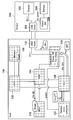
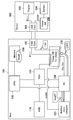
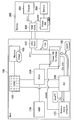
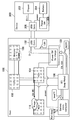
- 17 is a schematic diagram illustrating an example in which a hardware (HW) switch 150 is provided instead of the dedicated circuit in FIG. 16.
- 15 is a schematic diagram showing an example in which another device (Any Devices) 160 is provided instead of the memory 109 in FIG.
- It is a schematic diagram which shows the structure applied to applications other than power supply control. It is a schematic diagram which shows the mounting specification of each state in 3rd Embodiment. It is a schematic diagram which shows the discharge characteristic at the time of S3 and S0. It is a characteristic view which shows the threshold value of LBH. It is a characteristic view which shows timer hibernation. It is a flowchart which shows the process of LBH. It is a flowchart which shows a process of Timer
- FIG. 11 is a characteristic diagram illustrating load-capacity characteristics of an information processing apparatus having a low capacity and a high performance. It is a flowchart which shows the process of a hybrid sleep function. It is a flowchart which shows a process of a battery sleep disable. It is a block diagram which shows the process of 3rd Embodiment. It is a block diagram which shows the process of 3rd Embodiment. It is a block diagram which shows the process of 3rd Embodiment. It is a block diagram which shows the process of 3rd Embodiment. It is a block diagram which shows the process of 3rd Embodiment. It is a block diagram which shows the process of 3rd Embodiment.
- the mobile device is set in a standby state when the user does not use it, and is configured to immediately return from the standby state when the user wants to use the device.
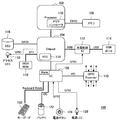
- FIG. 1 is a schematic diagram showing a configuration of a general PC 100.
- a PC 200 includes a processor (CPU (Central Processing Unit)) 202, a chip set 204, an EC (Embedded Controller) 206, a memory (DRAM) 209, an LCD (Liquid Crystal Display), a liquid crystal display device, 1, a storage device 220 such as an HDD (Hard Disk Drive), and a battery 222.
- CPU Central Processing Unit
- EC embedded Controller
- DRAM Memory
- LCD Liquid Crystal Display
- HDD Hard Disk Drive
- the chip set 204 is a chip that manages the exchange of data between the CPU 202 and various devices such as the storage device 220 and the LCD within the information processing apparatus 200.
- the chipset 204 includes a north bridge 208 and a south bridge 210.
- the north bridge 208 includes a memory controller 212 that controls the memory 209.
- the south bridge 210 includes an RTC (Real Time Clock) 214 that is a chip dedicated to timekeeping. Unlike the chips on other motherboards, the RTC 214 operates by receiving power from the built-in battery while the power is turned off (received from an external power source while the power is on).
- the OS (operating system) obtains the date and time from the RTC 214 at the time of startup, and thereafter, the OS measures the time independently.
- the EC 206 executes power supply control of the PC 200, and is configured by, for example, an LSI (Large Scale Integration Circuit).
- Suspend is also referred to as S3 (state) in the ACPI (Advanced Configuration and Power Interface) standard. Suspend is also referred to as standby or sleep. Suspend holds the data in memory 209 while This is a standby state in which the power consumption of the entire system can be reduced and the operating state can be quickly restored by turning off or stopping devices such as the processor 202, the storage device 220, and the LCD. In the suspend mode, the memory 209 holds data in a state where the OS is activated. Therefore, when the OS is restored, the OS is not restarted and returns to the state before the suspension.
- S3 state
- ACPI Advanced Configuration and Power Interface
- Self refresh is a mode in which the clock is deactivated to reduce the power consumption of the device and the refresh operation is automatically executed using an internal refresh counter. Self-refreshing is effective when data must be retained but the device is not accessed for a long time.
- the power consumption is relatively large compared to the state where the entire system is turned off (S5 of the ACPI standard). Further, in the suspend mode, when the power supply is cut off, such as when a power failure occurs or when the remaining battery level is exhausted, the data in the memory 209 is lost and the data cannot be restored.
- Hibernation (S4, also called hibernation)>
- the hibernation function saves (saves) the contents of the memory 209 in the storage device 220 such as an HDD immediately before turning off the power of the system, restores the contents of the memory 209 with the contents saved in the storage device 220 at the next startup, and returns. It is. Hibernation is also referred to as S4 in the ACPI standard.
- Hibernation has the advantage that it consumes less power than suspend because the system power can be completely turned off.
- hibernation since the contents of the memory 209 are saved and restored in the storage device 220, a relatively long time is required for transition and restoration.
- Patent Document 2 describes a method for reducing the amount of read / write data in hibernation performed by the BIOS.
- InstantOn is an OS that is prepared separately from a normal OS that can use all the functions of the system and that starts up in a short time with limited functions.
- a normal OS or InstantOn is selected as an OS to be started according to a user instruction.
- the EC 206 is responsible for managing the power state of the system.
- the state where the EC 206 is turned off (OFF) corresponds to the ACPI standard S5 and is a state where the entire system is turned off.
- suspend (S3, standby) is different from power off (S5), and it is necessary to maintain power supply to the memory 209 of the system. For this reason, in the case of the general PC 200 shown in FIG. 1, the EC 206 cannot be turned off during the suspension.
- Hybrid Sleep A combination of S3 (standby) and hibernation, and a hibernation image (Hib Image) is created on the storage device 220 simultaneously with the transition to standby. Although the transition time for creating a hibernation image is longer than that for the standby mode, the transition to the standby mode is fast, so the return to S0 is quick. Further, unlike standby, even if the power is lost, it is possible to recover from the hibernation image on the storage device 220. In addition, Hybrid Sleep is introduced as a function of Windows (registered trademark) Vista.
- the PC 200 realizes the return from the standby state by using solutions such as suspend, hibernation, and InstantOn.
- solutions such as suspend, hibernation, and InstantOn.
- the EC 206 cannot be turned off in the suspend state, there is a problem that power consumption increases.
- hibernation there is a problem that a relatively long time is required for transition / return time.
- each embodiment will be described focusing on an embodiment related to reducing power consumption of the entire system during suspension and an embodiment related to reducing transition time in hibernation.
- the first embodiment relates to a technique for turning off an EC power supply in order to reduce power during suspend (standby). By turning off the EC power supply, power during standby can be greatly reduced. Power supply to the memory is controlled by GPIO Use the Expander. It is possible to maintain the output level of the suspended memory by collecting the signals that need to be controlled in the GPIO Expander and supplying only the power of the GPIO Expander.
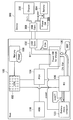
- FIG. 2 is a schematic diagram illustrating the overall configuration of the information processing apparatus 100 according to each embodiment described below.
- An example of the information processing apparatus 100 is a notebook personal computer (PC), but is not limited to this.
- the information processing apparatus 100 includes a processor 102, a chip set (PCH: platform controller hub) 104, an EC 106, a memory 109, a GPIO expander IC (GPIO Expander) 110, a charge control IC 112, and a USB port. 114, a storage device (SSD or HDD or the like) 116, an access LED 118, and a BIOS ROM 119.
- the information processing apparatus 100 includes a keyboard 120, a battery 122, a power button 124, and a power LED 126.
- the chipset 104 is not composed of the north bridge 208 and the south bridge 210, and the processor 102 includes the function of the north bridge 208. Yes. That is, the north bridge 208 in FIG. 1 is integrated with the processor 102. For this reason, the processor 102 includes a memory controller 110 that controls the memory 109.
- the chip set 104 is mainly composed of the south bridge 210 of FIG.
- the chip set 104 includes an RTC (Real Time Clock) 114 that is a chip dedicated to timing.
- the EC 106 includes an alarm timer 107.
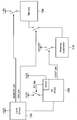
- FIG. 3 is a schematic diagram illustrating a specific configuration of the information processing apparatus 100 according to the first embodiment.
- FIG. 3 mainly shows the memory 109 and the components that supply power to the memory 109.
- the EC 106 is operated by two power supply systems (VCC1 / VCC2).
- the GPIO Expander 110 uses a power supply corresponding to the power supply VCC1 of the EC 106.
- the output levels of the two signals (MEMORY_ON / RST_ON) supplied to the memory 109 are kept.
- MEMORY_ON is a signal for controlling the power source of the memory 109
- RST_ON / EC_ON is a signal for controlling a reset signal of the memory 109.
- These signals are the VCC1 operating part of EC106 or GPIO. Supplied from the Expander 110.
- the power supply VCC2 of the EC 106 is turned off in the suspend (S3). As a result, most of the functions of the EC 106 are turned off. On the other hand, the power supply VCC1 of the EC 106 is not turned off even in the suspend state, and the power is supplied to the GPIO Expander 110 even in the suspend state.
- the GPIO Expander 110 is turned on, and a signal to the memory 109 can be continuously sent.
- power consumption can be significantly reduced.
- the power supply VCC1 is provided in the EC 106, but the power supply VCC1 may be provided separately from the EC 106. As a result, the EC 106 can be completely turned off during the suspend.
- the power supply of the EC 106 that executes control of power supply to the system is turned off during standby when the power of the processor 102 that controls the system is turned off, and separately from the EC 106 during standby.
- the provided GPIO Expander 110 executes power supply to the memory 109 that stores information.
- the configuration for realizing this processing can be configured by hardware (circuit) or a central processing unit such as a CPU and a program for causing this to function.
- FIG. 4 is a schematic diagram illustrating another example of a specific configuration of the information processing apparatus 100 according to the first embodiment.
- an external latch circuit 130 is provided instead of the GPIO Expander 110.
- the external latch circuit 130 uses a power supply corresponding to the power supply VCC1 of the EC 106 in the suspend state.
- the power supply VCC2 of the EC 106 can be turned off during the suspend similarly to the configuration shown in FIG. 3, so that the power consumption in the suspend can be greatly reduced.
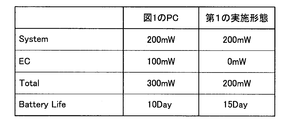
- FIG. 5 is a schematic diagram for explaining an example of the effect of the first embodiment.
- the power consumption of the EC 206 at the time of suspend is 200 [mW]
- the EC 106 at the time of suspend is The power consumption can be reduced to 0 [mW]. Therefore, the power consumption of the entire information processing apparatus 100 ((Total)) can be reduced to 200 [mW], and 100 [mW] with respect to the total power consumption (300 [mW]) of the PC 200 in FIG.
- the usable period of the battery 122 after charging can be set to 15 days, which is 1.5 times longer than the 10 days of the PC 200 in FIG. Become.
- the signals for maintaining the memory 109 at the time of suspend are collected in the GPIO Expander 110, and the power of the EC 106 is turned off at the time of suspend. Can be greatly reduced. Thereby, the holding period of the battery 122 can be extended significantly.
- Second Embodiment 3.1 Operation of Second Embodiment
- the second embodiment relates to a technology that realizes the startup time with high accuracy when the EC and the chipset are powered off during suspension.
- the chipset 104 includes an RTC (Real Time Clock) 114.
- RTC Real Time Clock
- PCH chipset
- Resume power supply the function of the RTC 114 provided in the chipset 104 cannot be used. That is, power consumption can be reduced by turning off the power of the chipset 104, but there is a demerit that sacrifices the function of the RTC 214.
- the EC 106 needs to be turned on (ON). If the EC 106 is turned off, power management cannot be performed. However, if the EC 106 is turned on, the power consumption increases.
- the information processing apparatus 100 has an RTC Wake function.
- the RTC Wake is a function that the chipset 104 starts itself at a predetermined time.
- the RTC Wake function is set by a user instruction or OS and enabled by the BIOS.
- the processor 102 can be turned on only for a necessary period.
- the power of the chipset 104 needs to be turned on.
- the BIOS is a group of programs for controlling peripheral devices such as the EC 106 and the storage device 116 connected to the processor 102 and the chipset 104.
- the basic input / output unit for these devices is used for the OS and application software. To provide.
- the BIOS is stored in the BIOS ROM 119.
- the RTC is executed by the OS.
- the same setting is made for the EC 106 by the BIOS.
- the EC 106 turns on the power of the chipset 104 a predetermined time before the date and time set by the RTC wake (for example, several seconds before).
- the RTC A wake interrupt occurs and the system starts up. According to such a configuration, the EC 106 and the chip set 104 can be turned on only when necessary, and the power consumption can be significantly reduced.
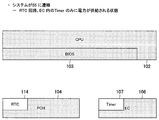
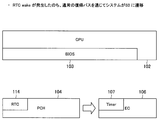
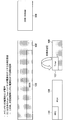
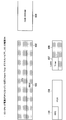
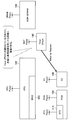
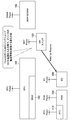
- FIG. 6 is a schematic diagram showing signals exchanged between the processor (CPU) 102, the chipset 104, and the EC 106, and the power on / off state.
- a region with a dot indicates a state where the power is off (OFF)
- a region without a dot indicates a state where the power is on (ON).
- the chip set 104 has the RTC 114.
- the EC 106 also has a unique timer 107.
- RTC on chipset 104 When Wake is set, in the chipset 104, an RTC wake interrupt occurs at the set date and time, the power is turned on to the processor 102, and the system is activated.
- the BIOS 103 operating on the processor 102 is Information about the date and time of activation by Wake (Wake) is acquired from the chipset 104.
- the BIOS 103 activates the EC 106 based on the information acquired from the chipset 104 (RTC). (date and time similar to wake) is set.
- the EC 106 sets its own timer 107 (Alarm Timer) so as to start up a predetermined time before the set date and time.
- the predetermined time depends on the accuracy of the timer 107 of the EC 106, and the RTC Depending on the margin until the wake is activated, the EC 106 is set to a time when the activation of the EC 106 can surely precede the RTC Wake.
- the predetermined time is set to an arbitrary value such as 1 second, 5 seconds, 1 minute, and 5 minutes.
- the EC 106 is activated based on the time set in the timer 107 several seconds before the date and time when the chip set 104 should be restored by Wake. This is because, as described above, when the RTC Wake date / time is set, the timer 107 of the EC 106 is set to start slightly before the set date / time.
- the restored EC 106 supplies power to the chip set 104.
- the RTC Wake time set in the RTC 114 has not been reached, and the timer of the RTC 114 has not expired.
- the RTC is electrically The environment where wake is possible is prepared.
- EC106 is RTC It operates only to create an environment where wake can be realized, and after powering on the chipset 104, the system is automatically activated by RTC wake and reaches S0. For this reason, in this embodiment, the actual RTC The system transitions to S0 by the wake mechanism and starts up (Wake). Therefore, compared with the case where the EC 106 as described in Patent Document 1 is used as a substitute for the RTC 114, it is possible to start up accurately with respect to the time of the RTC 114 (system time).
- the EC 106 is started sufficiently early so that the system is accurately started according to the time of the RTC 114. can do. Therefore, for example, even when performing TV recording, recording can be performed accurately in accordance with the time of the TV program based on the time of the RTC 114. In addition, it becomes easy to notify that the RTC 114 has returned (Resume) in terms of OS or BIOS. Therefore, an operation intended at the time intended by the user is possible.
- the user can If a wake is intended, a wake operation using the RTC 114 can be performed correctly. Accordingly, it is possible to support RTC wake by the RTC 114, and it is not necessary to emulate the RTC wake using a device other than the RTC 114 such as the EC 106. Therefore, it is possible to further improve the accuracy of the system startup time.
- RTC Since startup is performed by wake, an error in startup time when viewed from the OS can be suppressed. In addition, it is possible to easily detect that the OS has performed an RTC wake.
- the EC 106 manages the power supply of the main memory 109.
- the EC 106 has its own alarm timer (Alarm).
- the date and time when the power of the memory 109 is turned off is set in (Timer). At this time, it is recorded that the memory power is turned off at the next startup.
- the power of the processor 102 and the EC 106 is turned off while the power of the memory 109 is on.
- the EC 106 performs a power management operation of the main memory.
- EC106 has its own alarm timer (Alarm Since the date and time for turning off the power of the memory 109 is set in (Timer), the EC 106 turns off the power of the main memory 109 after its own power is turned on.
- FIG. 15 is a schematic diagram showing the configuration of the processor 102, the chip set (PCH) 104, the EC 106, and the memory 109. Power is supplied to each of the chip set 104 and the RTC 114. PCH Power is supplied to the chipset 104, and RTC Power is supplied to the RTC 114. Further, power is supplied to each of the EC 106 and the timer 107. EC power is supplied to the EC 106, and BAT Power is supplied to the timer 107. The processor 102 is supplied with power (CPU power).
- the power sources of the timer 107, the RTC 114, the chipset 104, the processor 102, the EC 106, and the memory 109 are separated so that they can be controlled.
- the power supply other than the RTC 114 and the timer 107 is configured to be capable of ON / OFF control by the EC 106. According to the configuration shown in FIG. 15, the timer 107 can be operated even when the EC 106 is not activated. Further, the RTC 114 can be operated even when the chipset 104 is not activated.
- FIG. 16 is a schematic diagram showing a modification of the configuration of FIG.
- the timer 107 is built in the EC 106.
- a dedicated circuit 140 having the same function as the timer 107 may be provided outside.
- the dedicated circuit 140 generates an interrupt signal for a startup request (Wake UP Request) to the EC 106.
- FIG. 17 shows an example in which a hardware (HW) switch 150 is provided instead of the dedicated circuit 140 shown in FIG.
- the EC 106 can be activated by a trigger other than the timer 107.
- the HW switch 150 when the HW switch 150 generates an activation request interrupt signal, the EC 106 is turned on, and the power management of the device can be performed.
- FIG. 18 is a schematic diagram illustrating an example in which another device (Any Devices) 160 is provided in place of the memory 109 in FIG.
- any device capable of controlling power in the EC 106 can control power with the same configuration.
- FIG. 19 is a schematic diagram showing a configuration applied to applications other than power supply control.
- the device 170 is controlled by the EC 106 other than the power control.
- the EC 106 can be powered off (OFF) while the device 170 is not controlled. In this way, even when performing control other than power control, it is possible to reduce power consumption by turning on the EC 106 only when necessary.
- Third Embodiment 4.1 Overview of USB Charging Next, a third embodiment of the present disclosure will be described.
- the third embodiment relates to a technology for connecting the information processing apparatus 100 and another apparatus and charging the other apparatus.
- USB charging will be described as an example.
- USB Charge is specified in Battery Charging Specification (hereinafter referred to as BCS), which is a quick charging standard using BUS Power formulated by USB-IF.
- BCS Battery Charging Specification
- the latest version of BCS is Ver.:Revision 1.2 (2010/12/7 release).
- the conventional USB BUS power can only supply power up to 500 [mA] (900 [mA] for USB 3.0) at a voltage of 5 [V] ⁇ 5%. ] Power can be supplied up to 1.5 [A] at a voltage of ⁇ 5%.
- USB Charge port The definition of the USB Charge port will be described.
- the BCS defines the following three types of ports. 1. SDP: Standard Downstream Port It is a normal USB port, can communicate with other devices, and can supply up to VBUS 500 [mA]. 2. DCP: Dedicated Charging Port MAX 1.5 [A] can be supplied from VBUS. Communication is not possible. 3. CDP: Charging Downstream Port MAX 1.5 [A] can be supplied from VBUS and communication is possible.
- the device connected to the information processing apparatus 100 and charged by USB is a device such as a smartphone or a digital camera. Some devices automatically pull VBUS even during S3.
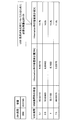
- FIG. 20 is a schematic diagram illustrating an example of mounting specifications of each state in the information processing apparatus 100 according to the present embodiment.
- default Default
- two types of Charge A mode is assumed.
- Default is a setting at the time of shipment, which is the same setting as a normal USB Port, and S0 and S3 are SDP.
- S0 is CDP and DCP is a state other than S0 with respect to the default. Therefore, rapid charging is possible in all states.
- the remaining amount of the battery 122 may be empty when the information processing apparatus 100 is not connected to an AC power source. In particular, if the remaining amount of the battery 122 becomes empty while data is being written to the storage device 116 by hibernation, the data may be lost.
- the occurrence of data lost (Data) Lost) is suppressed by temporarily stopping the USB charge under a predetermined condition.
- LBH low battery hibernation
- Timer Hibernation timer hibernation
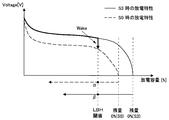
- FIG. 21 is a schematic diagram showing the discharge characteristics at S3 and S0.
- FIG. 22 is a characteristic diagram showing the threshold value of LBH. As shown in FIG. 21, since the discharge characteristic at S3 and the discharge characteristic at S0 are different, different threshold values are set at S3 and S0 in consideration of this.
- the S0 LBH threshold is 5% of the remaining battery power. If the LBH threshold value of S3 is set to 30% and the transition is made to S3 in the state where the remaining battery level is 25% in S0, LBH is executed, so the transition is made to S4.
- the amount of power consumed during USB charging is larger than that of normal USB communication, and in LBH, the battery 122 may become empty during the creation of the Hib Image. In this case, data loss occurs.
- FIG. 23 is a characteristic diagram showing timer hibernation, where the vertical axis indicates the remaining battery level and the horizontal axis indicates time.
- the process starts (wakes) at S0, writes an image to the storage device 116, and then transitions to S4.
- timer hibernation there is a possibility that the remaining amount of the battery 122 may be emptied during the timer period of 1 hour. Also, in timer hibernation, it must be started once at S0 in order to create a Hib Image. For this reason, it takes much more time for image creation than for low battery hibernation, and the possibility that the battery will be emptied becomes higher.
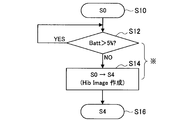
- FIG. 24 is a flowchart showing LBH processing.
- FIG. 24 shows an example in which LBH is activated during S0.
- step S12 if the remaining battery level is 5% or less, the process proceeds to step S14 and Hib Image is created and the process proceeds from S0 to S4.
- the power consumption of USB Char is large, and during USB charging, power is consumed even at steps S12 and S14.
- the battery 116 may be emptied during image creation.
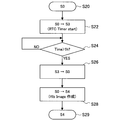
- FIG. 25 is a flowchart showing the processing of Timer Hib.
- Timer Hib is activated only during S3.
- step S22 a transition is made from S0 to S3, and the timer of the RTC 114 starts.
- step S24 it is determined whether or not the timer has exceeded 1 hour. If the timer has exceeded 1 hour, the process proceeds from S3 to S0 in step S26. If the timer is less than 1 hour, the process returns to step S24.
- step S28 Hib Image is created and the process proceeds from S0 to S4.
- it is necessary to start (wake) once in S0 in order to create the Hib Image it takes more time than the LBH to create the Image, and the battery 122 is more likely to be emptied.
- FIG. 26 is a characteristic diagram showing the temporary stop mechanism, in which the vertical axis indicates the remaining capacity of the battery 122 and the horizontal axis indicates time.
- the temporary stop mechanism temporarily stops the power supply by USB charging when the remaining battery level becomes 30% during USB charging in S3 (characteristic 1).
- time t2 When a predetermined time elapses after the power supply is stopped, at time t2, Timer Hib is activated.
- the characteristic 2 in FIG. 26 indicates that one hour elapses after the transition to S3 when the USB charging is not performed in S0, and the Timer at time t2 The case where Hib is activated is shown.
- Characteristic 3 shows a case where the capacity of the battery 122 becomes 5% or less during USB charging at S0. In this case, LBH is activated at time t1.
- the temporary stop condition is during DC drive, during S3, and the remaining battery capacity is 30% And below. Therefore, in the characteristics 2 and 3 in FIG.
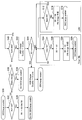
- FIG. 27 is a flowchart showing the temporary stop mechanism.
- the configuration for realizing this processing can be configured by hardware (circuit) or a central processing unit such as a CPU and a program for causing this to function.
- step S30 USB charging is enabled in the S0 state.
- step S32 it is determined whether the drive is AC drive or DC drive. If the drive is AC drive, the process proceeds to step S34, and a transition from S0 to S3 / S4 / S5 is possible in a state where USB charging is possible. . In this case, USB charging is possible in S3 / S4 / S5.
- step S36 the process proceeds to step S36, and the state change is determined.
- step S38 transition is made from S0 to S4 / S5 in a state where USB charging is possible.
- step S40 it is determined whether or not the remaining battery capacity exceeds 30%. If the remaining battery capacity exceeds 30%, the process waits in step S40. On the other hand, when the remaining battery level is 30% or less, the process proceeds to step S42, and the suspension condition is satisfied, so that the USB chargeable state is changed to the USB charge impossible state. As a result, USB charging to the device connected to the information processing apparatus 100 is stopped.
- step S44 the process proceeds to step S46, and the state changes from the USB charge disable state to the USB charge enable state.
- step S44 the process proceeds to the subsequent processes, and the LBH process (steps S12 to S16 in FIG. 24) or Timer Hib processing (steps S24 to S29 in FIG. 25) is performed.
- the remaining battery level 30% (Data The reason for setting the threshold value (which does not cause the loss) will be described below.
- the activation condition can be set to a uniform value for all models of the information processing apparatus 100.
- the trouble of setting the threshold value for each model can be saved.
- the load is under an environment of a temperature of 20 ° C. -Calculate the threshold value from the capacity characteristics.
- Timer at S3 The electric power required until S0 is activated (waked) by Hib is about 10% of the capacity of the battery 122.
- the load (the power applied during the transition from S0 to S4) when the hibernation is turned on (ON) is about 15% of the battery capacity.
- FIG. 28 is a schematic diagram showing the load when the hibernation is turned on (the amount of decrease in the capacity of the battery 122 during hibernation) in each of a plurality of different USB loads.
- the margin considering the temperature characteristics is set to 5% of the battery capacity. Accordingly, it is desirable to set the remaining capacity of about 30% of the battery capacity as a threshold in total of 10% + 15% + 5%.
- the threshold value is specified in units of [mWh], a relatively high threshold value is obtained in a model having a small battery capacity.
- a battery with a capacity that can handle the PC performance (load power) is selected, so in order to set a uniform threshold for all models, the threshold unit is set to [%]. It is preferable to decide.
- the temporary stop mechanism As described above, according to the temporary stop mechanism according to the present embodiment, it is during DC driving, is in S3, and the remaining battery capacity is 30%. Since the USB charge is temporarily stopped when the value is lower than, the loss of data can be reliably prevented.
- Hybrid Sleep Function Next, an outline of the hybrid sleep function will be described as another data loss countermeasure.
- an image is stored by hibernation by hybrid sleep or BIOS, and power supply other than the memory 109 is turned off in the S3 state, thereby promoting battery capacity retention during DC driving.
- Hybrid Sleep is the S3 state in which the Hib Image is created as described above, and the hibernation image is created on the storage device 220 simultaneously with the transition to the standby.
- FIG. 30 is a flowchart showing the process of the hybrid sleep function. As shown in FIG. 30, in the state where AC driving is not performed in the S0 state (step S50), when the transition to S3 is instructed (step S52), the state transits to Hybrid Sleep, and Hib Image is created (step S60).
- step S52 If it is determined in step S52 that the transition to S3 is not instructed, the process proceeds to step S54 to determine whether the remaining battery capacity exceeds 5%. If the remaining battery capacity is 5% or less, the process starts from S0. Transition to S4 and Hib Image is created (step 56, S58).
- Hib Image is created at the timing of entering S3, so that it is possible to reliably prevent data loss.
- Battery sleep disable (Battery Sleep Disable)
- the battery sleep (Batt Sleep) is in the enabled state, the battery charge / discharge current is below a certain current value, and it is not communicating with the EC 106 for a certain period of time.
- the battery 122 enters a sleep mode.
- the CPU 123 of the battery 122 that detects the amount of current enters a sleep state.
- the release condition is when the EC 106 starts up the processor.
- FIG. 31 is a flowchart showing battery sleep disable processing.
- FIG. 31 shows both the case where measures against battery sleep disable are taken (step S96 and later) and the case where measures are not taken (step S106 and later).
- Battery sleep disable is set regardless of whether or not connected to AC power (step S96) when power other than the memory is turned off in step S3 (step S92).
- step S100 the battery is not in the sleep state, and the CPU 123 of the battery 122 is also activated. Therefore, when USB charging is performed (step S102), the occurrence of abnormal heat generation is reliably suppressed (step S104).
- the disable condition is that both the 1st / 2nd battery is disabled when the USB charging is on. To turn off USB charging, only the 2nd battery is disabled and the 1st battery is enabled.
- step S108 the battery 122 is in the sleep state and the CPU 123 is not activated. For this reason, when USB charging is performed in step S110, abnormal heat generation occurs.
- FIGS. 32 to 37 show a state in which a device to be charged 300 to be USB charged is connected to the information processing device 100.
- FIG. The charged device 300 includes a chip set 302, a battery 304, a power switch 306, and a USB connection unit 308.
- the configuration of the information processing apparatus 100 is the same as that of FIG. 2, but the CPU 123 of the battery 122 (not shown in FIG. 2) and a power switch (Power) for USB charging are not shown.
- SW) 130 and USB connection unit 132 are shown. 32 to 37, it is shown that the power is not turned on to the components with dots.
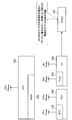
- FIG. 32 shows a state in which the USB charge is off at S0. In this state, all the components including the processor 102 and the chip set 104 are turned on. An image on the display screen (Image) exists on the processor 102, and the EC 106 monitors (monitors) the remaining amount of the battery 122. The EC 106 controls the port mode (port mode) of the power switch 130 for charging. In FIG. 32, the port mode is SDP, and the charged device 300 can be supplied up to 0.5 [A].
- FIG. 33 shows a state where the state transitions from S0 to S3 and the USB charge is off.
- the power of the processor 102 is turned off, and the image is written in the memory 109.
- the power is not supplied to the memory 109, and thus the Image disappears.
- the EC 106 monitors the remaining amount of the battery 122.
- the SDP state is maintained, and the device can supply up to 0.5 [A].
- FIG. 34 shows a state in which the transition from S0 to S4 / S5 and the USB charging is off (OFF). In this state, almost all the components are turned off. At S4, the image is stored in the HDD 116. In this case, even if the power is turned off, the image is stored in the HDD 116, so the image is not lost. Since the EC 106 is powered off, the remaining amount of the battery 122 cannot be monitored. Further, the CPU 123 of the battery 122 enters a sleep state, and the port mode is turned off (OFF). Therefore, the charged device 300 is not charged.
- FIG. 35 shows a state where USB Charge is on in S0. In this state, all the components including the processor 102 and the chip set 104 are turned on. Image exists on the processor 102, and the EC 106 monitors (monitors) the remaining amount of the battery 122. The EC 106 controls the port mode (Port mode) of the power switch (Power SW) 130 for charging.
- the port mode is CDP and can supply up to 1.5 [A] to the charged device 300 to be charged. In addition, when the to-be-charged apparatus 300 does not support CDP, the supply is up to 0.5 [A].
- FIG. 36 shows a state in which the state transitions from S0 to S3, and USB Charge is (ON).
- the power of the processor 102 is turned off, and the image is written in the memory 109.
- the image disappears.
- the EC 106 monitors the remaining amount of the battery 122.
- the port mode is DCP and can supply up to 1.5 [A] to the device.
- FIG. 37 shows a state in which the transition from S0 to S4 / S5 is performed and the USB charge is on.
- the power supply of the EC 106 is maintained.
- the image is stored in the HDD. In this case, even if the power is turned off, the image is stored in the HDD 116, so the image is not lost.
- the EC 106 monitors the remaining amount of the battery 122.
- the CPU 123 of the battery 122 is not in the sleep state, and the port mode is DCP.
- the fourth embodiment improves user convenience during BIOS hibernation.
- ⁇ Cancellation of hibernation> As described above, in hibernation, the contents of the memory 109 are saved (saved) in the storage device 116 such as an HDD immediately before the system is turned off. At this time, depending on the usage amount of the system memory 109 and the performance of the storage device 116, it may take time to write out the BIOS hibernation data, and the process cannot be interrupted. It may take a minute or more to write the data.
- an interrupt handler for the power button 124 is prepared in the BIOS, and hibernation is canceled when the power button 124 is pressed. If hibernation is canceled, hibernation data writing is interrupted and the system is returned to S0. The EC 106 detects that the power button 124 has been pressed and raises an interrupt to the system.
- Cancel is a function that, when the power button is pressed during BIOS hibernation data export, stops the export and returns immediately. This function eliminates the need to wait until the BIOS hibernation data writing is completed when it is desired to return during the BIOS hibernation data writing operation, thereby improving the usability of the user.
- the access lamp is turned off while the BIOS hibernation data is being written out, the user who wants to return is naturally guided to the power button 124 and can use the cancel function without being aware of it.
- a command I / F for overriding and controlling the lighting state of the power LED 126 and the access LED 118 between the BIOS 103 and the EC 106 is prepared.
- the BIOS 103 instructs the EC 106 to turn off the lamp before writing out the BIOS hibernation data.
- the lamp is turned off in order not to make the user aware of the time taken to write out the BIOS hibernation data.
- the BIOS hibernation data is written a little longer, the user will not mistakenly assume that the system is frozen.
- the user can be made aware that the user can return to S0 by pressing the power button 124 without making the user aware of the cancel function. That is, when the power LED 126 is turned off, it looks like an off state, and the user is naturally guided by pressing the power button 124 in order to turn on the power.
- the EC 106 implements a function of ignoring the turn-off instruction by the BIOS so that the process of intentionally turning off the lamp is not performed. If it is frozen, the lamp is lit without the system returning, so it is possible to inform the user of some abnormal state.
- FIG. 38 is a flowchart showing the processing of this embodiment.
- the BIOS 103 issues a command for instructing the EC 106 to turn off the lamp.
- the EC 106 overrides the lamp and turns off.
- writing processing to the storage device 116 is performed by hibernation.
- the EC 106 stops the lamp override.
- FIG. 39 is a flowchart showing the writing process.
- the BIOS 103 writes part of the hibernation data.
- the EC 106 stops the lamp override, and in the next step S136, the system is returned.
- step S132 If the power button 124 is not pressed in step S132, the process proceeds to step S138, where it is determined whether or not writing of all data has been completed. If the writing has been completed, the process is terminated (RETURN). If the writing has not been completed, the process returns to step S130.
- the fourth embodiment when the power button 124 is pressed, hibernation is canceled, so that user convenience can be improved.
- the lamp is turned off before the BIOS hibernation data is written, even if the BIOS hibernation data is written a little longer, the user will not mistakenly assume that the system is frozen. Further, the user can recognize that it is in a state where the user can cancel with the power button 124 and return to S0.
- a processor for controlling the system A power control unit that performs control of power supply to the system and is turned off during standby when the power of the processor is turned off; Memory to store information during standby; A power supply unit for performing power supply to the memory during standby;
- An information processing apparatus comprising: (2) The information processing apparatus according to (1), wherein the power supply unit includes a GPIO expander. (3) The information processing apparatus according to (1), wherein the power supply unit includes a latch circuit. (4) The power supply control unit includes a region that operates in the first power supply system and a region that operates in the second power supply system, and the region that operates in the second power supply system during standby is turned off.
- the information processing apparatus wherein the power supply unit operates in the first power supply system during standby. (5) turning off the power supply of the power supply control unit that performs control of power supply to the system during standby when the power supply of the processor that controls the system is turned off; A power supply unit provided separately from the power supply control unit during standby to execute power supply to a memory storing information; A method for controlling information processing. (6) Means for turning off the power supply of the power supply control unit that performs control of power supply to the system at the time of standby when the power supply of the processor that controls the system is turned off, Means for executing power supply to a memory for storing information in a power supply unit provided separately from the power supply control unit during standby; As a program to make the computer function.
Landscapes
- Engineering & Computer Science (AREA)
- Theoretical Computer Science (AREA)
- General Engineering & Computer Science (AREA)
- Physics & Mathematics (AREA)
- General Physics & Mathematics (AREA)
- Computer Hardware Design (AREA)
- Computing Systems (AREA)
- Power Engineering (AREA)
- Power Sources (AREA)
Abstract
Description
1.前提となる技術
2.第1の実施形態
2.1.装置の全体構成例
2.2.装置の具体的構成例
3.第2の実施形態
3.1.第2の実施形態の動作について
3.2.ECによるデバイスの電源のオン/オフの管理について
3.3.第2の実施形態の構成例
4.第3の実施形態
4.1.USB充電の概要
4.2.前提となるデータロスト対策について
4.3.本実施形態に係るデータロスト対策について
4.4.ハイブリッドスリープ機能について
4.5.バッテリースリープディスエーブルについて
4.6.第3の実施形態の処理について
5.第4の実施形態
近時では、メールやウェブをはじめとするインターネットへ接続する端末として、パーソナルコンピュータ(PC)に加えて、スマートフォンやタブレットと呼ばれるモバイル機器も使われるようになっている。
サスペンドは、ACPI(Advanced Configuration and Power Interface)規格ではS3(ステート)とも称される。また、サスペンドは、スタンバイまたはスリープとも称される。サスペンドは、メモリ209のデータを保持しつつ、
プロセッサ202、ストレージデバイス220、LCD等のデバイスをオフもしくは停止することで、システム全体の消費電力を下げ、かつ動作状態に高速に復帰出来る待機状態のことである。サスペンドでは、OSが起動した状態のデータをメモリ209が保持しているため、復帰するときにはOSは再起動されず、サスペンド前の状態にそのまま復帰する。
Refresh)と呼ばれる状態になる。セルフリフレッシュとは、クロックを非活性にしてデバイスの消費電力を低く抑え、内部のリフレッシュカウンタを用いて自動的にリフレッシュ動作を実行するモードである。セルフリフレッシュは、データを保持する必要はあるが、長時間デバイスにアクセスしない場合に有効である。
ハイバネーションは、システムの電源を切る直前にメモリ209の内容をHDDなどのストレージデバイス220に保存(待避)し、次回起動時にストレージデバイス220に保存した内容でメモリ209の内容を復元し、復帰する機能である。ハイバネーションは、ACPI規格ではS4とも称される。
InstantOnとは、システムの全ての機能を使用できる通常のOSとは別に用意された、機能に制限はあるものの短時間で起動するOSのことである。ユーザの指示により、起動するOSとして通常のOSまたはInstantOnが選択される。
EC206は、システムの電源ステートの管理を担っている。EC206がオフ(OFF)となった状態は、ACPI規格のS5に対応し、システム全体をオフした状態である。上述のように、サスペンド(S3、スタンバイ)は、は電源オフ(S5)とは異なる状態であり、システムのメモリ209への電源供給を維持する必要がある。このため、図1に示す一般的なPC200の場合、サスペンド中にEC206をオフ(OFF)にすることは出来なかった。
S3(スタンバイ)とハイバネーションを組み合わせたもので、スタンバイへの遷移と同時にハイバネーションイメージ(Hib Image)をストレージデバイス220上に作成する。ハイバネーションイメージを作成するために遷移時間がスタンバイに比べ長くなるが、スタンバイに遷移するのでS0への復帰は早い。また、スタンバイと異なり、電源が失われてもストレージデバイス220上にあるハイバネーションイメージから復帰出来る。なお、Hybrid Sleepは、Windows(登録商標) Vistaの機能として導入されている。
[2.1.装置の全体構成例]
第1の実施形態は、サスペンド(スタンバイ(Standby))時の電力を削減するために、EC電源をオフ(OFF)する技術に関する。EC電源をオフ(OFF)することで、スタンバイ時の電力を大幅に削減することができる。メモリへの電源供給は、ECより制御可能なGPIO
Expanderを使用する。制御が必要な信号をGPIO Expanderに集約し、GPIO Expanderの電源のみ供給することでサスペンド中のメモリの出力レベルを維持することができる。
図3は、第1の実施形態に係る情報処理装置100の具体的な構成を示す模式図である。図3は、主として、メモリ109と、メモリ109に電源を供給する構成要素を示している。
Expander110から供給する。
3.1.第2の実施形態の動作について
次に、本開示の第2の実施形態について説明する。第2の実施形態は、サスペンド時にECとチップセットの電源をオフする場合において、起動時刻を高精度に実現する技術に関する。
wakeが設定されている場合、BIOSが同じ設定を、EC106に対しても行う。EC106は、RTC wakeによって設定された日時よりも所定時間前(例えば数秒前)にチップセット104の電源を入れる。チップセット104では、設定された日時にRTC
wake割込みが発生し、システムが起動する。このような構成によれば、EC106及びチップセット104を必要な時だけオンにすることができ、大幅な消費電力の低減が可能である。
Wakeが設定されている場合、チップセット104では、設定された日時にRTC wake割込みが発生し、プロセッサ102に電源が投入され、システムが起動する。
Wakeによる起動(Wake)の日時に関する情報をチップセット104から取得する。そして、BIOS103は、チップセット104から取得した情報に基づいて、EC106に対して、起動する日時(RTC
wakeと同様の日時)を設定する。EC106は、設定された日時よりも所定時間前に起動するように、自身のタイマー107(Alarm Timer)を設定する。ここで、所定時間は、EC106のタイマー107の精度に応じて、またRTC
wakeが起動するまでのマージンに応じて、EC106の起動が確実にRTC Wakeよりも先行できる時間に設定される。所定時間は、例えば1秒、5秒、1分、5分など、任意の値に設定される。
Wakeによりチップセット104が復帰すべき日時の数秒前に、タイマー107に設定された時刻に基づいてEC106が起動する。これは、上述したように、RTC Wakeの日時が設定された時に、設定された日時よりも少し前に起動するようにEC106のタイマー107が設定されているためである。
wakeが可能な環境が整う。
Timerがエキスパイアし、RTC wakeの割込みが発生する。
wakeが発生したのち、通常の復帰パスを通じてシステムがS0に遷移する。これにより、チップセット104、およびプロセッサ102に電源が投入される。
wakeが実現可能な環境を作るためにのみ動作し、チップセット104に電源を投入した後は、RTC wakeによって自動的にシステムが起動してS0に達する。このため、本実施形態では、実際のRTC
wakeの仕組みでシステムがS0へ遷移して起動(Wake)する。従って、特許文献1に記載されているようなEC106がRTC114の代替として用いられる場合と比較して、RTC114の時刻(システム時刻)に対して正確に起動することができる。
wakeを意図すれば、正しくRTC114を用いたWake動作が可能となる。これにより、RTC114によるRTC wakeをサポートできるとともに、EC106などRTC114以外のデバイスを用いてRTC wakeをエミュレートする必要がないため、システムの起動時刻の精度をより高めることができる。
wakeにより起動が行われるため、OSから見た時の起動時刻の誤差を抑止することができる。また、OSが、RTC wakeしたことを容易に検知することが可能である。
wakeの直前にEC106が起動するため、その直前まではチップセット104、RTC114、EC106の電源を切っておくことができる。従って、消費電力を大幅に低減することが可能となる。
次に、図12~図14に基づいて、EC106によるデバイスの電源のオン/オフの管理について説明する。EC106によるデバイスの電源管理が必要な場合、EC106の電源をオン(ON)にしておく必要があるが、これによって消費電力が増加してしまう。このため、以下に説明する例では、アラームタイマー(Alarm
Timer)107を利用し、デバイスの電源管理の実動作(監視・電源のON/OFF等)が必要になる瞬間のみEC106の電源をオン(ON)にする。それ以外の期間では、EC106の電源をOFFにする。これにより、消費電力の低減を実現することができる。図12~図14においても、ドットを付した領域は、電源がオフ(OFF)の状態を示しており、ドットを付していない領域は、電源がオン(ON)の状態を示している。
Timer)にメモリ109の電源をオフ(OFF)にする日時を設定する。この時、次回起動時にメモリ電源をオフ(OFF)することを記録する。
Timer)がエキスパイアし、EC106の電源がオン(ON)となる。
Timer)にメモリ109の電源をオフ(OFF)にする日時が設定されているため、EC106は、自身の電源がオンとされた後、メインメモリ109の電源をオフ(OFF)する。
次に、上述した第2の実施形態の動作を行うための具体的な構成について説明する。図15は、プロセッサ102、チップセット(PCH)104、EC106、メモリ109の構成を示す模式図である。チップセット104とRTC114のそれぞれには、電源が供給されている。チップセット104にはPCH Powerが供給され、RTC114にはRTC Powerが供給されている。また、EC106とタイマー107のそれぞれには、電源が供給されている。EC106にはEC Powerが供給され、タイマー107にはBAT Powerが供給されている。また、プロセッサ102には、電源(CPU Power)が供給されている。
4.1.USB充電の概要
次に、本開示の第3の実施形態について説明する。第3の実施形態は、情報処理装置100と他の装置を接続して、他の装置を充電する技術に関する。本実施形態では、特にUSB充電(USB Charge)を例に挙げて説明する。
1.SDP:Standard Downstream Port
通常のUSBポートであり、他のデバイスとの通信が可能であり、VBUS 500[mA]まで供給可能とされる。
2.DCP:Dedicated Charging Port
VBUSからMAX 1.5[A]を供給可能である。通信は不可である。
3.CDP:Charging Downstream Port
VBUSからMAX 1.5[A]を供給可能であり、且つ通信可能である。
modeを想定する。Defaultは、出荷時の設定であり、通常のUSB Portと同じ設定であり、S0とS3がSDPとなる。Charge modeの場合は、デフォルトに対してS0をCDPとし、S0以外のステートをDCPとしている。従って、全てのステートで急速充電が可能である。
最初に、前提となるデータロスト対策について説明する。情報処理装置100にAC電源が接続されている場合は、データロストを生じることなく、接続されているデバイスを確実に充電することができる。一方、情報処理装置100にAC電源が接続されていない状態(DC駆動時)でUSB
Chargeを行うと、バッテリー122の残量を使い切り、情報処理装置100の画面に表示されている情報、メモリ109に保存されている情報のデータが失われる可能性がある。
Hibとも称する)について説明する。
LBHでは、S0またはS3時に、バッテリー122の残量がある閾値を下回った場合に、イメージをストレージデバイス116に書き込み、S4に遷移する。S3時はS0に起動してストレージデバイス116への書き込みを行う。図21は、S3時とS0時の放電特性を示す模式図である。また、図22は、LBHのしきい値を示す特性図である。図21に示すように、S3時の放電特性とS0時の放電特性は異なるため、これを考慮してS3時とS0時で異なるしきい値を設定する。この際、バッテリーの特性上、(S0でのLBHの閾値)<(S3でのLBHの閾値)となるため、ユーザがS0からS3に入れることができなくなる領域が存在する。例えば、S0のLBHしきい値をバッテリー残量で5%
、S3のLBHしきい値を30%とし、S0でバッテリー残量が25%の状態でS3に遷移させるとLBHが実行されるため、S4に遷移する。
図23は、タイマーハイバネーションを示す特性図であって、縦軸はバッテリー残量を、横軸は時間を示している。タイマーハイバネーションでは、DC駆動時に、S3へ遷移した後、1時間経過した場合、S0に起動(Wake)してイメージをストレージデバイス116に書き込んだ後、S4に遷移する。
Imageを作成してS0からS4へ遷移する。上述のようにUSB Chareの消費電力量は大きく、USB充電中はステップS12,S14の時でも電力を消費し Hib
Image 作成途中にバッテリー116が空になってしまう可能性がある。
Hibは、S3中のみ発動する。ステップS22では、S0からS3へ遷移し、RTC114のタイマーがスタートする。ステップS24では、タイマーが1時間を超えたか否かを判定し、タイマーが1時間を超えた場合はステップS26でS3からS0へ遷移する。タイマーが1時間以下の場合はステップS24へ戻る。ステップS28では、Hib
Imageを作成し、S0からS4へ遷移する。このように、Hib Image作成のために、一旦S0に起動(Wake)しなければならないため、Image作成までLBHよりもさらに時間を要し、よりバッテリー122が空になり易い。
以上に鑑み、本実施形態に係るデータロスト対策として、USB
Chargeの一時停止機構について説明する。図26は、一時停止機構を示す特性図であって、縦軸はバッテリー122の残容量を、横軸は時間を示している。
Hibが発動する。
Hibが発動する場合を示している。
を下回った時とする。従って、図26の特性2,3では一時停止は発動しない。
Hibの処理(図25のステップS24~S29)を行う。
Lostが生じないしきい値)を設定した根拠を以下に説明する。この発動条件は、例えば対象となる情報処理装置100のラインナップが複数機種存在する場合、情報処理装置100の各機種において、全機種一律の規定値とすることもできる。この場合、機種毎にしきい値を設定する手間を省くことができる。この際、ラインナップ中の高パフォーマンスPCから低バッテリー容量のPCまでを網羅できるようにしきい値を設定することが好適である。
HibでS0が起動(Wake)するまでに必要とされる電力は、バッテリー122の容量の10%程度である。また、図28に示すように、ハイバネーションがオン(ON)となる際の負荷(S0→S4遷移時にかかる電力)は、バッテリー容量の15%程度である。図28は、異なる複数のUSB負荷のそれぞれにおいて、ハイバネーションON時の負荷(ハイバネーション時のバッテリー122の容量減少量)を示す模式図である。また、温度特性を考慮したマージンをバッテリー容量の5%に設定する。これにより、10%+15%+5%の合計でバッテリー容量の30%程度の残容量をしきい値として設定することが望ましい。
を下回った場合は、USBチャージを一時停止とするため、データのロストが生じてしまうことを確実に抑止できる。
次に、他のデータロスト対策として、ハイブリッドスリープ機能についてその概要を説明する。ここでは、ハイブリッドスリープ(Hybrid Sleep)またはBIOSによるハイバネーションでイメージを保存し、S3ステートでメモリ109以外の電源を切ることで、DC駆動時のバッテリー容量保持を助長する。
Imageを作成する(ステップS60)。
Imageを作成する(ステップ56,S58)。
バッテリースリープ(Batt Sleep)がイネーブル(Enable)状態であり、且つバッテリー充放電電流が一定の電流値以下、且つEC106と通信していない、この状態が一定時間続いた時にバッテリー122はスリープモードに入る。この場合、電流量を検知しているバッテリー122のCPU123がスリープ状態となる。解除条件は、EC106がプロセッサを起動した時である。
sleepがEnableのままであると、Batt Sleepに入った後にUSB充電を始めた場合、CPU123が起動していな状態であるので電流量を検知できず、FETが発熱してしまう。
次に、図32~図37のブロック図に基づいて、第3の実施形態の処理について説明する。図32~図37は、情報処理装置100に対して、USB充電がされる被充電装置300が接続された状態を示している。被充電装置300は、チップセット302、バッテリー304、パワースイッチ306、USB接続部308を有して構成されている。また、情報処理装置100の構成は、図2と同様であるが、図2では図示していないバッテリー122のCPU123と、USB充電のためのパワースイッチ(Power
SW)130と、USB接続部132を示している。図32~図37において、ドットを付した構成要素には電源が投入されていないことを示している。
メモリ109に書き込まれる。この状態でバッテリー122の残量低下により電源が落ちると、メモリ109に電源が供給されないため、Imageは消失してしまう。EC106はバッテリー122の残量を監視している。ポートモードはSDPの状態が維持されており、デバイスに対して0.5[A]まで供給が可能である。
メモリ109に書き込まれる。この状態でバッテリー122の残量低下により電源が落ちるとImageは消失してしまう。EC106はバッテリー122の残量を監視している。ポートモードはDCPとなり、デバイスに対して1.5[A]まで供給が可能である。
次に、本開示の第4の実施形態について説明する。第4の実施形態は、BIOSハイバネーション時にユーザの利便性を高めるものである。
上述したように、ハイバネーションでは、システムの電源を切る直前にメモリ109の内容をHDDなどのストレージデバイス116に保存(待避)する。この際、システムメモリ109の使用量やストレージデバイス116の性能によって、BIOSハイバネーションデータの書き出しに時間がかかる場合があり、処理を中断することができない。データの書き出しには1分以上かかる場合もある。
また、BIOSハイバネーションデータ書き出し中は、システムの状態はS0であり、電源LED(パワーランプ)126やアクセスLED(ディスクアクセスランプ)118が点灯するため、ユーザはこれらの点灯が消灯するまで待つ必要がある。この間、ユーザが、点灯によってHybrid Sleepと誤認したり、何らかのシステムエラーでメモリダンプしているかのように誤認することが想定される。
BIOSハイバネーションデータ書き出しが開始されると、電源LED126、アクセスLED118が消灯するため、例えばハイバネーションデータ書き出し中にシステムがフリーズした場合は、ユーザがその状態をランプ点灯によって認識することはできない。
図38は、本実施形態の処理を示すフローチャートである。先ず、ステップS120では、BIOS103がEC106にランプの消灯を指示するコマンドを発行する。次に、ステップS122では、EC106がランプをオーバーライドして消灯する。次に、ステップS124では、ハイバネーションによりストレージデバイス116へ書き出し処理を行う。次に、ステップS126では、EC106がランプのオーバーライドを停止する。
(1)システムを制御するプロセッサと、
システムへの電力供給の制御を実行し、前記プロセッサの電源がオフとされたスタンバイ時に電源がオフとされる電源制御部と、
スタンバイ時に情報を記憶するメモリと、
スタンバイ時に前記メモリへの電力供給を実行する電力供給部と、
を備える、情報処理装置。
(2)前記電力供給部は、GPIOエキスパンダから構成される、前記(1)に記載の情報処理装置。
(3)前記電源供給部は、ラッチ回路から構成される、前記(1)に記載の情報処理装置。
(4)前記電源制御部は、第1の電源系統で動作する領域と、第2の電源系統で動作する領域とを含み、スタンバイ時に前記第2の電源系統で動作する領域がオフとされ、
前記電力供給部は、スタンバイ時に前記第1の電源系統で動作する、前記(1)に記載の情報処理装置。
(5)システムへの電力供給の制御を実行する電源制御部の電源を、システムを制御するプロセッサの電源がオフとされたスタンバイ時にオフとすることと、
スタンバイ時に、前記電源制御部とは別に設けられた電力供給部が、情報を記憶するメモリへの電力供給を実行すること、
を備える、情報処理の制御方法。
(6)システムへの電力供給の制御を実行する電源制御部の電源を、システムを制御するプロセッサの電源がオフとされたスタンバイ時にオフとする手段、
スタンバイ時に、前記電源制御部とは別に設けられた電力供給部が、情報を記憶するメモリへの電力供給を実行する手段、
としてコンピュータを機能させるためのプログラム。
102 プロセッサ
106 EC
109 メモリ
110 GPIO Expander
130 ラッチ回路
Claims (6)
- 情報処理装置のシステムを制御するプロセッサと、
前記システムへの電力供給の制御を実行し、前記プロセッサの電源がオフとされたスタンバイ時に電源がオフとされる電源制御部と、
スタンバイ時に情報を記憶するメモリと、
スタンバイ時に前記メモリへの電力供給を実行する電力供給部と、
を備える、情報処理装置。 - 前記電力供給部は、GPIOエキスパンダから構成される、請求項1に記載の情報処理装置。
- 前記電源供給部は、ラッチ回路から構成される、請求項1に記載の情報処理装置。
- 前記電源制御部は、第1の電源系統で動作する領域と、第2の電源系統で動作する領域とを含み、スタンバイ時に前記第2の電源系統で動作する領域がオフとされ、
前記電力供給部は、スタンバイ時に前記第1の電源系統で動作する、請求項1に記載の情報処理装置。 - 情報処理装置のシステムへの電力供給の制御を実行する電源制御部の電源を、前記システムを制御するプロセッサの電源がオフとされたスタンバイ時にオフとすることと、
スタンバイ時に、前記電源制御部とは別に設けられた電力供給部が、情報を記憶するメモリへの電力供給を実行すること、
を備える、情報処理の制御方法。 - 情報処理装置のシステムへの電力供給の制御を実行する電源制御部の電源を、前記システムを制御するプロセッサの電源がオフとされたスタンバイ時にオフとする手段、
スタンバイ時に、前記電源制御部とは別に設けられた電力供給部が、情報を記憶するメモリへの電力供給を実行する手段、
としてコンピュータを機能させるためのプログラム。
Priority Applications (4)
| Application Number | Priority Date | Filing Date | Title |
|---|---|---|---|
| CN201380020884.0A CN104246655B (zh) | 2012-04-27 | 2013-03-14 | 信息处理设备、信息处理方法及程序 |
| JP2014512412A JP5915733B2 (ja) | 2012-04-27 | 2013-03-14 | 情報処理装置、情報処理方法及びプログラム |
| US14/395,205 US10394307B2 (en) | 2012-04-27 | 2013-03-14 | Information processing apparatus, information processing method, and program |
| EP13781008.1A EP2843502B1 (en) | 2012-04-27 | 2013-03-14 | Information processing device, information processing method, and program |
Applications Claiming Priority (2)
| Application Number | Priority Date | Filing Date | Title |
|---|---|---|---|
| JP2012-103444 | 2012-04-27 | ||
| JP2012103444 | 2012-04-27 |
Publications (1)
| Publication Number | Publication Date |
|---|---|
| WO2013161425A1 true WO2013161425A1 (ja) | 2013-10-31 |
Family
ID=49482765
Family Applications (1)
| Application Number | Title | Priority Date | Filing Date |
|---|---|---|---|
| PCT/JP2013/057225 Ceased WO2013161425A1 (ja) | 2012-04-27 | 2013-03-14 | 情報処理装置、情報処理方法及びプログラム |
Country Status (5)
| Country | Link |
|---|---|
| US (1) | US10394307B2 (ja) |
| EP (1) | EP2843502B1 (ja) |
| JP (1) | JP5915733B2 (ja) |
| CN (1) | CN104246655B (ja) |
| WO (1) | WO2013161425A1 (ja) |
Families Citing this family (17)
| Publication number | Priority date | Publication date | Assignee | Title |
|---|---|---|---|---|
| JPH078393B2 (ja) | 1987-05-21 | 1995-02-01 | 旭テック株式会社 | 車両用ホイ−ル及びその製造法 |
| JPH078392B2 (ja) | 1987-05-21 | 1995-02-01 | 旭テック株式会社 | 車両用ホイ−ル及びその製造法 |
| JPH078391B2 (ja) | 1987-05-21 | 1995-02-01 | 旭テック株式会社 | 車両用ホイ−ル及びその製造法 |
| JPH0767589B2 (ja) | 1988-07-31 | 1995-07-26 | 旭テック株式会社 | 車両用ホイールのスピニング成形用型装置 |
| JPH0716746B2 (ja) | 1988-09-21 | 1995-03-01 | 旭テック株式会社 | スピニング成形方法 |
| JPH0716747B2 (ja) | 1988-10-24 | 1995-03-01 | 旭テック株式会社 | スピニング成形用素材 |
| US10146284B2 (en) * | 2014-05-20 | 2018-12-04 | Entropic Communications, Llc | Method and apparatus for providing standby power to an integrated circuit |
| US9971608B1 (en) * | 2015-05-21 | 2018-05-15 | Amazon Technologies, Inc. | Quick boot from halt by hall sensor smart cover |
| US20170090427A1 (en) * | 2015-09-25 | 2017-03-30 | Intel Corporation | Utility provisioning with iot analytics |
| CN105320246B (zh) * | 2015-09-29 | 2019-01-15 | 联想(北京)有限公司 | 一种信息处理方法及电子设备 |
| KR102601165B1 (ko) * | 2016-10-28 | 2023-11-10 | 현대자동차주식회사 | 전기차 원격 제어를 위한 차량 단말기 및 그의 동작 방법 |
| US10331187B2 (en) * | 2017-01-26 | 2019-06-25 | Intel Corporation | Selectively controlling power to a connector port |
| KR102875473B1 (ko) * | 2020-09-15 | 2025-10-24 | 삼성전자주식회사 | 전자 장치 및 전자 장치에서 전력 공급 제어 방법 |
| KR102887250B1 (ko) * | 2020-11-12 | 2025-11-18 | 삼성전자주식회사 | 확장 가능한 디스플레이를 포함하는 전자 장치 및 그 제어 방법 |
| CN115808964A (zh) * | 2021-09-14 | 2023-03-17 | 西安格易安创集成电路有限公司 | 存储器、存储器控制方法和系统 |
| CN114415820A (zh) * | 2021-12-08 | 2022-04-29 | 麒麟软件有限公司 | 一种处理器平台的电源管理方法及系统 |
| KR20250050261A (ko) | 2023-10-06 | 2025-04-15 | 삼성에스디아이 주식회사 | 배터리의 상태 표시 장치 및 그 제어 방법 |
Citations (5)
| Publication number | Priority date | Publication date | Assignee | Title |
|---|---|---|---|---|
| JP2001092627A (ja) | 1999-09-20 | 2001-04-06 | Toshiba Tec Corp | データ圧縮方法 |
| JP2005004544A (ja) * | 2003-06-12 | 2005-01-06 | Internatl Business Mach Corp <Ibm> | コンピュータ装置、システムの稼働状態の切り替え制御方法、周辺装置への電力供給制御方法及びプログラム |
| JP2006254117A (ja) * | 2005-03-10 | 2006-09-21 | Nec Access Technica Ltd | 携帯通信端末、該携帯通信端末に用いられる通信方法及び通信制御プログラム |
| JP2011090423A (ja) * | 2009-10-21 | 2011-05-06 | Lenovo Singapore Pte Ltd | コンピュータおよび電源装置 |
| JP2011204168A (ja) | 2010-03-26 | 2011-10-13 | Sony Corp | 情報処理装置及び電源制御回路 |
Family Cites Families (10)
| Publication number | Priority date | Publication date | Assignee | Title |
|---|---|---|---|---|
| JP2001090423A (ja) * | 1999-09-20 | 2001-04-03 | Dic Plastics Inc | 可動継手 |
| JP2001167038A (ja) | 1999-12-10 | 2001-06-22 | Toshiba Corp | コンピュータシステム、コンピュータ、及びプログラムが記録された記録媒体 |
| JP2002196846A (ja) * | 2000-12-26 | 2002-07-12 | Mitsubishi Electric Corp | Lsiのリーク電流低減方法 |
| US7405497B2 (en) * | 2004-04-13 | 2008-07-29 | Electrovaya Inc. | Integrated power supply system |
| US7484109B2 (en) * | 2005-03-31 | 2009-01-27 | Microsemi Corp. - Analog Mixed Signal Group Ltd. | Computer volatile memory power backup system |
| JP5292467B2 (ja) * | 2009-08-20 | 2013-09-18 | 株式会社東芝 | 通信装置 |
| KR101706773B1 (ko) * | 2009-10-20 | 2017-02-14 | 에스프린팅솔루션 주식회사 | 화상형성장치 및 그 제어방법 |
| JP2015038639A (ja) * | 2009-12-24 | 2015-02-26 | 株式会社東芝 | 電源制御モジュール、電子機器及びリセット制御方法 |
| JP5134037B2 (ja) | 2010-04-27 | 2013-01-30 | レノボ・シンガポール・プライベート・リミテッド | 待機電力の低減が可能な情報機器および電力の制御方法 |
| US8949638B2 (en) * | 2012-04-25 | 2015-02-03 | Hewlwtt-Packard Development Company, L.P. | Embedded controller with an internal timer |
-
2013
- 2013-03-14 EP EP13781008.1A patent/EP2843502B1/en active Active
- 2013-03-14 CN CN201380020884.0A patent/CN104246655B/zh active Active
- 2013-03-14 US US14/395,205 patent/US10394307B2/en active Active
- 2013-03-14 JP JP2014512412A patent/JP5915733B2/ja active Active
- 2013-03-14 WO PCT/JP2013/057225 patent/WO2013161425A1/ja not_active Ceased
Patent Citations (5)
| Publication number | Priority date | Publication date | Assignee | Title |
|---|---|---|---|---|
| JP2001092627A (ja) | 1999-09-20 | 2001-04-06 | Toshiba Tec Corp | データ圧縮方法 |
| JP2005004544A (ja) * | 2003-06-12 | 2005-01-06 | Internatl Business Mach Corp <Ibm> | コンピュータ装置、システムの稼働状態の切り替え制御方法、周辺装置への電力供給制御方法及びプログラム |
| JP2006254117A (ja) * | 2005-03-10 | 2006-09-21 | Nec Access Technica Ltd | 携帯通信端末、該携帯通信端末に用いられる通信方法及び通信制御プログラム |
| JP2011090423A (ja) * | 2009-10-21 | 2011-05-06 | Lenovo Singapore Pte Ltd | コンピュータおよび電源装置 |
| JP2011204168A (ja) | 2010-03-26 | 2011-10-13 | Sony Corp | 情報処理装置及び電源制御回路 |
Also Published As
| Publication number | Publication date |
|---|---|
| JPWO2013161425A1 (ja) | 2015-12-24 |
| EP2843502B1 (en) | 2018-12-12 |
| EP2843502A4 (en) | 2015-12-23 |
| CN104246655B (zh) | 2017-11-17 |
| JP5915733B2 (ja) | 2016-05-11 |
| US10394307B2 (en) | 2019-08-27 |
| US20150134990A1 (en) | 2015-05-14 |
| CN104246655A (zh) | 2014-12-24 |
| EP2843502A1 (en) | 2015-03-04 |
Similar Documents
| Publication | Publication Date | Title |
|---|---|---|
| JP5915733B2 (ja) | 情報処理装置、情報処理方法及びプログラム | |
| JP3974510B2 (ja) | コンピュータ装置、電力管理方法、およびプログラム | |
| US20110131427A1 (en) | Power management states | |
| JP5562486B2 (ja) | 実時間時計をプログラムするコンピュータ・システム、方法およびコンピュータ・プログラム・プロダクト | |
| JP5340335B2 (ja) | 情報処理装置 | |
| US20080082845A1 (en) | Information processing apparatus and system state control method | |
| JP2004152304A (ja) | Ac電源障害の場合にスタンバイ状態にあるパーソナルコンピュータの状態データを保持するためのシステムおよび方法 | |
| US9568983B1 (en) | Power cut off mode for conserving power in electronic devices | |
| CN102037428A (zh) | 具有用于提供降低电源消耗的睡眠状态的次要存储器控制器的集成电路及方法 | |
| US9880610B2 (en) | Power supplying method, power supplying system, and electronic device | |
| CN102375529A (zh) | 信息处理设备、功率控制方法和程序 | |
| CN101145036A (zh) | 电源管理结构及管理机制 | |
| US20250138620A1 (en) | Information processing apparatus and control method | |
| CN113253824B (zh) | 一种基于risc-v内核的mcu系统、供电方法以及终端设备 | |
| US8219842B2 (en) | Computer system and method for energy-saving operation of a computer system | |
| JP2007172314A (ja) | バッテリ駆動可能な情報処理装置及び同装置におけるネットワークコントローラ電源制御方法 | |
| JP2011090423A (ja) | コンピュータおよび電源装置 | |
| JP2013232083A (ja) | 情報処理装置、情報処理方法及びプログラム | |
| WO2013161438A1 (ja) | 情報処理装置、情報処理方法及びプログラム | |
| JP7562808B1 (ja) | 情報処理装置および制御方法 | |
| JP2013254512A (ja) | 情報処理装置 | |
| JP5764114B2 (ja) | 携帯式コンピュータを省電力状態からレジュームさせる方法、パワー・ステートの制御方法および携帯式コンピュータ | |
| TW541453B (en) | Power saving device for computer and method thereof | |
| JP7571222B1 (ja) | 情報処理装置、及び制御方法 | |
| JP5913770B2 (ja) | 回転式のディスクを備える記憶装置のパワー・ステートを制御する方法および携帯式コンピュータ |
Legal Events
| Date | Code | Title | Description |
|---|---|---|---|
| 121 | Ep: the epo has been informed by wipo that ep was designated in this application |
Ref document number: 13781008 Country of ref document: EP Kind code of ref document: A1 |
|
| WWE | Wipo information: entry into national phase |
Ref document number: 2013781008 Country of ref document: EP |
|
| ENP | Entry into the national phase |
Ref document number: 2014512412 Country of ref document: JP Kind code of ref document: A |
|
| WWE | Wipo information: entry into national phase |
Ref document number: 14395205 Country of ref document: US |
|
| NENP | Non-entry into the national phase |
Ref country code: DE |