WO2014147724A1 - Dispositif électronique et procédé d'entrée - Google Patents
Dispositif électronique et procédé d'entrée Download PDFInfo
- Publication number
- WO2014147724A1 WO2014147724A1 PCT/JP2013/057716 JP2013057716W WO2014147724A1 WO 2014147724 A1 WO2014147724 A1 WO 2014147724A1 JP 2013057716 W JP2013057716 W JP 2013057716W WO 2014147724 A1 WO2014147724 A1 WO 2014147724A1
- Authority
- WO
- WIPO (PCT)
- Prior art keywords
- sensor
- input
- screen
- pen
- finger
- Prior art date
- Legal status (The legal status is an assumption and is not a legal conclusion. Google has not performed a legal analysis and makes no representation as to the accuracy of the status listed.)
- Ceased
Links
Images



Classifications
-
- G—PHYSICS
- G06—COMPUTING OR CALCULATING; COUNTING
- G06F—ELECTRIC DIGITAL DATA PROCESSING
- G06F3/00—Input arrangements for transferring data to be processed into a form capable of being handled by the computer; Output arrangements for transferring data from processing unit to output unit, e.g. interface arrangements
- G06F3/01—Input arrangements or combined input and output arrangements for interaction between user and computer
- G06F3/048—Interaction techniques based on graphical user interfaces [GUI]
- G06F3/0487—Interaction techniques based on graphical user interfaces [GUI] using specific features provided by the input device, e.g. functions controlled by the rotation of a mouse with dual sensing arrangements, or of the nature of the input device, e.g. tap gestures based on pressure sensed by a digitiser
- G06F3/0488—Interaction techniques based on graphical user interfaces [GUI] using specific features provided by the input device, e.g. functions controlled by the rotation of a mouse with dual sensing arrangements, or of the nature of the input device, e.g. tap gestures based on pressure sensed by a digitiser using a touch-screen or digitiser, e.g. input of commands through traced gestures
- G06F3/04883—Interaction techniques based on graphical user interfaces [GUI] using specific features provided by the input device, e.g. functions controlled by the rotation of a mouse with dual sensing arrangements, or of the nature of the input device, e.g. tap gestures based on pressure sensed by a digitiser using a touch-screen or digitiser, e.g. input of commands through traced gestures for inputting data by handwriting, e.g. gesture or text
-
- G—PHYSICS
- G06—COMPUTING OR CALCULATING; COUNTING
- G06F—ELECTRIC DIGITAL DATA PROCESSING
- G06F3/00—Input arrangements for transferring data to be processed into a form capable of being handled by the computer; Output arrangements for transferring data from processing unit to output unit, e.g. interface arrangements
- G06F3/01—Input arrangements or combined input and output arrangements for interaction between user and computer
- G06F3/03—Arrangements for converting the position or the displacement of a member into a coded form
- G06F3/033—Pointing devices displaced or positioned by the user, e.g. mice, trackballs, pens or joysticks; Accessories therefor
- G06F3/0354—Pointing devices displaced or positioned by the user, e.g. mice, trackballs, pens or joysticks; Accessories therefor with detection of two-dimensional [2D] relative movements between the device, or an operating part thereof, and a plane or surface, e.g. 2D mice, trackballs, pens or pucks
- G06F3/03545—Pens or stylus
-
- G—PHYSICS
- G06—COMPUTING OR CALCULATING; COUNTING
- G06F—ELECTRIC DIGITAL DATA PROCESSING
- G06F3/00—Input arrangements for transferring data to be processed into a form capable of being handled by the computer; Output arrangements for transferring data from processing unit to output unit, e.g. interface arrangements
- G06F3/01—Input arrangements or combined input and output arrangements for interaction between user and computer
- G06F3/03—Arrangements for converting the position or the displacement of a member into a coded form
- G06F3/041—Digitisers, e.g. for touch screens or touch pads, characterised by the transducing means
-
- G—PHYSICS
- G06—COMPUTING OR CALCULATING; COUNTING
- G06F—ELECTRIC DIGITAL DATA PROCESSING
- G06F3/00—Input arrangements for transferring data to be processed into a form capable of being handled by the computer; Output arrangements for transferring data from processing unit to output unit, e.g. interface arrangements
- G06F3/01—Input arrangements or combined input and output arrangements for interaction between user and computer
- G06F3/03—Arrangements for converting the position or the displacement of a member into a coded form
- G06F3/041—Digitisers, e.g. for touch screens or touch pads, characterised by the transducing means
- G06F3/046—Digitisers, e.g. for touch screens or touch pads, characterised by the transducing means by electromagnetic means
Definitions
- Embodiments described herein relate generally to an electronic device including a touch screen display and an input method applied to the electronic device.
- the user can instruct the electronic device to execute the function associated with the menu or object by touching the menu or object displayed on the touch screen display with a finger or the like.
- Some touch screen displays accept not only finger operations but also pen operations. Since operations using a pen are often easier to specify the position than operations with a finger, for example, operating fine objects displayed on the screen, inputting characters by handwriting, etc. Suitable for
- One embodiment of the present invention provides an electronic device and an input method that can provide a function suitable for each operation when an operation with a finger and an operation using a pen are performed on a touch screen display. Objective.
- the electronic device includes a touch screen display, detection means, and execution control means.
- the touch screen display includes a first sensor and a second sensor, and displays an object on the screen.
- the detection means can detect a first operation on the object via the first sensor and a second operation on the object via the second sensor.
- the execution control means executes a first process when the first operation is detected, and executes a second process different from the first process when the second operation is detected.
- FIG. 1 is a perspective view illustrating an appearance of an electronic apparatus according to an embodiment.
- FIG. 2 is a block diagram showing a system configuration of the electronic apparatus of the embodiment.
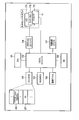
- FIG. 3 is a block diagram showing a functional configuration of an application program executed by the electronic apparatus of the embodiment.
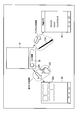
- FIG. 4 is a diagram for explaining a first example of an operation corresponding to an input with a finger and a pen in the electronic apparatus of the embodiment.
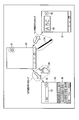
- FIG. 5 is a diagram for explaining a second example of the operation according to the input by the finger and the pen in the electronic apparatus of the embodiment.
- FIG. 6 is a diagram for explaining a third example of the operation according to the input by the finger and the pen in the electronic apparatus of the embodiment.
- FIG. 7 is a diagram illustrating an example of an operation table used by the electronic apparatus of the embodiment.
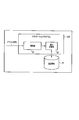
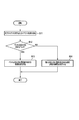
- FIG. 8 is a flowchart illustrating an example of a procedure of input processing executed by the electronic device of the embodiment.
- FIG. 1 is a perspective view illustrating an external appearance of an electronic apparatus according to an embodiment.
- This electronic device is, for example, a portable electronic device that can be input by handwriting with a pen or a finger.
- This electronic device can be realized as a tablet computer, a notebook personal computer, a smartphone, a PDA, or the like.
- the tablet computer 10 is a portable electronic device also called a tablet or a straight computer, and includes a main body 11 and a touch screen display 17 as shown in FIG.
- the touch screen display 17 is attached to be superposed on the upper surface of the main body 11.
- the main body 11 has a thin box-shaped housing.
- the touch screen display 17 incorporates a flat panel display and a sensor configured to detect a contact position of a pen or a finger on the screen of the flat panel display.
- the flat panel display may be, for example, a liquid crystal display (LCD).
- LCD liquid crystal display
- a capacitive touch panel (first sensor), an electromagnetic induction digitizer (second sensor), or the like can be used as the sensor, but the sensor is not limited thereto.
- the first sensor and the second sensor may be anything as long as they can detect the contact on the screen with a pen or a finger, and the first sensor and the second sensor may be a single H / W. It may be a separate H / W.
- two types of sensors, a digitizer and a touch panel are incorporated in the touch screen display 17.
- the touch screen display 17 can detect not only a touch operation (contact operation) on the screen using a finger but also a touch operation (contact operation) on the screen using the pen 10A.
- the pen 10A may be, for example, an electromagnetic induction pen.
- the touch panel first sensor
- the digitizer second sensor
- the user can perform various gesture operations such as tap, drag, swipe, flick, and the like on the touch screen display 17 using the pen 10A or a finger.
- the user can perform a handwriting input operation on the touch screen display 17 using the pen 10A.
- the trajectory of the movement of the pen 10A on the screen that is, the stroke handwritten by the handwriting input operation (trajectory of the handwriting stroke) is drawn in real time.
- the locus of each handwritten stroke is displayed on the screen.
- FIG. 2 is a diagram illustrating a system configuration of the tablet computer 10 according to the embodiment.
- the tablet computer 10 includes a CPU 101, a system controller 102, a main memory 103, a graphics controller 104, a BIOS-ROM 105, a recording device 106, a wireless communication device 107, an embedded controller (EC) 108, and the like.
- the CPU 101 is a processor that controls the operation of various modules in the tablet computer 10.
- the CPU 101 executes various programs loaded from the recording device 106 to the main memory 103.
- Programs executed by the CPU 101 include an operating system (OS) 201 and various application programs 202.
- the application program 202 includes, for example, a handwritten character recognition program, a browser program, an image editing program, a document creation program, a mailer program, and the like.
- the CPU 101 also executes a basic input / output system (BIOS) stored in the BIOS-ROM 105.
- BIOS is a program for hardware control.
- the system controller 102 is a device that connects between the local bus of the CPU 101 and various components.
- the system controller 102 also includes a memory controller that controls access to the main memory 103.
- the system controller 102 also has a function of executing communication with the graphics controller 104 via a serial bus or the like.
- the graphics controller 104 is a display controller that controls the LCD 17 ⁇ / b> A used as a display monitor of the tablet computer 10.
- a display signal generated by the graphics controller 104 is sent to the LCD 17A.
- the LCD 17A displays a screen image based on the display signal.
- a touch panel 17B is arranged as a first sensor for detecting a finger contact position on the screen.
- a digitizer 17C is disposed below the LCD 17A as a second sensor for detecting the contact position of the pen 10A on the screen.
- the touch panel 17B is a capacitance-type pointing device for inputting on the screen of the LCD 17A.
- the touch position on the screen where the finger is touched and the movement of the touch position are detected by the touch panel 17B.
- the digitizer 17C is an electromagnetic induction type pointing device for inputting on the screen of the LCD 17A.
- the digitizer 17C detects the contact position on the screen where the pen 10A is touched, the movement of the contact position, and the like.
- the OS 201 cooperates with the driver program that controls the touch panel 17B to issue an input event indicating that the finger has touched the screen and the contact position. Also, the OS 201 issues an input event indicating that the pen 10A has touched the screen and the contact position in cooperation with the driver program that controls the digitizer 17C.
- the wireless communication device 107 is a device configured to perform wireless communication such as wireless LAN or 3G mobile communication.
- EC108 is a one-chip microcomputer including an embedded controller for power management.
- the EC 108 has a function of turning on or off the tablet computer 10 in accordance with the operation of the power button by the user.
- the CPU 101 implements functions such as the detection unit 31 and the execution control unit 32 by executing the application program 202.
- the functional configuration shown in FIG. 3 may be realized by the OS 201. That is, the CPU 101 can also realize the functions of the detection unit 31, the execution control unit 32, and the like by executing the OS 201. That is, the functional configuration shown in FIG. 3 can be incorporated into various software executed by the CPU 101.
- the detecting unit 31 detects an operation on the object displayed on the screen of the LCD 17A.
- This object is, for example, a graphical user interface (GUI) object that can be operated by the user, such as a button, an icon, or an input area.
- GUI graphical user interface
- the detection unit 31 can detect, for example, a first operation using a finger on the object via the touch panel (first sensor) 17B.
- the detection part 31 can detect 2nd operation using the pen 10A with respect to an object via the digitizer (2nd sensor) 17C, for example.
- the detection unit 31 receives an input event issued by the OS 201.
- the OS 201 cooperates with the driver program that controls the touch panel 17B to issue a first input event indicating that a finger has touched the screen, the contact position, the movement of the contact position, and the like. That is, the OS 201 issues a first input event corresponding to a touch operation on the screen using a finger.
- the detection unit 31 receives the issued first input event, and if the contact position of the finger indicated by the first input event is within an area corresponding to the object on the screen, the detection unit 31 performs the first for the object using the finger. Detect as operation.
- the OS 201 issues a second input event indicating the touch of the pen 10A on the screen, the contact position, the movement of the contact position, etc. in cooperation with the driver program for controlling the digitizer 17C. That is, the OS 201 issues a second input event corresponding to a touch operation on the screen using the pen 10A.
- the detection unit 31 receives the issued second input event, and when the contact position of the pen 10A indicated by the second input event is within an area corresponding to the object on the screen, the detection unit 31 applies the object to the object using the pen 10A. Detect as the second operation.
- the detection unit 31 outputs the detected operation (or received input event) to the execution control unit 32.
- the execution control unit 32 controls the execution of the process based on the operation detected by the detection unit 31.
- the execution control unit 32 executes the first process when the first operation is detected, and executes the second process different from the first process when the second operation is detected.
- the execution control unit 32 executes the first process associated with the operation using the finger.
- the execution control unit 32 executes a second process associated with the operation using the pen 10A.
- the first process includes a process for displaying a GUI (for example, an icon, a button, etc. that can be easily selected with a finger) suitable for the operation with the finger in order to provide a function suitable for the operation with the finger.
- a GUI suitable for the operation with the pen 10A for example, an input area for handwriting characters and figures with the pen 10A
- the screen 51 shown in FIG. 4 is provided with a slide button 52 (object) for instructing unlocking.
- the screen 51 is unlocked in accordance with an operation of sliding the button (knob) 52A from left to right.
- a desktop screen also referred to as a home screen
- an application program for creating a handwritten document is activated, and a screen 55 for creating a handwritten document is displayed.
- the OS 201 uses the finger 10B to detect that the touch panel (first sensor) 17B detects an operation of sliding the button 52A from the left to the right using the finger 10B. An event indicating that an operation of sliding 52A from left to right is performed is issued.
- the detection unit 31 (for example, the detection unit 31 provided in the OS 201) receives (detects) an event issued by the OS 201 and outputs the event to the execution control unit 32.
- a desktop screen 54 is displayed.
- an icon 54A for instructing activation of various applications is displayed. Since each icon 54A is displayed in a size suitable for the touch operation with the finger 10B, the user can easily instruct activation of the application corresponding to the icon 54A.
- the OS 201 detects that the digitizer (second sensor) 17C detects an operation of sliding the button 52A from the left to the right using the pen 10A, and uses the pen 10A to move the button 52A from the left. Issues an event indicating that an operation to slide to the right has been performed.
- the detection unit 31 receives (detects) an event issued by the OS 201 and outputs it to the execution control unit 32.
- the execution control unit 32 activates the handwritten memo application program (note app).
- the handwritten memo application program (note app)
- a screen 55 for performing a handwritten memo is displayed.
- the user can handwritten characters and figures on the screen 55 using the pen 10A.
- the desktop screen 54 is displayed, and when the lock is released with the pen 10A, the screen 55 for handwritten notes is displayed.
- the user can select one of the icons 54A on the desktop screen 54 to instruct the activation of the corresponding application, and when the user releases the lock with the pen 10A. Can immediately start handwriting a memo on the displayed screen 55.
- the screen 61 shown in FIG. 5 is provided with a search button 62 (object) for instructing a search.
- This search button 62 is used, for example, to instruct the start of input of characters (character strings), symbols, figures, etc. used as search keys.
- an input area 65 for inputting the search key from the keyboard is displayed.
- the software keyboard 66 may be further displayed.
- the search button 62 is tapped (touched) with the pen 10A, an input area 68 for inputting a search key by handwriting is displayed.
- the OS 201 taps the button 62 using the finger 10B in response to an operation of tapping the button 62 using the finger 10B detected by the touch panel (first sensor) 17B. Issues an event indicating that an operation has been performed.
- the detection unit 31 (for example, the detection unit 31 provided in the application 202) receives (detects) an event issued by the OS 201 and outputs the event to the execution control unit 32.
- the execution control unit 32 (for example, the execution control unit 32 provided in the application 202), when the event indicates that an operation of tapping the button 62 using the finger 10B is performed, the software keyboard 66 And a search screen 64 using keyboard input (text input).
- the execution control unit 32 requests the application 202 to execute a corresponding command (or function, program, etc.) in order to display the software keyboard 66 and the search screen 64 using keyboard input. (Instruction) may be used.
- the search screen 64 using keyboard input is provided with, for example, an input area 65 for keyboard input and a search button 62 for instructing execution of the search.
- the user inputs a search key (character string) in the input area 65 by tapping a key (button) on the software keyboard 66 and taps the search button 62 to input the input search key.
- the search used eg, web search, file search, document search, image search, etc.
- the search used can be instructed to the application 202.
- the OS 201 performs an operation of tapping the button 62 using the pen 10A in response to the operation of tapping the button 62 using the pen 10A detected by the digitizer (second sensor) 17C. Issue an event indicating that The detection unit 31 receives (detects) an event issued by the OS 201 and outputs it to the execution control unit 32.
- the execution control unit 32 displays the search screen 67 using handwriting input.
- the execution control unit 32 requests (instructs) the application 202 to execute a corresponding command (or function, program, etc.) in order to display the search screen 67 using handwritten input.
- the search screen 67 using handwriting input is provided with, for example, an input area 68 for handwriting input and a search button 62 for instructing execution of the search.
- the user inputs a search key (character string, symbol, figure, etc.) by handwriting a stroke in the input area 68 using the pen 10 ⁇ / b> A and taps the search button 62.
- Search using the search key for example, web search, file search, document search, image search, etc.
- the search button 62 when the search button 62 is tapped with the finger 10B, the software keyboard 66 and the search screen 64 using keyboard input (text input) are displayed, and the search button 62 is tapped with the pen 10A. A search screen 67 using handwritten input is displayed. Accordingly, when the user taps the search button 62 with the finger 10B, the user can input the search key using the software keyboard. When the user taps the search button 62 with the pen 10A, the user inputs the search key by handwriting. be able to. Therefore, it is possible to provide an intuitive user interface suitable for each of the input using the finger 10B and the input using the pen 10A without providing a button for switching between keyboard input and handwriting input on the screen. it can.
- the OS 201 further taps the input area 65 using the pen 10A in response to the operation of tapping the input area 65 using the pen 10A detected by the digitizer (second sensor) 17C.
- An event indicating that an operation has been performed may be issued.
- the detection unit 31 receives (detects) an event issued by the OS 201 and outputs it to the execution control unit 32.
- the execution control unit 32 can also display the search screen 67 (input area 68) using handwriting input. .
- the screen 71 shown in FIG. 6 is provided with a screen shot button 72 (object) for instructing to save at least a part of the screen of the LCD 17A (for example, a screen shot of the screen image).
- a screen shot button 72 object
- the screenshot button 72 is tapped (touched) with the finger 10B
- at least a part of the screen of the LCD 17A is saved.
- the screen of the LCD 17A is saved.
- a program for performing handwriting input on at least a part of the screen is executed, and the stroke input by handwriting and at least a part of the screen are stored.
- the OS 201 taps the button 72 using the finger 10B in response to an operation of tapping the button 72 using the finger 10B detected by the touch panel (first sensor) 17B. Issues an event indicating that an operation has been performed.
- the detection unit 31 (for example, the detection unit 31 provided in the application 202) receives (detects) an event issued by the OS 201 and outputs the event to the execution control unit 32.
- the execution control unit 32 displays the screen of the LCD 17A when the event indicates that an operation of tapping the button 72 using the finger 10B is performed.
- At least a part of the screen shot (screen shot image file) 71 is stored in the storage medium 41 (such as the recording device 106).
- the execution control unit 32 may request (instruct) the application 202 to execute a corresponding command (or function, program, etc.) in order to save the screen shot 71.
- the OS 201 performs an operation of tapping the button 72 using the pen 10A in response to the operation of tapping the button 72 using the pen 10A detected by the digitizer (second sensor) 17C. Issue an event indicating that The detection unit 31 receives (detects) an event issued by the OS 201 and outputs it to the execution control unit 32.
- the execution control unit 32 performs a program (for example, a program for handwriting input on at least a part of the screen of the LCD 17A).
- a program that provides a user interface (UI) for handwriting input, and a handwritten memo 74 including strokes of characters and figures input by handwriting and a screen shot 73 of at least a part of the screen are stored in the storage medium 41. save.
- the execution control unit 32 sets, for example, an input area through which an image of the currently displayed screen is transmitted in at least a part of the screen. As a result, the user can handwrite characters and figures in the input area.
- execution control unit 32 executes a program for handwritten input and saves a screen shot 73 on which a handwritten memo 74 is written, with respect to the application 202, a corresponding command (or function, program, Etc.) may be requested (instructed) to be executed.
- the screen shot button 72 when the screen shot button 72 is tapped with the finger 10B, the screen shot 71 of the screen of the LCD 17A is saved, and when the screen shot button 72 is tapped with the pen 10A, the screen of the LCD 17A is displayed.
- a UI for handwriting input is provided on the screen shot, and the screen shot 73 in which the handwritten memo 74 is written is stored.
- the screen shot 71 can be saved, and when the user taps the screen shot button 72 with the pen 10A, the screen shot 71 is displayed.
- the screen shot 73 in which the handwritten memo 74 is written can be saved after adding the handwritten memo.
- processing corresponding to an input using the finger 10 ⁇ / b> B and processing corresponding to an input using the pen 10 ⁇ / b> A are associated with various objects. be able to.
- FIG. 7 illustrates an operation (first process) according to an input (first operation) using the finger 10B and an operation (second process) according to an input (second operation) using the pen 10A.
- an action corresponding to an input using the finger 10B that is, an action detected by the touch panel 17B
- an input using the pen 10A ie, an action corresponding to an input using the digitizer 17C. And are associated.
- the operation table is stored in the storage medium 41, for example.
- “display home screen” is associated with the slide button (unlock button) 52 as an operation based on an input using the finger 10 ⁇ / b> B.
- “Activating a handwritten memo application” is associated as an operation by input using 10A.
- “display a software keyboard and a search screen using keyboard input” is associated with the search button 62 as an operation using the finger 10B, and the pen 10A “Displaying a search screen using handwritten input” is associated as an operation based on an input using. Further, as in the example shown in FIG.
- “save the screen shot of the display” is associated with the screen shot button 72 as an operation by the input using the finger 10 ⁇ / b> B, and by the input using the pen 10 ⁇ / b> A.
- the operation is associated with “providing a UI for handwriting input on a screen shot of a display and saving a screen shot in which a handwritten note is written”.
- the execution control unit 32 When the input (operation) for the object is detected, the execution control unit 32 reads the operation information (entry) corresponding to the object from the operation table stored in the storage medium 41. Then, the execution control unit 32 executes either one of the operation associated with the input using the finger 10B and the operation associated with the input using the pen 10A based on the read operation information. To control. That is, when an input (first operation) using the finger 10B is detected based on the read operation information, the execution control unit 32 performs an operation (first process) associated with the input using the finger 10B. ) And an operation (second process) associated with the input using the pen 10A is executed when the input (second operation) using the pen 10A is detected.
- the above-described motion table is an example, and various motions according to the input using the finger 10B and the input using the pen 10A can be associated with various objects.
- the action table not only the contents of the action as described above but also a command, a function, a program, or the like for performing the action may be associated with the object.
- the operation information included in the operation table may be defined by the application 202 or the OS 201, or may be set by the user using a setting screen for setting operation information.
- an action corresponding to an input using the finger 10B and an action corresponding to an input using the pen 10A can be associated with each of a plurality of objects displayed on one screen.
- the detection unit 31 receives an input event for an object displayed on the screen of the LCD 17A from the OS 201 (block B11). For example, the detection unit 31 performs an input event corresponding to a touch operation on the screen using the finger 10B (that is, an input event corresponding to a touch operation detected by the touch panel 17B) or a touch operation on the screen using the pen 10A. A corresponding input event (that is, an input event corresponding to the touch operation detected by the digitizer 17C) is received.
- the execution control unit 32 determines whether or not the input event received by the detection unit 31 is an event indicating an input by the pen 10A (block B12).
- the input event includes, for example, various parameters representing the contents of the event. Using these parameters, the execution control unit 32 can determine whether the input event is an event indicating an input by the pen 10A, an event indicating an input by the finger 10B, or the like.
- the execution control unit 32 executes a process associated with the input by the pen 10A (block B13).
- the execution control unit 32 is associated with the input by the finger 10B. (For example, normal processing of the application 202 and the OS 201) is executed (block B14). Examples of the process associated with the input by the pen 10A and the process associated with the input by the finger 10B are as described with reference to FIGS.
- the touch screen display 17 includes a touch panel (first sensor) 17B and a digitizer (second sensor) 17C, and displays an object on the screen.
- the detection unit 31 detects a first operation (for example, an operation with the finger 10B) on the object via the touch panel 17B, and detects a second operation (for example, an operation with the pen 10A) on the object via the digitizer 17C. To do.
- the execution control unit 32 executes the first process when the first operation is detected, and executes the second process different from the first process when the second operation is detected. Thereby, the function suitable for each of 1st operation and 2nd operation can be provided.
Landscapes
- Engineering & Computer Science (AREA)
- General Engineering & Computer Science (AREA)
- Theoretical Computer Science (AREA)
- Physics & Mathematics (AREA)
- Human Computer Interaction (AREA)
- General Physics & Mathematics (AREA)
- Electromagnetism (AREA)
- User Interface Of Digital Computer (AREA)
Abstract
Un dispositif électronique selon un mode de réalisation comporte un affichage à écran tactile, un moyen détecteur, et un moyen de commande d'exécution. L'affichage à écran tactile comporte un premier capteur et un second capteur et affiche un objet sur un écran. Le moyen détecteur est capable de détecter, via le premier capteur, une première opération effectuée sur l'objet. Le moyen détecteur est aussi capable de détecter, via le second capteur, une seconde opération effectuée sur l'objet. Le moyen de commande d'exécution exécute un premier processus si la première opération est détectée et exécute un second processus différent si la seconde opération est détectée.
Priority Applications (3)
| Application Number | Priority Date | Filing Date | Title |
|---|---|---|---|
| JP2015506407A JP5951886B2 (ja) | 2013-03-18 | 2013-03-18 | 電子機器および入力方法 |
| PCT/JP2013/057716 WO2014147724A1 (fr) | 2013-03-18 | 2013-03-18 | Dispositif électronique et procédé d'entrée |
| US14/609,071 US20150138127A1 (en) | 2013-03-18 | 2015-01-29 | Electronic apparatus and input method |
Applications Claiming Priority (1)
| Application Number | Priority Date | Filing Date | Title |
|---|---|---|---|
| PCT/JP2013/057716 WO2014147724A1 (fr) | 2013-03-18 | 2013-03-18 | Dispositif électronique et procédé d'entrée |
Related Child Applications (1)
| Application Number | Title | Priority Date | Filing Date |
|---|---|---|---|
| US14/609,071 Continuation US20150138127A1 (en) | 2013-03-18 | 2015-01-29 | Electronic apparatus and input method |
Publications (1)
| Publication Number | Publication Date |
|---|---|
| WO2014147724A1 true WO2014147724A1 (fr) | 2014-09-25 |
Family
ID=51579459
Family Applications (1)
| Application Number | Title | Priority Date | Filing Date |
|---|---|---|---|
| PCT/JP2013/057716 Ceased WO2014147724A1 (fr) | 2013-03-18 | 2013-03-18 | Dispositif électronique et procédé d'entrée |
Country Status (3)
| Country | Link |
|---|---|
| US (1) | US20150138127A1 (fr) |
| JP (1) | JP5951886B2 (fr) |
| WO (1) | WO2014147724A1 (fr) |
Cited By (7)
| Publication number | Priority date | Publication date | Assignee | Title |
|---|---|---|---|---|
| JP2017027293A (ja) * | 2015-07-21 | 2017-02-02 | 富士通株式会社 | 電子機器及び表示制御プログラム |
| JP2018519583A (ja) * | 2015-06-10 | 2018-07-19 | アップル インコーポレイテッド | スタイラスでユーザインタフェースを操作するためのデバイス及び方法 |
| JP2023162919A (ja) * | 2022-04-27 | 2023-11-09 | レノボ・シンガポール・プライベート・リミテッド | 情報処理装置 |
| US12277308B2 (en) | 2022-05-10 | 2025-04-15 | Apple Inc. | Interactions between an input device and an electronic device |
| US12293147B2 (en) | 2016-09-23 | 2025-05-06 | Apple Inc. | Device, method, and graphical user interface for annotating text |
| US12321589B2 (en) | 2017-06-02 | 2025-06-03 | Apple Inc. | Device, method, and graphical user interface for annotating content |
| US12340034B2 (en) | 2018-06-01 | 2025-06-24 | Apple Inc. | Devices, methods, and graphical user interfaces for an electronic device interacting with a stylus |
Families Citing this family (5)
| Publication number | Priority date | Publication date | Assignee | Title |
|---|---|---|---|---|
| KR102157270B1 (ko) * | 2013-04-26 | 2020-10-23 | 삼성전자주식회사 | 펜을 이용하는 사용자 단말 장치 및 그 제어 방법 |
| KR102138913B1 (ko) * | 2013-07-25 | 2020-07-28 | 삼성전자주식회사 | 입력 처리 방법 및 그 전자 장치 |
| KR20160029509A (ko) * | 2014-09-05 | 2016-03-15 | 삼성전자주식회사 | 전자 장치 및 전자 장치의 어플리케이션 실행 방법 |
| JP6483647B2 (ja) | 2016-09-14 | 2019-03-13 | 株式会社東芝 | レーザ加工装置 |
| CN110196675B (zh) * | 2019-04-17 | 2022-07-15 | 华为技术有限公司 | 一种添加批注的方法及电子设备 |
Citations (6)
| Publication number | Priority date | Publication date | Assignee | Title |
|---|---|---|---|---|
| JPH0460715A (ja) * | 1990-06-28 | 1992-02-26 | Sanyo Electric Co Ltd | ペン入力装置 |
| JP2000172447A (ja) * | 1998-12-01 | 2000-06-23 | Fuji Xerox Co Ltd | 座標入力装置 |
| JP2003271310A (ja) * | 2002-03-13 | 2003-09-26 | Canon Inc | 情報入出力装置、その制御方法および該制御方法を実現するためのプログラム |
| JP2008108233A (ja) * | 2006-09-28 | 2008-05-08 | Kyocera Corp | 携帯端末及びその制御方法 |
| JP2011186550A (ja) * | 2010-03-04 | 2011-09-22 | Lenovo Singapore Pte Ltd | 座標入力装置、座標入力方法、およびコンピュータが実行可能なプログラム |
| WO2012153536A1 (fr) * | 2011-05-12 | 2012-11-15 | パナソニック株式会社 | Dispositif d'entrée de coordonnées et procédé d'entrée de coordonnées |
Family Cites Families (3)
| Publication number | Priority date | Publication date | Assignee | Title |
|---|---|---|---|---|
| JPH08179872A (ja) * | 1994-12-21 | 1996-07-12 | Sharp Corp | 入力装置およびその入力方法 |
| JPH09190268A (ja) * | 1996-01-11 | 1997-07-22 | Canon Inc | 情報処理装置およびその方法 |
| JP5668355B2 (ja) * | 2010-08-04 | 2015-02-12 | ソニー株式会社 | 情報処理装置、情報処理方法およびコンピュータプログラム |
-
2013
- 2013-03-18 WO PCT/JP2013/057716 patent/WO2014147724A1/fr not_active Ceased
- 2013-03-18 JP JP2015506407A patent/JP5951886B2/ja active Active
-
2015
- 2015-01-29 US US14/609,071 patent/US20150138127A1/en not_active Abandoned
Patent Citations (6)
| Publication number | Priority date | Publication date | Assignee | Title |
|---|---|---|---|---|
| JPH0460715A (ja) * | 1990-06-28 | 1992-02-26 | Sanyo Electric Co Ltd | ペン入力装置 |
| JP2000172447A (ja) * | 1998-12-01 | 2000-06-23 | Fuji Xerox Co Ltd | 座標入力装置 |
| JP2003271310A (ja) * | 2002-03-13 | 2003-09-26 | Canon Inc | 情報入出力装置、その制御方法および該制御方法を実現するためのプログラム |
| JP2008108233A (ja) * | 2006-09-28 | 2008-05-08 | Kyocera Corp | 携帯端末及びその制御方法 |
| JP2011186550A (ja) * | 2010-03-04 | 2011-09-22 | Lenovo Singapore Pte Ltd | 座標入力装置、座標入力方法、およびコンピュータが実行可能なプログラム |
| WO2012153536A1 (fr) * | 2011-05-12 | 2012-11-15 | パナソニック株式会社 | Dispositif d'entrée de coordonnées et procédé d'entrée de coordonnées |
Cited By (10)
| Publication number | Priority date | Publication date | Assignee | Title |
|---|---|---|---|---|
| JP2018519583A (ja) * | 2015-06-10 | 2018-07-19 | アップル インコーポレイテッド | スタイラスでユーザインタフェースを操作するためのデバイス及び方法 |
| US10365732B2 (en) | 2015-06-10 | 2019-07-30 | Apple Inc. | Devices and methods for manipulating user interfaces with a stylus |
| US10678351B2 (en) | 2015-06-10 | 2020-06-09 | Apple Inc. | Devices and methods for providing an indication as to whether a message is typed or drawn on an electronic device with a touch-sensitive display |
| US11907446B2 (en) | 2015-06-10 | 2024-02-20 | Apple Inc. | Devices and methods for creating calendar events based on hand-drawn inputs at an electronic device with a touch-sensitive display |
| JP2017027293A (ja) * | 2015-07-21 | 2017-02-02 | 富士通株式会社 | 電子機器及び表示制御プログラム |
| US12293147B2 (en) | 2016-09-23 | 2025-05-06 | Apple Inc. | Device, method, and graphical user interface for annotating text |
| US12321589B2 (en) | 2017-06-02 | 2025-06-03 | Apple Inc. | Device, method, and graphical user interface for annotating content |
| US12340034B2 (en) | 2018-06-01 | 2025-06-24 | Apple Inc. | Devices, methods, and graphical user interfaces for an electronic device interacting with a stylus |
| JP2023162919A (ja) * | 2022-04-27 | 2023-11-09 | レノボ・シンガポール・プライベート・リミテッド | 情報処理装置 |
| US12277308B2 (en) | 2022-05-10 | 2025-04-15 | Apple Inc. | Interactions between an input device and an electronic device |
Also Published As
| Publication number | Publication date |
|---|---|
| JPWO2014147724A1 (ja) | 2017-02-16 |
| US20150138127A1 (en) | 2015-05-21 |
| JP5951886B2 (ja) | 2016-07-13 |
Similar Documents
| Publication | Publication Date | Title |
|---|---|---|
| JP5951886B2 (ja) | 電子機器および入力方法 | |
| CN202649992U (zh) | 信息处理设备 | |
| RU2505848C2 (ru) | Виртуальная тактильная панель | |
| JP6009454B2 (ja) | コンピューティング装置の動きを利用するコンピューティング装置と相互作用するときに発生する入力イベントの解釈の強化 | |
| JP5759660B2 (ja) | タッチ・スクリーンを備える携帯式情報端末および入力方法 | |
| JP5237980B2 (ja) | 座標入力装置、座標入力方法、およびコンピュータが実行可能なプログラム | |
| US20090109187A1 (en) | Information processing apparatus, launcher, activation control method and computer program product | |
| US20140306897A1 (en) | Virtual keyboard swipe gestures for cursor movement | |
| US9459704B2 (en) | Method and apparatus for providing one-handed user interface in mobile device having touch screen | |
| US20150199125A1 (en) | Displaying an application image on two or more displays | |
| US8456433B2 (en) | Signal processing apparatus, signal processing method and selection method of user interface icon for multi-touch panel | |
| CN105378635A (zh) | 多区域触摸板 | |
| CN104205033A (zh) | 基于触摸的输入控制方法 | |
| CN106104450A (zh) | 选择图形用户界面某一部分的方法 | |
| KR20130075849A (ko) | 디스플레이 장치 및 이를 이용한 영상 표시 방법 | |
| CN104423626A (zh) | 信息处理装置以及控制方法 | |
| US20140359541A1 (en) | Terminal and method for controlling multi-touch operation in the same | |
| TWI497357B (zh) | 多點觸控板控制方法 | |
| US20150153925A1 (en) | Method for operating gestures and method for calling cursor | |
| JP2015049861A (ja) | 情報処理装置、制御方法、及びプログラム | |
| CN103809794A (zh) | 一种信息处理方法以及电子设备 | |
| US20140085340A1 (en) | Method and electronic device for manipulating scale or rotation of graphic on display | |
| JP6139647B1 (ja) | 情報処理装置、入力判定方法、及びプログラム | |
| Albanese et al. | A technique to improve text editing on smartphones | |
| CN101799727A (zh) | 多点触控接口的讯号处理装置、方法及使用者接口图像的选取方法 |
Legal Events
| Date | Code | Title | Description |
|---|---|---|---|
| 121 | Ep: the epo has been informed by wipo that ep was designated in this application |
Ref document number: 13878578 Country of ref document: EP Kind code of ref document: A1 |
|
| ENP | Entry into the national phase |
Ref document number: 2015506407 Country of ref document: JP Kind code of ref document: A |
|
| NENP | Non-entry into the national phase |
Ref country code: DE |
|
| 122 | Ep: pct application non-entry in european phase |
Ref document number: 13878578 Country of ref document: EP Kind code of ref document: A1 |