WO2015178094A1 - Terminal portable et procédé de traitement d'opération mis en œuvre par un terminal portable - Google Patents
Terminal portable et procédé de traitement d'opération mis en œuvre par un terminal portable Download PDFInfo
- Publication number
- WO2015178094A1 WO2015178094A1 PCT/JP2015/058927 JP2015058927W WO2015178094A1 WO 2015178094 A1 WO2015178094 A1 WO 2015178094A1 JP 2015058927 W JP2015058927 W JP 2015058927W WO 2015178094 A1 WO2015178094 A1 WO 2015178094A1
- Authority
- WO
- WIPO (PCT)
- Prior art keywords
- contact
- unit
- contact surface
- operation invalid
- area
- Prior art date
- Legal status (The legal status is an assumption and is not a legal conclusion. Google has not performed a legal analysis and makes no representation as to the accuracy of the status listed.)
- Ceased
Links
Images


Classifications
-
- G—PHYSICS
- G06—COMPUTING OR CALCULATING; COUNTING
- G06F—ELECTRIC DIGITAL DATA PROCESSING
- G06F3/00—Input arrangements for transferring data to be processed into a form capable of being handled by the computer; Output arrangements for transferring data from processing unit to output unit, e.g. interface arrangements
- G06F3/01—Input arrangements or combined input and output arrangements for interaction between user and computer
- G06F3/03—Arrangements for converting the position or the displacement of a member into a coded form
- G06F3/041—Digitisers, e.g. for touch screens or touch pads, characterised by the transducing means
-
- G—PHYSICS
- G06—COMPUTING OR CALCULATING; COUNTING
- G06F—ELECTRIC DIGITAL DATA PROCESSING
- G06F3/00—Input arrangements for transferring data to be processed into a form capable of being handled by the computer; Output arrangements for transferring data from processing unit to output unit, e.g. interface arrangements
- G06F3/01—Input arrangements or combined input and output arrangements for interaction between user and computer
- G06F3/048—Interaction techniques based on graphical user interfaces [GUI]
- G06F3/0487—Interaction techniques based on graphical user interfaces [GUI] using specific features provided by the input device, e.g. functions controlled by the rotation of a mouse with dual sensing arrangements, or of the nature of the input device, e.g. tap gestures based on pressure sensed by a digitiser
- G06F3/0488—Interaction techniques based on graphical user interfaces [GUI] using specific features provided by the input device, e.g. functions controlled by the rotation of a mouse with dual sensing arrangements, or of the nature of the input device, e.g. tap gestures based on pressure sensed by a digitiser using a touch-screen or digitiser, e.g. input of commands through traced gestures
Definitions
- the present invention relates to a mobile terminal and an operation processing method using the mobile terminal.
- Various portable terminals for example, tablet terminals or smartphones
- a touch panel is widely used.
- Such a portable terminal can accept an input operation with a finger on the display screen of the touch panel (Patent Document 1).
- Patent Document 1 In a mobile terminal equipped with a touch panel (especially a mobile terminal with a narrow frame area or a mobile terminal without a frame area), the user touches the edge of the touch panel unintentionally with the finger of the hand holding the terminal and performs an unintentional mistake. May end up. Therefore, the portable terminal disclosed in Patent Document 1 can prevent such an erroneous operation to some extent.
- the mobile terminal sets the coordinates of the operation invalid work area for the right hand or the left hand based on the determined hand, and invalidates the touch on the touch key in the operation invalid area.
- Japanese Patent Publication Japanese Patent Laid-Open No. 2014-026323 (published on February 6, 2014)”
- Patent Document 1 When holding a mobile terminal with the right or left hand, there are multiple ways to hold it (ie, how to hold it). For this reason, even if the technique disclosed in Patent Document 1 is used, there remains a problem in terms of ease of use for the user. For example, in the technique of Patent Document 1, even if the user holds the mobile terminal with the right hand, an area where an erroneous operation hardly occurs is set as an operation invalid area depending on how the user holds the portable terminal, and the effective area of the touch operation is narrowed. There are challenges.
- an object of the present invention is to provide a portable terminal capable of setting an operation invalid area optimal for a user's way of holding a portable terminal within a display screen, and the portable terminal. It is in providing the operation processing method by.
- a mobile terminal includes a display screen that receives an operation for designating coordinates, and a contact detection that is provided on each of a plurality of side surfaces of the terminal and detects a contact object.
- a contact surface specifying unit that specifies the size of the contact surface of the contact object, and the size of the contact surface specified by the contact surface specifying unit
- a specific area setting unit for setting a specific area having an area and a shape corresponding to the display area in the display screen, and an invalidation unit for invalidating an operation for specifying coordinates in the specific area.
- an operation processing method includes a display screen that receives an operation for specifying coordinates, and a contact that is provided on each of a plurality of side surfaces of the terminal and detects a contact object.
- a contact surface specifying step for specifying a size of the contact surface of the contact object with reference to detection results by the plurality of contact detection units, and the contact
- a specific area setting step for setting a specific area having an area and shape corresponding to the size of the contact surface specified in the surface specifying step in the display screen, and an operation for specifying coordinates in the specific area are invalidated. And an invalidating step.
- the effective area for the touch operation as wide as possible while setting the operation invalid area optimal for the way the user holds the mobile terminal in the display screen.
- FIG. 1 is an external view of a smartphone 1A according to Embodiment 1 of the present invention. It is a figure which shows the holding example of a smart phone. It is a correspondence diagram of the size of the contact surface of the thumb and how to hold the smartphone. It is a correspondence diagram of the size of the contact surface of the thumb and how to hold the smartphone. It is a flowchart which shows operation
- Embodiment 1 a smartphone that is an embodiment of a mobile terminal according to the present invention will be described with reference to FIGS.
- a smart phone is only an example of a portable terminal,
- the portable terminal which concerns on this invention can be implemented with forms, such as a feature phone or a tablet terminal, for example.
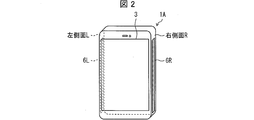
- FIG. 2 is an external view of the smartphone 1A.
- the smartphone 1 ⁇ / b> A has a touch panel display unit 3 on the front surface.
- the contact sensor 6L contact detection part
- toe which detects a contact thing (usually a user's finger
- a sensor 6R contact detection unit
- the smartphone 1A holds the smartphone 1A with one hand so that the user contacts the thumb with one side and four fingers other than the thumb with the other side.
- both the contact sensor 6L and the contact sensor 6R detect the finger contact, the contact position, and the size of the contact surface.
- the smartphone 1A determines how to hold the user's smartphone 1A based on the contact position detected by the contact sensor 6L and the contact sensor 6R and the size of the contact surface.
- the display unit 3 is provided with an operation invalid region according to the determined holding method.
- the operation invalid area is a specific area where a touch operation that specifies coordinates in the area is invalidated.
- the mobile terminal according to the present invention may include not only the display unit provided with the operation invalid area on the front surface of the own terminal but also the touch pad provided with the operation invalid area on the back surface of the own terminal.
- the portable terminal when contact is detected by both of the two contact sensors, the portable terminal may provide an operation invalid area on the display unit and an operation invalid area on the touch pad.
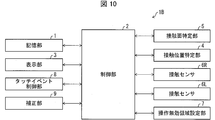
- FIG. 1 is a block diagram showing the smartphone 1A.
- the smartphone 1 ⁇ / b> A includes a storage unit 1, a control unit 2, a display unit 3, a contact position specifying unit 4 (contact position specifying unit), a contact surface specifying unit 5 (contact surface specifying unit), and two contacts. It has sensors (contact sensors 6R, 6L), an operation invalid region setting unit 7 (specific region setting unit), and a touch event control unit 8 (invalid unit).
- the storage unit 1 stores an OS (Operating System) program, various application programs, various control programs, various data, and the like.
- the control unit 2 is a CPU that controls and controls the entire smartphone 1 ⁇ / b> A, and performs various processes by reading a corresponding program from the storage unit 1. For example, the control unit 2 performs processing according to an application program (hereinafter referred to as “application”) read from the storage unit 1 (for example, processing for displaying a user interface screen (UI screen) of the application on the display unit 3). I do.
- application an application program
- the display unit 3 is a touch panel display that displays a user interface screen of the application.
- the contact position specifying unit 4 specifies the contact position between each of the contact sensors 6R and 6L and the finger when it is determined that both of the two contact sensors are in a state of detecting a finger contact.
- the contact surface specifying unit 5 specifies the size of the contact surface between each of the contact sensors 6R and 6L and the finger when it is determined that both of the two contact sensors are in a state of detecting the finger contact.
- the operation invalid area setting unit 7 determines the user's position from the contact position specified by the contact position specifying unit 4 and the size of the contact surface specified by the contact surface specifying unit 5.
- the method of holding the smartphone 1 ⁇ / b> A is determined, and an operation invalid area corresponding to the determined method of holding is set on the display unit 3.
- the touch event control unit 8 issues a touch event having the contact coordinates on the display screen as an argument to the foreground application.
- the touch event control unit 8 is configured to invalidate the touch operation that specifies the coordinates in the operation invalid area when both of the two contact sensors detect the finger contact. That is, the touch event control unit 8 does not issue a touch event even when a touch operation that specifies only coordinates within the operation invalid area is detected when both of the two contact sensors detect a finger contact. It has become.
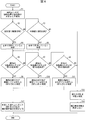
- FIG. 6 is a flowchart showing the operation.
- each of the contact sensor 6R and the contact sensor 6L detects the contact of the finger, and detects the contact position of the finger and the size of the contact surface (step S1; hereinafter referred to as “S1”). For short).
- the contact sensor 6R and the contact sensor 6L notify the contact position specifying unit 4 that the finger contact is detected and the contact position, and the contact surface 6L and the contact surface are detected.
- the contact size specifying unit 5 is notified of the size.
- the contact position specifying unit 4 specifies the contact position between the contact sensor 6R and the finger and the contact position between the contact sensor 6L and the finger.
- the contact surface specifying unit 5 specifies the size of the contact surface between the contact sensor 6R and the finger and the size of the contact surface between the contact sensor 6L and the finger.
- the operation invalid area setting unit 7 refers to the identification result of the contact position identification unit 4 or the contact surface identification unit 5 and determines whether or not the user is holding the smartphone 1A with one hand.
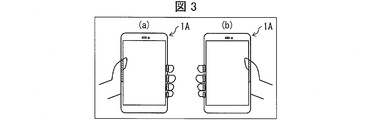
- FIG. 3 shows a holding example of the smartphone 1A.
- the operation invalid region setting unit 7 determines whether the left side L or the right side R is in contact with the thumb from the identification result of the contact position identification unit 4 or the contact surface identification unit 5.
- the operation invalid area setting unit 7 determines that the thumb is in contact with the left side surface L (S2; Yes)
- the operation invalid area setting unit 7 indicates that the user is a smartphone as shown in FIG. It is determined that 1A is held by the left hand (S3).
- the operation invalid area setting unit 7 determines that the thumb is in contact with the right side surface R (S2; No, S5; Yes)
- the operation invalid area setting unit 7 is illustrated in FIG.
- it determines with the user holding the smart phone 1A with the right hand (S4).
- the operation invalid area setting unit 7 cannot determine which of the left side L and the right side R is in contact with the thumb (S5; No)
- the operation invalid area setting unit 7 is connected to the user's smartphone 1A. It is determined that the holding method is indistinguishable (S13). For example, this is the case when the user holds the smartphone 1A with both hands.
- the operation invalid area setting unit 7 does not set the operation invalid area (S14) and ends the operation according to the flowchart of FIG.
- the operation invalid area setting unit 7 refers to the identification result of the contact position identification unit 4 or the contact surface identification unit 5 to determine which of the left side L and the right side R is in contact with the thumb. There is no particular limitation. For example, when the contact position specified by the contact position specifying unit 4 is one place on the left side L and there are a plurality of places on the right side R, the operation invalid area setting unit 7 determines that the thumb is on the left side L, When there is one contact position specified by the contact position specifying unit 4 on the right side surface R and a plurality of locations on the left side surface L, the operation invalid area setting unit 7 may determine that the thumb is on the right side surface R. .
- the operation invalid area setting unit 7 determines the result of specifying the contact surface specifying unit 5 (at each contact position). With reference to the size of the contact surface), it may be determined that the thumb is in contact with the side surface on which the contact surface having a size equal to or greater than a predetermined value is located.
- the operation invalid region setting unit 7 refers to the specification result of the contact position specifying unit 4, It may be determined that the thumb is in contact with the side surface with the smaller number of specified contact positions.
- the operation invalid area setting unit 7 refers to the identification result of the contact surface identification unit 5 and is in contact with the left side L The user determines how to hold the smartphone 1A from the size of the contact surface.
- the operation invalid area setting unit 7 is in contact with the right side surface R with reference to the identification result of the contact surface identification unit 5. The user determines how to hold the smartphone 1A from the size of the contact surface of the thumb.
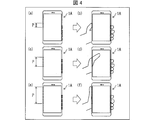
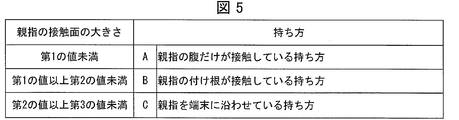
- the operation invalid area setting unit 7 has a holding method in which only the belly of the thumb is in contact with the left side surface L or the right side surface R (hereinafter referred to as “holding method”). It is determined that the user has the smartphone 1A (referred to as “A”) (S9).
- the size P of the contact surface of the thumb that is in contact with the left side surface L or the right side surface R is a predetermined second value (for example, a predetermined first value or more).
- the operation invalid region setting unit 7 has a thumb base on the left side L or the right side R as shown in FIG. 4 (d) and FIG. It is determined that the user has the smartphone 1 ⁇ / b> A by the holding method (hereinafter referred to as “holding method B”) (S ⁇ b> 10).
- the size P of the contact surface of the thumb that is in contact with the left side L or the right side R is a predetermined third value (for example, a predetermined second value or more). If it is less than 15 cm) (S7; No, S8; Yes), the operation invalid area setting unit 7 places the thumb along the left side L or the right side R as shown in FIG. 4 (f) and FIG. It is determined that the user has the smartphone 1 ⁇ / b> A according to the holding method (hereinafter referred to as “holding C”) (S ⁇ b> 11).
- the operation invalid area setting unit 7 It is determined that the smartphone 1 ⁇ / b> A is not distinguishable (S ⁇ b> 13), and the operation invalid area is not set (S ⁇ b> 14).
- the smartphone 1A ends the operation according to the flowchart of FIG. 6 after S14.
- the operation invalid region setting unit 7 is in contact with the thumb.
- the processing of S6 to S8 may be performed with P being the total size of the contact surfaces at all contact positions on the side surface.
- the operation invalid area setting unit 7 sets an operation invalid area having an area and shape corresponding to the holding method determined in any of S9 to S11 in the display unit 3 (S12), and the flow chart of FIG. Terminate the operation. Specifically, the operation invalid area setting unit 7 creates coordinate data indicating an operation invalid area having an area and shape corresponding to the holding method determined in any of S9 to S11, and stores the coordinate data in the storage unit 1. The area and shape of the operation invalid area corresponding to each holding method will be described later.
- the display unit 3 sends the touch coordinate information to the touch event control unit 8.
- the touch event control unit 8 reads out the coordinate data of the operation invalid area from the storage unit 1. Then, the touch event control unit 8 refers to the read coordinate data to determine whether or not the touch coordinates are located in the operation invalid area.
- the touch event control unit 8 determines that the touch coordinates are located in the operation invalid area, the touch event control unit 8 invalidates the touch operation. Therefore, the touch event control unit 8 does not issue a touch event having the touch coordinates as an argument to the foreground application.
- the touch event control unit 8 determines that the touch coordinates are not in the operation invalid area, the touch event control unit 8 validates the touch operation. Therefore, the touch event control unit 8 issues a touch event having the touch coordinates as an argument to the foreground application, and executes processing corresponding to the touch event.
- the length of the contact surface of the thumb that is in contact with the left side surface L or the right side surface R is detected as the size of the contact surface of the thumb.
- the present invention is not limited to this.
- the contact area of the thumb that is in contact with the left side surface L or the right side surface R may be detected as the size of the contact surface of the thumb.
- the user determines how to hold the smartphone 1A from the size of the contact surface of the thumb that is in contact with the left side L or the right side R.
- the present invention is not limited to this.
- the user may determine how to hold the smartphone 1 ⁇ / b> A from the contact positions of all the fingers in contact with the left side L and the right side R and the total size of the contact surfaces.
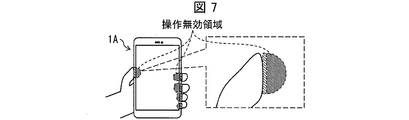
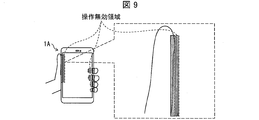
- FIGS. 7 to 9 are diagrams showing examples of setting the area and shape of the operation invalid region according to each holding method.
- the operation invalid area setting unit 7 determines that the user holds the smartphone 1A in the holding way A
- the operation invalid area setting unit 7 predicts that the thumb's belly is erroneously covered on the display screen, and operates the area that can touch the display screen.
- Set as invalid area For example, as shown in FIG. 7, a semi-circular region having the diameter of the contact surface of the thumb (length in the vertical direction of the side surface) corresponds to the contact position of the thumb at the left or right end of the display screen It is possible to set an operation invalid area at the position to be operated.
- the operation invalid area is set so that the semicircular arc is located on the center side of the display screen.
- the operation invalid area setting unit 7 determines that the user holds the smartphone 1A in the holding method B, it is predicted that the base of the thumb and the joint erroneously touch the display screen when the thumb is moved. Then, an area that can touch the display screen is set as an operation invalid area. For example, as shown in FIG. 8, a quarter-circle region having a radius slightly longer than the length of the contact surface of the thumb (the length in the vertical direction of the side surface) is set at the left or right end of the display screen.
- the operation invalid area can be set at a position corresponding to the contact position of the thumb.
- the operation invalid area is set so that a quarter circular arc follows the trajectory when the thumb is moved.
- the radius slightly longer than the length of the contact surface of the thumb is preferably a radius (for example, approximately 2 to 4 cm) assuming a length from the base of the thumb to the joint of the thumb.
- the operation invalid area setting unit 7 predicts that the area from the base of the thumb to the belly of the thumb is erroneously covered and touches the display screen.
- a possible area is set as an operation invalid area.
- a rectangle with the long side of the contact surface of the thumb can be set as an operation invalid area at a position corresponding to the contact position of the thumb at the left or right end of the display screen. is there.
- the operation invalid area is set so that the long side of the rectangle extends from the base of the thumb to the belly of the thumb, but the short side of the rectangle may have a minimum length (for example, approximately 1 to 2 mm). preferable.
- the operation invalid area setting unit 7 may not set the operation invalid area.
- the operation invalid area setting unit 7 refers to the identification results by the contact position identification unit 4 and the contact surface identification unit 5 and determines the size of the contact surface of the finger that is in contact with one specific side surface. It can be said that an operation invalid region having a corresponding area and shape is set.
- the operation invalid area setting unit 7 generates coordinate data indicating a boundary between the set operation invalid area and a non-operation invalid area (an area other than the operation invalid area), and uses the coordinate data as coordinate data indicating the operation invalid area. Store in the storage unit 1.
- an area where a finger other than the thumb can contact the display screen may also be set as an operation invalid area.
- a semicircular region whose diameter is the length of the contact surface of each finger other than the thumb (length in the vertical direction of the side surface) is a position corresponding to the contact position of each finger on the left or right end of the display screen Can be set as an operation invalid area.
- the operation invalid area is set so that the semicircular arc is located on the center side of the display screen.
- the operation invalid area setting unit 7 determines the boundary between the operation invalid area and the non-operation invalid area assuming an erroneous operation of the thumb, and the boundary between each operation invalid area and the non-operation invalid area assuming an erroneous operation of each finger other than the thumb. Coordinate data is generated, and the coordinate data is stored in the storage unit 1 as coordinate data indicating the operation invalid area.
- an area in which an erroneous operation is likely to occur can be set as an operation invalid area in accordance with how the user holds the smartphone 1A, and thus an area that is unlikely to cause an erroneous operation in the way of holding is not set as an operation invalid area. Therefore, the effective area of the touch operation can be made as wide as possible while setting the operation invalid area optimal for the user's way of holding the smartphone 1A in the display screen.
- FIG. 10 is a block diagram showing the smartphone 1B.
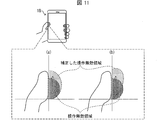
- FIG. 11 is a diagram illustrating a setting example of the area and shape of the corrected operation invalid area.
- members having the same functions as those described in the first embodiment are denoted by the same reference numerals, and description thereof is omitted.
- the smartphone 1B includes a storage unit 1, a control unit 2, a display unit 3, a contact position specifying unit 4, a contact surface specifying unit 5, two contact sensors, an operation invalid area setting unit 7, and touch event control. Part 8 and correction part 9 (correction part).
- the operation invalid area setting unit 7 stores the coordinate data of the operation invalid area in the storage unit 1, the contact position identified by the contact position identification unit 4, and the contact surface identified by the contact surface identification unit 5. Information on how to hold the user's smartphone 1 ⁇ / b> A determined from the size is also stored in the storage unit 1.
- the correction unit 9 reads out the information on how to hold the user's smartphone 1B determined by the operation invalid area setting unit 7 from the storage unit 1, and if the user's way of holding the smartphone 1B is the holding method A, the operation invalid area setting is performed. The operation invalid area set by the unit 7 is corrected. The correction of the operation invalid area by the correction unit 9 will be described in detail below.
- the correction unit 9 enlarges the operation invalid area set by the operation invalid area setting unit 7 to the upper side of the display screen, as shown in FIG. Accordingly, even when the thumb is displaced upward in the display screen and accidentally touches the display screen, the touch operation by the contact can be invalidated.
- a semicircular operation invalid area may be stretched upward in the display screen and corrected to a semi-elliptical operation invalid area.
- a semicircular operation invalid area may be stretched obliquely upward to the right of the display screen and corrected to a partially elliptical operation invalid area.
- the correction unit 9 may enlarge the operation invalid area set by the operation invalid area setting unit 7 to the lower side of the display screen. Therefore, even when the thumb is displaced downward in the display screen and accidentally touches the display screen, the touch operation by the contact can be invalidated.
- the correction unit 9 expands the operation invalid area set by the operation invalid area setting unit 7 in at least one of the upper and lower directions of the display screen. Then, the correction unit 9 generates coordinate data indicating the boundary between the corrected operation invalid area and the non-operation invalid area (area other than the operation invalid area), and uses the coordinate data as new coordinate data indicating the operation invalid area.
- the touch event control unit 8 reads the coordinate data from the storage unit 1 and determines whether or not the touch coordinates are located in the operation invalid area. It will be judged.
- each operation invalid area set by the operation invalid area setting unit 7 may be corrected for each operation invalid area assuming an erroneous operation of each finger other than the thumb. For example, it is predicted that fingers other than the thumb are also shifted in the direction in which the finger is facing. Therefore, the correction unit 9 expands each operation invalid region set by the operation invalid region setting unit 7 and assuming an erroneous operation of each finger other than the thumb in at least one of the upper and lower directions of the display screen, The operation invalid area may be corrected.
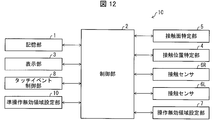
- FIG. 12 is a block diagram showing the smartphone 1C.
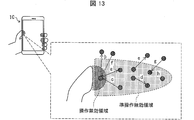
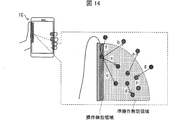
- 13 and 14 are diagrams showing examples of setting the area and shape of the semi-operation invalid region.
- members having the same functions as those described in the first embodiment are denoted by the same reference numerals, and description thereof is omitted.
- the smartphone 1C includes a storage unit 1, a control unit 2, a display unit 3, a contact position specifying unit 4, a contact surface specifying unit 5, two contact sensors, an operation invalid area setting unit 7, and touch event control. Section 8 and a semi-operation invalid area setting section 10 (semi-operation invalid area setting section).
- the semi-operation invalid area setting unit 10 reads the coordinate data of the operation invalid area from the storage unit 1 and sets a semi-operation invalid area, which is a specific area adjacent to the operation invalid area, on the display unit 3.
- the setting of the semi-operation invalid area by the semi-operation invalid area setting unit 10 will be described below.
- the semi-operation invalid area is an area where the user slides his / her finger and may accidentally come into contact.
- the semi-operation invalid area setting unit 10 sets a specific area adjacent to the operation invalid area as the semi-operation invalid area. Then, the touch event control unit 8 invalidates the slide operation from the point in the operation invalid area to the point in the semi-operation invalid area. Thereby, even when the thumb slips to the center of the display screen and the finger is accidentally moved on the display screen, the sliding operation by the contact movement can be invalidated.
- the semi-operation invalid area setting unit 10 sets a specific area adjacent to the operation invalid area as a semi-operation invalid area, but the specific area and shape of the semi-operation invalid area are not specifically limited.
- the specific area and shape of the semi-operation invalid area are not specifically limited.
- the area surrounding the outer periphery of the operation invalid area is set as the semi-operation invalid area. May be.
- the smartphone 1C in the way C there is a possibility that the user can slide from the thumb joint to the fingertip. Therefore, as shown in FIG. A quarter-circle region that is obtained by rotating the operation invalid region with the fulcrum as a fulcrum may be set as the semi-operation invalid region.
- the semi-operation invalid area setting unit 10 generates coordinate data indicating a boundary between the semi-operation invalid area and the non-quasi-operation invalid area (an area other than the semi-operation invalid area), and indicates the coordinate data as the semi-operation invalid area. It is stored in the storage unit 1 as coordinate data.
- the touch event control unit 8 reads the coordinate data of the starting point and the end point of the touching movement from the storage unit 1, It is determined whether or not the touch coordinates are located in the operation invalid region or the semi-operation invalid region.
- the touch event control unit 8 determines that the touch coordinate of the starting point is located in the operation invalid area and the touch coordinate of the end point is located in the semi-operation invalid area, a point in the semi-operation invalid area from the point in the operation invalid area The slide operation is determined to be invalidated (arrow a in FIGS. 13 and 14).
- the touch event control unit 8 validates the operation in the case of the following slide operations or touch operations (1) to (7).
- the touch event control unit 8 may invalidate the slide operation from the point in the operation invalid area to the point in the quasi-operation invalid area with a certain length of the contact surface.
- the touch event control unit 8 is a slide operation from a point in the operation invalid region to a point in the semi-operation invalid region, if the length of the contact surface is not a fixed length, the touch event control unit 8 May be enabled.
- control blocks (especially the operation invalid area setting unit 7, the touch event control unit 8, the correction unit 9, and the semi-operation invalid area setting unit 10) of the smartphones 1A to 1C are logic circuits formed on an integrated circuit (IC chip) or the like. (Hardware) or software using a CPU (Central Processing Unit).
- IC chip integrated circuit
- CPU Central Processing Unit
- the smartphones 1A to 1C include a CPU that executes instructions of a program that is software for realizing each function, and a ROM (Read Memory) in which the program and various data are recorded so as to be readable by a computer (or CPU).
- a storage device hereinafter referred to as “recording medium”
- a RAM Random Access Memory
- the objective of this invention is achieved when a computer (or CPU) reads the said program from the said recording medium and runs it.
- a “non-temporary tangible medium” such as a tape, a disk, a card, a semiconductor memory, a programmable logic circuit, or the like can be used.
- the program may be supplied to the computer via an arbitrary transmission medium (such as a communication network or a broadcast wave) that can transmit the program.
- a transmission medium such as a communication network or a broadcast wave
- the present invention can also be realized in the form of a data signal embedded in a carrier wave in which the program is embodied by electronic transmission.
- the mobile terminal (smartphone) according to aspect 1 of the present invention is provided on each of a display screen that receives an operation for designating coordinates and a plurality of side surfaces of the terminal, and detects a contact object (contact sensor 6L, 6R), referring to detection results by the plurality of contact detection units, the contact surface specifying unit (contact surface specifying unit 5) for specifying the size of the contact surface of the contact object, and the contact surface specifying unit A specific area setting section (operation invalid area setting section 7) for setting a specific area having an area and shape corresponding to the size of the contact surface in the display screen, and an operation for specifying coordinates in the specific area And an invalidating unit (touch event control unit 8) for invalidating.
- an area in which an erroneous operation is likely to occur is set as an operation invalid area according to how the user holds the mobile terminal, which is determined from the size of the contact surface of the contact object (such as the user's thumb). Therefore, an area where an erroneous operation is unlikely to occur with the holding method is not set as an operation invalid area. Therefore, it is possible to make the effective area of the touch operation as wide as possible while setting the operation invalid area optimal for the way the user holds the mobile terminal in the display screen.
- the portable terminal which concerns on aspect 2 of this invention is the said position 1,
- the contact position specific part (contact position specific part 4) which specifies the contact position of the said contact thing with reference to the detection result by the said several contact detection part
- the specific region setting unit refers to a specific result obtained by the contact position specifying unit and the contact surface specifying unit, and the size of the contact surface of the contact object that is in contact with the specific one side surface.
- the specific region having an area and shape corresponding to the size is set.
- the specific region set by the specific region setting unit Is further provided with a correction unit (correction unit 9) for enlarging the display screen in at least one of the upper and lower directions of the display screen, and the size of the contact surface specified by the contact surface specifying unit is less than a predetermined value
- the invalidation unit invalidates an operation for designating coordinates in the specific area enlarged by the correction unit.
- the thumb when the size of the contact surface of the contact object is less than the predetermined value, that is, when the user is holding the side surface in which only the belly of the thumb is in contact, the thumb is directed upward on the display screen. Even if the display screen is touched by mistake, the touch operation by the contact can be invalidated.
- the mobile terminal according to aspect 4 of the present invention is the mobile terminal according to aspect 1 or 2, further comprising: a semi-specific area setting unit (semi-operation invalid area setting unit 10) that sets a semi-specific area adjacent to the specific area in the display screen.
- the invalidation unit further invalidates a slide operation from the coordinates in the specific area to the coordinates in the semi-specific area.
- An operation processing method is a portable terminal including a display screen that accepts an operation for designating coordinates, and a contact detection unit that is provided on each of a plurality of side surfaces of the terminal and detects a contact object.
- An operation processing method referring to detection results by a plurality of the contact detection units, a contact surface specifying step for specifying the size of the contact surface of the contact object, and the contact specified by the contact surface specifying step A specific area setting step for setting a specific area having an area and shape according to the size of the surface in the display screen; and an invalidation step for invalidating an operation for specifying coordinates in the specific area. Yes.
- the present invention can be suitably used for various portable information terminals such as smartphones.
Landscapes
- Engineering & Computer Science (AREA)
- General Engineering & Computer Science (AREA)
- Theoretical Computer Science (AREA)
- Human Computer Interaction (AREA)
- Physics & Mathematics (AREA)
- General Physics & Mathematics (AREA)
- User Interface Of Digital Computer (AREA)
- Position Input By Displaying (AREA)
Abstract
L'invention concerne un terminal portable qui peut définir une région d'opération non valide sur un écran d'affichage, ladite région étant optimisée pour la façon dont le terminal portable est tenu. Un téléphone intelligent (1A) comprend : une unité de détermination de surface de contact (5) qui détermine la taille d'une surface en contact avec un doigt qui est détectée par des capteurs de contact (6L, 6R) ; une unité de définition de région d'opération non valide (7) qui définit une région d'opération non valide dans un écran d'affichage, ladite région ayant une zone et une forme correspondant à la taille de la surface de contact ; et une unité de commande d'événement de toucher (8) qui invalide les opérations désignées avec des coordonnées dans la région d'opération non valide.
Applications Claiming Priority (2)
| Application Number | Priority Date | Filing Date | Title |
|---|---|---|---|
| JP2014-107451 | 2014-05-23 | ||
| JP2014107451 | 2014-05-23 |
Publications (1)
| Publication Number | Publication Date |
|---|---|
| WO2015178094A1 true WO2015178094A1 (fr) | 2015-11-26 |
Family
ID=54553771
Family Applications (1)
| Application Number | Title | Priority Date | Filing Date |
|---|---|---|---|
| PCT/JP2015/058927 Ceased WO2015178094A1 (fr) | 2014-05-23 | 2015-03-24 | Terminal portable et procédé de traitement d'opération mis en œuvre par un terminal portable |
Country Status (1)
| Country | Link |
|---|---|
| WO (1) | WO2015178094A1 (fr) |
Cited By (1)
| Publication number | Priority date | Publication date | Assignee | Title |
|---|---|---|---|---|
| JP2024108909A (ja) * | 2023-01-31 | 2024-08-13 | 株式会社バンダイ | プログラム及びゲーム装置 |
Citations (8)
| Publication number | Priority date | Publication date | Assignee | Title |
|---|---|---|---|---|
| JP2008027183A (ja) * | 2006-07-21 | 2008-02-07 | Sharp Corp | 情報処理装置 |
| EP2175344A2 (fr) * | 2008-10-06 | 2010-04-14 | Samsung Electronics Co., Ltd. | Procédé et appareil pour afficher une interface graphique utilisateur en fonction d'un motif de contact de l'utilisateur |
| JP2011237945A (ja) * | 2010-05-07 | 2011-11-24 | Fujitsu Toshiba Mobile Communications Ltd | 携帯型電子機器 |
| JP2012027581A (ja) * | 2010-07-21 | 2012-02-09 | Kddi Corp | 携帯端末およびキー表示方法 |
| WO2012049942A1 (fr) * | 2010-10-13 | 2012-04-19 | Necカシオモバイルコミュニケーションズ株式会社 | Dispositif de terminal mobile et procédé d'affichage pour un panneau tactile dans un dispositif de terminal mobile |
| WO2013047271A1 (fr) * | 2011-09-27 | 2013-04-04 | Necカシオモバイルコミュニケーションズ株式会社 | Appareil électronique portable, procédé de réglage de région tactile et programme de réglage de région tactile |
| WO2013187370A1 (fr) * | 2012-06-15 | 2013-12-19 | 京セラ株式会社 | Dispositif de terminal |
| JP2014026323A (ja) * | 2012-07-24 | 2014-02-06 | Sharp Corp | 携帯情報表示装置および誤動作防止方法 |
-
2015
- 2015-03-24 WO PCT/JP2015/058927 patent/WO2015178094A1/fr not_active Ceased
Patent Citations (8)
| Publication number | Priority date | Publication date | Assignee | Title |
|---|---|---|---|---|
| JP2008027183A (ja) * | 2006-07-21 | 2008-02-07 | Sharp Corp | 情報処理装置 |
| EP2175344A2 (fr) * | 2008-10-06 | 2010-04-14 | Samsung Electronics Co., Ltd. | Procédé et appareil pour afficher une interface graphique utilisateur en fonction d'un motif de contact de l'utilisateur |
| JP2011237945A (ja) * | 2010-05-07 | 2011-11-24 | Fujitsu Toshiba Mobile Communications Ltd | 携帯型電子機器 |
| JP2012027581A (ja) * | 2010-07-21 | 2012-02-09 | Kddi Corp | 携帯端末およびキー表示方法 |
| WO2012049942A1 (fr) * | 2010-10-13 | 2012-04-19 | Necカシオモバイルコミュニケーションズ株式会社 | Dispositif de terminal mobile et procédé d'affichage pour un panneau tactile dans un dispositif de terminal mobile |
| WO2013047271A1 (fr) * | 2011-09-27 | 2013-04-04 | Necカシオモバイルコミュニケーションズ株式会社 | Appareil électronique portable, procédé de réglage de région tactile et programme de réglage de région tactile |
| WO2013187370A1 (fr) * | 2012-06-15 | 2013-12-19 | 京セラ株式会社 | Dispositif de terminal |
| JP2014026323A (ja) * | 2012-07-24 | 2014-02-06 | Sharp Corp | 携帯情報表示装置および誤動作防止方法 |
Cited By (2)
| Publication number | Priority date | Publication date | Assignee | Title |
|---|---|---|---|---|
| JP2024108909A (ja) * | 2023-01-31 | 2024-08-13 | 株式会社バンダイ | プログラム及びゲーム装置 |
| JP7545502B2 (ja) | 2023-01-31 | 2024-09-04 | 株式会社バンダイ | プログラム及びゲーム装置 |
Similar Documents
| Publication | Publication Date | Title |
|---|---|---|
| CN104777987B (zh) | 智能手表的控制方法及装置 | |
| JP6292673B2 (ja) | 携帯端末装置、誤操作防止方法、及びプログラム | |
| EP2829965A1 (fr) | Dispositif électronique et son procédé de fonctionnement | |
| CN104536643B (zh) | 一种图标拖动方法及终端 | |
| US10488988B2 (en) | Electronic device and method of preventing unintentional touch | |
| JP2014178768A (ja) | 情報処理装置 | |
| US9506966B2 (en) | Off-center sensor target region | |
| JP6135413B2 (ja) | 電子機器及びプログラム | |
| JP6294597B2 (ja) | 情報表示装置、プログラム、記録媒体、および情報表示方法 | |
| JP5782420B2 (ja) | ユーザインタフェース装置、ユーザインタフェース方法及びプログラム | |
| JP5984722B2 (ja) | 情報処理装置 | |
| JP2015141526A (ja) | 情報処理装置、情報処理方法、及びプログラム | |
| US20160252985A1 (en) | Wearable electronic apparatus | |
| WO2015178094A1 (fr) | Terminal portable et procédé de traitement d'opération mis en œuvre par un terminal portable | |
| JP6484859B2 (ja) | 情報処理装置、情報処理方法、及びプログラム | |
| JP6150712B2 (ja) | 情報処理装置およびプログラム | |
| JP2016045524A (ja) | 入力判定装置および電子機器 | |
| JP6159243B2 (ja) | 携帯端末、操作処理方法、プログラム、及び、記録媒体 | |
| JP6682951B2 (ja) | プログラムおよび情報処理装置 | |
| JP2013156694A (ja) | 情報処理装置、情報処理方法およびプログラム | |
| JP5904062B2 (ja) | 情報処理装置及びプログラム | |
| JP6193774B2 (ja) | 携帯端末、プログラム | |
| JP2015156154A (ja) | 入力装置およびそれを備えた携帯端末装置 | |
| JP6284459B2 (ja) | 端末装置 | |
| JP6093635B2 (ja) | 情報処理装置 |
Legal Events
| Date | Code | Title | Description |
|---|---|---|---|
| 121 | Ep: the epo has been informed by wipo that ep was designated in this application |
Ref document number: 15796016 Country of ref document: EP Kind code of ref document: A1 |
|
| NENP | Non-entry into the national phase |
Ref country code: DE |
|
| 122 | Ep: pct application non-entry in european phase |
Ref document number: 15796016 Country of ref document: EP Kind code of ref document: A1 |
|
| NENP | Non-entry into the national phase |
Ref country code: JP |