EP2175344A2 - Procédé et appareil pour afficher une interface graphique utilisateur en fonction d'un motif de contact de l'utilisateur - Google Patents
Procédé et appareil pour afficher une interface graphique utilisateur en fonction d'un motif de contact de l'utilisateur Download PDFInfo
- Publication number
- EP2175344A2 EP2175344A2 EP20090167533 EP09167533A EP2175344A2 EP 2175344 A2 EP2175344 A2 EP 2175344A2 EP 20090167533 EP20090167533 EP 20090167533 EP 09167533 A EP09167533 A EP 09167533A EP 2175344 A2 EP2175344 A2 EP 2175344A2
- Authority
- EP
- European Patent Office
- Prior art keywords
- contact
- user
- sensor
- contact pattern
- gui
- Prior art date
- Legal status (The legal status is an assumption and is not a legal conclusion. Google has not performed a legal analysis and makes no representation as to the accuracy of the status listed.)
- Granted
Links
Images





Classifications
-
- G—PHYSICS
- G06—COMPUTING OR CALCULATING; COUNTING
- G06F—ELECTRIC DIGITAL DATA PROCESSING
- G06F3/00—Input arrangements for transferring data to be processed into a form capable of being handled by the computer; Output arrangements for transferring data from processing unit to output unit, e.g. interface arrangements
- G06F3/01—Input arrangements or combined input and output arrangements for interaction between user and computer
- G06F3/048—Interaction techniques based on graphical user interfaces [GUI]
- G06F3/0484—Interaction techniques based on graphical user interfaces [GUI] for the control of specific functions or operations, e.g. selecting or manipulating an object, an image or a displayed text element, setting a parameter value or selecting a range
- G06F3/04842—Selection of displayed objects or displayed text elements
-
- G—PHYSICS
- G06—COMPUTING OR CALCULATING; COUNTING
- G06F—ELECTRIC DIGITAL DATA PROCESSING
- G06F1/00—Details not covered by groups G06F3/00 - G06F13/00 and G06F21/00
- G06F1/16—Constructional details or arrangements
- G06F1/1613—Constructional details or arrangements for portable computers
- G06F1/1626—Constructional details or arrangements for portable computers with a single-body enclosure integrating a flat display, e.g. Personal Digital Assistants [PDAs]
-
- G—PHYSICS
- G06—COMPUTING OR CALCULATING; COUNTING
- G06F—ELECTRIC DIGITAL DATA PROCESSING
- G06F1/00—Details not covered by groups G06F3/00 - G06F13/00 and G06F21/00
- G06F1/16—Constructional details or arrangements
- G06F1/1613—Constructional details or arrangements for portable computers
- G06F1/1633—Constructional details or arrangements of portable computers not specific to the type of enclosures covered by groups G06F1/1615 - G06F1/1626
- G06F1/1684—Constructional details or arrangements related to integrated I/O peripherals not covered by groups G06F1/1635 - G06F1/1675
- G06F1/169—Constructional details or arrangements related to integrated I/O peripherals not covered by groups G06F1/1635 - G06F1/1675 the I/O peripheral being an integrated pointing device, e.g. trackball in the palm rest area, mini-joystick integrated between keyboard keys, touch pads or touch stripes
-
- G—PHYSICS
- G06—COMPUTING OR CALCULATING; COUNTING
- G06F—ELECTRIC DIGITAL DATA PROCESSING
- G06F3/00—Input arrangements for transferring data to be processed into a form capable of being handled by the computer; Output arrangements for transferring data from processing unit to output unit, e.g. interface arrangements
- G06F3/01—Input arrangements or combined input and output arrangements for interaction between user and computer
- G06F3/016—Input arrangements with force or tactile feedback as computer generated output to the user
-
- G—PHYSICS
- G06—COMPUTING OR CALCULATING; COUNTING
- G06F—ELECTRIC DIGITAL DATA PROCESSING
- G06F3/00—Input arrangements for transferring data to be processed into a form capable of being handled by the computer; Output arrangements for transferring data from processing unit to output unit, e.g. interface arrangements
- G06F3/01—Input arrangements or combined input and output arrangements for interaction between user and computer
- G06F3/03—Arrangements for converting the position or the displacement of a member into a coded form
- G06F3/033—Pointing devices displaced or positioned by the user, e.g. mice, trackballs, pens or joysticks; Accessories therefor
- G06F3/0354—Pointing devices displaced or positioned by the user, e.g. mice, trackballs, pens or joysticks; Accessories therefor with detection of two-dimensional [2D] relative movements between the device, or an operating part thereof, and a plane or surface, e.g. 2D mice, trackballs, pens or pucks
- G06F3/03547—Touch pads, in which fingers can move on a surface
-
- G—PHYSICS
- G06—COMPUTING OR CALCULATING; COUNTING
- G06F—ELECTRIC DIGITAL DATA PROCESSING
- G06F3/00—Input arrangements for transferring data to be processed into a form capable of being handled by the computer; Output arrangements for transferring data from processing unit to output unit, e.g. interface arrangements
- G06F3/01—Input arrangements or combined input and output arrangements for interaction between user and computer
- G06F3/03—Arrangements for converting the position or the displacement of a member into a coded form
- G06F3/041—Digitisers, e.g. for touch screens or touch pads, characterised by the transducing means
- G06F3/0414—Digitisers, e.g. for touch screens or touch pads, characterised by the transducing means using force sensing means to determine a position
-
- G—PHYSICS
- G06—COMPUTING OR CALCULATING; COUNTING
- G06F—ELECTRIC DIGITAL DATA PROCESSING
- G06F3/00—Input arrangements for transferring data to be processed into a form capable of being handled by the computer; Output arrangements for transferring data from processing unit to output unit, e.g. interface arrangements
- G06F3/01—Input arrangements or combined input and output arrangements for interaction between user and computer
- G06F3/048—Interaction techniques based on graphical user interfaces [GUI]
- G06F3/0481—Interaction techniques based on graphical user interfaces [GUI] based on specific properties of the displayed interaction object or a metaphor-based environment, e.g. interaction with desktop elements like windows or icons, or assisted by a cursor's changing behaviour or appearance
- G06F3/04817—Interaction techniques based on graphical user interfaces [GUI] based on specific properties of the displayed interaction object or a metaphor-based environment, e.g. interaction with desktop elements like windows or icons, or assisted by a cursor's changing behaviour or appearance using icons
-
- G—PHYSICS
- G06—COMPUTING OR CALCULATING; COUNTING
- G06F—ELECTRIC DIGITAL DATA PROCESSING
- G06F3/00—Input arrangements for transferring data to be processed into a form capable of being handled by the computer; Output arrangements for transferring data from processing unit to output unit, e.g. interface arrangements
- G06F3/01—Input arrangements or combined input and output arrangements for interaction between user and computer
- G06F3/048—Interaction techniques based on graphical user interfaces [GUI]
- G06F3/0484—Interaction techniques based on graphical user interfaces [GUI] for the control of specific functions or operations, e.g. selecting or manipulating an object, an image or a displayed text element, setting a parameter value or selecting a range
-
- G—PHYSICS
- G06—COMPUTING OR CALCULATING; COUNTING
- G06F—ELECTRIC DIGITAL DATA PROCESSING
- G06F3/00—Input arrangements for transferring data to be processed into a form capable of being handled by the computer; Output arrangements for transferring data from processing unit to output unit, e.g. interface arrangements
- G06F3/01—Input arrangements or combined input and output arrangements for interaction between user and computer
- G06F3/048—Interaction techniques based on graphical user interfaces [GUI]
- G06F3/0487—Interaction techniques based on graphical user interfaces [GUI] using specific features provided by the input device, e.g. functions controlled by the rotation of a mouse with dual sensing arrangements, or of the nature of the input device, e.g. tap gestures based on pressure sensed by a digitiser
- G06F3/0488—Interaction techniques based on graphical user interfaces [GUI] using specific features provided by the input device, e.g. functions controlled by the rotation of a mouse with dual sensing arrangements, or of the nature of the input device, e.g. tap gestures based on pressure sensed by a digitiser using a touch-screen or digitiser, e.g. input of commands through traced gestures
Definitions
- Exemplary embodiments of the present invention relate to a graphical user interface (GUI) for electronic devices and, in particular, to a method and apparatus for displaying a GUI according to a user's contact pattern.
- GUI graphical user interface
- a touch screen may be used as a display unit and an input unit. Therefore, electronic devices having a touch screen may not require additional display and input units. Because of this advantage, a touch screen may be widely used for limited-size electronic devices such as, for example, mobile devices, which may also be referred to as portable devices or handheld devices.
- a user can manipulate a touch screen with one hand or both hands to command an execution of a desired function or application.
- one hand may grip a device, and the other hand may touch a touch screen of the device.
- parts of the touch screen may often be hidden by a finger (e.g., the thumb) of a gripping hand.
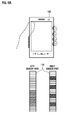
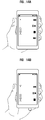
- FIG. 10A is an illustrative example showing a user's left thumb selecting one of the menu icons displayed on a touch screen.
- a specific icon e.g., Music Icon
- some of the other icons e.g., Game Icon, Display Icon, and Scheduler Icon
- these hidden icons may be in contact with the thumb, and thereby functions associated with the hidden icons may be undesirably executed.
- FIG. 10B is another illustrative example showing a user's left thumb touching a scroll bar presented on the touch screen. If the user touches the scroll bar located at the right side on the touch screen, displayed content (e.g., scene) may be hidden by the thumb. Furthermore, some displayed content may undesirably be touched with the thumb and accessed.
- displayed content e.g., scene
- An electronic device having tactile sensors may provide control of electronic device applications only if a user keeps contact with a specific part of the device without using a touch screen or a keypad.
- Such electronic devices may provide a display screen with a GUI to guide contact-based inputs. If the GUI is displayed in a fixed form regardless of a user's contact pattern, some positions in the GUI may fail to note/input the user's contact. This may be due to differences in individual hand sizes, finger sizes, and grip forms. It is difficult to realize a GUI adapted for multiple users. If no match exists between a position in the GUI and a contact point of the user's contact, confusion may be generated when a user manipulates applications on the electronic device.
- Exemplary embodiments of the present invention provide a method and apparatus for displaying a graphical user interface (GUI) adapted to a user's manipulating hand.
- GUI graphical user interface
- Exemplary embodiments of the present invention also provide an apparatus having a touch screen and a tactile sensor.
- Exemplary embodiments of the present invention disclose a method for displaying a GUI on a display unit in an apparatus including tactile sensor unit.
- the method comprises detecting at the tactile sensor unit a contact by a user, determining a contact pattern from the detected contact, and displaying the GUI corresponding to the contact pattern.
- Exemplary embodiments of the present invention provide an apparatus for displaying a GUI.
- the apparatus comprises a tactile sensor unit configured to create a contact detection signal when detecting a user's contact, including a left sensor part and a right sensor part, each sensor part having a plurality of sensor components, a display unit configured to display the GUI, and a control unit configured to receive the contact detection signal from the tactile sensor unit, to determine a contact pattern based on the contact detection signal, and to control the display unit to display the GUI corresponding to the contact pattern.
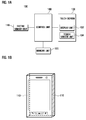
- FIG. 1A is a block diagram illustrating an internal configuration of an apparatus according to exemplary embodiments of the present invention.
- FIG. 1B shows an example of a tactile sensor unit located on lateral sides of the apparatus shown in FIG. 1A according to exemplary embodiments of the present invention.
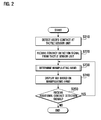
- FIG. 2 is a flow diagram illustrating a method for displaying a GUI depending on a manipulating hand according to exemplary embodiments of the present invention.
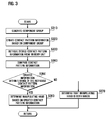
- FIG. 3 is a flow diagram illustrating an example of a detailed process of the manipulating hand determination step in the GUI display method shown in FIG. 2 according to exemplary embodiments of the present invention.
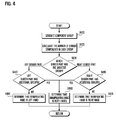
- FIG. 4 is a flow diagram that illustrates another example of a detailed process of the manipulating hand determination step in the GUI display method shown in FIG. 2 according to exemplary embodiments of the present invention.
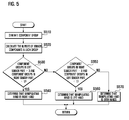
- FIG. 5 is a flow diagram illustrating another example of a detailed process of the manipulating hand determination step in the GUI display method shown in FIG. 2 according to exemplary embodiments of the present invention.
- FIG. 6A shows an example of a left hand grip and the tactile sensor unit located on a lateral side of the apparatus according to exemplary embodiments of the present invention.
- FIG. 6B shows an example of a right hand grip and the tactile sensor unit located on a lateral side of the apparatus according to exemplary embodiments of the present invention.
- FIG. 7A shows another example of a left hand grip and the tactile sensor unit located on a lateral side of the apparatus according to exemplary embodiments of the present invention.
- FIG. 7B shows another example of a right hand grip and the tactile sensor unit located on a lateral side of the apparatus according to exemplary embodiments of the present invention.
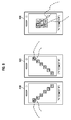
- FIG. 8 illustrates an example of a GUI according to exemplary embodiments of the present invention.
- FIG. 9 illustrates another example of a GUI according to exemplary embodiments of the present invention.
- FIG. 10A is an illustrative example showing a user's left thumb selecting one of the menu icons displayed on a touch screen according to a conventional GUI.
- FIG. 10B is another illustrative example showing a user's left thumb touching a scroll bar presented on a touch screen according to a conventional GUI.
- FIG. 11 is a flow diagram illustrating a method for displaying a GUI depending on a manipulating hand according to exemplary embodiments of the present invention.
- FIG. 12A illustrates an example of a screen on which menu icons are displayed in an idle screen application by a user's contact according to exemplary embodiments of the present invention.
- FIG. 12B illustrates an example of a screen on which displayed menu icons are changed in an idle screen application by a user's new contact according to exemplary embodiments of the present invention.
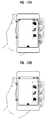
- FIG. 13A illustrates an example of a screen on which function icons are displayed in a camera application by a user's contact according to exemplary embodiments of the present invention.
- FIG. 13B illustrates an example of a screen on which the displayed function icons are changed in a camera application by a user's new contact according to exemplary embodiments of the present invention.
- FIG. 14A illustrate an example of a screen on which function icons are displayed in an MP3 application by a user's contact according to exemplary embodiments of the present invention.
- FIG. 14B illustrate an example of a screen on which the displayed function icons are changed in an MP3 application by a user's new contact according to exemplary embodiments of the present invention.
- first, second, third, etc. may be used herein to describe various elements, components, regions, layers and/or sections, these elements, components, regions, layers and/or sections should not be limited by these terms. These terms are only used to distinguish one element, component, region, layer or section from another region, layer or section. Thus, a first element, component, region, layer or section discussed below could be termed a second element, component, region, layer or section without departing from the teachings of the present invention.
- spatially relative terms such as “beneath,” “below,” “lower,” “above,” “upper” and the like, may be used herein for ease of description to describe one element or feature's relationship to another element(s) or feature(s) as illustrated in the figures. It will be understood that the spatially relative terms are intended to encompass different orientations of the device in use or operation in addition to the orientation depicted in the figures. For example, if the device in the figures is turned over, elements described as “below” or “beneath” other elements or features would then be oriented “above” the other elements or features. Thus, the exemplary term “below” can encompass both an orientation of above and below. The device may be otherwise oriented (rotated 90° or at other orientations) and the spatially relative descriptors used herein interpreted accordingly.
- GUI graphical user interface
- the GUI may include at least one window, at least one icon, at least one scroll bar, and any other graphical items used for inputting commands to the device by a user. It should be understood that exemplary embodiments of the present invention may include various types of GUIs in various shapes, designs, and configurations.
- a manipulating hand may refer to an electronic device user's hand engaged with manipulation of the electronic device's touch screen.
- the manipulating hand may include one or more hands by which a touch action is made on the touch screen. Additionally, the manipulating hand may include one or more hands in contact with the electronic device having a tactile sensor.
- the manipulating hand may be a user's left hand, right hand, or both hands.
- a tactile sensor unit or a tactile sensor may refer to at least one sensor sensitive to a user's touch.
- the tactile sensor unit may be different from touch sensors included in the touch screen and the tactile sensor unit may be located generally on at least one lateral side of the device. If a user grips the device, the tactile sensor unit may detect the contact between a user's hand and the device, create a contact detection signal, and transmit the contact detection signal to a control unit.
- the tactile sensor unit may be composed of at least one tactile sensor that can detect the extent of a contact pressure and the location of contact/pressure. Alternatively, the combination of pressure sensors and touch sensors may be used for the tactile sensor unit.
- the tactile sensor unit may include a left sensor part and a right sensor part, each of which may be composed of a plurality of sensor components.
- the tactile sensor unit may be formed on the upper side and/or the lower side, or may be formed on any and/or all sides of the device.
- Sensor components may refer to elements constituting the tactile sensor unit. Each sensor component may separately detect a user's contact. The number of sensor components included in the tactile sensor unit may be determined based on the type or size of sensor components.
- a component group may refer to a set of sensor components arranged in sequence among contact-detecting sensor components.
- the component group may be used for creating contact pattern information.
- the location of the component group and the number of sensor components included in a single component group may vary according to the user's grip form.
- FIG. 1A is a block diagram illustrating an internal configuration of an apparatus according to exemplary embodiments of the present invention.
- the apparatus 100 may be a mobile communication terminal, a portable terminal such as a personal digital assistant (PDA), a computer, a TV, or any other electronic devices having a touch screen.
- the apparatus 100 may include a tactile sensor unit 110, a memory unit 120, a touch screen 130, and a control unit 140.
- the tactile sensor unit 110 may detect contact of a user's hand when a user grips the apparatus 100.
- the tactile sensor unit 110 may detect the extent of the contact's pressure and a location of the contact/pressure.
- the tactile sensor unit 110 may be composed of tactile sensors, touch sensors, and/or a combination of pressure sensors and touch sensors.
- the tactile sensor unit 110 may be located on a lateral side of the apparatus 100, but not limited thereto. In some exemplary embodiments, the tactile sensor unit 110 may be located on every side of the apparatus 100.
- FIG. 1B shows an example of the tactile sensor unit 110 located on lateral sides of the apparatus 100. After detecting the contact of a user's hand, the tactile sensor unit 110 may transmit a contact detection signal to the control unit 140.
- the tactile sensor unit 110 may include a left sensor part and a right sensor part, each of which may be composed of a plurality of sensor components.
- the memory unit 120 may store a variety of programs required for performing functions of the apparatus 100 and data created while such functions are performed.
- the memory unit 120 may store data related to a process of assuming a manipulating hand and contact pattern information.
- the touch screen 130 may display information and may receive user input.
- the touch screen 130 may include a display unit 132 and a touch sensor unit 134.
- the display unit 132 may be formed of a liquid crystal display (LCD) or any other suitable type of display.
- the display unit 132 may provide a variety of graphical information related to states and operations of the apparatus 100.
- the display unit 132 may display a GUI depending on a manipulating hand. In some cases, the display unit 132 may display the GUI according to the position of the user's fingers that grip the apparatus 100.
- the touch sensor unit 134 may determine whether the user's hand(s) touches the touch screen or not.
- the touch sensor unit 134 may be formed of capacitive touch sensors, pressure sensors, and/or any other suitable touch-sensitive sensors. When detecting the touch of the user's hand, the touch sensor unit 134 may transmit a touch signal to the control unit 140.
- the touch signal may include coordinate data representing the user's touch location. In some cases, the touch sensor unit 134 may be not included in the apparatus 100.
- the control unit 140 may control states and operations of one or more elements of the apparatus 100. For example, the control unit 140 may receive a contact detection signal from the tactile sensor unit 110 and may determine the user's contact pattern by using the contact detection signal. Additionally, the control unit 140 may instruct the display unit 132 to display a GUI depending on the user's contact pattern.
- FIG. 2 is a flow diagram illustrating a method for displaying a GUI depending on a manipulating hand according to exemplary embodiments of the present invention.
- the tactile sensor unit 110 may detect a user's contact (S210).
- the user's contact may be a result of the user gripping the apparatus 100.
- the tactile sensor unit 110 may transmit the contact detection signal to the control unit 140.
- the control unit 140 may receive the contact detection signal from the tactile sensor unit 110 (S220). Next, the control unit 140 may determine the user's contact pattern and may thereby determine a manipulating hand (S230). Step S230 is illustrated in detail in FIG. 3 , FIG. 4 , and FIG. 5 .
- the control unit 140 may instruct the touch screen 130 to display a GUI based on the manipulating hand (S240).
- the control unit 140 may then decide whether to receive an additional contact detection signal from the tactile sensor unit 110 (S250). If the control unit 140 decides to receive additional contact detection signal(s), the method for displaying a GUI may return to step S230 to redetermine the user's contact pattern and further redetermine the manipulating hand.
- the additional contact detection signal may be provided by the tactile sensor unit 110 when the user changes a grip form.
- control unit 140 may maintain a current GUI. Thereafter, the user may manipulate the displayed GUI on the touch screen 130 to input a command to the apparatus 100.
- FIG. 3 is a flow diagram illustrating an example of a detailed process of step S230 shown in FIG. 2 according to exemplary embodiments of the present invention.
- the control unit 140 may generate at least one component group based on the contact detection signal received from the tactile sensor unit 110 (S310).
- the component group may refer to a set of sensor components arranged in one or more sequences among contact-detecting sensor components.
- FIG. 6A Exemplary embodiments of the sensor components and the component group are illustrated in FIG. 6A , FIG. 6B , FIG.7A , and FIG. 7B .
- FIG. 6A shows an example of a user holding the apparatus 100 with a left hand grip.
- the tactile sensor unit 110 may be located on a lateral side of the apparatus 100.
- the left sensor part may be located on the left lateral side of the apparatus 100, and the right sensor part may be located on the right lateral side of the apparatus 100.
- Each sensor part may be composed of a plurality of sensor components.
- the number of the sensor components may vary according to a size of the sensor components. For example, the smaller the sensor components are sized, the more sensor components may be arranged on the lateral sides of the apparatus 100. In FIG. 6A , for example, the number of the sensor components belonging to each sensor part may be twenty three. Marked components among sensor components in the left sensor part may represent components having detected contact with the left hand.
- marked components may represent components having detected contact with fingers of the left hand (e.g., four fingers except the thumb).
- Contact-detecting components may be grouped by their arrangements in sequence. For example, sequentially arranged nine components in the left sensor part may be assigned to one group. And, four pairs of two components in the right sensor part may be assigned to four groups.
- the control unit 140 may create contact pattern information based on the component group (S320). Therefore, the contact pattern information may be different based on how the user grips the apparatus 100.
- the contact pattern information may include, for example, the number of component groups in each sensor part, the location of component groups, the interval between the component groups, the number of sensor components in each component group, and/or pressure detection data of each sensor component.
- the contact pattern information of the left sensor part may contain the following data: one component group composed of nine sensor components located, for example, from the twelfth sensor component to the twentieth sensor component.
- the contact pattern information of the right sensor part may contain the following data: four component groups, each of which is composed of two sensor components located, for example, at the fourth, fifth, ninth, tenth, fourteenth, fifteenth, nineteenth and twentieth component positions. Three sensor components may be interposed between two adjacent component groups.
- the control unit 140 may retrieve stored contact pattern information from the memory unit 120 (S330).
- the memory unit 120 may store the contact pattern information, and, in general, may store different contact pattern information corresponding to different types of grip.
- Contact pattern information stored in the memory unit 120 may include, for example, the number of component groups in each sensor part, the location of component groups, the interval between the component groups, the number of sensor components in each component group, and/or pressure detection data of each sensor component.
- the control unit 140 may subsequently compare the created contact pattern information with the retrieved contact pattern information (S340). For example, the control unit 140 may execute respective comparisons of the number of component groups in each sensor part, the location of component groups, the interval between the component groups, the number of sensor components in each component group, and/or pressure detection data of each sensor component.
- the control unit 140 may also determine whether the created contact pattern information is within a range associated with the retrieved contact pattern information (S350). When the created information corresponds completely to the retrieved information, the control unit 140 may determine that the created information is within the range associated with the retrieved information. If an allowable margin is previously assigned to the contact pattern information stored in the memory unit 120, the created information may be within the allowable margin such that the created information may be determined to be within the range.
- the allowable margin may be respectively assigned to, for example, the number of component groups in each sensor part, the location of component groups, the interval between the component groups, the number of sensor components in each component group, and/or pressure detection data of each sensor component.
- the control unit 140 may determine the manipulating hand corresponding to the created contact pattern information (S360).
- the memory unit 120 may already have stored information about different manipulating hands according to different contact pattern information. If the created contact pattern information belongs to a range of the retrieved contact pattern information, the control unit 140 can determine the manipulating hand corresponding to the created contact pattern information.
- the determined manipulating hand may be the left hand, or the right hand.
- the control unit 140 may determine that the manipulating hand is both hands (S370). After determining the manipulating hand, the control unit 140 may return to the previous step S240 of displaying a GUI according to the manipulating hand.
- FIG. 4 is a flow diagram illustrating another example of a detailed process of step S230 shown in FIG. 2 according to exemplary embodiments of the present invention.
- the control unit 140 may generate at least one component group which may be a set of sensor components arranged in sequence among contact-detecting sensor components (S41 0). The control unit 140 may then calculate a number of sensor components contained in each component group (S420). For example, as noted in the example shown in FIG. 6A , a single component group in the left sensor part may have nine sensor components, and each of four component groups in the right sensor part may have two sensor components.
- the control unit 140 may determine which component group and sensor part may have the largest number of contact-detecting sensor components (S430). For example, the largest component group may be in the left sensor part or the right sensor part, and accordingly the control unit 140 may determine whether the largest sensor part is the left sensor part or the right sensor part in step S430. For example, referring to FIG. 6A , the control unit 140 may determine that the largest component group has nine sensor components and is located in the left sensor part. Referring to another example illustrated in FIG. 6B , the largest component group may have nine sensor components and may be located in the right sensor part. Therefore, the control unit 140 may determine that the largest sensor part is the right sensor part. Similarly, the largest sensor part may be the left sensor part in FIG. 7A and the right sensor part in FIG. 7B .
- the control unit 140 may further determine whether the left sensor part has additional component groups (S440).
- the additional component groups may refer to one or more component groups situated in the largest sensor part but that is not the largest component group.
- the left sensor part, which is the largest sensor part may have the largest component group and no additional component group.
- the left sensor part, together with the largest component group may have one additional component group composed of three sensor components from the third sensor component to the fifth sensor component.
- the control unit 140 may determine that the manipulating hand is the left hand (S450). The largest component group may then be considered to be in contact with the palm of the left hand. Also, having no additional component group may indicate that the thumb of the left hand may not be in contact with the tactile sensor unit 110. In these cases, the control unit 140 may determine that a user may manipulate the touch screen 130 with the thumb of the left hand. That is, the user may use his or her left hand to grip the apparatus 100 and to touch the touch screen 130. The control unit 140 may determine that the manipulating hand is the left hand.
- Similar steps may be taken if the manipulating hand is determined to be the right hand. For example, if the largest sensor part is the right sensor part, the control unit 140 may determine whether the right sensor part has additional component groups (S460). If the right sensor part has no additional component group, as shown in FIG. 6B , the control unit 140 may determine that the manipulating hand is the right hand (S470).
- the control unit 140 may determine that both hands may be the manipulating hand (S480).
- the presence of additional component groups may indicate that the thumb of the user's gripping hand is in contact with the tactile sensor unit 110.
- the control unit 140 may determine that a user may manipulate the touch screen 130 with the thumb of a non-gripping hand. So, the control unit 140 determines that the manipulating hand is both hands.
- FIG. 5 is a flow diagram illustrating another example of a detailed process of step S230 shown in FIG. 2 according to exemplary embodiments of the present invention.
- the control unit 140 may generate at least one component group which may be a set of sensor components arranged in sequence among contact-detecting sensor components (S51 0).
- the control unit 140 may calculate the number of component groups contained in each sensor part (S520).
- the sensor parts may be the left sensor part and the right sensor part.
- the control unit 140 may calculate simultaneously the number of component groups in the left sensor part and the right sensor part.
- the number of component groups may be one in the left sensor part and four in the right sensor part.
- the number of component groups may be four in the left sensor part and one in the right sensor part.
- the number of component groups may be two in the left sensor part and four in the right sensor part.
- the number of component groups may be four in the left sensor part and two in the right sensor part.
- the control unit 140 may determine whether the number of component groups is three or more in the left sensor part and one or less in the right sensor part (S530). If the number of component groups is three or more in the left sensor part and one or less in the right sensor part, the control unit 140 may determine that the manipulating hand is the user's right hand (S540). Three or more component groups in the left sensor part may indicate that at least three fingers except the thumb are in contact with the left sensor part. One or less component group in the right sensor part may indicate that the palm of the user's right hand is in contact with the right sensor part but the thumb may not be in contact. In such cases, the control unit 140 may determine that the user may manipulate the touch screen with the user's right hand thumb. That is, a user's right hand may be used to grip the apparatus 100 and to touch the touch screen 130. Accordingly, the control unit 140 may determine that the manipulating hand is the right hand.
- control unit 140 may determine whether the number of component groups is three or more in the right sensor part and is one or less in the left sensor part (S550).
- control unit 140 may determine that the manipulating hand is both hands (S570).
- FIG. 8 illustrates an example of a GUI according to exemplary embodiments of the present invention.
- FIG. 8 illustrates an exemplary embodiment of a display screen 810 having menu icons and with the left hand determined to be the manipulating hand.
- the control unit 140 may arrange the menu icons from the upper left corner to the lower right corner of the display screen 810 to correspond to a moving path of the left thumb. Accordingly, a user can select icons by touching the display screen 810 with his or her left thumb to execute desired functions corresponding to the selected icons. Since the menu icons are arranged along a moving path of the left thumb, no icon may be hidden from the thumb and an unexpected touch of an icon may be prevented.
- FIG. 8 also illustrates an exemplary embodiment of a display screen 820 with the right hand determined to be the manipulating hand.
- the control unit 140 may arrange the menu icons along a moving path of the right thumb.
- the control unit 140 may maintain a normal GUI changeable according to the user's intent.
- FIG. 9 illustrates another example of a GUI according to exemplary embodiments of the present invention.
- FIG. 9 illustrates an exemplary embodiment of a display screen 910 having a scroll bar and with the left hand determined to be the manipulating hand.
- the control unit 140 may arrange the scroll bar along the left side of the display screen 910 to correspond to a moving path of the left thumb. Accordingly, a user can move up and down the scroll bar by dragging it with the user's left thumb. Since the scroll bar may be arranged along the left side, displayed content may not be hidden by the thumb and an unexpected touch of the displayed content may be prevented.
- FIG. 9 also illustrates an exemplary embodiment of a display screen 920 having a scroll bar and with the right hand determined to be the manipulating hand.
- the control unit 140 may arrange the scroll bar along the right side of the display screen 920 to correspond to a moving path of the right thumb. Therefore, a user can move/drag the scroll bar with the user's right thumb without covering or touching displayed content. Accordingly, an unexpected touch to the displayed content may be prevented while the user drags the scroll bar.
- the control unit 140 may maintain a normal GUI changeable when both hands are determined to be the manipulating hand.
- FIG. 11 is a flow diagram illustrating a method for displaying a GUI based on a manipulating hand according to exemplary embodiments of the present invention.
- the method described with reference to FIG. 11 may be applicable, for example, when a user uses the tactile sensor unit 110 to input a command to the apparatus 100.
- the tactile sensor unit 110 may detects a user's contact (S1110).
- the user's contact may correspond to the user's gripping of the apparatus 100.
- the user can grip the apparatus 100 with one hand as shown in FIG. 12A and FIG. 12B or with both hands as shown in FIG. 13A and FIG. 13B .
- the tactile sensor unit 110 may transmits the contact detection signal, which includes information about the location and pressure of contacts, to the control unit 140.
- the control unit 140 may receive the contact detection signal from the tactile sensor unit 110 (S1120). Next, the control unit 140 may determine the user's contact pattern depending on the contact detection signal (S1130). Determination of the user's contact pattern may be based on information about the location and pressure of contacts. In some cases, the memory unit 120 may store a list of the user's grip forms in connection with the location and pressure of the user's contacts. The control unit 140 may retrieve, from the memory unit 120, a specific grip form corresponding to the received information about the location and pressure of contacts. For example, the control unit 140 may determine that a user's left hand grips the apparatus 100 if two contact detection signals from the left sensor part and four contact detection signals from the right sensor part, as shown in FIG. 12A , are received.
- the control unit 140 may instruct the display unit 132 to display a GUI at a specific location on the display unit 132 depending on the user's contact location (S1140). Specifically, the control unit 140 may first identify the currently executed application (before displaying a GUI), and may then select GUI elements corresponding to the currently executed application. For example, when an idle screen application is running, the control unit 140 may select menu icons as GUI elements for an idle screen. In other cases, if a camera application is running, the control unit 140 may select an icon for taking a photo and a scroll bar for zooming in/out to display. After selecting customized GUI elements, the control unit 140 may determine a GUI arranging pattern based on the currently executed application and the user's grip form. For example, referring to FIG. 12A and FIG.
- the control unit 140 may recognize an idle screen application as the currently executed application and may also determine that the user's left hand is gripping the apparatus 100. The control unit 140 may then determine a GUI arranging pattern such that menu icons may be disposed near a contact location of at least one of four fingers (except the thumb) of the user's left hand.
- control unit 140 may instruct the display unit 132 to display GUI elements based on the GUI arranging pattern. That is, previously selected GUI elements may be displayed on the display unit 132 according to the GUI arranging pattern.
- FIG. 12A and FIG. 12B illustrate two examples of a screen in which menu icons are displayed in an idle screen application according to exemplary embodiments of the present invention.
- three menu icons may be disposed at positions in a widthwise direction from three finger contact locations.
- the memory unit 120 may store rankings of how frequently the menus and menu icons are used.
- the control unit 140 may arrange menu icons in order of the usage frequency. For example, when a user grips the apparatus 100 during the execution of an idle screen application, the control unit 140 may retrieve the usage frequency rankings of menus from the memory unit 120 and may instruct the display unit 132 to display menu icons according to the retrieved rankings.
- the display of icons in the display unit 132 may be changed according to the user's preference.
- the control unit 140 may also change the location of GUI elements according to the pressure of the user's contact. Referring to FIG. 12A and FIG. 12B , when the user increases the pressure (e.g., pressure increases beyond a predetermined pressure threshold) of contacts while gripping the apparatus 100, menu icons displayed on the display unit 132 may move towards the right side of the screen, namely, towards the pressed fingers. Furthermore, the control unit 140 may execute a specific application when the corresponding icon reaches the right side of the display unit 132. In some cases, the control unit 140 may decide whether to execute applications based on the contact pressure of the user's fingers and/or when the icons reach the right side of the display unit 132.
- the pressure e.g., pressure increases beyond a predetermined pressure threshold
- the control unit 140 may also change the display size of GUI elements according to the pressure of a user's contact. For example, when the user increases the pressure of contacts, menu icons displayed on the display unit 132 may be enlarged or reduced in size. An increase of contact pressure may highlight menu icons displayed on the display unit 132.
- FIG. 13A and FIG. 13B illustrate two examples of a screen in which function icons are displayed in a camera application according to exemplary embodiments of the present invention.
- a user may grip the apparatus 100 with thumbs and forefingers of both hands.
- An icon for taking a photo may be located at a position close to the forefinger of the right hand, and a scroll bar for zooming in/out may be located at a position in a lengthwise direction from the thumb of the right hand. If the user increases the pressure of contact by the right forefinger, an icon for taking a photo moves towards the right forefinger. When this icon reaches the upper side of the display unit 132, a function of taking a photo may be executed. In addition, the user can increase the pressure of contact by the right thumb to regulate zooming in/out.
- FIG. 14A and FIG. 14B illustrate two examples of a screen on which function icons are displayed in an MP3 application.
- a user may grip the apparatus 100 with the left hand.
- Function icons may be displayed depending on the contact locations of fingers of the left hand except the thumb, whereas a volume control bar may be displayed depending on the contact location of the thumb.
- the displayed function icons may follow a predefined GUI arranging pattern.
- the user can regulate execution of an MP3 application by increasing a contact pressure or taking an action such as tapping.
- the location, size, and/or expression effect of icons may vary according to the user's contact.
- the control unit 140 may determine whether the user's contact location has changed (S1150). Specifically, when a user changes a grip form while gripping the apparatus 100, the tactile sensor unit 110 may detect a change in the user's contact and may generate a new contact detection signal. The control unit 140 may then receive the new contact detection signal from the tactile sensor unit 110, may determine the user's contact pattern again, and may modify display of a GUI depending on the new contact pattern.
- the user's contact in FIG. 12B may be different than the user's contact in FIG. 12A .
- the location of fingers may have moved downward in FIG. 12B .
- the control unit 140 may receive a new contact detection signal from the tactile sensor unit 110 and may determine a new contact pattern based on new information about the location and pressure of contacts. The control unit 140 may then instruct the display of a GUI to change according to the new contact pattern.
- the user's right forefinger may have moved (e.g., to the left) in FIG. 13B , as compared to FIG. 13A .
- the control unit 140 may receive a new contact detection signal, determine a new contact pattern, and move the photo icon toward a current forefinger contact, as shown in FIG. 13B .
- the number of contacts as well as the location of contacts may change. For example, four contacts on the right side in FIG. 14A may move downward and may be reduced to three contacts in FIG. 14B .
- a contact on the left side may move downward.
- a volume control bar may also move downward along the left side.
- a backward icon, a play/pause icon, and a stop icon may move downward along the right side, whereas a forward icon corresponding to the a finger (e.g., smallest finger) of the left hand may be removed from the display unit 132.
- exemplary embodiments of the present invention disclose a a method and apparatus for displaying and modifying a GUI depending on the location and pressure of a user's contacts. Accordingly, exemplary embodiments of the present invention may prevent confusion when a user manipulates an apparatus.
Landscapes
- Engineering & Computer Science (AREA)
- Theoretical Computer Science (AREA)
- General Engineering & Computer Science (AREA)
- Human Computer Interaction (AREA)
- Physics & Mathematics (AREA)
- General Physics & Mathematics (AREA)
- Computer Hardware Design (AREA)
- User Interface Of Digital Computer (AREA)
Priority Applications (1)
| Application Number | Priority Date | Filing Date | Title |
|---|---|---|---|
| EP20150507.0A EP3654141A1 (fr) | 2008-10-06 | 2009-08-10 | Procédé et appareil pour afficher une interface graphique utilisateur en fonction d'un motif de contact de l'utilisateur |
Applications Claiming Priority (2)
| Application Number | Priority Date | Filing Date | Title |
|---|---|---|---|
| KR20080097591 | 2008-10-06 | ||
| KR1020090012687A KR20100039194A (ko) | 2008-10-06 | 2009-02-17 | 사용자 접촉 패턴에 따른 GUI(Graphic User Interface) 표시 방법 및 이를 구비하는 장치 |
Related Child Applications (2)
| Application Number | Title | Priority Date | Filing Date |
|---|---|---|---|
| EP20150507.0A Division EP3654141A1 (fr) | 2008-10-06 | 2009-08-10 | Procédé et appareil pour afficher une interface graphique utilisateur en fonction d'un motif de contact de l'utilisateur |
| EP20150507.0A Division-Into EP3654141A1 (fr) | 2008-10-06 | 2009-08-10 | Procédé et appareil pour afficher une interface graphique utilisateur en fonction d'un motif de contact de l'utilisateur |
Publications (3)
| Publication Number | Publication Date |
|---|---|
| EP2175344A2 true EP2175344A2 (fr) | 2010-04-14 |
| EP2175344A3 EP2175344A3 (fr) | 2012-02-01 |
| EP2175344B1 EP2175344B1 (fr) | 2020-02-12 |
Family
ID=41259115
Family Applications (2)
| Application Number | Title | Priority Date | Filing Date |
|---|---|---|---|
| EP20150507.0A Ceased EP3654141A1 (fr) | 2008-10-06 | 2009-08-10 | Procédé et appareil pour afficher une interface graphique utilisateur en fonction d'un motif de contact de l'utilisateur |
| EP09167533.0A Active EP2175344B1 (fr) | 2008-10-06 | 2009-08-10 | Procédé et appareil pour afficher une interface graphique utilisateur en fonction d'un motif de contact de l'utilisateur |
Family Applications Before (1)
| Application Number | Title | Priority Date | Filing Date |
|---|---|---|---|
| EP20150507.0A Ceased EP3654141A1 (fr) | 2008-10-06 | 2009-08-10 | Procédé et appareil pour afficher une interface graphique utilisateur en fonction d'un motif de contact de l'utilisateur |
Country Status (2)
| Country | Link |
|---|---|
| US (4) | US8493342B2 (fr) |
| EP (2) | EP3654141A1 (fr) |
Cited By (49)
| Publication number | Priority date | Publication date | Assignee | Title |
|---|---|---|---|---|
| WO2012117149A1 (fr) * | 2011-02-28 | 2012-09-07 | Nokia Corporation | Surface tactile |
| WO2013023183A1 (fr) * | 2011-08-10 | 2013-02-14 | Google Inc. | Dispositif tactile ayant une interface utilisateur dynamique |
| EP2584452A1 (fr) * | 2011-10-17 | 2013-04-24 | Sony Mobile Communications Japan, Inc. | Dispositif de traitement d'informations avec détection de l'état dans lequel il est maintenu |
| CN103164112A (zh) * | 2011-12-15 | 2013-06-19 | 三星电子株式会社 | 使用握持传感器的基于用户的用户终端显示控制装置和方法 |
| WO2013190850A1 (fr) * | 2012-06-22 | 2013-12-27 | パナソニック株式会社 | Appareil d'informations |
| WO2014000250A1 (fr) | 2012-06-29 | 2014-01-03 | Intel Corporation | Fourniture d'une interface utilisateur sur la base d'une interaction d'un utilisateur avec un dispositif informatique |
| WO2014047361A3 (fr) * | 2012-09-21 | 2014-05-08 | Google Inc. | Détermination d'une main dominante d'un utilisateur d'un dispositif informatique |
| EP2757459A1 (fr) * | 2013-01-16 | 2014-07-23 | Samsung Electronics Co., Ltd | Appareil et procédé pour système d'affichage de bord-à-bord adaptatif pour dispositifs tactiles multiples |
| EP2706441A4 (fr) * | 2011-05-02 | 2014-09-24 | Nec Casio Mobile Comm Ltd | Terminal portable de type à écran tactile et procédé d'opération d'entrée |
| EP2784630A1 (fr) * | 2013-03-13 | 2014-10-01 | Immersion Corporation | Procédé et dispositifs permettant d'afficher des interfaces graphiques d'utilisateur sur la base de contact de l'utilisateur |
| EP2804079A1 (fr) * | 2013-05-17 | 2014-11-19 | Alcatel Lucent | Procédé et équipement utilisateur |
| EP2816442A1 (fr) * | 2013-06-20 | 2014-12-24 | Samsung Electronics Co., Ltd | Dispositif électronique et procédé de commande de dispositif électronique au moyen de détection de saisie |
| EP2824560A1 (fr) * | 2013-07-10 | 2015-01-14 | LG Electronics, Inc. | Terminal mobile et son procédé de contrôle |
| EP2804088A3 (fr) * | 2013-05-16 | 2015-03-11 | Samsung Electronics Co., Ltd | Terminal mobile et son procédé de contrôle |
| GB2522755A (en) * | 2013-12-05 | 2015-08-05 | Lenovo Singapore Pte Ltd | Contact signature control of device |
| WO2015178094A1 (fr) * | 2014-05-23 | 2015-11-26 | シャープ株式会社 | Terminal portable et procédé de traitement d'opération mis en œuvre par un terminal portable |
| US9215302B2 (en) | 2013-05-10 | 2015-12-15 | Google Technology Holdings LLC | Method and device for determining user handedness and controlling a user interface |
| EP2955603A1 (fr) * | 2014-06-09 | 2015-12-16 | Fujifilm Corporation | Équipement electronique avec dispositif d'affichage |
| EP2977886A1 (fr) * | 2014-07-23 | 2016-01-27 | Analog Devices, Inc. | Capteur capacitif pour détection de préhension et suivi de taquet |
| US9367085B2 (en) | 2012-01-26 | 2016-06-14 | Google Technology Holdings LLC | Portable electronic device and method for controlling operation thereof taking into account which limb possesses the electronic device |
| EP2680099A3 (fr) * | 2012-06-26 | 2016-07-20 | LG Electronics, Inc. | Terminal mobile et son procédé de contrôle |
| EP2939092A4 (fr) * | 2012-12-28 | 2016-08-24 | Intel Corp | Adapter une interface utilisateur en fonction de la main utilisant le dispositif informatique mobile |
| US9489502B2 (en) | 2014-02-04 | 2016-11-08 | Lenovo (Singapore) Pte. Ltd. | Biometric authentication display |
| EP2629181A4 (fr) * | 2010-10-13 | 2017-03-29 | NEC Corporation | Dispositif de terminal mobile et procédé d'affichage pour un panneau tactile dans un dispositif de terminal mobile |
| EP3176686A1 (fr) * | 2015-12-01 | 2017-06-07 | Xiaomi Inc. | Procédé et dispositif de manipulation d'objet d'une interface utilisateur |
| US9692875B2 (en) | 2012-08-31 | 2017-06-27 | Analog Devices, Inc. | Grip detection and capacitive gesture system for mobile devices |
| US9697342B2 (en) | 2014-02-04 | 2017-07-04 | Lenovo (Singapore) Pte. Ltd. | Biometric authentication stripe |
| JP2017524176A (ja) * | 2014-06-18 | 2017-08-24 | ゼットティーイー コーポレーションZte Corporation | 携帯端末インターフェースの調整方法、装置及び端末 |
| JP2017161985A (ja) * | 2016-03-07 | 2017-09-14 | 京セラドキュメントソリューションズ株式会社 | 入力装置および入力方法 |
| EP2533145A3 (fr) * | 2011-06-10 | 2017-12-13 | Samsung Electronics Co., Ltd. | Appareil et procédé pour fournir une interface utilisateur dynamique en prenant en considération des caractéristiques physiques d'un utilisateur |
| WO2017213748A1 (fr) * | 2016-06-08 | 2017-12-14 | Qualcomm Incorporated | Fourniture de boutons virtuels dans un dispositif portatif |
| US9959038B2 (en) | 2012-08-30 | 2018-05-01 | Google Llc | Displaying a graphic keyboard |
| EP3296850A4 (fr) * | 2015-05-14 | 2018-05-16 | Oneplus Technology (Shenzhen) Co., Ltd. | Procédé et dispositif pour gérer un aperçu de contenu de notification sur un terminal mobile, et support de stockage |
| EP3187990A4 (fr) * | 2014-08-29 | 2018-05-23 | Huizhou TCL Mobile Communication Co., Ltd. | Procédé d'affichage et terminal mobile |
| US10001808B1 (en) | 2017-03-29 | 2018-06-19 | Google Llc | Mobile device accessory equipped to communicate with mobile device |
| US10013081B1 (en) | 2017-04-04 | 2018-07-03 | Google Llc | Electronic circuit and method to account for strain gauge variation |
| US10095342B2 (en) | 2016-11-14 | 2018-10-09 | Google Llc | Apparatus for sensing user input |
| WO2018194718A1 (fr) * | 2017-04-18 | 2018-10-25 | Google Llc | Interface d'entrée d'utilisateur pour un dispositif électronique |
| US10162954B2 (en) | 2014-02-04 | 2018-12-25 | Lenovo (Singapore) Pte. Ltd. | Biometric account card |
| US10423270B2 (en) | 2016-06-13 | 2019-09-24 | Lg Electronic Inc. | Mobile terminal |
| EP3605292A1 (fr) * | 2018-07-31 | 2020-02-05 | Samsung Display Co., Ltd. | Capteur de force et afficheur le comprenant |
| EP3617834A1 (fr) * | 2018-09-03 | 2020-03-04 | HTC Corporation | Procédé de fonctionnement d'un dispositif portatif, dispositif portatif et support d'enregistrement lisible par ordinateur correspondant |
| EP3579089A3 (fr) * | 2018-05-17 | 2020-04-08 | Samsung Display Co., Ltd. | Capteur de force et afficheur le comprenant |
| US10635255B2 (en) | 2017-04-18 | 2020-04-28 | Google Llc | Electronic device response to force-sensitive interface |
| US10861908B2 (en) | 2018-08-20 | 2020-12-08 | Samsung Display Co., Ltd. | Display device |
| EP3792740A1 (fr) * | 2019-09-12 | 2021-03-17 | Beijing Xiaomi Mobile Software Co., Ltd. | Procédé et dispositif de réglage de clés et support d'enregistrement |
| EP3196748B1 (fr) * | 2013-12-20 | 2021-07-14 | Sony Corporation | Appareil de traitement d'informations, procédé et programme de traitement d'informations |
| EP3819751A4 (fr) * | 2018-08-29 | 2021-07-28 | Sony Group Corporation | Dispositif de traitement d'informations et procédé de traitement d'informations |
| EP3716026B1 (fr) * | 2019-03-29 | 2025-11-26 | Beijing Xiaomi Mobile Software Co., Ltd. | Procédé et appareil pour la prévention de fausses manoeuvres sur une arête et support d'enregistrement |
Families Citing this family (216)
| Publication number | Priority date | Publication date | Assignee | Title |
|---|---|---|---|---|
| US10048860B2 (en) | 2006-04-06 | 2018-08-14 | Google Technology Holdings LLC | Method and apparatus for user interface adaptation |
| CN102124435B (zh) * | 2009-05-19 | 2014-11-05 | 松下电器(美国)知识产权公司 | 内容显示装置及内容显示方法 |
| US20100310193A1 (en) * | 2009-06-08 | 2010-12-09 | Castleman Mark | Methods and apparatus for selecting and/or displaying images of perspective views of an object at a communication device |
| US8286084B2 (en) * | 2009-06-08 | 2012-10-09 | Swakker Llc | Methods and apparatus for remote interaction using a partitioned display |
| US8810516B2 (en) * | 2009-09-30 | 2014-08-19 | At&T Mobility Ii Llc | Angular sensitized keypad |
| US20110074692A1 (en) * | 2009-09-30 | 2011-03-31 | At&T Mobility Ii Llc | Devices and Methods for Conforming a Virtual Keyboard |
| US8812972B2 (en) * | 2009-09-30 | 2014-08-19 | At&T Intellectual Property I, L.P. | Dynamic generation of soft keyboards for mobile devices |
| US9128610B2 (en) * | 2009-09-30 | 2015-09-08 | At&T Mobility Ii Llc | Virtual predictive keypad |
| US8816965B2 (en) * | 2009-09-30 | 2014-08-26 | At&T Mobility Ii Llc | Predictive force sensitive keypad |
| US9122393B2 (en) * | 2009-09-30 | 2015-09-01 | At&T Mobility Ii Llc | Predictive sensitized keypad |
| JP5458783B2 (ja) * | 2009-10-01 | 2014-04-02 | ソニー株式会社 | 情報処理装置、情報処理方法およびプログラム |
| US8161417B1 (en) * | 2009-11-04 | 2012-04-17 | Sprint Communications Company L.P. | Enhancing usability of a moving touch screen |
| JP5355369B2 (ja) * | 2009-12-10 | 2013-11-27 | キヤノン株式会社 | データ処理装置、データ処理システム及びデータ処理装置での表示を制御する表示制御方法 |
| JP5370144B2 (ja) * | 2009-12-28 | 2013-12-18 | ソニー株式会社 | 操作方向判定装置、遠隔操作システム、操作方向判定方法およびプログラム |
| JP5526789B2 (ja) * | 2010-01-08 | 2014-06-18 | ソニー株式会社 | 情報処理装置およびプログラム |
| WO2011161892A1 (fr) * | 2010-06-23 | 2011-12-29 | パナソニック株式会社 | Dispositif de commande de marche, procédé de commande de marche, et dispositif d'entrée |
| US8593418B2 (en) * | 2010-08-08 | 2013-11-26 | Qualcomm Incorporated | Method and system for adjusting display content |
| US8531417B2 (en) * | 2010-09-02 | 2013-09-10 | Blackberry Limited | Location of a touch-sensitive control method and apparatus |
| WO2012079153A1 (fr) * | 2010-12-15 | 2012-06-21 | Userful Corporation | Procédé informatique multi-utilisateur et système pour celui-ci |
| US9250738B2 (en) | 2011-02-22 | 2016-02-02 | International Business Machines Corporation | Method and system for assigning the position of a touchpad device |
| JP2012174247A (ja) * | 2011-02-24 | 2012-09-10 | Kyocera Corp | 携帯電子機器、接触操作制御方法および接触操作制御プログラム |
| JP5810554B2 (ja) * | 2011-02-28 | 2015-11-11 | ソニー株式会社 | 電子装置、表示方法、およびプログラム |
| EP2500814B1 (fr) * | 2011-03-13 | 2019-05-08 | LG Electronics Inc. | Appareil d'affichage transparent et son procédé de fonctionnement |
| JP2012194810A (ja) * | 2011-03-16 | 2012-10-11 | Kyocera Corp | 携帯電子機器、接触操作制御方法および接触操作制御プログラム |
| JP2012238128A (ja) * | 2011-05-11 | 2012-12-06 | Kddi Corp | 背面入力機能を有する情報機器、背面入力方法、およびプログラム |
| CN102221965A (zh) * | 2011-05-18 | 2011-10-19 | 惠州Tcl移动通信有限公司 | 一种调整主菜单布局的方法及终端设备 |
| KR101789332B1 (ko) * | 2011-06-03 | 2017-10-24 | 삼성전자주식회사 | 휴대단말기에서 홈 스크린을 표시하는 방법 |
| JP5453351B2 (ja) * | 2011-06-24 | 2014-03-26 | 株式会社Nttドコモ | 移動情報端末、操作状態判定方法、プログラム |
| WO2012176371A1 (fr) * | 2011-06-24 | 2012-12-27 | 株式会社村田製作所 | Dispositif portable |
| JP5790203B2 (ja) * | 2011-06-29 | 2015-10-07 | ソニー株式会社 | 情報処理装置、情報処理方法、プログラム、および遠隔操作システム |
| JP5588931B2 (ja) * | 2011-06-29 | 2014-09-10 | 株式会社Nttドコモ | 移動情報端末、配置領域取得方法、プログラム |
| US9671954B1 (en) * | 2011-07-11 | 2017-06-06 | The Boeing Company | Tactile feedback devices for configurable touchscreen interfaces |
| US20130019201A1 (en) * | 2011-07-11 | 2013-01-17 | Microsoft Corporation | Menu Configuration |
| US20130019192A1 (en) * | 2011-07-13 | 2013-01-17 | Lenovo (Singapore) Pte. Ltd. | Pickup hand detection and its application for mobile devices |
| JP5799628B2 (ja) | 2011-07-15 | 2015-10-28 | ソニー株式会社 | 情報処理装置、情報処理方法、及びプログラム |
| US9417754B2 (en) | 2011-08-05 | 2016-08-16 | P4tents1, LLC | User interface system, method, and computer program product |
| JP6007469B2 (ja) * | 2011-09-01 | 2016-10-12 | ソニー株式会社 | 情報処理装置、表示制御方法、およびプログラム |
| WO2013035229A1 (fr) * | 2011-09-05 | 2013-03-14 | Necカシオモバイルコミュニケーションズ株式会社 | Appareil de terminal portable, procédé de commande de terminal portable et programme |
| JP2013065085A (ja) * | 2011-09-15 | 2013-04-11 | Nec Saitama Ltd | 携帯端末装置及びその表示方法 |
| CN103019554A (zh) * | 2011-09-20 | 2013-04-03 | 联想(北京)有限公司 | 命令识别方法及使用该方法的电子设备 |
| US9317156B2 (en) | 2011-09-30 | 2016-04-19 | Intel Corporation | Mobile device rejection of unintentional touch sensor contact |
| GB2496378B (en) | 2011-11-03 | 2016-12-21 | Ibm | Smart window creation in a graphical user interface |
| WO2013101220A1 (fr) * | 2011-12-30 | 2013-07-04 | Intel Corporation | Mise en œuvre de dispositif mobile par utilisation de l'intensité de saisie |
| US9588585B2 (en) * | 2012-01-13 | 2017-03-07 | Kyocera Corporation | Electronic device and control method of electronic device |
| US20140320536A1 (en) * | 2012-01-24 | 2014-10-30 | Google Inc. | Methods and Systems for Determining Orientation of a Display of Content on a Device |
| JP5926968B2 (ja) * | 2012-02-01 | 2016-05-25 | シャープ株式会社 | 表示装置及び表示方法、プログラム |
| US9001058B2 (en) * | 2012-03-05 | 2015-04-07 | International Business Machines Corporation | Computer action detection |
| USD730370S1 (en) | 2012-04-10 | 2015-05-26 | Google Inc. | Display screen of a communication terminal with a graphical user interface |
| US20130265235A1 (en) * | 2012-04-10 | 2013-10-10 | Google Inc. | Floating navigational controls in a tablet computer |
| CN103379211A (zh) * | 2012-04-23 | 2013-10-30 | 华为终端有限公司 | 一种自动切换手持模式的方法及无线手持设备 |
| WO2013169846A1 (fr) | 2012-05-09 | 2013-11-14 | Yknots Industries Llc | Dispositif, procédé et interface graphique utilisateur pour afficher des informations supplémentaires en réponse à un contact d'utilisateur |
| WO2013169875A2 (fr) | 2012-05-09 | 2013-11-14 | Yknots Industries Llc | Dispositif, méthode et interface utilisateur graphique d'affichage de contenu associé à une affordance correspondante |
| EP2847662B1 (fr) | 2012-05-09 | 2020-02-19 | Apple Inc. | Dispositif, procédé et interface d'utilisateur graphique pour obtenir une rétroaction destinée à modifier des états d'activation d'un objet d'interface d'utilisateur |
| WO2013169849A2 (fr) * | 2012-05-09 | 2013-11-14 | Industries Llc Yknots | Dispositif, procédé et interface utilisateur graphique permettant d'afficher des objets d'interface utilisateur correspondant à une application |
| WO2013169843A1 (fr) | 2012-05-09 | 2013-11-14 | Yknots Industries Llc | Dispositif, procédé et interface graphique utilisateur pour manipuler des objets graphiques encadrés |
| EP2847659B1 (fr) | 2012-05-09 | 2019-09-04 | Apple Inc. | Dispositif, procédé et interface graphique utilisateur permettant une transition entre des états d'affichage en réponse à un geste |
| WO2013169865A2 (fr) | 2012-05-09 | 2013-11-14 | Yknots Industries Llc | Dispositif, procédé et interface d'utilisateur graphique pour déplacer un objet d'interface d'utilisateur en fonction d'une intensité d'une entrée d'appui |
| WO2013169845A1 (fr) | 2012-05-09 | 2013-11-14 | Yknots Industries Llc | Dispositif, procédé et interface graphique utilisateur pour faire défiler des régions imbriquées |
| CN104508618B (zh) | 2012-05-09 | 2018-01-05 | 苹果公司 | 用于针对在用户界面中执行的操作提供触觉反馈的设备、方法和图形用户界面 |
| JP6031186B2 (ja) | 2012-05-09 | 2016-11-24 | アップル インコーポレイテッド | ユーザインタフェースオブジェクトを選択するためのデバイス、方法及びグラフィカルユーザインタフェース |
| WO2013169851A2 (fr) | 2012-05-09 | 2013-11-14 | Yknots Industries Llc | Dispositif, procédé et interface d'utilisateur graphique pour faciliter l'interaction de l'utilisateur avec des commandes dans une interface d'utilisateur |
| CN104487930A (zh) | 2012-05-09 | 2015-04-01 | 苹果公司 | 用于移动和放置用户界面对象的设备、方法和图形用户界面 |
| WO2013169842A2 (fr) | 2012-05-09 | 2013-11-14 | Yknots Industries Llc | Dispositif, procédé, et interface utilisateur graphique permettant de sélectionner un objet parmi un groupe d'objets |
| US9098192B2 (en) * | 2012-05-11 | 2015-08-04 | Perceptive Pixel, Inc. | Overscan display device and method of using the same |
| KR101979666B1 (ko) | 2012-05-15 | 2019-05-17 | 삼성전자 주식회사 | 표시부에 출력되는 입력 영역 운용 방법 및 이를 지원하는 단말기 |
| US20150135145A1 (en) * | 2012-06-15 | 2015-05-14 | Nikon Corporation | Electronic device |
| US20140043277A1 (en) * | 2012-08-09 | 2014-02-13 | Nokia Corporation | Apparatus and associated methods |
| US20170083109A1 (en) * | 2013-05-20 | 2017-03-23 | Yonggui Li | Keyboard and mouse of handheld digital device |
| JP5798532B2 (ja) * | 2012-08-23 | 2015-10-21 | 株式会社Nttドコモ | ユーザインタフェース装置、ユーザインタフェース方法及びプログラム |
| US20140359475A1 (en) * | 2013-05-29 | 2014-12-04 | Microsoft Corporation | Dynamic Panel of Inlined Control Settings |
| CN102937873B (zh) * | 2012-10-12 | 2015-09-16 | 天津三星通信技术研究有限公司 | 在便携式终端中进行键盘输入的方法和设备 |
| JP6278593B2 (ja) * | 2012-11-14 | 2018-02-14 | 京セラ株式会社 | 携帯端末装置、プログラムおよび表示制御方法 |
| KR20140070745A (ko) * | 2012-11-26 | 2014-06-11 | 삼성전자주식회사 | 디스플레이 장치 및 이의 구동 방법 |
| JP5874625B2 (ja) * | 2012-12-20 | 2016-03-02 | カシオ計算機株式会社 | 入力装置、入力操作方法及び制御プログラム並びに電子機器 |
| AU2013368441B2 (en) | 2012-12-29 | 2016-04-14 | Apple Inc. | Device, method, and graphical user interface for forgoing generation of tactile output for a multi-contact gesture |
| AU2013368443B2 (en) | 2012-12-29 | 2016-03-24 | Apple Inc. | Device, method, and graphical user interface for transitioning between touch input to display output relationships |
| WO2014105274A1 (fr) | 2012-12-29 | 2014-07-03 | Yknots Industries Llc | Dispositif, procédé et interface utilisateur graphique pour naviguer dans des hiérarchies d'interface utilisateur |
| WO2014105279A1 (fr) | 2012-12-29 | 2014-07-03 | Yknots Industries Llc | Dispositif, procédé et interface utilisateur graphique pour une commutation entre des interfaces utilisateur |
| HK1215094A1 (zh) | 2012-12-29 | 2016-08-12 | Apple Inc. | 用於根據具有模擬三維特徵的控制圖標的外觀變化來移動光標的設備、方法和圖形用戶界面 |
| CN107831991B (zh) | 2012-12-29 | 2020-11-27 | 苹果公司 | 用于确定是滚动还是选择内容的设备、方法和图形用户界面 |
| US9354786B2 (en) | 2013-01-04 | 2016-05-31 | Apple Inc. | Moving a virtual object based on tapping |
| US9086796B2 (en) * | 2013-01-04 | 2015-07-21 | Apple Inc. | Fine-tuning an operation based on tapping |
| JP5805685B2 (ja) * | 2013-02-27 | 2015-11-04 | 京セラ株式会社 | 電子機器、制御方法、及び制御プログラム |
| KR102241291B1 (ko) * | 2013-03-14 | 2021-04-16 | 삼성전자주식회사 | 전자 장치 및 그 동작 방법 |
| US20140320420A1 (en) * | 2013-04-25 | 2014-10-30 | Sony Corporation | Method and apparatus for controlling a mobile device based on touch operations |
| US9389727B2 (en) * | 2013-06-26 | 2016-07-12 | Atmel Corporation | Method and system to determine when a device is being held |
| WO2015047360A1 (fr) * | 2013-09-29 | 2015-04-02 | Rinand Solutions Llc | Enveloppe conforme à la détection de force |
| US9176635B2 (en) * | 2013-10-14 | 2015-11-03 | Parade Technologies, Ltd. | Virtual buttons for a touch interface |
| CN103488428A (zh) * | 2013-10-15 | 2014-01-01 | 深圳市中兴移动通信有限公司 | 界面解锁方法和移动终端 |
| CN105659203A (zh) * | 2013-10-22 | 2016-06-08 | 诺基亚技术有限公司 | 用于提供针对至触摸屏显示器的间接触摸输入的接收的装置和方法 |
| CN103558989B (zh) * | 2013-11-18 | 2016-05-25 | 深圳市金立通信设备有限公司 | 一种内容排版的方法及移动终端 |
| US9674236B2 (en) * | 2013-12-12 | 2017-06-06 | Samsung Electronics Co., Ltd. | Method for syncronized real-time sharing the display of ordered lists of content |
| US10831348B1 (en) | 2013-12-13 | 2020-11-10 | Google Llc | Ranking and selecting task components based on frequency of completions |
| CN103744586B (zh) * | 2014-01-07 | 2018-03-16 | 惠州Tcl移动通信有限公司 | 移动终端及其菜单项设置方法、装置 |
| EP2905679B1 (fr) * | 2014-01-07 | 2018-08-22 | Samsung Electronics Co., Ltd | Dispositif électronique et procédé de contrôle dudit dispositif |
| JP6193774B2 (ja) * | 2014-01-30 | 2017-09-06 | シャープ株式会社 | 携帯端末、プログラム |
| US9851883B2 (en) * | 2014-02-17 | 2017-12-26 | Xerox Corporation | Method and apparatus for adjusting and moving a user interface for single handed use on an endpoint device |
| FR3017723B1 (fr) * | 2014-02-19 | 2017-07-21 | Fogale Nanotech | Procede d'interaction homme-machine par combinaison de commandes tactiles et sans contact |
| WO2015126182A1 (fr) * | 2014-02-21 | 2015-08-27 | 삼성전자 주식회사 | Procédé d'affichage de contenu et dispositif électronique correspondant |
| CN104915073B (zh) * | 2014-03-14 | 2018-06-01 | 敦泰科技有限公司 | 一种手持式触控装置 |
| US9870083B2 (en) | 2014-06-12 | 2018-01-16 | Microsoft Technology Licensing, Llc | Multi-device multi-user sensor correlation for pen and computing device interaction |
| US9727161B2 (en) * | 2014-06-12 | 2017-08-08 | Microsoft Technology Licensing, Llc | Sensor correlation for pen and touch-sensitive computing device interaction |
| KR101622934B1 (ko) * | 2014-06-25 | 2016-05-20 | 한국과학기술연구원 | 플렉서블 디스플레이 장치, 그 제어 방법 및 그 방법을 수행하기 위한 기록 매체 |
| US9971496B2 (en) | 2014-08-04 | 2018-05-15 | Google Technology Holdings LLC | Method and apparatus for adjusting a graphical user interface on an electronic device |
| KR102255143B1 (ko) * | 2014-09-02 | 2021-05-25 | 삼성전자주식회사 | 벤디드 디스플레이를 구비한 휴대 단말기의 제어 방법 및 장치 |
| CN115700434A (zh) | 2014-09-02 | 2023-02-07 | 苹果公司 | 用于可变触觉输出的语义框架 |
| US9626020B2 (en) * | 2014-09-12 | 2017-04-18 | Microsoft Corporation | Handedness detection from touch input |
| US9804707B2 (en) | 2014-09-12 | 2017-10-31 | Microsoft Technology Licensing, Llc | Inactive region for touch surface based on contextual information |
| US10345967B2 (en) * | 2014-09-17 | 2019-07-09 | Red Hat, Inc. | User interface for a device |
| CN107077235B (zh) * | 2014-09-30 | 2021-01-12 | 惠普发展公司,有限责任合伙企业 | 确定非故意触摸拒绝 |
| CN105528169A (zh) * | 2014-10-23 | 2016-04-27 | 中兴通讯股份有限公司 | 一种触摸屏设备和对触摸屏设备进行操作的方法 |
| US9910489B2 (en) * | 2014-11-07 | 2018-03-06 | Cubic Corporation | Transit vending machine with automatic user interface adaption |
| US9612680B2 (en) * | 2015-01-28 | 2017-04-04 | Qualcomm Incorporated | Optimizing the use of sensors to improve pressure sensing |
| USD784366S1 (en) * | 2015-02-25 | 2017-04-18 | Lg Electronics Inc. | Display panel with animated graphical user interface |
| US10095396B2 (en) | 2015-03-08 | 2018-10-09 | Apple Inc. | Devices, methods, and graphical user interfaces for interacting with a control object while dragging another object |
| US9645732B2 (en) | 2015-03-08 | 2017-05-09 | Apple Inc. | Devices, methods, and graphical user interfaces for displaying and using menus |
| US9990107B2 (en) | 2015-03-08 | 2018-06-05 | Apple Inc. | Devices, methods, and graphical user interfaces for displaying and using menus |
| US10048757B2 (en) | 2015-03-08 | 2018-08-14 | Apple Inc. | Devices and methods for controlling media presentation |
| US9632664B2 (en) | 2015-03-08 | 2017-04-25 | Apple Inc. | Devices, methods, and graphical user interfaces for manipulating user interface objects with visual and/or haptic feedback |
| US9639184B2 (en) | 2015-03-19 | 2017-05-02 | Apple Inc. | Touch input cursor manipulation |
| US9785305B2 (en) | 2015-03-19 | 2017-10-10 | Apple Inc. | Touch input cursor manipulation |
| CN104765529A (zh) * | 2015-03-23 | 2015-07-08 | 努比亚技术有限公司 | 手持设备启动程序的方法和装置 |
| US20170045981A1 (en) | 2015-08-10 | 2017-02-16 | Apple Inc. | Devices and Methods for Processing Touch Inputs Based on Their Intensities |
| US10152208B2 (en) | 2015-04-01 | 2018-12-11 | Apple Inc. | Devices and methods for processing touch inputs based on their intensities |
| CN104850306B (zh) * | 2015-05-07 | 2018-01-19 | 西安交通大学 | 一种智能终端完全图标排列方法及装置 |
| KR102422181B1 (ko) * | 2015-06-02 | 2022-07-18 | 삼성전자주식회사 | 전자 장치의 디스플레이 제어 방법 및 그 전자 장치 |
| US9860451B2 (en) | 2015-06-07 | 2018-01-02 | Apple Inc. | Devices and methods for capturing and interacting with enhanced digital images |
| US10200598B2 (en) | 2015-06-07 | 2019-02-05 | Apple Inc. | Devices and methods for capturing and interacting with enhanced digital images |
| US9674426B2 (en) | 2015-06-07 | 2017-06-06 | Apple Inc. | Devices and methods for capturing and interacting with enhanced digital images |
| US10346030B2 (en) | 2015-06-07 | 2019-07-09 | Apple Inc. | Devices and methods for navigating between user interfaces |
| US9891811B2 (en) | 2015-06-07 | 2018-02-13 | Apple Inc. | Devices and methods for navigating between user interfaces |
| US9830048B2 (en) | 2015-06-07 | 2017-11-28 | Apple Inc. | Devices and methods for processing touch inputs with instructions in a web page |
| CN106293191B (zh) * | 2015-06-19 | 2019-09-10 | 北京智谷睿拓技术服务有限公司 | 信息处理方法和设备 |
| CN106325723B (zh) * | 2015-06-19 | 2019-09-20 | 北京智谷睿拓技术服务有限公司 | 信息处理方法和设备 |
| KR20170002051A (ko) * | 2015-06-29 | 2017-01-06 | 삼성전자주식회사 | 한 손 조작 사용자 인터페이스 구현 방법 및 이를 수행하는 전자 장치 |
| US10248308B2 (en) | 2015-08-10 | 2019-04-02 | Apple Inc. | Devices, methods, and graphical user interfaces for manipulating user interfaces with physical gestures |
| US10235035B2 (en) | 2015-08-10 | 2019-03-19 | Apple Inc. | Devices, methods, and graphical user interfaces for content navigation and manipulation |
| US10416800B2 (en) | 2015-08-10 | 2019-09-17 | Apple Inc. | Devices, methods, and graphical user interfaces for adjusting user interface objects |
| US9880735B2 (en) | 2015-08-10 | 2018-01-30 | Apple Inc. | Devices, methods, and graphical user interfaces for manipulating user interface objects with visual and/or haptic feedback |
| KR102468314B1 (ko) | 2015-10-21 | 2022-11-17 | 삼성전자주식회사 | Ui 제공 방법 및 이를 수행하는 전자 장치 |
| KR102466990B1 (ko) * | 2015-11-06 | 2022-11-14 | 삼성전자주식회사 | 복수의 화면을 표시하는 전자장치 및 그 제어 방법 |
| US10776762B2 (en) | 2015-12-16 | 2020-09-15 | Paypal, Inc. | Measuring tap pressure on mobile devices to automate actions |
| CN105630355A (zh) * | 2015-12-26 | 2016-06-01 | 深圳市金立通信设备有限公司 | 一种显示控制方法及终端 |
| CN105635471A (zh) * | 2016-01-06 | 2016-06-01 | 广东欧珀移动通信有限公司 | 移动终端及其通话界面功能图标的设置方法和装置 |
| DK179657B1 (en) | 2016-06-12 | 2019-03-13 | Apple Inc. | Devices, methods and graphical user interfaces for providing haptic feedback |
| DK179823B1 (en) | 2016-06-12 | 2019-07-12 | Apple Inc. | DEVICES, METHODS, AND GRAPHICAL USER INTERFACES FOR PROVIDING HAPTIC FEEDBACK |
| US11360662B2 (en) * | 2016-06-20 | 2022-06-14 | Michael HELKE | Accommodative user interface for handheld electronic devices |
| US10732759B2 (en) * | 2016-06-30 | 2020-08-04 | Microsoft Technology Licensing, Llc | Pre-touch sensing for mobile interaction |
| JP2016207228A (ja) * | 2016-08-31 | 2016-12-08 | 日本電気株式会社 | 入力装置及びプログラム |
| DK201670720A1 (en) * | 2016-09-06 | 2018-03-26 | Apple Inc | Devices, Methods, and Graphical User Interfaces for Generating Tactile Outputs |
| KR102628789B1 (ko) * | 2016-09-09 | 2024-01-25 | 삼성전자주식회사 | 전자 장치 및 전자 장치의 제어 방법 |
| CN106445238B (zh) * | 2016-10-17 | 2019-08-13 | 北京小米移动软件有限公司 | 边缘触控抑制方法和装置 |
| WO2018080443A1 (fr) * | 2016-10-25 | 2018-05-03 | Hewlett-Packard Development Company, L.P. | Commande d'interfaces d'utilisateur pour dispositifs électroniques |
| CN108271416B (zh) * | 2016-10-31 | 2021-09-10 | 深圳市汇顶科技股份有限公司 | 手持姿势检测方法、电容触控装置以及电子设备 |
| KR102659062B1 (ko) | 2016-11-29 | 2024-04-19 | 삼성전자주식회사 | 그립 센서의 감지 신호에 기초하여 ui를 표시하는 전자 장치 |
| KR102316024B1 (ko) * | 2017-03-02 | 2021-10-26 | 삼성전자주식회사 | 디스플레이 장치 및 디스플레이 장치의 사용자 인터페이스 표시 방법 |
| US10732714B2 (en) | 2017-05-08 | 2020-08-04 | Cirrus Logic, Inc. | Integrated haptic system |
| US10725647B2 (en) * | 2017-07-14 | 2020-07-28 | Microsoft Technology Licensing, Llc | Facilitating interaction with a computing device based on force of touch |
| US10831246B2 (en) | 2017-07-14 | 2020-11-10 | Motorola Mobility Llc | Virtual button movement based on device movement |
| US10498890B2 (en) | 2017-07-14 | 2019-12-03 | Motorola Mobility Llc | Activating virtual buttons using verbal commands |
| US10817173B2 (en) * | 2017-07-14 | 2020-10-27 | Motorola Mobility Llc | Visually placing virtual control buttons on a computing device based on grip profile |
| DE112018003675T5 (de) | 2017-07-20 | 2020-05-14 | Sony Corporation | Informationsverarbeitungseinrichtung, informationsverarbeitungsverfahren und programm |
| US11259121B2 (en) | 2017-07-21 | 2022-02-22 | Cirrus Logic, Inc. | Surface speaker |
| US11500453B2 (en) * | 2018-01-30 | 2022-11-15 | Sony Interactive Entertainment Inc. | Information processing apparatus |
| US10832537B2 (en) | 2018-04-04 | 2020-11-10 | Cirrus Logic, Inc. | Methods and apparatus for outputting a haptic signal to a haptic transducer |
| KR102519800B1 (ko) * | 2018-07-17 | 2023-04-10 | 삼성디스플레이 주식회사 | 전자 장치 |
| KR102550324B1 (ko) * | 2018-08-01 | 2023-07-03 | 삼성디스플레이 주식회사 | 표시 장치 |
| US11269415B2 (en) | 2018-08-14 | 2022-03-08 | Cirrus Logic, Inc. | Haptic output systems |
| GB201817495D0 (en) | 2018-10-26 | 2018-12-12 | Cirrus Logic Int Semiconductor Ltd | A force sensing system and method |
| US10969910B2 (en) * | 2018-12-18 | 2021-04-06 | Ford Global Technologies, Llc | Variable size user input device for vehicle |
| US11487425B2 (en) * | 2019-01-17 | 2022-11-01 | International Business Machines Corporation | Single-hand wide-screen smart device management |
| US11509292B2 (en) | 2019-03-29 | 2022-11-22 | Cirrus Logic, Inc. | Identifying mechanical impedance of an electromagnetic load using least-mean-squares filter |
| US11644370B2 (en) | 2019-03-29 | 2023-05-09 | Cirrus Logic, Inc. | Force sensing with an electromagnetic load |
| US12035445B2 (en) | 2019-03-29 | 2024-07-09 | Cirrus Logic Inc. | Resonant tracking of an electromagnetic load |
| US10828672B2 (en) | 2019-03-29 | 2020-11-10 | Cirrus Logic, Inc. | Driver circuitry |
| US10955955B2 (en) | 2019-03-29 | 2021-03-23 | Cirrus Logic, Inc. | Controller for use in a device comprising force sensors |
| US10726683B1 (en) | 2019-03-29 | 2020-07-28 | Cirrus Logic, Inc. | Identifying mechanical impedance of an electromagnetic load using a two-tone stimulus |
| US11283337B2 (en) | 2019-03-29 | 2022-03-22 | Cirrus Logic, Inc. | Methods and systems for improving transducer dynamics |
| US10992297B2 (en) | 2019-03-29 | 2021-04-27 | Cirrus Logic, Inc. | Device comprising force sensors |
| US10976825B2 (en) | 2019-06-07 | 2021-04-13 | Cirrus Logic, Inc. | Methods and apparatuses for controlling operation of a vibrational output system and/or operation of an input sensor system |
| GB2604215B (en) * | 2019-06-21 | 2024-01-31 | Cirrus Logic Int Semiconductor Ltd | A method and apparatus for configuring a plurality of virtual buttons on a device |
| US11320984B2 (en) * | 2019-08-19 | 2022-05-03 | Motorola Mobility Llc | Pressure sensing device interface representation |
| US11275453B1 (en) | 2019-09-30 | 2022-03-15 | Snap Inc. | Smart ring for manipulating virtual objects displayed by a wearable device |
| US11408787B2 (en) | 2019-10-15 | 2022-08-09 | Cirrus Logic, Inc. | Control methods for a force sensor system |
| US11380175B2 (en) | 2019-10-24 | 2022-07-05 | Cirrus Logic, Inc. | Reproducibility of haptic waveform |
| US12276687B2 (en) | 2019-12-05 | 2025-04-15 | Cirrus Logic Inc. | Methods and systems for estimating coil impedance of an electromagnetic transducer |
| US11545951B2 (en) | 2019-12-06 | 2023-01-03 | Cirrus Logic, Inc. | Methods and systems for detecting and managing amplifier instability |
| US11277597B1 (en) | 2020-03-31 | 2022-03-15 | Snap Inc. | Marker-based guided AR experience |
| US11662821B2 (en) | 2020-04-16 | 2023-05-30 | Cirrus Logic, Inc. | In-situ monitoring, calibration, and testing of a haptic actuator |
| US12244253B2 (en) | 2020-04-16 | 2025-03-04 | Cirrus Logic Inc. | Restricting undesired movement of a haptic actuator |
| US11798429B1 (en) | 2020-05-04 | 2023-10-24 | Snap Inc. | Virtual tutorials for musical instruments with finger tracking in augmented reality |
| US11520399B2 (en) | 2020-05-26 | 2022-12-06 | Snap Inc. | Interactive augmented reality experiences using positional tracking |
| US11513604B2 (en) * | 2020-06-17 | 2022-11-29 | Motorola Mobility Llc | Selectable response options displayed based-on device grip position |
| US11595511B2 (en) | 2020-07-30 | 2023-02-28 | Motorola Mobility Llc | Adaptive grip suppression within curved display edges |
| US11543860B2 (en) | 2020-07-30 | 2023-01-03 | Motorola Mobility Llc | Adaptive grip suppression tuning |
| US11494031B2 (en) | 2020-08-23 | 2022-11-08 | Sentons Inc. | Touch input calibration |
| US11287972B1 (en) | 2020-09-18 | 2022-03-29 | Motorola Mobility Llc | Selectable element selection within a curved display edge |
| US11508276B2 (en) | 2020-09-18 | 2022-11-22 | Motorola Mobility Llc | Adaptive user interface display size for curved display edges |
| US11925863B2 (en) | 2020-09-18 | 2024-03-12 | Snap Inc. | Tracking hand gestures for interactive game control in augmented reality |
| US11546505B2 (en) | 2020-09-28 | 2023-01-03 | Snap Inc. | Touchless photo capture in response to detected hand gestures |
| EP4575715A3 (fr) * | 2020-12-29 | 2025-07-16 | Snap Inc. | Micro-gestes de la main pour commander des éléments virtuels et graphiques |
| WO2022146673A1 (fr) | 2020-12-30 | 2022-07-07 | Snap Inc. | Suivi et affichage de précision de réalité augmentée |
| US11740313B2 (en) | 2020-12-30 | 2023-08-29 | Snap Inc. | Augmented reality precision tracking and display |
| CN112908327A (zh) * | 2021-02-02 | 2021-06-04 | 上海市胸科医院 | 应用程序的语音控制方法、装置、设备和存储介质 |
| US11531402B1 (en) | 2021-02-25 | 2022-12-20 | Snap Inc. | Bimanual gestures for controlling virtual and graphical elements |
| WO2022216784A1 (fr) | 2021-04-08 | 2022-10-13 | Snap Inc. | Interactions des deux mains entre des régions de main mappées pour commander des éléments virtuels et graphiques |
| KR20230170086A (ko) | 2021-04-19 | 2023-12-18 | 스냅 인코포레이티드 | 가상 및 그래픽 엘리먼트들을 애니메이팅하고 제어하기 위한 손 제스처 |
| US11933822B2 (en) | 2021-06-16 | 2024-03-19 | Cirrus Logic Inc. | Methods and systems for in-system estimation of actuator parameters |
| US11765499B2 (en) | 2021-06-22 | 2023-09-19 | Cirrus Logic Inc. | Methods and systems for managing mixed mode electromechanical actuator drive |
| US11908310B2 (en) | 2021-06-22 | 2024-02-20 | Cirrus Logic Inc. | Methods and systems for detecting and managing unexpected spectral content in an amplifier system |
| US11861084B2 (en) * | 2021-11-18 | 2024-01-02 | International Business Machines Corporation | Splitting a mobile device display and mapping content with single hand |
| US11552649B1 (en) | 2021-12-03 | 2023-01-10 | Cirrus Logic, Inc. | Analog-to-digital converter-embedded fixed-phase variable gain amplifier stages for dual monitoring paths |
| US11726734B2 (en) | 2022-01-13 | 2023-08-15 | Motorola Mobility Llc | Configuring an external presentation device based on an impairment of a user |
| US12131009B2 (en) | 2022-01-13 | 2024-10-29 | Motorola Mobility Llc | Configuring an external presentation device based on user handedness |
| TWI894524B (zh) * | 2023-02-23 | 2025-08-21 | 華碩電腦股份有限公司 | 行動電子裝置與其操作介面調整方法 |
| JP2024179242A (ja) * | 2023-06-14 | 2024-12-26 | 株式会社Pfu | キーボード装置、制御方法及び制御プログラム |
Citations (3)
| Publication number | Priority date | Publication date | Assignee | Title |
|---|---|---|---|---|
| US20060111093A1 (en) | 2004-11-19 | 2006-05-25 | Samsung Electronics Co., Ltd. | Apparatus and method for controlling portable terminal |
| US20060197750A1 (en) | 2005-03-04 | 2006-09-07 | Apple Computer, Inc. | Hand held electronic device with multiple touch sensing devices |
| JP2008027183A (ja) | 2006-07-21 | 2008-02-07 | Sharp Corp | 情報処理装置 |
Family Cites Families (15)
| Publication number | Priority date | Publication date | Assignee | Title |
|---|---|---|---|---|
| US8479122B2 (en) * | 2004-07-30 | 2013-07-02 | Apple Inc. | Gestures for touch sensitive input devices |
| US7760187B2 (en) * | 2004-07-30 | 2010-07-20 | Apple Inc. | Visual expander |
| CN1241109C (zh) | 2001-07-17 | 2006-02-08 | 仁宝电脑工业股份有限公司 | 根据压力来控制放大倍率的触碰式显示方法 |
| CN1271490C (zh) | 2001-09-25 | 2006-08-23 | 田中胜三 | 便携式电话机的文字输入装置 |
| US7009599B2 (en) * | 2001-11-20 | 2006-03-07 | Nokia Corporation | Form factor for portable device |
| JP2003296015A (ja) * | 2002-01-30 | 2003-10-17 | Casio Comput Co Ltd | 電子機器 |
| JP4071550B2 (ja) * | 2002-06-05 | 2008-04-02 | 一好 小谷 | 仮想キー片手入力装置における仮想キー配列方法 |
| US20090143141A1 (en) * | 2002-08-06 | 2009-06-04 | Igt | Intelligent Multiplayer Gaming System With Multi-Touch Display |
| WO2005008444A2 (fr) * | 2003-07-14 | 2005-01-27 | Matt Pallakoff | Systeme et procede pour client multimedia portable |
| EP1774427A2 (fr) | 2004-07-30 | 2007-04-18 | Apple Computer, Inc. | Interfaces graphiques utilisateurs a plusieurs modes, pour dispositifs d'introduction a effleurement |
| CN1752909A (zh) | 2004-09-20 | 2006-03-29 | 乐金电子(惠州)有限公司 | 携带式无线终端机的信息输入装置 |
| CN101133385B (zh) | 2005-03-04 | 2014-05-07 | 苹果公司 | 手持电子设备、手持设备及其操作方法 |
| KR100866484B1 (ko) | 2006-05-17 | 2008-11-03 | 삼성전자주식회사 | 다접점 터치 센서를 이용한 손가락의 이동 감지 장치 및방법 |
| KR101144423B1 (ko) | 2006-11-16 | 2012-05-10 | 엘지전자 주식회사 | 휴대 단말기 및 휴대 단말기의 화면 표시 방법 |
| KR101007045B1 (ko) | 2008-03-12 | 2011-01-12 | 주식회사 애트랩 | 접촉센서 장치 및 이 장치의 포인팅 좌표 결정 방법 |
-
2009
- 2009-08-10 EP EP20150507.0A patent/EP3654141A1/fr not_active Ceased
- 2009-08-10 EP EP09167533.0A patent/EP2175344B1/fr active Active
- 2009-08-27 US US12/548,704 patent/US8493342B2/en active Active
-
2013
- 2013-06-26 US US13/928,010 patent/US8749510B2/en active Active
-
2014
- 2014-06-05 US US14/297,263 patent/US9176650B2/en active Active
-
2015
- 2015-08-20 US US14/831,268 patent/US10180778B2/en active Active
Patent Citations (3)
| Publication number | Priority date | Publication date | Assignee | Title |
|---|---|---|---|---|
| US20060111093A1 (en) | 2004-11-19 | 2006-05-25 | Samsung Electronics Co., Ltd. | Apparatus and method for controlling portable terminal |
| US20060197750A1 (en) | 2005-03-04 | 2006-09-07 | Apple Computer, Inc. | Hand held electronic device with multiple touch sensing devices |
| JP2008027183A (ja) | 2006-07-21 | 2008-02-07 | Sharp Corp | 情報処理装置 |
Cited By (96)
| Publication number | Priority date | Publication date | Assignee | Title |
|---|---|---|---|---|
| EP2629181A4 (fr) * | 2010-10-13 | 2017-03-29 | NEC Corporation | Dispositif de terminal mobile et procédé d'affichage pour un panneau tactile dans un dispositif de terminal mobile |
| US9223446B2 (en) | 2011-02-28 | 2015-12-29 | Nokia Technologies Oy | Touch-sensitive surface |
| WO2012117149A1 (fr) * | 2011-02-28 | 2012-09-07 | Nokia Corporation | Surface tactile |
| US12008231B2 (en) | 2011-05-02 | 2024-06-11 | Nec Corporation | Invalid area specifying method for touch panel of mobile terminal |
| US10447845B2 (en) | 2011-05-02 | 2019-10-15 | Nec Corporation | Invalid area specifying method for touch panel of mobile terminal |
| US9843664B2 (en) | 2011-05-02 | 2017-12-12 | Nec Corporation | Invalid area specifying method for touch panel of mobile terminal |
| US9277045B2 (en) | 2011-05-02 | 2016-03-01 | Nec Corporation | Touch-panel cellular phone and input operation method |
| EP2706441A4 (fr) * | 2011-05-02 | 2014-09-24 | Nec Casio Mobile Comm Ltd | Terminal portable de type à écran tactile et procédé d'opération d'entrée |
| US10135967B2 (en) | 2011-05-02 | 2018-11-20 | Nec Corporation | Invalid area specifying method for touch panel of mobile terminal |
| US11644969B2 (en) | 2011-05-02 | 2023-05-09 | Nec Corporation | Invalid area specifying method for touch panel of mobile terminal |
| US11070662B2 (en) | 2011-05-02 | 2021-07-20 | Nec Corporation | Invalid area specifying method for touch panel of mobile terminal |
| US10609209B2 (en) | 2011-05-02 | 2020-03-31 | Nec Corporation | Invalid area specifying method for touch panel of mobile terminal |
| EP2533145A3 (fr) * | 2011-06-10 | 2017-12-13 | Samsung Electronics Co., Ltd. | Appareil et procédé pour fournir une interface utilisateur dynamique en prenant en considération des caractéristiques physiques d'un utilisateur |
| EP3474126A1 (fr) * | 2011-06-10 | 2019-04-24 | Samsung Electronics Co., Ltd. | Appareil et procédé pour fournir une interface utilisateur dynamique en prenant en considération les caractéristiques physiques d'un utilisateur |
| CN103858080A (zh) * | 2011-08-10 | 2014-06-11 | 谷歌公司 | 具有动态用户界面的触摸敏感设备 |
| WO2013023183A1 (fr) * | 2011-08-10 | 2013-02-14 | Google Inc. | Dispositif tactile ayant une interface utilisateur dynamique |
| US11194416B2 (en) | 2011-10-17 | 2021-12-07 | Sony Corporation | Information processing device |
| EP2584452A1 (fr) * | 2011-10-17 | 2013-04-24 | Sony Mobile Communications Japan, Inc. | Dispositif de traitement d'informations avec détection de l'état dans lequel il est maintenu |
| EP3444714A1 (fr) * | 2011-10-17 | 2019-02-20 | Sony Mobile Communications Japan, Inc. | Dispositif de traitement d'informations |
| US9658767B2 (en) | 2011-10-17 | 2017-05-23 | Sony Corporation | Information processing device |
| US9189127B2 (en) | 2011-12-15 | 2015-11-17 | Samsung Electronics Co., Ltd. | Apparatus and method of user-based mobile terminal display control using grip sensor |
| EP2605109A3 (fr) * | 2011-12-15 | 2015-04-29 | Samsung Electronics Co., Ltd | Appareil et procédé de commande d'affichage de terminal mobile d'un utilisateur utilisant un capteur de préhension |
| CN103164112A (zh) * | 2011-12-15 | 2013-06-19 | 三星电子株式会社 | 使用握持传感器的基于用户的用户终端显示控制装置和方法 |
| US9367085B2 (en) | 2012-01-26 | 2016-06-14 | Google Technology Holdings LLC | Portable electronic device and method for controlling operation thereof taking into account which limb possesses the electronic device |
| JPWO2013190850A1 (ja) * | 2012-06-22 | 2016-02-08 | パナソニックIpマネジメント株式会社 | 情報機器 |
| US9250737B2 (en) | 2012-06-22 | 2016-02-02 | Panasonic Intellectual Property Management Co., Ltd. | Information apparatus |
| WO2013190850A1 (fr) * | 2012-06-22 | 2013-12-27 | パナソニック株式会社 | Appareil d'informations |
| EP2680099A3 (fr) * | 2012-06-26 | 2016-07-20 | LG Electronics, Inc. | Terminal mobile et son procédé de contrôle |
| WO2014000250A1 (fr) | 2012-06-29 | 2014-01-03 | Intel Corporation | Fourniture d'une interface utilisateur sur la base d'une interaction d'un utilisateur avec un dispositif informatique |
| EP2868064A4 (fr) * | 2012-06-29 | 2016-01-20 | Intel Corp | Fourniture d'une interface utilisateur sur la base d'une interaction d'un utilisateur avec un dispositif informatique |
| US9959038B2 (en) | 2012-08-30 | 2018-05-01 | Google Llc | Displaying a graphic keyboard |
| US9692875B2 (en) | 2012-08-31 | 2017-06-27 | Analog Devices, Inc. | Grip detection and capacitive gesture system for mobile devices |
| US10382614B2 (en) | 2012-08-31 | 2019-08-13 | Analog Devices, Inc. | Capacitive gesture detection system and methods thereof |
| WO2014047361A3 (fr) * | 2012-09-21 | 2014-05-08 | Google Inc. | Détermination d'une main dominante d'un utilisateur d'un dispositif informatique |
| EP2939092A4 (fr) * | 2012-12-28 | 2016-08-24 | Intel Corp | Adapter une interface utilisateur en fonction de la main utilisant le dispositif informatique mobile |
| US10025494B2 (en) | 2013-01-16 | 2018-07-17 | Samsung Electronics Co., Ltd. | Apparatus and method for an adaptive edge-to-edge display system for multi-touch devices |
| EP2757459A1 (fr) * | 2013-01-16 | 2014-07-23 | Samsung Electronics Co., Ltd | Appareil et procédé pour système d'affichage de bord-à-bord adaptatif pour dispositifs tactiles multiples |
| US9904394B2 (en) | 2013-03-13 | 2018-02-27 | Immerson Corporation | Method and devices for displaying graphical user interfaces based on user contact |
| EP3168713A1 (fr) | 2013-03-13 | 2017-05-17 | Immersion Corporation | Procédé et dispositifs permettant d'afficher des interfaces graphiques d'utilisateur sur la base de contact de l'utilisateur |
| EP3557400A1 (fr) | 2013-03-13 | 2019-10-23 | Immersion Corporation | Procédé et dispositifs permettant d'afficher des interfaces graphiques d'utilisateur sur la base de contact de l'utilisateur |
| EP2784630A1 (fr) * | 2013-03-13 | 2014-10-01 | Immersion Corporation | Procédé et dispositifs permettant d'afficher des interfaces graphiques d'utilisateur sur la base de contact de l'utilisateur |
| US9215302B2 (en) | 2013-05-10 | 2015-12-15 | Google Technology Holdings LLC | Method and device for determining user handedness and controlling a user interface |
| EP2804088A3 (fr) * | 2013-05-16 | 2015-03-11 | Samsung Electronics Co., Ltd | Terminal mobile et son procédé de contrôle |
| US9529471B2 (en) | 2013-05-16 | 2016-12-27 | Samsung Electronics Co., Ltd. | Mobile terminal and control method thereof |
| EP2804079A1 (fr) * | 2013-05-17 | 2014-11-19 | Alcatel Lucent | Procédé et équipement utilisateur |
| US9626029B2 (en) | 2013-06-20 | 2017-04-18 | Samsung Electronics Co., Ltd | Electronic device and method of controlling electronic device using grip sensing |
| US10048793B2 (en) | 2013-06-20 | 2018-08-14 | Samsung Electronics Co., Ltd | Electronic device and method of controlling electronic device using grip sensing |
| US9778775B2 (en) | 2013-06-20 | 2017-10-03 | Samsung Electronics Co., Ltd | Electronic device and method of controlling electronic device using grip sensing |
| EP2816442A1 (fr) * | 2013-06-20 | 2014-12-24 | Samsung Electronics Co., Ltd | Dispositif électronique et procédé de commande de dispositif électronique au moyen de détection de saisie |
| EP2824560A1 (fr) * | 2013-07-10 | 2015-01-14 | LG Electronics, Inc. | Terminal mobile et son procédé de contrôle |
| US9600145B2 (en) | 2013-07-10 | 2017-03-21 | Lg Electronics Inc. | Mobile terminal and controlling method thereof |
| DE102014117345B4 (de) * | 2013-12-05 | 2017-10-19 | Lenovo (Singapore) Pte. Ltd. | Kontaktsignatursteuerung eines Geräts |
| GB2522755A (en) * | 2013-12-05 | 2015-08-05 | Lenovo Singapore Pte Ltd | Contact signature control of device |
| GB2522755B (en) * | 2013-12-05 | 2018-04-18 | Lenovo Singapore Pte Ltd | Contact signature control of device |
| EP3196748B1 (fr) * | 2013-12-20 | 2021-07-14 | Sony Corporation | Appareil de traitement d'informations, procédé et programme de traitement d'informations |
| US9489502B2 (en) | 2014-02-04 | 2016-11-08 | Lenovo (Singapore) Pte. Ltd. | Biometric authentication display |
| US10162954B2 (en) | 2014-02-04 | 2018-12-25 | Lenovo (Singapore) Pte. Ltd. | Biometric account card |
| US9697342B2 (en) | 2014-02-04 | 2017-07-04 | Lenovo (Singapore) Pte. Ltd. | Biometric authentication stripe |
| WO2015178094A1 (fr) * | 2014-05-23 | 2015-11-26 | シャープ株式会社 | Terminal portable et procédé de traitement d'opération mis en œuvre par un terminal portable |
| EP2955603A1 (fr) * | 2014-06-09 | 2015-12-16 | Fujifilm Corporation | Équipement electronique avec dispositif d'affichage |
| JP2017524176A (ja) * | 2014-06-18 | 2017-08-24 | ゼットティーイー コーポレーションZte Corporation | 携帯端末インターフェースの調整方法、装置及び端末 |
| EP2977886A1 (fr) * | 2014-07-23 | 2016-01-27 | Analog Devices, Inc. | Capteur capacitif pour détection de préhension et suivi de taquet |
| US10139869B2 (en) | 2014-07-23 | 2018-11-27 | Analog Devices, Inc. | Capacitive sensors for grip sensing and finger tracking |
| EP3187990A4 (fr) * | 2014-08-29 | 2018-05-23 | Huizhou TCL Mobile Communication Co., Ltd. | Procédé d'affichage et terminal mobile |
| US10404845B2 (en) | 2015-05-14 | 2019-09-03 | Oneplus Technology (Shenzhen) Co., Ltd. | Method and device for controlling notification content preview on mobile terminal, and storage medium |
| EP3296850A4 (fr) * | 2015-05-14 | 2018-05-16 | Oneplus Technology (Shenzhen) Co., Ltd. | Procédé et dispositif pour gérer un aperçu de contenu de notification sur un terminal mobile, et support de stockage |
| EP3176686A1 (fr) * | 2015-12-01 | 2017-06-07 | Xiaomi Inc. | Procédé et dispositif de manipulation d'objet d'une interface utilisateur |
| JP2017161985A (ja) * | 2016-03-07 | 2017-09-14 | 京セラドキュメントソリューションズ株式会社 | 入力装置および入力方法 |
| US10719232B2 (en) | 2016-06-08 | 2020-07-21 | Qualcomm Incorporated | Providing virtual buttons in a handheld device |
| WO2017213748A1 (fr) * | 2016-06-08 | 2017-12-14 | Qualcomm Incorporated | Fourniture de boutons virtuels dans un dispositif portatif |
| US10423270B2 (en) | 2016-06-13 | 2019-09-24 | Lg Electronic Inc. | Mobile terminal |
| EP3258365B1 (fr) * | 2016-06-13 | 2020-08-19 | LG Electronics Inc. | Terminal mobile |
| US10095342B2 (en) | 2016-11-14 | 2018-10-09 | Google Llc | Apparatus for sensing user input |
| US10001808B1 (en) | 2017-03-29 | 2018-06-19 | Google Llc | Mobile device accessory equipped to communicate with mobile device |
| US10013081B1 (en) | 2017-04-04 | 2018-07-03 | Google Llc | Electronic circuit and method to account for strain gauge variation |
| US10642383B2 (en) | 2017-04-04 | 2020-05-05 | Google Llc | Apparatus for sensing user input |
| CN108737632A (zh) * | 2017-04-18 | 2018-11-02 | 谷歌有限责任公司 | 用于电子设备的力敏用户输入界面 |
| US10514797B2 (en) | 2017-04-18 | 2019-12-24 | Google Llc | Force-sensitive user input interface for an electronic device |
| WO2018194718A1 (fr) * | 2017-04-18 | 2018-10-25 | Google Llc | Interface d'entrée d'utilisateur pour un dispositif électronique |
| US10635255B2 (en) | 2017-04-18 | 2020-04-28 | Google Llc | Electronic device response to force-sensitive interface |
| US11237660B2 (en) | 2017-04-18 | 2022-02-01 | Google Llc | Electronic device response to force-sensitive interface |
| CN108737632B (zh) * | 2017-04-18 | 2021-03-30 | 谷歌有限责任公司 | 用于电子设备的力敏用户输入界面 |
| EP3579089A3 (fr) * | 2018-05-17 | 2020-04-08 | Samsung Display Co., Ltd. | Capteur de force et afficheur le comprenant |
| US12066340B2 (en) | 2018-05-17 | 2024-08-20 | Samsung Display Co., Ltd. | Force sensor preventing malfunction due to component interference and display device including the same |
| EP4047463A1 (fr) * | 2018-07-31 | 2022-08-24 | Samsung Display Co., Ltd. | Capteur de force et afficheur le comprenant |
| EP3605292A1 (fr) * | 2018-07-31 | 2020-02-05 | Samsung Display Co., Ltd. | Capteur de force et afficheur le comprenant |
| US11320925B2 (en) | 2018-07-31 | 2022-05-03 | Samsung Display Co., Ltd. | Force sensor and display device including the same |
| US10788916B2 (en) | 2018-07-31 | 2020-09-29 | Samsung Display Co., Ltd. | Force sensor and display device including the same |
| US10861908B2 (en) | 2018-08-20 | 2020-12-08 | Samsung Display Co., Ltd. | Display device |
| US11398533B2 (en) | 2018-08-20 | 2022-07-26 | Samsung Display Co., Ltd. | Display device |
| EP3819751A4 (fr) * | 2018-08-29 | 2021-07-28 | Sony Group Corporation | Dispositif de traitement d'informations et procédé de traitement d'informations |
| US10838541B2 (en) | 2018-09-03 | 2020-11-17 | Htc Corporation | Method for operating handheld device, handheld device and computer-readable recording medium thereof |
| EP3617834A1 (fr) * | 2018-09-03 | 2020-03-04 | HTC Corporation | Procédé de fonctionnement d'un dispositif portatif, dispositif portatif et support d'enregistrement lisible par ordinateur correspondant |
| EP3716026B1 (fr) * | 2019-03-29 | 2025-11-26 | Beijing Xiaomi Mobile Software Co., Ltd. | Procédé et appareil pour la prévention de fausses manoeuvres sur une arête et support d'enregistrement |
| US11320926B2 (en) | 2019-09-12 | 2022-05-03 | Beijing Xiaomi Mobile Software Co., Ltd. | Key setting method and device, and storage medium |
| EP3792740A1 (fr) * | 2019-09-12 | 2021-03-17 | Beijing Xiaomi Mobile Software Co., Ltd. | Procédé et dispositif de réglage de clés et support d'enregistrement |
Also Published As
| Publication number | Publication date |
|---|---|
| US10180778B2 (en) | 2019-01-15 |
| EP3654141A1 (fr) | 2020-05-20 |
| US20130285963A1 (en) | 2013-10-31 |
| US20150355821A1 (en) | 2015-12-10 |
| EP2175344B1 (fr) | 2020-02-12 |
| US9176650B2 (en) | 2015-11-03 |
| US20140289655A1 (en) | 2014-09-25 |
| US8493342B2 (en) | 2013-07-23 |
| US8749510B2 (en) | 2014-06-10 |
| EP2175344A3 (fr) | 2012-02-01 |
| US20100085317A1 (en) | 2010-04-08 |
Similar Documents
| Publication | Publication Date | Title |
|---|---|---|
| US8749510B2 (en) | Method and apparatus for displaying graphical user interface depending on a user's contact pattern | |
| CN106909304B (zh) | 显示图形用户界面的方法和设备 | |
| US8159469B2 (en) | User interface for initiating activities in an electronic device | |
| KR101224588B1 (ko) | 멀티포인트 스트록을 감지하기 위한 ui 제공방법 및 이를적용한 멀티미디어 기기 | |
| US10203869B2 (en) | Information processing apparatus, and input control method and program of information processing apparatus | |
| JP5983503B2 (ja) | 情報処理装置及びプログラム | |
| US9060068B2 (en) | Apparatus and method for controlling mobile terminal user interface execution | |
| US20090109187A1 (en) | Information processing apparatus, launcher, activation control method and computer program product | |
| CN104641324A (zh) | 姿势发起的键盘功能 | |
| US20150193139A1 (en) | Touchscreen device operation | |
| KR20110066025A (ko) | 터치패널 작동방법 및 터치패널 구동칩 | |
| JP2018139158A (ja) | 携帯端末及びプログラム | |
| US20150153871A1 (en) | Touch-sensitive device and method | |
| KR20120095155A (ko) | 터치패널을 갖는 개인휴대단말기의 작동방법 | |
| JP2016186824A (ja) | 情報処理装置及びプログラム | |
| KR20110047421A (ko) | 터치패널의 작동방법 | |
| KR20120095130A (ko) | 터치패널을 갖는 개인휴대단말기의 작동방법 | |
| KR20110057027A (ko) | 터치패널의 작동방법 | |
| HK1258807A1 (zh) | 分屏显示的处理方法、装置、存储介质及电子设备 | |
| HK1190210B (en) | Using movement of a computing device to enhance interpretation of input events produced when interacting with the computing device | |
| HK1190210A (en) | Using movement of a computing device to enhance interpretation of input events produced when interacting with the computing device |
Legal Events
| Date | Code | Title | Description |
|---|---|---|---|
| PUAI | Public reference made under article 153(3) epc to a published international application that has entered the european phase |
Free format text: ORIGINAL CODE: 0009012 |
|
| AK | Designated contracting states |
Kind code of ref document: A2 Designated state(s): AT BE BG CH CY CZ DE DK EE ES FI FR GB GR HR HU IE IS IT LI LT LU LV MC MK MT NL NO PL PT RO SE SI SK SM TR |
|
| AX | Request for extension of the european patent |
Extension state: AL BA RS |
|
| PUAL | Search report despatched |
Free format text: ORIGINAL CODE: 0009013 |
|
| AK | Designated contracting states |
Kind code of ref document: A3 Designated state(s): AT BE BG CH CY CZ DE DK EE ES FI FR GB GR HR HU IE IS IT LI LT LU LV MC MK MT NL NO PL PT RO SE SI SK SM TR |
|
| AX | Request for extension of the european patent |
Extension state: AL BA RS |
|
| RIC1 | Information provided on ipc code assigned before grant |
Ipc: G06F 3/041 20060101ALI20111227BHEP Ipc: G06F 3/033 20060101ALI20111227BHEP Ipc: G06F 3/048 20060101ALI20111227BHEP Ipc: G06F 1/16 20060101AFI20111227BHEP |
|
| 17P | Request for examination filed |
Effective date: 20120801 |
|
| RAP1 | Party data changed (applicant data changed or rights of an application transferred) |
Owner name: SAMSUNG ELECTRONICS CO., LTD. |
|
| STAA | Information on the status of an ep patent application or granted ep patent |
Free format text: STATUS: EXAMINATION IS IN PROGRESS |
|
| 17Q | First examination report despatched |
Effective date: 20170810 |
|
| REG | Reference to a national code |
Ref country code: DE Ref legal event code: R079 Ref document number: 602009061132 Country of ref document: DE Free format text: PREVIOUS MAIN CLASS: G06F0001160000 Ipc: G06F0003041000 |
|
| RIC1 | Information provided on ipc code assigned before grant |
Ipc: G06F 1/16 20060101ALI20190725BHEP Ipc: G06F 3/0484 20130101ALI20190725BHEP Ipc: G06F 3/041 20060101AFI20190725BHEP |
|
| GRAP | Despatch of communication of intention to grant a patent |
Free format text: ORIGINAL CODE: EPIDOSNIGR1 |
|
| STAA | Information on the status of an ep patent application or granted ep patent |
Free format text: STATUS: GRANT OF PATENT IS INTENDED |
|
| INTG | Intention to grant announced |
Effective date: 20191002 |
|
| GRAS | Grant fee paid |
Free format text: ORIGINAL CODE: EPIDOSNIGR3 |
|
| GRAA | (expected) grant |
Free format text: ORIGINAL CODE: 0009210 |
|
| STAA | Information on the status of an ep patent application or granted ep patent |
Free format text: STATUS: THE PATENT HAS BEEN GRANTED |
|
| AK | Designated contracting states |
Kind code of ref document: B1 Designated state(s): AT BE BG CH CY CZ DE DK EE ES FI FR GB GR HR HU IE IS IT LI LT LU LV MC MK MT NL NO PL PT RO SE SI SK SM TR |
|
| REG | Reference to a national code |
Ref country code: GB Ref legal event code: FG4D |
|
| REG | Reference to a national code |
Ref country code: CH Ref legal event code: EP |
|
| REG | Reference to a national code |
Ref country code: AT Ref legal event code: REF Ref document number: 1232997 Country of ref document: AT Kind code of ref document: T Effective date: 20200215 |
|
| REG | Reference to a national code |
Ref country code: IE Ref legal event code: FG4D |
|
| REG | Reference to a national code |
Ref country code: DE Ref legal event code: R096 Ref document number: 602009061132 Country of ref document: DE |
|
| REG | Reference to a national code |
Ref country code: NL Ref legal event code: FP |
|
| REG | Reference to a national code |
Ref country code: ES Ref legal event code: FG2A Ref document number: 2776103 Country of ref document: ES Kind code of ref document: T3 Effective date: 20200729 |
|
| PG25 | Lapsed in a contracting state [announced via postgrant information from national office to epo] |
Ref country code: NO Free format text: LAPSE BECAUSE OF FAILURE TO SUBMIT A TRANSLATION OF THE DESCRIPTION OR TO PAY THE FEE WITHIN THE PRESCRIBED TIME-LIMIT Effective date: 20200512 Ref country code: FI Free format text: LAPSE BECAUSE OF FAILURE TO SUBMIT A TRANSLATION OF THE DESCRIPTION OR TO PAY THE FEE WITHIN THE PRESCRIBED TIME-LIMIT Effective date: 20200212 |
|
| REG | Reference to a national code |
Ref country code: LT Ref legal event code: MG4D |
|
| PG25 | Lapsed in a contracting state [announced via postgrant information from national office to epo] |
Ref country code: BG Free format text: LAPSE BECAUSE OF FAILURE TO SUBMIT A TRANSLATION OF THE DESCRIPTION OR TO PAY THE FEE WITHIN THE PRESCRIBED TIME-LIMIT Effective date: 20200512 Ref country code: IS Free format text: LAPSE BECAUSE OF FAILURE TO SUBMIT A TRANSLATION OF THE DESCRIPTION OR TO PAY THE FEE WITHIN THE PRESCRIBED TIME-LIMIT Effective date: 20200612 Ref country code: SE Free format text: LAPSE BECAUSE OF FAILURE TO SUBMIT A TRANSLATION OF THE DESCRIPTION OR TO PAY THE FEE WITHIN THE PRESCRIBED TIME-LIMIT Effective date: 20200212 Ref country code: LV Free format text: LAPSE BECAUSE OF FAILURE TO SUBMIT A TRANSLATION OF THE DESCRIPTION OR TO PAY THE FEE WITHIN THE PRESCRIBED TIME-LIMIT Effective date: 20200212 Ref country code: GR Free format text: LAPSE BECAUSE OF FAILURE TO SUBMIT A TRANSLATION OF THE DESCRIPTION OR TO PAY THE FEE WITHIN THE PRESCRIBED TIME-LIMIT Effective date: 20200513 Ref country code: HR Free format text: LAPSE BECAUSE OF FAILURE TO SUBMIT A TRANSLATION OF THE DESCRIPTION OR TO PAY THE FEE WITHIN THE PRESCRIBED TIME-LIMIT Effective date: 20200212 |
|
| PG25 | Lapsed in a contracting state [announced via postgrant information from national office to epo] |
Ref country code: EE Free format text: LAPSE BECAUSE OF FAILURE TO SUBMIT A TRANSLATION OF THE DESCRIPTION OR TO PAY THE FEE WITHIN THE PRESCRIBED TIME-LIMIT Effective date: 20200212 Ref country code: SM Free format text: LAPSE BECAUSE OF FAILURE TO SUBMIT A TRANSLATION OF THE DESCRIPTION OR TO PAY THE FEE WITHIN THE PRESCRIBED TIME-LIMIT Effective date: 20200212 Ref country code: LT Free format text: LAPSE BECAUSE OF FAILURE TO SUBMIT A TRANSLATION OF THE DESCRIPTION OR TO PAY THE FEE WITHIN THE PRESCRIBED TIME-LIMIT Effective date: 20200212 Ref country code: DK Free format text: LAPSE BECAUSE OF FAILURE TO SUBMIT A TRANSLATION OF THE DESCRIPTION OR TO PAY THE FEE WITHIN THE PRESCRIBED TIME-LIMIT Effective date: 20200212 Ref country code: PT Free format text: LAPSE BECAUSE OF FAILURE TO SUBMIT A TRANSLATION OF THE DESCRIPTION OR TO PAY THE FEE WITHIN THE PRESCRIBED TIME-LIMIT Effective date: 20200705 Ref country code: RO Free format text: LAPSE BECAUSE OF FAILURE TO SUBMIT A TRANSLATION OF THE DESCRIPTION OR TO PAY THE FEE WITHIN THE PRESCRIBED TIME-LIMIT Effective date: 20200212 Ref country code: SK Free format text: LAPSE BECAUSE OF FAILURE TO SUBMIT A TRANSLATION OF THE DESCRIPTION OR TO PAY THE FEE WITHIN THE PRESCRIBED TIME-LIMIT Effective date: 20200212 Ref country code: CZ Free format text: LAPSE BECAUSE OF FAILURE TO SUBMIT A TRANSLATION OF THE DESCRIPTION OR TO PAY THE FEE WITHIN THE PRESCRIBED TIME-LIMIT Effective date: 20200212 |
|
| PGFP | Annual fee paid to national office [announced via postgrant information from national office to epo] |
Ref country code: ES Payment date: 20200911 Year of fee payment: 12 |
|
| REG | Reference to a national code |
Ref country code: DE Ref legal event code: R097 Ref document number: 602009061132 Country of ref document: DE |
|
| REG | Reference to a national code |
Ref country code: AT Ref legal event code: MK05 Ref document number: 1232997 Country of ref document: AT Kind code of ref document: T Effective date: 20200212 |
|
| PLBE | No opposition filed within time limit |
Free format text: ORIGINAL CODE: 0009261 |
|
| STAA | Information on the status of an ep patent application or granted ep patent |
Free format text: STATUS: NO OPPOSITION FILED WITHIN TIME LIMIT |
|
| 26N | No opposition filed |
Effective date: 20201113 |
|
| PG25 | Lapsed in a contracting state [announced via postgrant information from national office to epo] |
Ref country code: AT Free format text: LAPSE BECAUSE OF FAILURE TO SUBMIT A TRANSLATION OF THE DESCRIPTION OR TO PAY THE FEE WITHIN THE PRESCRIBED TIME-LIMIT Effective date: 20200212 Ref country code: IT Free format text: LAPSE BECAUSE OF FAILURE TO SUBMIT A TRANSLATION OF THE DESCRIPTION OR TO PAY THE FEE WITHIN THE PRESCRIBED TIME-LIMIT Effective date: 20200212 |
|
| PG25 | Lapsed in a contracting state [announced via postgrant information from national office to epo] |
Ref country code: PL Free format text: LAPSE BECAUSE OF FAILURE TO SUBMIT A TRANSLATION OF THE DESCRIPTION OR TO PAY THE FEE WITHIN THE PRESCRIBED TIME-LIMIT Effective date: 20200212 Ref country code: SI Free format text: LAPSE BECAUSE OF FAILURE TO SUBMIT A TRANSLATION OF THE DESCRIPTION OR TO PAY THE FEE WITHIN THE PRESCRIBED TIME-LIMIT Effective date: 20200212 |
|
| PG25 | Lapsed in a contracting state [announced via postgrant information from national office to epo] |
Ref country code: MC Free format text: LAPSE BECAUSE OF FAILURE TO SUBMIT A TRANSLATION OF THE DESCRIPTION OR TO PAY THE FEE WITHIN THE PRESCRIBED TIME-LIMIT Effective date: 20200212 |
|
| REG | Reference to a national code |
Ref country code: CH Ref legal event code: PL |
|
| PG25 | Lapsed in a contracting state [announced via postgrant information from national office to epo] |
Ref country code: LU Free format text: LAPSE BECAUSE OF NON-PAYMENT OF DUE FEES Effective date: 20200810 Ref country code: LI Free format text: LAPSE BECAUSE OF NON-PAYMENT OF DUE FEES Effective date: 20200831 Ref country code: CH Free format text: LAPSE BECAUSE OF NON-PAYMENT OF DUE FEES Effective date: 20200831 |
|
| REG | Reference to a national code |
Ref country code: BE Ref legal event code: MM Effective date: 20200831 |
|
| PG25 | Lapsed in a contracting state [announced via postgrant information from national office to epo] |
Ref country code: FR Free format text: LAPSE BECAUSE OF NON-PAYMENT OF DUE FEES Effective date: 20200831 |
|
| PG25 | Lapsed in a contracting state [announced via postgrant information from national office to epo] |
Ref country code: IE Free format text: LAPSE BECAUSE OF NON-PAYMENT OF DUE FEES Effective date: 20200810 Ref country code: BE Free format text: LAPSE BECAUSE OF NON-PAYMENT OF DUE FEES Effective date: 20200831 |
|
| PG25 | Lapsed in a contracting state [announced via postgrant information from national office to epo] |
Ref country code: TR Free format text: LAPSE BECAUSE OF FAILURE TO SUBMIT A TRANSLATION OF THE DESCRIPTION OR TO PAY THE FEE WITHIN THE PRESCRIBED TIME-LIMIT Effective date: 20200212 Ref country code: MT Free format text: LAPSE BECAUSE OF FAILURE TO SUBMIT A TRANSLATION OF THE DESCRIPTION OR TO PAY THE FEE WITHIN THE PRESCRIBED TIME-LIMIT Effective date: 20200212 Ref country code: CY Free format text: LAPSE BECAUSE OF FAILURE TO SUBMIT A TRANSLATION OF THE DESCRIPTION OR TO PAY THE FEE WITHIN THE PRESCRIBED TIME-LIMIT Effective date: 20200212 |
|
| PG25 | Lapsed in a contracting state [announced via postgrant information from national office to epo] |
Ref country code: MK Free format text: LAPSE BECAUSE OF FAILURE TO SUBMIT A TRANSLATION OF THE DESCRIPTION OR TO PAY THE FEE WITHIN THE PRESCRIBED TIME-LIMIT Effective date: 20200212 |
|
| REG | Reference to a national code |
Ref country code: ES Ref legal event code: FD2A Effective date: 20221102 |
|
| PG25 | Lapsed in a contracting state [announced via postgrant information from national office to epo] |
Ref country code: ES Free format text: LAPSE BECAUSE OF NON-PAYMENT OF DUE FEES Effective date: 20210811 |
|
| PGFP | Annual fee paid to national office [announced via postgrant information from national office to epo] |
Ref country code: NL Payment date: 20250722 Year of fee payment: 17 |
|
| PGFP | Annual fee paid to national office [announced via postgrant information from national office to epo] |
Ref country code: DE Payment date: 20250721 Year of fee payment: 17 |
|
| PGFP | Annual fee paid to national office [announced via postgrant information from national office to epo] |
Ref country code: GB Payment date: 20250722 Year of fee payment: 17 |