WO2016117275A1 - Dispositif de sélection par menu multicouche, procédé d'utilisation du dispositif de sélection par menu multicouche, et programme d'utilisation du dispositif de sélection par menu multicouche - Google Patents
Dispositif de sélection par menu multicouche, procédé d'utilisation du dispositif de sélection par menu multicouche, et programme d'utilisation du dispositif de sélection par menu multicouche Download PDFInfo
- Publication number
- WO2016117275A1 WO2016117275A1 PCT/JP2015/086216 JP2015086216W WO2016117275A1 WO 2016117275 A1 WO2016117275 A1 WO 2016117275A1 JP 2015086216 W JP2015086216 W JP 2015086216W WO 2016117275 A1 WO2016117275 A1 WO 2016117275A1
- Authority
- WO
- WIPO (PCT)
- Prior art keywords
- option
- menu
- selection
- common
- options
- Prior art date
- Legal status (The legal status is an assumption and is not a legal conclusion. Google has not performed a legal analysis and makes no representation as to the accuracy of the status listed.)
- Ceased
Links
Images







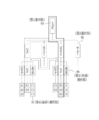


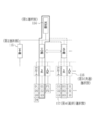

Classifications
-
- G—PHYSICS
- G06—COMPUTING OR CALCULATING; COUNTING
- G06F—ELECTRIC DIGITAL DATA PROCESSING
- G06F3/00—Input arrangements for transferring data to be processed into a form capable of being handled by the computer; Output arrangements for transferring data from processing unit to output unit, e.g. interface arrangements
- G06F3/01—Input arrangements or combined input and output arrangements for interaction between user and computer
- G06F3/048—Interaction techniques based on graphical user interfaces [GUI]
- G06F3/0481—Interaction techniques based on graphical user interfaces [GUI] based on specific properties of the displayed interaction object or a metaphor-based environment, e.g. interaction with desktop elements like windows or icons, or assisted by a cursor's changing behaviour or appearance
- G06F3/0482—Interaction with lists of selectable items, e.g. menus
-
- G—PHYSICS
- G06—COMPUTING OR CALCULATING; COUNTING
- G06F—ELECTRIC DIGITAL DATA PROCESSING
- G06F3/00—Input arrangements for transferring data to be processed into a form capable of being handled by the computer; Output arrangements for transferring data from processing unit to output unit, e.g. interface arrangements
- G06F3/01—Input arrangements or combined input and output arrangements for interaction between user and computer
- G06F3/048—Interaction techniques based on graphical user interfaces [GUI]
- G06F3/0484—Interaction techniques based on graphical user interfaces [GUI] for the control of specific functions or operations, e.g. selecting or manipulating an object, an image or a displayed text element, setting a parameter value or selecting a range
- G06F3/0485—Scrolling or panning
- G06F3/04855—Interaction with scrollbars
-
- G—PHYSICS
- G06—COMPUTING OR CALCULATING; COUNTING
- G06F—ELECTRIC DIGITAL DATA PROCESSING
- G06F3/00—Input arrangements for transferring data to be processed into a form capable of being handled by the computer; Output arrangements for transferring data from processing unit to output unit, e.g. interface arrangements
- G06F3/01—Input arrangements or combined input and output arrangements for interaction between user and computer
- G06F3/048—Interaction techniques based on graphical user interfaces [GUI]
- G06F3/0487—Interaction techniques based on graphical user interfaces [GUI] using specific features provided by the input device, e.g. functions controlled by the rotation of a mouse with dual sensing arrangements, or of the nature of the input device, e.g. tap gestures based on pressure sensed by a digitiser
- G06F3/0488—Interaction techniques based on graphical user interfaces [GUI] using specific features provided by the input device, e.g. functions controlled by the rotation of a mouse with dual sensing arrangements, or of the nature of the input device, e.g. tap gestures based on pressure sensed by a digitiser using a touch-screen or digitiser, e.g. input of commands through traced gestures
- G06F3/04886—Interaction techniques based on graphical user interfaces [GUI] using specific features provided by the input device, e.g. functions controlled by the rotation of a mouse with dual sensing arrangements, or of the nature of the input device, e.g. tap gestures based on pressure sensed by a digitiser using a touch-screen or digitiser, e.g. input of commands through traced gestures by partitioning the display area of the touch-screen or the surface of the digitising tablet into independently controllable areas, e.g. virtual keyboards or menus
-
- G—PHYSICS
- G06—COMPUTING OR CALCULATING; COUNTING
- G06Q—INFORMATION AND COMMUNICATION TECHNOLOGY [ICT] SPECIALLY ADAPTED FOR ADMINISTRATIVE, COMMERCIAL, FINANCIAL, MANAGERIAL OR SUPERVISORY PURPOSES; SYSTEMS OR METHODS SPECIALLY ADAPTED FOR ADMINISTRATIVE, COMMERCIAL, FINANCIAL, MANAGERIAL OR SUPERVISORY PURPOSES, NOT OTHERWISE PROVIDED FOR
- G06Q20/00—Payment architectures, schemes or protocols
- G06Q20/04—Payment circuits
- G06Q20/045—Payment circuits using payment protocols involving tickets
-
- G—PHYSICS
- G06—COMPUTING OR CALCULATING; COUNTING
- G06Q—INFORMATION AND COMMUNICATION TECHNOLOGY [ICT] SPECIALLY ADAPTED FOR ADMINISTRATIVE, COMMERCIAL, FINANCIAL, MANAGERIAL OR SUPERVISORY PURPOSES; SYSTEMS OR METHODS SPECIALLY ADAPTED FOR ADMINISTRATIVE, COMMERCIAL, FINANCIAL, MANAGERIAL OR SUPERVISORY PURPOSES, NOT OTHERWISE PROVIDED FOR
- G06Q20/00—Payment architectures, schemes or protocols
- G06Q20/04—Payment circuits
- G06Q20/047—Payment circuits using payment protocols involving electronic receipts
-
- G—PHYSICS
- G07—CHECKING-DEVICES
- G07F—COIN-FREED OR LIKE APPARATUS
- G07F17/00—Coin-freed apparatus for hiring articles; Coin-freed facilities or services
- G07F17/42—Coin-freed apparatus for hiring articles; Coin-freed facilities or services for ticket printing or like apparatus, e.g. apparatus for dispensing of printed paper tickets or payment cards
-
- G—PHYSICS
- G07—CHECKING-DEVICES
- G07F—COIN-FREED OR LIKE APPARATUS
- G07F9/00—Details other than those peculiar to special kinds or types of apparatus
- G07F9/02—Devices for alarm or indication, e.g. when empty; Advertising arrangements in coin-freed apparatus
- G07F9/023—Arrangements for display, data presentation or advertising
- G07F9/0235—Arrangements for display, data presentation or advertising the arrangements being full-front touchscreens
-
- G—PHYSICS
- G06—COMPUTING OR CALCULATING; COUNTING
- G06F—ELECTRIC DIGITAL DATA PROCESSING
- G06F2203/00—Indexing scheme relating to G06F3/00 - G06F3/048
- G06F2203/048—Indexing scheme relating to G06F3/048
- G06F2203/04803—Split screen, i.e. subdividing the display area or the window area into separate subareas
Definitions
- the present invention relates to a multi-tier menu selection device, an operation method of the multi-tier menu selection device, and an operation program of the multi-tier menu selection device.
- a multi-hierarchy menu selection device that has a plurality of options and displays a multi-hierarchy menu including a plurality of hierarchized hierarchical menus on a selection screen and receives an instruction for selecting an option has been widespread.
- the multi-hierarchy menu has a so-called tree structure having a plurality of selection paths having branch points according to the number of options of each hierarchical menu.
- a first hierarchical menu having a first option selected first
- a final hierarchical menu having a final selection selected last
- a first hierarchical menu and a final hierarchical menu are arranged.
- the multi-hierarchy menu is used, for example, as an operation menu for selecting software commands and a content menu for selecting contents such as images, music files, and templates.
- the operation menu the command is the final option
- the content is the final option.
- the menu name of the lower hierarchical menu linked to the hierarchical menu may be an option.
- the middle layer menu and the last layer menu are composed of a plurality of submenus existing in the same layer.
- the second hierarchy menu is composed of two submenus linked to the two first choices.
- the submenus of the lower hierarchical menu linked to those options also increase.
- the option selection instruction is performed, for example, by a mouse-over operation in which the mouse cursor is superimposed on the option in a state where the option of each hierarchical menu is displayed on the selection screen.
- the first hierarchy menu appears.
- a submenu of the second hierarchy menu linked to the selected first option appears.
- a submenu of the third hierarchical menu linked to the selected second option appears.
- Such display transition is repeated up to the final hierarchy menu.
- the command since the command is the final option, when the final option is instructed, the command assigned to the final option is executed.
- each hierarchical menu appears in order from the upper level to the lower level in accordance with the selection instruction of the option in each hierarchical menu.
- the display of each appearing hierarchical menu is continued, and the options of each displayed hierarchical menu can be changed.
- Patent Document 1 exemplifies an editing operation menu of word processing software as a multi-level menu.
- the editing operation menu has three hierarchical menus, a first menu, a second menu, and a third menu.
- the first hierarchy menu has first options such as “tool” and “format”.
- the second hierarchy menu which is an intermediate hierarchy menu, is a tool submenu having a second option such as “correction (red)” linked to the first option “tool”, or “character” linked to the first option “format”. It has a format submenu with a second option such as “size”.
- the third hierarchy menu which is the final hierarchy menu, is a correction (red insertion) submenu with a third option (final option) such as “start correction (red insertion)” linked to the second option “correction (red insertion)”. And a character size sub-menu having a third option such as “double vertical” linked to the second option “character size”.
- FIG. 13 of Patent Document 1 traces the selection path of the first option “tool” and the second option “correction (red insertion)” to the third option “start correction (red insertion)”.
- the mouse is over.
- the third option “double vertical” is selected by following a selection path that follows another first option and second option, for example, a selection path of the first option “format” and the second option “character size”.
- the selection route that reaches the third option “start correction (red)” and the selection route that reaches the third option “double vertical” are “tool” for the first option and “format” for the latter. There are some differences. Both routes are branched in the first hierarchy menu. For this reason, in the conventional change operation of the option, when changing to the third option “double vertical” in a state where the mouse is over the third option “start correction (red insertion)”, the current third option is changed. After returning to the first hierarchy menu where the branch point exists, the selection route that reaches the option “Start correction (red)” is changed, and then the first option is changed from “Tool” to “Format”. The selection of “character size” and the selection path that reaches the third option “double vertical” are followed, which is complicated.
- Patent Document 1 when the third option “double vertical” is selected in the most recent operation and a selection path for reaching the third option “double vertical” is stored, the third option “correction” is stored.
- the third option “Vertical” is displayed when returning to the first option “Format” in the first hierarchy menu in order to change to the third option “Double Vertical”.
- the selection path for reaching “double” is called, and the mouse is automatically over the third option “double vertical” (see FIG. 15 of Patent Document 1). As a result, the labor for changing the options is reduced.
- Patent Document 1 stores a selection route for reaching the final option selected in the most recent operation, and automatically selects the stored selection route when an option change operation is performed. Thus, it is effective when the option to be changed is the final option selected in the most recent operation.
- the technique described in Patent Document 1 may not always function effectively depending on the contents and types of options.
- the multi-hierarchy menu is, for example, a case where a product is selected as a final option in a shopping site on the Internet, or a print order reception machine that receives a postcard print order. Is also used to select a postcard pattern as the final option.
- the user searches and compares various products and postcard images while searching for the user's favorite products and postcard images.
- the technique described in Patent Document 1 does not function effectively, and the user is arbitrarily changed to an option that is not intended by the user, which may deteriorate usability.
- the present invention provides a multi-hierarchy menu selection device, an operation method of the multi-hierarchy menu selection device, and an operation program for the multi-hierarchy menu selection device capable of saving labor for changing the options when there is a common hierarchy menu. With the goal.
- a multi-hierarchy menu selection apparatus includes a first hierarchy menu having a first option selected first, a final hierarchy menu having a final option selected last, and a first hierarchy.
- a screen output control unit that controls the output of a selection screen that appears in order from the upper level according to the selection instruction and can change each option selected in each level menu until the selection of the final option is confirmed.
- an instruction receiving unit that accepts an instruction to select each option on the selection screen, and which of the options is a common option.
- Choice relationship information indicating the relationship of each choice including to the common alternatives information, and on the basis in accordance with the selection instruction to select the route information indicating the selected route of each option, and a automatic selection unit which automatically selects a choice.
- the automatic selection unit In the state where one common option of one submenu of the common hierarchy menu is selected, the automatic selection unit has an option that exists in the selection path to the currently selected common option in the upper hierarchy menu of the common hierarchy menu. If the instruction accepting unit accepts an instruction to change from to another option, it can be reached via another option, and the same common hierarchy menu as the common option selected immediately before the change The common option of another submenu in is searched, and the searched common option is automatically selected.
- the selected menu which is a hierarchical menu for which selection of options has been completed, is displayed in the hierarchical order from the top to the sub display area indicating the selection route, and the hierarchical menu below the selected menu. It is preferable to provide a main display area for displaying an unselected menu that has not been selected.
- the screen output control unit switches the display of the selection route of the sub display area in accordance with the automatic selection of the common choices of the automatic selection unit.
- all the options of the selected menu including the selected option and the non-selected option are displayed, and the non-selected option is displayed in a form that can be changed from the selected option. Is preferred.
- the display area of the main display area is preferably larger than the sub display area.
- each option is arranged in the main display area with a wider interval than each option of the selected menu in the sub display area.
- the screen output control unit displays detailed information about options in the main display area and does not display detailed information in the sub display area. Further, it is preferable that one selected menu in the sub display area can be displayed in the main display area instead of the unselected menu.
- the screen output control unit sequentially hides the selected menus from the higher hierarchy. It is preferable. In this case, it is preferable that the non-displayed selected menu can be displayed again.
- the multi-hierarchy menu is preferably used for receiving a product or service order or searching for a product or service where a product or service is prepared as a final option.
- the option is preferably a classification item for classifying goods or services.
- the operation method of the multi-hierarchy menu selection apparatus of the present invention includes a first hierarchy menu having a first option selected first, a final hierarchy menu having a final option selected last, and a first hierarchy menu and a final hierarchy menu.
- a multi-hierarchy menu including at least three hierarchical menus of a common hierarchical menu having a plurality of submenus including common options with common attributes is displayed, and each hierarchical menu responds to a selection instruction of each option.
- a screen output control step for controlling the output of a selection screen in which each option selected in each hierarchical menu can be changed until the selection of the final option is confirmed in order from the higher level, and on the selection screen
- An instruction reception step for receiving an instruction to select each option at and an option out of each option indicating which common options are common to each other Choice relationship information indicating the relationship of each choice including passing options information, and on the basis of the selected route information indicating each choice selected route for the selected instruction, and an automatic selection step of automatically selecting the option.
- the automatic selection step in a state where one common option of one submenu of the common hierarchy menu is selected, an option existing in the selection path to the currently selected common option in the upper hierarchy menu of the common hierarchy menu
- an instruction to change to another option is received in the instruction reception step, it can be reached via another option, and the same common hierarchy menu as the common option selected immediately before the change
- the common option of another submenu in is searched, and the searched common option is automatically selected.
- the operation program of the multi-hierarchy menu selection apparatus of the present invention includes a first hierarchy menu having a first option selected first, a final hierarchy menu having a final option selected last, and a first hierarchy menu and a final hierarchy menu.
- a multi-hierarchy menu including at least three hierarchical menus of a common hierarchical menu having a plurality of submenus including common options with common attributes is displayed, and each hierarchical menu responds to a selection instruction of each option.
- Screen output control function that controls the output of the selection screen that can change each option selected in each hierarchical menu until it appears in order from the upper level and the selection of the final option is confirmed, and on the selection screen
- An instruction reception function that accepts selection instructions for each option and a common option that indicates which of these options is a common option.
- Choice relationship information indicating the relationship of each choice including choice information, and on the basis of the selected route information indicating each choice selected route for the selection instruction, and an automatic selection function for automatically selecting the option causes the computer to execute.
- the automatic selection function is an option that exists in the selection path to the currently selected common option in the upper hierarchy menu of the common hierarchy menu in a state where one common option of one submenu of the common hierarchy menu is selected. If the instruction acceptance function accepts an instruction to change from to another option, it can be reached via another option, and the same common hierarchy menu as the common option selected immediately before the change The common option of another submenu in is searched, and the searched common option is automatically selected.
- the common common menu when there is a common hierarchy menu having a plurality of submenus including common options with common attributes, the common common menu is selected in the state where one common option of one submenu of the common hierarchy menu is selected.
- an instruction to change from the option existing in the selection path to the currently selected common option to another option is received in the higher level menu of the hierarchy menu, it can be reached via another option.
- Multi-hierarchy menu selection device capable of labor saving of change operation of options, operation method of multi-hierarchy menu selection device, and It is possible to provide a working program of the hierarchical menu selection device.
- FIG. 12 is a diagram showing a selection screen when the third option is changed from “cute” to “cool” in FIG. 11.
- FIG. 12 is a diagram showing a selection screen when the second option is changed from “no photo” to “two photos” in FIG. 11.
- a print order accepting device 2 corresponding to the multi-level menu selection apparatus of the present invention is installed at a store such as a supermarket or a convenience store, and accepts a print order for a postcard (equivalent to a product or service) from a user.
- the print order acceptance machine 2 has a built-in printer 20 (see FIG. 2) for printing a postcard corresponding to the print order.
- the user brings various removable media such as a memory card on which the photo data to be pasted on the post card is recorded to the print order receiving machine 2 to place a print order for the post card, and receives the printed post card accordingly. And pay the price.
- Printed on the front of the print order receiving machine 2 facing the user are a media slot group 10 into which various removable media are inserted, and a liquid crystal display (hereinafter referred to as a touch panel display) 11 having a touch panel laminated on the surface.
- the postcard discharge port 12 through which the postcard is discharged, the insertion port 13 through which coins are inserted, and the return port 14 through which change is returned, are printed by the receipt printer 21 (see FIG. 2), and the postcard order contents And a receipt discharge port 15 through which a receipt on which the input amount, change amount, etc. are written is discharged.
- a caster 16 is attached to the lower part of the print order receiving machine 2 for easy installation at the store.
- the print order acceptance machine 2 includes a media reader 22, a price clearing unit 23, a CPU (Central Processing Unit) 24, a memory 25, and a storage device 26. And a communication unit 27. These are interconnected via a data bus 28.
- a media reader 22 In addition to the touch panel display 11, the printer 20, and the receipt printer 21, the print order acceptance machine 2 includes a media reader 22, a price clearing unit 23, a CPU (Central Processing Unit) 24, a memory 25, and a storage device 26. And a communication unit 27. These are interconnected via a data bus 28.
- a CPU Central Processing Unit
- the media reader 22 reads out photo data from the removable media inserted in the media slot group 10 under the control of the CPU 24.
- the media reader 22 stores the read photo data in the memory 25.
- a configuration may be adopted in which photo data is directly read from the digital camera by connecting to a digital camera owned by the user with a wired or wireless connection.
- the price clearing unit 23 calculates the price based on the order contents of the postcard input through the touch panel display 11 under the control of the CPU 24.
- the price clearing unit 23 monitors the amount of coins inserted into the slot 13.
- the price clearing unit 23 calculates the difference between the calculated price and the input amount, that is, the change amount, and outputs a coin corresponding to the calculated change amount to the return port 14.
- the price clearing unit 23 transmits information on the price, the input amount, and the change amount to the receipt printer 21.
- the storage device 26 is a hard disk drive built in the print order receiving machine 2.
- the storage device 26 stores a control program such as an operating system, various application programs including an operation program 29, display data of various operation screens associated with these programs, option related information 30, and the like.
- the operation program 29 is a program for causing the print order receiving machine 2 to function as a multi-tier menu selection device.
- the memory 25 is a work memory for the CPU 24 to execute processing.
- the CPU 24 centrally controls each part of the computer by loading a program stored in the storage device 26 into the memory 25 and executing processing according to the program.
- the communication unit 27 is a network interface that transmits various types of information between the print order receiving machine 2 and an external device via a network such as the Internet.
- the external device is, for example, a management server operated by another print order receiving device 2 installed in the same store or another store, or a manufacturer of the print order receiving device 2. For example, information indicating the operation state of each other is transmitted / received to / from other print order receiving machines 2. In the case of the management server, information indicating the operating state is transmitted to the management server, and update information of the operation program 29 distributed from the management server is received.
- the touch panel display 11 displays various operation screens according to user operations.
- the operation screen has an operation function by GUI (Graphical User Interface).
- GUI Graphic User Interface
- the print order accepting device 2 accepts an operation instruction input by the user's finger F (see FIG. 6) through this GUI.
- a selection screen 62 (see FIG. 5 and the like) on which a multi-hierarchy menu including a plurality of hierarchical menus having a plurality of options appears is displayed as an operation screen. The user selects a desired option of each hierarchical menu on the selection screen 62 and finally determines a desired postcard pattern.
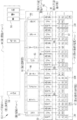
- the print order accepting machine 2 has a multi-hierarchy menu 35 including four hierarchical menus of a first hierarchical menu 40, a second hierarchical menu 41, a third hierarchical menu 42, and a fourth hierarchical menu 43. It is prepared.
- the first hierarchy menu 40 includes a first option 44 indicating the use of postcards such as “New Year's card”, “Hot summer greeting”, “Moving guidance”, “Marriage”, and “Birth of baby”, and the second hierarchy menu 41 includes , “No photo”, “1 photo”, “2 photos”, and “multiple photos (collage)”, the second option 45 indicating the number of photos to be pasted on the postcard, and the third level menu 42 , “Cute”, “Cool”, and “Simple” postcard designs are shown as the fourth option 47 in the third option 46 and the fourth hierarchy menu 43 indicating the taste of the postcard designs, respectively. Yes.
- Each use of the first option 44, the number of photographs of the second option 45, and each taste of the third option 46 are classification items for classifying the pattern of the post card as a product.
- the post card pattern of the fourth option 47 is distinguished by attaching symbols such as “A1”, “B1”, and “G1” for convenience of explanation.
- the second option 45 to the fourth option 47 linked to the first option 44 “moving guidance”, “marriage”, and “baby birth” are not shown.
- the fourth option 47 is the last option selected last, and the fourth layer menu 43 is the last layer menu.
- the second option 45 “no photo”, “one photo”, “two photos”, and “multiple photos (collage)” have the same attributes (number of photos) regardless of the upper-level choices.
- This is an option
- the second hierarchy menu 41 is a common hierarchy menu.
- “cute”, “cool”, and “simple” of the third option 46 are common options having the same attribute (pattern taste), and the third hierarchy menu 42 is also a common hierarchy menu. That is, the same second option 45 is linked to any of the first options 44, and the same third option 46 is linked to any of the second options 45.
- the common option is an option with a common attribute that exists in each of a plurality of submenus (described later) in the same hierarchical menu.
- the common hierarchy menu is a hierarchy menu having a plurality of submenus including common options.
- the second hierarchy menu 41 has five submenus (hereinafter referred to as the number of submenus) 48 linked to the five first options 44, respectively.
- pattern submenu 60 submenus (hereinafter referred to as “pattern submenu”) 50.
- Each of the submenus 48 to 50 is illustrated by surrounding only one part with a two-dot chain line in order to avoid complexity.
- the second hierarchy menu 41 to the fourth hierarchy menu 43 are configured by a plurality of submenus 48 to 50 existing in the same hierarchy.
- Each hierarchical menu 40 to 43 has a so-called tree structure having a plurality of selection paths having branch points corresponding to the number of options 44 to 47.
- Each option 44 to 47 has an option ID (Identification data) for identifying each option.
- the option IDs are “1-001” and “2-001” as illustrated above and next to the first option 44 and the second option 45 (the third option 46 and the fourth option 47 are not shown due to space).
- ”Etc. and a hyphen The number before the hyphen indicates the level to which the option belongs, and the number after the hyphen indicates the order in the level to which the option belongs. For example, “Birth of a baby” is the fifth option (counting from the left in FIG. 3) of the first layer menu 40, so that the option ID is “1-005”, and “multiple photos ( “Collage)” is the eighth option of the second hierarchical menu 41, so the option ID is “2-008”.
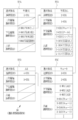
- the option relation information 30 stored in the storage device 26 is composed of a plurality of information blocks 55 prepared for each option.
- FIG. 4 illustrates information blocks 55A, 55B, 55C, and 55D of four options (“New Year's card”, “No photo”, “Cute”, and “A1”) in the first to fourth layers linked to each other. is doing.
- the information block 55 has items of option name, option ID, upper hierarchy option ID, lower hierarchy option ID, and common option ID.
- the option name item literally includes the name of the option such as “New Year's card” or “no photo”
- the option ID item includes the option ID of the option such as “1-001” or “2-001”. It is registered.
- an option ID of an upper hierarchy option linked to the option is registered.
- the upper layer option linked to the option that is, the first option 44
- the option ID “1-001” of “New Year's card” is registered.
- the option of the upper hierarchy linked to the option that is, the second option 45
- the option ID “2-001” for “no photo” is registered.
- an option ID of a lower hierarchy option linked to the option is registered.
- the lower hierarchy option linked to the option “New Year's card”, that is, the second option 45 “No photo”, “1 photo”, “2 photos” Each option ID “2-001” to “2-004” of “multiple photos (collage)” is registered.
- each of the lower hierarchy options linked to the option “no photo”, that is, the third option 46 “cute”, “cool”, and “simple”. Choice IDs “3-001” to “3-003” are registered.
- the common option ID item an option ID of an option having a relationship between the option and the common option in the same hierarchy is registered. That is, the common option ID item corresponds to common option information indicating which of the options 44 to 47 is the common option.
- the common option ID item of the information block 55B includes the first option 44 including the first option 44 “no photo” option ID “2-005” linked to the “summer greeting”. 44, “No moving” option IDs “2-009”, “2-013”, and “2—2” of the second option 45 linked to “moving guidance”, “marriage”, and “baby birth”, respectively. 017 "is registered.
- choice IDs are the second choice of “no photo” in the number sub-menu 49 linked to the first choice 44 “summer visit”, “moving guidance”, “marriage”, and “birth of baby”, respectively. 45, which is a common option for the option name “no photo” in the information block 55B.
- the second option 45 “one photo” and the third option 46 “cute” option ID “3-” linked to the option ID “2-002” are displayed.
- a second option 45 “no photo” an option ID
- the “Cute” option ID “3-013” and the like of the third option 46 linked to “2-005” are registered.
- the first option 44 indicates the use of postcards such as “New Year's card”, “Hot summer greeting”, “Moving guidance”, “Marriage”, “Baby birth”, and the fourth option 47 is the postcard pattern itself. Yes, the fourth choice 47 of each picture submenu 50 is different. Therefore, since the first option 44 and the fourth option 47 are not common options, nothing is registered in the common option ID item of the information block 55A and the information block 55D. From this common option ID item, the common option of the option is known.
- the CPU 24 of the print order accepting machine 2 functions as a GUI control unit 60 and an automatic selection unit 61 in cooperation with the memory 25.
- the GUI control unit 60 corresponds to a screen output control unit and an instruction receiving unit.
- the GUI control unit 60 has a screen output control function for controlling the output of the selection screen 62 to the touch panel display 11 based on the option relation information 30, and a selection instruction for each of the options 44 to 47 on the selection screen 62 by the user's finger F. It takes the function of accepting instructions.
- the GUI control unit 60 causes the memory 25 to record selection path information 63 indicating the selection path of each option 44 to 47 according to the received selection instruction.
- the selection path information 63 records the option IDs of the options selected by the user on the selection screen 62 in the order of selection. For example, when “New Year's card” is selected as the first option 44, “No photo” is selected as the second option 45, and “Cute” is selected as the third option 46, the GUI control unit 60 selects “1-001” as shown in FIG. (New Year's card) ” ⁇ “ 2-001 (no photo) ” ⁇ “ 3-001 (cute) ”is recorded as the selected route information 63.
- the automatic selection unit 61 has an automatic selection function for automatically selecting options based on the option relationship information 30 and the selection route information 63.
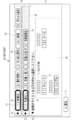
- the GUI control unit 60 outputs a selection screen 62 shown in FIG.
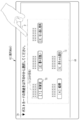
- the first level menu 40 is displayed on the selection screen 62 in FIG. 6 together with a message “Please select a postcard usage from the following”. More specifically, each of the first options 44 of “first year card”, “summer greeting”, “moving guidance”, “marriage”, “baby birth” in the first hierarchy menu 40 is a selection button for selecting these 70 is displayed.
- the selection buttons 70 are arranged in the numerical order after the hyphen of the option ID and are displayed with a wide space across the entire selection screen 62.
- the selection button 70 displays a number and an option name that are assigned in numerical order after the hyphen of the option ID.
- detailed information 71 regarding each first option 44 surrounded by a two-dot chain line is displayed on the upper part of the selection button 70.
- the detailed information 71 is an appealing sentence such as “You can easily make a greeting card for the New Year with professional skills to create beautiful designs and beautiful photos.” Paste to create a New Year's card. "
- the GUI control unit 60 selects the selection of FIG.
- the screen 62 is changed in order to the display states shown in FIGS. 7, 8, and 9.
- the selection button 70 of “New Year's card” being selected is displayed so as to be distinguishable from other selection buttons 70 that are not selected.
- the display form of the selection button 70 being selected is, for example, a form in which a selection mark 72 surrounding the selection button 70 is displayed.
- the selection mark 72 is a color (for example, orange) different from the background color (for example, white) of the selection screen 62.
- a check mark 73 is displayed above the selection button 70 of the “New Year's card” being selected. These selection marks 72 and check marks 73 are not displayed on non-selection selection buttons 70 other than “New Year's card”.
- the display of the selection mark 72 and the check mark 73 indicates to the user that “New Year's card” has been selected as the first option 44.
- each selection button 70 displayed with a wide space across the entire selection screen 62 is moved to an upper area of the selection screen 62 with an animation expression as indicated by a dotted arrow, and an option ID is displayed. They are arranged in a line in numerical order after the hyphen and are collected in the upper region at a narrower interval than those in FIGS. Detailed information 71 is not displayed on each selection button 70 collected in the upper area.
- the second layer menu 41 Simultaneously with the collection of the selection buttons 70 in the upper area, the second layer menu 41, more specifically, the “New Year's card” being selected is displayed at the bottom of the selection screen 62 with animation expression as shown by the dotted arrows.
- the animation expression is, for example, a form in which the number submenu 48 scrolls up from the lower side to the upper side of the selection screen 62. As indicated by hatching, the number submenu 48 has a background color (for example, gray) different from that of the first hierarchy menu 40.
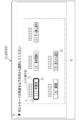
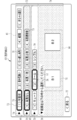
- the selection screen 62 in FIG. 9 includes a main display area 74 in which the number of submenus 48, which are unselected menus for which selection of options has not been completed, and a first hierarchy menu 40, which is a selected menu for which selection of options has been completed. Is divided into a sub display area 75 in which is displayed.
- the main display area 74 occupies most of the selection screen 62, and the main display area 74 has a larger display area than the sub display area 75 limited to the upper area of the selection screen 62.
- a selection button 70 for all options in the first hierarchy menu 40 is displayed, which includes a selection button 70 for the selected “New Year's card” and a selection button 70 for non-selection options other than “New Year's card”.
- the selection can be changed from the selection button 70 of the currently selected “New Year's card” to the selection button 70 of non-selected options.
- the check mark 73 is deleted and only the selection mark 72 is displayed on the selection button 70 of the “New Year's card” being selected.
- a triangle-shaped arrow 76 pointing to the currently selected “New Year's card” selection button 70 among the selection buttons 70 in the sub display area 75 is displayed on the upper portion of the number submenu 48.
- the display of the selection mark 72 and the arrow 76 indicates to the user which option has been selected in the past, that is, the selection route. Note that only the selection mark 72 may be displayed without displaying the arrow 76.
- a message “Please select the number of photos to paste from the following” and “No photo”, “1 photo”, “2 photos”, A selection button 70 and detailed information 71 for selecting each second option 45 of “multiple photos (collage)” are displayed. Similar to the selection screen 62 in FIG. 6, the selection buttons 70 are arranged in the numerical order after the hyphen of the option ID and displayed over the entire main display area 74 with a wide interval. In addition, a return button 77 for returning the display state of the selection screen 62 to the previous display state (the selection screen 62 of FIG. 6 in the case of FIG. 9) appears at the lower part of the selection screen 62.
- An aggregation button 78 in the form of a triangular arrow is displayed on the side of, and an expansion button 79 in the form of a triangular arrow is also displayed on the side of each selection button 70 in the sub display area 75 of FIG.
- the aggregation button 78 beside each message indicates that the triangular arrow points downward, and the selection button 70 displayed with the detailed information 71 belongs to an unselected menu for which selection of an option has not been completed. Yes.
- the triangular arrow points to each selection button 70, indicating that each selection button 70 belongs to the selected menu for which selection of the options has been completed. Yes.
- the function of the expand button 79 will be described later.
- the GUI control unit 60 displays the FIG.
- the selection screen 62 is changed in the same manner as in FIGS. 7 and 8 to obtain the display state shown in FIG.
- a message “Please select a pattern taste from the following” is displayed in the main display area 74.
- the third level menu 42 more specifically, “Cute” of the taste submenu 49 of the third level menu 42 linked to the selected first option 44 “New Year's card” and second option 45 “No photo” is selected.
- a selection button 70 and detailed information 71 for selecting each of the third options 46 of “COOL” and “SIMPLE” are displayed.
- the taste submenu 49 is scrolled up from the lower part of the selection screen 62 with animation expression, like the number submenu 48 of FIG.
- the background color of the taste submenu 49 is the same as that of the first hierarchical menu 40 that is two steps higher, and is a different background color (for example, white) from the number submenu 48 that is one step higher.
- each selection button 70 of the number submenu 48 is displayed at the bottom of the first hierarchy menu 40.
- Each of the selection buttons 70 in the number-of-sheets sub menu 48 can also change the selection from the selection button 70 of “no photo” being selected to the selection button 70 of a non-selected option.
- An expansion button 79 is also displayed next to each selection button 70 in the number submenu 48.
- the selection mark 72 is displayed on the selection button 70 of “no photo” being selected in the same manner as the selection button 70 of “New Year's card”. Also, an arrow 76 indicating the “no photo” selection button 70 is displayed at the top of the taste submenu 49, as in the number submenu 48.
- the selection buttons 70 of the number submenu 48 are collected in the sub display area 75 in the same manner as the selection buttons 70 of the first hierarchy menu 40 of FIG. Although the display area of the sub display area 75 is larger than that in the case of FIG. 9 by the addition of the number of sub menus 48 in addition to the first hierarchy menu 40, the main display area 74 is still displayed more than the sub display area 75. The area is large.
- the GUI control unit 60 selects the selection of FIG.
- the screen 62 is changed in the same manner as in FIGS. 7 and 8 to obtain the display state shown in FIG.
- a message “Please select a pattern from the following” is displayed in the main display area 74.
- the fourth hierarchy menu 43 more specifically, the fourth hierarchy menu 43 linked to the currently selected first option 44 “New Year's card”, second option 45 “no photo”, and third option 46 “cute”.
- a selection button 70 for selecting each of the fourth choices 47 of “A1”, “A2”, and “A3” in the picture submenu 50 is displayed.
- the thumbnail image of the postcard pattern is displayed as the selection button 70, and the detailed information 71 is not displayed.
- the manner of appearance of the picture submenu 50 and the manner of aggregation of the selection buttons 70 into the sub display area 75 of the taste submenu 49 are the manner of appearance of the number submenu 48 and the selection of the first hierarchical menu 40 in FIG. This is the same as the way of integrating the buttons 70. Also, the background color of the pattern submenu 50 is different from the first hierarchy menu 40 and the taste submenu 49 and is the same background color as the number-of-sheets submenu 48. In this way, by changing the background color of each hierarchical menu alternately for each hierarchical level, each hierarchical menu can be easily identified.
- selection buttons 70 of the taste submenu 49 are displayed below the first hierarchy menu 40 and the number submenu 48.
- the selection buttons 70 of the taste submenu 49 can also be changed from the selection button 70 of “Cute” being selected to the selection button 70 of non-selected options.
- a development button 79 is also displayed next to each selection button 70 in the taste submenu 49.
- the selection mark 72 is also displayed on the selection button 70 of “Cute” being selected.
- An arrow 76 pointing to the “cute” selection button 70 is also displayed at the top of the design submenu 50.
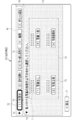
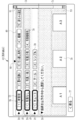
- the display area of the sub display area 75 is substantially the same as that of the main display area 74.
- each selection button 70 in the sub display area 75 plays a role like a so-called tab, and the main selection button 70 changes from a selection button 70 being selected to a selection button 70 that is not selected as described later.
- the unselected menu displayed in the display area 74 is switched.
- the user selects options in order from the upper level, and causes the design submenu 50 to appear in the main display area 74 as shown in the selection screen 62 of FIG.
- the selection screen 62 when the selection is changed from the selection button 70 of the currently selected option to the selection button 70 of the non-selected option, the user selects the non-selected option displayed in the sub display area 75. Touching a desired selection button 70 of the buttons 70 with the finger F selects the selection button 70.
- the GUI control unit 60 shifts the selection screen 62 in FIG. 11 to the display state shown in FIG.
- the main display area 74 includes a picture submenu of the fourth hierarchy menu 43 linked to the first option 44 “New Year's card”, the second option 45 “no photo”, and the third option 46 “cute” in FIG.
- a selection button 70 for selecting each fourth option 47 of “B2” is displayed.
- the display of the selection mark 72 of the taste submenu 49 is switched from the “cute” selection button 70 in FIG. 11 to the changed “cool” selection button 70.
- the display position of the arrow 76 in the picture submenu 50 is switched from the position indicating the “cute” selection button 70 in FIG. 11 to the position indicating the changed “cool” selection button 70.
- the selection button 70 of the number submenu 48 changes from “no photo” to “no photo”.
- the GUI control unit 60 shifts the selection screen 62 of FIG. 11 to the display state shown in FIG.
- the main display area 74 includes a picture submenu of the fourth hierarchy menu 43 linked to the first option 44 “New Year's card”, the second option 45 “no photo”, and the third option 46 “cute” in FIG.
- “G1” in another picture submenu 50 of the fourth hierarchy menu 43 linked to the first option 44 “New Year's card”, the second option 45 “two photos”, and the third option 46 “cute” A selection button 70 for selecting each fourth option 47 of “G2” is displayed.
- the display of the selection mark 72 in the number submenu 48 is switched from the “no photo” selection button 70 in FIG. 11 to the changed “two photos” selection button 70.
- the display position of the arrow 76 in the taste submenu 49 is switched from the position indicating the “no photo” selection button 70 in FIG. 11 to the position indicating the changed “two photos” selection button 70.
- a state where one common option of one submenu of the common layer menu is selected (in this example, the third layer menu linked to the first option 44 “New Year's card” and the second option 45 “No photo”).
- the GUI control unit 60 provides information on the instruction, specifically, an option ID of another option (in this example, an option ID “2-003 (two photos)”). It is output to the automatic selection unit 61.
- the automatic selection unit 61 operates upon receiving an option ID of another option from the GUI control unit 60, and automatically selects an option. More specifically, the automatic selection unit 61 can be reached via another option, and is the common option selected immediately before the change (in this example, the “cute” option) And the third option of the taste submenu 49 of the third hierarchy menu 42 linked to the first option 44 “New Year's card” and the second option 45 “Two photos” in the same common hierarchy menu. The option 46 (Cute) is searched, and the searched common option is automatically selected.
- the automatic selection unit 61 searches for common options based on the option relationship information 30 and the selected route information 63.
- the selected route information 63 in the state of FIG. 11 is “1-001 (New Year's card)” ⁇ “2-001 (no photo)” ⁇ “3-001 (cute), as illustrated in FIG. ) ”.
- the automatic selection unit 61 sets the option ID “2-003” as shown in FIG.
- the item of the lower hierarchy option ID of the information block 55E is searched, and each option ID of “3-007 (cute)”, “3-008 (cool)”, and “3-009 (simple)” is extracted.
- the automatic selection unit 61 records the item of the common option ID of the information block 55C of the option ID “3-001 (cute)”, which is the common option selected immediately before the change, recorded in the selected route information 63. It searches and it is determined whether the same option ID as each option ID extracted from the information block 55E is registered.
- the automatic selection unit 61 extracts the option ID “3-007” as an option ID for automatic selection.
- the automatic selection unit 61 outputs the search result to the GUI control unit 60.
- the GUI control unit 60 shifts the selection screen 62 in FIG. 11 to the display state in FIG. 13 based on the search result from the automatic selection unit 61.
- the selection path of the first option 44 to the third option 46 is, as shown in FIG. 15, the first option 44 “New Year's card”, the second option 45 “no photo”, The state of the third option 46 “cute” is changed to a first option 44 “New Year's card”, a second option 45 “two photos”, and a third option 46 “cute” surrounded by a solid line.
- the fourth option 47 is “A1”. ”,“ A2 ”, and“ A3 ”to“ G1 ”and“ G2 ”. In FIG. 15, only options relevant to the examples of FIGS. 11 and 13 are shown.
- the selection button for the expansion button 79 is received by touching the expansion button 79 next to the number submenu 48 with the finger F on the selection screen 62 in FIG.
- the selection screen 62 is transitioned to the display state shown in FIGS.
- the selection buttons 70 of the number submenu 48 that have been gathered in the sub display area 75 are moved so as to be scattered throughout the selection screen 62 with animation expression as indicated by dotted arrows.
- Detailed information 71 that is not displayed in the sub display area 75 is displayed above each selection button 70, and the display of the detailed information 71 is restored.
- the expansion button 79 on the side of the number submenu 48 becomes a consolidation button 78 with the triangular arrow pointing downward.
- each selection button 70 was displayed in the picture submenu 50 and the sub display area 75 that were displayed in the main display area 74 with animation expression as shown by the dotted arrows.
- the taste submenu 49 scrolls down to the bottom of the selection screen 62.
- the selection screen 62 becomes the display state shown in FIG. That is, by selecting the expansion button 79, the number of submenus 48 that are selected menus are returned and displayed in the main display area 74 instead of the unselected menus.
- the operation program 29 is activated.
- the GUI control unit 60 and the automatic selection unit 61 are constructed in the CPU 24, and the print order receiving device 2 functions as a multi-tier menu selection device.
- an initial screen for receiving a print order is output to the touch panel display 11 by the GUI control unit 60.
- a message that prompts the finger F to touch the touch panel display 11 such as “Please touch the screen” is displayed.
- a message prompting insertion of the removable media into the media slot group 10 such as “Please insert the media on which the photo is recorded.”
- a screen (not shown) on which an animation showing how to insert removable media into the media slot group 10 is displayed on the touch panel display 11.
- the GUI control unit 60 displays a selection button 70 for selecting each first option 44 of the first hierarchy menu 40. 6 is output to the touch panel display 11.
- the desired selection button 70 is selected on the selection screen 62 in FIG. 6, after the display state is changed as shown in FIGS. 7 and 8, the number submenu 48 is displayed in the main display area 74 as shown in FIG. In addition, the selection screen 62 on which the first hierarchy menu 40 is displayed in the sub display area 75 is output to the touch panel display 11.
- a selection mark 72 is displayed on the selection button 70 being selected. Further, an arrow 76 indicating the selection button 70 being selected is displayed at the top of the number submenu 48. Since the selection path is indicated to the user by the selection mark 72 and the arrow 76, the user does not need to remember each option selected by the user, and can easily confirm the selection path. You can also see at a glance which hierarchical menu option is currently selected.
- the display area of the main display area 74 is larger than that of the sub display area 75, an unselected menu for which selection of an option has not been completed can be displayed larger on the entire selection screen 62.
- the selection buttons 70 are arranged in the main display area 74 with a wide space therebetween, it becomes easy to select the selection buttons 70 of the unselected menu options, and the operability is improved.
- a selection button 70 for all the options of the selected menu including the selected option and the non-selected option is displayed in the sub display area 75, and the selection button 70 for the non-selected option is changed from the selected option. Therefore, it is easy to give an instruction to change the selection from the selection button 70 of the selected option to the selection button 70 of the non-selected option, and the operability is improved. The user can easily change the selection button 70 and easily find out the postcard pattern of the user's favorite while browsing and comparing various postcard patterns.
- the user can select the selection button 70 with reference to the detailed information 71.
- the display area of the sub display area 75 can be reduced, in other words, the display area of the main display area 74 can be increased.
- the display state of the selection screen 62 changes from FIG. 9 to FIG. 10, FIG. .
- the selection button 70 of the non-selected option of the hierarchical menu one level higher than the unselected menu is selected (for example, in the selection screen 62 of FIG. 11, the selection button 70 of the taste submenu 49 is changed from “Cute” to “Cool”. ”),
- the GUI control unit 60 displays the fourth level linked to the unselected menu (for example,“ New Year's card ”,“ No photo ”,“ Cute ”in FIG. 11) displayed before accepting the change instruction.
- one common option of one submenu of the common hierarchy menu is selected (for example, the taste submenu of the third hierarchy menu 42 linked to “New Year's card”, “No photo”).
- the options existing in the selection path to the currently selected common option in the upper hierarchy menu eg, the number submenu 48
- the automatic selection unit 61 passes through another option.
- the common option (option I linked to “New Year's card” and “No photo” that was selected immediately before the change was reached.
- “Cute” option of “3-001” and a common option of another submenu in the same common hierarchy menu (“New card”, “Cute” of option ID “3-007” linked to “Two photos” (Option) is searched and automatically selected (step S110).
- the GUI control unit 60 switches the display of the selection mark 72 and the arrow 76, that is, the display of the selected route in the sub display area 75, according to the search result from the automatic selection unit 61.
- another submenu for example, another picture submenu 50 of the fourth hierarchy menu 43 linked to “New Year's card”, “2 photos”, and “cute” in FIG. 13
- An unselected menu is displayed in the main display area 74, and the display state of the selection screen 62 is changed (step S120).
- the expansion button 79 indicates by the GUI control unit 60.
- a selection screen 62 in which the selected menu is returned to the main display area 74 instead of the unselected menu is output to the touch panel display 11.
- the desired selected menu can be returned to the unselected menu more quickly, and the labor of operation can be saved.
- the display of the detailed information 71 is also restored, which is also suitable when the detailed information 71 is to be reconfirmed.
- any one of the selection buttons 70 in the main display area 74 is touched with the finger F, so When one fourth option 47 is selected, the selection of the fourth option 47 is confirmed.
- a picture image of the selected postcard is displayed, and a function for specifying a photo to be pasted on the postcard (when “no photo” is selected in the second option 45) Is not provided with this function), and an operation screen (not shown) having a function of inputting the number of prints and a character string to be inserted into the postcard is output to the touch panel display 11.
- the user designates a photo as appropriate on the operation screen, inputs the number of prints and a character string, and then confirms the print order.
- the CPU 24 collects the price from the user via the price clearing unit 23, and then information such as a picture image of the selected postcard, a picture designated for pasting, the number of prints, and a character string. Is transferred to the printer 20, and the printer 20 is made to print the postcard according to the print order. Further, the CPU 24 causes the receipt printer 21 to print a receipt based on the information on the price, input amount, and change amount transmitted from the price clearing unit 23. The user receives a postcard from the postcard discharge port 12 and a receipt from the receipt discharge port 15.
- an automatic selection on / off button may be provided on the selection screen 62 so that the automatic selection unit 61 can automatically switch on / off the function of automatically selecting common options.
- the background of the selected menu is hit twice with the finger F instead of or in addition to the selection of the expansion button 79.
- a double tap operation may be employed.
- the number of selected menus that can be displayed in the sub display area 75 is set in advance, and when the number of selected menus exceeds the set number, the selected menus in the upper hierarchy are hidden in order. And When a hidden menu presence mark indicating that there is a hidden selected menu is displayed in the sub-display area 75 and a selection instruction for the hidden menu presence mark is received by the instruction receiving unit, the hidden selected menu is displayed. Is displayed again.
- the number of selected menus that can be displayed in the sub display area 75 for example, the number of selected menus is set such that the display area of the main display area 74 can be larger than that of the sub display area 75.
- the GUI control unit 60 outputs the selection screen 62 shown in FIG. 18 to the touch panel display 11 instead of the selection screen 62 of FIG.
- the number of selected menus displayed in the sub display area 75 is three, which exceeds the set number of two. Therefore, on the selection screen 62 in FIG. 18, the first hierarchy menu 40 which is the selected menu in the highest hierarchy among the three selected menus is not displayed. Then, a non-display menu presence mark 80 is displayed in the sub display area 75.
- the non-display menu presence mark 80 has a triangular arrow shape like the aggregation button 78 and the like, and the triangular arrow points upward in FIG.
- the GUI control unit 60 displays the selection screen 62 of FIG. 18 as shown in FIG. Transition to a state.
- a scroll bar 81 for scrolling the display of the selection screen 62 in the vertical direction appears.
- the first hierarchy menu 40 that has not been displayed on the selection screen 62 in FIG. 18 is displayed again.
- the non-display menu presence mark 80 indicates that the triangular arrow points downward and the non-display selected menu can be displayed again.
- the selection screen 62 returns to the display state in FIG.
- the menus are hidden in order from the selected menu in the upper hierarchy, so that the display area of the main display area 74 can be secured. Since the number of selected menus displayed in the sub display area 75 does not exceed the set number no matter how much the number of layers increases, the display area of the main display area 74 is ensured. In addition, since the selected menu is displayed in a form that can be switched between non-display and re-display, it is possible to easily confirm the selected route no matter how many layers are added.
- the non-display menu presence mark 80 is displayed, and the scroll bar 81 is displayed after the non-display menu presence mark 80 is selected.
- the scroll bar 81 may be displayed immediately at the stage of FIG. 18 without displaying the non-display menu presence mark 80.
- the selection screen 62 may be returned to the display state of FIG. 18 in response to the double tap of the scroll bar 81 in FIG.
- the present invention is not limited to this.
- the present invention may be applied to accepting an order for a product or service as a final option at a shopping site on the Internet or searching for a product or service.
- the multi-hierarchy menu 85 including the first hierarchy menu 90, the second hierarchy menu 91, the third hierarchy menu 92, and the fourth hierarchy menu 93 shown in FIG. 20 selects a product as a final option on a shopping site on the Internet. It is an example of the multi-hierarchy menu in the case of making it.
- the first hierarchy menu 90 includes a first option 94 indicating major classification items of products of “tops”, “bottoms”, “shoes”, “hats”, and “accessories”, and the second hierarchy menu 91 includes “ “Shirt”, “Cut and Sewn”, “Jacket”, and “Sweater” (the second option linked to the first option “Tops”), “Pants”, “Shorts”, “Skirts”, and “Leggings” ( The above is the second option 95 indicating the subcategory item of the product of the second option linked to the first option “bottoms”, and the third hierarchy menu 92 includes “Vivid”, “Chic”, and “Traditional” products.
- the product itself is prepared as the fourth option 97, respectively.
- the products of the fourth option 97 are distinguished by attaching symbols such as “A1”, “B1”, “G1”, etc. for convenience of explanation.
- the second option 95 to the fourth option 97 linked to the first option 94 “shoes”, “hat”, and “accessories” are not shown.
- “Vivid”, “Thick”, and “Traditional” in the third option 96 are common options that have the same attribute (taste of the product) regardless of the options in the upper hierarchy
- the third hierarchy menu 92 is the common hierarchy. It is a menu.
- the second hierarchy menu 91 is a submenu 98
- the third hierarchy menu 92 is a submenu 99
- the fourth hierarchy menu 93 is a submenu 100. Each has.
- the first option 94 “tops”, the second option 95 “shirt”, and the third option 96 “chic” are selected, and “B1” of the submenu 100 of the fourth hierarchy menu 93 is selected.
- the selection button 70 for selecting each of the fourth options 97 of “B2” is displayed in the main display area 74, when the second option 95 is changed from “shirt” to “jacket”, The automatic selection unit 61 automatically selects “chic” as the third option 96. Then, as encircled by a solid line in FIG.
- a selection button 70 for selecting each fourth option 97 of “H3” is displayed in the main display area 74.
- the first option 94 “tops”, the second option 95 “shirt”, and the third option 96 “chic” are selected as described above, and the submenu of the fourth hierarchy menu 93 is selected.
- the first option 94 is changed from “Tops” to “Bottoms” when the selection button 70 for selecting each of the fourth options 97 of “B1” and “B2” in the menu 100 is displayed in the main display area 74.
- the automatic selection unit 61 automatically selects “pants” as the second option 95 and “chic” as the third option 96. Then, as surrounded by a solid line in FIG.
- a selection button 70 for selecting the fourth option 97 is displayed in the main display area 74.
- the automatic selection unit 61 selects a predetermined selection condition. To automatically select an option that is not a common option.
- the selection condition is that the option with the smallest number after the hyphen of the option ID (the option on the leftmost in the submenu 98 in FIG. 20) is automatically selected. Therefore, “pants” among the second options 95 of the submenu 98 linked to “bottoms” is automatically selected as the second option 95.
- the automatic selection unit 61 has a function of automatically selecting not only common options but also options that are not common options in the changed selection route. 21 and FIG. 22, only the options relevant to the explanation are illustrated as in FIG.
- the present invention may be applied when searching for real estate properties such as rental apartments and condominiums as products or services on the Internet.
- the first option is the prefecture
- the second option is along the railway
- the third option is rent
- the fourth option is the exclusive area
- the fifth option is the floor plan
- the sixth option is to the nearest station.
- the eighth option is the common option. In this way, when the number of hierarchical menus is relatively large and the number of common hierarchical menus having common options is also relatively large, the effect of the present invention of saving labor in the option change operation is particularly exerted.
- FIG. 23 is an example of a multi-level menu 105 when searching for real estate properties such as rental apartments and condominiums on the Internet.
- the first hierarchy menu 110 includes first options 114 indicating prefectures such as “Tokyo” and “Kanagawa”, and the second hierarchy menu 111 includes railway lines such as “YT line” and “KO line”.
- the real estate property itself is prepared as the fourth option 117 in the third option 116 and the fourth hierarchy menu 113 showing the layout of “one room”, “1K”, etc. Has been.
- the real estate property of the fourth option 117 is distinguished by attaching symbols such as “A1”, “B1”, and “G1” for convenience of explanation.
- the illustrations of the options 114 to 117 are omitted as appropriate.
- the third hierarchy menu 112 is a common hierarchy menu.
- the second hierarchy menu 111 is the submenu 118
- the third hierarchy menu 112 is the submenu 119
- the fourth hierarchy menu 113 is the submenu 120. Each has.
- the first option 114 “Tokyo”, the second option 115 “SV line”, and the third option 116 “1K” are selected, and the submenu 120 of the fourth hierarchy menu 113 is selected.
- the second choice 115 is changed from “SV line” to “TO line”.
- the automatic selection unit 61 automatically selects “1K” as the third option 116. Then, as enclosed by a solid line in FIG.
- the multi-tier menu selection device 130 of the present invention is connected to a client terminal 131 owned by the user via a network.
- the CPU 132 of the multi-tier menu selection device 130 functions as a screen output control unit 133, an instruction reception unit 134, and an automatic selection unit 135.
- the screen output control unit 133 and the instruction receiving unit 134 are similar to the GUI control unit 60 of each of the embodiments described above, and the screen output control function for controlling the output of the selection screen 62 and the selection instruction for each option on the selection screen 62 It takes the function of accepting instructions.
- the automatic selection unit 135 has an automatic selection function for automatically selecting an option, like the automatic selection unit 61 of the above-described embodiments.
- the screen output control unit 133 distributes the selection screen 62 to the client terminal 131 in the form of XML data for web distribution created by a markup language such as XML (Extensible Markup Language).
- the client terminal 131 reproduces and displays the selection screen 62 on the web browser based on the XML data.
- the client terminal 131 transmits a selection instruction input via an input unit such as a mouse to the multi-tier menu selection device 130.
- JSON JavaScript (registered trademark) Object Notation
- the multi-level menu is not limited to accepting orders for products or services or searching for products or services as in the above-described embodiments, but includes an editing operation menu of word processing software described in Patent Document 1, A content menu for selecting content such as an image, a music file, and a template may be used.
- the content is completely “no photo”, “one photo”, “two photos”, “multiple photos (collage)”, “cute”, “cool”, “simple”, etc.
- options having similar contents such as “cute” and “lovely”, “chic” and “monotone” may be used as the common option.
- the sub-menus of the common layer menu may not have the same contents as the number-of-sub-menus 48 and the taste sub-menu 49 of the above-described embodiments.
- the taste submenu 49 in addition to “Cute”, “Cool”, “Simple”, in addition to “Cute”, “Cool”, “Simple”, “Orthodox”, “Luxury” You may prepare two types of things you have.
- each hierarchical menu shown in the above embodiments is merely an example, and the present invention is not limited to this.
- the display form described in Patent Document 1 may be adopted.
- the selection button 70 in the sub display area 75 may be displayed in a tab format. Also, there is no need for animation expressions such as scroll-up and scroll-down. Further, instead of arranging the selection buttons 70 of the main display area 74 with a wider interval than the selection buttons 70 of the choices of the selected menu in the sub display area 75, the selection buttons 70 of the main display area 74 are The size may be larger than the selection button 70 in the display area 75.
- the present invention is not limited to the above-described embodiments, and various configurations can be adopted without departing from the gist of the present invention. Further, the above-described various embodiments and various modifications can be appropriately combined. Further, the present invention extends to a storage medium for storing a program in addition to the program.
- Multi-level menu selection device 11 Touch panel display 24 CPU 25 memory 26 storage device 29 operation program 30 option related information 35, 85, 105 multi-level menu 40 first level menu 41 second (common) level menu 42 third (common) level menu 43 fourth (last) level menu 44 First option 45 Second (common) option 46 Third (common) option 47 Fourth (final) option 48 Number submenu 49 Taste submenu 60 GUI control unit (screen output control unit, instruction reception unit) 61 Automatic Selection Unit 62 Selection Screen 63 Selection Route Information 70 Selection Button 71 Detailed Information 72 Selection Mark 74 Main Display Area 75 Sub Display Area 79 Expand Button 80 Non-Display Menu Existence Mark 81 Scroll Bar 130 Multi-Level Menu Selection Device 132 CPU 133 Screen output control unit 134 Instruction reception unit 135 Automatic selection unit
Landscapes
- Engineering & Computer Science (AREA)
- Theoretical Computer Science (AREA)
- Physics & Mathematics (AREA)
- General Physics & Mathematics (AREA)
- General Engineering & Computer Science (AREA)
- Human Computer Interaction (AREA)
- Business, Economics & Management (AREA)
- Accounting & Taxation (AREA)
- Strategic Management (AREA)
- General Business, Economics & Management (AREA)
- User Interface Of Digital Computer (AREA)
Abstract
La présente invention concerne un dispositif de sélection par menu multicouche, un procédé d'utilisation du dispositif de sélection par menu multicouche, et un programme d'utilisation du dispositif de sélection par menu multicouche, à l'aide desquels il est possible d'économiser des efforts pour la modification de choix lorsqu'il existe un menu hiérarchique commun. Lorsque, pendant qu'un choix commun sur un sous-menu d'un menu hiérarchique commun est sélectionné, une indication de modification d'un choix (choix "pas de photographie") présent dans un chemin de sélection jusqu'au choix commun actuellement sélectionné pour passer à un autre choix (choix de "deux photographies") est acceptée dans un menu hiérarchique situé au-dessus du menu hiérarchique commun, une recherche est effectuée d'un choix commun (choix de "mignon" lié à "deux photographies") qui est accessible via un autre choix et qui figure sur un autre sous-menu du même menu hiérarchique commun que le choix commun (choix de "mignon" lié à "pas de photographie") qui était sélectionné immédiatement avant la modification, et le choix commun recherché est automatiquement sélectionné.
Priority Applications (4)
| Application Number | Priority Date | Filing Date | Title |
|---|---|---|---|
| JP2016570526A JP6320572B2 (ja) | 2015-01-21 | 2015-12-25 | マルチ階層メニュー選択装置、マルチ階層メニュー選択装置の作動方法、およびマルチ階層メニュー選択装置の作動プログラム |
| EP15878964.4A EP3249510A4 (fr) | 2015-01-21 | 2015-12-25 | Dispositif de sélection par menu multicouche, procédé d'utilisation du dispositif de sélection par menu multicouche, et programme d'utilisation du dispositif de sélection par menu multicouche |
| CN201580072240.5A CN107111420B (zh) | 2015-01-21 | 2015-12-25 | 多级菜单选择装置、多级菜单选择装置的工作方法及计算机可读取的非临时性记录介质 |
| US15/652,823 US10444944B2 (en) | 2015-01-21 | 2017-07-18 | Multi-hierarchical menu selection device, method of operating multi-hierarchical menu selection device, and program for operating multi-hierarchical menu selection device |
Applications Claiming Priority (2)
| Application Number | Priority Date | Filing Date | Title |
|---|---|---|---|
| JP2015-009439 | 2015-01-21 | ||
| JP2015009439 | 2015-01-21 |
Related Child Applications (1)
| Application Number | Title | Priority Date | Filing Date |
|---|---|---|---|
| US15/652,823 Continuation US10444944B2 (en) | 2015-01-21 | 2017-07-18 | Multi-hierarchical menu selection device, method of operating multi-hierarchical menu selection device, and program for operating multi-hierarchical menu selection device |
Publications (1)
| Publication Number | Publication Date |
|---|---|
| WO2016117275A1 true WO2016117275A1 (fr) | 2016-07-28 |
Family
ID=56416832
Family Applications (1)
| Application Number | Title | Priority Date | Filing Date |
|---|---|---|---|
| PCT/JP2015/086216 Ceased WO2016117275A1 (fr) | 2015-01-21 | 2015-12-25 | Dispositif de sélection par menu multicouche, procédé d'utilisation du dispositif de sélection par menu multicouche, et programme d'utilisation du dispositif de sélection par menu multicouche |
Country Status (5)
| Country | Link |
|---|---|
| US (1) | US10444944B2 (fr) |
| EP (1) | EP3249510A4 (fr) |
| JP (1) | JP6320572B2 (fr) |
| CN (1) | CN107111420B (fr) |
| WO (1) | WO2016117275A1 (fr) |
Cited By (6)
| Publication number | Priority date | Publication date | Assignee | Title |
|---|---|---|---|---|
| JP2022024105A (ja) * | 2020-03-02 | 2022-02-08 | 東芝テック株式会社 | レシートデータ管理装置及びそのプログラム並びにレシートデータ管理方法 |
| KR20220057869A (ko) * | 2020-10-30 | 2022-05-09 | 삼성에스디에스 주식회사 | 계층을 가지는 메뉴의 디스플레이 방법 및 장치 |
| KR20220143649A (ko) * | 2019-12-27 | 2022-10-25 | 메쏘디컬 마인드, 엘엘씨. | 그래픽 사용자 인터페이스 시스템 |
| US12248656B2 (en) | 2020-01-22 | 2025-03-11 | Methodical Mind, Llc | Graphical user interface system |
| US12405708B2 (en) | 2018-07-17 | 2025-09-02 | Methodical Mind, Llc | Graphical user interface system |
| US12585372B2 (en) | 2021-07-21 | 2026-03-24 | Methodical Mind, Llc | Graphical user interface system guide module |
Families Citing this family (8)
| Publication number | Priority date | Publication date | Assignee | Title |
|---|---|---|---|---|
| US10416865B2 (en) * | 2016-05-19 | 2019-09-17 | Welch Allyn, Inc. | Medical device with enhanced user interface controls |
| CN110968372A (zh) * | 2018-09-28 | 2020-04-07 | 北京国双科技有限公司 | 数据处理方法、装置及系统和显示界面 |
| US10890988B2 (en) | 2019-02-06 | 2021-01-12 | International Business Machines Corporation | Hierarchical menu for application transition |
| CN111309217A (zh) * | 2020-02-11 | 2020-06-19 | 东莞炜煌打印机有限公司 | 一种菜单设置方法、菜单及打印机 |
| CN112214146A (zh) * | 2020-09-08 | 2021-01-12 | 贝壳技术有限公司 | 数据处理的方法、装置、电子设备及存储介质 |
| US11531447B1 (en) * | 2021-06-15 | 2022-12-20 | Avalara, Inc. | System for assisting searches for codes corresponding to items using decision trees |
| WO2022266013A1 (fr) | 2021-06-15 | 2022-12-22 | Avalara, Inc. | Système d'aide à la recherche de codes correspondant à des articles utilisant des arbres de décision |
| USD1099929S1 (en) * | 2023-10-25 | 2025-10-28 | Mcmaster-Carr Supply Company | Display screen or portion thereof with graphical user interface |
Citations (2)
| Publication number | Priority date | Publication date | Assignee | Title |
|---|---|---|---|---|
| JPH09319542A (ja) * | 1996-03-27 | 1997-12-12 | Matsushita Electric Ind Co Ltd | タグダイアログ表示方法とその装置 |
| JPH10254889A (ja) * | 1997-03-10 | 1998-09-25 | Mitsubishi Electric Corp | 情報検索装置 |
Family Cites Families (11)
| Publication number | Priority date | Publication date | Assignee | Title |
|---|---|---|---|---|
| JP2002116857A (ja) | 2000-10-10 | 2002-04-19 | Just Syst Corp | メニュー表示装置、メニュー表示方法およびその方法をコンピュータに実行させるプログラムを記録したコンピュータ読み取り可能な記録媒体 |
| US7832714B2 (en) * | 2007-01-19 | 2010-11-16 | Heartland Technology Partners Llc | Desalination system |
| US8997018B2 (en) * | 2008-03-04 | 2015-03-31 | Synaptics Incorporated | Presenting a menu |
| US8887100B1 (en) * | 2008-09-10 | 2014-11-11 | Intuit Inc. | Multi-dimensional hierarchical browsing |
| CN101546248B (zh) * | 2009-05-05 | 2014-04-09 | 阿里巴巴集团控股有限公司 | 一种级联式选择菜单的呈现方法及装置 |
| US8631029B1 (en) * | 2010-03-26 | 2014-01-14 | A9.Com, Inc. | Evolutionary content determination and management |
| JP5664442B2 (ja) * | 2011-04-27 | 2015-02-04 | ブラザー工業株式会社 | テレビ会議装置、表示制御方法及び表示制御プログラム |
| KR20140016663A (ko) * | 2012-07-30 | 2014-02-10 | 에스케이하이닉스 주식회사 | 반도체 소자 및 그 제조방법 |
| US9870582B2 (en) * | 2013-03-14 | 2018-01-16 | Mcmaster-Carr Supply Company | System and method for browsing a product catalog and for dynamically generated product paths |
| CN104238894A (zh) * | 2013-06-08 | 2014-12-24 | 上海斐讯数据通信技术有限公司 | 一种选中菜单置顶的方法 |
| US9298785B2 (en) * | 2013-07-19 | 2016-03-29 | Paypal, Inc. | Methods, systems, and apparatus for generating search results |
-
2015
- 2015-12-25 JP JP2016570526A patent/JP6320572B2/ja active Active
- 2015-12-25 EP EP15878964.4A patent/EP3249510A4/fr not_active Ceased
- 2015-12-25 CN CN201580072240.5A patent/CN107111420B/zh active Active
- 2015-12-25 WO PCT/JP2015/086216 patent/WO2016117275A1/fr not_active Ceased
-
2017
- 2017-07-18 US US15/652,823 patent/US10444944B2/en active Active
Patent Citations (2)
| Publication number | Priority date | Publication date | Assignee | Title |
|---|---|---|---|---|
| JPH09319542A (ja) * | 1996-03-27 | 1997-12-12 | Matsushita Electric Ind Co Ltd | タグダイアログ表示方法とその装置 |
| JPH10254889A (ja) * | 1997-03-10 | 1998-09-25 | Mitsubishi Electric Corp | 情報検索装置 |
Non-Patent Citations (1)
| Title |
|---|
| See also references of EP3249510A4 * |
Cited By (13)
| Publication number | Priority date | Publication date | Assignee | Title |
|---|---|---|---|---|
| US12405708B2 (en) | 2018-07-17 | 2025-09-02 | Methodical Mind, Llc | Graphical user interface system |
| US12210731B2 (en) | 2019-12-27 | 2025-01-28 | Methodical Mind, Llc | Graphical user interface system |
| KR20220143649A (ko) * | 2019-12-27 | 2022-10-25 | 메쏘디컬 마인드, 엘엘씨. | 그래픽 사용자 인터페이스 시스템 |
| JP2023508463A (ja) * | 2019-12-27 | 2023-03-02 | メソディカル マインド,エルエルシー. | グラフィカルユーザインターフェースシステム |
| KR102762782B1 (ko) | 2019-12-27 | 2025-02-05 | 메쏘디컬 마인드, 엘엘씨. | 그래픽 사용자 인터페이스 시스템 |
| US12248656B2 (en) | 2020-01-22 | 2025-03-11 | Methodical Mind, Llc | Graphical user interface system |
| JP7516636B2 (ja) | 2020-03-02 | 2024-07-16 | 東芝テック株式会社 | レシートデータ管理装置及びそのプログラム、レシートデータ管理方法、レシートデータ管理システム |
| JP2023159357A (ja) * | 2020-03-02 | 2023-10-31 | 東芝テック株式会社 | レシートデータ管理装置及びそのプログラム並びにレシートデータ管理方法 |
| JP7339315B2 (ja) | 2020-03-02 | 2023-09-05 | 東芝テック株式会社 | レシートデータ管理装置及びそのプログラム、レシートデータ管理方法、レシートデータ管理システム |
| JP2022024105A (ja) * | 2020-03-02 | 2022-02-08 | 東芝テック株式会社 | レシートデータ管理装置及びそのプログラム並びにレシートデータ管理方法 |
| KR20220057869A (ko) * | 2020-10-30 | 2022-05-09 | 삼성에스디에스 주식회사 | 계층을 가지는 메뉴의 디스플레이 방법 및 장치 |
| KR102860380B1 (ko) * | 2020-10-30 | 2025-09-15 | 삼성에스디에스 주식회사 | 계층을 가지는 메뉴의 디스플레이 방법 및 장치 |
| US12585372B2 (en) | 2021-07-21 | 2026-03-24 | Methodical Mind, Llc | Graphical user interface system guide module |
Also Published As
| Publication number | Publication date |
|---|---|
| US20170315687A1 (en) | 2017-11-02 |
| EP3249510A4 (fr) | 2018-01-31 |
| CN107111420B (zh) | 2020-07-10 |
| US10444944B2 (en) | 2019-10-15 |
| JPWO2016117275A1 (ja) | 2017-10-26 |
| CN107111420A (zh) | 2017-08-29 |
| JP6320572B2 (ja) | 2018-05-09 |
| EP3249510A1 (fr) | 2017-11-29 |
Similar Documents
| Publication | Publication Date | Title |
|---|---|---|
| JP6320572B2 (ja) | マルチ階層メニュー選択装置、マルチ階層メニュー選択装置の作動方法、およびマルチ階層メニュー選択装置の作動プログラム | |
| TWI539357B (zh) | 用於觸碰賦能式指令執行之小型控制選單 | |
| KR101922749B1 (ko) | 동적 컨텍스트 기반 메뉴 | |
| CN102449589B (zh) | 可滚动的菜单以及工具栏 | |
| US9182948B1 (en) | Method and system for navigating hierarchical levels using graphical previews | |
| US9779097B2 (en) | Platform agnostic UI/UX and human interaction paradigm | |
| US20130110671A1 (en) | Methods and systems for online shopping incorporating dashboard features | |
| JP5908130B2 (ja) | ジャーナルを生成するためのアプリケーション | |
| US9274686B2 (en) | Navigation framework for visual analytic displays | |
| US20100287493A1 (en) | Method and system for viewing and editing an image in a magnified view | |
| US10884586B2 (en) | Method and system for managing and displaying application | |
| US20100131881A1 (en) | Apparatus and Method for Data Search and Organization | |
| JP2014182826A (ja) | 製品のカスタマイズオプションの仕様および表示 | |
| RU2706184C2 (ru) | Устройство обработки данных и способ для визуализации древовидной структуры | |
| JP5527521B2 (ja) | 階層構造表示装置、階層構造表示方法および階層構造表示制御プログラム | |
| US20110283173A1 (en) | Methods and systems for designing photo books | |
| US10387009B2 (en) | Multimedia apparatus and method for providing content | |
| CN102736903A (zh) | 一种基于智能终端桌面管理微件的方法及装置 | |
| US20190163354A1 (en) | Content retrieval device, operating method thereof, and content retrieval system | |
| JP3888483B2 (ja) | データベースの表示方法 | |
| JP2004265244A (ja) | 表示メニュー提供装置、表示メニュー提供方法、及び表示メニュー提供プログラム | |
| JP2008217753A (ja) | 情報入力方法、情報入力プログラム及び情報入力装置 | |
| JP7854888B2 (ja) | 情報処理装置、情報処理方法、および情報処理プログラム | |
| WO2025158146A1 (fr) | Procédé et système de navigation de document | |
| JP2013149044A (ja) | 情報表示装置、情報表示装置の制御方法、制御プログラム、および、記録媒体 |
Legal Events
| Date | Code | Title | Description |
|---|---|---|---|
| 121 | Ep: the epo has been informed by wipo that ep was designated in this application |
Ref document number: 15878964 Country of ref document: EP Kind code of ref document: A1 |
|
| REEP | Request for entry into the european phase |
Ref document number: 2015878964 Country of ref document: EP |
|
| ENP | Entry into the national phase |
Ref document number: 2016570526 Country of ref document: JP Kind code of ref document: A |
|
| NENP | Non-entry into the national phase |
Ref country code: DE |