WO2017145504A1 - Machine de traitement d'espèces, dispositif terminal, et système de traitement d'espèces - Google Patents
Machine de traitement d'espèces, dispositif terminal, et système de traitement d'espèces Download PDFInfo
- Publication number
- WO2017145504A1 WO2017145504A1 PCT/JP2016/087672 JP2016087672W WO2017145504A1 WO 2017145504 A1 WO2017145504 A1 WO 2017145504A1 JP 2016087672 W JP2016087672 W JP 2016087672W WO 2017145504 A1 WO2017145504 A1 WO 2017145504A1
- Authority
- WO
- WIPO (PCT)
- Prior art keywords
- password
- cash
- processing
- authentication
- unit
- Prior art date
- Legal status (The legal status is an assumption and is not a legal conclusion. Google has not performed a legal analysis and makes no representation as to the accuracy of the status listed.)
- Ceased
Links
Images






Classifications
-
- G—PHYSICS
- G07—CHECKING-DEVICES
- G07D—HANDLING OF COINS OR VALUABLE PAPERS, e.g. TESTING, SORTING BY DENOMINATIONS, COUNTING, DISPENSING, CHANGING OR DEPOSITING
- G07D9/00—Counting coins; Handling of coins not provided for in the other groups of this subclass
Definitions
- the present disclosure relates to a cash processing machine, a terminal device, and a cash processing system, and can be applied to security management of a cash processing machine installed in a financial institution such as a bank.
- a cash processing machine represented by a cash machine for a counter installed at a counter of a financial institution is used for depositing / withdrawing transactions of banknotes and coins, and counting and counting.
- the operator can perform transactions such as deposit / withdrawal by performing various operations from the operation unit of the cash processing machine or the reception terminal (information processing apparatus) connected to the cash processing machine.
- Patent Document 1 describes setting a password and an authority level for each operator on a POS terminal of a POS (point of sales) system used in a supermarket or the like.
- a cash processor a terminal device (a terminal device that accepts processing executed by the cash processor), and a cash processing system that can easily improve security are desired.
- 1st aspect of this indication is a cash processing machine which processes cash, Comprising: (1) Password holding
- a second aspect of the present disclosure is a terminal device that accepts a process instructing a cash processor that processes cash, (1) a process reception unit that receives an input of a process to be executed by the cash processor; (2) a password receiving unit that receives a password of the number of digits corresponding to the processing authority level of the process received by the processing receiving unit; and (3) authentication using the password received by the password receiving unit.
- a third aspect of the present disclosure is a cash processing system including a cash processing machine that processes cash and a terminal device that receives a process instructing the cash processing machine.
- a cash processing machine is applied, and the terminal device according to the second aspect is applied as the terminal device.
- FIG. 1 is a block diagram showing the overall configuration of the cash processing system 1000 of this embodiment.
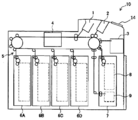
- FIG. 2 is a schematic cross-sectional view of the cash processor 10.
- one cash processing machine 10 and one terminal device 20 are arranged in the cash processing system 1000 shown in FIG. 1, but the number of arrangement of each device is not limited.
- a plurality of terminal devices 20 may be connected to one cash processing system 1000.
- the cash processor 10 and the terminal device 20 are connected by an interface 30.
- the configuration of the interface 30 is not limited, for example, a LAN interface (a network configured by a LAN cable, a switch, a router, or the like), a USB interface (for example, a USB cable), or the like can be applied.
- the cash processing system 1000 is a system used for cash management at a financial institution or the like.
- the cash processing machine 10 is a device that executes cash withdrawal and deposit based on operations by an operator such as a reception counter of a financial institution. Although it is possible to directly operate the cash processing machine 10 itself, the reception counter member of the financial institution mainly operates the cash processing machine 10 via the terminal device 20.
- the cash processing machine 10 includes a control unit 11, a storage unit 12, a cash processing unit 13, and an operation display unit 14.
- the operation display unit 14 functions as an interface (user interface) for outputting information to the operator and receiving operations from the operator.
- a specific device configuration applied to the operation display unit 14 is not limited, for example, various devices such as a touch panel display can be used.
- the operation display unit 14 displays an operation screen (GUI screen) using a touch panel display or the like (for example, displays a menu screen or a processing result screen), and outputs information to the operator and accepts operation from the operator.
- GUI screen operation screen
- the operation display unit 14 may further include hardware buttons, switches, levers, and the like (not shown).
- the cash processing unit 13 is a device that performs a deposit process for cash input from an operator, a withdrawal process for stored cash, and the like.
- the control unit 11 has a function of controlling the cash processing machine 10 as a whole.
- the control unit 11 controls processing such as deposit, withdrawal, collection, and organizing counting. Further, the control unit 11 controls the cash processing machine 10 as a whole so as to execute processing (operation) instructed by the operator from the operation display unit 14 or processing instructed by the operator from the terminal device 20.
- the storage unit 12 is a storage unit that stores data used in processing of the control unit 11 and the like.
- the storage unit 12 stores password data 121 used for authentication processing.
- the control unit 11 and the storage unit 12 may be realized by, for example, a processor, a ROM (Read Only Memory), a RAM (Random Access Memory), and the like, and by installing the control program according to the embodiment on a computer having them. It may be realized.
- FIG. 2 is a schematic sectional view of the cash processor 10. In FIG. 2, the cash processing unit 13 and the operation display unit 14 are illustrated.
- the cash processing unit 13 includes a deposit port 1 for inserting banknotes, a withdrawal port 2 for discharging banknotes, a temporary storage unit 3, a banknote recognition unit 4, a transport unit 5, banknote cassettes 6A to 6D, and a banknote cassette 7.
- the banknote cassette 7 has a banknote storage 8 and a reject storage 9.
- the deposit port 1 is a slot into which an operator inserts banknotes.
- the deposit port 1 is provided with a shutter (not shown) that opens and closes the opening. Further, the deposit port 1 has a separation function of separating and feeding out banknotes inserted in a bundle one by one.
- the withdrawal port 2 is a discharge port through which banknotes received by the operator are discharged.
- the withdrawal port 2 is provided with a shutter (not shown) that opens and closes the opening. Further, the withdrawal port 2 has a stacking function for stacking banknotes to be discharged.
- the deposit port 1 has a separation function of feeding out inserted banknotes one by one.
- the withdrawal port 2 has a stacking function for stacking banknotes to be discharged as described above.
- the temporary storage unit 3 has both functions of separating and accumulating banknotes.
- the temporary holding unit 3 temporarily accumulates the banknotes separated from the deposit port 1 and identified as normal by the banknote recognition unit 4 during the deposit transaction.
- the banknotes accumulated in the temporary storage unit 3 are paid out when a transaction is established, for example, when the account of the deposited banknote is confirmed, and is conveyed to the banknote cassettes 6A to 6D through the banknote recognition unit 4.
- the bill recognition unit 4 performs discrimination of bills passing one by one.
- the traveling direction of the banknotes corresponds to both directions, and the banknote recognition unit 4 can discriminate between banknotes transported from the deposit port 1 direction and banknotes transported from the opposite direction.
- the transport unit 5 includes each transport path that transports banknotes, each transport roller, and a drive mechanism that drives each transport path.
- the drive mechanism drives the conveyance path by rotating, for example, a DC servo motor or a pulse motor.
- the conveyance part 5 is controlled by the control part 11, and conveys a banknote to the target conveyance destination.
- the banknote cassettes 6A to 6D are banknote storage units that can store banknotes for each denomination, and have both functions of stacking and separating banknotes.
- the banknote cassettes 6A to 6D may include a plurality of banknote cassettes for the same denomination.
- the banknote cassettes 6A to 6D have a structure that can be attached to and detached from the cash processing machine 10, and the banknote cassettes 6A to 6D can be loaded with banknotes by exchanging them individually.
- the banknote cassette 7 includes a banknote storage 8 on the upper side and a reject storage 9 on the lower side (bottom). Moreover, the banknote cassette 7 becomes a structure which can be attached or detached with respect to the cash processing machine 10, and collection
- the banknote storage 8 has a stacking function for stacking banknotes and a separating function for feeding one by one.
- the banknote storage 8 can collect banknotes separated from the banknote cassettes 6A to 6D at the time of cassette count collection and collect banknotes. Moreover, the banknote storage 8 can feed out the banknotes accommodated in the cassette count replenishment and replenish the banknote cassette 6 with the banknotes.
- the reject box 9 has only a stacking function for stacking banknotes.
- the reject store 9 is a banknote storage unit for stacking banknotes (reject banknotes) that have been identified as abnormal (rejection determination) by the banknote recognition unit 4.
- the terminal device 20 is a device configured by installing the terminal program according to the embodiment in a computer such as a PC.
- the functional configuration of the terminal device 20 can be illustrated as shown in FIG. 1, for example.
- the terminal device 20 includes a control unit 21, a storage unit 22, and an operation display unit 23.
- the control unit 21 has a control function of the terminal device 20 as a whole, a communication function with the cash processor 10, and the like.
- the storage unit 22 is a storage unit that stores data used in the processing of the control unit 21 and the like.
- the control unit 21 and the storage unit 22 may be realized using, for example, a computer having a processor (for example, a CPU) and a memory.
- the operation display unit 23 functions as an interface (user interface) for outputting information to the operator and receiving operations from the operator.
- a specific device configuration applied to the operation display unit 23 is not limited, for example, a configuration in which various devices such as a display, a keyboard, and a mouse (not shown) may be combined.
- the operation display unit 23 displays an operation screen (GUI screen) to the operator (for example, displays a menu screen or a processing result screen), and can output information to the operator and accept operations from the operator. It demonstrates as what is comprised.
- control unit 21 a program operating on the control unit 21
- control unit 21 has three programs installed, that is, an application 211, a control driver 212, and a communication driver 213.
- the communication driver 213 is a driver for communicating with the cash processing machine 10 via the interface 30.
- the control driver 212 is a driver for communicating with the cash processing machine 10 using the communication driver 213 and controlling the cash processing machine 10 (for example, control by sending various commands).
- the control driver 212 performs control (for example, command transmission) with respect to the cash processing machine 10 according to an instruction from the application 211.
- the application 211 is responsible for receiving operations from the user and outputting information to the user using the operation display unit 23.
- the application 211 performs a process of displaying an operation screen (GUI screen) on the operation display unit 23 and receiving an input from the user (for example, an input using a mouse or a keyboard).
- the application 211 causes the cash processing machine 10 to execute various processes (for example, a deposit process, a withdrawal process, various setting change processes, etc.) via the control driver 212 in accordance with an operation on the operation screen by the user.
- various processes for example, a deposit process, a withdrawal process, various setting change processes, etc.
- the password data 121 is cash as authentication information when the cash processing machine 10 accepts a process execution operation (including an indirect operation using the terminal device 20) from the operator. It is stored in the storage unit 12 of the processor 10.
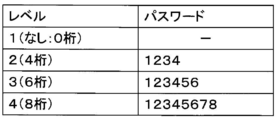
- FIG. 3 is an explanatory diagram showing a configuration example of the password data 121 in a table format.
- the password data 121 is data in which a password for each operation authority level (hereinafter referred to as “processing authority level”) is defined.
- FIG. 4 is an explanatory diagram showing the structure of authority and password for each processing authority level.
- four levels of operation authority 1 to 4 are set for the cash processing machine 10, and the wider (higher) operation authority as the number of processing authority levels increases. Is set.
- a minimum required operation authority level is set for each operation.
- the cash processing machine 10 performs authentication using a password when receiving an operation, and the range of operations that can be accepted (input) differs according to the processing authority level corresponding to the authenticated password. For example, when authentication is performed with a password of processing authority level 3, the cash processing machine 10 (control unit 11) can only accept processes with a processing authority level of 3 or lower, and accept operations with a processing authority level of 4 or higher. Can not.
- authentication is performed only with a password, and a user ID or the like for each operator or each processing authority level is not defined.
- an ID may be assigned for each operator or each processing authority level, and authentication may be performed by checking a combination of ID and password.
- the number of password digits for each processing authority level is not limited to the example in FIG. 3 and may be an arbitrary combination. Moreover, in the cash processing machine 10, you may make it changeable the number of password digits of each process authority level by operation of an operator.
- processing authority level 1 is used by a general bank employee in a bank (financial institution).
- Processing at processing authority level 1 includes, for example, general transactions such as deposits and withdrawals (transactions performed by bank employees in daily work).
- the processing authority level 2 is used by a manager class employee in a bank (financial institution).
- the processing authority level 2 processing includes, for example, setting change processing related to the operation of the cash processing machine 10 (for example, change of the cassette configuration, etc.).
- processing authority level 3 is used by maintenance personnel of the cash processor 10.
- processing of processing authority level 3 for example, setting change processing relating to security of the cash processing machine 10 (for example, a maintenance person performs operations such as changing the recognition rate of banknotes).
- the processing authority level 4 processing includes, for example, all password clearing (initialization) of processing authority levels 1 to 3.
- the storage unit 12 functions as a password holding unit that holds a password (password data 121). Moreover, in the cash processing machine 10, when the control part 11 performs a process, it functions as an authentication part which performs the authentication process using the password of the process authority level corresponding to the said process. Furthermore, in the cash processing machine 10, the control unit 11 functions as a process execution unit that executes a process that has been successfully authenticated.
- the application 211 of the control unit 21 functions as a process reception unit that receives an input of a process to be executed by the cash processing machine 10. Further, in the terminal device 20, the application 211 of the control unit 21 functions as a password receiving unit that receives a password having the number of digits corresponding to the processing authority level of the processing received via the operation display unit 23. Further, in the terminal device 20, the application 211 of the control unit 21 functions as a process execution instruction unit that instructs the cash processing machine 10 to execute a process received when authentication is successful.
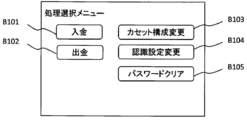
- the application 211 is not limited in the configuration of a screen that accepts a process selection to be executed from an operator, for example, a menu screen as shown in FIG. 6 (hereinafter referred to as a “process selection menu screen”) may be used. .
- a menu screen as shown in FIG. 6 hereinafter referred to as a “process selection menu screen”
- buttons B101 to B106 for receiving selection for each process are arranged.
- a button B101 for selecting a deposit transaction process at a processing authority level 1 a button B102 for selecting a withdrawal transaction process at a process authority level 1, and a cassette configuration at a process authority level 2
- a button B103 for selecting change processing a button B104 for selecting recognition setting change processing for processing authority level 3
- a button B105 for selecting password clear processing for processing authority level 4 are arranged.
- the process selection menu screen of FIG. 6 has a configuration in which buttons for accepting processes of processing authority levels 1 to 4 for simplifying the description are arranged on one menu screen.
- the menu screen that accepts the process selection from the operator may have a structure suitable for the number of processes that can be selected, such as a configuration in which a plurality of screens are hierarchized.
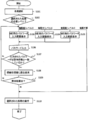
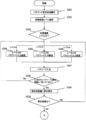
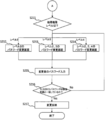
- the application 211 of the terminal device 20 confirms the processing authority level of the selected process (S102).
- the processing authority level information of each process may be registered in the application 211 in advance, and the application 211 may check the processing authority level of the process selected by the operator with reference to the information.
- processing selected by the operator is processing at processing authority level 1, no password input is required (the password is 0 digits), and therefore the application 211 does not request password input, but will be described later in step S110. Transition to processing.
- the application 211 causes the operation display unit 23 to display a password input screen for accepting a 4-digit password input corresponding to the process authority level 2 (S103). ).
- the application 211 causes the operation display unit 23 to display a password input screen for accepting a 6-digit password input corresponding to the process authority level 3 (S104). ).
- the application 211 causes the operation display unit 23 to display a password input screen for accepting an 8-digit password input corresponding to the process authority level 4 ( S105).
- the application 211 accepts the password input on the password input screen displayed in any of steps S103 to S104 (S106).
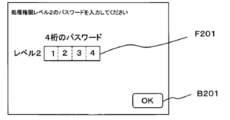
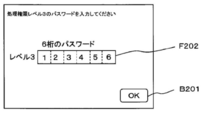
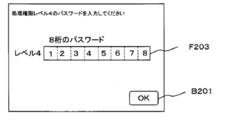
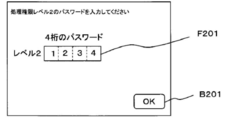
- 7A to 7C are explanatory diagrams showing an example of the configuration of the password input screen.
- FIG. 7A is a configuration example of a password input screen for accepting a 4-digit password input.
- a field F201 for accepting a 4-digit password entry and an OK button B201 for accepting completion of password entry are arranged.
- FIG. 7B is a configuration example of a password entry screen for accepting a 6-digit password entry.
- a field F202 for accepting a 6-digit password entry and an OK button B201 for accepting completion of password entry are arranged.
- FIG. 7C is a configuration example of a password input screen for accepting an 8-digit password input.
- a field F203 for accepting an 8-digit password entry and an OK button B201 for accepting completion of the password entry are arranged.
- the application 211 When the application 211 displays the password input screen, the application 211 performs a process of accepting a password input with the number of digits corresponding to the displayed password input screen.
- 7A to 7C are configured to display the entered numbers in the field for accepting the password input, but display the masked entered numbers (for example, enter the entered numbers as “* It may be replaced with a symbol such as “
- the application 211 checks whether or not the number of digits of the input password matches the number of digits requested to be input on the displayed password input screen (S107). If the input password does not match the number of digits requested to be input, the application 211 returns to any of the above-described steps S103 to S105 and starts again from the process of displaying the password input screen having the same number of digits.
- the application 211 transmits an authentication request to the control unit 11 of the cash processing machine 10 via the control driver 212 and the communication driver 213 (S108). At this time, the application 211 notifies the cash processing machine 10 (control unit 11) of the input password and the processing authority level for requesting authentication. And the control part 11 of the cash processing machine 10 will collate the notified password and the password registered into the password data 121, and will perform authentication OK or authentication NG with the terminal device 20 (application). 211).
- step S110 the application 211 receives an input of the detailed content of the process selected in step S101 described above and transmits a command (command) for requesting the cash processing machine 10 to execute the process.
- the cash processing machine 10 control unit 11 also checks whether or not the authentication of the processing authority level corresponding to the process is successful every time the process is executed, If the processing authority level of the processing does not match the processing authority level that has been successfully authenticated immediately before, the processing execution request from the terminal device 20 may be rejected.
- the cash processing machine 10 can execute processing according to the processing authority level of the operator.
- the application 211 When the password change process is selected, the application 211 further displays on the operation display unit 23 an operation screen (hereinafter referred to as a “processing authority level selection screen”) that accepts selection of a processing authority level for changing the password.
- the processing authority level is accepted from the operator (S202).
- processing authority level selection screen is not limited, for example, an operation screen as shown in FIG. 10 may be used.
- buttons B301 to B303 for accepting selection of the processing authority level are arranged.
- a button B301 for selecting processing authority level 2 a button B302 for selecting processing authority level 3, and a button B303 for selecting processing authority level 4 are arranged. Yes.
- the application 211 of the terminal device 20 confirms the selected processing authority level (S203).
- the application 211 displays a password input screen (operation screen of FIG. 7A) for accepting a 4-digit password input corresponding to the processing authority level 2 on the operation display unit 23. It is displayed (S204).
- the application 211 displays a password input screen (operation screen of FIG. 7B) for accepting a 6-digit password input corresponding to the processing authority level 3 as an operation display unit. 23 is displayed (S205).
- the application 211 operates a password input screen (operation screen in FIG. 7C) for accepting an 8-digit password input corresponding to the process authority level 4. It is displayed on the display unit 23 (S206).
- the application 211 receives a password input on the password input screen displayed in any of steps S204 to S206 (S207).
- the application 211 confirms whether or not the number of digits of the input password matches the number of digits requested to be input on the displayed password input screen (S208). If the input password does not match the number of digits requested to be input, the application 211 returns to any of the above-described steps S204 to S206 and starts the process of displaying the password input screen having the same number of digits again.
- the application 211 transmits a verification request (authentication request) to the control unit 11 of the cash processing machine 10 via the control driver 212 and the communication driver 213. (S209). And the control part 11 of the cash processing machine 10 will collate the notified password and the password registered in the password data 121, and will perform collation OK or collation NG with the terminal device 20 (application 211).
- the application 211 confirms the reply from the cash processing machine 10 (control part 11) (S210), and when the reply from the cash processing machine 10 (control part 11) is collation OK, it is step S211 mentioned later.
- the process proceeds to the verification NG, the process returns to any of the above-described steps S204 to S206 to start again from the process of displaying the password input screen having the same number of digits.
- the application 211 confirms the processing authority level in which the collation result is OK (S211).
- the application 211 causes the operation display unit 23 to display a password change screen for accepting an input of a password (4-digit password) after changing the processing authority level 2 ( S212).
- the application 211 operates the password change screen for accepting the input of the changed processing authority levels 2 and 3 (4-digit and 6-digit passwords). It is displayed on the display unit 23 (S213).
- the application 211 accepts the input of the password (4-digit, 6-digit, and 8-digit password) after changing the processing authority levels 2, 3, and 4.
- the password change screen is displayed on the operation display unit 23 (S214).
- the application 211 receives the changed password input on the password change screen displayed in any of steps S212 to S214 (S215).
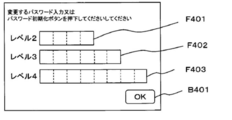
- 11A to 11C are explanatory diagrams showing an example of the configuration of the password change screen.
- FIG. 11A is a configuration example of a password change screen for accepting a password of processing authority level 2 (four digits).
- a field F401 for accepting a 4-digit password entry and an OK button B401 for accepting completion of password entry are arranged.
- FIG. 11B is a configuration example of a password change screen for accepting a password entry of processing authority level 2 (4 digits) and processing authority level 4 (6 digits).
- a field F401 for accepting a 4-digit password entry a field F402 for accepting a 6-digit password entry, and an OK button B401 for accepting completion of password entry are arranged.
- FIG. 11C is a configuration example of a password change screen for accepting password inputs of processing authority level 2 (4 digits), processing authority level 4 (6 digits), and processing authority level 4 (8 digits).
- a field F401 for accepting a 4-digit password entry a field F402 for accepting a 6-digit password entry, a field F403 for accepting an 8-digit password entry, and OK for accepting completion of the password entry.
- Button B401 is arranged.
- the application 211 When the application 211 displays the password change screen, the application 211 performs a process of accepting password input of the number of digits corresponding to the displayed password change screen.
- a plurality of levels of password input may be accepted at the same time.
- 11A to 11C are configured to display entered numbers in the field for accepting password input, but display the masked entered numbers (for example, enter * It may be displayed in place of symbols such as “
- the application 211 confirms whether or not the number of digits of the input password matches the number of digits requested for input for each field (S216). If the password entered on the password change screen does not match the number of digits requested to be input, the application 211 returns to any of the above steps S212 to S214 to display the password change screen with the same processing authority level again. Operate.
- the application 211 receives a password change request (input to the control unit 11 of the cash processing machine 10 via the control driver 212 and the communication driver 213). Command) is transmitted (S217).
- the cash processing machine 10 control unit 11
- the cash processing machine 10 changes the password of the notified processing authority level (changes the content of the password data 121).
- the password data 121 (password for each processing authority level) registered in the cash processing machine 10 can be changed.
- the cash processing system 1000 is configured to be able to change only the password below the processing authority level of the operator.
- the operator can execute only processing according to his authority. Thereby, in the cash processing system 1000, even if some passwords (for example, passwords of processing authority levels 2 and 3) are leaked, not all processing of the cash processing machine 10 can be executed illegally. Security can be improved.
- a higher processing authority level can set a password with a larger number of digits, and a higher processing authority level can ensure higher security. For example, if a 4-digit password can be set uniformly for all processing authority levels, the password entered by an operator who has only a low processing authority (an operator who only knows a password with a low processing authority level) It is possible to prevent accidental execution of processing that coincides with a password having a higher processing authority level by accident.
- FIGS. 5 to 10 described above an example in which processing is executed in accordance with an instruction (command) from the terminal device 20 has been described.
- the operation display unit 14 of the cash processing machine 10 itself, the same as in FIGS. 5 to 10 described above.
- An operation screen may be displayed to accept a process execution instruction from the operator.
- the control unit 11 of the cash processing machine performs password authentication processing using the processing authority level with reference to the password data 121 in the own device.
- the security is improved in the same manner as in the case where the terminal device 20 receives the instruction. There is an effect.
- FIG. 12 is a block diagram showing a configuration of a cash processing system 1000A according to the second embodiment.
- FIG. 12 the same or corresponding parts as those in FIG. Hereinafter, only the difference between the second embodiment and the first embodiment will be described.
- the second embodiment is different from the first embodiment in that the cash processing machine 10 and the terminal device 20 are replaced with the cash processing machine 10A and the terminal device 20A, respectively.
- password mode setting information 211A for setting whether or not to enable the password mode (password authentication using the processing authority level) in the cash processing machine 10A is set in the application 211. This is different from the first embodiment in that it is registered (held).
- the password mode setting information 211A is flag information in which either a value that enables the password mode in the cash processing machine 10A or a value that disables the password mode in the cash processing machine 10A is set.
- the first embodiment is that the password mode setting information 122 in the same format as the password mode setting information 211A is registered (held) in the storage unit 12. Is different.
- the control unit 11 of the cash processing machine 10A is activated for the first time (for example, activated in a factory-shipped state or a state initialized to a factory-shipped state)
- the control unit 11 accesses the terminal device 20A and sets a password mode.
- the value of the information 211A is acquired, and processing for reflecting the password mode setting information 122 in the storage unit 12 is performed.
- the storage unit 12 functions as a set value holding unit that holds the password mode setting information 122.
- the application 211 of the control unit 21 functions as a setting value holding unit that holds the password mode setting information 211A.
- FIG. 13 is a flowchart showing an operation when the cash processor 10A (control unit 11) is activated for the first time.
- the initial setting value (setting value before the first time starting) of password mode setting information 122 shall be a value which invalidates password mode.
- control unit 11 of the cash processing machine 10A When the control unit 11 of the cash processing machine 10A is activated for the first time, it accesses the terminal device 20A (application 211) to request and read the setting value of the password mode setting information 211A set on the terminal device 20A side ( S301).
- the control unit 11 checks the setting value of the acquired password mode setting information 211A (S302), and only when the acquired setting value is a value that enables the password mode, the password mode on the own device side.
- the setting information 122 is changed (changed to a value that enables the password mode) (S303).
- the control unit 11 may transmit a notification that the password mode has been effectively changed in the own device to the terminal device 20A side.
- the cash machine 10 operates in a state where the password mode is enabled.
- control unit 11 turns off the power of its own device (or shuts down without powering off) (S304), and terminates the operation at the first activation. If the password mode is set to be valid in step S303 described above, the cash processing machine 10 (the control unit 11) is activated with the password mode validated after the next activation.
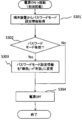
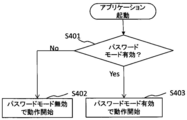
- the application 211 of the terminal device 20A When the application 211 of the terminal device 20A is activated, it confirms the content of the password mode setting information 211A (S401).
- the application 211 thereafter operates with the password mode disabled (S402). In this case, the application 211 executes the process in which the operation is accepted from the operator without executing authentication using a password (regardless of the processing authority level).
- the application 211 thereafter operates with the password mode enabled (S403). In this case, the application 211 executes the process that accepted the operation from the operator after performing authentication with a password using the process authority level (executes the same process as in the first embodiment).
- the application 211 when the cash processing machine 10A is activated, the application 211 sends the setting value of the password mode setting information 122 (a value indicating that the password mode is enabled or disabled) to the cash processing machine 10A. Notification (command transmission).
- the opportunity for the application 211 to notify the cash processing machine 10A of the setting value of the password mode setting information 122 is not limited.
- the application 211 monitors the state of the cash processing machine 10A via the interface 30, and notifies the setting value of the password mode setting information 122 when detecting that the cash processing machine 10A is activated (powered on). (Command transmission) may be performed, or the setting value of the password mode setting information 122 may be notified (command transmission) in response to a request from the cash processing machine 10A.
- the cash processing machine 10A (control unit 11) is activated after the second time (after the process of the flowchart of FIG. 13), first, the password mode setting information 122 set in the own device is referred to and the password mode is valid. It is confirmed whether it is invalid or invalid (S501).
- the control unit 21 thereafter operates in a state where the password mode is disabled (S506). In this case, when executing the process received from the operation display unit 14 or the terminal device 20A, the control unit 21 executes without executing authentication using a password (executed regardless of the processing authority level).
- the control unit 21 sets the password mode setting value (setting of the password mode setting information 211A) from the terminal device 20A (application 211). Value) command is received (S502), and the set value of the command is confirmed (S503).
- the trigger for the control unit 21 to receive the command for the password mode setting value from the terminal device 20A is not limited.
- the control unit 21 cannot execute the process in the terminal device 20A (application 211) with an error (password mode invalid). Error) (S504), and the operation returns to step S502. That is, when the password mode is set to be valid on the cash processing machine 10A side (password mode setting information 122), the control unit 21 rejects the execution of the process unless the password mode is also valid on the terminal device 20A side ( All commands will be rejected). At this time, even if the cash processing machine 10A accepts an operation directly from the operation display unit 14, the execution of the process is rejected.
- the control unit 21 when the command received from the terminal device 20A (the application 211) has the content that validates the password mode, the control unit 21 thereafter starts the operation with the password mode validated (S505). In this case, the control unit 21 executes the process that accepted the operation from the operator after performing authentication with a password using the process authority level (executes the same process as in the first embodiment).
- the password mode setting information 122 of the cash processing machine 10A is set to a value that enables the password mode, an operation (processing execution) by an unauthorized person is prevented. be able to.
- the application of the terminal device is configured to be able to operate all processing authority levels.
- the application program
- security can be further increased. It becomes possible to improve.
Landscapes
- Physics & Mathematics (AREA)
- General Physics & Mathematics (AREA)
- Financial Or Insurance-Related Operations Such As Payment And Settlement (AREA)
Abstract
L'invention concerne une machine de traitement d'espèces, comprenant : une unité de conservation de mots de passe pour conserver des mots de passe à différents nombres de chiffres pour chaque niveau d'autorité de processus au moment d'exécuter un processus ; une unité d'authentification configurée pour exécuter un processus d'authentification à l'aide d'un mot de passe à un niveau d'autorité de processus correspondant à un processus indiqué au moment d'exécuter le processus ; et une unité d'exécution de processus configurée pour exécuter un processus pour lequel une authentification a été réussie dans l'unité d'authentification.
Applications Claiming Priority (2)
| Application Number | Priority Date | Filing Date | Title |
|---|---|---|---|
| JP2016-033251 | 2016-02-24 | ||
| JP2016033251A JP6617603B2 (ja) | 2016-02-24 | 2016-02-24 | 現金処理機、端末装置、及び現金処理システム |
Publications (1)
| Publication Number | Publication Date |
|---|---|
| WO2017145504A1 true WO2017145504A1 (fr) | 2017-08-31 |
Family
ID=59685060
Family Applications (1)
| Application Number | Title | Priority Date | Filing Date |
|---|---|---|---|
| PCT/JP2016/087672 Ceased WO2017145504A1 (fr) | 2016-02-24 | 2016-12-16 | Machine de traitement d'espèces, dispositif terminal, et système de traitement d'espèces |
Country Status (2)
| Country | Link |
|---|---|
| JP (1) | JP6617603B2 (fr) |
| WO (1) | WO2017145504A1 (fr) |
Citations (5)
| Publication number | Priority date | Publication date | Assignee | Title |
|---|---|---|---|---|
| JPS63661B2 (fr) * | 1982-04-30 | 1988-01-08 | Nissan Motor | |
| JPH07146903A (ja) * | 1993-11-24 | 1995-06-06 | Fujitsu Ltd | ローカルセキュリティを有する取引システム |
| JP2000315276A (ja) * | 1999-04-30 | 2000-11-14 | Hitachi Ltd | 現金自動取引装置 |
| JP2003008801A (ja) * | 2002-03-26 | 2003-01-10 | Kyocera Mita Corp | 画像形成装置 |
| JP2009042890A (ja) * | 2007-08-07 | 2009-02-26 | Konica Minolta Business Technologies Inc | 情報処理装置、データ保護方法およびデータ保護プログラム |
Family Cites Families (1)
| Publication number | Priority date | Publication date | Assignee | Title |
|---|---|---|---|---|
| JPS63661A (ja) * | 1986-06-19 | 1988-01-05 | Omron Tateisi Electronics Co | カ−ド処理システム |
-
2016
- 2016-02-24 JP JP2016033251A patent/JP6617603B2/ja active Active
- 2016-12-16 WO PCT/JP2016/087672 patent/WO2017145504A1/fr not_active Ceased
Patent Citations (5)
| Publication number | Priority date | Publication date | Assignee | Title |
|---|---|---|---|---|
| JPS63661B2 (fr) * | 1982-04-30 | 1988-01-08 | Nissan Motor | |
| JPH07146903A (ja) * | 1993-11-24 | 1995-06-06 | Fujitsu Ltd | ローカルセキュリティを有する取引システム |
| JP2000315276A (ja) * | 1999-04-30 | 2000-11-14 | Hitachi Ltd | 現金自動取引装置 |
| JP2003008801A (ja) * | 2002-03-26 | 2003-01-10 | Kyocera Mita Corp | 画像形成装置 |
| JP2009042890A (ja) * | 2007-08-07 | 2009-02-26 | Konica Minolta Business Technologies Inc | 情報処理装置、データ保護方法およびデータ保護プログラム |
Also Published As
| Publication number | Publication date |
|---|---|
| JP6617603B2 (ja) | 2019-12-11 |
| JP2017151705A (ja) | 2017-08-31 |
Similar Documents
| Publication | Publication Date | Title |
|---|---|---|
| US8376219B1 (en) | Banking system controlled responsive to data bearing records | |
| JP6803692B2 (ja) | 現金処理システム、現金処理方法及び携帯端末 | |
| CN105229709B (zh) | 安全性系统 | |
| CN102081819A (zh) | 纸币处理装置 | |
| US7922080B1 (en) | Automated banking machine that operates responsive to data bearing records | |
| JP2012108796A (ja) | 自動取引システム、自動取引方法、および自動取引装置 | |
| CN101681533A (zh) | 货币处理机、货币处理机系统以及控制方法 | |
| WO2006067858A1 (fr) | Recepteur et distributeur automatique de pieces de monnaie | |
| JP2010092316A (ja) | 時間外取引方法及び時間外取引システム | |
| JP6617603B2 (ja) | 現金処理機、端末装置、及び現金処理システム | |
| JP5527988B2 (ja) | 貨幣処理システムおよび貨幣処理方法 | |
| JP5202152B2 (ja) | 現金処理システム | |
| JP7541794B2 (ja) | 貨幣処理装置、貨幣処理装置の異常解消方法およびコンピュータプログラム | |
| KR102250014B1 (ko) | 카드결제 기능이 구비된 무인 화폐교환장치 | |
| CN101488259A (zh) | 交易处理装置 | |
| JP2018160154A (ja) | 現金自動取引装置、情報処理方法、及び情報処理プログラム | |
| JPH0636211B2 (ja) | 自動取引装置 | |
| KR102002945B1 (ko) | Cen/xfs 비표준 기반 어플리케이션 인증 장치 및 그 제어방법, 그리고 금융기기 | |
| EP3627422A1 (fr) | Guichet bancaire automatique à trois modes | |
| US12632857B2 (en) | Money processing device, method of resolving abnormality of money processing device, and computer-readable recording medium | |
| JP6480313B2 (ja) | 取引装置、取引方法および取引プログラム | |
| JP6459499B2 (ja) | 現金処理装置および現金処理方法 | |
| JP2013145489A (ja) | 現金類処理装置、現金類処理方法、及びプログラム | |
| EP4358046A1 (fr) | Appareil de traitement de support de valeur et procédé de traitement de support de valeur | |
| JP7306166B2 (ja) | 金銭処理装置及び金銭処理方法 |
Legal Events
| Date | Code | Title | Description |
|---|---|---|---|
| NENP | Non-entry into the national phase |
Ref country code: DE |
|
| 121 | Ep: the epo has been informed by wipo that ep was designated in this application |
Ref document number: 16891659 Country of ref document: EP Kind code of ref document: A1 |
|
| 122 | Ep: pct application non-entry in european phase |
Ref document number: 16891659 Country of ref document: EP Kind code of ref document: A1 |