WO2018096849A1 - Dispositif de traitement d'informations, procédé de traitement d'informations et programme - Google Patents
Dispositif de traitement d'informations, procédé de traitement d'informations et programme Download PDFInfo
- Publication number
- WO2018096849A1 WO2018096849A1 PCT/JP2017/037827 JP2017037827W WO2018096849A1 WO 2018096849 A1 WO2018096849 A1 WO 2018096849A1 JP 2017037827 W JP2017037827 W JP 2017037827W WO 2018096849 A1 WO2018096849 A1 WO 2018096849A1
- Authority
- WO
- WIPO (PCT)
- Prior art keywords
- playback
- information
- playback device
- mode
- information processing
- Prior art date
- Legal status (The legal status is an assumption and is not a legal conclusion. Google has not performed a legal analysis and makes no representation as to the accuracy of the status listed.)
- Ceased
Links
Images



Classifications
-
- H—ELECTRICITY
- H04—ELECTRIC COMMUNICATION TECHNIQUE
- H04N—PICTORIAL COMMUNICATION, e.g. TELEVISION
- H04N21/00—Selective content distribution, e.g. interactive television or video on demand [VOD]
- H04N21/80—Generation or processing of content or additional data by content creator independently of the distribution process; Content per se
- H04N21/81—Monomedia components thereof
- H04N21/8106—Monomedia components thereof involving special audio data, e.g. different tracks for different languages
- H04N21/8113—Monomedia components thereof involving special audio data, e.g. different tracks for different languages comprising music, e.g. song in MP3 format
-
- H—ELECTRICITY
- H04—ELECTRIC COMMUNICATION TECHNIQUE
- H04L—TRANSMISSION OF DIGITAL INFORMATION, e.g. TELEGRAPHIC COMMUNICATION
- H04L41/00—Arrangements for maintenance, administration or management of data switching networks, e.g. of packet switching networks
- H04L41/08—Configuration management of networks or network elements
- H04L41/085—Retrieval of network configuration; Tracking network configuration history
- H04L41/0853—Retrieval of network configuration; Tracking network configuration history by actively collecting configuration information or by backing up configuration information
-
- H—ELECTRICITY
- H04—ELECTRIC COMMUNICATION TECHNIQUE
- H04L—TRANSMISSION OF DIGITAL INFORMATION, e.g. TELEGRAPHIC COMMUNICATION
- H04L41/00—Arrangements for maintenance, administration or management of data switching networks, e.g. of packet switching networks
- H04L41/08—Configuration management of networks or network elements
- H04L41/085—Retrieval of network configuration; Tracking network configuration history
- H04L41/0853—Retrieval of network configuration; Tracking network configuration history by actively collecting configuration information or by backing up configuration information
- H04L41/0856—Retrieval of network configuration; Tracking network configuration history by actively collecting configuration information or by backing up configuration information by backing up or archiving configuration information
-
- H—ELECTRICITY
- H04—ELECTRIC COMMUNICATION TECHNIQUE
- H04L—TRANSMISSION OF DIGITAL INFORMATION, e.g. TELEGRAPHIC COMMUNICATION
- H04L41/00—Arrangements for maintenance, administration or management of data switching networks, e.g. of packet switching networks
- H04L41/22—Arrangements for maintenance, administration or management of data switching networks, e.g. of packet switching networks comprising specially adapted graphical user interfaces [GUI]
-
- H—ELECTRICITY
- H04—ELECTRIC COMMUNICATION TECHNIQUE
- H04N—PICTORIAL COMMUNICATION, e.g. TELEVISION
- H04N21/00—Selective content distribution, e.g. interactive television or video on demand [VOD]
- H04N21/40—Client devices specifically adapted for the reception of or interaction with content, e.g. set-top-box [STB]; Operations thereof
- H04N21/43—Processing of content or additional data, e.g. demultiplexing additional data from a digital video stream; Elementary client operations, e.g. monitoring of home network or synchronising decoder's clock; Client middleware
- H04N21/431—Generation of visual interfaces for content selection or interaction; Content or additional data rendering
-
- H—ELECTRICITY
- H04—ELECTRIC COMMUNICATION TECHNIQUE
- H04N—PICTORIAL COMMUNICATION, e.g. TELEVISION
- H04N21/00—Selective content distribution, e.g. interactive television or video on demand [VOD]
- H04N21/40—Client devices specifically adapted for the reception of or interaction with content, e.g. set-top-box [STB]; Operations thereof
- H04N21/43—Processing of content or additional data, e.g. demultiplexing additional data from a digital video stream; Elementary client operations, e.g. monitoring of home network or synchronising decoder's clock; Client middleware
- H04N21/431—Generation of visual interfaces for content selection or interaction; Content or additional data rendering
- H04N21/4312—Generation of visual interfaces for content selection or interaction; Content or additional data rendering involving specific graphical features, e.g. screen layout, special fonts or colors, blinking icons, highlights or animations
-
- H—ELECTRICITY
- H04—ELECTRIC COMMUNICATION TECHNIQUE
- H04N—PICTORIAL COMMUNICATION, e.g. TELEVISION
- H04N21/00—Selective content distribution, e.g. interactive television or video on demand [VOD]
- H04N21/40—Client devices specifically adapted for the reception of or interaction with content, e.g. set-top-box [STB]; Operations thereof
- H04N21/43—Processing of content or additional data, e.g. demultiplexing additional data from a digital video stream; Elementary client operations, e.g. monitoring of home network or synchronising decoder's clock; Client middleware
- H04N21/436—Interfacing a local distribution network, e.g. communicating with another STB or one or more peripheral devices inside the home
-
- H—ELECTRICITY
- H04—ELECTRIC COMMUNICATION TECHNIQUE
- H04N—PICTORIAL COMMUNICATION, e.g. TELEVISION
- H04N21/00—Selective content distribution, e.g. interactive television or video on demand [VOD]
- H04N21/40—Client devices specifically adapted for the reception of or interaction with content, e.g. set-top-box [STB]; Operations thereof
- H04N21/43—Processing of content or additional data, e.g. demultiplexing additional data from a digital video stream; Elementary client operations, e.g. monitoring of home network or synchronising decoder's clock; Client middleware
- H04N21/436—Interfacing a local distribution network, e.g. communicating with another STB or one or more peripheral devices inside the home
- H04N21/43615—Interfacing a Home Network, e.g. for connecting the client to a plurality of peripherals
-
- H—ELECTRICITY
- H04—ELECTRIC COMMUNICATION TECHNIQUE
- H04N—PICTORIAL COMMUNICATION, e.g. TELEVISION
- H04N21/00—Selective content distribution, e.g. interactive television or video on demand [VOD]
- H04N21/40—Client devices specifically adapted for the reception of or interaction with content, e.g. set-top-box [STB]; Operations thereof
- H04N21/43—Processing of content or additional data, e.g. demultiplexing additional data from a digital video stream; Elementary client operations, e.g. monitoring of home network or synchronising decoder's clock; Client middleware
- H04N21/436—Interfacing a local distribution network, e.g. communicating with another STB or one or more peripheral devices inside the home
- H04N21/4363—Adapting the video stream to a specific local network, e.g. a Bluetooth® network
- H04N21/43637—Adapting the video stream to a specific local network, e.g. a Bluetooth® network involving a wireless protocol, e.g. Bluetooth®, RF or wireless LAN [IEEE 802.11]
-
- H—ELECTRICITY
- H04—ELECTRIC COMMUNICATION TECHNIQUE
- H04N—PICTORIAL COMMUNICATION, e.g. TELEVISION
- H04N21/00—Selective content distribution, e.g. interactive television or video on demand [VOD]
- H04N21/40—Client devices specifically adapted for the reception of or interaction with content, e.g. set-top-box [STB]; Operations thereof
- H04N21/43—Processing of content or additional data, e.g. demultiplexing additional data from a digital video stream; Elementary client operations, e.g. monitoring of home network or synchronising decoder's clock; Client middleware
- H04N21/442—Monitoring of processes or resources, e.g. detecting the failure of a recording device, monitoring the downstream bandwidth, the number of times a movie has been viewed, the storage space available from the internal hard disk
-
- H—ELECTRICITY
- H04—ELECTRIC COMMUNICATION TECHNIQUE
- H04N—PICTORIAL COMMUNICATION, e.g. TELEVISION
- H04N21/00—Selective content distribution, e.g. interactive television or video on demand [VOD]
- H04N21/40—Client devices specifically adapted for the reception of or interaction with content, e.g. set-top-box [STB]; Operations thereof
- H04N21/43—Processing of content or additional data, e.g. demultiplexing additional data from a digital video stream; Elementary client operations, e.g. monitoring of home network or synchronising decoder's clock; Client middleware
- H04N21/442—Monitoring of processes or resources, e.g. detecting the failure of a recording device, monitoring the downstream bandwidth, the number of times a movie has been viewed, the storage space available from the internal hard disk
- H04N21/44227—Monitoring of local network, e.g. connection or bandwidth variations; Detecting new devices in the local network
-
- H—ELECTRICITY
- H04—ELECTRIC COMMUNICATION TECHNIQUE
- H04N—PICTORIAL COMMUNICATION, e.g. TELEVISION
- H04N21/00—Selective content distribution, e.g. interactive television or video on demand [VOD]
- H04N21/40—Client devices specifically adapted for the reception of or interaction with content, e.g. set-top-box [STB]; Operations thereof
- H04N21/43—Processing of content or additional data, e.g. demultiplexing additional data from a digital video stream; Elementary client operations, e.g. monitoring of home network or synchronising decoder's clock; Client middleware
- H04N21/443—OS processes, e.g. booting an STB, implementing a Java virtual machine in an STB or power management in an STB
- H04N21/4432—Powering on the client, e.g. bootstrap loading using setup parameters being stored locally or received from the server
-
- H—ELECTRICITY
- H04—ELECTRIC COMMUNICATION TECHNIQUE
- H04N—PICTORIAL COMMUNICATION, e.g. TELEVISION
- H04N21/00—Selective content distribution, e.g. interactive television or video on demand [VOD]
- H04N21/40—Client devices specifically adapted for the reception of or interaction with content, e.g. set-top-box [STB]; Operations thereof
- H04N21/47—End-user applications
- H04N21/485—End-user interface for client configuration
- H04N21/4852—End-user interface for client configuration for modifying audio parameters, e.g. switching between mono and stereo
-
- H—ELECTRICITY
- H04—ELECTRIC COMMUNICATION TECHNIQUE
- H04R—LOUDSPEAKERS, MICROPHONES, GRAMOPHONE PICK-UPS OR LIKE ACOUSTIC ELECTROMECHANICAL TRANSDUCERS; ELECTRIC HEARING AIDS; PUBLIC ADDRESS SYSTEMS
- H04R3/00—Circuits for transducers
- H04R3/12—Circuits for transducers for distributing signals to two or more loudspeakers
-
- H—ELECTRICITY
- H04—ELECTRIC COMMUNICATION TECHNIQUE
- H04S—STEREOPHONIC SYSTEMS
- H04S7/00—Indicating arrangements; Control arrangements, e.g. balance control
- H04S7/30—Control circuits for electronic adaptation of the sound field
- H04S7/308—Electronic adaptation dependent on speaker or headphone connection
-
- H—ELECTRICITY
- H04—ELECTRIC COMMUNICATION TECHNIQUE
- H04R—LOUDSPEAKERS, MICROPHONES, GRAMOPHONE PICK-UPS OR LIKE ACOUSTIC ELECTROMECHANICAL TRANSDUCERS; ELECTRIC HEARING AIDS; PUBLIC ADDRESS SYSTEMS
- H04R2420/00—Details of connection covered by H04R, not provided for in its groups
- H04R2420/03—Connection circuits to selectively connect loudspeakers or headphones to amplifiers
Definitions
- the present technology relates to an information processing device, an information processing method, and a program applicable to control of a playback device.
- Patent Literature 1 describes a multi-room playback control method in which a plurality of playback devices connected to a network form a group and the same content is played back synchronously (paragraph [0043] of the specification of Patent Literature 1). ] To [0046] FIG.
- Patent Document 2 describes a broadcasting system that uses a multi-function device arranged in a hall instead of a speaker to realize a function similar to a conventional hall broadcasting.
- a group information table storing information on a group composed of a plurality of multifunction peripherals is created and displayed on a user terminal. The user selects a group for which audio is to be output from the displayed group information table. It is also possible to create a new group and register it in the group information table (paragraphs [0068] to [0085] [0116] to [0118] in FIGS. 6 and 14 of Patent Document 2).
- an object of the present technology is to provide an information processing apparatus, an information processing method, and a program capable of controlling a playback apparatus with high operability.
- an information processing apparatus includes a detection unit, a first acquisition unit, a second acquisition unit, and a generation unit.
- the detection unit detects a playback device.
- the first acquisition unit acquires a playback mode of the detected playback device.
- the second acquisition unit acquires history information including a playback device selected in the past and a playback mode when the playback device was selected in the past.
- the generation unit generates an operation image including the detected playback device and detection information including a playback mode when the playback device is detected, and the acquired history information.
- an operation image including detection information including the detected playback device and its playback mode and history information including the playback device selected in the past and the playback mode at that time is generated.
- detection information including the detected playback device and its playback mode
- history information including the playback device selected in the past and the playback mode at that time
- the playback mode may include a single playback mode and a group playback mode. Thereby, it is possible to control the reproduction of content in the single reproduction mode and the reproduction of content in the group reproduction mode with good operability.
- Each of the history information and the detection information includes at least one of a name of the playback device and an icon indicating that the playback mode is the single playback mode as information on the playback device whose playback mode is the single playback mode. But you can. This makes it possible to easily grasp the playback mode selected in the past or the playback mode of the detected playback device.
- Each of the history information and the detection information includes at least one of an icon indicating that the playback mode is the group playback mode, the name of the group including the playback device, and the group playback mode. One may be included. This makes it possible to easily grasp the playback mode selected in the past or the playback mode of the detected playback device.
- the group playback mode may include a synchronized playback mode, a surround playback mode, and a stereo playback mode. This makes it possible to control the reproduction of content in each of the synchronous reproduction mode, the surround reproduction mode, and the stereo reproduction mode with high operability.
- the operation image may include a first display area in which the history information is displayed and a second display area in which new detection information that is not included in the history information among the detection information is displayed.
- the user operability can be improved by appropriately setting the display positions of the first and second display areas.
- the operation image may be a list.
- the first display area may be set above the second display area.
- the detection unit may detect an unconnected playback device that requires a connection instruction from a user.
- the list may include a third display area in which information on the unconnected playback device is displayed.
- the detection unit may detect the unconnected playback device via short-range wireless communication. As a result, since an unconnected playback device in the vicinity of the user is detected, it is easy to determine whether or not to input a connection instruction, and high operability is exhibited.
- the third display area may be set above the first display area.
- the generation unit may determine an operation state of the playback device and the playback mode included in the history information, and generate the operation image so that a display mode differs according to the determination result. As a result, it is possible to easily determine whether or not the playback device and playback mode selected in the past are still constructed, and high operability is exhibited.
- the information processing apparatus may further include a playback control unit that instructs playback of content in the playback device and the playback mode included in the operation image.
- a playback control unit that instructs playback of content in the playback device and the playback mode included in the operation image.
- the second acquisition unit may acquire the history information from the detected playback device. As a result, the required memory capacity can be reduced, and history information can be acquired with high accuracy.
- An information processing method is an information processing method executed by a computer system, and includes detecting a playback device.
- the detected playback mode of the playback device is acquired.
- History information including a playback device selected in the past and a playback mode when the playback device was selected in the past is acquired.
- Detection information including the detected playback device and a playback mode at the time of detection of the playback device, and an operation image including the acquired history information are generated.
- a program causes a computer system to execute the following steps. Detecting a playback device; Obtaining a playback mode of the detected playback device; Obtaining history information including a playback device selected in the past and a playback mode when the playback device was selected in the past; Generating a detection image including the detected playback device and a playback mode when the playback device is detected, and an operation image including the acquired history information.
- the playback device can be controlled with good operability.
- the effects described here are not necessarily limited, and may be any of the effects described in the present disclosure.
- FIG. 1 is a schematic diagram illustrating a configuration example of a content reproduction system according to an embodiment of the present technology.
- the content playback system 100 includes a home network 1 built in a home, a plurality of playback devices 10 connected to the home network 1, a server device 20 that provides content, and a mobile terminal 30.
- the portable terminal 30 corresponds to an embodiment of the information processing apparatus according to the present technology.
- the plurality of playback devices 10, the server device 20, and the mobile terminal 30 are connected to the home network 1 via the access point 5 by wireless LAN communication such as WiFi.
- wireless LAN communication such as WiFi.
- the home network for example, a network conforming to DLNA (registered trademark) (Digital Living Network Alliance) standard is used.
- the plurality of playback devices 10 function as DMR (Digital Media Renderer), and the server device 20 functions as DMS (Digital Media Server).
- the mobile terminal 30 functions as a DMC (Digital Media Controller). Note that the present technology is also applicable when a network using another protocol is constructed.
- a plurality of playback devices 10 are arranged in a living room, a hobby room, and a bedroom.
- the portable terminal 30 transmits an instruction to acquire and play content from the server device 20 to each playback device 10 using, for example, a UPnP (Universal Plug and Play) control message.
- UPnP Universal Plug and Play
- the user can control the reproduction operation of the reproduction apparatus 10 arranged in each room by operating the portable terminal 30.
- the playback device 10 can play back content using short-range wireless communication such as Bluetooth (registered trademark).
- the home network 1 and the global network are connected via a home gateway (not shown).
- a home gateway not shown.
- each playback device 10 to play back content in the content server that exists on the global network (on the cloud).
- the local content in the playback device 10 is content read via, for example, a CD or USB, or content captured from a radio or the like.
- music content is played by a plurality of playback devices 10.
- the present technology is not limited to the reproduction of music content, and can be applied to the reproduction of various contents such as video. Further, the number of playback devices 10 and server devices 20 is not limited.
- CE Consumer Electronics
- a television device a PC (Personal computer), an audio video receiver, a video monitor, or a home game device
- In-vehicle audio mounted in a car and headphones mounted on a user are also included in the playback device according to the present technology.
- a PC or a network compatible HDD is used.
- NAS network compatible HDD
- a smartphone is typically used, but is not limited to this, and various PDAs (Personal Digital Assistant) such as a tablet terminal may be used.
- PDAs Personal Digital Assistant
- various computers can be used as the information processing apparatus according to the present technology.
- the playback device 10 a device that can operate as a DMP (Digital Media Player) may be used. In this case, it is possible to control content reproduction by operating a UI (User Interface) included in the reproduction apparatus 10. In this case, the playback apparatus 10 can function as an embodiment of the information processing apparatus according to the present technology.
- DMP Digital Media Player
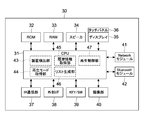
- FIG. 2 is a block diagram illustrating a configuration example of the mobile terminal 30.
- the portable terminal 30 includes a CPU (Central Processing Unit) 31, a ROM (Read Only Memory) 32, a RAM (Random Access Memory) 33, a speaker 34, a display 35, and a touch panel 36.
- the mobile terminal 30 includes an infrared (IR) communication unit 37, an external I / F (interface) 38, a key / switch 39, and an imaging unit 40.
- the mobile terminal 30 includes a network module 41 and a Bluetooth module 42.
- the CPU 31 exchanges signals with each block of the portable terminal 30 to perform various calculations, and performs portable operations such as a content reproduction instruction to the reproduction apparatus 10 and a GUI (Graphical User Interface) display on the display 35 (touch panel 36).
- portable operations such as a content reproduction instruction to the reproduction apparatus 10 and a GUI (Graphical User Interface) display on the display 35 (touch panel 36).
- GUI Graphic User Interface
- the ROM 32 stores various data processed by the CPU 31 such as various image data and metadata, and various programs such as applications.
- the RAM 33 is used as a work area for the CPU 31. When a program such as an application is executed, various data necessary for the execution are read into the RAM 33.
- a non-volatile memory such as an HDD (Hard Disk Drive), a flash memory, or other solid-state memory may be provided. These various data and programs may be stored in these storage devices.
- the storage unit is configured by the ROM 32, the HDD, and the like.
- the display 35 is a display device using, for example, liquid crystal or EL (Electro-Luminescence), and displays various GUIs. As shown in FIG. 2, the display 35 is configured integrally with the touch panel 36.
- the IR communication unit 37 is a module for executing IR communication with an external device.
- the external I / F 38 is an interface for connecting to an external device based on a standard such as USB or HDMI (registered trademark) (High-Definition Multimedia Interface).
- the key / switch 39 accepts, for example, a power switch, a shortcut key, etc., for example, a user operation that cannot be input on the touch panel 36.
- the imaging unit 40 includes, for example, a CMOS (Complementary Metal Oxide Semiconductor) or a CCD (Charge Coupled Devices) sensor, and generates a digital image of a subject.
- CMOS Complementary Metal Oxide Semiconductor
- CCD Charge Coupled Devices
- the network module 41 is an interface for connecting to the home network 1, and for example, a wireless LAN module such as WiFi is used. By operating the network module 41, wireless communication with the playback device 10 and the server device 20 becomes possible.
- the Bluetooth module 42 is a module for executing short-range wireless communication based on the Bluetooth standard with each of the plurality of playback devices 10.
- communication BLE communication
- BLE Bluetooth Low Energy
- BT communication short-range wireless communication
- Information processing by the mobile terminal 30 having the hardware configuration as described above is realized by cooperation between software stored in the ROM 32 or the like and hardware resources of the mobile terminal 30.
- the CPU 31 loads a program (application) according to the present technology stored in the ROM 32 or the like to the RAM 33 and executes the program, an information processing method according to the present technology is realized.
- the CPU 31 executes a predetermined program, so that a device detection unit 43, a playback mode acquisition unit 44, a history information acquisition unit 45, a list generation unit 46, which are functional blocks, A reproduction control unit 47 is realized.
- dedicated hardware such as an IC (integrated circuit) may be used as appropriate.
- a program such as an application is installed in the mobile terminal 30 from a global network, for example. Or a program may be installed in the portable terminal 30 via a recording medium.
- [Content playback mode] it is possible to set the content playback mode of each playback device 10 via the mobile terminal 30. In the present embodiment, it is possible to set either a single playback mode or a group playback mode.
- Single playback mode is a mode in which content is played back by a single playback device 10.
- a control message is transmitted from the portable terminal 30 to the playback device 10 in which the single playback mode is set, and various operations related to playback of content are controlled.
- various controls such as power control of the playback device 10 (for example, switching between a standby state and an active state), control of content playback volume, switching of content to be played back, fade-in / fade-out of content, and the like are possible.
- BLE communication or BL communication It is also possible to instruct the playback of content in the single playback mode via BLE communication or BL communication.
- the playback device 10 is detected.
- a BLE connection is established with the detected playback device 10 in response to a user instruction or the like.
- BLE connection includes both pairing and pairing-less connection.
- passkey authentication or the like is executed between the portable terminal 30 and the playback device 10.
- pairing processing is required.
- the playback device 10 is set to the pairing mode by the user, and pairing (BL connection) is established between the portable terminal 30 and the playback device 10.
- pairing BL connection
- the group playback mode is a mode in which a plurality of playback devices 10 connected to the home network 1 constitute a group and content is played back in the group.
- a multi-room playback mode synchronous playback mode
- a surround playback mode a stereo playback mode
- Multi-room playback is a playback method in which the same content is played back synchronously by a plurality of playback devices 10 in the group. For example, by playing the same content from a plurality of playback devices 10 in the same room, music can be enjoyed at a large volume in the entire room. Alternatively, when a party is invited by inviting many friends, the same content can be played from the playback device 10 arranged in each room, and the operation can be simultaneously controlled to increase the party.
- a plurality of playback devices 10 constituting a group are selected, and one of them is set as a master device.
- the other playback device 10 is set as a slave device.
- the instruction is transmitted to the master device.
- the master device acquires content to be played back and simultaneously delivers the content to slave devices. As a result, multi-room playback of content is realized.
- the method for selecting the master device is not limited.
- the playback device 10 with high network strength, the playback device 10 connected to the global network, or the like is set as the master device.
- the playback device 10 that is superior in playing back the content desired by the user is selected as the master device.
- the master device may be designated by the user.
- the master device and the slave device may be called a parent device and a child device.
- the slave device may be called a player machine.
- the method for realizing the synchronized playback by the master device and the slave device is not limited, and for example, any technique related to the synchronized playback may be used.
- synchronized reproduction can be performed by synchronizing with a clock and a time stamp and combining this with buffer processing.
- the flow control etc. which combined RTP (Real-time * Transport * Protocol) and RTCP (RTP * Control * Protoco1) are mentioned. It is also possible to use the technique described in Patent Document 1 described above.
- Surround playback corresponds to multi-channel playback of 3ch or more, and includes 5.1ch of a home theater, for example.
- a plurality of playback devices 10 constituting a group are selected, and a channel is set for each playback device 10.
- a total of six playback devices 10 are selected for front (front left and right), center (front center), rear (back left and right), and subwoofer (super bass).
- the method of assigning channels to each playback device 10 is not limited and is executed automatically or manually.
- a single playback device 10 includes a plurality of speakers, a plurality of channels may be assigned to the playback device 10. Therefore, there may be a case where a group is configured by a smaller number of playback apparatuses 10 than the number of channels.
- the configuration of the multi-channel playback system that can be realized by setting the surround playback mode is not limited. For example, it is possible to construct a multi-channel reproduction system having 2.1ch to 7.1ch or any other number of channels.
- stereo playback content is played back on 2 channels of LR (left and right).
- a group is constituted by two playback devices 10, and one of the LR channels is set for each playback device 10.
- the channel setting method is not limited, and stereo playback may be executed by a single playback device 10 having a plurality of speakers. Even in this case, the present technology can be applied as a group is configured.
- one of a plurality of playback devices 10 constituting a group is set as a master device, similarly to multi-room playback.
- the master device controls the playback operation of the slave device, so that surround playback or stereo playback is executed.
- surround playback or stereo playback is executed.
- other control methods may be used.
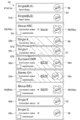
- FIG. 3 is a schematic diagram showing a configuration example of a playlist according to the present embodiment.
- FIG. 4 is a schematic diagram showing a state in which a playlist is displayed on the touch panel of the mobile terminal.
- An application for using the content reproduction system 100 is activated by a user using the mobile terminal 30. Then, the reproduction list 50 that is an image for reproduction according to the present embodiment is displayed on the touch panel 36 of the mobile terminal 30.
- the play list 50 is displayed so as to be scrollable up and down, for example.
- the play list 50 has a first display area 51, a second display area 52, and a third display area 53.
- history information 55 (55a to 55e) including the playback device 10 selected in the past and the playback mode when the playback device 10 was selected in the past is displayed.
- the following information is displayed as information of the playback device 10 whose playback mode is the single playback mode.
- the WiFi mark 57a is used in the case of connection through the home network 1
- the Bluetooth (registered trademark) mark 57b is used in the case of BLE connection or BT connection.
- the name of the playback device corresponds to information on the playback device selected in the past. Further, the name of the playback mode and the icon 56 correspond to the playback mode information at the time of past selection. Note that “Single ⁇ A ”may be handled as the name of the history information 55b and may be changed by the user. Even in this case, it is possible to grasp the history information 55 in the single reproduction mode by the icon 56.
- the following information is displayed as information of the playback device 10 whose playback mode is the group playback mode.
- the following member is the reproducing
- the name of the member in the name of the group corresponds to information on the playback device selected in the past.
- the playback mode name and the icon 58 correspond to playback mode information at the time of past selection.
- the name of the group may be changeable by the user.
- By at least the icon 58 it is possible to grasp the history information 55 of the group playback mode (multi-room playback mode, surround playback mode, stereo playback mode).
- the reproduction content information 59 may also be displayed in the single reproduction mode history information 55.
- the history information 55 in the group playback mode corresponds to the history information 55 of each playback device 10 constituting the group.
- the history information 55a corresponds to the history information 55 of each of the playback devices A, B, and C that has been selected in the past and that has been subjected to multi-room playback.
- the history information 55 is generated and stored every time the playback device 10 and its playback mode are selected via the mobile terminal 30. As the history information 55, the history information 55 of the newly selected playback device 10 is displayed above the first display area 51. Each time the history information 55 is newly generated, the history information 55 is sequentially added above the first display area 51.
- “selected” typically means that a user using the mobile terminal 30 has selected, and the history information 55 is generated for each user.
- the history information 55 is generated in association with the identification information (ID) of the user or the identification information (ID) of the portable terminal 30.
- any method for generating the history information 55 for each user may be employed.
- the “user” in the present disclosure is not limited to a single specific person, and a plurality of persons sharing the mobile terminal 30 may be “users”.
- the playback devices G and H have been selected in the past and stereo playback has been executed. Thereafter, the playback devices D, E, and F were selected and the surround playback was executed. Thereafter, the playback device I was selected and the content was played back in the single playback mode. At this time, the playback device I is controlled by BLE communication or BT communication.
- the playback device A is selected and the content is played back in the single playback mode.
- the playback devices A, B, and C are selected and the multi-room playback is executed.
- the playback mode of the playback device A is switched from the single playback mode to the multi-room playback.
- connection state of the history information 55a of “Group ABC” is an active state. This means that the playback devices A, B, and C still form a group and multi-room playback is possible. That is, the playback devices A, B, and C are detected, and the multi-room playback mode is set to indicate that each is the same group.
- the connection state of the history information 55b to 55e is an inactive state.
- the current state is not a state in which content can be played back by the playback device 10 included in each history information 55 and its playback mode.
- the playback device 10 included in the history information 55 is not detected or not connected.
- a case where a playback mode different from the playback mode included in the history information 55 is set may be considered.
- connection state of the history information 55a of “Group ABC” is the active state
- the playback device A is in the multi-room playback mode. Therefore, the connection state of the history information 55b of “Single A” is an inactive state.
- connection state corresponds to the operation state of the playback device 10 and its playback mode included in the history information 55.
- the connection state of each history information 55 is determined by the list generation unit 46, and the reproduction list 50 is generated so that the display mode differs according to the determination result.
- the presence or absence of active display of the WiFi mark 57a or the Bluetooth (registered trademark) mark 57b is appropriately controlled. Further, different colors are displayed as the background color of the history information 55 according to the connection state. For example, when the connection state is the active state, the background color is white, and when the connection state is inactive, the background color is gray (gray out). Of course, it is not limited to this.
- detection information including the playback device 10 detected by the mobile terminal 30 and the playback mode when the playback device 10 is detected is displayed.
- new detection information 60 60a to 60c
- the playback device 10 and its playback mode that have not been selected in the past among the playback device 10 and its playback mode detected by the mobile terminal 30 are displayed.
- the information displayed as the new detection information 60 is the same as the history information 55. That is, as the information of the playback device 10 whose playback mode is the single playback mode, the name of the playback mode, the icon 56 indicating that it is the single playback mode, and the connection state are displayed.
- the name of the playback device corresponds to the information of the detected playback device.
- the playback mode name and icon 56 correspond to the playback mode information at the time of detection.
- the name of the playback mode may be changeable by the user.
- a group name, an icon 58 indicating that the playback mode is the group playback mode, a connection state, and playback content information 59 are displayed.
- the name of the member in the name of the group corresponds to information on the detected playback device.
- the playback mode name and icon 58 correspond to the playback mode information at the time of detection.
- the name of the group may be changeable by the user.
- the playback device G in the single playback mode, the playback device F in the single playback mode, and the group “GroupJDEJ” in the multi-room playback mode are detected and displayed as new detection information 60.
- a case where another user uses another mobile terminal or the like to create a group “Group ⁇ DEJ” in the multi-room playback mode or a case where the playback devices G and F are used in the single playback mode can be considered.
- the single playback mode is set for the newly detected playback device 10
- the playback devices G and F may be newly added to the content playback system 100.
- the surround playback mode group “Surround DEF” was created by the playback devices D, E, and F in the past by the user. Thereafter, the group is changed by another user, and the group “Group DEJ” in the multi-room playback mode is created. There may be a case where the created group “Group DEJ” is detected. In addition, various situations are conceivable.
- new detection information 60 is information on the currently detected playback device 10 and its playback mode, all the connection states are active. In the present embodiment, newly generated new detection information 60 is sequentially added below the second display area 52.
- history information 55 and new detection information 60 displayed in the first and second display areas 51 and 52 are selected, reproduction included in the selected history information 55 and new detection information 60 is performed.
- the reproduction of content by the device 10 and its reproduction mode is instructed.
- history information 55 or new detection information 60 in an active state is selected, content is played back in a playback environment corresponding to each currently implemented information.
- a process for constructing a corresponding playback environment is executed, and if successful, the content is played back.
- the first display area 51 in which the history information 55 is displayed is located above the second display area 52 in which the new detection information 60 is displayed. Is set.
- the user can easily select the playback device 10 and the playback mode selected in the past, and can easily reproduce the playback environment that is frequently used.
- the history information 55 of the newly selected playback device 10 is sequentially added to the uppermost position of the first display area 51, it is possible to select the playback device 10 that is likely to be used and its playback mode. It becomes. As a result, it is possible to easily reproduce a recent favorite reproduction environment, and to exhibit very high operability.
- a new reproduction environment can be easily constructed by selecting the new detection information 60.
- the new detection information 60 is sequentially added below the second display area 52. Therefore, for example, it can be prevented that new detection information 60 relating to a reproduction environment that is not preferred is added to the upper part of the second display area 52 and obstructs an operation on the reproduction list. For example, when the selection operation is performed, it is possible to prevent the new detection information 60 from being inadvertently moved and making a selection mistake. As a result, high operability is exhibited.
- the detection information 61 of the unconnected playback device 10 detected by receiving the BLE beacon signal is displayed.
- the unconnected playback device 10 displayed here is a playback device 10 that requires a connection instruction from the user to establish a BLT connection.
- the detection information 61 of the unconnected playback device 10 includes the following information. Text indicating that it was detected by a BLE beacon signal (“Single (BLE)”) Icon 56 indicating that it is in single playback mode Text that requires connection instructions (“Need Setup”)
- the detection information 61 of the unconnected playback device 10 is sequentially added to the information in the third display area 53 every time it is newly generated.
- the playback device 10 When the BT connection is established, the playback device 10 is set to the pairing mode by the user, and then the pairing is executed. The pairing is often performed when instructing the reproduction of content. Therefore, the history information 55 is often generated along with the establishment of the BT connection and displayed in the first display area 51. As a result, the new detection information 60 displayed in the second display area 52 is often information on the playback device 10 detected via the home network 1.
- the present invention is not limited to this, and the new detection information 60 of the playback apparatus 10 that has established the BLE connection or the BT connection before the content playback instruction is input may be generated and displayed in the second display area 52. .
- the third display area 53 is set above the first display area 51.
- the playback device 10 that is close to the user carrying the mobile terminal 30 is detected by a BLE beacon signal of BLE communication that is short-range wireless communication. Therefore, since the number of the playback devices 10 to be detected is not so large, the first display area 51 is not shifted below the playback list 50.
- each of the first to third display areas 51 to 53 is not displayed in an identifiable manner. That is, the boundaries of the display areas are not displayed in the reproduction list 50. Therefore, it is not necessary for the user to input the operation by distinguishing the history information 55 and the new detection information 60, for example, and it is possible to operate the playlist 50 around the history information 55 that is naturally frequently used. . That is, it is possible to simply input an operation for constructing a desired reproduction environment, and high operability is exhibited. Of course, the playlist 50 may be generated so that each display area can be identified.
- both the history information 55 and the new detection information 60 can be regarded as information for realizing a reproduction environment.
- the history information 55 and the new detection information 60 may be described in a comprehensive manner as reproduction environment information.
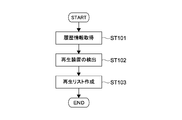
- FIG. 5 is a flowchart showing an outline of an example of creating the playlist 50.
- history information 55 is acquired by the history information acquisition unit 45 (step 101).
- the history information 55 is read from a storage unit configured by the ROM 32 or the like of the mobile terminal 30.
- the history information acquisition unit 45 corresponds to a second acquisition unit.
- the device detection unit 43 detects the playback device 10 on the home network 1 and the unconnected playback device 10 that transmits the BLE beacon signal (step 102).
- the play list 50 including the history information 55, the new detection information 60, and the detection information 61 of the unconnected playback device 10 is generated by the list generation unit 46 (step 103).
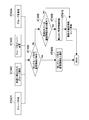
- FIG. 6 is a flowchart showing an example of processing from detection of the playback device 10 on the home network 1 to creation of the playlist 50.
- the playback device 10 on the home network 1 is detected by the device detection unit 43 (step 201).
- a device search message is transmitted by multicast via the network module 41.
- the playback device 10 connected to the home network 1 returns a device response message.
- the playback device 10 can be detected.
- Other detection methods may be used.
- the playback mode of the detected playback device 10 is acquired by the playback mode acquisition unit 44.
- a request for device information including a playback mode of the playback device 10 is transmitted using a request message generated using a method such as HTTP GET.
- the playback mode of each playback device 10 can be acquired.
- the reproduction mode acquisition unit 44 corresponds to a first acquisition unit.
- the list generation unit 46 generates detection information related to the detected playback device 10 (step 203). Then, it is determined whether or not the detection information is included in the history information 55 (step 204). When the detection information is new detection information 60 not included in the history information 55 (No in Step 204), the new detection information 60 is added to the second display area 52 (Step 205).
- the network status (connection state) of the history information 55 corresponding to the detection information displayed in the first display area 51 is set to active. (Step 206). Thereby, the reproduction list 50 can be generated.
- the reproduction list 50 can be generated.
- it is not necessarily limited to this method.
- the reproduction control unit 47 instructs the reproduction apparatus 10 included in the reproduction environment information and the reproduction of the content according to the reproduction mode.
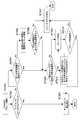
- FIG. 7 is a flowchart showing a processing example when the reproduction environment information in the group reproduction mode is selected.
- 8 to 10 are schematic diagrams showing examples of screens (images) displayed in the processing.
- the screen may be generated by the list generation unit 46 or may be generated by another image generation block.
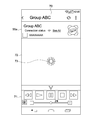
- a standby screen 70 shown in FIG. 8 is displayed.
- the standby screen 70 displays the selected reproduction environment information (in this example, history information 55a) and an operation GUI 71 for controlling the reproduction of the content.
- an operation information display area 72 In the center of the screen is an operation information display area 72, in which a mark 73 indicating that processing is in progress is displayed.
- Step 302 the network status of the selected playback environment information is determined (step 302). If the network status is active (Yes in Step 302), the dashboard screen 75 shown in FIG. 9 is displayed (Step 303). For example, this corresponds to the case where the history information 55 in the active state or the new detection information 60 is selected.
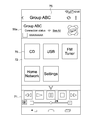
- the dashboard screen 75 is a screen displayed when the preparation of the reproduction environment related to the selected reproduction environment information is completed. Accordingly, when the network status is in the active state, the screen immediately moves to the dashboard screen 75 (the standby screen 70 may not be displayed).
- an icon 76 representing the type of content that can be played back in the playback environment that has been prepared is displayed.
- an icon 76 of content that can be played back by the playback devices A, B, and C is displayed. The user can grasp that the reproduction environment has been realized by confirming the display on the dashboard screen 75.
- various information is displayed in the display area 72 in accordance with the user's operation. For example, a list of reproducible contents, information on contents being reproduced, and a GUI for executing various settings are displayed. For example, a GUI for performing sound quality setting, EQ (equalizer) setting, timer setting, and other settings can be used.
- EQ equalizer
- Step 304 it is determined whether or not all the playback devices 10 constituting the group have been detected.
- a power ON packet (WOL packet) is transmitted to the playback device 10 (Step 305).
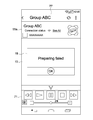
- step 306 After the transmission of the power ON packet, it is determined whether or not all the playback devices 10 have been detected within a predetermined time (step 306). If there is an undetected playback device 10 (No in step 306), an error screen 77 shown in FIG. 10 is displayed. An error dialog 78 is displayed in the display area 72 of the error screen 77 (step 307). When the error screen 77 is displayed, the processing ends without creating a reproduction environment corresponding to the selected reproduction environment information.
- process that enables detection of the undetected playback device 10 is not limited to the transmission of the power ON packet, and other processes may be executed.
- step 304 or 306 If all the playback devices 10 are detected in step 304 or 306, the process proceeds to Yes, and it is determined whether or not there is a playback device 10 belonging to another group (step 308).
- To belong to another group is typically a case in which a group is formed with another playback apparatus 10 that is not included in the playback environment information. In addition, the case where other group playback modes are set is also included.
- a group in the group playback mode included in the playback environment information is created by all the detected playback devices 10 (Step 309). For example, as described above, a master device and a slave device are set, and a group is formed around the master device.
- Step 310 If there is a playback device 10 belonging to another group (Yes in Step 308), the other groups are disbanded and wait until all the playback devices 10 are in the single playback mode (Step 310).
- the dissolution of a group is realized, for example, by transmitting a group dissolution request to the master device of the group.
- the playback mode of each playback device 10 is set to the single playback mode.
- a group playback mode group included in the selected playback environment information is created (step 309). If the creation of the group is successful (Yes in Step 311), the dashboard screen 75 shown in FIG. 9 is displayed (Step 303). On the other hand, when the group creation fails (No at step 311), an error screen 77 shown in FIG. 10 is displayed (step 307). The success / failure of group creation is executed based on, for example, a notification from the master device.
- the new detection information 60 is selected and the dashboard screen 75 is displayed, the new detection information 60 is registered as history information 55 and added to the first display area 51.
- the display position in the first display area 51 moves to the top.
- a mode for restricting movement of the history information 55 in the first display area 51 may be set.
- the network status of the playback device 10 included in the playback environment information is determined, and in the inactive state, a power ON packet is transmitted. If the playback device 10 is not detected even after the predetermined time has elapsed, an error screen 77 is displayed.
- the dashboard screen 75 is displayed. If it is in the group playback mode, the group is disbanded and waits for the single playback mode. When the single playback mode is set, the dashboard screen 75 is displayed.
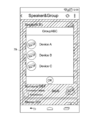
- FIG. 11 is a schematic diagram showing an example of the group information display dialog 79.
- the device display button (“See All”) displayed in the playback environment information in the group playback mode is selected, a group information display dialog 79 including information on each playback device 10 constituting the group is displayed.
- the name of each playback device 10 is displayed, and by selecting the name, the screen changes to a detailed screen related to each playback device 10.
- the specific configuration of the group information display dialog 79, information to be displayed, and the like may be set as appropriate.
- FIG. 12 is a flowchart showing an example of a registration process for the history information 55.
- the history information 55 is generated and registered in the storage unit every time the user selects the playback device 10 and its playback mode.
- processing based on the group name as shown in FIG. 12 may be executed.
- a group is created via a group creation GUI or the like (step 401).
- a group creation GUI for example, a default group name is generated or a group name is input by a user.
- a newly detected group is selected, that is, new detection information 60 in the group playback mode is selected (step 402).
- the group name is included in the new detection information 60.
- the group member is changed (step 403). For example, after the reproduction environment information of the groom reproduction mode in the reproduction list 50 is selected, the member is changed by selecting a predetermined member change button or the like. In response to an operation of changing a member by the user, a request for addition to the group or withdrawal from the group is transmitted to the master device. The group name is included in the selected reproduction environment information.
- the group name is changed by the user (step 404). For example, after the reproduction environment information of the groom reproduction mode in the reproduction list 50 is selected, a group name change operation is input.
- the method and GUI used are not limited.
- Steps 401 to 404 it is determined whether or not the history information 55 having the same group name exists in the history information 55 registered in the storage unit (Step 405).
- the history information 55 having the same group name exists (Yes in Step 405), the history information 55 is overwritten (Step 406).
- the history information 55 may be overwritten.
- the history information 55 regarding the reproduction environment that does not need to be reproduced is updated. It becomes possible. A dialog or the like for inquiring the user whether or not to execute overwriting may be displayed.
- Step 405 If there is no history information 55 having the same group name (No in Step 405), it is determined whether or not the number of registered history information 55 is the maximum (Step 407).
- the maximum number that can be registered is not limited and may be set as appropriate.
- Step 408 When the number of registered history information 55 is the maximum (Yes in Step 408), the oldest history information 55 is deleted (Step 409). Then, the reproduction environment information generated / changed according to the operations in steps 410 to 404 is registered as the latest history information 55 (step 410). When the number of registered history information 55 is not the maximum (No in Step 408), the latest history information 55 is registered without deleting the oldest history information 55 (Step 410).
- the maximum number of history information 55 that can be registered may be set. As a result, it is possible to delete the reproduction environment information corresponding to the reproduction environment that has not been used for a long time, and to reduce the necessary memory capacity. The user can also select and delete desired history information 55 from the reproduction list 50.
- the maximum number of history information 55 that can be registered for each playback mode may be set.
- the registerable number of single playback modes and the registerable number of group playback modes may be set respectively.
- the history information may be updated (deletion of old history information, etc.) for each playback mode.
- the number that can be registered may be set for each group playback mode (multi-room playback mode, surround playback mode, stereo playback mode).
- the playback device 10 detected by the mobile terminal 30 and the detection information (new detection information 60) including the playback mode, the playback device 10 selected in the past, and the current time A reproduction list 50 including history information 55 including a reproduction mode is generated.
- the playback device 10 can be controlled with good operability.
- the history information 55 of frequently used groups is displayed in the reproduction list 50.
- the history information 55 is displayed regardless of the network status, that is, whether or not the group currently exists or whether or not the playback apparatus 10 to which it belongs is in an active state. Accordingly, the user can easily reproduce the content by the group only by selecting the frequently used group history information 55 from the reproduction list 50 with one tap. As a result, very high operability can be exhibited.
- history information including the playback mode at the time of selection may be stored in the memory or the like of the playback device selected by the user.
- the history information may be requested from the portable device to the detected playback device, and the history information may be returned in response thereto. That is, the history information may be acquired from the detected playback device by the history information acquisition unit of the mobile terminal. As a result, the required memory capacity can be reduced, and history information can be acquired with high accuracy.
- the history information stored by the mobile terminal is displayed in the first display area of the playlist, and is acquired from the playback device.
- a fifth display area in which the history information is displayed may be set. That is, the history information stored by the mobile terminal and the history information acquired from the playback device may be displayed at different positions. For example, by defining conditions that define when the mobile terminal stores data and when the playback device stores data, display of history information in accordance with the conditions is realized. As a result, high operability can be exhibited.
- the type of operation that can be input to the playlist is not limited. Arbitrary operations such as new group creation, group dissolution, group member change, and reproduction information deletion as described above are possible.
- the display order of reproduction environment information in the play list that is, the display order of history information in the first display area (addition order) and the display order of detection information in the second display area (addition order) are arbitrarily set. It's okay. Further, the display part may be appropriately changed by the user.
- the play list is displayed as the operation image according to the present technology.
- the present invention is not limited to this, and any other operation GUI may be displayed as the operation image.
- a group reproduction list including history information and detection information only in the group reproduction mode may be displayed as an operation image.
- network communication BLE communication
- BT communication have been described as examples of communication for controlling the playback device.
- the present technology is not limited to these communications and can be applied to any communication method.
- the group reproduction mode may be established by short-range wireless communication or the like different from network communication.
- the information processing method according to the present technology is executed by a computer such as a portable terminal operated by a user.
- the information processing method and program according to the present technology may be executed by a computer operated by a user and another computer that can communicate via a network or the like.
- a content reproduction system according to the present technology may be constructed in conjunction with a computer operated by a user and another computer.
- the information processing method and the program according to the present technology can be executed not only in a computer system configured by a single computer but also in a computer system in which a plurality of computers operate in conjunction with each other.
- the system means a set of a plurality of components (devices, modules (parts), etc.), and it does not matter whether all the components are in the same housing. Accordingly, a plurality of devices housed in separate housings and connected via a network and a single device housing a plurality of modules in one housing are all systems.
- Information processing method and program execution according to the present technology by a computer system is performed when, for example, acquisition of history information or generation of an operation image is performed by a single computer, and each process is performed by a different computer. Including both cases.
- the execution of each process by a predetermined computer includes causing another computer to execute a part or all of the process and acquiring the result.
- the information processing method and program according to the present technology can be applied to a configuration of cloud computing in which one function is shared by a plurality of devices via a network and is processed jointly.
- this technique can also take the following structures.
- a detection unit for detecting a playback device A first acquisition unit for acquiring a reproduction mode of the detected reproduction device; A second acquisition unit that acquires history information including a playback device selected in the past and a playback mode when the playback device was selected in the past;
- An information processing apparatus comprising: a generation unit that generates detection information including the detected playback device and a playback mode at the time of detection of the playback device, and an operation image including the acquired history information.
- the playback mode includes an information processing apparatus including a single playback mode and a group playback mode.
- Each of the history information and the detection information includes at least one of a name of the playback device and an icon indicating that the playback mode is the single playback mode as information on the playback device whose playback mode is the single playback mode.
- Information processing device. (4) The information processing apparatus according to (2) or (3), Each of the history information and the detection information includes at least one of an icon indicating that the playback mode is the group playback mode, the name of the group including the playback device, and the group playback mode.
- Information processing device. The information processing apparatus according to any one of (2) to (4),
- the group reproduction mode includes an information reproduction apparatus including a synchronous reproduction mode, a surround reproduction mode, and a stereo reproduction mode.
- the information processing apparatus includes a first display area in which the history information is displayed, and a second display area in which new detection information that is not included in the history information among the detection information is displayed. .
- the information processing apparatus according to (6), The operation image is a list, The information processing apparatus, wherein the first display area is set above the second display area.
- the detection unit detects an unconnected playback device that requires a connection instruction from a user;
- the list includes a third display area in which information on the unconnected playback device is displayed.
- the information processing apparatus detects the unconnected playback device via short-range wireless communication.
- the information processing apparatus according to (8) or (9), The information processing apparatus, wherein the third display area is set above the first display area.
- the information processing apparatus according to any one of (1) to (10), The information processing apparatus, wherein the generation unit determines an operation state of the playback device and the playback mode included in the history information, and generates the operation image so that a display mode differs according to the determination result.
- the information processing apparatus according to any one of (1) to (11), An information processing apparatus comprising: a playback control unit that instructs playback of content according to the playback device and the playback mode included in the operation image.
- the second acquisition unit acquires the history information from the detected playback device.
Landscapes
- Engineering & Computer Science (AREA)
- Signal Processing (AREA)
- Multimedia (AREA)
- Computer Networks & Wireless Communication (AREA)
- Human Computer Interaction (AREA)
- Databases & Information Systems (AREA)
- Physics & Mathematics (AREA)
- Acoustics & Sound (AREA)
- General Health & Medical Sciences (AREA)
- Otolaryngology (AREA)
- Health & Medical Sciences (AREA)
- General Engineering & Computer Science (AREA)
- Software Systems (AREA)
- User Interface Of Digital Computer (AREA)
- Two-Way Televisions, Distribution Of Moving Picture Or The Like (AREA)
- Stereophonic System (AREA)
- Circuit For Audible Band Transducer (AREA)
Abstract
Selon un mode de réalisation, la présente invention concerne un dispositif de traitement d'informations doté d'une unité de détection, d'une première unité d'acquisition, d'une seconde unité d'acquisition et d'une unité de génération. L'unité de détection détecte un dispositif de reproduction. La première unité d'acquisition acquiert un mode de reproduction du dispositif de reproduction détecté. La seconde unité d'acquisition acquiert des informations d'historique qui comprennent un dispositif de reproduction qui a été sélectionné dans le passé et un mode de reproduction du dispositif de reproduction lorsque le dispositif de reproduction a été sélectionné dans le passé. L'unité de génération génère des informations de détection qui comprennent le dispositif de reproduction détecté et un mode de reproduction du dispositif de reproduction lorsque le dispositif de reproduction a été détecté et une image à des fins de fonctionnement qui comprend les informations d'historique acquises.
Priority Applications (3)
| Application Number | Priority Date | Filing Date | Title |
|---|---|---|---|
| JP2018552466A JP7010236B2 (ja) | 2016-11-25 | 2017-10-19 | 情報処理装置、情報処理方法、及びプログラム |
| EP17874124.5A EP3547695A4 (fr) | 2016-11-25 | 2017-10-19 | Dispositif de traitement d'informations, procédé de traitement d'informations et programme |
| US16/339,136 US11418406B2 (en) | 2016-11-25 | 2017-10-19 | Information processing apparatus and information processing method |
Applications Claiming Priority (2)
| Application Number | Priority Date | Filing Date | Title |
|---|---|---|---|
| JP2016229277 | 2016-11-25 | ||
| JP2016-229277 | 2016-11-25 |
Publications (1)
| Publication Number | Publication Date |
|---|---|
| WO2018096849A1 true WO2018096849A1 (fr) | 2018-05-31 |
Family
ID=62195447
Family Applications (1)
| Application Number | Title | Priority Date | Filing Date |
|---|---|---|---|
| PCT/JP2017/037827 Ceased WO2018096849A1 (fr) | 2016-11-25 | 2017-10-19 | Dispositif de traitement d'informations, procédé de traitement d'informations et programme |
Country Status (4)
| Country | Link |
|---|---|
| US (1) | US11418406B2 (fr) |
| EP (1) | EP3547695A4 (fr) |
| JP (1) | JP7010236B2 (fr) |
| WO (1) | WO2018096849A1 (fr) |
Families Citing this family (8)
| Publication number | Priority date | Publication date | Assignee | Title |
|---|---|---|---|---|
| DK179594B1 (en) | 2016-06-12 | 2019-02-25 | Apple Inc. | User interface for managing controllable external devices |
| CN118102037A (zh) | 2018-05-07 | 2024-05-28 | 苹果公司 | 用于查看实况视频馈送和录制视频的用户界面 |
| US10904029B2 (en) | 2019-05-31 | 2021-01-26 | Apple Inc. | User interfaces for managing controllable external devices |
| US11079913B1 (en) | 2020-05-11 | 2021-08-03 | Apple Inc. | User interface for status indicators |
| US11589010B2 (en) | 2020-06-03 | 2023-02-21 | Apple Inc. | Camera and visitor user interfaces |
| US20220365667A1 (en) | 2021-05-15 | 2022-11-17 | Apple Inc. | User interfaces for managing accessories |
| US12379827B2 (en) | 2022-06-03 | 2025-08-05 | Apple Inc. | User interfaces for managing accessories |
| US12321574B2 (en) | 2022-09-02 | 2025-06-03 | Apple Inc. | Content output devices and user interfaces |
Citations (3)
| Publication number | Priority date | Publication date | Assignee | Title |
|---|---|---|---|---|
| JP2012114577A (ja) | 2010-11-22 | 2012-06-14 | Sharp Corp | 放送システム |
| US20160026427A1 (en) * | 2014-07-22 | 2016-01-28 | Sonos, Inc. | Audio Settings |
| WO2016103546A1 (fr) | 2014-12-26 | 2016-06-30 | ソニー株式会社 | Dispositif de traitement d'informations, procédé de traitement d'informations, et programme |
Family Cites Families (7)
| Publication number | Priority date | Publication date | Assignee | Title |
|---|---|---|---|---|
| JPS62146568A (ja) | 1985-12-19 | 1987-06-30 | Nissei Reiki Kk | ソフトクリ−ム製造機の洗浄方法とその装置 |
| JP5055769B2 (ja) | 2005-05-23 | 2012-10-24 | ソニー株式会社 | コンテンツ表示再生システム、コンテンツ表示再生方法、記録媒体、及び操作制御装置 |
| JP4207135B2 (ja) * | 2006-07-21 | 2009-01-14 | ソニー株式会社 | 再生装置、再生方法及び再生プログラム |
| WO2009086599A1 (fr) * | 2008-01-07 | 2009-07-16 | Avega Systems Pty Ltd | Interface utilisateur pour gérer le fonctionnement de dispositifs de lecture multimédia en réseau |
| JP2013062624A (ja) * | 2011-09-12 | 2013-04-04 | Sharp Corp | 再生装置、再生方法、配信装置、配信システム、再生プログラムおよび記録媒体 |
| KR102164455B1 (ko) * | 2013-05-08 | 2020-10-13 | 삼성전자주식회사 | 콘텐트 제공 방법, 콘텐트 제공 장치 및 그 콘텐트 제공 시스템 |
| US10209947B2 (en) | 2014-07-23 | 2019-02-19 | Sonos, Inc. | Device grouping |
-
2017
- 2017-10-19 WO PCT/JP2017/037827 patent/WO2018096849A1/fr not_active Ceased
- 2017-10-19 US US16/339,136 patent/US11418406B2/en active Active
- 2017-10-19 EP EP17874124.5A patent/EP3547695A4/fr not_active Ceased
- 2017-10-19 JP JP2018552466A patent/JP7010236B2/ja active Active
Patent Citations (3)
| Publication number | Priority date | Publication date | Assignee | Title |
|---|---|---|---|---|
| JP2012114577A (ja) | 2010-11-22 | 2012-06-14 | Sharp Corp | 放送システム |
| US20160026427A1 (en) * | 2014-07-22 | 2016-01-28 | Sonos, Inc. | Audio Settings |
| WO2016103546A1 (fr) | 2014-12-26 | 2016-06-30 | ソニー株式会社 | Dispositif de traitement d'informations, procédé de traitement d'informations, et programme |
Non-Patent Citations (1)
| Title |
|---|
| See also references of EP3547695A4 |
Also Published As
| Publication number | Publication date |
|---|---|
| JPWO2018096849A1 (ja) | 2019-10-17 |
| US20190273664A1 (en) | 2019-09-05 |
| JP7010236B2 (ja) | 2022-02-10 |
| EP3547695A1 (fr) | 2019-10-02 |
| US11418406B2 (en) | 2022-08-16 |
| EP3547695A4 (fr) | 2020-04-22 |
Similar Documents
| Publication | Publication Date | Title |
|---|---|---|
| JP7010236B2 (ja) | 情報処理装置、情報処理方法、及びプログラム | |
| US20230315278A1 (en) | Device group management via information processing apparatus, method, and program | |
| CN108141629B (zh) | 在显示设备上呈现虚拟操作系统用户界面的方法、系统和介质 | |
| JP5708562B2 (ja) | オーディオ・ビデオ制御システム、携帯端末装置およびオーディオ・ビデオ制御プログラム | |
| CN107615258B (zh) | 信息处理方法、程序、信息处理装置和信息处理系统 | |
| JPWO2016199346A6 (ja) | 情報処理方法、プログラム、情報処理装置、及び情報処理システム | |
| JP7044076B2 (ja) | 再生装置、情報処理方法、及びプログラム | |
| US11362854B2 (en) | Information processing apparatus, information processing method, program, and information processing system | |
| US10142576B2 (en) | Control device, sound switching method of control device, and program | |
| JP6933224B2 (ja) | 情報処理装置、情報処理方法、プログラム、及び情報処理システム | |
| JP2015136157A (ja) | 携帯端末装置 | |
| JP2015029323A (ja) | 携帯情報処理装置 | |
| TW201517606A (zh) | 在遠端序列分享多媒體訊息的方法及其裝置 | |
| KR20210157799A (ko) | 무선 시스템 및 무선 디바이스 | |
| WO2014207931A1 (fr) | Système et procédé de communication | |
| JP2015125481A (ja) | 電子機器 | |
| JP2011101324A (ja) | 無線送受信機及びその制御方法 |
Legal Events
| Date | Code | Title | Description |
|---|---|---|---|
| 121 | Ep: the epo has been informed by wipo that ep was designated in this application |
Ref document number: 17874124 Country of ref document: EP Kind code of ref document: A1 |
|
| ENP | Entry into the national phase |
Ref document number: 2018552466 Country of ref document: JP Kind code of ref document: A |
|
| NENP | Non-entry into the national phase |
Ref country code: DE |
|
| ENP | Entry into the national phase |
Ref document number: 2017874124 Country of ref document: EP Effective date: 20190625 |