WO2019092920A1 - Programme de superposition d'informations supplémentaires, procédé de superposition d'informations supplémentaires et dispositif de superposition d'informations supplémentaires - Google Patents
Programme de superposition d'informations supplémentaires, procédé de superposition d'informations supplémentaires et dispositif de superposition d'informations supplémentaires Download PDFInfo
- Publication number
- WO2019092920A1 WO2019092920A1 PCT/JP2018/025930 JP2018025930W WO2019092920A1 WO 2019092920 A1 WO2019092920 A1 WO 2019092920A1 JP 2018025930 W JP2018025930 W JP 2018025930W WO 2019092920 A1 WO2019092920 A1 WO 2019092920A1
- Authority
- WO
- WIPO (PCT)
- Prior art keywords
- display window
- information
- information display
- additional information
- file
- Prior art date
- Legal status (The legal status is an assumption and is not a legal conclusion. Google has not performed a legal analysis and makes no representation as to the accuracy of the status listed.)
- Ceased
Links
Images








Classifications
-
- G—PHYSICS
- G06—COMPUTING OR CALCULATING; COUNTING
- G06F—ELECTRIC DIGITAL DATA PROCESSING
- G06F3/00—Input arrangements for transferring data to be processed into a form capable of being handled by the computer; Output arrangements for transferring data from processing unit to output unit, e.g. interface arrangements
- G06F3/01—Input arrangements or combined input and output arrangements for interaction between user and computer
- G06F3/048—Interaction techniques based on graphical user interfaces [GUI]
- G06F3/0484—Interaction techniques based on graphical user interfaces [GUI] for the control of specific functions or operations, e.g. selecting or manipulating an object, an image or a displayed text element, setting a parameter value or selecting a range
- G06F3/04845—Interaction techniques based on graphical user interfaces [GUI] for the control of specific functions or operations, e.g. selecting or manipulating an object, an image or a displayed text element, setting a parameter value or selecting a range for image manipulation, e.g. dragging, rotation, expansion or change of colour
-
- G—PHYSICS
- G06—COMPUTING OR CALCULATING; COUNTING
- G06F—ELECTRIC DIGITAL DATA PROCESSING
- G06F40/00—Handling natural language data
- G06F40/10—Text processing
- G06F40/166—Editing, e.g. inserting or deleting
-
- G—PHYSICS
- G06—COMPUTING OR CALCULATING; COUNTING
- G06F—ELECTRIC DIGITAL DATA PROCESSING
- G06F3/00—Input arrangements for transferring data to be processed into a form capable of being handled by the computer; Output arrangements for transferring data from processing unit to output unit, e.g. interface arrangements
- G06F3/01—Input arrangements or combined input and output arrangements for interaction between user and computer
- G06F3/048—Interaction techniques based on graphical user interfaces [GUI]
- G06F3/0481—Interaction techniques based on graphical user interfaces [GUI] based on specific properties of the displayed interaction object or a metaphor-based environment, e.g. interaction with desktop elements like windows or icons, or assisted by a cursor's changing behaviour or appearance
- G06F3/04817—Interaction techniques based on graphical user interfaces [GUI] based on specific properties of the displayed interaction object or a metaphor-based environment, e.g. interaction with desktop elements like windows or icons, or assisted by a cursor's changing behaviour or appearance using icons
-
- G—PHYSICS
- G06—COMPUTING OR CALCULATING; COUNTING
- G06F—ELECTRIC DIGITAL DATA PROCESSING
- G06F3/00—Input arrangements for transferring data to be processed into a form capable of being handled by the computer; Output arrangements for transferring data from processing unit to output unit, e.g. interface arrangements
- G06F3/01—Input arrangements or combined input and output arrangements for interaction between user and computer
- G06F3/048—Interaction techniques based on graphical user interfaces [GUI]
- G06F3/0484—Interaction techniques based on graphical user interfaces [GUI] for the control of specific functions or operations, e.g. selecting or manipulating an object, an image or a displayed text element, setting a parameter value or selecting a range
- G06F3/04847—Interaction techniques to control parameter settings, e.g. interaction with sliders or dials
-
- G—PHYSICS
- G06—COMPUTING OR CALCULATING; COUNTING
- G06F—ELECTRIC DIGITAL DATA PROCESSING
- G06F3/00—Input arrangements for transferring data to be processed into a form capable of being handled by the computer; Output arrangements for transferring data from processing unit to output unit, e.g. interface arrangements
- G06F3/01—Input arrangements or combined input and output arrangements for interaction between user and computer
- G06F3/048—Interaction techniques based on graphical user interfaces [GUI]
- G06F3/0484—Interaction techniques based on graphical user interfaces [GUI] for the control of specific functions or operations, e.g. selecting or manipulating an object, an image or a displayed text element, setting a parameter value or selecting a range
- G06F3/0485—Scrolling or panning
Definitions
- the present invention relates to an additional information superposition program and an additional information superposition method used in an electronic computer, and an additional information superposition apparatus using the additional information superposition program and the additional information superposition method.
- the electronic data may be temporarily attached to software that can be displayed and surrounded by red frames, or other application software Open and make notes.
- the above software does not build a program on the premise of checking a plain text file, it is not suitable for displaying a plain text file, and editing is time-consuming.
- the present invention has been made in consideration of such circumstances, and the object of the present invention is to superimpose additional information which can simplify the work of data management and association associated with the input of a memo or the like to electronic data.
- a program, an additional information superimposing method, and an additional information superimposing device are provided.
- an additional information superposition program, an additional information superposition method, and an additional information superposition apparatus activate at least one of a character, a symbol, a figure, or an image by activating the first software.
- the computer executes the first display process for displaying the first information display window capable of displaying the included file, and by activating the second software independent of the first software, at least characters, symbols, figures, or images are displayed.
- a second display process is performed to display a second information display window capable of inputting one additional information so as to be superimposed on at least a part of the first information display window, and the second information display window by the user is displayed.
- a processing function for executing a third display process for displaying the additional information in the second information display window when receiving the input of the additional information, and the second information by the user The file displayed in the first information display window when the input of the additional information to the display window is received, the additional information input in the second information display window, and the addition in the second information display window
- the additional information superposition program, the additional information superposition method, and the additional information superposition apparatus can input the additional information that is at least one of a character, a symbol, a figure, or an image. Displaying the display window so as to overlap at least a part of the first information display window.
- the additional information superposition program, the additional information superposition method, and the additional information superposition apparatus do not directly edit the target file displayed in the first information display window, and the target file of the first information display window
- the additional information input to the second information display window can be superimposed and displayed.
- the additional information superposition program, the additional information superposition method, and the additional information superposition apparatus include associating the target file with the second information display window to be superimposed on the target file. That is, the additional information superimposing program, the additional information superposing method, and the additional information superimposing apparatus according to this aspect may omit the time and effort of managing the target file and the second information display window to be superimposed on the target file it can.
- the additional information superimposing program, the additional information superimposing method, and the additional information superimposing apparatus can simplify the work such as data management and association associated with the input of a memo or the like to electronic data.
- FIG. 1 shows the file for calibration displayed on the 1st information display window of the display at the time of performing vertical scroll. It is a figure which shows the file for calibration displayed on the 1st information display window of the display at the time of performing horizontal scroll. It is a figure which shows the file for proofreading displayed on the 1st information display window of the display at the time of enlarging and displaying. It is a sequence diagram which shows the flow which produces the 2nd information display window superimposed on the object file displayed on the 1st information display window. It is a figure which shows the object file displayed on the 1st information display window of a display. It is a figure which shows the 2nd information display window superimposed on the 1st information display window of a display. FIG.
- FIG. 13 is a sequence diagram showing a flow from receipt of input of additional information by the user to the second information display window to storage of display change of the display and additional information. It is a figure which shows the 1st information display window at the time of displaying additional information, and a 2nd information display window.
- FIG. 17 is a sequence diagram showing a flow of displaying a second information display window to be superimposed on the target file displayed on the first information display window when the second information display window to be superimposed on the target file has already been created.
- FIG. 1 is a block diagram showing a document management system 1 including an electronic computer 10 for realizing an additional information superimposing function according to the present embodiment.
- the document management system 1 shown in FIG. 1 is, for example, a first information display capable of displaying a file including at least one of characters, symbols, figures, or images by activating predetermined application software (first software). It has a configuration for displaying a window. Further, the document management system 1 can input additional information which is at least one of a character, a symbol, a figure, or an image by activating the information superimposing software (second software) independent of the first software.
- the information display window is configured to be displayed so as to overlap at least a part of the first information display window.
- the first software in this embodiment includes an office suite, a text editor, a web browser, a document editing / displaying software using a multipurpose office document file format such as PDF, an image editing software for editing an image, and an image. It includes application software such as an image viewer for displaying.
- the office suite includes application software such as word processor, spreadsheet, presentation, mail client, personal information management (PIM), desktop publishing (DTP), and database.
- the document management system 1 shown in FIG. 1 includes a computer (additional information superposition device) 10, an input unit 20, and a display 30.
- the electronic computer 10 is mutually connected with the input unit 20 and the display 30.
- the computer 10 executes exchange of data with the connected device, and arithmetic processing related to each software.
- the electronic computer 10 has, for example, an input interface unit 11, a processing unit 12, a storage unit 13, and an output interface unit 14.
- the input interface unit 11, the processing unit 12, the storage unit 13, and the output interface unit 14 are mutually connected via a bus 15 provided in the apparatus.
- the input interface unit 11 converts an input operation of the user input via the input unit 20 into an electrical signal and outputs the signal to the processing unit 12.
- the input interface unit 11 in the present embodiment receives an input of additional information to the second information display window by the user, converts the input additional information into an electrical signal, and outputs the electrical signal to the processing unit 12.
- the input unit 20 in the present embodiment includes a mouse, a keyboard, a trackball, a switch button, a touch pad for performing an input operation by touching an operation surface, a touch pen for performing handwriting input, and a display screen and a touch pad are integrated. At least one of the integrated touch panel displays.
- the processing unit 12 includes, as hardware resources, predetermined processors such as a central processing unit (CPU) and a micro processing unit (MPU).
- the processor of the processing unit 12 reads the information display program 131 stored in the storage unit 13.
- the information display program 131 corresponds to the first software.
- the processor of the processing unit 12 executes the read information display program 131 to start the first software, thereby displaying first information capable of displaying a file including at least one of a character, a symbol, a figure, or an image.
- a first display process is performed to display the display window.
- the processor of the processing unit 12 reads the additional information superposition program 132 stored in the storage unit 13.
- the additional information superposition program 132 corresponds to the second software.
- the processor of the processing unit 12 executes the read additional information superposition program 132 to start the second software independent of the first software, thereby adding at least one of a character, a symbol, a figure, or an image.
- a second display process is performed in which a second information display window capable of inputting information is displayed so as to be superimposed on at least a part of the first information display window.
- the processor of the processing unit 12 executes a third display process of displaying the additional information on the second information display window.
- the storage unit 13 includes a read only memory (ROM), a random access memory (RAM), a hard disk drive (HDD) capable of storing data, and a solid state drive (SSD).
- the storage unit 13 stores, for example, the information display program 131 and the additional information superposition program 132.
- the storage unit 13 displays the file displayed on the first information display window and the additional information input to the second information display window. , Position coordinates of additional information in the second information display window are stored in association with each other.
- the storage unit 13 stores a calibration file used in initial setting described later.
- the calibration file is prepared for each of the first software.
- the calibration file has a format that can be displayed in the first information display window, and includes a plurality of figures.
- the storage unit 13 may use an optical disk such as a magneto-optical disk, a CD (Compact Disc), a DVD (Digital Versatile Disc), or the like in addition to a magnetic disk such as an HDD. Further, the storage area of the storage unit 13 may be in the electronic computer 10 or in an external storage device connected via a network.
- the output interface unit 14 converts the data output from the processing unit 12 into a control signal of the display 30 and outputs the control signal to the display 30.
- the output interface unit 14 in the present embodiment outputs the first information display window and the second information display window output from the processing unit 12 to the display 30.
- the output interface unit 14 in the present embodiment may be connected to an external output device such as a printer.
- the display 30 displays various data in accordance with the control of the processing unit 12. For example, the display 30 displays the first information display window and the second information display window output from the processing unit 12.
- the display 30 has a display interface circuit and a display device.
- the display interface circuit converts data representing a display target into a video signal.
- the display signal is supplied to the display device.
- the display device displays a video signal representing a display target.
- display devices for example, a CRT display (Cathode Ray Tube Display), a liquid crystal display (LCD: Liquid Crystal Display), an organic EL display (OELD: Organic Electro Luminescence Display), a plasma display, or the like known in the art Any other display is available as appropriate.
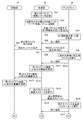
- FIGS. 2A to 2C are sequence diagrams showing an example of alignment of the first information display window and the second information display window in the document management system 1 according to the present embodiment.
- step Sa1 the processing unit 12 activates the second software.
- the processing unit 12 reads the additional information superposition program 132 corresponding to the second software from the storage unit 13 at the time of OS startup or a start operation by the user. Furthermore, the processing unit 12 executes the additional information superposition program 132 read from the storage unit 13. Thereby, the processing unit 12 activates the second software.
- the second software is referred to as superimposed software for the convenience of description.
- step Sa2 the processing unit 12 activates the first software to be aligned with the superimposed software.
- step Sa3 the processing unit 12 outputs, to the display 30, a first information display window corresponding to the first software to be aligned with the superimposed software.
- step Sa4 the display 30 displays a first information display window corresponding to the first software output from the processing unit 12.
- step Sa5 the display 30 notifies the processing unit 12 that the first information display window corresponding to the first software has been displayed.
- FIG. 3 is a view showing the initial setting screen WS corresponding to the superimposed software displayed on the display 30.
- the processing unit 12 displays an initial setting screen WS as shown in FIG. 3 on the display 30.
- the first software to be aligned with the superimposed software is selected by the cursor C.
- the cursor C clicks on the check box AC corresponding to the software ⁇ displayed on the initial setting screen WS, and then the execution button B is clicked.
- the processing unit 12 reads the information display program 131 corresponding to the selected first software from the storage unit 13 in response to the selection of the first software to be aligned. Furthermore, the processing unit 12 executes the information display program 131 read from the storage unit 13. Thereby, the processing unit 12 activates the first software to be aligned with the superimposed software. For example, the processing unit 12 activates the software ⁇ selected on the initial setting screen WS. At this time, the processing unit 12 corresponds to the selected software ⁇ to at least a part of the display 30, and has a first information display window capable of displaying a file including at least one of characters, symbols, figures, or images. Display (first display process).
- the selected software ⁇ is described as target software ⁇ .
- the first information display window corresponding to the target software ⁇ is described as an ⁇ window.
- step Sa6 the processing unit 12 instructs the storage unit 13 to output a calibration file corresponding to the target software ⁇ .
- the storage unit 13 receives the output instruction of the calibration file corresponding to the target software ⁇ from the processing unit 12, and outputs the calibration file corresponding to the target software ⁇ to the processing unit 12.
- step Sa8 the processing unit 12 outputs the calibration file output from the storage unit 13 to the display 30.
- step Sa9 the display 30 displays the calibration file output from the processing unit 12 on the ⁇ window. Specifically, the display 30 displays the calibration file in the document field of the ⁇ window at an enlargement ratio of 100% in the target software ⁇ .
- step Sa10 the display 30 notifies the processing unit 12 that the calibration file is displayed on the ⁇ window (completion notification).
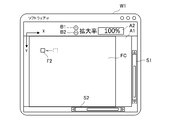
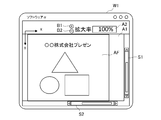
- FIG. 4 is a view showing the calibration file FC displayed on the ⁇ window W1 of the display 30.
- a document column A1 for displaying a file sliders S1 and S2, an enlargement ratio display column A2 for displaying an enlargement ratio of the file, and an enlargement corresponding to the enlargement of the file A button B1 and a reduction button B2 corresponding to file reduction are provided.
- the slider S1 corresponds to scrolling in the vertical direction (Y-axis direction).
- the slider S2 corresponds to scrolling in the horizontal direction (X-axis direction).
- the display 30 displays the calibration file FC output from the processing unit 12 in the document column A1 of the ⁇ window W1. At this time, the display 30 displays the calibration file FC at an enlargement ratio of 100% in the target software ⁇ .
- the calibration file FC includes a plurality of figures F1, F2, and F3.
- the figure F1 is arranged near the left end of the calibration file.
- the figure F2 is arranged near the right end of the calibration file.
- the figure F3 is arranged near the center of the proofreading file.
- the plurality of figures F1, F2 and F3 each have coordinate information (in the present embodiment, coordinates in the X axis direction and coordinates in the Y axis direction) in the ⁇ window W1.
- step Sa11 the processing unit 12 performs the screen capture of the display area including the calibration file FC (the state of FIG. 4) displayed in the document column A1 of the ⁇ window W1 in response to the reception of the completion notification from the display 30. Acquire an image (first captured image).
- step Sa12 the processing unit 12 outputs the acquired first captured image to the storage unit 13 together with coordinate information of the plurality of figures F1, F2, and F3 of the calibration file FC included in the acquired first captured image.
- step Sa13 the storage unit 13 stores the first capture image output from the processing unit 12 and coordinate information of the plurality of figures F1, F2, and F3.
- the coordinates of the plurality of figures F1, F2 and F3 corresponding to the first captured image are set as the initial coordinates of each of the plurality of figures F1, F2 and F3 in the ⁇ window W1 of the file for calibration FC.
- step Sa14 the processing unit 12 executes vertical scrolling of the file for calibration.
- step Sa15 the processing unit 12 outputs, to the display 30, a display change instruction for vertically scrolling and displaying the file for calibration.
- step Sa16 the display 30 vertically scrolls and displays the calibration file in accordance with the display change instruction from the processing unit 12.
- step Sa17 the display 30 notifies the processing unit 12 that the calibration file has been vertically scrolled and displayed (completion notification).
- FIG. 5 is a diagram showing the calibration file FC displayed on the ⁇ window W1 of the display 30 when vertical scrolling is performed.
- the display 30 scrolls and displays the calibration file FC output from the processing unit 12 in the vertical direction.
- the display 30 displays a calibration file FC which is scrolled in the vertical direction by one click of the slider S1.
- one scroll is performed in the vertical direction by clicking the slider S1 one click.
- the plurality of figures F1, F2, and F3 included in the calibration file FC scroll in the vertical direction, and the display position in the ⁇ window W1 changes.
- the plurality of figures F1 and F3 disappear from the document column A1, and the figure F2 is moved in the Y-axis direction.
- step Sa17 After the end of step Sa17, the process proceeds to step Sa18 shown in FIG. 2B.
- step Sa18 the processing unit 12 receives the completion notification from the display 30 as a trigger for the calibration file FC (figures F1 and F3 displayed in the document column A1 of the .alpha. Window W1).
- the screen capture image (second capture image) of the display area including the lost state (FIG. 5) is acquired.
- step Sa19 the processing unit 12 outputs the acquired second captured image to the storage unit 13.
- the processing unit 12 also outputs, to the storage unit 13, coordinate information of the graphic F 2 displayed in the ⁇ window W 1 together with the second captured image.
- step Sa20 the storage unit 13 stores the second captured image output from the processing unit 12 and the coordinate information of the figure F2 displayed in the ⁇ window W1.
- the coordinates of the figure F2 corresponding to the second captured image are set as the coordinates of the figure F2 in the ⁇ window W1 of the calibration file FC when the vertical scroll is performed.
- step Sa21 the processing unit 12 executes horizontal scrolling of the file for calibration.
- step Sa22 the processing unit 12 outputs, to the display 30, a display change instruction for horizontally scrolling and displaying the calibration file.
- step Sa23 the display 30 horizontally scrolls and displays the calibration file in accordance with the display change instruction from the processing unit 12.
- step Sa24 the display 30 notifies the processing unit 12 that the calibration file has been horizontally scrolled and displayed (completion notification).
- FIG. 6 is a diagram showing the calibration file FC displayed on the ⁇ window W1 of the display 30 when horizontal scrolling is performed.
- the display 30 scrolls and displays the calibration file FC (state of FIG. 5) output from the processing unit 12 in the horizontal direction.
- the display 30 displays a calibration file FC which is scrolled in the horizontal direction by one click of the slider S2.
- one scroll is performed in the horizontal direction by one click on the slider S2.
- the plurality of figures F1, F2, and F3 included in the calibration file FC are scrolled in the horizontal direction, and the display position in the ⁇ window W1 is changed.
- the figure F2 is moving in the X-axis direction.
- step Sa25 the processing unit 12 receives the completion notification from the display 30 as a trigger for the calibration file FC displayed in the document column A1 of the ⁇ window W1 (the state of FIG. 6 where the figures F1 and F3 disappear).
- step Sa26 the processing unit 12 outputs the acquired third captured image to the storage unit 13.
- the processing unit 12 also outputs, to the storage unit 13, coordinate information of the graphic F 2 displayed in the ⁇ window W 1 together with the third captured image.
- step Sa27 the storage unit 13 stores the third capture image output from the processing unit 12 and the coordinate information of the graphic F2.
- the coordinates of the figure F2 corresponding to the third captured image are set as the coordinates of the figure F2 in the ⁇ window W1 of the calibration file FC when horizontal scrolling is performed.
- the processing unit 12 returns the display of the calibration file to the initial state. Specifically, in step Sa28, the processing unit 12 instructs the storage unit 13 to output the initial coordinates of each of the plurality of figures F1, F2, and F3 in the ⁇ window W1 of the file for calibration. In step Sa29, the storage unit 13 receives the output instruction of the initial coordinates from the processing unit 12, and outputs the initial coordinates to the processing unit 12. In step Sa30, the processing unit 12 returns the display of the file for calibration to the initial state on the display 30, based on the initial coordinates of each of the plurality of figures F1, F2, and F3 output from the storage unit 13. Output display change instruction.
- step Sa31 in accordance with the display change instruction from the processing unit 12, the display 30 displays the calibration file such that each of the plurality of figures F1, F2, and F3 included in the calibration file is located at the initial coordinates.
- step Sa32 the display 30 notifies the processing unit 12 that the calibration file has been displayed so that each of the plurality of figures F1, F2 and F3 included in the calibration file is located at the initial coordinates (completion notification ).
- step Sa32 After completion of step Sa32, the process proceeds to step Sa33 shown in FIG. 2C.
- step Sa33 the processing unit 12 enlarges and displays the calibration file in response to the reception of the completion notification from the display 30.
- step Sa34 the processing unit 12 outputs, to the display 30, a display change instruction for enlarging and displaying the file for calibration.
- step Sa35 the display 30 enlarges and displays the calibration file in accordance with the display change instruction from the processing unit 12.
- step Sa36 the display 30 notifies the processing unit 12 that the file for calibration is enlarged and displayed (completion notification).
- FIG. 7 is a view showing the calibration file FC displayed on the ⁇ window W1 of the display 30 in the case of enlarged display.
- the display 30 enlarges and displays the calibration file FC output from the processing unit 12.
- the display 30 displays a calibration file FC enlarged by an amount corresponding to one click of the enlargement button B1.
- the enlargement factor for one click of the enlargement button B1 is taken as the enlargement factor for one scroll.
- the calibration file FC is enlarged and displayed with the center of the straight line connecting the figure F1 and the figure F3 as the center of the enlargement operation.
- the plurality of figures F1, F2, and F3 included in the calibration file FC scroll in the vertical direction or in the horizontal direction, and the display position in the ⁇ window W1 is changed.
- the plurality of figures F1 and F3 move in the X axis direction
- the figure F2 moves in the Y axis direction.
- the display of the enlargement factor in the enlargement factor display field A2 changes from 100% to 120%.
- step Sa37 the processing unit 12 performs screen capture of the display area including the calibration file FC (state in FIG. 7) displayed in the document column A1 of the ⁇ window W1 triggered by receipt of the completion notification from the display 30. Acquire an image (fourth capture image).
- step Sa38 the processing unit 12 outputs the acquired fourth captured image to the storage unit 13.
- the processing unit 12 also outputs, to the storage unit 13, coordinate information of each of the plurality of figures F 1, F 2, and F 3 displayed in the ⁇ window W 1 together with the fourth capture image.
- step Sa39 the storage unit 13 stores the fourth capture image output from the processing unit 12 and coordinate information of each of the plurality of figures F1, F2, and F3.
- the coordinates of the plurality of figures F1, F2 and F3 corresponding to the fourth captured image are set as the coordinates of each of the plurality of figures F1, F2 and F3 in the ⁇ window of the calibration file FC when enlarged display is performed.
- the coordinates of each of figures F1, F2 and F3, the coordinates of each of a plurality of figures F1, F2 and F3 in alpha window W1 of calibration file FC when horizontal scrolling is performed, and the alpha window of calibration file FC when enlarged The coordinates of each of the plurality of figures F1, F2, and F3 in W1 are shown in Table 1.
- step Sa40 the processing unit 12 instructs the storage unit 13 to output each piece of coordinate information shown in Table 1 above.
- step Sa41 the storage unit 13 receives the output instruction of the coordinate information from the processing unit 12, and outputs the coordinate information to the processing unit 12.
- step Sa42 based on each coordinate information shown in the above-mentioned Table 1 output from the storage unit 13, the processing unit 12 uses the characters and symbols included in the file in the case of horizontal scrolling, vertical scrolling, or enlargement in the ⁇ window W1. The number of moving pixels of at least one of the figure, the image, and the enlargement ratio are calculated (relationship information calculation processing).
- the coordinates of the figure F2 change from (100, 100) to (100, 80). That is, the figure F2 is moved by 20 pixels in the Y-axis direction each time one scroll is performed. That is, the number of moving pixels per scroll in the vertical direction is 20.
- the coordinates of the figure F2 change from (100, 80) to (80, 80). That is, the figure F2 is moved by 20 pixels in the X-axis direction every one scroll. That is, the number of movement pixels per scroll in the horizontal direction is 20.
- Table 2 shows the number of movement pixels per scroll in the vertical direction in the ⁇ window, the number of movement pixels per scroll in the horizontal direction, and the enlargement ratio per scroll stored in the storage unit 13.
- step Sa43 the processing unit 12 outputs the calculated number of moving pixels and the enlargement ratio to the storage unit 13.
- step Sa44 the storage unit 13 stores the number of moving pixels and the enlargement factor output from the processing unit 12.
- the initial setting in the document management system 1 is completed.
- the number of moving pixels per scroll in the vertical direction, the number of moving pixels per scroll in the horizontal direction, and the enlargement ratio per scroll shown in Table 2 The additional information input to the information display window can be horizontally scrolled, vertically scrolled, or enlarged (fourth display processing).
- the document management system 1 horizontally scrolls and vertically scrolls the additional information input to the second information display window with the number of movement pixels in the first information display window and the same number of movement pixels as the enlargement ratio and the enlargement ratio. Or can be expanded.
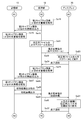
- FIG. 8 is a sequence diagram showing a flow of creating a second information display window to be superimposed on the target file displayed in the first information display window.
- a flow of creating a second information display window to be superimposed on the target file corresponding to the selected software ⁇ will be described.
- the second information display window corresponding to the superimposed software will be referred to as a superimposed window.
- step Sb1 the processing unit 12 activates the software ⁇ .
- step Sb2 the processing unit 12 outputs an ⁇ window capable of displaying a file including at least one of a character, a symbol, a figure, or an image corresponding to the software ⁇ to the display 30.
- step Sb3 the display 30 displays the ⁇ window output from the processing unit 12 (first display processing).
- step Sb4 the display 30 notifies the processing unit 12 that the ⁇ window has been displayed (completion notification).
- the processing unit 12 activates the software ⁇ , for example, when the user clicks the icon of the target file corresponding to the software ⁇ .
- step Sb5 the processing unit 12 instructs the storage unit 13 to output the target file corresponding to the software ⁇ , triggered by the reception of the completion notification from the display 30.
- step Sb6 the storage unit 13 receives the output instruction of the target file corresponding to the software ⁇ from the processing unit 12, and outputs the target file corresponding to the software ⁇ to the processing unit 12.
- step Sb7 the processing unit 12 outputs the target file output from the storage unit 13 to the display 30.
- step Sb8 the display 30 displays the target file output from the processing unit 12 on the ⁇ window. Specifically, the display 30 displays the target file in the document field of the ⁇ window.
- step Sb9 the display 30 notifies the processing unit 12 that the target file is displayed in the document column of the ⁇ window (completion notification).
- FIG. 9 is a diagram showing the target file AF displayed on the ⁇ window W1 of the display 30.
- the display 30 displays the target file AF output from the processing unit 12 in the document column A1 of the ⁇ window W1.
- the target file AF shown in FIG. 9 includes characters and figures.
- step Sb10 the processing unit 12 activates the superposition software.
- step Sb11 the processing unit 12 outputs, to the display 30, a superposition window capable of inputting additional information that is at least one of a character, a symbol, a figure, or an image corresponding to the superposition software.
- step Sb12 the display 30 displays the superposition window output from the processing unit 12 so as to be superimposed on at least a part of the ⁇ window (second display processing).
- step Sb13 the display 30 notifies the processing unit 12 that the superimposed window has been displayed (completion notification).
- the processing unit 12 in the present embodiment superimposes a superimposed window on a display area including at least one of a character, a symbol, a figure, or an image in a display area corresponding to the target file displayed in the ⁇ window. .
- the processing unit 12 starts up the superposition software, for example, at the time of OS startup or a startup operation by the user.
- FIG. 10 is a view showing the superposition window W2 superimposed on the ⁇ window W1 of the display 30. As shown in FIG. As shown in FIG. 10, the display 30 superimposes the superimposed window W2 output from the processing unit 12 on the display area including the characters and graphics of the target file displayed in the document column A1 of the ⁇ window W1. ing.
- the document management system 1 displays a superimposed window capable of inputting additional information which is at least one of a character, a symbol, a figure, or an image so as to be superimposed on at least a part of the ⁇ window.
- a superimposed window capable of inputting additional information which is at least one of a character, a symbol, a figure, or an image so as to be superimposed on at least a part of the ⁇ window.
- Can do (second display process).
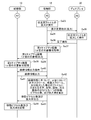
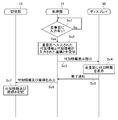
- FIG. 11 is a sequence diagram showing a flow from when the user inputs the additional information to the superposition window until the display change of the display 30 and the additional information are stored.
- step Sc1 the processing unit 12 determines whether or not the input of the additional information to the superposition window has been received by the user.
- step Sc2 the processing unit 12 adds the additional information input to the superposition window and the superposition window in which the additional information is input. Receive coordinates and
- step Sc3 the processing unit 12 displays additional information for displaying additional information in the superposition window on the display 30, based on the received additional information and the coordinates in the superposition window where the additional information is input. Output the instruction.
- step Sc4 in accordance with the additional information display instruction from the processing unit 12, the display 30 displays the additional information at the coordinates in the superposition window.
- step Sc5 the display 30 notifies the processing unit 12 that additional information has been displayed at the coordinates in the superposition window (completion notification).
- FIG. 12 is a diagram showing the ⁇ window W1 and the superposition window W2 when the additional information is displayed.
- the display 30 displays the additional information M1 and M2 output from the processing unit 12 in the superposition window W2.
- the display 30 displays, as the additional information M1, a balloon in which "drawing insertion required! Is described in the superposition window W2.
- the display 30 displays, as the additional information M2, a character described in red as "* Correct a figure" in the superposition window W2.
- the display 30 displays the background of the overlapping window W2 as transparent or opaque.
- the additional information M1 and M2 input to the overlapping window W2 can be superimposed and displayed on the target file of the ⁇ window W1 without directly editing the target file displayed in the ⁇ window W1. 3 display processing).
- step Sc6 the processing unit 12 outputs the received additional information and the coordinates in the superposition window to which the additional information is input, to the storage unit 13.
- step Sc7 the storage unit 13 stores the additional information output from the processing unit 12 and the coordinates in the superposition window to which the additional information is input.
- the storage unit 13 in the present embodiment stores the additional information as editable image data.
- the editable image data can display the background as transparent or opaque, or edit additional information.
- the additional information stored in the storage unit 13 and the coordinates in the superposition window to which the additional information is input are shown in Table 3.
- Table 3 describes the type of additional information indicating at least one of the target file name, characters, symbols, figures, and images, character information included in the additional information, coordinate information in the superposition window, and effect information such as color. It is done.
- the document management system 1 does not directly edit the target file displayed in the small window W1, and adds the additional information M1 and M2 input to the overlapping file W2 to the target file of the small window W1. Can be superimposed and displayed (third display processing).
- FIG. 13 is a sequence diagram showing a flow of displaying the second information display window to be superimposed on the target file displayed on the first information display window when the superposition window to be superimposed on the target file has already been created.
- FIG. 13 illustrates a flow of displaying the second information display window to be superimposed on the target file corresponding to the software ⁇ in view of the above-described initial setting. Note that, for the sake of convenience of the description, the detailed description of the parts overlapping with FIG. 8 is omitted.
- step Sd11 the processing unit 12 determines whether or not image data corresponding to the target file exists. Specifically, in accordance with the presence or absence of the correspondence table shown in Table 3, the processing unit 12 determines whether there is image data corresponding to the target file. If there is image data corresponding to the target file (Yes in step Sd11), in step Sd12, the processing unit 12 instructs the storage unit 13 to output the image data corresponding to the target file. In step Sb13, the storage unit 13 receives the output instruction of the image data corresponding to the target file from the processing unit 12, and outputs the image data corresponding to the target file to the processing unit 12. In step Sb14, the processing unit 12 outputs the image data output from the storage unit 13 to the display 30.
- the display 30 superimposes and displays the image data output from the processing unit 12 on the ⁇ window (second display process).
- the processing unit 12 in the present embodiment superimposes and displays image data on a display area including at least one of characters, symbols, figures, or images in the display area corresponding to the target file displayed in the ⁇ window. .
- the target file and the overlapping window to be superimposed on the target file are associated by the correspondence table shown in Table 3. That is, the document management system 1 can omit the time and effort of managing the target file and the overlapping window to be superimposed on the target file in association with each other.
- the document management system 1 displays the first information display window capable of displaying a file including at least one of characters, symbols, figures, or images by activating the first software.
- An incidental information superimposing device that executes the first display process, the second software that is independent of the first software can be used to input additional information that is at least one of a character, a symbol, a figure, or an image; 2)
- the second display process of displaying the information display window so as to be superimposed on at least a part of the first information display window, and when the user receives the input of the additional information to the second information display window, the additional information
- a processing unit for executing a third display process for displaying the second information display window, an input interface unit for receiving an input of additional information to the second information display window by the user, When the input of the additional information to the information display window is received, the file displayed on the first information display window, the additional information input to the second information display window, and the additional information on the second information display window
- a storage unit that associates
- the document management system 1 is configured such that the second information display window capable of inputting additional information that is at least one of characters, symbols, figures, or images is at least one of the first information display windows. It can be displayed so as to overlap a part. Thereby, the document management system 1 superimposes the additional information input to the second information display window on the target file of the first information display window without directly editing the target file displayed on the first information display window. Can be displayed.
- the target file and the second information display window to be superimposed on the target file are associated by the correspondence table shown in Table 3. That is, the document management system 1 can omit the time and effort of managing the target file and the second information display window superimposed on the target file in association with each other.
- additional information can be superimposed even if the original file is subject to security and can not be written. Further, regardless of the file format of the original file, the additional information can be superimposed by a unified operation. Also, it can be used as a proofreading tool, such as when another person enters a correction instruction in the image data superimposed on the original file and the creator of the original file corrects it.
- the additional information can be added without changing the acquired original file, it is possible to provide a clean original file without adding additional information even when distributing it to another person separately.
- the document management system 1 can simplify operations such as data management and association associated with input of a memo or the like to electronic data.
- the storage unit 13 stores the additional information output from the processing unit 12 and the coordinates in the superposition window to which the additional information is input.
- the storage unit 13 in the present embodiment is not limited to this.
- the storage unit 13 in the present embodiment stores past image data for an arbitrary generation, such as “latest image data, image data one generation before, image data two generations ago, and so on”. May be
- the document management system 1 according to the present embodiment can perform version management of the additional information.
- the image data in the above embodiment can be output from an external output device such as a printer separately from the original file or superimposed on the original file. Therefore, the document management system 1 according to the present embodiment can select and output necessary information according to the situation.
- predetermined processor means, for example, a dedicated or general purpose processor, or an application specific integrated circuit (ASIC), a programmable logic device (for example, a simple programmable logic device) (SPLD: Simple Programmable Logic Device), complex programmable logic device (CPLD: Complex Programmable Logic Device), field programmable gate array (FPGA: Field Programmable Gate Array), etc.
- SPLD Simple Programmable Logic Device
- CPLD Complex Programmable Logic Device
- FPGA Field Programmable Gate Array
- each component of this embodiment may be realized by a plurality of processors without being limited to a single processor, and further, a plurality of components (a plurality of processing units) may be realized by a single processor. It is also good.
- a first display process for displaying a first information display window capable of displaying a file including at least one of a character, a symbol, a figure, or an image by activating a first software.
- the second information display window capable of inputting additional information which is at least one of a character, a symbol, a figure, or an image by activating a second software independent of the first software on a computer to be executed is displayed as a first information display
- a second display process is performed to display so as to be superimposed on at least a part of the window, and the additional information is displayed on the second information display window when receiving the input of the additional information to the second information display window by the user
- the processing function for executing the third display processing and the input of the additional information to the second information display window by the user are received, the file displayed in the first information display window and the input in the second information display window Attached Information and a storage function of the position coordinates and the association with storage of the additional information in the second information display window, to realize.
- the second information display window capable of inputting additional information that is at least one of a character, a symbol, a figure, or an image is at least a part of the first information display window Including displaying so as to overlap.
- the target file of the first information display window is added to the second information display window without directly editing the target file displayed in the first information display window.
- Information can be superimposed and displayed.
- the first aspect of the present invention includes associating a target file with a second information display window superimposed on the target file. That is, according to the first aspect of the present invention, it is possible to omit the time and effort of managing the target file in association with the second information display window superimposed on the target file.
- the processing function includes characters, symbols, figures, and the like contained in the file when horizontal scrolling, vertical scrolling, or enlargement is performed in the first information display window.
- performing association information calculation processing for calculating at least one movement pixel number of the image and the enlargement ratio, and at least one of characters, symbols, figures, or images included in the file in the calculated first information display window
- performing fourth display processing for horizontally scrolling, vertically scrolling, or enlarging the additional information input to the second information display window according to the number of movement pixels and the enlargement ratio.
- the storage function stores a calibration file having a format that can be displayed in the first information display window and including a plurality of graphics.
- the processing function causes the file for calibration to be displayed on the first information display window, and in the association information calculation processing, the initial coordinates of each of the plurality of figures in the first information display window for the file for calibration, the file for calibration
- a fourth aspect of the present invention is the display according to any one of the first to third aspects of the present invention, wherein the processing function corresponds to the file displayed in the first information display window as the second display processing. And displaying a second information display window superimposed on an area including at least one of the characters, symbols, figures, or images of the display areas.
- a first display process for displaying a first information display window capable of displaying a file including at least one of a character, a symbol, a figure, or an image by activating a first software.
- a second information display window which is used for a computer to be executed and which can input additional information which is at least one of a character, a symbol, a figure, or an image by activating a second software independent of the first software;
- the second display process of displaying the information on the information display window so as to be superimposed on at least a part of the information display window is performed and the user receives the input of the additional information to the second information display window, the additional information is displayed on the second information display window
- the third display process to be displayed is executed, and the file displayed in the first information display window and the second information display window are input when the user inputs the additional information into the second information display window. Additional information, Storing in association with the position coordinates of the additional information in the second information display window, including.
- the fifth aspect of the present invention is the second information display window capable of inputting additional information that is at least one of a character, a symbol, a figure, or an image at least a part of the first information display window Including displaying so as to overlap.
- the target file of the first information display window is added to the second information display window without directly editing the target file displayed in the first information display window.
- Information can be superimposed and displayed.
- the first aspect of the present invention includes associating a target file with a second information display window superimposed on the target file. That is, according to the fifth aspect of the present invention, it is possible to omit the time and effort of managing the target file in association with the second information display window superimposed on the target file.
- a sixth aspect of the present invention provides a first display process for displaying a first information display window capable of displaying a file including at least one of a character, a symbol, a figure, or an image by activating a first software.
- a second information display window for inputting the additional information which is at least one of a character, a symbol, a figure, or an image by executing and activating a second software independent of the first software;
- a second display process is performed to display the additional information so as to be superimposed on at least a part, and the additional information is displayed on the second information display window when the input of the additional information to the second information display window is received by the user
- the processing unit for executing display processing the input interface unit for receiving the input of the additional information to the second information display window by the user, and the input of the additional information to the second information display window by the user are received,
- Information table Includes a file displayed in the window, the additional information input to the second information display window, and a storage unit that associates and stores the position coordinates of the additional information in the second information display window, the.
- the sixth aspect of the present invention is the second information display window capable of inputting additional information that is at least one of a character, a symbol, a figure, or an image at least a part of the first information display window Including displaying so as to overlap.
- the target file of the first information display window is added to the second information display window without directly editing the target file displayed in the first information display window.
- Information can be superimposed and displayed.
- the first aspect of the present invention includes associating a target file with a second information display window superimposed on the target file. That is, according to the sixth aspect of the present invention, it is possible to omit the time and effort of managing the target file in association with the second information display window superimposed on the target file.
Landscapes
- Engineering & Computer Science (AREA)
- Theoretical Computer Science (AREA)
- General Engineering & Computer Science (AREA)
- Physics & Mathematics (AREA)
- General Physics & Mathematics (AREA)
- Human Computer Interaction (AREA)
- Computational Linguistics (AREA)
- General Health & Medical Sciences (AREA)
- Health & Medical Sciences (AREA)
- Audiology, Speech & Language Pathology (AREA)
- Artificial Intelligence (AREA)
- User Interface Of Digital Computer (AREA)
- Document Processing Apparatus (AREA)
- Controls And Circuits For Display Device (AREA)
Abstract
La présente invention concerne un ordinateur qui lance un premier logiciel afin d'exécuter un premier processus d'affichage pour afficher une première fenêtre d'affichage d'informations dans laquelle un fichier peut être affiché, est amené à mettre en œuvre une fonction de traitement : pour exécuter un deuxième processus d'affichage en lançant un second logiciel pour afficher une seconde fenêtre d'affichage d'informations dans laquelle des informations supplémentaires peuvent être entrées de telle sorte que la seconde fenêtre d'affichage d'informations est superposée sur au moins une partie de la première fenêtre d'affichage d'informations ; et lorsqu'une entrée des informations supplémentaires effectuées par un utilisateur dans la seconde fenêtre d'affichage d'informations a été reçue, exécuter un troisième processus d'affichage pour afficher les informations supplémentaires dans la seconde fenêtre d'affichage d'informations.
Priority Applications (3)
| Application Number | Priority Date | Filing Date | Title |
|---|---|---|---|
| CN201880065485.9A CN111201534A (zh) | 2017-11-09 | 2018-07-09 | 附加信息叠加程序、附加信息叠加方法和附加信息叠加装置 |
| JP2019551878A JP6950135B2 (ja) | 2017-11-09 | 2018-07-09 | 付加情報重畳プログラム、付加情報重畳方法、及び付加情報重畳装置 |
| US16/868,835 US11119639B2 (en) | 2017-11-09 | 2020-05-07 | Non-transitory computer-readable medium storing an extra information superposition program, extra information superposition method, and extra information superposition method, and extra information superposition device |
Applications Claiming Priority (2)
| Application Number | Priority Date | Filing Date | Title |
|---|---|---|---|
| JP2017216558 | 2017-11-09 | ||
| JP2017-216558 | 2017-11-09 |
Related Child Applications (1)
| Application Number | Title | Priority Date | Filing Date |
|---|---|---|---|
| US16/868,835 Continuation US11119639B2 (en) | 2017-11-09 | 2020-05-07 | Non-transitory computer-readable medium storing an extra information superposition program, extra information superposition method, and extra information superposition method, and extra information superposition device |
Publications (1)
| Publication Number | Publication Date |
|---|---|
| WO2019092920A1 true WO2019092920A1 (fr) | 2019-05-16 |
Family
ID=66437712
Family Applications (1)
| Application Number | Title | Priority Date | Filing Date |
|---|---|---|---|
| PCT/JP2018/025930 Ceased WO2019092920A1 (fr) | 2017-11-09 | 2018-07-09 | Programme de superposition d'informations supplémentaires, procédé de superposition d'informations supplémentaires et dispositif de superposition d'informations supplémentaires |
Country Status (4)
| Country | Link |
|---|---|
| US (1) | US11119639B2 (fr) |
| JP (1) | JP6950135B2 (fr) |
| CN (1) | CN111201534A (fr) |
| WO (1) | WO2019092920A1 (fr) |
Families Citing this family (1)
| Publication number | Priority date | Publication date | Assignee | Title |
|---|---|---|---|---|
| US11150758B2 (en) | 2020-03-13 | 2021-10-19 | Wacom Co., Ltd. | Pressure activated accurate pointing |
Citations (3)
| Publication number | Priority date | Publication date | Assignee | Title |
|---|---|---|---|---|
| JPH09160905A (ja) * | 1995-12-06 | 1997-06-20 | Fujitsu Ltd | ファイルリンクシステム |
| JP2004013318A (ja) * | 2002-06-04 | 2004-01-15 | Ricoh Co Ltd | 情報処理方法、情報処理装置、及び情報処理プログラム |
| JP2012133493A (ja) * | 2010-12-20 | 2012-07-12 | Nec Networks & System Integration Corp | 電子会議システム |
Family Cites Families (16)
| Publication number | Priority date | Publication date | Assignee | Title |
|---|---|---|---|---|
| JP2004151898A (ja) * | 2002-10-29 | 2004-05-27 | Fuji Xerox Co Ltd | 表示制御方法、情報表示処理システム、プログラム |
| CN100452168C (zh) * | 2004-10-13 | 2009-01-14 | 松下电器产业株式会社 | 矩形图像描绘装置、矩形图像描绘方法以及集成电路 |
| JP2006323664A (ja) * | 2005-05-19 | 2006-11-30 | Sony Corp | 電子機器 |
| US7900158B2 (en) * | 2005-08-04 | 2011-03-01 | Microsoft Corporation | Virtual magnifying glass with intuitive use enhancements |
| WO2008038368A1 (fr) * | 2006-09-28 | 2008-04-03 | Navitime Japan Co., Ltd. | système d'affichage de fenêtre |
| US7768536B2 (en) * | 2007-04-11 | 2010-08-03 | Sony Ericsson Mobile Communications Ab | Methods of displaying information at different zoom settings and related devices and computer program products |
| JP5143148B2 (ja) * | 2010-01-18 | 2013-02-13 | シャープ株式会社 | 情報処理装置及び通信会議システム |
| EP2609732A4 (fr) * | 2010-08-27 | 2015-01-21 | Intel Corp | Techniques destinées à accroître un graphique à l'écran numérique |
| US9619435B2 (en) * | 2011-08-31 | 2017-04-11 | Adobe Systems Incorporated | Methods and apparatus for modifying typographic attributes |
| JP2014059766A (ja) * | 2012-09-18 | 2014-04-03 | Sharp Corp | 画像処理装置、画像形成装置、プログラム、記録媒体 |
| US20140282224A1 (en) * | 2013-03-15 | 2014-09-18 | Qualcomm Incorporated | Detection of a scrolling gesture |
| JP6248533B2 (ja) * | 2013-10-22 | 2017-12-20 | 富士通株式会社 | 画像処理装置、画像処理方法および画像処理プログラム |
| JP6500341B2 (ja) | 2014-04-24 | 2019-04-17 | コニカミノルタ株式会社 | 文書管理プログラム、文書管理方法及び文書管理システム |
| KR20170064901A (ko) * | 2015-12-02 | 2017-06-12 | 엘지전자 주식회사 | 모바일 디바이스 및 그 제어 방법 |
| JP6275312B1 (ja) * | 2017-06-02 | 2018-02-07 | キヤノン株式会社 | 投写装置およびその制御方法、プログラム |
| US20200104586A1 (en) * | 2018-09-28 | 2020-04-02 | Konica Minolta Laboratory U.S.A., Inc. | Method and system for manual editing of character recognition results |
-
2018
- 2018-07-09 CN CN201880065485.9A patent/CN111201534A/zh active Pending
- 2018-07-09 JP JP2019551878A patent/JP6950135B2/ja active Active
- 2018-07-09 WO PCT/JP2018/025930 patent/WO2019092920A1/fr not_active Ceased
-
2020
- 2020-05-07 US US16/868,835 patent/US11119639B2/en active Active
Patent Citations (3)
| Publication number | Priority date | Publication date | Assignee | Title |
|---|---|---|---|---|
| JPH09160905A (ja) * | 1995-12-06 | 1997-06-20 | Fujitsu Ltd | ファイルリンクシステム |
| JP2004013318A (ja) * | 2002-06-04 | 2004-01-15 | Ricoh Co Ltd | 情報処理方法、情報処理装置、及び情報処理プログラム |
| JP2012133493A (ja) * | 2010-12-20 | 2012-07-12 | Nec Networks & System Integration Corp | 電子会議システム |
Also Published As
| Publication number | Publication date |
|---|---|
| JP6950135B2 (ja) | 2021-10-13 |
| CN111201534A (zh) | 2020-05-26 |
| JPWO2019092920A1 (ja) | 2020-04-09 |
| US20200264763A1 (en) | 2020-08-20 |
| US11119639B2 (en) | 2021-09-14 |
Similar Documents
| Publication | Publication Date | Title |
|---|---|---|
| CN102542008B (zh) | 提供文档的概要视图 | |
| US20120311501A1 (en) | Displaying graphical object relationships in a workspace | |
| US20070266335A1 (en) | Providing a standard user interface (UI) across disparate display interfaces | |
| JP2009537903A (ja) | 表示画面の一部分を選択表示するためのユーザーインターフェースシステムと方法 | |
| WO2009122684A1 (fr) | Système d’affichage, procédé d’affichage, programme et support d’enregistrement | |
| Nam | Sketch-based rapid prototyping platform for hardware-software integrated interactive products | |
| JPWO2017138223A1 (ja) | 画像処理装置、画像処理システム及び画像処理方法 | |
| US20100077325A1 (en) | In Situ Editing of GUI Features | |
| JP6950135B2 (ja) | 付加情報重畳プログラム、付加情報重畳方法、及び付加情報重畳装置 | |
| KR102133532B1 (ko) | 필기 입력기반 레이아웃 제공 방법 및 그 장치 | |
| CN111506841A (zh) | 网页展示方法、装置、设备及可读存储介质 | |
| Kojima et al. | AR digital workspace: Extending the workspace of a mobile device into real space | |
| JP2014106810A (ja) | 画像処理装置、画像処理システム、画像処理方法及びプログラム | |
| CN1855020B (zh) | 图像编辑方法 | |
| Ty et al. | A mobile authoring tool for ar content generation using images as annotations | |
| JP7296814B2 (ja) | フローチャート表示システム及びフローチャート表示プログラム | |
| Tran et al. | Extended radar view and modification director: awareness mechanisms for synchronous collaborative authoring | |
| CN117056290A (zh) | 信息展示方法、装置、电子设备、存储介质及程序产品 | |
| JP2005258589A (ja) | 文字表示装置および文字表示方法ならびにプログラム | |
| KR20220013070A (ko) | 입력 데이터의 데이터 표기 형식에 매칭되는 조정 컨트롤을 표시할 수 있는 스프레드시트 문서 편집 장치 및 그 동작 방법 | |
| KR102859676B1 (ko) | 전자 문서에서의 북마크 설정을 통한 간편 이동을 가능하게 하는 전자 단말 장치 및 그 동작 방법 | |
| Kimani et al. | Adobe Fireworks Professional Level | |
| Humayoun et al. | i2ME: a framework for building interactive mockups | |
| JP2016081435A (ja) | スケジュール管理装置、スケジュール管理方法、及びプログラム | |
| US8451294B2 (en) | Partial window visibility |
Legal Events
| Date | Code | Title | Description |
|---|---|---|---|
| 121 | Ep: the epo has been informed by wipo that ep was designated in this application |
Ref document number: 18875314 Country of ref document: EP Kind code of ref document: A1 |
|
| ENP | Entry into the national phase |
Ref document number: 2019551878 Country of ref document: JP Kind code of ref document: A |
|
| NENP | Non-entry into the national phase |
Ref country code: DE |
|
| 122 | Ep: pct application non-entry in european phase |
Ref document number: 18875314 Country of ref document: EP Kind code of ref document: A1 |