EP0165442A2 - Méthode et système pour édition d'information - Google Patents
Méthode et système pour édition d'information Download PDFInfo
- Publication number
- EP0165442A2 EP0165442A2 EP85105726A EP85105726A EP0165442A2 EP 0165442 A2 EP0165442 A2 EP 0165442A2 EP 85105726 A EP85105726 A EP 85105726A EP 85105726 A EP85105726 A EP 85105726A EP 0165442 A2 EP0165442 A2 EP 0165442A2
- Authority
- EP
- European Patent Office
- Prior art keywords
- editor
- mode
- selecting
- editing
- information
- Prior art date
- Legal status (The legal status is an assumption and is not a legal conclusion. Google has not performed a legal analysis and makes no representation as to the accuracy of the status listed.)
- Granted
Links
Images


Classifications
-
- G—PHYSICS
- G06—COMPUTING OR CALCULATING; COUNTING
- G06F—ELECTRIC DIGITAL DATA PROCESSING
- G06F40/00—Handling natural language data
- G06F40/10—Text processing
- G06F40/166—Editing, e.g. inserting or deleting
Definitions
- This invention relates generally to editing information, and more specifically to an editor which is definable in terms of both configuration and mode.
- a cursor as a visually discernible point of operation for text editing is well known.
- Basic insert, delete, and replace operations for editing text relative to cursor location are also well known. This is also the case for other editing operations such as text merge operation.
- Embodied in a merge operation is the ability to get, copy and move portions or blocks of information for document, form letter, etc., preparation.
- block identification For example, using an IBM Displaywriter System, a block of text can be identified by identifying the beginning of the block, cursing down to the line where the block is to end, and then identifying the end of the block. The lines cursored over are automatically identified and highlighted or video reversed. The identified block can thereafter be copied, moved, or deleted upon keying to a menu.
- deletion has been improved in European patent application N° 0841046279, covering a dynamic eraser. In that application, an eraser is definable and dynamically moveable over information for erasure.
- the instant invention presents an advance over the prior art in that an editor can be selected, and any one of a plurality of editing modes can be selected for the editor, without regard for the information to be affected.
- the advantages of this advance are improved flexibility and ease of use.
- a unique method of, and system for, editing displayed information are provided in order to improve system user friendliness in terms of improved ease of use and flexibility.
- An editor and then a mode for the editor, are selected. Thereafter, the editor is used by the operator for editing a desired portion of the information according to the selected mode.
- the editor can be any displayed, called or built object such as a cursor or character.
- Erase, restore, video reverse, move, etc. are selectable modes for the editor. Editing information is upon movement of the editor over the information and under mouse control. For example, one side of a window border can be selected as an editor. Thereafter, movement of the editor across or over information in the window will result in erasure of information passed over by the editor.
- the mode can then be changed to a restore mode and the editor repositioned to its location at the time of being defined as an editor. This will result in restoration of all erased information.
- Fig. 1 In this figure is illustrated a window generally denoted by reference numeral 1. It is to be assumed that window 1 is being displayed on an at- points addressable cathode ray tube display screen of a device controlled standalone or host connected computer workstation. Display and control of window 1 along with text displayed therein can be by means of an application program useable by the workstation.
- Window 1 is bordered as shown, has dimensions smaller that those of the screen upon which it is being displayed and provides a view into information note generally displayed on the remainder of the screen.
- the point of operation is denoted by a textual cursor 2.
- Cursor 2 is displayed as an underscore character.
- cursor 2 is moved under device control, the point of operation is moved.
- the device is generally only a keyboard and as each character is keyed, cursor 2 is advanced to the next character position .
- an appropriate device may be a mouse, joystick, etc.
- a plurality of devices are attached to the workstation for controlling cursor motion and other operations.
- cursors In common use today at the same time and on the same screen are two types of cursors.
- One is the previously described textual cursor 2 which is normally associated with text and under keyboard control.
- the other is a pointing cursor, such as cursor 3, which is normally associated with displayed graphics and under other device control.
- the other device is popularly a mouse.
- cursor 2 in most instances only denotes a point of operation. For example, deletion or erasure of the comma prior to cursor 2 can entail keyboard keystroking an error-correct-backspace operation. Upon deletion of the comma, cursor 2 will be repositioned one character position to the left. However, cursor 2 has nothing directly to do with the editing operation itself.
- deletion of the last four lines of text in Fig. 1 entails keyboarding.
- a cursor can be used to aid in defining or bracketing the text to be deleted, but cursor motion does not cause deletion.
- a delete mode can be entered for deleting a block of text. When entered, the text following the cursor on the same line is highlighted. Vertical cursor motion across other lines of text will result in the other lines being highlighted.
- keyboarding must occur for bracketing. following bracketing, additional keyboarding is necessary to effect deletion. This is tedious and time consuming.
- a solution to the above tedious and time consuming editing task is to permit an operator or user to define an editor by selecting the editor and then selecting a mode for the selected editor. Selection of the editor and mode, as well as movement of the editor, is conveniently accomplished with a keyboard and a mouse.
- an operator can, under mouse control, select bottom border 5 of window 1 as an editor 6. Selection is by positioning cursor 3 such that it is coincident with border 5, and then depressing a select button on the mouse. Following selection of editor 6, the operator can upon keyboarding, select an erase or deleted mode. Mode selection is by keying a single function key.
- editor 6 When the desired position for editor has been reached such as that illustrated in Fig. 3, editor 6 is deselected. Deselection of editor 6 is by mouse button depression, and will result in an updating of system memory based on editing performed while the editor is selected.
- Window 1 can be window in a traditional sense, a page outline filling the screen, etc.
- other modes for editor 6 can be selected. When selected and upon upwards movement of editor 6, the text will be moved or pushed up in window 1. If the text in Fig. 1 were pushed up, the last line in Fig. 1 would be adjacent editor 6 in Fig. 2.
- an editor can be any other callable and/or selectable symbol, character, object, etc.
- an operator could have called a bar or line form a symbol table.
- a programmer writing an application program according to this invention may prefer this route rather that providing means for distinguishing border 5 from the remainder of the border of window 1.
- an operator could have selected cursor 4, if provided, and selected a video reverse mode through function key depression. Thereafter, all text passed over with cursor 4 under mouse control would be video reversed. If more text than desired is-s video reversed, a function key can be depressed for selecting a restore mode, and the cursor again passed over the text to be returned to normal video displaying.
- Mode selection through function key depression is well within the skill of an average programmer, and is a typed of operation commonly used today.
- the use of code keys in conjunction with other character keys is an available alternative for selecting a mode.
- FIG. 1 - 3 Reference is again made to Figs. 1 - 3 and the below set out illustration of an application program useable by a processor in the workstation or host for facilitating editing according to this invention.
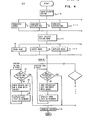
- the application program is also to be considered in conjunction with th e flow chart of Fig. 4.
- the program is in program design language from which source and machine code are derivable. Embedded in the program are comments bounded by ** . Again, it is to be assumed that the workstation is under mouse and keyboard device control.
- the user or operator begins by selecting (10) a displayed editing icon. Icon selection can be under mouse control, and is accomplished by using cursor 3 and depressing a button on the mouse. A 'CHARACTER SYMBOL' (11) is selected for column editing, etc. As has been pointed out, the editor could also have been build or called from a symbol table.
- Movement of the editor can alternatively be with keyboard cursor motion keys or with any other standard and well known means for moving "cursors" on a display.
- the user deselects (21) the editor. This can be performed by pressing an 'End' key on the keyboard, a button on a mouse, or by using any other standard and well known technique for ending modes.
- An editor and then a mode for the editor, are selected. Thereafter, the editor is used by the operator for editing a desired portion of the information according to the selected mode.
- the editor can be any displayed, called or built object such as cursor or character.
- Erase, restore, video reverse, move, etc. are selectable modes for the editor. Editing information is upon movement of the editor over the information and under mouse control. For example, one side of a window border can be selected as an editor, and an erase mode can be selected for the editor. Thereafter, movement of the editor across or over information in the window will result in erasure of information passed over by the editor.
- the mode can then be changed to a restore mode and the editor repositicned to its location at the time of being defined as an editor. This will result in restoration of all erased information.
Landscapes
- Engineering & Computer Science (AREA)
- Theoretical Computer Science (AREA)
- Audiology, Speech & Language Pathology (AREA)
- Health & Medical Sciences (AREA)
- Computational Linguistics (AREA)
- General Health & Medical Sciences (AREA)
- Physics & Mathematics (AREA)
- General Engineering & Computer Science (AREA)
- General Physics & Mathematics (AREA)
- Artificial Intelligence (AREA)
- Document Processing Apparatus (AREA)
- Stored Programmes (AREA)
- Digital Computer Display Output (AREA)
- Processing Or Creating Images (AREA)
Applications Claiming Priority (2)
| Application Number | Priority Date | Filing Date | Title |
|---|---|---|---|
| US62381284A | 1984-06-22 | 1984-06-22 | |
| US623812 | 1984-06-22 |
Publications (3)
| Publication Number | Publication Date |
|---|---|
| EP0165442A2 true EP0165442A2 (fr) | 1985-12-27 |
| EP0165442A3 EP0165442A3 (en) | 1986-06-11 |
| EP0165442B1 EP0165442B1 (fr) | 1990-09-12 |
Family
ID=24499493
Family Applications (1)
| Application Number | Title | Priority Date | Filing Date |
|---|---|---|---|
| EP85105726A Expired - Lifetime EP0165442B1 (fr) | 1984-06-22 | 1985-05-10 | Méthode et système pour édition d'information |
Country Status (3)
| Country | Link |
|---|---|
| EP (1) | EP0165442B1 (fr) |
| JP (1) | JPS619690A (fr) |
| DE (1) | DE3579632D1 (fr) |
Cited By (3)
| Publication number | Priority date | Publication date | Assignee | Title |
|---|---|---|---|---|
| GB2192744A (en) * | 1986-07-15 | 1988-01-20 | Brother Ind Ltd | A word processor with attribute functions |
| EP0253652A3 (en) * | 1986-07-15 | 1989-06-14 | Brother Kogyo Kabushiki Kaisha | Word processor |
| US5287538A (en) * | 1986-07-15 | 1994-02-15 | Brother Kogyo Kabushiki Kaisha | Word processor for reformatting a character group by locating line feed codes and selecting the beginning and end of the text when the line feed codes cannot be located |
Families Citing this family (1)
| Publication number | Priority date | Publication date | Assignee | Title |
|---|---|---|---|---|
| JPS6182227A (ja) * | 1984-08-29 | 1986-04-25 | Fujitsu Ltd | フル・スクリ−ン・デ−タ削除方式 |
Family Cites Families (3)
| Publication number | Priority date | Publication date | Assignee | Title |
|---|---|---|---|---|
| DE2939489A1 (de) * | 1979-09-28 | 1981-05-14 | Siemens Ag | System zur lokalisierung von bereichen bei gemischter text-/bildbearbeitung am bildschirm |
| JPS5779987A (en) * | 1980-11-07 | 1982-05-19 | Fujitsu Ltd | Document processing system |
| JPS5840659A (ja) * | 1981-09-03 | 1983-03-09 | Canon Inc | 文字処理装置 |
-
1985
- 1985-03-15 JP JP60050729A patent/JPS619690A/ja active Pending
- 1985-05-10 EP EP85105726A patent/EP0165442B1/fr not_active Expired - Lifetime
- 1985-05-10 DE DE8585105726T patent/DE3579632D1/de not_active Expired - Lifetime
Cited By (5)
| Publication number | Priority date | Publication date | Assignee | Title |
|---|---|---|---|---|
| GB2192744A (en) * | 1986-07-15 | 1988-01-20 | Brother Ind Ltd | A word processor with attribute functions |
| EP0253652A3 (en) * | 1986-07-15 | 1989-06-14 | Brother Kogyo Kabushiki Kaisha | Word processor |
| US4924433A (en) * | 1986-07-15 | 1990-05-08 | Brother Kogyo Kabushiki Kaisha | Word processor with attribute functions |
| GB2192744B (en) * | 1986-07-15 | 1991-04-24 | Brother Ind Ltd | A word processor with attribute functions |
| US5287538A (en) * | 1986-07-15 | 1994-02-15 | Brother Kogyo Kabushiki Kaisha | Word processor for reformatting a character group by locating line feed codes and selecting the beginning and end of the text when the line feed codes cannot be located |
Also Published As
| Publication number | Publication date |
|---|---|
| EP0165442B1 (fr) | 1990-09-12 |
| EP0165442A3 (en) | 1986-06-11 |
| DE3579632D1 (de) | 1990-10-18 |
| JPS619690A (ja) | 1986-01-17 |
Similar Documents
| Publication | Publication Date | Title |
|---|---|---|
| US4714918A (en) | Window view control | |
| US5157763A (en) | Visually assisted method for transfer of data within an application or from a source application to a receiving application | |
| US5535324A (en) | Method and system for dragging and plotting new data onto an embedded graph | |
| US4962475A (en) | Method for generating a document utilizing a plurality of windows associated with different data objects | |
| JP4091622B2 (ja) | ソフトウェアメモ | |
| EP0185905A1 (fr) | Méthode pour créer un document | |
| US4974194A (en) | Method for modifying intermingled text object and graphic object within an object set individually or correspondingly | |
| JPH04232526A (ja) | データ表示方法及び装置 | |
| JP2003529818A (ja) | グラフィックユーザインタフェース | |
| EP0156116A2 (fr) | Méthode et système pour faire varier la taille de fenêtres adjacentes sur un écran d'affichage | |
| KR100287095B1 (ko) | 오려둔 오브젝트의 다이나믹 디스플레이 및 오려둔 오브젝트의 디스플레이 방법 | |
| EP0156117A2 (fr) | Méthode et dispositif pour changer la configuration d'un graphique affichée | |
| JPH0812663B2 (ja) | 画像処理システム及びその方法 | |
| EP0185845A2 (fr) | Positionnement sur l'écran de "HELP" pour l'utilisateur d'un ordinateur | |
| EP0185904B1 (fr) | Construction d'un document sur mesure | |
| EP0165442B1 (fr) | Méthode et système pour édition d'information | |
| EP0404893B1 (fr) | Affichage electronique de document a programme d'annotation et fenetres multiples | |
| JPH0563819B2 (fr) | ||
| JPH07146863A (ja) | 編集処理装置 | |
| JP2785941B2 (ja) | ウインドウ情報分割・統合処理方式 | |
| JPH0528427B2 (fr) | ||
| EP0240920B1 (fr) | Amélioration d'un appareil de publication assistée par ordinateur | |
| JPH0793124A (ja) | 文書作成装置及びスクロール方法 | |
| JP2751212B2 (ja) | 文書作成装置 | |
| JPH0542516Y2 (fr) |
Legal Events
| Date | Code | Title | Description |
|---|---|---|---|
| PUAI | Public reference made under article 153(3) epc to a published international application that has entered the european phase |
Free format text: ORIGINAL CODE: 0009012 |
|
| AK | Designated contracting states |
Designated state(s): DE FR GB IT |
|
| PUAL | Search report despatched |
Free format text: ORIGINAL CODE: 0009013 |
|
| AK | Designated contracting states |
Kind code of ref document: A3 Designated state(s): DE FR GB IT |
|
| 17P | Request for examination filed |
Effective date: 19860424 |
|
| 17Q | First examination report despatched |
Effective date: 19881205 |
|
| GRAA | (expected) grant |
Free format text: ORIGINAL CODE: 0009210 |
|
| AK | Designated contracting states |
Kind code of ref document: B1 Designated state(s): DE FR GB IT |
|
| REF | Corresponds to: |
Ref document number: 3579632 Country of ref document: DE Date of ref document: 19901018 |
|
| ET | Fr: translation filed | ||
| ITF | It: translation for a ep patent filed | ||
| ITTA | It: last paid annual fee | ||
| PLBE | No opposition filed within time limit |
Free format text: ORIGINAL CODE: 0009261 |
|
| STAA | Information on the status of an ep patent application or granted ep patent |
Free format text: STATUS: NO OPPOSITION FILED WITHIN TIME LIMIT |
|
| 26N | No opposition filed | ||
| PGFP | Annual fee paid to national office [announced via postgrant information from national office to epo] |
Ref country code: FR Payment date: 19920427 Year of fee payment: 8 |
|
| PGFP | Annual fee paid to national office [announced via postgrant information from national office to epo] |
Ref country code: GB Payment date: 19930427 Year of fee payment: 9 |
|
| PGFP | Annual fee paid to national office [announced via postgrant information from national office to epo] |
Ref country code: DE Payment date: 19930525 Year of fee payment: 9 |
|
| PG25 | Lapsed in a contracting state [announced via postgrant information from national office to epo] |
Ref country code: FR Effective date: 19940131 |
|
| REG | Reference to a national code |
Ref country code: FR Ref legal event code: ST |
|
| PG25 | Lapsed in a contracting state [announced via postgrant information from national office to epo] |
Ref country code: GB Effective date: 19940510 |
|
| GBPC | Gb: european patent ceased through non-payment of renewal fee |
Effective date: 19940510 |
|
| PG25 | Lapsed in a contracting state [announced via postgrant information from national office to epo] |
Ref country code: DE Effective date: 19950201 |