EP0185904B1 - Nach Mass angefertigter Dokumentenaufbau - Google Patents
Nach Mass angefertigter Dokumentenaufbau Download PDFInfo
- Publication number
- EP0185904B1 EP0185904B1 EP85114355A EP85114355A EP0185904B1 EP 0185904 B1 EP0185904 B1 EP 0185904B1 EP 85114355 A EP85114355 A EP 85114355A EP 85114355 A EP85114355 A EP 85114355A EP 0185904 B1 EP0185904 B1 EP 0185904B1
- Authority
- EP
- European Patent Office
- Prior art keywords
- windows
- data
- document
- data objects
- window
- Prior art date
- Legal status (The legal status is an assumption and is not a legal conclusion. Google has not performed a legal analysis and makes no representation as to the accuracy of the status listed.)
- Expired - Lifetime
Links
Images

Classifications
-
- G—PHYSICS
- G09—EDUCATION; CRYPTOGRAPHY; DISPLAY; ADVERTISING; SEALS
- G09G—ARRANGEMENTS OR CIRCUITS FOR CONTROL OF INDICATING DEVICES USING STATIC MEANS TO PRESENT VARIABLE INFORMATION
- G09G5/00—Control arrangements or circuits for visual indicators common to cathode-ray tube indicators and other visual indicators
- G09G5/14—Display of multiple viewports
-
- G—PHYSICS
- G06—COMPUTING OR CALCULATING; COUNTING
- G06F—ELECTRIC DIGITAL DATA PROCESSING
- G06F40/00—Handling natural language data
- G06F40/10—Text processing
- G06F40/166—Editing, e.g. inserting or deleting
Definitions
- This invention relates generally to document editing, and more specifically to a method of, and system for, specially tailoring a master document.
- Document tailoring or new document creation utilizing a master document as a basis has up to now been a batch, cut and paste, etc., type of editing operation.
- An operator using an application driven device controlled display standalone, or host connected, computer work station or system today can cause the master document to be loaded into memory from a disk, and begin displaying and scroll through the document.
- Undesired portions can be deleted and desired portions can be edited. On paper, this sounds simple and straightforward. However, much attention, time, and keying are required. A single character can be deleted with very few keystrokes, but paragraphs must be cursored and bracketed prior to deletion.
- split screen facilities or application programs are available for viewing and comparing various portions of the master document in a side-by-side manner.
- these facilities one can, for example, create two view ports and cause one portion to be displayed on the top half of a display screen and a different portion to be displayed on the bottom half of the screen.
- Side by side viewing is also possible.
- capabilities have been provided to further divide the screen. Commonly, on the first division the screen is divided into halves, on the second division the screen is divided into fourths, etc.
- windowing systems or applications have become popular. Different portions of a document can be reviewed and compared, but separate windows must be created. Creating separate windows requires operator time, effort, and attention. In addition, to meet as many operator wants or needs as possible, users have increased the applications' capability to the extent that windows can be increased or decreased in size. This can be for purposes of either magnification or increasing the size of the portion of the document being viewed.
- document EP-A-59 349 discloses a data display and management system which provides for means permitting a segmentation of a display screen in a plurality of independently controllable vertical and horizontally split regions or windows. Smooth or discrete scrolling operations may be performed in any horizontal or vertical split region.
- the system is said to facilitate editing functions, but inserting/deleting lines and scrolling are those only "editing functions" which are referred to in the text.
- a specially tailored document is built from a plurality of windowed portions of the master document displayed on a screen at the same time.
- Each window provides a view port into a portion of the master document and the portion can be scrolled in the window to select that is to be included in the tailored document.
- the windows are system generated and are used to automatically bracket information or data which an operator desires to be included in the tailored document.
- a unique method of, and system for, building a specially tailored document from a master document are provided to improve user friendliness and system flexibility, and reduce operator attention, as claimed.
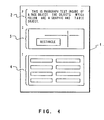
- Fig. 1 illustrates a document previously edited with multiple data objects on the page.
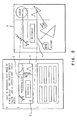
- Fig. 2 illustrates a view of the entire data area of a data object which is not all visible within the object window.
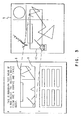
- Fig. 3 illustrates the results of scrolling the data within the object window to view different data.
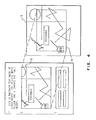
- Fig. 4 illustrates enlarging the window to view more data in the data area.
- Fig. 5 is a flow chart which illustrates operations performed in tailoring a master document according to the invention.
- the instant invention will be packaged as, or included in, an application program.
- application program will be abbreviated to application hereinafter.
- the application will have been written by a user or programmer for use in either a word processing or computing system operable by an operator.
- the systems contemplated include standalone and host connected device controlled display work stations.
- the system display will preferably be of an all-points-addressable (APA) cathode ray tube (CRT) type.
- APA all-points-addressable
- CRT cathode ray tube
- the window can thereafter be moved, and either enlarged or diminished in size.
- the window can be varied in size from very small up to a point that it fills the entire screen.
- Window manipulation in terms of locating and sizing on the screen, as a broad concept, is well known and forms no part of the instant invention.
- the term document is meant to include storable and retrievable information.
- the information can be in the form of text, graphics, tables, etc., which will be referred to hereinafter as data types.
- Device control includes control of the display by a keyboard, joy stick, light pen, mouse, scratch pad, etc., or any combination of such devices.
- system control is meant hardware and/or software control of the system.
- a menu is presented to the operator.
- the operator can select a data type such as a graphic object, table, etc., along with other parameters such as margin settings, etc., by keying to the menu. Keying to the menu results in a data object being defined or specified.
- the system Upon completion of keying to the menu, the system will cause a window to be built on the screen into which data can be input.
- the data input into the window can be much larger than the window. For example, if a text data object has been specified for one portion of the document to be built, the text input into the window can be several physical pages long. Handling of the excess text is by scrolling in the window during input.
- the text can be many times larger.
- the menu is recalled.
- a different data object can then be specified.
- the system will cause another window to be built on the screen below the previous window. At this time, displayed in the previous window will be the last part of the data input up to window size limitations.
- the screen will be filled with windows. When this occurs and a new data object is specified, the system will cause the windows already on the screen to be scrolled to provide room for another window.
- Each data object created in the above manner is stored in order of creation.
- the windowed data at the completion of input is also stored in the order the windows are created.
- Stored along with each of the windowed data is a pointer to a corresponding data object.
- a plurality of windows containing the windowed data are called and displayed on the screen.
- a view port is opened through the window into the corresponding data object.
- the view through the view port is of the same data windowed in the window prior to selection.
- the data object can be scrolled in the selected window for selecting a desired portion of the data object for inclusion in the document being tailored from the master document which is made up of the data objects.
- Selection of the window can be by means of a mouse controlled pointing cursor and a select button on the mouse. Selection of a portion of the data object for inclusion in the tailored document can also be by mouse button depression. The extent of selection of a portion of the data object is defined by the window size. This avoids normal bracketing and defining operations.
- keyboard/display computing system such as an IBM Personal Computer configured with a keyboard, an APA display, a black and white monitor, a graphics adaptor, a disk drive, an operating system, a mouse, sufficient working memory, and diskettes containing the master document and an application containing the instant invention. Further assume the system has been powered on, etc., and that the application of this invention has been loaded and is running.
- FIG. 1 In this figure there is illustrated a screen 1.
- the application displays the data objects of the document within on screen 1.
- Text data object 2, graphic data object 3, and table data object 4 represent the data objects contained within the document.
- data area 5 represents the entire data belonging to the data object 6. Only the portion 7 is currently visible through object window 8.
- the point of operation can be denoted by a cursor 9.
- the device can be a mouse, keyboard, joystick, etc.
- the particular characteristics of cursor 9 are unimportant as far as this invention is concerned. That is, the cursor could be a standard textual type cursor, etc.
- Cursor location and movement are directly related to editing. Editing encompasses insertion, deletion, replacement, etc., operations.
- Cursor 9 as shown in Fig. 2 denotes the data object selected and to be scrolled.
- object window 8 When the operator performs a scrolling action of the data within object window 8, the contents within object window 8 will scroll. The effects of this action will result in the operator viewing a different portion of the data within the window.
- Fig. 3 represents the data object 6 following operator scrolling.
- Object window 8 is displaying the data represented by portion 10. The entire data belonging to the object resides in data area 5. Next, the operator requests that the size of the object window 8 be increased to allow more of the data in the data area 5 to be viewed.
- object window 8 has been increased in size to accommodate more data from the data area 5.
- the portion viewed through window 8 is represented by portion 11.
- a routine is called to generate the internal structure of the document (CALL GET_DOC_DATA). If a new document is being created by the operator, an empty document structure is created. If a document already exists, the structure of the document will consist of all the data objects created by the operator in a previous editing session.
- the application calls a routine to allocate a 'parent' document window (CALL ALLOCATE_DOC_WINDOW) and then calls a routine to prepare the data objects to be displayed on the screen (CALL SET_DOC_VIEW). A pointer to the object which should be displayed at the top of the screen is input to this routine. This routine traverses through the document structure looking for data objects.
- the routine interfaces with the windowing system to allocate a window ('a child window of the parent') and a data area.
- the data area is a buffer which contains all the information pertaining to a data object.
- the routine translates the object data into the data area.
- the allocated window is of a fixed size defined by the operator or system at the time the object was edited last.
- the allocated window may also be smaller than the data in the object's data area.
- a link is maintained between the data object and its respective window and data area. Information about the positions of the objects on the page are also maintained.
- This routine will translate enough data objects necessary to generate a screen full of information.
- the routine displays the data on the physical screen.
- the application upon completion of displaying the document, enters a state in which the movement of the pointing cursor is being monitored for editing purposes.
- CALL MONITOR_INPUT As the application monitors input from the operator (CALL MONITOR_INPUT) several operator actions may occur. If an action occurred (e.g., move, copy, delete), the application calls a routine to process the command (CALL PROCESS_COMMAND). If the operator specifies that a data object is to be created, the application gets the data object's attributes such as window height and margins by calling a routine (CALL GET_OBJECT_ATTRIBUTES). The application then creates a data object internally and links the data object into the document structure. The placement of the created data object within the document structure is dependent on the selected location in the document where the operator requested the creation of the data object. The data object will be linked following the last data object at the selected location.
- CALL PROCESS_COMMAND If the operator specifies that a data object is to be created, the application gets the data object's attributes such as window height and margins by calling a routine (CALL GET_OBJECT_ATTRIBUTES).
- the application calls a routine (CALL REDISPLAY_DOC) to display an updated view of the document contents.
- This routine determines that a new object has been created, and that a window and data area do not exist for the object and will create them. The placement of the object in relation to the other objects in the document are maintained.
- the application calls a routine to set the window attributes of the selected data object in the document structure (CALL SET_OBJECT_ATTRIBUTES).
- the application then calls a routine (CALL REDISPLAY_DOC) to redisplay the updated view of the document contents, and the new size of the data object's window will be reflected.
- CALL GET_WINDOW_PTR determines which data object window and associated data area is to be edited.
- CALL GET_WINDOW_PTR determines which data object window and associated data area is to be edited.
- CALL GET_AREA_TYPE type of data in the data object's window
- a routine is called to handle the creation and editing process for the type of data.
- a routine (CALL EDIT_DRAW) is called if draw graphics data is to be created or edited.
- a routine (CALL EDIT_BUS) is called if business graphics data is to be created or edited.
- CALL EDIT_TABLE is called if table data is to be created or edited.
- a routine (CALL EDIT_TEXT) is called if text data is to be created or edited.
- the edit routines are responsible for inserting the data into the objects data areas as data input occurs and for issuing a redisplay of the changed data object contents.
- the routines also monitor when the data has reached the window boundary so that information scrolling can occur.
- the application Upon completion of editing the data object, the application will remember the last view of the data as shown within the data object's window.
- CALL GET_SCROLL_MODE_TYPE determines what type of scrolling is to occur. If scrolling of the object's data area within the window is to occur, a routine is called to determine which data object window and associated data area is to be scrolled (CALL GET_WINDOW_PTR). A routine is then called to determine how much of the data to scroll (CALL GET_SCROLL_AMT). Once the scroll amount has been determined, a routine is called to reset the view of the data within the object's window (CALL SET_WINDOW_VIEW).
- CALL GET_DATA a routine is called (CALL GET_DATA) to fetch more data into the data area.
- the scrolling is complete when the specified scroll amount has been reached or no more data exists for the object (UNTIL SCROLL_COMPLETE OR NO_MORE_DATA)
- the cursor location is updated (CALL SET_CURSOR_LOCATION) and a routine is called (SAVE_WINDOW_VIEW) to save the current view of the data within the window. If the type of scrolling to occur is document scrolling, normal scrolling of the document (CALL SET_DOC_VIEW) will occur.
- the view of the data object within the data objects windows are locked and will not change as the document is scrolled.
- the view of the data within the object's window is remembered when the call to SAVE_WINDOW_VIEW was made as defined above. If the operator elects to terminate the editing session or scroll the data object back into view, the last view within the data object's window is what is displayed.
- the application continues to monitor input until the editing session is complete (UNTIL EDIT_COMPLETE).
- the editing session is complete, all data within the data object's view ports are stored within the document.
- the application initiates the editing session and invokes routines to generate the internal document structure and to display the document data as represented by block 21. Displaying the document involves creating windows and data areas for each object within the document structure. If the document did not exist previously, an empty document is displayed. If the document did exist, a screen full of data information is generated and displayed on the screen.
- the application Upon displaying the initial view of the document on the screen, the application is ready to monitor operator input as depicted in block 22. If the input received is to execute an action as shown in block 23, the application determines what type of action occurred. If the operator requested that an object is to be created, the application creates the data object internally, creates the data object's window, and displays the data object on the screen. The process of object creation is shown in block 24.
- the operator specifies the new size and the application adjusts the size of the object's window.
- the sizing of the window is shown in block 25.
- the application will show as much data as will fit within the new window size. If any other actions occur, the application executes those actions as shown in block 26. If an action did not occur, the application determines if object editing is to occur as shown in block 27. If object editing is to occur, the application obtains information about the selected data object's window and data area as shown in block 28, and calls the appropriate edit routine to create/edit the data as depicted in block 29. If object editing is not occurring, the application determines if a scrolling action is to occur as shown in block 30.
- the application determines what type of scrolling is to take place. If scrolling of the data object is to occur, the application determines the amount of data to scroll, then scrolls that amount of data within the object's window as depicted in block 31. If scrolling of the document is to occur, the application scrolls the document maintaining the view of the data within the object windows as depicted in block 32. The application continues to monitor operator input until editing is complete as shown in block 33.
- a unique method of, and system for, building a specially tailored document from a master document are provided to improve user friendliness and system flexibility, and reduce operator attention.
- Portions of data objects making up a master document are windowed and displayed to an operator.
- a view port is created into a corresponding data object.
- the data object can then be scrolled in the view port for obtaining a desired portion of the data object for inclusion in the special document.
Landscapes
- Engineering & Computer Science (AREA)
- Theoretical Computer Science (AREA)
- Physics & Mathematics (AREA)
- General Physics & Mathematics (AREA)
- Audiology, Speech & Language Pathology (AREA)
- Computational Linguistics (AREA)
- General Health & Medical Sciences (AREA)
- Health & Medical Sciences (AREA)
- General Engineering & Computer Science (AREA)
- Artificial Intelligence (AREA)
- Computer Hardware Design (AREA)
- Digital Computer Display Output (AREA)
- Document Processing Apparatus (AREA)
- Controls And Circuits For Display Device (AREA)
Claims (7)
- Verfahren zum Erstellen eines Dokuments mit einer komplexen Mehroobjektkonfiguration aus einer Mehrzahl von Datenobjekten (2, 3, 4), die in dem Speicher eines Rechnersystems mit einem Anzeigeschirm (1) gespeichert sind und bei welchem die Datenobjekte zum Aufnehmen in das Dokument ausgewählt werden können,
dadurch gekennzeichnet, daß die Datenobjekte Teile eines Master-Dokuments sind, das auf einer einzigen Anzeigeseite der Anzeige nicht gesehen werden kann und durch die folgenden Schritte:a) Erzeugen einer Mehrzahl von Fenstern (8) auf dem Schirm,b) Anzeigen (21) von Abschnitten (7) der Datenobjekte der Master-Dokuments jeweils in den Fernstern,c) Rollen (30, 31) des angezeigten Abschnitts eines ausgewählten der Mehrzahl von Datenobjekten in einem der Mehrzahl von Fenstern, welche diesen entsprechen und falls notwendig, Vergrößern der Abmessung des Fensters, um den gewünschten Abschnitt des ausgewählten der Mehrzahl von Datenobjekten einzustellen, die in das Dokument aufgenommen werden sollen,d) Speichern des gewünschten Abschnitts in dem Rechnersystem,e) Wiederholen der Schritte c) und d) solange, bis alle gewünschten Abschnitte jedes der übrigen der Mehrzahl von Datenobjekten, die in das Dokument aufgenommen werden sollen, innerhalb eines entsprechenden der Mehrzahl von Fenstern eingestellt und in dem Rechnersystem gespeichert sind undf) Beenden (33) der Anzeige von Fenstern, wodurch das Dokument aus allen gewünschten Abschnitten erstellt ist, in einer Reihenfolge angeordnet ist, welche der Reihenfolge der Abschnitte entspricht, die in dem Rechnersystem gespeichert wurden und jede gewünschte Abmessung aufweisen kann. - Verfahren nach Anspruch 1, welches den zusätzlichen Schritt des Eingebens von Graphik-, Tabellen- und/oder alphanumerischen Daten in dem ersten, zweiten, usw.... und/oder n-ten Fenster umfaßt, wobei die Daten über irgendeine geeignete Dateneingangseinrichtung eingegeben werden.
- Verfahren nach Ansprüchen 1 oder 2, bei welchem die Datenobjekte Graphik-Objekte (3) sind.
- Verfahren nach Anspruch 1, 2 oder 3, bei welchem die Datenobjekte Tabellen (4) sind.
- Anzeigerechnersystem zum Erstellen eines Dokuments mit einer komplexen Mehrobjektkonfiguration aus einer Mehrzahl von Datenobjekten (2, 3, 4), die in dem Speicher des Rechners gespeichert sind, welches Mittel zum Auswählen gewisser der Datenobjekte zum Aufnehmen in das Dokument aufweist, dadurch gekennzeichnet, daß die Datenobjekte Teile eines Master-Dokuments sind, das auf einer einzigen Anzeigeseite der Anzeige nicht gesehen werden kann und daß dieses aufweist:
Mittel zum Erzeugen einer Mehrzahl von Fenstern (8) auf dem Schirm, ein Mittel zum Anzeigen ausgewählter der Mehrzahl von Datenobjekten jeweils in einer Mehrzahl von Fenstern mit einem unterschiedlichen Objekt in jedem der Mehrzahl von Fenstern, das ein Beobachtungsfenster in jedem entsprechenden der Mehrzahl von Datenobjekten ausbildet, wenn ausgewählt,
Mittel zum Vergrößern der Fenster, wie erforderlich, Mittel zum Rollen jedes der ausgewählten Datenobjekte in einem entsprechenden der Mehrzahl von Fenstern, um gewünschte Abschnitte der Datenobjekte in den entsprechenden Fenstern als sichtbar zu erhalten, Mittel zum Speichern der gewünschten Abschnitte von Datenobjekten in dem Speicher, die in der Mehrzahl von Fenstern sichtbar sind und Mittel zum Beenden der Anzeige der Mehrzahl von Fenstern, wodurch die gewünschten Abschnitte, die jedem der Mehrzahl innerhalb entsprechender der Mehrzahl von Fenstern eingestellter Datenobjekte jeweils zugeordnet sind, in dem Dokument in einer Reihenfolge angeordnet sind, welche der Reihenfolge der gewünschten Abschnitte von Datenobjekten entspricht, die in dem Speicher gespeichert wurden. - System nach Anspruch 5, das Mittel zum Durchführen von Aufbereitungsarbeitsgängen innerhalb der Abschnitte von Datenobjekten aufweist, die in den Fenstern angezeigt sind.
- System nach Anspruch 5 oder 6, das Mittel aufweist die bewirken, daß die bereits auf dem Schirm befindlichen Fenster gerollt werden, um Raum für andere Fenster bereitzustellen.
Applications Claiming Priority (2)
| Application Number | Priority Date | Filing Date | Title |
|---|---|---|---|
| US68656584A | 1984-12-26 | 1984-12-26 | |
| US686565 | 1984-12-26 |
Publications (2)
| Publication Number | Publication Date |
|---|---|
| EP0185904A1 EP0185904A1 (de) | 1986-07-02 |
| EP0185904B1 true EP0185904B1 (de) | 1992-03-11 |
Family
ID=24756834
Family Applications (1)
| Application Number | Title | Priority Date | Filing Date |
|---|---|---|---|
| EP85114355A Expired - Lifetime EP0185904B1 (de) | 1984-12-26 | 1985-11-12 | Nach Mass angefertigter Dokumentenaufbau |
Country Status (4)
| Country | Link |
|---|---|
| EP (1) | EP0185904B1 (de) |
| JP (1) | JPH0723995B2 (de) |
| CA (1) | CA1233257A (de) |
| DE (1) | DE3585597D1 (de) |
Families Citing this family (12)
| Publication number | Priority date | Publication date | Assignee | Title |
|---|---|---|---|---|
| JP2507361B2 (ja) * | 1986-10-31 | 1996-06-12 | 株式会社東芝 | 画像情報処理装置 |
| FR2617996A1 (fr) * | 1987-07-06 | 1989-01-13 | Durand Michel | Document pre-etabli sur support informatique, modifiable grace a un logiciel de traitement associe, dispose sur le meme support |
| CA1307853C (en) * | 1987-10-15 | 1992-09-22 | Anthony M. Peters | Visually assisted method for transfer of data |
| NL8901151A (nl) * | 1989-05-08 | 1990-12-03 | Oce Nederland Bv | Documentopmaaksysteem en werkwijze voor het samenstellen van documenten. |
| CA2021823C (en) * | 1989-08-14 | 1999-01-26 | Michael Morris Golding | Window display system and method |
| US5175813A (en) * | 1989-08-14 | 1992-12-29 | International Business Machines Corporation | Window display system and method for creating multiple scrollable and non-scrollable display regions on a non-programmable computer terminal |
| JPH0540757A (ja) * | 1991-01-28 | 1993-02-19 | Fujitsu Ltd | 文書処理装置 |
| US5602563A (en) * | 1993-12-15 | 1997-02-11 | International Business Machines Corporation | Float to surface display |
| GB2305758B (en) * | 1995-09-27 | 1999-10-13 | Motorola Ltd | A method and apparatus for producing a specific manual for configurable electronic equipment |
| GB2329500A (en) * | 1997-09-19 | 1999-03-24 | Mitel Corp | Editable customized document creation tool |
| US6562076B2 (en) | 1998-08-31 | 2003-05-13 | Xerox Corporation | Extending application behavior through active properties attached to a document in a document management system |
| US6266682B1 (en) | 1998-08-31 | 2001-07-24 | Xerox Corporation | Tagging related files in a document management system |
Citations (1)
| Publication number | Priority date | Publication date | Assignee | Title |
|---|---|---|---|---|
| GB2043311A (en) * | 1979-03-02 | 1980-10-01 | Ibm | Text processing |
Family Cites Families (4)
| Publication number | Priority date | Publication date | Assignee | Title |
|---|---|---|---|---|
| DE3272407D1 (en) * | 1981-02-23 | 1986-09-11 | Texas Instruments Inc | Display system with multiple scrolling regions |
| JPS58119076A (ja) * | 1982-01-08 | 1983-07-15 | Toshiba Corp | 画像編集装置 |
| JPS5965886A (ja) * | 1982-10-07 | 1984-04-14 | アルプス電気株式会社 | 仮想デイスプレイ制御方式 |
| JPS59100494A (ja) * | 1982-11-30 | 1984-06-09 | 富士通株式会社 | 映像装置の表示制御方式 |
-
1985
- 1985-08-08 CA CA000488366A patent/CA1233257A/en not_active Expired
- 1985-09-18 JP JP60204603A patent/JPH0723995B2/ja not_active Expired - Lifetime
- 1985-11-12 EP EP85114355A patent/EP0185904B1/de not_active Expired - Lifetime
- 1985-11-12 DE DE8585114355T patent/DE3585597D1/de not_active Expired - Lifetime
Patent Citations (1)
| Publication number | Priority date | Publication date | Assignee | Title |
|---|---|---|---|---|
| GB2043311A (en) * | 1979-03-02 | 1980-10-01 | Ibm | Text processing |
Non-Patent Citations (1)
| Title |
|---|
| IEEE Computer Society workshop on Computer Architekture for Pattern Analysis and Image Database Management, Nov. 11-13, 1981, pages 301-308 * |
Also Published As
| Publication number | Publication date |
|---|---|
| CA1233257A (en) | 1988-02-23 |
| JPS61156288A (ja) | 1986-07-15 |
| JPH0723995B2 (ja) | 1995-03-15 |
| DE3585597D1 (de) | 1992-04-16 |
| EP0185904A1 (de) | 1986-07-02 |
Similar Documents
| Publication | Publication Date | Title |
|---|---|---|
| US4962475A (en) | Method for generating a document utilizing a plurality of windows associated with different data objects | |
| EP0185905B1 (de) | Verfahren zur Gestaltung eines Dokuments | |
| US5001697A (en) | Method to automatically vary displayed object size with variations in window size | |
| EP0173125B1 (de) | In linie-dynamischer Editor für gemischte Objectdokumente | |
| EP0163032B1 (de) | Verfahren und Einrichtung zum Steuern von Informationsbildfenstern auf einem Anzeigegerät | |
| JP3014284B2 (ja) | ダイアログ・ボックスの表示方法及びシステム | |
| US4815029A (en) | In-line dynamic editor for mixed object documents | |
| US5157763A (en) | Visually assisted method for transfer of data within an application or from a source application to a receiving application | |
| US5671378A (en) | Method and system for sizing of graphical user interface objects for localization | |
| CA1309187C (en) | Sharing word-processing functions among multiple processors | |
| US5936623A (en) | Method and apparatus for selecting a particular object from among a large number of objects | |
| EP0428261A2 (de) | Rechnerbenutzerschnittstelle | |
| JPH0352098B2 (de) | ||
| JPS61229168A (ja) | コンピユ−タを用いてグラフを作成する方法 | |
| EP0185904B1 (de) | Nach Mass angefertigter Dokumentenaufbau | |
| JP2003529818A (ja) | グラフィックユーザインタフェース | |
| EP0336583A2 (de) | Tastatur-Umbelegung | |
| EP0156116A2 (de) | Verfahren und System zur Grössenänderung von benachbarten Fenstern auf einem Bildschirm | |
| JPH0563819B2 (de) | ||
| EP0075731A2 (de) | Spaltenformatierung durch maschinegeschriebenes Beispiel | |
| JPH0652278A (ja) | データ処理システム及び値選択方法 | |
| JP2751212B2 (ja) | 文書作成装置 | |
| JP2680076B2 (ja) | マルチウィンドウの画面表示方法 | |
| JPH0317741A (ja) | プログラム作成支援装置 | |
| JPS61262885A (ja) | 文字表示装置 |
Legal Events
| Date | Code | Title | Description |
|---|---|---|---|
| PUAI | Public reference made under article 153(3) epc to a published international application that has entered the european phase |
Free format text: ORIGINAL CODE: 0009012 |
|
| AK | Designated contracting states |
Kind code of ref document: A1 Designated state(s): DE FR GB IT |
|
| 17P | Request for examination filed |
Effective date: 19861029 |
|
| 17Q | First examination report despatched |
Effective date: 19881209 |
|
| GRAA | (expected) grant |
Free format text: ORIGINAL CODE: 0009210 |
|
| AK | Designated contracting states |
Kind code of ref document: B1 Designated state(s): DE FR GB IT |
|
| REF | Corresponds to: |
Ref document number: 3585597 Country of ref document: DE Date of ref document: 19920416 |
|
| ITF | It: translation for a ep patent filed | ||
| ET | Fr: translation filed | ||
| PLBE | No opposition filed within time limit |
Free format text: ORIGINAL CODE: 0009261 |
|
| STAA | Information on the status of an ep patent application or granted ep patent |
Free format text: STATUS: NO OPPOSITION FILED WITHIN TIME LIMIT |
|
| 26N | No opposition filed | ||
| PGFP | Annual fee paid to national office [announced via postgrant information from national office to epo] |
Ref country code: GB Payment date: 19951024 Year of fee payment: 11 |
|
| PGFP | Annual fee paid to national office [announced via postgrant information from national office to epo] |
Ref country code: FR Payment date: 19951107 Year of fee payment: 11 |
|
| PGFP | Annual fee paid to national office [announced via postgrant information from national office to epo] |
Ref country code: DE Payment date: 19951123 Year of fee payment: 11 |
|
| PG25 | Lapsed in a contracting state [announced via postgrant information from national office to epo] |
Ref country code: GB Effective date: 19961112 |
|
| GBPC | Gb: european patent ceased through non-payment of renewal fee |
Effective date: 19961112 |
|
| PG25 | Lapsed in a contracting state [announced via postgrant information from national office to epo] |
Ref country code: FR Effective date: 19970731 |
|
| PG25 | Lapsed in a contracting state [announced via postgrant information from national office to epo] |
Ref country code: DE Effective date: 19970801 |
|
| REG | Reference to a national code |
Ref country code: FR Ref legal event code: ST |