EP0216063A2 - Composition de document à partir de l'inventaire des éléments - Google Patents
Composition de document à partir de l'inventaire des éléments Download PDFInfo
- Publication number
- EP0216063A2 EP0216063A2 EP86110055A EP86110055A EP0216063A2 EP 0216063 A2 EP0216063 A2 EP 0216063A2 EP 86110055 A EP86110055 A EP 86110055A EP 86110055 A EP86110055 A EP 86110055A EP 0216063 A2 EP0216063 A2 EP 0216063A2
- Authority
- EP
- European Patent Office
- Prior art keywords
- document
- set forth
- file
- parts
- further including
- Prior art date
- Legal status (The legal status is an assumption and is not a legal conclusion. Google has not performed a legal analysis and makes no representation as to the accuracy of the status listed.)
- Ceased
Links
Images


Classifications
-
- G—PHYSICS
- G06—COMPUTING OR CALCULATING; COUNTING
- G06F—ELECTRIC DIGITAL DATA PROCESSING
- G06F40/00—Handling natural language data
- G06F40/10—Text processing
- G06F40/166—Editing, e.g. inserting or deleting
- G06F40/174—Form filling; Merging
-
- Y—GENERAL TAGGING OF NEW TECHNOLOGICAL DEVELOPMENTS; GENERAL TAGGING OF CROSS-SECTIONAL TECHNOLOGIES SPANNING OVER SEVERAL SECTIONS OF THE IPC; TECHNICAL SUBJECTS COVERED BY FORMER USPC CROSS-REFERENCE ART COLLECTIONS [XRACs] AND DIGESTS
- Y10—TECHNICAL SUBJECTS COVERED BY FORMER USPC
- Y10S—TECHNICAL SUBJECTS COVERED BY FORMER USPC CROSS-REFERENCE ART COLLECTIONS [XRACs] AND DIGESTS
- Y10S707/00—Data processing: database and file management or data structures
- Y10S707/99931—Database or file accessing
- Y10S707/99933—Query processing, i.e. searching
- Y10S707/99934—Query formulation, input preparation, or translation
Definitions
- This invention relates generally to word processing systems and more particularly to a method for creating a document parts inventory and composing final documents by referencing selected parts of the inventory.
- VDT video display terminal
- a VDT operator may display the file screen and select which file or letter is to be displayed on the screen and to which changes may be made to customize that previous file or letter to a current situation and save that newly created document to a new file. That process, however, normally involves a significant amount of keying by the operator since addressees, subjects, mailing addresses and content as well as the identity of individuals receiving copies, all have to be changed in most cases. Moreover, a substantial amount of time is required for content changes to the letters since sections of text must be identified and deleted and new sections require identification, keying in, insertion and proofreading before the document can be printed in final form.
- a preferred embodiment of the present invention displays a document parts inventory to the user on a single screen from which the user may compose a new document by screen references to the parts desired, and effect the printing of the selectively composed document, in most cases without reference to additional screens.
- the present invention has been designed to run in connection with, or "on top of”, a typical word processing program which includes editing functions utilized by the present invention in creating and modifying the document parts inventory files.
- editing functions utilized by the present invention in creating and modifying the document parts inventory files.
- Such basic editing operations are available on the market and well known in the art.
- Subsequent reference to an "XEDIT" function will be understood to mean such an editing function which has the capability of manipulating text including facilities to insert and delete text from a displayed document.
- the implementing code was used in connection with an IBM Personal Computer XT connected in a network to a host IBM 3081 mainframe computer which in turn was running the IBM Virtual Machine System Product (VM/SP).
- VM/SP IBM Virtual Machine System Product
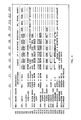
- FIG. 1 there is shown the master menu for the memo parts inventory or interface system.
- the main screen has 24 rows designated R1 through R24 and includes 13 columns designated C1 through C13.
- the FIG. 1 screen is displayed to the user after the user keys in the initials "MPI" and hits the enter key on his video display terminal after logging onto the VM system.
- the first column C1 of the master menu designates the control functions available to the program.
- the "PF1-PF12" designations on the screen refer to corresponding function keys on an operator keyboard which, on the Personal Computer XT, are designated F1-F10, and shifted F9 and F10, respectively.
- F1-F10 function keys on an operator keyboard which, on the Personal Computer XT
- F9 and F10 respectively.
- column C2 portions of a typical document are identified and those portions comprise the parts inventory for the documents to be created using the present invention.
- the selected inventory parts are displayed.
- the short identifier fields in column 3 designate corresponding files in the system which are selected for the document presently being composed, or default designations in the event files are unspecified by the operator.
- Columns C4-C13 generally indicate the short identifiers for particular files which have previously been created and which are available for selection by a user to include in a document presently being composed.
- the "TO" inventory part of a document is arranged in the present example to contain three rows of 10 columns each, or 30 files, with each file containing the name of an individual or department to whom memos are frequently sent. It should be noted that more than 30 files may be created and stored but only 30 will appear on the screen in the present example. Files not appearing on the screen may be viewed by moving the cursor anywhere in the "TO" fields and depressing the PF4 key to "Scroll List". In other applications, the "TO" list of files may have more or fewer spaces for files and the "Body" or other list or document part may be designed to display fewer or more files so that the total number of displayed short identifiers remains the same.
- CLAS various classifications
- NONE means that the document being composed is not classified in any way.
- the program may be designed so that each of the designations in C2 may or may not appear in the hard copy of the memo being created regardless of whether or not there is a user input or selection made in the corresponding C3 position.
- the date of the memorandum is designated and in the present example is defaulted to or automatically inserted as the current date, but may be typed over for a different date.
- the files are arranged to contain specific address information of the sender, and may include items which vary from individual to individual even within the department such as the individual's phone number or virtual machine terminal identification (VMID).
- VMID virtual machine terminal identification
- each of the files included in column C4 through C13 have space for a four-character designator although file designators having fewer characters may be used.
- C4 specifies "I105” which could stand for the corporate instruction, which could set forth the policy of the company with regard to a particular area of interest and the practices which are required to be implemented in that particular area by corporate management. In that case, that particular corporate instruction would be referenced on many different internal memoranda although each one would specifically include a report or correspondence with regard to only one practice covered by the broad policy.
- each one designates a particular "BODY" of a memorandum for a different "standard form".
- the file at R13, C4 is identified as "RPTM” which could stand for a required monthly report which must be submitted in accordance with the referenced corporate instruction I105.
- the file at R13, C5 "RPTW”, could stand for a weekly report and "BGTR" at C6 could mean the standard "BODY" for a budget request.
- the body files will have some correspondence to the subject files although there may be several body files which could correspond to one general subject file.
- the "SUBJ" file designated in "APR” could generally stand for "Name Approval” for the name of a new product.
- the "BODY” file "NAP1” could stand for a first standard correspondence under the name approval procedure which could be a request from one department to another for its concurrence and approval of a proposed name
- "NAP2" at R13, C9 could refer to a stored file containing the body portion of a memo which provides notice to various departments that a proposed name for a new product has received the necessary approvals.
- C3 a user is allowed to specify the number of copies "COPYS" of the memorandum to be printed, as well as the particular font "FONT” desired at R22, C5-6.
- Row R23 identifies the particular kinds of printers "PRNTR” on which the memo is to be printed, and R24, C3 specifies the location of the printer "PRTID" at which the created memorandum is to be printed.
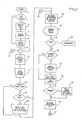
- FIG. 2 through FIG. 4 illustrate, in logical flow, the functions performed by the program in implementing the present invention and are hereinafter referred to in connection with the following description of an exemplary operation.
- the "Log” file contains a quick reference to previous documents which were created and printed in final form using the present invention.
- the "Log” file includes the "TO”, “FROM”, “DATE”, “SUBJECT”, and “REFERENCE” entries or fields as used in a prior printed memorandum or correspondence.
- the "Log” file also contains the identification of the unique set of short identifiers which were selected to create that memorandum.
- the "Log" files are displayed in several screens with each screen containing three separate summaries of previously printed documents.
- the log file is automatically created whenever a document is printed in final form and may be accessed by depressing the function key PF11 "VIEW LOG".
- the "VIEW LOG" function is useful to the extent that the short identifiers for the many files in the program may not be remembered by a user for a particular document and before creating a new document the user may wish to review the log file in order to identify a previously written document and the precise files which were combined in that document. In many cases, however, the user will relate the short identifiers on the master menu for the files with the content of those files and be able to create new documents without referring to the "Log" file at all.
- the program reads the last log record to display those file entries in the "SELECTIONS” column C3 when the master menu is displayed. In the event this is not the first time through the program, blocks 21 and 23 are bypassed and the program restores the selections or gets the default values at block 25 to display in the "SELECTIONS” column C3 when the master menu is displayed at block 29. In subsequent portions of the program, as shown in FIG. 4, where no operator input is required, the program is returned to the "Restore Selections" block 25 as designated at the C1 off-page connector 27.
- the program returns to off-page connector A1 so that the display may be updated or refreshed at block 15 before the refreshed master menu is displayed at block 29.
- all of the file identifiers in columns C4 through C13 are blank except for selected ones such as row 7 which includes the various possible classifications and row 8 which displays the current date. This particular arrangement may vary depending upon the particular application.
- a user creates his first document which, in the present example, is an internal memorandum having a prearranged format
- the user after insuring that the cursor is in the R4,C3 field activates the PF8 key designated in column 1 "XEDIT".
- a file screen appears on the display as shown below, in which the user is able to insert the full name of the individual to whom the memo is being sent together with the particular mail station of that individual, the city and the state.
- the format of the file screen may also be varied depending upon the application and the particular organization in which the program is operating.
- the user will push the PF12 key which activates the "FILE" command to save the input information in a file which may subsequently be accessed by cursor reference to the initials placed in column C3 when the file was created.
- the PF12 function also returns the user to the main menu.
- the initials originally typed in C3 now appear in C4 at row 5 indicating that a file has been created having those initials and may be accessed in the future for memoranda sent to the same individual.
- the program checks to determine whether the operator wishes to exit the program at block 31 which will occur if the operator depresses the PF1 function key "QUIT". Whenever the PF1 key is depressed, the program will terminate at 33 and return to the next level of program control (i.e. "VM"). If the PF1 key has not been depressed, the program checks to see if the cursor select function has been invoked at 35, such as would occur if an operator had positioned the cursor in one of the fields of columns C4-C13 and activated any key. If the cursor select function has been elected, the program moves the selected field to the "SELECTIONS" column, i.e.
- the program either gets or edits the selections on the screen at block 39 depending upon whether or not the cursor select function was invoked at block 35.
- the program then checks for errors at block 41, and if there are no errors, the program restores the "SELECTIONS" list at block 45 and continues to scan for inputs as shown in FIG. 3 beginning with B2 off-page connector 47. In the event errors existed at block 41 error messages are moved to the screen at block 43 before the "SELECTIONS" list is restored at block 45.
- the user may continue to build the document parts inventory by positioning the cursor under the first character blank of C3 in R7 to input the classification "CLAS" for the particular document being created.
- the document is unclassified and accordingly the word "NONE" is inserted in that space.
- the user would then proceed to the first space in C3 across from R9 which is the identifier for the "FROM" part of the memo.
- the user would insert his own initials, or if a secretary is typing a memo, the initials of the person requesting the memo.
- the user would again push the PF8 "XEDIT" key, and the program would display another file screen for input from the operator.
- the "FROM” file screen as shown below solicits the full name of the sender to be shown on the memorandum as well as the particular address of the sender and possibly his phone number and VM/ID or other relevant information.
- the operator pushes the PF12 key to file away that information and return the user to the master menu screen. Thereafter, that file may be accessed by positioning the cursor under the initials which created that file and pushing the PF8 key or merely "selected” for a subsequent memo by positioning the cursor as noted and pushing the "ENTER" key.
- the user will then normally create a subject file "SUBJ" by inputting a subject file identifier of up to four characters in R10 at C3. Again positioning the cursor under that field the operator would push the PF8 key and the particularly identified subject file screen would appear as shown below with all blanks to be completed as necessary by the user. The user would then key in the full subject as it would appear on the document and press PF12 to file that input and return the user to the main menu.
- the user identifies and inputs to create a "REF” file and the remaining files as shown in FIG. 1.
- the editor functions include devices by which new paragraphs may be added and new lines may be added if the predetermined file space is not sufficient for the text of the memo body.
- An exemplary "BODY" file screen is shown below.
- the listing capability which is part of the formatting control, appears on the body file screen and allows a user to insert data items which will automatically be numbered in appropriate order.
- the classification line at row 7 contains one of the three predesignated "classifications” and if a different "classification" is required that input is entered on the master menu in row 7 beginning at column C8 rather than being entered in an associated file screen.
- the PF1 key when pushed returns the user to the originating program from which the document parts or memo parts program was accessed.
- PF2 "CHECK SPELLING”
- the PF3 key "VIEW MEMO” allows a user to view the entire memo after it has been created before it is sent to the printer.
- the PF 3 key may then be actuated at which time a message would appear in a lower right hand corner of the master screen advising the operator that the memo is being collected together from the selected parts.
- the memo as created appears on the screen for the user to visually proofread. That process occurs each time the "VIEW MEMO" PF3 or print functions PF5 or PF6 are invoked, i.e., a new memo is collected from the parts which have been inserted in the "SELECTIONS” column C3.
- the PF4 key "SCROLL LIST" is used by an operator to scroll file designations which have been created but do not appear on the screen in columns C4-C13 because of screen space limitations.
- PF5 "PRINT A DRAFT COPY” assembles the document and prints it at the designated printer in draft format but does not "Log” the document into the "Log” file.
- PF6 "PRINT A FINAL COPY” causes the designated printer to print a copy of the created document in a final format and automatically creates a summary of the document and saves the summary in the "Log” file as hereinbefore explained.
- the user will position the cursor in one of the columns C4 through C13 which is to be erased and then hit the ENTER key. That process will move the particularly identified file to the "SELECTIONS" column C3 at which time the user would press the PF7 ERASE key.
- PF8 "XEDIT" key is used to add or delete information from the screen files and the PF9 SCROLL LOG FORWARD and PF10 SCROLL LOG BACKWARD keys are used to move from summary to summary in the "Log” file and change the list of "SELECTIONS” (C3) accordingly.
- PF11 VIEW LOG is used to display the 1st screen of the "Log” file from the master menu.
- the PF12 HELP key is used to display the instructions with regard to the use of the memo parts program.
- the program functions invoked by the PF keys are illustrated in detail. As shown in those figures, the program is interruptoriented so that in the event none of the function keys are actuated, the program continues to cycle through the decision blocks associated with the function keys returning to the off page connector A1 and merge point 9 shown in FIG. 2.
- the program determines whether the PF7 key has been actuated for the first or second time at 57. After one actuation a flag is set at block 59 so that the second actuation of the PF7 key is effective to erase the designated file as indicated at block 61.
- the flag is set at block 59 and the program recycles, displays a message to the operator as hereinbefore noted, and is effective to detect a second actuation on the next scan.
- the program makes a determination that the function key PF3 "VIEW MEMO" has been actuated as shown in decision block 51, and the memo has not been built as determined at 63, the selected parts are concatenated at 65 and formatted at 67 to be displayed to the user at 71. If the memo had already been assembled as shown in the "SELECTIONS” column C3, the program insures that the memo has been formatted at 69 before displaying the memo to the user at 71. In the event the memo had not previously been formatted, it is formatted at 67 before being displayed. The program then returns to the merge point 9 shown on FIG. 2.
- the program is effective to initiate the print routine in the event the function keys PF5 "PRINT A DRAFT COPY” or PF6 "PRINT A FINAL COPY" have been actuated. If either key has been actuated, and the memo has not been built as determined at 73, the selected parts are concatenated at 75 and formatted at 77 for printing at 81. In the event the memo had previously been built, the program goes directly from the "memo built" decision block 73 to the "memo formatted” block 79. In the event the memo had not previously been formatted, it is then formatted at 77 prior to being printed at 81.
- the difference between the "PRINT A FINAL COPY" function key PF6 and the "PRINT A DRAFT COPY” function PF5 is illustrated by the subroutine including the decision block 83 and the "update log” process indicated at 85.
- the appearance of the memo being printed will be the same regardless of which key had been actuated. However, if the memo being printed is a final draft as determined at 83, the "Log" file is updated at 85 for future reference before the program returns to the merge point 9. If the user desires to print only a rough draft, the "Log" file is not updated and after the rough draft is printed, the program then returns to the merge point 9 and continues to cycle for the detection of actuated function keys.
- the program continues its scanning process as shown by the off-page connector C3.
- the off-page connector C3 is connected to a "check spelling" decision block 87. That routine corresponds to the function key PF2 which, when actuated would effect a display of the file in connection with a "spell checker” routine. That routine is part of the underlying word processing code and similar routines are well known in the art. Accordingly, the details of the "check spelling" routine will not be elaborated upon at this point.
- the next function scanned for selection is the "scroll log” function shown at decision block 89 and corresponding to the actuation of either of the function keys PF9 “SCROLL LOG FORWARD” or PF10 “SCROLL LOG BACKWARD".
- the program will either refresh or update the selections list with the next three summary entries of the "Log” file or the previous summary entries of the "Log” file depending upon which function key is actuated by the user. It should be noted that the "scroll log” function is available only after a user has first created multiple document summaries in the "Log” file by executing the "Print a Final Copy" function.
- the function key PF12 "HELP" invokes a help routine as shown in decision block 91 which is effective to display a help file at 103 containing specific instructions on the operation of the memo parts inventory or interface program.
- decision block 93 leads the program to display the "Log" file of part combinations for the memos previously selected and printed in final form as shown at 105.
- function key PF8 "XEDIT" is detected by the decision block 95 which leads to a subsequent determination of whether or not the operator is creating a new part as shown by decision block 107.
- a blank file is processed at 109 for display to the operator and subsequent operator input.
- the program recalls the existing part file at 111 to display to the operator at 29 (FIG. 2) to receive operator input regarding the modification of the previously created file.
- An editing function which processes any operator input, is also part of a preexisting word processing program underlying the present code and is well known in the art.
- function key PF4 "SCROLL LIST" is detected at decision block 97.
- that function is effective to scroll the lists of short identifiers which are saved by the present program but may not be displayed on the master menu screen because of the size limitation of the screen.
- the "TO" memo part in the present embodiment includes space for three rows of ten columns each, or 30 files for which short identifiers may be displayed on the screen.
- the program will receive additional short identifiers which may not be displayed on the screen but may be selectively displayed with the "SCROLL LIST" function.
- the program determines whether or not the cursor is in a valid screen area at 113 in which case the next short identifier will be accessed at 115 and appear in the appropriate screen area. It should be noted that the cursor must be in a valid area on the screen for the implementation of the "SCROLL LIST" function, i.e., the cursor must be in one of the fields appearing in columns C4-C13 which can be accessed so that the program has input regarding which displayed group of short identifiers is to be scrolled. If, for example, the cursor is in the "DATE" field when the PF4 function key is actuated, an error message will be presented to the operator as shown at 117 and the program will return to the merge point 9 shown in FIG. 2.
Landscapes
- Engineering & Computer Science (AREA)
- Theoretical Computer Science (AREA)
- Audiology, Speech & Language Pathology (AREA)
- Health & Medical Sciences (AREA)
- Computational Linguistics (AREA)
- General Health & Medical Sciences (AREA)
- Physics & Mathematics (AREA)
- General Engineering & Computer Science (AREA)
- General Physics & Mathematics (AREA)
- Artificial Intelligence (AREA)
- Digital Computer Display Output (AREA)
- General Factory Administration (AREA)
- Document Processing Apparatus (AREA)
- Information Retrieval, Db Structures And Fs Structures Therefor (AREA)
Applications Claiming Priority (2)
| Application Number | Priority Date | Filing Date | Title |
|---|---|---|---|
| US06/779,535 US4730252A (en) | 1985-09-24 | 1985-09-24 | Document composition from parts inventory |
| US779535 | 1985-09-24 |
Publications (2)
| Publication Number | Publication Date |
|---|---|
| EP0216063A2 true EP0216063A2 (fr) | 1987-04-01 |
| EP0216063A3 EP0216063A3 (fr) | 1988-07-27 |
Family
ID=25116758
Family Applications (1)
| Application Number | Title | Priority Date | Filing Date |
|---|---|---|---|
| EP86110055A Ceased EP0216063A3 (fr) | 1985-09-24 | 1986-07-22 | Composition de document à partir de l'inventaire des éléments |
Country Status (3)
| Country | Link |
|---|---|
| US (1) | US4730252A (fr) |
| EP (1) | EP0216063A3 (fr) |
| JP (1) | JPS6272058A (fr) |
Cited By (6)
| Publication number | Priority date | Publication date | Assignee | Title |
|---|---|---|---|---|
| WO1991006056A1 (fr) * | 1989-10-16 | 1991-05-02 | Medical Documenting Systems, Inc. | Systeme de documentation assiste par ordinateur afferent a la dictee et a la transcription |
| EP0361366A3 (fr) * | 1988-09-26 | 1992-12-23 | Sharp Kabushiki Kaisha | Appareil de préparation de documents |
| EP0497283A3 (en) * | 1991-01-28 | 1993-10-13 | Fujitsu Limited | A document processor |
| EP0590892A3 (en) * | 1992-09-28 | 1994-06-01 | Brother Ind Ltd | Document processing apparatus |
| GB2278702B (en) * | 1993-06-01 | 1997-08-20 | Mitsubishi Electric Corp | A user interface system |
| GB2329500A (en) * | 1997-09-19 | 1999-03-24 | Mitel Corp | Editable customized document creation tool |
Families Citing this family (73)
| Publication number | Priority date | Publication date | Assignee | Title |
|---|---|---|---|---|
| JPS62154942A (ja) * | 1985-12-27 | 1987-07-09 | Canon Inc | フアクシミリ装置 |
| US5261042A (en) * | 1986-03-27 | 1993-11-09 | Wang Laboratories, Inc. | Menu management system |
| US4831526A (en) * | 1986-04-22 | 1989-05-16 | The Chubb Corporation | Computerized insurance premium quote request and policy issuance system |
| US5146404A (en) * | 1986-09-19 | 1992-09-08 | Westinghouse Electric Corporation | Electronic maintenance support work station |
| US4992972A (en) * | 1987-11-18 | 1991-02-12 | International Business Machines Corporation | Flexible context searchable on-line information system with help files and modules for on-line computer system documentation |
| US5107419A (en) * | 1987-12-23 | 1992-04-21 | International Business Machines Corporation | Method of assigning retention and deletion criteria to electronic documents stored in an interactive information handling system |
| US4899299A (en) * | 1987-12-23 | 1990-02-06 | International Business Machines Corporation | Method for managing the retention of electronic documents in an interactive information handling system |
| JPH01237757A (ja) * | 1987-12-23 | 1989-09-22 | Internatl Business Mach Corp <Ibm> | 情報処理システム中の文書オブジエクトを検索する方法 |
| CA1328027C (fr) * | 1988-07-14 | 1994-03-22 | Toshio Kashio | Appareil de traitement des donnees |
| US5202984A (en) * | 1988-07-14 | 1993-04-13 | Casio Computer Co., Ltd. | Apparatus and method for updating transaction file |
| US5038316A (en) * | 1988-08-22 | 1991-08-06 | James D. Hempleman | Method for generating user documentation for an application program by executing commands associated with different aspects of the application program in response to analysis of the application program |
| US5317733A (en) * | 1990-01-26 | 1994-05-31 | Cisgem Technologies, Inc. | Office automation system for data base management and forms generation |
| JP3074737B2 (ja) * | 1990-12-29 | 2000-08-07 | カシオ計算機株式会社 | ファイル更新処理装置 |
| JP2595817B2 (ja) * | 1991-01-17 | 1997-04-02 | ヤマハ株式会社 | 2次記憶装置の情報の制御方法および2次記憶装置を有する電子機器 |
| US5357629A (en) * | 1991-09-16 | 1994-10-18 | Pitney Bowes Inc. | System for recording structured read only data table revisions and forming a directory to the latest revisions of table elements |
| JP3134505B2 (ja) * | 1992-05-29 | 2001-02-13 | カシオ計算機株式会社 | 伝票処理装置 |
| US5848184A (en) * | 1993-03-15 | 1998-12-08 | Unisys Corporation | Document page analyzer and method |
| US5940811A (en) * | 1993-08-27 | 1999-08-17 | Affinity Technology Group, Inc. | Closed loop financial transaction method and apparatus |
| EP0715740B1 (fr) * | 1993-08-27 | 2001-07-04 | Affinity Technology, Inc. | Procede et appareil de transaction financiere en boucle fermee |
| US7103594B1 (en) | 1994-09-02 | 2006-09-05 | Wolfe Mark A | System and method for information retrieval employing a preloading procedure |
| US7467137B1 (en) | 1994-09-02 | 2008-12-16 | Wolfe Mark A | System and method for information retrieval employing a preloading procedure |
| US5715445A (en) | 1994-09-02 | 1998-02-03 | Wolfe; Mark A. | Document retrieval system employing a preloading procedure |
| US6604103B1 (en) | 1994-09-02 | 2003-08-05 | Mark A. Wolfe | System and method for information retrieval employing a preloading procedure |
| US6003023A (en) * | 1994-11-04 | 1999-12-14 | International Business Machines Corporation | Incremental change processing apparatus for presented objects |
| US7302638B1 (en) | 1995-06-07 | 2007-11-27 | Wolfe Mark A | Efficiently displaying and researching information about the interrelationships between documents |
| US5870770A (en) * | 1995-06-07 | 1999-02-09 | Wolfe; Mark A. | Document research system and method for displaying citing documents |
| US5878403A (en) | 1995-09-12 | 1999-03-02 | Cmsi | Computer implemented automated credit application analysis and decision routing system |
| US7181427B1 (en) * | 1995-09-12 | 2007-02-20 | Jp Morgan Chase Bank, N.A. | Automated credit application system |
| US5778350A (en) * | 1995-11-30 | 1998-07-07 | Electronic Data Systems Corporation | Data collection, processing, and reporting system |
| US6584467B1 (en) | 1995-12-08 | 2003-06-24 | Allstate Insurance Company | Method and apparatus for obtaining data from vendors in real time |
| US6006252A (en) | 1996-10-08 | 1999-12-21 | Wolfe; Mark A. | System and method for communicating information relating to a network resource |
| US6012070A (en) * | 1996-11-15 | 2000-01-04 | Moore Business Forms, Inc. | Digital design station procedure |
| US8626763B1 (en) | 1997-05-22 | 2014-01-07 | Google Inc. | Server-side suggestion of preload operations |
| US20040138992A1 (en) * | 1997-09-03 | 2004-07-15 | Defrancesco James | Computer implemented automated credit application analysis and decision routing system |
| US6292813B1 (en) | 1997-11-17 | 2001-09-18 | Mark A. Wolfe | System and method for communicating information relating to a network resource |
| US7257604B1 (en) | 1997-11-17 | 2007-08-14 | Wolfe Mark A | System and method for communicating information relating to a network resource |
| US6505176B2 (en) | 1998-06-12 | 2003-01-07 | First American Credit Management Solutions, Inc. | Workflow management system for an automated credit application system |
| JP2000105648A (ja) * | 1998-09-29 | 2000-04-11 | Nec Saitama Ltd | 携帯用電子機器 |
| US6324490B1 (en) | 1999-01-25 | 2001-11-27 | J&L Fiber Services, Inc. | Monitoring system and method for a fiber processing apparatus |
| DE60003177T2 (de) * | 1999-03-18 | 2004-05-06 | 602531 British Columbia Ltd., Vancouver | Dateneingabe für personalrechnergeräte |
| US7293231B1 (en) * | 1999-03-18 | 2007-11-06 | British Columbia Ltd. | Data entry for personal computing devices |
| US6876991B1 (en) | 1999-11-08 | 2005-04-05 | Collaborative Decision Platforms, Llc. | System, method and computer program product for a collaborative decision platform |
| US7407175B2 (en) * | 2000-03-01 | 2008-08-05 | Deka Products Limited Partnership | Multiple-passenger transporter |
| US6502774B1 (en) | 2000-03-08 | 2003-01-07 | J + L Fiber Services, Inc. | Refiner disk sensor and sensor refiner disk |
| US6752165B2 (en) | 2000-03-08 | 2004-06-22 | J & L Fiber Services, Inc. | Refiner control method and system |
| US6778936B2 (en) | 2000-03-08 | 2004-08-17 | J & L Fiber Services, Inc. | Consistency determining method and system |
| CA2323856A1 (fr) * | 2000-10-18 | 2002-04-18 | 602531 British Columbia Ltd. | Methode, systeme et support pour entrer des donnees dans un dispositif informatique personnel |
| CA2333342A1 (fr) * | 2001-01-31 | 2002-07-31 | Curomax Corporation | Portail de financement automobile |
| US6938843B2 (en) | 2001-03-06 | 2005-09-06 | J & L Fiber Services, Inc. | Refiner control method and system |
| TWI248023B (en) * | 2001-11-09 | 2006-01-21 | Sheng A Tsao | Data object oriented repository system |
| US9378525B2 (en) | 2003-07-31 | 2016-06-28 | Dealertrack, Inc. | Integrated electronic credit application, contracting and securitization system and method |
| EP1733548A4 (fr) | 2004-02-20 | 2008-02-06 | Snapin Software Inc | Procedes permettant d'obtenir une interface utilisateur, destines par exemple a l'auto-soutien du client sur un dispositif mobile |
| US7104480B2 (en) * | 2004-03-23 | 2006-09-12 | J&L Fiber Services, Inc. | Refiner sensor and coupling arrangement |
| US8880597B1 (en) * | 2004-09-07 | 2014-11-04 | Evernote Corporation | Electronic note management system and user-interface |
| US8552984B2 (en) * | 2005-01-13 | 2013-10-08 | 602531 British Columbia Ltd. | Method, system, apparatus and computer-readable media for directing input associated with keyboard-type device |
| WO2007044972A2 (fr) | 2005-10-12 | 2007-04-19 | Snapin Software Inc. | Procedes d'interception de messages, notamment destine a un service autonome de clients sur un dispositif mobile |
| CN101248472B (zh) | 2005-06-24 | 2010-11-03 | 斯纳品软件公司 | 本地拦截方法,例如提供训练、信息呼叫和诊断的客户帮助的应用程序 |
| EP1969886B1 (fr) | 2005-12-13 | 2017-09-20 | Nuance Communications, Inc. | Procede destine a realiser des services interactifs sur un dispositif mobile tels que des services interactifs de temps ecoule ou de lieu |
| US20080002830A1 (en) * | 2006-04-14 | 2008-01-03 | Cherkasov Aleksey G | Method, system, and computer-readable medium to maintain and/or purge files of a document management system |
| US8744414B2 (en) * | 2007-01-05 | 2014-06-03 | Nuance Communications, Inc. | Methods of interacting between mobile devices and voice response systems |
| CA2581824A1 (fr) * | 2007-03-14 | 2008-09-14 | 602531 British Columbia Ltd. | Systeme, dispositif et methode d'entree de donnees au moyen de touches multifonctions |
| AU2008240151B2 (en) | 2007-04-12 | 2012-04-05 | Nuance Communications, Inc. | System and method for detecting mutually supported capabilities between mobile devices |
| US8589149B2 (en) | 2008-08-05 | 2013-11-19 | Nuance Communications, Inc. | Probability-based approach to recognition of user-entered data |
| US9063932B2 (en) * | 2009-12-18 | 2015-06-23 | Vertafore, Inc. | Apparatus, method and article to manage electronic or digital documents in a networked environment |
| US8700682B2 (en) * | 2009-12-24 | 2014-04-15 | Vertafore, Inc. | Systems, methods and articles for template based generation of markup documents to access back office systems |
| US8788956B2 (en) * | 2010-12-07 | 2014-07-22 | Business Objects Software Ltd. | Symbolic tree node selector |
| US9384198B2 (en) | 2010-12-10 | 2016-07-05 | Vertafore, Inc. | Agency management system and content management system integration |
| US8731973B2 (en) | 2011-04-19 | 2014-05-20 | Vertafore, Inc. | Overlaying images in automated insurance policy form generation |
| US10228819B2 (en) | 2013-02-04 | 2019-03-12 | 602531 British Cilumbia Ltd. | Method, system, and apparatus for executing an action related to user selection |
| US9507814B2 (en) | 2013-12-10 | 2016-11-29 | Vertafore, Inc. | Bit level comparator systems and methods |
| US9367435B2 (en) | 2013-12-12 | 2016-06-14 | Vertafore, Inc. | Integration testing method and system for web services |
| US9747556B2 (en) | 2014-08-20 | 2017-08-29 | Vertafore, Inc. | Automated customized web portal template generation systems and methods |
| US9600400B1 (en) | 2015-10-29 | 2017-03-21 | Vertafore, Inc. | Performance testing of web application components using image differentiation |
Family Cites Families (13)
| Publication number | Priority date | Publication date | Assignee | Title |
|---|---|---|---|---|
| US4085445A (en) * | 1976-06-07 | 1978-04-18 | International Business Machines Corporation | Text merge with copies and envelopes |
| JPS5727367A (en) * | 1980-07-23 | 1982-02-13 | Sharp Corp | Electronic translator |
| JPS6037946B2 (ja) * | 1981-02-20 | 1985-08-29 | 株式会社東芝 | 文書作成装置 |
| US4555759A (en) * | 1981-05-18 | 1985-11-26 | International Business Machines Corp. | Selective use of restored file setups |
| US4481603A (en) * | 1981-05-18 | 1984-11-06 | International Business Machines Corporation | File processing method using expanding display windows for selected records and text fields |
| US4454576A (en) * | 1981-05-18 | 1984-06-12 | International Business Machines Corporation | Report preparation |
| US4417322A (en) * | 1981-06-16 | 1983-11-22 | International Business Machines Corporation | Report generation control system for text processing machines |
| US4445795A (en) * | 1981-09-24 | 1984-05-01 | International Business Machines | Method and apparatus for merge processing in a text processing system |
| JPS58100195A (ja) * | 1981-12-10 | 1983-06-14 | 日本電気株式会社 | 連続音声認識装置 |
| JPS58121439A (ja) * | 1982-01-11 | 1983-07-19 | Sharp Corp | 編集処理装置の文章差し込み方式 |
| JPS593546A (ja) * | 1982-06-30 | 1984-01-10 | Fujitsu Ltd | 異形式文書間複写処理方式 |
| US4559598A (en) * | 1983-02-22 | 1985-12-17 | Eric Goldwasser | Method of creating text using a computer |
| US4633430A (en) * | 1983-10-03 | 1986-12-30 | Wang Laboratories, Inc. | Control structure for a document processing system |
-
1985
- 1985-09-24 US US06/779,535 patent/US4730252A/en not_active Expired - Lifetime
-
1986
- 1986-07-22 EP EP86110055A patent/EP0216063A3/fr not_active Ceased
- 1986-08-20 JP JP61193034A patent/JPS6272058A/ja active Pending
Cited By (12)
| Publication number | Priority date | Publication date | Assignee | Title |
|---|---|---|---|---|
| EP0361366A3 (fr) * | 1988-09-26 | 1992-12-23 | Sharp Kabushiki Kaisha | Appareil de préparation de documents |
| WO1991006056A1 (fr) * | 1989-10-16 | 1991-05-02 | Medical Documenting Systems, Inc. | Systeme de documentation assiste par ordinateur afferent a la dictee et a la transcription |
| US5148366A (en) * | 1989-10-16 | 1992-09-15 | Medical Documenting Systems, Inc. | Computer-assisted documentation system for enhancing or replacing the process of dictating and transcribing |
| AU637552B2 (en) * | 1989-10-16 | 1993-05-27 | Medical Documenting Systems, Inc. | Computer-assisted documentation system |
| US5267155A (en) * | 1989-10-16 | 1993-11-30 | Medical Documenting Systems, Inc. | Apparatus and method for computer-assisted document generation |
| EP0497283A3 (en) * | 1991-01-28 | 1993-10-13 | Fujitsu Limited | A document processor |
| EP0590892A3 (en) * | 1992-09-28 | 1994-06-01 | Brother Ind Ltd | Document processing apparatus |
| GB2278702B (en) * | 1993-06-01 | 1997-08-20 | Mitsubishi Electric Corp | A user interface system |
| US5860067A (en) * | 1993-06-01 | 1999-01-12 | Mitsubishi Denki Kabushiki Kaisha | User interface scheduling system with time segment creation and selection |
| US5877760A (en) * | 1993-06-01 | 1999-03-02 | Mitsubishi Denki Kabushiki Kaisha | User interface for synchronously and independently scrolling windows |
| US5943051A (en) * | 1993-06-01 | 1999-08-24 | Mitsubishi Denki Kabushiki Kaisha | User interface for synchronized scrolling and segment editing |
| GB2329500A (en) * | 1997-09-19 | 1999-03-24 | Mitel Corp | Editable customized document creation tool |
Also Published As
| Publication number | Publication date |
|---|---|
| EP0216063A3 (fr) | 1988-07-27 |
| US4730252A (en) | 1988-03-08 |
| JPS6272058A (ja) | 1987-04-02 |
Similar Documents
| Publication | Publication Date | Title |
|---|---|---|
| US4730252A (en) | Document composition from parts inventory | |
| US5666139A (en) | Pen-based computer copy editing apparatus and method for manuscripts | |
| US7793233B1 (en) | System and method for customizing note flags | |
| US5040142A (en) | Method of editing and circulating an electronic draft document amongst reviewing persons at remote terminals attached to a local area network | |
| EP0089468B1 (fr) | Procédé pour introduire par clavier des abréviations et visualisation en formes différentes | |
| EP0075732B1 (fr) | Procédé et appareil pour traiter l'interclassement dans un système de traitement de texte | |
| JP4053100B2 (ja) | 文書情報管理システムおよび文書情報管理方法 | |
| US5974372A (en) | Graphical user interface (GUI) language translator | |
| US20020091728A1 (en) | Multidimensional electronic spreadsheet system and method | |
| JPS59152485A (ja) | 電子フオント管理方法 | |
| KR930009761B1 (ko) | 워드프로세서 | |
| JP3691628B2 (ja) | 文書情報管理システム | |
| US4435778A (en) | Method for editing spatially related data in an interactive text processing system | |
| JPS6356575B2 (fr) | ||
| EP0394168B1 (fr) | Document personnalisé avec des commandes de document variables | |
| Camarda | Special Edition Using Microsoft Office Word 2003 | |
| JPS6087073A (ja) | タイトル記号の自動付加機能を有する文章編集装置 | |
| US5290109A (en) | Electronic typewriter for printing of documents having a fixed format | |
| WO1997021176A1 (fr) | Systeme pluridimensionnel pour feuilles de calcul electronique et procede correspondant | |
| Camarda | Using Microsoft Word 2002 | |
| Chen et al. | Automating index preparation | |
| JPH09297801A (ja) | 帳票印刷方法 | |
| Anderson et al. | Beginning Microsoft Word 2010 | |
| Gassaway et al. | Word processors for qualitative sociologists: A review essay | |
| Danielson | The man-machine combination for computer-assisted copy editing |
Legal Events
| Date | Code | Title | Description |
|---|---|---|---|
| PUAI | Public reference made under article 153(3) epc to a published international application that has entered the european phase |
Free format text: ORIGINAL CODE: 0009012 |
|
| AK | Designated contracting states |
Kind code of ref document: A2 Designated state(s): DE FR GB |
|
| 17P | Request for examination filed |
Effective date: 19870728 |
|
| PUAL | Search report despatched |
Free format text: ORIGINAL CODE: 0009013 |
|
| AK | Designated contracting states |
Kind code of ref document: A3 Designated state(s): DE FR GB |
|
| 17Q | First examination report despatched |
Effective date: 19900626 |
|
| STAA | Information on the status of an ep patent application or granted ep patent |
Free format text: STATUS: THE APPLICATION HAS BEEN REFUSED |
|
| 18R | Application refused |
Effective date: 19921106 |
|
| APAF | Appeal reference modified |
Free format text: ORIGINAL CODE: EPIDOSCREFNE |
|
| RIN1 | Information on inventor provided before grant (corrected) |
Inventor name: BRADSHAW, KENNETH ALLEN |