EP0309373A2 - Animation interactive d'objets graphiques - Google Patents
Animation interactive d'objets graphiques Download PDFInfo
- Publication number
- EP0309373A2 EP0309373A2 EP88480023A EP88480023A EP0309373A2 EP 0309373 A2 EP0309373 A2 EP 0309373A2 EP 88480023 A EP88480023 A EP 88480023A EP 88480023 A EP88480023 A EP 88480023A EP 0309373 A2 EP0309373 A2 EP 0309373A2
- Authority
- EP
- European Patent Office
- Prior art keywords
- sprite
- graphics
- user
- command
- display
- Prior art date
- Legal status (The legal status is an assumption and is not a legal conclusion. Google has not performed a legal analysis and makes no representation as to the accuracy of the status listed.)
- Granted
Links
Images




Classifications
-
- G—PHYSICS
- G06—COMPUTING OR CALCULATING; COUNTING
- G06F—ELECTRIC DIGITAL DATA PROCESSING
- G06F3/00—Input arrangements for transferring data to be processed into a form capable of being handled by the computer; Output arrangements for transferring data from processing unit to output unit, e.g. interface arrangements
- G06F3/01—Input arrangements or combined input and output arrangements for interaction between user and computer
- G06F3/048—Interaction techniques based on graphical user interfaces [GUI]
- G06F3/0484—Interaction techniques based on graphical user interfaces [GUI] for the control of specific functions or operations, e.g. selecting or manipulating an object, an image or a displayed text element, setting a parameter value or selecting a range
- G06F3/04845—Interaction techniques based on graphical user interfaces [GUI] for the control of specific functions or operations, e.g. selecting or manipulating an object, an image or a displayed text element, setting a parameter value or selecting a range for image manipulation, e.g. dragging, rotation, expansion or change of colour
-
- G—PHYSICS
- G06—COMPUTING OR CALCULATING; COUNTING
- G06T—IMAGE DATA PROCESSING OR GENERATION, IN GENERAL
- G06T15/00—Three-dimensional [3D] image rendering
- G06T15/10—Geometric effects
- G06T15/40—Hidden part removal
Definitions
- This invention generally relates to a computer display system, and more particularly, the invention is directed to a display system which provides the tools to manage the animation of graphics objects (sprites) on a display.
- An interface is provided which allows an operator to interactively define sequences of operations to be performed on sprites using a cursor placement device such as a mouse. These operations include moving the sprites on a specified path over the display, hiding the sprite, placing the sprite on the display, or redefining the sprite. Each operation is recorded for later playback. In this way a user can interactively create an imaginative, animated display, such as a man walking across the display.
- Video games are an accepted form of entertainment for kids of all ages.
- the games consist of complex graphics objects moving across the display in real time. Some of the objects may be under the control of a user manipulated joystick, while others follow predefined paths and actions that are hardcoded into the supporting hardware and software.
- the software that supports the video games consists of explicit instructions that a programmer must code to enable the logic of the game. There is no provision to allow the user to change the game and enable new paths for the movement of the graphics objects.
- an interactive display manager allows a user to select a sprite from the display or from a sprite table. Then the user selects the operation to perform on the sprite. Enabled operations include hiding the sprite, showing the sprite, redefining the sprite, placing the sprite, moving the sprite, or changing the sprite transparent color.
- the move operation allows the user to make the sprite the current cursor character and move it around the display under the control of the mouse. Any of the operations may be performed on the selected sprite. The operations are recorded for the user to later playback. Additionally, the user can select other sprites and perform additional operations on them.
- the user can interactively create an animated display consisting of multiple sprites.
- the various sprite operations he or she can play them back at any time to see how they appear and edit the operations to tailor them to the user's needs.
- the sprite animation capabilities of this invention are designed to be embedded in a general graphics editing program that provides access to any generic screen artwork package to produce the screens on which the sprites will move over, and which can be used to generate the images to be used for the sprites.
- the editor also provides the capability to edit, save and load animation command lists produced by the animation editor. This editor represents a component of what is called the "authoring system", wherein a presentation using the sprite animation is created.
- a separate "presentation system” utilizing the command lists generated in the authoring system and the EXECUTE command function is used to replay the animation sequences without the overhead of the animation editor.
- the EXECUTE command function would be embedded into the game, simulation, teaching aid or the like.
- the following disclosure describes a method for the improved management of the animation of graphics objects (sprites) on a display.
- the disclosed invention is described using a Personal Computer (PC); however, one of ordinary skill in the art will recognize that any microprocessor that has the capability of displaying graphic information on a display could be substituted for the PC.
- PC Personal Computer
- a graphics display 10 is attached to a Personal Computer 20 which includes an attached keyboard 30 and cursor placement device such as a mouse 40.
- the mouse 40 could be replaced with a joystick, touch screen or other pointing device and is an optional supplement to the cursor keys on the keyboard 30.
- the cursor keys on the keyboard 30 and/or mouse 40 are used to position the cursor 50.
- sprites such as the sprite 60
- graphics display 10 Multiple sprites, such as the sprite 60, can be displayed on the graphics display 10.
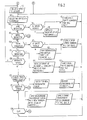
- FIG. 2 A detailed flowchart of the sprite control program according to the invention is provided in Figure 2.
- the creation of an animated display begins when the function is chosen from a menu selection.
- the selection of the function causes the menu to be removed from the display 10 and the user is prompted to select the sprite to animate at 100.
- the user selects the operation to perform at function block 105.
- the selection of the operation is facilitated by moving the cursor through a menu of operations and selecting an operation by pressing a button on the mouse 40.
- different logic is then entered as indicated by the sequence of decision blocks 110, 115, 120, 125, 130, 135, 140, and 150.
- the sprite is to be rendered invisible.
- a test is first made in decision block 111 to determine if the sprite is currently visible. Assuming that it is, the sprite will be lifted off the display by replacing the background at the current x,y position of the sprite, as indicated in function block 112. Once that is done, or if the sprite was not visible, a HIDE sprite command is saved for the sprite in function block 113 before the logic loops back to function block 105.
- the flow of control passes to label 300 of Figure 3.
- the MOVE operation is discussed in more detail below with reference to that figure.
- decision block 120 If the selected operation is the SHOW operation as detected at decision block 120, a test is made in decision block 121 to determine if the sprite is visible. Assuming that it is not, the background is saved at the x,y coordinates of the sprite and the sprite is displayed at that location, as indicated in function block 122. When that is accomplished, or if the sprite is already visible, a SHOW sprite command is saved for the sprite in function block 123 before the logic loops back to function block 105.
- the selected operation is the PLACE operation as detected at decision block 125
- a the sprite is displayed at the current x,y location of the cursor, and the sprite image is saved as new background, as indicated in function block 126. This leaves a permanent copy of the sprite at the location.
- a PLACE sprite command is saved for this sprite before control returns to function block 105 to select the next operation.
- decision block 130 as test is made to determine if the user wishes to select a different sprite. This may be in response to a prompt asking for an input by the user. If the user indicates that he or she desires to select a different sprite, control returns to function block 100 to allow that selection. Otherwise, control proceeds to decision block 135 where the user may select the operation of changing the transparent color of the sprite.
- the system querys the user for the desired new transparent color in function block 136.
- the background of the current x,y location of the sprite is replaced in function block 137.
- the background is then saved and the sprite is displayed with the new transparent background color at the current x,y location in function block 138.
- a CHANGE TRANSPARENT COLOR command is saved for the sprite in function block 139 before control loops back to function block 105.
- control is passed to label 600 of Figure 5.
- the REDEFINE operation will be described in more detail below with reference to that figure.
- the option to QUIT the main program is provided the user in decision block 150. If the user chooses not to quit at this time, control loops back to function block 105 where the user is again prompted to select another operation. However, if the decision is to quit, then control is passed to label 715 of Figure 6 to invoke the playback and edit functions of the program.
- a test is first made in decision block 310 to determine if the sprite to be moved is visible. If it is not, it is first necessary to save the background and display the sprite at the current x,y location of the cursor, as indicated in function block 320. Once the sprite is made visible, or if it is already visible, the new x,y location is obtained in function block 340. This is followed by a test in decision block 350 to determine if the user wishes to quit the request. This might be detected by the user pressing the Escape key or other designated function key, for example.
- control returns to the sprite control program at function block 105. Assuming, however, that no quit request is detected in decision block 350, then a test is made in decision block to determine if the user desires to start a save path sequence. Again, this would be by prompting the user to input his or her request. If a save path sequence is requested, control passes to label 400 in Figure 4. This procedure will be described in more detail below with reference to that figure.
- a test is made in decision block 370 to determine if the x,y location of the sprite has changed. If not, control loops back to function block 340 to obtain the new x,y location. Assuming that the x,y location did change, then the background is replaced at the old x,y location in function block 380, and at the new x,y location, the background is saved and the sprite is displayed, as indicated in function block 390, before control loops back to function block 340.
- the SAVE PATH SEQUENCE commences at label 400 in Figure 4.
- the new x,y location and the button press on the mouse are obtained in function block 410.
- a test is made in decision block 420 to determine if a quit request has been made by the user. Again, this would be detected by the user pressing the appropriate key. If a quit request is detected, any path list data is discarded in function block 425 before control reverts to decision block 370 in Figure 3. Otherwise, a test is made in decision block 430 to determine if the user has made a SAVE or DONE PATH REQUEST. This is detected by the user pressing a designated function key on the keyboard. If such a request has been made, the path list is saved as a sprite command in function block 435 before control reverts to decision block 370 in Figure 3.
- the background is replaced at the old x,y location in function block 440, and in function block 450, the background is saved and the sprite is displayed at the new x,y location. Finally, the new x,y location of the sprite is recorded in the path list in function block 460 before the process loops back to function block 410.
- Sprite redefinition permits new images to be used for a sprite when the current image is no longer desired.
- the images may be accessed from the current display screen (created in the graphics artwork package) or from a file generated by the art package.
- the command created for defining a sprite from the screen will take whatever is on the screen in the specified position when the command is executed, while the define from file will access a specified position from the image file indicated.
- the file method permits a library of sprite images to be easily generated, used and distributed.
- the screen method permits the image to change depending on actions outside the animation editor, such as user actions in the presentation system.
- the file definition or the screen definition are obtained in function block 610.
- a test is then made in decision block 620 to determine which type of definition was obtained. If a file definition, the current screen image is saved in function block 625, and a file name for the source picture is obtained in function block 630. Then, in function block 635, the file is loaded and displayed. Next, the area to be used for the sprite image is obtained in function block 640, and a DEFINE sprite command from the file is saved for this sprite in function block 645. Finally, the saved screen is restored in function block 650 before control reverts back to function block 105 of Figure 2.
- test in decision block 620 determines that the information obtained is a screen definition
- the area of the screen to be used for the new sprite image is obtained in function block 670.
- a DEFINE sprite command from the screen is saved for this sprite in function block 675, and control reverts to function block 105 of Figure 2.
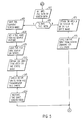
- the playback and edit program is shown in the flowchart of Figure 6.
- This program may be entered from the sprite control program shown in Figure 2 to view and edit the sprite path definition generated by the user, or it may be started independently of the sprite control program. If started independently, the first thing that happens is that the operations menu is displayed in function block 710. This menu is not displayed if the playback and edit program is entered from the main program shown in Figure 2 at label 715.
- the master program menu contains the following selections :
- the selected operation is obtained in function block 720, and then a test is made in decision block 730 to determine if other graphics operations are to be performed. If so, the process is exited to another screen graphics package, not part of this invention.
- This screen graphics package could be any one of a number of commercially available graphics utilities such as, for example, the IBM Storyboard Plus for the IBM Personal System/2 (PS/2) computers.
- PS/2 IBM Personal System/2
- decision blocks 740, 750, 760, 770, 780, 790, and 800 which present the user with several options which may be selected. If the option to step through the sprite command list is selected as detected by decision block 740, then for each command, the system prompts the user for a choice in function block 742. The user is given the option to quit in decision block 744 before the EXECUTE command is called in function block 746.
- the EXECUTE command function is described in more detail below with reference to Figure 7. After that routine is performed, the process loops back to function block 742. Should the user elect to QUIT, the process loops back to function block 720.
- command number to be deleted is obtained in function block 772, and the command is deleted from the command list in function block 774. Control then reverts to function block 720.
- control reverts back to function block 720. However, if the user elects to quit, the program stops at this point.
- the command executer is a function that accepts a command as input and performs the operations on the sprite specified. It is modular and independent from the editor, so that it may be included in various presentation system implementations in the most efficient manner.
- the EXECUTE command function supports the following commands:
- the EXECUTE command function flowchart is shown in Figure 7. This function is called by function blocks 746 and 752 of Figure 6.
- the first step of the process is to determine in decision block 900 whether the command is a HIDE command. If it is, a test is made in decision block 902 to determine if the sprite is visible. If it is, the background is replaced at the current x,y location in function block 904 before the process returns to the playback and edit program of Figure 6. If the sprite is not visible, a return to the playback and edit program is made directly.
- a test is made in decision block 920 to determine if the command is a PLACE command. If it is, the sprite is displayed at the supplied x,y location and the sprite image is saved as new background in function block 922. A return is then made to the playback and edit program.
- a test is made in decision block 930 to determine if the command is a DEFINE from FILE command. If it is, a file is opened under the name supplied as the source for the sprite image in function block 932. The sprite image is loaded from the file in function block 934, and then a return is made to the playback and edit program.
- a test is made in decision block 940 to determine if the command is a DEFINE from SCREEN command. If it is, all sprites are hidden in function block 942. Then, the screen area specified as the new sprite image is defined in function block 944, and in function block 946, the previously visible sprites are displayed before a return is made to the playback and edit program.
- decision block 947 if the command is a CHANGE TRANSPARENT COLOR command, the next test in decision block 960 is to determine if the sprite is visible. Assuming that it is, the background of the current x,y location is saved in function block 962, and in function block 964, the sprite is displayed at the current x,y location with the new transparent color. Once this procedure is complete, or if the sprite is not visible, the new transparent color for this sprite is saved in function block 966 before a return is made to the playback and edit program.
- the flowcharts of Figures 2 to 7 provide a complete description of the logic of the program according to the invention.
- a programmer of ordinary skill in the art can easily write code in any desired programming language, such as BASIC, Pascal or C, from these flowcharts, and the invention is not limited to source code written in any particular language.
- the data required to implement the sprites consists of data specific to each sprite, and that shared by the sprites. Shared data is limited to an optional speed modifier that effects the speed of movement. This enhances the animation by permitting greater control of motion.
- Sprite specific data includes :
- a preferred environment for the invention is the IBM Learning System/1 Authoring and Presentation Systems.
- This commercially available software allows an author to create, using the authoring system, a series of screens, like pages in a book, that will be used to teach students. Each screen is created with attribute information such as color, length of display time, user prompts, inputs and branch information.
- the presentation part of the system is then used to present a coordinated display of a sequence of screens, depending on student input, without the overhead of the authoring system.
- the subject invention is an enhancement which can be used to manage graphics animations in the IBM Learning System/1. Those skilled in the art will recognize that the invention can be readily used in other environments with equal advantage.
Landscapes
- Engineering & Computer Science (AREA)
- Physics & Mathematics (AREA)
- Theoretical Computer Science (AREA)
- General Engineering & Computer Science (AREA)
- General Physics & Mathematics (AREA)
- Human Computer Interaction (AREA)
- Geometry (AREA)
- Computer Graphics (AREA)
- Processing Or Creating Images (AREA)
Applications Claiming Priority (2)
| Application Number | Priority Date | Filing Date | Title |
|---|---|---|---|
| US07/098,653 US4841291A (en) | 1987-09-21 | 1987-09-21 | Interactive animation of graphics objects |
| US98653 | 1987-09-21 |
Publications (3)
| Publication Number | Publication Date |
|---|---|
| EP0309373A2 true EP0309373A2 (fr) | 1989-03-29 |
| EP0309373A3 EP0309373A3 (fr) | 1991-10-16 |
| EP0309373B1 EP0309373B1 (fr) | 1998-06-03 |
Family
ID=22270325
Family Applications (1)
| Application Number | Title | Priority Date | Filing Date |
|---|---|---|---|
| EP88480023A Expired - Lifetime EP0309373B1 (fr) | 1987-09-21 | 1988-08-30 | Animation interactive d'objets graphiques |
Country Status (5)
| Country | Link |
|---|---|
| US (1) | US4841291A (fr) |
| EP (1) | EP0309373B1 (fr) |
| JP (1) | JPH0750513B2 (fr) |
| BR (1) | BR8804862A (fr) |
| DE (1) | DE3856198T2 (fr) |
Cited By (10)
| Publication number | Priority date | Publication date | Assignee | Title |
|---|---|---|---|---|
| EP0590961A3 (fr) * | 1992-09-30 | 1994-12-21 | Hudson Soft Co Ltd | Appareil de traitement d'image. |
| EP0589658A3 (fr) * | 1992-09-21 | 1995-01-11 | Matsushita Electric Industrial Co Ltd | Incrustation de données graphiques avec mémorisation des paramètres graphiques. |
| WO1996025723A1 (fr) * | 1994-09-07 | 1996-08-22 | Intel Corporation | Architecture d'ordinateur pour la creation et la manipulation d'objets visualisables |
| US5646866A (en) | 1995-02-15 | 1997-07-08 | Intel Corporation | Preloading files for subsequent processing |
| EP0680776A4 (fr) * | 1992-11-20 | 1998-10-07 | Sega Enterprises Kk | Procede de commande d'un affichage. |
| EP0640906A3 (fr) * | 1993-08-25 | 1998-12-16 | Canon Kabushiki Kaisha | Appareil d'affichage |
| EP0892339A1 (fr) * | 1997-07-18 | 1999-01-20 | International Business Machines Corporation | Procédé et système pour déterminer la trajectoire du mouvement d'un objet multimédia |
| US6091427A (en) * | 1997-07-18 | 2000-07-18 | International Business Machines Corp. | Method and system for a true-scale motion path editor using time segments, duration and synchronization |
| US6111590A (en) * | 1997-07-18 | 2000-08-29 | International Business Machines Corp. | Method and system for a true scale motion path editor to create motion paths as independent entities |
| EP0756226A3 (fr) * | 1995-07-28 | 2004-04-07 | Ncr International Inc. | Dispositif de libre-service et méthode |
Families Citing this family (70)
| Publication number | Priority date | Publication date | Assignee | Title |
|---|---|---|---|---|
| US4984152A (en) * | 1987-10-06 | 1991-01-08 | Bell Communications Research, Inc. | System for controlling computer processing utilizing a multifunctional cursor with decoupling of pointer and image functionalities in space and time |
| JP2693777B2 (ja) | 1988-03-23 | 1997-12-24 | 株式会社日立製作所 | 対話画面定義方法およびその装置 |
| KR920006328B1 (ko) * | 1988-03-25 | 1992-08-03 | 미쯔비시덴끼 가부시끼가이샤 | 표시 및 묘화 제어 시스템 |
| US5016876A (en) * | 1988-10-14 | 1991-05-21 | Williams Electronics Games, Inc. | Video display co-processor for use in a video game |
| US5155588A (en) * | 1990-02-06 | 1992-10-13 | Levien Raphael L | Color correction and apparatus for photographic reproduction |
| JPH04121923A (ja) * | 1990-09-12 | 1992-04-22 | Sony Corp | 電子機器のスイッチ構造 |
| US5261820A (en) * | 1990-12-21 | 1993-11-16 | Dynamix, Inc. | Computer simulation playback method and simulation |
| US5533181A (en) * | 1990-12-24 | 1996-07-02 | Loral Corporation | Image animation for visual training in a simulator |
| US5214414A (en) * | 1991-04-12 | 1993-05-25 | International Business Machines Corp. | Cursor for lcd displays |
| US5544295A (en) * | 1992-05-27 | 1996-08-06 | Apple Computer, Inc. | Method and apparatus for indicating a change in status of an object and its disposition using animation |
| JP3223580B2 (ja) * | 1992-05-29 | 2001-10-29 | ソニー株式会社 | 画像作成装置 |
| US5465384A (en) * | 1992-11-25 | 1995-11-07 | Actifilm, Inc. | Automatic polling and display interactive entertainment system |
| US5450540A (en) * | 1992-12-16 | 1995-09-12 | Apple Computer, Inc. | Graphical interface for interacting constrained actors |
| US5523791A (en) * | 1993-10-12 | 1996-06-04 | Berman; John L. | Method and apparatus for applying overlay images |
| US5586243A (en) * | 1994-04-15 | 1996-12-17 | International Business Machines Corporation | Multiple display pointers for computer graphical user interfaces |
| JPH0822556A (ja) * | 1994-07-08 | 1996-01-23 | Ricoh Co Ltd | テクスチャマッピング装置 |
| US5680534A (en) * | 1994-10-31 | 1997-10-21 | Nintendo Co., Ltd. | Video game/videographics program fabricating system and method with superimpose control |
| US5592609A (en) * | 1994-10-31 | 1997-01-07 | Nintendo Co., Ltd. | Video game/videographics program fabricating system and method with unit based program processing |
| US5599231A (en) * | 1994-10-31 | 1997-02-04 | Nintendo Co., Ltd. | Security systems and methods for a videographics and authentication game/program fabricating device |
| US5680533A (en) * | 1994-10-31 | 1997-10-21 | Nintendo Co., Ltd. | Videographics program/video game fabricating system and method |
| US6115036A (en) * | 1994-10-31 | 2000-09-05 | Nintendo Co., Ltd. | Video game/videographics program editing apparatus with program halt and data transfer features |
| US6010405A (en) * | 1994-12-30 | 2000-01-04 | Sega Enterprises, Ltd. | Videogame system for creating simulated comic book game |
| TW266277B (en) * | 1994-12-31 | 1995-12-21 | Sega Of America Inc | Videogame system and methods for enhanced processing and display of graphical character elements |
| US5603658A (en) * | 1995-06-27 | 1997-02-18 | Cohen; Justin R. | Computer play toy for infants and very young children |
| US5556339A (en) * | 1995-06-27 | 1996-09-17 | Cohen; Justin R. | Computer picture toy for infants and very young children |
| US6164971A (en) * | 1995-07-28 | 2000-12-26 | Figart; Grayden T. | Historical event reenactment computer systems and methods permitting interactive role players to modify the history outcome |
| US5995102A (en) * | 1997-06-25 | 1999-11-30 | Comet Systems, Inc. | Server system and method for modifying a cursor image |
| US7111254B1 (en) | 1997-06-25 | 2006-09-19 | Comet Systems, Inc. | System for replacing a cursor image in connection with displaying the contents of a web page |
| JPH11338448A (ja) * | 1998-04-27 | 1999-12-10 | Samsung Electronics Co Ltd | オンスクリ―ンディスプレイ画面の出力方法および出力装置 |
| US6720979B1 (en) | 1999-07-15 | 2004-04-13 | International Business Machines Corporation | Dynamic manipulation of animated graphics in a web browser |
| US6290565B1 (en) * | 1999-07-21 | 2001-09-18 | Nearlife, Inc. | Interactive game apparatus with game play controlled by user-modifiable toy |
| US6993245B1 (en) | 1999-11-18 | 2006-01-31 | Vulcan Patents Llc | Iterative, maximally probable, batch-mode commercial detection for audiovisual content |
| US8910199B2 (en) * | 2000-02-25 | 2014-12-09 | Interval Licensing Llc | Targeted television content display |
| US6574793B1 (en) * | 2000-02-25 | 2003-06-03 | Interval Research Corporation | System and method for displaying advertisements |
| AU2001249994A1 (en) * | 2000-02-25 | 2001-09-03 | Interval Research Corporation | Method and system for selecting advertisements |
| US7661116B2 (en) * | 2000-02-25 | 2010-02-09 | Vulcan Patents Llc | Auction for targeted content |
| JP4619608B2 (ja) * | 2000-03-08 | 2011-01-26 | ギブン イメージング リミテッド | インビボ撮像のための装置およびシステム |
| KR20000054150A (ko) * | 2000-05-24 | 2000-09-05 | 전연택 | 3차원 가상공간에서 애니메이션을 구현하는 시스템 |
| CA2310945C (fr) | 2000-06-05 | 2009-02-03 | Corel Corporation | Systeme et methode permettant d'agrandir et de modifier des images |
| IL151048A0 (en) * | 2000-12-07 | 2003-04-10 | Given Imaging Ltd | Method and system for use of a pointing device with moving images |
| KR20020054243A (ko) * | 2000-12-27 | 2002-07-06 | 오길록 | 다중 영상을 이용한 대화형 모델 생성 장치 및 그 방법 |
| US9113846B2 (en) | 2001-07-26 | 2015-08-25 | Given Imaging Ltd. | In-vivo imaging device providing data compression |
| US9149175B2 (en) | 2001-07-26 | 2015-10-06 | Given Imaging Ltd. | Apparatus and method for light control in an in-vivo imaging device |
| US20060184039A1 (en) * | 2001-07-26 | 2006-08-17 | Dov Avni | Apparatus and method for light control in an in-vivo imaging device |
| JP3939189B2 (ja) * | 2002-04-17 | 2007-07-04 | パナソニック コミュニケーションズ株式会社 | 情報処理装置、製品の組立工程表示用プログラム、及び製品の組立工程表示方法 |
| US20040204127A1 (en) * | 2002-06-24 | 2004-10-14 | Forlines Clifton L. | Method for rendering with composited images on cellular telephones |
| US7179171B2 (en) * | 2002-06-24 | 2007-02-20 | Mitsubishi Electric Research Laboratories, Inc. | Fish breeding toy for cellular telephones |
| JP4507790B2 (ja) * | 2003-12-24 | 2010-07-21 | セイコーエプソン株式会社 | レイアウト要素の配置装置、配置プログラム、及び電子機器 |
| US20050174337A1 (en) * | 2004-02-11 | 2005-08-11 | Nielsen Paul S. | Electronic handheld drawing and gaming system using television monitor |
| US20050195195A1 (en) * | 2004-03-04 | 2005-09-08 | International Business Machines Corporation | System, apparatus and method of creating control paths for animated objects |
| US20050231512A1 (en) | 2004-04-16 | 2005-10-20 | Niles Gregory E | Animation of an object using behaviors |
| US7932909B2 (en) * | 2004-04-16 | 2011-04-26 | Apple Inc. | User interface for controlling three-dimensional animation of an object |
| US7605852B2 (en) | 2004-05-17 | 2009-10-20 | Micron Technology, Inc. | Real-time exposure control for automatic light control |
| AU2006201734A1 (en) | 2005-04-27 | 2006-11-16 | Aruze Corp. | Gaming machine |
| IL176231A (en) * | 2005-06-14 | 2010-12-30 | Given Imaging Ltd | Modulator and method for producing a modulated signal |
| IL177045A (en) | 2005-07-25 | 2012-12-31 | Daniel Gat | Device, system and method for receiving, recording and displaying in-body information with user-entered information |
| US20070146392A1 (en) * | 2005-12-28 | 2007-06-28 | Xcpt, Inc. | System and method for magnifying and editing objects |
| US8700469B2 (en) * | 2006-03-06 | 2014-04-15 | Apple Inc. | System and method for delivering advertising with enhanced effectiveness |
| US8176467B2 (en) * | 2006-07-25 | 2012-05-08 | Harris Corporation | Computer program generation system and method thereof |
| US8922585B2 (en) * | 2006-10-24 | 2014-12-30 | Hewlett-Packard Development Company, L.P. | Display controller |
| US7962899B2 (en) | 2006-12-01 | 2011-06-14 | Harris Corporation | System for monitoring a target application and method thereof |
| US20080161647A1 (en) * | 2006-12-27 | 2008-07-03 | Amit Pascal | Device and method for multiple illumination fields of an in-vivo imaging device |
| US20080172669A1 (en) * | 2007-01-12 | 2008-07-17 | Carefx Corporation | System capable of executing workflows on target applications and method thereof |
| US20080309618A1 (en) * | 2007-06-12 | 2008-12-18 | Kazuyuki Okada | Methods and systems for controlling an input device, for generating collision data, and for controlling a camera angle |
| US20090315897A1 (en) * | 2008-06-24 | 2009-12-24 | Microsoft Corporation | Animation platform |
| US20090315896A1 (en) * | 2008-06-24 | 2009-12-24 | Microsoft Corporation | Animation platform |
| US20100315335A1 (en) * | 2009-06-16 | 2010-12-16 | Microsoft Corporation | Pointing Device with Independently Movable Portions |
| US9703398B2 (en) * | 2009-06-16 | 2017-07-11 | Microsoft Technology Licensing, Llc | Pointing device using proximity sensing |
| WO2017175135A1 (fr) * | 2016-04-04 | 2017-10-12 | Unima Logiciel Inc. | Procédé et système pour créer une séquence utilisée pour communiquer des informations associées à une application |
| CN110908638A (zh) * | 2019-10-31 | 2020-03-24 | 维沃移动通信有限公司 | 一种操作流创建方法及电子设备 |
Family Cites Families (10)
| Publication number | Priority date | Publication date | Assignee | Title |
|---|---|---|---|---|
| US4116444A (en) * | 1976-07-16 | 1978-09-26 | Atari, Inc. | Method for generating a plurality of moving objects on a video display screen |
| US4435778C1 (en) * | 1981-05-18 | 2002-09-03 | Ibm | Method for editing spatially related data in an interactive text processing system |
| US4471348A (en) * | 1982-01-15 | 1984-09-11 | The Boeing Company | Method and apparatus for simultaneously displaying data indicative of activity levels at multiple digital test points in pseudo real time and historical digital format, and display produced thereby |
| US4600919A (en) * | 1982-08-03 | 1986-07-15 | New York Institute Of Technology | Three dimensional animation |
| US4588987A (en) * | 1983-09-13 | 1986-05-13 | International Business Machines Corp. | Display system for monitoring and alarm system |
| FR2569020B1 (fr) * | 1984-08-10 | 1986-12-05 | Radiotechnique Compelec | Procede pour creer et modifier une image synthetique |
| US4661810A (en) * | 1985-02-19 | 1987-04-28 | International Business Machines Corporation | Method for interactive rotation of displayed graphic objects |
| US4686522A (en) * | 1985-02-19 | 1987-08-11 | International Business Machines Corporation | Method of editing graphic objects in an interactive draw graphic system using implicit editing actions |
| JPH0691916B2 (ja) * | 1985-07-30 | 1994-11-16 | カシオ計算機株式会社 | アニメ−シヨン制御装置 |
| US4764763A (en) * | 1985-12-13 | 1988-08-16 | The Ohio Art Company | Electronic sketching device |
-
1987
- 1987-09-21 US US07/098,653 patent/US4841291A/en not_active Expired - Lifetime
-
1988
- 1988-08-30 EP EP88480023A patent/EP0309373B1/fr not_active Expired - Lifetime
- 1988-08-30 DE DE3856198T patent/DE3856198T2/de not_active Expired - Fee Related
- 1988-09-20 JP JP63233856A patent/JPH0750513B2/ja not_active Expired - Lifetime
- 1988-09-20 BR BR8804862A patent/BR8804862A/pt not_active IP Right Cessation
Non-Patent Citations (4)
| Title |
|---|
| Barrington, US; R.G. SHOUP: "Superpaint: the digital animator" * |
| DATAMOTION, vol. 25, no. 5, May 1979, pages 150-156, Technical Publishing Co., Barrington, US; R.G. SHOUP: "Superpaint: the digital animator" * |
| IEEE COMPUTER GRAPHICS AND APPLICATIONS, vol. 7, no. 4, April 1987, pages 11-22, IEEE Society Press, New York, US; J. WILHELMS: "Toward automatic motion control" * |
| PROCEEDINGS OF IFIP CONGRESS ON INFORMATION PROCESSING, Stockholm, 5th - 10th August 1974, pages 712-716, North-Holland Publishing Co., Amsterdam, NL; R.P. FUTRELLE: "Galatea: Interactive graphics for the analysis of moving images" * |
Cited By (14)
| Publication number | Priority date | Publication date | Assignee | Title |
|---|---|---|---|---|
| EP0589658A3 (fr) * | 1992-09-21 | 1995-01-11 | Matsushita Electric Industrial Co Ltd | Incrustation de données graphiques avec mémorisation des paramètres graphiques. |
| US5463729A (en) * | 1992-09-21 | 1995-10-31 | Matsushita Electric Industrial Co., Ltd. | Image generation device |
| EP0590961A3 (fr) * | 1992-09-30 | 1994-12-21 | Hudson Soft Co Ltd | Appareil de traitement d'image. |
| EP0680776A4 (fr) * | 1992-11-20 | 1998-10-07 | Sega Enterprises Kk | Procede de commande d'un affichage. |
| EP0640906A3 (fr) * | 1993-08-25 | 1998-12-16 | Canon Kabushiki Kaisha | Appareil d'affichage |
| WO1996025723A1 (fr) * | 1994-09-07 | 1996-08-22 | Intel Corporation | Architecture d'ordinateur pour la creation et la manipulation d'objets visualisables |
| US5650941A (en) * | 1994-09-07 | 1997-07-22 | Intel Corporation | Computer architecture for creating and manipulating displayable objects |
| US5748196A (en) * | 1995-02-15 | 1998-05-05 | Intel Corporation | Implementing branching operations at processing intersections in interactive applications |
| US5646866A (en) | 1995-02-15 | 1997-07-08 | Intel Corporation | Preloading files for subsequent processing |
| EP0756226A3 (fr) * | 1995-07-28 | 2004-04-07 | Ncr International Inc. | Dispositif de libre-service et méthode |
| EP0892339A1 (fr) * | 1997-07-18 | 1999-01-20 | International Business Machines Corporation | Procédé et système pour déterminer la trajectoire du mouvement d'un objet multimédia |
| US6091427A (en) * | 1997-07-18 | 2000-07-18 | International Business Machines Corp. | Method and system for a true-scale motion path editor using time segments, duration and synchronization |
| US6108010A (en) * | 1997-07-18 | 2000-08-22 | International Business Machines Corp. | Method and system for a true-scale motion path editor |
| US6111590A (en) * | 1997-07-18 | 2000-08-29 | International Business Machines Corp. | Method and system for a true scale motion path editor to create motion paths as independent entities |
Also Published As
| Publication number | Publication date |
|---|---|
| US4841291A (en) | 1989-06-20 |
| EP0309373A3 (fr) | 1991-10-16 |
| DE3856198D1 (de) | 1998-07-09 |
| EP0309373B1 (fr) | 1998-06-03 |
| JPH01236377A (ja) | 1989-09-21 |
| JPH0750513B2 (ja) | 1995-05-31 |
| BR8804862A (pt) | 1989-04-25 |
| DE3856198T2 (de) | 1999-02-18 |
Similar Documents
| Publication | Publication Date | Title |
|---|---|---|
| US4841291A (en) | Interactive animation of graphics objects | |
| US5883639A (en) | Visual software engineering system and method for developing visual prototypes and for connecting user code to them | |
| EP0793824B1 (fr) | Interface graphique definissable par l'utilisateur servant a acceder a des informations dans un systeme de fichiers electronique | |
| US5892507A (en) | Computer system for authoring a multimedia composition using a visual representation of the multimedia composition | |
| US5339393A (en) | Graphical user interface for displaying available source material for editing | |
| US5982350A (en) | Compositer interface for arranging the components of special effects for a motion picture production | |
| US7468728B2 (en) | Apparatus for controlling a virtual environment | |
| WO1995014268A1 (fr) | Procede et appareil d'affichage de personnages animes tridimensionnels sur l'ecran de controle d'un ordinateur | |
| EP0403118B1 (fr) | Compilation audio-visuelle dans un système de traitement de données | |
| JPH04258090A (ja) | 映像同期処理方法および装置 | |
| TWI847342B (zh) | 用於在編輯環境中呈現具有多媒體元素之媒體內容之方法及系統 | |
| US20020008704A1 (en) | Interactive behavioral authoring of deterministic animation | |
| KR20000039294A (ko) | 게임제작 도구에서 게임 이벤트 편집방법 | |
| Gross | Director 8 and Lingo authorized | |
| JP2713147B2 (ja) | マルチメディアプレゼンテーション編集方法 | |
| Rosenzweig | Special Edition Using Director 8.5 | |
| KR102313993B1 (ko) | 모션 시뮬레이터를 위한 시뮬레이터 프로그램 제작 장치 및 방법 | |
| Miller | Instant Prototyping Using HyperCard® on the Macintosh® | |
| Murdock | Kelly L. Murdock's Autodesk 3ds Max 2019 Complete Reference Guide | |
| Underdahl et al. | Macromedia Director MX 2004 Bible | |
| JPH1049703A (ja) | アニメ−ションプログラム作成装置および作成方法 | |
| Persidsky | Director 8 for Macintosh and Windows | |
| Maytom et al. | The world of the Vikings: An interactive video project | |
| JPH09120466A (ja) | 対話型アニメーション作成・再生方法および装置 | |
| Hsu | Programming Surveys for the MIT Information Acceleration Project |
Legal Events
| Date | Code | Title | Description |
|---|---|---|---|
| PUAI | Public reference made under article 153(3) epc to a published international application that has entered the european phase |
Free format text: ORIGINAL CODE: 0009012 |
|
| AK | Designated contracting states |
Kind code of ref document: A2 Designated state(s): DE FR GB IT |
|
| 17P | Request for examination filed |
Effective date: 19890720 |
|
| PUAL | Search report despatched |
Free format text: ORIGINAL CODE: 0009013 |
|
| AK | Designated contracting states |
Kind code of ref document: A3 Designated state(s): DE FR GB IT |
|
| 17Q | First examination report despatched |
Effective date: 19940519 |
|
| APCB | Communication from the board of appeal sent |
Free format text: ORIGINAL CODE: EPIDOS OBAPE |
|
| APCB | Communication from the board of appeal sent |
Free format text: ORIGINAL CODE: EPIDOS OBAPE |
|
| APAB | Appeal dossier modified |
Free format text: ORIGINAL CODE: EPIDOS NOAPE |
|
| GRAG | Despatch of communication of intention to grant |
Free format text: ORIGINAL CODE: EPIDOS AGRA |
|
| GRAG | Despatch of communication of intention to grant |
Free format text: ORIGINAL CODE: EPIDOS AGRA |
|
| GRAH | Despatch of communication of intention to grant a patent |
Free format text: ORIGINAL CODE: EPIDOS IGRA |
|
| GRAH | Despatch of communication of intention to grant a patent |
Free format text: ORIGINAL CODE: EPIDOS IGRA |
|
| GRAA | (expected) grant |
Free format text: ORIGINAL CODE: 0009210 |
|
| AK | Designated contracting states |
Kind code of ref document: B1 Designated state(s): DE FR GB IT |
|
| REF | Corresponds to: |
Ref document number: 3856198 Country of ref document: DE Date of ref document: 19980709 |
|
| ITF | It: translation for a ep patent filed | ||
| ET | Fr: translation filed | ||
| PLBE | No opposition filed within time limit |
Free format text: ORIGINAL CODE: 0009261 |
|
| STAA | Information on the status of an ep patent application or granted ep patent |
Free format text: STATUS: NO OPPOSITION FILED WITHIN TIME LIMIT |
|
| 26N | No opposition filed | ||
| PGFP | Annual fee paid to national office [announced via postgrant information from national office to epo] |
Ref country code: FR Payment date: 19990817 Year of fee payment: 12 |
|
| PG25 | Lapsed in a contracting state [announced via postgrant information from national office to epo] |
Ref country code: FR Free format text: LAPSE BECAUSE OF NON-PAYMENT OF DUE FEES Effective date: 20010430 |
|
| REG | Reference to a national code |
Ref country code: FR Ref legal event code: ST |
|
| PGFP | Annual fee paid to national office [announced via postgrant information from national office to epo] |
Ref country code: GB Payment date: 20010801 Year of fee payment: 14 |
|
| PGFP | Annual fee paid to national office [announced via postgrant information from national office to epo] |
Ref country code: DE Payment date: 20010821 Year of fee payment: 14 |
|
| REG | Reference to a national code |
Ref country code: GB Ref legal event code: IF02 |
|
| PG25 | Lapsed in a contracting state [announced via postgrant information from national office to epo] |
Ref country code: GB Free format text: LAPSE BECAUSE OF NON-PAYMENT OF DUE FEES Effective date: 20020830 |
|
| PG25 | Lapsed in a contracting state [announced via postgrant information from national office to epo] |
Ref country code: DE Free format text: LAPSE BECAUSE OF NON-PAYMENT OF DUE FEES Effective date: 20030301 |
|
| GBPC | Gb: european patent ceased through non-payment of renewal fee |
Effective date: 20020830 |
|
| PG25 | Lapsed in a contracting state [announced via postgrant information from national office to epo] |
Ref country code: IT Free format text: LAPSE BECAUSE OF NON-PAYMENT OF DUE FEES;WARNING: LAPSES OF ITALIAN PATENTS WITH EFFECTIVE DATE BEFORE 2007 MAY HAVE OCCURRED AT ANY TIME BEFORE 2007. THE CORRECT EFFECTIVE DATE MAY BE DIFFERENT FROM THE ONE RECORDED. Effective date: 20050830 |
|
| APAH | Appeal reference modified |
Free format text: ORIGINAL CODE: EPIDOSCREFNO |