EP0541345A1 - Anzeige dynamischer Kontrollblöcke - Google Patents
Anzeige dynamischer Kontrollblöcke Download PDFInfo
- Publication number
- EP0541345A1 EP0541345A1 EP92310088A EP92310088A EP0541345A1 EP 0541345 A1 EP0541345 A1 EP 0541345A1 EP 92310088 A EP92310088 A EP 92310088A EP 92310088 A EP92310088 A EP 92310088A EP 0541345 A1 EP0541345 A1 EP 0541345A1
- Authority
- EP
- European Patent Office
- Prior art keywords
- dynamic data
- data structure
- type
- display
- data
- Prior art date
- Legal status (The legal status is an assumption and is not a legal conclusion. Google has not performed a legal analysis and makes no representation as to the accuracy of the status listed.)
- Withdrawn
Links
Images
Classifications
-
- G—PHYSICS
- G06—COMPUTING OR CALCULATING; COUNTING
- G06F—ELECTRIC DIGITAL DATA PROCESSING
- G06F16/00—Information retrieval; Database structures therefor; File system structures therefor
- G06F16/90—Details of database functions independent of the retrieved data types
- G06F16/93—Document management systems
- G06F16/94—Hypermedia
Definitions
- the present invention relates to interactive data processing systems and more particularly to a system for enabling users to select and display process and operating system control blocks.
- Interactive debugging techniques are known in the prior art, which techniques allow a user thereof to have information of interest displayed on the screen of a terminal device.
- One technique is described in IBM Technical Disclosure Bulletin , Vol. 32, No. 5A, October 1989, "Managing Full-Screen Display of an Interactive Debug Facility Using Asynchronous Resource Managers".
- hyperlinks There is a method for linking information together in interactive data processing systems known as hyperlinks.
- a typical way in which hyperlinks have been implemented involves predefining links between related pieces of information by the developer. Links are usually a single item of information such as an address pointer or file name. In this manner a plurality linked display panels or windows containing text (hypertext), graphics (hypergraphics), and multimedia data objects such as sound (hypermedia) are made available in a user friendly way.
- IBM Technical Disclosure Bulletin Vol. 33, No. 11, April 1991, Implementing Memory Efficient Hypertext in Online Manual Tool', describes an interactive system with hypertext linked display.
- the present invention provides in a first aspect a method for interactively displaying data from dynamic data structures, for use in an interactive data processing system including a processor device, a memory, a user input device and a display, comprising: providing a type-unique format routine for each unique type of dynamic data structure in the system; in response to user selection of a link including a pointer to a dynamic data structure and an indicator of the dynamic data structures type, accessing said dynamic data structure; formatting dynamic data structure data in accordance with the type-unique format routine for said dynamic data structure; and displaying formatted data to the user.
- It is a second aspect of the invention to provide a system for interactive display of information from dynamic data structures comprising; means for providing links between dynamic data structures of plural types, each of said links having a location pointer and an indicator of dynamic data structure type; means for formatting information for display according to a unique format routine for each dynamic data structure type; means for accessing a dynamic data structure in response to user selection of a dynamic data structure link; and means for displaying formatted data.
- each display line formatted there is means for correcting dynamic data structure data from binary stored form to a displayable form, means for storing the converted data, and means for correlating with the stored data a dynamic data structure type mask.
- the present invention has applicability in the field of debugging programs, providing links (termed HYPERBLOCK links) between related control blocks, so that users of a system including the invention may proceed directly from one, windowed display of data from a control block to another windowed display of data from a related control block without a required return to an index.
- the formatting information which is provided in association with each link enables the linked-to control block data to be displayed in a generally similar and meaningful way.
- Each type format routine may be designed to output two tables for subsequent use in processing user interaction as well as for creating commands for input to a display device.
- One such table termed the line table, contains line by line descriptions of actual information to appear on the display screen.
- the other table the mask table, details which field(s) by line are selectable and which format routine to call, that is those fields for which the two part HYPERBLOCK links have been defined.
- a method and system for facilitating interactive system debug or analysis through display of HYPERBLOCK linked control blocks executes as an IBM Presentation Manager application on an IBM Personal System/2 furnished with the IBM OS/2 2.0 operating system (IBM Presentation Manager, Personal System/2 and OS/2 are registered trademarks of IBM Corporation).
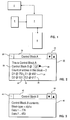
- FIG. 1 Such a system is shown schematically in Fig. 1.
- the system includes a keyboard display terminal 2 interconnected to processor 4 which is operatively coupled to user input device 6 and to memory 8.
- User input device 6 is preferably a mouse
- terminal 2 preferably includes a colour monitor
- memory 8 may be implemented as a combination of RAM and DASD storage.
- Dynamic data includes control block information of substantive interest while performing system debug or analysis. Dynamic data comprises actual. control block fields, particularly those containing references to related control blocks. It should be noted that control block information is also dynamic in that field contents are often time variant.
- FIG. 2 shows a window 20 containing sample data from a control block A, as displayed on the screen of display terminal 2 of Fig. 1.
- window 20 comprehends conventional functions and features such as title bar 22, scroll indicators 24 and system icon 26 the operation of which are well understood and form no part of the present invention.
- A, B, D and E are used to represent different control block types, each type being associated with a predefined format routine.
- Field 28 contains a reference to another control block of a different type, Control Block B.
- Fields 30, 32 in window 20 refer to two instances of a third control block type, D.
- Fields 34, 36 are instances of a fourth control block type, E.
- Fig. 3 shows a window 40 displayed on the screen of terminal 2 as a result of user selection of field 28.
- User selection is preferably indicated in the conventional manner of manipulating mouse 6 to position pointer character 38 on the field prior to clicking.
- the data content format differences between windows 20 and 40 are due to their containing data from two different control block types. While we have shown no references to related control blocks in window 40, it will be understood that we have done so only to maintain the simplicity of this description. Obviously, window 40 could contain references to many other control blocks of many still different types.
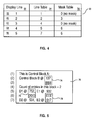
- FIG. 4 represents the tables output by the A format routine in preparing the display of window 20 from control block A data in memory 8.
- the data array shown in Fig. 5 represents the control block information formatted in accordance with our invention comprising control block A.
- Hyperblock_index_structure (current_line).
- Line_table current position in Hyperblock_data_structure, Move data into Hyperblock_data_structure (current_position).
- an array structure 50 is shown including column headings DISPLAY LINE #, LINE TABLE, and MASK TABLE, 52, 54 and 56, respectively.
- Rows 58, 60, 62, 64 and 66 contain data pertinent to five lines of substantive information shown in window 20.
- each row is simply the line number of the final display, but in column 54 the row entries refer to row numbers (1) through (7) set out in Fig. 5 adjacent data block 70.
- HYPERBLOCK link as above noted includes two parts, an address pointer and a type indicator. In this case, '137' is a sample address pointer; and BBB indicates that the B type format routine should be used to structure the information at the indicated location for display.
- HYPERBLOCK links are specified also at 76 and 78. Link 76 is one of two for display line 5, and link 78 is the second of two for display line 5. which has two HYPERBLOCK links specified.
- the Mask Table notice that the entries for rows 58 and 62 indicate a line of display information which has no HYPERBLOCK links. That is, the meaning of 0 is that no field in that line is selectable as a pointer to a related control block.
- the entry for row 60 is 3, meaning that the mask for the selectable field in that line (of the window 20 display) is found in row (3) of data block 70.
- Rows 64 and 66 of Fig. 4 each contain a non zero value, 6 in column 56, indicating that display lines 4 and 5 each have a HYPERBLOCK link. Since the mask value is the same, 6, row (6) in Fig. 5 contains the mask information to be used in each case.
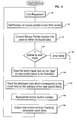
- Fig. 6 is a flow chart useful in understanding the operation of our invention. The process flow is described after a point in time when at least a first window containing data from a control block with at least a selectable field has been displayed to a user, e.g., after a window such as window 20 of Fig. 2 is displayed on the screen of display terminal 2.
- the HYPERBLOCK fields are displayed in a different colour.
- the user can then select to view the next control block information, by clicking in our example on field 28.
- the mouse pointer (38, Fig. 2) position is obtained from the system via messages. This position is reported in the form of x,y coordinates and are then converted into a row, column location which maps directly into the displayed data (Fig. 5).
- Fig. 5 the displayed data
- Those having skill in the art will appreciate that attaining the location of the mouse pointer represents conventional function, and forms no part of the present invention. If the position of the pointer is found at decision block 96 to not be located at a selectable field, an audible warning beep, or some other warning/error message to the user is issued at step 98.
- step 100 the type, (mask value) of the linked-to control block, BBB in our example, is obtained using the mask table information to access the control block at the appropriate entry point.
- the address, @ 137 in our example., of the linked-to control block is retrieved from the to be displayed data in the control block at step 102.
- the corresponding format routine is then invoked at step 104 for formatting the window (window 40, Fig. 3 in our example) containing data from the linked-to control block.
- the new window is then output at step 106.
- the new control block information is stored into tables as above described in connection with Figs. 4 and 5.
- the process has now completed one iteration and is ready for the user to select another HYPERBLOCK link for display.
Landscapes
- Engineering & Computer Science (AREA)
- Databases & Information Systems (AREA)
- Theoretical Computer Science (AREA)
- Business, Economics & Management (AREA)
- General Business, Economics & Management (AREA)
- Data Mining & Analysis (AREA)
- Physics & Mathematics (AREA)
- General Engineering & Computer Science (AREA)
- General Physics & Mathematics (AREA)
- Digital Computer Display Output (AREA)
- Debugging And Monitoring (AREA)
Applications Claiming Priority (2)
| Application Number | Priority Date | Filing Date | Title |
|---|---|---|---|
| US788623 | 1985-10-17 | ||
| US78862391A | 1991-11-04 | 1991-11-04 |
Publications (1)
| Publication Number | Publication Date |
|---|---|
| EP0541345A1 true EP0541345A1 (de) | 1993-05-12 |
Family
ID=25145050
Family Applications (1)
| Application Number | Title | Priority Date | Filing Date |
|---|---|---|---|
| EP92310088A Withdrawn EP0541345A1 (de) | 1991-11-04 | 1992-11-04 | Anzeige dynamischer Kontrollblöcke |
Country Status (2)
| Country | Link |
|---|---|
| EP (1) | EP0541345A1 (de) |
| JP (1) | JPH05224854A (de) |
Family Cites Families (3)
| Publication number | Priority date | Publication date | Assignee | Title |
|---|---|---|---|---|
| JPH02196325A (ja) * | 1989-01-26 | 1990-08-02 | Nec Corp | 端末画面入力制御方式 |
| JPH03129517A (ja) * | 1989-10-16 | 1991-06-03 | Toshiba Corp | 画面入出力動作定義方式 |
| JPH03208122A (ja) * | 1990-01-09 | 1991-09-11 | Sharp Corp | 画面項目属性設定方法 |
-
1992
- 1992-08-13 JP JP4216055A patent/JPH05224854A/ja active Pending
- 1992-11-04 EP EP92310088A patent/EP0541345A1/de not_active Withdrawn
Non-Patent Citations (2)
| Title |
|---|
| COMPUTER vol. 21, no. 1, January 1988, LONG BEACH US pages 81 - 96 NICOLE YANKELOVICH ET AL. 'Intermedia: The Concept and the Construction of a Seamless Information Environment' * |
| IBM TECHNICAL DISCLOSURE BULLETIN. vol. 33, no. 11, April 1991, NEW YORK US pages 259 - 263 'Implementing memory efficient hypertext in online manual tool' * |
Also Published As
| Publication number | Publication date |
|---|---|
| JPH05224854A (ja) | 1993-09-03 |
Similar Documents
| Publication | Publication Date | Title |
|---|---|---|
| US5396621A (en) | Sorting a table by rows or columns in response to interactive prompting with a dialog box graphical icon | |
| US4723211A (en) | Editing of a superblock data structure | |
| US4992972A (en) | Flexible context searchable on-line information system with help files and modules for on-line computer system documentation | |
| US4723209A (en) | Flow attribute for text objects | |
| JP3014284B2 (ja) | ダイアログ・ボックスの表示方法及びシステム | |
| US6769096B1 (en) | System and method for updating a table of contents in a frameset | |
| US5978818A (en) | Automated hypertext outline generation for documents | |
| US5990888A (en) | Method and system for manipulating graphical objects | |
| AU687578B2 (en) | Medical text structuring and selection system | |
| CA1313419C (en) | Valuator menu for use as a graphical user interface tool | |
| US5432942A (en) | Data structure extraction, conversion and display tool | |
| US8296654B2 (en) | Automatic guide for data analysis | |
| US4791556A (en) | Method for operating a computer which searches for operational symbols and executes functions corresponding to the operational symbols in response to user inputted signal | |
| US5430839A (en) | Data entry screen method | |
| US9875227B2 (en) | Manipulating of labelled data for data entry in management applications | |
| US6335738B1 (en) | Method and tool for generating and displaying a descriptive annotation of selected application data | |
| Nielsen | Traditional dialogue design applied to modern user interfaces | |
| US20020091728A1 (en) | Multidimensional electronic spreadsheet system and method | |
| EP0494575A2 (de) | Schneide- und Klebefilterung von unbegrenzten, dynamischen, unmodifizierbaren Datenströmen | |
| US5050105A (en) | Direct cursor-controlled access to multiple application programs and data | |
| JPH05224859A (ja) | グラフィカル・ユーザ・インターフェース | |
| EP0697667A1 (de) | Verfahren und Gerät zur Darstellung von Strukturen und Verbindungen einer relationellen Datenbank | |
| US20050022170A1 (en) | Visual debugging interface | |
| US6266806B1 (en) | Object oriented monitor displaying interactions among objects in square matrix with an object designated in first column and additional column(s) for interacting objects | |
| JP3712749B2 (ja) | 情報処理装置におけるウィンドウ表示処理方式 |
Legal Events
| Date | Code | Title | Description |
|---|---|---|---|
| PUAI | Public reference made under article 153(3) epc to a published international application that has entered the european phase |
Free format text: ORIGINAL CODE: 0009012 |
|
| AK | Designated contracting states |
Kind code of ref document: A1 Designated state(s): DE FR GB IT |
|
| 17P | Request for examination filed |
Effective date: 19930918 |
|
| 18W | Application withdrawn |
Withdrawal date: 19960927 |