EP0816105A2 - Etikettendrucker - Google Patents
Etikettendrucker Download PDFInfo
- Publication number
- EP0816105A2 EP0816105A2 EP97110019A EP97110019A EP0816105A2 EP 0816105 A2 EP0816105 A2 EP 0816105A2 EP 97110019 A EP97110019 A EP 97110019A EP 97110019 A EP97110019 A EP 97110019A EP 0816105 A2 EP0816105 A2 EP 0816105A2
- Authority
- EP
- European Patent Office
- Prior art keywords
- parameters
- label
- parameter
- display
- label printer
- Prior art date
- Legal status (The legal status is an assumption and is not a legal conclusion. Google has not performed a legal analysis and makes no representation as to the accuracy of the status listed.)
- Granted
Links
Images





Classifications
-
- B—PERFORMING OPERATIONS; TRANSPORTING
- B65—CONVEYING; PACKING; STORING; HANDLING THIN OR FILAMENTARY MATERIAL
- B65C—LABELLING OR TAGGING MACHINES, APPARATUS, OR PROCESSES
- B65C11/00—Manually-controlled or manually-operable label dispensers, e.g. modified for the application of labels to articles
- B65C11/02—Manually-controlled or manually-operable label dispensers, e.g. modified for the application of labels to articles having printing equipment
- B65C11/0289—Manually-controlled or manually-operable label dispensers, e.g. modified for the application of labels to articles having printing equipment using electrical or electro-mechanical means
-
- B—PERFORMING OPERATIONS; TRANSPORTING
- B41—PRINTING; LINING MACHINES; TYPEWRITERS; STAMPS
- B41J—TYPEWRITERS; SELECTIVE PRINTING MECHANISMS, i.e. MECHANISMS PRINTING OTHERWISE THAN FROM A FORME; CORRECTION OF TYPOGRAPHICAL ERRORS
- B41J3/00—Typewriters or selective printing or marking mechanisms characterised by the purpose for which they are constructed
- B41J3/407—Typewriters or selective printing or marking mechanisms characterised by the purpose for which they are constructed for marking on special material
-
- B—PERFORMING OPERATIONS; TRANSPORTING
- B65—CONVEYING; PACKING; STORING; HANDLING THIN OR FILAMENTARY MATERIAL
- B65C—LABELLING OR TAGGING MACHINES, APPARATUS, OR PROCESSES
- B65C2210/00—Details of manually controlled or manually operable label dispensers
- B65C2210/0002—Data entry devices
- B65C2210/0013—Keyboards; Touchscreens
- B65C2210/0018—Keyboards; Touchscreens permanent
Definitions
- the present invention relates to a printing device and particularly, but not exclusively, relates to a tape printing device.
- EP-A-322918 and EP-A-322919 (Brother Kogyo Kabushiki Kaisha) and EP-A-267890 (Varitronics) revealed.
- the printers each have one Printing device with a cassette receiving space for recording a cassette or tape holder housing.
- EP-A-0267890 are a ribbon and a in the ribbon holder housing Substrate tape housed, the latter an upper image-receiving layer has, which by means of an adhesive on a Back layer is attached.
- EP-A-322918 and EP-A-322919 are a ribbon in the ribbon holder case clear image-receiving tape and double-sided adhesive tape housed that after printing with one of his attached sides coated with adhesive to the image receiving tape and has a back layer made from its peel off the other side coated with adhesive can.
- the image transmission medium is located on these two devices (the ribbon) and the image receiving ribbon (the Substrate tape) in the same cassette.
- the image reception band is mutual Overlap with the ribbon led to a printing zone, that of a fixed printhead and a platen roller exists to which the print head can be pressed, so that an image is transferred from the ink ribbon to the image receiving tape.
- This can be done in many ways, including by dry lettering or dry film printing processes, however, the most commonly used method is currently the thermal printing process in which the print head is heated and the heat causes ink to flow from the ribbon onto the image receiving ribbon is transmitted.
- the printhead in direct contact with a heat-sensitive image receiving tape stand, whereby when the printhead is heated on the Image receiving band an image is generated.
- Tape printers or label printers are generally considered Handheld devices or small table devices. Such devices generally have an increasing number of different ones Features and options. However, the number of buttons available for selecting these features and options stand, due to the compact design of these products limited. Currently, individual functions such as character size or font by pressing one of the respective Function assigned key selected. The number of on this Functions available can be controlled by the Increase use of shift keys. However, this can setting or selecting the various functions right complicate, especially when there are a large number to choose from Features or options is available. This can be a time consuming process. It can also be for the user be difficult to clearly identify which options for Are available and what values actually exist for a given option have been selected.
- the Splitting the display into two fields makes it easier for the user between the information relating to the label image and the pre-stored data concerning the information, which can simplify the operation of the label printer differentiate. They are a selection mode and an editing mode provided, of which the selection mode is designed so that in first field Menus (parameters) and in the second field Options for the parameters for selection are displayed while in edit mode Characters can be entered that are to be printed Define image.
- the menu includes a variety of Parameters whose values can be selected by the user, the displayed options the possible for a given parameter Represent values.
- this shows second field only the values for a selected parameter the parameter menu.
- the keys include a plurality of data entry keys for entering characters and a variety of function keys to control the printing of these characters, and that Control means is designed so that it is the label printer controls that it is optionally in a selection mode and in a Editing mode works, the selected mode being selected in the selection mode
- Function key causes information in the display area in the form of a variety of different parameters that the one defined by the selected function key Relate function, appear, each of the variety of parameters a group of selectable values for definition is assigned to this parameter, and in edit mode the information displayed in the display area is based on the Press the data entry keys to enter the characters entered.
- the display for the selection of the values for the function parameters can be made available. Furthermore, embodiments are provided the invention, which allow that a large number of different parameters are displayed simultaneously which makes it easier for the user who various options, especially when the parameters belong together. Thus, for example, the Reduce the number of keystrokes required.
- a currently selected value for the respective one is preferred Parameters from the multitude of parameters are displayed. On in this way the user can easily recognize which ones There are parameters and what values are selected for these parameters have been. This allows you to select the values simplify for a large number of parameters.
- both are the first in edit mode as well as the second field of the display so that they display the characters entered representing the image to be printed define.
- the first field is designed so that the entered characters are displayed which are the ones to be printed Define image
- the second field is designed to be displays information related to the label.
- This Information related to the label can be information represent that refer to the values of certain parameters or Obtain messages to the user.
- first and second field there is a means of distinguishing between the first and second field provided.
- a line can be provided in the first and second fields. This line can be shown in the display area itself or the Display overlaid.
- a selection key can be provided to change the value of one select a movable cursor of the selected parameter, where the selection key is pressed until the desired value for the parameter is selected. So if for example for There are four possible values for a parameter is the selection key Press twice to select the third value.
- the same button to select values for multiple different parameters will be the use of the label printer considerably easier for the user. The usage a single button versus a group of buttons like e.g. a group of arrow keys, is easier and more convenient for the user.
- the control means is preferably designed so that when the label printer is in selection mode and is on information relating to a first function key is displayed actuation of a second function key, that in the display area those associated with the first function key Information is replaced by information, that refer to the second function key.
- a user can set the values of parameters that are based on more than one function key, obtain, easily set. Thereby can be the number of steps to select a desired group of features or parameters are reduce.
- One of the keys is preferably assigned to a function key Parameter is a language parameter, the control means being designed in this way is that it gives the user information in language displays which has been selected as the language parameter.
- different languages require different ones Keyboards so that the messages to a user usually are only available in one language.
- it is a big one Number of different languages available so people can many different languages work with the same device.
- the parameters in the selected Language together with z. B. Messages to the user are displayed will.
- One of the functions keys is preferably assigned Functions a special character function, and referring to this Parameters relating to the special character function constitute subgroups of related special characters from the group of special characters that can be selected by the user.
- Functions a special character function
- this Parameters relating to the special character function constitute subgroups of related special characters from the group of special characters that can be selected by the user.
- it can Division of the special character groups into subgroups that belong together Contain special characters, easier for the user to find a certain special character.
- One or more of the at least one function key assigned Parameter can affect storage parameters, and the second Field can be designed so that there is information about the shows current memory status. This information can be found in of the form that they represent the number of in one Memory saved labels or the percentage of available Specify storage capacity. This is a useful one Note that prevents the storage capacity from being exceeded or that labels remain in memory should be overwritten accidentally.
- the first Category includes parameters that are either selected or not are selected. Generally, due to these parameters no values are displayed in the lower field of the display.
- the second category includes parameters that have at least two values can have, and in these cases, the possible values generally displayed in the second field of the display. Through the The parameters are divided into one of these two groups Users working with the tape printer as well as selecting of the various functions or options made easier.
- At least one of the function keys causes Parameters relating to character and / or label characteristics, together with a sample sign and / or sample label appearing at least some of the selected characteristics having. This way the user is shown the impact of changing the value of a particular parameter Has.
- the sign and / or label preferably only indicates that of the selected one Features assigned to the function key. This will making it easier for the user to find out what impact has a change in the value of a particular parameter.
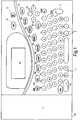
- Figure 1 shows a top view of a simplified representation a tape printing device 2.
- the tape printing device 2 has a keyboard 4 on.
- the keyboard 4 has a variety of data entry keys and includes in particular a variety of numbers, letters and Punctuation keys 6 for entering on a label data to be printed and function keys 8a-i for editing of the entered data. With these function keys 8a-i lets For example, the size or font of the entered Change data.
- the label to be created also underlined by means of these function keys 8a-i and be framed.
- the assigned to the function keys 8a-i Functions are described in more detail below.
- the Keyboard 4 also includes a PRINT key 10 that is pressed when a label is to be printed. In some Embodiments of the invention can (not shown) Tape feed buttons may be provided.
- the keyboard has 4 also an on / off button 14 for switching the label printing device on and off 2nd
- the tape printing device 2 also has a liquid crystal display (LCD) 18 which displays the data at the time it is input.
- LCD liquid crystal display
- the display 18 allows the user to print what is to be printed Label wholly or partially to consider what the editing the label before printing.
- the display is further configured that they have various user-selectable editing options displays.
- the display 18 can also Messages to the user appear, for example error messages or a request to press push button 10.
- the display 18 is driven by an LCD driver 28 which is shown in Figure 3.
- the cassette accommodating space 40 contains a thermal print head 42 and a counter-pressure roller 44, which form a Pressure zone 46 are operatively connected to one another.
- the counter pressure roller 44 is rotatable in a cage-like shape 49 stored.
- the print head 42 can be pivoted about a pivot point 48, so that it is in contact with the platen roller for printing 44 brought and for removing and replacing the Cassettes 50, 51 are moved away from the platen roller 44 can.
- the first cassette inserted in the cassette accommodating space 40 is generally designated with the reference number 50.
- This Cassette 50 contains a supply reel 52 of image receiving tape 54.
- the image receiving tape 54 contains an upper layer for recording a printed image on one of their pages while the other side is covered with an adhesive layer on which a releasable backing layer is attached.
- the image reception band 54 is provided by a guide arrangement (not shown) through the cassette 50, through an outlet O out of the cassette 50 and past the printing zone 46 led to a cutting point C.
- the platen roller 44 is housed in a recess 47 of the first cassette 50.
- the second cassette 51 contains a supply of ink ribbon 60 a ribbon supply spool 56 and a ribbon take-up spool 58.
- the second cassette 51 also has a recess 45 for Recording of the print head 42.
- Image receiving ribbon 54 and ribbon 60 are arranged so that they overlap between passed through the print head 42 and the platen roller 44 will. In particular, stands the one that captures the image Layer of the image receiving tape 54 in contact with the ink ribbon 60.
- the ribbon 60 is a thermal transfer ribbon, which at Contact with the activated or heated elements of the thermal print head 42 generates an image on the image receiving belt 54.
- the counter-pressure roller 44 is driven by a motor 30 (see FIG. 3), for example a DC motor or a stepper motor, driven so that by its rotation the image receiving tape 54th in a direction parallel to the longitudinal extent of the image receiving tape 54 is conveyed through the pressure zone 46. To this An image is printed on the image receiving tape 54 which is then led from the pressure zone 46 to the cutting point C.
- the rotation of the counter-pressure roller 44 also causes the ink ribbon 60 from the ribbon supply spool 56 past the printhead 42 transported to the ribbon take-up spool 58.
- a cutter assembly 66 is provided which is a cutter support member 68 which carries a blade 70.
- the blade 70 acts against an anvil 71.
- the motor 30 is a DC motor
- the image receiving tape 54 during the printing process continuously moved through the pressure zone 46.
- the motor is a stepper motor
- the counter-pressure roller 44 is rotated step by step, taking the image receiving tape 54 during printing gradually moved through the pressure zone 46.
- the motor is a stepper motor
- the counter-pressure roller 44 is rotated step by step, taking the image receiving tape 54 during printing gradually moved through the pressure zone 46.
- the motor 30 is a DC motor
- the counter-pressure roller 44 is rotated step by step, taking the image receiving tape 54 during printing gradually moved through the pressure zone 46.
- the motor is a stepper motor
- the counter-pressure roller 44 is rotated step by step, taking the image receiving tape 54 during printing gradually moved through the pressure zone 46.
- any type of engine that is operated appropriately is used with the embodiments of the invention will.
- the print head 42 is a thermal print head, which has a row with a plurality of printing elements.
- the printhead 42 preferably has only the width of one printing element, and the row extends perpendicular to the longitudinal extent of the image receiving belt 54.
- the height of the row of Printing elements is preferably equal to the width of the label printing device 2 image reception band 54 to be used Embodiments in which image receiving bands 54 with more than one width can be used Print head row generally a height that the greatest width corresponds to the image receiving band 54.
- the image is from the printhead 42 printed in rows on the image receiving tape 54.
- the Image receiving tape can be made using the ink ribbon 60 with an image be printed. If, in an alternative embodiment, the image reception band 54 made of a suitable heat-sensitive material exists, the image can also directly from the print head 42 the image receiving tape 54 are transmitted. With a heat sensitive In this case, an image receiving tape 54 does not require an ink ribbon.
- the cassette accommodating space can be designed in this way be that it takes up a single cassette in which both the Image receiving tape as well as the ribbon are included.
- the cassette accommodating space can also provide any other suitable arrangement a supply of image receiving tape in the embodiments find use of the invention.
- printhead 42 may be height that are slightly smaller than the width of the largest Image receiving tape used in the tape printing device 2 can. The reason for this is that an image on the image receiving tape 54 printed image usually an upper and a lower one blank edge. The printhead 42 can then be a height have the largest bandwidth minus the height of the top and lower margin.
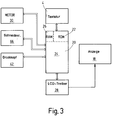
- FIG 3 shows the basic control circuit for controlling the Tape printing device 2 of Figure 1 and Figure 2. It contains one Microprocessor chip 20 with a read-only memory (ROM) 22, one Microprocessor 24 and a random access memory which in Block diagram with RAM 26 is designated.
- the microprocessor 24 is controlled by a program stored in the ROM 22 and acts as a control part through this control.
- the microprocessor chip can be replaced by a separate microprocessor, a separate ROM and a separate RAM can be replaced.
- the microprocessor chip 20 is connected to be connected to it receives addressed entered label data from the keyboard 4.
- the display 18 is driven via the LCD driver 28 a label to be printed (or a part thereof) and / or one Display message or instructions to the user.
- the LCD driver 28 may be part of the microprocessor chip 20.
- the microprocessor chip 20 also gives data for control of the print head 42, which for creating a label Image receiving tape 54 printed with an image.
- controls the microprocessor chip 20 also the motor 30 for transportation of the image receiving tape 54 by the tape printing device 2.
- the Microprocessor chip 20 may also include cutting device 66 control so that 54 sections are separated from the image receiving tape after it has been printed with an image. Alternatively the cutting device can also be operated manually be.
- the tape printing device 2 makes it possible to use the various Keys to label and display 18 on the display.
- the ROM 22 stores both alphanumeric information Characters and the like that correspond to the Keys 6 are assigned, as well as information about the Function keys 8a-i assigned functions. If a button 6 pressed, the associated character or the like is concerned Data retrieved from the ROM 22 and then in RAM 26 saved.
- the data stored in RAM 26 can be in Form of a code that identifies the character.
- the microprocessor 24 pixel data in a form column for column to the printhead 42 and in another form the display 18 are transmitted.
- the displayed image differs from the printed one Image only in its resolution.
- This data can take the form of one or more Have flags.
- the microprocessor 24 generated and directed to printhead 42 and display 18 Pixel data takes into account that stored in RAM 26 Data related to one or more functions.
- the function keys 8a-i of the keyboard 4 have predetermined functions connected, whereby the respective function assigned predetermined Data can be retrieved from the ROM 22 and / or the RAM 26. Some of the functions also allow information to store in RAM 26.
- image receiving bands can be used with a Series of different widths in connection with the invention
- Tape printing device can be used.
- image receiving bands 54 can be used with five different widths - 6, 12, 19, 24 and 32 mm.
- ribbons 60 with two different ones Widths are used - 19 and 28 mm.
- the 19 mm wide ribbon 60 can be used in conjunction with 6, 12 and 19 mm wide image reception bands 54 can be used.
- the 24 and 32 mm wide image reception bands 54 can be combined with the 28 mm wide Ribbon can be used.
- One printed on the image receiving tape 54 Picture usually has a free top and bottom Edge. So it is still possible with the 28 mm wide ribbon 60, a "full" size image on the 32 mm wide image receiving tape 54 to print. The picture then has one, for example top and bottom of each 2 mm high.
- Has data entry keys 6 which are used to enter an image or Command to be used on the image receiving tape 54 to get a printed label.
- the keyboard 4 also has a variety of function keys 8a-i. The individual The function assigned to each key is described below Described in order.
- the key 8a is assigned two functions. If the button 8a is pressed alone and no other keys at the same time An "escape" function is carried out first.
- the button 8a allows the user to view the displayed Exit menus when one of the 8b-i buttons is activated is so that the display 18 returns to a state where the user can enter characters, etc., the a Define the image to be printed on the image receiving tape, where the entered characters or the like on the display 18 are displayed.
- the escape key enables it allows the user to return to normal data entry mode in which an image to be printed can be entered.
- the button 8a is also one "New" function assigned. If the shift key 6a at the same time is actuated with the button 8a, the previous command entered or the previously entered image deleted, and the user can add a new command or a new picture enter.
- the 8b (SIZE) key referred to as the size key, enables it a user, the value of three different Parameters. In particular, the font parameter, the character size parameter and the character width parameter Values are assigned.
- the size key 8b By pressing the size key 8b, the menu shown in FIG. 4 is shown on the display 18. As can be seen in FIG. 4, the display 18 is in two Fields 18a and 18b divided. In the upper field 18a are the three parameters mentioned above and their current from the user selected values are displayed.
- Size Size referenced. As can be seen, is in Figure 4 the size parameter marked with the cursor 61, and accordingly are the available size options by the user can be selected in the lower field 18b of the display 18 displayed.
- the user can see the currently selected size value, e.g. AUTO, change by pressing SELECT 62 presses.
- the size value currently selected by the user becomes then indicated by the next one in the lower field 18b of the display Value replaced. This would be when the selection key is pressed 62 size 1 the size selected by the user, which is then in the upper Field 18a of the display is shown.
- the information 1 to 6 represent suitable sizes, where "1" is the smallest and "6" is the largest.
- Each press of the select button 62 causes a different size value the currently selected value.
- Option 62 is repeatedly pressed until the desired size value is the size selected by the user.
- the character size parameter is AUTO. If the value AUTO is selected, the character size becomes suitable selected to a bandwidth selected by the user, as will be explained in more detail below. In some embodiments however, the character size of the invention can be also suitable for the actual width of the in the cassette receiving room Select 40 available image reception bands.
- the arrow keys 63 are actuated until the width or Font parameter is marked with cursor 61.
- the in lower field 18b of the display 18 displayed options or values then set the different width or font options represents the user for the highlighted parameter be available.
- the currently selected width value and font is in the upper field of the display 18 next to the information Width or font specified.
- width or Font by pressing one or more selection keys 62 can be selected. "Times" and "Helv" is indicated while the latitudes are represented by the letter three times "W" are represented, each of which is a different one Width that is used for the different character widths stand when the cursor 61 is assigned to the width.
- the display 18 there is 18a in the right part of the upper field the display 18 a pattern character 100.
- the pattern character points always only the size, font and width that are currently for those to be entered by the user and then printed Characters are selected by the user. In other words, that Pattern character 100 always only reflects the values of those parameters, which can be selected via this menu.
- the displayed Character is a model character herein Case the letter A. However, the sample display can also of any other letter or several other letters be formed. If immediately before a variant Pressing the size key 8b the image entered by the user includes a large number of lines, so a large number of Pattern characters shown. The number of pattern characters corresponds the number of lines, with the characters arranged one above the other are. If the selected character size is too large, the Pattern characters are displayed next to each other instead, where they arrange multiple lines in the input image reflect.
- the displayed pattern symbol 100 also be a full WYSIWYG character, which means that it appears on display 18 essentially the same as later on the image receiving belt 54 after printing.
- the pattern sign in this case also reflects the values of parameters, not only through this menu, but also through the others Function keys can be selected. The only difference between the displayed version of the sign and the printed one Version of the sign is then in its resolution, because the Display has a lower resolution than the printed one Image.
- upper and lower bars 102 can also be a part of the pattern character 100 may be superimposed on the display 18. Between a free area 103 is provided for this bar 102, which gives the user a custom width for the image receiving band displays. In this way, it becomes clear to the user made when the value selected for the size parameter results in the character for the user for the image reception band 54 selected width is too large.
- the bars 102 may also be the actual width of the reflect in the cassette receiving space 40 existing image receiving tape. This way the user will see if the value selected for the size parameter causes the sign for the current width of the in the cassette receiving space 40 existing image receiving band 54 is too large.
- the enter key 9 is pressed.
- the escape key 8a is pressed the menu shown in FIG. 4 disappears from display 18, and the size, width, and font parameters return to the values immediately before actuation the size button 8b were selected.
- the third function key 8c is the markup key. This enables the user to display further features of the and character to be printed on the image receiving tape 54 to select.
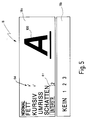
- the mark button 8c appears on the display 18 the menu shown in Figure 5. How in the previous menu, the display is in two fields 18a and 18b split. In contrast to that shown in Figure 4 Menu, however, the lower field 18b of the display 18 is empty except when the underline parameter is marked with the cursor 61 is.
- the underline parameter shows the values NONE (none), 1, 2 and 3 on. "NONE" means no underlining, "1" for underlining with a very thin line, "2" for underline with a line of medium thickness and "3" for underlining with a very thick line.
- the following parameters can also be selected: NORMAL (Standard), BOLD, Italic, OUTLINE (plain typeface) and SHATTEN (shading). However, these parameters differ from the underlining parameter described above in that they are either selected or not selected are. When selected, they will be ticked 64 provided, such as in Figure 5 in addition to the parameters Bold and italic is shown. If they are not selected, appears also no check 64 next to the parameters, as it is for Example in Figure 5 for the parameters NORMAL, OUTLINE and SHATTEN is the case. For example, to set the FAT setting change, the parameter BOLD is highlighted by the arrow keys 63 are operated so that the cursor 61 over the parameter FAT is located.
- the selection key 62 is operated to the Remove the BOLD setting.
- the FAT parameter is selected again.
- NORMAL, BOLD, COURSE, OUTLINE and SHADOW some are of course mutually exclusive. For example, if the Parameter BOLD has not been selected at the same time the NORMAL parameter can also be selected. If the parameter BOLD is activated and then the NORMAL parameter is selected the parameter BOLD is no longer valid.
- the lower Field 18b of display 18 remains empty if one of the in the menu of FIG. 5 shows the parameters displayed with the cursor 61, except when the underline parameter described above is marked with the cursor 61.
- a WYSIWYG pattern character becomes 100 indicated that only those for the parameters of the figure 5 displayed menus has selected values. If the user that is to say changes one of the parameter values shown in FIG displayed menu, the character changes so that it reflects the change in parameter value.
- the pattern sign 100 only features that can be selected through the menu in which the pattern character 100 is contained. With some Embodiments of the invention, however, have the sizes and Display menu displayed pattern characters 100 the features that are selected from both of these menus. With others Words, the displayed pattern symbol then reflects both the selected markup and size features.
- the size button can be a variety of pattern characters to be provided to the number of lines in to reflect the entered image.
- the enter key 9 pressed, causing the selected parameter values be confirmed and the menu removed from the display becomes.
- the escape key 8a can also be pressed to return to the previous parameter values.
- Characters that subsequently define a printable Entered image then have the characteristics that selected using the mark button 8c and also the size button 8b have been. It is also possible to use part of the Highlight text and the size and / or markup menu to call.
- the selected text section then receives the newly selected one Values for the size and markup parameters while the unmarked text the previously selected values for the Marking and size parameters. Within the marked Text will then receive all those subsequently added Sign the new parameter values while outside the highlighted Text of any character added later will be the previous one Has parameter values.
- Key 8d is the layout key.
- the menu shown in FIG. 6 is displayed.
- the display 18 is divided into two fields 18a and 18b. How in the markup and size menus, the first field shows 18a the display 18 shows the parameters and the currently selected values for these parameters while the second field 18b of the display 18 the options for a given one, marked by the cursor 61 Displays parameters.
- the upper field 18a of the display is a sample label 101 is also provided which shows the values of the User selected layout parameters is reflected. With others Words reflect the sample label for the layout parameters selected values. So if a parameter value changed the pattern label changes to reflect the change reflects the parameter value.
- the text within the label can additionally have the features previously defined by the user using the size key 8b and the markup key 8c for which characters have been selected.
- the sample label can also be the over other menu selectable parameter values, for example values for character feature parameters.
- the preferred Embodiment of the invention have the characters in the sample label 101 but not the character features chosen by the user, but preselected features. This will turn the user on alerted to the effects of using the for the layout parameters has selected values.
- the sample label 101 then only reflects those that can be selected via the layout menu Features.
- the parameter FIXED LENGTH is shown highlighted in FIG.
- the individual available for the FIXED LENGTH parameter Options are shown in the lower field 18b of the display 18.
- Another parameter value can be selected for a fixed length, by pressing the selection key 62 a corresponding number of times. For example, if the fixed length parameter is WITHOUT is to have to press the selection button 62 twice, since the currently selected value for this parameter, as in FIG. 6 recognizable, TEXT reads.
- TEXT means that for the length of the Text in an entered label a maximum, by the user selected length is selected.
- LABEL means that for the label itself a predetermined, determined by the user Length is selected.
- the particular one determined by the user Length can be selected by pressing arrow keys 63, around the cursor to mark a value field to the side which appears when the values TEXT or LABEL can be selected.
- the length desired by the user can with the up and down arrow keys 63 down arrow to zoom in or out of value can be selected.
- the user can desired length selected using the numeric keys will.
- the third value WITHOUT means that label and text in Depending on the entered image can be any length.
- the Arrow keys 63 used with which the desired parameter to be changed is marked. For example, if the parameter for the Thickness of the frame or the border is to be changed the arrow key 63 three times with the upward arrow to be actuated so that the cursor 61 marks the parameter THICKNESS.
- the values available for the thickness parameter or Options are then displayed in the lower field 18b of the display 18.
- the thickness parameter relates to the thickness of the Frame bounding lines and has a number of suitable numerical ones Values.
- the FRAME parameter has the values 0, 1, 2 or 3.
- "0” stands for without frame, "1” for a standard frame in rectangular format, "2” for a standard frame with rounded corners and "3" for a somewhat more elaborate frame.
- the MARGINALIZATION parameter. can the values Accept Right, Center, Left, or Off. As in the displayed sample label 101, the text is in Right-aligned with respect to the frame.
- the parameter POSITG. can take four values, namely HORIZONTAL, HORIZONTAL and SPIEGEL, VERTICAL or VERTICAL and MIRROR with respect to the length of the image receiving tape 54.
- SPIEGEEL means that the image is printed mirror-inverted, so that it is viewed from the side of the image receiving tape that is opposite to the one on which it is printed.
- the ALIGNMENT option. (ORIENTATION) refers to the alignment of the label in its entirety with the Band and has the values R, L and C, for right-justified, left-justified and stand centered.
- the input key 9 is operated to the selected parameter values to confirm and the layout menu from the display 18 to remove.
- the label layout of the existing image, a selected part of an existing image or a new one The entered image then gives the selected ones for the layout parameters Values again.
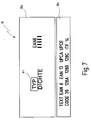
- FIG. 7 By pressing the bar code key 8e, this is shown in FIG. 7 shown menu is displayed.
- This ad is again in two Fields 18a and 18b divided.
- the upper field 18a of the display 18 there is again a list of parameters with their current ones selected values.
- the second field 18b of the display 18 are the different options shown for the one with the Cursor 61 marked parameters are available.
- the one with parameters marked with cursor 61 can be selected using the arrow keys 63 can be changed, moving the cursor 61 so as in connection with the previous function keys 8b, 8c or 8d. Any of those available for a given parameter Values displayed in the lower field 18b of the display can be selected by the selection key 62 accordingly is operated often.
- the enter key 9 is pressed.
- the values have to be selected to match the format of the bar codes to be printed.
- the first parameter TYPE affects the type.
- the possible options or values for these parameters refer to standard barcode formats and are as follows:
- the second parameter DENSITY is the density parameter that the Can be low, normal, or high.
- the one for the density parameter selected value is determined by the thickness of the strokes of the Sample bar codes appear next to the "DENSITY" indicator.
- the Bar code menu will be removed once the user has entered the for the Parameter desired values by pressing the enter key 9 selected.
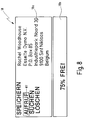
- FIG 8 menu By pressing the memory key 8f (MEMORY) this is shown in FIG 8 menu shown. With this menu there is a A number of different functions are available. If the first SAVE option is highlighted with the cursor, then that will current label that immediately before pressing the save button 8f has been entered by the user. Marking the DELETE option with the cursor 61 enables it to the user, a label that is just in the top box 18a of the Display 18 appears to clear from memory. The option CALL allows the user to save a previously saved one Recall label from memory while over the option SEARCH the user for an earlier one in memory can search stored label. To select one of these options the arrow keys 63 are used to move the cursor 61 highlight the selected option.
- the lower field 18b Display is used to show the user how much Percent of storage capacity is still free. This becomes independent of which of the four storage parameters with the Cursor has been selected. To the selected for the parameters Confirm values and remove the menu from display 18, the enter key 9 is pressed.
- the 8g key is the special character key, via which one or more of a variety of stored special characters in a label can be inserted.
- the special character key 8g is assigned a number of special characters. Providing of buttons for each of these special characters would be an enormous number on buttons require what is inappropriate. If the special character key 8g is operated, that shown in Figure 9 Menu is displayed. This gives the user several options Available. So he can choose one of the options shown, namely ALL, INTERPKT. (INTERPUNKTION), TECHNICAL, CURRENCY (CURRENCY) or SPECIAL. To choose one of these options the arrow keys 63 are pressed until the desired option is marked with the cursor 61.
- the special characters assigned to this option become automatic is displayed in the area 18c of the upper field 18a of the display.
- One of the special characters shown in the display area 18c then be selected from the displayed special characters by cursor 61 is moved until it is over the selected one Special characters.
- the enter key 9 is operated. This removes the special character menu from the display 18 and causes the marked special character in the on the Image receiving tape 54 image to be printed appears.
- ALL option all special characters will be used displayed. Because not all special characters appear on the display at the same time can be displayed using the arrow keys 63 may be scrolled so that the user looks through all available special characters can.
- the options INTERPECT., TECHNICAL, CURRENCY and SPECIAL are all subgroups of the ALL option. With the option INTERPUNCTION punctuation marks and the like can be selected. With the TECHNICAL option, technical symbols, for example mathematical or scientific symbols.
- the CURRENCY option selects currency symbols while there are a few more about the SPECIAL option Have special characters selected. This menu only does that upper field 18a of the screen used. The lower field 18b the screen is always clear in this menu.
- the selection button 62 is actuated, as soon as the cursor 61 is over the selected special character located. This will make the selected special character in the lower field 18b of the screen. The user moves then the cursor to the next special character to be selected. The Option key 62 is then pressed again, and the second special character appears next to the first selected special character in the lower Field 18b of the display 18 is displayed. This continues until the user selected all of the required special characters Has. When the enter key 9 is pressed, all appear selected and displayed in the lower field 18b of the display 18 Special characters in the one to be printed on the image receiving tape 54 Image that also appears on the display. At a another variant, only one special character can be selected at a time be, so that each time you press the selection button 62 straight selected special character the previously selected special character replaced.
- the function key 8h (SPECIAL) is the key for the special menu. If this key 8h is pressed, it becomes in Figure 10 shown menu is displayed. There are six parameters here to adjust. The first concerns copies, namely the number copies of a label to be printed. This number can be from Users can be set. If the copy parameter in the upper Field 18a of the display is marked with the cursor 61, the Option 62 or an arrow key with one facing to the side Arrow pressed to move the cursor to the copy box. The number in the box can be repeated by pressing the Arrow key can be changed with the arrow pointing upwards, to increase the number of copies. Likewise, the Arrow key 63 used with the downward arrow to reduce the number of copies.
- Option 62 or an arrow key with one facing to the side Arrow pressed to move cursor 61 back to copy parameter to move as shown in Figure 10.
- An alternative An embodiment appears in the lower field 18b of the display one Ask the user to copy the number of copies they want Use the number buttons 6 to enter. If for example five copies are desired, the user will press the button press with the number 5. Alternatively, the user could when the copy box is checked, simply the number the required copies using the number keys Enter 6 without prompting the user should be.
- the second parameter ANST. COPIES that can be selected affects increasing copies. This means that successive Copies of the same label with increasing numbers be provided. For example, if the first label is the number 1, then the second label has the number 2, etc. If the parameter for increasing copies marked with the cursor 61 the user gives the required number of increasing Copies. As above in connection with the copy parameter COPIES described, the required number of increasing Copies can be selected. The microprocessor determines then the number and on the current label increases the value of the number for each subsequent label One.
- the third parameter is the color parameter COLOR, which is selected can be made to different pages (or sections) of a Print labels in different colors. Is to it required the cassette 51, which has a supply of ribbon contains a first color, take out and another Ribbon cartridge 51, which is a ribbon of a different color contains to replace.
- the print head is controlled so that it is only the first page or prints the first section of the image. The printhead then stops printing and it can be a user Message prompting the ribbon cartridge to appear switch. Once one ribbon cartridge is in the other Color is inserted, then the second section of the picture printed in the second color.
- the color parameter is either selected or not selected.
- the selection key 62 is actuated. Another press selection key 62 causes the color parameter not to be selected is. When the color parameter is selected, appears next to a check mark for this parameter.
- the fourth parameter is the PREVIEW parameter, the is either selected or not selected, as above executed in connection with the color parameter. If the preview parameter is selected, the label is reduced so far that it is viewed in its entirety on the display can be. The user can thus get an idea of it make how the different parts of the label are positioned relative to each other are.
- the fifth parameter is the inverse parameter INVERS, which in turn is either selected or not selected, as above shown in the description of the color parameter. If the reverse parameter is not selected, then generated for example a black ribbon on for example one white image receiving tape an image in the way that the text as black image appears on white background. If the reversal parameter is selected, the text appears as white Picture on a black background.
- reverse pressure are those print elements of the printhead that when non-reverse printing are disabled, enabled, and those Print elements that are activated in non-reverse printing are deactivated.
- the last parameter that is entered using the special key 8h (SPECIAL) can be selected is the parameter SERIES (SERIAL OPERATION). This parameter is also either selected or not selected. This parameter is selected as in conjunction with the foregoing description of the preceding Parameters of this menu. Is the parameter SERIES selected, then the tape printing device 2 is able to Commands and data from an external device, such as a PC or the like to receive. If the SERIES parameter is not selected, then the tape printing device 2 can not be by a control external PC or the like. SERIES stands by the way for the serial interface to which the tape printing device is connected becomes.
- the enter button 9 is pressed, to confirm the values selected for the parameters and remove the menu from the display 18.
- the installation button 8i (SETUP) taken.
- the installation button 8i When the installation button 8i is pressed, the menu shown in Figure 11 is displayed. Like the others Functions, the display is divided into two fields 18a and 18b. The individual parameters to set the values for are together in the upper field 18a of the display with the currently valid values of some of these parameters. The different options or values for the highlighted Parameters that can be selected can be found in the bottom Field 18b of the display 18 are displayed. In the installation menu the values of five parameters must be set.
- the first parameter is the cutting parameter CUTTER (CUTTING PRICE).
- CUTTING PRICE The first parameter
- the user has two choices for this parameter, the lower field 18b of the display are displayed.
- the cutting device guides a full cut through the tape and a tabular cut out.
- the second parameter is the CASSETTE parameter, with which the user select image receiving tape of a width can, regardless of the width of the in the cassette receiving space 40 recorded image receiving band 54 is.
- the menu shown in Figure 12 replaces the menu according to Figure 11.
- In this menu are the five possible widths displayed by the image reception band that the user selects can. Only one of these widths can be selected at a time. In the menu shown in FIG. 12, this is from the user currently selected width of the image receiving band 12 mm.
- the The cursor moves until the new one selected by the user Width of the image reception band is marked with the cursor.
- the selection key 62 is operated to make this value the new one Confirm user selected bandwidth and that in figure Remove 12 shown menu from the display. That in Figure 12 menu shown is then by the menu shown in Figure 11 replaced. If, as an alternative to this option, the escape key 8a is pressed, the bandwidth selected by the user replaced by the value of the previously selected bandwidth. At The embodiments of the invention are always one by the user selected bandwidth selected. In other embodiments the invention, however, it is possible to choose whether a bandwidth selected by the user at a specific time is fixed or not.
- the bandwidth selected by the user can be chosen at will and does not have to be the width of the image receiving band 54 correspond to that actually in the cassette receiving space 40 is recorded.
- the bandwidth selected by the user allows it him a label to print on tape with the user selected width, especially if for the Character of the size parameter AUTO is selected. With others Words when using the size key 8b the value AUTO for the character size is selected, the microprocessor 24 is able to the optimal one for the bandwidth selected by the user Select character size. This label can then be used by the user saved and then printed if the width of the image receiving tape contained in the cassette accommodating space 40 corresponds to the bandwidth selected by the user.
- the third and fourth parameters are user-specific, so-called personal parameters. These parameters allow a user to a group of preferred character and / or label features select and select these selected features for later Save use. This enables the parameter to be selected PERSONAL REQUEST (CALL), the previously selected characters and / or Call up label features. The image that the user has already entered or is about to enter then has these character and / or label features. Of the PERS. MEMORY parameter (SAVE) allows a group the character and / or label features selected by the user save. SAVE the user-specific parameters and CALL are either selected or not selected and can be selected exactly as in connection with the color parameter of the menu shown in Figure 10.
- the fifth parameter assigned to this menu is the language parameter LANGUAGE.
- This selects the language that is used to send messages to the user, for example in the various, in conjunction with the function keys 8b-8i described menus.
- the various available Standing languages are in the lower field 18b of the display listed when the language parameter is selected and the The user can then select the language they want.
- the language parameter is marked with the cursor 61, the desired language selected by the selection key 62 accordingly is operated often. So a user can speak the language change as desired.
- the language selected by the user does not affect keyboard operation. There is one A number of different keyboards are available, which vary depending on Can distinguish the national language from each other.
- All function keys 8b to 8i display a menu, which consists of two fields.
- the upper field 18a shows in usually the parameters and the currently selected values for these parameters while the lower field 18b of the display shows the Can display options marked with the cursor 61 Parameters are available.
- the two fields 18a and 18b of the Ads are by a line running across the ad separated from each other.
- the user doesn't the possibility of addressing the lower field 18b of the display or to change if one of the function keys 8b-8i is pressed is. Even if there are no values in the lower field 18b of the display 18 the lower field 18b of the display 18 remains to be displayed empty.
- the microprocessor 24 is designed to be the LCD driver 28 controls so that the display is divided into two separate areas when one of the function keys 8b-i is actuated.
- the upper field 18a of the display is so the microprocessor 24 controlled that the user viewed this first part of the display can address.
- the microprocessor controls 24 the lower field 18b of the display so that the user is not is able to address the lower field of the display.
- In normal (editing) mode in which the user has a too the microprocessor allows you to enter a printing image 24 the user, both the upper and the lower field of the Address display 18.
- the user can only view the first field in edit mode address so that an entered image in the first Field 18a of the display can be displayed.
- the second field of Display can be used to provide the user with information, such as. the value of certain parameters, messages or the like to transmit.
- actuation is sufficient in the embodiments of the invention one of the function keys 8b-8i to make your to call the assigned menu.
- the use of shift keys or the like is not required.
Landscapes
- Engineering & Computer Science (AREA)
- Mechanical Engineering (AREA)
- Printers Characterized By Their Purpose (AREA)
- Record Information Processing For Printing (AREA)
Abstract
Description
wobei ein Auswahlmodus und ein Editiermodus vorgesehen sind, das Steuermittel so betreibbar ist, daß im Auswahlmodus im ersten Feld mehrere Parameter und im zweiten Feld auswählbare Optionen für einen der Parameter angezeigt werden und im Editiermodus mit Dateneingabetasten Zeichen eingebbar sind, die ein zu druckendes Bild definieren, und im Editiermodus sich die im Anzeigebereich angezeigten Informationen auf die durch Betätigung der Dateneingabetasten eingegebenen Zeichen beziehen.
wobei im Auswahlmodus die jeweils betätigte Funktionstaste bewirkt, daß im Anzeigebereich Informationen in Form einer Vielzahl unterschiedlicher Parameter angezeigt werden, die sich auf die durch die ausgewählte Funktionstaste festgelegte Funktion beziehen, wobei jedem der Vielzahl von Parametern eine Gruppe auswählbarer Werte zur Definition dieses Parameters zugeordnet ist, wobei die Vielzahl der unterschiedlichen, einer betätigten Funktionstaste zugeordneten Parameter, der aktuell ausgewählte Wert für jeden der Vielzahl von Parametern sowie eine Vielzahl von auswählbaren Werten für mindestens einen der Parameter gleichzeitig im Anzeigebereich anzeigbar sind; und
wobei im Editiermodus die im Anzeigebereich angezeigten Informationen Zeichen betreffen, die durch Betätigung der Dateneingabetasten eingegeben werden.


Claims (21)
- Etikettendrucker, der folgendes umfaßt:eine Vielzahl von Tasten zur Eingabe von Daten, die ein auf einen Aufzeichnungsträger (54) zu druckendes Etikettenbild definieren;einen Anzeigebereich (18) zur Anzeige von sich auf das Etikettenbild beziehenden Informationen;ein Druckmittel zum Druck des Etikettenbilds; undein Steuermittel zur Steuerung des Betriebs des Etikettendruckers, mit einem Adressiermittel zur Adressierung des Anzeigebereiches (18), der zwei Anzeigefelder (18a,18b) umfaßt, die jeweils durch das Adressiermittel wahlweise adressierbar sind, um die das Etikettenbild betreffenden Informationen anzuzeigen,
wobei ein Auswahlmodus und ein Editiermodus vorgesehen sind, das Steuermittel so betreibbar ist, daß im Auswahlmodus im ersten Feld (18a) mehrere Parameter und im zweiten Feld (18b) auswählbare Optionen für einen der Parameter angezeigt werden und im Editiermodus mit Dateneingabetasten (6) Zeichen eingebbar sind, die ein zu druckendes Bild definieren, und im Editiermodus sich die im Anzeigebereich (18) angezeigten Informationen auf die durch Betätigung der Dateneingabetasten (6) eingegebenen Zeichen beziehen. - Etikettendrucker nach Anspruch 1, wobei die Tasten eine Vielzahl von Funktionstasten (8b-8i) zur Steuerung des Drucks eingegebener Zeichen umfassen, wobei im Auswahlmodus die jeweils betätigte Funktionstaste (8b-8i) bewirkt, daß im Anzeigebereich (18) Informationen in Form von einer Vielzahl unterschiedlicher Parameter, die sich auf die durch die ausgewählte Funktionstaste (8a-8i) festgelegte Funktion beziehen, angezeigt werden, wobei jedem der Vielzahl von Parametern eine Gruppe auswählbarer Werte zur Definition dieses Parameters zugeordnet ist.
- Etikettendrucker nach Anspruch 2, wobei ein aktuell ausgewählter Wert für den jeweiligen Parameter aus der Vielzahl von Parametern auf der Anzeige (18) angezeigt wird.
- Etikettendrucker, der folgendes umfaßt:ein Eingabemittel zur Eingabe von Daten, die ein auf einen Aufzeichnungsträger (54) zu druckendes Etikettenbild definieren, wobei das Eingabemittel eine Vielzahl von Dateneingabetasten (6) zur Eingabe von Zeichen sowie eine Vielzahl von Funktionstasten (8b-8i) zur Steuerung des Drucks dieser Zeichen umfaßt;einen Anzeigebereich (18) zur Anzeige von sich auf ein zu druckendes Etikettenbild beziehenden Informationen;ein Druckmittel zum Druck des Etikettenbilds; undein Steuermittel zur Steuerung des Betriebs des Etikettendruckers, so daß er wahlweise in einem Auswahlmodus und in einem Editiermodus arbeitet;
wobei im Auswahlmodus die jeweils betätigte Funktionstaste (8b-8i) bewirkt, daß im Anzeigebereich (18) Informationen in Form einer Vielzahl unterschiedlicher Parameter angezeigt werden, die sich auf die durch die ausgewählte Funktionstaste (8b-8i) festgelegte Funktion beziehen, wobei jedem der Vielzahl von Parametern eine Gruppe auswählbarer Werte zur Definition dieses Parameters zugeordnet ist, wobei die Vielzahl der unterschiedlichen, einer betätigten Funktionstaste (8b-8i) zugeordneten Parameter, der aktuell ausgewählte Wert für jeden der Vielzahl von Parametern sowie eine Vielzahl von auswählbaren Werten für mindestens einen der Parameter gleichzeitig im Anzeigebereich (18) anzeigbar sind; und
wobei im Editiermodus die im Anzeigebereich (18) angezeigten Informationen Zeichen betreffen, die durch Betätigung der Dateneingabetasten (6) eingegeben werden. - Etikettendrucker nach Anspruch 4, wobei das Steuermittel ein Adressiermittel zur Adressierung der Anzeige (18) enthält, die zwei Anzeigefelder (18a,18b) umfaßt, die jeweils durch das Adressiermittel wahlweise adressierbar sind, um die das Etikettenbild betreffenden Informationen anzuzeigen, wobei ein erstes Feld (18a) so adressierbar ist, daß es Informationen in Abhängigkeit von der Betätigung der Tasten (6) des Eingabemittels anzeigt, und das zweite Feld (18b) der Anzeige (18) so adressierbar ist, daß es vorgespeicherte, die Informationen betreffende Daten in Abhängigkeit von der Betätigung der Eingabetasten (6) anzeigt, wodurch es einen Benutzer bei der Abfassung eines Etiketts unterstützt.
- Etikettendrucker nach Anspruch 5, wobei im Auswahlmodus im ersten Feld (18a) mehrere Parameter und im zweiten Feld (18b) auswählbare Optionen für mindestens einen der Parameter anzeigbar sind.
- Etikettendrucker nach einem der Ansprüche 1 bis 3 oder 5 bis 6, wobei im Editiermodus sowohl das erste Feld (18a) als auch das zweite Feld (18b) der Anzeige (18) die eingegebenen Zeichen anzeigen, die das zu druckende Bild definieren.
- Etikettendrucker nach einem der Ansprüche 1 bis 3 oder 5 bis 6, wobei im Editiermodus das erste Feld (18a) so ausgebildet ist, daß dort die eingegebenen Zeichen angezeigt werden, die das zu druckende Bild definieren, und das zweite Feld (18b) so ausgebildet ist, daß es sich auf das Etikett beziehende Informationen anzeigt.
- Etikettendrucker nach einem der Ansprüche 1 bis 3 oder 5 bis 8, wobei ein Mittel zur Unterscheidung zwischen dem ersten Feld (18a) und zweiten Feld (18b) vorgesehen ist.
- Etikettendrucker nach Anspruch 9, wobei im Anzeigebereich (18) zur Unterscheidung zwischen dem ersten Feld (18a) und zweiten Feld (18b) eine Linie vorgesehen ist.
- Etikettendrucker nach einem der vorhergehenden Ansprüche, wobei eine Wahltaste (62) vorgesehen ist, um den Wert eines einem bewegbaren Cursor (61) zugeordneten Parameters auszuwählen, wobei die Wahltaste (62) so oft betätigbar ist, bis der gewünschte Wert für den Parameter ausgewählt ist.
- Etikettendrucker nach einem der Ansprüche 2 bis 11, wobei das Steuermittel so ausgebildet ist, daß, wenn sich der Etikettendrucker im Auswahlmodus befindet und sich auf eine erste Funktionstaste (8b-8i) beziehende Informationen angezeigt werden, die Betätigung einer zweiten Funktionstaste (8b-8i) bewirkt, daß im Anzeigebereich (18) die mit der ersten Funktionstaste (8b-8i) zusammenhängenden Informationen durch Informationen ersetzt werden, die sich auf die zweite Funktionstaste (8b-8i) beziehen.
- Etikettendrucker nach einem der Ansprüche 2 bis 12, wobei einer der einer Funktionstaste (8b-8i) zugeordneten Parameter ein Sprachenparameter ist und das Steuermittel so ausgebildet ist, daß es dem Benutzer Informationen in der Sprache anzeigt, die als Sprachenparameter ausgewählt worden ist.
- Etikettendrucker nach einem der Ansprüche 2 bis 13, wobei eine der einer Funktionstaste (8b-8i) zugeordneten Funktionen eine Sonderzeichenfunktion ist und die sich auf diese Sonderzeichenfunktion beziehenden Parameter Untergruppen von zusammengehörigen Sonderzeichen aus der Gruppe von durch den Benutzer auswählbaren Sonderzeichen darstellen.
- Etikettendrucker nach einem der Ansprüche 2 bis 14, wobei einer oder mehrere der mindestens einer Funktionstaste (8b-8i) zugeordneten Parameter Speicherparameter betreffen und das zweite Feld (18b) so angesteuert wird, daß es Informationen über den aktuellen Speicherstatus anzeigt.
- Etikettendrucker nach Anspruch 15, wobei Informationen über die Anzahl der im Speicher gespeicherten Etiketten und/oder über den Prozentsatz an verfügbarer Speicherkapazität im zweiten Feld (18b) angezeigt werden.
- Etikettendrucker nach einem der Ansprüche 2 bis 16, wobei die Parameter eines oder mehrere der folgenden Merkmale umfassen:ZeichenmerkmaleEtikettenmerkmaleStrichcodemerkmaleSchneidemerkmaleSpeichermerkmaleDruckmerkmale
- Etikettendrucker nach einem der Ansprüche 2 bis 17, wobei mindestens eine der Funktionstasten (8b-8i) bewirkt, daß Parameter, die sich auf Zeichen- und/oder Etikettenmerkmale beziehen, zusammen mit einem Musterzeichen (100) und/oder Musteretikett (101) angezeigt werden, das mindestens einige der ausgewählten Merkmale aufweist.
- Etikettendrucker nach Anspruch 18, wobei das Musterzeichen (100) und/oder Musteretikett (101) nur die der gewählten Funktionstaste (8b-8i) zugeordneten Merkmale aufweist.
- Etikettendrucker nach einem der vorhergehenden Ansprüche, wobei auswählbare Optionen für einen Parameter nur dann angezeigt werden, wenn ein bewegbarer Cursor (61) einem Parameter aus einer bestimmten Teilmenge der Parameter zugeordnet ist.
- Etikettendrucker nach Anspruch 20, wobei den zur bestimmten Teilmenge der Parameter gehörenden Parametern unterschiedliche Optionen zugeordnet sind, die nicht nur die Werte Ein oder Aus annehmen können.
Applications Claiming Priority (2)
| Application Number | Priority Date | Filing Date | Title |
|---|---|---|---|
| GB9614144 | 1996-07-05 | ||
| GB9614144A GB2314957A (en) | 1996-07-05 | 1996-07-05 | Label printer |
Publications (3)
| Publication Number | Publication Date |
|---|---|
| EP0816105A2 true EP0816105A2 (de) | 1998-01-07 |
| EP0816105A3 EP0816105A3 (de) | 1999-03-24 |
| EP0816105B1 EP0816105B1 (de) | 2001-11-07 |
Family
ID=10796412
Family Applications (1)
| Application Number | Title | Priority Date | Filing Date |
|---|---|---|---|
| EP97110019A Expired - Lifetime EP0816105B1 (de) | 1996-07-05 | 1997-06-19 | Etikettendrucker |
Country Status (4)
| Country | Link |
|---|---|
| US (1) | US5920684A (de) |
| EP (1) | EP0816105B1 (de) |
| DE (1) | DE59705242D1 (de) |
| GB (1) | GB2314957A (de) |
Cited By (2)
| Publication number | Priority date | Publication date | Assignee | Title |
|---|---|---|---|---|
| WO2008122635A3 (en) * | 2007-04-05 | 2009-01-22 | Dymo Nv | Tape printing apparatus and method with displaying features |
| US7616338B2 (en) | 2002-05-13 | 2009-11-10 | Dymo | Label printer |
Families Citing this family (27)
| Publication number | Priority date | Publication date | Assignee | Title |
|---|---|---|---|---|
| JP3367850B2 (ja) * | 1996-12-17 | 2003-01-20 | 株式会社キングジム | 文字情報処理装置 |
| JP3580083B2 (ja) * | 1997-04-30 | 2004-10-20 | セイコーエプソン株式会社 | 画像処理装置 |
| US6428220B1 (en) | 2000-01-07 | 2002-08-06 | Monarch Marking Systems, Inc. | Portable barcode printer with improved control and display for a small number of function keys |
| EP1201444B1 (de) * | 2000-10-24 | 2007-03-14 | Dymo | Etikettendrucker |
| US6832726B2 (en) * | 2000-12-19 | 2004-12-21 | Zih Corp. | Barcode optical character recognition |
| US7311256B2 (en) * | 2000-12-19 | 2007-12-25 | Zih Corp. | Barcode optical character recognition |
| GB2372480A (en) * | 2001-01-30 | 2002-08-28 | Esselte Nv | Portable inkjet printer having a printer unit and a base station wherein the station includes an opening to receive an image receiving medium for printing |
| US6899273B2 (en) * | 2001-05-02 | 2005-05-31 | Hand Held Products, Inc. | Optical reader comprising soft key including permanent graphic indicia |
| GB0124510D0 (en) * | 2001-10-12 | 2001-12-05 | Knox Robert | Apparatus for consumer on-demand label printing |
| JP2005014524A (ja) * | 2003-06-27 | 2005-01-20 | King Jim Co Ltd | 印刷装置及び印刷方法並びにプログラム |
| GB2407536A (en) * | 2003-10-30 | 2005-05-04 | Esselte | A label printing device |
| US8661332B2 (en) | 2004-04-30 | 2014-02-25 | Microsoft Corporation | Method and apparatus for document processing |
| US7383500B2 (en) | 2004-04-30 | 2008-06-03 | Microsoft Corporation | Methods and systems for building packages that contain pre-paginated documents |
| US7359902B2 (en) | 2004-04-30 | 2008-04-15 | Microsoft Corporation | Method and apparatus for maintaining relationships between parts in a package |
| US7440132B2 (en) * | 2004-05-03 | 2008-10-21 | Microsoft Corporation | Systems and methods for handling a file with complex elements |
| US20050246384A1 (en) * | 2004-05-03 | 2005-11-03 | Microsoft Corporation | Systems and methods for passing data between filters |
| US7755786B2 (en) * | 2004-05-03 | 2010-07-13 | Microsoft Corporation | Systems and methods for support of various processing capabilities |
| US7519899B2 (en) * | 2004-05-03 | 2009-04-14 | Microsoft Corporation | Planar mapping of graphical elements |
| US8243317B2 (en) | 2004-05-03 | 2012-08-14 | Microsoft Corporation | Hierarchical arrangement for spooling job data |
| US7580948B2 (en) * | 2004-05-03 | 2009-08-25 | Microsoft Corporation | Spooling strategies using structured job information |
| US7607141B2 (en) * | 2004-05-03 | 2009-10-20 | Microsoft Corporation | Systems and methods for support of various processing capabilities |
| US7584111B2 (en) * | 2004-11-19 | 2009-09-01 | Microsoft Corporation | Time polynomial Arrow-Debreu market equilibrium |
| JP4862271B2 (ja) * | 2005-03-31 | 2012-01-25 | ブラザー工業株式会社 | ラベル作成装置 |
| US8736897B2 (en) * | 2006-08-31 | 2014-05-27 | Pitney Bowes Inc. | Method for printing address labels using a secure indicia printer |
| USD619648S1 (en) | 2009-07-24 | 2010-07-13 | Panduit Corp. | Keyboard for a hand-held printer |
| USD619638S1 (en) | 2009-07-24 | 2010-07-13 | Panduit Corp. | Hand-held printer |
| JP6183778B2 (ja) * | 2013-04-10 | 2017-08-23 | ブラザー工業株式会社 | ラベル作成用処理プログラム及びラベル作成用処理方法 |
Family Cites Families (21)
| Publication number | Priority date | Publication date | Assignee | Title |
|---|---|---|---|---|
| EP0085065A4 (de) * | 1981-08-05 | 1985-12-11 | Wirt Byron Cates | Anordnung zur herstellung von aufzeichnungsträgern. |
| US5288155A (en) * | 1989-05-16 | 1994-02-22 | Brother Kogyo Kabushiki Kaisha | Printer capable of displaying selected font |
| JPH03129397A (ja) * | 1989-10-16 | 1991-06-03 | Canon Inc | 文書処理装置 |
| JPH03204766A (ja) * | 1990-01-04 | 1991-09-06 | Brother Ind Ltd | 文書処理装置のメニュー表示制御装置 |
| JPH03229356A (ja) * | 1990-02-02 | 1991-10-11 | Brother Ind Ltd | 文書処理装置のレイアウト表示制御装置 |
| JPH03229355A (ja) * | 1990-02-02 | 1991-10-11 | Brother Ind Ltd | 文書処理装置のレイアウト表示制御装置 |
| GB9026253D0 (en) * | 1990-12-03 | 1991-01-16 | Esselte Dymo Nv | Thermal printer |
| EP0574657B1 (de) * | 1992-03-11 | 2000-11-15 | Chinon Industries Inc. | Gerät zum Drucken von Etiketten und Textverarbeitungssystem |
| JPH06106784A (ja) * | 1992-09-29 | 1994-04-19 | Brother Ind Ltd | テープ印字装置 |
| CA2107759A1 (en) * | 1992-10-06 | 1994-04-07 | Masahiko Nunokawa | Tape printing device |
| CA2130064C (en) * | 1993-10-27 | 1999-05-18 | Cory A. Cherichetti | Method and apparatus for transferring data between a host processor and a subsystem processor in a data processing system |
| DE69431095T2 (de) * | 1993-11-02 | 2002-11-21 | Casio Computer Co., Ltd. | Druckgerät |
| US5562353A (en) * | 1993-11-02 | 1996-10-08 | Casio Computer Co., Ltd. | Tape printing apparatus that calculates character sizes and line lengths |
| CN1051958C (zh) * | 1993-12-22 | 2000-05-03 | 精工爱普生株式会社 | 带式打印设备 |
| JPH07200556A (ja) * | 1993-12-27 | 1995-08-04 | Brother Ind Ltd | 文書作成装置 |
| JPH07200580A (ja) * | 1993-12-28 | 1995-08-04 | Brother Ind Ltd | 文書作成装置 |
| US5503482A (en) * | 1993-12-29 | 1996-04-02 | Brother Kogyo Kabushiki Kaisha | Tape printing apparatus |
| JPH07214860A (ja) * | 1994-01-29 | 1995-08-15 | Brother Ind Ltd | 文書処理装置 |
| JP3209750B2 (ja) * | 1994-12-02 | 2001-09-17 | セイコーエプソン株式会社 | 文字情報処理装置 |
| JP3312710B2 (ja) * | 1994-12-21 | 2002-08-12 | 株式会社サトー | ラベルプリンタ |
| JPH08212195A (ja) * | 1995-01-31 | 1996-08-20 | Brother Ind Ltd | 文書処理装置 |
-
1996
- 1996-07-05 GB GB9614144A patent/GB2314957A/en not_active Withdrawn
-
1997
- 1997-06-02 US US08/867,517 patent/US5920684A/en not_active Expired - Lifetime
- 1997-06-19 EP EP97110019A patent/EP0816105B1/de not_active Expired - Lifetime
- 1997-06-19 DE DE59705242T patent/DE59705242D1/de not_active Expired - Lifetime
Cited By (2)
| Publication number | Priority date | Publication date | Assignee | Title |
|---|---|---|---|---|
| US7616338B2 (en) | 2002-05-13 | 2009-11-10 | Dymo | Label printer |
| WO2008122635A3 (en) * | 2007-04-05 | 2009-01-22 | Dymo Nv | Tape printing apparatus and method with displaying features |
Also Published As
| Publication number | Publication date |
|---|---|
| EP0816105A3 (de) | 1999-03-24 |
| DE59705242D1 (de) | 2001-12-13 |
| EP0816105B1 (de) | 2001-11-07 |
| GB9614144D0 (en) | 1996-09-04 |
| US5920684A (en) | 1999-07-06 |
| GB2314957A (en) | 1998-01-14 |
Similar Documents
| Publication | Publication Date | Title |
|---|---|---|
| EP0816105B1 (de) | Etikettendrucker | |
| DE69621295T2 (de) | Drucker | |
| DE69308173T2 (de) | Etikettendruckgerät | |
| DE69534606T2 (de) | Streifendruckvorrichtung | |
| EP0816106B1 (de) | Etikettendrucker mit unterschiedlichen Anzeigemoden | |
| DE69331491T2 (de) | Streifendrucker | |
| DE69530135T2 (de) | Zeicheninformationsprozessor zum Drucken von Zeichen | |
| DE60002274T2 (de) | Datenverarbeitung um Text und Bilddaten auf einem Substrat anzubringen | |
| DE69426806T2 (de) | Drucken in einem vorgegebenen Format | |
| DE60104910T2 (de) | Druckeinrichtung | |
| DE20307514U1 (de) | Etikettendrucker | |
| DE69723397T2 (de) | Banddruckgerät | |
| DE69920091T2 (de) | Verfahren und Vorrichtung zur Erzeugung von Druckbildern und Druckapparat mit einer solchen Vorrichtung | |
| DE69719725T2 (de) | Streifendrucker | |
| DE29602534U1 (de) | Banddruckgerät mit der Fähigkeit zum Drucken von Strichcodes | |
| DE69315745T2 (de) | Thermodrucker | |
| DE69421397T2 (de) | Streifendrucker | |
| DE60201279T2 (de) | Druckvorrichtung | |
| DE60127222T2 (de) | Etikettendrucker | |
| EP0821314A2 (de) | Banddruckgerät zum Drucken von Rahmen mit unterschiedlichen Formen | |
| DE69431095T2 (de) | Druckgerät | |
| DE69430613T2 (de) | Banddruckvorrichtung | |
| DE60005265T2 (de) | Ein Drucker für Hintergrundbilder | |
| DE69305209T2 (de) | Stempelvorrichtung | |
| DE602005000067T2 (de) | Banddrucker und Verfahren zur Herstellung eines Bandes |
Legal Events
| Date | Code | Title | Description |
|---|---|---|---|
| PUAI | Public reference made under article 153(3) epc to a published international application that has entered the european phase |
Free format text: ORIGINAL CODE: 0009012 |
|
| AK | Designated contracting states |
Kind code of ref document: A2 Designated state(s): DE FR GB |
|
| PUAL | Search report despatched |
Free format text: ORIGINAL CODE: 0009013 |
|
| AK | Designated contracting states |
Kind code of ref document: A3 Designated state(s): AT BE CH DE DK ES FI FR GB GR IE IT LI LU MC NL PT SE |
|
| 17P | Request for examination filed |
Effective date: 19990416 |
|
| AKX | Designation fees paid |
Free format text: DE FR GB |
|
| GRAG | Despatch of communication of intention to grant |
Free format text: ORIGINAL CODE: EPIDOS AGRA |
|
| 17Q | First examination report despatched |
Effective date: 20001123 |
|
| GRAG | Despatch of communication of intention to grant |
Free format text: ORIGINAL CODE: EPIDOS AGRA |
|
| GRAH | Despatch of communication of intention to grant a patent |
Free format text: ORIGINAL CODE: EPIDOS IGRA |
|
| GRAH | Despatch of communication of intention to grant a patent |
Free format text: ORIGINAL CODE: EPIDOS IGRA |
|
| GRAA | (expected) grant |
Free format text: ORIGINAL CODE: 0009210 |
|
| AK | Designated contracting states |
Kind code of ref document: B1 Designated state(s): DE FR GB |
|
| GBT | Gb: translation of ep patent filed (gb section 77(6)(a)/1977) |
Effective date: 20011107 |
|
| REF | Corresponds to: |
Ref document number: 59705242 Country of ref document: DE Date of ref document: 20011213 |
|
| REG | Reference to a national code |
Ref country code: GB Ref legal event code: IF02 |
|
| ET | Fr: translation filed | ||
| PLBE | No opposition filed within time limit |
Free format text: ORIGINAL CODE: 0009261 |
|
| STAA | Information on the status of an ep patent application or granted ep patent |
Free format text: STATUS: NO OPPOSITION FILED WITHIN TIME LIMIT |
|
| 26N | No opposition filed | ||
| REG | Reference to a national code |
Ref country code: FR Ref legal event code: CD |
|
| REG | Reference to a national code |
Ref country code: FR Ref legal event code: PLFP Year of fee payment: 19 |
|
| PGFP | Annual fee paid to national office [announced via postgrant information from national office to epo] |
Ref country code: GB Payment date: 20150629 Year of fee payment: 19 Ref country code: DE Payment date: 20150629 Year of fee payment: 19 |
|
| PGFP | Annual fee paid to national office [announced via postgrant information from national office to epo] |
Ref country code: FR Payment date: 20150617 Year of fee payment: 19 |
|
| REG | Reference to a national code |
Ref country code: DE Ref legal event code: R082 Ref document number: 59705242 Country of ref document: DE |
|
| REG | Reference to a national code |
Ref country code: DE Ref legal event code: R119 Ref document number: 59705242 Country of ref document: DE |
|
| GBPC | Gb: european patent ceased through non-payment of renewal fee |
Effective date: 20160619 |
|
| REG | Reference to a national code |
Ref country code: FR Ref legal event code: ST Effective date: 20170228 |
|
| PG25 | Lapsed in a contracting state [announced via postgrant information from national office to epo] |
Ref country code: DE Free format text: LAPSE BECAUSE OF NON-PAYMENT OF DUE FEES Effective date: 20170103 Ref country code: FR Free format text: LAPSE BECAUSE OF NON-PAYMENT OF DUE FEES Effective date: 20160630 |
|
| PG25 | Lapsed in a contracting state [announced via postgrant information from national office to epo] |
Ref country code: GB Free format text: LAPSE BECAUSE OF NON-PAYMENT OF DUE FEES Effective date: 20160619 |