EP0961199A1 - Verfahren und Anordnug zur Änderung von numerischen Werten auf einer Anzeigevorrichtung - Google Patents
Verfahren und Anordnug zur Änderung von numerischen Werten auf einer Anzeigevorrichtung Download PDFInfo
- Publication number
- EP0961199A1 EP0961199A1 EP99303833A EP99303833A EP0961199A1 EP 0961199 A1 EP0961199 A1 EP 0961199A1 EP 99303833 A EP99303833 A EP 99303833A EP 99303833 A EP99303833 A EP 99303833A EP 0961199 A1 EP0961199 A1 EP 0961199A1
- Authority
- EP
- European Patent Office
- Prior art keywords
- numeric
- signal
- value
- pointing
- display
- Prior art date
- Legal status (The legal status is an assumption and is not a legal conclusion. Google has not performed a legal analysis and makes no representation as to the accuracy of the status listed.)
- Ceased
Links
Images











Classifications
-
- G—PHYSICS
- G06—COMPUTING OR CALCULATING; COUNTING
- G06F—ELECTRIC DIGITAL DATA PROCESSING
- G06F3/00—Input arrangements for transferring data to be processed into a form capable of being handled by the computer; Output arrangements for transferring data from processing unit to output unit, e.g. interface arrangements
- G06F3/01—Input arrangements or combined input and output arrangements for interaction between user and computer
- G06F3/048—Interaction techniques based on graphical user interfaces [GUI]
- G06F3/0487—Interaction techniques based on graphical user interfaces [GUI] using specific features provided by the input device, e.g. functions controlled by the rotation of a mouse with dual sensing arrangements, or of the nature of the input device, e.g. tap gestures based on pressure sensed by a digitiser
- G06F3/0488—Interaction techniques based on graphical user interfaces [GUI] using specific features provided by the input device, e.g. functions controlled by the rotation of a mouse with dual sensing arrangements, or of the nature of the input device, e.g. tap gestures based on pressure sensed by a digitiser using a touch-screen or digitiser, e.g. input of commands through traced gestures
-
- G—PHYSICS
- G06—COMPUTING OR CALCULATING; COUNTING
- G06F—ELECTRIC DIGITAL DATA PROCESSING
- G06F3/00—Input arrangements for transferring data to be processed into a form capable of being handled by the computer; Output arrangements for transferring data from processing unit to output unit, e.g. interface arrangements
- G06F3/01—Input arrangements or combined input and output arrangements for interaction between user and computer
- G06F3/048—Interaction techniques based on graphical user interfaces [GUI]
- G06F3/0484—Interaction techniques based on graphical user interfaces [GUI] for the control of specific functions or operations, e.g. selecting or manipulating an object, an image or a displayed text element, setting a parameter value or selecting a range
- G06F3/04847—Interaction techniques to control parameter settings, e.g. interaction with sliders or dials
-
- G—PHYSICS
- G06—COMPUTING OR CALCULATING; COUNTING
- G06F—ELECTRIC DIGITAL DATA PROCESSING
- G06F3/00—Input arrangements for transferring data to be processed into a form capable of being handled by the computer; Output arrangements for transferring data from processing unit to output unit, e.g. interface arrangements
- G06F3/01—Input arrangements or combined input and output arrangements for interaction between user and computer
- G06F3/048—Interaction techniques based on graphical user interfaces [GUI]
- G06F3/0487—Interaction techniques based on graphical user interfaces [GUI] using specific features provided by the input device, e.g. functions controlled by the rotation of a mouse with dual sensing arrangements, or of the nature of the input device, e.g. tap gestures based on pressure sensed by a digitiser
- G06F3/0488—Interaction techniques based on graphical user interfaces [GUI] using specific features provided by the input device, e.g. functions controlled by the rotation of a mouse with dual sensing arrangements, or of the nature of the input device, e.g. tap gestures based on pressure sensed by a digitiser using a touch-screen or digitiser, e.g. input of commands through traced gestures
- G06F3/04883—Interaction techniques based on graphical user interfaces [GUI] using specific features provided by the input device, e.g. functions controlled by the rotation of a mouse with dual sensing arrangements, or of the nature of the input device, e.g. tap gestures based on pressure sensed by a digitiser using a touch-screen or digitiser, e.g. input of commands through traced gestures for inputting data by handwriting, e.g. gesture or text
Definitions
- the present invention relates to a numeric value changing device and apparatus for use in industrial panel displays and personal computers. More particularly, the invention pertains to a numeric value changing method and apparatus that provide a clear and legible display of a numeric value on a small panel display device and allow ease in making a change to the numeric display without impairing its viewability.
- LEDs 10-segment light emitting diodes
- LCDs liquid crystal displays
- numeric value could be changed or modified using a mouse, touch panel or similar pointing means.
- numeric changing elements such as up and down keys and a slide bar
- Figs. 34 and 35 are screen layouts showing examples of the display screen that use the above prior art method.
- Reference numeral 24 denotes a numeric display area provided on the display surface of a touch panel to display a numeric value of four figures (three in integral part and one decimal place); 27 denotes a slide bar displayed immediately below the numeric display area 24; and 28 denotes up and down keys displayed beside the numeric display area 24.
- Reference numeral 25 denotes a user's hand, and 26 a selected position pressed by the hand 25. For example, by sliding the user's finger on the slide bar 27, or by pointing the up or down key 28 with the user's finger, the numeric value displayed in the numeric display area 24 can be changed.
- Another object of the present invention is to provide a numeric value changing method and apparatus that ensure excellent viewability from a distance even for digital display of a numeric value for process control and permit the use of pointing means to change the numeric value.
- the numeric value changing method comprises the steps of: displaying on a display screen of display means display elements including a set value; outputting from pointing means a pointing signal containing information on the position selected by the pointing means in the display screen (which information will hereinafter be referred to as selected position information); and changing the set value with a change of the selected position information when the set value is displayed at the position corresponding to the selected position information.
- the numeric value changing method it is possible to change the numeric value without displaying images for updating the set value. Since the conventional method necessitates displaying various display elements on the display screen for the selection by pointing means, the space for the numeric display area is inevitably limited, and the numeric value needs to be displayed small in size. However, the method of the present invention enables the numeric value to be changed by pointing means without yielding such a detriment of the prior art method.
- the numeric value can be displayed large in size, for instance, over the entire area of the display surface of the display means.
- the numeric value can be changed by a single round of pointing-sliding-releasing operations, and the numeric changing process during sliding movement of the pointing means can be recognized from the numeric display being currently provided.
- the numeric value can easily be changed to a desired value by a simple operation.
- the numeric value is updated according to the distance of movement of the pointing means.
- This method makes it possible to establish correspondence between the amount of manipulation of the pointing means and the amount of updating of the numeric value. Hence, the numeric value can be changed based on the operator's sensory perception.
- the amount of updating of the set value changes with the speed of movement of the pointing means.
- numeric value can be changed easily and surely using the pointing means.
- the direction in which to increase or decrease the set value changes with the direction of movement of the pointing means.
- the direction in which to increase or decrease the set value changes with a change in the direction of movement of the pointing means.
- the set value is changed with a change of the selected position information until the set value is deselected.
- the set value need not be selected repeatedly for its change, and hence it can be changed efficiently.
- the set value with a plurality of digits is selectable by the pointing means for each digit.
- the number of numeral candidates for each digit can be reduced, for example, to 10 (a decimal number).
- this embodiment provides the advantage of efficient and easy numeric change in a small panel display as well.
- the selected position information changes with the sliding movement of pointing means over a desired area on the display screen after pointing a desired one of the display elements by the pointing means.
- an operation of selecting the numeral to be changed, an operation of making the desired change, an operation of finishing the numeric change and an operation of deselecting the numeral selected are performed by a single round of pointing-sliding-releasing operations with an operator's finger.
- the numeric change and the numeric display are performed at particular time intervals, and the effective area of the sliding movement of the pointing means is not limited to a specific small area.
- the numeric value changing apparatus comprises: display means for displaying on its display screen display elements including a set value; pointing means for outputting a pointing signal that has information on the position selected by the pointing means in the display screen; and numeric changing means supplied with the pointing signal, for changing the set value with a change of the selected position information when the set value is displayed at the position corresponding to the selected position information.
- the apparatus of the present invention enables the numeric value to be changed by pointing means without yielding such a detriment of the prior art method.
- the numeric value can be displayed large in size, for instance, over the entire area of the display surface of the display means.
- the numeric value can be changed by a single round of pointing-sliding-releasing operations, and the numeric changing process during sliding movement of the pointing means can be recognized from the numeric display being currently provided.
- the numeric value can easily be changed to a desired value by a simple operation.
- Fig. 1 is a block diagram illustrating the configuration of a numeric value changing apparatus according to a first embodiment (Embodiment 1).
- Reference numeral 1 denotes a display device for displaying a numeric value on its display screen;
- 2 denotes a pointing device for outputting a pointing signal that has information on the position selected on the display screen (which information will hereinafter be referred to as selected position information);
- 3 denotes numeric changing means for changing the numeric value in response to the pointing signal.
- a combination of the display device 1 and the pointing device 2 may be a combination of a mouse and a cathode-ray tube widely used in desktop computers, but this embodiment will be described to employ a combination of a liquid crystal display (LCD) and a touch panel.
- LCD liquid crystal display
- numeric display area 24 The area where to display the numeric value will hereinafter be referred to as a numeric display area 24.
- Reference numeral 4 denotes a numeric pointer detection part which is supplied with the pointing signal from the pointing device 2 and outputs the pointing signal as a numeric value pointing signal when the position corresponding to the selected position information of the input pointing signal is in the numeric display area.
- Reference numeral 5 denotes a sliding movement detection part which outputs a sliding movement signal corresponding to a change of the selected position information contained in the numeric value pointing signal.
- Reference numeral 6 denotes a movement signal-to-numeric changing signal conversion part which calculates the amount of numeric change based on the sliding movement signal and outputs a numeric changing signal.
- Reference numeral 7 denotes a numeric change processing part which is supplied with the numeric changing signal and updates the numeric value based on the amount of numeric change specified by the input numeric changing signal and, at the same time, outputs a numeric signal corresponding to the updated numeric value.
- Reference numeral 8 denotes a numeric display processing part which supplies the display device 1 with a display signal based on the numeric signal from the numeric change processing part 7.
- Fig. 2 is a flowchart showing control operations of the numeric changing means 3 according to Embodiment 1 of the present invention.
- ST1 is a step of making a check to determine whether the pointing detection part 4 has detected the selection of the numeric display area 24 and the entrance into a state of pointing the numeric value
- ST2 is a step of making a check to determine whether the sliding movement detection part 5 has detected the sliding movement on the touch panel used as the pointing device 2
- ST3 is a step of supplying the movement signal-to-numeric changing signal conversion part 6 with the numeric changing signal based on the sliding movement signal available from the sliding movement detection part 5
- ST4 is a step of updating the numeric value in the numeric change processing part 7 based on the specified amount of numeric change and outputting therefrom the updated numeric signal
- ST5 is a step of outputting from the numeric display processing part 8 a display signal based on the updated numeric signal provided from the numeric change processing part 7
- ST6 is a step of
- Fig. 3 is a screen layout showing an example of the display screen according to Embodiment 1.
- Reference numeral 24 denotes the numeric display area 24 that is provided on the display screen of an LCD to display a numeric value with four figures (three in the integral part and one decimal place).
- Reference numeral 24a denotes a third digit display section, 24b a second digit display section, 24c a first digit display section, and 24d a first decimal place display section.
- Reference numeral 25 denotes an operator's hand manipulating the touch panel; and 26 denotes a selected position on the touch panel pressed (pointed) with a finger of the operator's hand 25.
- the touch panel When touched by the finger at the position corresponding to the numeric display area 24 of the display device 2, the touch panel outputs a pointing signal that has selected position information corresponding to the pointed position. And the pointing detection part 4 applies a numeric pointing signal to the sliding movement detection part 5 (Fig. 3(a)).
- the sliding movement detection part 5 outputs a sliding movement signal corresponding to the selected position information.
- the movement signal-to-numeric changing signal conversion part 6 outputs a numeric changing signal that has predetermined amount-of-numeric-change information corresponding to the input sliding movement signal, and the numeric change processing part 7 changes the preset numeric value according to the amount-of-change information provided thereto.
- the numeric change processing part 7 outputs a numeric signal corresponding to the newly set numeric value, and the preset numeric value displayed on the display device 1 is updated accordingly (Fig. 3(b)).
- the preset value is further updated correspondingly, and the preset value displayed on the display device 2 is also further updated (Fig. 3(c)).
- the range over which to slide the finger on the touch panel is not limited specifically to the numeric display area 24.
- the numeric value can be changed until the numeric display area 24 is deselected, by sliding the finger anywhere on the touch panel regardless of whether inside or outside the numeric display area 24. Accordingly, the operation of determining the object to be changed, the operation of changing the numeric value, the operation of finishing the numeric change and the operation of deselecting the object of change are carried out by a single continuous finger pointing-sliding-releasing movement. Furthermore, the numeric value is changed and displayed at specific time intervals during the finger sliding movement, and the effective area for finger sliding movement is not limited to any particular small area.
- the numeric value changing method will be described in concrete terms. Now, let it assumed, for example, that when a numeric value "103" is currently displayed in the numeric display area 24.
- the numeric value on display can be changed to a desired value, for example, "121” by pressing the numeric display area 24 with the operator's finger and then sliding thereon the finger so that the preset value changes in a sequential order 103 ⁇ 104 ⁇ 105 ⁇ 119 ⁇ 120 ⁇ 121.
- the predetermined number of digits to be displayed is four as in the case of Fig. 3, the range over which numeric values can be set is from 0 to 999.9.
- the numeric value can freely be changed to four-digit integers larger than 0 only by monotonously increasing the numeric value.
- the preset value to be changed is not limited specifically to those that can be changed by monotonously increasing and decreasing them, but may also be a sequence of pre-arrayed numeric values.
- pre-arraying numeric values for example, 1 ⁇ 3 ⁇ 4 ⁇ 6 ⁇ 8 ⁇ 10 ⁇ 12 ⁇ 1 ⁇ 3 ⁇ 4 ⁇ 6 ⁇ 8 ⁇ 10 ⁇ 12 ⁇ , it is possible to efficiently set and change channel numbers of commercial TV broadcasting stations in and around Tokyo, for instance.
- the display device 1 displays a set numeric value on its display screen;
- the pointing device 2 outputs a pointing signal that has information on the position selected on the display screen;
- the numeric changing means 3 which is supplied with the pointing signal, changes the set value in accordance with a change in the selected position information after the numeric display area 24 is selected.
- the preset value can be changed without displaying on the display screen any display elements for updating the preset value.
- the conventional numeric value changing method and apparatus because of the necessity for displaying on the display screen various display elements to be selected by the pointing device 2, the space for the numeric display area 24 is limited, and consequently, a numeric value needs to be displayed small in size. With the method and apparatus of the present invention, however, it is possible to change the numeric value by the pointing device 2 without causing such a disadvantage of the prior art.
- a desired numeric value can be displayed large in size over the entire area of the display screen of the display device 1, and even in the case of using a small panel display device, the set value can easily be changed using the pointing device 2 without impairing its legibility from a distance.
- the set value can be changed by a single round of finger pointing-sliding-release operations, and the numeric change processing during the pointer sliding movement can be recognized from the numeric display; hence, a change to a desired value can readily be made by simple manipulations.
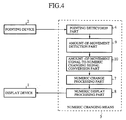
- Fig. 4 is a block diagram illustrating the configuration of a numeric value changing apparatus according to a second embodiment (Embodiment 2).
- Reference numeral 9 denotes an amount-of-movement detection part that outputs an amount-of-movement signal corresponding to the amount of change (the amount of movement) of the selected position information contained in the pointing signal.
- Reference numeral 10 denotes an amount-of-movement signal-to-numeric changing signal conversion part which is supplied with the amount-of-movement signal from the detection part 9, calculates the amount of change of the numeric value from the amount of change of the selected position information and outputs a numeric changing signal accordingly.
- This embodiment is identical in construction with Embodiment 1 except the above.
- Fig. 5 is a flowchart showing operations of the numeric changing means 3 in this embodiment.
- ST8 is a step of outputting from the amount-of-movement detection part 9 the amount-of-movement signal corresponding to the amount of change of the selected position information
- ST9 is a step of outputting from the amount-of-movement signal-to-numeric changing signal conversion part 10 the numeric changing signal based on the amount-of-movement signal.
- the other steps are the same as those in Embodiment 1, and are identified by the same reference numerals; no description will be given of them.
- the touch panel When touched by the finger at the position corresponding to the numeric display area 24 of the display device 2, the touch panel outputs a pointing signal that has selected position information corresponding to the pressed position. And the pointing detection part 4 applies a numeric pointing signal to the amount-of-movement detection part 5 (Fig. 3(a)). Then, upon sliding the finger on the touch panel a little upwardly, the selected position information contained in the pointing signal (a numeric pointing signal) changes correspondingly. The amount-of-movement detection part 5 outputs an amount-of-movement signal corresponding to the amount of change in the selected position information.
- the amount-of-movement signal-to-numeric changing signal conversion part 10 outputs a numeric changing signal that has predetermined amount-of-numeric-change information corresponding to the input amount-of-movement signal, and the numeric change processing part 7 changes the preset numeric value according to the amount-of-change information provided thereto.
- the numeric change processing part 7 outputs a numeric signal corresponding to the newly set numeric value, and the preset numeric value displayed on the display device 1 is updated accordingly (Fig. 5(b)).
- the numeric changing signal becomes large correspondingly, and the set value is also greatly updated (Figs. 5(c), (d)).
- the amount of manipulation of the pointing device 2 can be made to correspond with the amount of updating the numeric value. This provides an advantage that the numeric value can be changed based on the operator's sensory perception.
- Fig. 7 is a block diagram illustrating the configuration of a numeric value changing apparatus according to a third embodiment (Embodiment 3).
- Reference numeral 11 denotes a sliding speed detection part that outputs a sliding speed signal corresponding to the speed of change of the selected position information contained in the pointing signal.
- Reference numeral 12 denotes a speed signal-to-numeric changing signal conversion part which is supplied with the sliding speed signal from the sliding speed detection part 9, then calculates the amount of change of the numeric value from the speed of change of the selected position information, and outputs a numeric changing signal accordingly.
- This embodiment is identical in construction with Embodiment 1 except the above. The parts corresponding to those in Embodiment 1 are identified by the same reference numerals, and no description will be repeated.
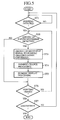
- Fig. 8 is a flowchart showing operations of the numeric changing means 3 in this embodiment.
- ST10 is a step of outputting from the sliding speed detection part 11 the sliding speed signal corresponding to the speed of change of the selected position information
- ST11 is a step of outputting from the sliding speed signal-to-numeric changing signal conversion part 12 the numeric changing signal based on the sliding speed signal.
- the other steps are identical with those in Embodiment 1, and are identified by the same reference numerals, but no description will be given of them.
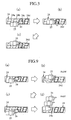
- Fig. 9 is a screen layout depicting an example of the display screen according to Embodiment 3.
- the display elements shown in Fig. 9 are identical with those in Embodiment 1, and are identified by the same reference numerals, but no description will be repeated.
- the touch panel When touched by the finger at the position corresponding to the numeric display area 24 of the display device 2, the touch panel outputs a pointing signal that has selected position information corresponding to the pressed position. And the pointing detection part 4 applies a numeric pointing signal to the sliding speed detection part 5 (Fig. 9(a)). Then, upon sliding the finger on the touch panel a little upwardly, the selected position information contained in the pointing signal (the numeric pointing signal) changes correspondingly. The sliding speed detection part 11 outputs a sliding speed signal corresponding to the speed of change of the selected position information.
- the sliding speed signal-to-numeric changing signal conversion part 12 outputs a numeric changing signal that has predetermined amount-of-numeric-change information corresponding to the input sliding speed signal, and the numeric change processing part 7 changes the preset numeric value according to the amount-of-change information provided thereto.
- the numeric change processing part 7 outputs a numeric signal corresponding to the newly set numeric value, and the preset numeric value displayed on the display device 1 is also updated accordingly (Fig. 9(b)).
- the numeric changing signal becomes large correspondingly, and the set value is also greatly updated (Figs. 9(c), (d)).
- the current set value is "1,” it can be changed little by little in order 1 ⁇ 2 ⁇ 3 ⁇ by sliding the finger slowly on the touch panel over a fixed distance.
- it is desired to change the set value greatly for example, from “1" to "100,” it can be achieved by sliding the finger faster over the fixed distance.
- the amount of manipulation of the pointing device 2 can be made to correspond with the amount of updating the numeric value. This provides an advantage that the numeric value can be changed based on the operator's sensory perception.
- this embodiment avoids the necessity of making provision for sensitive updating of the numeric value in response to the movement of the finger due to limitations on the range of its sliding movement; hence, the numeric value can be changed easily and surely using the touch panel.
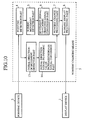
- Fig. 10 is a block diagram illustrating the configuration of a numeric value changing apparatus according to a fourth embodiment (Embodiment 4).
- Reference numeral 13 denotes an initial-direction- of-movement detection part that detects the initial direction of movement of the finger on the touch panel, indicated by the numeric pointing signal, and outputs an initial-direction-of-movement signal.
- Reference numeral 14 denotes an initial direction signal-to-numeric value increase/decrease signal conversion part which outputs a numeric value increase/decrease signal corresponding to the initial direction of movement signal.
- the numeric change processing part 7 is supplied with both of the numeric changing signal and the numeric value increase/decrease signal, then increases or decreases the preset value in accordance with the numeric value increase/decrease signal, and outputs a numeric signal corresponding to the thus updated numeric value.
- Embodiment 1 is identical in construction with Embodiment 1 except the above.
- the parts corresponding to those in Embodiment 1 are identified by the same reference numerals, and no description will be repeated.
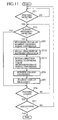
- Fig. 11 is a flowchart showing operations of the numeric changing means 3 in this embodiment.
- ST12 is a step of detecting the initial direction of movement of the finger on the touch panel (indicated by the numeric pointing signal) in the initial-direction-of-movement detection part 13
- ST13 is a step of outputting from the initial direction signal-to-numeric value increase/decrease signal conversion part 14 the numeric value increase/decrease signal based on the initial- direction-of movement signal.
- the other steps are identical with those in Embodiment 1, and are identified by the same reference numerals, but no description will be given of them.
- Fig. 12 is a screen layout depicting an example of the display screen according to Embodiment 4.
- the display elements shown in Fig. 12 are identical with those in Embodiment 1, and are identified by the same reference numerals, but no description will be repeated.
- the initial-direction-of-movement detection part 13 detects the direction of movement of the finger, and outputs the initial-direction-of-movement signal. And the initial direction signal-to-numeric value increase/decrease signal conversion part 14 outputs a numeric value increase/decrease signal of a positive direction.
- the sliding movement detection part 5 and the movement signal-to-numeric changing signal conversion part 6 provide a numeric changing signal corresponding to the amount of subsequent movement of the finger.
- the numeric change processing part 7 changes the set value in the direction of increase in accordance with the amount-of-numeric-change information and the numeric value increase/decrease signal (Figs. 12(a) to (c)).
- the numeric change processing part 7 changes the set value in the direction of decrease in accordance with the amount-of-numeric-change information and the numeric value increase/decrease signal (Figs. 12(d) to (f)). While in this embodiment the numeric value has been described to be increased or decreased depending on whether the finger is initially slid upward or downward on the touch panel, the correspondence between the initial direction of movement of the finger and the direction of change of the numeric value is not limited specifically to the above. The numeric value may be increased or decreased, for example, depending on whether the finger is initially slid to right or left.
- the operation of increasing the set value can be continued by sliding the finger upward to the upper edge of the screen first and then to left or downward.
- the other operations are the same as in Embodiment 1, and no description will be given of them.
- the numeric value increasing or decreasing operation can be continued even if the direction of movement of the finger is changed. This permits minute setting with higher efficiency than in the case where the set value is only increased or decreased merely corresponding to a change in the distance of movement of the finger.
- the direction of increasing or decreasing the set value is determined by the initial direction of movement of the finger indicated by the numeric pointing signal, and hence remains unchanged even if the direction of change of the numeric value updating information is changed afterward.
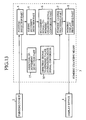
- Fig. 13 is a block diagram illustrating the configuration of a numeric value changing apparatus according to a fifth embodiment (Embodiment 5).
- Reference numeral 15 denotes a direction-of-movement detection part that detects the direction of movement of the finger contained in selected position information during the input thereinto of a numeric pointing signal and outputs a direction-of-movement signal.
- Reference numeral 16 denotes a direction signal-to-numeric value increase/decrease signal conversion part which responds to a change of direction-of-movement information contained in the direction signal from the detection part 15 to output a different numeric value increase/decrease signal.
- the numeric change processing part 7 is supplied with both of the numeric changing signal and the numeric value increase/decrease signal, then changes the set value in the direction that increases or decreases it in accordance with the numeric value increase/decrease signal, and at the same time, outputs a numeric signal corresponding to the thus updated numeric value.
- This embodiment is identical in construction with Embodiment 1 except the above. The parts corresponding to those in Embodiment 1 are identified by the same reference numerals, and no description will be repeated.
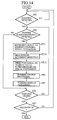
- Fig. 14 is a flowchart showing operations of the numeric changing means 3 in this embodiment.
- ST14 is a step of detecting the direction of movement of the finger on the touch panel (indicated by the selected position information) by the direction-of-movement detection part 15 during the input thereinto of the numeric pointing signal
- ST15 is a step of outputting from the direction signal-to-numeric value increase/decrease signal conversion part 16 the numeric value increase/decrease signal based on the direction-of-movement signal.
- the other steps are identical with those in Embodiment 1, and are identified by the same reference numerals, but no description will be given of them.
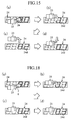
- Fig. 15 is a screen layout depicting an example of the display screen according to Embodiment 5.
- the display elements shown in Fig. 15 are identical with those in Embodiment 1, and are identified by the same reference numerals, but no description will be repeated.
- the direction-of-movement detection part 15 Upon sliding the finger upward on the touch panel in an area corresponding to the numeric display area 24 of the display device 1, the direction-of-movement detection part 15 detects the direction of movement of the finger, and outputs the direction-of-movement signal. And the direction signal-to-numeric value increase/decrease signal conversion part 16 outputs a numeric value increase/decrease signal of a positive direction (Figs. 15(a) to (c)).
- the direction-of-movement detection part 15 provides a different direction-of-movement signal
- the signal conversion part 16 provides a numeric value increase/decrease signal of a negative direction (Fig. 15(d)). While in this embodiment the numeric value has been described to be increased or decreased depending on whether the finger is slid upward or downward on the touch panel, the correspondence between the direction of movement of the finger and the direction of change of the numeric value is not limited specifically to the above. The numeric value may be increased or decreased, for example, depending on whether the finger is slid to right or left.
- Embodiment 5 since the direction of increasing or decreasing the set value changes with a change in the direction of movement of the finger, even if the numeric value is changed to a value larger than the intended one, it is possible to correct the unintended value to the desired one simply by changing the direction of movement of the finger.
- Fig. 16 is a block diagram illustrating the configuration of a numeric value changing apparatus according to a sixth embodiment (Embodiment 6).
- Reference numeral 17 denotes a discontinuation signal-to-numeric change stop signal conversion part which is supplied with the numeric pointing signal and, upon discontinuation of the input thereto of this pointing signal, outputs a numeric change stop signal.
- Reference numeral 18 denotes a numeric change continuation processing part which, until the application thereinto of the numeric change stop signal, keeps on processing for updating the set value at fixed time intervals and, upon each updating, outputs a numeric signal corresponding to the updated value.
- This embodiment is identical in construction with Embodiment 1 except the above. The parts corresponding to those in Embodiment 1 are identified by the same reference numerals, and no description will be repeated.
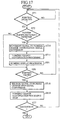
- Fig. 17 is a flowchart showing operations of the numeric changing means 3 in this embodiment.
- ST16 is a step of outputting from the direction signal-to-numeric changing signal conversion part 6 the numeric changing signal based on the direction-of-movement signal at fixed time intervals
- ST17 is a step of outputting from the numeric change continuation processing part 18 the numeric signal based on the numeric changing signal
- ST18 is a step of outputting from the discontinuation signal-to-numeric change stop signal conversion part 17 the numeric change stop signal in response to the discontinuation of the input thereto of the numeric pointing signal
- ST19 is a step of stopping the numeric change continuation processing part 18 from outputting the numeric signal based on the numeric changing signal.
- the other steps are identical with those in Embodiment 1, and are identified by the same reference numerals, but no description will be given of them.
- Fig. 18 is a screen layout depicting an example of the display screen according to Embodiment 6.
- the display elements shown in Fig. 18 are identical with those in Embodiment 1, and are identified by the same reference numerals, but no description will be repeated.
- a numeric changing signal indicative of a change in the position of the finger is fed into the numeric change continuation processing part 18.
- the numeric change continuation processing part 18 increases or decreases the set value at fixed time intervals and outputs a numeric signal of a different value.
- the set value displayed on the display device 1 is also updated correspondingly (Figs. 18(b) to (c)).
- the set value can be further changed in order 2 ⁇ 3 ⁇ 4 ⁇ as long as the numeric value to be changed is pointed by the finger. Then, the numeric value thus changed can finally be set at the desired value by taking the finger off the touch panel at predetermined timing (Fig. 18(d)).
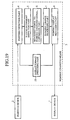
- Fig. 19 is a block diagram illustrating the configuration of a numeric value changing apparatus according to a seventh embodiment (Embodiment 7).
- Reference numeral 19 denotes a numeric display format switching part which outputs a display format signal for changing the display format of the numeric display area 24.
- the numeric display processing part 8 When supplied with the display format signal, the numeric display processing part 8 responds it to perform processing for changing the color or the like of the display area 24, and outputs a display signal accordingly.
- This embodiment is identical in construction with Embodiment 1 except the above. The parts corresponding to those in Embodiment 1 are identified by the same reference numerals, and no description will be repeated.
- Fig. 20 is a flowchart showing operations of the numeric changing means 3 in this embodiment.
- ST20 is a step of outputting from the numeric display format switching part 19 the display format signal and from the numeric display processing part 8 the display signal indicating, for example, a color different from the previous one in response to the display format signal;
- ST21 is a step of performing processing for restoring the previous display color or the like of the display area 24 in the display format switching part 19 and the display processing part 8 in response to the discontinuation of the pointing signal.
- what is changed based on the display format signal is not limited specifically to color.
- the other steps are identical with those in Embodiment 1, and are identified by the same reference numerals, but no description will be given of them.
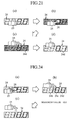
- Fig. 21 is a screen layout depicting an example of the display screen according to Embodiment 7.
- the display elements shown in Fig. 21 are identical with those in Embodiment 1, and are identified by the same reference numerals, but no description will be repeated.
- the display format switching part 19 Upon pressing the finger against the touch panel in an area corresponding to the numeric display area 24 of the display device 1 (Fig. 21(a)), the display format switching part 19 provides the display format signal, and the color or the like of the display area 24 is changed (Fig. 21(a)).
- the display format signal from the display format switching part 19 is canceled, and the color or the like of the display area 24 is restored (Fig. 21(d)).
- the background color turns blue, and the blue background remains unchanged during the numeric changing operation by the finger sliding movement, but it turns black again when the finger is moved off the touch panel.
- the selected numeric value since the selected numeric value remains in the new display format until it becomes deselected, it can easily be distinguished from other set values displayed on the touch panel. For example, even if an unintended one of numerical values displayed on the touch panel is selected, it can readily be found out before it is changed. Hence, it is possible to prevent the controlled object from being controlled based on a wrong set value when the numeric value changing apparatus of this embodiment is used to change numeric parameters for process control.
- Fig. 22 is a block diagram illustrating the configuration of a numeric value changing apparatus according to an eighth embodiment (Embodiment 8).
- Reference numeral 20 denotes a numeric setting control part which controls numeric setting to stay within a range defined by certain maximum and minimum values.
- Embodiment 1 is identical in construction with Embodiment 1 except the above.
- the parts corresponding to those in Embodiment 1 are identified by the same reference numerals, and no description will be repeated.
- Fig. 23 is a flowchart showing operations of the numeric changing means 8 in this embodiment.
- ST22 is a step of controlling the set value by the numeric setting control part 20 to keep it within the numeric range.
- the other steps are identical with those in Embodiment 1, and are identified by the same reference numerals, but no description will be given of them.
- Fig. 24 is a screen layout depicting an example of the display screen according to Embodiment 8.
- the display elements shown in Fig. 24 are identical with those in Embodiment 1, and are identified by the same reference numerals, but no description will be repeated.
- the set value is changed to the maximum value corresponding to the finger sliding movement (Fig. 24(c)).
- the subsequent finger sliding movement will not update the set value (Fig. 24(d)). For example, when the minimum and maximum values are preset at 0 and 100, respectively, the set value will not go out of this range, no matter how much it is changed by finger sliding movement.
- the apparatus of this embodiment is of great utility when employed in process control, in particular, in a plant control system for which it is absolutely necessary to ensure safety.
- Fig. 25 is a block diagram illustrating the configuration of a numeric value changing apparatus according to a ninth embodiment (Embodiment 9).
- Reference numeral 21 denotes a pointed digit or figure detection part which is supplied with the pointing signal from the pointing device 2 and outputs it as a digit pointing signal when the selected position information contained in the input pointing signal indicates a predetermined digit display section (for example, 24a) in the numeric display area 24.
- This embodiment is identical in construction with Embodiment 1 except the above. The parts corresponding to those in Embodiment 1 are identified by the same reference numerals, and no description will be repeated.
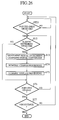
- Fig. 26 is a flowchart showing operations of the numeric changing means 8 in this embodiment.
- ST23 is a step of making a check to see if the pointed digit detection part 21 has detected the pointed digit of the numeric value on display.
- the other steps are identical with those in Embodiment 1, and are identified by the same reference numerals, but no description will be given of them.
- Fig. 27 is a screen layout depicting an example of the display screen according to Embodiment 9.
- the display elements shown in Fig. 27 are identical with those in Embodiment 1, and are identified by the same reference numerals, but no description will be repeated.
- the numeral of the selected digit display section is changed independently in response to the finger sliding movement (Figs. 27(c), (d)). For example, in the case of changing a set value from "103" to "105", the first digit display section 24c is selected first by pointing it with the finger, followed by sliding the finger to make a 3 ⁇ 4 ⁇ 5 change.
- the third digit display section 24a is selected first by pointing with the finger, after which the finger is slid to make a 1 ⁇ 2 ⁇ 3 ⁇ 4 change. Since the numeric value can be changed for each digit, it is possible to implement efficient numeric changing operation, for example, in the case of making a change the set value from "103" to "403.”
- the set value with plural figures can selectively be changed for each digit.
- the number of numeral candidates for each digit can be reduced, for example, to 10 (a decimal number).
- This embodiment provides the advantage of efficient and easy numeric change in a small panel display as well.
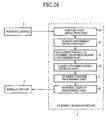
- Fig. 28 is a block diagram illustrating the configuration of a numeric value changing apparatus according to a tenth embodiment (Embodiment 10).
- Reference numeral 22 denotes a carry-up/carry-down decision part which, upon occurrence of a carry-up or carry-down at each of the selected digits 24b, 24c and 24d, outputs a numeric changing signal such that the numeral at the digit more significant than each selected digit is also changed accordingly.
- Embodiment 1 is identical in construction with Embodiment 1 except the above.
- the parts corresponding to those in Embodiment 1 are identified by the same reference numerals, and no description will be repeated.
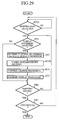
- Fig. 29 is a flowchart showing operations of the numeric changing means 8 in this embodiment.
- ST24 is a step of determining by the carry-up/carry-down decision part 22 as to whether to change numerals at the digits 24a, 24b and 24c more significant than the selected digits 24b, 24c and 24d, respectively.
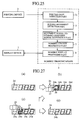
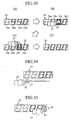
- Fig. 30 is a screen layout depicting an example of the display screen according to Embodiment 10.
- the display elements shown in Fig. 30 are identical with those in Embodiment 1, and are identified by the same reference numerals, but no description will be repeated.
- the first digit display section 24c is selected first by touching the corresponding area on the touch panel with the finger, followed by sliding the finger on the touch panel to make a change 3 ⁇ 4 ⁇ 9 ⁇ 0 ⁇ 1 ⁇ 2.
- the numeral at the immediately high-order digit is automatically carried up from “0" to "1.”
- Fig. 31 is a block diagram illustrating the configuration of a numeric value changing apparatus according to an eleventh embodiment (Embodiment 11).
- Reference numeral 23 denotes a sign reversal decision part which outputs a signal for changing the sign of the set value when supplied with a numeric change signal beyond the numeric changing range when the most significant digit of the set value is being selected.
- This embodiment is identical in construction with Embodiment 1 except the above. The parts corresponding to those in Embodiment 1 are identified by the same reference numerals, and no description will be repeated.
- Fig. 32 is a flowchart showing operations of the numeric changing means 3 in this embodiment.
- ST25 is a step of outputting from the sign reversal decision part 23 the signal for changing the sign of the set value when the most significant digit of the value is updated beyond the numeric changing range.
- the other steps are identical with those in Embodiment 1, and are identified by the same reference numerals, but no description will be given of them.
- Fig. 33 is a screen layout depicting an example of the display screen according to Embodiment 11.
- the display elements shown in Fig. 33 are identical with those in Embodiment 1, and are identified by the same reference numerals, but no description will be repeated.
- the sign of the set value is reversed.
- the sign of the set value is changed to the sign opposite to the above.
- the third digit display section is selected first by touching the corresponding area on the touch panel with the finger, followed by sliding the finger on the touch panel to make a change 2 ⁇ 1 ⁇ 0 ⁇ -1 ⁇ -2. In this instance, when the third digit undergoes a change 1 ⁇ 0 ⁇ -1, sign changing processing is performed.
- the apparatus of this embodiment provides increased efficiency, in particular, when changing the set value, for example, from “100” to “-100” or from “-100” to "100.”
Landscapes
- Engineering & Computer Science (AREA)
- General Engineering & Computer Science (AREA)
- Theoretical Computer Science (AREA)
- Human Computer Interaction (AREA)
- Physics & Mathematics (AREA)
- General Physics & Mathematics (AREA)
- User Interface Of Digital Computer (AREA)
- Position Input By Displaying (AREA)
- Liquid Crystal Display Device Control (AREA)
Applications Claiming Priority (2)
| Application Number | Priority Date | Filing Date | Title |
|---|---|---|---|
| JP14477998A JPH11338600A (ja) | 1998-05-26 | 1998-05-26 | 設定数値変更方法および設定数値変更装置 |
| JP14477998 | 1998-05-26 |
Publications (1)
| Publication Number | Publication Date |
|---|---|
| EP0961199A1 true EP0961199A1 (de) | 1999-12-01 |
Family
ID=15370248
Family Applications (1)
| Application Number | Title | Priority Date | Filing Date |
|---|---|---|---|
| EP99303833A Ceased EP0961199A1 (de) | 1998-05-26 | 1999-05-17 | Verfahren und Anordnug zur Änderung von numerischen Werten auf einer Anzeigevorrichtung |
Country Status (4)
| Country | Link |
|---|---|
| US (1) | US6310613B1 (de) |
| EP (1) | EP0961199A1 (de) |
| JP (1) | JPH11338600A (de) |
| CN (1) | CN1239786A (de) |
Cited By (20)
| Publication number | Priority date | Publication date | Assignee | Title |
|---|---|---|---|---|
| WO2002064486A1 (de) * | 2001-02-13 | 2002-08-22 | Siemens Aktiengesellschaft | Betriebsverfahren und bedienungseinrichtung für automatisierte containerkaikrane |
| FR2847058A1 (fr) * | 2002-11-13 | 2004-05-14 | Peugeot Citroen Automobiles Sa | Dispositif a commande tactile permettant de regler un parametre ayant des valeurs dont les variations sont continues |
| WO2007059095A3 (en) * | 2005-11-15 | 2008-02-14 | Cardinal Health 303 Inc | System and method for rapid input of data |
| EP2020634A1 (de) * | 2007-07-31 | 2009-02-04 | Palo Alto Research Institute Incorporated | Benutzeroberfläche für ein Kontext-Freizeit-Empfehlungssystem |
| WO2009088641A1 (en) * | 2008-01-06 | 2009-07-16 | Apple Inc. | Variable rate media playback methods for electronic devices with touch interfaces |
| EP2144385A3 (de) * | 2008-07-07 | 2010-03-03 | Lg Electronics Inc. | Tragbares Endgerät und Verfahren zur Steuerung eines tragbaren Endgeräts |
| EP2196359A1 (de) * | 2008-12-12 | 2010-06-16 | Volkswagen AG | Bedienverfahren und Bedieneinrichtung |
| EP2290820A1 (de) * | 2009-08-25 | 2011-03-02 | E.G.O. Elektro-Gerätebau GmbH | Verfahren zur Eingabe eines zweistelligen Wertes an einer Bedieneinrichtung und Bedieneinrichtung |
| DE102010056160A1 (de) * | 2010-12-24 | 2012-06-28 | Volkswagen Ag | Verfahren zum Bedienen eines Gerätes, insbesondere eines Kraftfahrzeuges |
| US20130111396A1 (en) * | 2011-10-31 | 2013-05-02 | Microsoft Corporation | Exposing inertial snap points |
| DE102013000219A1 (de) | 2013-01-04 | 2014-07-10 | Volkswagen Aktiengesellschaft | Verfahren und Vorrichtung zum Bedienen einer Einrichtung |
| US8839155B2 (en) | 2009-03-16 | 2014-09-16 | Apple Inc. | Accelerated scrolling for a multifunction device |
| CN104633948A (zh) * | 2015-02-26 | 2015-05-20 | 芜湖美的厨卫电器制造有限公司 | 显示装置、热水器及其加热参数的显示方法 |
| EP2758857A4 (de) * | 2011-09-22 | 2015-07-01 | Microsoft Technology Licensing Llc | Benutzerschnittstelle zur direkten bearbeitung eines wertes |
| EP2202625A3 (de) * | 2008-12-26 | 2015-10-14 | Brother Kogyo Kabushiki Kaisha | Eingabevorrichtung |
| US9354803B2 (en) | 2005-12-23 | 2016-05-31 | Apple Inc. | Scrolling list with floating adjacent index symbols |
| US9436374B2 (en) | 2009-09-25 | 2016-09-06 | Apple Inc. | Device, method, and graphical user interface for scrolling a multi-section document |
| EP3246810A1 (de) * | 2016-05-18 | 2017-11-22 | Honeywell International Inc. | System und verfahren zum knopfbetrieb für berührungsbildschirmvorrichtungen |
| US10705701B2 (en) | 2009-03-16 | 2020-07-07 | Apple Inc. | Device, method, and graphical user interface for moving a current position in content at a variable scrubbing rate |
| EP3623930B1 (de) * | 2018-09-12 | 2021-11-03 | Alpine Electronics, Inc. | Betriebsvorrichtung |
Families Citing this family (54)
| Publication number | Priority date | Publication date | Assignee | Title |
|---|---|---|---|---|
| US7818691B2 (en) * | 2000-05-11 | 2010-10-19 | Nes Stewart Irvine | Zeroclick |
| JP2003099171A (ja) * | 2001-09-21 | 2003-04-04 | Sony Corp | 情報処理装置および情報処理方法、記録媒体、並びにプログラム |
| US7496528B2 (en) * | 2001-12-27 | 2009-02-24 | Proto Labs, Inc. | Automated quoting of molds and molded parts |
| CA2429660A1 (en) * | 2002-05-31 | 2003-11-30 | Regelous, Stephen Noel | Field control method and system |
| US7075517B2 (en) * | 2002-09-16 | 2006-07-11 | Networkfab Corporation | Enhanced method and user interface for controlling radio communications equipment by utilizing a wheel mouse |
| CN100416474C (zh) * | 2002-10-09 | 2008-09-03 | 捷书有限公司 | 快速输入设备及其运行方法和应用 |
| JP3867039B2 (ja) * | 2002-10-25 | 2007-01-10 | 学校法人慶應義塾 | ハンドパターンスイッチ装置 |
| JP3742951B2 (ja) * | 2002-10-25 | 2006-02-08 | 学校法人慶應義塾 | ハンドパターンスイッチ装置 |
| JP2004206533A (ja) * | 2002-12-26 | 2004-07-22 | Yamatake Corp | 情報入力装置、情報入力プログラム及び情報入力方法 |
| JP3625470B1 (ja) * | 2003-09-30 | 2005-03-02 | キヤノン株式会社 | プロセスカートリッジ、及び、電子写真画像形成装置 |
| JP4380563B2 (ja) * | 2005-03-02 | 2009-12-09 | ソニー株式会社 | 編集装置および編集処理プログラム |
| US8564544B2 (en) * | 2006-09-06 | 2013-10-22 | Apple Inc. | Touch screen device, method, and graphical user interface for customizing display of content category icons |
| US9304675B2 (en) | 2006-09-06 | 2016-04-05 | Apple Inc. | Portable electronic device for instant messaging |
| US8564543B2 (en) | 2006-09-11 | 2013-10-22 | Apple Inc. | Media player with imaged based browsing |
| US8736557B2 (en) * | 2006-09-11 | 2014-05-27 | Apple Inc. | Electronic device with image based browsers |
| JP4820250B2 (ja) * | 2006-09-19 | 2011-11-24 | 株式会社リコー | 表示入力装置、方法およびプログラム |
| KR100720335B1 (ko) * | 2006-12-20 | 2007-05-23 | 최경순 | 접촉 위치 이동에 따라 생성되는 상대좌표값에 대응하는텍스트를 입력하는 텍스트 입력 장치 및 그 방법 |
| US9001047B2 (en) | 2007-01-07 | 2015-04-07 | Apple Inc. | Modal change based on orientation of a portable multifunction device |
| US8689132B2 (en) | 2007-01-07 | 2014-04-01 | Apple Inc. | Portable electronic device, method, and graphical user interface for displaying electronic documents and lists |
| KR101442105B1 (ko) * | 2007-09-07 | 2014-09-19 | 삼성전자주식회사 | 다차원 입력이 가능한 터치 스크린 패널 및 그의 다차원입력 방법 |
| JP4933997B2 (ja) * | 2007-09-25 | 2012-05-16 | 株式会社山武 | 数値設定方法およびタッチパネル式操作装置 |
| US8327272B2 (en) | 2008-01-06 | 2012-12-04 | Apple Inc. | Portable multifunction device, method, and graphical user interface for viewing and managing electronic calendars |
| US20100066743A1 (en) * | 2008-09-17 | 2010-03-18 | Gustavo Adolfo Fortmann | Method for improved visualization of dynamic values displayed in a digital format |
| US20110080351A1 (en) * | 2009-10-07 | 2011-04-07 | Research In Motion Limited | method of controlling touch input on a touch-sensitive display when a display element is active and a portable electronic device configured for the same |
| US8736561B2 (en) | 2010-01-06 | 2014-05-27 | Apple Inc. | Device, method, and graphical user interface with content display modes and display rotation heuristics |
| JP5556515B2 (ja) * | 2010-09-07 | 2014-07-23 | ソニー株式会社 | 情報処理装置、情報処理方法およびプログラム |
| DE102010062485B3 (de) * | 2010-12-06 | 2012-04-26 | E.G.O. Elektro-Gerätebau GmbH | Verfahren zur Steuerung eines Gerätes und Bedieneinrichtung dafür |
| JP5535090B2 (ja) * | 2011-01-04 | 2014-07-02 | 三菱電機株式会社 | 表示装置および表示装置の画面データ作成装置 |
| JP5668548B2 (ja) * | 2011-03-16 | 2015-02-12 | 株式会社リコー | 表示装置、表示装置の表示方法、プログラム、コンピュータ読み取り可能な記録媒体、画像形成装置 |
| JP5561290B2 (ja) | 2012-02-13 | 2014-07-30 | コニカミノルタ株式会社 | 画像形成装置およびその制御プログラム |
| JP6004693B2 (ja) * | 2012-03-23 | 2016-10-12 | キヤノン株式会社 | 表示制御装置及びその制御方法 |
| JP6034649B2 (ja) * | 2012-10-16 | 2016-11-30 | キヤノン株式会社 | 情報処理装置、情報処理装置の制御方法、及びプログラム |
| JP5951551B2 (ja) * | 2013-04-17 | 2016-07-13 | 株式会社スター精機 | 成形品取出機の教示ペンダント |
| JP6065728B2 (ja) * | 2013-04-18 | 2017-01-25 | 三菱電機株式会社 | 数量選択装置および端末 |
| JP6141221B2 (ja) * | 2013-07-31 | 2017-06-07 | 京セラドキュメントソリューションズ株式会社 | 数値入力装置及び電子機器 |
| JP6180274B2 (ja) * | 2013-10-17 | 2017-08-16 | 日置電機株式会社 | 測定装置 |
| JP6120754B2 (ja) * | 2013-11-27 | 2017-04-26 | 京セラドキュメントソリューションズ株式会社 | 表示入力装置およびそれを備えた画像形成装置 |
| JP5953321B2 (ja) * | 2014-01-15 | 2016-07-20 | 京セラドキュメントソリューションズ株式会社 | 表示装置及び表示制御プログラム |
| JP5901663B2 (ja) * | 2014-01-15 | 2016-04-13 | 京セラドキュメントソリューションズ株式会社 | 表示装置及び表示制御プログラム |
| JP6342734B2 (ja) * | 2014-07-10 | 2018-06-13 | 大和製衡株式会社 | 秤 |
| CN106797493A (zh) | 2014-09-02 | 2017-05-31 | 苹果公司 | 音乐用户界面 |
| US10992795B2 (en) | 2017-05-16 | 2021-04-27 | Apple Inc. | Methods and interfaces for home media control |
| US11431836B2 (en) | 2017-05-02 | 2022-08-30 | Apple Inc. | Methods and interfaces for initiating media playback |
| US10928980B2 (en) | 2017-05-12 | 2021-02-23 | Apple Inc. | User interfaces for playing and managing audio items |
| US12526361B2 (en) | 2017-05-16 | 2026-01-13 | Apple Inc. | Methods for outputting an audio output in accordance with a user being within a range of a device |
| CN111343060B (zh) | 2017-05-16 | 2022-02-11 | 苹果公司 | 用于家庭媒体控制的方法和界面 |
| JP2019159359A (ja) * | 2018-03-07 | 2019-09-19 | 株式会社スクウェア・エニックス | プログラム、コンピュータ装置、及びプログラム制御方法 |
| JP6730365B2 (ja) * | 2018-04-16 | 2020-07-29 | ファナック株式会社 | 軸送り装置 |
| US11620103B2 (en) | 2019-05-31 | 2023-04-04 | Apple Inc. | User interfaces for audio media control |
| US11010121B2 (en) | 2019-05-31 | 2021-05-18 | Apple Inc. | User interfaces for audio media control |
| US11194467B2 (en) | 2019-06-01 | 2021-12-07 | Apple Inc. | Keyboard management user interfaces |
| CN111459389B (zh) * | 2020-04-24 | 2021-06-04 | Oppo(重庆)智能科技有限公司 | 提示方法、电子装置和存储介质 |
| JP7508881B2 (ja) * | 2020-06-17 | 2024-07-02 | 京セラドキュメントソリューションズ株式会社 | 情報処理装置 |
| US11392291B2 (en) | 2020-09-25 | 2022-07-19 | Apple Inc. | Methods and interfaces for media control with dynamic feedback |
Citations (3)
| Publication number | Priority date | Publication date | Assignee | Title |
|---|---|---|---|---|
| EP0293291A1 (de) * | 1987-05-25 | 1988-11-30 | Sextant Avionique S.A. | Fernsteuervorrichtung für einen Rechner, der mit einem Bildschirm verbunden ist |
| EP0326751A2 (de) * | 1988-02-01 | 1989-08-09 | Sperry Marine Inc. | Steuerberührungsanzeige mit Steuerung durch Schiebeberührung |
| FR2677783A1 (fr) * | 1991-06-11 | 1992-12-18 | Sextant Avionique | Procede et dispositif pour la modification d'une variable affichee sur un ecran video. |
Family Cites Families (3)
| Publication number | Priority date | Publication date | Assignee | Title |
|---|---|---|---|---|
| US4242676A (en) * | 1977-12-29 | 1980-12-30 | Centre Electronique Horloger Sa | Interactive device for data input into an instrument of small dimensions |
| JPH0695796A (ja) * | 1992-09-14 | 1994-04-08 | Mutoh Ind Ltd | ペン入出力装置 |
| JP3894240B2 (ja) * | 1996-05-14 | 2007-03-14 | ソニー株式会社 | 表示制御装置 |
-
1998
- 1998-05-26 JP JP14477998A patent/JPH11338600A/ja active Pending
-
1999
- 1999-05-17 EP EP99303833A patent/EP0961199A1/de not_active Ceased
- 1999-05-17 US US09/312,063 patent/US6310613B1/en not_active Expired - Fee Related
- 1999-05-26 CN CN99107058.5A patent/CN1239786A/zh active Pending
Patent Citations (3)
| Publication number | Priority date | Publication date | Assignee | Title |
|---|---|---|---|---|
| EP0293291A1 (de) * | 1987-05-25 | 1988-11-30 | Sextant Avionique S.A. | Fernsteuervorrichtung für einen Rechner, der mit einem Bildschirm verbunden ist |
| EP0326751A2 (de) * | 1988-02-01 | 1989-08-09 | Sperry Marine Inc. | Steuerberührungsanzeige mit Steuerung durch Schiebeberührung |
| FR2677783A1 (fr) * | 1991-06-11 | 1992-12-18 | Sextant Avionique | Procede et dispositif pour la modification d'une variable affichee sur un ecran video. |
Non-Patent Citations (1)
| Title |
|---|
| "ENHANCED MULTI-FIELD SPIN BUTTON", IBM TECHNICAL DISCLOSURE BULLETIN, vol. 36, no. 11, 1 November 1993 (1993-11-01), pages 117, XP000424799, ISSN: 0018-8689 * |
Cited By (35)
| Publication number | Priority date | Publication date | Assignee | Title |
|---|---|---|---|---|
| US6965823B2 (en) | 2001-02-13 | 2005-11-15 | Siemens Aktiengesellschaft | Operating method and device for operating automated container quay cranes |
| WO2002064486A1 (de) * | 2001-02-13 | 2002-08-22 | Siemens Aktiengesellschaft | Betriebsverfahren und bedienungseinrichtung für automatisierte containerkaikrane |
| FR2847058A1 (fr) * | 2002-11-13 | 2004-05-14 | Peugeot Citroen Automobiles Sa | Dispositif a commande tactile permettant de regler un parametre ayant des valeurs dont les variations sont continues |
| EP1420333A3 (de) * | 2002-11-13 | 2005-04-20 | Peugeot Citroen Automobiles SA | Berührungssteuereinrichtung zur Steuerung eines Parameters mit kontinuierlich variablen Werten |
| WO2007059095A3 (en) * | 2005-11-15 | 2008-02-14 | Cardinal Health 303 Inc | System and method for rapid input of data |
| US9201507B2 (en) | 2005-11-15 | 2015-12-01 | Carefusion 303, Inc. | System and method for rapid input of data |
| AU2006315593B2 (en) * | 2005-11-15 | 2011-08-11 | Carefusion 303, Inc. | System and method for rapid input of data |
| US10732814B2 (en) | 2005-12-23 | 2020-08-04 | Apple Inc. | Scrolling list with floating adjacent index symbols |
| US9354803B2 (en) | 2005-12-23 | 2016-05-31 | Apple Inc. | Scrolling list with floating adjacent index symbols |
| EP2020634A1 (de) * | 2007-07-31 | 2009-02-04 | Palo Alto Research Institute Incorporated | Benutzeroberfläche für ein Kontext-Freizeit-Empfehlungssystem |
| WO2009088641A1 (en) * | 2008-01-06 | 2009-07-16 | Apple Inc. | Variable rate media playback methods for electronic devices with touch interfaces |
| EP2144385A3 (de) * | 2008-07-07 | 2010-03-03 | Lg Electronics Inc. | Tragbares Endgerät und Verfahren zur Steuerung eines tragbaren Endgeräts |
| US8494494B2 (en) | 2008-07-07 | 2013-07-23 | Lg Electronics Inc. | Mobile terminal and method of controlling mobile terminal |
| EP2196359A1 (de) * | 2008-12-12 | 2010-06-16 | Volkswagen AG | Bedienverfahren und Bedieneinrichtung |
| EP2202625A3 (de) * | 2008-12-26 | 2015-10-14 | Brother Kogyo Kabushiki Kaisha | Eingabevorrichtung |
| US12254171B2 (en) | 2009-03-16 | 2025-03-18 | Apple Inc. | Device, method, and graphical user interface for moving a current position in content at a variable scrubbing rate |
| US8839155B2 (en) | 2009-03-16 | 2014-09-16 | Apple Inc. | Accelerated scrolling for a multifunction device |
| US10705701B2 (en) | 2009-03-16 | 2020-07-07 | Apple Inc. | Device, method, and graphical user interface for moving a current position in content at a variable scrubbing rate |
| US11567648B2 (en) | 2009-03-16 | 2023-01-31 | Apple Inc. | Device, method, and graphical user interface for moving a current position in content at a variable scrubbing rate |
| US11907519B2 (en) | 2009-03-16 | 2024-02-20 | Apple Inc. | Device, method, and graphical user interface for moving a current position in content at a variable scrubbing rate |
| EP2290820A1 (de) * | 2009-08-25 | 2011-03-02 | E.G.O. Elektro-Gerätebau GmbH | Verfahren zur Eingabe eines zweistelligen Wertes an einer Bedieneinrichtung und Bedieneinrichtung |
| US9436374B2 (en) | 2009-09-25 | 2016-09-06 | Apple Inc. | Device, method, and graphical user interface for scrolling a multi-section document |
| DE102010056160A1 (de) * | 2010-12-24 | 2012-06-28 | Volkswagen Ag | Verfahren zum Bedienen eines Gerätes, insbesondere eines Kraftfahrzeuges |
| EP2758857A4 (de) * | 2011-09-22 | 2015-07-01 | Microsoft Technology Licensing Llc | Benutzerschnittstelle zur direkten bearbeitung eines wertes |
| US9720583B2 (en) | 2011-09-22 | 2017-08-01 | Microsoft Technology Licensing, Llc | User interface for editing a value in place |
| CN108182032B (zh) * | 2011-09-22 | 2021-04-23 | 微软技术许可有限责任公司 | 用于对值进行就地编辑的用户界面 |
| CN108182032A (zh) * | 2011-09-22 | 2018-06-19 | 微软技术许可有限责任公司 | 用于对值进行就地编辑的用户界面 |
| US10133466B2 (en) | 2011-09-22 | 2018-11-20 | Microsoct Technology Licensing, LLC | User interface for editing a value in place |
| US9372612B2 (en) * | 2011-10-31 | 2016-06-21 | Microsoft Technology Licensing, Llc | Exposing inertial snap points |
| US20130111396A1 (en) * | 2011-10-31 | 2013-05-02 | Microsoft Corporation | Exposing inertial snap points |
| DE102013000219A1 (de) | 2013-01-04 | 2014-07-10 | Volkswagen Aktiengesellschaft | Verfahren und Vorrichtung zum Bedienen einer Einrichtung |
| CN104633948A (zh) * | 2015-02-26 | 2015-05-20 | 芜湖美的厨卫电器制造有限公司 | 显示装置、热水器及其加热参数的显示方法 |
| US9916032B2 (en) | 2016-05-18 | 2018-03-13 | Honeywell International Inc. | System and method of knob operation for touchscreen devices |
| EP3246810A1 (de) * | 2016-05-18 | 2017-11-22 | Honeywell International Inc. | System und verfahren zum knopfbetrieb für berührungsbildschirmvorrichtungen |
| EP3623930B1 (de) * | 2018-09-12 | 2021-11-03 | Alpine Electronics, Inc. | Betriebsvorrichtung |
Also Published As
| Publication number | Publication date |
|---|---|
| CN1239786A (zh) | 1999-12-29 |
| JPH11338600A (ja) | 1999-12-10 |
| US6310613B1 (en) | 2001-10-30 |
Similar Documents
| Publication | Publication Date | Title |
|---|---|---|
| US6310613B1 (en) | Method and apparatus for changing numeric values on a display device | |
| US5910801A (en) | Mechanism for fine-grained and coarse-grained control of zooming in a display of a one-dimensional data set | |
| US6496182B1 (en) | Method and system for providing touch-sensitive screens for the visually impaired | |
| JP3176541B2 (ja) | 情報検索装置および情報検索方法 | |
| US7373605B2 (en) | Presentation system for displaying data | |
| US7698653B2 (en) | Graphical user interface including zoom control box representing image and magnification of displayed image | |
| US6320599B1 (en) | Zooming scale indicator in computer graphics | |
| US5473343A (en) | Method and apparatus for locating a cursor on a computer screen | |
| US5742285A (en) | Virtual screen display system | |
| KR100464194B1 (ko) | 데이타 처리 시스템내의 표시영역에 적합한 아이콘 크기의 자동 조정 | |
| US20020067346A1 (en) | Graphical user interface for devices having small tactile displays | |
| EP0464712A2 (de) | Anzeige/Eingabesteuersystem für virtuelle Tastatur in einem Informationsverarbeitungsgerät mit integrierter Anzeige/Eingabevorrichtung | |
| JP7806775B2 (ja) | 電子機器、表示制御方法及びプログラム | |
| US6018336A (en) | Computer system having digitizing tablet | |
| EP1376324A2 (de) | Informationsverarbeitungsgerät und in einem solchen Gerät verwendbare Verfahren zur Unterstützung von Zeicheneingabe | |
| US6342894B1 (en) | Icon display method | |
| EP1302841A2 (de) | Eingabesysteme | |
| JPH08249125A (ja) | ポインタによる数値入力方法 | |
| JPH10133639A (ja) | 拡大表示枠付きマウスカーソル | |
| JPH05282123A (ja) | 表示制御装置および表示制御方法 | |
| JP3313583B2 (ja) | カーソル表示方法とそのカーソル表示装置 | |
| JP3211263B2 (ja) | 表示制御装置 | |
| KR100228806B1 (ko) | 휴대용 정보 단말기의 화면 표시방법 | |
| JPH0524532B2 (de) | ||
| JPH11327633A (ja) | プラントオペレーション装置及びその装置の処理プログラムを記録する記録媒体 |
Legal Events
| Date | Code | Title | Description |
|---|---|---|---|
| PUAI | Public reference made under article 153(3) epc to a published international application that has entered the european phase |
Free format text: ORIGINAL CODE: 0009012 |
|
| AK | Designated contracting states |
Kind code of ref document: A1 Designated state(s): DE FR GB |
|
| AX | Request for extension of the european patent |
Free format text: AL;LT;LV;MK;RO;SI |
|
| 17P | Request for examination filed |
Effective date: 20000510 |
|
| AKX | Designation fees paid |
Free format text: DE FR GB |
|
| 17Q | First examination report despatched |
Effective date: 20020627 |
|
| STAA | Information on the status of an ep patent application or granted ep patent |
Free format text: STATUS: THE APPLICATION HAS BEEN REFUSED |
|
| 18R | Application refused |
Effective date: 20040401 |