EP1505545A2 - Méthode et dispositif pour la visualisation d'une fonction dans le plan polaire au moyen d'un calculateur - Google Patents
Méthode et dispositif pour la visualisation d'une fonction dans le plan polaire au moyen d'un calculateur Download PDFInfo
- Publication number
- EP1505545A2 EP1505545A2 EP04254472A EP04254472A EP1505545A2 EP 1505545 A2 EP1505545 A2 EP 1505545A2 EP 04254472 A EP04254472 A EP 04254472A EP 04254472 A EP04254472 A EP 04254472A EP 1505545 A2 EP1505545 A2 EP 1505545A2
- Authority
- EP
- European Patent Office
- Prior art keywords
- user
- calculator
- expression
- radius
- display
- Prior art date
- Legal status (The legal status is an assumption and is not a legal conclusion. Google has not performed a legal analysis and makes no representation as to the accuracy of the status listed.)
- Granted
Links
Images









Classifications
-
- G—PHYSICS
- G06—COMPUTING OR CALCULATING; COUNTING
- G06T—IMAGE DATA PROCESSING OR GENERATION, IN GENERAL
- G06T11/00—Two-dimensional [2D] image generation
- G06T11/20—Drawing from basic elements
- G06T11/26—Drawing of charts or graphs
Definitions
- the present invention relates to a method of and apparatus for expression display and animation of expression display in polar plan using a calculator.
- a hand-held calculator is an important and useful device. Similar to a computer, the hand-held calculator has a processor, a memory, a display, and an input device; however, there are important distinguishing differences between the hand-held calculator and the computer.
- the hand-held calculator is a specialized device and not a general purpose device, as is true of a computer. Because of this specialization, typically the handheld calculator costs less, has a longer useful lifespan, and is more reliable and more portable than the computer.
- a hand-held calculator typically executes a single program and, less frequently, supports execution of user-created programs.
- a hand-held calculator supports addition, subtraction, multiplication, and division of numbers, either integer-based or decimal-based, entered by a user and displays the results on a built-in display.
- a graphical calculator is a further specialized version of a hand-held calculator having a display which is typically larger than a regular hand-held calculator display in order to enable graph output.
- graphical calculator displays are liquid crystal displays for more accurate representation and enhanced readability of a graph output.
- a graphical calculator is able to display a graph of a specific expression, e.g. a sine wave representing a sinusoidal function, entered by a user.
- a specific expression e.g. a sine wave representing a sinusoidal function
- graphical capabilities on hand-held calculators are only available as part of expensive and complex, "high end" scientific calculators. These graphical calculators are more expensive than other calculators, typically costing hundreds of dollars. These graphical calculators are more complicated to operate than other calculators because of the large amount of functionality incorporated therein.
- the increased functionality has required a corresponding increase in the number of keys required for manipulating and using the calculator.
- currently available graphical calculators have approximately fifty (50) keys including two (2) shift or modifier keys for a user to manipulate, e.g. a Texas Instruments (TI) 83 plus calculator has 51 keys and two (2) shift keys which can be used concurrently, enabling up to four functions to be assigned per the 51 remaining keys, and a Hewlett-Packard (HP) 48G+/GX calculator has 49 keys and three (3) shift keys, enabling up six functions to be assigned per the remaining 49 keys.
- TI Texas Instruments
- HP Hewlett-Packard
- a user must contend with different modes of operation of the current graphical calculator. Different modes of operation, accessible via specific keys and/or key sequences, must be utilized in order to access specific calculator functionality, e.g. a graphical calculator may include a fraction mode, a decimal mode, a binary mode, a hexadecimal mode, a finance mode, a statistics mode, and a graph mode.
- expression input requires increasingly complicated key manipulations and combinations.
- a mode specifying combination may include manipulation of a graph key to instruct the calculator to graph the following expression entry.
- the expression entry combination may include manipulation of multiple keys to input the expression to be graphed and the completion combination includes manipulation of a key, e.g. an enter key, to instruct the calculator to perform the preceding operations, i.e. graph the entered expression.
- the user manual for a currently available hand-held graphical calculator has dramatically increased in size in order to fully explain the use of the calculator.
- the above-cited TI-83 plus calculator manual includes 269 pages and the HP 48G+/GX calculator manual includes 506 pages. These are very long documents which are typically not read by users. Further, users are likely to be deterred from reading the manual because of the imposing size of the manual.
- Graphical calculators are very popular and effective educational aides. School students using graphical calculators can easily visualize complex functions; however, the complexity and cost of currently available graphical calculators deters many students and schools from making a purchase. Purchasers are dissuaded by the size of the manual, multiple modes of operation, and the number of keys and key combinations required for inputting expressions.
- Graphical representations of a function is an effective teaching method.
- Prior approaches for teaching functions using polar coordinates and a polar plan representation include lectures and drawing functions using a hand drawn approach, i.e., pen and paper, chalk and blackboard, or marker and whiteboard.
- prior approaches to display graphical representations of functions on calculators have included use of a polar coordinate system.
- the present invention seeks to provide an improved calculator and preferably a calculator-based implementation for drawing polar plan representations wherein the graphing of the function is based on varying the radius of which the inventor is currently aware.
- the preferred embodiments can provide a method of and apparatus for expression display by varying the angle of a user-entered expression in polar plan using a calculator.
- They can also provide a method of and apparatus for animated expression display in polar plan using a calculator.
- a method aspect of graphing a user-entered expression on a calculator display includes a calculator receiving a user-entered expression including a radius variable to be graphed.
- the user-entered expression causes the calculator to graph the userentered expression on a polar coordinate system.
- An apparatus aspect of a calculator for graphing a user-entered expression on a calculator display includes means for receiving and displaying a user-entered expression including a radius variable.
- the calculator further includes means for graphing the received user-entered expression in a polar coordinate system on a calculator display responsive to receiving only the user-entered expression.
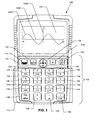
- Figure 1 is a front face view of a graphical calculator 100 according to an embodiment of the present invention.
- an embodiment according to the present invention enables use of a calculator for display of graphical representations of user-entered expressions using a polar coordinate system based on varying the radius term of the expression. Further advantageously, an embodiment according to the present invention enables use of a calculator for animated display of a user-entered expression using a calculator.
- Calculator 100 includes a display 102 and a primarily key-based input area 104 set in a front face 106.
- front face 106 is depicted as a rounded rectangle, it is to be understood that the front face may be manufactured to be any of a number of different shapes.
- input mechanisms are described below, it is to be understood that variations in the number, type, and configuration of input mechanisms may be found in different embodiments of the present invention.
- Display 102 is a rectangular liquid crystal display (LCD) which is 96 pixels wide and 64 pixels in height. As shown in figure 1, display 102 displays a sine wave 102A on a graph having an X axis 102B and a Y axis 102C.
- Input area 104 includes four keys and one directional input device 108 in a row 110 and 16 keys arranged in a four by four grid 112. Although a four by four grid is depicted and described, it is to be understood that the input area keys may be arranged in different configurations.
- Directional input device 108 is used to navigate menus and perform information input, recall, and editing.
- Directional input device 108 may be manipulated by the user to input at least four directions, i.e. up, down, left, and right to calculator 100.
- Input of the left arrow of directional input device 108 inputs a move left command to processor 204 thereby moving the current cursor position on display 102 to the left one position.
- Input of the right arrow of directional input device 108 inputs a move right command to processor 204 thereby moving the current cursor position on display 102 to the right one position.
- a secondary function of directional input device 108 is editing an expression on display 102.
- the input of shift key 114 in conjunction with or prior to left arrow of directional input device 108 inputs a backspace command to processor 204 thereby deleting the character to the left of the current cursor position on display 102.
- the input of shift key 114 in conjunction with or prior to right arrow of directional input device 108 inputs a delete command to processor 204 thereby deleting the character to the right of the current cursor position on display 102.
- the four remaining keys in row 110 are shift key 114, open parenthesis key 116, close parenthesis key 118, and power key 120.
- Shift key 114 is used to access a second set of functions, i.e. secondary functions, assigned to the remaining keys on calculator 100. For example, user activating power key 120 turns on calculator 100; however, activation of power key 120 subsequent to activation of shift key 114 turns off the calculator. In a similar fashion, each of the remaining keys of calculator 100 has an assigned secondary function.
- Open parenthesis key 116 inputs a beginning parenthesis in a user-entered expression.
- the secondary function of open parenthesis key 116 is to input a command causing calculator 100 to split a graphical output on display 102 such that one half of the display is a graph and the other half is numerical information related to the graph displayed.
- Close parenthesis key 118 inputs an ending parenthesis in a user-entered expression.
- the secondary function of close parenthesis key 118 is to input a T variable in a user-entered expression.
- Power key 120 turns on calculator 100 and, as described above, the secondary function of power key 120 is to turn off calculator 100. Additionally, power key 120 operates as a clear key after calculator 100 is turned on, i.e. the power key may be used to clear the displayed expression on display 102. Manipulation of shift key 114 followed by right arrow of directional input device 108 deletes input characters to the right of the current input position and manipulation of shift key 114 followed by left arrow of directional input device 108 deletes input characters to the left of the current input position.
- Row 1, column 1 key 122 i.e. the seven key, inputs a seven (7) value in user-entered expression and has a secondary function of inputting a sin function in a user-entered expression.
- Row 1, column 2 key 124 i.e. the eight key, inputs an eight (8) value in a user-entered expression and has a secondary function of inputting a cos function in a user-entered expression.
- column 3 key 126 i.e. the nine key inputs a nine (9) value in a user-entered expression and has a secondary function of inputting a tan function in a user-entered expression.
- the division key inputs a division (/) function in a user-entered expression and has a secondary function of inputting a theta ( ⁇ ) variable in a user-entered expression. Further, as described in detail below, the division key 128 is used to input a fractional value to calculator 100. Division key 128 is input between input of the digits of the numerator and denominator of a fraction.
- Row 2, column 1 key 130 i.e. the four key, inputs a four (4) value in a user-entered expression and has a secondary function of inputting a square root function in a user-entered expression.
- Row 2, column 2 key 132 i.e. the five key, inputs a five-(5) value in a user entered expression and has a secondary function of inputting a squared function, i.e. raising a value to the second power, in a user-entered expression.
- Row 2, column 3 key 134 i.e. the six key, inputs a six (6) value in a user-entered expression and has a secondary function of inputting a value raised to the power of a subsequently entered value function, i.e.
- Row 2 key 136 i.e. the multiplication key, inputs a multiplication (*) function in a user-entered expression and has a secondary function of inputting an X variable in a user-entered expression.
- Row 3, column 1 key 138 i.e. the one key, inputs a one (1) value in a user-entered expression and has a secondary function of inputting an absolute value function in a user-entered expression.
- Row 3, column 2 key 140 i.e. the 2 key, inputs a two (2) value in a user-entered expression and has a secondary function of inputting a natural logarithm function in a user-entered expression.
- Row 3, column 4 key 144 i.e. the minus key, inputs a subtraction (-) function in a user-entered expression and has a secondary function of inputting a NOT function in a user-entered expression.
- Row 4, column 1 key 146 i.e. the execute key, inputs an execute command to calculator 100 and has a secondary function of inputting a menu command to the calculator.
- Row 4, column 2 key 148 i.e. the zero key, inputs a zero (0) value in a user-entered expression and has a secondary function of inputting an e value in a user-entered expression.
- Row 4, column 3 key 150 i.e. the dot key, inputs a decimal point in a value entry and has a secondary function of inputting a pi constant value in a user-entered expression.
- Row 4, column 4 key 152 of i.e.
- the plus key inputs an addition (+) function in a user-entered expression and has a secondary function of inputting a times ten to the power of a subsequently entered value, i.e. "*10 ⁇ Y" in a user-entered expression.
- processor 204 drives display 102 to display a menu 300 ( Figure 3).
- the user manipulates directional input device 108 up arrow and/or down arrow to cause the highlighted menu item to move up/down one item.
- the user manipulates execute key 146 (primary function) to input the highlighted menu item. If the user manipulates the power key 120, no input to processor 204 is generated and the menu 300 is no longer displayed on display 102.
- Figure 2 is a block diagram illustrating an exemplary calculator 100 upon which an embodiment of the invention may be implemented.
- Calculator 100 includes a bus 202 or other communication mechanism for communicating information, and a processor 204 coupled with the bus 202 for processing information.
- processor 204 is a 16 bit processor.
- Calculator 100 also includes a main memory 206, such as a random access memory (RAM) or other dynamic storage device, coupled to the bus 202 for storing data and expressions according to an embodiment of the present invention and instructions to be executed by processor 204.
- Main memory 206 also may be used for storing temporary variables or other intermediate information during execution of instructions to be executed by processor 204.
- main memory 206 is an 8 Kilobyte RAM.
- the components of calculator 100 may be combined onto a single integrated circuit, e.g. processor 204 and main memory 206 may be combined on a single "system on a chip.”
- Calculator 100 further includes a read only memory (ROM) 208 or other static storage device coupled to the bus 202 for storing static information and instructions for the processor 204.
- ROM 208 is a 128 Kilobyte ROM.
- Calculator 100 may be coupled via the bus 202 to a display 102, such as the above-described 96 * 64 pixel LCD, for displaying an interface to a user.
- An input area 104 is coupled to the bus 202 for communicating information, e.g. user-entered expressions and values, and command inputs to the processor 204.
- An input device 108 is part of input area 104 and communicates direction information and command selections to processor 204 and controls cursor movement on the display 102.
- This input device typically has two degrees of freedom in two axes, a first axis (e.g., x) and a second axis (e.g., y) allowing the device to specify positions in a plane.
- the invention is related to the use of calculator 100, such as the depicted calculator of Figure 2, to input and apply operations, e.g. expressions, to data and graph the results of operations by driving display 102.
- data is stored and accessed from main memory 206 by calculator 200 in response to processor 204 executing sequences of instructions contained in main memory 206 in response to input received via input area 104.
- a user interacts with the calculator 100 via a user interface displayed (as described below) on display 102.
- main memory 206 causes the processor 204 to perform the process steps described below.
- processor 204 executes the sequences of instructions contained in the main memory 206 to perform the process steps described below.
- hard-wired circuitry may be used in place of or in combination with computer software instructions to implement the invention.
- embodiments of the invention are not limited to any specific combination of hardware circuitry and software.
- Figure 3 illustrates a menu 300 displayed on display 102 according to an embodiment of the present invention.
- menu 300 is displayed in response to the user manipulating the secondary function, i.e. menu, of execute key 146.
- Menu 300 includes additional expressions able to be selected and input by a user (in the manner described above) to processor 204.
- user-entered expressions are able to be displayed varying based on a radius variable.
- an animated display of the graphing process of graphing the function in polar plan view is achieved by repeatedly drawing a circle having an origin at a given starting point, e.g., (0, 0), and a radius equal to the value R and a point on the perimeter of the circle at an angle ⁇ .
- the user-entered expression determines the radius R and the angle ⁇ .
- the angle ⁇ varies from a given starting value, e.g., zero (0), as the circles are drawn.
- a user is able to input and display expressions in a polar coordinate system and a polar plan view using a calculator.
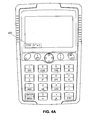
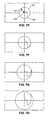
- display 102 displays a user input of a mathematical expression 402, i.e. "cos( ⁇ )", by sequential manipulation of the shift key 114, the eight key 124, the shift key 114, and the division key 128.
- " at the end of mathematical expression 402 indicates the cursor position to the user during editing/input of the user-entered expression, i.e. mathematical expression 402.
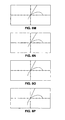
- processor 204 evaluates the input mathematical expression 402 and drives display 102 to display the result 404 i.e. a graphical representation of a cosine function 406 varying based on the radius R in a two dimensional polar coordinate system (i.e., a four petal flower graph) to the user as depicted in Figure 4b.
- the user need only input an expression to be graphed to processor 204 of calculator 100 and the processor drives display 102 to graph the mathematical expression. The user is not required to enter a graphing mode or manipulate a graphing key.
- the user is able to graph expressions using a polar coordinate system without requiring special modes or the manipulation of a graphing key.
- the user is able to display either cosine wave 406 or cosine wave 406 and a listing of select points on cosine wave 406. Further, the user is able to zoom in and out, increasing or decreasing the scale of the displayed graph, shift the coordinate system to the right, left, upward, or downward as described, and manipulate directional input device 108 to move a cursor position along the displayed graphical representation of the user-entered mathematical expression.
- the user is able to manipulate calculator 100 to display a graphical representation of a user-entered expression varying based on the radius R and a user-entered expression varying based on the angle ⁇ in a polar plan view of a polar coordinate system.
- display 102 displays a user input of a mathematical expression 408 including two cosine expressions, i.e. "cos(2 ⁇ ) & cos(2R)." The first part of the expression, i.e., cos(2 ⁇ ), varies based on the value of the angle ⁇ , while the second part of the expression, i.e., cos(2R), varies based on the value of the radius R.
- the user By sequential manipulation of the shift key 114, the eight key 124, the two key 140, the multiplication key 136, the shift key 114 and the division key 128, the user inputs the first part of the expression.
- the second part of the expression 408 is entered by sequential manipulation of the shift key 114, the eight key 124, the two key 140, the multiplication key 136, shift key 114, the execute key 146, highlighting the R expression in the displayed menu 300 and manipulation of the execute key 146.
- " at the end of mathematical expression 408 indicates the cursor position to the user during editing/input of the user-entered expression, i.e. mathematical expression 408.
- processor 204 evaluates the input mathematical expression 408 and drives display 102 to display the result 410, i.e., a graphical representation of a cosine wave 412 varying based on the angle ⁇ in a polar coordinate system (i.e., the four petal flower graph) and a graphical representation of a cosine wave 414 varying based on the radius R in a polar coordinate system (i.e., the sinusoid to the right of the cosine wave 412) to the user depicted in Figure 4d.
- a graphical representation of a cosine wave 412 varying based on the angle ⁇ in a polar coordinate system (i.e., the four petal flower graph)
- a graphical representation of a cosine wave 414 varying based on the radius R in a polar coordinate system (i.e., the sinusoid to the right of the cosine wave 412) to the user depicted in Figure 4d.
- both expressions may be displayed on display 102 at the same time as illustrated in Figure 4d.
- the user is able to graph expressions varying based on either the angle ⁇ or the radius R without requiring special modes or the manipulation of a graphing key.
- the user may manipulate input area 104 and input an expression varying solely based on the radius R, e.g., "cos(2R)", to obtain a graphical representation of the user-entered expression.
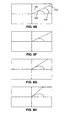
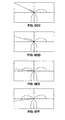
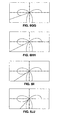
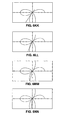
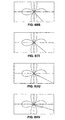
- Figures 6a-6ww sequentially illustrate a sequence of steps in the animation process of graphing the function cos(2 ⁇ ) while varying the angle ⁇ .
- a line 602 ( Figure 6e for example) is drawn from the origin 604 at an angle ⁇ (indicated by reference numeral 606) and through a point 608.
- Point 608 is determined by the graphed function, i.e., cos(2 ⁇ ), wherein the radius is equal to the value of the cosine of angle ⁇ 606.
- Subsequent drawn lines on the polar plan "sweep" out the graph of the function in polar coordinates as the angle ⁇ varies.
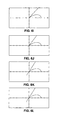
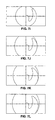
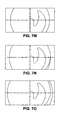
- Figures 7a-7o sequentially illustrate a sequence of steps in the animation process of graphing the function cos(2R) while varying the radius R.
- a circle 702 ( Figure 7e for example) is drawn at a radius from the origin (indicated by reference numeral 706) and through a point 708.
- Point 708 determined by the graphed function, i.e., cos(2R), wherein the angle is equal to the value of the cosine of radius R 708.
- Subsequent drawn lines on the polar plan "sweep" out the graph of the function in polar coordinates as the angle ⁇ varies.
- the user may further manipulate specified keys in order to input commands causing the calculator 100 to stop, resume, speed up or slow down the animation. Further, additional key manipulations by the user may cause the increase or decrease of scale and/or movement of the position of the origin point of the coordinate system on display 102.
Landscapes
- Physics & Mathematics (AREA)
- General Physics & Mathematics (AREA)
- Engineering & Computer Science (AREA)
- Theoretical Computer Science (AREA)
- Calculators And Similar Devices (AREA)
- User Interface Of Digital Computer (AREA)
- Management, Administration, Business Operations System, And Electronic Commerce (AREA)
Applications Claiming Priority (2)
| Application Number | Priority Date | Filing Date | Title |
|---|---|---|---|
| US636781 | 2003-08-08 | ||
| US10/636,781 US20050041017A1 (en) | 2003-08-08 | 2003-08-08 | Function drawing in polar plan using a calculator |
Publications (3)
| Publication Number | Publication Date |
|---|---|
| EP1505545A2 true EP1505545A2 (fr) | 2005-02-09 |
| EP1505545A3 EP1505545A3 (fr) | 2006-11-08 |
| EP1505545B1 EP1505545B1 (fr) | 2010-11-10 |
Family
ID=33552962
Family Applications (1)
| Application Number | Title | Priority Date | Filing Date |
|---|---|---|---|
| EP04254472A Expired - Lifetime EP1505545B1 (fr) | 2003-08-08 | 2004-07-27 | Méthode et dispositif pour la visualisation d'une fonction dans le plan polaire au moyen d'un calculateur |
Country Status (5)
| Country | Link |
|---|---|
| US (1) | US20050041017A1 (fr) |
| EP (1) | EP1505545B1 (fr) |
| AU (1) | AU2004202571A1 (fr) |
| DE (1) | DE602004029967D1 (fr) |
| SG (2) | SG144919A1 (fr) |
Families Citing this family (14)
| Publication number | Priority date | Publication date | Assignee | Title |
|---|---|---|---|---|
| US7698638B2 (en) | 2004-09-15 | 2010-04-13 | Microsoft Corporation | Systems and methods for automated equation buildup |
| US20060190821A1 (en) * | 2005-02-22 | 2006-08-24 | Microsoft Corporation | Programmable object model for mathematical expressions |
| US8020091B2 (en) * | 2005-07-15 | 2011-09-13 | Microsoft Corporation | Alignment and breaking of mathematical expressions in documents |
| US20070033524A1 (en) * | 2005-08-02 | 2007-02-08 | Microsoft Corporation | Mapping codes for characters in mathematical expressions |
| US20070239696A1 (en) * | 2006-03-28 | 2007-10-11 | Microsoft Corporation | Interactive relational graphic solutions |
| US7702570B2 (en) * | 2007-03-15 | 2010-04-20 | Bgc Partners, Inc. | System and method for providing an operator interface for a radar display of market data |
| USD588591S1 (en) * | 2008-03-21 | 2009-03-17 | Nokia Corporation | Panel for a handset |
| USD588590S1 (en) * | 2008-03-21 | 2009-03-17 | Nokia Corporation | Set of buttons for a handset |
| USD592651S1 (en) * | 2008-03-21 | 2009-05-19 | Nokia Corporation | Set of buttons for a handset |
| US8464179B2 (en) * | 2008-07-30 | 2013-06-11 | Hewlett-Packard Development Company, L.P. | Math menu user interface on a calculator |
| US20100115403A1 (en) * | 2008-11-06 | 2010-05-06 | Microsoft Corporation | Transforming math text objects using build down and build up |
| US20100185421A1 (en) * | 2009-01-19 | 2010-07-22 | Texas Instruments Incorporated | Method and Apparatus for Pictorial Representation of an Algebraic Expression |
| JP5892094B2 (ja) * | 2013-03-21 | 2016-03-23 | カシオ計算機株式会社 | グラフ表示制御装置、グラフ表示制御方法及びグラフ表示制御プログラム |
| JP6992491B2 (ja) * | 2017-12-22 | 2022-01-13 | カシオ計算機株式会社 | 表示装置、表示方法、およびプログラム |
Citations (1)
| Publication number | Priority date | Publication date | Assignee | Title |
|---|---|---|---|---|
| EP0660244A1 (fr) | 1993-11-25 | 1995-06-28 | Casio Computer Company Limited | Dispositif d'affichage de graphes |
Family Cites Families (2)
| Publication number | Priority date | Publication date | Assignee | Title |
|---|---|---|---|---|
| JP2959960B2 (ja) * | 1994-06-08 | 1999-10-06 | シャープ株式会社 | 複数グラフ表示機能付き情報処理装置 |
| US6938060B2 (en) * | 2001-12-27 | 2005-08-30 | Texas Instruments Incorporated | Apparatus and method for graphically displaying a vector simultaneously along with the numerical values of its vector components |
-
2003
- 2003-08-08 US US10/636,781 patent/US20050041017A1/en not_active Abandoned
-
2004
- 2004-06-11 AU AU2004202571A patent/AU2004202571A1/en not_active Abandoned
- 2004-07-21 SG SG200805158-3A patent/SG144919A1/en unknown
- 2004-07-21 SG SG200404505A patent/SG109011A1/en unknown
- 2004-07-27 EP EP04254472A patent/EP1505545B1/fr not_active Expired - Lifetime
- 2004-07-27 DE DE602004029967T patent/DE602004029967D1/de not_active Expired - Lifetime
Patent Citations (1)
| Publication number | Priority date | Publication date | Assignee | Title |
|---|---|---|---|---|
| EP0660244A1 (fr) | 1993-11-25 | 1995-06-28 | Casio Computer Company Limited | Dispositif d'affichage de graphes |
Also Published As
| Publication number | Publication date |
|---|---|
| EP1505545A3 (fr) | 2006-11-08 |
| EP1505545B1 (fr) | 2010-11-10 |
| DE602004029967D1 (de) | 2010-12-23 |
| AU2004202571A1 (en) | 2005-02-24 |
| SG109011A1 (en) | 2005-02-28 |
| US20050041017A1 (en) | 2005-02-24 |
| SG144919A1 (en) | 2008-08-28 |
Similar Documents
| Publication | Publication Date | Title |
|---|---|---|
| EP1505545B1 (fr) | Méthode et dispositif pour la visualisation d'une fonction dans le plan polaire au moyen d'un calculateur | |
| US20060008779A1 (en) | Computer method for controlling a display, and graphical tools for on-screen analysis | |
| JP3701991B2 (ja) | 作表能力を有する計算機 | |
| EP1424626A2 (fr) | Mode papier millimétré pour un ordinateur | |
| US20020075227A1 (en) | Tracing and storing points of interest on a graphing calculator | |
| AU2004202572B2 (en) | Graphical calculator user interface for function drawing | |
| AU2004202575B2 (en) | Input and evaluation of fractions using a calculator | |
| US7272621B2 (en) | Previous calculation reuse in a calculator | |
| US6771252B2 (en) | Shading of inequalities on a graphing calculator | |
| EP0446886B1 (fr) | Appareil entrée/sortie d'informations | |
| EP1505513A2 (fr) | Calculateur graphique | |
| JP3239356B2 (ja) | 図形編集装置 | |
| JP2695082B2 (ja) | グラフ影付け機能付き電子機器 | |
| GB2415878A (en) | Configurable grid tool for displays | |
| JPS63103365A (ja) | 電子式卓上計算機 | |
| JPS58154887A (ja) | カ−ソル機能 | |
| JPH04169926A (ja) | 図形処理装置 | |
| JPH02213975A (ja) | 電子計算機 | |
| Falk | Drafting Packages | |
| JPS62278632A (ja) | 計算機の入力方法 | |
| JP2000029610A (ja) | 情報機器 | |
| Robin | Comparisons of graphical calculators: Texas TI-81 compared with Casio 7000G | |
| JPS62154069A (ja) | マウスを使つた直線入力装置 | |
| JP3332691B2 (ja) | 画像処理方法及び装置 | |
| JPH07302156A (ja) | 情報処理方法 |
Legal Events
| Date | Code | Title | Description |
|---|---|---|---|
| PUAI | Public reference made under article 153(3) epc to a published international application that has entered the european phase |
Free format text: ORIGINAL CODE: 0009012 |
|
| AK | Designated contracting states |
Kind code of ref document: A2 Designated state(s): AT BE BG CH CY CZ DE DK EE ES FI FR GB GR HU IE IT LI LU MC NL PL PT RO SE SI SK TR |
|
| AX | Request for extension of the european patent |
Extension state: AL HR LT LV MK |
|
| PUAL | Search report despatched |
Free format text: ORIGINAL CODE: 0009013 |
|
| RIC1 | Information provided on ipc code assigned before grant |
Ipc: G06F 15/02 20060101ALI20060925BHEP Ipc: G06T 11/20 20060101AFI20041027BHEP |
|
| AK | Designated contracting states |
Kind code of ref document: A3 Designated state(s): AT BE BG CH CY CZ DE DK EE ES FI FR GB GR HU IE IT LI LU MC NL PL PT RO SE SI SK TR |
|
| AX | Request for extension of the european patent |
Extension state: AL HR LT LV MK |
|
| 17P | Request for examination filed |
Effective date: 20061211 |
|
| AKX | Designation fees paid |
Designated state(s): DE FR GB |
|
| 17Q | First examination report despatched |
Effective date: 20090515 |
|
| GRAP | Despatch of communication of intention to grant a patent |
Free format text: ORIGINAL CODE: EPIDOSNIGR1 |
|
| GRAS | Grant fee paid |
Free format text: ORIGINAL CODE: EPIDOSNIGR3 |
|
| GRAA | (expected) grant |
Free format text: ORIGINAL CODE: 0009210 |
|
| AK | Designated contracting states |
Kind code of ref document: B1 Designated state(s): DE FR GB |
|
| REG | Reference to a national code |
Ref country code: GB Ref legal event code: FG4D |
|
| REF | Corresponds to: |
Ref document number: 602004029967 Country of ref document: DE Date of ref document: 20101223 Kind code of ref document: P |
|
| PLBE | No opposition filed within time limit |
Free format text: ORIGINAL CODE: 0009261 |
|
| STAA | Information on the status of an ep patent application or granted ep patent |
Free format text: STATUS: NO OPPOSITION FILED WITHIN TIME LIMIT |
|
| 26N | No opposition filed |
Effective date: 20110811 |
|
| PGFP | Annual fee paid to national office [announced via postgrant information from national office to epo] |
Ref country code: FR Payment date: 20110805 Year of fee payment: 8 |
|
| PGFP | Annual fee paid to national office [announced via postgrant information from national office to epo] |
Ref country code: GB Payment date: 20110725 Year of fee payment: 8 Ref country code: DE Payment date: 20110727 Year of fee payment: 8 |
|
| REG | Reference to a national code |
Ref country code: DE Ref legal event code: R097 Ref document number: 602004029967 Country of ref document: DE Effective date: 20110811 |
|
| GBPC | Gb: european patent ceased through non-payment of renewal fee |
Effective date: 20120727 |
|
| REG | Reference to a national code |
Ref country code: FR Ref legal event code: ST Effective date: 20130329 |
|
| PG25 | Lapsed in a contracting state [announced via postgrant information from national office to epo] |
Ref country code: DE Free format text: LAPSE BECAUSE OF NON-PAYMENT OF DUE FEES Effective date: 20130201 Ref country code: GB Free format text: LAPSE BECAUSE OF NON-PAYMENT OF DUE FEES Effective date: 20120727 Ref country code: FR Free format text: LAPSE BECAUSE OF NON-PAYMENT OF DUE FEES Effective date: 20120731 |
|
| REG | Reference to a national code |
Ref country code: DE Ref legal event code: R119 Ref document number: 602004029967 Country of ref document: DE Effective date: 20130201 |