EP1633131A2 - Digitale Stehbildkamera - Google Patents
Digitale Stehbildkamera Download PDFInfo
- Publication number
- EP1633131A2 EP1633131A2 EP05107982A EP05107982A EP1633131A2 EP 1633131 A2 EP1633131 A2 EP 1633131A2 EP 05107982 A EP05107982 A EP 05107982A EP 05107982 A EP05107982 A EP 05107982A EP 1633131 A2 EP1633131 A2 EP 1633131A2
- Authority
- EP
- European Patent Office
- Prior art keywords
- image
- monitor
- monitor means
- displayed
- display
- Prior art date
- Legal status (The legal status is an assumption and is not a legal conclusion. Google has not performed a legal analysis and makes no representation as to the accuracy of the status listed.)
- Withdrawn
Links
- 238000001514 detection method Methods 0.000 claims description 6
- 230000006870 function Effects 0.000 description 35
- 239000000203 mixture Substances 0.000 description 12
- 239000004973 liquid crystal related substance Substances 0.000 description 11
- 238000000034 method Methods 0.000 description 5
- 235000019646 color tone Nutrition 0.000 description 4
- 238000010586 diagram Methods 0.000 description 3
- 230000008569 process Effects 0.000 description 3
- 230000004044 response Effects 0.000 description 3
- 230000002457 bidirectional effect Effects 0.000 description 2
- 230000006835 compression Effects 0.000 description 2
- 238000007906 compression Methods 0.000 description 2
- 238000001454 recorded image Methods 0.000 description 2
- 230000001413 cellular effect Effects 0.000 description 1
- 230000008921 facial expression Effects 0.000 description 1
- 230000004907 flux Effects 0.000 description 1
- 238000009432 framing Methods 0.000 description 1
- 238000012986 modification Methods 0.000 description 1
- 230000004048 modification Effects 0.000 description 1
- 238000012795 verification Methods 0.000 description 1
Images




Classifications
-
- H—ELECTRICITY
- H04—ELECTRIC COMMUNICATION TECHNIQUE
- H04N—PICTORIAL COMMUNICATION, e.g. TELEVISION
- H04N1/00—Scanning, transmission or reproduction of documents or the like, e.g. facsimile transmission; Details thereof
- H04N1/0035—User-machine interface; Control console
- H04N1/00405—Output means
- H04N1/00408—Display of information to the user, e.g. menus
- H04N1/0044—Display of information to the user, e.g. menus for image preview or review, e.g. to help the user position a sheet
- H04N1/00442—Simultaneous viewing of a plurality of images, e.g. using a mosaic display arrangement of thumbnails
-
- H—ELECTRICITY
- H04—ELECTRIC COMMUNICATION TECHNIQUE
- H04N—PICTORIAL COMMUNICATION, e.g. TELEVISION
- H04N23/00—Cameras or camera modules comprising electronic image sensors; Control thereof
- H04N23/60—Control of cameras or camera modules
- H04N23/63—Control of cameras or camera modules by using electronic viewfinders
- H04N23/633—Control of cameras or camera modules by using electronic viewfinders for displaying additional information relating to control or operation of the camera
-
- H—ELECTRICITY
- H04—ELECTRIC COMMUNICATION TECHNIQUE
- H04N—PICTORIAL COMMUNICATION, e.g. TELEVISION
- H04N1/00—Scanning, transmission or reproduction of documents or the like, e.g. facsimile transmission; Details thereof
- H04N1/0035—User-machine interface; Control console
- H04N1/00405—Output means
- H04N1/00408—Display of information to the user, e.g. menus
- H04N1/0044—Display of information to the user, e.g. menus for image preview or review, e.g. to help the user position a sheet
- H04N1/00442—Simultaneous viewing of a plurality of images, e.g. using a mosaic display arrangement of thumbnails
- H04N1/00453—Simultaneous viewing of a plurality of images, e.g. using a mosaic display arrangement of thumbnails arranged in a two dimensional array
-
- H—ELECTRICITY
- H04—ELECTRIC COMMUNICATION TECHNIQUE
- H04N—PICTORIAL COMMUNICATION, e.g. TELEVISION
- H04N1/00—Scanning, transmission or reproduction of documents or the like, e.g. facsimile transmission; Details thereof
- H04N1/0035—User-machine interface; Control console
- H04N1/00405—Output means
- H04N1/00408—Display of information to the user, e.g. menus
- H04N1/0044—Display of information to the user, e.g. menus for image preview or review, e.g. to help the user position a sheet
- H04N1/00461—Display of information to the user, e.g. menus for image preview or review, e.g. to help the user position a sheet marking or otherwise tagging one or more displayed image, e.g. for selective reproduction
-
- H—ELECTRICITY
- H04—ELECTRIC COMMUNICATION TECHNIQUE
- H04N—PICTORIAL COMMUNICATION, e.g. TELEVISION
- H04N1/00—Scanning, transmission or reproduction of documents or the like, e.g. facsimile transmission; Details thereof
- H04N1/0035—User-machine interface; Control console
- H04N1/00405—Output means
- H04N1/00408—Display of information to the user, e.g. menus
- H04N1/00469—Display of information to the user, e.g. menus with enlargement of a selected area of the displayed information
-
- H—ELECTRICITY
- H04—ELECTRIC COMMUNICATION TECHNIQUE
- H04N—PICTORIAL COMMUNICATION, e.g. TELEVISION
- H04N1/00—Scanning, transmission or reproduction of documents or the like, e.g. facsimile transmission; Details thereof
- H04N1/21—Intermediate information storage
- H04N1/2104—Intermediate information storage for one or a few pictures
- H04N1/2112—Intermediate information storage for one or a few pictures using still video cameras
-
- H—ELECTRICITY
- H04—ELECTRIC COMMUNICATION TECHNIQUE
- H04N—PICTORIAL COMMUNICATION, e.g. TELEVISION
- H04N1/00—Scanning, transmission or reproduction of documents or the like, e.g. facsimile transmission; Details thereof
- H04N1/21—Intermediate information storage
- H04N1/2104—Intermediate information storage for one or a few pictures
- H04N1/2112—Intermediate information storage for one or a few pictures using still video cameras
- H04N1/2129—Recording in, or reproducing from, a specific memory area or areas, or recording or reproducing at a specific moment
- H04N1/2133—Recording or reproducing at a specific moment, e.g. time interval or time-lapse
-
- H—ELECTRICITY
- H04—ELECTRIC COMMUNICATION TECHNIQUE
- H04N—PICTORIAL COMMUNICATION, e.g. TELEVISION
- H04N23/00—Cameras or camera modules comprising electronic image sensors; Control thereof
- H04N23/50—Constructional details
- H04N23/53—Constructional details of electronic viewfinders, e.g. rotatable or detachable
- H04N23/531—Constructional details of electronic viewfinders, e.g. rotatable or detachable being rotatable or detachable
-
- H—ELECTRICITY
- H04—ELECTRIC COMMUNICATION TECHNIQUE
- H04N—PICTORIAL COMMUNICATION, e.g. TELEVISION
- H04N23/00—Cameras or camera modules comprising electronic image sensors; Control thereof
- H04N23/60—Control of cameras or camera modules
- H04N23/65—Control of camera operation in relation to power supply
- H04N23/651—Control of camera operation in relation to power supply for reducing power consumption by affecting camera operations, e.g. sleep mode, hibernation mode or power off of selective parts of the camera
-
- H—ELECTRICITY
- H04—ELECTRIC COMMUNICATION TECHNIQUE
- H04N—PICTORIAL COMMUNICATION, e.g. TELEVISION
- H04N23/00—Cameras or camera modules comprising electronic image sensors; Control thereof
- H04N23/60—Control of cameras or camera modules
- H04N23/667—Camera operation mode switching, e.g. between still and video, sport and normal or high- and low-resolution modes
-
- H—ELECTRICITY
- H04—ELECTRIC COMMUNICATION TECHNIQUE
- H04N—PICTORIAL COMMUNICATION, e.g. TELEVISION
- H04N5/00—Details of television systems
- H04N5/76—Television signal recording
- H04N5/765—Interface circuits between an apparatus for recording and another apparatus
- H04N5/77—Interface circuits between an apparatus for recording and another apparatus between a recording apparatus and a television camera
- H04N5/772—Interface circuits between an apparatus for recording and another apparatus between a recording apparatus and a television camera the recording apparatus and the television camera being placed in the same enclosure
-
- H—ELECTRICITY
- H04—ELECTRIC COMMUNICATION TECHNIQUE
- H04N—PICTORIAL COMMUNICATION, e.g. TELEVISION
- H04N2101/00—Still video cameras
-
- H—ELECTRICITY
- H04—ELECTRIC COMMUNICATION TECHNIQUE
- H04N—PICTORIAL COMMUNICATION, e.g. TELEVISION
- H04N5/00—Details of television systems
- H04N5/76—Television signal recording
- H04N5/907—Television signal recording using static stores, e.g. storage tubes or semiconductor memories
-
- H—ELECTRICITY
- H04—ELECTRIC COMMUNICATION TECHNIQUE
- H04N—PICTORIAL COMMUNICATION, e.g. TELEVISION
- H04N9/00—Details of colour television systems
- H04N9/79—Processing of colour television signals in connection with recording
- H04N9/80—Transformation of the television signal for recording, e.g. modulation, frequency changing; Inverse transformation for playback
- H04N9/804—Transformation of the television signal for recording, e.g. modulation, frequency changing; Inverse transformation for playback involving pulse code modulation of the colour picture signal components
- H04N9/8042—Transformation of the television signal for recording, e.g. modulation, frequency changing; Inverse transformation for playback involving pulse code modulation of the colour picture signal components involving data reduction
- H04N9/8047—Transformation of the television signal for recording, e.g. modulation, frequency changing; Inverse transformation for playback involving pulse code modulation of the colour picture signal components involving data reduction using transform coding
Definitions
- the present invention relates to a digital still camera having a monitor device at which an image can be displayed.
- a liquid crystal monitor disposed at the rear surface of the body of a digital still camera may be utilized as a viewfinder by displaying in real time at the liquid crystal monitor subject images captured repeatedly by an image-capturing element.
- an image that has been captured and recorded previously may also be displayed at the liquid crystal monitor by selecting a replay mode.
- Japanese Laid Open Patent Publication No. 2002-94625 discloses a cellular phone capable of photography, which includes two liquid crystal monitors.
- the two monitors disclosed in the publication are not utilized to facilitate a subsequent photographing operation or to provide better convenience in the replay mode that may be subsequently selected.
- a digital still camera includes an image-capturing means; a recording means for recording a subject image captured by the image-capturing means into an image recording medium; a reproducing means for reproducing a subject image recorded in the image recording medium; a first monitor means; a second monitor means; and a display control means for displaying the subject image captured by the image-capturing means at the first monitor means and displays at the second monitor means an image other than the image displayed at the first monitor means.
- the display control means displays in real time at the first monitor means subject images repeatedly captured by the image-capturing means simultaneously as the display control means displays at the second monitor means a photographic support image having been captured by the image-capturing means. It is preferable that the photographic support image displayed at the second monitor means is the subj ect image reproduced by the reproducing means. A plurality of subject images reproduced by the reproducing means may be displayed at the second monitor means as the photographic support image.
- the display control means displays at the first monitor means the subject image reproduced by the reproducing means simultaneously as the display control means displays at the second monitor means one of an image related to the subject image displayed at the first monitor means and an image to be used to aid selection of an image to be displayed at the first monitor means.
- the image displayed at the second monitor means is an enlarged image of part of the subj ect image displayed at the first monitor means. It is preferable that the enlarged image on display contains a focus area of the subject image displayed at the first monitor means.
- the display control means may display at the first monitor means a frame indicating an area displayed as the enlarged image over the subject image.
- the image displayed at the second monitor means is an image created by executing white balance adj ustment processing on the subject image displayed at the first monitor means.
- a selection means for selecting an image displayed at the second monitor means may be further provided, and it is possible that the display control means displays a plurality of images corresponding to varying white balance settings at the second monitor means and as one image among the plurality of images is selected through the selection means, the display control means uses the white balance setting of the selected image in a subsequent photographing operation or in data of the subject image displayed at the first monitor means.
- a selection means for selecting an image displayed at the second monitor means may be further provided, and it is also possible that the display control means displays a plurality of thumbnail images reproduced by the reproducing means at the second monitor means and as one image among the plurality of thumbnail images on display is selected through the selection means, the display control means displays a subject image corresponding to the selected thumbnail image over a screen of the first monitor means.
- the display control means displays in real time at the first monitor means subject images repeatedly captured by the image-capturing means or displays at the first monitor means an image reproduced by the reproducing means simultaneously as the display control means displays at the second monitor means information indicating at least one of characteristics of the subject image displayed at the first monitor means and photographing conditions under which the subject image displayed at the first monitor means has been photographed.
- the information displayed at the second monitor means may contain a histogram indicating a brightness distribution in the subject image displayed at the first monitor means.
- one of the first monitor means and the second monitor means includes a display screen that turns to a desired angle and by adjusting the angle of the display screen, a display screen of the first monitor means and a display screen of the second monitor means are aligned next to one another so as to be viewed simultaneously.
- the display screen of the first monitor means and the display screen of the second monitor means may be set in a closed state in which the display screens face opposite each other so as to conceal each other.
- the digital still camera may further includes a detection means for detecting whether the first monitor means and the second monitor means have an angular relationship that allows an operator to view the first monitor means and the second monitor means simultaneously, and if detection results provided by the detection means indicate that the first monitor means and the second monitor means do not have the angular relationship which allows the first monitor means and the second monitor means be viewed simultaneously, the display control means may turn off one of the first monitor means and the second monitor means.
- a digital still camera includes an image-capturing means; a recording means for recording a subject image captured by the image-capturing means into an image recording medium; a first monitor means; a second monitor means; and a display control means for displaying in real time subject images repeatedly captured by the image-capturing means at a display screen of the first monitor means and also at a display screen of the second monitor means when the display screen of the first monitor means is turned toward a photographer and the display screen of the second monitor means is turned toward a photographic subject.
- a digital still camera includes an image-capturing means; a recording means that records a subject image captured by the image-capturing means into an image recording medium; a first monitor means; a second monitor means; and a display control means that displays in real time at a display screen of the first monitor means subject images repeatedly captured by the image-capturing means and brings up a countdown display of a self timer at a display screen of the second monitor means when the display screen of the first monitor means is turned toward a photographer and the display screen of the second monitor means is turned toward a photographic subject in a self timer mode.
- FIGS. 1 through 14 An embodiment of the present invention is now explained in reference to FIGS. 1 through 14.
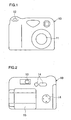
- FIGS. 1 to 3 provide front view and rear views of a digital still camera achieved in the embodiment.
- a photographic lens 11 is disposed at the front surface of a camera body 10 and a shutter release button 12 is disposed at the top surface of the camera body 10.
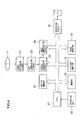
- a flip-out color liquid crystal monitor 15 and a fixed color liquid crystal monitor 16 are disposed, in addition to a viewfinder eyepiece unit 13 and a plurality of operating members 14.
- the monitors 15 and 16 respectively include rectangular liquid crystal screens 15a and 16a having substantially equal dimensions.
- the flip-out monitor 15 is a free angle monitor, which is allowed to rotate via hinge portions 17 relative to an axis (a Y axis) extending through the top and the bottom of the camera and is also allowed to rotate relative to an X axis extending perpendicular to the Y axis. Accordingly, as the flip-out monitor 15 rotates around the X axis and the Y axis, the orientation of the screen 15a can be adjusted freely.
- the fixedmonitor 16 on the other hand, is fixed at the rear surface of the camera, and its screen 16a is thus always set on the rear surface toward the photographer.
- the flip-out monitor 15 When the flip-out monitor 15 is in a closed state, as shown in FIG. 2, the screen 15a is placed over the screen 16a of the fixed monitor 16 and the two screens 15a and 16a are both concealed.
- FIG. 3 showing the flip-out monitor 15 having been opened by approximately 180° around the Y axis, the two screens 15a and 16a are exposed, one set next to the other along the horizontal direction.
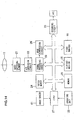
- FIG. 4 is a block diagram of a control system of the digital still camera.
- a subject light flux having been transmitted through the photographic lens 11 forms an image at a light receiving surface of an image-capturing element (image-capturing device) 21 constituted with a CCD or the like, and the image-capturing element 21, in turn, outputs an electrical signal (image capturing signal) corresponding to the light intensity of the subject image having been formed.
- the image capturing signal is then converted to a digital signal at an A/D converter 22 and then undergoes various types of image processing at a signal processing circuit 23.
- Image data resulting from the signal processing are stored into a buffer memory 24 and these are recorded into a memory card MC via a recording circuit 25. When the image data are recorded, they are compressed as necessary in a predetermined compression format at an image compression circuit 26.
- the various circuits described above are all controlled by a CPU 27.
- the flip-out monitor 15 and the fixedmonitor 16 each include a liquid crystal drive unit, a backlight, a backlight control unit and the like.
- the CPU 27 issues instructions to the liquid crystal drive units and the backlight control units in response to which images are displayed based upon image data and other types of information are displayed at the screens 15a and 16a.
- Image display modes include a display mode in which subject images repeatedly captured at the image-capturing element 21 are displayed in real time (hereafter referred to as a through image displaymode) and a display mode in which an image recorded in the memory card MC is read out and displayed (hereafter referred to as a reproduced image display mode).
- an operating unit 28 which includes the shutter release button 12 and the operating members 14 described earlier, and a memory 29 such as a ROM or a RAM in which information used when implementing the control is stored are connected to the CPU 27.
- the camera has all the functions (1) through (6) explained below, and the photographer is allowed to select a desired function through, for instance, custom setting. Alternatively, the camera may automatically select a specific function based upon a judgment made with regard to the current operating conditions.
- the CPU 27 brings up the through image display described above at the fixed monitor 16 and also brings up a reproduced image display at the flip-out monitor 15.
- the reproduced image display is a thumbnail display, and if there is a plurality of images having already been recorded, the plurality of images are displayed by splitting the screen. While the photographer determines the composition by viewing the through image at the screen 16a, he is able to check the plurality of images having already been photographed (having already been recorded) on display close-by at the screen 15a at all times. Thus, he is able to decide on a specific composition with ease by taking into consideration the compositions of the images having already been photographed.
- the flip-out monitor 15 When the flip-out monitor 15 is opened by 180° in particular, the two screens 15a and 16a are set side-by-side on a substantially single plane, namely, they are aligned next to one another, which allows the two screens to be viewed together with ease.
- the open angle does not need to be exactly 180°.
- the image can be photographed simply by operating the shutter release button 12 and the photographed image is recorded into the memory card MC through the procedure explained earlier. It is desirable that once the image is recorded, the thumbnail image display at the screen 15a be updated so that the latest recorded images are displayed at all times.
- a histogram of an image indicates the brightness distribution in the image in a graph as image characteristics.
- the image histogram normally indicates the brightness along the horizontal axis and the frequency along the vertical axis.
- the graph reflects the exposure value set in the camera, and the center of the graph shifts further to the left if the image is under-exposed and shifts further to the right if the image is over-exposed. Accordingly, a real-time display of the histogram of the through image allows the photographer to correct the exposure by checking the state of the histogram so as to minimize the occurrence of under-exposure or over-exposure (in particular blackouts or whiteouts).
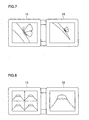
- the through image display is brought up at the fixed monitor 16 and, at the same time, a real-time display of the histogram of the through image is brought up at the flip-out monitor 15.
- Reference numeral 31 in FIG. 6 indicates the histogram display.
- the histogram can be displayed over a large display area while keeping the through image intact and without having to display the through image in a reduced form, and thus, the optimal exposure can be selected smoothly without affecting the process of decision-making with regard to the composition.
- the photographing conditions such as the file mode, the aperture value and the shutter speed and other information may be displayed in addition to the histogram.
- the histogram is displayed over part of the image or in a blank area created by reducing the image. In either case, the image is not as easy to view, which makes it more difficult to determine the composition. In addition, the histogram on display is smaller and not as easy to read.
- a liquid crystal monitor is normally a compact unit with a relatively small number of pixels, it is difficult to verify the focus state simply by viewing the through image. Accordingly, this function is selected so as to simultaneously bring up the through image display at the fixed monitor 16 and a display of an enlarged image of an area around a focus area in the through image at the flip-out monitor 15.
- area around a focus area refers to an area containing the focus area at the center thereof within the image plane (containing a selected focus area if there is a plurality of focus areas).
- the CPU 27 engages a focal adjustment device (not shown) to execute a focal adjustment in the area and also brings up the display of the enlarged image of the area around the focus area explained above at the flip-out monitor 15.
- the display of the enlarged image facilitates verification of the focus state (whether or not the image is focused) even with the liquid crystal monitor, and thus, defocusing can be prevented. Since the entire through image is concurrently displayed at a separate screen, the process of composition decision-making is not affected at all.
- a digital still camera allows white balance adjustment (WB) and the adjustment is executed through menu selection. While the color tone of the image is altered through white balance adjustment, the exact results can only be verified after the adjustment is actually executed. For this reason, the photographer needs to have a great deal of experience to be able to produce an image in the exact color tone he desires. Accordingly, this function is selected to bring up the through image display at the fixed monitor 16 and, at the same time, a plurality of through images in reduced size in correspondence to varying white balance settings are displayed at the flip-out monitor 15. The photographer is then able to select via an operating member 14 the most desirable image (e.g., the image that is the closest in color tone to the actual subject) among the reduced images.
- WB white balance adjustment
- the CPU 27 sets the white balance of the selected image as the white balance setting for the photographing operation. Namely, the white balance setting of the selected image is used in subsequent photographing operations. This function allows even a novice photographer to take pictures in desired color tones with ease.
- the through image display and the photographic support display may be respectively brought up at the flip-out monitor 15 and the fixed monitor 16, instead.
- the photographer may be allowed to select the monitor at which the through image is to be displayed as well.
- a given through image is displayed both at the flip-out monitor 15 and the fixed monitor 16.
- the flip-out monitor 15 is allowed to assume any angular position. Accordingly, by rotating the monitor 15 around the X axis in the state shown in FIG. 3, the screen 15a can be turned toward the subject.
- the through image can be checked by both the subject, i.e., the person being photographed, and the photographer.
- the photographic subject is able to decide on the optimal facial expression or posture by checking the through image and is also able to make a specific request with regard to the composition. This establishes a completely new photographing concept that allows more active participation of the photographic subject as well as the photographer in the photographing operation.
- the through image display is brought up at the fixedmonitor 16 and the self timer countdown is displayed at the flip-out monitor 15 in a self timer mode.
- the self timer countdown display can be viewed from the photographic subject side if the screen 15a of the monitor 15 is turned toward the subject. For instance, if the camera is set to take the picture in five seconds following the shutter release operation, the countdown display may indicate numerals in the order of "5" -> "4" -> ...-> "1" -> "0" and a photograph is taken at "0". With large numerals displayed at the screen 15a, the photographic subject can know when the shutter will actually be released. This function allows the photographic subject to be ready for the shutter release and, as a result, the photographic subject is never caught unawares when the picture is taken. It is desirable that this function be automatically selected as the camera is set in the self timer mode.
- the camera is set in a mode (e.g., a multiple self timer function), in which a plurality of pictures are taken on the self timer in response to a single operation, a message such as "another picture" may be brought up during the interval between the individual photographing operations and the countdown display may then be brought up again.
- a function of automatically turning off the fixed monitor 16 may be made available.
- an image having already been recorded in the memory card MC can be read out and displayed at a monitor screen (reproduced image display).
- the image files having been recorded in the memory card MC each contain a thumbnail image in addition to the main image, and in general, a plurality of thumbnail images are simultaneously displayed at the screen and once one of the thumbnail images is selected, the main image corresponding to the selected thumbnail image is displayed over the entire screen.
- the following display functions (7) through (11) are available in the replay mode in the camera achieved in the embodiment.
- the photographer may be allowed to select a desired function through, for instance, custom setting.
- a reproduced image (main image) is displayed at one of the monitors with information related to the reproduced image displayed at the other monitor.
- the information related to the reproduced image includes the photographing conditions such as the file mode, the aperture value and the shutter speed as well as the histogram.
- Such information saved together with the image in an Exif format is read out and displayed.
- Other types of information are also saved as the Exif information, and thus, it will be convenient to handle all types of information as display options and allow whichever type of information that is selected to be displayed.
- several types of information which are pre-selected may be brought up on display. If the reproduced image is brought up at the fixed monitor 16 and the information is brought up on display at the flip-out monitor 15, the monitors may provide displays similar to those in FIG. 6, for instance. However, while the image displayed at the fixedmonitor 15 is a through image in FIG. 6, a reproduced image will be displayed at the fixed monitor 16 when this function is selected.
- an image and information related to the image can be displayed simultaneously only by displaying the information over the image, which makes it harder to view both the image and the information.
- the image and the information are displayed simultaneously at separate positions in the embodiment, and thus, both the image and the information can be viewed with ease.
- FIG. 11 shows an example in which the main image display is brought up at the fixed monitor 16 and the thumbnail display is brought up at the flip-out monitor 15. As a specific image among the thumbnail images on display at the flip-out monitor 15 is selected, the main image corresponding to the selected thumbnail image is brought up on display at the fixed monitor 16. Since this function allows the thumbnail display to remain on while the main image is brought up on display, the next image for display can be selected quickly.
- FIG. 13 presents a display example in which the main image is displayed at the fixed monitor 16 and the enlarged image is displayed at the flip-out monitor 15, with lines 51 framing the area corresponding to the enlarged display superimposed on the main image. This allows the photographer to ascertain with ease which part of the main image is currently displayed as the enlarged image. While it is necessary to switch one of the monitors back to the thumbnail display when selecting the next image, it is not necessary to reset the magnification factor of the enlarged image to the standard magnification factor.
- the frame lines 51 may be allowed to move within the screen in response to a specific operation so as to alter the image area for enlargement, i.e. , the image displayed at the flip-out monitor 15, by interlocking with the movement of the frame lines 51.
- the main image having been selected is brought up on display at one of the monitors and a plurality of thumbnail images of the main image, each corresponding to one of various white balance settings, are concurrently brought up on display at the other monitor.
- the main image may be displayed at the fixed monitor 16, as shown in FIG. 8.
- the image displayed in FIG. 8 is the through image
- the image displayed when this function is selected is a reproduced image.
- the image data undergo digital processing so as to reflect the white balance setting in the main image. This function allows the white balance of the photographed image to be adjusted on the camera.
- the functions (7) to (11) explained above each bring up a reproduced image of the main image on display at the fixed monitor 16 and brings up an image related to the main image displayed at the fixed monitor 16 or images used to aid in the selection of an image to be displayed at the fixed monitor 16 on display at the flip-out monitor 15.
- the reproduced image and the related image or the aiding images may be respectively displayed at the flip-out monitor 15 and the fixed monitor 16, instead.
- the photographer may be allowed to select the monitor at which the main image is to be displayed.
- one of the monitors may automatically go off if the remaining battery power becomes lower than a predetermined level.
- the flip-out monitor 15 is folded in, as shown in FIG. 2, while it is turned toward the photographer, the screen 16a of the fixed monitor 16 becomes concealed, leaving the screen 15a alone in a visible state. In such a situation, the fixed monitor 16 may be made to turn itself off.
- the monitors 15 and 16 are never viewed by the photographer and the photographic subject together as in (5) and (6) described earlier. Accordingly, it is desirable to judge that one of the monitors is not used for viewing and to turn off the monitor as a power saving measure if the viewing angles of the two monitors 15 and 16 are greatly different in the replay mode.
- Such power saving measures may be realized by disposing an angle sensor 61 (see FIG. 14) along the X axis so as to detect the angle of the flip-out monitor 15 relative to the fixed monitor 16.
- the CPU 27 sequentially monitors the output from the angle sensor 61 and turns off one of the monitors if the detected angle is in an angle range over which the two monitors cannot be viewed simultaneously or the two monitors can only be viewed simultaneously with significant difficulty. Either monitor may be turned off in this case. It is desirable to turn off the fixed monitor 16 if the camera body 10 is set down for reproduced image display since the free angle flip-out monitor 15 can be adjusted to the optimal angle for easy viewing.
- the fixed monitor 16 is likely to be easier to view, and accordingly, the flip-out monitor 15 should be turned off. Thus, it is ultimately desirable to allow the photographer to select which monitor is to be turned off.
- the present invention may be adopted in a camera having two fixed monitors disposed side by side. It is to be noted however, that, such a configuration is bound to increase the bulk of the camera and the functions (5) and (6) cannot be offered in the camera. Furthermore, the camera does not need to have all the functions (1) to (11) described above and may have only one of these functions.
Landscapes
- Engineering & Computer Science (AREA)
- Multimedia (AREA)
- Signal Processing (AREA)
- Human Computer Interaction (AREA)
- Studio Devices (AREA)
- Television Signal Processing For Recording (AREA)
- Color Television Image Signal Generators (AREA)
Applications Claiming Priority (2)
| Application Number | Priority Date | Filing Date | Title |
|---|---|---|---|
| JP2004256878 | 2004-09-03 | ||
| JP2004335426A JP2006101466A (ja) | 2004-09-03 | 2004-11-19 | デジタルスチルカメラ |
Publications (2)
| Publication Number | Publication Date |
|---|---|
| EP1633131A2 true EP1633131A2 (de) | 2006-03-08 |
| EP1633131A3 EP1633131A3 (de) | 2008-08-20 |
Family
ID=35464165
Family Applications (1)
| Application Number | Title | Priority Date | Filing Date |
|---|---|---|---|
| EP05107982A Withdrawn EP1633131A3 (de) | 2004-09-03 | 2005-08-31 | Digitale Stehbildkamera |
Country Status (3)
| Country | Link |
|---|---|
| US (2) | US20060050151A1 (de) |
| EP (1) | EP1633131A3 (de) |
| JP (1) | JP2006101466A (de) |
Cited By (5)
| Publication number | Priority date | Publication date | Assignee | Title |
|---|---|---|---|---|
| EP1976259A1 (de) | 2007-03-30 | 2008-10-01 | Brother Kogyo Kabushiki Kaisha | Bilderzeugungsvorrichtung die eine Mehrzahl von Vorschaubildern erzeugt, wobei die Vorschaubilder unter Anwendung von unterschiedlichen Scannereinstellungen erzeugt werden |
| EP2293020A1 (de) * | 2009-07-31 | 2011-03-09 | Honeywell International Inc. | Anzeige und Verfahren zur Auswahl von anzuzeigenden Bildern |
| CN103167293A (zh) * | 2011-12-09 | 2013-06-19 | 夏普株式会社 | 显示系统 |
| EP2637398A1 (de) * | 2012-03-09 | 2013-09-11 | BlackBerry Limited | Verwalten von zwei oder mehr Anzeigen auf einer Vorrichtung mit Kamera |
| EP3930304A1 (de) * | 2020-06-23 | 2021-12-29 | Canon Kabushiki Kaisha | Abbildungsvorrichtung, verfahren zur steuerung der abbildungsvorrichtung und programm |
Families Citing this family (54)
| Publication number | Priority date | Publication date | Assignee | Title |
|---|---|---|---|---|
| EP2384007B1 (de) | 2003-02-27 | 2014-09-10 | Seiko Epson Corporation | Wiedergabe von Bildern unter Verwendung eines spezifischen Farbraumes |
| JP4426804B2 (ja) * | 2003-09-19 | 2010-03-03 | 株式会社日立製作所 | ビデオカメラ |
| US7755639B2 (en) * | 2004-08-27 | 2010-07-13 | Seiko Epson Corporation | Image reproduction using a particular color space |
| KR101128075B1 (ko) * | 2005-03-15 | 2012-07-17 | 삼성전자주식회사 | 두개의 디스플레이 패널을 갖는 디지털 촬영 장치 및 그제어 방법 |
| US8085318B2 (en) * | 2005-10-11 | 2011-12-27 | Apple Inc. | Real-time image capture and manipulation based on streaming data |
| US7663691B2 (en) | 2005-10-11 | 2010-02-16 | Apple Inc. | Image capture using display device as light source |
| US20060284895A1 (en) * | 2005-06-15 | 2006-12-21 | Marcu Gabriel G | Dynamic gamma correction |
| US7839446B2 (en) * | 2005-08-30 | 2010-11-23 | Olympus Corporation | Image capturing apparatus and image display apparatus including imparting distortion to a captured image |
| JP4956988B2 (ja) | 2005-12-19 | 2012-06-20 | カシオ計算機株式会社 | 撮像装置 |
| JP4687451B2 (ja) * | 2005-12-27 | 2011-05-25 | カシオ計算機株式会社 | 撮像装置、及びスルー画像表示方法 |
| JP2007328555A (ja) * | 2006-06-08 | 2007-12-20 | Hitachi Ltd | 映像補正装置 |
| US20080231741A1 (en) * | 2007-03-21 | 2008-09-25 | Mcintyre Dale F | Camera with multiple displays |
| US20080303949A1 (en) * | 2007-06-08 | 2008-12-11 | Apple Inc. | Manipulating video streams |
| US8122378B2 (en) * | 2007-06-08 | 2012-02-21 | Apple Inc. | Image capture and manipulation |
| JP2009272783A (ja) * | 2008-05-01 | 2009-11-19 | Victor Co Of Japan Ltd | テレビジョン放送表示装置 |
| JP5200815B2 (ja) * | 2008-09-24 | 2013-06-05 | カシオ計算機株式会社 | 撮像装置及びそのプログラム |
| JP5233570B2 (ja) * | 2008-10-15 | 2013-07-10 | 株式会社ニコン | 撮像装置 |
| JP4748204B2 (ja) * | 2008-11-05 | 2011-08-17 | ソニー株式会社 | 撮像装置、撮像装置の表示制御方法 |
| JP4697289B2 (ja) * | 2008-11-05 | 2011-06-08 | ソニー株式会社 | 撮像装置、撮像装置の表示制御方法 |
| KR101592033B1 (ko) * | 2009-11-06 | 2016-02-04 | 엘지전자 주식회사 | 이동 단말기 및 그 화면 분할 방법 |
| KR101725888B1 (ko) * | 2009-11-13 | 2017-04-13 | 삼성전자주식회사 | 카메라 또는 원격 제어 장치에서의 이미지 제공 방법 및 그 장치 |
| KR101700357B1 (ko) * | 2009-11-30 | 2017-01-26 | 삼성전자주식회사 | 점프 영상 촬영 장치 및 방법 |
| JP2011141753A (ja) * | 2010-01-07 | 2011-07-21 | Sony Corp | 表示制御装置、表示制御方法及び表示制御プログラム |
| KR20120002834A (ko) * | 2010-07-01 | 2012-01-09 | 삼성전자주식회사 | 참조 영상을 제공하는 촬상장치 및 그의 참조 영상 제공방법 |
| CN102469245B (zh) | 2010-11-11 | 2015-07-29 | 奥林巴斯映像株式会社 | 摄像装置和摄像方法 |
| JP2012118832A (ja) * | 2010-12-02 | 2012-06-21 | Sony Corp | 情報処理装置、情報処理方法及びプログラム |
| JP5327211B2 (ja) | 2010-12-28 | 2013-10-30 | カシオ計算機株式会社 | 撮像装置、撮像制御方法及びプログラム |
| US20120198386A1 (en) * | 2011-01-31 | 2012-08-02 | Nokia Corporation | Causing display of thumbnail images |
| JP5752463B2 (ja) * | 2011-04-04 | 2015-07-22 | 西日本高速道路エンジニアリング九州株式会社 | 監視カメラ調整システム |
| US8576140B2 (en) * | 2011-06-29 | 2013-11-05 | Xerox Corporation | Methods and systems for simultaneous local and contextual display |
| JP5836671B2 (ja) * | 2011-07-11 | 2015-12-24 | キヤノン株式会社 | 撮像装置および画像表示システム |
| JP5839882B2 (ja) * | 2011-08-05 | 2016-01-06 | キヤノン株式会社 | 撮像装置 |
| KR101322465B1 (ko) * | 2011-11-17 | 2013-10-28 | 삼성전자주식회사 | 셀프 카메라 촬영을 위한 방법 및 장치 |
| CN108388344B (zh) | 2011-12-30 | 2022-05-17 | 英特尔公司 | 电子设备的用户界面 |
| JP5880263B2 (ja) * | 2012-05-02 | 2016-03-08 | ソニー株式会社 | 表示制御装置、表示制御方法、プログラムおよび記録媒体 |
| CN103049175B (zh) * | 2013-01-22 | 2016-08-10 | 华为终端有限公司 | 预览画面呈现方法、装置及终端 |
| JP2013251909A (ja) * | 2013-07-12 | 2013-12-12 | Olympus Imaging Corp | 撮像装置 |
| KR102099681B1 (ko) * | 2013-10-10 | 2020-04-10 | 삼성전자주식회사 | 영상처리장치 및 그 제어방법 |
| US9811245B2 (en) | 2013-12-24 | 2017-11-07 | Dropbox, Inc. | Systems and methods for displaying an image capturing mode and a content viewing mode |
| JP2015186084A (ja) * | 2014-03-25 | 2015-10-22 | ソニー株式会社 | 撮像装置 |
| ES2873034T3 (es) * | 2014-06-20 | 2021-11-03 | Huawei Tech Co Ltd | Método y aparato para visualizar la interfaz de aplicación, y el dispositivo electrónico |
| US20160062966A1 (en) * | 2014-08-26 | 2016-03-03 | Microsoft Corporation | Full screen pop-out of objects in editable form |
| JP6445219B2 (ja) * | 2016-03-31 | 2018-12-26 | 富士フイルム株式会社 | デジタルカメラ及びデジタルカメラの表示方法 |
| US10812713B2 (en) | 2016-10-25 | 2020-10-20 | Hewlett-Packard Development Company, L.P. | Selecting camera modes for electronic devices having multiple display panels |
| US20180348815A1 (en) * | 2017-06-02 | 2018-12-06 | Arrow Technologies Inc. | Systems and methods for automatically capturing images using a wearable computing device |
| US10264186B2 (en) * | 2017-06-30 | 2019-04-16 | Microsoft Technology Licensing, Llc | Dynamic control of camera resources in a device with multiple displays |
| JP7049163B2 (ja) * | 2018-04-09 | 2022-04-06 | キヤノン株式会社 | 電子機器およびその制御方法、プログラム並びに記憶媒体 |
| EP3608764A4 (de) * | 2018-06-08 | 2020-10-28 | SZ DJI Technology Co., Ltd. | Steuerungsverfahren und -vorrichtung für bildschirm |
| JP6821769B2 (ja) * | 2019-11-13 | 2021-01-27 | 華為技術有限公司Huawei Technologies Co.,Ltd. | アプリケーションインターフェースを表示する方法、装置および電子デバイス |
| WO2021175247A1 (en) * | 2020-03-06 | 2021-09-10 | Guangdong Oppo Mobile Telecommunications Corp., Ltd. | Method and system of simultaneous media capturing and displaying at electronic device |
| JP7651306B2 (ja) * | 2020-06-23 | 2025-03-26 | キヤノン株式会社 | 撮像装置、撮像装置の制御方法及びプログラム |
| KR102848751B1 (ko) | 2020-10-30 | 2025-08-22 | 삼성전자 주식회사 | 플렉서블 디스플레이의 촬영 안내 방법 및 장치 |
| US11165953B1 (en) * | 2020-12-17 | 2021-11-02 | Gopro, Inc. | Framing recommendations by image capture device |
| JP7786832B2 (ja) * | 2024-01-25 | 2025-12-16 | キヤノン株式会社 | 撮像装置、制御方法およびプログラム |
Citations (7)
| Publication number | Priority date | Publication date | Assignee | Title |
|---|---|---|---|---|
| JP2001177741A (ja) * | 1999-12-15 | 2001-06-29 | Minolta Co Ltd | 電子カメラおよび表示システム |
| JP2001186396A (ja) * | 1999-12-24 | 2001-07-06 | Nec Corp | カメラ付き携帯情報端末装置 |
| US20010024235A1 (en) | 2000-03-16 | 2001-09-27 | Naoto Kinjo | Image photographing/reproducing system and method, photographing apparatus and image reproducing apparatus used in the image photographing/reproducing system and method as well as image reproducing method |
| JP2002094625A (ja) | 2000-09-19 | 2002-03-29 | Sanyo Electric Co Ltd | 無線情報端末機 |
| JP2003101910A (ja) * | 2001-09-20 | 2003-04-04 | Nikon Corp | 画像再生装置および画像再生方法 |
| US20030071904A1 (en) | 2001-10-16 | 2003-04-17 | Minolta Co. , Ltd | Image capturing apparatus, image reproducing apparatus and program product |
| JP2004180021A (ja) | 2002-11-27 | 2004-06-24 | Sony Ericsson Mobilecommunications Japan Inc | 携帯端末装置 |
Family Cites Families (26)
| Publication number | Priority date | Publication date | Assignee | Title |
|---|---|---|---|---|
| JP3018323B2 (ja) * | 1994-06-10 | 2000-03-13 | カシオ計算機株式会社 | 電子スチルカメラ |
| JP4150090B2 (ja) * | 1997-07-25 | 2008-09-17 | ソニー株式会社 | 映像撮影記録装置 |
| JP4233624B2 (ja) * | 1997-12-26 | 2009-03-04 | カシオ計算機株式会社 | 電子カメラ装置 |
| JPH11266381A (ja) * | 1998-03-17 | 1999-09-28 | Canon Inc | 電子カメラ |
| JPH11355620A (ja) * | 1998-06-08 | 1999-12-24 | Sony Corp | 撮像装置 |
| JP2000278373A (ja) * | 1999-03-29 | 2000-10-06 | Ricoh Co Ltd | 携帯型電子機器 |
| GB2353911B (en) * | 1999-09-02 | 2004-03-24 | Hewlett Packard Co | Device for capturing images and hand-writing |
| JP2001128035A (ja) * | 1999-10-26 | 2001-05-11 | Minolta Co Ltd | デジタルカメラ |
| JP2001177742A (ja) * | 1999-12-20 | 2001-06-29 | Minolta Co Ltd | 電子カメラ |
| US7046287B2 (en) * | 1999-12-24 | 2006-05-16 | Nec Corporation | Portable information terminal equipped with camera |
| JP2001211351A (ja) * | 2000-01-27 | 2001-08-03 | Fuji Photo Film Co Ltd | 画像撮像装置およびその動作制御方法 |
| JP2001238115A (ja) * | 2000-02-21 | 2001-08-31 | Olympus Optical Co Ltd | 電子カメラ |
| JP4274665B2 (ja) * | 2000-03-03 | 2009-06-10 | オリンパス株式会社 | 電子ビューファインダ付き電子カメラ |
| JP3551123B2 (ja) * | 2000-04-18 | 2004-08-04 | ミノルタ株式会社 | 電子カメラ |
| JP4499258B2 (ja) * | 2000-08-04 | 2010-07-07 | オリンパス株式会社 | 電子カメラ |
| JP2003234933A (ja) * | 2002-02-08 | 2003-08-22 | Konica Corp | 撮像装置 |
| JP4536311B2 (ja) * | 2002-04-30 | 2010-09-01 | シャープ株式会社 | 撮影装置、および、それを用いた携帯機器 |
| US7271838B2 (en) * | 2002-05-08 | 2007-09-18 | Olympus Corporation | Image pickup apparatus with brightness distribution chart display capability |
| JP2004208028A (ja) * | 2002-12-25 | 2004-07-22 | Minolta Co Ltd | 撮像装置 |
| JP2004282399A (ja) * | 2003-03-14 | 2004-10-07 | Nec Saitama Ltd | カウントダウン表示付きセルフタイマー撮影機能を有する携帯電話機 |
| US7702015B2 (en) * | 2003-03-20 | 2010-04-20 | Ge Security, Inc. | Systems and methods for multi-resolution image processing |
| JP4343628B2 (ja) | 2003-09-04 | 2009-10-14 | Hoya株式会社 | 電子カメラ |
| KR100627048B1 (ko) * | 2003-12-15 | 2006-09-25 | 삼성테크윈 주식회사 | 디지털 카메라의 제어방법 |
| KR101128075B1 (ko) * | 2005-03-15 | 2012-07-17 | 삼성전자주식회사 | 두개의 디스플레이 패널을 갖는 디지털 촬영 장치 및 그제어 방법 |
| US7632023B2 (en) * | 2005-12-19 | 2009-12-15 | Fujifilm Corporation | Camera |
| US20080231740A1 (en) * | 2007-03-21 | 2008-09-25 | Mcintyre Dale F | Camera with multiple displays |
-
2004
- 2004-11-19 JP JP2004335426A patent/JP2006101466A/ja active Pending
-
2005
- 2005-08-25 US US11/210,706 patent/US20060050151A1/en not_active Abandoned
- 2005-08-31 EP EP05107982A patent/EP1633131A3/de not_active Withdrawn
-
2009
- 2009-07-29 US US12/461,016 patent/US8654238B2/en not_active Expired - Fee Related
Patent Citations (7)
| Publication number | Priority date | Publication date | Assignee | Title |
|---|---|---|---|---|
| JP2001177741A (ja) * | 1999-12-15 | 2001-06-29 | Minolta Co Ltd | 電子カメラおよび表示システム |
| JP2001186396A (ja) * | 1999-12-24 | 2001-07-06 | Nec Corp | カメラ付き携帯情報端末装置 |
| US20010024235A1 (en) | 2000-03-16 | 2001-09-27 | Naoto Kinjo | Image photographing/reproducing system and method, photographing apparatus and image reproducing apparatus used in the image photographing/reproducing system and method as well as image reproducing method |
| JP2002094625A (ja) | 2000-09-19 | 2002-03-29 | Sanyo Electric Co Ltd | 無線情報端末機 |
| JP2003101910A (ja) * | 2001-09-20 | 2003-04-04 | Nikon Corp | 画像再生装置および画像再生方法 |
| US20030071904A1 (en) | 2001-10-16 | 2003-04-17 | Minolta Co. , Ltd | Image capturing apparatus, image reproducing apparatus and program product |
| JP2004180021A (ja) | 2002-11-27 | 2004-06-24 | Sony Ericsson Mobilecommunications Japan Inc | 携帯端末装置 |
Cited By (9)
| Publication number | Priority date | Publication date | Assignee | Title |
|---|---|---|---|---|
| EP1976259A1 (de) | 2007-03-30 | 2008-10-01 | Brother Kogyo Kabushiki Kaisha | Bilderzeugungsvorrichtung die eine Mehrzahl von Vorschaubildern erzeugt, wobei die Vorschaubilder unter Anwendung von unterschiedlichen Scannereinstellungen erzeugt werden |
| US8422069B2 (en) | 2007-03-30 | 2013-04-16 | Brother Kogyo Kabushiki Kaisha | Image forming device creating a preview image |
| US8724193B2 (en) | 2007-03-30 | 2014-05-13 | Brother Kogyo Kabushiki Kaisha | Image forming device creating a preview image |
| EP2293020A1 (de) * | 2009-07-31 | 2011-03-09 | Honeywell International Inc. | Anzeige und Verfahren zur Auswahl von anzuzeigenden Bildern |
| CN103167293A (zh) * | 2011-12-09 | 2013-06-19 | 夏普株式会社 | 显示系统 |
| CN103167293B (zh) * | 2011-12-09 | 2015-07-22 | 夏普株式会社 | 显示系统 |
| EP2637398A1 (de) * | 2012-03-09 | 2013-09-11 | BlackBerry Limited | Verwalten von zwei oder mehr Anzeigen auf einer Vorrichtung mit Kamera |
| EP3930304A1 (de) * | 2020-06-23 | 2021-12-29 | Canon Kabushiki Kaisha | Abbildungsvorrichtung, verfahren zur steuerung der abbildungsvorrichtung und programm |
| US11595584B2 (en) | 2020-06-23 | 2023-02-28 | Canon Kabushiki Kaisha | Imaging apparatus, method of controlling imaging apparatus and computer-readable medium |
Also Published As
| Publication number | Publication date |
|---|---|
| EP1633131A3 (de) | 2008-08-20 |
| JP2006101466A (ja) | 2006-04-13 |
| US8654238B2 (en) | 2014-02-18 |
| US20060050151A1 (en) | 2006-03-09 |
| US20090303352A1 (en) | 2009-12-10 |
Similar Documents
| Publication | Publication Date | Title |
|---|---|---|
| US8654238B2 (en) | Digital still camera having a monitor device at which an image can be displayed | |
| CN101341738B (zh) | 照相机设备及成像方法 | |
| EP1278099B1 (de) | Verfahren und Kamera mit Warnung für die Bildqualität | |
| US7616248B2 (en) | Revised recapture camera and method | |
| EP1278100B1 (de) | Kamera und Verfahren zum Anzeigen eines aufgenommenen Bildes sowie eines anderen Blickwinkels auf das Aufnahmeobjekt | |
| US7046290B2 (en) | Multi-point auto-focus digital camera including electronic zoom | |
| EP1278373A2 (de) | Korrekturvorschlagende Kamere und Verfahren | |
| JP2000350071A (ja) | 電子スチルカメラ | |
| JP2005269562A (ja) | 撮影装置 | |
| JP4325385B2 (ja) | デジタルカメラおよびデジタルカメラの画像取得方法 | |
| JP2008252711A (ja) | ディジタルカメラ | |
| JP2001208961A (ja) | カメラ | |
| JP2003143444A (ja) | 撮像装置及びその制御方法、プログラム並びに記憶媒体 | |
| JP2007201539A (ja) | デジタルカメラ | |
| JP2009088710A (ja) | 撮影装置、撮影方法及び撮影プログラム | |
| US7689115B2 (en) | Camera | |
| JP4273605B2 (ja) | 電子スチルカメラ | |
| JP2004236287A (ja) | 電子カメラ | |
| JPH11266381A (ja) | 電子カメラ | |
| JP2882391B2 (ja) | デジタルカメラ | |
| JP2012085228A (ja) | 撮影条件設定装置、撮像装置、画像処理装置および撮影条件設定プログラム | |
| JP2004023632A (ja) | デジタルカメラ | |
| JP4183832B2 (ja) | 電子カメラ装置 | |
| JP5658580B2 (ja) | 撮像装置及びその制御方法、プログラム、記録媒体 | |
| JP2001211377A (ja) | デジタルカメラ |
Legal Events
| Date | Code | Title | Description |
|---|---|---|---|
| PUAI | Public reference made under article 153(3) epc to a published international application that has entered the european phase |
Free format text: ORIGINAL CODE: 0009012 |
|
| AK | Designated contracting states |
Kind code of ref document: A2 Designated state(s): AT BE BG CH CY CZ DE DK EE ES FI FR GB GR HU IE IS IT LI LT LU LV MC NL PL PT RO SE SI SK TR |
|
| AX | Request for extension of the european patent |
Extension state: AL BA HR MK YU |
|
| PUAL | Search report despatched |
Free format text: ORIGINAL CODE: 0009013 |
|
| AK | Designated contracting states |
Kind code of ref document: A3 Designated state(s): AT BE BG CH CY CZ DE DK EE ES FI FR GB GR HU IE IS IT LI LT LU LV MC NL PL PT RO SE SI SK TR |
|
| AX | Request for extension of the european patent |
Extension state: AL BA HR MK YU |
|
| 17P | Request for examination filed |
Effective date: 20081127 |
|
| 17Q | First examination report despatched |
Effective date: 20090123 |
|
| AKX | Designation fees paid |
Designated state(s): DE FR GB |
|
| RAP1 | Party data changed (applicant data changed or rights of an application transferred) |
Owner name: NIKON CORPORATION |
|
| RAP1 | Party data changed (applicant data changed or rights of an application transferred) |
Owner name: NIKON CORPORATION |
|
| STAA | Information on the status of an ep patent application or granted ep patent |
Free format text: STATUS: THE APPLICATION IS DEEMED TO BE WITHDRAWN |
|
| 18D | Application deemed to be withdrawn |
Effective date: 20160715 |