EP2202626A2 - Appareil d'entrée - Google Patents
Appareil d'entrée Download PDFInfo
- Publication number
- EP2202626A2 EP2202626A2 EP09252856A EP09252856A EP2202626A2 EP 2202626 A2 EP2202626 A2 EP 2202626A2 EP 09252856 A EP09252856 A EP 09252856A EP 09252856 A EP09252856 A EP 09252856A EP 2202626 A2 EP2202626 A2 EP 2202626A2
- Authority
- EP
- European Patent Office
- Prior art keywords
- button
- display
- displayed
- name
- degree
- Prior art date
- Legal status (The legal status is an assumption and is not a legal conclusion. Google has not performed a legal analysis and makes no representation as to the accuracy of the status listed.)
- Ceased
Links
Images




Classifications
-
- G—PHYSICS
- G06—COMPUTING OR CALCULATING; COUNTING
- G06F—ELECTRIC DIGITAL DATA PROCESSING
- G06F3/00—Input arrangements for transferring data to be processed into a form capable of being handled by the computer; Output arrangements for transferring data from processing unit to output unit, e.g. interface arrangements
- G06F3/01—Input arrangements or combined input and output arrangements for interaction between user and computer
- G06F3/048—Interaction techniques based on graphical user interfaces [GUI]
- G06F3/0487—Interaction techniques based on graphical user interfaces [GUI] using specific features provided by the input device, e.g. functions controlled by the rotation of a mouse with dual sensing arrangements, or of the nature of the input device, e.g. tap gestures based on pressure sensed by a digitiser
- G06F3/0488—Interaction techniques based on graphical user interfaces [GUI] using specific features provided by the input device, e.g. functions controlled by the rotation of a mouse with dual sensing arrangements, or of the nature of the input device, e.g. tap gestures based on pressure sensed by a digitiser using a touch-screen or digitiser, e.g. input of commands through traced gestures
-
- G—PHYSICS
- G06—COMPUTING OR CALCULATING; COUNTING
- G06F—ELECTRIC DIGITAL DATA PROCESSING
- G06F3/00—Input arrangements for transferring data to be processed into a form capable of being handled by the computer; Output arrangements for transferring data from processing unit to output unit, e.g. interface arrangements
- G06F3/01—Input arrangements or combined input and output arrangements for interaction between user and computer
- G06F3/048—Interaction techniques based on graphical user interfaces [GUI]
- G06F3/0481—Interaction techniques based on graphical user interfaces [GUI] based on specific properties of the displayed interaction object or a metaphor-based environment, e.g. interaction with desktop elements like windows or icons, or assisted by a cursor's changing behaviour or appearance
- G06F3/04817—Interaction techniques based on graphical user interfaces [GUI] based on specific properties of the displayed interaction object or a metaphor-based environment, e.g. interaction with desktop elements like windows or icons, or assisted by a cursor's changing behaviour or appearance using icons
-
- G—PHYSICS
- G06—COMPUTING OR CALCULATING; COUNTING
- G06F—ELECTRIC DIGITAL DATA PROCESSING
- G06F3/00—Input arrangements for transferring data to be processed into a form capable of being handled by the computer; Output arrangements for transferring data from processing unit to output unit, e.g. interface arrangements
- G06F3/01—Input arrangements or combined input and output arrangements for interaction between user and computer
- G06F3/048—Interaction techniques based on graphical user interfaces [GUI]
- G06F3/0487—Interaction techniques based on graphical user interfaces [GUI] using specific features provided by the input device, e.g. functions controlled by the rotation of a mouse with dual sensing arrangements, or of the nature of the input device, e.g. tap gestures based on pressure sensed by a digitiser
- G06F3/0489—Interaction techniques based on graphical user interfaces [GUI] using specific features provided by the input device, e.g. functions controlled by the rotation of a mouse with dual sensing arrangements, or of the nature of the input device, e.g. tap gestures based on pressure sensed by a digitiser using dedicated keyboard keys or combinations thereof
- G06F3/04895—Guidance during keyboard input operation, e.g. prompting
Definitions
- the present invention relates to an inputting apparatus.
- Patent Document 1 Japanese Patent Application Publication No. 10-269022 discloses a technique in which, when a finger or the like of a user has approached input buttons displayed on a display device, an approach sensing device senses this approach, so that images of the input buttons located on the periphery of coordinates the finger has approached are enlarged and displayed.
- a first aspect in accordance with the present invention provides an inputting apparatus, comprising: a display unit on which an image is displayed; a detecting portion configured to detect an approach value which represents an approaching degree or a touching degree of an input object with respect to each of positions in the display unit and which becomes larger where the approaching degree or the touching degree is a certain degree than where the approaching degree or the touching degree is a degree smaller than the certain degree; a button-display portion configured to display at least one button on the display unit; a receiving portion configured to receive an input of a predetermined command assigned to one of the at least one button where an approach value detected in the one button displayed by the button-display portion exceeds a first threshold value; and an enlarging and displaying portion configured to enlarge and display only the one button on the display unit where the approach value detected in the one button exceeds a second threshold value which is smaller than the first threshold value.
- the button to be selected can be easily checked.
- the button-display portion may be configured to simultaneously display a plurality of buttons on the display unit
- the enlarging and displaying portion may include an extracting portion configured to extract all ones of the plurality of buttons displayed on the display unit, the ones having respective approach values having detected by the detecting portion, each of which exceeds the second threshold value
- the enlarging and displaying portion may be configured to enlarge and display only one of the buttons extracted by the extracting portion, the one having the largest approach value.
- the inputting apparatus may further comprise a positional-information detecting portion configured to detect positional information indicating a position of the input object in the one button, and the enlarging and displaying portion may be configured to display a button name representing a name of the one button at a position which is different from the position of the input object detected by the positional-information detecting portion and which overlaps with the one button enlarged and displayed by enlarging and displaying portion.
- the button name is displayed at the position overlapping with the enlarged and displayed button, thereby restraining that a problem occurs in which the button name cannot be checked because the button name is covered with or hidden by the input object.
- the button-display portion may be configured to display the one button by using a frame representing an edge of the one button, and the enlarging and displaying portion may be configured to display the button name within the frame.
- the enlarging and displaying portion may be configured to display the button name at a position distant from the position of the input object by a predetermined distance.
- the button name is displayed at the position distant from the input object by the predetermined distance, thereby restraining that the problem occurs in which the button name cannot be checked because the button name is covered with or hidden by the input object.
- the enlarging and displaying portion may be configured to change a manner of the display of the button name such that the button name is displayed within the frame and at the position distant from the position of the input object by the predetermined distance.
- the button name since the button name is displayed in a state in which the manner of the display is changed, the button name can be displayed within the frame, and it is possible to restrain that the problem occurs in which the button name cannot be checked because the button name is covered with or hidden by the input object. Further, only the button the user wants to select can be displayed on an outside of the frame.
- the inputting apparatus may further comprise an entering-position specifying portion configured to specify an entering position of the input object in the one button on the basis of the positional information detected by the positional-information detecting portion, and the enlarging and displaying portion may be configured to enlarge and display the one button on the basis of the entering position specified by the entering-position specifying portion.
- the button name can be easily checked.
- the second threshold value may be a value which is smaller than an approach value at a time when the input object touches the display unit.
- the button can be displayed before the input object touches the display unit.
- the enlarging and displaying portion may be configured to enlarge and display, instead of the one button, another button different from the one button where the approach value does not exceed the first threshold value and where an approach value of said other button is larger than that of the one button.
- a second aspect in accordance with the present invention provides an inputting apparatus comprising: a display unit on which an image is displayed; a detecting portion configured to detect an approach value which represents an approaching degree or a touching degree of an input object with respect to each of positions in the display unit and which becomes larger where the approaching degree or the touching degree is a certain degree than where the approaching degree or the touching degree is a degree smaller than the certain degree; a button-display portion configured to display at least one button on the display unit; a receiving portion configured to receive an input of a predetermined command assigned to one of the at least one button where an approach value detected in the one button displayed by the button-display portion exceeds a first threshold value; and a button-name display portion configured to display a button name representing a name of the one button on the display unit at a position not overlapping with the one button, where the approach value detected in the one button exceeds a second threshold value which is smaller than the first threshold value.
- the button-display portion may be configured to display the one button by using a frame representing an edge of the one button, and the button-name display portion may be configured to display the button name on an outside of the frame.
- the button-display portion may be configured to simultaneously display a plurality of buttons on the display unit
- the button-name display portion may include an extracting portion configured to extract all ones of the plurality of buttons displayed on the display unit, the ones having respective approach values having detected by the detecting portion, each of which exceeds the second threshold value
- the button-name display portion may be configured to display a button name of only one of the buttons extracted by the extracting portion, the one having the largest approach value.
- the button-name display portion may be configured to display the button name within a words-balloon frame extended from the one button or within a frame provided at a position not overlapping with the one button.
- the inputting apparatus may further comprise a positional-information detecting portion configured to detect positional information indicating a position of the input object in the one button; and an entering-position specifying portion configured to specify an entering position of the input object in the one button on the basis of the positional information detected by the positional-information detecting portion, and the button-name display portion may be configured to display the words-balloon frame at a position different from the entering position specified by the entering-position specifying portion.
- the button name can be easily checked.
- the second threshold value may be a value which is smaller than an approach value at a time when the input object touches the display unit.
- the button can be displayed before the input object touches the display unit.
- the button-name display portion may be configured to display, instead of the button name of the one button, a name of another button different from the one button where the approach value does not exceed the first threshold value and where an approach value of said other button is larger than that of the one button.
- FIG. 1 an external structure of a multi-function peripheral (MFP) 1 as an example of an inputting apparatus of the present invention, a hardware configuration of the inputting apparatus, an example of an operation of the inputting apparatus, and a display updating processing of the inputting apparatus.
- MFP multi-function peripheral
- an LCD (a part of a display unit) 16 and a touch panel (a part of a detecting portion) 17 in addition to operational keys 15.
- a user can perform various settings and various controls of the MFP 1 by performing an inputting operation with the operational keys 15 or the touch panel 17.
- the MFP 1 displays the setting item in a state in which the setting item is enlarged.
- the MFP 1 is configured to perform facsimile communication with an external device, not shown, connected via a phone-line network 100 (with reference to Fig. 2 ). Further, this MFP 1 has various functions such as a printer function, a scanner function, and a copying function.
- an operational panel 6 having an elongated shape.
- This operational panel 6 is for operating the MFP 1 and is mainly provided with the operational keys 15, the LCD 16, and the touch panel 17. The user can set and control the various functions by operating various buttons of the operational keys 15 or by operating the touch panel 17.
- the touch panel 17 as one type of the inputting apparatus is provided on a display screen of the LCD 16.
- touching of the user's finger on an image displayed on the LCD 16 e.g., an image of a key or a button (hereinafter may be referred to as "key image") means touching of the finger on the touch panel 17 provided on the display screen of the LCD 16.
- a position at which the user has touched or approached the touch panel 17 is specified.
- a positional-information detecting portion of a CPU 11 detects positional information indicating a position of the finger.
- the CPU 11 performs a processing corresponding to an image displayed at a position of the finger (for example, the key image).
- the approach value representing the touch (or the approach) of the finger is a value representing a touching degree as a degree of the touch (or an approaching degree as a degree of the approach) of the input object or means with respect to the touch panel 17 (the LCD 16), and where the touching degree (or the approaching degree) of, e.g., the finger with respect to the touch panel 17 is a certain degree, the approach value takes a value larger than the approach value in the case where the touching degree (or the approaching degree) is a degree smaller than the certain degree.
- touch panels of various types such as resistance membrane type and infrared type.
- a touch panel of projected electrostatic capacitance type is employed as the touch panel 17.
- the touch panel of the electrostatic capacitance type is configured to use a change of an electrostatic capacitance between the finger and the touch panel by an electrostatic bond between the finger and the touch panel which is caused when a tip of the finger has approached or touched the touch panel.
- the MFP 1 including the touch panel of the electrostatic capacitance type is configured to detect the change of the electrostatic capacitance, thereby also detecting that the finger is approaching the touch panel in addition to whether the finger is touching the touch panel or not
- the touch panel of the projected type is a touch panel in which an area for detecting the touch or approach of the finger or the like is minutely separated into a plurality of areas like a grid, for example, in order to simultaneously detect changes of respective electrostatic capacitances at a plurality of positions in the touch panel 17, and which is provided with a sensor (specifically, an electrode pattern) at each of the areas. It is noted that each of the areas will be referred to as a detecting area.
- a voltage value (corresponding to the approach value) according to an approach distance of the user's finger is outputted from the sensor in each detecting area.
- an outputted voltage value is increased, and a voltage value equal to or greater than a threshold value A (a second threshold value) is outputted at a time immediately before the finger has touched one of the detecting areas (e.g., a distance between the finger and the detecting area becomes about 2-3mm), for example, while a voltage value equal to or greater than a threshold value B (a first threshold value) is outputted when the finger has touched one of the detecting areas.
- the approach value corresponding to the voltage value is increased, and an approach value equal to or greater than the second threshold value (the threshold value A with respect to the voltage value) is detected at the time immediately before the finger has touched one of the touch panel 17 (e.g., the distance between the finger and the detecting area of the touch panel 17 becomes about 2-3mm), while an approach value equal to or greater than the first threshold value (the threshold value B) is detected when the finger has touched one of the detecting areas.
- the second threshold value the threshold value A with respect to the voltage value
- the first threshold value as the threshold value with respect to the approach value is greater than the second threshold value (in other words, the second threshold value is a value which is smaller than the approach value at a time when the user's finger touches the LCD 16 or the touch panel 17) while the threshold value B as the threshold value with respect to the voltage value is greater than the threshold value A.
- the outputted voltage value is decreased.
- the distance between the finger and the detecting area becomes equal to or greater than 20mm, for example, the change of the electrostatic capacitance is not detected, so that a voltage value "0" is outputted. That is, in accordance that the user's finger is distant from the touch panel 17, the approach value is decreased. When the distance between the finger and the detecting area of the touch panel 17 becomes equal to or greater than 20mm, the approach value becomes "0".
- the MFP 1 mainly includes the CPU 11, a ROM 12, a RAM 13, a flash memory 14, the operational keys 15, the LCD 16, the touch panel 17, a scanner 20, a printer 21, an NCU 23, and a modem 24.
- the CPU 11, the ROM 12, the RAM 13, and the flash memory 14 are connected to each other via a bus line 26. Further, the operational keys 15, the LCD 16, the touch panel 17, the scanner 20, the printer 21, the NCU 23, the modem 24, the bus line 26 are connected to each other via an input and output port 27.
- the CPU 11 is configured to control the various functions of the MFP 1 and to control various portions of the MFP 1 which are connected to the input and output port 27, in accordance with fixed values and programs stored in the ROM 12, the RAM 13, and the flash memory 14, or in accordance with various signals transmitted and received via the NCU 23. Further, the CPU 11 is configured to simultaneously display, as a button-display portion, the key (button) images.
- the ROM 12 is an unrewritable memory which stores, e.g., control programs performed in the MFP 1.
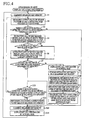
- the ROM 12 stores a program for performing a display updating processing indicated by a flow-chart in Fig. 4 which will be described below.
- the RAM 13 is a rewritable volatile memory for temporarily storing various data when various operations of the MFP 1 are performed.
- the RAM 13 includes an enlarged key memory 13a.
- the flash memory 14 is a rewritable nonvolatile memory. Data stored in this flash memory 14 is kept also after the MFP 1 is turned off.
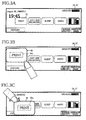
- a size of each of the key images shown in Fig. 3A is referred to as "the normal size of the key image”. Further, an entire area in which one key image is displayed will be referred to as a display area of the key image. The user can perform, by touching a part of the display area of each key image displayed on the LCD 16, a processing corresponding to the touched key image.
- a print key 32 shown in Fig. 3B is a key image displayed such that a print key 31 is enlarged at a predetermined ratio.
- the print key 31 shown in Fig. 3A is enlarged and displayed so as to overlap with display of a current time, with a right and lower corner of the display area of the key image being as a reference point (an origin point).
- an item name 32a (“PRINT" in Fig. 3B ) displayed in the display area is also displayed so as to be enlarged.
- the reference point (the origin point) for displaying the print key 32 can be determined on the basis of a position at which the user's finger has entered the print key 31 for the first time. Where the position at which the user's finger has entered the print key 31 for the first time is the vicinity of a right and lower corner of the display area of the print key 31, the print key 32 can be displayed so as to be enlarged, with the reference point being as the right and lower corner of the display area of the print key 31.
- an output voltage of each of detecting areas of the display area of the print key 31 may be stored in advance, thereby allowing that the position at which the user's finger has entered the print key 31 for the first time is specified by referring a history of the output voltage of the detecting area, when the output voltage value exceeds the threshold value A in the display area of the print key 31.
- the reference point may be determined on the basis of a position on the print key 31 which the user's finger has approached for the first time (i.e., the position at which the output voltage exceeds the threshold value A for the first time).
- the MFP 1 may be configured such that the display area of the print key 31 is separated into, e.g., nine areas arranged three by three in lengthwise and widthwise directions of the display area. Where the MFP 1 is thus configured, it is possible that the area the user's finger has approached for the first time is determined from the nine areas, and the print key 32 is enlarged and displayed, with a predetermined position of the area (the right and lower corner or a left and lower corner of the display area of the print key 31, for example) being as the reference point.
- a predetermined position of the area the right and lower corner or a left and lower corner of the display area of the print key 31, for example
- the print key 32 is a key image displayed such that the print key 31 is enlarged at a predetermined ratio.
- the print key 31 shown in Fig. 3A is displayed so as to overlap with a right half of a history key image, with a left and upper corner of the display area of the key image being as the reference point (the origin point).
- the item name 32a ("PRINT" in Fig. 3C ) displayed in the display area is also enlarged and displayed.
- PRINT PRINT
- the position at which the user's finger has entered the print key 31 for the first time is the vicinity of the left and upper corner of the print key 31, and thus the reference point is located at a left and upper corner of the display area of the print key 31.
- the display updating processing is a processing for enlarging and displaying the display area of the key image when the user's finger has approached (but has not touched) the key image where the inputting operation is performed by the touch panel 17.
- the display updating processing is repeatedly performed from turning on a main power of the MFP 1 until the main power is turned off.
- the CPU 11 judges in S3 whether there is any sensor having detected the output value exceeding the threshold value A or not. Where the CPU 11 has judged that there is any sensor in which the output value exceeds the threshold value A (S3: Yes), the CPU 11 extracts in S4 all of the key image(s) having the display area in which there is the sensor having detected the output value exceeding the threshold value A. As a result, the CPU 11 extracts all the key images the user's finger is approaching.
- the CPU 11 skips S4-S14 and goes to S15 because there is a possibility that the user's finger does not approach the touch panel 17.
- the CPU 11 judges in S5 whether a plurality of the key images are extracted in S4 or not. Where the CPU 11 has judged that the plurality of the key images are extracted (S5: Yes), the CPU 11 extracts in S6 one of the extracted the key images that has the display area in which the sensor has detected the largest output value. That is, the CPU 11 extracts only one key image of the extracted key images which the user's finger has approached the most or to the nearest position.
- the user moves his or her finger toward the key image to be selected.
- the CPU 11 can pick up only the key image the user intends to select, by extracting one key image having the largest output value detected by the sensor.
- the CPU 11 has judged that the extracted key image does not coincide with the key image indicated by the key information stored in the enlarged key memory 13a (S7: No)
- the key image the user's finger is approaching changes from the enlarged and displayed key image to another key image, or the user's finger has approached the key image in a state in which the key image is not enlarged and displayed.
- the CPU 11 since the enlarged and displayed key image may already exist, the CPU 11 temporarily displays in S8 all the key images in the normal size (with reference to Fig. 3A ) in order to return the size of the key image to the normal size. Then, in S9, the CPU 11 stores, into the enlarged key memory 13a, the key information (e.g., a name or a number of the key) of the key image extracted in S6.
- the key information e.g., a name or a number of the key
- the CPU 11 determines the reference point for enlarging and displaying the key image on the basis of a position of the display area of the extracted key image at which the user's finger has entered the display area for the first time. For example, where the user's finger approaches from the right and lower corner of the key image and moves toward a central portion thereof, the user's finger initially approaches the most to a right and lower portion of the display area in the display area of the key image.
- the CPU 11 can display the item name of the key image (i.e., the name of the key image or a button name) at a position distant from the user's finger by enlarging and displaying the key image with the right and lower corner of the display area being as a reference.
- the reference point for enlarging and displaying the key image is determined on the basis of the position at which the user's finger has entered the display area for the first time, but it is also possible that a position of the display area of the key image at which the sensor having detected the largest the output value is located is determined as the reference point.
- the CPU 11 can display the item name of the key image at a position distant from the user's finger by setting the position of the sensor at the reference point.
- the display area of the extracted key image is enlarged and displayed, with the reference point being as the origin point.
- the CPU 11 enlarges and displays the item name of the key image (i.e., the name of the key image) at a position of the enlarged display area, which position is distant from the reference point by equal to or more than a predetermined distance (for example, a width of a finger), and goes to S13.
- a predetermined distance for example, a width of a finger
- the item name of the key image is displayed at the position distant from the reference point by, e.g., equal to or more than the width of the finger by the processing of S12, it is possible to restrain that the item name of the key image is hidden by the user's finger at a time when the key image is enlarged and displayed. Thus, it is possible to restrain that the user touches an unintended area with his or her finger, thereby preventing the operational error.
- the CPU 11 judges whether there is a sensor having detected an output value exceeding the threshold value B within the key image indicated by the key information stored in the enlarged key memory 13a, i.e., the display area of the enlarged and displayed key image.
- the CPU 11 has judged that there is no sensor having detected the output value exceeding the threshold value B within the display area of the enlarged and displayed key image (S13: No), the key image has already been enlarged and displayed, but there may be a case in which the user's finger has not touched the key image yet. Thus, the CPU 11 repeatedly performs the processings of the above-described S2-S13.
- the CPU 11 performs in S14 a processing corresponding to the key image indicated by the key information stored in the enlarged key memory 13a.
- the key information stored in the enlarged key memory 13a indicates the print key 32
- image recording is performed by the printer 21 on the basis of image data to be designated by the user.
- the CPU 11 clears in S15 the enlarged key memory 13a and displays in S16 all the key images in the normal size (with reference to Fig. 3A ). It is noted that the processings of S15 and S16 are performed where the user's finger has touched the key image, and a processing corresponding to the key image has been performed and where the user's finger has moved away from the touch panel 17 (or does not approach the touch panel). As a result, all the key images are displayed in the normal size.
- the display area of the key image can be enlarged and displayed.
- the item name can be enlarged and displayed at a position at which the finger is moved away (i.e., the position distant from the reference point by, e.g., equal to or more than the width of the finger).
- the different key image is enlarged and displayed instead of the enlarged and displayed key image.
- the touch panel 17 of the projected electrostatic capacitance type is used, but the type of the touch panel 17 is not limited.
- any type may be employed as long as a touch panel which can detect the approach of the finger is used.
- the display area of the key image the user's finger has approached the most is enlarged and displayed, and the item name of the key image (i.e., the name of the key image) is enlarged and displayed in the display area at the position distant from the reference point by, e.g., equal to or more than the width of the finger.
- the MFP 1 may be configured in the following manner. That is, in a state in which the user's finger has approached the enlarged and displayed print key 32, as shown in Fig. 5A , a position at which an item name 33a of the print key 32 is displayed continues to be changed to a position distant from the user's finger such that the item name 33a is not hidden by the user's finger, during movement of the user's finger in the display area of the print key 32.
- the item name 33a may be displayed in a relatively small size, and may be displayed so as to be separated into a plurality of parts (e.g., the item name "PRINT" is separated into "PRI" and "NT"), for example.
- the item name can be displayed in a frame of the enlarged and displayed key image, permitting the item name of the key image to be clearly displayed.
- a manner of the display can be changed. For example, display of horizontal writing can be changed to display of vertical writing.
- the MFP 1 may be configured such that an output value of each of the respective sensors of all the detecting areas of the touch panel 17 are stored into the RAM 13 periodically (e.g., once in 100ms), and the item name is displayed at a position avoiding a position of the finger at a time immediately before the key image is enlarged and displayed. Further, the MFP 1 may be configured such that a direction in which the user's finger is to be moved is calculated and estimated on the basis of a change of the position of the user's finger, and the item name 33a is displayed at a tip of the user's finger. Where the MFP 1 is thus configured, the item name 33a is not hidden by the user's finger, and the operational error can be prevented because it becomes easy for the user to visually recognize the item name 33a.
- the MFP 1 may be configured in the following manner. That is, the display area and the item name of the key image 31 the user's finger has approached the most are not enlarged and displayed, and a words balloon 34 is displayed on a periphery of the key image 31 or on an outside of the key image 31 such that, as shown in Fig. 5B , a position (a reference point) at which the finger has entered the display area of the key image 31 is avoided, for example, and the item name of the key image 31 the user's finger has approached the most is displayed within the words balloon 34 (i.e., within a words-balloon frame).
- the CPU 11 does not display or dismisses the words balloon in S108, and stores in S109 the extracted key image into the words-balloon key memory. Then, in S110, an entering position at which the user's finger has entered is specified in the display area of the extracted key image, and the words balloon of the extracted key image is displayed in S111 at the position avoiding the entering position. As a result, the words balloon is displayed at the position distant or different from the entering position of the finger, whereby the user can recognize which key image his or her finger has approached the most.
- the CPU 11 can be considered to include a receiving portion which is configured to receive the input of a predetermined command assigned to the key (button) where the approach value of the key image (the button image) displayed by the button-display portion exceeds the first threshold value, and which performs the processings of S14 and S114. Further, the CPU 11 can also be considered to include an enlarging and displaying portion configured to enlarge and display the key image where the approach value of the key image exceeds the second threshold value which is smaller than the first threshold value, and which performs the processing of S11.
- the CPU 11 can also be considered to include an extracting portion configured to extract all ones of the key images displayed on the LCD 16, the ones having respective approach values having detected by the touch panel 17, each of which exceeds the second threshold value, and which performs the processings of S4 and S104. Further, the CPU 11 can also be considered to include an entering-position specifying portion configured to specify the entering position on the basis of the positional information detected by the positional-information detecting portion, and which performs the processings of S 10 and S110. Further, the CPU 11 can also be considered to include a button-name display portion configured to display the name of the key image at a position not overlapping with the key image, where the approach value of the key image exceeds the second threshold value, and which performs the processing of S111.
- the MFP 1 may be configured such that there is provided or prepared a display area 35 in advance in which, as shown in Fig. 5C , an image the same as the key image 31 the user's finger has approached the most is displayed without enlarging and displaying the display area and the item name of the key image 31 the user's finger has approached the most
- the user can recognize which key image his or her finger has approached the most even where the key image 31 and/or the item name of the key image 31 is or are hidden by the user's finger.
- the MFP 1 may be configured such that, where the user's finger has touched the key image 31 displayed on or within the display area 35, a processing corresponding to the key image 31 is performed. Further, the MFP 1 may be configured such that only the item name is displayed on the display area 35.
- the MFP 1 may be configured in the following manner. That is, where the user operates the touch panel 17 by extending his or her arm from the back side of the MFP 1 to the front side thereof (with reference to Fig. 1 ), as shown in Fig. 5D , the item name of each key image displayed on the LCD 16 is displayed so as to be rotated by 180 degrees, and the print key is enlarged and displayed. Further, the MFP 1 may be configured such that, where the user operates the touch panel 17 from a right side of the MFP 1, for example, the item name of each key image displayed on the LCD 16 is displayed so as to be rotated leftward by 90 degrees.
- the MFP 1 may be configured such that, where the user operates the touch panel 17 from a left side of the MFP 1, the item name of each key image displayed the LCD 16 is displayed so as to be rotated rightward by 90 degrees.
- the MFP 1 when the user operates the touch panel 17, the item name displayed on the LCD 16 is displayed on a front side of the user (i.e., without being rotated) such that characters of the item name are not inverted or inclined for the user, and thus the user can easily recognize the item name.
- the print key is enlarged and displayed so as to be rotated by 180 degrees, it is possible to prevent the operational error that the user touches an unintended area, for example.
- the MFP 1 is configured such that, where the display area of the key image the user's finger has approached the most is enlarged and displayed, the enlarged and displayed key image partly or entirely covers the other key images.
- the MFP 1 may be configured such that, where the other key images are partly or entirely covered, positions at which the enlarged and displayed key image and the other key images are displayed are displaced such that any of the other key images is not covered.
- the MFP 1 may be configured such that, in the case where the other key images are partly covered or hidden by the enlarged and displayed key image, even where the rest of the display area of the other key images which are not covered are touched by the finger, an input by the touch is rejected. Since the enlarged and displayed key image is a key image the user's finger has approached the most, there is a high possibility that the enlarged and displayed key image is a key image the user intends to touch. On the other hand, there is a low possibility that each of the key images partly covered with the enlarged and displayed key image is the key image the user intends to touch. Thus, it is possible to prevent the operational error that the user touches an unintended area, for example, by rejecting or canceling the input for the key images partly covered with the enlarged and displayed key image.
- the MFP 1 may be configured such that, where the display of the current date and time is partly or entirely covered, a position of the display of the current date and time is moved, whereby the current date and time is always displayed on the LCD 16.
- the key image is displayed as an image whose edge or periphery is surrounded with a frame, but the present invention is not limited to this configuration.
- the enlarged and displayed key image is clearly displayed even where no frame is provided on a periphery of the enlarged and displayed key image.
- an item of the key image can be clearly displayed by displaying the item name of the key image on a position located on the key image.
- the enlarged and displayed key image can be clearly displayed by adding a black shadow to the periphery of the enlarged and displayed key image instead of the frame.
- the enlarged and displayed key image is displayed in three dimensions, the enlarged and displayed key image can be displayed more clearly.
Landscapes
- Engineering & Computer Science (AREA)
- General Engineering & Computer Science (AREA)
- Theoretical Computer Science (AREA)
- Human Computer Interaction (AREA)
- Physics & Mathematics (AREA)
- General Physics & Mathematics (AREA)
- User Interface Of Digital Computer (AREA)
- Position Input By Displaying (AREA)
Applications Claiming Priority (1)
| Application Number | Priority Date | Filing Date | Title |
|---|---|---|---|
| JP2008332778A JP4683126B2 (ja) | 2008-12-26 | 2008-12-26 | 入力装置 |
Publications (2)
| Publication Number | Publication Date |
|---|---|
| EP2202626A2 true EP2202626A2 (fr) | 2010-06-30 |
| EP2202626A3 EP2202626A3 (fr) | 2011-01-05 |
Family
ID=42101844
Family Applications (1)
| Application Number | Title | Priority Date | Filing Date |
|---|---|---|---|
| EP09252856A Ceased EP2202626A3 (fr) | 2008-12-26 | 2009-12-21 | Appareil d'entrée |
Country Status (4)
| Country | Link |
|---|---|
| US (1) | US8271900B2 (fr) |
| EP (1) | EP2202626A3 (fr) |
| JP (1) | JP4683126B2 (fr) |
| CN (1) | CN101770335B (fr) |
Cited By (6)
| Publication number | Priority date | Publication date | Assignee | Title |
|---|---|---|---|---|
| EP2500797A1 (fr) * | 2011-03-17 | 2012-09-19 | Sony Corporation | Appareil de traitement d'informations, procédé et programme de traitement d'informations |
| CN103309496A (zh) * | 2012-03-16 | 2013-09-18 | 富士通株式会社 | 输入控制装置和输入控制方法 |
| WO2015025194A1 (fr) * | 2013-08-22 | 2015-02-26 | Sony Corporation | Mode d'exécution adaptatif |
| EP2763013A4 (fr) * | 2011-09-26 | 2015-08-05 | Appareil et procédé d'affichage et programme | |
| EP3396520A1 (fr) * | 2017-04-24 | 2018-10-31 | Beijing Xiaomi Mobile Software Co., Ltd. | Procédé de commande d'écran et appareil l'utilisant |
| CN111524211A (zh) * | 2020-04-17 | 2020-08-11 | 杭州海康威视数字技术股份有限公司 | 笔迹擦除方法、装置及设备 |
Families Citing this family (75)
| Publication number | Priority date | Publication date | Assignee | Title |
|---|---|---|---|---|
| JP2011134273A (ja) * | 2009-12-25 | 2011-07-07 | Sony Corp | 情報処理装置、情報処理方法およびプログラム |
| US20120050007A1 (en) * | 2010-08-24 | 2012-03-01 | Babak Forutanpour | Methods and apparatus for interacting with an electronic device application by moving an object in the air over an electronic device display |
| JP5569271B2 (ja) * | 2010-09-07 | 2014-08-13 | ソニー株式会社 | 情報処理装置、情報処理方法およびプログラム |
| CN101990036B (zh) * | 2010-10-15 | 2013-07-10 | 深圳桑菲消费通信有限公司 | 一种在手机屏幕中使用的导航方法 |
| CN102073454A (zh) * | 2011-01-13 | 2011-05-25 | 宇龙计算机通信科技(深圳)有限公司 | 一种移动终端及触摸屏的输入控制方法 |
| FR2971066B1 (fr) * | 2011-01-31 | 2013-08-23 | Nanotec Solution | Interface homme-machine tridimensionnelle. |
| CN102681748B (zh) * | 2011-03-09 | 2015-01-28 | 联想(北京)有限公司 | 一种信息处理设备以及信息处理方法 |
| JP2012190183A (ja) * | 2011-03-09 | 2012-10-04 | Sony Corp | 画像処理装置および方法、並びにプログラム |
| JP2012203644A (ja) * | 2011-03-25 | 2012-10-22 | Kyocera Corp | 電子機器 |
| JP2014142676A (ja) * | 2011-05-16 | 2014-08-07 | Panasonic Corp | 入力装置、情報端末装置および入力システム |
| JP6073782B2 (ja) * | 2011-05-16 | 2017-02-01 | パナソニック インテレクチュアル プロパティ コーポレーション オブ アメリカPanasonic Intellectual Property Corporation of America | 表示装置、表示制御方法及び表示制御プログラム、並びに、入力装置、入力支援方法及びプログラム |
| US9417754B2 (en) | 2011-08-05 | 2016-08-16 | P4tents1, LLC | User interface system, method, and computer program product |
| US20130104039A1 (en) * | 2011-10-21 | 2013-04-25 | Sony Ericsson Mobile Communications Ab | System and Method for Operating a User Interface on an Electronic Device |
| JP5836105B2 (ja) * | 2011-12-20 | 2015-12-24 | シャープ株式会社 | 情報処理装置、情報処理装置の制御方法、情報処理装置制御プログラムおよび該プログラムを記録したコンピュータ読み取り可能な記録媒体 |
| EP2818984B1 (fr) * | 2012-02-20 | 2017-10-25 | NEC Corporation | Dispositif de saisie de panneau tactile et son procédé de commande |
| US9146655B2 (en) | 2012-04-06 | 2015-09-29 | Samsung Electronics Co., Ltd. | Method and device for executing object on display |
| US9377937B2 (en) * | 2012-04-06 | 2016-06-28 | Samsung Electronics Co., Ltd. | Method and device for executing object on display |
| WO2013169851A2 (fr) | 2012-05-09 | 2013-11-14 | Yknots Industries Llc | Dispositif, procédé et interface d'utilisateur graphique pour faciliter l'interaction de l'utilisateur avec des commandes dans une interface d'utilisateur |
| WO2013169849A2 (fr) | 2012-05-09 | 2013-11-14 | Industries Llc Yknots | Dispositif, procédé et interface utilisateur graphique permettant d'afficher des objets d'interface utilisateur correspondant à une application |
| CN104508618B (zh) | 2012-05-09 | 2018-01-05 | 苹果公司 | 用于针对在用户界面中执行的操作提供触觉反馈的设备、方法和图形用户界面 |
| WO2013169875A2 (fr) * | 2012-05-09 | 2013-11-14 | Yknots Industries Llc | Dispositif, méthode et interface utilisateur graphique d'affichage de contenu associé à une affordance correspondante |
| WO2013169845A1 (fr) | 2012-05-09 | 2013-11-14 | Yknots Industries Llc | Dispositif, procédé et interface graphique utilisateur pour faire défiler des régions imbriquées |
| CN104487930A (zh) | 2012-05-09 | 2015-04-01 | 苹果公司 | 用于移动和放置用户界面对象的设备、方法和图形用户界面 |
| EP2847659B1 (fr) | 2012-05-09 | 2019-09-04 | Apple Inc. | Dispositif, procédé et interface graphique utilisateur permettant une transition entre des états d'affichage en réponse à un geste |
| WO2013169843A1 (fr) | 2012-05-09 | 2013-11-14 | Yknots Industries Llc | Dispositif, procédé et interface graphique utilisateur pour manipuler des objets graphiques encadrés |
| WO2013169865A2 (fr) | 2012-05-09 | 2013-11-14 | Yknots Industries Llc | Dispositif, procédé et interface d'utilisateur graphique pour déplacer un objet d'interface d'utilisateur en fonction d'une intensité d'une entrée d'appui |
| WO2013169842A2 (fr) | 2012-05-09 | 2013-11-14 | Yknots Industries Llc | Dispositif, procédé, et interface utilisateur graphique permettant de sélectionner un objet parmi un groupe d'objets |
| EP2847662B1 (fr) | 2012-05-09 | 2020-02-19 | Apple Inc. | Dispositif, procédé et interface d'utilisateur graphique pour obtenir une rétroaction destinée à modifier des états d'activation d'un objet d'interface d'utilisateur |
| JP6031186B2 (ja) | 2012-05-09 | 2016-11-24 | アップル インコーポレイテッド | ユーザインタフェースオブジェクトを選択するためのデバイス、方法及びグラフィカルユーザインタフェース |
| WO2013169846A1 (fr) | 2012-05-09 | 2013-11-14 | Yknots Industries Llc | Dispositif, procédé et interface graphique utilisateur pour afficher des informations supplémentaires en réponse à un contact d'utilisateur |
| WO2013169262A1 (fr) * | 2012-05-11 | 2013-11-14 | Empire Technology Development Llc | Remédiation à une erreur d'entrée |
| WO2013183370A1 (fr) * | 2012-06-05 | 2013-12-12 | ソニー株式会社 | Dispositif de traitement de l'information, procédé de traitement de l'information et support d'enregistrement sur lequel a été enregistré un programme informatique |
| WO2014105274A1 (fr) | 2012-12-29 | 2014-07-03 | Yknots Industries Llc | Dispositif, procédé et interface utilisateur graphique pour naviguer dans des hiérarchies d'interface utilisateur |
| CN107831991B (zh) | 2012-12-29 | 2020-11-27 | 苹果公司 | 用于确定是滚动还是选择内容的设备、方法和图形用户界面 |
| AU2013368443B2 (en) | 2012-12-29 | 2016-03-24 | Apple Inc. | Device, method, and graphical user interface for transitioning between touch input to display output relationships |
| AU2013368441B2 (en) | 2012-12-29 | 2016-04-14 | Apple Inc. | Device, method, and graphical user interface for forgoing generation of tactile output for a multi-contact gesture |
| HK1215094A1 (zh) | 2012-12-29 | 2016-08-12 | Apple Inc. | 用於根據具有模擬三維特徵的控制圖標的外觀變化來移動光標的設備、方法和圖形用戶界面 |
| WO2014105279A1 (fr) | 2012-12-29 | 2014-07-03 | Yknots Industries Llc | Dispositif, procédé et interface utilisateur graphique pour une commutation entre des interfaces utilisateur |
| DE102013000219A1 (de) * | 2013-01-04 | 2014-07-10 | Volkswagen Aktiengesellschaft | Verfahren und Vorrichtung zum Bedienen einer Einrichtung |
| CN103092444B (zh) * | 2013-01-05 | 2015-07-01 | 北京京东方光电科技有限公司 | 一种实现触摸屏自适应触摸检测的方法及装置 |
| CN104063119B (zh) * | 2013-03-22 | 2017-09-08 | 腾讯科技(深圳)有限公司 | 管理软件应用的方法、装置和终端 |
| JP5865287B2 (ja) * | 2013-03-29 | 2016-02-17 | 株式会社ジャパンディスプレイ | 電子機器および電子機器の制御方法 |
| KR102120651B1 (ko) | 2013-05-30 | 2020-06-09 | 삼성전자 주식회사 | 터치스크린을 구비하는 디바이스에서 화면 표시 방법 및 장치 |
| JP5860838B2 (ja) * | 2013-05-30 | 2016-02-16 | 京セラドキュメントソリューションズ株式会社 | 表示装置、電子機器、及び画像形成装置 |
| JP6311439B2 (ja) * | 2014-05-09 | 2018-04-18 | 株式会社デンソー | 操作装置 |
| CN105677193A (zh) * | 2014-11-18 | 2016-06-15 | 夏普株式会社 | 对象操作方法和电子设备 |
| US10048757B2 (en) | 2015-03-08 | 2018-08-14 | Apple Inc. | Devices and methods for controlling media presentation |
| US10095396B2 (en) | 2015-03-08 | 2018-10-09 | Apple Inc. | Devices, methods, and graphical user interfaces for interacting with a control object while dragging another object |
| US9990107B2 (en) | 2015-03-08 | 2018-06-05 | Apple Inc. | Devices, methods, and graphical user interfaces for displaying and using menus |
| US9645732B2 (en) | 2015-03-08 | 2017-05-09 | Apple Inc. | Devices, methods, and graphical user interfaces for displaying and using menus |
| US9632664B2 (en) | 2015-03-08 | 2017-04-25 | Apple Inc. | Devices, methods, and graphical user interfaces for manipulating user interface objects with visual and/or haptic feedback |
| US9639184B2 (en) | 2015-03-19 | 2017-05-02 | Apple Inc. | Touch input cursor manipulation |
| US9578193B2 (en) * | 2015-03-31 | 2017-02-21 | Kyocera Document Solutions Inc. | Quick operation user interface for a multifunction printing device |
| US20170045981A1 (en) | 2015-08-10 | 2017-02-16 | Apple Inc. | Devices and Methods for Processing Touch Inputs Based on Their Intensities |
| US10152208B2 (en) | 2015-04-01 | 2018-12-11 | Apple Inc. | Devices and methods for processing touch inputs based on their intensities |
| US9860451B2 (en) | 2015-06-07 | 2018-01-02 | Apple Inc. | Devices and methods for capturing and interacting with enhanced digital images |
| US9830048B2 (en) | 2015-06-07 | 2017-11-28 | Apple Inc. | Devices and methods for processing touch inputs with instructions in a web page |
| US9891811B2 (en) | 2015-06-07 | 2018-02-13 | Apple Inc. | Devices and methods for navigating between user interfaces |
| US10200598B2 (en) | 2015-06-07 | 2019-02-05 | Apple Inc. | Devices and methods for capturing and interacting with enhanced digital images |
| US10346030B2 (en) | 2015-06-07 | 2019-07-09 | Apple Inc. | Devices and methods for navigating between user interfaces |
| US10416800B2 (en) | 2015-08-10 | 2019-09-17 | Apple Inc. | Devices, methods, and graphical user interfaces for adjusting user interface objects |
| US10248308B2 (en) | 2015-08-10 | 2019-04-02 | Apple Inc. | Devices, methods, and graphical user interfaces for manipulating user interfaces with physical gestures |
| US9880735B2 (en) | 2015-08-10 | 2018-01-30 | Apple Inc. | Devices, methods, and graphical user interfaces for manipulating user interface objects with visual and/or haptic feedback |
| US10235035B2 (en) | 2015-08-10 | 2019-03-19 | Apple Inc. | Devices, methods, and graphical user interfaces for content navigation and manipulation |
| JP6134775B2 (ja) * | 2015-12-22 | 2017-05-24 | 株式会社ジャパンディスプレイ | 電子機器および電子機器の制御方法 |
| EP4113268B1 (fr) | 2016-05-18 | 2024-04-17 | Apple Inc. | Dispositifs, procédés et interfaces utilisateur graphiques pour messagerie |
| US11320982B2 (en) | 2016-05-18 | 2022-05-03 | Apple Inc. | Devices, methods, and graphical user interfaces for messaging |
| JP6897010B2 (ja) * | 2016-05-26 | 2021-06-30 | 富士フイルムビジネスイノベーション株式会社 | 復帰制御装置、画像処理装置及びプログラム |
| US10368208B2 (en) | 2016-06-12 | 2019-07-30 | Apple Inc. | Layers in messaging applications |
| JP2018025916A (ja) * | 2016-08-09 | 2018-02-15 | 本田技研工業株式会社 | 車載用操作装置 |
| CN106569635A (zh) * | 2016-10-31 | 2017-04-19 | 努比亚技术有限公司 | 一种终端悬浮组合操作装置及其方法 |
| TWI689846B (zh) * | 2018-02-14 | 2020-04-01 | 元太科技工業股份有限公司 | 輸入裝置及其顯示符號之方法 |
| JP2018190469A (ja) * | 2018-08-22 | 2018-11-29 | キヤノン株式会社 | 画像形成装置、コンピュータプログラムおよび記録媒体 |
| CN110231908A (zh) * | 2018-10-30 | 2019-09-13 | 蔚来汽车有限公司 | 界面控制方法和装置、终端、控制器及介质 |
| USD940170S1 (en) * | 2019-03-29 | 2022-01-04 | My Universe Llc | Display screen or portions thereof with graphical user interface |
Citations (9)
| Publication number | Priority date | Publication date | Assignee | Title |
|---|---|---|---|---|
| JPH10269022A (ja) | 1997-03-25 | 1998-10-09 | Hitachi Ltd | 通信機能付き携帯型情報処理装置 |
| DE10310794A1 (de) | 2003-03-12 | 2004-09-23 | Siemens Ag | Bedieneinrichtung und Kommunikationsgerät |
| JP2005352924A (ja) | 2004-06-11 | 2005-12-22 | Mitsubishi Electric Corp | ユーザインタフェース装置 |
| US20060209016A1 (en) | 2005-03-17 | 2006-09-21 | Microsoft Corporation | Computer interaction based upon a currently active input device |
| EP1942401A1 (fr) | 2007-01-05 | 2008-07-09 | Apple Inc. | Dispositif de communication multimédia avec écran tactile sensible aux gestes de contrôle, manipulation et édition de fichiers média |
| WO2008153600A1 (fr) | 2007-06-15 | 2008-12-18 | Sony Ericsson Mobile Communications Ab | Stylet de proximité et écran d'affichage, et dispositif les incorporant |
| DE102007039669A1 (de) | 2007-08-22 | 2009-02-26 | Navigon Ag | Anzeigeeinrichtung mit Bildfläche |
| EP2105826A2 (fr) | 2008-03-25 | 2009-09-30 | LG Electronics Inc. | Terminal mobile et procédé pour y afficher des informations |
| EP2105827A2 (fr) | 2008-03-26 | 2009-09-30 | Lg Electronics Inc. | Terminal mobile et son procédé de commande |
Family Cites Families (23)
| Publication number | Priority date | Publication date | Assignee | Title |
|---|---|---|---|---|
| US5347295A (en) * | 1990-10-31 | 1994-09-13 | Go Corporation | Control of a computer through a position-sensed stylus |
| US5565888A (en) * | 1995-02-17 | 1996-10-15 | International Business Machines Corporation | Method and apparatus for improving visibility and selectability of icons |
| US6252596B1 (en) * | 1998-03-31 | 2001-06-26 | Canon Kabushiki Kaisha | Command entry highlight editing for a menu selection system and method |
| US7434177B1 (en) * | 1999-12-20 | 2008-10-07 | Apple Inc. | User interface for providing consolidation and access |
| US20050024341A1 (en) * | 2001-05-16 | 2005-02-03 | Synaptics, Inc. | Touch screen with user interface enhancement |
| US6844887B2 (en) * | 2001-07-05 | 2005-01-18 | International Business Machine Corporation | Alternate reduced size on-screen pointers for accessing selectable icons in high icon density regions of user interactive display interfaces |
| CN2503527Y (zh) * | 2001-08-03 | 2002-07-31 | 爱浪科技(中山)有限公司 | 具有解释功能的触摸按键装置 |
| JP2003143286A (ja) | 2001-10-31 | 2003-05-16 | Nec Corp | 携帯電話機 |
| CA2387936A1 (fr) * | 2002-05-29 | 2003-11-29 | Ibm Canada Limited-Ibm Canada Limitee | Interface utilisateur a menus avec differentiation selon la taille entre les options de menu validees et les options invalidees |
| US20050193351A1 (en) * | 2002-08-16 | 2005-09-01 | Myorigo, L.L.C. | Varying-content menus for touch screens |
| US20040160419A1 (en) * | 2003-02-11 | 2004-08-19 | Terradigital Systems Llc. | Method for entering alphanumeric characters into a graphical user interface |
| US7610274B2 (en) * | 2004-07-02 | 2009-10-27 | Canon Kabushiki Kaisha | Method, apparatus, and program for retrieving data |
| US7653883B2 (en) * | 2004-07-30 | 2010-01-26 | Apple Inc. | Proximity detector in handheld device |
| JP4649932B2 (ja) * | 2004-09-30 | 2011-03-16 | マツダ株式会社 | 車両用情報表示装置 |
| US7818672B2 (en) * | 2004-12-30 | 2010-10-19 | Microsoft Corporation | Floating action buttons |
| JP4479962B2 (ja) * | 2005-02-25 | 2010-06-09 | ソニー エリクソン モバイル コミュニケーションズ, エービー | 入力処理プログラム、携帯端末装置、及び入力処理方法 |
| US20080098331A1 (en) * | 2005-09-16 | 2008-04-24 | Gregory Novick | Portable Multifunction Device with Soft Keyboards |
| US7603621B2 (en) * | 2006-01-25 | 2009-10-13 | Microsoft Corporation | Computer interface for illiterate and near-illiterate users |
| US7966573B2 (en) * | 2006-02-17 | 2011-06-21 | Microsoft Corporation | Method and system for improving interaction with a user interface |
| CN100571346C (zh) * | 2006-07-26 | 2009-12-16 | 深圳Tcl新技术有限公司 | 电视功能图标的放大显示方法 |
| JP2008197934A (ja) * | 2007-02-14 | 2008-08-28 | Calsonic Kansei Corp | 操作者判別方法 |
| JP2008305174A (ja) | 2007-06-07 | 2008-12-18 | Sony Corp | 情報処理装置、情報処理方法、プログラム |
| US9325823B2 (en) * | 2008-12-19 | 2016-04-26 | Verizon Patent And Licensing Inc. | Visual address book and dialer |
-
2008
- 2008-12-26 JP JP2008332778A patent/JP4683126B2/ja not_active Expired - Fee Related
-
2009
- 2009-12-21 EP EP09252856A patent/EP2202626A3/fr not_active Ceased
- 2009-12-23 US US12/646,633 patent/US8271900B2/en not_active Expired - Fee Related
- 2009-12-25 CN CN2009102626697A patent/CN101770335B/zh not_active Expired - Fee Related
Patent Citations (9)
| Publication number | Priority date | Publication date | Assignee | Title |
|---|---|---|---|---|
| JPH10269022A (ja) | 1997-03-25 | 1998-10-09 | Hitachi Ltd | 通信機能付き携帯型情報処理装置 |
| DE10310794A1 (de) | 2003-03-12 | 2004-09-23 | Siemens Ag | Bedieneinrichtung und Kommunikationsgerät |
| JP2005352924A (ja) | 2004-06-11 | 2005-12-22 | Mitsubishi Electric Corp | ユーザインタフェース装置 |
| US20060209016A1 (en) | 2005-03-17 | 2006-09-21 | Microsoft Corporation | Computer interaction based upon a currently active input device |
| EP1942401A1 (fr) | 2007-01-05 | 2008-07-09 | Apple Inc. | Dispositif de communication multimédia avec écran tactile sensible aux gestes de contrôle, manipulation et édition de fichiers média |
| WO2008153600A1 (fr) | 2007-06-15 | 2008-12-18 | Sony Ericsson Mobile Communications Ab | Stylet de proximité et écran d'affichage, et dispositif les incorporant |
| DE102007039669A1 (de) | 2007-08-22 | 2009-02-26 | Navigon Ag | Anzeigeeinrichtung mit Bildfläche |
| EP2105826A2 (fr) | 2008-03-25 | 2009-09-30 | LG Electronics Inc. | Terminal mobile et procédé pour y afficher des informations |
| EP2105827A2 (fr) | 2008-03-26 | 2009-09-30 | Lg Electronics Inc. | Terminal mobile et son procédé de commande |
Cited By (10)
| Publication number | Priority date | Publication date | Assignee | Title |
|---|---|---|---|---|
| EP2500797A1 (fr) * | 2011-03-17 | 2012-09-19 | Sony Corporation | Appareil de traitement d'informations, procédé et programme de traitement d'informations |
| US9323351B2 (en) | 2011-03-17 | 2016-04-26 | Sony Corporation | Information processing apparatus, information processing method and program |
| EP2763013A4 (fr) * | 2011-09-26 | 2015-08-05 | Appareil et procédé d'affichage et programme | |
| US9244556B2 (en) | 2011-09-26 | 2016-01-26 | Nec Corporation | Display apparatus, display method, and program |
| CN103309496A (zh) * | 2012-03-16 | 2013-09-18 | 富士通株式会社 | 输入控制装置和输入控制方法 |
| WO2015025194A1 (fr) * | 2013-08-22 | 2015-02-26 | Sony Corporation | Mode d'exécution adaptatif |
| EP3396520A1 (fr) * | 2017-04-24 | 2018-10-31 | Beijing Xiaomi Mobile Software Co., Ltd. | Procédé de commande d'écran et appareil l'utilisant |
| US10712849B2 (en) | 2017-04-24 | 2020-07-14 | Beijing Xiaomi Mobile Software Co., Ltd. | Method for controlling screen and apparatus using the same |
| CN111524211A (zh) * | 2020-04-17 | 2020-08-11 | 杭州海康威视数字技术股份有限公司 | 笔迹擦除方法、装置及设备 |
| CN111524211B (zh) * | 2020-04-17 | 2024-01-23 | 杭州海康威视数字技术股份有限公司 | 笔迹擦除方法、装置及设备 |
Also Published As
| Publication number | Publication date |
|---|---|
| EP2202626A3 (fr) | 2011-01-05 |
| CN101770335B (zh) | 2012-08-08 |
| US20100169834A1 (en) | 2010-07-01 |
| JP2010152827A (ja) | 2010-07-08 |
| CN101770335A (zh) | 2010-07-07 |
| US8271900B2 (en) | 2012-09-18 |
| JP4683126B2 (ja) | 2011-05-11 |
Similar Documents
| Publication | Publication Date | Title |
|---|---|---|
| US8271900B2 (en) | Inputting apparatus | |
| US9146628B2 (en) | Input apparatus and storage medium storing input control program | |
| JP5958233B2 (ja) | 画像形成装置およびプログラム | |
| JP4037378B2 (ja) | 情報処理装置、画像出力装置、情報処理プログラムおよび記録媒体 | |
| US9172830B2 (en) | Image forming apparatus interface where user selections are displayed in a hierarchical manner | |
| US7555728B2 (en) | Preventing unintentional selection of a touch panel button via gray out for a predetermined time | |
| US10015331B2 (en) | Image forming apparatus, non-transitory storage medium storing program to be executed by the same, method of controlling the same, and terminal device | |
| EP2148267A2 (fr) | Dispositif mobile doté d'un écran tactile et procédé associé de réglage de clavier virtuel | |
| JP2008276277A (ja) | 操作表示装置及び画像形成装置 | |
| US10506116B2 (en) | Image processing apparatus causing display to display images, method, and non-transitory computer-readable recording medium storing computer-readable instructions | |
| US9875014B2 (en) | Input apparatus and storage medium storing input control program | |
| JP2015028733A (ja) | 操作装置および画像処理装置 | |
| JP6211904B2 (ja) | 情報処理装置 | |
| EP3355175A1 (fr) | Appareil d'affichage et programme d'affichage | |
| US8542201B2 (en) | Inputting apparatus | |
| JP5831715B2 (ja) | 操作装置および画像処理装置 | |
| JP6221622B2 (ja) | タッチパネル装置および画像形成装置 | |
| JP6812639B2 (ja) | 電子機器、電子機器の制御プログラム | |
| US20240345681A1 (en) | Information processing system, information processing method, and non-transitory computer readable medium | |
| US9819817B2 (en) | Display input device and method of controlling display input device | |
| JP6447179B2 (ja) | 情報入力システムおよび入力装置 | |
| US20240345685A1 (en) | Information processing system, information processing method, and non-transitory computer readable medium | |
| JP2011175516A (ja) | 入力装置及び入力制御プログラム | |
| JP7310152B2 (ja) | 情報処理装置及びプログラム | |
| JP6711017B2 (ja) | 表示装置、および制御プログラム |
Legal Events
| Date | Code | Title | Description |
|---|---|---|---|
| PUAI | Public reference made under article 153(3) epc to a published international application that has entered the european phase |
Free format text: ORIGINAL CODE: 0009012 |
|
| AK | Designated contracting states |
Kind code of ref document: A2 Designated state(s): AT BE BG CH CY CZ DE DK EE ES FI FR GB GR HR HU IE IS IT LI LT LU LV MC MK MT NL NO PL PT RO SE SI SK SM TR |
|
| AX | Request for extension of the european patent |
Extension state: AL BA RS |
|
| PUAL | Search report despatched |
Free format text: ORIGINAL CODE: 0009013 |
|
| AK | Designated contracting states |
Kind code of ref document: A3 Designated state(s): AT BE BG CH CY CZ DE DK EE ES FI FR GB GR HR HU IE IS IT LI LT LU LV MC MK MT NL NO PL PT RO SE SI SK SM TR |
|
| AX | Request for extension of the european patent |
Extension state: AL BA RS |
|
| 17P | Request for examination filed |
Effective date: 20110527 |
|
| 17Q | First examination report despatched |
Effective date: 20120703 |
|
| STAA | Information on the status of an ep patent application or granted ep patent |
Free format text: STATUS: EXAMINATION IS IN PROGRESS |
|
| STAA | Information on the status of an ep patent application or granted ep patent |
Free format text: STATUS: THE APPLICATION HAS BEEN REFUSED |
|
| 18R | Application refused |
Effective date: 20200217 |