EP2219100A1 - Poignée de commande électronique pour un appareil de commande doté d'un écran tactile - Google Patents
Poignée de commande électronique pour un appareil de commande doté d'un écran tactile Download PDFInfo
- Publication number
- EP2219100A1 EP2219100A1 EP09152655A EP09152655A EP2219100A1 EP 2219100 A1 EP2219100 A1 EP 2219100A1 EP 09152655 A EP09152655 A EP 09152655A EP 09152655 A EP09152655 A EP 09152655A EP 2219100 A1 EP2219100 A1 EP 2219100A1
- Authority
- EP
- European Patent Office
- Prior art keywords
- operating
- electronic
- mode
- stylus according
- stylus
- Prior art date
- Legal status (The legal status is an assumption and is not a legal conclusion. Google has not performed a legal analysis and makes no representation as to the accuracy of the status listed.)
- Withdrawn
Links
Images
Classifications
-
- G—PHYSICS
- G06—COMPUTING OR CALCULATING; COUNTING
- G06F—ELECTRIC DIGITAL DATA PROCESSING
- G06F3/00—Input arrangements for transferring data to be processed into a form capable of being handled by the computer; Output arrangements for transferring data from processing unit to output unit, e.g. interface arrangements
- G06F3/01—Input arrangements or combined input and output arrangements for interaction between user and computer
- G06F3/03—Arrangements for converting the position or the displacement of a member into a coded form
- G06F3/033—Pointing devices displaced or positioned by the user, e.g. mice, trackballs, pens or joysticks; Accessories therefor
- G06F3/0354—Pointing devices displaced or positioned by the user, e.g. mice, trackballs, pens or joysticks; Accessories therefor with detection of two-dimensional [2D] relative movements between the device, or an operating part thereof, and a plane or surface, e.g. 2D mice, trackballs, pens or pucks
- G06F3/03545—Pens or stylus
Definitions
- the invention relates to an electronic operating stylus for an operating device with a touch display, which has at least one tip for performing operations on the surface of the touch display
- HMI devices For operation and observation e.g. HMI devices, which are referred to as HMI devices or “Human Machine Interfaces”, are used by technical processes. These allow using a "touch display”, i. touch-sensitive display devices, e.g. the display of measured values and the specification of setting commands. For such immediate operator interventions, touch-sensitive areas are output on the touch display in display masks, process diagrams and the like. In general, touchscreen operations are performed by a person with pens having a rounded tip. Such a pin provides passive, mechanical help. This poses the problem that, especially with devices having complex menu and mask structures, such as e.g. Automation devices, to perform operations a variety of tip-like operations in u.U. Hierarchically structured operating masks are required on a touch display.
- a touch display i. touch-sensitive display devices, e.g. the display of measured values and the specification of setting commands.
- touch-sensitive areas are output on the touch display in display masks, process diagrams and the like.
- touchscreen operations are performed by
- the invention is based on the object of specifying a control pen, with which a person can make operations in a more systematic, easier and faster way even with operator panels, the complex and u.U. have hierarchically structured menu and mask structures.
- the electronic operating stylus is equipped with means for selecting an operating mode of the operating device and with electronic data transmission means at least for transmitting the selected operating mode to the operating device.
- a unit for the wireless transmission of data is integrated in the control pen as an electronic data transmission means, e.g. a receiver operating in a common wireless standard such as WiFi, WLAN or BLUETOOTH. This design allows a person an unobstructed free handling of the electronic control pen without annoying cable connections and a secure, fast data exchange with the associated control unit.
- the invention has the particular advantage that a selection or switching of the operating modes of the central, higher-level operating device is now possible directly on the electronic control pen.
- the selection currently made by a user is transmitted via the data transfer means of the pen e.g. communicated to a central processing unit in the higher-level operating device.
- This assumes the operating state and can be operated by means of the operating handle according to the invention without further switching immediately in the desired mode.
- With appropriate exercise of a user can thus be changed virtually flying between the individual operating modes of the HMI device.
- the flow of operations in different operating modes is no longer disturbed and a user is no longer forced to switch modes, e.g. via a menu on the touch display of the HMI device.
- control stylus is equipped with a first optical display device for visualizing the selected operating mode of the operating device. This can be performed, for example, in the form of a stylus on all sides comprehensive ring light.
- the selected operating state can be optically marked for a user of the operating handle in a particularly simple manner when the display device as a multicolor display unit is executed and each selectable mode of operation is associated with a light color.
- the means for selecting an operating mode are designed such that at least one operating or editing mode of the operating device can be activated with the electronic operating stylus.
- the operating device can be adjusted by means of the operating handle, e.g. be put in an operating mode.
- an operator can display currently displayed image objects on the touch display using the operating stylus, e.g. enable or disable or make inputs, e.g. Enter setpoints in the form of alphanumeric characters.
- buttons or input fields of a user interface can be selected with the control stylus.
- data entries can be made.
- the operating handle is additionally equipped with the integrated acknowledgment button in this case. This can be used to accept or reject an entry made.
- a value e.g.
- a value input e.g. be rejected by touching the touch-sensitive display with the stylus tip outside the active field and pressing the acknowledgment button.
- the operating device can be offset by means of the operating handle according to the invention, for example, in an editing mode.
- an operator can directly adapt and optimize a user interface displayed on the touch display using the operating stylus according to the invention.
- image objects of a user interface can be selected with the operating stylus.
- An image object is put into an edit mode and can then moved with the control pen or enlarged and reduced eg by touching the corners.
- double-click By executing a so-called "double-click" into the selected object, lower-level operating modes can also be activated. It is then possible with the help of the operating handle to edit the content of the object, for example, to adapt its labels.
- the electronic control pen on a pin-like housing with a handle at least for holding the tip and a handle mounted on the rotary head at least for the operation of the selection means for a mode of operation of the HMI device.
- the control stylus operable via the rotary head Drehkodierschalter is integrated as a means for selecting an operating mode of the HMI device.
- the operating handle is equipped with an electronic unit for detecting the current position of the tip and for transmitting these position values to the operating device.
- dynamic movements of the operating handle which are specifically caused by a user, electronically registered and preferably communicated wirelessly to the operating device by means of the data transmission device.
- These can then be converted into polylines that represent graphic elements, such as check marks, strokes and much more. If letters or numbers are tracked by a person as a result of the movement of the active operating stylus, these lines can be converted into alphanumeric characters in the operating device by means of an OCR recognition.
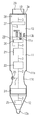
- the illustrated in the figure embodiment of a designed according to the invention operating handle has a pin-like housing 10 with a lower handle 11 and a seated thereon rotary head 13.
- a recessed grip 11a for engaging the fingers of a person.
- the handle 11 is closed at the lower end via a conical base 12, which terminates in a tip 12 a, in particular a soft tip. This allows mechanical touch operations to be performed on the touch display of the operator panel.
- a person can select a mode for the central control unit.
- three rotary positions are indicated, which correspond to the modes "operate”, i. Operating mode, "edit”, i. Edit mode, and "off", i. Hibernation, correspond.
- the rotational surface 14 between handle 11 and turret 13 allows a rastered specification of angular positions, wherein the respective active position is characterized by an underlying mark 11 b.
- the respective rotational position of the rotary head 13 is detected via an integrated operating mode switch 26, in particular a rotary coding switch.
- This and the other internal components 20 are functionally represented in the example of the figure in a dashed line and connected to each other via a symbolic internal connection 3 for the purpose of energy and data transmission.
- the mode selected by a person via the rotary encoder switch 26 is communicated to an exemplary internal processing unit 21.
- the control stylus exemplified in the figure is advantageously provided with a preferably multi-colored ring light placed at the base of the grip 11.
- the exemplary operating handle is further equipped with a unit 25 for position detection, which is advantageously housed in close proximity to the tip 12a in the conical base 12.
- a unit 25 for position detection which is advantageously housed in close proximity to the tip 12a in the conical base 12.
- movements of the tip which are specifically caused by a person, can be detected and transmitted via the communication unit 22 in turn to an operating device.
- This can in particular reconstruct text inputs from this.
- an acknowledgment button 23 is present, which is ergonomically placed in the recessed grip 11a of the handle 11 and provided with a rubber-elastic cover 11c.
- the pulses generated via the acknowledgment button 23 are also advantageously transmitted via the communication unit 22 by radio to an operating device.
- a battery 28 for powering the operating handle and a light 29 for indicating the state of the data communication path are advantageously mounted.
- a controllable holding magnet 27 can be advantageously activated when the operating handle has been switched off by an operator via the rotary head of the housing. This makes it possible to quasi lay the pen on any metallic substrates without a separate holder, e.g. on sheet metal walls of a control cabinet.
Landscapes
- Engineering & Computer Science (AREA)
- General Engineering & Computer Science (AREA)
- Theoretical Computer Science (AREA)
- Human Computer Interaction (AREA)
- Physics & Mathematics (AREA)
- General Physics & Mathematics (AREA)
- Position Input By Displaying (AREA)
Priority Applications (1)
| Application Number | Priority Date | Filing Date | Title |
|---|---|---|---|
| EP09152655A EP2219100A1 (fr) | 2009-02-12 | 2009-02-12 | Poignée de commande électronique pour un appareil de commande doté d'un écran tactile |
Applications Claiming Priority (1)
| Application Number | Priority Date | Filing Date | Title |
|---|---|---|---|
| EP09152655A EP2219100A1 (fr) | 2009-02-12 | 2009-02-12 | Poignée de commande électronique pour un appareil de commande doté d'un écran tactile |
Publications (1)
| Publication Number | Publication Date |
|---|---|
| EP2219100A1 true EP2219100A1 (fr) | 2010-08-18 |
Family
ID=40677633
Family Applications (1)
| Application Number | Title | Priority Date | Filing Date |
|---|---|---|---|
| EP09152655A Withdrawn EP2219100A1 (fr) | 2009-02-12 | 2009-02-12 | Poignée de commande électronique pour un appareil de commande doté d'un écran tactile |
Country Status (1)
| Country | Link |
|---|---|
| EP (1) | EP2219100A1 (fr) |
Citations (6)
| Publication number | Priority date | Publication date | Assignee | Title |
|---|---|---|---|---|
| JPS63286924A (ja) * | 1987-05-20 | 1988-11-24 | Amada Metrecs Co Ltd | 電子式製図装置の入力ペン |
| EP0591083A1 (fr) * | 1992-09-28 | 1994-04-06 | International Business Machines Corporation | Procédé et dispositif pour interagir avec une interface utilisateur d'un système d'ordinateur utilisant un crayon |
| EP0615209A2 (fr) * | 1993-03-12 | 1994-09-14 | Kabushiki Kaisha Toshiba | Dispositif d'entrée d'informations, dispositif de rétention de l'information de position et système de reconnaissance de position les incluant |
| EP1103883A2 (fr) * | 1999-11-29 | 2001-05-30 | Xerox Corporation | Sélection du mode d'entrée de données sur un ordinateur de poche |
| EP1253547A2 (fr) * | 2001-04-25 | 2002-10-30 | Xybernaut Corporation | Un dispositif d'entrée sans fil du type crayon pour ordinateur |
| EP1416423A2 (fr) * | 2002-10-31 | 2004-05-06 | Microsoft Corporation | Dispositif de calcul universel |
-
2009
- 2009-02-12 EP EP09152655A patent/EP2219100A1/fr not_active Withdrawn
Patent Citations (6)
| Publication number | Priority date | Publication date | Assignee | Title |
|---|---|---|---|---|
| JPS63286924A (ja) * | 1987-05-20 | 1988-11-24 | Amada Metrecs Co Ltd | 電子式製図装置の入力ペン |
| EP0591083A1 (fr) * | 1992-09-28 | 1994-04-06 | International Business Machines Corporation | Procédé et dispositif pour interagir avec une interface utilisateur d'un système d'ordinateur utilisant un crayon |
| EP0615209A2 (fr) * | 1993-03-12 | 1994-09-14 | Kabushiki Kaisha Toshiba | Dispositif d'entrée d'informations, dispositif de rétention de l'information de position et système de reconnaissance de position les incluant |
| EP1103883A2 (fr) * | 1999-11-29 | 2001-05-30 | Xerox Corporation | Sélection du mode d'entrée de données sur un ordinateur de poche |
| EP1253547A2 (fr) * | 2001-04-25 | 2002-10-30 | Xybernaut Corporation | Un dispositif d'entrée sans fil du type crayon pour ordinateur |
| EP1416423A2 (fr) * | 2002-10-31 | 2004-05-06 | Microsoft Corporation | Dispositif de calcul universel |
Similar Documents
| Publication | Publication Date | Title |
|---|---|---|
| DE112014004307B4 (de) | Roboterbedienungsvorrichtung, Robotersystem, und Roboterbedienungsprogramm | |
| EP2874789B1 (fr) | Procédé de commande d'un robot industriel et dispositif permettant de mettre en oeuvre le procédé | |
| DE69032645T2 (de) | Datenverarbeitungssystem mit auf Gesten basierenden Eingabedaten | |
| EP3515371B1 (fr) | Prothèse pouvant être actionnée par une force extérieure | |
| DE60212976T2 (de) | Verfahren und Benutzerschnittstelle zur Zeicheneingabe | |
| EP2834050B1 (fr) | Procédé pour commander un robot industriel | |
| DE102017124552B4 (de) | Mit mobilgerät verbundenes not-halt-system | |
| DE102018117790A1 (de) | Maschinenbedienpanel mit integriertem Bedienterminal, und externes Gerät | |
| EP2953793B1 (fr) | Système de commande d'une presse à imprimer | |
| EP1456808A1 (fr) | Dispositif de detection et de representation de mouvements | |
| EP3389947A1 (fr) | Machine-outil portative pourvue d'une unité de changement de vitesse | |
| EP3521964A1 (fr) | Unité de commande à distance pour un chariot élévateur ainsi que système doté d'une telle unité de commande à distance et d'un tel chariot élévateur | |
| DE102010051639A1 (de) | Steuerungsvorrichtung mit Multi-Touch Funktionalität | |
| EP2896027A2 (fr) | Procédé pour commander un système de pilotage à distance ainsi qu'un tel système de pilotage à distance | |
| DE102013009906B4 (de) | Verfahren zur Handschrifterkennung mittels eines berührungsempfindlichen Kraftwagen-Bediensystems und berührungsempfindliches Kraftwagen-Bediensystem | |
| DE102008050542A1 (de) | Medizinisches Bildaufnahmesystem, Bedieneinrichtung und Verfahren zum Steuern einer Bildaufnahmevorrichtung | |
| DE102010009622A1 (de) | Verfahren zum Betreiben einer Benutzerschnittstelle und Vorrichtung dazu, insbesondere in einem Fahrzeug | |
| EP1850305A2 (fr) | Dispositif d'affichage destiné à la représentation par saisie tactile d'éléments d'information et système d'affichage doté d'un tel dispositif d'affichage | |
| DE102019125662A1 (de) | Bedienhilfe, Fernsteuerung und Verfahren zur Fernsteuerung | |
| EP1374031A2 (fr) | Ordinateur et procede de commande correspondant | |
| DE102010062607A1 (de) | Vorrichtung zur Erzeugung eines Eingabesignals | |
| DE10104162A1 (de) | Bedien-und/oder Steuerungseinrichtung für mindestens eine elektronische Einrichtung und Verfahren zur Bedienung und/oder Steuerung | |
| DE102016008049B4 (de) | Verfahren zum Betreiben einer Bedienvorrichtung, Bedienvorrichtung und Kraftfahrzeug | |
| WO2008025619A1 (fr) | Appareil de mesure à distance | |
| DE4000519A1 (de) | Koordinatenleseeinrichtung |
Legal Events
| Date | Code | Title | Description |
|---|---|---|---|
| PUAI | Public reference made under article 153(3) epc to a published international application that has entered the european phase |
Free format text: ORIGINAL CODE: 0009012 |
|
| AK | Designated contracting states |
Kind code of ref document: A1 Designated state(s): AT BE BG CH CY CZ DE DK EE ES FI FR GB GR HR HU IE IS IT LI LT LU LV MC MK MT NL NO PL PT RO SE SI SK TR |
|
| AX | Request for extension of the european patent |
Extension state: AL BA RS |
|
| RTI1 | Title (correction) |
Free format text: ELECTRONIC PEN FOR AN OPERATING DEVICE WITH A TOUCH SCREEN |
|
| AKY | No designation fees paid | ||
| STAA | Information on the status of an ep patent application or granted ep patent |
Free format text: STATUS: THE APPLICATION IS DEEMED TO BE WITHDRAWN |
|
| 18D | Application deemed to be withdrawn |
Effective date: 20110219 |