EP2405372A2 - Appareil d'affichage et procédé d'affichage de celui-ci - Google Patents
Appareil d'affichage et procédé d'affichage de celui-ci Download PDFInfo
- Publication number
- EP2405372A2 EP2405372A2 EP11184205A EP11184205A EP2405372A2 EP 2405372 A2 EP2405372 A2 EP 2405372A2 EP 11184205 A EP11184205 A EP 11184205A EP 11184205 A EP11184205 A EP 11184205A EP 2405372 A2 EP2405372 A2 EP 2405372A2
- Authority
- EP
- European Patent Office
- Prior art keywords
- list image
- contents
- content
- frequency
- display apparatus
- Prior art date
- Legal status (The legal status is an assumption and is not a legal conclusion. Google has not performed a legal analysis and makes no representation as to the accuracy of the status listed.)
- Ceased
Links
Images



Classifications
-
- H—ELECTRICITY
- H04—ELECTRIC COMMUNICATION TECHNIQUE
- H04N—PICTORIAL COMMUNICATION, e.g. TELEVISION
- H04N5/00—Details of television systems
- H04N5/76—Television signal recording
- H04N5/91—Television signal processing therefor
- H04N5/93—Regeneration of the television signal or of selected parts thereof
-
- G—PHYSICS
- G06—COMPUTING OR CALCULATING; COUNTING
- G06F—ELECTRIC DIGITAL DATA PROCESSING
- G06F16/00—Information retrieval; Database structures therefor; File system structures therefor
- G06F16/50—Information retrieval; Database structures therefor; File system structures therefor of still image data
- G06F16/54—Browsing; Visualisation therefor
-
- G—PHYSICS
- G06—COMPUTING OR CALCULATING; COUNTING
- G06F—ELECTRIC DIGITAL DATA PROCESSING
- G06F16/00—Information retrieval; Database structures therefor; File system structures therefor
- G06F16/90—Details of database functions independent of the retrieved data types
- G06F16/95—Retrieval from the web
- G06F16/953—Querying, e.g. by the use of web search engines
- G06F16/9535—Search customisation based on user profiles and personalisation
-
- G—PHYSICS
- G06—COMPUTING OR CALCULATING; COUNTING
- G06F—ELECTRIC DIGITAL DATA PROCESSING
- G06F3/00—Input arrangements for transferring data to be processed into a form capable of being handled by the computer; Output arrangements for transferring data from processing unit to output unit, e.g. interface arrangements
- G06F3/01—Input arrangements or combined input and output arrangements for interaction between user and computer
- G06F3/048—Interaction techniques based on graphical user interfaces [GUI]
- G06F3/0481—Interaction techniques based on graphical user interfaces [GUI] based on specific properties of the displayed interaction object or a metaphor-based environment, e.g. interaction with desktop elements like windows or icons, or assisted by a cursor's changing behaviour or appearance
- G06F3/0482—Interaction with lists of selectable items, e.g. menus
-
- G—PHYSICS
- G06—COMPUTING OR CALCULATING; COUNTING
- G06F—ELECTRIC DIGITAL DATA PROCESSING
- G06F16/00—Information retrieval; Database structures therefor; File system structures therefor
- G06F16/90—Details of database functions independent of the retrieved data types
- G06F16/95—Retrieval from the web
- G06F16/951—Indexing; Web crawling techniques
-
- G—PHYSICS
- G06—COMPUTING OR CALCULATING; COUNTING
- G06F—ELECTRIC DIGITAL DATA PROCESSING
- G06F16/00—Information retrieval; Database structures therefor; File system structures therefor
- G06F16/90—Details of database functions independent of the retrieved data types
- G06F16/95—Retrieval from the web
- G06F16/954—Navigation, e.g. using categorised browsing
-
- G—PHYSICS
- G06—COMPUTING OR CALCULATING; COUNTING
- G06F—ELECTRIC DIGITAL DATA PROCESSING
- G06F3/00—Input arrangements for transferring data to be processed into a form capable of being handled by the computer; Output arrangements for transferring data from processing unit to output unit, e.g. interface arrangements
- G06F3/01—Input arrangements or combined input and output arrangements for interaction between user and computer
- G06F3/048—Interaction techniques based on graphical user interfaces [GUI]
- G06F3/0481—Interaction techniques based on graphical user interfaces [GUI] based on specific properties of the displayed interaction object or a metaphor-based environment, e.g. interaction with desktop elements like windows or icons, or assisted by a cursor's changing behaviour or appearance
-
- Y—GENERAL TAGGING OF NEW TECHNOLOGICAL DEVELOPMENTS; GENERAL TAGGING OF CROSS-SECTIONAL TECHNOLOGIES SPANNING OVER SEVERAL SECTIONS OF THE IPC; TECHNICAL SUBJECTS COVERED BY FORMER USPC CROSS-REFERENCE ART COLLECTIONS [XRACs] AND DIGESTS
- Y10—TECHNICAL SUBJECTS COVERED BY FORMER USPC
- Y10S—TECHNICAL SUBJECTS COVERED BY FORMER USPC CROSS-REFERENCE ART COLLECTIONS [XRACs] AND DIGESTS
- Y10S707/00—Data processing: database and file management or data structures
- Y10S707/99931—Database or file accessing
- Y10S707/99933—Query processing, i.e. searching
- Y10S707/99935—Query augmenting and refining, e.g. inexact access
Definitions
- the present invention relates to a display apparatus and a displaying method of the same, and more particularly, to a display apparatus capable of browsing contents and a displaying method of the same.
- a display apparatus can be provided with a list of contents for content browsing.
- the contents are displayed as thumbnail images or simple texts, so that a user can select desired contents in the list, thereby reproducing or executing the contents.
- the user can generate a specific folder and individually group the contents into the specific folder, or add an image such as a star icon or the like to a currently displayed list.
- an aspect of the present invention is to provide a display apparatus capable of intuitively displaying contents according to frequency of use and a displaying method of the same.
- a display apparatus capable of intuitively displaying recently used contents and a displaying method of the same.
- a display apparatus comprising a content output unit which outputs at least one content; a display unit; a video processor which processes and outputs a list image of the contents to the display unit; and a controller which controls the video processor to change a display effect of the list image according to frequency of use of the contents.
- the video processor may change video noise, hereinafter simply referred to as noise, of the list image according to frequency of use of the contents.
- the video processor may change light and shade of the list image according to frequency of use of the contents.
- the video processor may change transparency of the list image according to frequency of use of the contents.
- the video processor applies a mosaic process to the list image of contents not selected for a predetermined period of time.
- the video processor may change an inclination of the list image of latest selected contents to be different from inclination of other list images.
- Another aspect of the present invention can be achieved by providing a displaying method of a display apparatus including a display unit, the method including: receiving a selection signal for displaying a list image of at least one content; and processing the list image of the contents to be changed in a display effect according to frequency of use of the contents.
- Yet another aspect of the present invention can be achieved by providing a computer readable recording medium having recorded thereon a program for executing the displaying method of the display apparatus.
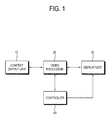
- FIG. 1 is a control block diagram of a display apparatus according to an exemplary embodiment of the present invention.
- the display apparatus includes a content output unit 10, a video processor 20, a display unit 30, and a controller 40 controlling them.
- the display apparatus in this embodiment may include an apparatus capable of displaying a list of contents as an image so that the contents can be distinguished or searched. That is, a computer system having a display unit, a television, various mobile terminals, a digital photo frame, a camera stored with contents, a camcorder, etc. may be the display apparatus.
- the video processor 20 processes a list image of contents to be output from the content output unit 10 under control of the controller 40, and displays it on the display unit 30. If the contents can be output from the content output unit 10, i.e., if the contents are available, the video processor 20 provides a list of contents available to a user as an image. Also, if a user browses contents, i.e., if a user requests a search, the video processor 20 displays the list image of contents on the display unit 30. For example, if the contents are a still image, the list image contains a thumbnail image of the still image. If the contents are an audio file, the list image contains a thumbnail image of an album jacket. If the contents are a moving picture, the list image contains a main scene thereof.
- an image related to a title of contents i.e., an icon may be displayed as a list image.
- a folder containing contents may be displayed as a list image, without the contents of the folder being displayed.
- the display unit 30 displays the list image processed in the video processor 30.
- the display unit 30 may include a liquid crystal display (LCD) panel, an organic light emitting diode (OLED), or a plasma display panel (PDP), and includes a panel driver for driving the panel.
- LCD liquid crystal display
- OLED organic light emitting diode
- PDP plasma display panel
- the controller 40 controls the video processor 20 to display items about contents to be displayable or executable on the display unit 30 when a content source is connected to the content output unit 10 or when a user searches contents. Also, the controller 40 controls the video processor 20 to change the list image of the contents in a display effect according to frequency of use of the contents. Whenever the contents are selected, the controller 40 counts the frequency in selection of the contents and stores it. The video processor 20 changes the display effect of the list image according to the frequency in selection.
- various known methods may be applied to an algorithm for changing the display effect according to specific variables.
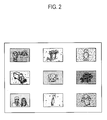
- FIGs. 2 to 6 are views showing various list images according to exemplary embodiments of the present invention.
- FIG. 2 shows a list image which changes using noise according to frequency of use of contents. If the frequency with which a user uses the contents, i.e., the frequency in displaying and executing the contents is high, very little noise is added to the list image so that the list image can be clearly and definitely displayed. On the other hand, if the frequency of use is low, much noise is added so that the list image can be unclearly and roughly displayed like an old photo. A user can intuitively know his/her preference of using the contents through the list image of contents, and be also reminded of the existence of the contents. Through the list image, the contents can be readily managed. For example, the contents correspond to very low frequency of use may be deleted, but the contents correspond to high frequency of use may be separately managed as a file.
- FIG. 3 shows a list image of contents that can be changed using light and shade according to frequency of use.
- the list image is hatched, in which a narrower interval between oblique lines represents a darker image, but a broader interval between oblique lines represents a brighter image.
- the controller 40 may make the list image brighter as the frequency of use becomes higher, and darker as the frequency becomes lower. That is, the display effect of the list image is not limited as long as a user can easily distinguish among the use frequencies of plural contents through the light and shade of the contents.
- the list image may be changed using transparency or outline clearness according to frequency of use.
- the list image may be changed in a color tone according to frequency of use. For example, if the frequency of use is low, the list image is changed to have a black or dark brown tone, thereby having an aged photo effect. As long as frequency of use of contents is distinguished at a glance and the content corresponding to high frequency is emphasized, various methods of displaying the list image can be employed.
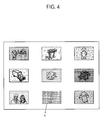
- FIG. 4 shows that a list image of contents not selected for a predetermined period of time undergoes a mosaic process.
- the video processor 20 applies the mosaic process to the contents corresponding to particular low frequency of use in addition to the display effect of the list image changed according to the frequency of use.
- a list image of FIG. 4 is the list image of contents not selected by a user for a specific period of time, e.g., ten days, one month or one years, the list image A may undergo the mosaic process. Instead of the mosaic process, this list image may be inactivated, i.e., processed not to be selectable.
- the list image of the contents corresponding to the high use frequency may be processed to be distinguishable from the other list image of the contents corresponding to low frequency use.
- an animation having a left and right motion may be added to the list image.
- the list image may be repetitively zoomed in and out. Through the content search, a user can more easily recognize the frequency of use of the contents.
- FIG. 5 shows that the image list of latest used contents is displayed differently from the other list images.
- the video processor 20 changes an inclination of the latest list image B such that displaying or opening the contents is indicated as being different from those of the other list images.
- the list image is inclined downward as if a user takes out a photo from an album and then stops.
- the list image may be inclined upward.
- the list image of latest used contents may be changed in its outline. For example, the outline of the list image may be displayed by a bold line or the bold outline may be highlighted.
- FIG. 6 shows another list image in the display apparatus of FIG. 1 .
- the list image corresponds not to the contents but a folder to which the contents belong.
- a user may browse not only the list image of contents but the list image of folders in which the contents are stored.
- the video processor 20 may change the display effect of a folder image according to frequency of use.
- the list image corresponding to the folders may be changed in transparency, light and shade, noise, etc. according to frequency of use.
- the folder may be changed in color or size.
- an icon displayed on the display unit 30 may be also changed in the display effect according to frequency of use.
- a user may intuitively ascertain the frequency of use of contents, folders and icons through an interface provided as an image. Similarly, deletion or a reminder of the contents can be based on such intuitiveness, so that the contents can be more effectively managed.
- the video processor 20 may arrange the list image according to the frequency of use while changing the display effect of the list image. For example, an arranged position of the list image is changed according to frequency of use, so that a user can more definitely distinguish among the contents. Further, the frequency of use may be reflected on the list image by adjusting the size of the list image.
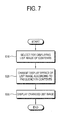
- FIG. 7 is a control flowchart for explaining a displaying method of the display apparatus of FIG. 1 .
- the controller 20 controls the video processor 20 to change the display effect of the list image according to the frequency of use of the contents.
- the list image may be changed in at least one of noise, light and shade, transparency, and a color tone, or may undergo the mosaic process according to frequency of use.
- the changed list image is displayed on the display unit 30, and thus a user selects the searched list image to display or execute the contents.
- a display apparatus capable of intuitively displaying contents according to frequency of use, and a displaying method of the same.
- a display apparatus capable of intuitively displaying the latest used contents, and a displaying method of the same.
- a display apparatus capable of arranging contents according to frequency of use, and a displaying method of the same.
- a display apparatus in which contents can be easily searched and managed, and a displaying method of the same.
- exemplary embodiments can be written as computer programs and can be implemented in general-use digital computers that execute the programs using a computer readable recording medium.
- Examples of the computer readable recording medium include storage media including magnetic storage media (e.g., ROM, floppy disks, hard disks, etc.) and optical recording media (e.g., CD-ROMs, or DVDs).
Landscapes
- Engineering & Computer Science (AREA)
- Theoretical Computer Science (AREA)
- Databases & Information Systems (AREA)
- General Engineering & Computer Science (AREA)
- General Physics & Mathematics (AREA)
- Physics & Mathematics (AREA)
- Data Mining & Analysis (AREA)
- Human Computer Interaction (AREA)
- Signal Processing (AREA)
- Multimedia (AREA)
- User Interface Of Digital Computer (AREA)
- Controls And Circuits For Display Device (AREA)
- Two-Way Televisions, Distribution Of Moving Picture Or The Like (AREA)
Applications Claiming Priority (2)
| Application Number | Priority Date | Filing Date | Title |
|---|---|---|---|
| KR1020090090424A KR101599288B1 (ko) | 2009-09-24 | 2009-09-24 | 디스플레이장치 및 그 영상표시방법 |
| EP10162042A EP2306340A1 (fr) | 2009-09-24 | 2010-05-05 | Appareil d'affichage et procédé d'affichage de celui-ci |
Related Parent Applications (1)
| Application Number | Title | Priority Date | Filing Date |
|---|---|---|---|
| EP10162042.5 Division | 2010-05-05 |
Publications (2)
| Publication Number | Publication Date |
|---|---|
| EP2405372A2 true EP2405372A2 (fr) | 2012-01-11 |
| EP2405372A3 EP2405372A3 (fr) | 2012-03-28 |
Family
ID=42254360
Family Applications (2)
| Application Number | Title | Priority Date | Filing Date |
|---|---|---|---|
| EP11184205A Ceased EP2405372A3 (fr) | 2009-09-24 | 2010-05-05 | Appareil d'affichage et procédé d'affichage de celui-ci |
| EP10162042A Ceased EP2306340A1 (fr) | 2009-09-24 | 2010-05-05 | Appareil d'affichage et procédé d'affichage de celui-ci |
Family Applications After (1)
| Application Number | Title | Priority Date | Filing Date |
|---|---|---|---|
| EP10162042A Ceased EP2306340A1 (fr) | 2009-09-24 | 2010-05-05 | Appareil d'affichage et procédé d'affichage de celui-ci |
Country Status (4)
| Country | Link |
|---|---|
| US (1) | US9032333B2 (fr) |
| EP (2) | EP2405372A3 (fr) |
| JP (1) | JP2011070651A (fr) |
| KR (1) | KR101599288B1 (fr) |
Families Citing this family (12)
| Publication number | Priority date | Publication date | Assignee | Title |
|---|---|---|---|---|
| WO2011127846A2 (fr) * | 2011-05-13 | 2011-10-20 | 华为终端有限公司 | Procédé de mise à jour d'un mode d'affichage d'une touche et combiné radio |
| USD683760S1 (en) * | 2011-12-02 | 2013-06-04 | Microsoft Corporation | Display screen with icon |
| USD683759S1 (en) * | 2011-12-02 | 2013-06-04 | Microsoft Corporation | Display screen with icon |
| US9044171B2 (en) | 2012-06-22 | 2015-06-02 | Fitbit, Inc. | GPS power conservation using environmental data |
| US11029199B2 (en) | 2012-06-22 | 2021-06-08 | Fitbit, Inc. | Ambient light determination using physiological metric sensor data |
| US9597014B2 (en) | 2012-06-22 | 2017-03-21 | Fitbit, Inc. | GPS accuracy refinement using external sensors |
| US8976062B2 (en) | 2013-04-01 | 2015-03-10 | Fitbit, Inc. | Portable biometric monitoring devices having location sensors |
| USD729843S1 (en) * | 2013-05-28 | 2015-05-19 | Deere & Company | Display screen or portion thereof with icon |
| CN105447006B (zh) | 2014-08-08 | 2019-08-16 | 阿里巴巴集团控股有限公司 | 一种图片选择方法及其装置 |
| JP6511860B2 (ja) * | 2015-02-27 | 2019-05-15 | 富士通株式会社 | 表示制御システム、グラフ表示方法およびグラフ表示プログラム |
| US11845718B2 (en) * | 2019-09-29 | 2023-12-19 | China Petroleum & Chemical Corporation | Process for producing p-xylene and ethylbenzene from C8 aromatic containing ethylbenzene |
| CN110955362B (zh) * | 2019-11-21 | 2022-08-30 | 北京达佳互联信息技术有限公司 | 网页中元素的处理方法、装置、电子设备及存储介质 |
Family Cites Families (20)
| Publication number | Priority date | Publication date | Assignee | Title |
|---|---|---|---|---|
| JPH0795261B2 (ja) | 1988-10-25 | 1995-10-11 | 日本電気株式会社 | メニュー表示方式 |
| JPH0520016A (ja) | 1991-07-16 | 1993-01-29 | Casio Comput Co Ltd | アイコンメニユー表示装置 |
| KR930007256A (ko) * | 1991-09-10 | 1993-04-22 | 오오가 노리오 | 작동메뉴를 나타내는 비디오 디스플레이장치 및 그의 텔레비전 수상기 |
| US6118427A (en) * | 1996-04-18 | 2000-09-12 | Silicon Graphics, Inc. | Graphical user interface with optimal transparency thresholds for maximizing user performance and system efficiency |
| JPH10333861A (ja) | 1997-06-02 | 1998-12-18 | Fuji Xerox Co Ltd | 記憶量表示装置 |
| JP3862913B2 (ja) * | 2000-02-15 | 2006-12-27 | シャープ株式会社 | ファイル処理装置及びコンピュータをファイル処理装置として動作させるためのプログラムを格納したコンピュータ読取可能な記憶媒体 |
| JP2002077779A (ja) | 2000-08-29 | 2002-03-15 | Matsushita Electric Ind Co Ltd | 画像管理装置 |
| US6918132B2 (en) | 2001-06-14 | 2005-07-12 | Hewlett-Packard Development Company, L.P. | Dynamic interface method and system for displaying reduced-scale broadcasts |
| JP2003091347A (ja) * | 2001-09-18 | 2003-03-28 | Sony Corp | 情報処理装置、並びに画面表示方法、画面表示プログラム及び画面表示プログラムが記録された記録媒体 |
| JP2004242288A (ja) | 2003-01-17 | 2004-08-26 | Matsushita Electric Ind Co Ltd | 映像再生装置および映像記録再生装置 |
| JP2005148798A (ja) | 2003-11-11 | 2005-06-09 | Casio Comput Co Ltd | 情報処理装置および情報処理のプログラム |
| EP2256687A1 (fr) * | 2005-02-16 | 2010-12-01 | Adobe Systems Incorporated | Interface interactif, en temps réel et non-modal |
| US7543244B2 (en) * | 2005-03-22 | 2009-06-02 | Microsoft Corporation | Determining and displaying a list of most commonly used items |
| US8166412B2 (en) * | 2006-01-13 | 2012-04-24 | Adobe Systems Incorporated | Visual cue discernment on scattered data |
| KR100686165B1 (ko) | 2006-04-18 | 2007-02-26 | 엘지전자 주식회사 | 오에스디 기능 아이콘을 갖는 휴대용 단말기 및 이를이용한 오에스디 기능 아이콘의 디스플레이 방법 |
| US20090103899A1 (en) * | 2007-10-18 | 2009-04-23 | Sony Ericsson Mobile Communications Ab | Dynamic media proxies based on time and usage patterns |
| KR101512131B1 (ko) * | 2008-01-15 | 2015-04-16 | 삼성전자 주식회사 | 컨텐츠 목록을 표시하는 방법 및 장치 |
| US20090207316A1 (en) * | 2008-02-19 | 2009-08-20 | Sorenson Media, Inc. | Methods for summarizing and auditing the content of digital video |
| US9772689B2 (en) * | 2008-03-04 | 2017-09-26 | Qualcomm Incorporated | Enhanced gesture-based image manipulation |
| US20100185986A1 (en) * | 2009-01-16 | 2010-07-22 | Dell Products L.P. | System and Method for Displaying Data File Properties in an Information Handling System |
-
2009
- 2009-09-24 KR KR1020090090424A patent/KR101599288B1/ko not_active Expired - Fee Related
-
2010
- 2010-04-06 US US12/754,958 patent/US9032333B2/en active Active
- 2010-05-05 EP EP11184205A patent/EP2405372A3/fr not_active Ceased
- 2010-05-05 EP EP10162042A patent/EP2306340A1/fr not_active Ceased
- 2010-07-05 JP JP2010153293A patent/JP2011070651A/ja active Pending
Non-Patent Citations (1)
| Title |
|---|
| None |
Also Published As
| Publication number | Publication date |
|---|---|
| EP2405372A3 (fr) | 2012-03-28 |
| US9032333B2 (en) | 2015-05-12 |
| EP2306340A1 (fr) | 2011-04-06 |
| US20110072377A1 (en) | 2011-03-24 |
| JP2011070651A (ja) | 2011-04-07 |
| KR101599288B1 (ko) | 2016-03-04 |
| KR20110032762A (ko) | 2011-03-30 |
Similar Documents
| Publication | Publication Date | Title |
|---|---|---|
| US9032333B2 (en) | Display apparatus and displaying method of the same | |
| US7673240B2 (en) | Ubiquitous navbar user interface across multiple heterogeneous digital media devices | |
| EP3364280B1 (fr) | Appareil de traitement d'informations, procédé de traitement d'informations et programme | |
| US7844916B2 (en) | Multimedia reproducing apparatus and menu screen display method | |
| RU2488160C2 (ru) | Закрепленные по центру списки | |
| US8543940B2 (en) | Method and apparatus for browsing media content and executing functions related to media content | |
| US7546554B2 (en) | Systems and methods for browsing multimedia content on small mobile devices | |
| US8977980B2 (en) | Display scrolling method, display apparatus, and recording medium having display program recorded thereon | |
| US20110161818A1 (en) | Method and apparatus for video chapter utilization in video player ui | |
| EP1607844A2 (fr) | Dispositif électronique portable, méthode d'affichage, programme, et interface graphique utilisateur pour celui-ci | |
| AU2012341372A1 (en) | Flexible display apparatus and method of providing user interface by using the same | |
| US9009141B2 (en) | Display apparatus and displaying method of contents | |
| CN1795674A (zh) | 多媒体再现装置和再现方法 | |
| JP2006011690A (ja) | スクロール制御装置およびスクロール制御方法 | |
| KR20150066129A (ko) | 디스플레이 장치 및 그의 제어 방법 | |
| US20110154256A1 (en) | Electronic apparatus and method of controlling the same | |
| US20120155828A1 (en) | Content Continuous-Reproduction Device, Reproduction Method Thereof, and Reproduction Control Program Thereof | |
| US8701036B2 (en) | Electronic device and method for implementing icon board based operation interface thereof | |
| JP4772583B2 (ja) | マルチメディア再生装置、メニュー画面表示方法、メニュー画面表示プログラム及びメニュー画面表示プログラムを記憶したコンピュータ読み取り可能な記憶媒体 | |
| JP5126026B2 (ja) | 情報処理装置、表示制御方法およびプログラム | |
| CN105468254B (zh) | 内容搜索设备和用于搜索内容的方法 | |
| US8522280B2 (en) | Display control apparatus, display control method and communication system | |
| US20200401280A1 (en) | Display device and method for controlling display device | |
| Price | Windows 7 for Seniors in easy steps | |
| JP2011138381A (ja) | ファイル表示装置、ファイル表示方法、ファイル表示プログラムおよびそれを記録したコンピュータ読み取り可能な記録媒体 |
Legal Events
| Date | Code | Title | Description |
|---|---|---|---|
| AC | Divisional application: reference to earlier application |
Ref document number: 2306340 Country of ref document: EP Kind code of ref document: P |
|
| AK | Designated contracting states |
Kind code of ref document: A2 Designated state(s): AL AT BE BG CH CY CZ DE DK EE ES FI FR GB GR HR HU IE IS IT LI LT LU LV MC MK MT NL NO PL PT RO SE SI SK SM TR |
|
| AX | Request for extension of the european patent |
Extension state: BA ME RS |
|
| PUAI | Public reference made under article 153(3) epc to a published international application that has entered the european phase |
Free format text: ORIGINAL CODE: 0009012 |
|
| PUAL | Search report despatched |
Free format text: ORIGINAL CODE: 0009013 |
|
| AK | Designated contracting states |
Kind code of ref document: A3 Designated state(s): AL AT BE BG CH CY CZ DE DK EE ES FI FR GB GR HR HU IE IS IT LI LT LU LV MC MK MT NL NO PL PT RO SE SI SK SM TR |
|
| AX | Request for extension of the european patent |
Extension state: BA ME RS |
|
| RIC1 | Information provided on ipc code assigned before grant |
Ipc: G06F 17/30 20060101AFI20120222BHEP |
|
| RAP1 | Party data changed (applicant data changed or rights of an application transferred) |
Owner name: SAMSUNG ELECTRONICS CO., LTD. |
|
| 17P | Request for examination filed |
Effective date: 20120815 |
|
| 17Q | First examination report despatched |
Effective date: 20130207 |
|
| APBK | Appeal reference recorded |
Free format text: ORIGINAL CODE: EPIDOSNREFNE |
|
| APBN | Date of receipt of notice of appeal recorded |
Free format text: ORIGINAL CODE: EPIDOSNNOA2E |
|
| APBR | Date of receipt of statement of grounds of appeal recorded |
Free format text: ORIGINAL CODE: EPIDOSNNOA3E |
|
| APAF | Appeal reference modified |
Free format text: ORIGINAL CODE: EPIDOSCREFNE |
|
| APBT | Appeal procedure closed |
Free format text: ORIGINAL CODE: EPIDOSNNOA9E |
|
| STAA | Information on the status of an ep patent application or granted ep patent |
Free format text: STATUS: THE APPLICATION HAS BEEN REFUSED |
|
| 18R | Application refused |
Effective date: 20180731 |