EP2503445B1 - Granuläres Element einer grafischen Benutzerschnittstelle - Google Patents
Granuläres Element einer grafischen Benutzerschnittstelle Download PDFInfo
- Publication number
- EP2503445B1 EP2503445B1 EP12172974.3A EP12172974A EP2503445B1 EP 2503445 B1 EP2503445 B1 EP 2503445B1 EP 12172974 A EP12172974 A EP 12172974A EP 2503445 B1 EP2503445 B1 EP 2503445B1
- Authority
- EP
- European Patent Office
- Prior art keywords
- granularity
- parameter
- user interface
- graphical user
- gui element
- Prior art date
- Legal status (The legal status is an assumption and is not a legal conclusion. Google has not performed a legal analysis and makes no representation as to the accuracy of the status listed.)
- Active
Links
Images


Classifications
-
- G—PHYSICS
- G06—COMPUTING OR CALCULATING; COUNTING
- G06F—ELECTRIC DIGITAL DATA PROCESSING
- G06F3/00—Input arrangements for transferring data to be processed into a form capable of being handled by the computer; Output arrangements for transferring data from processing unit to output unit, e.g. interface arrangements
- G06F3/01—Input arrangements or combined input and output arrangements for interaction between user and computer
- G06F3/048—Interaction techniques based on graphical user interfaces [GUI]
- G06F3/0481—Interaction techniques based on graphical user interfaces [GUI] based on specific properties of the displayed interaction object or a metaphor-based environment, e.g. interaction with desktop elements like windows or icons, or assisted by a cursor's changing behaviour or appearance
- G06F3/04812—Interaction techniques based on cursor appearance or behaviour, e.g. being affected by the presence of displayed objects
-
- G—PHYSICS
- G06—COMPUTING OR CALCULATING; COUNTING
- G06F—ELECTRIC DIGITAL DATA PROCESSING
- G06F3/00—Input arrangements for transferring data to be processed into a form capable of being handled by the computer; Output arrangements for transferring data from processing unit to output unit, e.g. interface arrangements
- G06F3/01—Input arrangements or combined input and output arrangements for interaction between user and computer
- G06F3/048—Interaction techniques based on graphical user interfaces [GUI]
- G06F3/0484—Interaction techniques based on graphical user interfaces [GUI] for the control of specific functions or operations, e.g. selecting or manipulating an object, an image or a displayed text element, setting a parameter value or selecting a range
- G06F3/04847—Interaction techniques to control parameter settings, e.g. interaction with sliders or dials
-
- G—PHYSICS
- G06—COMPUTING OR CALCULATING; COUNTING
- G06F—ELECTRIC DIGITAL DATA PROCESSING
- G06F3/00—Input arrangements for transferring data to be processed into a form capable of being handled by the computer; Output arrangements for transferring data from processing unit to output unit, e.g. interface arrangements
- G06F3/01—Input arrangements or combined input and output arrangements for interaction between user and computer
- G06F3/048—Interaction techniques based on graphical user interfaces [GUI]
- G06F3/0481—Interaction techniques based on graphical user interfaces [GUI] based on specific properties of the displayed interaction object or a metaphor-based environment, e.g. interaction with desktop elements like windows or icons, or assisted by a cursor's changing behaviour or appearance
-
- G—PHYSICS
- G06—COMPUTING OR CALCULATING; COUNTING
- G06F—ELECTRIC DIGITAL DATA PROCESSING
- G06F3/00—Input arrangements for transferring data to be processed into a form capable of being handled by the computer; Output arrangements for transferring data from processing unit to output unit, e.g. interface arrangements
- G06F3/01—Input arrangements or combined input and output arrangements for interaction between user and computer
- G06F3/048—Interaction techniques based on graphical user interfaces [GUI]
- G06F3/0481—Interaction techniques based on graphical user interfaces [GUI] based on specific properties of the displayed interaction object or a metaphor-based environment, e.g. interaction with desktop elements like windows or icons, or assisted by a cursor's changing behaviour or appearance
- G06F3/0482—Interaction with lists of selectable items, e.g. menus
-
- G—PHYSICS
- G06—COMPUTING OR CALCULATING; COUNTING
- G06F—ELECTRIC DIGITAL DATA PROCESSING
- G06F3/00—Input arrangements for transferring data to be processed into a form capable of being handled by the computer; Output arrangements for transferring data from processing unit to output unit, e.g. interface arrangements
- G06F3/01—Input arrangements or combined input and output arrangements for interaction between user and computer
- G06F3/048—Interaction techniques based on graphical user interfaces [GUI]
- G06F3/0484—Interaction techniques based on graphical user interfaces [GUI] for the control of specific functions or operations, e.g. selecting or manipulating an object, an image or a displayed text element, setting a parameter value or selecting a range
- G06F3/0485—Scrolling or panning
-
- G—PHYSICS
- G06—COMPUTING OR CALCULATING; COUNTING
- G06F—ELECTRIC DIGITAL DATA PROCESSING
- G06F3/00—Input arrangements for transferring data to be processed into a form capable of being handled by the computer; Output arrangements for transferring data from processing unit to output unit, e.g. interface arrangements
- G06F3/01—Input arrangements or combined input and output arrangements for interaction between user and computer
- G06F3/048—Interaction techniques based on graphical user interfaces [GUI]
- G06F3/0484—Interaction techniques based on graphical user interfaces [GUI] for the control of specific functions or operations, e.g. selecting or manipulating an object, an image or a displayed text element, setting a parameter value or selecting a range
- G06F3/0485—Scrolling or panning
- G06F3/04855—Interaction with scrollbars
Definitions
- the invention relates generally to graphical user interfaces for computer systems and, more particularly, to a graphical user interface element providing multiple levels of granularity for application control.
- GUIs Graphical user interfaces
- Most cursor control devices include a switch for generating signals to the computer system to indicate a selection or other user action.
- the combination of windows, icons, and a cursor control device permits a user to operate in a visual "point-and-click" manner.
- point-and-click refers to positioning a cursor on a display so it is over a desired image and activating a switch (e.g ., a button, a finger tap or a stylus tap) on the cursor control device.
- One illustrative graphical user interface is the FinderTM interface for the Macintosh ® family of computer systems. (FINDER is a trademark of, and MACINTOSH is a registered trademark of, Apple Computer, Inc. of Cupertino, California.)
- Equipment and application controls have been simulated for display through a GUI.
- graphical representations of a volume control knob and a visual zoom slider control are indicative of GUI elements used in today's graphical user interfaces.
- the application's settings e.g ., the playback volume, visual magnification or angle of image rotation
- the user positions a cursor over the graphical representation of the knob or slider, activates the cursor control device by clicking and holding the cursor control device's button and drags the cursor in a circular or linear motion to achieve the desired setting (e.g ., volume, rotation or zoom level).
- GUI elements While more convenient than a command-line input interface, conventional GUI elements only permit the user to adjust the desired parameter in a linear fashion. That is, when the user adjusts the GUI element through a specified range (e.g ., 45 degrees rotation or 1 inch of liner motion), conventional GUI elements adjust the associated parameter (e.g ., image rotation or volume) a corresponding specified amount. This can make it difficult for a user to rapidly change the target parameter through a large range while also permitting the user to finely adjust the parameter's final or end-value. For example, if a 2 inch slider is used to control the rotation of a selected image, a 1 inch change in the slider control's position will cause a 180 degree rotation of the displayed image. While this permits the user to rapidly adjust the image's rotation through a wide range, the resolution of the GUI element can make it difficult to precisely control the final value.
- a specified range e.g . 45 degrees rotation or 1 inch of liner motion
- conventional GUI elements adjust the associated parameter (e.g ., image rotation or
- GUI element that permits a user to rapidly adjust an application's operation in a first (coarse) manner while also permitting the user to adjust the application's operation is a second (fine) manner.
- a graphical uses interface method according to the invention is defined in claim 1, and a program storage device according to the invention is defined in claim 15.
- a graphical user interface (GUI) element permits a user to control an application in both a coarse manner and a fine manner.
- GUI graphical user interface
- parameter adjustment is made at a first (coarse) granularity so that rapid changes to the target parameter can be made (e.g ., displayed zoom level, image rotation or playback volume).
- a second (fine) granularity so that fine changes to the target parameter can be made.
- the finer the control is the finer the control.
- this action when coincident with the GUI element, this action can cause a selected image to rotate through 45 degrees; when 1 inch away from the GUI element, this action may cause selected image to rotate through only 20 degrees; and when 3 inches away from the GUI element, this action may cause selected image to rotate through only 5 degrees.
- a graphical user interface element in accordance with the invention provides a user with the ability to adjust an operating characteristic of an application (e.g ., zoom level, page or list display, image rotation, image exposure and volume), wherein a given amount of cursor movement causes a specified amount of change when the cursor is coincident/over the displayed GUI element and a lesser amount of change when the cursor is off or away from the GUI element. That is, the granularity of the change associated with a given cursor movement is modified as a function of the distance between the cursor and GUI element.
- an operating characteristic of an application e.g ., zoom level, page or list display, image rotation, image exposure and volume
- GUI element in accordance with the invention is that a single control element can be used to rapidly "get close" to the user's desired setting while also permitting the user to use relatively large cursor movements to effect fine or small changes to the target parameter.
- GUI element 100 in accordance with the invention is used to rotate image 105 in graphics window 110. With the cursor positioned over GUI element 100, rotation is effected at a first granularity.
- cursor motion about the center of GUI element 100 of a specified amount i.e., the difference between cursor position 115 and 115' ) causes image 105 to be rotated X degrees in steps of, for example, 15 degrees, resulting in image 105'.
- the target image i.e . image 105, 105', 105" and 105"'
- the image could be rotated about an arbitrary point such as the point identified by the cursor when GUI element 100 is displayed.
- the cursor may be placed over that object the user desires to rotate before displaying GUI element 100.
- GUI element 100 includes an indication of the current amount of image rotation (i.e ., 0° in FIG. 1A , A o in FIG. 1B , B o in FIG. 1C and C o in FIG. ID). This can be useful feedback to the user in that as the amount of rotation approaches the desired value, the user can move the cursor further away from GUI element 100 so that finer adjustments may be made. In other embodiments, this information may be displayed through the status bar of the target application, as a field displayed at a user or system specified location or in any other manner known in the art.
- GUI element 100 may be displayed through a user action such as, for example, by depressing a predetermined key (e.g., the Option key), a combination of predetermined keys (e.g., the Shift and Option keys), a pull-down menu, a pop-up menu or any means known in the art. GUI element 100 may be dismissed in similar fashion. Also in accordance with the invention, GUI element may be opaque for easy viewing or translucent so that the object/image "beneath" it may be viewed.
- a predetermined key e.g., the Option key
- a combination of predetermined keys e.g., the Shift and Option keys
- GUI element 100 may be dismissed in similar fashion.
- GUI element may be opaque for easy viewing or translucent so that the object/image "beneath" it may be viewed.
- GUI elements in accordance with the invention are equally applicable to all continuously changeable parameters.
- a GUI element in accordance with the invention may be used to provide display zoom control, image exposure control, color adjustment, contrast adjustment, brightness, playback volume control or record volume control.
- GUI element in accordance with the invention for each of these parameters is the same: when the cursor is coincident with the displayed GUI element, the parameter is adjusted at a first (coarse) granularity; as the cursor is moved away from the GUI element, the granularity of cursor movement is increased such that a given motion (e.g ., 25° of rotation about the GUI element) results in an ever decreasing magnitude of change in the parameter; and the current value of the parameter is displayed.
- a given motion e.g ., 25° of rotation about the GUI element
- GUI element in accordance with another embodiment of the invention may be used to control or set non-continuously changeable parameters.
- Illustrative GUI elements of this type provide the ability to scan through a document (e.g., by page, chapter and section) or scroll through a list ( e.g., by alpha or date order).
- a user may scroll through a document using GUI element 200.
- cursor 205 When cursor 205 is placed over a specific page number (e.g. , page 3), that page is displayed.
- a specific page number e.g. , page 3
- the selected page is scrolled up and down (or side to side) if it is not wholly visible in the application's window. Further, as cursor 205 is moved further away from GUI element 200, the slower the displayed page is scrolled.
- each section of GUI element 210 may be associated with a specified page range (e.g ., pages 21 through 30).
- the first page of that section is displayed (e.g ., page 21).
- FIG. 2C as cursor 215 is moved away from GUI element 210 ( e.g ., to cursor 215' ), individual pages within the specified range are displayed.
- movement from page to page (or within a single page) becomes slower and slower.
- GUI element 200 when the cursor does not overlap GUI element 200 ( 205 ), scroll operations are limited to the displayed page (or page range). In another embodiment, as the cursor is rotated about GUI element 200 scroll operations continue such that page to page (page-range to page-range) scrolling occurs. Other features such as how to display and dismiss GUI elements 200 and 210 and their visible characteristics (e.g ., its translucency) may be controlled as discussed above with respect to FIGS. 1A-1D .
- GUI element in accordance with the invention may be partitioned not by page number as shown in FIGS. 2A-2C , but by some other sorting category such as, for example, by alpha order, date order, file size, etc.
- GUI element 300 is partitioned into 26 sections - each section associated with a specific alpha character.
- GUI element 300 is particularly useful when scrolling through a alpha-sorted list.
- a cursor is placed over GUI element 300 (e.g ., over the character F)
- the cursor is displayed.
- the underlying list is scrolled. The further the cursor is from GUI element 300, the slower the scroll operation occurs.
- GUI element 300 may quickly jump through the underlying list (by moving the cursor over various characters displayed by GUI element 300 ), and slowly scroll through that portion of the list they are most interested in.
- groups of letters may be combined into a single section of the GUI element. For example, if the GUI element is too small to be partitioned into 26 sections, but can be partitioned into 13 sections, each section could be assigned a two character range such as A-B, C-D, etc.
- scroll operations are limited to the displayed range ( i.e., to only those list elements whose sort parameter begins with F).
- scroll operations continue such that the list is continuously scrolled ( i.e ., from list elements whose sort parameter begins with F to list elements whose sort parameter begins with G, ).
- Other features such as how to display and dismiss GUI element 300 ) and its visible characteristics (e.g. , its translucency) may be controlled as discussed above with respect to FIGS. 1A-1D .
- a GUI element in accordance with the invention may use sections having the appropriate category or label (e.g. , last week, this week, next week, this year, last year, less than 1 Megabyte, between 1 and 2 megabytes, etc.)
- a GUI element in accordance with the invention may be used to scroll through a list of items that are not easily ordered or for which there are to many categories to identify on the GUI element itself.
- One example of this may be for date ordered lists or for images sorted in accordance with their size. Lists of this nature can be extremely large and, as a result, include to many elements to be easily displayed in categories that can be displayed on the GUI element.
- GUI element 400 may be used.
- categories or parameter ranges are not displayed. Only the current item (e.g., item X) and, optionally, the total number of items (e.g ., Y) are displayed.
- the list may be scrolled through at one granularity (e.g ., for each 10° of rotation about GUI element 400' s center, a screen-full of items are displayed).
- the granularity increases. For example, when the cursor is 1 inch away from GUI element 400 each 10° of rotation about GUI element 400' s center could cause 10 elements to be scrolled. And when the cursor is 3 inch away from GUI element 400 each 10° of rotation about GUI element 400' s center could cause 2 elements to be scrolled.
- Other features such as how to display and dismiss GUI element 400 ) and its visible characteristics (e.g ., its translucency) may be controlled as discussed above with respect to FIGS. 1A-1D .
- a GUI element in accordance with the invention may be displayed through activation of a single predetermined key (e.g., the Option key), a combination of predetermined keys (e.g ., the Shift and Option keys), a pull-down menu, a pop-up menu or any means known in the art.
- a GUI element in accordance with the invention may be a "static" control associated with and automatically displayed by an application as it is being invoked ( e.g ., loaded into operational memory and executed).
- a GUI element in accordance with the invention is translucent.
- a GUI element in accordance with the invention is opaque.
- a predetermined amount such as, for example, one pixel
- the parameter being controlled e.g ., the amount of rotation, zoom, volume change, display brightness or the movement within a document or list
- GUI element does not display a range (as with, for example, a continuously variable parameter such as the amount of zoom to apply)
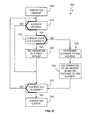
- the parameter is adjusted by a first amount that is dependent upon the amount of cursor motion that has occurred about the GUI element's center. Method of operation 500 then continues at block 515 as discussed above.
- the distance to the cursor from the center of the GUI element is determined (block 535 ) and, based on this and the amount the cursor has moved about the GUI element's center, the target parameter is adjusted (block 540 ). For example, a dock-wise rotation of the cursor about the GUI element's center may increase the target parameters value while a counter-clockwise rotation may decrease it. As described above, as the cursor is moved away from the GUI element, the amount of change applied to the parameter being controlled (e.g ., the value or amount of zoom or the amount the contents in the underlying window is to be scrolled) is decreased.
- the amount of change applied to the parameter being controlled e.g ., the value or amount of zoom or the amount the contents in the underlying window is to be scrolled
- the relationship between the amount of this distance and the granularity of the change applied to the parameter being controlled is entirely up to the programmer - substantially any functional relationship may be used.
- a linear function could be used.
- an exponential function could be used.
- a combination of linear and exponential functions could be used such that a linear function could be used until the cursor is a specified distance from the GUI element and, at that point, an exponential function could be applied.
- Method of operation 500 then continues at block 515 as discussed above.
- a GUI element in accordance with the invention may be embodied as a "static" control associated with one or more parameters (e.g ., window scroll operations, image rotation and display zoom) for an executing application.
- a GUI element in accordance with the invention may be displayed during program activation and remain on the screen for so long as the program is active.
- the parameter when a user manipulates a cursor over the displayed GUI element, the parameter is changed in accordance with a first granularity and when the user manipulates the cursor away from the displayed GUI element ( e.g ., rotates the cursor about the GUI element's center point), the parameter is changed in accordance with a second granularity.
- the second granularity may be a function of both the amount of cursor motion (e.g ., rotation about the GUI element's center point) and the distance the cursor is from the displayed GUI element.
- the GUI element may be selectively displayed or hidden from view by a user in accordance with a specified command (e.g., a menu selection or command-key operation).
- a specified command e.g., a menu selection or command-key operation.
- the GUI element may automatically be displayed and hidden depending on the user's selected operation. For example, if the user selects an object in a display window and then selects a "rotate" action from the application's command interface (e.g ., a menu), the program itself may generate a signal to display a GUI element in accordance with the invention.
- GUI elements in accordance with the invention and their methods of use will typically be implemented in large part, if not entirely, through software.
- Such software would typically be organized into one or more program modules for execution by a programmable control device.
- a programmable control device may be a single computer processor, a special purpose processor (e.g. , a digital signal processor, "DSP"), a plurality of processors coupled by a communications link or a custom designed state machine.
- DSP digital signal processor
- Custom designed state machines may be embodied in a hardware device such as an integrated circuit including, but not limited to, application specific integrated circuits ("ASICs") or field programmable gate array (“FPGAs”). It will further be understood that such software can be stored in a storage device.
- Storage devices suitable for tangibly embodying program instructions include, but are not limited to: magnetic disks (fixed, floppy, and removable) and tape; optical media such as CD-ROMs and digital video disks (“DVDs”); and semiconductor memory devices such as Electrically Programmable Read-Only Memory (“EPROM”), Electrically Erasable Programmable Read-Only Memory (“EEPROM”), Programmable Gate Arrays and flash devices.
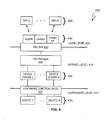
- illustrative system architecture 600 (as provided by the Mac OS X operating system) may be divided into user level 605, kernel level 610 and hardware level 615. Mediating the interface between user level 605 and kernel level 610 is Human Interface Device (HID) application program interface (API) module 620. Mediating the interface between kernel level 610 and hardware level 615 is one or more hardware controllers 625.
- HID Human Interface Device
- API application program interface
- User-level programs 630 execute within user level 605 and communicate with hardware devices 635 (e.g ., device-1 and device-2) through one or more user interface frameworks 640, HID API 620, HID manager module 645, one or more device drivers 650 and one or more hardware controllers 625.
- Illustrative hardware devices include cursor control devices such as a mouse, a track pad and a track ball.
- user interface frameworks 640 are collections of APIs that provide specific capabilities.
- the Application Kit (AppKit) is a collection of APIs containing all the objects needed to implement a graphical, event-driven user interface: windows, panels, buttons, menus, scrollers, and text fields.
- Carbon is a collection of C programming interfaces that let a programmer implement basic application functionality such as the user interface, event handling, file management, and so on.
- Image Kit is a collection of APIs that provide access to built-in image filters for both video and still images and support for creating custom filters.
- program code to implement a GUI element in accordance with the invention may be provided through the Image Kit framework. This is a logical location when the objects to be manipulated are graphical objects
- program code to implement a GUI element in accordance with the invention may be incorporated within the Application Kit and/or Carbon frameworks.
- program code to implement a GUI element in accordance with the invention may be incorporated in a user-level application or HID manager 645.
- GUI element in accordance with the invention has been described in terms of a mechanism that increases granularity as a user moves a cursor further away from the GUI element
- the invention may also be applied in reverse. That is, when the cursor overlaps the GUI element, a fine control may be applied and as the cursor is moved further from the GUI element, control of the target parameter could become progressively more coarse.
Landscapes
- Engineering & Computer Science (AREA)
- General Engineering & Computer Science (AREA)
- Theoretical Computer Science (AREA)
- Human Computer Interaction (AREA)
- Physics & Mathematics (AREA)
- General Physics & Mathematics (AREA)
- User Interface Of Digital Computer (AREA)
- Controls And Circuits For Display Device (AREA)
Claims (15)
- Grafisches Benutzerschnittstellenverfahren, aufweisend:Anzeigen eines grafischen Benutzerschnittstellenelements (100, 200, 300, 400), das mit einem Parameter assoziiert ist;Anpassen des Parameters gemäß einer ersten Granularität, in Reaktion auf eine Benutzermanipulationsangabe in einer mit dem angezeigten grafischen Benutzerschnittstellenelement (100, 200, 300, 400) übereinstimmenden Anzeigeregion; und Anpassen des Parameters gemäß einer zweiten Granularität, in Reaktion auf eine Benutzermanipulationsangabe in einer nicht mit dem angezeigten grafischen Benutzerschnittstellenelement (100, 200, 300, 400) übereinstimmenden Anzeigeregion;dadurch gekennzeichnet, dassdas Anpassen des Parameters gemäß der ersten Granularität ein Anpassen des Parameters mit einem Betrag umfasst, der auf einer Modifikation, durch die erste Granularität, eines bestimmten Betrags einer Bewegung, die in die Benutzermanipulationsangabe einbezogen ist, basiert; unddas Anpassen des Parameters gemäß der zweiten Granularität ein Anpassen des Parameters mit einem Betrag umfasst, der auf einer Modifikation, durch die zweite Granularität, des bestimmten Betrages der Bewegung, die in die Benutzermanipulationsangabe einbezogen ist, basiert.
- Grafisches Benutzerschnittstellenverfahren nach Anspruch 1, wobei der Parameter einen Anzeigeparameter umfasst.
- Grafisches Benutzerschnittstellenverfahren nach Anspruch 2, wobei der Anzeigeparameter einen der folgenden Anzeigeparameter umfasst: Anzeigezoom, Bildbelichtung, Bildrotation, Farbanpassung, Kontrast, Helligkeit, Seitenzahlanzeige und Scrollwert.
- Grafisches Benutzerschnittstellenverfahren nach Anspruch 1, wobei der Parameter einen Nicht-Anzeige-Parameter umfasst.
- Grafisches Benutzerschnittstellenverfahren nach Anspruch 4, wobei der Nicht-Anzeige-Parameter einen Lautstärke-Parameter umfasst.
- Grafisches Benutzerschnittstellenverfahren nach Anspruch 1, wobei die zweite Granularität eine Funktion davon ist, wie weit einer Cursor (115, 115', 120, 120', 205, 215, 215') von dem angezeigten grafischen Benutzerschnittstellenelement (100, 200, 300, 400) entfernt ist.
- Grafisches Benutzerschnittstellenverfahren nach Anspruch 1, wobei das Anpassen des Parameters ein Anpassen des Parameters in Reaktion auf die zweite Granularität und um wie viel die Angabe der Benutzermanipulation gegenüber dem angezeigten grafischen Benutzerschnittstellenelement (100, 200, 300, 400) rotiert wird, umfasst.
- Grafisches Benutzerschnittstellenverfahren nach Anspruch 1, wobei das Anzeigen ein Anzeigen des grafischen Benutzerschnittstellenelements (100, 200, 300, 400) in Reaktion auf ein erstes Signal umfasst.
- Grafisches Benutzerschnittstellenverfahren nach Anspruch 1, wobei der Parameter mit einer Anzeigeeigenschaft einer Anwendung assoziiert ist;
Anpassen der Anzeigeeigenschaft einer Anwendung mit der ersten Granularität in Reaktion auf die Angabe der Benutzermanipulation in einer Anzeigeregion, die mit dem angezeigten Benutzerschnittstellenelement (100, 200, 300, 400) überlappt; und Anpassen der Anzeigeeigenschaft der Anwendung mit der zweiten Granularität in Reaktion auf die Angabe der Benutzermanipulation in einer Anzeigeregion, die nicht mit dem angezeigten Benutzerschnittstellenelement (100, 200, 300, 400) überlappt. - Verfahren nach Anspruch 9, wobei die erste Granularität grob ist und die zweite Granularität gegenüber der ersten Granularität fein ist.
- Verfahren nach Anspruch 10, wobei die Anzeigeeigenschaft eine Seite umfasst, die erste Granularität eine Bewegung zwischen Seiten und die zweite Granularität eine Bewegung innerhalb einer angezeigten Seite umfasst.
- Verfahren nach Anspruch 10, wobei die Anzeigeeigenschaft einen Rotationswinkel umfasst, die erste Granularität eine Rotation um einen spezifizierten Schritt, in Grad, umfasst, und die zweite Granularität eine Rotation in Stufen umfasst, die weniger als der spezifizierte Schritt sind.
- Verfahren nach Anspruch 10, wobei die Anzeigeeigenschaft ein Scrollen durch eine geordnete Liste umfasst, die erste Granularität ein Scrollen durch vordefinierte Kategorien und die zweite Granularität ein Scrollen innerhalb einer vordefinierten Kategorie umfasst.
- Verfahren nach Anspruch 13, wobei die vordefinierte Kategorie eine alphabetische Sortierung umfasst, so dass die erste Granularität ein Scrollen zwischen sukzessiven alphabetischen Gruppierungen in der geordneten Liste umfasst und die zweite Granularität ein Scrollen innerhalb einer alphabetischen Gruppierung umfasst.
- Programmspeichervorrichtung, lesbar von einer programmierbaren Steuervorrichtung, umfassend Instruktionen, die auf der Programmspeichervorrichtung gespeichert sind, um die programmierbare Steuervorrichtung zu veranlassen, ein Verfahren gemäß Anspruch 1 auszuführen.
Applications Claiming Priority (2)
| Application Number | Priority Date | Filing Date | Title |
|---|---|---|---|
| US11/462,683 US8677257B2 (en) | 2006-08-04 | 2006-08-04 | Granular graphical user interface element |
| EP07813775A EP2049981B1 (de) | 2006-08-04 | 2007-08-03 | Granuläres grafikbenutzerschnittstellenelement |
Related Parent Applications (2)
| Application Number | Title | Priority Date | Filing Date |
|---|---|---|---|
| EP07813775A Division EP2049981B1 (de) | 2006-08-04 | 2007-08-03 | Granuläres grafikbenutzerschnittstellenelement |
| EP07813775A Division-Into EP2049981B1 (de) | 2006-08-04 | 2007-08-03 | Granuläres grafikbenutzerschnittstellenelement |
Publications (2)
| Publication Number | Publication Date |
|---|---|
| EP2503445A1 EP2503445A1 (de) | 2012-09-26 |
| EP2503445B1 true EP2503445B1 (de) | 2015-01-21 |
Family
ID=38895876
Family Applications (2)
| Application Number | Title | Priority Date | Filing Date |
|---|---|---|---|
| EP07813775A Active EP2049981B1 (de) | 2006-08-04 | 2007-08-03 | Granuläres grafikbenutzerschnittstellenelement |
| EP12172974.3A Active EP2503445B1 (de) | 2006-08-04 | 2007-08-03 | Granuläres Element einer grafischen Benutzerschnittstelle |
Family Applications Before (1)
| Application Number | Title | Priority Date | Filing Date |
|---|---|---|---|
| EP07813775A Active EP2049981B1 (de) | 2006-08-04 | 2007-08-03 | Granuläres grafikbenutzerschnittstellenelement |
Country Status (5)
| Country | Link |
|---|---|
| US (2) | US8677257B2 (de) |
| EP (2) | EP2049981B1 (de) |
| JP (1) | JP5249935B2 (de) |
| KR (1) | KR101054597B1 (de) |
| WO (1) | WO2008019321A2 (de) |
Families Citing this family (52)
| Publication number | Priority date | Publication date | Assignee | Title |
|---|---|---|---|---|
| US7958456B2 (en) | 2005-12-23 | 2011-06-07 | Apple Inc. | Scrolling list with floating adjacent index symbols |
| US8677257B2 (en) | 2006-08-04 | 2014-03-18 | Apple Inc. | Granular graphical user interface element |
| JP2008249973A (ja) * | 2007-03-30 | 2008-10-16 | Sony Corp | ボリューム制御装置、ボリューム制御方法及びそのプログラム |
| JP5003377B2 (ja) * | 2007-09-21 | 2012-08-15 | パナソニック株式会社 | 電子機器におけるマークの位置あわせ方法 |
| US8638338B2 (en) * | 2008-02-11 | 2014-01-28 | Apple Inc. | Adjusting color attribute of an image in a non-uniform way |
| KR20090110202A (ko) | 2008-04-17 | 2009-10-21 | 삼성전자주식회사 | 개인화된 사용자 인터페이스를 디스플레이하는 방법 및 장치 |
| KR101545137B1 (ko) * | 2008-04-17 | 2015-08-19 | 삼성전자주식회사 | 사용자 인터페이스를 생성하는 방법 및 장치 |
| KR101560183B1 (ko) * | 2008-04-17 | 2015-10-15 | 삼성전자주식회사 | 사용자 인터페이스를 제공/수신하는 방법 및 장치 |
| US8572513B2 (en) * | 2009-03-16 | 2013-10-29 | Apple Inc. | Device, method, and graphical user interface for moving a current position in content at a variable scrubbing rate |
| US9354795B2 (en) * | 2009-04-29 | 2016-05-31 | Lenovo (Singapore) Pte. Ltd | Refining manual input interpretation on touch surfaces |
| JP5326802B2 (ja) * | 2009-05-19 | 2013-10-30 | ソニー株式会社 | 情報処理装置、画像拡大縮小方法及びそのプログラム |
| US8624933B2 (en) | 2009-09-25 | 2014-01-07 | Apple Inc. | Device, method, and graphical user interface for scrolling a multi-section document |
| KR101111752B1 (ko) * | 2009-09-30 | 2012-02-16 | 주식회사 오비고 | 브라우저의 제어 방법 및 시스템 |
| DE102009058727A1 (de) * | 2009-12-17 | 2011-06-22 | Bayerische Motoren Werke Aktiengesellschaft, 80809 | Verfahren und Rechner zum Darstellen von Informationen auf einer Aufzeigevorrichtung eines Fahrzeugs |
| US20110163967A1 (en) * | 2010-01-06 | 2011-07-07 | Imran Chaudhri | Device, Method, and Graphical User Interface for Changing Pages in an Electronic Document |
| US9189876B2 (en) | 2012-03-06 | 2015-11-17 | Apple Inc. | Fanning user interface controls for a media editing application |
| US9041727B2 (en) | 2012-03-06 | 2015-05-26 | Apple Inc. | User interface tools for selectively applying effects to image |
| US9131192B2 (en) | 2012-03-06 | 2015-09-08 | Apple Inc. | Unified slider control for modifying multiple image properties |
| US9202433B2 (en) | 2012-03-06 | 2015-12-01 | Apple Inc. | Multi operation slider |
| US9031931B2 (en) * | 2012-04-10 | 2015-05-12 | Pitney Bowes Inc. | Systems and methods for providing query results to a user in an intuitive graphical format |
| USD729260S1 (en) * | 2012-04-27 | 2015-05-12 | Samsung Electronics Co., Ltd. | Display screen or portion thereof with graphical user interface |
| CN104281380B (zh) * | 2013-07-08 | 2018-01-30 | 纬创资通(昆山)有限公司 | 虚拟调节钮的操作方法 |
| US9177362B2 (en) * | 2013-08-02 | 2015-11-03 | Facebook, Inc. | Systems and methods for transforming an image |
| US9628543B2 (en) | 2013-09-27 | 2017-04-18 | Samsung Electronics Co., Ltd. | Initially establishing and periodically prefetching digital content |
| USD776126S1 (en) | 2014-02-14 | 2017-01-10 | Samsung Electronics Co., Ltd. | Display screen or portion thereof with a transitional graphical user interface |
| US10235333B1 (en) * | 2014-04-11 | 2019-03-19 | Twitter, Inc. | Managing consistency models in a distributed database |
| US9600114B2 (en) | 2014-07-31 | 2017-03-21 | International Business Machines Corporation | Variable pressure touch system |
| CN106797493A (zh) | 2014-09-02 | 2017-05-31 | 苹果公司 | 音乐用户界面 |
| KR101650269B1 (ko) * | 2015-03-12 | 2016-08-22 | 라인 가부시키가이샤 | 화면 제어를 위한 효율적인 인터페이스를 제공하는 시스템 및 방법 |
| JP2016173703A (ja) * | 2015-03-17 | 2016-09-29 | 株式会社ミツトヨ | タッチディスプレイを用いた入力操作を支援する方法 |
| US9769367B2 (en) | 2015-08-07 | 2017-09-19 | Google Inc. | Speech and computer vision-based control |
| US9836484B1 (en) | 2015-12-30 | 2017-12-05 | Google Llc | Systems and methods that leverage deep learning to selectively store images at a mobile image capture device |
| US9836819B1 (en) | 2015-12-30 | 2017-12-05 | Google Llc | Systems and methods for selective retention and editing of images captured by mobile image capture device |
| US10732809B2 (en) | 2015-12-30 | 2020-08-04 | Google Llc | Systems and methods for selective retention and editing of images captured by mobile image capture device |
| US9838641B1 (en) | 2015-12-30 | 2017-12-05 | Google Llc | Low power framework for processing, compressing, and transmitting images at a mobile image capture device |
| US10225511B1 (en) | 2015-12-30 | 2019-03-05 | Google Llc | Low power framework for controlling image sensor mode in a mobile image capture device |
| US10203860B2 (en) * | 2016-03-18 | 2019-02-12 | Ebay Inc. | Graphical user interface element adjustment |
| US11431836B2 (en) | 2017-05-02 | 2022-08-30 | Apple Inc. | Methods and interfaces for initiating media playback |
| US10992795B2 (en) | 2017-05-16 | 2021-04-27 | Apple Inc. | Methods and interfaces for home media control |
| US10928980B2 (en) | 2017-05-12 | 2021-02-23 | Apple Inc. | User interfaces for playing and managing audio items |
| CN111343060B (zh) | 2017-05-16 | 2022-02-11 | 苹果公司 | 用于家庭媒体控制的方法和界面 |
| US12526361B2 (en) | 2017-05-16 | 2026-01-13 | Apple Inc. | Methods for outputting an audio output in accordance with a user being within a range of a device |
| CN108089799B (zh) * | 2017-12-12 | 2022-12-13 | 维沃移动通信有限公司 | 一种屏边控件的控制方法及移动终端 |
| EP3502858B1 (de) * | 2017-12-22 | 2023-08-16 | Dassault Systèmes | Gestenbasierter manipulator zum drehen |
| US10996917B2 (en) | 2019-05-31 | 2021-05-04 | Apple Inc. | User interfaces for audio media control |
| WO2020243691A1 (en) | 2019-05-31 | 2020-12-03 | Apple Inc. | User interfaces for audio media control |
| US11392291B2 (en) | 2020-09-25 | 2022-07-19 | Apple Inc. | Methods and interfaces for media control with dynamic feedback |
| US11694376B2 (en) * | 2020-10-19 | 2023-07-04 | Adobe Inc. | Intuitive 3D transformations for 2D graphics |
| USD1050149S1 (en) | 2021-02-22 | 2024-11-05 | Becton, Dickinson And Company | Display screen with graphical user interface |
| USD1062756S1 (en) * | 2021-02-22 | 2025-02-18 | Becton, Dickinson And Company | Display screen with graphical user interface |
| USD1041441S1 (en) | 2022-08-15 | 2024-09-10 | Aristocrat Technologies, Inc. | Display screen or portion thereof with transitional graphical user interface |
| USD1068794S1 (en) * | 2022-09-30 | 2025-04-01 | Aristocrat Technologies, Inc. | Display screen or portion thereof with transitional graphical user interface |
Family Cites Families (25)
| Publication number | Priority date | Publication date | Assignee | Title |
|---|---|---|---|---|
| JPH03263217A (ja) * | 1990-03-14 | 1991-11-22 | Canon Inc | 情報入出力装置 |
| JP3189959B2 (ja) | 1991-11-28 | 2001-07-16 | ソニー株式会社 | 再生装置 |
| DE69230186T2 (de) | 1991-11-28 | 2000-05-11 | Sony Corp., Tokio/Tokyo | Videosignalwiedergabegerät |
| US5432932A (en) * | 1992-10-23 | 1995-07-11 | International Business Machines Corporation | System and method for dynamically controlling remote processes from a performance monitor |
| US5600789A (en) * | 1992-11-19 | 1997-02-04 | Segue Software, Inc. | Automated GUI interface testing |
| JPH08249125A (ja) * | 1995-03-14 | 1996-09-27 | Yaskawa Electric Corp | ポインタによる数値入力方法 |
| JP3021077U (ja) * | 1995-07-28 | 1996-02-16 | アイコム株式会社 | 無線通信機の制御装置 |
| JPH09244858A (ja) * | 1996-03-08 | 1997-09-19 | Hitachi Vlsi Eng Corp | ウィンドウシステムの制御方法および情報処理装置 |
| US5877758A (en) * | 1996-11-22 | 1999-03-02 | Microsoft Corporation | System and method for using a slider control for controlling parameters of a display item |
| GB2335822B (en) * | 1998-03-25 | 2003-09-10 | Nokia Mobile Phones Ltd | Context sensitive pop-up window for a portable phone |
| JP3853517B2 (ja) * | 1998-06-01 | 2006-12-06 | 日本電気株式会社 | 拡張スクロールシステム |
| US6369837B1 (en) * | 1998-07-17 | 2002-04-09 | International Business Machines Corporation | GUI selector control |
| US6486896B1 (en) * | 1999-04-07 | 2002-11-26 | Apple Computer, Inc. | Scalable scroll controller |
| JP2001184153A (ja) * | 1999-12-27 | 2001-07-06 | Casio Comput Co Ltd | 情報処理装置、情報表示プログラムが記録された記録媒体 |
| US6677965B1 (en) * | 2000-07-13 | 2004-01-13 | International Business Machines Corporation | Rubber band graphical user interface control |
| US6922816B1 (en) | 2000-08-24 | 2005-07-26 | International Business Machines Corporation | Method and system for adjusting settings with slider controls having variable sensitivity |
| US7080324B1 (en) | 2000-10-11 | 2006-07-18 | Agilent Technologies, Inc. | Control for a graphical user interface supporting coupled variables and method of operation thereof |
| JP3806610B2 (ja) * | 2001-05-08 | 2006-08-09 | 株式会社ケンウッド | ボリューム調整装置、ボリューム調整方法、及び、プログラム |
| JP4215549B2 (ja) | 2003-04-02 | 2009-01-28 | 富士通株式会社 | タッチパネル・モードとポインティング・デバイス・モードで動作する情報処理装置 |
| US7509593B2 (en) * | 2005-05-12 | 2009-03-24 | Microsoft Corporation | Mouse sound volume control |
| US7625287B2 (en) * | 2005-10-05 | 2009-12-01 | Nintendo Co., Ltd. | Driving game steering wheel simulation method and apparatus |
| US7720552B1 (en) * | 2006-06-05 | 2010-05-18 | Rockwell Automation Technologies, Inc. | Virtual knob lever arm as analog control element |
| JP2008033695A (ja) * | 2006-07-29 | 2008-02-14 | Sony Corp | 表示内容のスクロール方法、スクロール装置およびスクロールプログラム |
| US8677257B2 (en) | 2006-08-04 | 2014-03-18 | Apple Inc. | Granular graphical user interface element |
| US9448723B2 (en) * | 2010-06-28 | 2016-09-20 | Hulu, LLC | Method and apparatus for intuitive navigation of a media program |
-
2006
- 2006-08-04 US US11/462,683 patent/US8677257B2/en not_active Expired - Fee Related
-
2007
- 2007-08-03 EP EP07813775A patent/EP2049981B1/de active Active
- 2007-08-03 EP EP12172974.3A patent/EP2503445B1/de active Active
- 2007-08-03 KR KR1020097002185A patent/KR101054597B1/ko active Active
- 2007-08-03 JP JP2009523925A patent/JP5249935B2/ja not_active Expired - Fee Related
- 2007-08-03 WO PCT/US2007/075199 patent/WO2008019321A2/en not_active Ceased
-
2014
- 2014-01-10 US US14/152,819 patent/US10203857B2/en active Active
Also Published As
| Publication number | Publication date |
|---|---|
| JP2010500662A (ja) | 2010-01-07 |
| US8677257B2 (en) | 2014-03-18 |
| WO2008019321A2 (en) | 2008-02-14 |
| US10203857B2 (en) | 2019-02-12 |
| WO2008019321A3 (en) | 2008-04-10 |
| JP5249935B2 (ja) | 2013-07-31 |
| KR20090026211A (ko) | 2009-03-11 |
| KR101054597B1 (ko) | 2011-08-04 |
| US20080034289A1 (en) | 2008-02-07 |
| US20140195978A1 (en) | 2014-07-10 |
| EP2049981B1 (de) | 2012-09-19 |
| EP2049981A2 (de) | 2009-04-22 |
| EP2503445A1 (de) | 2012-09-26 |
Similar Documents
| Publication | Publication Date | Title |
|---|---|---|
| EP2503445B1 (de) | Granuläres Element einer grafischen Benutzerschnittstelle | |
| JP7617206B2 (ja) | タッチ感知ディスプレイを備えた電子デバイス上に同時に表示される複数のアプリケーションと対話するシステム及び方法 | |
| AU2021203782B2 (en) | Systems and methods for multitasking on an electronic device with a touch-sensitive display | |
| US9310967B2 (en) | Border menu for context dependent actions within a graphical user interface | |
| US20200387257A1 (en) | Systems and Methods for Resizing Applications in a Multitasking View on an Electronic Device with a Touch-Sensitive Display | |
| JP4763695B2 (ja) | タッチ・センシティブ入力デバイスのためのモード・ベースのグラフィカル・ユーザ・インタフェース | |
| US5473343A (en) | Method and apparatus for locating a cursor on a computer screen | |
| AU778653B2 (en) | User interface for providing consolidation and access | |
| AU2007101053A4 (en) | Multimedia communication device with touch screen responsive to gestures for controlling, manipulating, and editing of media files | |
| US7814439B2 (en) | Pan-zoom tool | |
| EP0717344A1 (de) | Taskenbalken mit Startmenü | |
| US20160357358A1 (en) | Device, Method, and Graphical User Interface for Manipulating Application Windows | |
| US20090083655A1 (en) | Method and tool for virtual desktop management | |
| JPH06301505A (ja) | コンピュータ制御ディスプレイ・システム | |
| KR20120046059A (ko) | 제스쳐 인식 방법 및 장치 | |
| JPH07182135A (ja) | コンピュータ化ユーザ・インタフェース | |
| HK1120135A (en) | Multimedia communication device with touch screen responsive to gestures for controlling, manipulating and editing of media files | |
| HK1137234A1 (en) | Computer interface having a virtual single-layer mode for viewing overlapping objects |
Legal Events
| Date | Code | Title | Description |
|---|---|---|---|
| PUAI | Public reference made under article 153(3) epc to a published international application that has entered the european phase |
Free format text: ORIGINAL CODE: 0009012 |
|
| 17P | Request for examination filed |
Effective date: 20120621 |
|
| AC | Divisional application: reference to earlier application |
Ref document number: 2049981 Country of ref document: EP Kind code of ref document: P |
|
| AK | Designated contracting states |
Kind code of ref document: A1 Designated state(s): AT BE BG CH CY CZ DE DK EE ES FI FR GB GR HU IE IS IT LI LT LU LV MC MT NL PL PT RO SE SI SK TR |
|
| GRAP | Despatch of communication of intention to grant a patent |
Free format text: ORIGINAL CODE: EPIDOSNIGR1 |
|
| INTG | Intention to grant announced |
Effective date: 20140707 |
|
| GRAS | Grant fee paid |
Free format text: ORIGINAL CODE: EPIDOSNIGR3 |
|
| GRAA | (expected) grant |
Free format text: ORIGINAL CODE: 0009210 |
|
| AC | Divisional application: reference to earlier application |
Ref document number: 2049981 Country of ref document: EP Kind code of ref document: P |
|
| AK | Designated contracting states |
Kind code of ref document: B1 Designated state(s): AT BE BG CH CY CZ DE DK EE ES FI FR GB GR HU IE IS IT LI LT LU LV MC MT NL PL PT RO SE SI SK TR |
|
| REG | Reference to a national code |
Ref country code: GB Ref legal event code: FG4D |
|
| REG | Reference to a national code |
Ref country code: CH Ref legal event code: EP |
|
| REG | Reference to a national code |
Ref country code: IE Ref legal event code: FG4D |
|
| REG | Reference to a national code |
Ref country code: DE Ref legal event code: R096 Ref document number: 602007040167 Country of ref document: DE Effective date: 20150312 |
|
| REG | Reference to a national code |
Ref country code: AT Ref legal event code: REF Ref document number: 709453 Country of ref document: AT Kind code of ref document: T Effective date: 20150315 |
|
| REG | Reference to a national code |
Ref country code: NL Ref legal event code: T3 |
|
| REG | Reference to a national code |
Ref country code: AT Ref legal event code: MK05 Ref document number: 709453 Country of ref document: AT Kind code of ref document: T Effective date: 20150121 |
|
| REG | Reference to a national code |
Ref country code: LT Ref legal event code: MG4D |
|
| PG25 | Lapsed in a contracting state [announced via postgrant information from national office to epo] |
Ref country code: FI Free format text: LAPSE BECAUSE OF FAILURE TO SUBMIT A TRANSLATION OF THE DESCRIPTION OR TO PAY THE FEE WITHIN THE PRESCRIBED TIME-LIMIT Effective date: 20150121 Ref country code: SE Free format text: LAPSE BECAUSE OF FAILURE TO SUBMIT A TRANSLATION OF THE DESCRIPTION OR TO PAY THE FEE WITHIN THE PRESCRIBED TIME-LIMIT Effective date: 20150121 Ref country code: LT Free format text: LAPSE BECAUSE OF FAILURE TO SUBMIT A TRANSLATION OF THE DESCRIPTION OR TO PAY THE FEE WITHIN THE PRESCRIBED TIME-LIMIT Effective date: 20150121 Ref country code: ES Free format text: LAPSE BECAUSE OF FAILURE TO SUBMIT A TRANSLATION OF THE DESCRIPTION OR TO PAY THE FEE WITHIN THE PRESCRIBED TIME-LIMIT Effective date: 20150121 Ref country code: BG Free format text: LAPSE BECAUSE OF FAILURE TO SUBMIT A TRANSLATION OF THE DESCRIPTION OR TO PAY THE FEE WITHIN THE PRESCRIBED TIME-LIMIT Effective date: 20150421 |
|
| PG25 | Lapsed in a contracting state [announced via postgrant information from national office to epo] |
Ref country code: IS Free format text: LAPSE BECAUSE OF FAILURE TO SUBMIT A TRANSLATION OF THE DESCRIPTION OR TO PAY THE FEE WITHIN THE PRESCRIBED TIME-LIMIT Effective date: 20150521 Ref country code: PL Free format text: LAPSE BECAUSE OF FAILURE TO SUBMIT A TRANSLATION OF THE DESCRIPTION OR TO PAY THE FEE WITHIN THE PRESCRIBED TIME-LIMIT Effective date: 20150121 Ref country code: AT Free format text: LAPSE BECAUSE OF FAILURE TO SUBMIT A TRANSLATION OF THE DESCRIPTION OR TO PAY THE FEE WITHIN THE PRESCRIBED TIME-LIMIT Effective date: 20150121 Ref country code: GR Free format text: LAPSE BECAUSE OF FAILURE TO SUBMIT A TRANSLATION OF THE DESCRIPTION OR TO PAY THE FEE WITHIN THE PRESCRIBED TIME-LIMIT Effective date: 20150422 Ref country code: LV Free format text: LAPSE BECAUSE OF FAILURE TO SUBMIT A TRANSLATION OF THE DESCRIPTION OR TO PAY THE FEE WITHIN THE PRESCRIBED TIME-LIMIT Effective date: 20150121 |
|
| REG | Reference to a national code |
Ref country code: DE Ref legal event code: R097 Ref document number: 602007040167 Country of ref document: DE |
|
| PG25 | Lapsed in a contracting state [announced via postgrant information from national office to epo] |
Ref country code: DK Free format text: LAPSE BECAUSE OF FAILURE TO SUBMIT A TRANSLATION OF THE DESCRIPTION OR TO PAY THE FEE WITHIN THE PRESCRIBED TIME-LIMIT Effective date: 20150121 Ref country code: CZ Free format text: LAPSE BECAUSE OF FAILURE TO SUBMIT A TRANSLATION OF THE DESCRIPTION OR TO PAY THE FEE WITHIN THE PRESCRIBED TIME-LIMIT Effective date: 20150121 Ref country code: EE Free format text: LAPSE BECAUSE OF FAILURE TO SUBMIT A TRANSLATION OF THE DESCRIPTION OR TO PAY THE FEE WITHIN THE PRESCRIBED TIME-LIMIT Effective date: 20150121 Ref country code: SK Free format text: LAPSE BECAUSE OF FAILURE TO SUBMIT A TRANSLATION OF THE DESCRIPTION OR TO PAY THE FEE WITHIN THE PRESCRIBED TIME-LIMIT Effective date: 20150121 Ref country code: RO Free format text: LAPSE BECAUSE OF FAILURE TO SUBMIT A TRANSLATION OF THE DESCRIPTION OR TO PAY THE FEE WITHIN THE PRESCRIBED TIME-LIMIT Effective date: 20150121 |
|
| PLBE | No opposition filed within time limit |
Free format text: ORIGINAL CODE: 0009261 |
|
| STAA | Information on the status of an ep patent application or granted ep patent |
Free format text: STATUS: NO OPPOSITION FILED WITHIN TIME LIMIT |
|
| 26N | No opposition filed |
Effective date: 20151022 |
|
| PG25 | Lapsed in a contracting state [announced via postgrant information from national office to epo] |
Ref country code: IT Free format text: LAPSE BECAUSE OF FAILURE TO SUBMIT A TRANSLATION OF THE DESCRIPTION OR TO PAY THE FEE WITHIN THE PRESCRIBED TIME-LIMIT Effective date: 20150121 |
|
| PG25 | Lapsed in a contracting state [announced via postgrant information from national office to epo] |
Ref country code: SI Free format text: LAPSE BECAUSE OF FAILURE TO SUBMIT A TRANSLATION OF THE DESCRIPTION OR TO PAY THE FEE WITHIN THE PRESCRIBED TIME-LIMIT Effective date: 20150121 |
|
| PG25 | Lapsed in a contracting state [announced via postgrant information from national office to epo] |
Ref country code: LU Free format text: LAPSE BECAUSE OF FAILURE TO SUBMIT A TRANSLATION OF THE DESCRIPTION OR TO PAY THE FEE WITHIN THE PRESCRIBED TIME-LIMIT Effective date: 20150803 Ref country code: MC Free format text: LAPSE BECAUSE OF FAILURE TO SUBMIT A TRANSLATION OF THE DESCRIPTION OR TO PAY THE FEE WITHIN THE PRESCRIBED TIME-LIMIT Effective date: 20150121 |
|
| REG | Reference to a national code |
Ref country code: CH Ref legal event code: PL |
|
| GBPC | Gb: european patent ceased through non-payment of renewal fee |
Effective date: 20150803 |
|
| PG25 | Lapsed in a contracting state [announced via postgrant information from national office to epo] |
Ref country code: LI Free format text: LAPSE BECAUSE OF NON-PAYMENT OF DUE FEES Effective date: 20150831 Ref country code: CH Free format text: LAPSE BECAUSE OF NON-PAYMENT OF DUE FEES Effective date: 20150831 |
|
| PG25 | Lapsed in a contracting state [announced via postgrant information from national office to epo] |
Ref country code: BE Free format text: LAPSE BECAUSE OF FAILURE TO SUBMIT A TRANSLATION OF THE DESCRIPTION OR TO PAY THE FEE WITHIN THE PRESCRIBED TIME-LIMIT Effective date: 20150121 |
|
| REG | Reference to a national code |
Ref country code: IE Ref legal event code: MM4A |
|
| REG | Reference to a national code |
Ref country code: FR Ref legal event code: ST Effective date: 20160429 |
|
| PG25 | Lapsed in a contracting state [announced via postgrant information from national office to epo] |
Ref country code: IE Free format text: LAPSE BECAUSE OF NON-PAYMENT OF DUE FEES Effective date: 20150803 Ref country code: GB Free format text: LAPSE BECAUSE OF NON-PAYMENT OF DUE FEES Effective date: 20150803 |
|
| PG25 | Lapsed in a contracting state [announced via postgrant information from national office to epo] |
Ref country code: FR Free format text: LAPSE BECAUSE OF NON-PAYMENT OF DUE FEES Effective date: 20150831 |
|
| PG25 | Lapsed in a contracting state [announced via postgrant information from national office to epo] |
Ref country code: MT Free format text: LAPSE BECAUSE OF FAILURE TO SUBMIT A TRANSLATION OF THE DESCRIPTION OR TO PAY THE FEE WITHIN THE PRESCRIBED TIME-LIMIT Effective date: 20150121 |
|
| PG25 | Lapsed in a contracting state [announced via postgrant information from national office to epo] |
Ref country code: HU Free format text: LAPSE BECAUSE OF FAILURE TO SUBMIT A TRANSLATION OF THE DESCRIPTION OR TO PAY THE FEE WITHIN THE PRESCRIBED TIME-LIMIT; INVALID AB INITIO Effective date: 20070803 |
|
| PG25 | Lapsed in a contracting state [announced via postgrant information from national office to epo] |
Ref country code: CY Free format text: LAPSE BECAUSE OF FAILURE TO SUBMIT A TRANSLATION OF THE DESCRIPTION OR TO PAY THE FEE WITHIN THE PRESCRIBED TIME-LIMIT Effective date: 20150121 |
|
| PG25 | Lapsed in a contracting state [announced via postgrant information from national office to epo] |
Ref country code: TR Free format text: LAPSE BECAUSE OF FAILURE TO SUBMIT A TRANSLATION OF THE DESCRIPTION OR TO PAY THE FEE WITHIN THE PRESCRIBED TIME-LIMIT Effective date: 20150121 |
|
| PG25 | Lapsed in a contracting state [announced via postgrant information from national office to epo] |
Ref country code: PT Free format text: LAPSE BECAUSE OF FAILURE TO SUBMIT A TRANSLATION OF THE DESCRIPTION OR TO PAY THE FEE WITHIN THE PRESCRIBED TIME-LIMIT Effective date: 20150121 |
|
| P01 | Opt-out of the competence of the unified patent court (upc) registered |
Effective date: 20230523 |
|
| PGFP | Annual fee paid to national office [announced via postgrant information from national office to epo] |
Ref country code: NL Payment date: 20240613 Year of fee payment: 18 |
|
| PGFP | Annual fee paid to national office [announced via postgrant information from national office to epo] |
Ref country code: DE Payment date: 20240612 Year of fee payment: 18 |
|
| REG | Reference to a national code |
Ref country code: DE Ref legal event code: R119 Ref document number: 602007040167 Country of ref document: DE |
|
| REG | Reference to a national code |
Ref country code: NL Ref legal event code: MM Effective date: 20250901 |