EP2784653A2 - Appareil et procédé de commande de fenêtres superposées dans un dispositif - Google Patents
Appareil et procédé de commande de fenêtres superposées dans un dispositif Download PDFInfo
- Publication number
- EP2784653A2 EP2784653A2 EP20140152612 EP14152612A EP2784653A2 EP 2784653 A2 EP2784653 A2 EP 2784653A2 EP 20140152612 EP20140152612 EP 20140152612 EP 14152612 A EP14152612 A EP 14152612A EP 2784653 A2 EP2784653 A2 EP 2784653A2
- Authority
- EP
- European Patent Office
- Prior art keywords
- screen
- application
- displayed
- information based
- controller
- Prior art date
- Legal status (The legal status is an assumption and is not a legal conclusion. Google has not performed a legal analysis and makes no representation as to the accuracy of the status listed.)
- Granted
Links
Images









Classifications
-
- G—PHYSICS
- G06—COMPUTING OR CALCULATING; COUNTING
- G06F—ELECTRIC DIGITAL DATA PROCESSING
- G06F3/00—Input arrangements for transferring data to be processed into a form capable of being handled by the computer; Output arrangements for transferring data from processing unit to output unit, e.g. interface arrangements
- G06F3/14—Digital output to display device ; Cooperation and interconnection of the display device with other functional units
-
- G—PHYSICS
- G06—COMPUTING OR CALCULATING; COUNTING
- G06F—ELECTRIC DIGITAL DATA PROCESSING
- G06F3/00—Input arrangements for transferring data to be processed into a form capable of being handled by the computer; Output arrangements for transferring data from processing unit to output unit, e.g. interface arrangements
- G06F3/01—Input arrangements or combined input and output arrangements for interaction between user and computer
- G06F3/048—Interaction techniques based on graphical user interfaces [GUI]
- G06F3/0481—Interaction techniques based on graphical user interfaces [GUI] based on specific properties of the displayed interaction object or a metaphor-based environment, e.g. interaction with desktop elements like windows or icons, or assisted by a cursor's changing behaviour or appearance
-
- G—PHYSICS
- G06—COMPUTING OR CALCULATING; COUNTING
- G06F—ELECTRIC DIGITAL DATA PROCESSING
- G06F3/00—Input arrangements for transferring data to be processed into a form capable of being handled by the computer; Output arrangements for transferring data from processing unit to output unit, e.g. interface arrangements
- G06F3/01—Input arrangements or combined input and output arrangements for interaction between user and computer
- G06F3/048—Interaction techniques based on graphical user interfaces [GUI]
- G06F3/0484—Interaction techniques based on graphical user interfaces [GUI] for the control of specific functions or operations, e.g. selecting or manipulating an object, an image or a displayed text element, setting a parameter value or selecting a range
- G06F3/0485—Scrolling or panning
-
- G—PHYSICS
- G06—COMPUTING OR CALCULATING; COUNTING
- G06F—ELECTRIC DIGITAL DATA PROCESSING
- G06F3/00—Input arrangements for transferring data to be processed into a form capable of being handled by the computer; Output arrangements for transferring data from processing unit to output unit, e.g. interface arrangements
- G06F3/01—Input arrangements or combined input and output arrangements for interaction between user and computer
- G06F3/048—Interaction techniques based on graphical user interfaces [GUI]
- G06F3/0487—Interaction techniques based on graphical user interfaces [GUI] using specific features provided by the input device, e.g. functions controlled by the rotation of a mouse with dual sensing arrangements, or of the nature of the input device, e.g. tap gestures based on pressure sensed by a digitiser
- G06F3/0488—Interaction techniques based on graphical user interfaces [GUI] using specific features provided by the input device, e.g. functions controlled by the rotation of a mouse with dual sensing arrangements, or of the nature of the input device, e.g. tap gestures based on pressure sensed by a digitiser using a touch-screen or digitiser, e.g. input of commands through traced gestures
- G06F3/04883—Interaction techniques based on graphical user interfaces [GUI] using specific features provided by the input device, e.g. functions controlled by the rotation of a mouse with dual sensing arrangements, or of the nature of the input device, e.g. tap gestures based on pressure sensed by a digitiser using a touch-screen or digitiser, e.g. input of commands through traced gestures for inputting data by handwriting, e.g. gesture or text
-
- G—PHYSICS
- G06—COMPUTING OR CALCULATING; COUNTING
- G06F—ELECTRIC DIGITAL DATA PROCESSING
- G06F3/00—Input arrangements for transferring data to be processed into a form capable of being handled by the computer; Output arrangements for transferring data from processing unit to output unit, e.g. interface arrangements
- G06F3/14—Digital output to display device ; Cooperation and interconnection of the display device with other functional units
- G06F3/1454—Digital output to display device ; Cooperation and interconnection of the display device with other functional units involving copying of the display data of a local workstation or window to a remote workstation or window so that an actual copy of the data is displayed simultaneously on two or more displays, e.g. teledisplay
-
- G—PHYSICS
- G09—EDUCATION; CRYPTOGRAPHY; DISPLAY; ADVERTISING; SEALS
- G09G—ARRANGEMENTS OR CIRCUITS FOR CONTROL OF INDICATING DEVICES USING STATIC MEANS TO PRESENT VARIABLE INFORMATION
- G09G5/00—Control arrangements or circuits for visual indicators common to cathode-ray tube indicators and other visual indicators
- G09G5/003—Details of a display terminal, the details relating to the control arrangement of the display terminal and to the interfaces thereto
-
- G—PHYSICS
- G09—EDUCATION; CRYPTOGRAPHY; DISPLAY; ADVERTISING; SEALS
- G09G—ARRANGEMENTS OR CIRCUITS FOR CONTROL OF INDICATING DEVICES USING STATIC MEANS TO PRESENT VARIABLE INFORMATION
- G09G5/00—Control arrangements or circuits for visual indicators common to cathode-ray tube indicators and other visual indicators
- G09G5/34—Control arrangements or circuits for visual indicators common to cathode-ray tube indicators and other visual indicators for rolling or scrolling
-
- G—PHYSICS
- G06—COMPUTING OR CALCULATING; COUNTING
- G06F—ELECTRIC DIGITAL DATA PROCESSING
- G06F2203/00—Indexing scheme relating to G06F3/00 - G06F3/048
- G06F2203/048—Indexing scheme relating to G06F3/048
- G06F2203/04804—Transparency, e.g. transparent or translucent windows
-
- G—PHYSICS
- G09—EDUCATION; CRYPTOGRAPHY; DISPLAY; ADVERTISING; SEALS
- G09G—ARRANGEMENTS OR CIRCUITS FOR CONTROL OF INDICATING DEVICES USING STATIC MEANS TO PRESENT VARIABLE INFORMATION
- G09G5/00—Control arrangements or circuits for visual indicators common to cathode-ray tube indicators and other visual indicators
- G09G5/14—Display of multiple viewports
Definitions
- the present disclosure relates to an apparatus and a method of controlling screens in a device. More particularly, the present disclosure relates to an apparatus and a method of controlling a plurality of screens which separately display information based on at least one application in a device.
- a user can view different pieces of information at the same time. For example, while executing an Internet application on a screen of a device, the user may view a video on an additional window.
- the user should manually move the additional window to an intended position in order to view information displayed on the screen but hidden by the additional window, which results in an inconvenience to the user.
- an aspect of the present disclosure is to provide an apparatus and a method of controlling a plurality of screens which separately display information based on at least one application in a device.
- Another aspect of the present disclosure is to provide an apparatus and a method of, when information based on at least one application is being displayed separately on a plurality of screens, enabling a user to view information displayed on one screen but hidden by another screen overlapped over the one screen by changing an attribute of the other screen in a device.
- an apparatus for controlling screens in a device includes a display configured to include a first screen and a second screen overlapped over the first screen, and a controller configured to control display of partial information of the first screen hidden by the second screen to be viewable by changing an attribute of the second screen, upon detecting a gesture on the second screen while information is being displayed separately on the first and second screens.
- an apparatus for controlling screens in a device includes a display configured to include a first screen and a second screen overlapped over the first screen, and a controller configured to, while information based on a first application is being displayed on the first screen and information based on a second application is being displayed on the second screen, upon detecting a hovering gesture, determine whether the hovering gesture has been generated on the second screen based on coordinates of a position of the hovering gesture, determine a type of the hovering gesture, if the hovering gesture has been generated on the second screen, control display of partial information of the first screen hidden by the second screen to be viewable by moving the second screen out of a currently displayed area of the second screen, if the determined type of the hovering gesture is a request for moving the second screen, and control returning of the second screen to a previous displayed area or keep the second screen in a currently displayed area, if the partial information of the first screen is completely viewed.
- a method of controlling screens in a device includes displaying information based on at least one application separately on first and second screens, and displaying partial information of the first screen hidden by the second screen to be viewable by changing an attribute of the second screen, upon detecting a gesture on the second screen while the information based on the at least one application separately on the first and second screens.
- the second screen is displayed overlapped over the first screen.
- a method of controlling screens in a device includes displaying information based on a first application on a first screen and displaying information based on a second application on a second screen overlapped over the first screen, determining whether a hovering gesture has been generated on the second screen based on coordinates of a position of the hovering gesture, upon detecting the hovering gesture while the information based on the first application is being displayed on the first screen and the information based on the second application is being displayed on the second screen, determining a type of the hovering gesture, if the hovering gesture has been generated on the second screen, displaying partial information of the first screen hidden by the second screen to be viewable by moving the second screen out of a currently displayed area of the second screen, if the determined type of the hovering gesture is a request for moving the second screen, and returning the second screen to a previous displayed area or keeping the second screen in a currently displayed area, if the partial information of the first screen is completely viewed.
- a device is a portable terminal or a fixed terminal.
- a portable terminal refers to an electronic device configured to be carried readily with a user.
- the term 'portable terminal' covers a broad range of devices including a video phone, a portable phone, a smart phone, a Wideband Code Division Multiple Access (WCDMA) terminal, a Universal Mobile Telecommunications System (UMTS) terminal, a Personal Digital Assistant (PDA), a Portable Multimedia Player (PMP), a Digital Multimedia Broadcasting (DMB) terminal, an e-book reader, a laptop computer, a tablet, and a digital camera.
- the fixed terminal may be, but is not limited to, a desktop Personal Computer (PC).
- a second screen is displayed overlapped over a first window. If the first and second windows are regarded as layers, the first and second windows may be referred to as an underlying layer and an overlying layer, respectively.
- the second screen may also be referred to as an additional window that may be displayed overlapped over the first screen.
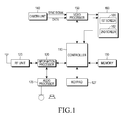
- FIG. 1 is a block diagram of a device according to an embodiment of the present disclosure.
- a Radio Frequency (RF) unit 123 performs the wireless communication functionality of the device.
- the RF unit 123 includes an RF transmitter that upconverts the frequency of a transmission signal and amplifies the upconverted transmission signal and an RF receiver that low-noise-amplifies a received signal and downconverts the frequency of the low-noise-amplified signal.
- An information processor 120 includes a transmitter that encodes and modulates the transmission signal and a receiver that demodulates and decodes the received signal. Therefore, the information processor 120 may include a Modulator-Demodulator (MODEM) and a Coder-Decoder (CODEC).
- MODEM Modulator-Demodulator
- CDODEC Coder-Decoder
- the CODEC includes a data CODEC to process packet information and an audio CODEC to process an audio signal, such as a voice.
- An audio processor 125 reproduces a received audio signal output from the audio CODEC of the information processor 120 or transmits a transmission audio signal generated from a microphone to the audio CODEC of the information processor 120.
- a keypad 127 includes alphanumerical keys to input numbers and characters and functions keys to set functions.
- a memory 130 may include a program memory and an information memory.
- the program memory may store programs that control general operations of the device and programs that control display of partial information of the first screen hidden by the second screen so that the partial information is viewable on the first screen, by changing an attribute (e.g., a position, a size, a transparency, or the like) of the second screen.
- the information memory temporarily stores information generated during execution of the programs.
- a controller 110 provides overall control to the device.
- the controller 110 controls display of partial information of the first screen hidden by the second screen by changing an attribute of the second screen, so that the partial information is viewable on the first screen.
- Attributes of the second screen include at least one of a position, a size, or a transparency of the second screen.
- the specific gesture detected on the second screen may be at least one of a hovering gesture, a gesture of inputting a specific key in the device, a motion gesture of the device, a touch, a user's motion detected by infrared rays, a user's eye movement, and the like.
- the hovering gesture is to hold a touch pen above a screen in a non-contact manner by a gap for a certain period of time.
- a button of the touch pen may be kept pressed for a certain period of time. Accordingly, when the user makes a hovering gesture with the touch pen to change an attribute of the second screen, the user may or may not press the button of the touch pen according to the user's presetting.
- the controller 110 may express the movement of the second screen through a User Interface (UI) that gives a bouncy effect to the second screen by applying a physical engine algorithm that makes two objects having the same polarity repel each other.
- UI User Interface
- the controller 110 controls movement of the second screen out of a currently displayed area so that partial information of the first screen hidden by the second screen is viewable on the first screen.
- the controller 110 If the user finishes viewing the partial information on the first screen, the controller 110 returns the second screen to the previous displayed area or keeps the second screen in a currently displayed area.
- the controller 110 may determine that the user has finished viewing the partial information of the first screen. Alternatively or additionally, when confirming that the user has turned his or her gaze toward a different position by eye tracking, the controller 110 may determine that the user has finished viewing the partial information of the first screen.
- an input gesture or an information movement gesture is detected on the first screen, no input gesture is detected on the first screen for a certain period of time, or a user's gaze change is detected by eye tracking, it may be determined that the partial information of the first screen has been viewed completely in the embodiment of the present disclosure.
- the controller 110 may control display of partial information of the first screen hidden by the second screen by increasing the transparency of the second screen, so that the partial information shows through the more transparent second screen.
- the controller 110 may increase the transparency of a partial area around the coordinates of a position of the second screen at which the hovering gesture has been detected or the transparency of the entire area of the second screen.
- the controller 110 If the user finishes viewing the partial information on the first screen, the controller 110 returns the second screen to a previous transparency level.
- the controller 110 may determine that the user has finished viewing the partial information of the first screen. Alternatively or additionally, when confirming that the user has turned his or her gaze toward a different position by eye tracking, the controller 110 may determine that the user has finished viewing the partial information of the first screen.
- the controller 110 upon detecting a scroll-up/down of the first screen until lowermost/uppermost information based on the first application is scrolled up/down on the first screen, the controller 110 detects a currently displayed area of the second screen. If the controller 110 determines that the second screen is positioned in a lower/upper area of the first screen, the controller 110 controls information in the lower/upper area of the first screen not to be overlapped with the second screen by further scrolling up/down a bottom boundary of the first screen to or above/below a top/bottom boundary of the second screen.
- the controller 110 upon detecting a scroll-up/down of the first screen until lowermost/uppermost information based on the first application is scrolled up/down on the first screen, the controller 110 detects a currently displayed area of the second screen. If the controller 110 determines that the second screen is positioned in a lower/upper area of the first screen, the controller 110 controls information in the lower/upper area of the first screen not to be overlapped with the second screen by moving the second screen out of the currently displayed area.
- the controller 110 upon detecting a scroll-up/down of the first screen until lowermost/uppermost information based on the first application is scrolled up/down on the first screen, the controller 110 detects a currently displayed area of the second screen. If the controller 110 determines that the second screen is positioned in a lower/upper area of the first screen, the controller 110 controls display of information hidden by the second screen in the lower/upper area of the first screen by increasing the transparency of the second screen so that the information in the lower/upper area of the first screen shows through the more transparent second screen.
- the controller 110 detects a currently displayed area of the second screen.
- the controller 110 determines that the second screen is positioned across the reference line of the first screen, the controller 110 controls information in the left/right area of the first screen not to be overlapped with the second screen by moving the second screen to the right/left area of the first screen opposite to the left/right area of the first screen in which the rightmost/leftmost information based on the first application is located and adjusting the size of the second screen according to the size of the right/left area of the first screen.
- the controller 110 upon detecting display of a pop-up window on the first screen, the controller 110 detects a currently displayed area of the second screen. If the controller 110 determines that the second screen is overlapped over the pop-up window, the controller 110 controls the pop-up window not to be overlapped with the second screen by moving the second screen out of the displayed area of the pop-up window.
- the pop-up window may be a menu pop-up window including menu types by which to execute functions, a notification pop-up window including a notification text message, or the like.
- the controller 110 upon detecting display of a pop-up window on the first screen, the controller 110 detects a currently displayed area of the second screen. If the controller 110 determines that the second screen is overlapped over the pop-up window, the controller 110 increases the transparency of the second screen so that partial information of the pop-up window hidden by the second screen shows through the more transparent second screen.
- the controller 110 determines whether the first and second applications have been activated. If the first application is active and the second screen is positioned over the first area, the controller 110 controls movement of the second screen to the second area of the first screen. If the size of the first area is changed, the controller 110 also adjusts the size of the second screen according to the changed size of the first area. Herein, the size of the second screen is adjusted to be smaller than the size of the first area.
- the controller 110 controls movement of the second screen to the first area of the first screen. If the size of the second area is adjusted, the controller 110 also adjusts the size of the second screen according to the changed size of the second area. Herein, the size of the second screen is adjusted to be smaller than the size of the second area.
- the controller 110 upon detecting an input gesture on an input window of the first screen, the controller 110 detects a currently displayed area of the second screen. If the second screen is overlapped over the input window or a keypad displayed by the input gesture, the controller 110 controls the input window and the keypad not to be overlapped with the second screen by moving the second screen out of the displayed areas of the input window and the keypad or adjusting the size of the second screen.
- the controller 110 determines whether the hovering gesture has been generated above the second screen, based on the coordinates of the position of the hovering gesture. If the hovering gesture has been generated above the second screen, the controller 110 determines the type of the hovering gesture. If the type of the hovering gesture is a request for moving the second screen, the controller 110 moves the second screen from a currently displayed area so that partial information of the first screen hidden by the second screen is viewable on the first screen. When the user has finished viewing the partial information on the first screen, the controller 110 returns the second screen to the previous displayed area or keeps the second screen in a currently displayed area.
- the controller 110 determines that the hovering gesture has been generated above the first screen, based on the coordinates of the position of the hovering gesture, the controller 110 controls the information based on the first application on the first screen.
- the controller 110 controls the information based on the second application on the second screen in response to the command to control the second screen.
- a camera unit 140 captures image information and includes a camera sensor that converts a captured optical signal to an electrical signal and a signal processor that converts an analog image signal captured by the camera sensor to digital information. It is assumed herein that the camera sensor is a Charge Coupled Device (CCD) sensor or a Complementary Metal Oxide Semiconductor (CMOS) sensor.
- CCD Charge Coupled Device
- CMOS Complementary Metal Oxide Semiconductor
- the camera sensor and the signal processor may be integrated into a single device or separately configured.
- a video processor 150 performs Image Signal Processing (ISP) on an image signal received from the camera unit 140 in order to display an image on a display 160.
- ISP functions include gamma correction, interpolation, spatial change, image effects, image scaling, Automatic White Balance (AWB), Automatic Exposure (AE), Automatic Focus (AF), and the like. Therefore, the video processor 150 processes the image signal received from the camera unit 140 on a frame basis and outputs frame image information according to the characteristics and size of the display 160.
- the video processor 150 includes a video CODEC that compresses frame image information to be displayed on the display 160 in a certain scheme or decompresses compressed frame image information to original frame image information.
- the video CODEC may be a Joint Photographic Experts Group (JPEG) CODEC, a Moving Picture Experts Group 4 (MPEG4) CODEC, a Wavelet CODEC, or the like. It is assumed that the video processor 150 has an On Screen Display (OSD) function. Thus, the video processor 150 may output OSD information according to the size of a screen that will display the OSD information, under the control of the controller 110.
- JPEG Joint Photographic Experts Group
- MPEG4 Moving Picture Experts Group 4
- Wavelet CODEC Wavelet CODEC
- the display 160 displays an image signal received from the video processor 150 on a screen and also displays user information received from the controller 110.
- the display 160 may be configured as a Liquid Crystal Display (LCD).
- the display 160 may include an LCD controller, a memory to store image information, and an LCD device. If the LCD is configured in a touch screen fashion, keys as included in the keypad 127 may be displayed on the display 160.
- the touch screen unit includes a Touch Screen Panel (TSP) with a plurality of sensor panels.
- the plurality of sensor panels may include a capacitive sensor panel that detects a hand touch and an electromagnetic sensor panel that detects a fine touch.
- the display 160 includes a first screen 161 and a second screen 162 which separately display information based on at least one application.
- the second screen 162 has a different size from the first screen 161 and is displayed overlapped over the first screen 161.
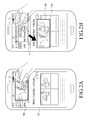
- FIGS. 2A and 2B illustrate a movement of a second screen in a device according to an embodiment of the present disclosure.
- Internet application-based information is displayed on the first screen 161 of the display 160, while TV application-based information is displayed on the second screen 162 of the display 160.
- the second screen 162 moves from a currently displayed area (a) to another area, as illustrated in FIG. 2B .
- partial information of the first screen 161 hidden by the second screen 162 that is, partial information of the first screen 161 hidden under the displayed area (a) of the second screen 162 is displayed to be viewable to a user.
- Another area to which the second screen 162 has moved from the currently displayed area (a) upon generation of the hovering gesture is an area available to the second screen 162 other than the currently displayed area (a) on the first screen 161.
- FIGS. 2A and 2B The operation illustrated in FIGS. 2A and 2B will be described with reference to FIGS. 3A and 3B .
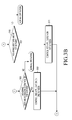
- FIGS. 3A and 3B are flowcharts illustrating an operation of moving a second screen in a device according to an embodiment of the present disclosure.
- FIGS. 3A and 3B The embodiment of the present disclosure illustrated in FIGS. 3A and 3B will be described below with reference to FIG. 1 and FIGS. 3A and 3B .
- information based on a first application is displayed on the first screen 161, while information based on a second application is displayed on the second screen 162 of a different size from the first screen 161, overlapped over the first screen 161 at operation 301.
- the controller 110 determines the coordinates of the position of the hovering gesture. If the controller 110 determines that the hovering gesture has been generated above the second screen 162 based on the coordinates of the position of the hovering gesture at operation 303, the controller 110 determines the type of the hovering gesture.
- the type of the hovering gesture may be identified depending on whether a button of the touch pen has been pressed or not.
- the controller 110 determines that the hovering gesture is a request for moving the second screen 162 at operation 304.
- the controller 110 moves the second screen 162 from a currently displayed area so that partial information of the first screen 161 hidden by the second screen may be displayed to be viewable.
- controller 110 determines that the user has finished viewing the partial information of the first screen 161 from which the second screen 162 has been moved at operation 306, the controller 110 returns the second screen 162 to the previous displayed area or keeps the second screen 162 in a currently displayed area at operation 307.
- the controller 110 determines that the hovering gesture is a request for controlling the second screen 162 at operation 308 and controls the information based on the second application on the second screen 162 at operation 309.
- the controller 110 determines that the hovering gesture has been generated above the first screen 161 based on the coordinates of the position of the hovering gesture at operation 310, the controller 110 controls the information based on the first application on the first screen 161 at operation 311.
- FIGS. 4A and 4B are flowcharts illustrating an operation of controlling a transparency of a second screen in a device according to an embodiment of the present disclosure.
- FIGS. 4A and 4B The embodiment of the present disclosure illustrated in FIGS. 4A and 4B will be described below with reference to FIG. 1 and FIGS. 4A and 4B .
- information based on a first application is displayed on the first screen 161, while information based on a second application is displayed on the second screen 162 of a different size from the first screen 161, overlapped over the first screen 161 at operation 401.
- the controller 110 determines the coordinates of the position of the hovering gesture. If the controller 110 determines that the hovering gesture has been generated above the second screen 162 based on the coordinates of the position of the hovering gesture at operation 403, the controller 110 determines the type of the hovering gesture.
- the type of the hovering gesture may be identified depending on whether a button of the touch pen has been pressed or not.
- the controller 110 determines that the hovering gesture is a request for controlling the transparency of the second screen 162 at operation 404.
- the controller 110 increases the transparency of the second screen 162 so that partial information of the first screen 161 hidden by the second screen may show through the more transparent second screen 162.
- the controller 110 may increase the transparency of a partial area of the second screen 162 around the coordinates of the position of the hovering gesture or the transparency of the entire area of the second screen 162 at operation 405.
- the controller 110 determines that the user has finished viewing the partial information of the first screen 161 through the more transparent second screen 162 at operation 406, the controller 110 returns the second screen 162 to a previous transparency level at operation 407.
- the controller 110 determines that the hovering gesture is a request for controlling the second screen 162 at operation 408 and controls the information based on the second application on the second screen 162 at operation 409.
- controller 110 determines that the hovering gesture has been generated above the first screen 161 based on the coordinates of the position of the hovering gesture at operation 410, the controller 110 controls the information based on the first application on the first screen 161 at operation 411.
- a second screen is moved or the transparency of the second screen is controlled according to a hovering gesture above the second screen
- the size of the second screen is decreased to a certain size according to the hovering gesture above the second screen and when it is determined that a user has finished viewing partial information of a first screen hidden by the second screen, the second screen is returned to its original size.
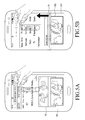
- FIGS. 5A and 5B illustrate control of a second screen by scrolling up or down a first screen in a device according to an embodiment of the present disclosure.
- Internet application-based information is displayed on the first screen 161 of the display 160, while TV application-based information is displayed on the second screen 162 overlapped over a lower area of the first screen 161. If the first screen 161 is scrolled up until lowermost Internet application-based information is scrolled up on the first screen 161, a bottom boundary of the first screen 161 is moved up to or above a top boundary (b) of the second screen 162 in the lower area of the first screen 161 by further scroll-up of the first screen 161 as illustrated in FIG. 5B . Therefore, information in the lower area of the first screen 161 is displayed without overlapping with the second screen 162.
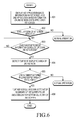
- FIG. 6 is a flowchart illustrating an operation of controlling a second screen by scrolling up or down a first screen in a device according to a second embodiment of the present disclosure.
- FIG. 6 The embodiment of the present disclosure illustrated in FIG. 6 will be described with reference to FIGS. 1 and 6 .
- information based on a first application is displayed on the first screen 161, while information based on the second application is displayed on the second screen 162 of a different size from the first screen 161, overlapped over the first screen 161 at operation 601.
- the controller 110 Upon detecting a scroll-up/down of the first screen 161 at operation 602, the controller 110 scrolls up/down information on the first screen 161.
- the controller 110 detects a currently displayed area of the second screen 162 at operation 604.
- the controller 110 moves the bottom/top boundary of the first screen 161 to or above/below the top/bottom boundary of the second screen 162 by further scrolling up/down the first screen 161 so that information in the lower/upper area of the first screen 161 may not be overlapped with the second screen 162 at operation 606.
- FIGS. 7A and 7B illustrate a movement of a second screen by scrolling up or down a first screen according to the second embodiment of the present disclosure.
- Internet application-based information is displayed on the first screen 161 of the display 160, while TV application-based information is displayed on the second screen 162 overlapped over a lower area of the first screen 161. If the first screen 161 is scrolled up until lowermost Internet-based information is scrolled up on the first screen 161, the second screen 162 is moved out of a currently displayed area (c) in the lower area of the first screen 161 as illustrated in FIG. 7B . Therefore, information hidden by the second screen 162 in the lower area of the first screen 161, that is, information of the first screen 161 hidden under the displayed area (c) of the second screen 162 is displayed to be viewable.
- FIG. 8 is a flowchart illustrating an operation of moving a second screen by scrolling up or down a first screen in a device according to the second embodiment of the present disclosure.
- FIG. 8 The embodiment of the present disclosure illustrated in FIG. 8 will be described with reference to FIGS. 1 and 8 .
- information based on a first application is displayed on the first screen 161, while information based on the second application is displayed on the second screen 162 of a different size from the first screen 161, overlapped over the first screen 161 at operation 801.
- the controller 110 Upon detecting a scroll-up/down of the first screen 161 at operation 802, the controller 110 scrolls up/down information on the first screen 161.
- the controller 110 detects a currently displayed area of the second screen 162 at operation 804.
- the controller 110 moves the second screen 162 out of the currently displayed area so that information in the lower/upper area of the first screen 161 may not be overlapped with the second screen 162 at operation 806.
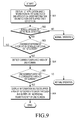
- FIG. 9 is a flowchart illustrating an operation of controlling a transparency of a second screen by scrolling up or down a first screen in a device according to the second embodiment of the present disclosure.
- FIG. 9 The embodiment of the present disclosure illustrated in FIG. 9 will be described with reference to FIGS. 1 and 9 .
- information based on a first application is displayed on the first screen 161, while information based on the second application is displayed on the second screen 162 of a different size from the first screen 161, overlapped over the first screen 161 at operation 901.
- the controller 110 Upon detecting a scroll-up/down of the first screen 161 at operation 902, the controller 110 scrolls up/down information on the first screen 161.
- the controller 110 detects a currently displayed area of the second screen 162 at operation 904.
- the controller 110 increases the transparency of the second screen 162 so that information in the lower/upper area of the first screen 161 may show through the more transparent second screen 162 at operation 906.
- the controller 110 If it is determined that the user finishes viewing the information in the lower/upper area of the first screen 161, the controller 110 returns the second screen 162 to a previous transparency level.
- FIGS. 10A, 10B, and 10C illustrate control of a movement and a size of a second screen by scrolling a first screen to the left or to the right in a device according to the second embodiment of the present disclosure.
- Internet application-based information is displayed on the first screen 161 of the display 160, while TV application-based information is displayed on the second screen 162 overlapped over an upper area of the first screen 161.
- a virtual reference line (d) is drawn vertically on the first screen 161.
- the reference line (d) may be a vertical center line of the first screen 161.
- the second screen 162 may be moved to the left area 161a.
- the second screen 162 may be moved progressively to the left area 162a, while the size of the second screen 162 is being adjusted gradually.
- FIGS. 10A, 10B, and 10C will be described with reference to FIG. 11
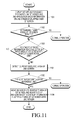
- FIG. 11 is a flowchart illustrating an operation of controlling a movement and a size of a second screen by scrolling a first screen to the left or to the right in a device according to the second embodiment of the present disclosure.
- FIG. 11 The embodiment of the present disclosure illustrated in FIG. 11 will be described below with reference to FIGS. 1 and 11 .
- information based on a first application is displayed on the first screen 161, while information based on a second application is displayed on the second screen 162 of a different size from the first screen, overlapped over the first screen 161 at operation 1101.
- the controller 110 Upon detecting a leftward/rightward scroll of the first screen 161 at operation 1102, the controller 110 scrolls information to the left/right on the first screen 161.
- the controller 110 detects a currently displayed area of the second screen 162 at operation 1104.
- the controller 110 moves the second screen 162 to the right/left area of the first screen 161 opposite to the left/right area of the first screen 161 into which the rightmost/leftmost information based on the first application has been moved and adjusts the size of the second screen 162 according to the size of the right/left area of the first screen 161, so that the information in the left/right area of the first screen 161 is not overlapped with the second screen 162 at operation 1106.
- the controller 110 displays the second screen 162 in the right area of the first screen 161, with an adjusted size.
- the controller 110 displays the second screen 162 in the left area of the first screen 161, with an adjusted size.
- FIGS. 10A, 10B , and 11 While it has been described in the second embodiment of the present disclosure illustrated in FIGS. 10A, 10B , and 11 that a second screen is moved and the size of the second screen is adjusted according to a leftward/rightward scroll of a first screen, it may be further contemplated that information of the first screen hidden by the second screen shows through the second screen by controlling the transparency of the second screen according to a leftward/rightward scroll of the first screen.
- the additional scroll of the first screen or the control of movement or transparency of the second screen according to a scroll-up/down of the first screen illustrated in FIGS. 5A to 9 is also applicable to the operation illustrated in FIGS. 10A, 10B , and 11 .
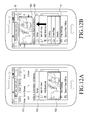
- FIGS. 12A and 12B illustrate a movement of a second screen in response to a display of a pop-up window on a first screen in a device according to a third embodiment of the present disclosure.
- Internet application-based information is displayed on the first screen 161 of the display 160, while TV application-based information is displayed on the second screen 162 overlapped over a lower area of the first screen 161.
- a menu pop-up window 163 including menu types is displayed to execute a function according to an input of a specific button, the second screen 162 is moved out of a displayed area of the pop-up window 613 as illustrated in FIG. 12B . Therefore, partial information hidden by the second window 162 in the menu pop-up window 163 of the first screen 161, that is, partial information of the menu pop-up window 163 located in a displayed area (e) of the second screen 162 is displayed to be viewable on the first screen 161.
- FIGS. 12A and 12B The operation illustrated in FIGS. 12A and 12B will be described with reference to FIG. 13 .
- FIG. 13 is a flowchart illustrating an operation of moving a second screen in response to a display of a pop-up window on a first screen in a device according to the third embodiment of the present disclosure.
- FIG. 13 The embodiment of the present disclosure illustrated in FIG. 13 will be described below with reference to FIGS. 1 and 13 .
- information based on a first application is displayed on the first screen 161, while information based on a second application is displayed on the second screen of a different size from the first screen 161, overlapped over the first screen 161 at operation 1301.
- the controller 110 detects a currently displayed area of the second screen 162 at operation 1303.
- the controller 110 moves the second screen 162 out of a displayed area of the pop-up window so that the pop-up window may not be overlapped with the second screen 162 at operation 1305. Even though the second screen 162 is moved out of the displayed area of the pop-up window, if the second screen 162 is so large as to be overlapped with the pop-up window, the controller 110 may additionally adjust the size of the second screen 162 during the movement of the second screen 162.
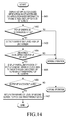
- FIG. 14 is a flowchart illustrating an operation of controlling transparency of a second screen in response to a display of a pop-up window on a first screen in a device according to the third embodiment of the present disclosure.
- FIG. 14 The embodiment of the present disclosure illustrated in FIG. 14 will be described below with reference to FIGS. 1 and 14 .
- information based on a first application is displayed on the first screen 161, while information based on a second application is displayed on the second screen of a different size from the first screen 161, overlapped over the first screen 161 at operation 1401.
- the controller 110 detects a currently displayed area of the second screen 162 at operation 1403.
- the controller 110 increases the transparency of the second screen 162 so that partial information of the pop-up window hidden by the second screen 162 may show through the more transparent second screen 162 at operation 1405.
- the controller 110 controls execution of a function of the pop-up window corresponding to the coordinates of the touched position on the first screen 161.
- the controller 110 Upon detecting display of no pop-up window with the second screen 162 rendered more transparent at operation 1406, the controller 110 returns the second screen 162 to a previous transparency level at operation 1407.
- FIGS. 15A and 15B illustrate a movement of a second screen depending on activation of two applications, while information based on the two applications is respectively displayed in two areas of a first screen in a device according to a fourth embodiment of the present disclosure.
- the first screen 161 of the display 160 is divided into a first area 161 c and a second area 161 d.
- Internet application-based information and TV application-based information are displayed respectively in the first and second areas 161c and 161d of the first screen 161, while photo application-based information is displayed on the second screen 162. If the first area 161 c of the first screen 161 is touched and thus, the Internet application is activated in the first area 161c, the second screen 162 is moved to the second area 161d in which the TV application is deactivated as illustrated in FIG. 15A .
- the second screen 162 displayed overlapped over the second area 161d of the first screen 161, upon generation of a touch on the second area 161d, the second area 161d is activated. Thereafter, the second screen 162 is moved to the first area 161c in which the Internet application is deactivated, as illustrated in FIG. 15B , wherein a display area (f)illustrates where the moved second screen 162 was displayed.
- FIGS. 15A and 15B The operation illustrated in FIGS. 15A and 15B will be described with reference to FIGS. 16A and 16B .
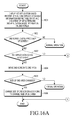
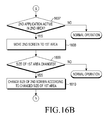
- FIGS. 16A and 16B are flowcharts illustrating an operation of moving a second screen according to an input gesture on a first screen in a device according to the fourth embodiment of the present disclosure.
- FIGS. 16A and 16B The operation illustrated in FIGS. 16A and 16B will be described below with reference to FIGS. 1 , 16A , and 16B .
- information based on a first application is displayed in a first area of the first screen 161, while information based on a second application is displayed in a second area of the first screen 161 at operation 1601.
- the controller 110 determines which application between the first and second applications is active.
- the controller 110 Upon detecting a gesture, such as a touch in the first area of the first screen, the controller 110 determines that the first application is active in the first area at operation 1603 and determines a currently displayed area of the second screen 162. If the second screen 162 is displayed in the first area of the first screen 161, the controller 110 moves the second screen 162 to the second area in which the second application is inactive at operation 1604.
- a gesture such as a touch in the first area of the first screen
- the controller 110 Upon detecting a change in the size of the second area of the first screen 161 with the second screen 162 displayed in the second area at operation 1605, the controller 110 adjusts the size of the second screen 162 according to the changed size of the second area at operation 1606.
- the controller 110 Upon detecting a gesture, such as a touch on the second area of the first screen 161, the controller 110 determines that the second application is active in the second area at operation 1607 and detects a currently displayed area of the second screen 162. If the second screen 162 is displayed in the second area of the first screen 161, the controller 110 moves the second screen 162 to the first area in which the first application is inactive at operation 1608.
- the controller 110 Upon detecting a change in the size of the first area of the first screen 161 with the second screen 162 displayed in the first area at operation 1609, the controller 110 adjusts the size of the second screen 162 according to the changed size of the first area at operation 1610.
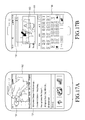
- FIGS. 17A and 17B illustrate a movement of a second screen according to an input gesture on a first screen in a device according to a fifth embodiment of the present disclosure.
- Internet application-based information is displayed on the first screen 161 of the display 160, while TV application-based information is displayed on the second screen 162 overlapped over an input window 164 of the first screen 161.
- an input gesture such as a touch on the input window 164
- the second screen 162 may be moved or the size of the second screen 162 may be adjusted so that the second screen 162 may not be overlapped with the input window 164 or a keypad 165 triggered by the input gesture on the input window 164, as illustrated in FIG. 17B .
- FIGS. 17A and 17B The operation illustrated in FIGS. 17A and 17B will be described with reference to FIG. 18 .
- FIG. 18 is a flowchart illustrating an operation of moving a second screen according to an input gesture on a first screen in a device according to the fifth embodiment of the present disclosure.
- FIG. 18 The operation of FIG. 18 will be described below with reference to FIGS. 1 and 18 .
- information based on a first application is displayed on the first screen 161, while information based on a second application is displayed on the second screen 162 of a different size from the first screen 161, overlapped over the first screen 161 at operation 1801.
- the controller 110 Upon detecting an input gesture, such as a touch on an input window of the first screen 161 at operation 1802, the controller 110 detects a currently displayed area of the second screen 162 at operation 1803.
- the controller 110 moves the second screen 162 or controls the size of the second screen 162 so that the second screen 162 may not be overlapped with the input window or the keypad at operation 1805.
- the various embodiments of the present disclosure as described above typically involve the processing of input data and the generation of output data to some extent.
- This input data processing and output data generation may be implemented in hardware or software in combination with hardware.
- specific electronic components may be employed in a mobile device or similar or related circuitry for implementing the functions associated with the various embodiments of the present disclosure as described above.
- one or more processors operating in accordance with stored instructions may implement the functions associated with the various embodiments of the present disclosure as described above. If such is the case, it is within the scope of the present disclosure that such instructions may be stored on one or more processor readable mediums.
- processor readable mediums examples include a Read-Only Memory (ROM), a Random-Access Memory (RAM), Compact Disc (CD)-ROMs, magnetic tapes, floppy disks, and optical data storage devices.
- ROM Read-Only Memory
- RAM Random-Access Memory
- CD Compact Disc
- the processor readable mediums can also be distributed over network coupled computer systems so that the instructions are stored and executed in a distributed fashion.
- functional computer programs, instructions, and instruction segments for accomplishing the present disclosure can be easily construed by programmers skilled in the art to which the present disclosure pertains.
Landscapes
- Engineering & Computer Science (AREA)
- Theoretical Computer Science (AREA)
- General Engineering & Computer Science (AREA)
- Physics & Mathematics (AREA)
- General Physics & Mathematics (AREA)
- Human Computer Interaction (AREA)
- Computer Hardware Design (AREA)
- User Interface Of Digital Computer (AREA)
- Controls And Circuits For Display Device (AREA)
- Digital Computer Display Output (AREA)
Applications Claiming Priority (1)
| Application Number | Priority Date | Filing Date | Title |
|---|---|---|---|
| KR1020130031497A KR102110193B1 (ko) | 2013-03-25 | 2013-03-25 | 기기의 화면제어장치 및 방법 |
Publications (3)
| Publication Number | Publication Date |
|---|---|
| EP2784653A2 true EP2784653A2 (fr) | 2014-10-01 |
| EP2784653A3 EP2784653A3 (fr) | 2015-03-25 |
| EP2784653B1 EP2784653B1 (fr) | 2018-02-14 |
Family
ID=50097542
Family Applications (1)
| Application Number | Title | Priority Date | Filing Date |
|---|---|---|---|
| EP14152612.9A Not-in-force EP2784653B1 (fr) | 2013-03-25 | 2014-01-27 | Appareil et procédé de commande de fenêtres superposées dans un dispositif |
Country Status (10)
| Country | Link |
|---|---|
| US (1) | US9666158B2 (fr) |
| EP (1) | EP2784653B1 (fr) |
| JP (1) | JP6549352B2 (fr) |
| KR (1) | KR102110193B1 (fr) |
| CN (1) | CN104077022B (fr) |
| AU (1) | AU2014201501B2 (fr) |
| BR (1) | BR102014007137A2 (fr) |
| CA (1) | CA2847479C (fr) |
| TW (1) | TWI610218B (fr) |
| WO (1) | WO2014157914A1 (fr) |
Cited By (1)
| Publication number | Priority date | Publication date | Assignee | Title |
|---|---|---|---|---|
| EP2808772B1 (fr) * | 2013-05-31 | 2017-02-01 | LG Electronics, Inc. | Terminal mobile et procédé de contrôle pour adapter la transparence ou la position d'une fenêtre en réponse d'un défilement d'une autre fenêtre |
Families Citing this family (24)
| Publication number | Priority date | Publication date | Assignee | Title |
|---|---|---|---|---|
| KR101616671B1 (ko) | 2015-02-03 | 2016-04-28 | 네이버 주식회사 | 인터넷 만화 컨텐츠의 유통을 위한 방법과 시스템 및 기록 매체 |
| US10248280B2 (en) * | 2015-08-18 | 2019-04-02 | International Business Machines Corporation | Controlling input to a plurality of computer windows |
| CN106484382B (zh) * | 2015-08-31 | 2019-06-21 | 阿里巴巴集团控股有限公司 | 一种弹框显示的方法和设备 |
| CN105389084A (zh) * | 2015-11-17 | 2016-03-09 | 惠州Tcl移动通信有限公司 | 一种移动终端方便用户进行信息输入的方法及移动终端 |
| KR102374292B1 (ko) | 2015-12-09 | 2022-03-16 | 삼성전자주식회사 | 액세서리, 전자 장치 및 전자 장치에서 입력을 처리하는 방법 |
| JP2017157027A (ja) * | 2016-03-02 | 2017-09-07 | 京セラドキュメントソリューションズ株式会社 | 表示装置 |
| JP6195964B1 (ja) * | 2016-04-15 | 2017-09-13 | ネイバー コーポレーションNAVER Corporation | アプリケーション制作装置及びその方法、アプリケーション駆動装置、並びにコンピュータプログラム |
| KR102733071B1 (ko) * | 2016-08-01 | 2024-11-21 | 삼성전자주식회사 | 터치 인식 방법 및 이를 수행하는 전자 장치 |
| WO2018026155A1 (fr) * | 2016-08-01 | 2018-02-08 | Samsung Electronics Co., Ltd. | Procédé et dispositif électronique de reconnaissance du toucher |
| KR102587138B1 (ko) * | 2016-10-17 | 2023-10-11 | 삼성전자주식회사 | 전자 장치 및 전자 장치에서의 디스플레이 제어 방법 |
| CN107908348B (zh) * | 2017-11-27 | 2019-07-26 | 维沃移动通信有限公司 | 显示的方法和移动终端 |
| US10890979B2 (en) | 2018-04-23 | 2021-01-12 | Industrial Technology Research Institute | Controlling system and controlling method for virtual display |
| CN108680166A (zh) * | 2018-05-15 | 2018-10-19 | 努比亚技术有限公司 | 导航信息兼容显示方法、终端及计算机可读存储介质 |
| CN110011900B (zh) * | 2019-03-21 | 2021-06-11 | 维沃移动通信有限公司 | 一种信息处理方法及终端设备 |
| CN112129309A (zh) * | 2019-06-25 | 2020-12-25 | 上海擎感智能科技有限公司 | 一种地图显示方法及装置 |
| CN110442314B (zh) * | 2019-07-19 | 2022-11-29 | 咪咕动漫有限公司 | 一种显示方法、终端及计算机可读存储介质 |
| WO2022041162A1 (fr) * | 2020-08-29 | 2022-03-03 | Citrix Systems, Inc. | Masque comprenant une fenêtre mobile pour visualiser un contenu |
| CN112132654A (zh) * | 2020-09-04 | 2020-12-25 | 贝壳技术有限公司 | 一种房源信息展示的方法、装置和存储介质 |
| US12597402B2 (en) | 2021-03-31 | 2026-04-07 | Sony Group Corporation | Information processing device, information processing method, and program for application window having first display mode and second display mode |
| TWI765706B (zh) * | 2021-05-11 | 2022-05-21 | 凌華科技股份有限公司 | 彈出視窗的非侵入式共享處理方法及系統 |
| KR102909485B1 (ko) * | 2021-05-14 | 2026-01-07 | 텐센트 테크놀로지(센젠) 컴퍼니 리미티드 | 컨트롤 디스플레이 방법 및 장치, 디바이스, 매체 및 프로그램 제품 |
| CN118843848A (zh) | 2021-11-29 | 2024-10-25 | 三星电子株式会社 | 包括可变形显示器的电子装置及其操作方法 |
| KR20240009248A (ko) | 2022-07-13 | 2024-01-22 | 삼성전자주식회사 | 멀티 윈도우의 표시를 제어하기 위한 전자 장치, 그 동작 방법 및 저장 매체 |
| WO2024253458A1 (fr) * | 2023-06-07 | 2024-12-12 | 삼성전자 주식회사 | Dispositif électronique prenant en charge de multiples fenêtres et son procédé de commande |
Family Cites Families (25)
| Publication number | Priority date | Publication date | Assignee | Title |
|---|---|---|---|---|
| EP0605945B1 (fr) * | 1992-12-15 | 1997-12-29 | Sun Microsystems, Inc. | Présentation d'informations dans un système d'affichage à fenêtres transparentes |
| US5517021A (en) * | 1993-01-19 | 1996-05-14 | The Research Foundation State University Of New York | Apparatus and method for eye tracking interface |
| US5689666A (en) | 1994-01-27 | 1997-11-18 | 3M | Method for handling obscured items on computer displays |
| AU697980B2 (en) * | 1994-05-10 | 1998-10-22 | Minnesota Mining And Manufacturing Company | A method for handling obscured items on computer displays |
| JPH07325696A (ja) * | 1994-05-31 | 1995-12-12 | Toshiba Medical Eng Co Ltd | マルチウィンドウ処理方法 |
| JP3976806B2 (ja) * | 1995-03-28 | 2007-09-19 | キヤノン株式会社 | データ入力装置およびその表示方法 |
| JPH11203014A (ja) * | 1998-01-20 | 1999-07-30 | Hitachi Ltd | マルチウインドウシステムでのヘルプ表示方式 |
| US20020015064A1 (en) * | 2000-08-07 | 2002-02-07 | Robotham John S. | Gesture-based user interface to multi-level and multi-modal sets of bit-maps |
| JP4174651B2 (ja) * | 2002-01-23 | 2008-11-05 | ソニー株式会社 | 画面表示制御方法および画面表示制御装置 |
| US7343566B1 (en) | 2002-07-10 | 2008-03-11 | Apple Inc. | Method and apparatus for displaying a window for a user interface |
| US7429993B2 (en) * | 2004-09-17 | 2008-09-30 | Microsoft Corporation | Method and system for presenting functionally-transparent, unobtrusive on-screen windows |
| KR100723212B1 (ko) | 2005-12-09 | 2007-05-29 | 엘지전자 주식회사 | 화면 분할 표시 기능을 구비한 전자 단말기 및 그 화면표시 방법 |
| JP4749882B2 (ja) * | 2006-02-10 | 2011-08-17 | 富士フイルム株式会社 | ウインドウ表示システム |
| WO2008007372A2 (fr) * | 2006-07-12 | 2008-01-17 | N-Trig Ltd. | Détection par effleurement et détection tactile pour numériseur graphique |
| WO2008007907A1 (fr) | 2006-07-14 | 2008-01-17 | Dong Soo Son | Système de présentation de contenus de film interactif et procédé correspondant |
| KR100791417B1 (ko) | 2006-07-14 | 2008-01-07 | 손동수 | 동영상 컨텐츠 제공 시스템 및 방법 |
| US8191003B2 (en) | 2007-02-14 | 2012-05-29 | International Business Machines Corporation | Managing transparent windows |
| US8645863B2 (en) | 2007-06-29 | 2014-02-04 | Microsoft Corporation | Menus with translucency and live preview |
| KR20090039951A (ko) | 2007-10-19 | 2009-04-23 | 엔스트림(주) | 플래쉬 기반의 동영상재생기 및 오버레이 효과에 의한광고시스템 |
| KR101348370B1 (ko) | 2007-10-24 | 2014-01-07 | 삼성전자주식회사 | 가변적 디스플레이 장치 및 그 디스플레이 방법 |
| JP5457765B2 (ja) * | 2008-11-20 | 2014-04-02 | キヤノン株式会社 | 情報処理装置、及びその制御方法 |
| KR101645474B1 (ko) | 2009-12-22 | 2016-08-04 | 엘지전자 주식회사 | 영상 처리 장치 및 방법 |
| TW201133329A (en) | 2010-03-26 | 2011-10-01 | Acer Inc | Touch control electric apparatus and window operation method thereof |
| JP2012032852A (ja) * | 2010-07-28 | 2012-02-16 | Sony Corp | 情報処理装置、情報処理方法およびコンピュータプログラム |
| JP2014182657A (ja) * | 2013-03-19 | 2014-09-29 | Sharp Corp | 情報処理装置、プログラム |
-
2013
- 2013-03-25 KR KR1020130031497A patent/KR102110193B1/ko not_active Expired - Fee Related
-
2014
- 2014-01-23 US US14/162,191 patent/US9666158B2/en active Active
- 2014-01-27 EP EP14152612.9A patent/EP2784653B1/fr not_active Not-in-force
- 2014-03-06 CN CN201410079796.4A patent/CN104077022B/zh not_active Expired - Fee Related
- 2014-03-13 AU AU2014201501A patent/AU2014201501B2/en not_active Ceased
- 2014-03-21 TW TW103110581A patent/TWI610218B/zh not_active IP Right Cessation
- 2014-03-24 CA CA2847479A patent/CA2847479C/fr active Active
- 2014-03-25 WO PCT/KR2014/002499 patent/WO2014157914A1/fr not_active Ceased
- 2014-03-25 JP JP2014062219A patent/JP6549352B2/ja not_active Expired - Fee Related
- 2014-03-25 BR BR102014007137A patent/BR102014007137A2/pt active Search and Examination
Non-Patent Citations (1)
| Title |
|---|
| None |
Cited By (2)
| Publication number | Priority date | Publication date | Assignee | Title |
|---|---|---|---|---|
| EP2808772B1 (fr) * | 2013-05-31 | 2017-02-01 | LG Electronics, Inc. | Terminal mobile et procédé de contrôle pour adapter la transparence ou la position d'une fenêtre en réponse d'un défilement d'une autre fenêtre |
| US9678648B2 (en) | 2013-05-31 | 2017-06-13 | Lg Electronics Inc. | Mobile terminal and controlling method thereof |
Also Published As
| Publication number | Publication date |
|---|---|
| CA2847479A1 (fr) | 2014-09-25 |
| EP2784653A3 (fr) | 2015-03-25 |
| BR102014007137A2 (pt) | 2016-01-12 |
| EP2784653B1 (fr) | 2018-02-14 |
| KR20140116656A (ko) | 2014-10-06 |
| AU2014201501B2 (en) | 2019-05-09 |
| JP2014186736A (ja) | 2014-10-02 |
| WO2014157914A1 (fr) | 2014-10-02 |
| CN104077022B (zh) | 2018-11-13 |
| KR102110193B1 (ko) | 2020-05-13 |
| TWI610218B (zh) | 2018-01-01 |
| US20140285422A1 (en) | 2014-09-25 |
| CN104077022A (zh) | 2014-10-01 |
| TW201443764A (zh) | 2014-11-16 |
| US9666158B2 (en) | 2017-05-30 |
| CA2847479C (fr) | 2021-05-04 |
| JP6549352B2 (ja) | 2019-07-24 |
| AU2014201501A1 (en) | 2014-10-09 |
Similar Documents
| Publication | Publication Date | Title |
|---|---|---|
| EP2784653B1 (fr) | Appareil et procédé de commande de fenêtres superposées dans un dispositif | |
| US9720586B2 (en) | Apparatus and method for providing for interaction with content within a digital bezel | |
| US20130152024A1 (en) | Electronic device and page zooming method thereof | |
| EP2650768A1 (fr) | Appareil et procédé pour fournir une bordure numérique | |
| US20140165013A1 (en) | Electronic device and page zooming method thereof | |
| US9170728B2 (en) | Electronic device and page zooming method thereof | |
| EP2722748A2 (fr) | Appareil et procédé d'affichage de données dans un terminal | |
| US20140059478A1 (en) | Apparatus and method for providing a digital bezel without occluding interactive content | |
| CN105683895A (zh) | 提供用户交互的用户终端设备及其方法 | |
| CN102474560A (zh) | 由电子装置使用触敏显示器控制数字图像的放大和采集 | |
| US9229615B2 (en) | Method and apparatus for displaying additional information items | |
| EP3521987A1 (fr) | Procédé et dispositif d'affichage d'interface d'utilisateur graphique,de page, et de terminal mobile | |
| US20140043255A1 (en) | Electronic device and image zooming method thereof | |
| US10095384B2 (en) | Method of receiving user input by detecting movement of user and apparatus therefor | |
| KR20150025214A (ko) | 동영상에 비주얼 객체를 중첩 표시하는 방법, 저장 매체 및 전자 장치 | |
| US20160004420A1 (en) | Electronic device and computer program product | |
| WO2022166893A1 (fr) | Procédé et appareil d'affichage d'informations, dispositif électronique et support de stockage | |
| CN103902137B (zh) | 一种触摸设备的键盘调节方法和装置 | |
| CN103383621A (zh) | 视图切换方法及装置 | |
| CN105892897A (zh) | 一种终端操作方法及设备 | |
| GB2516472A (en) | Methods and Apparatuses Relating to the Display of User Interfaces | |
| CN103376999A (zh) | 手持式电子装置及其数位资讯的画面控制方法 | |
| JP5898015B2 (ja) | 情報端末装置 | |
| US20140125611A1 (en) | Apparatus and method for displaying zoomed data in terminal |
Legal Events
| Date | Code | Title | Description |
|---|---|---|---|
| 17P | Request for examination filed |
Effective date: 20140127 |
|
| AK | Designated contracting states |
Kind code of ref document: A2 Designated state(s): AL AT BE BG CH CY CZ DE DK EE ES FI FR GB GR HR HU IE IS IT LI LT LU LV MC MK MT NL NO PL PT RO RS SE SI SK SM TR |
|
| AX | Request for extension of the european patent |
Extension state: BA ME |
|
| PUAI | Public reference made under article 153(3) epc to a published international application that has entered the european phase |
Free format text: ORIGINAL CODE: 0009012 |
|
| PUAL | Search report despatched |
Free format text: ORIGINAL CODE: 0009013 |
|
| AK | Designated contracting states |
Kind code of ref document: A3 Designated state(s): AL AT BE BG CH CY CZ DE DK EE ES FI FR GB GR HR HU IE IS IT LI LT LU LV MC MK MT NL NO PL PT RO RS SE SI SK SM TR |
|
| AX | Request for extension of the european patent |
Extension state: BA ME |
|
| RIC1 | Information provided on ipc code assigned before grant |
Ipc: G06F 3/0488 20130101AFI20150218BHEP Ipc: G09G 5/14 20060101ALN20150218BHEP Ipc: G06F 3/0481 20130101ALI20150218BHEP |
|
| R17P | Request for examination filed (corrected) |
Effective date: 20150925 |
|
| RBV | Designated contracting states (corrected) |
Designated state(s): AL AT BE BG CH CY CZ DE DK EE ES FI FR GB GR HR HU IE IS IT LI LT LU LV MC MK MT NL NO PL PT RO RS SE SI SK SM TR |
|
| STAA | Information on the status of an ep patent application or granted ep patent |
Free format text: STATUS: EXAMINATION IS IN PROGRESS |
|
| 17Q | First examination report despatched |
Effective date: 20161028 |
|
| RIC1 | Information provided on ipc code assigned before grant |
Ipc: G09G 5/14 20060101ALN20170720BHEP Ipc: G06F 3/14 20060101ALI20170720BHEP Ipc: G06F 3/0481 20130101ALI20170720BHEP Ipc: G06F 3/0485 20130101ALI20170720BHEP Ipc: G06F 3/0488 20130101AFI20170720BHEP |
|
| GRAP | Despatch of communication of intention to grant a patent |
Free format text: ORIGINAL CODE: EPIDOSNIGR1 |
|
| STAA | Information on the status of an ep patent application or granted ep patent |
Free format text: STATUS: GRANT OF PATENT IS INTENDED |
|
| RIC1 | Information provided on ipc code assigned before grant |
Ipc: G06F 3/14 20060101ALI20170809BHEP Ipc: G09G 5/14 20060101ALN20170809BHEP Ipc: G06F 3/0485 20130101ALI20170809BHEP Ipc: G06F 3/0488 20130101AFI20170809BHEP Ipc: G06F 3/0481 20130101ALI20170809BHEP |
|
| INTG | Intention to grant announced |
Effective date: 20170830 |
|
| GRAS | Grant fee paid |
Free format text: ORIGINAL CODE: EPIDOSNIGR3 |
|
| GRAA | (expected) grant |
Free format text: ORIGINAL CODE: 0009210 |
|
| STAA | Information on the status of an ep patent application or granted ep patent |
Free format text: STATUS: THE PATENT HAS BEEN GRANTED |
|
| AK | Designated contracting states |
Kind code of ref document: B1 Designated state(s): AL AT BE BG CH CY CZ DE DK EE ES FI FR GB GR HR HU IE IS IT LI LT LU LV MC MK MT NL NO PL PT RO RS SE SI SK SM TR |
|
| REG | Reference to a national code |
Ref country code: GB Ref legal event code: FG4D |
|
| REG | Reference to a national code |
Ref country code: CH Ref legal event code: EP |
|
| REG | Reference to a national code |
Ref country code: IE Ref legal event code: FG4D |
|
| REG | Reference to a national code |
Ref country code: DE Ref legal event code: R096 Ref document number: 602014020858 Country of ref document: DE Ref country code: AT Ref legal event code: REF Ref document number: 970264 Country of ref document: AT Kind code of ref document: T Effective date: 20180315 |
|
| REG | Reference to a national code |
Ref country code: NL Ref legal event code: FP |
|
| REG | Reference to a national code |
Ref country code: AT Ref legal event code: MK05 Ref document number: 970264 Country of ref document: AT Kind code of ref document: T Effective date: 20180214 |
|
| PG25 | Lapsed in a contracting state [announced via postgrant information from national office to epo] |
Ref country code: LT Free format text: LAPSE BECAUSE OF FAILURE TO SUBMIT A TRANSLATION OF THE DESCRIPTION OR TO PAY THE FEE WITHIN THE PRESCRIBED TIME-LIMIT Effective date: 20180214 Ref country code: CY Free format text: LAPSE BECAUSE OF FAILURE TO SUBMIT A TRANSLATION OF THE DESCRIPTION OR TO PAY THE FEE WITHIN THE PRESCRIBED TIME-LIMIT Effective date: 20180214 Ref country code: HR Free format text: LAPSE BECAUSE OF FAILURE TO SUBMIT A TRANSLATION OF THE DESCRIPTION OR TO PAY THE FEE WITHIN THE PRESCRIBED TIME-LIMIT Effective date: 20180214 Ref country code: FI Free format text: LAPSE BECAUSE OF FAILURE TO SUBMIT A TRANSLATION OF THE DESCRIPTION OR TO PAY THE FEE WITHIN THE PRESCRIBED TIME-LIMIT Effective date: 20180214 Ref country code: NO Free format text: LAPSE BECAUSE OF FAILURE TO SUBMIT A TRANSLATION OF THE DESCRIPTION OR TO PAY THE FEE WITHIN THE PRESCRIBED TIME-LIMIT Effective date: 20180514 Ref country code: ES Free format text: LAPSE BECAUSE OF FAILURE TO SUBMIT A TRANSLATION OF THE DESCRIPTION OR TO PAY THE FEE WITHIN THE PRESCRIBED TIME-LIMIT Effective date: 20180214 |
|
| PG25 | Lapsed in a contracting state [announced via postgrant information from national office to epo] |
Ref country code: RS Free format text: LAPSE BECAUSE OF FAILURE TO SUBMIT A TRANSLATION OF THE DESCRIPTION OR TO PAY THE FEE WITHIN THE PRESCRIBED TIME-LIMIT Effective date: 20180214 Ref country code: AT Free format text: LAPSE BECAUSE OF FAILURE TO SUBMIT A TRANSLATION OF THE DESCRIPTION OR TO PAY THE FEE WITHIN THE PRESCRIBED TIME-LIMIT Effective date: 20180214 Ref country code: BG Free format text: LAPSE BECAUSE OF FAILURE TO SUBMIT A TRANSLATION OF THE DESCRIPTION OR TO PAY THE FEE WITHIN THE PRESCRIBED TIME-LIMIT Effective date: 20180514 Ref country code: GR Free format text: LAPSE BECAUSE OF FAILURE TO SUBMIT A TRANSLATION OF THE DESCRIPTION OR TO PAY THE FEE WITHIN THE PRESCRIBED TIME-LIMIT Effective date: 20180515 Ref country code: LV Free format text: LAPSE BECAUSE OF FAILURE TO SUBMIT A TRANSLATION OF THE DESCRIPTION OR TO PAY THE FEE WITHIN THE PRESCRIBED TIME-LIMIT Effective date: 20180214 Ref country code: SE Free format text: LAPSE BECAUSE OF FAILURE TO SUBMIT A TRANSLATION OF THE DESCRIPTION OR TO PAY THE FEE WITHIN THE PRESCRIBED TIME-LIMIT Effective date: 20180214 |
|
| PG25 | Lapsed in a contracting state [announced via postgrant information from national office to epo] |
Ref country code: AL Free format text: LAPSE BECAUSE OF FAILURE TO SUBMIT A TRANSLATION OF THE DESCRIPTION OR TO PAY THE FEE WITHIN THE PRESCRIBED TIME-LIMIT Effective date: 20180214 Ref country code: EE Free format text: LAPSE BECAUSE OF FAILURE TO SUBMIT A TRANSLATION OF THE DESCRIPTION OR TO PAY THE FEE WITHIN THE PRESCRIBED TIME-LIMIT Effective date: 20180214 Ref country code: RO Free format text: LAPSE BECAUSE OF FAILURE TO SUBMIT A TRANSLATION OF THE DESCRIPTION OR TO PAY THE FEE WITHIN THE PRESCRIBED TIME-LIMIT Effective date: 20180214 Ref country code: PL Free format text: LAPSE BECAUSE OF FAILURE TO SUBMIT A TRANSLATION OF THE DESCRIPTION OR TO PAY THE FEE WITHIN THE PRESCRIBED TIME-LIMIT Effective date: 20180214 |
|
| REG | Reference to a national code |
Ref country code: DE Ref legal event code: R097 Ref document number: 602014020858 Country of ref document: DE |
|
| PG25 | Lapsed in a contracting state [announced via postgrant information from national office to epo] |
Ref country code: SK Free format text: LAPSE BECAUSE OF FAILURE TO SUBMIT A TRANSLATION OF THE DESCRIPTION OR TO PAY THE FEE WITHIN THE PRESCRIBED TIME-LIMIT Effective date: 20180214 Ref country code: CZ Free format text: LAPSE BECAUSE OF FAILURE TO SUBMIT A TRANSLATION OF THE DESCRIPTION OR TO PAY THE FEE WITHIN THE PRESCRIBED TIME-LIMIT Effective date: 20180214 Ref country code: DK Free format text: LAPSE BECAUSE OF FAILURE TO SUBMIT A TRANSLATION OF THE DESCRIPTION OR TO PAY THE FEE WITHIN THE PRESCRIBED TIME-LIMIT Effective date: 20180214 Ref country code: SM Free format text: LAPSE BECAUSE OF FAILURE TO SUBMIT A TRANSLATION OF THE DESCRIPTION OR TO PAY THE FEE WITHIN THE PRESCRIBED TIME-LIMIT Effective date: 20180214 |
|
| PLBE | No opposition filed within time limit |
Free format text: ORIGINAL CODE: 0009261 |
|
| STAA | Information on the status of an ep patent application or granted ep patent |
Free format text: STATUS: NO OPPOSITION FILED WITHIN TIME LIMIT |
|
| 26N | No opposition filed |
Effective date: 20181115 |
|
| PG25 | Lapsed in a contracting state [announced via postgrant information from national office to epo] |
Ref country code: SI Free format text: LAPSE BECAUSE OF FAILURE TO SUBMIT A TRANSLATION OF THE DESCRIPTION OR TO PAY THE FEE WITHIN THE PRESCRIBED TIME-LIMIT Effective date: 20180214 Ref country code: IT Free format text: LAPSE BECAUSE OF FAILURE TO SUBMIT A TRANSLATION OF THE DESCRIPTION OR TO PAY THE FEE WITHIN THE PRESCRIBED TIME-LIMIT Effective date: 20180214 |
|
| PG25 | Lapsed in a contracting state [announced via postgrant information from national office to epo] |
Ref country code: MC Free format text: LAPSE BECAUSE OF FAILURE TO SUBMIT A TRANSLATION OF THE DESCRIPTION OR TO PAY THE FEE WITHIN THE PRESCRIBED TIME-LIMIT Effective date: 20180214 |
|
| REG | Reference to a national code |
Ref country code: CH Ref legal event code: PL |
|
| PG25 | Lapsed in a contracting state [announced via postgrant information from national office to epo] |
Ref country code: LU Free format text: LAPSE BECAUSE OF NON-PAYMENT OF DUE FEES Effective date: 20190127 |
|
| REG | Reference to a national code |
Ref country code: BE Ref legal event code: MM Effective date: 20190131 |
|
| REG | Reference to a national code |
Ref country code: IE Ref legal event code: MM4A |
|
| PG25 | Lapsed in a contracting state [announced via postgrant information from national office to epo] |
Ref country code: FR Free format text: LAPSE BECAUSE OF NON-PAYMENT OF DUE FEES Effective date: 20190131 |
|
| PG25 | Lapsed in a contracting state [announced via postgrant information from national office to epo] |
Ref country code: BE Free format text: LAPSE BECAUSE OF NON-PAYMENT OF DUE FEES Effective date: 20190131 |
|
| PG25 | Lapsed in a contracting state [announced via postgrant information from national office to epo] |
Ref country code: LI Free format text: LAPSE BECAUSE OF NON-PAYMENT OF DUE FEES Effective date: 20190131 Ref country code: CH Free format text: LAPSE BECAUSE OF NON-PAYMENT OF DUE FEES Effective date: 20190131 |
|
| PG25 | Lapsed in a contracting state [announced via postgrant information from national office to epo] |
Ref country code: IE Free format text: LAPSE BECAUSE OF NON-PAYMENT OF DUE FEES Effective date: 20190127 |
|
| PG25 | Lapsed in a contracting state [announced via postgrant information from national office to epo] |
Ref country code: TR Free format text: LAPSE BECAUSE OF FAILURE TO SUBMIT A TRANSLATION OF THE DESCRIPTION OR TO PAY THE FEE WITHIN THE PRESCRIBED TIME-LIMIT Effective date: 20180214 |
|
| PG25 | Lapsed in a contracting state [announced via postgrant information from national office to epo] |
Ref country code: PT Free format text: LAPSE BECAUSE OF FAILURE TO SUBMIT A TRANSLATION OF THE DESCRIPTION OR TO PAY THE FEE WITHIN THE PRESCRIBED TIME-LIMIT Effective date: 20180614 Ref country code: MT Free format text: LAPSE BECAUSE OF NON-PAYMENT OF DUE FEES Effective date: 20190127 |
|
| PG25 | Lapsed in a contracting state [announced via postgrant information from national office to epo] |
Ref country code: IS Free format text: LAPSE BECAUSE OF FAILURE TO SUBMIT A TRANSLATION OF THE DESCRIPTION OR TO PAY THE FEE WITHIN THE PRESCRIBED TIME-LIMIT Effective date: 20180614 |
|
| PG25 | Lapsed in a contracting state [announced via postgrant information from national office to epo] |
Ref country code: HU Free format text: LAPSE BECAUSE OF FAILURE TO SUBMIT A TRANSLATION OF THE DESCRIPTION OR TO PAY THE FEE WITHIN THE PRESCRIBED TIME-LIMIT; INVALID AB INITIO Effective date: 20140127 |
|
| PG25 | Lapsed in a contracting state [announced via postgrant information from national office to epo] |
Ref country code: MK Free format text: LAPSE BECAUSE OF FAILURE TO SUBMIT A TRANSLATION OF THE DESCRIPTION OR TO PAY THE FEE WITHIN THE PRESCRIBED TIME-LIMIT Effective date: 20180214 |
|
| PGFP | Annual fee paid to national office [announced via postgrant information from national office to epo] |
Ref country code: GB Payment date: 20231220 Year of fee payment: 11 |
|
| PGFP | Annual fee paid to national office [announced via postgrant information from national office to epo] |
Ref country code: NL Payment date: 20231221 Year of fee payment: 11 |
|
| PGFP | Annual fee paid to national office [announced via postgrant information from national office to epo] |
Ref country code: DE Payment date: 20231220 Year of fee payment: 11 |
|
| REG | Reference to a national code |
Ref country code: DE Ref legal event code: R119 Ref document number: 602014020858 Country of ref document: DE |
|
| REG | Reference to a national code |
Ref country code: NL Ref legal event code: MM Effective date: 20250201 |
|
| GBPC | Gb: european patent ceased through non-payment of renewal fee |
Effective date: 20250127 |
|
| PG25 | Lapsed in a contracting state [announced via postgrant information from national office to epo] |
Ref country code: DE Free format text: LAPSE BECAUSE OF NON-PAYMENT OF DUE FEES Effective date: 20250801 |
|
| PG25 | Lapsed in a contracting state [announced via postgrant information from national office to epo] |
Ref country code: NL Free format text: LAPSE BECAUSE OF NON-PAYMENT OF DUE FEES Effective date: 20250201 |
|
| PG25 | Lapsed in a contracting state [announced via postgrant information from national office to epo] |
Ref country code: GB Free format text: LAPSE BECAUSE OF NON-PAYMENT OF DUE FEES Effective date: 20250127 |