EP3477433A1 - Informationsverarbeitungsvorrichtung, informationsverarbeitungsverfahren und computerprogramm - Google Patents
Informationsverarbeitungsvorrichtung, informationsverarbeitungsverfahren und computerprogramm Download PDFInfo
- Publication number
- EP3477433A1 EP3477433A1 EP17814996.9A EP17814996A EP3477433A1 EP 3477433 A1 EP3477433 A1 EP 3477433A1 EP 17814996 A EP17814996 A EP 17814996A EP 3477433 A1 EP3477433 A1 EP 3477433A1
- Authority
- EP
- European Patent Office
- Prior art keywords
- user
- information
- stimulus
- processing apparatus
- content
- Prior art date
- Legal status (The legal status is an assumption and is not a legal conclusion. Google has not performed a legal analysis and makes no representation as to the accuracy of the status listed.)
- Withdrawn
Links
Images





Classifications
-
- A—HUMAN NECESSITIES
- A61—MEDICAL OR VETERINARY SCIENCE; HYGIENE
- A61B—DIAGNOSIS; SURGERY; IDENTIFICATION
- A61B5/00—Measuring for diagnostic purposes; Identification of persons
-
- G—PHYSICS
- G09—EDUCATION; CRYPTOGRAPHY; DISPLAY; ADVERTISING; SEALS
- G09B—EDUCATIONAL OR DEMONSTRATION APPLIANCES; APPLIANCES FOR TEACHING, OR COMMUNICATING WITH, THE BLIND, DEAF OR MUTE; MODELS; PLANETARIA; GLOBES; MAPS; DIAGRAMS
- G09B19/00—Teaching not covered by other main groups of this subclass
-
- G—PHYSICS
- G09—EDUCATION; CRYPTOGRAPHY; DISPLAY; ADVERTISING; SEALS
- G09B—EDUCATIONAL OR DEMONSTRATION APPLIANCES; APPLIANCES FOR TEACHING, OR COMMUNICATING WITH, THE BLIND, DEAF OR MUTE; MODELS; PLANETARIA; GLOBES; MAPS; DIAGRAMS
- G09B5/00—Electrically-operated educational appliances
- G09B5/06—Electrically-operated educational appliances with both visual and audible presentation of the material to be studied
-
- A—HUMAN NECESSITIES
- A61—MEDICAL OR VETERINARY SCIENCE; HYGIENE
- A61B—DIAGNOSIS; SURGERY; IDENTIFICATION
- A61B5/00—Measuring for diagnostic purposes; Identification of persons
- A61B5/02—Detecting, measuring or recording for evaluating the cardiovascular system, e.g. pulse, heart rate, blood pressure or blood flow
- A61B5/021—Measuring pressure in heart or blood vessels
-
- A—HUMAN NECESSITIES
- A61—MEDICAL OR VETERINARY SCIENCE; HYGIENE
- A61B—DIAGNOSIS; SURGERY; IDENTIFICATION
- A61B5/00—Measuring for diagnostic purposes; Identification of persons
- A61B5/02—Detecting, measuring or recording for evaluating the cardiovascular system, e.g. pulse, heart rate, blood pressure or blood flow
- A61B5/024—Measuring pulse rate or heart rate
-
- A—HUMAN NECESSITIES
- A61—MEDICAL OR VETERINARY SCIENCE; HYGIENE
- A61B—DIAGNOSIS; SURGERY; IDENTIFICATION
- A61B5/00—Measuring for diagnostic purposes; Identification of persons
- A61B5/08—Measuring devices for evaluating the respiratory organs
- A61B5/0816—Measuring devices for examining respiratory frequency
-
- A—HUMAN NECESSITIES
- A61—MEDICAL OR VETERINARY SCIENCE; HYGIENE
- A61B—DIAGNOSIS; SURGERY; IDENTIFICATION
- A61B5/00—Measuring for diagnostic purposes; Identification of persons
- A61B5/103—Measuring devices for testing the shape, pattern, colour, size or movement of the body or parts thereof, for diagnostic purposes
- A61B5/11—Measuring movement of the entire body or parts thereof, e.g. head or hand tremor or mobility of a limb
- A61B5/1104—Measuring movement of the entire body or parts thereof, e.g. head or hand tremor or mobility of a limb induced by stimuli or drugs
-
- A—HUMAN NECESSITIES
- A61—MEDICAL OR VETERINARY SCIENCE; HYGIENE
- A61B—DIAGNOSIS; SURGERY; IDENTIFICATION
- A61B5/00—Measuring for diagnostic purposes; Identification of persons
- A61B5/16—Devices for psychotechnics; Testing reaction times ; Devices for evaluating the psychological state
- A61B5/163—Devices for psychotechnics; Testing reaction times ; Devices for evaluating the psychological state by tracking eye movement, gaze, or pupil change
-
- A—HUMAN NECESSITIES
- A61—MEDICAL OR VETERINARY SCIENCE; HYGIENE
- A61B—DIAGNOSIS; SURGERY; IDENTIFICATION
- A61B5/00—Measuring for diagnostic purposes; Identification of persons
- A61B5/42—Detecting, measuring or recording for evaluating the gastrointestinal, the endocrine or the exocrine systems
- A61B5/4261—Evaluating exocrine secretion production
- A61B5/4266—Evaluating exocrine secretion production sweat secretion
-
- A—HUMAN NECESSITIES
- A61—MEDICAL OR VETERINARY SCIENCE; HYGIENE
- A61B—DIAGNOSIS; SURGERY; IDENTIFICATION
- A61B5/00—Measuring for diagnostic purposes; Identification of persons
- A61B5/48—Other medical applications
- A61B5/4803—Speech analysis specially adapted for diagnostic purposes
-
- A—HUMAN NECESSITIES
- A63—SPORTS; GAMES; AMUSEMENTS
- A63H—TOYS, e.g. TOPS, DOLLS, HOOPS OR BUILDING BLOCKS
- A63H33/00—Other toys
- A63H33/38—Picture books with additional toy effects, e.g. pop-up or slide displays
-
- G—PHYSICS
- G06—COMPUTING OR CALCULATING; COUNTING
- G06F—ELECTRIC DIGITAL DATA PROCESSING
- G06F3/00—Input arrangements for transferring data to be processed into a form capable of being handled by the computer; Output arrangements for transferring data from processing unit to output unit, e.g. interface arrangements
- G06F3/01—Input arrangements or combined input and output arrangements for interaction between user and computer
-
- G—PHYSICS
- G09—EDUCATION; CRYPTOGRAPHY; DISPLAY; ADVERTISING; SEALS
- G09B—EDUCATIONAL OR DEMONSTRATION APPLIANCES; APPLIANCES FOR TEACHING, OR COMMUNICATING WITH, THE BLIND, DEAF OR MUTE; MODELS; PLANETARIA; GLOBES; MAPS; DIAGRAMS
- G09B7/00—Electrically-operated teaching apparatus or devices working with questions and answers
- G09B7/02—Electrically-operated teaching apparatus or devices working with questions and answers of the type wherein the student is expected to construct an answer to the question which is presented or wherein the machine gives an answer to the question presented by a student
-
- G—PHYSICS
- G09—EDUCATION; CRYPTOGRAPHY; DISPLAY; ADVERTISING; SEALS
- G09B—EDUCATIONAL OR DEMONSTRATION APPLIANCES; APPLIANCES FOR TEACHING, OR COMMUNICATING WITH, THE BLIND, DEAF OR MUTE; MODELS; PLANETARIA; GLOBES; MAPS; DIAGRAMS
- G09B21/00—Teaching, or communicating with, the blind, deaf or mute
- G09B21/001—Teaching or communicating with blind persons
- G09B21/007—Teaching or communicating with blind persons using both tactile and audible presentation of the information
Definitions
- the present disclosure relates to an information processing apparatus, an information processing method, and a computer program.
- a technique for analyzing the user's preference and presenting information suitable for the user's preference a technique for personalizing an idea stimulus facilitating that the user generates an idea and presenting it to the user in the user's idea generation support (e.g., Patent Literature 1), or others are developed.
- Patent Literature 1 JP 2010-244334A
- a human being senses external environments using five senses, namely, visual, auditory, tactile, gustatory, and olfactory senses. It is known that a human being has each sense superior to others among these senses.
- receiving information presentation there is a case where information visually presented on a screen is easier to understand than that audibly presented by voice.
- how to present easy-to-understand information is different depending on the person. Such a difference is thought to be related to difference in the dominance of each person's five senses.
- the present disclosure provides a novel and improved information processing apparatus, information processing method, and computer program, capable of presenting information in a presentation way that allows each user to easily accept information.
- an information processing apparatus including: a processing unit configured to present content to a user on a basis of sensor information acquired by a sensor configured to detect reaction of the user to a stimulus given to the user.
- an information processing method including: presenting content together with a stimulus; detecting, by a sensor, reaction of a user to the stimulus given to the user; and estimating a dominant sense of the user on a basis of sense information acquired by the sensor.
- a computer program causing a computer to function as an information processing apparatus including: a processing unit configured to present content to a user on a basis of sensor information acquired by a sensor configured to detect reaction of the user to a stimulus given to the user.
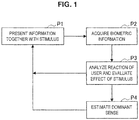
- FIG. 1 is a diagram illustrated to describe an overview of content presentation using the information processing apparatus according to the present embodiment.
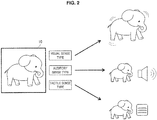
- FIG. 2 is a diagram illustrated to describe an example of content presentation for each user using the information processing apparatus according to the present embodiment.
- the information processing apparatus presents information using a presentation way that allows each user to easily accept information.
- This technology estimates a sense that works dominantly among the user's senses (hereinafter also referred to as "dominant sense”) and presents information in such a manner to stimulate the dominant sense, so that the user accepts information without being subjected to load. It is possible to estimate the dominant sense of each user on the basis of the user's biometric information.
- presenting information to a user information is presented in such a manner that a sense (e.g., visual, auditory, or tactile sense) is stimulated (P1).
- a sense e.g., visual, auditory, or tactile sense
- biometric information of the user who received the stimulus is acquired (P2).
- the reaction of the user who received the stimulus is estimated by analyzing the acquired biometric information of the user, and whether or not the stimulus given on the basis of the user's reaction has an effect on the user is evaluated (P3).
- the evaluation of the process P3 is fed back to a functional unit, which presents the information, to use for consideration in presenting the information to the user later and is employed as information used to estimate a user's dominant sense from the user's reaction to the stimulus (P4).
- the process P4 estimates the user's dominant sense on the basis of the reactions to various stimuli presented to the user in the processes P1 to P3.
- the feedback of the estimated dominant sense of the user to a functional unit used to present the information allows the information to be present to the user in such a manner to stimulate the dominant sense.
- impression object 10 there is an object 10 to be impressed by a viewer (hereinafter also referred to as "impression object") among objects included in the video content. Only the addition of stimulus information is set in the video content in presenting an impression object 10.
- the information processing apparatus sets the stimulus information in the impression object 10 on the basis of the viewer's dominant sense for the video content and plays back the video content.
- the way of recognizing the information differs for each user depending on the user's dominant sense.
- differences in information recognition depending on the user's dominant sense are represented by classifying them into sense types.
- three sense types are set, for example, visual sense type in which visual sense works dominantly, auditory sense type in which auditory sense works dominantly, and tactile sense type in which tactual sense works dominantly. How to receive information, how to communicate it, how to store it, and so on are different depending on each sense type, and in one example, these differences appear in the body's movement.
- the description is first given of the movement of eyeball as an example of the body's movement.
- the visual sense type user tends to have the movement of the eyeball that looks upwards or looks around restlessly.
- the auditory sense type user tends to move the eyes along the contents of the information while looking at one point or look downward slightly.
- the tactile sense type user tends to swing the eyes in the horizontal direction or downward.
- the description is given of the movement of hand or arm as another example of the body's movement.
- the visual sense type user tends to move the hand or the like upward
- the auditory sense type user tends to move it according to the meaning of the story
- the tactile sense type user tends to move the arm up and down exaggeratedly.
- the visual sense type user tends to have strong obsession about an image or color, have a logical leap in speech, or talk rapidly. Then, the visual sense type user tends to perceive the information in terms of planes and store it.
- the auditory sense type user tends to have obsession about time or distance and so speak consistently. Many people speak at a slow speed with less intonation of voice. Then, the auditory sense type user tends to associate information and store it in terms of lines.
- the tactile sense type user tends to have a lot of onomatopoeia or mimetic words and have much intonation of voices. Then, the tactile sense type user tends to store information individually in terms of points.
- the user's dominant sense is estimated and information is presented to the user in such a manner to stimulate the dominant sense.
- FIG. 2 it is assumed that an elephant included in the video content is impressed to the user as an impression object 10.
- the information processing apparatus can scale up or down, move, or blink the elephant that is the impression object 10 in such a manner to stimulate the visual sense that is the dominant sense.
- the information processing apparatus can output its cry or sound effect in such a manner to stimulate the auditory sense that is the dominant sense as well as the display of the elephant that is the impression object 10.
- the information processing apparatus can vibrate equipment that the user touches while holding or wearing it in such a manner to stimulate the tactile sense that is the dominant sense as well as the display of the elephant that is the impression object 10.
- the equipment to be vibrated can be equipment itself provided with a display device, such as a tablet terminal, a smartphone, or a wearable terminal, which plays back the video content, or can be other devices than the equipment that plays back the video content.
- the equipment to be vibrated can vibrate upon reception of an instruction given from the equipment that plays back the video content, or can be controlled by a control server or the like used to control these devices via a network.
- the change in the way of presenting the impression object 10 in the video content depending on the user's sense type makes it possible for each user to understand the information with ease, thereby making it easy to impress the impression object 10 to the user.
- FIG. 3 is a functional block diagram illustrating an exemplary configuration of the information presentation system 100 according to the present embodiment of the present disclosure.
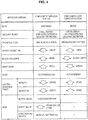
- FIG. 4 is a diagram illustrated to describe the relationship between biometric information and user's reaction as an example of information held by a reaction evaluation information storage unit 130.
- FIG. 5 is a diagram illustrated to describe an indicator used to evaluate user's reaction to a stimulus.
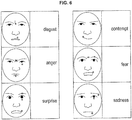
- FIG. 6 is a diagram illustrated to describe an indicator in a case where user's reaction to a stimulus is evaluated from a facial expression.
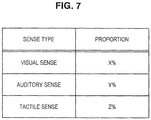
- FIG. 7 is a diagram illustrated to describe an example of sense type information 141 stored in a user model storage unit 140.
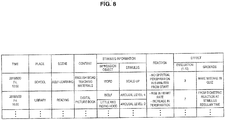
- FIG. 8 is a diagram illustrated to describe an example of a stimulus reaction history table 143 stored in the user model storage unit 140.
- the information presentation system 100 includes sensors 110, a model setting unit 120, the reaction evaluation information storage unit 130, the user model storage unit 140, a presentation processing unit 150, a content storage unit 160, and a presentation unit 170, as illustrated in FIG. 3 .
- the sensors 110 acquire user-related information that is used to analyze reaction of the user who receives presented information.
- Examples of the sensors 110 include a biometric sensor 111 for acquiring biometric information of the user, a speech acquisition device 113 for acquiring speech, and an imaging device 115 for capturing an image of the user.
- the biometric sensor 111 can be, in one example, a sensor that detects a change in an organ (effector) that reacts when a user receives a stimulus from the outside as biometric information.
- Humans receive a stimulus such as sound or light from the external environment through receptors such as ears and eyes. The sense is stimulated when the stimulus received by the receptor is transmitted to the cerebral sensory cortex via the nervous system. Then, the cerebral motor cortex, when determining movement of the body with respect to this sense, transmits a command based on determination to the effector and activates the effector. The variation in the effector caused by this stimulus appears as reaction to the stimulus.
- the biometric sensor 111 detects such variation in the effector to a stimulus.
- FIG. 4 illustrates an example of the effector.
- examples of effectors include pupil, salivary gland, bronchial tube, airway secretion, blood pressure, heart rate, liver, gastrointestinal tract, and skin.
- Each effector functions in cases where the sympathetic nervous system works dominantly in stress state or the parasympathetic nervous system works dominantly in relaxation state, rather than in a case where the user feels a stimulus.
- the pupil is dilated, or mydriasis occurs in a case where the user feels discomfort to the stimulus received by the user and the pupil is contracted, or miosis occurs in a case where the user feels comfort to the stimulus received by the user.
- the effector shows variation depending on how the user feels the stimulus from the external environment.
- the biometric sensor 111 examples include a pulse wave sensor or sphygmograph, a perspiration sensor or sweating meter, and a blood pressure meter.
- the speech acquisition device 113 or the imaging device 115 can be provided to function as the sensors 110.
- the acquisition by the speech acquisition device 113 of the user's speech when the user receives the stimulus makes it possible to perceive the intonation or magnitude of the voice, the speed of the voice, or the like.
- the image captured by the imaging device 115 of the user's facial expression or body's movement when the user receives the stimulus makes it possible to perceive how the user feels the stimulus on the basis of the captured still or moving image.
- the imaging device 115 can be used as a biometric sensor, and in one example, it is also possible to obtain a heart rate using the face-based heart rate analysis technique from the image captured by the imaging device 115 and to recognize respiration from minimal change in the body.
- the sensors 110 preferably have at least one of the biometric sensor 111 or the imaging device 115, and it is possible to recognize more accurately the user's reaction as more information is acquired.
- the Internet-of-Things (IoT) sensors or the like can be used as the sensors 110, in addition to the biometric sensor 111, the speech acquisition device 113, and the imaging device 115.
- the detection values acquired by the sensors 110 are output to the model setting unit 120 as sensor information.
- the model setting unit 120 sets a user model representing the user's reaction to the stimulus for each user on the basis of the sensor information.
- the model setting unit 120 first analyzes the sensor information and estimates the user's reaction to the stimulus presented to the user. In this event, the model setting unit 120 can estimate the user's reaction with reference to the reaction evaluation information storage unit 130 to be described later.
- the reaction evaluation information storage unit 130 stores, in one example, the relationship between the biometric information and the user's reaction illustrated in FIG. 4 , a two-axis mapping ( FIG. 5 ) representing inner psychological states of the user, the relationship between the user's facial expression and emotion ( FIG. 6 ), or the like.
- the model setting unit 120 can estimate the user's reaction from variation in the effector illustrated in FIG. 4 on the basis of the biometric information acquired by the biometric sensor 111.
- the model setting unit 120 detects variation in the magnitude of the pupil, it is determined that the user is in stress state upon the pupil dilatation (mydriasis) and the user is in relaxation state upon the pupil contraction (miosis).
- the user's reaction can be estimated for each item of the sensor information.
- the model setting unit 120 records contents of the stimulus presented to the user and the estimated user's reaction in the user model storage unit 140 as stimulus reaction history information.
- the model setting unit 120 evaluates the estimated user's reaction and sets the user model.
- the user model represents the user's dominant sense, and in one example, is represented as the user's sense type.
- the presentation of each information item based on the user model that is set for each user makes it possible to appropriately stimulate different dominant senses for each user, thereby allowing each user to easily accept information.
- the model setting unit 120 stores the set user model in the user model storage unit 140 to be described later.
- the model setting unit 120 can update the user model on the basis of the reaction to the stimulus given to the user.
- the reaction evaluation information storage unit 130 is a storage unit that stores information used to estimate the user's reaction to the stimulus presented to the user by the model setting unit 120.
- the reaction evaluation information storage unit 130 can store, in one example, a circular model representing inner psychological states of the user as illustrated in FIG. 5 , in addition to the relationship between the biometric information and the user's reaction illustrated in FIG. 4 .
- the user's reaction to the stimulus is represented as to whether the emotion is positive or negative on one axis and is represented as the excitement degree of emotion on the other axis (herein, referred to as "arousal level"). It is also possible to associate the arousal levels shown in FIG.
- the mapping by the model setting unit 120 of an emotion that is specified on the basis of on the sensor information obtained by the sensors 110 to the circular model of FIG. 5 makes it also possible to quantitatively represent the tendency of the user's reaction to the stimulus.
- the reaction evaluation information storage unit 130 can hold, in one example, the relationship between facial expressions and emotions as illustrated in FIG. 6 .
- the facial expression whose corners of the mouth and outer corners of the eyes rises or falls, or the facial expression that changes due to wrinkles between the eyebrows or the like represent emotions at that time, such as disgust, anger, surprise, contempt, fear, sadness, or the like.
- the characteristic parts of the face forming facial expressions for various emotions are held in the reaction evaluation information storage unit 130, so the model setting unit 120 is capable of extracting the characteristic parts by analyzing the image captured by the imaging device 115 and is capable of specifying the emotion in which the extracted characteristic part appears.
- FIGS. 4 to 6 are examples of the information stored in the reaction evaluation information storage unit 130.
- the information presentation system according to the present disclosure does not necessarily include all of these pieces of information, or can include other pieces of information.
- the information stored in the reaction evaluation information storage unit 130 can be set in advance or be updated as appropriate.
- the user model storage unit 140 is a storage unit that stores a user model representing the user's reaction to the stimulus.
- the user model storage unit 140 has user's sense type information 141 and a stimulus reaction history table 143.
- the sense type information 141 stores the sense type of each user estimated by the model setting unit 120 as a user model.
- the proportion of each of visual, auditory, and tactile sense types is included for each user, as illustrated in FIG. 7 . Some people have one sense that works dominantly, and others have multiple senses that work dominantly in the same degree. Thus, as illustrated in FIG. 7 , the representation of the extent to which each sense type dominantly works as the proportion makes it possible to set a stimulus more suitable for each user.
- the sense type information 141 is a sense type estimated on the basis of the information stored in the stimulus reaction history table 143.
- the stimulus reaction history table 143 stores information such as contents presented by the information presentation system 100, stimulus information that is set, reaction of the user to the stimulus information, effect on the user, and the like.
- An exemplary configuration of the stimulus reaction history table 143 is illustrated in FIG. 8 .
- the stimulus reaction history table 143 illustrated in FIG. 8 can store time, place, scene, content, stimulus information, user's reaction, and effect on the user. Information other than those illustrated in FIG. 8 can also be stored in the stimulus reaction history table 143.
- Examples of information stored in the stimulus reaction history table 143 are shown below.
- the effect on the user caused by giving the stimulus stored in the stimulus reaction history table 143 can be updated later.
- a stimulus is added to cause a user to remember English words in using the content of English words teaching materials.
- the presented stimulus is considered to have an effect on the user because the user reacts to be effective at first glance, but thereafter, when the quiz is carried out, it is found that the user does not understand at all.
- the presented stimulus can be considered to be updated as having no effect in practice.
- the information held by the user model storage unit 140 is appropriately updated by the model setting unit 120. In one example, it can be updated in real time every time there is reaction to a stimulus, or can be updated in a batch process after a certain period of time.
- the presentation processing unit 150 to be described later refers to the user model storage unit 140 and sets a stimulus to the impression object included in the content.
- the presentation processing unit 150 presents various pieces of content stored in the content storage unit 160 to the user through the presentation unit 170.
- the presentation processing unit 150 sets a stimulus for the impression object included in the content stored in the content storage unit 160 on the basis of the information stored in the user model storage unit 140 and outputs it to the presentation unit 170.
- the presentation processing unit 150 can determine stimulus information to be set on the basis of the sense type information 141 in referring to the user model storage unit 140.
- the presentation processing unit 150 can, in one example, refer to the stimulus reaction history table 143, extract history information relating to the current stimulus from the previous stimulus content and the history of the reaction, and check the reaction to the stimulus and its effect on the basis of the extracted information. Then, the presentation processing unit 150 can determine stimulus information to be set currently.
- the presentation processing unit 150 can set, in one example, the stimulus information on the basis of user characteristics such as user's preference or user information set by the user, in addition to the user model.
- the content storage unit 160 is a storage unit that stores content to be presented to the user.
- the content storage unit 160 can be provided in the same equipment or server as the presentation processing unit 150, or can be content held on the cloud.
- the content is not particularly limited, but content that can add a stimulus to the user in presenting the content can be assumed.
- examples of the content include digital content.
- educational content such as learning drills, book content such as digital picture books, AR content provided by synthesizing and displaying images in real time on real video, or the like is applicable.
- the presentation unit 170 presents content to the user together with the stimulus that is set in the impression object.
- the presentation unit 170 includes, in one example, a display unit that displays information, a sound output unit that outputs sound, a vibration generation unit that vibrates equipment, and the like.
- the content and the stimulus that is set in the impression object are not necessarily presented from the same equipment.
- the content including the impression object is displayed on a tablet terminal, and another device such as a wristband terminal or smartphone can be vibrated in synchronization with display of the impression object.
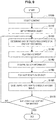
- FIG. 9 is a flowchart illustrating an example of an information presentation way performed by the information presentation system 100 according to the present embodiment.
- a content creator first selects content to be presented to the user (SI00).
- an object to be impressed to the user in the content is set as an impression object (S110).
- Steps S100 and S110 are stages for content creation before the content is provided to the user.
- the content creator does not necessarily set specific movement, speech, or the like for the impression object, but can set only an impression object impressed to the user.
- the presentation processing unit 150 of the information presentation system 100 refers to the user model storage unit 140 and determines a way of presenting the content (S120).
- the presentation processing unit 150 refers to the sense type information 141 of the user model storage unit 140 and sets stimulus information corresponding to the sense type of the user who uses the content.
- the impression object is displayed by scaling or blinking it.
- the content presentation way is determined in step S120, the content is played back (S130), and the content is presented to the user. In presenting the impression object, the stimulus information being set is also presented together.
- biometric information, facial expression, speech, or the like of the user is acquired by the sensors 110 (S140).
- the sensor information acquired by the sensors 110 is output to the model setting unit 120.
- the model setting unit 120 refers to the reaction evaluation information storage unit 130, evaluates the user's reaction when the stimulus is given, and estimates a sense type (S150).
- the model setting unit 120 records the presented content, the impression object, the set stimulus information, the user's reaction to the stimulus, the effect on the user of the stimulus, or the like in the stimulus reaction history table 143, and updates the sense type information 141 with the sense type estimated currently (S160).
- the processing from step S120 to SS160 is performed, in one example, until the playback of the content ends (S170).
- the basic information presentation way performed by the information presentation system 100 is described above. Such an information presentation way makes it possible to allow the information to be presented for each user in the most acceptable manner. In addition, it is possible to implement automatically an appropriate stimulus way corresponding to the user, so the content creator does not necessarily set a detailed stimulus presentation way in giving the expected stimulus to the impression object.
- a preset fixed user model or a general user model can be set in the user model storage unit 140 as an initial user model.
- the fixed user model is not particularly limited, and any optional initial value can be set, in one example, by setting the sense type to only "visual sense type".
- the general user model can be, in one example, an average value of sense type information of other users acquired previously.
- content for test used to specify an approximate sense type can be presented to set the initial user model. In this event, the reaction of the user is evaluated on the basis of the sensor information acquired when the test content is presented, and the sense type of the user is estimated. In this manner, the execution of the test processing for setting the user model of the user allows the stimulus information suitable for the user's sense immediately after the start of the content playback to be presented.
- FIG. 10 is a diagram illustrated to describe an image of a digital picture book presented as content.
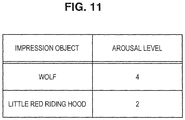
- FIG. 11 is a diagram illustrated to describe an example of the magnitude of stimulus information to be set in the impression object.
- FIG. 12 is a diagram illustrated to describe contents of the stimulus information to be set for the impression object.
- FIG. 13 is a diagram illustrated to describe a caution issued to a content creator in a case where the stimulus information is set excessively.
- a digital picture book In the use case described herein, it is considered to, in playing back a digital picture book, set the stimulus information in people, animals, and objects appearing in the story of the digital picture book, and make the digital picture book fun and easy to remain in the user's impression.
- the content of a digital picture book is typically used by displaying a still or moving image on a display 20 of a terminal 2, such as a tablet terminal, as illustrated in FIG. 10 .
- the digital picture book of "Little Red Riding Hood” is set by a content creator as an impression object to impress the user with the appearance of Little Red Riding Hood 21 and Wolf 23.
- the content creator sets an arousal level indicating the magnitude of the stimulus for each impression object. The greater the arousal level, the greater the stimulus.
- the arousal level of Wolf is set to 4
- the arousal level of the Little Red Riding Hood is set to 2.
- the presentation processing unit 150 of the information presentation system 100 refers to the sense type information 141 of the user model storage unit 140 and sets a stimulus to be given along with the content on the basis of the sense type of the user and the set arousal level of the impression object.
- FIG. 12 illustrates an example of setting stimulus information and arousal level. Such information can be stored in the user model storage unit 140.
- the magnitude of movement of the impression object is set as the stimulus to the visual sense type user
- the magnitude of the effect sound is set as a stimulus to the auditory sense type user
- the vibration time of the terminal 2 is set as a stimulus to the tactile sense type user.
- a user who uses the digital picture book has all characteristics of visual, auditory, and tactile sense types, but the visual sense type is more dominant than the other types, so the content is presented in such a manner that the movement of the impression object is emphasized more than other stimuli.
- the presentation processing unit 150 moves Wolf 23 of the arousal level 4 by 20% more than normal movement, outputs the sound effect with volume 10% higher than normal volume, vibrate the terminal 2 for three seconds, on the basis of the relationship between the stimulus information and the arousal level illustrated in FIG. 12 .
- the stimulus that is set to Little Red Riding Hood 21 of the arousal level 2 is smaller than Wolf 23, moves by 10% more than normal movement, outputs the effect sound with the volume 5% higher than normal sound, and vibrates the terminal 2 for one second.
- the content creator automatically sets the specific movement of the impression object only by setting of the impression object and the magnitude of the stimulus.
- the content creator can set the arousal level for the impression object, so there is also the possibility of setting unintended stimulus and distracting the user's attention to the impression object.
- the stimulus information is set on a bush 25 in addition to Little Red Riding Hood 21 and Wolf 23 that are impression objects, and the movement or sound effect of each object and the vibration of the terminal 2 exceed a predetermined level.
- the determination as to whether or not excessive stimulus is set is performed depending on whether the number of objects for which stimulus information is set among impression objects displayed at the same time is equal to or more than a predetermined number and whether each arousal level is equal to or more than 4.
- the user can be notified by displaying a message 27 indicating that excessive stimulus is set on the display 20, outputting sound, or the like.
- FIG. 14 is a diagram illustrated to describe an example of presenting guide information corresponding to the sense type of the user.
- the guide information using AR superimposed on the real image being displayed is suitably presented depending on the sense type of the user is illustrated.
- the guide information corresponds to the impression object.
- a smartphone or a tablet terminal a head mounted display, an eyewear terminal, or the like can be used as a terminal 3 on which the real image and the guide information are displayed.
- guide information used to guide the user to an annex is presented.
- the content creator sets only a place where the user makes a destination as the impression object.
- the presentation processing unit 150 of the information presentation system 100 refers to the user model storage unit 140 to acquire the sense type of the user. Then, the guide information is presented depending on the sense type of the user. In one example, a guide object 31, which indicates visually the position of the annex displayed on the display 30, is highlighted and displayed to the visual sense type user.
- the guide object 31 is displayed on the display 30 to be smaller than the case where the guide object 31 is presented to the visual sense type user, but the position of the annex is notified by sound to the auditory sense type user. Furthermore, in one example, the guide object 31 is displayed on the display 30 to be smaller as in the case of the auditory sense type user, but the position of the annex can be notified to the tactile sense type user by vibrating the terminal 3 in the case where the annex is displayed in the display 30.
- a dominant sense of the user from the behavior of the user at the time of stopping the presentation of the guide information.
- three actions are set, that is, winking after checking the guide, "OK" after checking the guide, and pointing the finger after checking the guide.
- the presentation of the guide information is similarly stopped, but it can be assumed that the action selected by the user is naturally selected by the dominant sense.
- the user is the visual sense type user in the case where the user winks after checking the guide
- the user is the auditory sense type user in the case where the user says "OK” after checking the guide
- the user is the tactile sense type user in the case where the user points to a finger after checking the guide. It is possible to use such actions to estimate the sense type of the user by holding the actions in the user model storage unit 140.
- FIG. 15 is a diagram illustrated to describe an example of presenting words to the visual sense type user.
- FIG. 16 is a diagram illustrated to describe an example of presenting words to the tactile sense type user.
- This use case presents English words in such a manner that the user can easily remember English words in remembering English words using English word teaching materials.
- the English word is the impression object, and in FIGS. 15 and 16 , the English word "elephant" is an impression object 41.
- the presentation processing unit 150 refers to the user model storage unit 140 to acquire the sense type of the user. Then, an English word that is the impression object 41 is presented depending on the sense type of the user.
- an English word “elephant” is displayed on the display 40, and alphabets 41a to 41h that constitute the word are displayed in such a manner that each character differs from other alphabets.
- characters "e", "1", "e”,... are displayed from the left while enlarging sequentially each character. When the character is enlarged, the color of the character can be changed.
- the English word “elephant” is displayed on the display 40. It can be played back as "E-L-E-P-H-A-N-T, ELEPHANT" by speech.
- the English word "elephant” is initially displayed in a thin form on the display 40. This is referred to as a draft object 43. Then, the user is caused to trace the draft object 43 displayed on the display 40 with an operation object, such as a touch pen 6 or a finger, and to write the English word.
- the use of the information presentation system 100 according to the present embodiment makes it possible to change the presentation of English words depending on the user's sense type, thereby presenting the information in a way that the user can remember easily.
- FIG. 17 illustrates an example of processing in the case of changing the way of presentation of content depending on a change in the user's reaction.
- the presentation processing unit 150 of the information presentation system 100 refers to the user model storage unit 140 and determines the way of presentation of content (S200).
- the presentation processing unit 150 refers to the sense type information 141 of the user model storage unit 140 and sets stimulus information corresponding to the sense type of the user who uses the content.
- the content presentation way is determined in step S200, the content is played back (S210), and the content is presented to the user. In presenting an impression object, the set stimulus information is also presented.
- the sensors 110 acquire biometric information, facial expression, speech, or the like of the user (S220).
- the sensor information acquired by the sensors 110 is output to the model setting unit 120.
- the model setting unit 120 refers to the reaction evaluation information storage unit 130, evaluates the user's reaction when the stimulus is given, and estimates the sense type (S230).
- the model setting unit 120 determines whether the user's reaction is lower than a level at the time when the learning has continued so far by a predetermined ratio or is higher than the level (S240).
- the user's concentration ability expires, the spiritual perspiration disappears.
- the determination in step S240 can be performed by utilizing such a change that the degree of change in biometric information is reduced.
- step S240 In a case where the condition in step S240 is not satisfied and the user's reaction does not change so much, the processing returns to step S210 to continue the learning.
- the presentation processing unit 150 determines whether or not there is stimulus information that is not set so far (S250). In the case where there is stimulus information that is not set, the presentation processing unit 150 changes the stimulus information at the time of presenting the impression object in anticipation of improving the user's reaction (S260), returns to step S210, continues the learning. On the other hand, in the case where there is no stimulus information that is not set in step S250, the presentation processing unit 150 offers a rest or taking a deep breath to the user to have balanced learning itself (S270).
- the degree of stimulus information can be changed depending on the user's proficiency level.
- the stimulus information of a high level of proficiency is set to be weak and the stimulus information of a low level of proficiency is set to be strong in the digital teaching materials, so it is possible to give much impression to a portion that is not fixed to the user's memory.
- the degree of proficiency of the user can be determined, in one example, by evaluation based on the result of the quiz, the number of times of content playback, or the like.
- the information presentation system 100 makes it possible to specify the user model such as the sense type of the user.
- students of the same type are organized into the same class or the same team on the basis of the user model of the specified user, so a teacher can teach the class according to the type of the students. It is possible to take a lesson according to the specified sense of the students, so the degree of comprehension of the learning contents increases, thereby taking an efficient lesson.
- a teacher having a type that matches the type of students can be appointed, so it is expected that the teacher and students can communicate with each other in unconscious portions, and their communications can be performed satisfactorily.
- the use of the user model that can be specified by the information presentation system 100 according to the present embodiment makes it possible to select and adjust a stimulus that is easy for a user to receive at a theme park, an art gallery, an exhibition, or the like.
- stimulus information that is more likely to be interested is set depending on the sense type of each user, such as entering from sound for an auditory sense type person or entering from light for a visual sense type person.
- the information presentation system 100 is capable of specifying the user model, so it is possible to perceive the type of the partner in advance at the time of communicating with the person who is meeting for the first time, thereby making it easy to communicate.
- a translation presentation way corresponding to the sense type of the partner or its effect can be set as stimulus information.
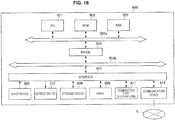
- FIG. 18 is a hardware configuration diagram illustrating the hardware configuration of a functional unit that constitutes the information presentation system 100 according to the present embodiment.
- FIG. 18 is described as an example of the hardware configuration of an information processing apparatus 900 including the respective functional units illustrated in FIG. 3 , the similar configuration can be used in the case of an apparatus having only some of the functional units illustrated in FIG. 3 .
- the information processing apparatus 900 can be configured as a processing device such as a computer.
- the information processing apparatus 900 includes a central processing unit (CPU) 901, a read only memory (ROM) 902, a random access memory (RAM) 903, and a host bus 904a, as illustrated in FIG. 18 .
- the information processing apparatus 900 includes a bridge 904, an external bus 904b, an interface 905, an input device 906, an output device 907, a storage device 908, a drive 909, a connection port 911, and a communication device 913.
- the CPU 901 functions as an arithmetic processing unit and a control unit, and controls the overall operation in the information processing apparatus 900 in accordance with various programs.
- the CPU 901 can be a microprocessor.
- the ROM 902 stores programs, operation parameters, or the like used by the CPU 901.
- the RAM 903 temporarily stores a program to be used in the execution of the CPU 901 and stores parameters or the like that are appropriately changed in its execution. These are mutually connected through the host bus 904a composed of a CPU bus or the like.
- the host bus 904a is connected to the external bus 904b, such as peripheral component interconnect/interface (PCI) bus, via the bridge 904.
- PCI peripheral component interconnect/interface
- the host bus 904a, the bridge 904, and the external bus 904b are not necessarily configured as independent components, but their functions can be equipped on one bus.
- the input device 906 includes an input means that allows the user to input information, such as a mouse, a keyboard, a touch panel, a button, a microphone, a switch, and a lever, and includes an input control circuit for generating an input signal on the basis of an input by the user and outputting it to the CPU 901.
- the output device 907 includes, in one example, a display device such as a liquid crystal display (LCD) device, an organic light emitting diode (OLED) device, and a lamp, and an audio output device such as a loudspeaker.
- LCD liquid crystal display
- OLED organic light emitting diode
- the storage device 908 is an example of a storage unit of the information processing device 900 and is a device used to store data.
- the storage device 908 can include a storage medium, a recording device that records data in the storage medium, a reading device that reads data from the storage medium, a deletion device that deletes data recorded in the storage medium, and the like.
- the storage device 908 drives a hard disk, and stores programs executed by the CPU 901 and various data.
- the drive 909 is a reader-writer for a storage medium, which is incorporated in the information processing apparatus 900 or externally attached thereto.
- the drive 909 reads information recorded on a removable recording medium such as a mounted magnetic disk, optical disk, magneto-optical disk, semiconductor memory, or the like, and outputs the information to the RAM 903.
- the connection port 911 is an interface connected to an external device and, in one example, is a connection port with an external device capable of transmitting data by universal serial bus (USB) or the like.
- the communication device 913 is a communication interface constituted as a communication device or the like for the connection to a communication network 5.
- the communication device 913 can be a wireless local area network (LAN) compatible communication device, a wireless USB compatible communication device, or a wire communication device that performs wired communication.
- LAN local area network
- present technology may also be configured as below.
Landscapes
- Health & Medical Sciences (AREA)
- Life Sciences & Earth Sciences (AREA)
- Engineering & Computer Science (AREA)
- Physics & Mathematics (AREA)
- Animal Behavior & Ethology (AREA)
- Surgery (AREA)
- Veterinary Medicine (AREA)
- Public Health (AREA)
- General Health & Medical Sciences (AREA)
- Molecular Biology (AREA)
- Medical Informatics (AREA)
- Biophysics (AREA)
- Pathology (AREA)
- Biomedical Technology (AREA)
- Heart & Thoracic Surgery (AREA)
- Theoretical Computer Science (AREA)
- Physiology (AREA)
- Educational Technology (AREA)
- Business, Economics & Management (AREA)
- General Physics & Mathematics (AREA)
- Cardiology (AREA)
- Educational Administration (AREA)
- Pulmonology (AREA)
- General Engineering & Computer Science (AREA)
- Entrepreneurship & Innovation (AREA)
- Hospice & Palliative Care (AREA)
- Chemical & Material Sciences (AREA)
- Bioinformatics & Cheminformatics (AREA)
- Medicinal Chemistry (AREA)
- Dentistry (AREA)
- Oral & Maxillofacial Surgery (AREA)
- Vascular Medicine (AREA)
- Endocrinology (AREA)
- Social Psychology (AREA)
- Audiology, Speech & Language Pathology (AREA)
- Child & Adolescent Psychology (AREA)
- Developmental Disabilities (AREA)
- Gastroenterology & Hepatology (AREA)
- Psychiatry (AREA)
- Psychology (AREA)
Applications Claiming Priority (2)
| Application Number | Priority Date | Filing Date | Title |
|---|---|---|---|
| JP2016124091A JP2017227780A (ja) | 2016-06-23 | 2016-06-23 | 情報処理装置、情報処理方法及びコンピュータプログラム |
| PCT/JP2017/014979 WO2017221525A1 (ja) | 2016-06-23 | 2017-04-12 | 情報処理装置、情報処理方法及びコンピュータプログラム |
Publications (2)
| Publication Number | Publication Date |
|---|---|
| EP3477433A1 true EP3477433A1 (de) | 2019-05-01 |
| EP3477433A4 EP3477433A4 (de) | 2019-05-22 |
Family
ID=60784793
Family Applications (1)
| Application Number | Title | Priority Date | Filing Date |
|---|---|---|---|
| EP17814996.9A Withdrawn EP3477433A4 (de) | 2016-06-23 | 2017-04-12 | Informationsverarbeitungsvorrichtung, informationsverarbeitungsverfahren und computerprogramm |
Country Status (4)
| Country | Link |
|---|---|
| US (2) | US11145219B2 (de) |
| EP (1) | EP3477433A4 (de) |
| JP (1) | JP2017227780A (de) |
| WO (1) | WO2017221525A1 (de) |
Families Citing this family (12)
| Publication number | Priority date | Publication date | Assignee | Title |
|---|---|---|---|---|
| JP2017227780A (ja) * | 2016-06-23 | 2017-12-28 | ソニー株式会社 | 情報処理装置、情報処理方法及びコンピュータプログラム |
| US10798451B2 (en) * | 2017-02-24 | 2020-10-06 | Rovi Guides, Inc. | Systems and methods for detecting a reaction by a user to a media asset to which the user previously reacted at an earlier time, and recommending a second media asset to the user consumed during a range of times adjacent to the earlier time |
| WO2019106975A1 (ja) * | 2017-11-30 | 2019-06-06 | 国立研究開発法人産業技術総合研究所 | コンテンツ作成方法 |
| WO2019155564A1 (ja) * | 2018-02-08 | 2019-08-15 | 株式会社日立製作所 | 情報提供システムおよび情報提供方法 |
| JP2021170148A (ja) | 2018-07-02 | 2021-10-28 | ソニーグループ株式会社 | 情報処理装置、情報処理方法、および記録媒体 |
| JP7508097B2 (ja) * | 2019-12-02 | 2024-07-01 | フォレストデジタル株式会社 | 映像システム、プログラム、およびコンピュータ読み取り可能な記憶媒体 |
| JP7618482B2 (ja) * | 2021-03-31 | 2025-01-21 | 株式会社ベネッセコーポレーション | 情報処理装置、プログラム、および情報処理方法 |
| JP7701192B2 (ja) * | 2021-05-27 | 2025-07-01 | 株式会社日立製作所 | コミュニケーション支援装置、プログラムおよび記憶媒体 |
| KR20230021924A (ko) | 2021-08-06 | 2023-02-14 | 삼성전자주식회사 | 전자 장치 및 전자 장치에서 복수의 상태들의 우선 순위에 기반한 캐릭터 오브젝트 표시 방법 |
| US20250160742A1 (en) * | 2022-02-10 | 2025-05-22 | Nippon Telegraph And Telephone Corporation | Feedback apparatus, feedback method, and program |
| US20250258536A1 (en) * | 2024-02-12 | 2025-08-14 | Motorola Mobility Llc | Electronic Devices, Systems, and Corresponding Methods for Utilizing User Sensory Preference Reaction Scores to Enhance User Interface Interactions |
| US20250258992A1 (en) * | 2024-02-12 | 2025-08-14 | Motorola Mobility Llc | Electronic Devices and Corresponding Methods for Utilizing User Sensory Preference Reaction Scores to Enhance User Interface Interactions |
Family Cites Families (15)
| Publication number | Priority date | Publication date | Assignee | Title |
|---|---|---|---|---|
| KR100371456B1 (ko) * | 1995-10-09 | 2004-03-30 | 닌텐도가부시키가이샤 | 삼차원화상처리시스템 |
| US7207804B2 (en) * | 1996-03-27 | 2007-04-24 | Michael Hersh | Application of multi-media technology to computer administered vocational personnel assessment |
| JP2001190840A (ja) * | 2000-01-06 | 2001-07-17 | Konami Co Ltd | ゲームシステムおよびコンピュータ読取可能な記憶媒体 |
| JP2001252265A (ja) * | 2000-03-08 | 2001-09-18 | Sharp Corp | バイオフィードバック装置 |
| US7041049B1 (en) | 2003-11-21 | 2006-05-09 | First Principles, Inc. | Sleep guidance system and related methods |
| US20070100214A1 (en) | 2005-03-10 | 2007-05-03 | Steinert John W | Method and apparatus for stimulating exercise |
| CN101232860A (zh) | 2005-07-29 | 2008-07-30 | 约翰·威廉·斯坦纳特 | 用于刺激训练的方法及装置 |
| US20070066916A1 (en) * | 2005-09-16 | 2007-03-22 | Imotions Emotion Technology Aps | System and method for determining human emotion by analyzing eye properties |
| JP5353390B2 (ja) | 2009-04-07 | 2013-11-27 | 日本電気株式会社 | 発想支援装置、発想支援方法および発想支援用プログラム |
| JP5074610B2 (ja) | 2011-03-28 | 2012-11-14 | 啓介 伴野 | 香りを発する誘惑性物質の嫌忌嗜好性教育システム |
| CN103181180B (zh) | 2011-07-29 | 2017-03-29 | 松下电器(美国)知识产权公司 | 提示控制装置以及提示控制方法 |
| US9489384B2 (en) * | 2011-12-26 | 2016-11-08 | Empire Technology Development Llc | Content providing techniques |
| EP2972662A4 (de) | 2013-03-15 | 2017-03-01 | Intel Corporation | Gehirn-computer-schnittstellensystem auf basis der erfassung zeitlicher und räumlicher muster biophysikalischer signale |
| US10332315B2 (en) * | 2016-06-20 | 2019-06-25 | Magic Leap, Inc. | Augmented reality display system for evaluation and modification of neurological conditions, including visual processing and perception conditions |
| JP2017227780A (ja) * | 2016-06-23 | 2017-12-28 | ソニー株式会社 | 情報処理装置、情報処理方法及びコンピュータプログラム |
-
2016
- 2016-06-23 JP JP2016124091A patent/JP2017227780A/ja active Pending
-
2017
- 2017-04-12 WO PCT/JP2017/014979 patent/WO2017221525A1/ja not_active Ceased
- 2017-04-12 US US16/308,502 patent/US11145219B2/en not_active Expired - Fee Related
- 2017-04-12 EP EP17814996.9A patent/EP3477433A4/de not_active Withdrawn
-
2021
- 2021-09-30 US US17/490,678 patent/US20220028296A1/en not_active Abandoned
Also Published As
| Publication number | Publication date |
|---|---|
| US20200184843A1 (en) | 2020-06-11 |
| US20220028296A1 (en) | 2022-01-27 |
| EP3477433A4 (de) | 2019-05-22 |
| US11145219B2 (en) | 2021-10-12 |
| JP2017227780A (ja) | 2017-12-28 |
| WO2017221525A1 (ja) | 2017-12-28 |
Similar Documents
| Publication | Publication Date | Title |
|---|---|---|
| US20220028296A1 (en) | Information processing apparatus, information processing method, and computer program | |
| CA2673644C (en) | Situated simulation for training, education, and therapy | |
| Klin et al. | The enactive mind, or from actions to cognition: lessons from autism | |
| Picard et al. | Toward agents that recognize emotion | |
| Fabri | Emotionally expressive avatars for collaborative virtual environments | |
| AU2015218578B2 (en) | Systems, environment and methods for evaluation and management of autism spectrum disorder using a wearable data collection device | |
| WO2019084412A1 (en) | PLATFORM OF MICRO SIMULATION OF VIRTUAL REALITY | |
| EP3856012B1 (de) | Visualisierter virtueller agent | |
| JP7364099B2 (ja) | 出力制御装置、出力制御方法およびプログラム | |
| CN110430802A (zh) | 利用虚拟现实的神经疾病诊断装置及方法 | |
| JP7066115B2 (ja) | パブリックスピーキング支援装置、及びプログラム | |
| JP2021114004A (ja) | 情報処理装置及び情報処理方法 | |
| Nassani et al. | Adaptive learning companions: Enhancing education with biosignal-driven digital human | |
| ElSayed et al. | LexiaQuest: Exploring the Feasibility of a NLP-Based Screening Tool for Dyslexia Using Virtual Reality | |
| JP2006330173A (ja) | 学習支援装置、学習支援装置の制御方法、学習支援装置の制御プログラム、及びコンピュータ読み取り可能な記録媒体 | |
| JP2026073275A (ja) | システム | |
| JP2026025336A (ja) | システム | |
| JP2026050934A (ja) | システム | |
| JP2026050860A (ja) | システム | |
| JP2026028956A (ja) | システム | |
| JP2025060533A (ja) | システム | |
| JP2026024582A (ja) | システム | |
| JP2026068398A (ja) | システム | |
| JP2026044917A (ja) | システム | |
| JP2026064058A (ja) | システム |
Legal Events
| Date | Code | Title | Description |
|---|---|---|---|
| STAA | Information on the status of an ep patent application or granted ep patent |
Free format text: STATUS: THE INTERNATIONAL PUBLICATION HAS BEEN MADE |
|
| PUAI | Public reference made under article 153(3) epc to a published international application that has entered the european phase |
Free format text: ORIGINAL CODE: 0009012 |
|
| STAA | Information on the status of an ep patent application or granted ep patent |
Free format text: STATUS: REQUEST FOR EXAMINATION WAS MADE |
|
| 17P | Request for examination filed |
Effective date: 20190118 |
|
| AK | Designated contracting states |
Kind code of ref document: A1 Designated state(s): AL AT BE BG CH CY CZ DE DK EE ES FI FR GB GR HR HU IE IS IT LI LT LU LV MC MK MT NL NO PL PT RO RS SE SI SK SM TR |
|
| AX | Request for extension of the european patent |
Extension state: BA ME |
|
| A4 | Supplementary search report drawn up and despatched |
Effective date: 20190425 |
|
| RIC1 | Information provided on ipc code assigned before grant |
Ipc: A61B 5/00 20060101ALI20190417BHEP Ipc: G09B 5/06 20060101AFI20190417BHEP Ipc: G06F 3/01 20060101ALI20190417BHEP Ipc: A63H 33/38 20060101ALI20190417BHEP Ipc: G09B 21/00 20060101ALN20190417BHEP Ipc: G09B 7/02 20060101ALI20190417BHEP |
|
| DAV | Request for validation of the european patent (deleted) | ||
| DAX | Request for extension of the european patent (deleted) | ||
| STAA | Information on the status of an ep patent application or granted ep patent |
Free format text: STATUS: EXAMINATION IS IN PROGRESS |
|
| 17Q | First examination report despatched |
Effective date: 20200807 |
|
| RAP3 | Party data changed (applicant data changed or rights of an application transferred) |
Owner name: SONY GROUP CORPORATION |
|
| REG | Reference to a national code |
Ref country code: DE Ref legal event code: R079 Free format text: PREVIOUS MAIN CLASS: G06F0003010000 Ipc: G09B0005060000 |
|
| GRAP | Despatch of communication of intention to grant a patent |
Free format text: ORIGINAL CODE: EPIDOSNIGR1 |
|
| STAA | Information on the status of an ep patent application or granted ep patent |
Free format text: STATUS: GRANT OF PATENT IS INTENDED |
|
| RIC1 | Information provided on ipc code assigned before grant |
Ipc: G09B 21/00 20060101ALN20250130BHEP Ipc: G09B 7/02 20060101ALI20250130BHEP Ipc: A63H 33/38 20060101ALI20250130BHEP Ipc: A61B 5/00 20060101ALI20250130BHEP Ipc: G06F 3/01 20060101ALI20250130BHEP Ipc: G09B 5/06 20060101AFI20250130BHEP |
|
| INTG | Intention to grant announced |
Effective date: 20250207 |
|
| STAA | Information on the status of an ep patent application or granted ep patent |
Free format text: STATUS: THE APPLICATION IS DEEMED TO BE WITHDRAWN |
|
| 18D | Application deemed to be withdrawn |
Effective date: 20250611 |