EP4439231A2 - Interface utilisateur distante - Google Patents
Interface utilisateur distante Download PDFInfo
- Publication number
- EP4439231A2 EP4439231A2 EP24194531.0A EP24194531A EP4439231A2 EP 4439231 A2 EP4439231 A2 EP 4439231A2 EP 24194531 A EP24194531 A EP 24194531A EP 4439231 A2 EP4439231 A2 EP 4439231A2
- Authority
- EP
- European Patent Office
- Prior art keywords
- electronic device
- target
- touch
- user interface
- display
- Prior art date
- Legal status (The legal status is an assumption and is not a legal conclusion. Google has not performed a legal analysis and makes no representation as to the accuracy of the status listed.)
- Pending
Links
Images















Classifications
-
- G—PHYSICS
- G06—COMPUTING OR CALCULATING; COUNTING
- G06F—ELECTRIC DIGITAL DATA PROCESSING
- G06F3/00—Input arrangements for transferring data to be processed into a form capable of being handled by the computer; Output arrangements for transferring data from processing unit to output unit, e.g. interface arrangements
- G06F3/01—Input arrangements or combined input and output arrangements for interaction between user and computer
- G06F3/048—Interaction techniques based on graphical user interfaces [GUI]
- G06F3/0484—Interaction techniques based on graphical user interfaces [GUI] for the control of specific functions or operations, e.g. selecting or manipulating an object, an image or a displayed text element, setting a parameter value or selecting a range
- G06F3/04842—Selection of displayed objects or displayed text elements
-
- G—PHYSICS
- G06—COMPUTING OR CALCULATING; COUNTING
- G06F—ELECTRIC DIGITAL DATA PROCESSING
- G06F3/00—Input arrangements for transferring data to be processed into a form capable of being handled by the computer; Output arrangements for transferring data from processing unit to output unit, e.g. interface arrangements
- G06F3/01—Input arrangements or combined input and output arrangements for interaction between user and computer
- G06F3/048—Interaction techniques based on graphical user interfaces [GUI]
- G06F3/0481—Interaction techniques based on graphical user interfaces [GUI] based on specific properties of the displayed interaction object or a metaphor-based environment, e.g. interaction with desktop elements like windows or icons, or assisted by a cursor's changing behaviour or appearance
- G06F3/04817—Interaction techniques based on graphical user interfaces [GUI] based on specific properties of the displayed interaction object or a metaphor-based environment, e.g. interaction with desktop elements like windows or icons, or assisted by a cursor's changing behaviour or appearance using icons
-
- G—PHYSICS
- G06—COMPUTING OR CALCULATING; COUNTING
- G06F—ELECTRIC DIGITAL DATA PROCESSING
- G06F3/00—Input arrangements for transferring data to be processed into a form capable of being handled by the computer; Output arrangements for transferring data from processing unit to output unit, e.g. interface arrangements
- G06F3/01—Input arrangements or combined input and output arrangements for interaction between user and computer
- G06F3/048—Interaction techniques based on graphical user interfaces [GUI]
- G06F3/0487—Interaction techniques based on graphical user interfaces [GUI] using specific features provided by the input device, e.g. functions controlled by the rotation of a mouse with dual sensing arrangements, or of the nature of the input device, e.g. tap gestures based on pressure sensed by a digitiser
- G06F3/0488—Interaction techniques based on graphical user interfaces [GUI] using specific features provided by the input device, e.g. functions controlled by the rotation of a mouse with dual sensing arrangements, or of the nature of the input device, e.g. tap gestures based on pressure sensed by a digitiser using a touch-screen or digitiser, e.g. input of commands through traced gestures
-
- G—PHYSICS
- G06—COMPUTING OR CALCULATING; COUNTING
- G06F—ELECTRIC DIGITAL DATA PROCESSING
- G06F3/00—Input arrangements for transferring data to be processed into a form capable of being handled by the computer; Output arrangements for transferring data from processing unit to output unit, e.g. interface arrangements
- G06F3/01—Input arrangements or combined input and output arrangements for interaction between user and computer
- G06F3/048—Interaction techniques based on graphical user interfaces [GUI]
- G06F3/0487—Interaction techniques based on graphical user interfaces [GUI] using specific features provided by the input device, e.g. functions controlled by the rotation of a mouse with dual sensing arrangements, or of the nature of the input device, e.g. tap gestures based on pressure sensed by a digitiser
- G06F3/0488—Interaction techniques based on graphical user interfaces [GUI] using specific features provided by the input device, e.g. functions controlled by the rotation of a mouse with dual sensing arrangements, or of the nature of the input device, e.g. tap gestures based on pressure sensed by a digitiser using a touch-screen or digitiser, e.g. input of commands through traced gestures
- G06F3/04883—Interaction techniques based on graphical user interfaces [GUI] using specific features provided by the input device, e.g. functions controlled by the rotation of a mouse with dual sensing arrangements, or of the nature of the input device, e.g. tap gestures based on pressure sensed by a digitiser using a touch-screen or digitiser, e.g. input of commands through traced gestures for inputting data by handwriting, e.g. gesture or text
-
- G—PHYSICS
- G06—COMPUTING OR CALCULATING; COUNTING
- G06F—ELECTRIC DIGITAL DATA PROCESSING
- G06F1/00—Details not covered by groups G06F3/00 - G06F13/00 and G06F21/00
- G06F1/16—Constructional details or arrangements
- G06F1/1613—Constructional details or arrangements for portable computers
- G06F1/1626—Constructional details or arrangements for portable computers with a single-body enclosure integrating a flat display, e.g. Personal Digital Assistants [PDAs]
-
- G—PHYSICS
- G06—COMPUTING OR CALCULATING; COUNTING
- G06F—ELECTRIC DIGITAL DATA PROCESSING
- G06F1/00—Details not covered by groups G06F3/00 - G06F13/00 and G06F21/00
- G06F1/16—Constructional details or arrangements
- G06F1/1613—Constructional details or arrangements for portable computers
- G06F1/163—Wearable computers, e.g. on a belt
-
- G—PHYSICS
- G06—COMPUTING OR CALCULATING; COUNTING
- G06F—ELECTRIC DIGITAL DATA PROCESSING
- G06F1/00—Details not covered by groups G06F3/00 - G06F13/00 and G06F21/00
- G06F1/16—Constructional details or arrangements
- G06F1/1613—Constructional details or arrangements for portable computers
- G06F1/1633—Constructional details or arrangements of portable computers not specific to the type of enclosures covered by groups G06F1/1615 - G06F1/1626
- G06F1/1684—Constructional details or arrangements related to integrated I/O peripherals not covered by groups G06F1/1635 - G06F1/1675
- G06F1/1694—Constructional details or arrangements related to integrated I/O peripherals not covered by groups G06F1/1635 - G06F1/1675 the I/O peripheral being a single or a set of motion sensors for pointer control or gesture input obtained by sensing movements of the portable computer
-
- G—PHYSICS
- G06—COMPUTING OR CALCULATING; COUNTING
- G06F—ELECTRIC DIGITAL DATA PROCESSING
- G06F2203/00—Indexing scheme relating to G06F3/00 - G06F3/048
- G06F2203/041—Indexing scheme relating to G06F3/041 - G06F3/045
- G06F2203/04105—Pressure sensors for measuring the pressure or force exerted on the touch surface without providing the touch position
-
- G—PHYSICS
- G06—COMPUTING OR CALCULATING; COUNTING
- G06F—ELECTRIC DIGITAL DATA PROCESSING
- G06F3/00—Input arrangements for transferring data to be processed into a form capable of being handled by the computer; Output arrangements for transferring data from processing unit to output unit, e.g. interface arrangements
- G06F3/01—Input arrangements or combined input and output arrangements for interaction between user and computer
- G06F3/03—Arrangements for converting the position or the displacement of a member into a coded form
- G06F3/033—Pointing devices displaced or positioned by the user, e.g. mice, trackballs, pens or joysticks; Accessories therefor
- G06F3/0346—Pointing devices displaced or positioned by the user, e.g. mice, trackballs, pens or joysticks; Accessories therefor with detection of the device orientation or free movement in a three-dimensional [3D] space, e.g. 3D mice, 6-DOF [six degrees of freedom] pointers using gyroscopes, accelerometers or tilt-sensors
-
- H—ELECTRICITY
- H04—ELECTRIC COMMUNICATION TECHNIQUE
- H04L—TRANSMISSION OF DIGITAL INFORMATION, e.g. TELEGRAPHIC COMMUNICATION
- H04L67/00—Network arrangements or protocols for supporting network services or applications
- H04L67/01—Protocols
- H04L67/02—Protocols based on web technology, e.g. hypertext transfer protocol [HTTP]
- H04L67/025—Protocols based on web technology, e.g. hypertext transfer protocol [HTTP] for remote control or remote monitoring of applications
-
- H—ELECTRICITY
- H04—ELECTRIC COMMUNICATION TECHNIQUE
- H04M—TELEPHONIC COMMUNICATION
- H04M1/00—Substation equipment, e.g. for use by subscribers
- H04M1/72—Mobile telephones; Cordless telephones, i.e. devices for establishing wireless links to base stations without route selection
- H04M1/724—User interfaces specially adapted for cordless or mobile telephones
- H04M1/72403—User interfaces specially adapted for cordless or mobile telephones with means for local support of applications that increase the functionality
- H04M1/72409—User interfaces specially adapted for cordless or mobile telephones with means for local support of applications that increase the functionality by interfacing with external accessories
- H04M1/72412—User interfaces specially adapted for cordless or mobile telephones with means for local support of applications that increase the functionality by interfacing with external accessories using two-way short-range wireless interfaces
-
- H—ELECTRICITY
- H04—ELECTRIC COMMUNICATION TECHNIQUE
- H04M—TELEPHONIC COMMUNICATION
- H04M1/00—Substation equipment, e.g. for use by subscribers
- H04M1/72—Mobile telephones; Cordless telephones, i.e. devices for establishing wireless links to base stations without route selection
- H04M1/724—User interfaces specially adapted for cordless or mobile telephones
- H04M1/72403—User interfaces specially adapted for cordless or mobile telephones with means for local support of applications that increase the functionality
- H04M1/72409—User interfaces specially adapted for cordless or mobile telephones with means for local support of applications that increase the functionality by interfacing with external accessories
- H04M1/72415—User interfaces specially adapted for cordless or mobile telephones with means for local support of applications that increase the functionality by interfacing with external accessories for remote control of appliances
-
- H—ELECTRICITY
- H04—ELECTRIC COMMUNICATION TECHNIQUE
- H04M—TELEPHONIC COMMUNICATION
- H04M1/00—Substation equipment, e.g. for use by subscribers
- H04M1/72—Mobile telephones; Cordless telephones, i.e. devices for establishing wireless links to base stations without route selection
- H04M1/724—User interfaces specially adapted for cordless or mobile telephones
- H04M1/72403—User interfaces specially adapted for cordless or mobile telephones with means for local support of applications that increase the functionality
- H04M1/72442—User interfaces specially adapted for cordless or mobile telephones with means for local support of applications that increase the functionality for playing music files
-
- H—ELECTRICITY
- H04—ELECTRIC COMMUNICATION TECHNIQUE
- H04M—TELEPHONIC COMMUNICATION
- H04M2250/00—Details of telephonic subscriber devices
- H04M2250/12—Details of telephonic subscriber devices including a sensor for measuring a physical value, e.g. temperature or motion
-
- H—ELECTRICITY
- H04—ELECTRIC COMMUNICATION TECHNIQUE
- H04M—TELEPHONIC COMMUNICATION
- H04M2250/00—Details of telephonic subscriber devices
- H04M2250/22—Details of telephonic subscriber devices including a touch pad, a touch sensor or a touch detector
Definitions
- the disclosed examples relate generally to user interfaces of electronic devices.
- Such electronic devices may be portable devices like cellular phones, tablet computers, laptops, digital audio players, and so forth. Such electronic devices may also be home electronics like audio-visual equipment, home security equipment, home automation equipment, appliances, and so forth. Such electronic devices may also be integrated with equipment not traditionally labeled as electronic devices. For example, such electronic devices may include telematics equipment that is integrated with an automobile.
- User interfaces for remotely controlling target electronic devices using a personal electronic device with a touch-sensitive display are disclosed.
- the touch-sensitive display comprises one or more sensors to detect the intensity of contacts with the touch-sensitive display
- a plurality of icons representing applications including an icon representing a remote control application
- a first contact on the touch-sensitive display at a location of the icon is received.
- the electronic device determines whether a target device out of a plurality of target devices is responsive to remote control.
- the electronic device displays a first plurality of remote controls for the target device.
- the electronic device receives a second contact on the touch-sensitive display, the second contact having a maximum intensity.
- the electronic device instructs the target device to perform an operation; and in response to receiving the second contact and a determination that the maximum intensity is above the threshold intensity, the electronic device displays a second plurality of remote controls for the first target device.
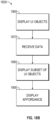
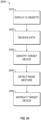
- the electronic device displays a user interface object on the touch-sensitive display of the electronic device, where the displayed user interface object represents a remote control application.
- the electronic device receives data representing a contact on the displayed user interface object, and identifies a target electronic device that is responsive to remote control.
- the electronic device displays graphical user interface objects for controlling operations of the identified target electronic device.
- the electronic device displays a plurality of graphical user interface objects representing the plurality of target electronic devices. Restated, in response to a determination that no target electronic device is responsive to remote control, the electronic device displays a plurality of graphical user interface objects that represent the plurality of target electronic devices.
- the electronic device receives first data representing a first contact at a location on the touch-sensitive display, the first contact having a maximum intensity below a predetermined threshold intensity, and the location is associated with an operation of a target electronic device.
- the device sends an instruction to the target electronic device instructing the target electronic device to perform an operation.
- the electronic device then additionally receives second data representing a second contact on the display, the second contact having a maximum intensity above the threshold intensity.
- the electronic device displays a user interface for registering (e.g., pairing) a new target electronic device with the remote control application.
- an intermediate device relays instructions from the electronic device that is running the remote control application to the target electronic device that is being remotely controlled. That is, the electronic device sends data to an intermediate electronic device, where the data represents an instruction instructing the target electronic device to perform the operation, and an instruction is then communicated by the intermediate electronic device to the target electronic device.
- the target electronic device is responsive to remote control when the target electronic device is executing an application having an operation that can be requested using the remote control application.
- the electronic device obtains data representing a plurality of target devices, displays a user interface object representing a remote control application, and receives data representing a selection on the displayed user interface object.
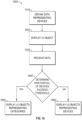
- the electronic device determines whether the number of target devices exceeds a threshold, and in accordance with a determination that the number exceeds the threshold, the electronic device displays a plurality of graphical user interface objects representing categories of target devices, in response to receiving the data, and in accordance with a determination that the number does not exceed the threshold, the electronic device a plurality of graphical user interface objects representing the plurality of target devices, in response to receiving the data.
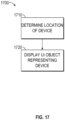
- the electronic device determines the location of a target device relative to the electronic device; and displays, on the touch-sensitive display, a user interface object representing the target device.
- the target device is nearby and the display position of the user interface object, on the touch-sensitive display, is based on the location of the target device relative to the electronic device in some examples.
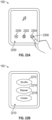
- the electronic device displays a user interface object representing a remote control application on the touch-sensitive display of the electronic device, receives first data representing a zoom function on the displayed user interface object; and in response to receiving the first data representing the zoom function, displays an affordance including indication of nearby target devices capable of being remotely controlled.
- the electronic device receives data representing a first movement of a rotatable input device; and in response to receiving the data representing the first movement, displays only a subset of the plurality of graphical user interface objects, where the displayed subset of graphical user interface objects includes the icon representing the remote control application, and displays an affordance including indication of nearby target devices capable of being remotely controlled.
- the electronic device identifies a target device that is responsive to remote control out of a plurality of target devices, detects a raise gesture based on detected motion of the electronic device; and, in response to detecting the raise gesture, instructs the target device to perform an operation.
- remote control As discussed above, consumers often own multiple electronic devices. It is desirable for a user to be able to remotely control these electronic devices. It is also desirable for the device (i.e., the "remote control") that is used to remotely control these electronic devices to be portable and readily accessible. It is also desirable for the remote control to support remote control of various electronic devices while maintaining a physical form factor that promotes usability.
- FIGS. 1A-1B , 2 , 3 , 4A-4B , and 5A-5B provide a description of exemplary devices for performing the techniques for remote control of an electronic device.
- FIGS. 6-14 and 21A-22B illustrate exemplary user interfaces for performing examples of remote control described herein.
- the user interfaces in the figures are also used to illustrate the processes described below, including the processes in FIGS. 15A-18B and 24 .
- first means "first,” “second,” etc. to describe various elements, these elements should not be limited by the terms. These terms are only used to distinguish one element from another.
- a first touch could be termed a second touch, and, similarly, a second touch could be termed a first touch, without departing from the scope of the various described embodiments.
- the first touch and the second touch are both touches, but they are not the same touch.
- the device is a portable communications device, such as a mobile telephone, that also contains other functions, such as PDA and/or music player functions.
- portable multifunction devices include, without limitation, the iPhone ® , iPod Touch ® , and iPad ® devices from Apple Inc. of Cupertino, California.
- Other portable electronic devices such as laptops or tablet computers with touch-sensitive surfaces (e.g., touch screen displays and/or touchpads), are, optionally, used.
- the device is not a portable communications device, but is a desktop computer with a touch-sensitive surface (e.g., a touch screen display and/or a touchpad).
- an electronic device that includes a display and a touch-sensitive surface is described. It should be understood, however, that the electronic device optionally includes one or more other physical user-interface devices, such as a physical keyboard, a mouse, and/or a joystick.
- the device typically supports a variety of applications, such as one or more of the following: a drawing application, a presentation application, a word processing application, a website creation application, a disk authoring application, a spreadsheet application, a gaming application, a telephone application, a video conferencing application, an e-mail application, an instant messaging application, a workout support application, a photo management application, a digital camera application, a digital video camera application, a web browsing application, a digital music player application, and/or a digital video player application.
- applications such as one or more of the following: a drawing application, a presentation application, a word processing application, a website creation application, a disk authoring application, a spreadsheet application, a gaming application, a telephone application, a video conferencing application, an e-mail application, an instant messaging application, a workout support application, a photo management application, a digital camera application, a digital video camera application, a web browsing application, a digital music player application, and/or a digital video player application.
- the various applications that are executed on the device optionally use at least one common physical user-interface device, such as the touch-sensitive surface.
- One or more functions of the touch-sensitive surface as well as corresponding information displayed on the device are, optionally, adjusted and/or varied from one application to the next and/or within a respective application.
- a common physical architecture (such as the touch-sensitive surface) of the device optionally supports the variety of applications with user interfaces that are intuitive and transparent to the user.
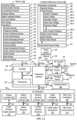
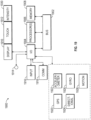
- FIG. 1A is a block diagram illustrating portable multifunction device 100 with touch-sensitive display system 112 in accordance with some embodiments.
- Touch-sensitive display 112 is sometimes called a "touch screen” for convenience and is sometimes known as or called a "touch-sensitive display system.”
- Device 100 includes memory 102 (which optionally includes one or more computer-readable storage mediums), memory controller 122, one or more processing units (CPUs) 120, peripherals interface 118, RF circuitry 108, audio circuitry 110, speaker 111, microphone 113, input/output (I/O) subsystem 106, other input control devices 116, and external port 124.
- Device 100 optionally includes one or more optical sensors 164.
- Device 100 optionally includes one or more contact intensity sensors 165 for detecting intensity of contacts on device 100 (e.g., a touch-sensitive surface such as touch-sensitive display system 112 of device 100).
- Device 100 optionally includes one or more tactile output generators 167 for generating tactile outputs on device 100 (e.g., generating tactile outputs on a touch-sensitive surface such as touch-sensitive display system 112 of device 100 or touchpad 355 of device 300). These components optionally communicate over one or more communication buses or signal lines 103.
- the term "intensity" of a contact on a touch-sensitive surface refers to the force or pressure (force per unit area) of a contact (e.g., a finger contact) on the touch-sensitive surface, or to a substitute (proxy) for the force or pressure of a contact on the touch-sensitive surface.
- the intensity of a contact has a range of values that includes at least four distinct values and more typically includes hundreds of distinct values (e.g., at least 256).
- Intensity of a contact is, optionally, determined (or measured) using various approaches and various sensors or combinations of sensors. For example, one or more force sensors underneath or adjacent to the touch-sensitive surface are, optionally, used to measure force at various points on the touch-sensitive surface.
- force measurements from multiple force sensors are combined (e.g., a weighted average) to determine an estimated force of a contact.
- a pressure-sensitive tip of a stylus is, optionally, used to determine a pressure of the stylus on the touch-sensitive surface.
- the size of the contact area detected on the touch-sensitive surface and/or changes thereto, the capacitance of the touch-sensitive surface proximate to the contact and/or changes thereto, and/or the resistance of the touch-sensitive surface proximate to the contact and/or changes thereto are, optionally, used as a substitute for the force or pressure of the contact on the touch-sensitive surface.
- the substitute measurements for contact force or pressure are used directly to determine whether an intensity threshold has been exceeded (e.g., the intensity threshold is described in units corresponding to the substitute measurements).
- the substitute measurements for contact force or pressure are converted to an estimated force or pressure, and the estimated force or pressure is used to determine whether an intensity threshold has been exceeded (e.g., the intensity threshold is a pressure threshold measured in units of pressure).
- intensity of a contact as an attribute of a user input allows for user access to additional device functionality that may otherwise not be accessible by the user on a reduced-size device with limited real estate for displaying affordances (e.g., on a touch-sensitive display) and/or receiving user input (e.g., via a touch-sensitive display, a touch-sensitive surface, or a physical/mechanical control such as a knob or a button).
- the term "tactile output” refers to physical displacement of a device relative to a previous position of the device, physical displacement of a component (e.g., a touch-sensitive surface) of a device relative to another component (e.g., housing) of the device, or displacement of the component relative to a center of mass of the device that will be detected by a user with the user's sense of touch.
- a component e.g., a touch-sensitive surface
- another component e.g., housing
- the tactile output generated by the physical displacement will be interpreted by the user as a tactile sensation corresponding to a perceived change in physical characteristics of the device or the component of the device.
- a touch-sensitive surface e.g., a touch-sensitive display or trackpad
- movement of a touch-sensitive surface is, optionally, interpreted by the user as a "down click" or "up click" of a physical actuator button.
- a user will feel a tactile sensation such as an "down click” or “up click” even when there is no movement of a physical actuator button associated with the touch-sensitive surface that is physically pressed (e.g., displaced) by the user's movements.
- movement of the touch-sensitive surface is, optionally, interpreted or sensed by the user as "roughness" of the touch-sensitive surface, even when there is no change in smoothness of the touch-sensitive surface. While such interpretations of touch by a user will be subject to the individualized sensory perceptions of the user, there are many sensory perceptions of touch that are common to a large majority of users.
- a tactile output is described as corresponding to a particular sensory perception of a user (e.g., an "up click,” a “down click,” “roughness")
- the generated tactile output corresponds to physical displacement of the device or a component thereof that will generate the described sensory perception for a typical (or average) user.
- device 100 is only one example of a portable multifunction device, and that device 100 optionally has more or fewer components than shown, optionally combines two or more components, or optionally has a different configuration or arrangement of the components.
- the various components shown in FIG. 1A are implemented in hardware, software, or a combination of both hardware and software, including one or more signal processing and/or application-specific integrated circuits.
- Memory 102 optionally includes one or more computer-readable storage mediums.
- the computer-readable storage mediums are optionally tangible and non-transitory.
- the computer-readable storage mediums are optionally transitory.
- Memory 102 optionally includes high-speed random access memory and optionally also includes non-volatile memory, such as one or more magnetic disk storage devices, flash memory devices, or other non-volatile solid-state memory devices.
- Memory controller 122 optionally controls access to memory 102 by other components of device 100.
- Peripherals interface 118 can be used to couple input and output peripherals of the device to CPU 120 and memory 102.
- the one or more processors 120 run or execute various software programs and/or sets of instructions stored in memory 102 to perform various functions for device 100 and to process data.
- peripherals interface 118, CPU 120, and memory controller 122 are, optionally, implemented on a single chip, such as chip 104. In some other embodiments, they are, optionally, implemented on separate chips.
- RF (radio frequency) circuitry 108 receives and sends RF signals, also called electromagnetic signals.
- RF circuitry 108 converts electrical signals to/from electromagnetic signals and communicates with communications networks and other communications devices via the electromagnetic signals.
- RF circuitry 108 optionally includes well-known circuitry for performing these functions, including but not limited to an antenna system, an RF transceiver, one or more amplifiers, a tuner, one or more oscillators, a digital signal processor, a CODEC chipset, a subscriber identity module (SIM) card, memory, and so forth.
- an antenna system an RF transceiver, one or more amplifiers, a tuner, one or more oscillators, a digital signal processor, a CODEC chipset, a subscriber identity module (SIM) card, memory, and so forth.
- SIM subscriber identity module
- RF circuitry 108 optionally communicates with networks, such as the Internet, also referred to as the World Wide Web (WWW), an intranet and/or a wireless network, such as a cellular telephone network, a wireless local area network (LAN) and/or a metropolitan area network (MAN), and other devices by wireless communication.
- the RF circuitry 108 optionally includes well-known circuitry for detecting near field communication (NFC) fields, such as by a short-range communication radio.
- NFC near field communication
- the wireless communication optionally uses any of a plurality of communications standards, protocols, and technologies, including but not limited to Global System for Mobile Communications (GSM), Enhanced Data GSM Environment (EDGE), high-speed downlink packet access (HSDPA), high-speed uplink packet access (HSUPA), Evolution, Data-Only (EV-DO), HSPA, HSPA+, Dual-Cell HSPA (DC-HSPDA), long term evolution (LTE), near field communication (NFC), wideband code division multiple access (W-CDMA), code division multiple access (CDMA), time division multiple access (TDMA), Bluetooth, Bluetooth Low Energy (BTLE), Wireless Fidelity (Wi-Fi) (e.g., IEEE 802.11a, IEEE 802.11b, IEEE 802.11g, IEEE 802.11n, and/or IEEE 802.11ac), voice over Internet Protocol (VoIP), Wi-MAX, a protocol for e-mail (e.g., Internet message access protocol (IMAP) and/or post office protocol (POP)), instant messaging (e.
- Audio circuitry 110, speaker 111, and microphone 113 provide an audio interface between a user and device 100.
- Audio circuitry 110 receives audio data from peripherals interface 118, converts the audio data to an electrical signal, and transmits the electrical signal to speaker 111.
- Speaker 111 converts the electrical signal to human-audible sound waves.
- Audio circuitry 110 also receives electrical signals converted by microphone 113 from sound waves.
- Audio circuitry 110 converts the electrical signal to audio data and transmits the audio data to peripherals interface 118 for processing. Audio data is, optionally retrieved from and/or transmitted to memory 102 and/or RF circuitry 108 by peripherals interface 118.
- audio circuitry 110 also includes a headset jack (e.g., 212, FIG. 2 ). The headset jack provides an interface between audio circuitry 110 and removable audio input/output peripherals, such as output-only headphones or a headset with both output (e.g., a headphone for one or both ears) and input (e.g., a microphone).
- I/O subsystem 106 couples input/output peripherals on device 100, such as touch screen 112 and other input control devices 116, to peripherals interface 118.
- I/O subsystem 106 optionally includes display controller 156, optical sensor controller 158, intensity sensor controller 159, haptic feedback controller 161, and one or more input controllers 160 for other input or control devices.
- the one or more input controllers 160 receive/send electrical signals from/to other input control devices 116.
- the other input control devices 116 optionally include physical buttons (e.g., push buttons, rocker buttons, etc.), dials, slider switches, joysticks, click wheels, and so forth.
- input controller(s) 160 are, optionally, coupled to any (or none) of the following: a keyboard, an infrared port, a USB port, and a pointer device such as a mouse.
- the one or more buttons optionally include an up/down button for volume control of speaker 111 and/or microphone 113.
- the one or more buttons optionally include a push button (e.g., 206, FIG. 2 ).
- a quick press of the push button optionally disengages a lock of touch screen 112 or optionally begins a process that uses gestures on the touch screen to unlock the device, as described in U.S. Patent Application 11/322,549, "Unlocking a Device by Performing Gestures on an Unlock Image," filed December 23, 2005 , U.S. Pat. No. 7,657,849 , which is hereby incorporated by reference in its entirety.
- a longer press of the push button e.g., 206) optionally turns power to device 100 on or off.
- the functionality of one or more of the buttons are, optionally, user-customizable.
- Touch screen 112 is used to implement virtual or soft buttons and one or more soft keyboards.
- Touch-sensitive display 112 provides an input interface and an output interface between the device and a user.
- Display controller 156 receives and/or sends electrical signals from/to touch screen 112.
- Touch screen 112 displays visual output to the user.
- the visual output optionally includes graphics, text, icons, video, and any combination thereof (collectively termed "graphics"). In some embodiments, some or all of the visual output optionally corresponds to user-interface objects.
- Touch screen 112 has a touch-sensitive surface, sensor, or set of sensors that accepts input from the user based on haptic and/or tactile contact.
- Touch screen 112 and display controller 156 (along with any associated modules and/or sets of instructions in memory 102) detect contact (and any movement or breaking of the contact) on touch screen 112 and convert the detected contact into interaction with user-interface objects (e.g., one or more soft keys, icons, web pages, or images) that are displayed on touch screen 112.
- user-interface objects e.g., one or more soft keys, icons, web pages, or images
- a point of contact between touch screen 112 and the user corresponds to a finger of the user.
- Touch screen 112 optionally uses LCD (liquid crystal display) technology, LPD (light emitting polymer display) technology, or LED (light emitting diode) technology, although other display technologies are used in other embodiments.
- Touch screen 112 and display controller 156 optionally detect contact and any movement or breaking thereof using any of a plurality of touch sensing technologies now known or later developed, including but not limited to capacitive, resistive, infrared, and surface acoustic wave technologies, as well as other proximity sensor arrays or other elements for determining one or more points of contact with touch screen 112.
- touch sensing technologies now known or later developed, including but not limited to capacitive, resistive, infrared, and surface acoustic wave technologies, as well as other proximity sensor arrays or other elements for determining one or more points of contact with touch screen 112.
- projected mutual capacitance sensing technology is used, such as that found in the iPhone ® and iPod Touch ® from Apple Inc. of Cupertino, California.
- a touch-sensitive display in some embodiments of touch screen 112 is, optionally, analogous to the multi-touch sensitive touchpads described in the following U.S. Patents: 6,323,846 (Westerman et al. ), 6,570,557 (Westerman et al. ), and/or 6,677,932 (Westerman ), and/or U.S. Patent Publication 2002/0015024A1 , each of which is hereby incorporated by reference in its entirety.
- touch screen 112 displays visual output from device 100, whereas touch-sensitive touchpads do not provide visual output.
- a touch-sensitive display in some embodiments of touch screen 112 is described in the following applications: (1) U.S. Patent Application No. 11/381,313, "Multipoint Touch Surface Controller,” filed May 2, 2006 ; (2) U.S. Patent Application No. 10/840,862, “Multipoint Touchscreen,” filed May 6, 2004 ; (3) U.S. Patent Application No. 10/903,964, "Gestures For Touch Sensitive Input Devices," filed July 30, 2004 ; (4) U.S. Patent Application No. 11/048,264, “Gestures For Touch Sensitive Input Devices,” filed January 31, 2005 ; (5) U.S. Patent Application No.
- Touch screen 112 optionally has a video resolution in excess of 100 dpi. In some embodiments, the touch screen has a video resolution of approximately 160 dpi.
- the user optionally makes contact with touch screen 112 using any suitable object or appendage, such as a stylus, a finger, and so forth.
- the user interface is designed to work primarily with finger-based contacts and gestures, which can be less precise than stylus-based input due to the larger area of contact of a finger on the touch screen.
- the device translates the rough finger-based input into a precise pointer/cursor position or command for performing the actions desired by the user.
- device 100 in addition to the touch screen, device 100 optionally includes a touchpad (not shown) for activating or deactivating particular functions.
- the touchpad is a touch-sensitive area of the device that, unlike the touch screen, does not display visual output.
- the touchpad is, optionally, a touch-sensitive surface that is separate from touch screen 112 or an extension of the touch-sensitive surface formed by the touch screen.
- Power system 162 for powering the various components.
- Power system 162 optionally includes a power management system, one or more power sources (e.g., battery, alternating current (AC)), a recharging system, a power failure detection circuit, a power converter or inverter, a power status indicator (e.g., a light-emitting diode (LED)) and any other components associated with the generation, management and distribution of power in portable devices.
- power sources e.g., battery, alternating current (AC)
- AC alternating current
- a recharging system e.g., a recharging system
- a power failure detection circuit e.g., a power failure detection circuit
- a power converter or inverter e.g., a power converter or inverter
- a power status indicator e.g., a light-emitting diode (LED)
- Device 100 optionally also includes one or more optical sensors 164.
- FIG. 1A shows an optical sensor coupled to optical sensor controller 158 in I/O subsystem 106.
- Optical sensor 164 optionally includes charge-coupled device (CCD) or complementary metal-oxide semiconductor (CMOS) phototransistors.
- CCD charge-coupled device
- CMOS complementary metal-oxide semiconductor
- Optical sensor 164 receives light from the environment, projected through one or more lenses, and converts the light to data representing an image.
- imaging module 143 also called a camera module
- optical sensor 164 optionally captures still images or video.
- an optical sensor is located on the back of device 100, opposite touch screen display 112 on the front of the device so that the touch screen display is enabled for use as a viewfinder for still and/or video image acquisition.
- an optical sensor is located on the front of the device so that the user's image is, optionally, obtained for video conferencing while the user views the other video conference participants on the touch screen display.
- the position of optical sensor 164 can be changed by the user (e.g., by rotating the lens and the sensor in the device housing) so that a single optical sensor 164 is used along with the touch screen display for both video conferencing and still and/or video image acquisition.
- Device 100 optionally also includes one or more contact intensity sensors 165.
- FIG. 1A shows a contact intensity sensor coupled to intensity sensor controller 159 in I/O subsystem 106.
- Contact intensity sensor 165 optionally includes one or more piezoresistive strain gauges, capacitive force sensors, electric force sensors, piezoelectric force sensors, optical force sensors, capacitive touch-sensitive surfaces, or other intensity sensors (e.g., sensors used to measure the force (or pressure) of a contact on a touch-sensitive surface).
- Contact intensity sensor 165 receives contact intensity information (e.g., pressure information or a proxy for pressure information) from the environment.
- contact intensity information e.g., pressure information or a proxy for pressure information
- At least one contact intensity sensor is collocated with, or proximate to, a touch-sensitive surface (e.g., touch-sensitive display system 112). In some embodiments, at least one contact intensity sensor is located on the back of device 100, opposite touch screen display 112, which is located on the front of device 100.
- a touch-sensitive surface e.g., touch-sensitive display system 112
- at least one contact intensity sensor is located on the back of device 100, opposite touch screen display 112, which is located on the front of device 100.
- Device 100 optionally also includes one or more proximity sensors 166.
- FIG. 1A shows proximity sensor 166 coupled to peripherals interface 118. Alternately, proximity sensor 166 is, optionally, coupled to input controller 160 in I/O subsystem 106. Proximity sensor 166 optionally performs as described in U.S. Patent Application Nos.
- the proximity sensor turns off and disables touch screen 112 when the multifunction device is placed near the user's ear (e.g., when the user is making a phone call).
- Device 100 optionally also includes one or more tactile output generators 167.
- FIG. 1A shows a tactile output generator coupled to haptic feedback controller 161 in I/O subsystem 106.
- Tactile output generator 167 optionally includes one or more electroacoustic devices such as speakers or other audio components and/or electromechanical devices that convert energy into linear motion such as a motor, solenoid, electroactive polymer, piezoelectric actuator, electrostatic actuator, or other tactile output generating component (e.g., a component that converts electrical signals into tactile outputs on the device).
- Contact intensity sensor 165 receives tactile feedback generation instructions from haptic feedback module 133 and generates tactile outputs on device 100 that are capable of being sensed by a user of device 100.
- At least one tactile output generator is collocated with, or proximate to, a touch-sensitive surface (e.g., touch-sensitive display system 112) and, optionally, generates a tactile output by moving the touch-sensitive surface vertically (e.g., in/out of a surface of device 100) or laterally (e.g., back and forth in the same plane as a surface of device 100).
- a touch-sensitive surface e.g., touch-sensitive display system 112
- at least one tactile output generator sensor is located on the back of device 100, opposite touch screen display 112, which is located on the front of device 100.
- Device 100 optionally also includes one or more accelerometers 168.
- FIG. 1A shows accelerometer 168 coupled to peripherals interface 118.
- accelerometer 168 is, optionally, coupled to an input controller 160 in I/O subsystem 106.
- Accelerometer 168 optionally performs as described in U.S. Patent Publication No. 20050190059 , "Acceleration-based Theft Detection System for Portable Electronic Devices," and U.S. Patent Publication No. 20060017692 , “Methods And Apparatuses For Operating A Portable Device Based On An Accelerometer,” both of which are incorporated by reference herein in their entirety.
- information is displayed on the touch screen display in a portrait view or a landscape view based on an analysis of data received from the one or more accelerometers.
- Device 100 optionally includes, in addition to accelerometer(s) 168, a magnetometer (not shown) and a GPS (or GLONASS or other global navigation system) receiver (not shown) for obtaining information concerning the location and orientation (e.g., portrait or landscape) of device 100.
- the software components stored in memory 102 include operating system 126, communication module (or set of instructions) 128, contact/motion module (or set of instructions) 130, graphics module (or set of instructions) 132, text input module (or set of instructions) 134, Global Positioning System (GPS) module (or set of instructions) 135, and applications (or sets of instructions) 136.
- memory 102 FIG. 1A or 370 ( FIG. 3 ) stores device/global internal state 157, as shown in FIGS. 1A and 3 .
- Device/global internal state 157 includes one or more of: active application state, indicating which applications, if any, are currently active; display state, indicating what applications, views or other information occupy various regions of touch screen display 112; sensor state, including information obtained from the device's various sensors and input control devices 116; and location information concerning the device's location and/or attitude.
- Operating system 126 e.g., Darwin, RTXC, LINUX, UNIX, OS X, iOS, WINDOWS, or an embedded operating system such as VxWorks
- Operating system 126 includes various software components and/or drivers for controlling and managing general system tasks (e.g., memory management, storage device control, power management, etc.) and facilitates communication between various hardware and software components.
- Communication module 128 facilitates communication with other devices over one or more external ports 124 and also includes various software components for handling data received by RF circuitry 108 and/or external port 124.
- External port 124 e.g., Universal Serial Bus (USB), FIREWIRE, etc.
- USB Universal Serial Bus
- FIREWIRE FireWire
- the external port is a multi-pin (e.g., 30-pin) connector that is the same as, or similar to and/or compatible with, the 30-pin connector used on iPod ® (trademark of Apple Inc.) devices.
- Contact/motion module 130 optionally detects contact with touch screen 112 (in conjunction with display controller 156) and other touch-sensitive devices (e.g., a touchpad or physical click wheel).
- Contact/motion module 130 includes various software components for performing various operations related to detection of contact, such as determining if contact has occurred (e.g., detecting a finger-down event), determining an intensity of the contact (e.g., the force or pressure of the contact or a substitute for the force or pressure of the contact), determining if there is movement of the contact and tracking the movement across the touch-sensitive surface (e.g., detecting one or more finger-dragging events), and determining if the contact has ceased (e.g., detecting a finger-up event or a break in contact).
- Contact/motion module 130 receives contact data from the touch-sensitive surface. Determining movement of the point of contact, which is represented by a series of contact data, optionally includes determining speed (magnitude), velocity (magnitude and direction), and/or an acceleration (a change in magnitude and/or direction) of the point of contact. These operations are, optionally, applied to single contacts (e.g., one finger contacts) or to multiple simultaneous contacts (e.g., "multitouch"/multiple finger contacts). In some embodiments, contact/motion module 130 and display controller 156 detect contact on a touchpad.
- contact/motion module 130 uses a set of one or more intensity thresholds to determine whether an operation has been performed by a user (e.g., to determine whether a user has "clicked" on an icon).
- at least a subset of the intensity thresholds are determined in accordance with software parameters (e.g., the intensity thresholds are not determined by the activation thresholds of particular physical actuators and can be adjusted without changing the physical hardware of device 100). For example, a mouse "click" threshold of a trackpad or touch screen display can be set to any of a large range of predefined threshold values without changing the trackpad or touch screen display hardware.
- a user of the device is provided with software settings for adjusting one or more of the set of intensity thresholds (e.g., by adjusting individual intensity thresholds and/or by adjusting a plurality of intensity thresholds at once with a system-level click "intensity" parameter).
- Contact/motion module 130 optionally detects a gesture input by a user.
- Different gestures on the touch-sensitive surface have different contact patterns (e.g., different motions, timings, and/or intensities of detected contacts).
- a gesture is, optionally, detected by detecting a particular contact pattern.
- detecting a finger tap gesture includes detecting a finger-down event followed by detecting a finger-up (liftoff) event at the same position (or substantially the same position) as the finger-down event (e.g., at the position of an icon).
- detecting a finger swipe gesture on the touch-sensitive surface includes detecting a finger-down event followed by detecting one or more finger-dragging events, and subsequently followed by detecting a finger-up (liftoff) event.
- Graphics module 132 includes various known software components for rendering and displaying graphics on touch screen 112 or other display, including components for changing the visual impact (e.g., brightness, transparency, saturation, contrast, or other visual property) of graphics that are displayed.
- graphics includes any object that can be displayed to a user, including without limitation, text, web pages, icons (such as user-interface objects including soft keys), digital images, videos, animations, and the like.
- graphics module 132 stores data representing graphics to be used. Each graphic is, optionally, assigned a corresponding code. Graphics module 132 receives, from applications etc., one or more codes specifying graphics to be displayed along with, if necessary, coordinate data and other graphic property data, and then generates screen image data to output to display controller 156.
- Haptic feedback module 133 includes various software components for generating instructions used by tactile output generator(s) 167 to produce tactile outputs at one or more locations on device 100 in response to user interactions with device 100.
- Text input module 134 which is, optionally, a component of graphics module 132, provides soft keyboards for entering text in various applications (e.g., contacts 137, e-mail 140, IM 141, browser 147, and any other application that needs text input).
- applications e.g., contacts 137, e-mail 140, IM 141, browser 147, and any other application that needs text input).
- GPS module 135 determines the location of the device and provides this information for use in various applications (e.g., to telephone 138 for use in location-based dialing; to camera 143 as picture/video metadata; and to applications that provide location-based services such as weather widgets, local yellow page widgets, and map/navigation widgets).
- applications e.g., to telephone 138 for use in location-based dialing; to camera 143 as picture/video metadata; and to applications that provide location-based services such as weather widgets, local yellow page widgets, and map/navigation widgets).
- Applications 136 optionally include the following modules (or sets of instructions), or a subset or superset thereof:
- Examples of other applications 136 that are, optionally, stored in memory 102 include other word processing applications, other image editing applications, drawing applications, presentation applications, JAVA-enabled applications, encryption, digital rights management, voice recognition, and voice replication.
- contacts module 137 are, optionally, used to manage an address book or contact list (e.g., stored in application internal state 192 of contacts module 137 in memory 102 or memory 370), including: adding name(s) to the address book; deleting name(s) from the address book; associating telephone number(s), e-mail address(es), physical address(es) or other information with a name; associating an image with a name; categorizing and sorting names; providing telephone numbers or e-mail addresses to initiate and/or facilitate communications by telephone 138, video conference module 139, e-mail 140, or IM 141; and so forth.
- an address book or contact list e.g., stored in application internal state 192 of contacts module 137 in memory 102 or memory 370
- telephone module 138 are optionally, used to enter a sequence of characters corresponding to a telephone number, access one or more telephone numbers in contacts module 137, modify a telephone number that has been entered, dial a respective telephone number, conduct a conversation, and disconnect or hang up when the conversation is completed.
- the wireless communication optionally uses any of a plurality of communications standards, protocols, and technologies.
- video conference module 139 includes executable instructions to initiate, conduct, and terminate a video conference between a user and one or more other participants in accordance with user instructions.
- e-mail client module 140 includes executable instructions to create, send, receive, and manage e-mail in response to user instructions.
- e-mail client module 140 makes it very easy to create and send e-mails with still or video images taken with camera module 143.
- the instant messaging module 141 includes executable instructions to enter a sequence of characters corresponding to an instant message, to modify previously entered characters, to transmit a respective instant message (for example, using a Short Message Service (SMS) or Multimedia Message Service (MMS) protocol for telephony-based instant messages or using XMPP, SIMPLE, or IMPS for Internet-based instant messages), to receive instant messages, and to view received instant messages.
- SMS Short Message Service
- MMS Multimedia Message Service
- XMPP extensible Markup Language
- SIMPLE Session Initiation Protocol
- IMPS Internet Messaging Protocol
- transmitted and/or received instant messages may include graphics, photos, audio files, video files and/or other attachments as are supported in an MMS and/or an Enhanced Messaging Service (EMS).
- EMS Enhanced Messaging Service
- instant messaging refers to both telephony-based messages (e.g., messages sent using SMS or MMS) and Internet-based messages (e.g., messages sent using XMPP
- workout support module 142 includes executable instructions to create workouts (e.g., with time, distance, and/or calorie burning goals); communicate with workout sensors (sports devices); receive workout sensor data; calibrate sensors used to monitor a workout; select and play music for a workout; and display, store, and transmit workout data.
- create workouts e.g., with time, distance, and/or calorie burning goals
- communicate with workout sensors sports devices
- receive workout sensor data calibrate sensors used to monitor a workout
- select and play music for a workout and display, store, and transmit workout data.
- camera module 143 includes executable instructions to capture still images or video (including a video stream) and store them into memory 102, modify characteristics of a still image or video, or delete a still image or video from memory 102.
- image management module 144 includes executable instructions to arrange, modify (e.g., edit), or otherwise manipulate, label, delete, present (e.g., in a digital slide show or album), and store still and/or video images.
- modify e.g., edit
- present e.g., in a digital slide show or album
- browser module 147 includes executable instructions to browse the Internet in accordance with user instructions, including searching, linking to, receiving, and displaying web pages or portions thereof, as well as attachments and other files linked to web pages.
- calendar module 148 includes executable instructions to create, display, modify, and store calendars and data associated with calendars (e.g., calendar entries, to-do lists, etc.) in accordance with user instructions.
- widget modules 149 are mini-applications that are, optionally, downloaded and used by a user (e.g., weather widget 149-1, stocks widget 149-2, calculator widget 149-3, alarm clock widget 149-4, and dictionary widget 149-5) or created by the user (e.g., user-created widget 149-6).
- a widget includes an HTML (Hypertext Markup Language) file, a CSS (Cascading Style Sheets) file, and a JavaScript file.
- a widget includes an XML (Extensible Markup Language) file and a JavaScript file (e.g., Yahoo! Widgets).
- the widget creator module 150 is, optionally, used by a user to create widgets (e.g., turning a user-specified portion of a web page into a widget).
- search module 151 includes executable instructions to search for text, music, sound, image, video, and/or other files in memory 102 that match one or more search criteria (e.g., one or more user-specified search terms) in accordance with user instructions.
- search criteria e.g., one or more user-specified search terms
- video and music player module 152 includes executable instructions that allow the user to download and play back recorded music and other sound files stored in one or more file formats, such as MP3 or AAC files, and executable instructions to display, present, or otherwise play back videos (e.g., on touch screen 112 or on an external, connected display via external port 124).
- device 100 optionally includes the functionality of an MP3 player, such as an iPod (trademark of Apple Inc.).
- notes module 153 includes executable instructions to create and manage notes, to-do lists, and the like in accordance with user instructions.
- map module 154 are, optionally, used to receive, display, modify, and store maps and data associated with maps (e.g., driving directions, data on stores and other points of interest at or near a particular location, and other location-based data) in accordance with user instructions.
- maps e.g., driving directions, data on stores and other points of interest at or near a particular location, and other location-based data
- online video module 155 includes instructions that allow the user to access, browse, receive (e.g., by streaming and/or download), play back (e.g., on the touch screen or on an external, connected display via external port 124), send an e-mail with a link to a particular online video, and otherwise manage online videos in one or more file formats, such as H.264.
- instant messaging module 141 rather than e-mail client module 140, is used to send a link to a particular online video.
- modules and applications corresponds to a set of executable instructions for performing one or more functions described above and the methods described in this application (e.g., the computer-implemented methods and other information processing methods described herein).
- modules e.g., sets of instructions
- video player module is, optionally, combined with music player module into a single module (e.g., video and music player module 152, FIG. 1A ).
- memory 102 optionally stores a subset of the modules and data structures identified above. Furthermore, memory 102 optionally stores additional modules and data structures not described above.
- device 100 is a device where operation of a predefined set of functions on the device is performed exclusively through a touch screen and/or a touchpad.
- a touch screen and/or a touchpad as the primary input control device for operation of device 100, the number of physical input control devices (such as push buttons, dials, and the like) on device 100 is, optionally, reduced.
- the predefined set of functions that are performed exclusively through a touch screen and/or a touchpad optionally include navigation between user interfaces.
- the touchpad when touched by the user, navigates device 100 to a main, home, or root menu from any user interface that is displayed on device 100.
- a "menu button" is implemented using a touchpad.
- the menu button is a physical push button or other physical input control device instead of a touchpad.
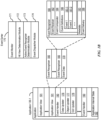
- FIG. 1B is a block diagram illustrating exemplary components for event handling in accordance with some embodiments.
- memory 102 FIG. 1A
- 370 FIG. 3
- event sorter 170 e.g., in operating system 126
- application 136-1 e.g., any of the aforementioned applications 137-151, 155, 380-390.
- Event sorter 170 receives event information and determines the application 136-1 and application view 191 of application 136-1 to which to deliver the event information.
- Event sorter 170 includes event monitor 171 and event dispatcher module 174.
- application 136-1 includes application internal state 192, which indicates the current application view(s) displayed on touch-sensitive display 112 when the application is active or executing.
- device/global internal state 157 is used by event sorter 170 to determine which application(s) is (are) currently active, and application internal state 192 is used by event sorter 170 to determine application views 191 to which to deliver event information.
- application internal state 192 includes additional information, such as one or more of: resume information to be used when application 136-1 resumes execution, user interface state information that indicates information being displayed or that is ready for display by application 136-1, a state queue for enabling the user to go back to a prior state or view of application 136-1, and a redo/undo queue of previous actions taken by the user.
- Event monitor 171 receives event information from peripherals interface 118.
- Event information includes information about a sub-event (e.g., a user touch on touch-sensitive display 112, as part of a multi-touch gesture).
- Peripherals interface 118 transmits information it receives from I/O subsystem 106 or a sensor, such as proximity sensor 166, accelerometer(s) 168, and/or microphone 113 (through audio circuitry 110).
- Information that peripherals interface 118 receives from I/O subsystem 106 includes information from touch-sensitive display 112 or a touch-sensitive surface.
- event monitor 171 sends requests to the peripherals interface 118 at predetermined intervals. In response, peripherals interface 118 transmits event information. In other embodiments, peripherals interface 118 transmits event information only when there is a significant event (e.g., receiving an input above a predetermined noise threshold and/or for more than a predetermined duration).
- event sorter 170 also includes a hit view determination module 172 and/or an active event recognizer determination module 173.
- Hit view determination module 172 provides software procedures for determining where a sub-event has taken place within one or more views when touch-sensitive display 112 displays more than one view. Views are made up of controls and other elements that a user can see on the display.
- the application views (of a respective application) in which a touch is detected optionally correspond to programmatic levels within a programmatic or view hierarchy of the application. For example, the lowest level view in which a touch is detected is, optionally, called the hit view, and the set of events that are recognized as proper inputs are, optionally, determined based, at least in part, on the hit view of the initial touch that begins a touch-based gesture.
- Hit view determination module 172 receives information related to sub-events of a touch-based gesture.
- hit view determination module 172 identifies a hit view as the lowest view in the hierarchy which should handle the sub-event. In most circumstances, the hit view is the lowest level view in which an initiating sub-event occurs (e.g., the first sub-event in the sequence of sub-events that form an event or potential event).
- the hit view typically receives all sub-events related to the same touch or input source for which it was identified as the hit view.
- Active event recognizer determination module 173 determines which view or views within a view hierarchy should receive a particular sequence of sub-events. In some embodiments, active event recognizer determination module 173 determines that only the hit view should receive a particular sequence of sub-events. In other embodiments, active event recognizer determination module 173 determines that all views that include the physical location of a sub-event are actively involved views, and therefore determines that all actively involved views should receive a particular sequence of sub-events. In other embodiments, even if touch sub-events were entirely confined to the area associated with one particular view, views higher in the hierarchy would still remain as actively involved views.
- Event dispatcher module 174 dispatches the event information to an event recognizer (e.g., event recognizer 180). In embodiments including active event recognizer determination module 173, event dispatcher module 174 delivers the event information to an event recognizer determined by active event recognizer determination module 173. In some embodiments, event dispatcher module 174 stores in an event queue the event information, which is retrieved by a respective event receiver 182.
- an event recognizer e.g., event recognizer 180.
- event dispatcher module 174 delivers the event information to an event recognizer determined by active event recognizer determination module 173.
- event dispatcher module 174 stores in an event queue the event information, which is retrieved by a respective event receiver 182.
- operating system 126 includes event sorter 170.
- application 136-1 includes event sorter 170.
- event sorter 170 is a stand-alone module, or a part of another module stored in memory 102, such as contact/motion module 130.
- application 136-1 includes a plurality of event handlers 190 and one or more application views 191, each of which includes instructions for handling touch events that occur within a respective view of the application's user interface.
- Each application view 191 of the application 136-1 includes one or more event recognizers 180.
- a respective application view 191 includes a plurality of event recognizers 180.
- one or more of event recognizers 180 are part of a separate module, such as a user interface kit (not shown) or a higher level object from which application 136-1 inherits methods and other properties.
- a respective event handler 190 includes one or more of: data updater 176, object updater 177, GUI updater 178, and/or event data 179 received from event sorter 170.
- Event handler 190 optionally utilizes or calls data updater 176, object updater 177, or GUI updater 178 to update the application internal state 192.
- one or more of the application views 191 include one or more respective event handlers 190.
- one or more of data updater 176, object updater 177, and GUI updater 178 are included in a respective application view 191.
- a respective event recognizer 180 receives event information (e.g., event data 179) from event sorter 170 and identifies an event from the event information.
- Event recognizer 180 includes event receiver 182 and event comparator 184.
- event recognizer 180 also includes at least a subset of: metadata 183, and event delivery instructions 188 (which optionally include sub-event delivery instructions).
- Event receiver 182 receives event information from event sorter 170.
- the event information includes information about a sub-event, for example, a touch or a touch movement.
- the event information also includes additional information, such as location of the sub-event.
- the event information optionally also includes speed and direction of the sub-event.
- events include rotation of the device from one orientation to another (e.g., from a portrait orientation to a landscape orientation, or vice versa), and the event information includes corresponding information about the current orientation (also called device attitude) of the device.
- Event comparator 184 compares the event information to predefined event or sub-event definitions and, based on the comparison, determines an event or sub-event, or determines or updates the state of an event or sub-event.
- event comparator 184 includes event definitions 186.
- Event definitions 186 contain definitions of events (e.g., predefined sequences of sub-events), for example, event 1 (187-1), event 2 (187-2), and others.
- sub-events in an event (187) include, for example, touch begin, touch end, touch movement, touch cancellation, and multiple touching.
- the definition for event 1 (187-1) is a double tap on a displayed object.
- the double tap for example, comprises a first touch (touch begin) on the displayed object for a predetermined phase, a first liftoff (touch end) for a predetermined phase, a second touch (touch begin) on the displayed object for a predetermined phase, and a second liftoff (touch end) for a predetermined phase.
- the definition for event 2 (187-2) is a dragging on a displayed object.
- the dragging for example, comprises a touch (or contact) on the displayed object for a predetermined phase, a movement of the touch across touch-sensitive display 112, and liftoff of the touch (touch end).
- the event also includes information for one or more associated event handlers 190.
- event definition 187 includes a definition of an event for a respective user-interface object.
- event comparator 184 performs a hit test to determine which user-interface object is associated with a sub-event. For example, in an application view in which three user-interface objects are displayed on touch-sensitive display 112, when a touch is detected on touch-sensitive display 112, event comparator 184 performs a hit test to determine which of the three user-interface objects is associated with the touch (sub-event). If each displayed object is associated with a respective event handler 190, the event comparator uses the result of the hit test to determine which event handler 190 should be activated. For example, event comparator 184 selects an event handler associated with the sub-event and the object triggering the hit test.
- the definition for a respective event (187) also includes delayed actions that delay delivery of the event information until after it has been determined whether the sequence of sub-events does or does not correspond to the event recognizer's event type.
- a respective event recognizer 180 determines that the series of sub-events do not match any of the events in event definitions 186, the respective event recognizer 180 enters an event impossible, event failed, or event ended state, after which it disregards subsequent sub-events of the touch-based gesture. In this situation, other event recognizers, if any, that remain active for the hit view continue to track and process sub-events of an ongoing touch-based gesture.
- a respective event recognizer 180 includes metadata 183 with configurable properties, flags, and/or lists that indicate how the event delivery system should perform sub-event delivery to actively involved event recognizers.
- metadata 183 includes configurable properties, flags, and/or lists that indicate how event recognizers interact, or are enabled to interact, with one another.
- metadata 183 includes configurable properties, flags, and/or lists that indicate whether sub-events are delivered to varying levels in the view or programmatic hierarchy.
- a respective event recognizer 180 activates event handler 190 associated with an event when one or more particular sub-events of an event are recognized.
- a respective event recognizer 180 delivers event information associated with the event to event handler 190. Activating an event handler 190 is distinct from sending (and deferred sending) sub-events to a respective hit view.
- event recognizer 180 throws a flag associated with the recognized event, and event handler 190 associated with the flag catches the flag and performs a predefined process.
- event delivery instructions 188 include sub-event delivery instructions that deliver event information about a sub-event without activating an event handler. Instead, the sub-event delivery instructions deliver event information to event handlers associated with the series of sub-events or to actively involved views. Event handlers associated with the series of sub-events or with actively involved views receive the event information and perform a predetermined process.
- data updater 176 creates and updates data used in application 136-1. For example, data updater 176 updates the telephone number used in contacts module 137, or stores a video file used in video player module.
- object updater 177 creates and updates objects used in application 136-1. For example, object updater 177 creates a new user-interface object or updates the position of a user-interface object.
- GUI updater 178 updates the GUI. For example, GUI updater 178 prepares display information and sends it to graphics module 132 for display on a touch-sensitive display.
- event handler(s) 190 includes or has access to data updater 176, object updater 177, and GUI updater 178.
- data updater 176, object updater 177, and GUI updater 178 are included in a single module of a respective application 136-1 or application view 191. In other embodiments, they are included in two or more software modules.
- event handling of user touches on touch-sensitive displays also applies to other forms of user inputs to operate multifunction devices 100 with input devices, not all of which are initiated on touch screens.
- mouse movement and mouse button presses optionally coordinated with single or multiple keyboard presses or holds; contact movements such as taps, drags, scrolls, etc. on touchpads; pen stylus inputs; movement of the device; oral instructions; detected eye movements; biometric inputs; and/or any combination thereof are optionally utilized as inputs corresponding to sub-events which define an event to be recognized.
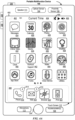
- FIG. 2 illustrates a portable multifunction device 100 having a touch screen 112 in accordance with some embodiments.
- the touch screen optionally displays one or more graphics within user interface (UI) 200.
- UI user interface
- a user is enabled to select one or more of the graphics by making a gesture on the graphics, for example, with one or more fingers 202 (not drawn to scale in the figure) or one or more styluses 203 (not drawn to scale in the figure).
- selection of one or more graphics occurs when the user breaks contact with the one or more graphics.
- the gesture optionally includes one or more taps, one or more swipes (from left to right, right to left, upward and/or downward), and/or a rolling of a finger (from right to left, left to right, upward and/or downward) that has made contact with device 100.
- inadvertent contact with a graphic does not select the graphic.
- a swipe gesture that sweeps over an application icon optionally does not select the corresponding application when the gesture corresponding to selection is a tap.
- Device 100 optionally also include one or more physical buttons, such as "home" or menu button 204.
- menu button 204 is, optionally, used to navigate to any application 136 in a set of applications that are, optionally, executed on device 100.
- the menu button is implemented as a soft key in a GUI displayed on touch screen 112.
- device 100 includes touch screen 112, menu button 204, push button 206 for powering the device on/off and locking the device, volume adjustment button(s) 208, subscriber identity module (SIM) card slot 210, headset jack 212, and docking/charging external port 124.
- Push button 206 is, optionally, used to turn the power on/off on the device by depressing the button and holding the button in the depressed state for a predefined time interval; to lock the device by depressing the button and releasing the button before the predefined time interval has elapsed; and/or to unlock the device or initiate an unlock process.
- device 100 also accepts verbal input for activation or deactivation of some functions through microphone 113.
- Device 100 also, optionally, includes one or more contact intensity sensors 165 for detecting intensity of contacts on touch screen 112 and/or one or more tactile output generators 167 for generating tactile outputs for a user of device 100.
- FIG. 3 is a block diagram of an exemplary multifunction device with a display and a touch-sensitive surface in accordance with some embodiments.
- Device 300 need not be portable.
- device 300 is a laptop computer, a desktop computer, a tablet computer, a multimedia player device, a navigation device, an educational device (such as a child's learning toy), a gaming system, or a control device (e.g., a home or industrial controller).
- Device 300 typically includes one or more processing units (CPUs) 310, one or more network or other communications interfaces 360, memory 370, and one or more communication buses 320 for interconnecting these components.
- Communication buses 320 optionally include circuitry (sometimes called a chipset) that interconnects and controls communications between system components.
- Device 300 includes input/output (I/O) interface 330 comprising display 340, which is typically a touch screen display.
- I/O interface 330 also optionally includes a keyboard and/or mouse (or other pointing device) 350 and touchpad 355, tactile output generator 357 for generating tactile outputs on device 300 (e.g., similar to tactile output generator(s) 167 described above with reference to FIG. 1A ), sensors 359 (e.g., optical, acceleration, proximity, touch-sensitive, and/or contact intensity sensors similar to contact intensity sensor(s) 165 described above with reference to FIG. 1A ).
- sensors 359 e.g., optical, acceleration, proximity, touch-sensitive, and/or contact intensity sensors similar to contact intensity sensor(s) 165 described above with reference to FIG. 1A ).
- Memory 370 includes high-speed random access memory, such as DRAM, SRAM, DDR RAM, or other random access solid state memory devices; and optionally includes non-volatile memory, such as one or more magnetic disk storage devices, optical disk storage devices, flash memory devices, or other non-volatile solid state storage devices. Memory 370 optionally includes one or more storage devices remotely located from CPU(s) 310. In some embodiments, memory 370 stores programs, modules, and data structures analogous to the programs, modules, and data structures stored in memory 102 of portable multifunction device 100 ( FIG. 1A ), or a subset thereof. Furthermore, memory 370 optionally stores additional programs, modules, and data structures not present in memory 102 of portable multifunction device 100.
- memory 370 of device 300 optionally stores drawing module 380, presentation module 382, word processing module 384, website creation module 386, disk authoring module 388, and/or spreadsheet module 390, while memory 102 of portable multifunction device 100 ( FIG. 1A ) optionally does not store these modules.
- Each of the above-identified elements in FIG. 3 are, optionally, stored in one or more of the previously mentioned memory devices.
- Each of the above-identified modules corresponds to a set of instructions for performing a function described above.
- the above-identified modules or programs (e.g., sets of instructions) need not be implemented as separate software programs, procedures, or modules, and thus various subsets of these modules are, optionally, combined or otherwise rearranged in various embodiments.
- memory 370 optionally stores a subset of the modules and data structures identified above. Furthermore, memory 370 optionally stores additional modules and data structures not described above.
- FIG. 4A illustrates an exemplary user interface for a menu of applications on portable multifunction device 100 in accordance with some embodiments. Similar user interfaces is, optionally, implemented on device 300.
- user interface 400 includes the following elements, or a subset or superset thereof:
- icon labels illustrated in FIG. 4A are merely exemplary.
- icon 422 for video and music player module 152 are optionally labeled "Music” or "Music Player.”
- Other labels are, optionally, used for various application icons.
- a label for a respective application icon includes a name of an application corresponding to the respective application icon.
- a label for a particular application icon is distinct from a name of an application corresponding to the particular application icon.
- FIG. 4B illustrates an exemplary user interface on a device (e.g., device 300, FIG. 3 ) with a touch-sensitive surface 451 (e.g., a tablet or touchpad 355, FIG. 3 ) that is separate from the display 450 (e.g., touch screen display 112).
- Device 300 also, optionally, includes one or more contact intensity sensors (e.g., one or more of sensors 359) for detecting intensity of contacts on touch-sensitive surface 451 and/or one or more tactile output generators 357 for generating tactile outputs for a user of device 300.
- one or more contact intensity sensors e.g., one or more of sensors 359
- tactile output generators 357 for generating tactile outputs for a user of device 300.
- the device detects inputs on a touch-sensitive surface that is separate from the display, as shown in FIG. 4B .
- the touch-sensitive surface e.g., 451 in FIG. 4B
- the touch-sensitive surface has a primary axis (e.g., 452 in FIG. 4B ) that corresponds to a primary axis (e.g., 453 in FIG. 4B ) on the display (e.g., 450).
- the device detects contacts (e.g., 460 and 462 in FIG.
- finger inputs e.g., finger contacts, finger tap gestures, finger swipe gestures
- one or more of the finger inputs are replaced with input from another input device (e.g., a mouse-based input or stylus input).
- a swipe gesture is, optionally, replaced with a mouse click (e.g., instead of a contact) followed by movement of the cursor along the path of the swipe (e.g., instead of movement of the contact).
- a tap gesture is, optionally, replaced with a mouse click while the cursor is located over the location of the tap gesture (e.g., instead of detection of the contact followed by ceasing to detect the contact).
- multiple user inputs are simultaneously detected, it should be understood that multiple computer mice are, optionally, used simultaneously, or a mouse and finger contacts are, optionally, used simultaneously.
- FIG. 5A illustrates exemplary personal electronic device 500.
- Device 500 includes body 502.
- device 500 can include some or all of the features described with respect to devices 100 and 300 (e.g., FIGS. 1A-4B ).
- device 500 has touch-sensitive display screen 504, hereafter touch screen 504.
- touch screen 504 optionally includes one or more intensity sensors for detecting intensity of contacts (e.g., touches) being applied.
- the one or more intensity sensors of touch screen 504 (or the touch-sensitive surface) can provide output data that represents the intensity of touches.
- the user interface of device 500 can respond to touches based on their intensity, meaning that touches of different intensities can invoke different user interface operations on device 500.
- Exemplary techniques for detecting and processing touch intensity are found, for example, in related applications: International Patent Application Serial No. PCT/US2013/040061, titled “Device, Method, and Graphical User Interface for Displaying User Interface Objects Corresponding to an Application,” filed May 8, 2013 , and International Patent Application Serial No. PCT/US2013/069483, titled “Device, Method, and Graphical User Interface for Transitioning Between Touch Input to Display Output Relationships,” filed November 11, 2013 , each of which is hereby incorporated by reference in their entirety.
- device 500 has one or more input mechanisms 506 and 508.
- Input mechanisms 506 and 508, if included, can be physical. Examples of physical input mechanisms include push buttons and rotatable mechanisms.
- device 500 has one or more attachment mechanisms. Such attachment mechanisms, if included, can permit attachment of device 500 with, for example, hats, eyewear, earrings, necklaces, shirts, jackets, bracelets, watch straps, chains, trousers, belts, shoes, purses, backpacks, and so forth. These attachment mechanisms permit device 500 to be worn by a user.
- FIG. 5B depicts exemplary personal electronic device 500.
- device 500 can include some or all of the components described with respect to FIGS. 1A , 1B , and 3 .
- Device 500 has bus 512 that operatively couples I/O section 514 with one or more computer processors 516 and memory 518.
- I/O section 514 can be connected to display 504, which can have touch-sensitive component 522 and, optionally, touch-intensity sensitive component 524.
- I/O section 514 can be connected with communication unit 530 for receiving application and operating system data, using Wi-Fi, Bluetooth, near field communication (NFC), cellular, and/or other wireless communication techniques.
- Device 500 can include input mechanisms 506 and/or 508.
- Input mechanism 506 may be a rotatable input device or a depressible and rotatable input device, for example.
- Input mechanism 508 is, optionally, a button, in some examples.
- Input mechanism 508 is, optionally, a microphone, in some examples.
- Personal electronic device 500 optionally includes various sensors, such as GPS sensor 532, accelerometer 534, directional sensor 540 (e.g., compass), gyroscope 536, motion sensor 538, and/or a combination thereof, all of which can be operatively connected to I/O section 514.
- sensors such as GPS sensor 532, accelerometer 534, directional sensor 540 (e.g., compass), gyroscope 536, motion sensor 538, and/or a combination thereof, all of which can be operatively connected to I/O section 514.
- Memory 518 of personal electronic device 500 can be a non-transitory computer-readable storage medium, for storing computer-executable instructions, which, when executed by one or more computer processors 516, for example, can cause the computer processors to perform the techniques described above, including processes 1500-1850 ( FIGS. 15A-18B ) and process 2400 ( FIG. 24 ).
- the computer-executable instructions can also be stored and/or transported within any non-transitory computer-readable storage medium for use by or in connection with an instruction execution system, apparatus, or device, such as a computer-based system, processor-containing system, or other system that can fetch the instructions from the instruction execution system, apparatus, or device and execute the instructions.
- a "non-transitory computer-readable storage medium” can be any medium that can tangibly contain or store computer-executable instructions for use by or in connection with the instruction execution system, apparatus, or device.
- the non-transitory computer-readable storage medium can include, but is not limited to, magnetic, optical, and/or semiconductor storages. Examples of such storage include magnetic disks, optical discs based on CD, DVD, or Blu-ray technologies, as well as persistent solid-state memory such as flash, solid-state drives, and the like.
- Personal electronic device 500 is not limited to the components and configuration of FIG. 5B , but can include other or additional components in multiple configurations.
- the term "affordance” refers to a user-interactive graphical user interface object that is, optionally, displayed on the display screen of devices 100, 300, and/or 500 ( FIGS. 1 , 3 , and 5 ).
- an image e.g., icon
- a button e.g., button
- text e.g., hyperlink
- the term "focus selector” refers to an input element that indicates a current part of a user interface with which a user is interacting.
- the cursor acts as a "focus selector” so that when an input (e.g., a press input) is detected on a touch-sensitive surface (e.g., touchpad 355 in FIG. 3 or touch-sensitive surface 451 in FIG. 4B ) while the cursor is over a particular user interface element (e.g., a button, window, slider or other user interface element), the particular user interface element is adjusted in accordance with the detected input.
- a touch screen display e.g., touch-sensitive display system 112 in FIG.
- a detected contact on the touch screen acts as a "focus selector" so that when an input (e.g., a press input by the contact) is detected on the touch screen display at a location of a particular user interface element (e.g., a button, window, slider, or other user interface element), the particular user interface element is adjusted in accordance with the detected input.
- an input e.g., a press input by the contact
- a particular user interface element e.g., a button, window, slider, or other user interface element
- focus is moved from one region of a user interface to another region of the user interface without corresponding movement of a cursor or movement of a contact on a touch screen display (e.g., by using a tab key or arrow keys to move focus from one button to another button); in these implementations, the focus selector moves in accordance with movement of focus between different regions of the user interface.
- the focus selector is generally the user interface element (or contact on a touch screen display) that is controlled by the user so as to communicate the user's intended interaction with the user interface (e.g., by indicating, to the device, the element of the user interface with which the user is intending to interact).
- a focus selector e.g., a cursor, a contact, or a selection box
- a press input is detected on the touch-sensitive surface (e.g., a touchpad or touch screen) will indicate that the user is intending to activate the respective button (as opposed to other user interface elements shown on a display of the device).
- the term "characteristic intensity" of a contact refers to a characteristic of the contact based on one or more intensities of the contact.
- the characteristic intensity is based on multiple intensity samples.
- the characteristic intensity is, optionally, based on a predefined number of intensity samples, or a set of intensity samples collected during a predetermined time period (e.g., 0.05, 0.1, 0.2, 0.5, 1, 2, 5, 10 seconds) relative to a predefined event (e.g., after detecting the contact, prior to detecting liftoff of the contact, before or after detecting a start of movement of the contact, prior to detecting an end of the contact, before or after detecting an increase in intensity of the contact, and/or before or after detecting a decrease in intensity of the contact).
- a predefined time period e.g., 0.05, 0.1, 0.2, 0.5, 1, 2, 5, 10 seconds
- a characteristic intensity of a contact is, optionally based on one or more of: a maximum value of the intensities of the contact, a mean value of the intensities of the contact, an average value of the intensities of the contact, a top 10 percentile value of the intensities of the contact, a value at the half maximum of the intensities of the contact, a value at the 90 percent maximum of the intensities of the contact, or the like.
- the duration of the contact is used in determining the characteristic intensity (e.g., when the characteristic intensity is an average of the intensity of the contact over time).
- the characteristic intensity is compared to a set of one or more intensity thresholds to determine whether an operation has been performed by a user.
- the set of one or more intensity thresholds optionally includes a first intensity threshold and a second intensity threshold.
- a contact with a characteristic intensity that does not exceed the first threshold results in a first operation
- a contact with a characteristic intensity that exceeds the first intensity threshold and does not exceed the second intensity threshold results in a second operation
- a contact with a characteristic intensity that exceeds the second threshold results in a third operation.
- a comparison between the characteristic intensity and one or more thresholds is used to determine whether or not to perform one or more operations (e.g., whether to perform a respective operation or forgo performing the respective operation) rather than being used to determine whether to perform a first operation or a second operation.
- a portion of a gesture is identified for purposes of determining a characteristic intensity.
- a touch-sensitive surface optionally receives a continuous swipe contact transitioning from a start location and reaching an end location, at which point the intensity of the contact increases.
- the characteristic intensity of the contact at the end location is, optionally, based on only a portion of the continuous swipe contact, and not the entire swipe contact (e.g., only the portion of the swipe contact at the end location).
- a smoothing algorithm is, optionally, applied to the intensities of the swipe contact prior to determining the characteristic intensity of the contact.
- the smoothing algorithm optionally includes one or more of: an unweighted sliding-average smoothing algorithm, a triangular smoothing algorithm, a median filter smoothing algorithm, and/or an exponential smoothing algorithm.
- these smoothing algorithms eliminate narrow spikes or dips in the intensities of the swipe contact for purposes of determining a characteristic intensity.
- the intensity of a contact on the touch-sensitive surface is, optionally, be characterized relative to one or more intensity thresholds, such as a contact-detection intensity threshold, a light press intensity threshold, a deep press intensity threshold, and/or one or more other intensity thresholds.
- the light press intensity threshold corresponds to an intensity at which the device will perform operations typically associated with clicking a button of a physical mouse or a trackpad.
- the deep press intensity threshold corresponds to an intensity at which the device will perform operations that are different from operations typically associated with clicking a button of a physical mouse or a trackpad.
- the device when a contact is detected with a characteristic intensity below the light press intensity threshold (e.g., and above a nominal contact-detection intensity threshold below which the contact is no longer detected), the device will move a focus selector in accordance with movement of the contact on the touch-sensitive surface without performing an operation associated with the light press intensity threshold or the deep press intensity threshold.
- a characteristic intensity below the light press intensity threshold e.g., and above a nominal contact-detection intensity threshold below which the contact is no longer detected
- these intensity thresholds are consistent between different sets of user interface figures.
- An increase of characteristic intensity of the contact from an intensity below the light press intensity threshold to an intensity between the light press intensity threshold and the deep press intensity threshold is sometimes referred to as a "light press” input.
- An increase of characteristic intensity of the contact from an intensity below the deep press intensity threshold to an intensity above the deep press intensity threshold is sometimes referred to as a "deep press” input.
- An increase of characteristic intensity of the contact from an intensity below the contact-detection intensity threshold to an intensity between the contact-detection intensity threshold and the light press intensity threshold is sometimes referred to as detecting the contact on the touch-surface.
- a decrease of characteristic intensity of the contact from an intensity above the contact-detection intensity threshold to an intensity below the contact-detection intensity threshold is sometimes referred to as detecting liftoff of the contact from the touch-surface.
- the contact-detection intensity threshold is zero. In some embodiments, the contact-detection intensity threshold is greater than zero.
- one or more operations are performed in response to detecting a gesture that includes a respective press input or in response to detecting the respective press input performed with a respective contact (or a plurality of contacts), where the respective press input is detected based at least in part on detecting an increase in intensity of the contact (or plurality of contacts) above a press-input intensity threshold.
- the respective operation is performed in response to detecting the increase in intensity of the respective contact above the press-input intensity threshold (e.g., a "down stroke" of the respective press input).
- the press input includes an increase in intensity of the respective contact above the press-input intensity threshold and a subsequent decrease in intensity of the contact below the press-input intensity threshold, and the respective operation is performed in response to detecting the subsequent decrease in intensity of the respective contact below the press-input threshold (e.g., an "up stroke" of the respective press input).
- the device employs intensity hysteresis to avoid accidental inputs sometimes termed "jitter," where the device defines or selects a hysteresis intensity threshold with a predefined relationship to the press-input intensity threshold (e.g., the hysteresis intensity threshold is X intensity units lower than the press-input intensity threshold or the hysteresis intensity threshold is 75%, 90%, or some reasonable proportion of the press-input intensity threshold).
- the hysteresis intensity threshold is X intensity units lower than the press-input intensity threshold or the hysteresis intensity threshold is 75%, 90%, or some reasonable proportion of the press-input intensity threshold.
- the press input includes an increase in intensity of the respective contact above the press-input intensity threshold and a subsequent decrease in intensity of the contact below the hysteresis intensity threshold that corresponds to the press-input intensity threshold, and the respective operation is performed in response to detecting the subsequent decrease in intensity of the respective contact below the hysteresis intensity threshold (e.g., an "up stroke" of the respective press input).
- the press input is detected only when the device detects an increase in intensity of the contact from an intensity at or below the hysteresis intensity threshold to an intensity at or above the press-input intensity threshold and, optionally, a subsequent decrease in intensity of the contact to an intensity at or below the hysteresis intensity, and the respective operation is performed in response to detecting the press input (e.g., the increase in intensity of the contact or the decrease in intensity of the contact, depending on the circumstances).
- the descriptions of operations performed in response to a press input associated with a press-input intensity threshold or in response to a gesture including the press input are, optionally, triggered in response to detecting either: an increase in intensity of a contact above the press-input intensity threshold, an increase in intensity of a contact from an intensity below the hysteresis intensity threshold to an intensity above the press-input intensity threshold, a decrease in intensity of the contact below the press-input intensity threshold, and/or a decrease in intensity of the contact below the hysteresis intensity threshold corresponding to the press-input intensity threshold.
- the operation is, optionally, performed in response to detecting a decrease in intensity of the contact below a hysteresis intensity threshold corresponding to, and lower than, the press-input intensity threshold.
- FIG. 6 illustrates exemplary personal electronic device 600 (hereafter device 600) that can have a remote control software application that permits electronic device 600 to remotely control other electronic devices.
- Device 600 includes body 602.
- device 600 has touch-sensitive display screen (hereafter touchscreen) 604.
- Touchscreen 604 can include a display device, such as a liquid crystal display (LCD), light-emitting diode (LED) display, organic light-emitting diode (OLED) display, or the like, positioned partially or fully behind or in front of a touch sensor panel implemented using any desired touch sensing technology, such as mutual-capacitance touch sensing, self-capacitance touch sensing, resistive touch sensing, projection scan touch sensing, or the like.
- LCD liquid crystal display
- LED light-emitting diode
- OLED organic light-emitting diode
- Touchscreen 604 can allow a user to perform various functions by touching or hovering near the touch sensor panel. The user may make contact with touchscreen 604 using any suitable object or appendage, such as a stylus, a finger, and so forth.
- device 600 is designed to work primarily with finger-based contacts and gestures, which can be less precise than stylus-based inputs due to the larger area of contact of a finger on the touchscreen.
- the device translates the rough finger-based input into a precise pointer/cursor position or command for performing the actions desired by the user.
- Touchscreen 604 can display graphical user interface objects. Examples of such graphical user interface objects include images, video, text, and other graphics.
- graphical user interface objects include images, video, text, and other graphics.
- the term “icon” refers to a graphical user interface object-such as an image-that provides a visual indication of a device feature and optionally, when activated, initiates that feature.
- the term “affordance” refers to a graphical user interface object-such as an image-and/or its content-such as text within the image.
- touchscreen 604 has one or more intensity sensors (not shown) for detecting intensity of contacts being applied.
- the one or more intensity sensors of touchscreen 604 can provide output data that represents the intensity of contacts.
- the user interface of device 600 can respond to contacts based on their intensity, meaning that contacts of different intensities can invoke different user interface operations on device 600.
- the term "intensity" of a contact on touchscreen 604 refers to the force or pressure (force per unit area) of a contact (e.g., a finger) on the touchscreen.
- touchscreen 604 does not have the above-described intensity sensors; rather, device 600 uses a substitute (proxy) for the force or pressure of a contact on touchscreen 604.
- the size of the contact area detected on the touchscreen 604 and/or changes thereto, the capacitance of the touchscreen 604 proximate to the contact and/or changes thereto, and/or the resistance of the touchscreen 604 proximate to the contact and/or changes thereto can be used as a substitute for the force or pressure of the contact on touchscreen 604.
- These substitute measurements for contact force or pressure may be used directly to determine whether an intensity threshold has been exceeded (e.g., the intensity threshold is described in units corresponding to the substitute measurements).
- these substitute measurements for contact force or pressure may be converted to an estimated force or pressure and the estimated force or pressure may then be used to determine whether an intensity threshold has been exceeded (e.g., the intensity threshold is a pressure threshold measured in units of pressure).
- device 600 can optionally communicate with a stylus having a pressure-sensitive tip that detects and provides data regarding the intensity of the stylus's contact on device 600, particularly touchscreen 604.
- device 600 has one or more input mechanisms 606 and 608.
- Input mechanisms 606 and 608, if included, can be physical. Examples of physical input mechanisms include push buttons and rotatable mechanisms.
- device 600 has one or more attachment mechanisms. Such attachment mechanisms, if included, can permit attachment of device 600 with, for example, hats, eyewear, earrings, necklaces, shirts, jackets, bracelets, watch straps, chains, trousers, belts, shoes, purses, backpacks, and so forth.
- FIG. 7 shows exemplary user interface screen 700 that device 600 can display on touchscreen 604.
- Screen 700 can be, for example, a home screen that appears when the display of device 600 is powered on, or that appears in response to user input on device 600.
- Screen 700 has icons 702, 704, 706, 708, and 710. These icons correspond to software applications that are available on device 600.
- a user can make contact with icons 702, 704, 706, 708, or 710 to launch a corresponding application.
- Launching an application means causing the application to run in the foreground of device 600 and to appear on touchscreen 604.
- Icon 706 corresponds to a remote control application.
- a remote control application allows a user to remotely control other electronic devices. These other electronic devices can be referred to as target electronic devices.
- Target electronic devices are capable of being remotely controlled, meaning that they have the requisite hardware and/or software to receive and act on instructions from remote controllers. Some target electronic devices, however, may not always be responsive to remote control even if they are capable.
- a target electronic device may be configured to receive and process incoming instructions when it is running some software applications but not others.
- Such a target electronic device may be identified as responsive to remote control when it is executing logic (e.g., a target software application) that has an operation that can be initiated remotely (e.g., from device 600).
- a target electronic device is responsive to remote control when it is executing a relevant target software application in the foreground, but not be responsive to remote control when the target software application is executing in the background.
- Device 600 may require an external electronic device to be registered with device 600 before it is treated as a target electronic device capable of remote communication.
- the registration process may be akin to "pairing" processes used in the context of Bluetooth TM communication, WiFi Protected Setup (WPS), operating system device setup, and the like.
- electronic device 600 may determine responsiveness by listening for network discovery information broadcasted by target electronic devices that are responsive to remote control. In these examples, electronic device 600 expects target electronic devices that are responsive to remote control to send out communication datagrams (e.g., using a service discovery protocol) indicating their presence and responsiveness onto a communication channel (e.g., a network). In some examples, electronic device 600 may determine responsiveness by sending requests onto a communication channel and listening for acknowledgements from target electronic devices that are responsive to remote control. In these examples, electronic device 600 expects target electronic devices that are responsive to remote control to acknowledge requests. Electronic device 600 may broadcast requests and/or target requests to registered electronic devices. In some examples, electronic device 600 may determine responsiveness using a combination of the above-described techniques.
- electronic device 600 may actively poll for target electronic devices by sending broadcast signals when its battery level is relatively full (e.g., above a threshold), but passively listen for network discovery data from target electronic devices when its battery level is relatively empty (e.g., below a threshold).
- a user may make contact with icon 706 to launch the remote control application.
- This causes device 600 to display one of several possible graphical user interface screens (e.g. landing screen).
- device 600 identifies whether there is a registered target electronic device that is currently responsive to remote control. If so, device 600 displays a screen depicting possible operations of the identified target electronic device.
- a target electronic device that is responsive to remote control is a media player that is currently playing media.
- FIG. 8 shows an exemplary screen for controlling such a media player.
- Screen 800 has graphical user interface objects 802, 804, and 806 representing operations on a target electronic device that has been identified as being responsive to remote control.
- User interface object 802 represents a "pause” operation
- object 804 represents a “fast forward” operation
- object 806 represents a “rewind” operation.
- These operations constitute transport operations.
- device 600 sends data representing an instruction to the media player instructing it to pause.
- Screen 800 may additionally include other objects representing additional transport operations (e.g., "play,” “stop,” “next,” “previous,” and so forth).
- user interface object 802 (representing pause) may be replaced with a user interface object representing play after being invoked.
- target electronic device that is responsive to remote control
- a computer that is running a presentation program, such as Microsoft TM PowerPoint or Apple TM KeyNote.
- the remote control application prioritizes the display of remote controls for presentation programs. Restated, if two target devices are responsive to remote control, and one of the two target devices is running a presentation program, the remote control application may land on remote controls for the presentation program upon launch.
- Device 600 can display other landing screens. When a user activates icon 706 ( FIG. 7 ), device 600 may be unable to identify any registered target electronic device that is currently responsive to remote control. In some examples, when this occurs, device 600 may display a screen that corresponds to the last target electronic device that was remotely controlled using device 600, even if that target electronic device is not currently responsive. In other examples, when this occurs, device 600 may display a screen that corresponds to the last media playback device that was remotely controlled using device 600, even if that target media device is not currently responsive.
- device 600 may display a graphical user interface screen permitting a user's selection of a target electronic device (from a list of devices) to control remotely.
- FIG. 9 shows an example of such a screen.
- Screen 900 has graphical user interface objects 402, 404, and 406. These graphical user interface objects correspond to electronic devices that are capable of being remotely controlled and have been registered with device 600.
- Object 902 is related to a set-top media playback device
- object 904 is related to an audio player
- object 906 is related to an automobile.
- a user can activate one of these objects to view the remotely controllable operations of the corresponding target electronic device. For example, a user can make contact with object 904 to view transport operations for the corresponding audio player.
- device 600 may display screen 800 ( FIG. 8 ), in some examples.
- Device 600 can display still other landing screens.
- device 600 may display a screen for registering target electronic devices (instead of screen 900 as shown in FIG. 9 ).
- the possibility of this alternate behavior means that device 600 can respond differently when it is (i) unable to detect a responsive electronic device, as opposed to when it (ii) detects affirmatively that nearby registered electronic devices exist but are not responding to remote control instructions. More specifically, device can display screen 900 ( FIG. 9 ) when (i) occurs but display a device registration screen when (ii) occurs. This distinction is especially relevant if target electronic devices can execute multiple software applications.
- Such target electronic devices may be responsive to remote control when certain applications are running, but be unresponsive to remote control at other times.
- Device 600 can thus react accordingly, meaning that in some examples device 600 avoids asking a user to register additional target electronic devices simply because his registered target electronic devices are momentarily unresponsive to remote control.
- FIG. 10 depicts graphical user interface screen 1000 showing the remote-controllable operations of the media player.
- the relevant media player may be a set-top media device or other device.
- Screen 1000 includes graphical user interface objects 1002, 1004, and 1006 representing transport operations.
- a user may contact object 504, for example, to fast-forward into the media playback.
- Screen 1000 also includes text (e.g., affordances) identifying the media being played.
- device 600 can share graphical user interface objects between different screens of its remote control application.
- the sharing of graphical user interface objects refers to the re-use of graphical user interface objects to cause the same effect among different user interface screens of target electronic devices. That is, graphical user interface objects 802 ( FIG. 8 ) and 1002 ( FIG. 10 ) are shared in that they have the same visual appearance and the same effect of pausing playback on different electronic devices.
- the sharing of remote control components refers to the ability of one graphical user interface object to concurrently cause the same effect across multiple target electronic devices. That is, graphical user interface object 1002 can have the effect of pausing playback on multiple set-top devices that are registered with device 600 in response to a single user contact, such as multiple living room cable boxes.
- Device 600 can display yet still other landing screens.
- device 600 may determine the positioning of nearby target electronic devices.
- Device 600 may then display graphical representations of nearby target electronic devices based on their relative positions and/or proximities. For example, device 600 may determine that a first target electronic device is in front of the user and a second target electronic device is to the left of the user. In this situation, device 600 may display a first icon representing the first target electronic device near the top of touchscreen 604 and a second icon representing the second target electronic device near the left of touchscreen 604.
- FIG. 6 illustrates exemplary graphical user interface screen 600 in which graphical user interface objects representing different target electronic devices are positioned and sized on-screen according to their positions and proximities with respect to device 600.
- car 610, cellular phone 612, and door entry system 614 are nearby and are positioned to the north, east, and west of device 600, respectively.
- Car 610 is physically closest to device 600 while cellular phone 612 is farthest away.
- device 600 displays screen 600 having graphical user interface object 606 (representing car 610) near the top edge of touchscreen 604, object 602 (representing cellular phone 612) near the right edge, and object 604 (representing door entry system 614) near the left edge.
- the on-screen position of a graphical user interface object corresponds to the relative position of its corresponding target electronic device with respect to device 600.
- Device 600 also displays object 606 in larger size as compared with icon 602.
- the on-screen size of a graphical user interface object is inversely proportional to the distance between device 600 and its corresponding target electronic device. Note, while distance can be measured using physical units, in some examples, distance between devices may be approximated based on meta-data such as network access delays and GPS location information, for example.
- Device 600 can display yet still other landing screens.
- device 600 groups target electronic devices into categories and display a listing of device categories. This grouping is useful when the number of registered target electronic devices exceeds that which can be usefully displayed on touchscreen 604. In some examples, this limit is based on a predetermined numeric threshold. In some examples, particularly where touch input is used, graphical user interface objects that are smaller than the tip of the average human index finger are considered not useful for touch input.
- FIG. 7 shows exemplary graphical user interface screen 700. Screen 700 has graphical user interface objects 702, 704, and 706 indicating the categories of "home,” "personal portable devices,” and “automotive,” respectively.
- a user may make contact with object 702 to view a more detailed listing of target electronic devices related to home automation, such as media playback devices, door entry devices, lighting devices, and so forth.
- a user may contact object 704 to view a more detailed listing of target electronic devices such as portable music players and cellular phones, for example.
- a user may contact object 706 to view a more detailed listing of target electronic devices related to in-car telematics systems.
- FIG. 8 in response to activation of graphical user interface object 702 ( FIG. 7 ), device 600 displays graphical user interface screen 800.
- Screen 800 includes user interface objects 802, 804, and 806 corresponding to target electronic devices in the Home category:
- User interface object 802 corresponds to a television remote control
- user interface object 804 corresponds to a garage door opener
- user interface object 806 corresponds to a remote lighting controller.
- a user may activate user interface object 802, 804, or 806 to launch remote control screens for these target electronic devices.
- device 600 may be able to detect motion that represents a raise gesture. For example, if device 600 is a wearable device configured to be worn on a user's arm, the device may be able to detect when the user has raised his arm. When a raise gesture is detected, device 600 may send an instruction that instructs a target electronic device to perform an operation, or to stop the performance of an operation. For example, device 600 may instruct a media playback device to stop (or pause) playback when a user raises the device.
- raising gestures such as wrist raises are described in, e.g., U.S. Provisional Patent Application Serial No.
- device 600 may display user interface object representing additional controls (e.g., transport controls) for the target electronic device.
- additional controls e.g., transport controls
- Device 600 can display user interface screen based on the intensity of contacts being applied to touchscreen 604 ( FIG. 6 ). Specifically, device 600 can respond differently when a user contacts touchscreen 604 of device 600 with a greater intensity than what is normally needed to activate a graphical user interface object. This aspect is described with reference to FIGS. 22A-B . As shown in FIG. 22A , device 600 may display user interface screen 2200. Screen 2200 may be screen 800 ( FIG. 8 ) for remotely controlling a target electronic device, in this instance an audio player. A user may activate (e.g., tap) a displayed icon to invoke a corresponding transport control of the target audio player.
- device 600 may, instead of invoking a corresponding remote operation of the target electronic device, replace the display of screen 2200 with a graphical user interface screen 2210 showing alternate features of the target electronic device.
- screen 2210 include shuffling playback icon 2212, repeating playback icon 2214, and/or playlist and/or station icon 2216. These features constitute alternate features. More generally, the term "alternate features" refers to features different from those features otherwise displayed on device 600 had the intensity of contact 2208 been below the threshold intensity (e.g., features corresponding to screen 2200).
- device 600 may require registration of an electronic device before allowing remote control of the electronic device.
- device 600 provides graphical user interface screens for registering target electronic devices.
- device 600 proactively displays the necessary registration screens under some usage conditions, as discussed above.
- device 600 reactively displays the necessary registration screens when a user contacts touchscreen 604 of device 600 with a greater intensity than what is normally needed to activate a graphical user interface object.
- the intensity sensors of device 600 detect a contact that has a maximum intensity that is greater than a threshold intensity
- device 600 can display graphical user interface screens for registering electronic devices as target electronic devices. This aspect is described with reference to FIGS. 21A-B .
- device 600 is displaying user interface screen 2100 which may be screen 900 ( FIG. 9 ) for selecting a target electronic device to remote control.
- a user may activate (e.g., tap) on a displayed graphical user interface object to select a corresponding electronic device that is to be remotely controlled.
- device 600 may, instead of displaying remote controls for the corresponding electronic device, replace the display of screen 2100 with graphical user interface screen 2110.
- Screen 2110 provides an alternate feature of registering new target electronic devices.
- Device 600 may limit what electronic devices can be registered as target electronic devices. In some examples, device 600 registers only nearby electronic devices. Device 600 may consider an electronic device to be “nearby” if the two are within the communication range of a short-range wireless communication protocol such as Bluetooth TM (whether classic or low energy), near-field communication, ZigBee TM , and the like. Also, device 600 may consider an electronic device to be “nearby” if the two are within communication range of a local area network such as IEEE 802.11 network. Also, device 600 considers an electronic device to be “nearby” if the two are within communication range of a wide area network such as a cellular network, a cellular data network, or a wide area network (e.g., internet). Also, device 600 may consider network response times between itself and a target electronic device in determining whether the target electronic device is nearby. Also, device 600 may consider additional meta-data, such as GPS location information, in determining whether a target electronic device is nearby.
- a short-range wireless communication protocol such
- device 600 in response to a user contact at a maximum intensity that is greater than the predetermined threshold intensity, displays a user interface for viewing and changing configuration settings associated with the remote control application.
- FIG. 14A shows graphical user interface screen 1400, which can be an alternative to screen 700 ( FIG. 7 ) in some examples.
- screen 1400 includes graphical user interface object 1402 corresponding to a remote control application.
- Screen 1400 also includes affordance 1406 indicating additional information related to the remote control application.
- Affordance 1406 may appear inside graphical user interface object 1402 (as shown), or may appear outside but adjacent to graphical user interface object 1402 (not shown).
- Exemplary affordances can show, for example, (i) whether at least one registered electronic device is responsive to remote control; (ii) the types and/or number of registered electronic devices responsive to remote control; (iii) the types and/or number of electronic devices capable of remote control; (iv) the types and/or number of electronic devices capable of remote control and available for registration with device 600; and/or (iv) the types and/or number of electronic devices registered with device 600.
- These affordances can range from a simple visual indicator (such as an image) to rows of text (such as scrolling/marquee text).
- Affordance 1402 need not always be displayed. As demonstrated by FIG. 14B , in some examples, affordance 1402 disappears when graphical user interface object 1406 is reduced in size. Object 1406 may become reduced in size when a user zooms-out from screen 1400 using one or more of the input mechanisms of device 600, for example. Suitable input mechanisms may include one or more of the touchscreen(s), button(s) and rotatable mechanism described above. Restated, affordance 1402 may be displayed in one graphical user interface screen at one zoom level (e.g., screen 1400) but not on another screen at another zoom level (e.g., screen 1410).
- FIG. 15A depicts exemplary process 1500 that device 600 can perform to control a target electronic device.
- a graphical user interface object is displayed on a touchscreen.
- the graphical user interface object represents a remote control application for remotely controlling a target electronic device.
- data representing a contact input such as a finger tap is obtained.
- a determination is made that the contact occurred on the user interface object representing the remote control application.
- an electronic device that can be remotely controlled is identified.
- the identified target electronic device may have been registered on device 600. If the identified target electronic device is determined to be presently responsive to remote control, processing proceeds to block 1540, where graphical user interface objects for controlling the identified target electronic device are displayed.
- the displayed graphical user interface objects may depend on the operations supported by the identified target electronic device. If no target electronic device is identified, processing proceeds to block 1550, where graphical user interface objects for manually selecting a target electronic device for remote control are displayed.
- FIG. 15B depicts exemplary process 1560 that device 600 can perform to control a target electronic device.
- a graphical user interface object is displayed on a touchscreen.
- the graphical user interface object includes a plurality of icons including an icon that represents a remote control application for remotely controlling a target electronic device.
- a first contact on a touch-sensitive display is received at the location of the icon.
- a determination is made as to whether a target device out of a plurality of target devices is responsive to remote control.
- a first plurality of remote controls for the target device is displayed.
- a second contact on the touch-sensitive display is received.
- the second contact has a maximum intensity in some examples.
- the target device is instructions to perform an operation.
- a second plurality of remote controls for the first target device is displayed.
- the identified target electronic device may have been registered on device 600. If the identified target electronic device is determined to be presently responsive to remote control, processing proceeds to block 1540, where graphical user interface objects for controlling the identified target electronic device are displayed. The displayed graphical user interface objects may depend on the operations supported by the identified target electronic device. If no target electronic device is identified, processing proceeds to block 1550, where graphical user interface objects for manually selecting a target electronic device for remote control are displayed.
- FIG. 16 depicts exemplary process 1600 that device 600 can perform to control a target electronic device.
- information representing multiple target electronic devices is obtained. The obtained information may be used to identify target electronic devices that are responsive to remote control.
- a user interface object is displayed on touchscreen 604. The user interface object may represent a remote control application for remotely controlling a target electronic device.
- data representing a contact, such as a finger tap, on the user interface object is received.
- a determination is made as to whether the number of target electronic devices that may be remotely controlled exceeds a threshold. This determination may be based on the information obtained at block 1610.
- processing proceeds to block 1650 where graphical user interface objects representing categories of target electronic devices are displayed. If the number of devices is determined not to exceed the threshold, then processing proceeds to block 1660 where graphical user interface objects representing target electronic devices are displayed.
- FIG. 17 depicts exemplary process 1700 that device 600 can perform to identify target electronic devices for remote control.
- the location of a target electronic device is determined.
- the location of the target electronic device relative to device 600 may be determined by obtaining network and/or location information from the target electronic devices, for example.
- a user interface object representing the target electronic device is displayed on touchscreen 604.
- the user interface object may be displayed at a location on touchscreen 604 that illustrates the location of the target electronic device relative to device 600, as discussed above with respect to FIG. 6 .
- FIG. 18A depicts exemplary process 1800 that device 600 can perform to indicate whether target electronic device are available for remote control.
- a relative larger number (as compared with block 1830) of graphical user interface objects are displayed on touchscreen 604.
- the displayed graphical user interface objects include an object representing a remote control application.
- data representing a user input is obtained form an input device of device 600.
- a determination is made that the received data represents a zoom-in operation.
- a reduced number (as compared with block 1810) of graphical user interface objects are displayed on touchscreen 604.
- the displayed graphical user interface objects still include the object representing the remote control application being displayed in a relatively larger size (as compared with block 1810). Additionally, the object representing the remote control application includes an additional affordance.
- the additional affordance may indicate, for example: (i) whether at least one registered electronic device is responsive to remote control; (ii) the types and/or number of registered electronic devices responsive to remote control; (iii) the types and/or number of electronic devices capable of remote control; (iv) the types and/or number of electronic devices capable of remote control and available for registration with device 600; and/or (iv) the types and/or number of electronic devices registered with device 600.
- FIG. 18B depicts exemplary process 1850 that device 600 can perform to indicate whether target electronic device are available for remote control.
- a relative larger number (for example, as compared with block 1880) of graphical user interface objects are displayed on touchscreen 604.
- the displayed graphical user interface objects include an object (e.g., icon) representing a remote control application.
- data representing a first movement of a rotatable input device is received.
- a reduced number (as compared with block 1860) of graphical user interface objects are displayed on touchscreen 604.
- the displayed graphical user interface objects still include the object representing the remote control application being displayed in a relatively larger size (as compared with block 1860).
- an additional affordance is displayed.
- the additional affordance may indicate, for example: (i) whether at least one nearby electronic device is responsive to remote control; (ii) the types and/or number of nearby electronic devices responsive to remote control; (iii) the types and/or number of electronic devices capable of remote control; (iv) the types and/or number of electronic devices capable of remote control and available for registration with device 600; and/or (iv) the types and/or number of electronic devices registered with device 600.
- Fig. 24 depicts exemplary process 2400 that device 600 can perform to control a target device.
- a plurality of icons representing applications including an icon representing a remote control application, are displayed.
- data representing user input is obtained from an input device of device 600.
- a determination is made that the received data represents a touch at a position of the icon representing the remote control application.
- a target device that is responsive to remote control is identified from a larger plurality of target devices.
- a raise gesture is detected based on motion of the electronic device detected by a motion sensor.
- an instruction is sent to the target device instructing the target device to perform an operation.
- the instruction is an instruction to stop (or pause) an operation on the target device.
- device 600 may instruct a media player to stop (or pause) playback in response to a raise gesture.
- blocks 2430-2450 are performed only if blocks 2410-2420 are performed, meaning that an electronic device would send remote control instructions only the user has launched the remote control application by touching a corresponding icon.
- blocks 2430-2450 are performed even if blocks 2410-2420 are not performed, meaning that an electronic device may send remote control instructions based on raise gestures even if the user has not launched the remote control application.
- Techniques for detecting a raise gesture involving an electronic device may include those described in U.S. Provisional Patent Application Serial No. 62/026,532, "Raise Gesture Detection in a Device," filed July 18, 2014 , the content of which is hereby incorporated by reference.
- FIG. 19 depicts exemplary computing system 1900 that, in some examples, supports device 600.
- Computing system 1900 has bus 1902 that operatively couples I/O section 1904 with one or more computer processors 1906 and memory 1908.
- I/O section 1904 can be connected to display 1910, which can have touch-sensitive component 1912 and, optionally, touch-intensity sensitive component 1930.
- I/O section 1904 can be connected with communication unit 1918 for receiving application and operating system data, using Wi-Fi, Bluetooth TM , near field communication ("NFC”), cellular and/or other wireless communication techniques.
- Computing system 1900 can include input mechanisms 1914 and/or 1916.
- Input mechanism 1914 may be a rotatable input device, for example.
- Input mechanism 1916 may be a button, for example.
- Computing system 1900 can include various sensors, such as GPS sensor 1920, accelerometer 1922, directional sensor 1924 (e.g., compass), gyroscope 1926, motion sensor 1928, and/or a combination thereof, all of which can be operatively connected to I/O section 1904.
- sensors such as GPS sensor 1920, accelerometer 1922, directional sensor 1924 (e.g., compass), gyroscope 1926, motion sensor 1928, and/or a combination thereof, all of which can be operatively connected to I/O section 1904.
- Memory 1908 of computing system 1900 can be a non-transitory computer readable storage medium, for storing computer-executable instructions, which, when executed by one or more computer processors 1906, for example, can cause the computer processors to perform the remote control techniques described above, including processes 1500-1850 ( FIGS. 15A-18B ) and process 2400 ( FIG. 24 ).
- the computer-executable instructions can also be stored and/or transported within any non-transitory computer readable storage medium for use by or in connection with an instruction execution system, apparatus, or device, such as a computer-based system, processor-containing system, or other system that can fetch the instructions from the instruction execution system, apparatus, or device and execute the instructions.
- a "non-transitory computer readable storage medium” can be any medium that can tangibly contain or store computer-executable instructions for use by or in connection with the instruction execution system, apparatus, or device.
- the non-transitory computer readable storage medium can include, but is not limited to, magnetic, optical, and/or semiconductor storages. Examples of such storage include magnetic disks, optical discs based on CD, DVD, or Blu-ray technologies, as well as persistent solid-state memory such as flash, solid-state drives, and the like.
- Computing system 1900 is not limited to the components and configuration of FIG. 19 , but can include other or additional components in multiple configurations.
- FIG. 23 shows exemplary functional blocks of an electronic device 2300 that, in some examples, perform the features described above.
- an electronic device 2300 includes a display unit 2302 configured to display graphical objects; a touch-sensitive surface unit 2304 configured to receive user gestures; one or more sensor units 2306 configured to detect intensity of contacts with the touch-sensitive surface unit; and a processing unit 2308 coupled to the display unit 23002, the touch-sensitive surface unit 2304, and the sensor units 2306.
- the processing unit includes a detecting unit 2310, a remote control unit 2312, and a communication unit 2314.
- the functional blocks of the device 2300 are, optionally, implemented by hardware, software, or a combination of hardware and software to carry out the principles of the various described examples.
- processing unit 2308 is configured to detect a contact (e.g., with the detecting unit 2310), on the touch-sensitive surface unit 2304 over a graphical user interface object; and in response to detecting the contact, instruct a target electronic device to perform an operation.
- the instruction may be transmitted using communication unit 2314.
- processing unit 2308 is configured to detect a contact (e.g., with the detecting unit 2310), on the touch-sensitive surface unit 2304 over a graphical user interface object; and in response to detecting the contact: in accordance with a determination that the contact is below a predefined intensity criteria, perform a first operation (e.g., display a default set of remote control operations) using remote control unit 2312; and in accordance with a determination that the contact is above the predefined intensity criteria, perform a different second operation (e.g., display an alternate set of remote control operations).
- a contact e.g., with the detecting unit 2310
- a first operation e.g., display a default set of remote control operations
- remote control unit 2312 e.g., display an alternate set of remote control operations
- processing unit 2308 is configured to detect a contact (e.g., with the detecting unit 2310), on the touch-sensitive surface unit 2304 over a graphical user interface object.
- communication unit 2314 is configured to detect nearby target electronic devices.
- device 2300 can display on display unit 2302 a plurality of graphical user interface objects representing the nearby target electronic devices. The on-screen location of the graphical user interface units can reflect the relative location of the nearby target electronic devices with respect to device 2300.
- a target electronic device may use a communication protocol not supported by device 600.
- the target electronic device may support WiFi but not Bluetooth TM
- device 600 may support Bluetooth TM but not WiFi.
- device 600 may use an intermediate device that supports both Bluetooth TM and WiFi protocols to communicate with the target electronic device.
- the intermediate device may be a Bluetooth TM and WiFi-enabled cellular phone, for example.
- FIG. 20 depicts an exemplary communication path between device 600, intermediate device 2002, and target electronic device 2004.
- Device 600 communicates with intermediate device 2002 using a first communication protocol that may not be supported by target electronic device 2004, and intermediate device 2002 relays that communication to target electronic device 2004 using a second communication protocol that is supported by target electronic device 2004.
- the reverse communication path may also be supported, meaning that target electronic device 2004 can communicate with device 600 via intermediate device 2002.
- Communications sent to target electronic device 2004 may include instructions that cause the target electronic device to perform an operation.
- intermediate device 2002 relays an instruction from device 600 to target electronic 2004 verbatim.
- intermediate device 2002 processes an instruction from device 600 and creates a corresponding instruction for transmission to target electronic device 2004.
- intermediate device 2002 modifies an instruction from device 600 and transmits the modified instruction to target electronic device 2004.
- the communication path depicted by FIG. 20 can be utilized even if device 600 and target electronic device 2004 support a common communication protocol. In these examples, the communication path depicted in FIG. 20 may be preferred by device 600 because intermediate device 2002 contains data relevant to the remote control operation.
- the datagrams sent by device 600 to intermediate device 2002 need not be identical to the datagrams sent by intermediate device 2002 to target electronic device 2004, meaning that, in "relaying" an instruction, intermediate device 2002 may create a new instruction datagram for transmission to target electronic device 2004 based on an instruction datagram received from device 600.
- FIG. 25 shows an exemplary functional block diagram of an electronic device 2500 configured in accordance with the principles of the various described embodiments.
- the functional blocks of electronic device 2500 are configured to perform the techniques described above.
- the functional blocks of the device 2500 are, optionally, implemented by hardware, software, or a combination of hardware and software to carry out the principles of the various described examples. It is understood by persons of skill in the art that the functional blocks described in FIG. 25 are, optionally, combined or separated into sub-blocks to implement the principles of the various described examples. Therefore, the description herein optionally supports any possible combination or separation or further definition of the functional blocks described herein.
- an electronic device 2500 includes a touch-sensitive display unit 2502 configured to detect the intensity of contacts with the touch-sensitive display unit 2502 and optionally one or more sensor units 2522 and a tactile output unit 2524.
- the one or more sensor units 2522 may be configured to detect the intensity of contacts, for instance, with the touch-sensitive display 2522 and/or the touch-sensitive display unit 2502 and the tactile output unit 2524 may be configured to provide haptic outputs, for instance, in response to user inputs.
- the electronic device 250 further may include a processing unit 2504 coupled to the touch-sensitive display unit 2502, the one or more sensor units 2522, and the tactile output unit 2524.
- the processing unit 2504 includes one or more of a display enabling unit 2506, a receiving unit 2508, a determining unit 2510, an identifying unit 2512, an invoking unit 2514, a sending unit 2516, and a transmitting unit 2518.
- the processing unit 2504 is configured to: enable display (e.g., with the display enabling unit 2506) of a plurality of icons representing applications, including an icon representing a remote control application; receive (e.g., with the receiving unit 2508) a first contact on the touch-sensitive display at a location of the icon; determine (e.g., with the determining unit 2510) whether a target device out of a plurality of target devices is responsive to remote control.
- the processing unit 2504 is further configured to, in response to the first contact and a determination of the target device being responsive to remote control: enable display (e.g., with the display enabling unit 2506) of a first plurality of remote controls for the target device; while enabling display of the first plurality of remote controls, receive (e.g., with the receiving unit 2508) of a second contact on the touch-sensitive display, the second contact having a maximum intensity; in response to receiving the second contact and a determination that the maximum intensity is below a threshold intensity, instruct the target device to perform an operation; and in response to receiving the second contact and a determination that the maximum intensity is above the threshold intensity, enable display (e.g., with the display enabling unit 2506) of a second plurality of remote controls for the first target device.
- the processing unit 2504 is configured to: enable display (e.g., with the display enabling unit 2506) of a user interface object on the touch-sensitive display of the electronic device, wherein the displayed user interface object represents a remote control application; receive data (e.g., with the receiving unit 2508) representing a selection on the displayed user interface object; identify (e.g., with the identifying unit 2512) a target device, out of a plurality of target devices, that is responsive to remote control; and in response to receiving the data representing the selection, enable display (e.g., with the display enabling unit 2506) of a plurality of graphical user interface objects for controlling operations of the identified target device.
- the processing unit 2504 is further configured to: in response to an identification that no target device is responsive to remote control, enable display (e.g., with the display enabling unit 2506) of a plurality of graphical user interface objects representing the plurality of target devices.
- the touch-sensitive display unit includes one or more sensor units to detect the intensity of contacts with the touch-sensitive display, the data representing the selection is a first data, the target device is a first target device.
- the processing unit is further configured to: receive (e.g., with the receiving unit 2508) second data representing a second contact at a location on the touch-sensitive display, the second contact having a maximum intensity above a threshold intensity; and in response to the second contact, invoke (e.g., with the invoking unit 2514) a user interface for registering a second target electronic device with the electronic device.
- the touch-sensitive display unit includes one or more sensor units to detect the intensity of contacts with the touch-sensitive display, the data representing the selection is a first data, the target device is a first target device.
- the processing unit 2504 is further configured to: receive (e.g., with the receiving unit 2508) second data representing a second contact at a location on the touch-sensitive display, the second contact having a maximum intensity below a threshold intensity, the location associated with an operation of the first target device; in response to the second contact, send (e.g., with the sending unit 2516) an instruction to the target device instructing the target device to perform the operation; receive (e.g., with the receiving unit 2508) third data representing a third contact on the display, the third contact having a maximum intensity above the threshold intensity; and in response to the third contact, enable display (e.g., with the display enabling unit 2506) of a user interface for registering a second target device with the remote control application.
- the data representing the selection is a first data.
- the processing unit 2504 is further configured to: send (e.g., with the sending unit 2516), from the electronic device to an intermediate electronic device, data representing an instruction instructing the target device to perform the operation, and the instruction is communicated by the intermediate electronic device to the target device.
- the intermediate electronic device is a phone.
- the processing unit 2504 is configured to identify (e.g., with the identifying unit 2512) a target device by receiving network service information sent by the target device.
- the processing unit 2504 is configured to identify (e.g., with the identifying unit 2512) the target device by transmitting (e.g., via a transmitting unit 2518) a request message and receiving (e.g., with the receiving unit 2508) an acknowledgement message sent by the target device, wherein the acknowledge message was sent by the target device in response to the request message.
- the target device is responsive to remote control when the target device is executing an application having an operation that can be requested using the remote control application.
- the application executing on the target device is executing in the background.
- the target device is a device other than the electronic device.
- the plurality of graphical user interface objects includes transport controls.
- the processing unit 2504 is configured to determine (e.g., with the determining unit 2510) the plurality of graphical user interface objects based on the identified target device.
- the plurality of graphical user interface objects is shared by the identified target device and at least one other device of the plurality of target devices.
- FIG. 15A The operations described above with reference to FIG. 15A are, optionally, implemented by components depicted in FIGs. 1A-1B , 6 , 19 , 20 , or 25 .
- displaying operations 1510, 1540, and 1550; receiving operation 1520; and identifying operation 1530 are, optionally, implemented by event sorter 170, event recognizer 180, and event handler 190.
- Event monitor 171 in event sorter 170 detects a contact on touch-sensitive display 112, and event dispatcher module 174 delivers the event information to application 136-1.
- a respective event recognizer 180 of application 136-1 compares the event information to respective event definitions 186, and determines whether a first contact at a first location on the touch-sensitive surface (or whether rotation of the device) corresponds to a predefined event or sub-event, such as selection of an object on a user interface, or rotation of the device from one orientation to another.
- event recognizer 180 activates an event handler 190 associated with the detection of the event or sub-event.
- Event handler 190 optionally uses or calls data updater 176 or object updater 177 to update the application internal state 192.
- event handler 190 accesses a respective GUI updater 178 to update what is displayed by the application.
- FIGs. 1A-1B it would be clear to a person having ordinary skill in the art how other processes can be implemented based on the components depicted in FIGs. 1A-1B .
- FIG. 26 shows an exemplary functional block diagram of an electronic device 2600 configured in accordance with the principles of the various described embodiments.
- the functional blocks of electronic device 2600 are configured to perform the techniques described above.
- the functional blocks of the device 2600 are, optionally, implemented by hardware, software, or a combination of hardware and software to carry out the principles of the various described examples. It is understood by persons of skill in the art that the functional blocks described in FIG. 26 are, optionally, combined or separated into sub-blocks to implement the principles of the various described examples. Therefore, the description herein optionally supports any possible combination or separation or further definition of the functional blocks described herein.
- an electronic device 2600 includes a touch-sensitive display unit 2602, and a processing unit 2604 coupled to the touch-sensitive display unit 2602.
- the processing unit 2604 includes an obtaining unit 2606, a display enabling unit 2608, a receiving unit 2610, and a determining unit 2612.
- the processing unit 2604 is configured to: obtain (e.g., with the obtaining unit 2606) data representing a plurality of target devices; enable display (e.g., with the display enabling unit 2608) of a user interface object representing a remote control application; receive (e.g., with the receiving unit 2610) data representing a selection on the displayed user interface object; and determine (e.g., with the determining unit 2612) whether the number of target devices exceeds a threshold; in accordance with a determination that the number exceeds the threshold, enable display (e.g., with the display enabling unit 2608) of a plurality of graphical user interface objects representing categories of target devices, in response to receiving the data, and in accordance with a determination that the number does not exceed the threshold, enable display (e.g., with the display enabling unit 2608) of a plurality of graphical user interface objects representing the plurality of target devices, in response to receiving the data.
- enable display e.g., with the display enabling unit 2608 of
- obtaining operation 1610; displaying operations 1620, 1650, and 1660; receiving operation 1630; and determining operation 1640 are, optionally, implemented by event sorter 170, event recognizer 180, and event handler 190.
- Event monitor 171 in event sorter 170 detects a contact on touch-sensitive display 112, and event dispatcher module 174 delivers the event information to application 136-1.
- a respective event recognizer 180 of application 136-1 compares the event information to respective event definitions 186, and determines whether a first contact at a first location on the touch-sensitive surface (or whether rotation of the device) corresponds to a predefined event or sub-event, such as selection of an object on a user interface, or rotation of the device from one orientation to another.
- event recognizer 180 activates an event handler 190 associated with the detection of the event or sub-event.
- Event handler 190 optionally uses or calls data updater 176 or object updater 177 to update the application internal state 192.
- event handler 190 accesses a respective GUI updater 178 to update what is displayed by the application.
- FIGs. 1A-1B it would be clear to a person having ordinary skill in the art how other processes can be implemented based on the components depicted in FIGs. 1A-1B .
- FIG. 27 shows an exemplary functional block diagram of an electronic device 2700 configured in accordance with the principles of the various described embodiments.
- the functional blocks of electronic device 2700 are configured to perform the techniques described above.
- the functional blocks of the device 2700 are, optionally, implemented by hardware, software, or a combination of hardware and software to carry out the principles of the various described examples. It is understood by persons of skill in the art that the functional blocks described in FIG. 27 are, optionally, combined or separated into sub-blocks to implement the principles of the various described examples. Therefore, the description herein optionally supports any possible combination or separation or further definition of the functional blocks described herein.
- an electronic device 2700 includes a touch-sensitive display unit 2702, and a processing unit 2704 coupled to the touch-sensitive display unit 2702.
- the processing unit 2704 includes a determining unit 2706, and a display enabling unit 2708.
- the processing unit 2704 is configured to: determine (e.g., with determining unit 2706) the location of a target device relative to the electronic device; and enable display (e.g., with display enabling unit 2708), on the touch-sensitive display unit, of a user interface object representing the target device, the target device is nearby, and the display position of the user interface object, on the touch-sensitive display, is based on the location of the target device relative to the electronic device.
- the processing unit 2704 is further configured to enable display (e.g., with the display enabling unit 2708) of the user interface object on the top half of the touch-sensitive display unit when the location of the target device is in front of a user of the electronic device.
- the processing unit 2704 is further configured to determine (e.g., with the determining unit 2706) a distance between the target device and the electronic device and the processing unit is configured to enable display (e.g., with display enabling unit 2708) of the user interface object at a size that is inversely proportional to the determined distance.
- determining operation 1710 and displaying operation 1720 are, optionally, implemented by event sorter 170, event recognizer 180, and event handler 190.
- Event monitor 171 in event sorter 170 detects a contact on touch-sensitive display 112, and event dispatcher module 174 delivers the event information to application 136-1.
- a respective event recognizer 180 of application 136-1 compares the event information to respective event definitions 186, and determines whether a first contact at a first location on the touch-sensitive surface (or whether rotation of the device) corresponds to a predefined event or sub-event, such as selection of an object on a user interface, or rotation of the device from one orientation to another.
- event recognizer 180 activates an event handler 190 associated with the detection of the event or sub-event.
- Event handler 190 optionally uses or calls data updater 176 or object updater 177 to update the application internal state 192.
- event handler 190 accesses a respective GLTI updater 178 to update what is displayed by the application.
- FIGs. 1A-1B it would be clear to a person having ordinary skill in the art how other processes can be implemented based on the components depicted in FIGs. 1A-1B .
- FIG. 28 shows an exemplary functional block diagram of an electronic device 2800 configured in accordance with the principles of the various described embodiments.
- the functional blocks of electronic device 2800 are configured to perform the techniques described above.
- the functional blocks of the device 2800 are, optionally, implemented by hardware, software, or a combination of hardware and software to carry out the principles of the various described examples. It is understood by persons of skill in the art that the functional blocks described in FIG. 28 are, optionally, combined or separated into sub-blocks to implement the principles of the various described examples. Therefore, the description herein optionally supports any possible combination or separation or further definition of the functional blocks described herein.
- an electronic device 2800 includes a touch-sensitive display unit 2802, optionally one or more sensor units 2806 to detect the intensity of contacts, for instance, with the touch-sensitive display, and a processing unit 2804 coupled to the touch-sensitive display unit 2802 and, optionally, the one or more sensor units 2806.
- the processing unit 2804 includes a display enabling unit 2806, a receiving unit 2808 and a determining unit 2810.
- the processing unit configured to: enable display (e.g., with display enabling unit 2806) of a user interface object on the touch-sensitive display of the electronic device, the displayed user interface object representing a remote control application; receive (e.g., with the receiving unit 2808) first data representing a zoom function on the displayed user interface object; and in response to receiving the first data representing the zoom function, enable display of an affordance including indication of nearby target devices capable of being remotely controlled.
- the indication indicates a number of nearby target devices capable of being remotely controlled.
- the processing unit 2804 is further configured to: receive (e.g., with the receiving unit 2808) second data representing a second selection on the displayed affordance including indication of nearby target devices; and in response to receiving the second data representing the second selection, enable display (e.g., with display enabling unit 2806) of a listing of the nearby target devices capable of being remotely controlled.
- the processing unit 2804 is further configured to: receive (e.g., with the receiving unit 2808) third data representing selection of a target device from the listing of target devices; and in response to receiving the third data representing the selection of the target device, enable display (e.g., with display enabling unit 2806) of a plurality of graphical user interface objects for controlling operations of the selected target device.
- the plurality of graphical user interface objects includes transport controls.
- the plurality of graphical user interface objects are determined based on the selected target device.
- the plurality of graphical user interface objects are shared by the selected target device and at least one other device in the listing of target devices.
- the processing unit 2804 is further configured to: in response to receiving the first data representing the first zoom function, determine (e.g., with the determining unit 2810) a number of nearby target devices capable of being remotely controlled.
- the processing unit 2804 is further configured to: in response to a determination that no nearby target device is capable of being remotely controlled, enable display (e.g., with display enabling unit 2806) of a plurality of graphical user interface objects for controlling operations on the last selected target device.
- enable display e.g., with display enabling unit 2806
- the touch-sensitive display unit includes one or more sensor units (e.g., sensor units 2810) to detect the intensity of contacts with the touch-sensitive display.
- the processing unit 2804 is further configured to: determine (e.g., with the determining unit 2810) the intensity of the third selection, wherein the third selection is a contact with the touch-sensitive display unit; in response to a determination that the intensity of the third selection is greater than a predetermined threshold: enable display (e.g., with display enabling unit 2806) of a user interface for registering an additional target device capable of being remotely controlled by the remote control application; and in response to a determination that the intensity of the third selection is less than the predetermined threshold: enable display (e.g., with display enabling unit 2806) of the listing of the nearby target devices capable of being remotely controlled.
- enable display e.g., with display enabling unit 2806
- the processing unit 2804 is further configured to: receive (e.g., with the receiving unit 2808) data representing a fourth selection on the touch-sensitive display, wherein the fourth selection is a contact on the touch-sensitive display; determine (e.g., with the determining unit 2810) the intensity of the fourth selection; and in response to a determination that the intensity of the fourth selection is greater than the predetermined threshold: enable display (e.g., with the display enabling unit 2806) of a user interface for viewing the settings associated with the remote control application.
- enable display e.g., with the display enabling unit 2806
- the nearby target devices capable of being remotely controlled include target devices registered with the electronic device.
- the nearby target devices capable of being remotely controlled include target devices responsive to remote control.
- the nearby target devices capable of being remotely controlled include target devices accessible via a wireless communications interface.
- displaying operations 1810 and 1830 and receiving operation 1820 are, optionally, implemented by event sorter 170, event recognizer 180, and event handler 190.
- Event monitor 171 in event sorter 170 detects a contact on touch-sensitive display 112, and event dispatcher module 174 delivers the event information to application 136-1.
- a respective event recognizer 180 of application 136-1 compares the event information to respective event definitions 186, and determines whether a first contact at a first location on the touch-sensitive surface (or whether rotation of the device) corresponds to a predefined event or sub-event, such as selection of an object on a user interface, or rotation of the device from one orientation to another.
- event recognizer 180 activates an event handler 190 associated with the detection of the event or sub-event.
- Event handler 190 optionally uses or calls data updater 176 or object updater 177 to update the application internal state 192.
- event handler 190 accesses a respective GLTI updater 178 to update what is displayed by the application.
- FIGs. 1A-1B it would be clear to a person having ordinary skill in the art how other processes can be implemented based on the components depicted in FIGs. 1A-1B .
- FIG. 29 shows an exemplary functional block diagram of an electronic device 2900 configured in accordance with the principles of the various described embodiments.
- the functional blocks of electronic device 2900 are configured to perform the techniques described above.
- the functional blocks of the device 2900 are, optionally, implemented by hardware, software, or a combination of hardware and software to carry out the principles of the various described examples. It is understood by persons of skill in the art that the functional blocks described in FIG. 29 are, optionally, combined or separated into sub-blocks to implement the principles of the various described examples. Therefore, the description herein optionally supports any possible combination or separation or further definition of the functional blocks described herein.
- an electronic device 2900 includes a touch-sensitive display unit 2902, a rotatable input device unit 2904; and a processing unit 2906 coupled to the touch-sensitive display unit 2902 and the rotatable input device unit 2904.
- the processing unit 2906 includes a display enabling unit 2908 and a receiving unit 2910.
- the processing unit is configured to: enable display (e.g., with display enabling unit 2908) of a plurality of graphical user interface objects, wherein a user interface object of the plurality of graphical user interface objects is an icon representing a remote control application; receive (e.g., with receiving unit 2910) data representing a first movement of the rotatable input device; and in response to receiving the data representing the first movement: enable display (e.g., with display enabling unit 2908) of only a subset of the plurality of graphical user interface objects, the displayed subset of graphical user interface objects includes the icon representing the remote control application, and enable display (e.g., with display enabling unit 2908) of an affordance including indication of nearby target devices capable of being remotely controlled
- the affordance indicates a number of nearby target devices capable of being remotely controlled.
- the affordance is displayed within the icon representing the remote control application.
- FIG. 18B The operations described above with reference to FIG. 18B are, optionally, implemented by components depicted in FIGs. 1A-1B , 6 , 19 , 20 , or 29 .
- display operations 1860, 1880, and 1890; and receiving operation 1860 are, optionally, implemented by event sorter 170, event recognizer 180, and event handler 190.
- Event monitor 171 in event sorter 170 detects a contact on touch-sensitive display 112, and event dispatcher module 174 delivers the event information to application 136-1.
- a respective event recognizer 180 of application 136-1 compares the event information to respective event definitions 186, and determines whether a first contact at a first location on the touch-sensitive surface (or whether rotation of the device) corresponds to a predefined event or sub-event, such as selection of an object on a user interface, or rotation of the device from one orientation to another.
- event recognizer 180 activates an event handler 190 associated with the detection of the event or sub-event.
- Event handler 190 optionally uses or calls data updater 176 or object updater 177 to update the application internal state 192.
- event handler 190 accesses a respective GUI updater 178 to update what is displayed by the application.
- FIGs. 1A-1B it would be clear to a person having ordinary skill in the art how other processes can be implemented based on the components depicted in FIGs. 1A-1B .
- FIG. 30 shows an exemplary functional block diagram of an electronic device 3000 configured in accordance with the principles of the various described embodiments.
- the functional blocks of electronic device 3000 are configured to perform the techniques described above.
- the functional blocks of the device 3000 are, optionally, implemented by hardware, software, or a combination of hardware and software to carry out the principles of the various described examples. It is understood by persons of skill in the art that the functional blocks described in FIG. 30 are, optionally, combined or separated into sub-blocks to implement the principles of the various described examples. Therefore, the description herein optionally supports any possible combination or separation or further definition of the functional blocks described herein.
- an electronic device 3000 includes a touch-sensitive display unit 3002, one or more sensor units 3004 to detect motion of the electronic device; and a processing unit 3006 coupled to the touch-sensitive display unit 3002 and the or more sensor units 3004.
- the processing unit 3006 includes one or more of an identifying unit 3008, a detecting unit 3010, an instructing unit 3012, a display enabling unit 3014, and a receiving unit 3016.
- the processing unit is configured to: identify (e.g., with the identifying unit 3008) a target device that is responsive to remote control out of a plurality of target devices; detect (e.g., with the detecting unit 3010) a raise gesture based on detected motion of the electronic device; and in response to detecting the raise gesture, instruct (e.g., with the instructing unit 3012) the target device to perform an operation.
- the processing unit is further configured to: enable display (e.g., with display enabling unit 3014) of a plurality of icons representing applications, including an icon representing a remote control application; and receive (e.g., with receiving unit 3016) a first contact on the touch-sensitive display at a location of the icon, where at least one of identifying the target device that is responsive to remote control and detecting the raise gesture occurs after receiving the first contact.
- enable display e.g., with display enabling unit 3014
- receive e.g., with receiving unit 3016
- instructing includes instructing the target device to pause or stop an operation.
- instructing includes instructing the target device to pause or stop playback of audio and/or visual content.
- identifying includes identifying a target device that performs audio and/or visual playback.
- identifying includes identifying a television or a television set-top media playback device.
- identifying e.g., with the identifying unit 3008 a target device includes receiving network service information sent by the target device.
- the processing unit 3010 is further configured to: enable display (e.g., with the display enabling unit 3014) of a plurality of graphical user interface objects for controlling operations of the identified target device.
- obtaining operation 1610; displaying operations 1620, 1650, and 1660; receiving operation 1630; and determining operation 1640 are, optionally, implemented by event sorter 170, event recognizer 180, and event handler 190.
- Event monitor 171 in event sorter 170 detects a contact on touch-sensitive display 112, and event dispatcher module 174 delivers the event information to application 136-1.
- a respective event recognizer 180 of application 136-1 compares the event information to respective event definitions 186, and determines whether a first contact at a first location on the touch-sensitive surface (or whether rotation of the device) corresponds to a predefined event or sub-event, such as selection of an object on a user interface, or rotation of the device from one orientation to another.
- event recognizer 180 activates an event handler 190 associated with the detection of the event or sub-event.
- Event handler 190 optionally uses or calls data updater 176 or object updater 177 to update the application internal state 192.
- event handler 190 accesses a respective GUI updater 178 to update what is displayed by the application.
- FIGs. 1A-1B it would be clear to a person having ordinary skill in the art how other processes can be implemented based on the components depicted in FIGs. 1A-1B .
- FIG. 31 shows an exemplary functional block diagram of an electronic device 3100 configured in accordance with the principles of the various described embodiments.
- the functional blocks of electronic device 3100 are configured to perform the techniques described above.
- the functional blocks of the device 3100 are, optionally, implemented by hardware, software, or a combination of hardware and software to carry out the principles of the various described examples. It is understood by persons of skill in the art that the functional blocks described in FIG. 31 are, optionally, combined or separated into sub-blocks to implement the principles of the various described examples. Therefore, the description herein optionally supports any possible combination or separation or further definition of the functional blocks described herein.
- an electronic device 3100 includes a touch-sensitive display unit 3002, one or more sensor units 3004 to detect motion of the electronic device; and a processing unit 3006 coupled to the touch-sensitive display unit 3102 and the or more sensor units 3004.
- the processing unit 3106 includes one or more of a display enabling unit 3108, a receiving unit 3110, a determining unit 3112, and an instructing unit 3116.
- the processing unit 3106 is configured to display (e.g., with the display enabling unit 3108) a plurality of icons representing applications, including an icon representing a remote control application; receive (e.g., with the receiving unit 3110) a first contact on the touch-sensitive display at a location of the icon; determine whether a target device out of a plurality of target devices is responsive to remote control; in response to the first contact and a determination of the target device being responsive to remote control: enable display (e.g., with the display enabling unit 3108) of a first plurality of remote controls for the target device; while enabling display of the first plurality of remote controls, receive (e.g., with the receiving unit 3110) a second contact on the touch-sensitive display, the second contact having a maximum intensity; in response to receiving the second contact and a determination that the maximum intensity is below a threshold intensity, instruct (e.g., with the instructing unit 3116) the target device to perform an operation; and in response to receiving the second contact and a determination that the maximum intensity is
- FIG. 15B The operations described above with reference to FIG. 15B are, optionally, implemented by components depicted in FIGs. 1A-1B , 6 , 19 , 20 , or 30 .
- displaying operations 1565, 1580, 1595; receiving operations 1570 and 1585; determining operation 1575, and instructing operation 1590 are, optionally, implemented by event sorter 170, event recognizer 180, and event handler 190.
- Event monitor 171 in event sorter 170 detects a contact on touch-sensitive display 112, and event dispatcher module 174 delivers the event information to application 136-1.
- a respective event recognizer 180 of application 136-1 compares the event information to respective event definitions 186, and determines whether a first contact at a first location on the touch-sensitive surface (or whether rotation of the device) corresponds to a predefined event or sub-event, such as selection of an object on a user interface, or rotation of the device from one orientation to another.
- event recognizer 180 activates an event handler 190 associated with the detection of the event or sub-event.
- Event handler 190 optionally uses or calls data updater 176 or object updater 177 to update the application internal state 192.
- event handler 190 accesses a respective GUI updater 178 to update what is displayed by the application.
- FIGs. 1A-1B it would be clear to a person having ordinary skill in the art how other processes can be implemented based on the components depicted in FIGs. 1A-1B .
Landscapes
- Engineering & Computer Science (AREA)
- Theoretical Computer Science (AREA)
- General Engineering & Computer Science (AREA)
- Human Computer Interaction (AREA)
- Physics & Mathematics (AREA)
- General Physics & Mathematics (AREA)
- Computer Hardware Design (AREA)
- Computer Networks & Wireless Communication (AREA)
- Signal Processing (AREA)
- User Interface Of Digital Computer (AREA)
- Selective Calling Equipment (AREA)
Applications Claiming Priority (5)
| Application Number | Priority Date | Filing Date | Title |
|---|---|---|---|
| US201462027145P | 2014-07-21 | 2014-07-21 | |
| US201462027764P | 2014-07-22 | 2014-07-22 | |
| US201562129798P | 2015-03-07 | 2015-03-07 | |
| PCT/US2015/041424 WO2016014601A2 (fr) | 2014-07-21 | 2015-07-21 | Interface utilisateur distante |
| EP15753796.0A EP3195098B1 (fr) | 2014-07-21 | 2015-07-21 | Interface utilisateur distante |
Related Parent Applications (2)
| Application Number | Title | Priority Date | Filing Date |
|---|---|---|---|
| EP15753796.0A Division-Into EP3195098B1 (fr) | 2014-07-21 | 2015-07-21 | Interface utilisateur distante |
| EP15753796.0A Division EP3195098B1 (fr) | 2014-07-21 | 2015-07-21 | Interface utilisateur distante |
Publications (2)
| Publication Number | Publication Date |
|---|---|
| EP4439231A2 true EP4439231A2 (fr) | 2024-10-02 |
| EP4439231A3 EP4439231A3 (fr) | 2024-12-11 |
Family
ID=53938390
Family Applications (2)
| Application Number | Title | Priority Date | Filing Date |
|---|---|---|---|
| EP15753796.0A Active EP3195098B1 (fr) | 2014-07-21 | 2015-07-21 | Interface utilisateur distante |
| EP24194531.0A Pending EP4439231A3 (fr) | 2014-07-21 | 2015-07-21 | Interface utilisateur distante |
Family Applications Before (1)
| Application Number | Title | Priority Date | Filing Date |
|---|---|---|---|
| EP15753796.0A Active EP3195098B1 (fr) | 2014-07-21 | 2015-07-21 | Interface utilisateur distante |
Country Status (4)
| Country | Link |
|---|---|
| US (4) | US10135905B2 (fr) |
| EP (2) | EP3195098B1 (fr) |
| TW (1) | TWI647608B (fr) |
| WO (1) | WO2016014601A2 (fr) |
Families Citing this family (60)
| Publication number | Priority date | Publication date | Assignee | Title |
|---|---|---|---|---|
| WO2014143776A2 (fr) | 2013-03-15 | 2014-09-18 | Bodhi Technology Ventures Llc | Fourniture d'interactions à distance avec un dispositif hôte à l'aide d'un dispositif sans fil |
| USD737319S1 (en) * | 2013-06-09 | 2015-08-25 | Apple Inc. | Display screen or portion thereof with graphical user interface |
| US10565219B2 (en) | 2014-05-30 | 2020-02-18 | Apple Inc. | Techniques for automatically generating a suggested contact based on a received message |
| US10579212B2 (en) | 2014-05-30 | 2020-03-03 | Apple Inc. | Structured suggestions |
| EP4036685A1 (fr) | 2014-06-27 | 2022-08-03 | Apple Inc. | Interface utilisateur de taille réduite |
| EP3195098B1 (fr) | 2014-07-21 | 2024-10-23 | Apple Inc. | Interface utilisateur distante |
| JP6322765B2 (ja) | 2014-08-02 | 2018-05-09 | アップル インコーポレイテッド | コンテキスト特化ユーザインターフェース |
| US9547419B2 (en) | 2014-09-02 | 2017-01-17 | Apple Inc. | Reduced size configuration interface |
| WO2016036412A1 (fr) | 2014-09-02 | 2016-03-10 | Apple Inc. | Interface utilisateur d'appareil photo à distance |
| EP4668726A3 (fr) | 2014-09-02 | 2026-03-25 | Apple Inc. | Interface utilisateur de téléphone |
| USD762693S1 (en) | 2014-09-03 | 2016-08-02 | Apple Inc. | Display screen or portion thereof with graphical user interface |
| US10055121B2 (en) | 2015-03-07 | 2018-08-21 | Apple Inc. | Activity based thresholds and feedbacks |
| US10216351B2 (en) | 2015-03-08 | 2019-02-26 | Apple Inc. | Device configuration user interface |
| US9542037B2 (en) | 2015-03-08 | 2017-01-10 | Apple Inc. | Device, method, and user interface for processing intensity of touch contacts |
| US10460227B2 (en) | 2015-05-15 | 2019-10-29 | Apple Inc. | Virtual assistant in a communication session |
| US11025565B2 (en) | 2015-06-07 | 2021-06-01 | Apple Inc. | Personalized prediction of responses for instant messaging |
| CN105159523A (zh) * | 2015-07-31 | 2015-12-16 | 小米科技有限责任公司 | 目标功能的开启方法、装置及系统 |
| US11874716B2 (en) | 2015-08-05 | 2024-01-16 | Suunto Oy | Embedded computing device management |
| US10445425B2 (en) | 2015-09-15 | 2019-10-15 | Apple Inc. | Emoji and canned responses |
| US11838990B2 (en) | 2015-12-21 | 2023-12-05 | Suunto Oy | Communicating sensor data in wireless communication systems |
| US11587484B2 (en) * | 2015-12-21 | 2023-02-21 | Suunto Oy | Method for controlling a display |
| US11541280B2 (en) | 2015-12-21 | 2023-01-03 | Suunto Oy | Apparatus and exercising device |
| US11857842B2 (en) | 2015-12-21 | 2024-01-02 | Suunto Oy | Apparatus and exercising device |
| US10372121B2 (en) * | 2016-04-26 | 2019-08-06 | Ford Global Technologies, Llc | Determination of continuous user interaction and intent through measurement of force variability |
| DK201770423A1 (en) | 2016-06-11 | 2018-01-15 | Apple Inc | Activity and workout updates |
| CN107493374B (zh) * | 2016-06-11 | 2020-06-19 | 苹果公司 | 具有数字助理的应用集成装置及方法 |
| DK201670540A1 (en) | 2016-06-11 | 2018-01-08 | Apple Inc | Application integration with a digital assistant |
| US10372892B2 (en) | 2016-07-13 | 2019-08-06 | Motorola Mobility Llc | Electronic device with gesture actuation of companion devices, and corresponding systems and methods |
| US10251056B2 (en) | 2016-07-13 | 2019-04-02 | Motorola Mobility Llc | Electronic device with gesture actuation of companion devices, and corresponding systems and methods |
| US11243567B2 (en) | 2016-07-13 | 2022-02-08 | Motorola Mobility Llc | Deformable electronic device and methods and systems for reconfiguring presentation data and actuation elements |
| US10878771B2 (en) | 2016-07-13 | 2020-12-29 | Motorola Mobility Llc | Deformable electronic device and methods and systems for display remediation to compensate performance degradation |
| CN106125697A (zh) * | 2016-08-19 | 2016-11-16 | 嘉兴礼海电气科技有限公司 | 带显示屏的触摸控制器及控制方法 |
| US11435888B1 (en) | 2016-09-21 | 2022-09-06 | Apple Inc. | System with position-sensitive electronic device interface |
| DE102016218824A1 (de) * | 2016-09-29 | 2018-03-29 | Siemens Aktiengesellschaft | Bedienungsvorrichtung, Arbeitskleidung und Maschine |
| US11204787B2 (en) | 2017-01-09 | 2021-12-21 | Apple Inc. | Application integration with a digital assistant |
| USD866575S1 (en) * | 2017-03-20 | 2019-11-12 | Exfo Inc. | Display screen, or portion thereof, with graphical user interface for multi-fiber connector, fiber inspection probe testing |
| CN107560684A (zh) * | 2017-09-29 | 2018-01-09 | 深圳传音通讯有限公司 | 一种水量监测方法、电子设备及计算机可读存储介质 |
| US10698498B2 (en) * | 2017-11-30 | 2020-06-30 | Komodo OpenLab Inc. | Configurable device switching mechanism that enables seamless interactions with multiple devices |
| CN108732922A (zh) * | 2018-04-28 | 2018-11-02 | 桂林飞宇科技股份有限公司 | 一种稳定器控制系统及控制方法 |
| DK180639B1 (en) | 2018-06-01 | 2021-11-04 | Apple Inc | DISABILITY OF ATTENTION-ATTENTIVE VIRTUAL ASSISTANT |
| US10887193B2 (en) | 2018-06-03 | 2021-01-05 | Apple Inc. | User interfaces for updating network connection settings of external devices |
| CN108932079B (zh) * | 2018-07-04 | 2022-01-07 | Oppo广东移动通信有限公司 | 触控信息的处理方法、装置、存储介质及电子设备 |
| US11663904B2 (en) | 2018-09-07 | 2023-05-30 | 7hugs Labs SAS | Real-time scene creation during use of a control device |
| CN110888698A (zh) * | 2018-09-10 | 2020-03-17 | 杭州海康威视数字技术股份有限公司 | 一种演示文稿控制方法、装置及系统 |
| WO2020097858A1 (fr) * | 2018-11-15 | 2020-05-22 | 深圳市欢太科技有限公司 | Procédé et appareil de commande de programme d'application, support de stockage informatique et dispositif électronique |
| KR102393717B1 (ko) | 2019-05-06 | 2022-05-03 | 애플 인크. | 전자 디바이스의 제한된 동작 |
| DK201970533A1 (en) | 2019-05-31 | 2021-02-15 | Apple Inc | Methods and user interfaces for sharing audio |
| US11093262B2 (en) | 2019-07-29 | 2021-08-17 | Motorola Mobility Llc | Electronic devices and corresponding methods for switching between normal and privacy modes of operation |
| US11113375B2 (en) | 2019-09-09 | 2021-09-07 | Motorola Mobility Llc | Electronic devices with proximity authentication and gaze actuation of companion electronic devices and corresponding methods |
| US11003433B1 (en) * | 2020-02-05 | 2021-05-11 | Dell Products L.P. | System and method for improved peer-to-peer software distribution |
| US12511021B2 (en) | 2020-09-14 | 2025-12-30 | Apple Inc. | Device management user interface |
| CN112286618A (zh) * | 2020-11-16 | 2021-01-29 | Oppo广东移动通信有限公司 | 设备协作方法、装置、系统、电子设备和存储介质 |
| CN114637441A (zh) * | 2020-12-15 | 2022-06-17 | 华为技术有限公司 | 空间管理的方法、装置、电子设备和可读存储介质 |
| US12579758B2 (en) | 2022-02-08 | 2026-03-17 | Apple Inc. | Devices, methods, and graphical user interfaces for interacting with virtual objects using hand gestures |
| US12386428B2 (en) | 2022-05-17 | 2025-08-12 | Apple Inc. | User interfaces for device controls |
| US12481251B2 (en) | 2022-09-20 | 2025-11-25 | Motorola Mobility Llc | Electronic devices and corresponding methods for redirecting user interface controls during accessibility contexts |
| US11909544B1 (en) * | 2022-09-20 | 2024-02-20 | Motorola Mobility Llc | Electronic devices and corresponding methods for redirecting user interface controls during a videoconference |
| US12289423B2 (en) | 2022-09-20 | 2025-04-29 | Motorola Mobility Llc | Electronic devices and corresponding methods for redirecting user interface controls during multi-user contexts |
| US20250238129A1 (en) | 2024-01-18 | 2025-07-24 | Apple Inc. | User interfaces integrating hardware buttons |
| US20250244224A1 (en) * | 2024-01-26 | 2025-07-31 | Saudi Arabian Oil Company | Digital portable magentic particle tester |
Citations (8)
| Publication number | Priority date | Publication date | Assignee | Title |
|---|---|---|---|---|
| US3859005A (en) | 1973-08-13 | 1975-01-07 | Albert L Huebner | Erosion reduction in wet turbines |
| US4826405A (en) | 1985-10-15 | 1989-05-02 | Aeroquip Corporation | Fan blade fabrication system |
| US6323846B1 (en) | 1998-01-26 | 2001-11-27 | University Of Delaware | Method and apparatus for integrating manual input |
| US6570557B1 (en) | 2001-02-10 | 2003-05-27 | Finger Works, Inc. | Multi-touch system and method for emulating modifier keys via fingertip chords |
| US6677932B1 (en) | 2001-01-28 | 2004-01-13 | Finger Works, Inc. | System and method for recognizing touch typing under limited tactile feedback conditions |
| US20050190059A1 (en) | 2004-03-01 | 2005-09-01 | Apple Computer, Inc. | Acceleration-based theft detection system for portable electronic devices |
| US20060017692A1 (en) | 2000-10-02 | 2006-01-26 | Wehrenberg Paul J | Methods and apparatuses for operating a portable device based on an accelerometer |
| US7657849B2 (en) | 2005-12-23 | 2010-02-02 | Apple Inc. | Unlocking a device by performing gestures on an unlock image |
Family Cites Families (1115)
| Publication number | Priority date | Publication date | Assignee | Title |
|---|---|---|---|---|
| GB412212A (en) | 1932-12-19 | 1934-06-19 | Ralph Dunstan Sansome | A new or improved method of, and means for, covering the exposed surfaces of cast metal goods |
| US3148500A (en) | 1963-01-29 | 1964-09-15 | Hayes Thomas | Animated clock |
| JPS52141671A (en) | 1976-05-20 | 1977-11-26 | Sharp Corp | Digital display electronic watch with stop watch |
| US4803487A (en) | 1987-04-30 | 1989-02-07 | Motorola, Inc. | Portable communications receiver with separate information presentation means |
| US5208790A (en) | 1989-05-29 | 1993-05-04 | Casio Computer Co., Ltd. | Astronomical data indicating device |
| JPH0590390U (ja) | 1991-08-19 | 1993-12-10 | エム パフ ノーバート | 動画表示音声式時計 |
| CH682034B5 (fr) | 1991-10-14 | 1994-01-14 | Eta S.A. Fabriques D'ebauches | Pièce d'horlogerie comportant un module de chronographe adapté sur un module moteur. |
| US5659693A (en) | 1992-08-27 | 1997-08-19 | Starfish Software, Inc. | User interface with individually configurable panel interface for use in a computer system |
| US5487054A (en) | 1993-01-05 | 1996-01-23 | Apple Computer, Inc. | Method and apparatus for setting a clock in a computer system |
| CH685967B5 (fr) | 1993-11-26 | 1996-05-31 | Asulab Sa | Piéce d'horlogerie à affichage dynamique. |
| US6097371A (en) | 1996-01-02 | 2000-08-01 | Microsoft Corporation | System and method of adjusting display characteristics of a displayable data file using an ergonomic computer input device |
| CH686808B5 (fr) | 1994-01-12 | 1997-01-15 | Ebauchesfabrik Eta Ag | Piece d'horlogerie avec indication de la partie de la terre visible depuis la lune. |
| US5682469A (en) | 1994-07-08 | 1997-10-28 | Microsoft Corporation | Software platform having a real world interface with animated characters |
| EP0775001A4 (fr) | 1994-07-28 | 1999-09-01 | Super Dimension Inc | Table de jeu avec ordinateur |
| JP3027700B2 (ja) | 1995-04-14 | 2000-04-04 | リズム時計工業株式会社 | 多機能表示時計 |
| US5825353A (en) | 1995-04-18 | 1998-10-20 | Will; Craig Alexander | Control of miniature personal digital assistant using menu and thumbwheel |
| JPH08339172A (ja) | 1995-06-09 | 1996-12-24 | Sony Corp | 表示制御装置 |
| JP3631838B2 (ja) | 1996-02-21 | 2005-03-23 | チノン株式会社 | 外部記憶装置およびカメラシステム |
| US5845257A (en) | 1996-02-29 | 1998-12-01 | Starfish Software, Inc. | System and methods for scheduling and tracking events across multiple time zones |
| JPH09251084A (ja) | 1996-03-15 | 1997-09-22 | Citizen Watch Co Ltd | 電子時計 |
| US6043818A (en) | 1996-04-30 | 2000-03-28 | Sony Corporation | Background image with a continuously rotating and functional 3D icon |
| US5617031A (en) | 1996-05-16 | 1997-04-01 | The United States Of America As Represented By The Secretary Of The Army | Buried pipe locator utilizing a change in ground capacitance |
| US5793366A (en) | 1996-11-12 | 1998-08-11 | Sony Corporation | Graphical display of an animated data stream between devices on a bus |
| US6167353A (en) | 1996-07-03 | 2000-12-26 | Interval Research Corporation | Computer method and apparatus for interacting with a physical system |
| JPH1091281A (ja) | 1996-08-19 | 1998-04-10 | Internatl Business Mach Corp <Ibm> | 情報処理機器 |
| US5870683A (en) | 1996-09-18 | 1999-02-09 | Nokia Mobile Phones Limited | Mobile station having method and apparatus for displaying user-selectable animation sequence |
| US5904728A (en) | 1996-10-11 | 1999-05-18 | Visteon Technologies, Llc | Voice guidance timing in a vehicle navigation system |
| FI111674B (fi) | 1996-10-31 | 2003-08-29 | Nokia Corp | Käyttäjäliityntä |
| US5999195A (en) | 1997-03-28 | 1999-12-07 | Silicon Graphics, Inc. | Automatic generation of transitions between motion cycles in an animation |
| US6008807A (en) | 1997-07-14 | 1999-12-28 | Microsoft Corporation | Method and system for controlling the display of objects in a slide show presentation |
| DE19747879A1 (de) | 1997-10-21 | 1999-04-22 | Volker Prof Dr Hepp | Vorrichtung zur Zeiterfassung |
| US5986655A (en) | 1997-10-28 | 1999-11-16 | Xerox Corporation | Method and system for indexing and controlling the playback of multimedia documents |
| JP3058852B2 (ja) | 1997-11-25 | 2000-07-04 | 株式会社プレ・ステージ | 電子時計 |
| WO1999034265A1 (fr) | 1997-12-23 | 1999-07-08 | Schenk Thomas C | Montre a cadran de 24 heures |
| JPH11183183A (ja) | 1997-12-25 | 1999-07-09 | Sony Corp | ナビゲーションシステム、ナビゲーション装置および振動装置 |
| US6535243B1 (en) | 1998-01-06 | 2003-03-18 | Hewlett- Packard Company | Wireless hand-held digital camera |
| JPH11232013A (ja) | 1998-02-18 | 1999-08-27 | Seiko Epson Corp | 携帯型情報処理装置、制御方法および記録媒体 |
| WO1999066394A1 (fr) | 1998-06-17 | 1999-12-23 | Microsoft Corporation | Procede relatif a l'adaptation d'elements d'interface utilisateur en fonction des antecedents d'utilisation |
| US6232972B1 (en) | 1998-06-17 | 2001-05-15 | Microsoft Corporation | Method for dynamically displaying controls in a toolbar display based on control usage |
| US7831930B2 (en) | 2001-11-20 | 2010-11-09 | Universal Electronics Inc. | System and method for displaying a user interface for a remote control application |
| JP2000098884A (ja) | 1998-09-25 | 2000-04-07 | Jatco Corp | 地図表示装置 |
| JP3580710B2 (ja) | 1998-10-15 | 2004-10-27 | 松下電器産業株式会社 | 分散型インターネットブラウザシステムとその表示方法 |
| US7469381B2 (en) | 2007-01-07 | 2008-12-23 | Apple Inc. | List scrolling and document translation, scaling, and rotation on a touch-screen display |
| JP2000241199A (ja) | 1999-02-24 | 2000-09-08 | Seiko Epson Corp | 情報処理装置および情報処理装置の情報入力方法 |
| US6538665B2 (en) | 1999-04-15 | 2003-03-25 | Apple Computer, Inc. | User interface for presenting media information |
| US6416471B1 (en) | 1999-04-15 | 2002-07-09 | Nexan Limited | Portable remote patient telemonitoring system |
| GB2350523B (en) | 1999-05-26 | 2003-11-26 | Nokia Mobile Phones Ltd | Communication device |
| US6190174B1 (en) | 1999-06-03 | 2001-02-20 | Kader Industrial Company Limited | Electronic story board |
| US6359837B1 (en) | 1999-06-30 | 2002-03-19 | Casio Computer Co., Ltd. | Camera, camera system, information recording system, timepiece, and link system for camera and timepiece |
| US6553345B1 (en) | 1999-08-26 | 2003-04-22 | Matsushita Electric Industrial Co., Ltd. | Universal remote control allowing natural language modality for television and multimedia searches and requests |
| US6522347B1 (en) | 2000-01-18 | 2003-02-18 | Seiko Epson Corporation | Display apparatus, portable information processing apparatus, information recording medium, and electronic apparatus |
| US6809724B1 (en) | 2000-01-18 | 2004-10-26 | Seiko Epson Corporation | Display apparatus and portable information processing apparatus |
| US20020140633A1 (en) | 2000-02-03 | 2002-10-03 | Canesta, Inc. | Method and system to present immersion virtual simulations using three-dimensional measurement |
| WO2001071433A1 (fr) | 2000-03-21 | 2001-09-27 | Bjorn Kartomten | Montre bracelet mixte analogique-numerique a detection de localisation automatique |
| JP4434424B2 (ja) | 2000-04-18 | 2010-03-17 | 株式会社ルネサステクノロジ | ホームエレクトロニクスシステム、ホームサーバ装置およびコンピュータをホームサーバ装置として機能させるためのプログラムを記録したコンピュータ読取可能な記録媒体 |
| US20020054066A1 (en) | 2000-04-27 | 2002-05-09 | Dan Kikinis | Method and system for inputting time in a video environment |
| US6746371B1 (en) | 2000-04-28 | 2004-06-08 | International Business Machines Corporation | Managing fitness activity across diverse exercise machines utilizing a portable computer system |
| JP2001318852A (ja) | 2000-05-12 | 2001-11-16 | Noboru Someya | 電子データ配信システム及びそれに使用されるビデオゲーム機並びに腕時計 |
| US6650894B1 (en) | 2000-05-30 | 2003-11-18 | International Business Machines Corporation | Method, system and program for conditionally controlling electronic devices |
| AU5679501A (en) | 2000-05-31 | 2001-12-11 | Sharp Kabushiki Kaisha | Device for editing animation, method for editing animation, program for editing animation, recorded medium where computer program for editing animation is recorded |
| US20020038384A1 (en) | 2000-06-16 | 2002-03-28 | Khan Umair A. | System, method and computer program product for transcoding tabular content for display on thin client devices by way of content addressing |
| US6809759B1 (en) | 2000-06-19 | 2004-10-26 | Benq Corporation | Remote control unit with previewing device for an image-capturing device |
| WO2001099392A1 (fr) | 2000-06-21 | 2001-12-27 | Seiko Epson Corporation | Telephone mobile et dispositif de communication radio servant a traiter en collaboration un appel entrant |
| US6714233B2 (en) | 2000-06-21 | 2004-03-30 | Seiko Epson Corporation | Mobile video telephone system |
| US6477117B1 (en) | 2000-06-30 | 2002-11-05 | International Business Machines Corporation | Alarm interface for a smart watch |
| US6556222B1 (en) | 2000-06-30 | 2003-04-29 | International Business Machines Corporation | Bezel based input mechanism and user interface for a smart watch |
| WO2002008882A1 (fr) | 2000-07-21 | 2002-01-31 | Raphael Bachmann | Procede d"un systeme d"enregistrement rapide et appareil d"enregistrement rapide |
| US6496780B1 (en) | 2000-09-12 | 2002-12-17 | Wsi Corporation | Systems and methods for conveying weather reports |
| US6639875B2 (en) | 2000-11-07 | 2003-10-28 | Alfred E. Hall | Time piece with changable color face |
| GB2389998B (en) | 2000-11-18 | 2005-06-15 | Sendo Int Ltd | An exchangeable cover for a mobile telephone |
| GB2370208B (en) | 2000-12-18 | 2005-06-29 | Symbian Ltd | Computing device with user interface for navigating a contacts list |
| JP2002257955A (ja) | 2000-12-25 | 2002-09-11 | Seiko Epson Corp | 通信機能付腕時計装置、情報表示方法、制御プログラム及び記録媒体 |
| WO2002054157A1 (fr) | 2001-01-08 | 2002-07-11 | Firmaet Berit Johannsen | Dispositif d'indication temporel |
| US6728533B2 (en) | 2001-01-25 | 2004-04-27 | Sharp Laboratories Of America, Inc. | Clock for mobile phones |
| US7698652B2 (en) | 2001-02-09 | 2010-04-13 | Koninklijke Philips Electronics N.V. | Rapid retrieval user interface designed around small displays and few buttons for searching long lists |
| AU2002255568B8 (en) | 2001-02-20 | 2014-01-09 | Adidas Ag | Modular personal network systems and methods |
| US6601988B2 (en) | 2001-03-19 | 2003-08-05 | International Business Machines Corporation | Simplified method for setting time using a graphical representation of an analog clock face |
| US6965394B2 (en) | 2001-03-30 | 2005-11-15 | Koninklijke Philips Electronics N.V. | Remote camera control device |
| US20020142734A1 (en) | 2001-04-03 | 2002-10-03 | James Wickstead | Miniaturized wrist phone |
| US7013431B2 (en) | 2001-04-30 | 2006-03-14 | Broadband Graphics, Llc | Cell based EUI methods and apparatus |
| JP2002342356A (ja) | 2001-05-18 | 2002-11-29 | Nec Software Kyushu Ltd | 情報提供システム,方法,およびプログラム |
| JP2002351768A (ja) | 2001-05-29 | 2002-12-06 | Mitsubishi Electric Corp | 転送者端末及び情報転送方法 |
| CA2448678C (fr) | 2001-05-30 | 2008-03-25 | Panavision, Inc. | Telecommande a tenue manuelle pour cameras ou camescopes et pour lentilles |
| US7674169B2 (en) | 2001-07-06 | 2010-03-09 | Scientific Games International, Inc. | Random animated lottery system |
| JP2003030245A (ja) | 2001-07-12 | 2003-01-31 | Sony Corp | 情報閲覧装置、情報閲覧システム、サーバ装置、端末装置、情報閲覧方法、情報提供方法、情報閲覧プログラム、情報提供プログラムおよび記録媒体 |
| US7036091B1 (en) | 2001-09-24 | 2006-04-25 | Digeo, Inc. | Concentric curvilinear menus for a graphical user interface |
| AUPR815201A0 (en) | 2001-10-08 | 2001-11-01 | University Of Wollongong, The | Session mobility using digital items |
| US20030067497A1 (en) | 2001-10-09 | 2003-04-10 | Pichon Olivier Francis | Method and device for modifying a pre-existing graphical user interface |
| US20030074647A1 (en) | 2001-10-12 | 2003-04-17 | Andrew Felix G.T.I. | Automatic software input panel selection based on application program state |
| US8095879B2 (en) | 2002-12-10 | 2012-01-10 | Neonode Inc. | User interface for mobile handheld computer unit |
| US7203380B2 (en) | 2001-11-16 | 2007-04-10 | Fuji Xerox Co., Ltd. | Video production and compaction with collage picture frame user interface |
| KR20040063974A (ko) | 2001-11-27 | 2004-07-15 | 마츠시타 덴끼 산교 가부시키가이샤 | 장착형 정보통지장치 |
| US7088234B2 (en) | 2001-11-27 | 2006-08-08 | Matsushita Electric Industrial Co., Ltd. | Wearing information notifying unit |
| US20040264916A1 (en) | 2001-12-14 | 2004-12-30 | Van De Sluis Bartel Marinus | Method of enabling interaction using a portable device |
| JP3975480B2 (ja) | 2001-12-20 | 2007-09-12 | ソニー株式会社 | 情報処理装置および方法、記録媒体、並びにプログラム |
| US6892135B1 (en) | 2001-12-21 | 2005-05-10 | Garmin Ltd. | Navigation system, method and device with automatic next turn page |
| US8004496B2 (en) | 2002-01-08 | 2011-08-23 | Koninklijke Philips Electronics N.V. | User interface for electronic devices for controlling the displaying of long sorted lists |
| US6977868B2 (en) | 2002-02-14 | 2005-12-20 | Fossil, Inc | Method and apparatus for synchronizing data between a watch and external digital device |
| US6857105B1 (en) | 2002-02-19 | 2005-02-15 | Adobe Systems Incorporated | Method and apparatus for expanding and contracting graphical function displays |
| US20030158927A1 (en) | 2002-02-21 | 2003-08-21 | Gateway, Inc. | Connected home network console |
| US7751650B2 (en) | 2002-03-05 | 2010-07-06 | Sony Corporation | Image processing device image processing program and image processing method |
| US20030171984A1 (en) | 2002-03-06 | 2003-09-11 | Wodka Joseph F. | Customization of promotional material through use of programmable radio frequency identification technology |
| US7296243B2 (en) | 2002-03-19 | 2007-11-13 | Aol Llc | Animating display motion |
| US20030214885A1 (en) | 2002-05-17 | 2003-11-20 | Summer Powell | Electronic time-telling device |
| US7546548B2 (en) | 2002-06-28 | 2009-06-09 | Microsoft Corporation | Method and system for presenting menu commands for selection |
| US7656393B2 (en) | 2005-03-04 | 2010-02-02 | Apple Inc. | Electronic device having display and surrounding touch sensitive bezel for user interface and control |
| US11275405B2 (en) | 2005-03-04 | 2022-03-15 | Apple Inc. | Multi-functional hand-held device |
| US6871076B2 (en) | 2002-07-11 | 2005-03-22 | International Business Machines Corporation | Method and system for automatically adjusting location based system information in a mobile computer |
| US20040017733A1 (en) | 2002-07-24 | 2004-01-29 | Sullivan Brian E. | Custom designed virtual time piece |
| US7461346B2 (en) | 2002-07-30 | 2008-12-02 | Sap Ag | Editing browser documents |
| AU2002950502A0 (en) | 2002-07-31 | 2002-09-12 | E-Clips Intelligent Agent Technologies Pty Ltd | Animated messaging |
| EP1388778B1 (fr) | 2002-08-07 | 2008-03-12 | Seiko Epson Corporation | Dispositif d'informations portable |
| US7065718B2 (en) | 2002-08-08 | 2006-06-20 | International Business Machines Corporation | System and method for configuring time related settings using a graphical interface |
| JP2004184396A (ja) | 2002-10-09 | 2004-07-02 | Seiko Epson Corp | 表示装置、時計、表示装置の制御方法、制御プログラムおよび記録媒体 |
| US20050015803A1 (en) | 2002-11-18 | 2005-01-20 | Macrae Douglas B. | Systems and methods for providing real-time services in an interactive television program guide application |
| JP4107383B2 (ja) | 2002-11-25 | 2008-06-25 | クラリオン株式会社 | ナビゲーション装置、方法及びプログラム |
| US7616208B2 (en) | 2002-12-18 | 2009-11-10 | Genesys Conferencing Ltd. | Method and system for application broadcast |
| US20060160090A1 (en) | 2003-04-11 | 2006-07-20 | Macina Robert A | Composition splice variants and methods relating to cancer specific genes and proteins |
| US7539576B2 (en) | 2003-04-17 | 2009-05-26 | Navitime Japan Co., Ltd. | Pedestrian navigation device, pedestrian navigation system, pedestrian navigation method and program |
| EP1616319A4 (fr) | 2003-04-18 | 2012-01-18 | Systems Ltd Keyless | Systemes destines a favoriser l'entree de donnees dans un environnement mobile et fixe |
| US7035170B2 (en) | 2003-04-29 | 2006-04-25 | International Business Machines Corporation | Device for displaying variable data for small screens |
| ATE426313T1 (de) | 2003-05-28 | 2009-04-15 | Nokia Corp | Verfahren und funkendgerateanordnung zur anzeige einer ankommenden verbindung |
| GB0312465D0 (en) | 2003-05-30 | 2003-07-09 | Therefore Ltd | A data input method for a computing device |
| JP4161814B2 (ja) | 2003-06-16 | 2008-10-08 | ソニー株式会社 | 入力方法および入力装置 |
| US20050041667A1 (en) | 2003-06-30 | 2005-02-24 | Microsoft Corporation | Calendar channel |
| US7257254B2 (en) | 2003-07-24 | 2007-08-14 | Sap Ag | Method and system for recognizing time |
| US8290603B1 (en) | 2004-06-05 | 2012-10-16 | Sonos, Inc. | User interfaces for controlling and manipulating groupings in a multi-zone media system |
| US7571014B1 (en) | 2004-04-01 | 2009-08-04 | Sonos, Inc. | Method and apparatus for controlling multimedia players in a multi-zone system |
| AU2004300958A1 (en) | 2003-08-13 | 2005-02-24 | Qualcomm, Incorporated | A signal interface for higher data rates |
| US8645336B2 (en) | 2003-11-07 | 2014-02-04 | Magnaforte, Llc | Digital interactive phrasing system and method |
| US20050125744A1 (en) | 2003-12-04 | 2005-06-09 | Hubbard Scott E. | Systems and methods for providing menu availability help information to computer users |
| US20070143495A1 (en) | 2003-12-08 | 2007-06-21 | Shai Porat | Personal messaging systems |
| US20050134695A1 (en) | 2003-12-17 | 2005-06-23 | Deshpande Sachin G. | Systems and methods for providing remote camera control |
| CN1301027C (zh) | 2004-01-14 | 2007-02-14 | 杭州波导软件有限公司 | 带有附属机的移动电话 |
| US20050198319A1 (en) | 2004-01-15 | 2005-09-08 | Yahoo! Inc. | Techniques for parental control of internet access including a guest mode |
| US7637204B2 (en) | 2004-02-26 | 2009-12-29 | Sunbeam Products, Inc. | Brewing device with time-since-brew indicator |
| US20050195094A1 (en) | 2004-03-05 | 2005-09-08 | White Russell W. | System and method for utilizing a bicycle computer to monitor athletic performance |
| KR100853605B1 (ko) | 2004-03-23 | 2008-08-22 | 후지쯔 가부시끼가이샤 | 핸드헬드 장치에서의 경사 및 평행 이동 운동 성분들의구별 |
| US11475436B2 (en) | 2010-01-08 | 2022-10-18 | Blackhawk Network, Inc. | System and method for providing a security code |
| US20050231512A1 (en) | 2004-04-16 | 2005-10-20 | Niles Gregory E | Animation of an object using behaviors |
| US7071825B2 (en) | 2004-04-26 | 2006-07-04 | Microsoft Corporation | Self-monitored active rack |
| US20050246642A1 (en) | 2004-05-03 | 2005-11-03 | Valderas Harold M | Application for viewing video slide based presentations |
| US7463304B2 (en) | 2004-05-06 | 2008-12-09 | Sony Ericsson Mobile Communications Ab | Remote control accessory for a camera-equipped wireless communications device |
| WO2005109829A1 (fr) | 2004-05-06 | 2005-11-17 | Koninklijke Philips Electronics N.V. | Procede, dispositif et programme de transfert sans coupure de l'execution d'une application logicielle entre des premier et deuxieme dispositifs |
| US8526646B2 (en) | 2004-05-10 | 2013-09-03 | Peter V. Boesen | Communication device |
| US20050278757A1 (en) | 2004-05-28 | 2005-12-15 | Microsoft Corporation | Downloadable watch faces |
| KR100595665B1 (ko) | 2004-06-03 | 2006-07-03 | 엘지전자 주식회사 | 카메라폰의 원격 제어 시스템 및 방법 |
| US7490295B2 (en) | 2004-06-25 | 2009-02-10 | Apple Inc. | Layer for accessing user interface elements |
| US7761800B2 (en) | 2004-06-25 | 2010-07-20 | Apple Inc. | Unified interest layer for user interface |
| US20060019649A1 (en) | 2004-07-21 | 2006-01-26 | Feinleib David A | System and method for remote telephone ringer |
| US7653883B2 (en) | 2004-07-30 | 2010-01-26 | Apple Inc. | Proximity detector in handheld device |
| US7411590B1 (en) | 2004-08-09 | 2008-08-12 | Apple Inc. | Multimedia file format |
| US7580363B2 (en) | 2004-08-16 | 2009-08-25 | Nokia Corporation | Apparatus and method for facilitating contact selection in communication devices |
| US8079904B2 (en) | 2004-08-20 | 2011-12-20 | Igt | Gaming access card with display |
| US9632665B2 (en) * | 2004-09-08 | 2017-04-25 | Universal Electronics Inc. | System and method for flexible configuration of a controlling device |
| US7593755B2 (en) | 2004-09-15 | 2009-09-22 | Microsoft Corporation | Display of wireless data |
| US7747966B2 (en) | 2004-09-30 | 2010-06-29 | Microsoft Corporation | User interface for providing task management and calendar information |
| WO2006041864A2 (fr) | 2004-10-07 | 2006-04-20 | Melvin Bacharach | Tableau de presence portable et procede correspondant |
| US7519923B2 (en) | 2004-10-20 | 2009-04-14 | International Business Machines Corporation | Method for generating a tree view of elements in a graphical user interface (GUI) |
| US20060092770A1 (en) | 2004-10-30 | 2006-05-04 | Demas Theodore J | Information displays and methods associated therewith |
| JP4592551B2 (ja) | 2004-11-10 | 2010-12-01 | シャープ株式会社 | 通信装置 |
| KR100594127B1 (ko) | 2004-11-16 | 2006-06-28 | 삼성전자주식회사 | 블루투스 기기에서 본딩 프로세스 방법 및 장치 |
| US7336280B2 (en) | 2004-11-18 | 2008-02-26 | Microsoft Corporation | Coordinating animations and media in computer display output |
| US8478363B2 (en) | 2004-11-22 | 2013-07-02 | The Invention Science Fund I, Llc | Transfer then sleep |
| US7619616B2 (en) | 2004-12-21 | 2009-11-17 | Microsoft Corporation | Pressure sensitive controls |
| US7629966B2 (en) | 2004-12-21 | 2009-12-08 | Microsoft Corporation | Hard tap |
| US7643706B2 (en) | 2005-01-07 | 2010-01-05 | Apple Inc. | Image management tool with calendar interface |
| CN101133385B (zh) | 2005-03-04 | 2014-05-07 | 苹果公司 | 手持电子设备、手持设备及其操作方法 |
| JP5550211B2 (ja) | 2005-03-04 | 2014-07-16 | アップル インコーポレイテッド | 多機能ハンドヘルド装置 |
| US7783065B2 (en) | 2005-03-18 | 2010-08-24 | Nyko Technologies, Inc. | Wireless headphone kit for media players |
| KR20060102724A (ko) | 2005-03-24 | 2006-09-28 | 삼성전자주식회사 | 휴대단말기와 그에 따른 리모트 컨트롤 장치 |
| US7751285B1 (en) | 2005-03-28 | 2010-07-06 | Nano Time, LLC | Customizable and wearable device with electronic images |
| KR20060109708A (ko) | 2005-04-18 | 2006-10-23 | 어윤형 | 밤낮이 표시되는 만국시계 |
| US20090144391A1 (en) | 2007-11-30 | 2009-06-04 | Searete Llc, A Limited Liability Corporation Of The State Of Delaware | Audio sharing |
| US7685530B2 (en) | 2005-06-10 | 2010-03-23 | T-Mobile Usa, Inc. | Preferred contact group centric interface |
| KR100716288B1 (ko) | 2005-06-17 | 2007-05-09 | 삼성전자주식회사 | 디스플레이장치 및 그 제어방법 |
| US8115862B2 (en) | 2005-07-11 | 2012-02-14 | Nikon Corporation | Electronic camera that wirelessly transfers data, which includes a power save mode |
| US7659836B2 (en) | 2005-07-20 | 2010-02-09 | Astrazeneca Ab | Device for communicating with a voice-disabled person |
| US7379664B2 (en) | 2005-07-26 | 2008-05-27 | Tinkers & Chance | Remote view and controller for a camera |
| JP2007041790A (ja) | 2005-08-02 | 2007-02-15 | Sony Corp | 表示装置及び方法 |
| WO2007018881A2 (fr) | 2005-08-05 | 2007-02-15 | Walker Digital, Llc | Creation efficace de medias personnalises par pre-codage d'elements communs |
| US20070040810A1 (en) | 2005-08-18 | 2007-02-22 | Eastman Kodak Company | Touch controlled display device |
| WO2007030503A2 (fr) | 2005-09-06 | 2007-03-15 | Pattern Intelligence, Inc. | Interfaces utilisateur graphiques |
| US9629384B2 (en) | 2005-09-14 | 2017-04-25 | S & P Ingredient Development, Llc | Low sodium salt composition |
| JP3830956B1 (ja) | 2005-09-14 | 2006-10-11 | 健治 吉田 | 情報出力装置 |
| US7933632B2 (en) | 2005-09-16 | 2011-04-26 | Microsoft Corporation | Tile space user interface for mobile devices |
| US7537162B1 (en) | 2005-09-28 | 2009-05-26 | Adobe Systems Incorporated | Methods and apparatus for validating input by rendering a barcode |
| ATE463783T1 (de) | 2005-10-11 | 2010-04-15 | Research In Motion Ltd | System und verfahren zur organisation von anwendungsindikatoren auf einer elektronischen vorrichtung |
| KR100679039B1 (ko) | 2005-10-21 | 2007-02-05 | 삼성전자주식회사 | 3차원 그래픽 유저 인터페이스, 이를 제공하는 장치 및방법 |
| US7558950B2 (en) | 2005-10-27 | 2009-07-07 | Sony Ericsson Mobile Communications Ab | Methods of configuring an electronic device to be operable with an electronic apparatus based on automatic identification thereof and related devices |
| US20070109417A1 (en) | 2005-11-16 | 2007-05-17 | Per Hyttfors | Methods, devices and computer program products for remote control of an image capturing device |
| JP2007163294A (ja) | 2005-12-14 | 2007-06-28 | Sony Corp | 腕時計、腕時計の表示方法、および、プログラム |
| KR101181766B1 (ko) | 2005-12-23 | 2012-09-12 | 엘지전자 주식회사 | 이동통신 단말기에서의 메뉴 표시 방법, 및 그 방법을구현하기 위한 이동통신 단말기 |
| US7467352B2 (en) | 2005-12-29 | 2008-12-16 | Motorola, Inc. | Method and apparatus for mapping corresponding functions in a user |
| US7574672B2 (en) | 2006-01-05 | 2009-08-11 | Apple Inc. | Text entry interface for a portable communication device |
| JP2007189503A (ja) | 2006-01-13 | 2007-07-26 | Matsushita Electric Ind Co Ltd | 端末装置及びプログラム |
| JP2009524357A (ja) | 2006-01-20 | 2009-06-25 | カンバーセイショナル コンピューティング コーポレイション | 着用型ディスプレーインターフェースクライエント装置 |
| US7644372B2 (en) | 2006-01-27 | 2010-01-05 | Microsoft Corporation | Area frequency radial menus |
| US20080120029A1 (en) | 2006-02-16 | 2008-05-22 | Zelek John S | Wearable tactile navigation system |
| US7827289B2 (en) | 2006-02-16 | 2010-11-02 | Dell Products, L.P. | Local transmission for content sharing |
| US7898542B1 (en) | 2006-03-01 | 2011-03-01 | Adobe Systems Incorporated | Creating animation effects |
| JP2007243275A (ja) | 2006-03-06 | 2007-09-20 | Sony Ericsson Mobilecommunications Japan Inc | 携帯端末装置ならびに画面表示方法および画面表示プログラム |
| WO2007102110A2 (fr) | 2006-03-07 | 2007-09-13 | Koninklijke Philips Electronics N.V. | Procede de transfert de donnees |
| US7843471B2 (en) | 2006-03-09 | 2010-11-30 | International Business Machines Corporation | Persistent authenticating mechanism to map real world object presence into virtual world object awareness |
| WO2007105937A1 (fr) | 2006-03-10 | 2007-09-20 | Tomtom International B.V. | Dispositif tactile, dispositif et systeme de navigation comportant un tel dispositif tactile et dispositif de navigation |
| KR100754674B1 (ko) | 2006-03-10 | 2007-09-03 | 삼성전자주식회사 | 휴대 단말의 메뉴 선택 방법 및 장치 |
| EP1840512B1 (fr) | 2006-03-31 | 2013-03-06 | Research In Motion Limited | Procédé et appareil pour fournir des localisations cartographiques dans les applications utilisateur utilisant des chaines URL |
| US7836400B2 (en) | 2006-03-31 | 2010-11-16 | Research In Motion Limited | Snooze support for event reminders |
| CN101401109B (zh) | 2006-04-20 | 2013-01-02 | 思科技术公司 | 显示在多个位置之间的可视会议中的用户的系统和方法 |
| US20090278806A1 (en) | 2008-05-06 | 2009-11-12 | Matias Gonzalo Duarte | Extended touch-sensitive control area for electronic device |
| US20070254640A1 (en) | 2006-04-27 | 2007-11-01 | Bliss Stephen J | Remote control and viewfinder for mobile camera phone |
| US7627311B2 (en) | 2006-05-02 | 2009-12-01 | Sony Ericsson Mobile Communications Ab | Image acquisition for contacts list |
| DE602006004011D1 (de) | 2006-05-16 | 2009-01-15 | Em Microelectronic Marin Sa | Verfahren und System zur Authentifizierung und zum sicheren Austausch von Daten zwischen einem personalisierten Chip und einem dedizierten Server |
| KR100816286B1 (ko) | 2006-05-18 | 2008-03-24 | 삼성전자주식회사 | 휴대 단말기와 외부 장치를 이용한 디스플레이 장치 및방법 |
| EP2020088A2 (fr) | 2006-05-22 | 2009-02-04 | Nike International Ltd. | Interface utilisateur pour télécommander un lecteur de musique numérique |
| US8375326B2 (en) | 2006-05-30 | 2013-02-12 | Dell Products Lp. | Contextual-based and overlaid user interface elements |
| KR200425314Y1 (ko) | 2006-06-16 | 2006-09-11 | 신상열 | 다기능 엘시디 시계 |
| US8594742B2 (en) | 2006-06-21 | 2013-11-26 | Symbol Technologies, Inc. | System and method for monitoring a mobile device |
| US20080046839A1 (en) | 2006-06-27 | 2008-02-21 | Pixtel Media Technology (P) Ltd. | Input mode switching methods and devices utilizing the same |
| US20080004113A1 (en) | 2006-06-30 | 2008-01-03 | Jason Avery | Enhanced controller with modifiable functionality |
| JP2008033739A (ja) | 2006-07-31 | 2008-02-14 | Sony Corp | 力覚フィードバックおよび圧力測定に基づくタッチスクリーンインターラクション方法および装置 |
| KR100778367B1 (ko) | 2006-08-02 | 2007-11-22 | 삼성전자주식회사 | 휴대 단말기 및 그의 이벤트 처리 방법 |
| US9058595B2 (en) | 2006-08-04 | 2015-06-16 | Apple Inc. | Methods and systems for managing an electronic calendar |
| US8078036B2 (en) | 2006-08-23 | 2011-12-13 | Sony Corporation | Custom content compilation using digital chapter marks |
| JP4267648B2 (ja) | 2006-08-25 | 2009-05-27 | 株式会社東芝 | インターフェース装置及びその方法 |
| WO2008025058A1 (fr) | 2006-08-27 | 2008-03-06 | My Mobile Watch Limited | Montre téléphone mobile gsm |
| US8014760B2 (en) | 2006-09-06 | 2011-09-06 | Apple Inc. | Missed telephone call management for a portable multifunction device |
| US20080055263A1 (en) | 2006-09-06 | 2008-03-06 | Lemay Stephen O | Incoming Telephone Call Management for a Portable Multifunction Device |
| US7941760B2 (en) | 2006-09-06 | 2011-05-10 | Apple Inc. | Soft keyboard display for a portable multifunction device |
| US8564544B2 (en) | 2006-09-06 | 2013-10-22 | Apple Inc. | Touch screen device, method, and graphical user interface for customizing display of content category icons |
| US8564543B2 (en) | 2006-09-11 | 2013-10-22 | Apple Inc. | Media player with imaged based browsing |
| US8788080B1 (en) | 2006-09-12 | 2014-07-22 | Sonos, Inc. | Multi-channel pairing in a media system |
| US8144006B2 (en) | 2006-09-19 | 2012-03-27 | Sharp Laboratories Of America, Inc. | Methods and systems for message-alert display |
| US8235724B2 (en) | 2006-09-21 | 2012-08-07 | Apple Inc. | Dynamically adaptive scheduling system |
| JP4884912B2 (ja) | 2006-10-10 | 2012-02-29 | 三菱電機株式会社 | 電子機器 |
| US20080098313A1 (en) | 2006-10-23 | 2008-04-24 | Instabuddy Llc | System and method for developing and managing group social networks |
| US8090087B2 (en) | 2006-10-26 | 2012-01-03 | Apple Inc. | Method, system, and graphical user interface for making conference calls |
| US7515509B2 (en) | 2006-12-08 | 2009-04-07 | Jennifer Klein | Teaching clock |
| KR100784969B1 (ko) | 2006-12-20 | 2007-12-11 | 삼성전자주식회사 | 휴대 단말기의 사용기록 기반 메뉴 표시 방법 |
| US8519963B2 (en) | 2007-01-07 | 2013-08-27 | Apple Inc. | Portable multifunction device, method, and graphical user interface for interpreting a finger gesture on a touch screen display |
| US8607167B2 (en) | 2007-01-07 | 2013-12-10 | Apple Inc. | Portable multifunction device, method, and graphical user interface for providing maps and directions |
| US8631088B2 (en) | 2007-01-07 | 2014-01-14 | Apple Inc. | Prioritized data synchronization with host device |
| US8091045B2 (en) | 2007-01-07 | 2012-01-03 | Apple Inc. | System and method for managing lists |
| KR100896055B1 (ko) | 2007-01-15 | 2009-05-07 | 엘지전자 주식회사 | 회전입력장치 구비 이동단말기 및 그 디스플레이 방법 |
| EP2207124A3 (fr) | 2007-01-26 | 2010-11-17 | Research In Motion Limited | Saisie tactile d'un mot de passe sur un dispositif portable |
| KR101239797B1 (ko) | 2007-02-07 | 2013-03-06 | 엘지전자 주식회사 | 터치 스크린을 구비한 전자 기기 및 이를 이용한 아날로그시계 제공 방법 |
| KR100896711B1 (ko) | 2007-02-08 | 2009-05-11 | 삼성전자주식회사 | 터치 스크린을 갖는 휴대 단말기의 탭을 통한 기능 실행방법 |
| JP4869981B2 (ja) | 2007-02-28 | 2012-02-08 | オリンパス株式会社 | 撮像システム及び撮像機器の認証方法 |
| US8306534B2 (en) | 2007-03-02 | 2012-11-06 | Research In Motion Limited | Service status display on a handheld communication device |
| US20080219151A1 (en) | 2007-03-07 | 2008-09-11 | Nokia Corporation | System and method for using a peer to peer mechanism to repair broadcast data in wireless digital broadcast networks |
| US9544563B1 (en) | 2007-03-23 | 2017-01-10 | Proximex Corporation | Multi-video navigation system |
| KR100810379B1 (ko) | 2007-03-26 | 2008-03-04 | 삼성전자주식회사 | 휴대단말기에서 화면 이미지를 디스플레이 하는 방법 및장치 |
| KR101390103B1 (ko) | 2007-04-03 | 2014-04-28 | 엘지전자 주식회사 | 영상제어방법 및 이동단말기 |
| KR20080004775U (ko) | 2007-04-17 | 2008-10-22 | 유한회사 디알텍 | 외장스피커를 구비하는 손목시계 겸용 블루투스 헤드셋 |
| US8364139B2 (en) | 2007-04-19 | 2013-01-29 | Apple Inc. | Personal area network systems and devices and methods for use thereof |
| CN100487637C (zh) | 2007-04-30 | 2009-05-13 | 陈灿华 | 触摸式外接键盘 |
| US20090225060A1 (en) | 2007-05-03 | 2009-09-10 | Rizoiu Ioana M | Wrist-mounted laser with animated, page-based graphical user-interface |
| US20080305742A1 (en) | 2007-06-07 | 2008-12-11 | Basir Otman A | Interface for pda and computing device |
| US8171432B2 (en) | 2008-01-06 | 2012-05-01 | Apple Inc. | Touch screen device, method, and graphical user interface for displaying and selecting application options |
| KR20090008976A (ko) | 2007-07-19 | 2009-01-22 | 삼성전자주식회사 | 네비게이션 단말에서의 지도 스크롤 방법 및 그 네비게이션단말 |
| JP2009050471A (ja) | 2007-08-27 | 2009-03-12 | Sony Corp | 動き特徴提示装置、動き特徴提示方法及び動き特徴提示プログラム |
| US8532285B2 (en) | 2007-09-05 | 2013-09-10 | Avaya Inc. | Method and apparatus for call control using motion and position information |
| US20090068984A1 (en) | 2007-09-06 | 2009-03-12 | Burnett R Alan | Method, apparatus, and system for controlling mobile device use |
| US9071945B1 (en) | 2007-09-17 | 2015-06-30 | Google Inc. | Caller feedback in mobile devices |
| US8509854B2 (en) | 2007-09-18 | 2013-08-13 | Lg Electronics Inc. | Mobile terminal and method of controlling operation of the same |
| US9454270B2 (en) | 2008-09-19 | 2016-09-27 | Apple Inc. | Systems and methods for detecting a press on a touch-sensitive surface |
| US20090102933A1 (en) | 2007-09-24 | 2009-04-23 | Global Device Management | Target Acquisition System |
| US8145277B2 (en) | 2007-09-28 | 2012-03-27 | Embarq Holdings Company Llc | System and method for a wireless ringer function |
| KR101409895B1 (ko) | 2007-10-09 | 2014-06-20 | 엘지전자 주식회사 | 휴대 단말기 및 그 동작 제어방법 |
| US20090100342A1 (en) | 2007-10-12 | 2009-04-16 | Gabriel Jakobson | Method and system for presenting address and mapping information |
| US8892999B2 (en) | 2007-11-30 | 2014-11-18 | Nike, Inc. | Interactive avatar for social network services |
| US8600457B2 (en) | 2007-11-30 | 2013-12-03 | Microsoft Corporation | Sleep mode for mobile communication device |
| US8416198B2 (en) | 2007-12-03 | 2013-04-09 | Apple Inc. | Multi-dimensional scroll wheel |
| US20090164923A1 (en) | 2007-12-21 | 2009-06-25 | Nokia Corporation | Method, apparatus and computer program product for providing an adaptive icon |
| US8373549B2 (en) | 2007-12-31 | 2013-02-12 | Apple Inc. | Tactile feedback in an electronic device |
| US8327272B2 (en) | 2008-01-06 | 2012-12-04 | Apple Inc. | Portable multifunction device, method, and graphical user interface for viewing and managing electronic calendars |
| WO2009086602A1 (fr) | 2008-01-07 | 2009-07-16 | Avega Systems Pty Ltd | Systèmes et procédés pour fournir une lecture multimédia dans un environnement en réseau |
| US20090177538A1 (en) | 2008-01-08 | 2009-07-09 | Microsoft Corporation | Zoomable advertisements with targeted content |
| US8004541B2 (en) | 2008-01-28 | 2011-08-23 | Hewlett-Packard Development Company, L.P. | Structured display system with system defined transitions |
| CN101981987B (zh) | 2008-01-30 | 2014-12-03 | 谷歌公司 | 移动设备事件的通知 |
| US7884734B2 (en) | 2008-01-31 | 2011-02-08 | Microsoft Corporation | Unique identification of devices using color detection |
| US8677285B2 (en) | 2008-02-01 | 2014-03-18 | Wimm Labs, Inc. | User interface of a small touch sensitive display for an electronic data and communication device |
| US8344998B2 (en) | 2008-02-01 | 2013-01-01 | Wimm Labs, Inc. | Gesture-based power management of a wearable portable electronic device with display |
| JP4945548B2 (ja) | 2008-02-08 | 2012-06-06 | ルネサスエレクトロニクス株式会社 | 検波回路とそれを含むrf回路およびそれらを内蔵する携帯機器 |
| US9088430B2 (en) | 2008-02-19 | 2015-07-21 | Qualcomm Incorporated | Providing network originated push messages for remotely testing a mobile device |
| US8510126B2 (en) | 2008-02-24 | 2013-08-13 | The Regents Of The University Of California | Patient monitoring |
| US8881040B2 (en) | 2008-08-28 | 2014-11-04 | Georgetown University | System and method for detecting, collecting, analyzing, and communicating event-related information |
| US20090216431A1 (en) | 2008-02-26 | 2009-08-27 | Tien Vu | Method and apparatus for adjusting distance for generating maneuver instruction for navigation system |
| US8875042B2 (en) | 2008-02-29 | 2014-10-28 | Blackberry Limited | System and method of navigating through notifications |
| CN101978374A (zh) | 2008-03-03 | 2011-02-16 | 耐克国际有限公司 | 交互式运动设备系统 |
| US20090228868A1 (en) | 2008-03-04 | 2009-09-10 | Max Drukman | Batch configuration of multiple target devices |
| US20090231356A1 (en) | 2008-03-17 | 2009-09-17 | Photometria, Inc. | Graphical user interface for selection of options from option groups and methods relating to same |
| JP4931845B2 (ja) | 2008-03-18 | 2012-05-16 | 富士フイルム株式会社 | 撮像装置及び撮影画像表示制御方法 |
| US9503562B2 (en) * | 2008-03-19 | 2016-11-22 | Universal Electronics Inc. | System and method for appliance control via a personal communication or entertainment device |
| JP4692566B2 (ja) | 2008-03-28 | 2011-06-01 | ブラザー工業株式会社 | 通信装置 |
| US8077157B2 (en) | 2008-03-31 | 2011-12-13 | Intel Corporation | Device, system, and method of wireless transfer of files |
| MA30830B1 (fr) | 2008-04-04 | 2009-11-02 | Said Kamal | Les montres et les horloges a nouveau sens de rotation des aiguilles qui est le sens trigonometrique positif et arabe |
| US20090254624A1 (en) | 2008-04-08 | 2009-10-08 | Jeff Baudin | E-mail message management system |
| KR100977385B1 (ko) | 2008-04-10 | 2010-08-20 | 주식회사 팬택 | 위젯형 대기화면을 제어할 수 있는 이동 단말기 및 그를이용한 대기화면 제어 방법 |
| US9286027B2 (en) | 2008-04-11 | 2016-03-15 | T-Mobile Usa, Inc. | Digital picture frame having communication capabilities |
| WO2009129402A1 (fr) | 2008-04-16 | 2009-10-22 | Nike International, Ltd. | Interface utilisateur de performances sportives pour dispositif mobile |
| US8341184B2 (en) | 2008-05-07 | 2012-12-25 | Smooth Productions Inc. | Communications network system and service provider |
| ES2378744T3 (es) | 2008-05-11 | 2012-04-17 | Research In Motion Limited | Dispositivo electrónico y método que proporcionan una característica de reloj de alarma mejorada y alarma facilitada mejorada |
| US20090284476A1 (en) | 2008-05-13 | 2009-11-19 | Apple Inc. | Pushing a user interface to a remote device |
| CN101667091A (zh) | 2008-05-15 | 2010-03-10 | 杭州惠道科技有限公司 | 实时预测用户输入的人机界面 |
| EP2283421B1 (fr) | 2008-05-20 | 2019-08-14 | Citrix Systems, Inc. | Procédés et systèmes pour utiliser des dispositifs d'affichage externes avec un dispositif informatique mobile |
| EP2293855A1 (fr) | 2008-06-02 | 2011-03-16 | Nike International Ltd. | Système et procédé pour créer un avatar |
| US8135392B2 (en) | 2008-06-06 | 2012-03-13 | Apple Inc. | Managing notification service connections and displaying icon badges |
| US20090311993A1 (en) | 2008-06-16 | 2009-12-17 | Horodezky Samuel Jacob | Method for indicating an active voice call using animation |
| US20090325630A1 (en) | 2008-06-27 | 2009-12-31 | Nokia Corporation | Method, apparatus, and computer program product for personalizing a device |
| US20090327886A1 (en) | 2008-06-27 | 2009-12-31 | Microsoft Corporation | Use of secondary factors to analyze user intention in gui element activation |
| CN101620494A (zh) | 2008-06-30 | 2010-01-06 | 龙旗科技(上海)有限公司 | 一种导航菜单的动态显示方法 |
| US10983665B2 (en) * | 2008-08-01 | 2021-04-20 | Samsung Electronics Co., Ltd. | Electronic apparatus and method for implementing user interface |
| US8769612B2 (en) | 2008-08-14 | 2014-07-01 | Microsoft Corporation | Portable device association |
| WO2010017627A1 (fr) | 2008-08-14 | 2010-02-18 | Dwight Darling | Présentation électronique de fuseaux horaires mondiaux |
| US8218790B2 (en) | 2008-08-26 | 2012-07-10 | Apple Inc. | Techniques for customizing control of volume level in device playback |
| JP5195180B2 (ja) | 2008-09-02 | 2013-05-08 | カシオ計算機株式会社 | 情報表示装置および電子時計 |
| US20100064255A1 (en) | 2008-09-05 | 2010-03-11 | Apple Inc. | Contextual menus in an electronic device |
| US8872646B2 (en) | 2008-10-08 | 2014-10-28 | Dp Technologies, Inc. | Method and system for waking up a device due to motion |
| KR20100044341A (ko) | 2008-10-22 | 2010-04-30 | 엘지전자 주식회사 | 이동 단말기 및 이를 이용한 스케쥴러 제공 방법 |
| US8624836B1 (en) | 2008-10-24 | 2014-01-07 | Google Inc. | Gesture-based small device input |
| US8452456B2 (en) | 2008-10-27 | 2013-05-28 | Lennox Industries Inc. | System and method of use for a user interface dashboard of a heating, ventilation and air conditioning network |
| KR101569176B1 (ko) | 2008-10-30 | 2015-11-20 | 삼성전자주식회사 | 오브젝트 실행 방법 및 장치 |
| WO2010051493A2 (fr) | 2008-10-31 | 2010-05-06 | Nettoons, Inc. | Visualisation d'une animation en temps réel sur le web, création, et distribution |
| US8868338B1 (en) | 2008-11-13 | 2014-10-21 | Google Inc. | System and method for displaying transitions between map views |
| US8584031B2 (en) | 2008-11-19 | 2013-11-12 | Apple Inc. | Portable touch screen device, method, and graphical user interface for using emoji characters |
| JP4752900B2 (ja) | 2008-11-19 | 2011-08-17 | ソニー株式会社 | 画像処理装置、画像表示方法および画像表示プログラム |
| US8493408B2 (en) | 2008-11-19 | 2013-07-23 | Apple Inc. | Techniques for manipulating panoramas |
| KR101050642B1 (ko) | 2008-12-04 | 2011-07-19 | 삼성전자주식회사 | 와치 폰 및 상기 와치 폰에서 통화수행 방법 |
| KR20100065640A (ko) | 2008-12-08 | 2010-06-17 | 삼성전자주식회사 | 터치스크린의 햅틱 피드백 방법 |
| US9134798B2 (en) | 2008-12-15 | 2015-09-15 | Microsoft Technology Licensing, Llc | Gestures, interactions, and common ground in a surface computing environment |
| US8289286B2 (en) | 2008-12-19 | 2012-10-16 | Verizon Patent And Licensing Inc. | Zooming keyboard/keypad |
| US8522163B2 (en) | 2008-12-19 | 2013-08-27 | Verizon Patent And Licensing Inc. | Systems and methods for radial display of time based information |
| US8453057B2 (en) | 2008-12-22 | 2013-05-28 | Verizon Patent And Licensing Inc. | Stage interaction for mobile device |
| KR101545880B1 (ko) | 2008-12-22 | 2015-08-21 | 삼성전자주식회사 | 터치 스크린을 구비한 단말기 및 그 단말기의 데이터 표시 방법 |
| USD736254S1 (en) | 2008-12-26 | 2015-08-11 | Sony Corporation | Display panel or screen with an icon |
| US9342231B2 (en) | 2008-12-29 | 2016-05-17 | Apple Inc. | Remote control of a presentation |
| EP2204702B1 (fr) | 2008-12-30 | 2014-04-23 | Vodafone Holding GmbH | Horloge |
| KR101467796B1 (ko) * | 2009-01-12 | 2014-12-10 | 엘지전자 주식회사 | 이동단말기 및 그 제어 방법 |
| US20110306393A1 (en) | 2010-06-15 | 2011-12-15 | Tomasz Goldman | Headset base with display and communications base |
| US8378979B2 (en) | 2009-01-27 | 2013-02-19 | Amazon Technologies, Inc. | Electronic device with haptic feedback |
| US9955332B2 (en) | 2009-01-28 | 2018-04-24 | Headwater Research Llc | Method for child wireless device activation to subscriber account of a master wireless device |
| US8633901B2 (en) | 2009-01-30 | 2014-01-21 | Blackberry Limited | Handheld electronic device having a touchscreen and a method of using a touchscreen of a handheld electronic device |
| EP2214087B1 (fr) | 2009-01-30 | 2015-07-08 | BlackBerry Limited | Dispositif électronique portable disposant d'un écran tactile et procédé d'utilisation d'un écran tactile d'un dispositif électronique portable |
| US8364389B2 (en) | 2009-02-02 | 2013-01-29 | Apple Inc. | Systems and methods for integrating a portable electronic device with a bicycle |
| US10175848B2 (en) | 2009-02-09 | 2019-01-08 | Nokia Technologies Oy | Displaying a display portion including an icon enabling an item to be added to a list |
| US20100226213A1 (en) | 2009-03-04 | 2010-09-09 | Brian Robert Drugge | User Customizable Timepiece |
| US9614685B2 (en) | 2009-03-09 | 2017-04-04 | Nokia Technologies Oy | Methods, apparatuses, and computer program products for facilitating synchronization of setting configurations |
| US20100235734A1 (en) | 2009-03-16 | 2010-09-16 | Bas Ording | Methods and Graphical User Interfaces for Editing on a Multifunction Device with a Touch Screen Display |
| US20100251176A1 (en) | 2009-03-24 | 2010-09-30 | Microsoft Corporation | Virtual keyboard with slider buttons |
| US20100245268A1 (en) | 2009-03-30 | 2010-09-30 | Stg Interactive S.A. | User-friendly process for interacting with informational content on touchscreen devices |
| US8167127B2 (en) | 2009-03-31 | 2012-05-01 | Marware Inc. | Protective carrying case for a portable electronic device |
| JP5275883B2 (ja) | 2009-04-08 | 2013-08-28 | 株式会社エヌ・ティ・ティ・ドコモ | クライアント端末連携システム、連携サーバ装置、クライアント端末、クライアント端末連携方法 |
| DE102009018165A1 (de) | 2009-04-18 | 2010-10-21 | Schreiber & Friends | Verfahren zur Darstellung eines animierten Objekts |
| US20100271312A1 (en) | 2009-04-22 | 2010-10-28 | Rachid Alameh | Menu Configuration System and Method for Display on an Electronic Device |
| JP2010257051A (ja) | 2009-04-22 | 2010-11-11 | Funai Electric Co Ltd | 回転式入力装置及び電子機器 |
| JP2010257048A (ja) | 2009-04-22 | 2010-11-11 | Funai Electric Co Ltd | 回転式入力装置及び電子機器 |
| CA2929927C (fr) | 2009-04-26 | 2018-09-11 | Nike Innovate C.V. | Caracteristiques et fonctionnalite gps dans un systeme de montre d'athletisme |
| US8601389B2 (en) | 2009-04-30 | 2013-12-03 | Apple Inc. | Scrollable menus and toolbars |
| US20100287513A1 (en) | 2009-05-05 | 2010-11-11 | Microsoft Corporation | Multi-device gesture interactivity |
| US20100289910A1 (en) | 2009-05-15 | 2010-11-18 | Moran Research And Consulting, Inc. | Method and apparatus for remote camera control |
| US8200323B2 (en) | 2009-05-18 | 2012-06-12 | Adidas Ag | Program products, methods, and systems for providing fitness monitoring services |
| US8105208B2 (en) | 2009-05-18 | 2012-01-31 | Adidas Ag | Portable fitness monitoring systems with displays and applications thereof |
| US20100289740A1 (en) | 2009-05-18 | 2010-11-18 | Bong Soo Kim | Touchless control of an electronic device |
| KR101613838B1 (ko) | 2009-05-19 | 2016-05-02 | 삼성전자주식회사 | 휴대 단말기의 홈 스크린 지원 방법 및 이를 지원하는 휴대 단말기 |
| KR101602221B1 (ko) | 2009-05-19 | 2016-03-10 | 엘지전자 주식회사 | 이동 단말 및 그 제어 방법 |
| US9241062B2 (en) | 2009-05-20 | 2016-01-19 | Citrix Systems, Inc. | Methods and systems for using external display devices with a mobile computing device |
| US8095119B2 (en) | 2009-06-02 | 2012-01-10 | Microsoft Corporation | In-call contact information display |
| US8289400B2 (en) | 2009-06-05 | 2012-10-16 | Apple Inc. | Image capturing device having continuous image capture |
| US8548523B2 (en) | 2009-07-01 | 2013-10-01 | At&T Intellectual Property I, L.P. | Methods, apparatus, and computer program products for changing ring method based on type of connected device |
| CH701440A2 (fr) | 2009-07-03 | 2011-01-14 | Comme Le Temps Sa | Montre-bracelet à écran tactile et procédé d'affichage sur une montre à écran tactile. |
| JP2011013195A (ja) | 2009-07-06 | 2011-01-20 | Seiko Instruments Inc | クロノグラフ時計 |
| TWI381655B (zh) * | 2009-07-16 | 2013-01-01 | Quanta Comp Inc | 遙控裝置及其遙控方法 |
| US9213466B2 (en) | 2009-07-20 | 2015-12-15 | Apple Inc. | Displaying recently used functions in context sensitive menu |
| WO2011011025A1 (fr) | 2009-07-24 | 2011-01-27 | Research In Motion Limited | Procédé et appareil pour un afficheur tactile |
| KR20110012477A (ko) | 2009-07-30 | 2011-02-09 | 삼성전자주식회사 | 휴대단말기에서 자바 어플리케이션을 이용한 데이터 저장 방법 및 장치 |
| US9244562B1 (en) | 2009-07-31 | 2016-01-26 | Amazon Technologies, Inc. | Gestures and touches on force-sensitive input devices |
| KR101602365B1 (ko) | 2009-08-03 | 2016-03-10 | 엘지전자 주식회사 | 휴대 단말기 |
| US9571625B2 (en) | 2009-08-11 | 2017-02-14 | Lg Electronics Inc. | Electronic device and control method thereof |
| JP5333068B2 (ja) | 2009-08-31 | 2013-11-06 | ソニー株式会社 | 情報処理装置、表示方法及び表示プログラム |
| TWD144158S1 (zh) | 2009-09-01 | 2011-12-01 | 瀚宇彩晶股份有限公司 | 平面顯示器之時鐘 |
| GB2475669A (en) | 2009-09-03 | 2011-06-01 | Tapisodes Ltd | Animated progress indicator for smartphone |
| US8675084B2 (en) | 2009-09-04 | 2014-03-18 | Apple Inc. | Systems and methods for remote camera control |
| CN102598086B (zh) | 2009-09-04 | 2015-06-17 | 耐克创新有限合伙公司 | 监控和跟踪运动活动的设备及方法 |
| TWI554076B (zh) | 2009-09-04 | 2016-10-11 | 普露諾洛股份有限公司 | 遠距離的電話管理器 |
| JP5278259B2 (ja) | 2009-09-07 | 2013-09-04 | ソニー株式会社 | 入力装置、入力方法及びプログラム |
| US9317116B2 (en) | 2009-09-09 | 2016-04-19 | Immersion Corporation | Systems and methods for haptically-enhanced text interfaces |
| US8624933B2 (en) | 2009-09-25 | 2014-01-07 | Apple Inc. | Device, method, and graphical user interface for scrolling a multi-section document |
| US8799826B2 (en) | 2009-09-25 | 2014-08-05 | Apple Inc. | Device, method, and graphical user interface for moving a calendar entry in a calendar application |
| TWI420332B (zh) | 2009-09-29 | 2013-12-21 | Htc Corp | 天氣狀態顯示方法、裝置及電腦程式產品 |
| US8405663B2 (en) | 2009-10-01 | 2013-03-26 | Research In Motion Limited | Simulated resolution of stopwatch |
| EP2306692B1 (fr) | 2009-10-02 | 2014-05-21 | BlackBerry Limited | Procédés et dispositifs pour faciliter l'appariement Bluetooth à l'aide d'une caméra en tant que lecteur de codes à barres |
| US8457651B2 (en) | 2009-10-02 | 2013-06-04 | Qualcomm Incorporated | Device movement user interface gestures for file sharing functionality |
| US8879994B2 (en) | 2009-10-02 | 2014-11-04 | Blackberry Limited | Methods and devices for facilitating Bluetooth pairing using a camera as a barcode scanner |
| US10068728B2 (en) | 2009-10-15 | 2018-09-04 | Synaptics Incorporated | Touchpad with capacitive force sensing |
| US9306803B2 (en) | 2009-10-30 | 2016-04-05 | Hewlett Packard Enterprise Development Lp | Methods and devices for implementing configuration synchronization |
| US20110111735A1 (en) | 2009-11-06 | 2011-05-12 | Apple Inc. | Phone hold mechanism |
| GB2475273B (en) | 2009-11-12 | 2011-09-28 | Liberation Consulting Ltd | Toy systems and position systems |
| KR101725888B1 (ko) | 2009-11-13 | 2017-04-13 | 삼성전자주식회사 | 카메라 또는 원격 제어 장치에서의 이미지 제공 방법 및 그 장치 |
| CN101702112A (zh) | 2009-11-19 | 2010-05-05 | 宇龙计算机通信科技(深圳)有限公司 | 一种待机图形界面的设置方法及电子设备 |
| US8432367B2 (en) | 2009-11-19 | 2013-04-30 | Google Inc. | Translating user interaction with a touch screen into input commands |
| US8364855B2 (en) | 2009-11-20 | 2013-01-29 | Apple Inc. | Dynamic interpretation of user input in a portable electronic device |
| CA2786225C (fr) | 2009-11-25 | 2019-12-24 | Pebble Industries Inc. | Systeme et procede pour avertir un utilisateur sur un dispositif externe de notifications ou d'alertes provenant d'un dispositif connecte a un reseau |
| CA2781396C (fr) | 2009-12-01 | 2018-05-01 | Ringcentral, Inc. | Plate-forme universelle de gestion d'appels |
| US20110138284A1 (en) | 2009-12-03 | 2011-06-09 | Microsoft Corporation | Three-state touch input system |
| US8799816B2 (en) | 2009-12-07 | 2014-08-05 | Motorola Mobility Llc | Display interface and method for displaying multiple items arranged in a sequence |
| WO2011072882A1 (fr) | 2009-12-14 | 2011-06-23 | Tomtom Polska Sp.Z.O.O. | Procédé et appareil permettant d'évaluer un attribut d'un point d'intérêt |
| US9495683B2 (en) | 2009-12-21 | 2016-11-15 | Iheartmedia Management Services, Inc. | Process and workflow for enterprise data matching |
| KR20110074024A (ko) | 2009-12-24 | 2011-06-30 | 삼성전자주식회사 | 멀티미디어 기기 |
| KR20110077260A (ko) | 2009-12-30 | 2011-07-07 | 주식회사 아이리버 | 애플리케이션과 상호작용하는 컨트롤 키를 제공하는 모바일 디바이스 및 그 방법 |
| KR101626621B1 (ko) | 2009-12-30 | 2016-06-01 | 엘지전자 주식회사 | 원형 디스플레이부를 구비한 이동 통신 단말기의 데이터 제어 방법 및 이를 적용한 이동 통신 단말기 |
| EP2341414A1 (fr) * | 2009-12-31 | 2011-07-06 | Sony Computer Entertainment Europe Limited | Dispositif électronique portable et procédé de contrôle d'un dispositif électronique portable |
| US8510677B2 (en) | 2010-01-06 | 2013-08-13 | Apple Inc. | Device, method, and graphical user interface for navigating through a range of values |
| US8793611B2 (en) | 2010-01-06 | 2014-07-29 | Apple Inc. | Device, method, and graphical user interface for manipulating selectable user interface objects |
| US20110163966A1 (en) | 2010-01-06 | 2011-07-07 | Imran Chaudhri | Apparatus and Method Having Multiple Application Display Modes Including Mode with Display Resolution of Another Apparatus |
| US10705794B2 (en) | 2010-01-18 | 2020-07-07 | Apple Inc. | Automatically adapting user interfaces for hands-free interaction |
| JP2011170834A (ja) | 2010-01-19 | 2011-09-01 | Sony Corp | 情報処理装置、操作予測方法及び操作予測プログラム |
| US8301121B2 (en) | 2010-01-22 | 2012-10-30 | Sony Ericsson Mobile Communications Ab | Regulating alerts generated by communication terminals responsive to sensed movement |
| US10048725B2 (en) | 2010-01-26 | 2018-08-14 | Apple Inc. | Video out interface for electronic device |
| US20110181521A1 (en) | 2010-01-26 | 2011-07-28 | Apple Inc. | Techniques for controlling z-ordering in a user interface |
| US8346590B2 (en) | 2010-01-27 | 2013-01-01 | Google Inc. | Automatically schedule and re-schedule meetings through search interface |
| US8655275B2 (en) | 2010-01-28 | 2014-02-18 | Red Hat, Inc. | Device setup extension for applications |
| GB201001728D0 (en) | 2010-02-03 | 2010-03-24 | Skype Ltd | Screen sharing |
| US20110197165A1 (en) | 2010-02-05 | 2011-08-11 | Vasily Filippov | Methods and apparatus for organizing a collection of widgets on a mobile device display |
| KR101600549B1 (ko) | 2010-02-11 | 2016-03-07 | 삼성전자주식회사 | 시간정보에 연계된 정보의 히스토리 제공 방법 및 장치 |
| US9354768B2 (en) | 2010-02-12 | 2016-05-31 | Samsung Electronics Co., Ltd | Method and apparatus for providing a widget |
| EP2357594B1 (fr) | 2010-02-15 | 2013-08-14 | Research In Motion Limited | Dispositif électronique portable et son procédé de commande pour restituer des informations de calendrier |
| DE102010008622A1 (de) | 2010-02-19 | 2011-08-25 | Airbus Operations GmbH, 21129 | Gehäuseloses Staufach |
| US20110205851A1 (en) | 2010-02-23 | 2011-08-25 | Jared Harris | E-Watch |
| US20120028707A1 (en) | 2010-02-24 | 2012-02-02 | Valve Corporation | Game animations with multi-dimensional video game data |
| JP2011175440A (ja) | 2010-02-24 | 2011-09-08 | Sony Corp | 情報処理装置、情報処理方法およびコンピュータ読み取り可能な記録媒体 |
| EP2363790A1 (fr) | 2010-03-01 | 2011-09-07 | Research In Motion Limited | Verfahren zur Bereitstellung von taktiler Rückkoppelung und Vorrichtung |
| US8595645B2 (en) | 2010-03-11 | 2013-11-26 | Apple Inc. | Device, method, and graphical user interface for marquee scrolling within a display area |
| KR20110103718A (ko) | 2010-03-15 | 2011-09-21 | 삼성전자주식회사 | 포터블 디바이스 및 그 제어방법 |
| CN101819486B (zh) | 2010-03-23 | 2012-06-13 | 宇龙计算机通信科技(深圳)有限公司 | 一种触摸屏的监视处理方法、装置及移动终端 |
| JP2011205562A (ja) | 2010-03-26 | 2011-10-13 | Sony Corp | 画像表示装置および画像表示方法 |
| US8798610B2 (en) | 2010-03-26 | 2014-08-05 | Intel Corporation | Method and apparatus for bearer and server independent parental control on smartphone, managed by the smartphone |
| JP2011209786A (ja) | 2010-03-29 | 2011-10-20 | Sony Corp | 情報処理装置、および情報処理方法、並びにプログラム |
| JP5397699B2 (ja) | 2010-03-31 | 2014-01-22 | 日本電気株式会社 | 携帯通信端末およびその機能制限制御方法 |
| US8704863B2 (en) | 2010-04-07 | 2014-04-22 | Apple Inc. | Transitioning between circuit switched calls and video calls |
| US9021354B2 (en) | 2010-04-09 | 2015-04-28 | Apple Inc. | Context sensitive remote device |
| IES20100214A2 (en) | 2010-04-14 | 2011-11-09 | Smartwatch Ltd | Programmable controllers and schedule timers |
| US9110505B2 (en) | 2010-04-16 | 2015-08-18 | Innovative Devices Inc. | Wearable motion sensing computing interface |
| CA2792987C (fr) | 2010-04-21 | 2014-09-09 | Research In Motion Limited | Procede d'interaction avec une zone deroulante sur un dispositif electronique portable |
| US8786664B2 (en) | 2010-04-28 | 2014-07-22 | Qualcomm Incorporated | System and method for providing integrated video communication applications on a mobile computing device |
| JP2011238125A (ja) | 2010-05-12 | 2011-11-24 | Sony Corp | 画像処理装置および方法、並びにプログラム |
| US20110281568A1 (en) | 2010-05-13 | 2011-11-17 | Rovi Technologies Corporation | Management of incoming telephony communications in a local media network |
| DE102010020895A1 (de) | 2010-05-18 | 2011-11-24 | Volkswagen Ag | Verfahren und Vorrichtung zum Bereitstellen einer Benutzerschnittstelle |
| WO2011146740A2 (fr) | 2010-05-19 | 2011-11-24 | Google Inc. | Mouvement de glissement permettant de changer de touches d'ordinateur |
| US20120254804A1 (en) | 2010-05-21 | 2012-10-04 | Sheha Michael A | Personal wireless navigation system |
| KR101673925B1 (ko) | 2010-05-26 | 2016-11-09 | 삼성전자주식회사 | 터치 락 상태를 가지는 단말기 및 이의 운용 방법 |
| US20110302518A1 (en) | 2010-06-07 | 2011-12-08 | Google Inc. | Selecting alternate keyboard characters via motion input |
| JP2011258160A (ja) | 2010-06-11 | 2011-12-22 | Namco Bandai Games Inc | プログラム、情報記憶媒体及び画像生成システム |
| JP2011258159A (ja) | 2010-06-11 | 2011-12-22 | Namco Bandai Games Inc | プログラム、情報記憶媒体及び画像生成システム |
| CN101873386A (zh) | 2010-06-13 | 2010-10-27 | 华为终端有限公司 | 一种移动终端及其来电提示方法 |
| JP3162246U (ja) | 2010-06-14 | 2010-08-26 | 呂 東霖 | 携帯電話の着信を通知することが可能な腕時計 |
| US20130044080A1 (en) | 2010-06-16 | 2013-02-21 | Holy Stone Enterprise Co., Ltd. | Dual-view display device operating method |
| KR101716893B1 (ko) | 2010-07-05 | 2017-03-15 | 엘지전자 주식회사 | 이동 단말기 및 그 제어방법 |
| US20110316858A1 (en) | 2010-06-24 | 2011-12-29 | Mediatek Inc. | Apparatuses and Methods for Real Time Widget Interactions |
| US8957920B2 (en) * | 2010-06-25 | 2015-02-17 | Microsoft Corporation | Alternative semantics for zoom operations in a zoomable scene |
| JP5464083B2 (ja) | 2010-07-07 | 2014-04-09 | ソニー株式会社 | 情報処理装置、情報処理方法およびプログラム |
| US20120011449A1 (en) | 2010-07-09 | 2012-01-12 | Ori Sasson | Messaging system |
| US10039970B2 (en) | 2010-07-14 | 2018-08-07 | Adidas Ag | Location-aware fitness monitoring methods, systems, and program products, and applications thereof |
| US9392941B2 (en) | 2010-07-14 | 2016-07-19 | Adidas Ag | Fitness monitoring methods, systems, and program products, and applications thereof |
| US9110589B1 (en) | 2010-07-21 | 2015-08-18 | Google Inc. | Tab bar control for mobile devices |
| JP5672814B2 (ja) | 2010-07-22 | 2015-02-18 | ソニー株式会社 | 情報処理装置、情報処理方法、及びプログラム |
| US8319772B2 (en) | 2010-07-23 | 2012-11-27 | Microsoft Corporation | 3D layering of map metadata |
| US9786159B2 (en) * | 2010-07-23 | 2017-10-10 | Tivo Solutions Inc. | Multi-function remote control device |
| JP2012027875A (ja) | 2010-07-28 | 2012-02-09 | Sony Corp | 電子機器、処理方法及びプログラム |
| US8630392B2 (en) | 2010-07-30 | 2014-01-14 | Mitel Networks Corporation | World clock enabling time zone sensitive applications |
| JP4635109B1 (ja) | 2010-07-30 | 2011-02-16 | 日本テクノ株式会社 | 略全面がディスプレイ機能を有する時刻表示用文字盤を備えた時計 |
| CN103155425B (zh) | 2010-08-13 | 2015-07-29 | Lg电子株式会社 | 移动终端、显示装置及其控制方法 |
| JP5625612B2 (ja) | 2010-08-19 | 2014-11-19 | 株式会社リコー | 操作表示装置および操作表示方法 |
| US8519834B2 (en) | 2010-08-22 | 2013-08-27 | Andrea Theresa Jersa | Wrist wound vibrating device |
| KR101660746B1 (ko) | 2010-08-24 | 2016-10-10 | 엘지전자 주식회사 | 이동 단말기 및 이것의 애플리케이션 지시자 설정 방법 |
| US9441939B2 (en) | 2010-08-25 | 2016-09-13 | Clairvoyant Technology Llc | System for object detection using radio frequency reflection |
| CN102375404A (zh) | 2010-08-27 | 2012-03-14 | 鸿富锦精密工业(深圳)有限公司 | 多时区时间显示系统及其多时区时间显示方法 |
| KR101780440B1 (ko) | 2010-08-30 | 2017-09-22 | 삼성전자 주식회사 | 멀티 터치에 따른 리스트 데이터 출력 제어 방법 및 이를 지원하는 휴대 단말기 |
| US8611559B2 (en) | 2010-08-31 | 2013-12-17 | Apple Inc. | Dynamic adjustment of master and individual volume controls |
| US8854318B2 (en) | 2010-09-01 | 2014-10-07 | Nokia Corporation | Mode switching |
| US20120059664A1 (en) | 2010-09-07 | 2012-03-08 | Emil Markov Georgiev | System and method for management of personal health and wellness |
| US8620850B2 (en) | 2010-09-07 | 2013-12-31 | Blackberry Limited | Dynamically manipulating an emoticon or avatar |
| US9159298B2 (en) | 2010-09-08 | 2015-10-13 | Lg Electronics Inc. | Terminal and contents sharing method for terminal |
| WO2012036327A1 (fr) | 2010-09-15 | 2012-03-22 | 엘지전자 주식회사 | Procédé et dispositif d'affichage d'ordonnancement en communications mobiles |
| TW201215144A (en) | 2010-09-16 | 2012-04-01 | Hon Hai Prec Ind Co Ltd | Image correcting system for cameras and correcting method using same |
| WO2012037564A1 (fr) | 2010-09-17 | 2012-03-22 | Oracle International Corporation | Procédé et appareil pour associer une fonctionnalité de dispositif mobile à une définition d'application |
| WO2012040402A2 (fr) | 2010-09-21 | 2012-03-29 | Somaxis Incorporated | Procédés pour promouvoir la condition physique en relation avec des données électrophysiologiques |
| US8620617B2 (en) | 2010-09-30 | 2013-12-31 | Fitbit, Inc. | Methods and systems for interactive goal setting and recommender using events having combined activity and location information |
| KR101708821B1 (ko) | 2010-09-30 | 2017-02-21 | 엘지전자 주식회사 | 이동 단말기 및 그 제어 방법 |
| US9310909B2 (en) | 2010-09-30 | 2016-04-12 | Fitbit, Inc. | Methods, systems and devices for physical contact activated display and navigation |
| CN102446435B (zh) | 2010-09-30 | 2013-11-27 | 汉王科技股份有限公司 | 模拟时钟的调节方法及装置 |
| US8781791B2 (en) | 2010-09-30 | 2014-07-15 | Fitbit, Inc. | Touchscreen with dynamically-defined areas having different scanning modes |
| TW201215086A (en) | 2010-09-30 | 2012-04-01 | Accton Technology Corp | An apparatus for providing image and a voice communication method thereon |
| TWI467462B (zh) | 2010-10-01 | 2015-01-01 | Univ Nat Taiwan Science Tech | Active browsing method |
| US8577554B2 (en) | 2010-10-08 | 2013-11-05 | Toyota Motor Engineering & Manufacturing North America, Inc. | Navigation system activation of a vehicular directional signal |
| US8473577B2 (en) | 2010-10-13 | 2013-06-25 | Google Inc. | Continuous application execution between multiple devices |
| US8732609B1 (en) | 2010-10-18 | 2014-05-20 | Intuit Inc. | Method and system for providing a visual scrollbar position indicator |
| US8677238B2 (en) | 2010-10-21 | 2014-03-18 | Sony Computer Entertainment Inc. | Navigation of electronic device menu without requiring visual contact |
| US9011292B2 (en) | 2010-11-01 | 2015-04-21 | Nike, Inc. | Wearable device assembly having athletic functionality |
| US8974349B2 (en) | 2010-11-01 | 2015-03-10 | Nike, Inc. | Wearable device assembly having athletic functionality |
| CN102455860A (zh) | 2010-11-03 | 2012-05-16 | 深圳市金蝶友商电子商务服务有限公司 | 终端饼状图转动交互显示方法及终端 |
| US9262002B2 (en) | 2010-11-03 | 2016-02-16 | Qualcomm Incorporated | Force sensing touch screen |
| US20120115608A1 (en) | 2010-11-05 | 2012-05-10 | Howard Pfeifer | Method and apparatus for controlling an audio parameter of a plurality of wagering game machines |
| TW201222405A (en) | 2010-11-16 | 2012-06-01 | Hon Hai Prec Ind Co Ltd | Method for configuring view of city in weather forecast application |
| US20120113008A1 (en) | 2010-11-08 | 2012-05-10 | Ville Makinen | On-screen keyboard with haptic effects |
| US20120120277A1 (en) | 2010-11-16 | 2012-05-17 | Apple Inc. | Multi-point Touch Focus |
| US8195313B1 (en) | 2010-11-19 | 2012-06-05 | Nest Labs, Inc. | Thermostat user interface |
| JP2012123475A (ja) | 2010-12-06 | 2012-06-28 | Fujitsu Ten Ltd | 情報処理装置及び表示方法 |
| AU2010249319A1 (en) | 2010-12-13 | 2012-06-28 | Canon Kabushiki Kaisha | Conditional optimised paths in animated state machines |
| TW201224867A (en) * | 2010-12-14 | 2012-06-16 | Fih Hong Kong Ltd | Wearable mouse |
| US8597093B2 (en) | 2010-12-16 | 2013-12-03 | Nike, Inc. | Methods and systems for encouraging athletic activity |
| EP2466260A1 (fr) | 2010-12-16 | 2012-06-20 | Research In Motion Limited | Changement de fréquence des notifications de navigation basé sur le degré de familiarité d'un utilisateur avec une route |
| US8994646B2 (en) | 2010-12-17 | 2015-03-31 | Microsoft Corporation | Detecting gestures involving intentional movement of a computing device |
| US9244606B2 (en) | 2010-12-20 | 2016-01-26 | Apple Inc. | Device, method, and graphical user interface for navigation of concurrently open software applications |
| US8612874B2 (en) | 2010-12-23 | 2013-12-17 | Microsoft Corporation | Presenting an application change through a tile |
| US9423878B2 (en) | 2011-01-06 | 2016-08-23 | Blackberry Limited | Electronic device and method of displaying information in response to a gesture |
| US9942304B2 (en) | 2011-01-08 | 2018-04-10 | N99 Llc | Remote control authority and authentication |
| US9002420B2 (en) | 2011-01-19 | 2015-04-07 | Ram Pattikonda | Watch having an interface to a mobile communications device |
| CN201928419U (zh) | 2011-01-21 | 2011-08-10 | 青岛海信移动通信技术股份有限公司 | 一种耳机及配置有所述耳机的移动通信终端 |
| US20120198531A1 (en) | 2011-01-31 | 2012-08-02 | Microsoft Corporation | Multi-device session pairing using a visual tag |
| US9049494B2 (en) | 2011-01-31 | 2015-06-02 | Cbs Interactive, Inc. | Media playback control |
| US8381106B2 (en) | 2011-02-03 | 2013-02-19 | Google Inc. | Touch gesture for detailed display |
| US20130093904A1 (en) | 2011-02-11 | 2013-04-18 | Cole & Ashcroft Lp | Remote Shutter for a Camera or Other Imaging Device |
| US10146329B2 (en) | 2011-02-25 | 2018-12-04 | Nokia Technologies Oy | Method and apparatus for providing different user interface effects for different motion gestures and motion properties |
| US20130063383A1 (en) | 2011-02-28 | 2013-03-14 | Research In Motion Limited | Electronic device and method of displaying information in response to detecting a gesture |
| US20120223935A1 (en) | 2011-03-01 | 2012-09-06 | Nokia Corporation | Methods and apparatuses for facilitating interaction with a three-dimensional user interface |
| JP3168099U (ja) | 2011-03-11 | 2011-06-02 | 株式会社ホリウチ電子設計 | Gps時刻を用いた時計 |
| US9489074B2 (en) | 2011-03-23 | 2016-11-08 | Kyocera Corporation | Electronic device, operation control method, and operation control program |
| WO2012127484A1 (fr) | 2011-03-24 | 2012-09-27 | Yogesh Chunilal Rathod | Système et procédé permettant de gérer, contrôler, suivre, mettre à jour, mesurer et faciliter le maintien du statut et de l'état d'un utilisateur |
| JP2012203832A (ja) | 2011-03-28 | 2012-10-22 | Canon Inc | 表示制御装置及びその制御方法 |
| US9215506B2 (en) | 2011-03-31 | 2015-12-15 | Tivo Inc. | Phrase-based communication system |
| US10108946B2 (en) | 2011-04-14 | 2018-10-23 | Handle Financial, Inc. | Payment processing with dynamic barcodes |
| KR101774316B1 (ko) | 2011-04-18 | 2017-09-04 | 엘지전자 주식회사 | 영상표시장치 및 이를 이용한 콘텐츠 관리방법 |
| US9171268B1 (en) | 2011-04-22 | 2015-10-27 | Angel A. Penilla | Methods and systems for setting and transferring user profiles to vehicles and temporary sharing of user profiles to shared-use vehicles |
| JP2012231249A (ja) * | 2011-04-25 | 2012-11-22 | Sony Corp | 表示制御装置、表示制御方法、およびプログラム |
| US10198097B2 (en) | 2011-04-26 | 2019-02-05 | Sentons Inc. | Detecting touch input force |
| US8224894B1 (en) | 2011-05-09 | 2012-07-17 | Google Inc. | Zero-click sharing of application context across devices |
| US8405729B2 (en) | 2011-05-11 | 2013-03-26 | Sony Corporation | System and method for pairing hand-held devices utilizing a front-facing camera |
| US20130137073A1 (en) | 2011-05-20 | 2013-05-30 | Gene Edward Nacey | Software and method for indoor cycling instruction |
| CN102790826A (zh) | 2011-05-20 | 2012-11-21 | 腾讯科技(深圳)有限公司 | 首字母列表定位方法及移动终端 |
| KR101891803B1 (ko) | 2011-05-23 | 2018-08-27 | 삼성전자주식회사 | 터치스크린을 구비한 휴대 단말기의 화면 편집 방법 및 장치 |
| DE102011050655B4 (de) | 2011-05-26 | 2024-08-22 | Enrx Ipt Gmbh | Verfahren zur Erkennung eines elektrisch leitfähigen Fremdkörpers und Vorrichtung zur induktiven Übertragung elektrischer Energie |
| JP5774378B2 (ja) | 2011-05-27 | 2015-09-09 | リズム時計工業株式会社 | 時計装置 |
| US9092130B2 (en) | 2011-05-31 | 2015-07-28 | Apple Inc. | Devices, methods, and graphical user interfaces for document manipulation |
| US8998076B2 (en) | 2011-06-03 | 2015-04-07 | Arthur Chang | Establishing connections among electronic devices |
| JP2012251960A (ja) | 2011-06-07 | 2012-12-20 | Casio Comput Co Ltd | 腕装着型端末、ナビゲーションシステム、及び、プログラム |
| US20160270717A1 (en) | 2011-06-10 | 2016-09-22 | Aliphcom | Monitoring and feedback of physiological and physical characteristics using wearable devices |
| JP6031735B2 (ja) | 2011-06-13 | 2016-11-24 | ソニー株式会社 | 情報処理装置、情報処理方法およびコンピュータプログラム |
| EP2720442A4 (fr) | 2011-06-13 | 2014-11-05 | Nec Casio Mobile Comm Ltd | Système de communication |
| US8970653B2 (en) | 2011-06-16 | 2015-03-03 | Vtel Products Corporation, Inc. | Video conference control system and method |
| US20120324390A1 (en) | 2011-06-16 | 2012-12-20 | Richard Tao | Systems and methods for a virtual watch |
| US9946429B2 (en) | 2011-06-17 | 2018-04-17 | Microsoft Technology Licensing, Llc | Hierarchical, zoomable presentations of media sets |
| JP2013008365A (ja) | 2011-06-23 | 2013-01-10 | Ailive Inc | 運動感知型機器を用いる遠隔制御 |
| GB2492540B (en) | 2011-06-30 | 2015-10-14 | Samsung Electronics Co Ltd | Receiving a broadcast stream |
| KR20130004857A (ko) | 2011-07-04 | 2013-01-14 | 삼성전자주식회사 | 인터넷 서비스를 위한 사용자 인터페이스 제공 방법 및 장치 |
| US9652741B2 (en) | 2011-07-08 | 2017-05-16 | Box, Inc. | Desktop application for access and interaction with workspaces in a cloud-based content management system and synchronization mechanisms thereof |
| US8917834B2 (en) | 2011-07-12 | 2014-12-23 | Telefonaktiebolaget L M Ericsson (Publ) | Terminal and method for offering termination-side services |
| US20130019175A1 (en) | 2011-07-14 | 2013-01-17 | Microsoft Corporation | Submenus for context based menu system |
| US20130017846A1 (en) | 2011-07-14 | 2013-01-17 | Htc Corporation | Systems and Methods for Smart Texting on Mobile Devices |
| KR101811755B1 (ko) | 2011-07-15 | 2018-01-26 | 엘지전자 주식회사 | 이동 단말기 |
| CN102890598A (zh) | 2011-07-21 | 2013-01-23 | 国际商业机器公司 | 预设输入框的输入法模式的方法和系统 |
| US20130024781A1 (en) | 2011-07-22 | 2013-01-24 | Sony Corporation | Multi-Modal and Updating Interface for Messaging |
| CN103703444A (zh) | 2011-07-29 | 2014-04-02 | 惠普发展公司,有限责任合伙企业 | 使得计算设备能够利用另一计算设备 |
| US9438697B2 (en) | 2011-08-01 | 2016-09-06 | Quickbiz Holdings Limited, Apia | User interface content state synchronization across devices |
| US9417754B2 (en) | 2011-08-05 | 2016-08-16 | P4tents1, LLC | User interface system, method, and computer program product |
| GB2493709A (en) | 2011-08-12 | 2013-02-20 | Siine Ltd | Faster input of text in graphical user interfaces |
| US20150195179A1 (en) | 2011-08-17 | 2015-07-09 | Google Inc. | Method and system for customizing toolbar buttons based on usage |
| US20130234969A1 (en) | 2011-08-17 | 2013-09-12 | Wintek Corporation | Touch display panel |
| US9819710B2 (en) | 2011-08-25 | 2017-11-14 | Logitech Europe S.A. | Easy sharing of wireless audio signals |
| US8806369B2 (en) | 2011-08-26 | 2014-08-12 | Apple Inc. | Device, method, and graphical user interface for managing and interacting with concurrently open software applications |
| US8890886B2 (en) | 2011-09-02 | 2014-11-18 | Microsoft Corporation | User interface with color themes based on input image data |
| US20130057472A1 (en) | 2011-09-07 | 2013-03-07 | Logitech Europe S.A. | Method and system for a wireless control device |
| US10353566B2 (en) | 2011-09-09 | 2019-07-16 | Microsoft Technology Licensing, Llc | Semantic zoom animations |
| US8976128B2 (en) | 2011-09-12 | 2015-03-10 | Google Technology Holdings LLC | Using pressure differences with a touch-sensitive display screen |
| US20130063366A1 (en) | 2011-09-13 | 2013-03-14 | Google Inc. | User inputs of a touch-sensitive device |
| US20130069893A1 (en) | 2011-09-15 | 2013-03-21 | Htc Corporation | Electronic device, controlling method thereof and computer program product |
| US20130076757A1 (en) | 2011-09-27 | 2013-03-28 | Microsoft Corporation | Portioning data frame animation representations |
| US20130080932A1 (en) | 2011-09-27 | 2013-03-28 | Sanjiv Sirpal | Secondary single screen mode activation through user interface toggle |
| US9576284B2 (en) | 2011-09-29 | 2017-02-21 | Paypal, Inc. | Social proximity payments |
| JP6353786B2 (ja) | 2011-09-30 | 2018-07-04 | アップル インコーポレイテッド | ハンズフリーインタラクションに対するユーザインターフェースの自動適合化 |
| WO2013051048A1 (fr) | 2011-10-03 | 2013-04-11 | 古野電気株式会社 | Dispositif ayant un panneau tactile, programme de commande d'affichage et procédé de commande d'affichage |
| US9619139B2 (en) | 2011-10-03 | 2017-04-11 | Kyocera Corporation | Device, method, and storage medium storing program |
| US8682973B2 (en) | 2011-10-05 | 2014-03-25 | Microsoft Corporation | Multi-user and multi-device collaboration |
| CN202309894U (zh) | 2011-10-11 | 2012-07-04 | 东莞市华鸿塑料机械厂 | 一种具有光学手指导航组件的数码相机 |
| US9462340B1 (en) | 2011-10-13 | 2016-10-04 | Trevor Mathurin | Voice/manual activated and integrated audio/video multi-media, multi-interface system |
| KR101834995B1 (ko) | 2011-10-21 | 2018-03-07 | 삼성전자주식회사 | 디바이스 간 컨텐츠 공유 방법 및 장치 |
| CN102375690A (zh) | 2011-10-25 | 2012-03-14 | 深圳桑菲消费通信有限公司 | 一种触屏移动终端及其设置时间的方法 |
| US8467270B2 (en) | 2011-10-26 | 2013-06-18 | Google Inc. | Smart-watch with user interface features |
| JPWO2013061517A1 (ja) * | 2011-10-27 | 2015-04-02 | パナソニック インテレクチュアル プロパティ コーポレーション オブアメリカPanasonic Intellectual Property Corporation of America | 機器連携サービス実行装置、機器連携サービス実行方法、及び機器連携サービス実行プログラム |
| US9477517B2 (en) | 2011-10-28 | 2016-10-25 | Qualcomm Incorporated | Service broker systems, methods, and apparatus |
| US8688793B2 (en) | 2011-11-08 | 2014-04-01 | Blackberry Limited | System and method for insertion of addresses in electronic messages |
| US9551980B2 (en) | 2011-11-09 | 2017-01-24 | Lonestar Inventions, L.P. | Solar timer using GPS technology |
| US20130125016A1 (en) | 2011-11-11 | 2013-05-16 | Barnesandnoble.Com Llc | System and method for transferring content between devices |
| US20130120106A1 (en) | 2011-11-16 | 2013-05-16 | Motorola Mobility, Inc. | Display device, corresponding systems, and methods therefor |
| US20130174044A1 (en) | 2011-11-22 | 2013-07-04 | Thomas Casey Hill | Methods and apparatus to control presentation devices |
| FR2983177B1 (fr) | 2011-11-29 | 2014-06-06 | Airbus Operations Sas | Dispositif de dialogue interactif entre un operateur d'un aeronef et un systeme de guidage dudit aeronef. |
| US20130141371A1 (en) | 2011-12-01 | 2013-06-06 | Research In Motion Limited | Electronic device and method of displaying information in response to a gesture |
| US20130141331A1 (en) | 2011-12-02 | 2013-06-06 | Htc Corporation | Method for performing wireless display control, and associated apparatus and associated computer program product |
| US9154901B2 (en) | 2011-12-03 | 2015-10-06 | Location Labs, Inc. | System and method for disabling and enabling mobile device functional components |
| US9162144B2 (en) | 2011-12-05 | 2015-10-20 | Microsoft Technology Licensing, Llc | Portable device pairing with a tracking system |
| US9626013B2 (en) | 2011-12-05 | 2017-04-18 | Sony Corporation | Imaging apparatus |
| KR101879333B1 (ko) | 2011-12-06 | 2018-07-17 | 엘지전자 주식회사 | 이동 단말기 및 그의 아이콘 배열방법 |
| TWI557630B (zh) | 2011-12-06 | 2016-11-11 | 宏碁股份有限公司 | 電子裝置、社群互動磚資料顯示方法及動態圖示磚連結方法 |
| US9743357B2 (en) | 2011-12-16 | 2017-08-22 | Joseph Akwo Tabe | Energy harvesting computer device in association with a communication device configured with apparatus for boosting signal reception |
| US20130162411A1 (en) | 2011-12-22 | 2013-06-27 | Qualcomm Incorporated | Method and apparatus to adapt a remote control user interface |
| US8894462B2 (en) | 2011-12-22 | 2014-11-25 | Activision Publishing, Inc. | Interactive video game with visual lighting effects |
| US20130225152A1 (en) | 2011-12-23 | 2013-08-29 | Microsoft Corporation | Automatically quieting mobile devices |
| JP6063121B2 (ja) | 2011-12-26 | 2017-01-18 | 任天堂株式会社 | 通信システム、通信端末、通信方法およびプログラム |
| WO2013097895A1 (fr) | 2011-12-28 | 2013-07-04 | Nokia Corporation | Fourniture d'une instance ouverte d'une application |
| US9274683B2 (en) | 2011-12-30 | 2016-03-01 | Google Inc. | Interactive answer boxes for user search queries |
| CN102430244B (zh) | 2011-12-30 | 2014-11-05 | 领航数位国际股份有限公司 | 一种通过手指接触产生视觉上的人机互动的方法 |
| KR101977016B1 (ko) | 2011-12-30 | 2019-05-13 | 삼성전자 주식회사 | 방송 수신 시스템의 프론트 엔드 집적회로, 이를 포함하는 방송 수신 시스템, 및 이의 동작 방법 |
| CN102592524B (zh) | 2011-12-30 | 2014-01-15 | 鸿富锦精密工业(深圳)有限公司 | 电子标签及其内容更新方法与内容更新系统 |
| TWM435665U (en) | 2012-01-02 | 2012-08-11 | Advanced Information And Electronics Software Technology Co Ltd | The control interface on mobile devices |
| TWI494802B (zh) | 2012-01-04 | 2015-08-01 | Asustek Comp Inc | 操作方法與使用其之可攜式電子裝置 |
| US20170235360A1 (en) | 2012-01-04 | 2017-08-17 | Tobii Ab | System for gaze interaction |
| US9335904B2 (en) | 2012-01-06 | 2016-05-10 | Panasonic Corporation Of North America | Context dependent application/event activation for people with various cognitive ability levels |
| KR102022318B1 (ko) | 2012-01-11 | 2019-09-18 | 삼성전자 주식회사 | 음성 인식을 사용하여 사용자 기능을 수행하는 방법 및 장치 |
| EP2804530B1 (fr) | 2012-01-19 | 2018-04-18 | NIKE Innovate C.V. | Plateforme et interface multi-activité |
| US20130191785A1 (en) | 2012-01-23 | 2013-07-25 | Microsoft Corporation | Confident item selection using direct manipulation |
| US9226015B2 (en) | 2012-01-26 | 2015-12-29 | Panasonic Intellectual Property Management Co., Ltd. | Mobile terminal, television broadcast receiver, and device linkage method |
| US20130201098A1 (en) | 2012-02-02 | 2013-08-08 | Google Inc. | Adjustment of a parameter using computing device movement |
| KR102024587B1 (ko) | 2012-02-02 | 2019-09-24 | 엘지전자 주식회사 | 이동 단말기 및 그 제어방법 |
| US20140068526A1 (en) | 2012-02-04 | 2014-03-06 | Three Bots Ltd | Method and apparatus for user interaction |
| US9524272B2 (en) | 2012-02-05 | 2016-12-20 | Apple Inc. | Navigating among content items in a browser using an array mode |
| US9164663B1 (en) | 2012-02-09 | 2015-10-20 | Clement A. Berard | Monitoring and reporting system for an electric power distribution and/or collection system |
| US9171482B2 (en) | 2012-02-09 | 2015-10-27 | Abraham Carter | Providing diet and exercise plans with real time tracking, modification, and notification |
| EP2626822A1 (fr) | 2012-02-13 | 2013-08-14 | HTC Corporation | Procédé et appareil électronique permettant d'associer des notes et événements de calendrier |
| CN103294965B (zh) | 2012-02-16 | 2016-06-15 | 克利特股份有限公司 | 用于社交网络的亲子引导支持 |
| KR101873413B1 (ko) | 2012-02-17 | 2018-07-02 | 엘지전자 주식회사 | 이동 단말기 및 그것의 제어방법 |
| EP2632131A1 (fr) | 2012-02-21 | 2013-08-28 | Research In Motion Limited | Procédé, appareil et système pour la fourniture d'une interface utilisateur partagée |
| US9967388B2 (en) | 2012-02-21 | 2018-05-08 | Qualcomm Incorporated | Mirrored interface navigation of multiple user interfaces |
| US20130219303A1 (en) | 2012-02-21 | 2013-08-22 | Research In Motion Tat Ab | Method, apparatus, and system for providing a shared user interface |
| US9143402B2 (en) | 2012-02-24 | 2015-09-22 | Qualcomm Incorporated | Sensor based configuration and control of network devices |
| KR102008495B1 (ko) | 2012-02-24 | 2019-08-08 | 삼성전자주식회사 | 데이터 공유 방법 및 이를 위한 이동 단말기 |
| US8947382B2 (en) | 2012-02-28 | 2015-02-03 | Motorola Mobility Llc | Wearable display device, corresponding systems, and method for presenting output on the same |
| US9678647B2 (en) | 2012-02-28 | 2017-06-13 | Oracle International Corporation | Tooltip feedback for zoom using scroll wheel |
| US20130234929A1 (en) | 2012-03-07 | 2013-09-12 | Evernote Corporation | Adapting mobile user interface to unfavorable usage conditions |
| US9189062B2 (en) | 2012-03-07 | 2015-11-17 | Google Technology Holdings LLC | Portable electronic device and method for controlling operation thereof based on user motion |
| EP2825943A1 (fr) | 2012-03-13 | 2015-01-21 | Telefonaktiebolaget LM Ericsson (Publ) | Appareil et procédé de navigation sur un écran tactile de l'appareil |
| DE102012020817A1 (de) | 2012-03-13 | 2013-09-19 | Hannes Bonhoff | Verfahren zum Eingeben eines Passworts und Computerprogrammprodukt |
| KR101204593B1 (ko) | 2012-03-15 | 2012-11-23 | 정한욱 | 네비게이션 서비스 중 전화를 수신하기 위한 이동통신 단말기 및 그 방법 |
| US9247525B2 (en) | 2012-03-16 | 2016-01-26 | Qualcomm Incorporated | Systems and methods for providing notifications |
| US20130254705A1 (en) | 2012-03-20 | 2013-09-26 | Wimm Labs, Inc. | Multi-axis user interface for a touch-screen enabled wearable device |
| US8910063B2 (en) | 2012-03-27 | 2014-12-09 | Cisco Technology, Inc. | Assisted display for command line interfaces |
| US9934713B2 (en) | 2012-03-28 | 2018-04-03 | Qualcomm Incorporated | Multifunction wristband |
| US20160345131A9 (en) | 2012-04-04 | 2016-11-24 | Port Nexus Corporation | Mobile device tracking monitoring system and device for enforcing organizational policies and no distracted driving protocols |
| US8996997B2 (en) | 2012-04-18 | 2015-03-31 | Sap Se | Flip-through format to view notification and related items |
| US9041844B2 (en) | 2012-04-27 | 2015-05-26 | Blackberry Limited | Camera device with a dynamic touch screen shutter and dynamic focal control area |
| US9173052B2 (en) | 2012-05-08 | 2015-10-27 | ConnecteDevice Limited | Bluetooth low energy watch with event indicators and activation |
| EP2847662B1 (fr) | 2012-05-09 | 2020-02-19 | Apple Inc. | Dispositif, procédé et interface d'utilisateur graphique pour obtenir une rétroaction destinée à modifier des états d'activation d'un objet d'interface d'utilisateur |
| JP6031186B2 (ja) | 2012-05-09 | 2016-11-24 | アップル インコーポレイテッド | ユーザインタフェースオブジェクトを選択するためのデバイス、方法及びグラフィカルユーザインタフェース |
| WO2013169849A2 (fr) * | 2012-05-09 | 2013-11-14 | Industries Llc Yknots | Dispositif, procédé et interface utilisateur graphique permettant d'afficher des objets d'interface utilisateur correspondant à une application |
| WO2013169875A2 (fr) | 2012-05-09 | 2013-11-14 | Yknots Industries Llc | Dispositif, méthode et interface utilisateur graphique d'affichage de contenu associé à une affordance correspondante |
| CN104487930A (zh) | 2012-05-09 | 2015-04-01 | 苹果公司 | 用于移动和放置用户界面对象的设备、方法和图形用户界面 |
| EP2847659B1 (fr) | 2012-05-09 | 2019-09-04 | Apple Inc. | Dispositif, procédé et interface graphique utilisateur permettant une transition entre des états d'affichage en réponse à un geste |
| WO2013169842A2 (fr) | 2012-05-09 | 2013-11-14 | Yknots Industries Llc | Dispositif, procédé, et interface utilisateur graphique permettant de sélectionner un objet parmi un groupe d'objets |
| WO2013169851A2 (fr) | 2012-05-09 | 2013-11-14 | Yknots Industries Llc | Dispositif, procédé et interface d'utilisateur graphique pour faciliter l'interaction de l'utilisateur avec des commandes dans une interface d'utilisateur |
| CN103425399A (zh) | 2012-05-25 | 2013-12-04 | 鸿富锦精密工业(深圳)有限公司 | 便携式电子装置解锁系统及其解锁方式设置方法 |
| KR101959347B1 (ko) | 2012-05-25 | 2019-03-18 | 삼성전자주식회사 | 복수의 통신 단말을 이용한 다중 디스플레이 방법, 기계로 읽을 수 있는 저장 매체 및 통신 단말 |
| US9191988B2 (en) | 2012-05-26 | 2015-11-17 | Qualcomm Incorporated | Smart pairing using bluetooth technology |
| US8655694B2 (en) | 2012-05-29 | 2014-02-18 | Wesley John Boudville | Dynamic group purchases using barcodes |
| KR20170097238A (ko) | 2012-06-05 | 2017-08-25 | 나이키 이노베이트 씨.브이. | 다중 활동 플랫폼 및 인터페이스 |
| US9031543B2 (en) * | 2012-06-06 | 2015-05-12 | Qualcomm Incorporated | Visualization of network members based on location and direction |
| US8971556B2 (en) | 2012-06-10 | 2015-03-03 | Apple Inc. | Remotely controlling a hearing device |
| US8957973B2 (en) | 2012-06-11 | 2015-02-17 | Omnivision Technologies, Inc. | Shutter release using secondary camera |
| CN102695302B (zh) | 2012-06-15 | 2014-12-24 | 吴芳 | 用于扩展便携终端电子设备移动通信功能的系统和方法 |
| KR101963589B1 (ko) | 2012-06-18 | 2019-03-29 | 삼성전자주식회사 | 휴대단말기에서 RCS(Rich Communication Suite)의 Capability Discovery 수행 방법 및 장치 |
| US8949363B2 (en) | 2012-06-19 | 2015-02-03 | Blackberry Limited | Delayed or suspended alerts with multiple devices in proximity |
| US20130346922A1 (en) | 2012-06-26 | 2013-12-26 | Google Inc. | Insitu actions within presentation of notifications |
| EP2680125A3 (fr) | 2012-06-28 | 2015-01-28 | Orange | Interface utilisateur améliorée pour transférer un contenu multimédia |
| JP2014010777A (ja) | 2012-07-02 | 2014-01-20 | Fujitsu Ltd | 表示プログラム、表示方法、及び情報処理装置 |
| US9069932B2 (en) | 2012-07-06 | 2015-06-30 | Blackberry Limited | User-rotatable three-dimensionally rendered object for unlocking a computing device |
| CN102800045A (zh) | 2012-07-12 | 2012-11-28 | 北京小米科技有限责任公司 | 一种图像处理的方法及装置 |
| US8780219B2 (en) | 2012-07-23 | 2014-07-15 | Wooblue, Inc. | Wireless viewing and control interface for imaging devices |
| EP2698686B1 (fr) | 2012-07-27 | 2018-10-10 | LG Electronics Inc. | Terminal portable au poignet et son procédé de contrôle |
| US20140028729A1 (en) | 2012-07-30 | 2014-01-30 | Sap Ag | Scalable zoom calendars |
| US8990343B2 (en) | 2012-07-30 | 2015-03-24 | Google Inc. | Transferring a state of an application from a first computing device to a second computing device |
| WO2014021605A1 (fr) * | 2012-07-31 | 2014-02-06 | 인텔렉추얼디스커버리 주식회사 | Procédé et dispositif de commande à distance |
| US8995687B2 (en) | 2012-08-01 | 2015-03-31 | Sonos, Inc. | Volume interactions for connected playback devices |
| US20140036639A1 (en) | 2012-08-02 | 2014-02-06 | Cozi Group Inc. | Family calendar |
| JP6309185B2 (ja) | 2012-08-07 | 2018-04-11 | 任天堂株式会社 | 画像表示プログラム、画像表示装置、画像表示システム、および画像表示方法 |
| WO2014024000A1 (fr) | 2012-08-08 | 2014-02-13 | Freescale Semiconductor, Inc. | Procédé et système permettant de faire défiler un ensemble de données sur un écran |
| CN102772211A (zh) | 2012-08-08 | 2012-11-14 | 中山大学 | 一种人体运动状态检测系统及检测方法 |
| US20140045547A1 (en) | 2012-08-10 | 2014-02-13 | Silverplus, Inc. | Wearable Communication Device and User Interface |
| US8990300B2 (en) | 2012-08-21 | 2015-03-24 | Mitel Networks Corporation | Constructing a contact sharing history |
| KR102020345B1 (ko) | 2012-08-22 | 2019-11-04 | 삼성전자 주식회사 | 터치스크린을 구비하는 단말에서 홈 화면의 구성 방법 및 장치 |
| KR20140026027A (ko) | 2012-08-24 | 2014-03-05 | 삼성전자주식회사 | 어플리케이션 실행 방법 및 휴대 단말 |
| US9112991B2 (en) | 2012-08-27 | 2015-08-18 | Nokia Technologies Oy | Playing synchronized multichannel media on a combination of devices |
| US9230076B2 (en) | 2012-08-30 | 2016-01-05 | Microsoft Technology Licensing, Llc | Mobile device child share |
| JP2014053692A (ja) | 2012-09-05 | 2014-03-20 | Sharp Corp | 情報送信装置、情報送信方法、およびプログラム |
| CN102833345B (zh) | 2012-09-05 | 2016-12-07 | 中兴通讯股份有限公司 | 一种设备间共享内容的方法、装置及系统 |
| US9131332B2 (en) | 2012-09-10 | 2015-09-08 | Qualcomm Incorporated | Method of providing call control information from a mobile phone to a peripheral device |
| US20140074570A1 (en) | 2012-09-10 | 2014-03-13 | Super Transcon Ip, Llc | Commerce System and Method of Controlling the Commerce System by Presenting Contextual Advertisements on a Computer System |
| US20140075311A1 (en) | 2012-09-11 | 2014-03-13 | Jesse William Boettcher | Methods and apparatus for controlling audio volume on an electronic device |
| US20140173439A1 (en) | 2012-09-12 | 2014-06-19 | ACCO Brands Corporation | User interface for object tracking |
| JP6039328B2 (ja) | 2012-09-14 | 2016-12-07 | キヤノン株式会社 | 撮影制御装置および撮像装置の制御方法 |
| US20140082533A1 (en) | 2012-09-20 | 2014-03-20 | Adobe Systems Incorporated | Navigation Interface for Electronic Content |
| US9165406B1 (en) | 2012-09-21 | 2015-10-20 | A9.Com, Inc. | Providing overlays based on text in a live camera view |
| US20150113468A1 (en) | 2012-09-24 | 2015-04-23 | Richard Lawrence Clark | System and method of inputting time on an electronic device having a touch screen |
| US9178361B2 (en) | 2012-09-27 | 2015-11-03 | ConvenientPower, Ltd. | Methods and systems for detecting foreign objects in a wireless charging system |
| WO2014055459A1 (fr) | 2012-10-03 | 2014-04-10 | Redbox Automated Retail, Llc | Système et procédé de billetterie d'événements mettant en oeuvre une machine de distribution d'articles |
| KR102045841B1 (ko) | 2012-10-09 | 2019-11-18 | 삼성전자주식회사 | 전자 장치에서 태스크 추천 아이콘을 생성하는 방법 및 장치 |
| JP6112819B2 (ja) | 2012-10-10 | 2017-04-12 | オリンパス株式会社 | 電子機器、駆動方法およびプログラム |
| US8726343B1 (en) | 2012-10-12 | 2014-05-13 | Citrix Systems, Inc. | Managing dynamic policies and settings in an orchestration framework for connected devices |
| US20140123005A1 (en) | 2012-10-25 | 2014-05-01 | Apple Inc. | User interface for streaming media stations with virtual playback |
| WO2014062725A1 (fr) | 2012-10-17 | 2014-04-24 | N2 Imaging Systems, LLC | Tête formant adaptateur de formation d'image pour des dispositifs de formation d'image personnels |
| US8762895B2 (en) | 2012-10-28 | 2014-06-24 | Google Inc. | Camera zoom indicator in mobile devices |
| US20140123043A1 (en) * | 2012-10-31 | 2014-05-01 | Intel Mobile Communications GmbH | Selecting Devices for Data Transactions |
| US9582156B2 (en) | 2012-11-02 | 2017-02-28 | Amazon Technologies, Inc. | Electronic publishing mechanisms |
| CH707163A2 (fr) | 2012-11-06 | 2014-05-15 | Montres Breguet Sa | Montre astronomique. |
| US9235321B2 (en) | 2012-11-14 | 2016-01-12 | Facebook, Inc. | Animation sequence associated with content item |
| KR20150082313A (ko) | 2012-11-16 | 2015-07-15 | 텔레호낙티에볼라게트 엘엠 에릭슨(피유비엘) | 단거리 라디오 기술을 사용하는 햅틱 피드백 가능 내비게이션 시스템 |
| US20140143671A1 (en) | 2012-11-19 | 2014-05-22 | Avid Technology, Inc. | Dual format and dual screen editing environment |
| US10410180B2 (en) | 2012-11-19 | 2019-09-10 | Oath Inc. | System and method for touch-based communications |
| US9477313B2 (en) | 2012-11-20 | 2016-10-25 | Samsung Electronics Co., Ltd. | User gesture input to wearable electronic device involving outward-facing sensor of device |
| IN2015DN03807A (fr) | 2012-11-20 | 2015-10-02 | Jolla Oy | |
| US8994827B2 (en) | 2012-11-20 | 2015-03-31 | Samsung Electronics Co., Ltd | Wearable electronic device |
| US10551928B2 (en) | 2012-11-20 | 2020-02-04 | Samsung Electronics Company, Ltd. | GUI transitions on wearable electronic device |
| US11372536B2 (en) | 2012-11-20 | 2022-06-28 | Samsung Electronics Company, Ltd. | Transition and interaction model for wearable electronic device |
| KR101911253B1 (ko) | 2012-11-21 | 2018-10-24 | 엘지전자 주식회사 | 전자 태그와 모바일 디바이스 및 디스플레이 장치를 포함하는 시스템의 제어 방법, 모바일 디바이스 그리고 디스플레이 장치 |
| US9529439B2 (en) | 2012-11-27 | 2016-12-27 | Qualcomm Incorporated | Multi device pairing and sharing via gestures |
| US9766778B2 (en) | 2012-11-27 | 2017-09-19 | Vonage Business Inc. | Method and apparatus for rapid access to a contact in a contact list |
| CN102984569A (zh) | 2012-11-29 | 2013-03-20 | 中兴通讯股份有限公司 | 一种控制电视界面焦点的方法、装置和系统 |
| US9292160B2 (en) | 2012-11-30 | 2016-03-22 | Verizon and Redbox Digital Entertainment Services, LLC | Systems and methods for presenting media program accessibility information |
| US10079968B2 (en) | 2012-12-01 | 2018-09-18 | Qualcomm Incorporated | Camera having additional functionality based on connectivity with a host device |
| US9141270B1 (en) | 2012-12-01 | 2015-09-22 | Allscipts Software, Llc | Smart scroller user interface element |
| KR20140071157A (ko) | 2012-12-03 | 2014-06-11 | 삼성전자주식회사 | 단말기의 정보 운용 방법 이를 지원하는 단말기 |
| KR102141044B1 (ko) | 2012-12-03 | 2020-08-04 | 삼성전자주식회사 | 복수의 터치스크린을 가지는 휴대 장치 및 복수의 터치스크린을 가지는 휴대 장치의 사운드 출력방법 |
| US9357336B2 (en) | 2012-12-03 | 2016-05-31 | Samsung Electronics Co., Ltd. | Information providing method and mobile terminal therefor |
| US20140156801A1 (en) | 2012-12-04 | 2014-06-05 | Mobitv, Inc. | Cowatching and connected platforms using a push architecture |
| US20140157167A1 (en) | 2012-12-05 | 2014-06-05 | Huawei Technologies Co., Ltd. | Method and Device for Controlling Icon |
| KR20140073232A (ko) | 2012-12-06 | 2014-06-16 | 엘지전자 주식회사 | 휴대 단말기 및 그 동작 방법 |
| HK1213661A1 (zh) | 2012-12-07 | 2016-07-08 | 优特设备有限公司 | 在多显示屏上应用工作流的协调 |
| US9201579B2 (en) | 2012-12-07 | 2015-12-01 | Linkedin Corporation | Slide to apply |
| KR102206044B1 (ko) | 2012-12-10 | 2021-01-21 | 삼성전자주식회사 | 뱅글 타입의 모바일 디바이스와 그 제어 방법 및 ui 표시 방법 |
| EP3617843B1 (fr) | 2012-12-10 | 2025-03-19 | Samsung Electronics Co., Ltd. | Dispositif mobile, son procédé de commande et procédé d'affichage ui |
| US9189131B2 (en) | 2012-12-11 | 2015-11-17 | Hewlett-Packard Development Company, L.P. | Context menus |
| US20140164930A1 (en) | 2012-12-12 | 2014-06-12 | Clearside, Inc. | Mobile device application for remotely controlling a presentation accessed via a presentation server |
| US20140164907A1 (en) | 2012-12-12 | 2014-06-12 | Lg Electronics Inc. | Mobile terminal and method of controlling the mobile terminal |
| KR101940948B1 (ko) | 2012-12-13 | 2019-01-21 | 나이키 이노베이트 씨.브이. | 모바일 디바이스를 사용한 신체단련 모니터링 |
| JP2014120859A (ja) | 2012-12-14 | 2014-06-30 | Funai Electric Co Ltd | 表示装置、表示システム、表示装置の制御方法および信号処理装置 |
| KR102037416B1 (ko) | 2012-12-17 | 2019-10-28 | 삼성전자주식회사 | 외부 기기 관리 방법, 외부 기기의 동작 방법, 호스트 단말, 관리 서버 및 외부 기기 |
| US9146124B2 (en) | 2012-12-18 | 2015-09-29 | Nokia Technologies Oy | Helmet-based navigation notifications |
| US9996150B2 (en) | 2012-12-19 | 2018-06-12 | Qualcomm Incorporated | Enabling augmented reality using eye gaze tracking |
| CH707412A2 (de) | 2012-12-19 | 2014-06-30 | Eduardo Santana | Verfahren und Vorrichtung zur Anzeige von Zeitinformationen. |
| JP5874625B2 (ja) | 2012-12-20 | 2016-03-02 | カシオ計算機株式会社 | 入力装置、入力操作方法及び制御プログラム並びに電子機器 |
| US10270720B2 (en) | 2012-12-20 | 2019-04-23 | Microsoft Technology Licensing, Llc | Suggesting related items |
| JP6075055B2 (ja) | 2012-12-20 | 2017-02-08 | カシオ計算機株式会社 | 表示端末装置、情報表示システム、情報表示制御方法、及び、プログラム |
| JP5796789B2 (ja) | 2012-12-20 | 2015-10-21 | カシオ計算機株式会社 | 情報処理システムにおける無線端末、無線端末による携帯情報端末の起動方法 |
| US20140180582A1 (en) | 2012-12-21 | 2014-06-26 | Mark C. Pontarelli | Apparatus, method and techniques for wearable navigation device |
| EP2750353B1 (fr) | 2012-12-26 | 2019-04-24 | Samsung Electronics Co., Ltd | Dispositif et procédé de commande de terminal |
| CN103902165B (zh) | 2012-12-27 | 2017-08-01 | 北京新媒传信科技有限公司 | 实现菜单背景的方法和装置 |
| US20140189584A1 (en) | 2012-12-27 | 2014-07-03 | Compal Communications, Inc. | Method for switching applications in user interface and electronic apparatus using the same |
| US11513675B2 (en) | 2012-12-29 | 2022-11-29 | Apple Inc. | User interface for manipulating user interface objects |
| US10691230B2 (en) | 2012-12-29 | 2020-06-23 | Apple Inc. | Crown input for a wearable electronic device |
| CN107831991B (zh) | 2012-12-29 | 2020-11-27 | 苹果公司 | 用于确定是滚动还是选择内容的设备、方法和图形用户界面 |
| AU2013368443B2 (en) | 2012-12-29 | 2016-03-24 | Apple Inc. | Device, method, and graphical user interface for transitioning between touch input to display output relationships |
| WO2014105279A1 (fr) | 2012-12-29 | 2014-07-03 | Yknots Industries Llc | Dispositif, procédé et interface utilisateur graphique pour une commutation entre des interfaces utilisateur |
| CN103914238B (zh) | 2012-12-30 | 2017-02-08 | 杭州网易云音乐科技有限公司 | 一种实现界面上多控件整合的方法和装置 |
| US9152304B2 (en) | 2012-12-31 | 2015-10-06 | General Electric Company | Systems and methods for virtual control of a non-destructive testing system |
| GB201300031D0 (en) | 2013-01-02 | 2013-02-13 | Canonical Ltd | Ubuntu UX innovations |
| KR102131646B1 (ko) | 2013-01-03 | 2020-07-08 | 삼성전자주식회사 | 디스플레이장치 및 그 제어방법 |
| US20140195943A1 (en) | 2013-01-04 | 2014-07-10 | Patent Category Corp. | User interface controls for portable devices |
| CN102984342A (zh) | 2013-01-06 | 2013-03-20 | 深圳桑菲消费通信有限公司 | 一种移动终端设定世界时钟的方法 |
| US20140195972A1 (en) | 2013-01-07 | 2014-07-10 | Electronics And Telecommunications Research Institute | Method and apparatus for managing programs or icons |
| US20140310598A1 (en) | 2013-01-10 | 2014-10-16 | Okappi, Inc. | Multimedia Spiral Timeline |
| US9098991B2 (en) | 2013-01-15 | 2015-08-04 | Fitbit, Inc. | Portable monitoring devices and methods of operating the same |
| CN103945046A (zh) | 2013-01-21 | 2014-07-23 | 目酷实验室有限公司 | 拍照控制方法及控制装置 |
| JP5572726B2 (ja) | 2013-01-24 | 2014-08-13 | デジタルア−ツ株式会社 | プログラム、および情報処理方法 |
| US10009164B2 (en) | 2013-01-28 | 2018-06-26 | Qualcomm Incorporated | Method and apparatus for utilizing a reconfiguration timer for updating TDD configuration |
| US9933846B2 (en) | 2013-01-28 | 2018-04-03 | Samsung Electronics Co., Ltd. | Electronic system with display mode mechanism and method of operation thereof |
| CN103092469A (zh) | 2013-01-30 | 2013-05-08 | 东莞宇龙通信科技有限公司 | 终端和图标移动方法 |
| US20150370469A1 (en) | 2013-01-31 | 2015-12-24 | Qualcomm Incorporated | Selection feature for adjusting values on a computing device |
| US9466187B2 (en) | 2013-02-04 | 2016-10-11 | Immersion Corporation | Management of multiple wearable haptic devices |
| CN103984494A (zh) | 2013-02-07 | 2014-08-13 | 上海帛茂信息科技有限公司 | 用于多种设备间的直觉式用户互动系统及方法 |
| JP6057752B2 (ja) | 2013-02-07 | 2017-01-11 | オリンパス株式会社 | 撮像装置、撮像方法及びプログラム |
| US9319869B2 (en) | 2013-02-11 | 2016-04-19 | Qualcomm Incorporated | Method for storing and sharing a history of interactions between devices in a network |
| CN104255040B8 (zh) * | 2013-02-20 | 2019-03-08 | 松下电器(美国)知识产权公司 | 信息终端的控制方法和程序 |
| SG2014010144A (en) * | 2013-02-20 | 2014-08-28 | Panasonic Corp | Control method for information apparatus and program |
| US20140237387A1 (en) | 2013-02-21 | 2014-08-21 | Atlassian Pty Ltd | Integrated notifications in a collaborative electronic information system |
| JP2014165609A (ja) | 2013-02-22 | 2014-09-08 | Olympus Imaging Corp | 撮影機器 |
| EP2770711B1 (fr) | 2013-02-22 | 2020-12-02 | BlackBerry Limited | Dispositifs et procédés pour afficher des données en réponse à des événements détectés |
| US9031783B2 (en) | 2013-02-28 | 2015-05-12 | Blackberry Limited | Repositionable graphical current location indicator |
| KR102188097B1 (ko) | 2013-03-04 | 2020-12-07 | 삼성전자주식회사 | 페이지 운용 방법 및 그 전자 장치 |
| US9280844B2 (en) | 2013-03-12 | 2016-03-08 | Comcast Cable Communications, Llc | Animation |
| US9402167B2 (en) | 2013-03-14 | 2016-07-26 | Google Technology Holdings LLC | Notification handling system and method |
| US20160028869A1 (en) | 2013-03-15 | 2016-01-28 | Apple Inc. | Providing remote interactions with host device using a wireless device |
| JP6103999B2 (ja) | 2013-03-15 | 2017-03-29 | キヤノン株式会社 | 画像データ送信装置、画像データ受信装置、画像データ送信方法、画像データ受信方法、及びプログラム |
| US9712688B2 (en) | 2013-03-15 | 2017-07-18 | Cam Ranger LLC | Wireless adapter and method for communication with digital camera |
| US20140279531A1 (en) | 2013-03-15 | 2014-09-18 | SingTel Idea Factory Pte. Ltd. | Systems and methods for financial transactions between mobile devices via hand gestures |
| US9674751B2 (en) * | 2013-03-15 | 2017-06-06 | Facebook, Inc. | Portable platform for networked computing |
| WO2014143776A2 (fr) | 2013-03-15 | 2014-09-18 | Bodhi Technology Ventures Llc | Fourniture d'interactions à distance avec un dispositif hôte à l'aide d'un dispositif sans fil |
| US9792014B2 (en) | 2013-03-15 | 2017-10-17 | Microsoft Technology Licensing, Llc | In-place contextual menu for handling actions for a listing of items |
| KR20140115731A (ko) | 2013-03-22 | 2014-10-01 | 삼성전자주식회사 | 휴대 단말기의 오브젝트 변환 방법 및 그 장치 |
| US20140331314A1 (en) | 2013-03-28 | 2014-11-06 | Fuhu Holdings, Inc. | Time and Sleep Control System and Method |
| KR20140120488A (ko) | 2013-04-03 | 2014-10-14 | 엘지전자 주식회사 | 포터블 디바이스 및 그의 제어 방법 |
| US20140306898A1 (en) | 2013-04-10 | 2014-10-16 | Barnesandnoble.Com Llc | Key swipe gestures for touch sensitive ui virtual keyboard |
| US9479922B2 (en) | 2013-04-12 | 2016-10-25 | Google Inc. | Provisioning a plurality of computing devices |
| US10027723B2 (en) | 2013-04-12 | 2018-07-17 | Provenance Asset Group Llc | Method and apparatus for initiating communication and sharing of content among a plurality of devices |
| KR102011457B1 (ko) | 2013-04-17 | 2019-08-19 | 엘지전자 주식회사 | 이동 단말기 및 그것의 제어 방법 |
| US9594354B1 (en) | 2013-04-19 | 2017-03-14 | Dp Technologies, Inc. | Smart watch extended system |
| KR102171444B1 (ko) | 2013-04-22 | 2020-10-29 | 엘지전자 주식회사 | 스마트 워치 및 제어 방법 |
| US20140320387A1 (en) | 2013-04-24 | 2014-10-30 | Research In Motion Limited | Device, System and Method for Generating Display Data |
| TWI489227B (zh) | 2013-05-06 | 2015-06-21 | 巨擘科技股份有限公司 | 腕錶結構、腕錶用的電子旋鈕以及顯示器型腕錶 |
| US10805861B2 (en) | 2013-05-08 | 2020-10-13 | Cellcontrol, Inc. | Context-aware mobile device management |
| KR20140132917A (ko) | 2013-05-09 | 2014-11-19 | 삼성전자주식회사 | 휴대 전자기기와 연결 가능한 부가 장치를 통한 표시 방법 및 장치 |
| US10126904B2 (en) | 2013-05-09 | 2018-11-13 | Amazon Technologies, Inc. | Mobile device gestures |
| US9075612B2 (en) | 2013-05-10 | 2015-07-07 | Jinrong Yang | System and method for managing display power consumption |
| US9069458B2 (en) | 2013-05-16 | 2015-06-30 | Barnes & Noble College Booksellers, Llc | Kid mode user interface with application-specific configurability |
| US9494436B2 (en) | 2013-05-20 | 2016-11-15 | Physical Enterprises, Inc. | Visual prompts for route navigation |
| KR102010298B1 (ko) | 2013-05-21 | 2019-10-21 | 엘지전자 주식회사 | 영상표시장치 및 영상표시장치의 동작방법 |
| KR102144763B1 (ko) | 2013-05-22 | 2020-08-28 | 삼성전자주식회사 | 웨어러블 부가 장치를 통한 스케줄 표시 방법 및 장치 |
| EP3005039A4 (fr) | 2013-05-28 | 2017-03-01 | Pulletikurty, Ravi | Système comportant un dispositif électronique portable miniature pour ordre et commande d'une pluralité de dispositifs sans fil |
| US9735978B2 (en) | 2013-05-29 | 2017-08-15 | Sonos, Inc. | Playback queue control via a playlist on a mobile device |
| US9282368B2 (en) | 2013-05-30 | 2016-03-08 | Verizon Patent And Licensing Inc. | Parental control system using more restrictive setting for media clients based on occurrence of an event |
| US9749395B2 (en) | 2013-05-31 | 2017-08-29 | International Business Machines Corporation | Work environment for information sharing and collaboration |
| US20140359637A1 (en) | 2013-06-03 | 2014-12-04 | Microsoft Corporation | Task continuance across devices |
| US9103681B2 (en) | 2013-06-08 | 2015-08-11 | Apple Inc. | Navigation application with several navigation modes |
| US9280704B2 (en) | 2013-06-12 | 2016-03-08 | The Code Corporation | Communicating wireless pairing information for pairing an electronic device to a host system |
| CN203311163U (zh) | 2013-06-18 | 2013-11-27 | 深圳市益威科电子有限公司 | 一种智能蓝牙手表 |
| US9509913B2 (en) | 2013-06-18 | 2016-11-29 | Olympus Corporation | Image pickup apparatus, method of controlling image pickup apparatus, image pickup apparatus system, and image pickup control program stored in storage medium of image pickup apparatus |
| US9389691B2 (en) | 2013-06-21 | 2016-07-12 | Blackberry Limited | Devices and methods for establishing a communicative coupling in response to a gesture |
| AU2014302623A1 (en) | 2013-06-24 | 2016-01-21 | Cimpress Schweiz Gmbh | System, method and user interface for designing customizable products from a mobile device |
| KR101538787B1 (ko) | 2013-06-27 | 2015-07-22 | 인하대학교 산학협력단 | 췌장염 진단용 바이오 마커 조성물 |
| US9729730B2 (en) | 2013-07-02 | 2017-08-08 | Immersion Corporation | Systems and methods for perceptual normalization of haptic effects |
| CN104283701A (zh) | 2013-07-03 | 2015-01-14 | 中兴通讯股份有限公司 | 配置信息的下发方法、系统及装置 |
| KR102018378B1 (ko) | 2013-07-08 | 2019-09-04 | 엘지전자 주식회사 | 전자 기기 및 전자 기기의 제어 방법 |
| US9304667B2 (en) | 2013-07-12 | 2016-04-05 | Felix Houston Petitt, JR. | System, devices, and platform for education, entertainment |
| US20150019982A1 (en) | 2013-07-12 | 2015-01-15 | Felix Houston Petitt, JR. | System, devices, and platform for security |
| KR102189679B1 (ko) | 2013-07-12 | 2020-12-14 | 삼성전자주식회사 | 외부 기기에 디스플레이된 정보와 관련된 기능을 실행하는 휴대용 기기, 휴대용 기기에서 외부 기기에 디스플레이된 정보와 관련된 기능을 실행하는 방법 및 컴퓨터 판독 가능한 기록 매체 |
| US20150022674A1 (en) | 2013-07-18 | 2015-01-22 | Koss Corporation | Wireless video camera |
| CN103415084B (zh) | 2013-07-18 | 2016-11-02 | 中国联合网络通信集团有限公司 | 移动终端上网方法和移动终端 |
| KR102179812B1 (ko) | 2013-07-18 | 2020-11-17 | 엘지전자 주식회사 | 와치형 이동단말기 |
| KR102163684B1 (ko) | 2013-07-19 | 2020-10-12 | 삼성전자주식회사 | 디바이스의 홈 스크린 구성 방법 및 장치 |
| US9606721B2 (en) | 2013-07-22 | 2017-03-28 | Lg Electronics Inc. | Mobile terminal and control method thereof |
| US9622074B2 (en) | 2013-07-24 | 2017-04-11 | Htc Corporation | Method for continuing operation on mobile electronic device, mobile device using the same, wearable device using the same, and computer readable medium |
| TW201504928A (zh) | 2013-07-31 | 2015-02-01 | Wintek Corp | 電子裝置及其配對方法 |
| US9247356B2 (en) | 2013-08-02 | 2016-01-26 | Starkey Laboratories, Inc. | Music player watch with hearing aid remote control |
| CN103399750B (zh) | 2013-08-07 | 2017-05-24 | 北京奇虎科技有限公司 | 用户界面实现方法及装置 |
| KR101352713B1 (ko) | 2013-08-09 | 2014-01-17 | 넥스트리밍(주) | 동영상 편집을 위한 사용자 인터페이스의 제공장치, 그 제공방법 및 기록매체 |
| US9438717B2 (en) | 2013-08-12 | 2016-09-06 | Htc Corporation | Method of displaying contact information, method of handling lost call and electronic apparatus using the same |
| WO2015023774A1 (fr) | 2013-08-13 | 2015-02-19 | John Tapley | Applications pour dispositifs portables |
| KR20150019710A (ko) | 2013-08-14 | 2015-02-25 | 삼성전자주식회사 | 촬영 장치 및 이의 제어 방법 |
| US9959011B2 (en) | 2013-08-14 | 2018-05-01 | Vizbii Technologies, Inc. | Methods, apparatuses, and computer program products for quantifying a subjective experience |
| US9568891B2 (en) | 2013-08-15 | 2017-02-14 | I.Am.Plus, Llc | Multi-media wireless watch |
| US20150098309A1 (en) | 2013-08-15 | 2015-04-09 | I.Am.Plus, Llc | Multi-media wireless watch |
| KR102101741B1 (ko) | 2013-08-16 | 2020-05-29 | 엘지전자 주식회사 | 이동 단말기 및 이의 제어방법 |
| CN103399480A (zh) | 2013-08-19 | 2013-11-20 | 百度在线网络技术(北京)有限公司 | 智能手表及其控制装置和方法 |
| US10075598B2 (en) | 2013-08-21 | 2018-09-11 | The Neat Company, Inc. | Sheet scanner with swipe screen interface with links to multiple storage destinations for scanned items |
| CN105684004A (zh) | 2013-08-23 | 2016-06-15 | 耐克创新有限合伙公司 | 会话和群组 |
| US9100944B2 (en) | 2013-08-28 | 2015-08-04 | Qualcomm Incorporated | Wireless connecting mobile devices and wearable devices |
| KR102034587B1 (ko) | 2013-08-29 | 2019-10-21 | 엘지전자 주식회사 | 이동 단말기 및 이의 제어 방법 |
| KR20150026336A (ko) | 2013-09-02 | 2015-03-11 | 엘지전자 주식회사 | 웨어러블 디바이스 및 그 컨텐트 출력 방법 |
| KR102071579B1 (ko) | 2013-09-02 | 2020-01-30 | 삼성전자주식회사 | 화면 미러링을 이용한 서비스 제공 방법 및 그 장치 |
| KR102147088B1 (ko) | 2013-09-03 | 2020-08-24 | 삼성전자 주식회사 | 전자장치에서 수신된 정보를 사용자에게 제공하기 위한 방법 및 장치 |
| WO2014207294A1 (fr) | 2013-09-13 | 2014-12-31 | Polar Electro Oy | Système de surveillance de l'activité physique |
| US20150081210A1 (en) | 2013-09-17 | 2015-03-19 | Sony Corporation | Altering exercise routes based on device determined information |
| CN103576902A (zh) | 2013-09-18 | 2014-02-12 | 酷派软件技术(深圳)有限公司 | 控制终端设备的方法及系统 |
| US9800525B1 (en) | 2013-09-25 | 2017-10-24 | Amazon Technologies, Inc. | Profile-based integrated messaging platform |
| US9148775B2 (en) | 2013-09-27 | 2015-09-29 | Microsoft Technology Licensing, Llc | Multivariant mobile operating system configuration |
| US9271117B2 (en) | 2013-09-27 | 2016-02-23 | Samsung Electronics Co., Ltd. | Computing system with configuration update mechanism and method of operation thereof |
| US9407756B2 (en) | 2013-09-28 | 2016-08-02 | Intel Corporation | Notification acknowledgement in electronic devices |
| US20150100537A1 (en) | 2013-10-03 | 2015-04-09 | Microsoft Corporation | Emoji for Text Predictions |
| US20150100621A1 (en) | 2013-10-03 | 2015-04-09 | Yang Pan | User Interface for a System Including Smart Phone and Smart Watch |
| JP5888305B2 (ja) | 2013-10-11 | 2016-03-22 | セイコーエプソン株式会社 | 計測情報表示装置、計測情報表示システム、計測情報表示方法及び計測情報表示プログラム |
| US8996639B1 (en) | 2013-10-15 | 2015-03-31 | Google Inc. | Predictive responses to incoming communications |
| US9461945B2 (en) | 2013-10-18 | 2016-10-04 | Jeffrey P. Phillips | Automated messaging response |
| US10146830B2 (en) | 2013-10-18 | 2018-12-04 | Apple Inc. | Cross application framework for aggregating data relating to people, locations, and entities |
| US20150121231A1 (en) | 2013-10-28 | 2015-04-30 | Promethean Limited | Systems and Methods for Interactively Presenting a Presentation to Viewers |
| CA2928625A1 (fr) | 2013-10-29 | 2015-05-07 | Kortek Industries Pty Ltd | Systeme adaptable d'alimentation multimodale, d'eclairage et d'automatisation sans fil |
| EP3063608B1 (fr) | 2013-10-30 | 2020-02-12 | Apple Inc. | Affichage d'objets d'interface utilisateur pertinents |
| CA2929173A1 (fr) | 2013-10-30 | 2015-05-07 | Huawei Device Co., Ltd. | Procede, systeme, et appareil de configuration de cle |
| US9082314B2 (en) | 2013-10-30 | 2015-07-14 | Titanium Marketing, Inc. | Time teaching watch and method |
| KR20150049977A (ko) | 2013-10-31 | 2015-05-08 | 엘지전자 주식회사 | 디지털 디바이스 및 그 제어 방법 |
| CN103558916A (zh) | 2013-11-07 | 2014-02-05 | 百度在线网络技术(北京)有限公司 | 人机交互系统、方法及其装置 |
| CN103604272B (zh) | 2013-11-13 | 2016-01-13 | 四川长虹电器股份有限公司 | 智能冰箱系统及手势控制接听电话的方法 |
| KR20150055474A (ko) * | 2013-11-13 | 2015-05-21 | 삼성전자주식회사 | 화상형성장치 및 화상형성장치에서 팝업 창의 표시를 제어하는 방법 |
| CN103607660A (zh) | 2013-11-22 | 2014-02-26 | 乐视致新电子科技(天津)有限公司 | 智能电视的界面切换的控制方法和控制装置 |
| US10606476B2 (en) | 2013-12-04 | 2020-03-31 | Autodesk, Inc. | Techniques for interacting with handheld devices |
| US9288810B2 (en) | 2013-12-05 | 2016-03-15 | Qualcomm Incorporated | Wireless media sharing from multiple sources to a single sink |
| TWM474482U (zh) | 2013-12-05 | 2014-03-21 | Univ Southern Taiwan Sci & Tec | 使用於隨身物上之皮膚狀態感應系統 |
| KR102114616B1 (ko) | 2013-12-06 | 2020-05-25 | 엘지전자 주식회사 | 스마트 와치 및 제어 방법 |
| CN104144203B (zh) | 2013-12-11 | 2016-06-01 | 腾讯科技(深圳)有限公司 | 信息共享方法及装置 |
| US20150185703A1 (en) | 2013-12-27 | 2015-07-02 | Kabushiki Kaisha Toshiba | Electronic device and method for displaying watch object |
| US20160345039A1 (en) | 2013-12-30 | 2016-11-24 | Thomson Licensing | Proximity dependent media playback |
| CN103744671B (zh) | 2013-12-31 | 2017-06-27 | 联想(北京)有限公司 | 一种信息处理的方法及电子设备 |
| TWI518439B (zh) | 2014-01-02 | 2016-01-21 | 原相科技股份有限公司 | 相機裝置 |
| US9588677B2 (en) | 2014-01-03 | 2017-03-07 | Verizon Patent And Licensing Inc. | Systems and methods for touch-screen-based remote interaction with a graphical user interface |
| EP2892240B1 (fr) | 2014-01-06 | 2020-11-25 | Harman International Industries, Inc. | Appareil et procédé de sélection de dispositif automatique pour dispositifs multimédia sans fil |
| US8811951B1 (en) | 2014-01-07 | 2014-08-19 | Google Inc. | Managing display of private information |
| KR20150082824A (ko) | 2014-01-08 | 2015-07-16 | 삼성전자주식회사 | 장치 제어 방법 및 제어 장치 |
| US9628950B1 (en) | 2014-01-12 | 2017-04-18 | Investment Asset Holdings Llc | Location-based messaging |
| US20150205511A1 (en) | 2014-01-17 | 2015-07-23 | Apple Inc. | Systems And Methods For An Animated Graphical User Interface |
| KR102188266B1 (ko) | 2014-01-23 | 2020-12-08 | 엘지전자 주식회사 | 스마트 워치, 디스플레이 디바이스 및 그 제어 방법 |
| EP3821795B1 (fr) | 2014-02-03 | 2026-02-11 | NIKE Innovate C.V. | Visualisation de points d'activité |
| CN103793075B (zh) | 2014-02-14 | 2017-02-15 | 北京君正集成电路股份有限公司 | 一种应用在智能手表上的识别方法 |
| KR20150099297A (ko) | 2014-02-21 | 2015-08-31 | 삼성전자주식회사 | 전자장치의 화면 표시 방법 |
| WO2015126182A1 (fr) | 2014-02-21 | 2015-08-27 | 삼성전자 주식회사 | Procédé d'affichage de contenu et dispositif électronique correspondant |
| WO2015126095A1 (fr) | 2014-02-21 | 2015-08-27 | 삼성전자 주식회사 | Dispositif électronique |
| US9830170B2 (en) | 2014-02-24 | 2017-11-28 | Samsung Electronics Co., Ltd. | Synchronization between electronic devices |
| US9031812B2 (en) | 2014-02-27 | 2015-05-12 | Fitbit, Inc. | Notifications on a user device based on activity detected by an activity monitoring device |
| US10691332B2 (en) | 2014-02-28 | 2020-06-23 | Samsung Electronics Company, Ltd. | Text input on an interactive display |
| US9398373B2 (en) | 2014-02-28 | 2016-07-19 | Bose Corporation | Direct selection of audio source |
| EP2916195B1 (fr) | 2014-03-03 | 2019-09-11 | LG Electronics Inc. | Terminal mobile et son procédé de contrôle |
| US20150261493A1 (en) | 2014-03-11 | 2015-09-17 | Sonos, Inc. | Playback Zone Representations |
| CN104917794B (zh) | 2014-03-13 | 2018-11-02 | 中国移动通信集团公司 | 一种数据共享方法、装置及系统 |
| US9722962B2 (en) | 2014-03-21 | 2017-08-01 | Facebook, Inc. | Providing message status notifications during electronic messaging |
| CN104954537B (zh) * | 2014-03-24 | 2018-10-12 | 联想(北京)有限公司 | 一种信息处理方法及第一电子设备 |
| CN103876721A (zh) | 2014-03-28 | 2014-06-25 | 嘉兴市制衡精仪有限公司 | 基于穿戴式传感器的健康管理系统 |
| US10698569B2 (en) | 2014-04-03 | 2020-06-30 | Centurylink Intellectual Property Llc | System and method for implementing customer control point or customer portal |
| US20150287403A1 (en) | 2014-04-07 | 2015-10-08 | Neta Holzer Zaslansky | Device, system, and method of automatically generating an animated content-item |
| GB201406789D0 (en) | 2014-04-15 | 2014-05-28 | Microsoft Corp | Displaying video call data |
| US9801613B2 (en) | 2014-04-18 | 2017-10-31 | Fujifilm Sonosite, Inc. | Hand-held medical imaging system with thumb controller and associated systems and methods |
| KR102244856B1 (ko) | 2014-04-22 | 2021-04-27 | 삼성전자 주식회사 | 웨어러블 장치와의 사용자 인터랙션을 제공하는 방법 및 이를 수행하는 웨어러블 장치 |
| US20150301506A1 (en) | 2014-04-22 | 2015-10-22 | Fahad Koumaiha | Transparent capacitive touchscreen device overlying a mechanical component |
| JP2015210587A (ja) | 2014-04-24 | 2015-11-24 | 株式会社Nttドコモ | 情報処理装置、プログラム及び情報出力方法 |
| US10845982B2 (en) | 2014-04-28 | 2020-11-24 | Facebook, Inc. | Providing intelligent transcriptions of sound messages in a messaging application |
| US9344546B2 (en) | 2014-05-06 | 2016-05-17 | Fitbit, Inc. | Fitness activity related messaging |
| US20150339261A1 (en) | 2014-05-23 | 2015-11-26 | Samsung Electronics Co., Ltd. | System and method for data transfer among the devices |
| CN106415559B (zh) | 2014-05-30 | 2019-07-26 | 苹果公司 | 健康数据聚合器 |
| US9754011B2 (en) | 2014-05-30 | 2017-09-05 | Linkedin Corporation | Storing and analyzing presentation data |
| WO2015183366A1 (fr) | 2014-05-30 | 2015-12-03 | Apple, Inc. | Continuité |
| US10222868B2 (en) | 2014-06-02 | 2019-03-05 | Samsung Electronics Co., Ltd. | Wearable device and control method using gestures |
| US20170257472A1 (en) | 2014-06-04 | 2017-09-07 | Sonova Ag | Audio device network and audio device pairing method |
| US20150358043A1 (en) | 2014-06-05 | 2015-12-10 | Samsung Electronics Co., Ltd. | Wearable device, main unit of wearable device, fixing unit of wearable device, and control method of wearable device |
| KR20160000330A (ko) | 2014-06-24 | 2016-01-04 | 엘지전자 주식회사 | 이동 단말기 |
| CN203930358U (zh) | 2014-06-24 | 2014-11-05 | 东莞市玄天电子有限公司 | 一种双显示模式的蓝牙手表 |
| CN104063280B (zh) | 2014-06-25 | 2017-09-12 | 华为技术有限公司 | 一种智能终端的控制方法 |
| EP4036685A1 (fr) | 2014-06-27 | 2022-08-03 | Apple Inc. | Interface utilisateur de taille réduite |
| JP2016013151A (ja) | 2014-06-30 | 2016-01-28 | 株式会社バンダイナムコエンターテインメント | サーバシステム、ゲーム装置およびプログラム |
| US9338493B2 (en) | 2014-06-30 | 2016-05-10 | Apple Inc. | Intelligent automated assistant for TV user interactions |
| US10307643B2 (en) | 2014-07-10 | 2019-06-04 | Nike, Inc. | Athletic team integrated communication, notification, and scheduling system |
| WO2016014513A1 (fr) | 2014-07-21 | 2016-01-28 | Beam Authentic, LLC | Dispositifs d'affichage à porter |
| EP3195098B1 (fr) | 2014-07-21 | 2024-10-23 | Apple Inc. | Interface utilisateur distante |
| KR101698098B1 (ko) | 2014-07-23 | 2017-01-19 | 엘지전자 주식회사 | 이동 단말기 및 그것의 제어방법 |
| KR20160015050A (ko) | 2014-07-30 | 2016-02-12 | 엘지전자 주식회사 | 반지형 이동 단말기 |
| EP2998822B1 (fr) | 2014-07-31 | 2018-09-12 | Samsung Electronics Co., Ltd | Dispositif de communication mobile utilisant plusieurs dispositifs portables en parallèle |
| KR20160015719A (ko) | 2014-07-31 | 2016-02-15 | 엘지전자 주식회사 | 이동 단말기 및 그 제어방법 |
| US20160036996A1 (en) | 2014-08-02 | 2016-02-04 | Sony Corporation | Electronic device with static electric field sensor and related method |
| JP6322765B2 (ja) | 2014-08-02 | 2018-05-09 | アップル インコーポレイテッド | コンテキスト特化ユーザインターフェース |
| US9898175B2 (en) | 2014-08-05 | 2018-02-20 | Fibar Group S.A. | Home network manager for home automation |
| US10101716B2 (en) | 2014-12-04 | 2018-10-16 | Belkin International, Inc. | Autonomous, distributed, rule-based intelligence |
| US10045105B2 (en) | 2014-08-12 | 2018-08-07 | Bose Corporation | Wireless communication between endpoint devices |
| WO2016025853A1 (fr) | 2014-08-15 | 2016-02-18 | Beam Authentic, LLC | Systèmes pour afficher un contenu multimédia sur des dispositifs d'affichage |
| CN107077809B (zh) | 2014-08-15 | 2021-03-09 | 碧姆奥森蒂克公司 | 用于处理可穿戴式显示设备的媒体的系统 |
| KR102418119B1 (ko) | 2014-08-25 | 2022-07-07 | 삼성전자 주식회사 | 시계 화면 구성 방법 및 이를 구현한 웨어러블 전자장치 |
| US9886179B2 (en) | 2014-08-27 | 2018-02-06 | Apple Inc. | Anchored approach to scrolling |
| KR20160026578A (ko) | 2014-09-01 | 2016-03-09 | 삼성전자주식회사 | 전자 장치의 디스플레이 방법 및 그 전자 장치 |
| WO2016036412A1 (fr) | 2014-09-02 | 2016-03-10 | Apple Inc. | Interface utilisateur d'appareil photo à distance |
| KR102016160B1 (ko) | 2014-09-02 | 2019-08-29 | 애플 인크. | 경고를 관리하기 위한 축소된 크기의 인터페이스 |
| WO2016036510A1 (fr) | 2014-09-02 | 2016-03-10 | Apple Inc. | Interface utilisateur de musique |
| CN108133742B (zh) | 2014-09-02 | 2020-04-14 | 苹果公司 | 身体活动和健身监视器 |
| EP4668726A3 (fr) | 2014-09-02 | 2026-03-25 | Apple Inc. | Interface utilisateur de téléphone |
| WO2016036481A1 (fr) | 2014-09-02 | 2016-03-10 | Apple Inc. | Interfaces utilisateur à taille réduite pour mise à jour dynamique d'aperçus d'application |
| US9547419B2 (en) | 2014-09-02 | 2017-01-17 | Apple Inc. | Reduced size configuration interface |
| JP6667233B2 (ja) | 2014-09-02 | 2020-03-18 | ナイキ イノベイト シーブイ | モバイル装置を用いた健康の監視 |
| US10275138B2 (en) | 2014-09-02 | 2019-04-30 | Sonos, Inc. | Zone recognition |
| JP2017527033A (ja) | 2014-09-02 | 2017-09-14 | アップル インコーポレイテッド | ユーザ入力を受信するためのユーザインタフェース |
| US20160062719A1 (en) | 2014-09-03 | 2016-03-03 | Synterna Technologies, Inc. | Systems and Methods for Automatic Content Display |
| CN104288983A (zh) | 2014-09-05 | 2015-01-21 | 惠州Tcl移动通信有限公司 | 穿戴设备及基于该穿戴设备的健身方法 |
| KR102271434B1 (ko) | 2014-09-26 | 2021-07-01 | 엘지전자 주식회사 | 이동단말기 및 그 제어방법 |
| US20160092053A1 (en) | 2014-09-30 | 2016-03-31 | Linkedln Corporation | Controlling remote presentations through a wearable device |
| JP2016085457A (ja) | 2014-10-24 | 2016-05-19 | 株式会社半導体エネルギー研究所 | 電子機器 |
| CN104360735B (zh) | 2014-10-28 | 2018-06-19 | 深圳市金立通信设备有限公司 | 一种界面显示方法 |
| KR102354763B1 (ko) | 2014-11-17 | 2022-01-25 | 삼성전자주식회사 | 주변 기기를 식별하는 전자 기기 및 이의 주변 기기 식별 방법 |
| KR102246556B1 (ko) | 2014-12-02 | 2021-04-30 | 엘지전자 주식회사 | 멀티미디어 디바이스 및 그 제어 방법 |
| KR20160066951A (ko) | 2014-12-03 | 2016-06-13 | 엘지전자 주식회사 | 이동 단말기 및 그 제어 방법 |
| US9864570B2 (en) | 2014-12-09 | 2018-01-09 | Harman International Industries, Incorporated | Proximity based temporary audio sharing |
| US9927957B1 (en) | 2014-12-11 | 2018-03-27 | Audible, Inc. | Rotary navigation of synchronized content |
| CN104484796B (zh) | 2014-12-18 | 2018-03-27 | 天津三星通信技术研究有限公司 | 便携式终端及其日程管理方法 |
| WO2016104988A1 (fr) | 2014-12-23 | 2016-06-30 | 엘지전자 주식회사 | Terminal mobile, dispositif de sortie audio et système de sortie audio constitué de ces derniers |
| US20160191511A1 (en) | 2014-12-24 | 2016-06-30 | Paypal Inc. | Wearable device authentication |
| CN104464010A (zh) | 2014-12-26 | 2015-03-25 | 浪潮集团有限公司 | 一种基于云计算的嵌入式多媒体签到系统 |
| US9112849B1 (en) | 2014-12-31 | 2015-08-18 | Spotify Ab | Methods and systems for dynamic creation of hotspots for media control |
| KR20160084159A (ko) | 2015-01-05 | 2016-07-13 | 삼성전자주식회사 | 휴대 단말 및 그 제어 방법 |
| KR102304772B1 (ko) | 2015-01-06 | 2021-09-24 | 삼성전자주식회사 | 운동 보조를 위한 전자 장치 및 방법 |
| US10402769B2 (en) | 2015-01-16 | 2019-09-03 | Adp, Llc | Employee preference identification in a wellness management system |
| GB2534423B (en) | 2015-01-26 | 2018-06-20 | Lightwaverf Tech Ltd | A door or window assembly, a security method and a method of making a door or window assembly |
| KR20160092363A (ko) | 2015-01-27 | 2016-08-04 | 엘지전자 주식회사 | 이동단말기 및 그 제어방법 |
| US9574896B2 (en) | 2015-02-13 | 2017-02-21 | Apple Inc. | Navigation user interface |
| KR102227262B1 (ko) | 2015-02-17 | 2021-03-15 | 삼성전자주식회사 | 프로파일을 전달하는 방법과 이를 지원하는 전자 장치 |
| US9329831B1 (en) | 2015-02-25 | 2016-05-03 | Sonos, Inc. | Playback expansion |
| US10055121B2 (en) | 2015-03-07 | 2018-08-21 | Apple Inc. | Activity based thresholds and feedbacks |
| US10216351B2 (en) | 2015-03-08 | 2019-02-26 | Apple Inc. | Device configuration user interface |
| EP3073703A1 (fr) | 2015-03-23 | 2016-09-28 | Laboratories Thomson Ltd. | Procédé et système de partage de contenu audio de la musique et d'autres dispositifs mobiles |
| KR101688162B1 (ko) | 2015-03-23 | 2016-12-20 | 엘지전자 주식회사 | 이동단말기 및 그 제어방법 |
| US9369537B1 (en) | 2015-03-31 | 2016-06-14 | Lock2Learn, LLC | Systems and methods for regulating device usage |
| US10019599B1 (en) | 2015-04-08 | 2018-07-10 | Comigo Ltd. | Limiting applications execution time |
| USD765118S1 (en) | 2015-04-13 | 2016-08-30 | Apple Inc. | Display screen or portion thereof with graphical user interface |
| US10466861B2 (en) | 2015-04-21 | 2019-11-05 | Apple Inc. | Adaptive user interfaces |
| EP3286915B1 (fr) | 2015-04-23 | 2021-12-08 | Apple Inc. | Interface d'utilisateur de viseur numérique pour caméras multiples |
| KR20160131275A (ko) | 2015-05-06 | 2016-11-16 | 엘지전자 주식회사 | 와치 타입 단말기 |
| US10747861B2 (en) | 2015-06-02 | 2020-08-18 | Lg Electronics Inc. | Mobile terminal and method for controlling same |
| KR20160143338A (ko) | 2015-06-05 | 2016-12-14 | 엘지전자 주식회사 | 이동단말기 및 그 제어방법 |
| USD773510S1 (en) | 2015-06-05 | 2016-12-06 | Apple Inc. | Display screen or portion thereof with graphical user interface |
| US10387104B2 (en) | 2015-06-07 | 2019-08-20 | Apple Inc. | Audio control for web browser |
| US10271084B2 (en) | 2015-06-07 | 2019-04-23 | Apple Inc. | Video recording and replay |
| JP6520442B2 (ja) | 2015-06-16 | 2019-05-29 | ヤマハ株式会社 | パラメータ制御装置およびパラメータ制御プログラム |
| AU2016283117A1 (en) | 2015-06-25 | 2018-01-25 | Websafety, Inc. | Management and control of mobile computing device using local and remote software agents |
| US9892715B2 (en) | 2015-06-26 | 2018-02-13 | Polar Electro Oy | Rotating display |
| GB2540224A (en) | 2015-07-08 | 2017-01-11 | Nokia Technologies Oy | Multi-apparatus distributed media capture for playback control |
| US9661117B2 (en) | 2015-07-16 | 2017-05-23 | Plantronics, Inc. | Wearable devices for headset status and control |
| US10187455B2 (en) | 2015-07-28 | 2019-01-22 | Microsoft Technology Licensing, Llc | Automated network connection sharing |
| US10168797B2 (en) | 2015-07-29 | 2019-01-01 | Samsung Electronics Co., Ltd. | Terminal apparatus, audio system, and method for controlling sound volume of external speaker thereof |
| JP6602086B2 (ja) | 2015-08-04 | 2019-11-06 | 株式会社ディーアンドエムホールディングス | ワイヤレスオーディオシステム |
| US10304347B2 (en) | 2015-08-20 | 2019-05-28 | Apple Inc. | Exercised-based watch face and complications |
| CN105208511A (zh) | 2015-08-28 | 2015-12-30 | 深圳市冠旭电子有限公司 | 基于智能蓝牙耳机的音乐共享方法、系统及智能蓝牙耳机 |
| KR102389038B1 (ko) | 2015-09-02 | 2022-04-21 | 엘지전자 주식회사 | 전자 기기 및 전자 기기의 제어 방법 |
| JP6551929B2 (ja) | 2015-09-16 | 2019-07-31 | 株式会社ファインウェル | 受話機能を有する腕時計 |
| KR20170035547A (ko) | 2015-09-23 | 2017-03-31 | 엘지이노텍 주식회사 | 원격 제어장치, 원격 제어방법 및 원격 제어시스템 |
| US9861894B2 (en) | 2015-09-29 | 2018-01-09 | International Business Machines Corporation | Dynamic personalized location and contact-aware games |
| JP6668661B2 (ja) | 2015-09-30 | 2020-03-18 | ヤマハ株式会社 | パラメータ制御装置およびパラメータ制御プログラム |
| CA3001350A1 (fr) | 2015-10-06 | 2017-04-13 | Raymond A. Berardinelli | Dispositif et procede pour montre intelligente |
| US10863267B2 (en) | 2015-11-10 | 2020-12-08 | Savant Systems, Inc. | Volume control for audio/video devices |
| KR20170055295A (ko) | 2015-11-11 | 2017-05-19 | 엘지전자 주식회사 | 이동 단말기 및 그 이동 단말기의 제어 방법 |
| KR101748669B1 (ko) | 2015-11-12 | 2017-06-19 | 엘지전자 주식회사 | 와치형 단말기 및 그 제어방법 |
| JP6601188B2 (ja) | 2015-11-30 | 2019-11-06 | セイコーエプソン株式会社 | 電子機器、端末装置、無線ネットワーク切替え方法、無線通信接続方法、およびプログラム |
| KR102479462B1 (ko) | 2015-12-07 | 2022-12-21 | 삼성전자주식회사 | 플렉서블 전자장치 및 그 동작 방법 |
| CN105574378A (zh) | 2015-12-09 | 2016-05-11 | 小米科技有限责任公司 | 终端控制方法及终端控制装置 |
| US10575083B2 (en) | 2015-12-22 | 2020-02-25 | Bragi GmbH | Near field based earpiece data transfer system and method |
| US10223066B2 (en) | 2015-12-23 | 2019-03-05 | Apple Inc. | Proactive assistance based on dialog communication between devices |
| KR20170076357A (ko) | 2015-12-24 | 2017-07-04 | 삼성전자주식회사 | 사용자 단말 장치, 이의 스피커 장치의 음량을 조절하기 위한 모드 전환 방법 및 음향 시스템 |
| CN112631488B (zh) | 2015-12-31 | 2022-11-11 | 北京三星通信技术研究有限公司 | 一种基于智能桌面的内容显示方法和智能桌面终端 |
| KR102501759B1 (ko) | 2016-01-05 | 2023-02-20 | 삼성전자주식회사 | 오디오 출력 장치 및 오디오 출력 장치의 동작 방법 |
| KR20170082405A (ko) | 2016-01-06 | 2017-07-14 | 삼성전자주식회사 | 이어 웨어러블 타입 와이어리스 디바이스 및 이를 지원하는 시스템 |
| US10182138B2 (en) | 2016-01-08 | 2019-01-15 | Qualcomm Incorporated | Smart way of controlling car audio system |
| WO2017127536A1 (fr) | 2016-01-19 | 2017-07-27 | Beam Authentic, Inc. | Coque pour dispositif mobile pouvant contenir un dispositif d'affichage |
| US10831273B2 (en) | 2016-01-26 | 2020-11-10 | Lenovo (Singapore) Pte. Ltd. | User action activated voice recognition |
| KR102451469B1 (ko) | 2016-02-03 | 2022-10-06 | 삼성전자주식회사 | 외부 전자 장치를 제어하기 위한 방법 및 전자 장치 |
| KR20170092877A (ko) | 2016-02-04 | 2017-08-14 | 삼성전자주식회사 | 기능 동기화 방법 및 이를 지원하는 전자 장치 |
| JP6604865B2 (ja) | 2016-02-08 | 2019-11-13 | 株式会社ディーアンドエムホールディングス | ワイヤレスオーディオシステム、コントローラ、ワイヤレススピーカ、およびコンピュータで読み取り可能なプログラム |
| US20170243508A1 (en) | 2016-02-19 | 2017-08-24 | Fitbit, Inc. | Generation of sedentary time information by activity tracking device |
| KR102446811B1 (ko) | 2016-02-19 | 2022-09-23 | 삼성전자주식회사 | 복수의 디바이스들로부터 수집된 데이터 통합 및 제공 방법 및 이를 구현한 전자 장치 |
| US9760252B1 (en) | 2016-02-23 | 2017-09-12 | Pebble Technology, Corp. | Controlling and optimizing actions on notifications for a mobile device |
| US9832697B2 (en) | 2016-04-04 | 2017-11-28 | Verizon Patent And Licensing Inc. | Providing wireless services using multiple core networks |
| US10222957B2 (en) | 2016-04-20 | 2019-03-05 | Google Llc | Keyboard with a suggested search query region |
| CN105959906B (zh) | 2016-04-25 | 2020-03-24 | 上海海漾软件技术有限公司 | 网络设备通信、与网络设备通信的方法及装置 |
| US20170322713A1 (en) | 2016-05-03 | 2017-11-09 | Samsung Electronics Co., Ltd. | Display apparatus and method for controlling the same and computer-readable recording medium |
| KR20170124933A (ko) | 2016-05-03 | 2017-11-13 | 삼성전자주식회사 | 디스플레이 장치, 그 제어 방법 및 컴퓨터 판독가능 기록 매체 |
| US10481635B2 (en) | 2016-05-04 | 2019-11-19 | Verizon Patent And Licensing Inc. | Configuring a user interface layout of a user device via a configuration device |
| US20170331901A1 (en) | 2016-05-11 | 2017-11-16 | Fitbit, Inc. | Companion app to cooperate with an integrated tracker app |
| DK201670595A1 (en) | 2016-06-11 | 2018-01-22 | Apple Inc | Configuring context-specific user interfaces |
| DK201770423A1 (en) | 2016-06-11 | 2018-01-15 | Apple Inc | Activity and workout updates |
| CN109478097B (zh) | 2016-06-16 | 2022-02-22 | 苹果公司 | 用于提供信息的方法和系统及计算机程序产品 |
| EP3276905B1 (fr) | 2016-07-25 | 2023-01-25 | GN Audio A/S | Système de communication audio utilisant lte |
| CN106060772A (zh) | 2016-08-10 | 2016-10-26 | 乐视控股(北京)有限公司 | 一种配置wifi参数的方法和装置 |
| WO2018032085A1 (fr) | 2016-08-17 | 2018-02-22 | Aflatooni Aflatoon | Système de connexion à un réseau local sans fil sécurisé (wlan) lorsqu'il est en itinérance au moyen de justificatifs d'identité d'accès sécurisé achetés |
| DK201670720A1 (en) | 2016-09-06 | 2018-03-26 | Apple Inc | Devices, Methods, and Graphical User Interfaces for Generating Tactile Outputs |
| US10042595B2 (en) | 2016-09-06 | 2018-08-07 | Apple Inc. | Devices, methods, and graphical user interfaces for wireless pairing with peripheral devices and displaying status information concerning the peripheral devices |
| WO2018072215A1 (fr) | 2016-10-21 | 2018-04-26 | 华为技术有限公司 | Procédé et appareil de vérification de sécurité |
| DK179492B1 (en) | 2016-10-25 | 2019-01-08 | Apple Inc. | SYSTEMS AND METHODS FOR ENABLING LOW-VISION USERS TO INTERACT WITH A TOUCH-SENSITIVE SECONDARY DISPLAY |
| SG10201609247YA (en) | 2016-11-04 | 2018-06-28 | Huawei Int Pte Ltd | System and method for configuring a wireless device for wireless network access |
| US9820323B1 (en) | 2016-11-22 | 2017-11-14 | Bose Corporation | Wireless audio tethering system |
| EP3336618A1 (fr) | 2016-12-16 | 2018-06-20 | ETA SA Manufacture Horlogère Suisse | Boite de montre avec molette de commande |
| JP6786403B2 (ja) | 2017-01-10 | 2020-11-18 | 京セラ株式会社 | 通信システム、通信機器、制御方法及びプログラム |
| WO2018140747A1 (fr) | 2017-01-27 | 2018-08-02 | Joy S.A.S. | Dispositif d'affichage de pictogrammes pour représenter le temps |
| WO2018143671A1 (fr) | 2017-01-31 | 2018-08-09 | Samsung Electronics Co., Ltd. | Procédé et dispositif électronique de gestion automatique d'événements sur la base d'une différence de fuseaux horaires |
| US10684693B2 (en) | 2017-03-02 | 2020-06-16 | Samsung Electronics Co., Ltd. | Method for recognizing a gesture and an electronic device thereof |
| JP2018147265A (ja) | 2017-03-06 | 2018-09-20 | オンキヨー株式会社 | 電子機器 |
| KR102291021B1 (ko) | 2017-03-17 | 2021-08-18 | 삼성전자주식회사 | 오디오 출력을 제어하기 위한 전자 장치 및 그의 동작 방법 |
| KR102340127B1 (ko) | 2017-03-24 | 2021-12-16 | 삼성전자주식회사 | 복수의 외부 장치들로 오디오 데이터를 전송하는 방법 및 전자 장치 |
| US10643246B1 (en) | 2017-03-29 | 2020-05-05 | Amazon Technologies, Inc. | Methods and systems for customization of user profiles |
| US10111063B1 (en) | 2017-03-31 | 2018-10-23 | Verizon Patent And Licensing Inc. | System and method for EUICC personalization and network provisioning |
| KR102857458B1 (ko) | 2017-04-19 | 2025-09-09 | 매직 립, 인코포레이티드 | 웨어러블 시스템을 위한 멀티모달 임무 실행 및 텍스트 편집 |
| CN106936929A (zh) | 2017-04-21 | 2017-07-07 | 深圳华制智能制造技术有限公司 | 一种物联网网关设备、物联网设备组网系统及其组网方法 |
| US10992795B2 (en) | 2017-05-16 | 2021-04-27 | Apple Inc. | Methods and interfaces for home media control |
| US10928980B2 (en) | 2017-05-12 | 2021-02-23 | Apple Inc. | User interfaces for playing and managing audio items |
| US12242707B2 (en) | 2017-05-15 | 2025-03-04 | Apple Inc. | Displaying and moving application views on a display of an electronic device |
| US11671250B2 (en) | 2017-06-04 | 2023-06-06 | Apple Inc. | Migration for wearable to new companion device |
| US10845767B2 (en) | 2017-10-25 | 2020-11-24 | Lenovo (Singapore) Pte. Ltd. | Watch face selection |
| JP6766793B2 (ja) | 2017-10-26 | 2020-10-14 | 京セラドキュメントソリューションズ株式会社 | 情報処理装置、画像形成装置、情報処理システム、及び情報処理方法 |
| US20190138696A1 (en) | 2017-11-08 | 2019-05-09 | Under Armour, Inc. | Systems and methods for sharing health and fitness stories |
| US10524300B2 (en) | 2017-12-01 | 2019-12-31 | Bose Corporation | Wireless low-latency audio content sharing |
| US11048334B2 (en) | 2017-12-22 | 2021-06-29 | Butterfly Network, Inc. | Methods and apparatuses for identifying gestures based on ultrasound data |
| CN108289239A (zh) | 2018-01-22 | 2018-07-17 | 维沃移动通信有限公司 | 一种多媒体文件播放控制方法及移动终端 |
| EP3762809A4 (fr) | 2018-03-07 | 2021-12-01 | University of Massachusetts Medical School Office Of Technology Management | Système pour faciliter une communication vocale pour des individus ne pouvant pas parler ou écrire |
| US10966149B2 (en) | 2018-03-09 | 2021-03-30 | Samsung Electronics Co., Ltd. | Display device and control method thereof |
| US10623844B2 (en) | 2018-03-29 | 2020-04-14 | Sonos, Inc. | Headphone interaction with media playback system |
| WO2019200350A1 (fr) | 2018-04-13 | 2019-10-17 | Li2Ei Llc | Système de commande de dispositif basé sur la récompense |
| US10872024B2 (en) | 2018-05-08 | 2020-12-22 | Apple Inc. | User interfaces for controlling or presenting device usage on an electronic device |
| US10609208B2 (en) | 2018-05-08 | 2020-03-31 | Apple Inc. | Managing device usage |
| US10299300B1 (en) | 2018-05-16 | 2019-05-21 | Bose Corporation | Secure systems and methods for establishing wireless audio sharing connection |
| US11074116B2 (en) | 2018-06-01 | 2021-07-27 | Apple Inc. | Direct input from a remote device |
| US10887193B2 (en) | 2018-06-03 | 2021-01-05 | Apple Inc. | User interfaces for updating network connection settings of external devices |
| CN108958608B (zh) | 2018-07-10 | 2022-07-15 | 广州视源电子科技股份有限公司 | 电子白板的界面元素操作方法、装置及交互智能设备 |
| US11099647B2 (en) | 2018-08-05 | 2021-08-24 | Pison Technology, Inc. | User interface control of responsive devices |
| US10802598B2 (en) | 2018-08-05 | 2020-10-13 | Pison Technology, Inc. | User interface control of responsive devices |
| WO2020041268A1 (fr) | 2018-08-24 | 2020-02-27 | Maley Matthew Stearns | Fiche de commande de prise de courant verrouillable et système et procédé d'utilisation de cette dernière pour connecter et déconnecter une alimentation à un dispositif électrique |
| CN109347581B (zh) | 2018-09-30 | 2020-11-27 | Oppo广东移动通信有限公司 | 蓝牙耳机连接方法、装置、电子设备及存储介质 |
| CN109461462B (zh) | 2018-11-02 | 2021-12-17 | 王佳一 | 音频分享方法及装置 |
| CN109584879B (zh) | 2018-11-23 | 2021-07-06 | 华为技术有限公司 | 一种语音控制方法及电子设备 |
| US10817251B2 (en) | 2018-11-29 | 2020-10-27 | Bose Corporation | Dynamic capability demonstration in wearable audio device |
| US20200228646A1 (en) | 2019-01-10 | 2020-07-16 | Automatic Labs Inc. | Systems and methods for distracted driving prevention |
| WO2020153933A1 (fr) | 2019-01-21 | 2020-07-30 | Google Llc | Commande de dispositifs distants à l'aide de modèles d'interface utilisateur |
| US11036368B1 (en) | 2019-03-29 | 2021-06-15 | Snap Inc. | Messaging system with message transmission user interface |
| US11093659B2 (en) | 2019-04-25 | 2021-08-17 | Motorola Mobility Llc | Controlling content visibility on a computing device based on wearable device proximity |
| WO2020227133A1 (fr) | 2019-05-06 | 2020-11-12 | Apple Inc. | Configuration et interface de dispositif portable autonome |
| KR102393717B1 (ko) | 2019-05-06 | 2022-05-03 | 애플 인크. | 전자 디바이스의 제한된 동작 |
| US11468197B2 (en) | 2019-05-06 | 2022-10-11 | Apple Inc. | Configuring context-based restrictions for a computing device |
| CN113518148A (zh) | 2019-05-06 | 2021-10-19 | 苹果公司 | 用于捕获和管理视觉媒体的用户界面 |
| DK201970533A1 (en) | 2019-05-31 | 2021-02-15 | Apple Inc | Methods and user interfaces for sharing audio |
| US20200379716A1 (en) | 2019-05-31 | 2020-12-03 | Apple Inc. | Audio media user interface |
| US12511021B2 (en) | 2020-09-14 | 2025-12-30 | Apple Inc. | Device management user interface |
| US11928263B2 (en) | 2020-12-07 | 2024-03-12 | Samsung Electronics Co., Ltd. | Electronic device for processing user input and method thereof |
| US12471238B2 (en) | 2021-01-22 | 2025-11-11 | Nvidia Corporation | Static data center power balancing and configuration |
| US11868531B1 (en) | 2021-04-08 | 2024-01-09 | Meta Platforms Technologies, Llc | Wearable device providing for thumb-to-finger-based input gestures detected based on neuromuscular signals, and systems and methods of use thereof |
| US12449907B2 (en) | 2021-05-19 | 2025-10-21 | Apple Inc. | Navigating user interfaces using a cursor |
| CN115484380B (zh) | 2021-06-16 | 2024-07-19 | 荣耀终端有限公司 | 拍摄方法、图形用户界面及电子设备 |
| US11803247B2 (en) | 2021-10-25 | 2023-10-31 | Kyndryl, Inc. | Gesture-based control of plural devices in an environment |
| US12579758B2 (en) | 2022-02-08 | 2026-03-17 | Apple Inc. | Devices, methods, and graphical user interfaces for interacting with virtual objects using hand gestures |
| US20230335139A1 (en) | 2022-04-13 | 2023-10-19 | Penumbra, Inc. | Systems and methods for voice control in virtual reality |
| US12386428B2 (en) | 2022-05-17 | 2025-08-12 | Apple Inc. | User interfaces for device controls |
| US20240385691A1 (en) | 2023-05-05 | 2024-11-21 | Apple Inc. | User interfaces for gesture detection |
| US20250238129A1 (en) | 2024-01-18 | 2025-07-24 | Apple Inc. | User interfaces integrating hardware buttons |
-
2015
- 2015-07-21 EP EP15753796.0A patent/EP3195098B1/fr active Active
- 2015-07-21 US US14/805,403 patent/US10135905B2/en active Active
- 2015-07-21 WO PCT/US2015/041424 patent/WO2016014601A2/fr not_active Ceased
- 2015-07-21 EP EP24194531.0A patent/EP4439231A3/fr active Pending
- 2015-07-21 TW TW104123593A patent/TWI647608B/zh not_active IP Right Cessation
-
2018
- 2018-09-28 US US16/147,523 patent/US11604571B2/en active Active
-
2022
- 2022-10-27 US US17/975,141 patent/US12093515B2/en active Active
-
2024
- 2024-05-24 US US18/674,435 patent/US12554382B2/en active Active
Patent Citations (9)
| Publication number | Priority date | Publication date | Assignee | Title |
|---|---|---|---|---|
| US3859005A (en) | 1973-08-13 | 1975-01-07 | Albert L Huebner | Erosion reduction in wet turbines |
| US4826405A (en) | 1985-10-15 | 1989-05-02 | Aeroquip Corporation | Fan blade fabrication system |
| US6323846B1 (en) | 1998-01-26 | 2001-11-27 | University Of Delaware | Method and apparatus for integrating manual input |
| US20020015024A1 (en) | 1998-01-26 | 2002-02-07 | University Of Delaware | Method and apparatus for integrating manual input |
| US20060017692A1 (en) | 2000-10-02 | 2006-01-26 | Wehrenberg Paul J | Methods and apparatuses for operating a portable device based on an accelerometer |
| US6677932B1 (en) | 2001-01-28 | 2004-01-13 | Finger Works, Inc. | System and method for recognizing touch typing under limited tactile feedback conditions |
| US6570557B1 (en) | 2001-02-10 | 2003-05-27 | Finger Works, Inc. | Multi-touch system and method for emulating modifier keys via fingertip chords |
| US20050190059A1 (en) | 2004-03-01 | 2005-09-01 | Apple Computer, Inc. | Acceleration-based theft detection system for portable electronic devices |
| US7657849B2 (en) | 2005-12-23 | 2010-02-02 | Apple Inc. | Unlocking a device by performing gestures on an unlock image |
Also Published As
| Publication number | Publication date |
|---|---|
| WO2016014601A2 (fr) | 2016-01-28 |
| US20240310982A1 (en) | 2024-09-19 |
| TW201617823A (zh) | 2016-05-16 |
| EP3195098A2 (fr) | 2017-07-26 |
| US10135905B2 (en) | 2018-11-20 |
| EP3195098B1 (fr) | 2024-10-23 |
| US11604571B2 (en) | 2023-03-14 |
| TWI647608B (zh) | 2019-01-11 |
| EP4439231A3 (fr) | 2024-12-11 |
| US12093515B2 (en) | 2024-09-17 |
| US12554382B2 (en) | 2026-02-17 |
| WO2016014601A3 (fr) | 2016-05-12 |
| US20230052490A1 (en) | 2023-02-16 |
| US20160021168A1 (en) | 2016-01-21 |
| US20190037004A1 (en) | 2019-01-31 |
Similar Documents
| Publication | Publication Date | Title |
|---|---|---|
| US12554382B2 (en) | Remote user interface | |
| US10616416B2 (en) | User interface for phone call routing among devices | |
| US11354015B2 (en) | Adaptive user interfaces | |
| AU2019203727B2 (en) | Intelligent device identification | |
| US11079894B2 (en) | Device configuration user interface | |
| US12149518B2 (en) | Credential entry and management | |
| AU2015201884B2 (en) | Continuity | |
| US10387104B2 (en) | Audio control for web browser | |
| US20200104038A1 (en) | System and method of controlling devices using motion gestures | |
| WO2016195737A1 (fr) | Déplacement entre de multiples vues |
Legal Events
| Date | Code | Title | Description |
|---|---|---|---|
| PUAI | Public reference made under article 153(3) epc to a published international application that has entered the european phase |
Free format text: ORIGINAL CODE: 0009012 |
|
| STAA | Information on the status of an ep patent application or granted ep patent |
Free format text: STATUS: REQUEST FOR EXAMINATION WAS MADE |
|
| 17P | Request for examination filed |
Effective date: 20240814 |
|
| AC | Divisional application: reference to earlier application |
Ref document number: 3195098 Country of ref document: EP Kind code of ref document: P |
|
| AK | Designated contracting states |
Kind code of ref document: A2 Designated state(s): AL AT BE BG CH CY CZ DE DK EE ES FI FR GB GR HR HU IE IS IT LI LT LU LV MC MK MT NL NO PL PT RO RS SE SI SK SM TR |
|
| RIN1 | Information on inventor provided before grant (corrected) |
Inventor name: CHAUDHRI, IMRAN Inventor name: DYE, ALAN C. Inventor name: YANG, LAWRENCE Y. Inventor name: LEMAY, STEPHEN O. Inventor name: FOSS, CHRISTOPHER PATRICK Inventor name: GRAHAM, DAVID CHANCE Inventor name: IVE, JONATHAN P. |
|
| PUAL | Search report despatched |
Free format text: ORIGINAL CODE: 0009013 |
|
| AK | Designated contracting states |
Kind code of ref document: A3 Designated state(s): AL AT BE BG CH CY CZ DE DK EE ES FI FR GB GR HR HU IE IS IT LI LT LU LV MC MK MT NL NO PL PT RO RS SE SI SK SM TR |
|
| RIC1 | Information provided on ipc code assigned before grant |
Ipc: G06F 3/04817 20220101ALI20241106BHEP Ipc: G06F 3/0488 20220101ALI20241106BHEP Ipc: G06F 1/16 20060101AFI20241106BHEP |
|
| STAA | Information on the status of an ep patent application or granted ep patent |
Free format text: STATUS: EXAMINATION IS IN PROGRESS |
|
| 17Q | First examination report despatched |
Effective date: 20251127 |