WO2012147579A1 - Dispositif, procédé, programme et processeur d'affichage - Google Patents
Dispositif, procédé, programme et processeur d'affichage Download PDFInfo
- Publication number
- WO2012147579A1 WO2012147579A1 PCT/JP2012/060434 JP2012060434W WO2012147579A1 WO 2012147579 A1 WO2012147579 A1 WO 2012147579A1 JP 2012060434 W JP2012060434 W JP 2012060434W WO 2012147579 A1 WO2012147579 A1 WO 2012147579A1
- Authority
- WO
- WIPO (PCT)
- Prior art keywords
- display
- book
- unread
- electronic
- electronic book
- Prior art date
- Legal status (The legal status is an assumption and is not a legal conclusion. Google has not performed a legal analysis and makes no representation as to the accuracy of the status listed.)
- Ceased
Links
Images







Classifications
-
- G—PHYSICS
- G06—COMPUTING OR CALCULATING; COUNTING
- G06F—ELECTRIC DIGITAL DATA PROCESSING
- G06F3/00—Input arrangements for transferring data to be processed into a form capable of being handled by the computer; Output arrangements for transferring data from processing unit to output unit, e.g. interface arrangements
- G06F3/01—Input arrangements or combined input and output arrangements for interaction between user and computer
- G06F3/048—Interaction techniques based on graphical user interfaces [GUI]
- G06F3/0481—Interaction techniques based on graphical user interfaces [GUI] based on specific properties of the displayed interaction object or a metaphor-based environment, e.g. interaction with desktop elements like windows or icons, or assisted by a cursor's changing behaviour or appearance
- G06F3/0482—Interaction with lists of selectable items, e.g. menus
-
- G—PHYSICS
- G06—COMPUTING OR CALCULATING; COUNTING
- G06Q—INFORMATION AND COMMUNICATION TECHNOLOGY [ICT] SPECIALLY ADAPTED FOR ADMINISTRATIVE, COMMERCIAL, FINANCIAL, MANAGERIAL OR SUPERVISORY PURPOSES; SYSTEMS OR METHODS SPECIALLY ADAPTED FOR ADMINISTRATIVE, COMMERCIAL, FINANCIAL, MANAGERIAL OR SUPERVISORY PURPOSES, NOT OTHERWISE PROVIDED FOR
- G06Q10/00—Administration; Management
- G06Q10/10—Office automation; Time management
-
- G—PHYSICS
- G06—COMPUTING OR CALCULATING; COUNTING
- G06F—ELECTRIC DIGITAL DATA PROCESSING
- G06F15/00—Digital computers in general; Data processing equipment in general
- G06F15/02—Digital computers in general; Data processing equipment in general manually operated with input through keyboard and computation using a built-in program, e.g. pocket calculators
Definitions
- the present invention relates to a display device, a display method, a display program, and a processor.
- This application claims priority based on Japanese Patent Application No. 2011-098438 filed in Japan on April 26, 2011, the contents of which are incorporated herein by reference.
- Patent Document 1 describes a portable terminal measure that extracts conversion candidates from a dictionary unit according to an input, accepts selection of the extracted conversion candidates, and executes a process according to the accepted selection target. Yes.
- the present invention has been made in view of the above points, and provides a display device, a display method, a display program, and a processor that can easily use an electronic book service.
- a display device is a display device that displays an electronic book, and an application that displays the contents of the electronic book. Is displayed on the entire screen, the display unit displays information indicating that there is an unread electronic book.
- the display unit may be configured to simultaneously display information indicating that there is an unread electronic book related to at least two or more groups.
- the display unit displays, as information indicating that there is an unread electronic book, an unread number indicating the number of unread electronic books, or an image indicating that there is an unread electronic book. It may be configured to.
- the display unit may be configured to display an image indicating that there is an unread electronic book as information indicating that there is an unread electronic book.
- the display unit when the number of unread electronic books is larger than a predetermined value, the display unit is configured to display information indicating that the value is equal to or larger than the predetermined value. Also good.
- the display unit may be configured to display a first list of images representing unread electronic books.
- the display device displays a second list of images representing an electronic book, and determines the display order of the images in the first list based on the display order of the second list.
- a control unit may be provided.
- the display unit may be configured to display the first list in the display order determined by the display control unit.
- the display device may include a display control unit that determines an image display order in the first list based on a group to which the electronic book belongs.
- the display unit may be configured to display the first list in the display order determined by the display control unit.
- the display device may include a display area control unit that determines an image display area in the first list based on a group to which the electronic book belongs.
- the display unit may be configured to display the first list in a display area determined by the display area control unit.
- a display method is a display method in a display device, and there is an unread electronic book when an application for displaying the contents of the electronic book is not displayed on the entire screen. A step of displaying information indicating the above.
- the display program according to another aspect of the present invention indicates that there is an unread electronic book when an application for displaying the contents of the electronic book is not displayed on the entire screen on the computer of the display device. A step of displaying information is executed.
- the electronic book service can be easily used.
- FIG. 1 is a schematic diagram showing an example of a communication system according to the first embodiment of the present invention.
- the communication system includes an electronic terminal device 1, a base station device 2, a network 3, and a store server 4.
- the electronic terminal device 1 is a mobile terminal device, an electronic book device, or the like.
- the electronic terminal device 1 provides functions such as downloading, storing, and displaying electronic books.
- the store server 4 provides the electronic terminal device 1 with the electronic book and information about the electronic book via the network 3 and the base station device 2.
- Information related to electronic books includes group information indicating the group to which the electronic book belongs (“Book” or “Recommended”), and electronic books with regular / non-regular subscriptions (serial publications, periodicals, irregular publications) Information indicating that the information is included.
- the store server 4 provides information (also referred to as a store page, see FIG. 4) to be displayed on the browser of the electronic terminal device 1. Further, the store server 4 distributes the notification information to the electronic terminal device 1.
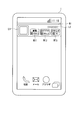
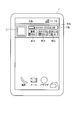
- FIG. 2 is a schematic diagram illustrating an example of display (vertical display) in the electronic terminal device 1 according to the present embodiment.
- an image denoted by reference symbol W1 is a widget W1.
- the widget W1 is displayed embedded in a page or screen.
- the widget W1 can be displayed even when a dedicated application (also referred to as an electronic book application) for the electronic book service is not activated, not displayed on the entire screen, or activated on the back.
- the widget refers to a simple application (a kind of application) displayed and operated on a part of the screen (top screen or home screen) displayed when the electronic terminal device 1 starts to be used.
- the widget displays information related to the electronic terminal device 1 or the application without activating the application itself, or provides a part of the functions of the electronic terminal device 1 or the application. Since the widget uses only a part of the screen, it is possible to immediately check various information by arranging a plurality of widgets on the screen. In addition, the widget can operate as a button for starting an application and does not consume much resources (memory, CPU, display, etc.) of the electronic terminal device 1, so that the standby screen of the electronic terminal device 1 can be used. It is suitable for displaying. On the widget W1, store logos L1 and L2 are displayed. The widget W1 is 4 ⁇ 1 in size.
- the number of unread electronic books is displayed for each group.
- an image W11 with a reference sign W11 represents that there are 100 or more unread electronic books in the electronic books belonging to the “book” group.
- An image W12 denoted by reference sign W12 represents that there are 100 or more unread electronic books in the electronic books belonging to the “recommended” group.
- the number W11 and W12 when the number of unread electronic books is smaller than 100, the number is displayed.
- An image W13 denoted by reference sign W13 indicates that there are “46” unread notice information items.
- An “unread” image is an image indicating that there is an unread electronic book.
- the electronic terminal device 1 displays an “unread” image or the number of unread electronic books regarding at least two or more groups in the area of the operation unit (touch panel) that starts the application. As described above, in this embodiment, even when the electronic book application is not activated, an “unread” image or the number of unread electronic books is displayed, so that the user can easily use the electronic book service.
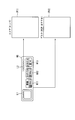
- FIG. 3 is a schematic diagram illustrating an example of a link of the widget W1 according to the present embodiment.
- This figure shows that when the logo L2 is selected (tapped, clicked), the electronic terminal device 1 displays the store page P11 (see FIG. 4). Further, this figure shows that when an area other than the logo L2 is selected, the electronic terminal device 1 displays a desk page P12 (see FIG. 5).
- the electronic terminal device 1 may display the store page P11.
- images W11, W12, and W13 are selected, a page related to the corresponding group may be displayed. For example, when the image W12 is selected, the electronic terminal device 1 may display a list of electronic books belonging to the “recommended” group on the store page or the desk page.
- the image W13 is selected, the electronic terminal device 1 may display a list of notification information as a store page, a desk page, or a list dedicated to notification.
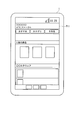
- FIG. 4 is a schematic diagram illustrating an example of the store page P11 according to the present embodiment. This figure shows a case where the electronic terminal device 1 starts a browser and displays a store page P11 downloaded from the store server 4 on the browser.
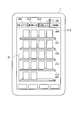
- FIG. 5 is a schematic diagram illustrating an example of the desk page P12 according to the present embodiment. This figure is a figure when the electronic terminal device 1 starts the electronic book application and displays the desk page P12. In FIG. 5, the electronic terminal device 1 does not display the widget W1. However, the present invention is not limited to this, and the widget W1 may be displayed over the desk page P12.
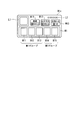
- images m11 to m14 denoted by reference numerals m11 to m14 are images used for selecting the groups “unread / recommended”, “recently read book”, “favorite”, and “subscription”, respectively.
- unread / recommended an electronic book purchased by a user or an unread electronic book distributed under a subscription contract is displayed in order, or an electronic book distributed free of charge from the store server 4 is displayed in order. Is done.
- “Recently read books” electronic books are displayed in order of reading start date and time.
- “Favorites” electronic books are displayed in the order in which the user registers them as favorites.
- “subscription” electronic books distributed in accordance with a subscription contract are sequentially displayed.
- a hatched image m13 is selected, and an image (thumbnail image) representing an electronic book belonging to the “favorite” group is displayed in a region R1 denoted by reference symbol R1.
- images of five-level book shelves s11 to s15 are displayed, and thumbnail images of electronic books are displayed as if books are placed on the bookshelves.
- a maximum of four thumbnail images of an electronic book are displayed on a single shelf and are displayed in a predetermined order.
- images and thumbnail images of the bookshelves s11 to s15 are displayed in the same manner.
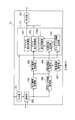
- FIG. 6 is a schematic block diagram showing the configuration of the electronic terminal device 1 according to this embodiment.
- an electronic terminal device 1 includes an input unit 101, a communication unit 102, an electronic book acquisition unit 103, an electronic book storage unit 104, a notification information acquisition unit 105, a management information storage unit 106, a management information update unit 107, a display control.
- the unit 11 and the display unit 121 are included.
- Each storage unit may be a storage capacity mounted on the main body or a storage device connected from the outside.
- the display control unit 11 includes a browser display control unit 111, a desk display control unit 112, an unread number generation unit 113, and a widget display control unit 114.
- the electronic terminal device 1 has a known function in the electronic terminal device (not shown) in addition to the above configuration.
- the input unit 101 receives input from a user.
- the input unit 101 outputs information corresponding to the received input to the communication unit 102, the management information update unit 107, and the display control unit 11.
- the input unit 101 is realized by a touch panel or operation buttons.
- the communication unit 102 communicates with the base station apparatus 2 based on information input from the input unit 101 or according to an instruction of a computer program.
- the communication unit 102 receives information from the store server 4 and outputs the information to each unit of the electronic terminal device 1. For example, the communication unit 102 receives a store page from the store server 4 and outputs the received store page to the browser display control unit 111.
- the electronic book acquisition unit 103 receives an electronic book and information on the electronic book from the store server 4 via the communication unit 102.
- the electronic book acquisition unit 103 stores the received electronic book (for example, the book ID and the content information of the electronic book) in the electronic book storage unit 104.
- the electronic book acquisition unit 103 stores the received information on the electronic book as book management information in the book management information table of the management information storage unit 104 (see FIGS. 7 and 8).
- the electronic book acquisition unit 103 allocates and stores book management information for each group (“book” and “recommendation”) indicated by the group information included in the information related to the electronic book.
- the notification information acquisition unit 105 receives the notification information distributed from the store server 4 via the communication unit 102.
- the notification information acquisition unit 105 stores the received notification information in the notification information table of the management information storage unit 106 (see FIG. 9).
- the management information update unit 107 updates the information stored in the management information update unit 107 based on the information input from the input unit 101. For example, when the user opens an electronic book, the management information update unit 107 writes the date and time in the reading start date and time corresponding to the book ID of the opened electronic book.
- the browser display control unit 111 generates store page display information based on the store page input from the communication unit 102.
- the browser display control unit 111 outputs the generated display information to the display unit 121.
- the desk display control unit 112 reads the information stored in the management information storage unit 104 and the electronic book stored in the electronic book storage unit 104 in accordance with the information input from the input unit 101.
- the desk display control unit 112 generates display information of the desk page based on the read information, and outputs the generated display information to the display unit 121.
- the unread number generation unit 113 calculates the number of unread books for each group and the number of unread notification information.
- the unread number generation unit 113 outputs information indicating the calculated unread number to the widget display control unit 114.
- the widget display control unit 114 generates display information of the widget W1.
- the widget W1 includes display information of the number of unread items indicated by the information input from the unread number generation unit 113.
- the widget display control unit 114 outputs the generated display information to the display unit 121.
- the display unit 121 displays the display information input from the browser display control unit 111, the desk display control unit 112, and the widget display control unit 114.
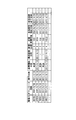
- FIG. 7 is a schematic diagram illustrating an example of a book management information table according to the present embodiment.
- This book management information table shows a book management information table related to electronic books in the “book” group.
- the “books” group of e-books are e-books subscribed to by users, such as those purchased by users (including serials, periodicals, and non-periodic publications) or free of charge. Included in the download.
- the book management information table includes a book ID, download date / time, subscription date / time, issue date / time, reading start date / time, last reading date / time, number of readings, reading accumulated time, effective period start date / time, effective period end date / time, subscription flag. Each item.
- the book management information table has book management information for each book ID.
- book ID is identification information of an electronic book.
- the download date and time is the date and time when the electronic terminal device 1 downloaded the electronic book with the book ID.
- the subscription date and time is the date and time when the user subscribes to the electronic book with the book ID.
- the subscription date and time for electronic books of serial publications, periodicals, and non-periodic publications is the publication date of each publication.
- the issue date and time is the issue date and time of the electronic book with the book ID.
- the issue date and time is information set by the book issuer and is included in the information related to the electronic book.
- the reading start date and time is the date and time when the user first opened the electronic book with the book ID. In the book management information of an electronic book that has not yet been opened, “unread” is written at the reference date.
- the last reading date and time is the date and time when the user last opened the electronic book with the book ID.
- the number of readings is the number of times the user has opened an electronic book with a book ID. Note that the number of readings may be one when the number of readings within a predetermined period is one or more. For example, when counting once a day, it is the number of days when the user opened an electronic book with a book ID.
- the cumulative reading time is the cumulative time during which the user has opened the electronic book with the book ID.
- the effective period start date and time and the effective period end date and time are the start date and the end date and time at which the electronic book with the book ID can be referenced, respectively. That is, the electronic terminal device 1 provides the user with the electronic book with the book ID only during the period between the effective period start date and time and the effective period end date and time.
- the subscription flag is information indicating whether or not the electronic book with the book ID is a periodical publication. In addition, information indicating that it is a periodic publication may be set for serial books and non-periodical electronic books.
- the book management information on the first line in FIG. 7 indicates that an electronic book with a book ID “12345” was issued to “2011/4/20” and purchased and downloaded by the user on the same day. .
- This book management information indicates that the electronic book whose book ID is “12345” is “unread”, that is, has not yet been opened and the reading start date has not been written.
- an electronic book whose book ID is “23456” is first opened on “2011/4/17”, and by “2011/4/19”, This indicates that the cumulative time “720 minutes” has been opened for a total of “4” times.
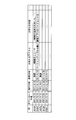
- FIG. 8 is a schematic diagram illustrating an example of another book management information table according to the present embodiment.
- This book management information table shows a book management information table related to electronic books in the “recommended” group.
- the “recommended” group of electronic books is an electronic book recommended to the user, and includes, for example, an electronic book set by a store manager or an electronic book provider, and an electronic book set by a computer program.
- the book management information table includes items of book ID, download date / time, issue date / time, reading start date / time, last reading date / time, number of readings, reading accumulated time, effective period start date / time, and effective period end date / time. Yes.
- the book management information table has book management information for each book ID.
- the contents of each item in FIG. 8 are the same as the items in FIG.
- the book management information on the first line in FIG. 8 indicates that an electronic book with a book ID “98765” was issued to “2011/4/18” and purchased and downloaded by the user on the same day. .
- This book management information indicates that the electronic book with the book ID “98765” is “unread”, that is, has not yet been opened and the reading start date has not been written.
- FIG. 9 is a schematic diagram illustrating an example of the notification information table according to the present embodiment.
- the notification information table has items of ID of notification information, download date / time, subscription date / time, issue date / time, reference date / time, notification title, and notification content.
- the value of each item of the notification information table in FIG. 9 is a schematic diagram illustrating an example of the notification information table according to the present embodiment.
- the notification information table has items of ID of notification information, download date / time, subscription date / time, issue date / time, reference date / time, notification title, and notification content.
- ID is identification information of notification information.
- the download date and time is the date and time when the ID notification information is downloaded to the electronic terminal device 1.
- the issue date is the issue date of the notification information.
- the reference date and time is the date and time when the electronic terminal device 1 first displays the notification content corresponding to the ID. It should be noted that “unread” is written at the reference date in the notification information for which the notification content is not yet displayed.
- the notice title is the title of the notice content.
- the notification title is used when displaying a list.
- the notification content is the content of the notification.
- the notification information on the first line in FIG. 9 indicates that the notification with the ID “abcde” was issued on “2011/4/18” and was purchased and downloaded by the user on the same day.
- This notification information indicates that the title is “A function release” and the content is “A function added ...”.
- This notification information indicates that the notification whose ID is “abcde” is “unread”, that is, it has not been opened yet and the reference date has not been written.
- FIG. 10 is a flowchart illustrating an example of the operation of the electronic terminal device 1 according to the present embodiment.
- the electronic terminal device 1 transmits information indicating that an electronic book is to be purchased to the store server 4 based on a user operation.
- the store server 4 stores the user ID, the book ID, and the subscription date in association with each other. Then, it progresses to step S102. If the user has a subscription contract, the electronic book to be automatically transmitted to the electronic terminal device 1 is determined by the processing of the store server 4 without the user performing a purchase operation of the electronic book.
- the electronic terminal device 1 transmits information indicating that an electronic book is downloaded to the store server 4 based on an input from the user.
- This information includes a user ID and a book ID.
- the store server 4 stores the electronic book of the book ID and the information about the electronic book as electronic information. It transmits to the terminal device 1.
- the information on the electronic book includes group information, the purchase date and time stored in step S101, the valid period start date and time, the valid period end date and time, and the subscription flag.
- the information transmitted from the electronic terminal book 1 may not include the book ID.
- the store server 4 manages electronic books to be transmitted for each user ID, and when there is a request from the electronic terminal device 1, information on the electronic book and the electronic book corresponding to the user ID is obtained. Send.
- the electronic book acquisition unit 103 of the electronic terminal device 1 stores the electronic book downloaded from the store server 4 in the electronic book storage unit 104.
- the electronic book acquisition unit 103 stores information related to the electronic book downloaded from the store server 4 in the book management information table of the group indicated by the group information included in this information.
- the electronic terminal device 1 may not have a book management information table for each group. In this case, information on books in different groups of electronic books is stored in a mixed state, and one item in the information has an item for identifying the group.
- the electronic book acquisition unit 103 writes the current time in the download date and time, and writes “unread” in the reading start date and time.
- the electronic book acquisition unit 103 writes “0” times as the number of readings and “0” s as the accumulated reading time. Thereafter, the process proceeds to step S103.
- Step S103 The desk display control unit 112 displays a desk page based on the input from the user and the electronic book application.
- the management information update unit 107 determines whether or not the user has started reading by determining whether or not the electronic book has been opened based on an input from the user. If it is determined that reading has started (YES), the process proceeds to step S104. On the other hand, if it is not determined that reading has started (NO), the process returns to step S103.
- Step S104 The management information updating unit 107 reads out the book management information of the electronic book determined to have started reading in step S103, and determines whether there is a reading start date and time of the read book management information. If there is a reading start date and time (YES), the process proceeds to step S106. On the other hand, when the reading start date / time is not written (the reading start date / time is “unread”) (NO), the process proceeds to step S105.
- Step S105 The management information update unit 107 writes the current time in the reading start date and time of the book management information read in step S104. Thereafter, the process proceeds to step S106.
- Step S106 The management information update unit 107 adds “1” times to the number of readings of the book management information read in step S104. Thereafter, the process proceeds to step S107.
- Step S107 The management information update unit 107 writes the current time for every elapse of a predetermined time (for example, 1 minute) in the final reading date and time of the book management information read in step S104. Thereafter, the process proceeds to step S108.
- Step S108 The management information update unit 107 adds the time to a cumulative reading time of the book management information read in step S104 every time a predetermined time (for example, 1 minute) has elapsed. Thereafter, the process proceeds to step S109. Note that the management information update unit 107 may not add to the accumulated reading time when an electronic book is not displayed (for example, when a standby screen is displayed or when another application is displayed).
- Step S109 The management information updating unit 107 determines whether or not reading of the electronic book has ended based on an input from the user. Specifically, the management information update unit 107 determines that reading of the electronic book has ended when the electronic book is closed or when the electronic book application is ended. When the reading of the electronic book is finished (YES), the electronic terminal device 1 finishes the operation. On the other hand, when the reading of the electronic book is not completed (NO), the process returns to step S107.
- FIG. 11 is a flowchart illustrating an example of the operation of the electronic terminal device 1 according to the present embodiment. This figure shows the operation when displaying a widget.
- Step S201 The electronic terminal device 1 is activated. Then, it progresses to step S201.
- Step S202 From the book management information table of the “book” group, the unread number generation unit 113 has a current time between the effective period start date and the effective period end date and the reading start date is not written. Count the number of book management information (unread count). The unread number generation unit 113 sets the counted unread number as the number of unread electronic books in the “book” group.
- the unread number generation unit 113 counts the number of book management information (number of unread items) in which the reading start date / time is not written from the book management information table of the “recommended” group. The unread number generation unit 113 sets the counted unread number as the number of unread electronic books in the “recommended” group. The unread number generation unit 113 counts the number of book management information (number of unread cases) in which the reading start date / time is not written from the notification information table. The unread number generation unit 113 sets the counted unread number as the number of “Notification” unread. Note that the management information update unit 107 may determine whether it is within the validity period, and delete the electronic book that has passed the validity period independently by another process.
- Step S205 The widget display control unit 114 displays the widget W1.
- the widget display control unit 114 displays the number of unread items calculated in step S202 (the number of unread items after the change when changed in step S204) for each group. Note that the widget display control unit 114 does not display the number of unread items and the “unread” images for the group whose number of unread items is “0”. For this reason, the user can easily distinguish from the case where one or more unreads exist only by looking at the widget. Thereafter, the process proceeds to step S206.
- Step S206 The unread number generation unit 113 determines whether or not information (record) has been added to the table of the management information storage unit 106. If it is determined that information has been added to the table (YES), the process returns to step S202. That is, the electronic terminal device 1 updates the number of unread items when, for example, downloading of a book is completed, or when downloading of a periodicals or recommended information is completed. Thereby, the electronic terminal device 1 can display the latest number of unread items. On the other hand, if it is determined that no information is added to the table (NO), the process proceeds to step S207.
- Step S207 The unread number generation unit 113 determines whether the reading start date or the reference date in the table of the management information storage unit 106 has been updated. When it is determined that the reading start date or the reference date has been updated (YES), the process returns to step S202. That is, the electronic terminal device 1 updates the number of unread cases when, for example, an electronic book is opened. Specifically, after displaying the contents of an unread electronic book with a viewer (opening the electronic book) and then transitioning to the OS screen, the number of unread books is reduced by one. Thereby, the electronic terminal device 1 can display the latest number of unread items. On the other hand, if it is determined that the reading start date or the reference date has not been updated (NO), the process proceeds to step S208.
- Step S208 The unread number generation unit 113 determines whether or not a predetermined period has elapsed since the previous step S208. If it is determined that the predetermined period has elapsed (YES), the process returns to step S202. That is, for example, the electronic terminal device 1 updates the number of unread cases every time a predetermined period elapses. Thereby, the electronic terminal device 1 can exclude, for example, an electronic book whose valid period end date has passed without being read from the number of unread items. Therefore, the electronic terminal device 1 can display the latest number of unread items. On the other hand, if it is determined that the predetermined period has not elapsed (NO), the process proceeds to step S209. (Step S209) When the electronic terminal device 1 is switched off (YES), the operation is terminated. On the other hand, when the electronic terminal device 1 is not switched off (NO), the process returns to step S206.
- the display unit 121 displays an unread electronic book when an application (electronic book application) that displays the contents of the electronic book is not activated or is not displayed on the entire screen. Displays information indicating that there is Thereby, the electronic terminal device 1 can make a user use an electronic book service simply. According to the present embodiment, the display unit 121 displays the number of unread items. Thereby, the electronic terminal device 1 can inform the user of the number of unread items, and can prompt the user to read the electronic book.
- an application electronic book application
- the display unit 121 displays information indicating that it is equal to or larger than this value when the number of unread messages is larger than a predetermined value. Thereby, the electronic terminal device 1 can inform the user of the number of unread items without increasing the display area. Also, the number of unread messages becomes enormous, and it is possible to prevent the user from ignoring the number of unread messages and feeling stressed about the number of unread messages. According to the present embodiment, the display unit 121 displays the number of unread electronic books belonging to a group for each predetermined group. Thereby, the electronic terminal device 1 can inform the user of the number of unread items for each group.
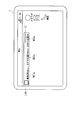
- FIG. 12 is a schematic diagram illustrating another example of display (horizontal display) in the electronic terminal device 1 according to the present embodiment.
- This figure shows an example of a display when the electronic terminal device 1 of FIG. 2 is rotated 90 degrees.
- the widget W1a is shorter in the vertical direction and longer in the horizontal direction than the widget 1.
- the group name and the number of unread messages are displayed on the same line (displayed on different lines in FIG. 2).
- the electronic terminal device 1 displays the widget W1a having a short vertical length by displaying the group name and the number of unread messages on the same line.
- the user can use the area in the vertical direction of the screen in an area other than the widget W1a without being pressed.
- FIG. 13 is a schematic diagram illustrating an example of display in the electronic terminal device 1 according to the first modification of the present embodiment. 13 is different from the widget W1 in FIG. 2 in that the widget W1b has a telop display portion T1b.
- the telop display unit T1b displays a character string such as an advertisement distributed from the store server 4. This character string has a predetermined number of characters (for example, 200 characters) or less and is displayed in a loop in the telop display portion T1b.
- the electronic terminal device 1 displays the telop display unit T1b. Instead, the widget W1 of FIG. 2 may be displayed.
- a logo L2b is displayed on the telop display portion T1b. When the logo L2b is selected, the electronic terminal device 1 displays the store page P11.
- FIG. 14 is a schematic diagram illustrating an example of display in the electronic terminal device 1 according to the second embodiment of the present invention. Comparing the widget W1c of FIG. 14 with the widget W1 of FIG. 2, the difference is that the widget W1c has a thumbnail image display portion B1. In the thumbnail image display section B1, thumbnail images B11 to B15 of electronic books are displayed in this order.
- the thumbnail image displayed on the thumbnail image display unit B1 is a thumbnail image of an unread electronic book. When there are five or more thumbnail images, the thumbnail images can be scrolled in the thumbnail image display section B1.
- the widget W1 is 4 ⁇ 2 in size.
- FIG. 15 is a schematic block diagram showing the configuration of the electronic terminal device 1c according to the present embodiment.
- an electronic terminal device 1c includes an input unit 101, a communication unit 102, an electronic book acquisition unit 103, an electronic book storage unit 104, a notification information acquisition unit 105, a management information storage unit 106, a management information update unit 107, a display control.
- the unit 11 c and the display unit 121 are included.
- the electronic terminal device 1c (FIG. 15) is compared with the electronic terminal device 1 (FIG. 6), the electronic terminal device 1c is different in that it includes a thumbnail image generation unit 115c.
- the thumbnail image generation unit 115c arranges the thumbnail images and generates display information for displaying the thumbnail images in the arranged order. Specifically, the thumbnail image generation unit 115c arranges the thumbnail images in one of the following orders or a combination of the following orders. (1) Order displayed on the desk page or store page (2) Download date / time, issue date / time, purchase date / time (3) Group information order
- the management information storage unit 106 stores display order information in which the book ID is associated with the display order in the display order table.
- the desk display control unit 112 stores display order information indicating the display order when the list (second list) is displayed on the desk page in the display order table.
- the electronic book acquisition unit 103 and the notification information acquisition unit 105 store display order information indicating the display order when displaying the list (second list) on the store page in the display order table.
- the thumbnail image generation unit 115c arranges thumbnail images of unread electronic books based on information stored in the management information storage unit 106. In other words, the thumbnail image generation unit 115c arranges thumbnail images of unread electronic books according to the order displayed on the bookshelf displayed on the desk page or the store page.
- the thumbnail image generation unit 115c based on the information stored in the management information storage unit 106, thumbnails of unread electronic books in the new order of download date / time, issue date / time, and purchase date / time. Align images.
- the present invention is not limited to this, and the thumbnail image generation unit 115c may arrange the download date / time, issue date / time, and purchase date / time in the oldest order.
- the thumbnail image generating unit 115c arranges thumbnail images of unread electronic books in a predetermined group order based on information stored in the management information storage unit 106.
- the order of the groups may be “book” and “recommended”, or “recommended” and “book”.
- “book” refers to an electronic book purchased by a user or an electronic book acquired through a subscription contract
- “recommended” refers to an electronic book transmitted free of charge from the store server 4.
- the way of dividing is not limited to this.
- the thumbnail image generation unit 115c may determine the order of the groups according to the usage history of the user as in the following (a) to (c).
- the thumbnail image generation unit 115c determines the order of groups so that a group including an electronic book with a new download date / time (or may be an issue date / time or purchase date / time) is given priority. May be.
- the thumbnail image generation unit 115c is the first “book” group including the electronic book (book ID “12345”) with the latest download date “2011/4/20”.
- the “recommended” group including the new “2011/4/18” electronic book is set in the second order.
- the thumbnail image generation unit 115c may determine the order of groups so that a group with a large number of unread items is prioritized. Thereby, the opportunity for a user to refer to the electronic book of a group with many unread cases can be increased.
- the present invention is not limited to this, and the thumbnail image generation unit 115c may determine the order of groups so that priority is given to a group with a small number of unread items. Thereby, it is possible to make it easy for the user to refer to the electronic book of a group with a small number of unread items, that is, a group often used by the user.
- the thumbnail image generation unit 115c may determine the order of the groups based on the number of books instead of the number of unread cases. That is, the thumbnail image generation unit 115c may determine the order of the groups based on the total number of unread and read electronic books.
- the thumbnail image generating unit 115c may determine the order of groups so that a group with a large total number of reading counts or reading cumulative time is prioritized.
- the present invention is not limited to this, and the thumbnail image generation unit 115c may determine the order of the groups so that priority is given to a group with a small total number of readings or total reading time.
- FIG. 16 is a flowchart showing an example of the operation of the electronic terminal device 1c according to the present embodiment. Comparing the operation of the electronic terminal device 1c (FIG. 16) and the operation of the electronic terminal device 1 (FIG. 11), the operation of the electronic terminal device 1c is different in that it includes steps S310 and S305.
- Step S310 The thumbnail image generation unit 115c arranges the thumbnail images in the order of (1) to (3) described above. Note that the thumbnail image generation unit 115c sets the current time between the effective period start date and time and the effective period end date and time to be aligned. Thereafter, the process proceeds to step S305. (Step S305) The widget display control unit 114 displays the widget W1c.
- the display unit 121 displays a list (first list) of thumbnail images representing unread electronic books.
- the electronic terminal device 1 can display the thumbnail image of the unread electronic book for the user, and can easily use the electronic book service.
- the display control unit 11c determines the display order of images on the thumbnail image display unit B1 based on the display order of the list on the desk page or the store page. To do. Thereby, even when the desk page or the store page changes, the electronic terminal device 1 can display the image list in the same order as the thumbnail images displayed on the widget W1c. Thereby, the electronic terminal device 1 can provide a smooth service to the user.
- the electronic terminal device 1 can prevent the electronic book of the thumbnail image displayed on the widget W1c from being displayed on the desk page or the list of the store page and preventing the user from using the service smoothly.
- the display control unit 11c determines the display order of images on the thumbnail image display unit B1 based on the group to which the electronic book belongs.
- the display unit 121 displays a list of thumbnail images in the display order determined by the display control unit 11c. Thereby, for example, the electronic terminal device 1 can preferentially display a list of thumbnail images of a group having a high priority.
- the electronic terminal device 1c may allocate the display area of the thumbnail image display unit B1 for each group.
- FIG. 17 is a schematic diagram illustrating an example of display on the electronic terminal device 1c according to the second modification of the present embodiment.
- the display areas of the thumbnail images B11 to B13 are assigned to the first group.
- the display areas for the thumbnail images B14 and B15 are assigned to the second group.
- the first group is a “book” group
- the second group is a “recommended” group.
- the thumbnail image generation unit 115c extracts thumbnail images of unread electronic books for each group and arranged in the display order.
- the thumbnail image generation unit 115c selects thumbnail images in the arrangement order by a predetermined number for each group.
- the thumbnail image generation unit 115c generates display information for displaying the selected thumbnail image in a predetermined display area.
- the thumbnail image generation unit 115c as shown in (d) to (f) below, according to the usage history of the user, the order in the display area and the size of the display area (vertical width, horizontal width, ratio, etc.) ) May be determined.
- the thumbnail image generation unit 115c has a group order or display area so that priority is given to a group including an electronic book with a new download date / time (or issue date / time or purchase date / time). May be determined.
- the thumbnail image generation unit 115c displays the thumbnail images of the electronic books belonging to the “book” group first from the left, and the display area of three thumbnail images.
- the thumbnail image generation unit 115c displays the thumbnail image of the electronic book belonging to the “recommended” group second from the left, and also displays two thumbnail images. That is, the thumbnail image generation unit 115c displays the thumbnail image of the electronic book belonging to the priority group in a larger area on the left side.
- the thumbnail image generation unit 115c may determine the order of groups or the size of the display area so that priority is given to a group having a large number of unread items. However, the present invention is not limited to this, and the thumbnail image generation unit 115c may determine the order of the groups or the size of the display area so that priority is given to a group with a small number of unread items.
- (F) Order of the number of readings or the cumulative reading time For example, the thumbnail image generation unit 115c determines the order of the groups or the size of the display area so as to give priority to a group having a large total value of the number of readings or the cumulative reading time. May be. However, the present invention is not limited to this, and the thumbnail image generation unit 115c may determine the order of the groups or the size of the display area so that priority is given to a group with a small number of readings or total reading time. .
- the display control unit 11c determines the image display area on the thumbnail image display unit B1 based on the group to which the electronic book belongs.
- the display unit 121 displays a list of thumbnail images in the display order determined by the display control unit 11c.
- the electronic terminal device 1 can preferentially display a list of thumbnail images of a group having a high priority.
- the electronic terminal device 1 can allocate a display area to a group with a low priority, for example, and can increase the number of groups to be displayed.
- the program for realizing the control function may be recorded on a computer-readable recording medium, and the program recorded on the recording medium may be read by a computer system and executed.
- the “computer system” here is a computer system built in the display devices 1 and 1c, and includes an OS and hardware such as peripheral devices.
- the “computer-readable recording medium” refers to a storage device such as a flexible medium, a magneto-optical disk, a portable medium such as a ROM or a CD-ROM, and a hard disk incorporated in a computer system.
- the “computer-readable recording medium” is a medium that dynamically holds a program for a short time, such as a communication line when transmitting a program via a network such as the Internet or a communication line such as a telephone line,
- a volatile memory inside a computer system serving as a server or a client may be included and a program that holds a program for a certain period of time.
- the program may be a program for realizing a part of the functions described above, and may be a program capable of realizing the functions described above in combination with a program already recorded in a computer system.
- LSI Large Scale Integration
- Each functional block of the display devices 1 and 1c may be individually made into a processor, or a part or all of them may be integrated into a processor.
- the method of circuit integration is not limited to LSI, and may be realized by a dedicated circuit or a general-purpose processor. Further, in the case where an integrated circuit technology that replaces LSI appears due to progress in semiconductor technology, an integrated circuit based on the technology may be used.
- the present invention can be applied to a mobile phone, an electronic book device, and the like.
Landscapes
- Engineering & Computer Science (AREA)
- Business, Economics & Management (AREA)
- Theoretical Computer Science (AREA)
- Entrepreneurship & Innovation (AREA)
- Human Resources & Organizations (AREA)
- Strategic Management (AREA)
- Physics & Mathematics (AREA)
- General Physics & Mathematics (AREA)
- General Engineering & Computer Science (AREA)
- Quality & Reliability (AREA)
- Tourism & Hospitality (AREA)
- Operations Research (AREA)
- General Business, Economics & Management (AREA)
- Marketing (AREA)
- Economics (AREA)
- Data Mining & Analysis (AREA)
- Human Computer Interaction (AREA)
- User Interface Of Digital Computer (AREA)
- Information Transfer Between Computers (AREA)
- Information Retrieval, Db Structures And Fs Structures Therefor (AREA)
Abstract
Priority Applications (3)
| Application Number | Priority Date | Filing Date | Title |
|---|---|---|---|
| CN2012800186828A CN103477315A (zh) | 2011-04-26 | 2012-04-18 | 显示装置、显示方法、显示程序以及处理器 |
| US14/113,536 US9495077B2 (en) | 2011-04-26 | 2012-04-18 | Display device, display method, and non-transitory computer-readable recording medium |
| JP2013512027A JP5507757B2 (ja) | 2011-04-26 | 2012-04-18 | 表示装置、表示方法、表示プログラム、及びプロセッサ |
Applications Claiming Priority (2)
| Application Number | Priority Date | Filing Date | Title |
|---|---|---|---|
| JP2011-098438 | 2011-04-26 | ||
| JP2011098438 | 2011-04-26 |
Publications (1)
| Publication Number | Publication Date |
|---|---|
| WO2012147579A1 true WO2012147579A1 (fr) | 2012-11-01 |
Family
ID=47072100
Family Applications (1)
| Application Number | Title | Priority Date | Filing Date |
|---|---|---|---|
| PCT/JP2012/060434 Ceased WO2012147579A1 (fr) | 2011-04-26 | 2012-04-18 | Dispositif, procédé, programme et processeur d'affichage |
Country Status (4)
| Country | Link |
|---|---|
| US (1) | US9495077B2 (fr) |
| JP (1) | JP5507757B2 (fr) |
| CN (1) | CN103477315A (fr) |
| WO (1) | WO2012147579A1 (fr) |
Cited By (5)
| Publication number | Priority date | Publication date | Assignee | Title |
|---|---|---|---|---|
| JP2014149832A (ja) * | 2013-01-31 | 2014-08-21 | Samsung Electronics Co Ltd | 客体表示方法、客体提供方法及びそのためのシステム |
| JP2015060514A (ja) * | 2013-09-20 | 2015-03-30 | シャープ株式会社 | 処理装置、処理方法、および処理プログラム |
| JP2015169943A (ja) * | 2014-03-04 | 2015-09-28 | 株式会社ニコン | 電子コンテンツ出力装置および電子コンテンツ出力プログラム |
| JP2020034991A (ja) * | 2018-08-27 | 2020-03-05 | オムロン株式会社 | 入力デバイス、携帯端末、入力デバイス制御方法、および入力デバイス制御プログラム |
| CN114925285A (zh) * | 2022-06-30 | 2022-08-19 | 抖音视界(北京)有限公司 | 书籍信息处理方法、装置、设备和存储介质 |
Families Citing this family (11)
| Publication number | Priority date | Publication date | Assignee | Title |
|---|---|---|---|---|
| US9229613B2 (en) * | 2012-02-01 | 2016-01-05 | Facebook, Inc. | Transitions among hierarchical user interface components |
| USD744494S1 (en) * | 2012-03-06 | 2015-12-01 | Apple Inc. | Display screen or portion thereof with graphical user interface |
| USD708638S1 (en) | 2012-03-07 | 2014-07-08 | Apple Inc. | Display screen or portion thereof with graphical user interface |
| AU349475S (en) * | 2013-01-18 | 2013-06-27 | Samsung Electronics Co Ltd | Electric oven with image display |
| JP5942978B2 (ja) * | 2013-12-26 | 2016-06-29 | ソニー株式会社 | 情報処理装置、情報処理方法およびプログラム |
| JP6533085B2 (ja) | 2015-03-31 | 2019-06-19 | Line株式会社 | 端末、情報処理方法、及びプログラム |
| US10078424B2 (en) * | 2015-11-12 | 2018-09-18 | International Business Machines Corporation | Recognition and display of reading progress |
| CN110633036A (zh) * | 2018-06-22 | 2019-12-31 | 中兴通讯股份有限公司 | 图片浏览方法、装置及移动终端、计算机可读存储介质 |
| USD937846S1 (en) * | 2018-08-31 | 2021-12-07 | Mitsubishi Electric Corporation | Display screen with graphical user interface |
| JP1632789S (ja) * | 2018-08-31 | 2019-06-03 | 車両設備稼動状態管理機能付き電子計算機 | |
| CN115757255A (zh) * | 2022-11-23 | 2023-03-07 | 北京字跳网络技术有限公司 | 一种书籍信息展示方法及装置 |
Citations (3)
| Publication number | Priority date | Publication date | Assignee | Title |
|---|---|---|---|---|
| JP2003150618A (ja) * | 2001-11-13 | 2003-05-23 | Sony Corp | コンテンツ検索提示システム、コンテンツ検索提示装置、コンテンツ検索提示方法、コンテンツ検索提示プログラム及びコンテンツ検索提示プログラム格納媒体 |
| JP2003298715A (ja) * | 2002-04-01 | 2003-10-17 | Nec Saitama Ltd | 携帯端末における機能呼出方法及び該方法を用いる携帯端末 |
| JP2007129506A (ja) * | 2005-11-04 | 2007-05-24 | Hitachi Advanced Digital Inc | 移動体通信機における着信履歴表示方式 |
Family Cites Families (17)
| Publication number | Priority date | Publication date | Assignee | Title |
|---|---|---|---|---|
| US5697793A (en) * | 1995-12-14 | 1997-12-16 | Motorola, Inc. | Electronic book and method of displaying at least one reading metric therefor |
| AU2001271763A1 (en) * | 2000-06-30 | 2002-01-14 | Zinio Systems, Inc. | System and method for encrypting, distributing and viewing electronic documents |
| US6640655B1 (en) | 2000-10-03 | 2003-11-04 | Varco I/P, Inc. | Self tracking sensor suspension mechanism |
| US6725228B1 (en) * | 2000-10-31 | 2004-04-20 | David Morley Clark | System for managing and organizing stored electronic messages |
| JP2004139440A (ja) * | 2002-10-18 | 2004-05-13 | Matsushita Electric Ind Co Ltd | サービス提供システム及び、それに関する、装置または方法または記録媒体またはプログラム |
| US9100218B2 (en) * | 2002-11-18 | 2015-08-04 | Aol Inc. | Enhanced buddy list interface |
| US7669140B2 (en) * | 2003-08-21 | 2010-02-23 | Microsoft Corporation | System and method for providing rich minimized applications |
| EP1672884B1 (fr) * | 2004-12-20 | 2017-01-04 | Samsung Electronics Co., Ltd. | Dispositif et procédé fournissant assistance pour un utilisateur d'un terminal sans fil en utilisant une figure virtuelle |
| JP4405939B2 (ja) * | 2005-05-18 | 2010-01-27 | キヤノン株式会社 | 画像処理装置とその制御方法および画像処理システム |
| JP4697491B2 (ja) * | 2006-03-31 | 2011-06-08 | 日本電気株式会社 | ウェブコンテンツ閲覧情報表示装置、方法、プログラム |
| JP4860754B2 (ja) * | 2007-05-08 | 2012-01-25 | シャープ株式会社 | 通信端末装置 |
| JP4457318B2 (ja) * | 2007-07-17 | 2010-04-28 | ソニー株式会社 | 携帯情報端末 |
| JP2009135715A (ja) | 2007-11-29 | 2009-06-18 | Sharp Corp | コンテンツ起動携帯端末装置 |
| JP4702434B2 (ja) * | 2008-11-14 | 2011-06-15 | ブラザー工業株式会社 | 通信装置および制御プログラム |
| JP5872753B2 (ja) * | 2009-05-01 | 2016-03-01 | ソニー株式会社 | サーバ装置、電子機器、電子書籍提供システム、サーバ装置の電子書籍提供方法、電子機器の電子書籍表示方法及びプログラム |
| US20120303418A1 (en) * | 2011-05-23 | 2012-11-29 | Illan Poreh | Dynamic pricing of access to content where pricing varies with user behavior over time to optimize total revenue and users are matched to specific content of interest |
| WO2013108119A1 (fr) * | 2012-01-18 | 2013-07-25 | Yoav Lorch | Systèmes et procédés d'achat progressif et de gestion de contenus |
-
2012
- 2012-04-18 WO PCT/JP2012/060434 patent/WO2012147579A1/fr not_active Ceased
- 2012-04-18 CN CN2012800186828A patent/CN103477315A/zh active Pending
- 2012-04-18 JP JP2013512027A patent/JP5507757B2/ja active Active
- 2012-04-18 US US14/113,536 patent/US9495077B2/en not_active Expired - Fee Related
Patent Citations (3)
| Publication number | Priority date | Publication date | Assignee | Title |
|---|---|---|---|---|
| JP2003150618A (ja) * | 2001-11-13 | 2003-05-23 | Sony Corp | コンテンツ検索提示システム、コンテンツ検索提示装置、コンテンツ検索提示方法、コンテンツ検索提示プログラム及びコンテンツ検索提示プログラム格納媒体 |
| JP2003298715A (ja) * | 2002-04-01 | 2003-10-17 | Nec Saitama Ltd | 携帯端末における機能呼出方法及び該方法を用いる携帯端末 |
| JP2007129506A (ja) * | 2005-11-04 | 2007-05-24 | Hitachi Advanced Digital Inc | 移動体通信機における着信履歴表示方式 |
Cited By (7)
| Publication number | Priority date | Publication date | Assignee | Title |
|---|---|---|---|---|
| JP2014149832A (ja) * | 2013-01-31 | 2014-08-21 | Samsung Electronics Co Ltd | 客体表示方法、客体提供方法及びそのためのシステム |
| US10165061B2 (en) | 2013-01-31 | 2018-12-25 | Samsung Electronics Co., Ltd. | Method and system for displaying object, and method and system for providing the object |
| US10819807B2 (en) | 2013-01-31 | 2020-10-27 | Samsung Electronics Co., Ltd. | Method and system for displaying object, and method and system for providing the object |
| JP2015060514A (ja) * | 2013-09-20 | 2015-03-30 | シャープ株式会社 | 処理装置、処理方法、および処理プログラム |
| JP2015169943A (ja) * | 2014-03-04 | 2015-09-28 | 株式会社ニコン | 電子コンテンツ出力装置および電子コンテンツ出力プログラム |
| JP2020034991A (ja) * | 2018-08-27 | 2020-03-05 | オムロン株式会社 | 入力デバイス、携帯端末、入力デバイス制御方法、および入力デバイス制御プログラム |
| CN114925285A (zh) * | 2022-06-30 | 2022-08-19 | 抖音视界(北京)有限公司 | 书籍信息处理方法、装置、设备和存储介质 |
Also Published As
| Publication number | Publication date |
|---|---|
| CN103477315A (zh) | 2013-12-25 |
| US9495077B2 (en) | 2016-11-15 |
| JP5507757B2 (ja) | 2014-05-28 |
| US20140096079A1 (en) | 2014-04-03 |
| JPWO2012147579A1 (ja) | 2014-07-28 |
Similar Documents
| Publication | Publication Date | Title |
|---|---|---|
| JP5507757B2 (ja) | 表示装置、表示方法、表示プログラム、及びプロセッサ | |
| KR101215175B1 (ko) | 다중 대기화면 제공 시스템 및 방법 | |
| US8949739B2 (en) | Creating and maintaining images of browsed documents | |
| US8775935B2 (en) | Personification of software agents | |
| EP2568372A1 (fr) | Dispositif électronique et procédé pour faire fonctionner des programmes d'application | |
| US20120260202A1 (en) | Customized launching of applications | |
| AU2014408285A1 (en) | Device, method, and graphical user interface for presenting and installing applications | |
| EP2375685A2 (fr) | Procédé et système permettant de fournir un service de stockage d'applications | |
| JP2011159077A (ja) | 携帯端末装置 | |
| JP2009540415A (ja) | 端末への情報の自動配信を提供するための方法、装置、およびコンピュータプログラム | |
| WO2011046846A2 (fr) | Acheminement de saisies de données d'utilisateur vers des applications | |
| JPWO2016121552A1 (ja) | 情報処理装置及びプログラム | |
| US9946427B1 (en) | Dynamic home screen | |
| JP6401726B2 (ja) | 情報処理装置、情報処理方法、及びプログラム | |
| JP6126189B1 (ja) | 表示制御方法、端末、情報処理装置、及びプログラム | |
| JP4704286B2 (ja) | コンテンツ表示装置、コンテンツ表示方法、プログラム、および記録媒体 | |
| JP2012238114A (ja) | 興味推定装置、方法及びプログラム | |
| JP2012103868A (ja) | 情報処理装置、情報処理方法およびプログラム | |
| KR100635556B1 (ko) | 휴대 단말기의 고객 맞춤형 사용자 인터페이스 제공 방법 | |
| US20190347145A1 (en) | Enhanced notifications | |
| JP5855059B2 (ja) | アプリケーション販促装置、アプリケーション販促システム、アプリケーション販促方法、及びアプリケーション販促プログラム | |
| JP2012053284A (ja) | コンテンツ表示装置、サーバ装置、広告情報配信システム、コンテンツ表示装置の制御方法、コンテンツ表示装置制御プログラムおよび該プログラムを記録したコンピュータ読み取り可能な記録媒体 | |
| JP6282859B2 (ja) | スケジュール管理システムおよびスケジュール管理用プログラム | |
| JP7391789B2 (ja) | 情報処理システム、方法、及びプログラム | |
| HARRIS | Software Development Aspects of a Mobile Food Ordering System |
Legal Events
| Date | Code | Title | Description |
|---|---|---|---|
| 121 | Ep: the epo has been informed by wipo that ep was designated in this application |
Ref document number: 12776278 Country of ref document: EP Kind code of ref document: A1 |
|
| ENP | Entry into the national phase |
Ref document number: 2013512027 Country of ref document: JP Kind code of ref document: A |
|
| WWE | Wipo information: entry into national phase |
Ref document number: 14113536 Country of ref document: US |
|
| NENP | Non-entry into the national phase |
Ref country code: DE |
|
| 122 | Ep: pct application non-entry in european phase |
Ref document number: 12776278 Country of ref document: EP Kind code of ref document: A1 |