WO2017221525A1 - 情報処理装置、情報処理方法及びコンピュータプログラム - Google Patents
情報処理装置、情報処理方法及びコンピュータプログラム Download PDFInfo
- Publication number
- WO2017221525A1 WO2017221525A1 PCT/JP2017/014979 JP2017014979W WO2017221525A1 WO 2017221525 A1 WO2017221525 A1 WO 2017221525A1 JP 2017014979 W JP2017014979 W JP 2017014979W WO 2017221525 A1 WO2017221525 A1 WO 2017221525A1
- Authority
- WO
- WIPO (PCT)
- Prior art keywords
- user
- information
- stimulus
- processing apparatus
- content
- Prior art date
- Legal status (The legal status is an assumption and is not a legal conclusion. Google has not performed a legal analysis and makes no representation as to the accuracy of the status listed.)
- Ceased
Links
Images






Classifications
-
- G—PHYSICS
- G09—EDUCATION; CRYPTOGRAPHY; DISPLAY; ADVERTISING; SEALS
- G09B—EDUCATIONAL OR DEMONSTRATION APPLIANCES; APPLIANCES FOR TEACHING, OR COMMUNICATING WITH, THE BLIND, DEAF OR MUTE; MODELS; PLANETARIA; GLOBES; MAPS; DIAGRAMS
- G09B19/00—Teaching not covered by other main groups of this subclass
-
- G—PHYSICS
- G09—EDUCATION; CRYPTOGRAPHY; DISPLAY; ADVERTISING; SEALS
- G09B—EDUCATIONAL OR DEMONSTRATION APPLIANCES; APPLIANCES FOR TEACHING, OR COMMUNICATING WITH, THE BLIND, DEAF OR MUTE; MODELS; PLANETARIA; GLOBES; MAPS; DIAGRAMS
- G09B5/00—Electrically-operated educational appliances
- G09B5/06—Electrically-operated educational appliances with both visual and audible presentation of the material to be studied
-
- A—HUMAN NECESSITIES
- A61—MEDICAL OR VETERINARY SCIENCE; HYGIENE
- A61B—DIAGNOSIS; SURGERY; IDENTIFICATION
- A61B5/00—Measuring for diagnostic purposes; Identification of persons
-
- A—HUMAN NECESSITIES
- A61—MEDICAL OR VETERINARY SCIENCE; HYGIENE
- A61B—DIAGNOSIS; SURGERY; IDENTIFICATION
- A61B5/00—Measuring for diagnostic purposes; Identification of persons
- A61B5/02—Detecting, measuring or recording for evaluating the cardiovascular system, e.g. pulse, heart rate, blood pressure or blood flow
- A61B5/021—Measuring pressure in heart or blood vessels
-
- A—HUMAN NECESSITIES
- A61—MEDICAL OR VETERINARY SCIENCE; HYGIENE
- A61B—DIAGNOSIS; SURGERY; IDENTIFICATION
- A61B5/00—Measuring for diagnostic purposes; Identification of persons
- A61B5/02—Detecting, measuring or recording for evaluating the cardiovascular system, e.g. pulse, heart rate, blood pressure or blood flow
- A61B5/024—Measuring pulse rate or heart rate
-
- A—HUMAN NECESSITIES
- A61—MEDICAL OR VETERINARY SCIENCE; HYGIENE
- A61B—DIAGNOSIS; SURGERY; IDENTIFICATION
- A61B5/00—Measuring for diagnostic purposes; Identification of persons
- A61B5/08—Measuring devices for evaluating the respiratory organs
- A61B5/0816—Measuring devices for examining respiratory frequency
-
- A—HUMAN NECESSITIES
- A61—MEDICAL OR VETERINARY SCIENCE; HYGIENE
- A61B—DIAGNOSIS; SURGERY; IDENTIFICATION
- A61B5/00—Measuring for diagnostic purposes; Identification of persons
- A61B5/103—Measuring devices for testing the shape, pattern, colour, size or movement of the body or parts thereof, for diagnostic purposes
- A61B5/11—Measuring movement of the entire body or parts thereof, e.g. head or hand tremor or mobility of a limb
- A61B5/1104—Measuring movement of the entire body or parts thereof, e.g. head or hand tremor or mobility of a limb induced by stimuli or drugs
-
- A—HUMAN NECESSITIES
- A61—MEDICAL OR VETERINARY SCIENCE; HYGIENE
- A61B—DIAGNOSIS; SURGERY; IDENTIFICATION
- A61B5/00—Measuring for diagnostic purposes; Identification of persons
- A61B5/16—Devices for psychotechnics; Testing reaction times ; Devices for evaluating the psychological state
- A61B5/163—Devices for psychotechnics; Testing reaction times ; Devices for evaluating the psychological state by tracking eye movement, gaze, or pupil change
-
- A—HUMAN NECESSITIES
- A61—MEDICAL OR VETERINARY SCIENCE; HYGIENE
- A61B—DIAGNOSIS; SURGERY; IDENTIFICATION
- A61B5/00—Measuring for diagnostic purposes; Identification of persons
- A61B5/42—Detecting, measuring or recording for evaluating the gastrointestinal, the endocrine or the exocrine systems
- A61B5/4261—Evaluating exocrine secretion production
- A61B5/4266—Evaluating exocrine secretion production sweat secretion
-
- A—HUMAN NECESSITIES
- A61—MEDICAL OR VETERINARY SCIENCE; HYGIENE
- A61B—DIAGNOSIS; SURGERY; IDENTIFICATION
- A61B5/00—Measuring for diagnostic purposes; Identification of persons
- A61B5/48—Other medical applications
- A61B5/4803—Speech analysis specially adapted for diagnostic purposes
-
- A—HUMAN NECESSITIES
- A63—SPORTS; GAMES; AMUSEMENTS
- A63H—TOYS, e.g. TOPS, DOLLS, HOOPS OR BUILDING BLOCKS
- A63H33/00—Other toys
- A63H33/38—Picture books with additional toy effects, e.g. pop-up or slide displays
-
- G—PHYSICS
- G06—COMPUTING OR CALCULATING; COUNTING
- G06F—ELECTRIC DIGITAL DATA PROCESSING
- G06F3/00—Input arrangements for transferring data to be processed into a form capable of being handled by the computer; Output arrangements for transferring data from processing unit to output unit, e.g. interface arrangements
- G06F3/01—Input arrangements or combined input and output arrangements for interaction between user and computer
-
- G—PHYSICS
- G09—EDUCATION; CRYPTOGRAPHY; DISPLAY; ADVERTISING; SEALS
- G09B—EDUCATIONAL OR DEMONSTRATION APPLIANCES; APPLIANCES FOR TEACHING, OR COMMUNICATING WITH, THE BLIND, DEAF OR MUTE; MODELS; PLANETARIA; GLOBES; MAPS; DIAGRAMS
- G09B7/00—Electrically-operated teaching apparatus or devices working with questions and answers
- G09B7/02—Electrically-operated teaching apparatus or devices working with questions and answers of the type wherein the student is expected to construct an answer to the question which is presented or wherein the machine gives an answer to the question presented by a student
-
- G—PHYSICS
- G09—EDUCATION; CRYPTOGRAPHY; DISPLAY; ADVERTISING; SEALS
- G09B—EDUCATIONAL OR DEMONSTRATION APPLIANCES; APPLIANCES FOR TEACHING, OR COMMUNICATING WITH, THE BLIND, DEAF OR MUTE; MODELS; PLANETARIA; GLOBES; MAPS; DIAGRAMS
- G09B21/00—Teaching, or communicating with, the blind, deaf or mute
- G09B21/001—Teaching or communicating with blind persons
- G09B21/007—Teaching or communicating with blind persons using both tactile and audible presentation of the information
Definitions
- the present disclosure relates to an information processing apparatus, an information processing method, and a computer program.
- humans sense the outside world using the five senses, that is, vision, hearing, touch, taste, and smell. About these five senses, it is said that human beings have superior sensations.
- a method of presenting information that is easy to understand varies from person to person, such as being easier to understand when presented visually and presented on a screen than when presented acoustically by sound. These differences are considered to be related to the difference in the degree of superiority of the five senses.
- the present disclosure proposes a new and improved information processing apparatus, information processing method, and computer program capable of presenting information by a presentation method that facilitates receiving information for each user.
- an information processing apparatus including a processing unit that presents content to a user based on sensor information acquired by a sensor that detects a user's reaction to a stimulus given to the user is provided.
- the computer functions as an information processing apparatus including a processing unit that presents content to the user based on sensor information acquired by a sensor that detects a user's response to a stimulus given to the user.
- a computer program is provided.
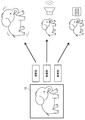
- FIG. 5 is an explanatory diagram illustrating an outline of content presentation using an information processing apparatus according to an embodiment of the present disclosure.
- FIG. It is explanatory drawing which shows an example of the content presentation for every user using the information processing apparatus which concerns on the embodiment.
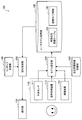
- It is a functional block diagram showing an example of 1 composition of an information presentation system concerning the embodiment.
- FIG. It is explanatory drawing which shows the example of presentation of the guide information according to a user's sense type as use case 2.
- FIG. It is explanatory drawing which shows the example of word presentation to a visual type user as use case 3.
- FIG. It is explanatory drawing which shows the example of word presentation to a tactile-type user.
- It is a flowchart which shows an example of a process in the case of changing the method of presentation of content by a user's reaction change.
- It is a hardware block diagram which shows the hardware constitutions of the one function part which comprises the information presentation system which concerns on the embodiment.
- FIG. 1 is an explanatory diagram showing an outline of content presentation using the information processing apparatus according to the present embodiment.
- FIG. 2 is an explanatory diagram illustrating an example of content presentation for each user using the information processing apparatus according to the present embodiment.
- the information processing apparatus presents information by a presentation method that facilitates receiving information for each user.
- a presentation method that facilitates receiving information for each user.
- Each user's sense of superiority can be estimated based on the user's biological information.
- the information when presenting information to the user, the information is presented so as to stimulate a certain sense (for example, vision, hearing, touch, etc.) (P1).
- a certain sense for example, vision, hearing, touch, etc.
- the biometric information of the user who has received the stimulus is acquired (P2).
- the acquired biological information of the user is analyzed to estimate the response of the user who has received the stimulus, and it is evaluated whether or not the stimulus given based on the response of the user is effective for the user (P3).
- the evaluation of the process P3 is used as information for estimating the user's superiority from the response to the user's stimulus while being fed back to the function unit that presents the information for consideration when the information is next presented to the user. (P4).
- process P4 the user's sense of superiority is estimated based on responses to various stimuli presented to the user in processes P1 to P3.
- the estimated user sense of superiority is fed back to the function unit that presents information, so that information is presented to the user so as to stimulate the sense of superiority.
- impression object 10 there is an object (hereinafter also referred to as an “impression object”) 10 that the viewer wants to make an impression among objects included in the video content.
- the video content is set only to add stimulus information when the impression object 10 is presented.
- the information processing apparatus sets stimulus information for the impression object 10 based on the sense of superiority of the viewer of the video content and reproduces the video content.
- the way of recognizing information is different for each user depending on the user's sense of superiority.
- the difference in information recognition depending on the user's superior sense is classified into sense types.
- three types are set as a sense type: a visual type that predominates in sight, an auditory type that predominates in hearing, and a tactile type that predominates in tactile sense.
- a sense type a visual type that predominates in sight
- an auditory type that predominates in hearing
- a tactile type that predominates in tactile sense.
- how to receive information, how to communicate, how to memorize, etc. are different, for example, the difference appears in the movement of the body.
- the visual user tends to move up or scramble.
- auditory users tend to move according to the contents of information and look slightly downward, while tactile users tend to swim their eyes in the horizontal direction or downward.
- visual users tend to move their hands upwards, and auditory users move according to the meaning of the story.
- Tactile users tend to move their arms up and down with overaction.
- Tactile users tend to have many onomatopoeia or mimetic words and have many voice inflections. Tactile users tend to store information individually as points.
- the user's superior sense is estimated and information is presented to the user so as to stimulate the superior sense.
- FIG. 2 it is assumed that an elephant included in the video content is impressed on the user as an impression object 10.
- the information processing apparatus enlarges / reduces, moves, or blinks the elephant that is the impression object 10 so as to stimulate the sense of superiority. May be.
- the information processing apparatus may output a cry or sound effect so as to stimulate the dominant sense of hearing, along with the display of the elephant that is the impression object 10. .
- the information processing apparatus displays the elephant that is the impression object 10 and the device that the user touches by holding or wearing so as to stimulate the tactile sense that is the dominant sense. It may be vibrated.
- the device to be vibrated may be a device itself including a display device such as a tablet terminal, a smartphone, or a wearable terminal that reproduces video content, or may be a device other than a device that reproduces video content.
- the device to be vibrated can be vibrated in response to an instruction from the device playing the video content, and may be controlled by a control server or the like that controls these devices via the network. .
- FIG. 3 is a functional block diagram illustrating a configuration example of the information presentation system 100 according to the embodiment of the present disclosure.
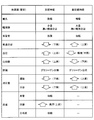
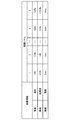
- FIG. 4 is an explanatory diagram showing a relationship between biometric information and a user's reaction as an example of information held by the reaction evaluation information storage unit 130.
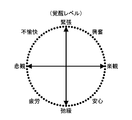
- FIG. 5 is an explanatory diagram showing one index for evaluating the user's response to the stimulus.
- FIG. 6 is an explanatory diagram showing an index when the user's response to the stimulus is evaluated from the facial expression.
- FIG. 7 is an explanatory diagram illustrating an example of sensory type information 141 stored in the user model storage unit 140.
- FIG. 8 is an explanatory diagram showing an example of the stimulus response history table 143 stored in the user model storage unit 140.
- the information presentation system 100 includes sensors 110, a model setting unit 120, a reaction evaluation information storage unit 130, a user model storage unit 140, a presentation processing unit 150, A content storage unit 160 and a presentation unit 170 are included.
- Sensors 110 acquire information about the user for analyzing the reaction of the user whose information is presented.
- the sensors 110 include a biological sensor 111 that acquires user's biological information, a voice acquisition device 113 that acquires voice, and an imaging device 115 that images the user.
- the biological sensor 111 for example, a sensor that detects a change in an organ (effector) that reacts when a user receives a stimulus from the outside world as biological information may be used.
- Humans receive stimuli such as sound and light from the outside world through receptors such as ears and eyes. The senses are established by transmitting the stimulus received by the receptor to the sensory center of the cerebrum via the nervous system.
- the movement center of the cerebrum determines the movement of the body with respect to this sense, it transmits a command based on the determination to the effector and activates the effector. Changes in the effector due to this stimulus appear in response to the stimulus.
- the biosensor 111 detects a change in the effector with respect to such a stimulus.
- Figure 4 shows an example of effector.
- the effector include a pupil, a salivary gland, a bronchus, an airway secretion, a blood pressure, a heart rate, a liver, a digestive organ, and skin.
- Each effector may be in a tension state and the sympathetic nerve will work preferentially, and may be in a relaxed state and the parasympathetic nerve will work predominately depending on how the user feels the stimulus.
- the pupil dilates when he / she feels uncomfortable with the stimulus received by the user, and reduces his / her pupil when he / she feels security with respect to the stimulus received by the user.
- the effector changes depending on how the user feels the stimulus from the outside world. Therefore, it is possible to estimate a response to the stimulus given to the user based on the detection value of the biosensor 111.
- the biological sensor 111 include a pulse wave sensor, a sweat sensor, and a sphygmomanometer.
- a voice acquisition device 113 or an imaging device 115 may be provided.
- a voice acquisition device 113 by acquiring the user's voice when receiving a stimulus by the voice acquisition device 113, it is possible to grasp the inflection and loudness of the voice, the speed of the talk, and the like.
- the imaging device 115 by capturing the user's facial expression or body movement when a stimulus is received by the imaging device 115, it is possible to grasp how the user feels the stimulus based on the captured still image or moving image.
- the imaging device 115 can also be used as a biological sensor. For example, a heart rate can be obtained from an image captured by the imaging device 115 using facial heartbeat analysis technology, and respiration is recognized from minute changes in the body. It is also possible to do.
- the sensors 110 need only have at least one of the biosensor 111 and the imaging device 115, but the more information that is acquired, the more accurately the user's reaction can be recognized. It becomes.
- the biosensor 111, the sound acquisition device 113, and the imaging device 115 for example, an IoT (Internet of Things) sensor or the like can be used as the sensors 110.
- the detection value acquired by the sensors 110 is output to the model setting unit 120 as sensor information.
- the model setting unit 120 sets, for each user, a user model representing the user's response to the stimulus based on the sensor information.
- the model setting unit 120 analyzes sensor information and estimates a user's reaction to a stimulus presented to the user.
- the model setting unit 120 may estimate a user's reaction with reference to a reaction evaluation information storage unit 130 described later.
- a reaction evaluation information storage unit 130 for example, the relationship between the biological information and the user's reaction shown in FIG. 4, biaxial mapping representing the user's internal state (FIG. 5), the relationship between the user's facial expression and emotion ( FIG. 6) and the like are stored.
- the model setting unit 120 may estimate the user's reaction from the change in the effector shown in FIG. 4 based on the biological information acquired by the biological sensor 111. For example, when the user's pupil is acquired as an image as biometric information, the model setting unit 120 detects a change in the size of the pupil, and when the pupil becomes larger, the user is in a tension state and the pupil becomes smaller. The user is determined to be in a relaxed state. When there is a plurality of acquired sensor information, the user's reaction may be estimated for each sensor information. Then, the model setting unit 120 records the content of the stimulus presented to the user and the estimated user response in the user model storage unit 140 as stimulus response history information.
- the model setting unit 120 sets the user model by evaluating the estimated user reaction.
- the user model represents the user's superior sense, and is represented, for example, by the user's sense type. By presenting information based on the user model set for each user, it is possible to appropriately stimulate a different sense of superiority for each user and make it easier for each user to receive information.
- the model setting unit 120 stores the set user model in a user model storage unit 140 described later.
- the model setting unit 120 may update the user model based on a response to the stimulus given to the user.
- the reaction evaluation information storage unit 130 is a storage unit that stores information for estimating the user's response to the stimulus presented to the user by the model setting unit 120.
- the reaction evaluation information storage unit 130 holds, for example, an annular model representing the internal state of the user as shown in FIG. Good.
- the ring model shown in FIG. 5 represents the user's response to the stimulus, with positive / negative emotions on one axis and the degree of emotion excitement (also referred to as “wakefulness level” in this disclosure) on the other axis.
- the arousal level in FIG. 5 can correspond to the change of the effector with respect to the stimulus from the outside shown in FIG.
- the model setting unit 120 can quantitatively represent the user's response tendency to the stimulus by mapping the emotion specified based on the sensor information acquired by the sensors 110 to the annular model in FIG.
- the reaction evaluation information storage unit 130 may hold a relationship between facial expressions and emotions as shown in FIG. 6, for example. Emotions at that time, such as disgust or anger, surprise, contempt, fear, sadness, etc., appear in facial expressions that change due to the rising and falling of the corners of the mouth and the corner of the eye or the wrinkles between the eyebrows. Therefore, by holding the facial feature part that forms facial expressions for various emotions in the reaction evaluation information storage unit 130, the model setting unit 120 analyzes the image captured by the imaging device 115, for example, and extracts the characteristic part. Thus, it is possible to specify the emotion in which the extracted feature portion appears.
- reaction evaluation information storage unit 130 examples of information stored in the reaction evaluation information storage unit 130, and the information presentation system according to the present disclosure may not include all of the information. May be included. Moreover, the information memorize
- the user model storage unit 140 is a storage unit that stores a user model representing a user's response to a stimulus.
- the user model storage unit 140 includes user sense type information 141 and a stimulus response history table 143.
- the sensory type information 141 stores the sensory type of each user estimated by the model setting unit 120 as a user model.
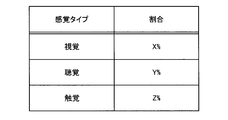
- the sensory type information 141 includes a ratio of visual type, auditory type, and tactile type for each user. In some people, one sensation works predominately, and in others, several sensations function to the same extent. Therefore, as shown in FIG. 7, it is possible to set a stimulus more suitable for each user by expressing the degree to which each sensory type works preferentially as a ratio.
- the sensory type information 141 is a sensory type estimated based on information stored in the stimulus response history table 143.
- the stimulus response history table 143 stores the content presented by the information presentation system 100 and the set stimulus information, the user's response to the information, the effect on the user, and the like.
- One structural example of the stimulus response history table 143 is shown in FIG.
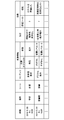
- the stimulus response history table 143 shown in FIG. 8 can store time, place, scene, content, stimulus information, user response, and user effect. Information other than that shown in FIG. 8 can be stored in the stimulus response history table 143. There may also be information that cannot be acquired depending on the scene. In this case, it may be recorded that acquisition is impossible or not acquired.
- the effect on the user by giving the stimulus stored in the stimulus response history table 143 may be updated later. For example, it is assumed that a stimulus that causes the user to learn English words when using the content of English word teaching materials is added. The stimulus seemed to be effective because the user seemed to respond to the presented stimulus at first glance, but when a small test was conducted afterwards, it was found that the stimulus was not understood at all. Is a case where it is renewed that there was no actual effect.
- the information stored in the user model storage unit 140 is appropriately updated by the model setting unit 120. For example, it may be updated in real time whenever there is a response to a certain stimulus, or may be updated in a batch process after a certain period of time has elapsed.
- the user model storage unit 140 is referred to a presentation processing unit 150 described later, and the presentation processing unit 150 sets a stimulus to an impression object included in the content.
- the presentation processing unit 150 presents various contents stored in the content storage unit 160 to the user via the presentation unit 170.
- the presentation processing unit 150 sets a stimulus based on information stored in the user model storage unit 140 for the impression object included in the content stored in the content storage unit 160 and outputs the stimulus to the presentation unit 170.
- the presentation processing unit 150 may determine stimulation information to be set based on the sense type information 141.
- the presentation processing unit 150 refers to, for example, the stimulus response history table 143, extracts history information related to the current stimulus from the past stimulus content and the history of the response, and the response to the stimulus from the extracted information and its response
- the stimulus information to be set this time may be determined after confirming the effect.
- the presentation processing unit 150 may set stimulation information based on user characteristics such as user preference and user information set by the user.
- the content storage unit 160 is a storage unit that stores content to be presented to the user.
- the content storage unit 160 may be provided in the same device or server as the presentation processing unit 150, or may be content held on the cloud.
- the content is not particularly limited, but may be content that can add a stimulus to the user when presenting the content.
- the content also includes digital content.
- the present invention can be applied to educational content such as a learning drill, book content such as a digital picture book, and AR content that synthesizes and displays an image in real time.
- the presentation unit 170 presents content to the user together with the stimulus set in the impression object.
- the presentation unit 170 includes, for example, a display unit that displays information, an audio output unit that outputs audio, a vibration generation unit that vibrates the device, and the like.
- the stimulus set in the content and the impression object does not necessarily have to be presented from the same device. For example, when vibration is applied with the presentation of an impression object, content including the impression object is displayed on the tablet terminal, but vibration is caused by vibrating other devices such as a wristband type terminal and a smartphone in synchronization with the display of the impression object. Also good.
- FIG. 9 shows a basic information presentation method by the information presentation system 100 shown in FIG.
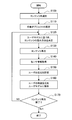
- FIG. 9 is a flowchart illustrating an example of an information presentation method by the information presentation system 100 according to the present embodiment.
- Steps S100 and S110 are content creation stages before content is provided to the user.
- the content creator does not need to set a specific movement or sound for the impression object, but only sets the impression object to be impressed by the user.
- the presentation processing unit 150 of the information presentation system 100 refers to the user model storage unit 140 and determines a content presentation method (S120).
- the presentation processing unit 150 refers to the sensory type information 141 in the user model storage unit 140 and sets stimulation information corresponding to the sensory type of the user who uses the content.
- the user is a visual sense type
- the impression object is enlarged / reduced or displayed blinking.
- the content presentation method is determined in step S120, the content is reproduced (S130), and the content is presented to the user.
- the set stimulus information is also presented.
- the user's biological information, facial expression, voice, etc. are acquired by the sensors 110 (S140).
- the sensor information acquired by the sensors 110 is output to the model setting unit 120.
- the model setting unit 120 refers to the reaction evaluation information storage unit 130, evaluates a user's reaction when a stimulus is given, and estimates a sense type (S150).
- the model setting unit 120 records the presented content, the impression object, the set stimulus information, the user's response to the stimulus, the effect of the stimulus on the user, and the like in the stimulus response history table 143, and the sensory type information 141 is estimated this time. It is updated with the sense type (S160).
- the processing from step S120 to SS160 is performed, for example, until the reproduction of the content is finished (S170).
- the basic information presentation method by the information presentation system 100 has been described above. According to such an information presentation method, information can be presented for each user by a method that is most easily received. In addition, since an appropriate stimulation method according to the user can be automatically performed, the content creator does not need to set a detailed stimulation presentation method when giving an expected stimulus to an impression object.
- a preset fixed user model or a general user model may be set as the initial user model in the user model storage unit 140.
- the fixed user model is not particularly limited, and an arbitrary initial value may be set, for example, the sensory type is set to “visual type” only.
- the general user model may be, for example, an average value of sensory type information of other users acquired in the past.
- an initial user model may be set by presenting test content for specifying a rough sense type before presenting actual content to the user. At this time, the user's reaction is evaluated based on the sensor information acquired when the test content is presented, and the user's sense type is estimated. As described above, by performing the test process for setting the user model of the user, stimulation information suitable for the user's sense is presented immediately after the start of content reproduction.
- FIG. 10 is an explanatory diagram showing an image of a digital picture book presented as content.
- FIG. 11 is an explanatory diagram illustrating an example of the size of stimulus information set in an impression object.
- FIG. 12 is an explanatory diagram showing the content of stimulus information set for an impression object.
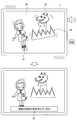
- FIG. 13 is an explanatory diagram showing that a content creator is alerted when stimulation information is set excessively.
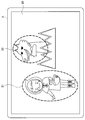
- the contents of a digital picture book are used by displaying a still image or a moving image on the display 20 of the terminal 2 such as a tablet terminal as shown in FIG.
- the content creator sets an awakening level representing the magnitude of the stimulus for each impression object. The greater the arousal level, the greater the stimulus. For example, in the example shown in FIG. 11, the waking level of the wolf is set to 4, and the waking level of the red riding hood is set to 2.
- the presentation processing unit 150 of the information presentation system 100 refers to the sensory type information 141 of the user model storage unit 140, and sets a stimulus to be given together with the content based on the user's sensory type and the set awakening level of the impression object. .
- FIG. 12 shows a setting example of stimulus information and arousal level. Such information may be stored in the user model storage unit 140.
- the stimulus for the visual user the magnitude of the movement of the impression object, the magnitude of the sound effect as the stimulus for the auditory user, and the vibration time of the terminal 2 as the stimulus for the tactile user. Is set.
- the user who uses the digital picture book has all the types of features of visual type, auditory type, and tactile type, but since the visual type is more dominant, the movement of the impression object is different from other stimuli.
- the content is presented so as to be more emphasized.
- the presentation processing unit 150 moves the wolves 23 of the arousal level 4 by 20% larger than the normal movement and 10% larger than normal.
- the sound effect is output at the volume, and the terminal 2 is vibrated for 3 seconds.
- the set stimulus is smaller than the wolf 23, moves 10% larger than the normal movement, and outputs a sound effect at a volume 5% larger than normal.
- the terminal 2 is vibrated for 1 second.
- the content creator automatically sets the specific movement of the impression object only by setting the impression object and the size of the stimulus.
- the content creator since the content creator can set the arousal level for the impression object, it may set even an unintended stimulus, which may distract the user's attention to the impression object.
- stimulation information is set for the leaf 25, and the movement and sound effect of each object and the vibration of the terminal 2 have a predetermined level.
- the determination as to whether or not excessive stimulation is set is, for example, that the number of objects for which stimulus information is set among impression objects displayed at the same time is a predetermined number or more, and each awakening level is 4 or more. This may be done depending on the case.
- a message 27 indicating that the excessive stimulus is set is displayed on the display 20 as shown in the lower side of FIG. You may notify a user by making it display or outputting an audio
- FIG. 14 is an explanatory diagram illustrating an example of presentation of guide information according to a user's sense type.
- guide information using AR displayed superimposed on a real image is appropriately presented according to the user's sense type.
- Guide information corresponds to the impression object.
- a head mounted display, an eyewear terminal, or the like can be used in addition to a smartphone or a tablet terminal.
- guide information for guiding the user to the annex is presented.
- the content creator sets only the impression object as the place the user has set as the destination.
- the presentation processing unit 150 of the information presentation system 100 refers to the user model storage unit 140 and acquires the user's sense type.
- guide information is shown according to a user's sense type. For example, for the visual user, the guide object 31 that visually indicates the position of the annex displayed on the display 30 is highlighted. For example, for the auditory type user, the guide object 31 is displayed on the display 30 smaller than the case where the guide object 31 is presented to the visual type user.
- the guide object 31 is displayed small on the display 30 as in the case of an auditory user, but the terminal 3 is vibrated when an annex is displayed in the display 30.
- the location of the annex may be notified.
- the processing for stopping the guide information presentation three operations are set: winking after confirming the guide, “OK” after confirming the guide, and pointing the finger after confirming the guide.
- the guide information presentation is similarly stopped, but it can be estimated that the operation selected by the user is naturally selected by the sense of superiority.
- the visual type is used when the user winks after confirming the guide, the auditory type when the user says “OK” after confirming the guide, and the tactile type when the user points a finger after confirming the guide. You may judge.
- the user model storage unit 140 it can be used for estimation of a user's sense type.
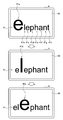
- FIG. 15 is an explanatory diagram illustrating an example of word presentation to a visual user.
- FIG. 16 is an explanatory diagram illustrating an example of word presentation to a tactile-type user. This use case presents English words so that the user can easily learn English words when using the English language teaching materials.
- the English word is the impression object, and in FIGS. 15 and 16, the English word “elephant” is the impression object 41.
- the presentation processing unit 150 refers to the user model storage unit 140 and acquires the user's sense type. And the English word which is the impression object 41 is shown according to a user's sense type. For example, for a visual user, an English word “elephant” is displayed on the display 40, and the alphabets 41a to 41h constituting the word are displayed one by one so that the display is different from the other alphabets. . For example, in the example of FIG. 15, “e”, “l”, “e”,... When the character is enlarged, the color of the character may be changed.
- an English word “elephant” is displayed on the display 40, and “ELP” is spoken as “Elephant”. You may replay it.
- ELP spoken as “Elephant”.
- “elephant” and the English word are displayed lightly on the display 40. This is a draft object 43. Then, the user causes the draft object 43 displayed on the display 40 to be traced with an operating body such as the touch pen 6 or a finger to write English words.
- information presentation system 100 can be presented in a presentation method that is easy for the user to remember by changing the presentation of English words according to the sense type of the user. .
- FIG. 17 shows an example of processing in the case of changing the way of presenting content according to a change in user reaction.
- the presentation processing unit 150 of the information presentation system 100 refers to the user model storage unit 140 and determines a content presentation method (S200).
- the presentation processing unit 150 refers to the sensory type information 141 in the user model storage unit 140 and sets stimulation information corresponding to the sensory type of the user who uses the content.
- the content presentation method is determined in step S200, the content is reproduced (S210), and the content is presented to the user.
- the impression object is presented, the set stimulus information is also presented.
- the user's biological information, facial expression, voice, etc. are acquired by the sensors 110 (S220).
- the sensor information acquired by the sensors 110 is output to the model setting unit 120.
- the model setting unit 120 refers to the reaction evaluation information storage unit 130, evaluates a user's reaction when a stimulus is given, and estimates a sense type (S230).
- the model setting unit 120 determines whether the user's reaction has decreased below a predetermined rate or increased above a predetermined rate from the level at which learning has been continued so far (S240). For example, when the user's concentration is lost, mental sweating disappears.
- the determination in step S240 can be performed using such a change that the degree of change in biological information becomes weak.
- step S240 If the condition of step S240 is not satisfied and the user's reaction is not much different from before, the process returns to step S210 and the learning is continued.
- the presentation processing unit 150 determines whether there is stimulation information that has not been set so far (S250). ). If there is unset stimulus information, the presentation processing unit 150 changes the stimulus information when presenting the impression object in the hope of improving the user's response (S260), returns to step S210, and continues learning. Let it continue. On the other hand, when there is no unset stimulus information in step S250, the presentation processing unit 150 proposes a break or deep breath to the user in order to give the sharpness of learning itself (S270).
- the degree of stimulation information may be changed according to the proficiency level of the user.
- the stimulus information of the part with high proficiency is weak and the stimulus information of the part with low proficiency is set strong, so that it is possible to make a more impressed part that is not fixed in the user's memory.
- the user's proficiency level can be determined by, for example, evaluation based on the result of a small test, the number of times content is reproduced, and the like.
- a user model such as a user's sense type can be specified. Therefore, by organizing the same type of students into the same class and the same team based on the identified user model of the user, the teacher can conduct a lesson according to the type of the student. Since it is possible to take classes that match the student's senses, the level of understanding of the learning content increases, and it is possible to conduct classes efficiently. Also, in selecting a teacher, by selecting a teacher of a type that matches the type of student, it is expected that the teacher and the student can communicate with each other in an unconscious part, and communication can be performed satisfactorily.
- Theme parks / art museums / exhibitions Further, by using the fact that the user model can be specified by the information presentation system 100 according to the present embodiment, selection of stimuli that are easy for the user to receive at the theme parks, museums, exhibitions, etc. Adjustments can also be made. For example, at a theme park, stimulus information that is easy to be interesting according to each user's sensory type, such as entering sound from an auditory person and entering light from a visual person, as an attraction for an attraction. You may make it set.
- FIG. 18 is a hardware configuration diagram illustrating a hardware configuration of one functional unit constituting the information presentation system 100 according to the present embodiment. 18 illustrates an example of a hardware configuration of the information processing apparatus 900 including each functional unit illustrated in FIG. 3, but similar hardware is also applied to an apparatus including only a part of the functional unit illustrated in FIG. 3. It may be a configuration.
- the information processing apparatus 900 can be realized by a processing apparatus such as a computer as described above.
- the information processing apparatus 900 includes a CPU (Central Processing Unit) 901, a ROM (Read Only Memory) 902, a RAM (Random Access Memory) 903, and a host bus 904a.
- the information processing apparatus 900 includes a bridge 904, an external bus 904b, an interface 905, an input device 906, an output device 907, a storage device 908, a drive 909, a connection port 911, and a communication device 913. Prepare.
- the CPU 901 functions as an arithmetic processing unit and a control unit, and controls the overall operation in the information processing apparatus 900 according to various programs. Further, the CPU 901 may be a microprocessor.
- the ROM 902 stores programs used by the CPU 901, calculation parameters, and the like.
- the RAM 903 temporarily stores programs used in the execution of the CPU 901, parameters that change as appropriate during the execution, and the like. These are connected to each other by a host bus 904a including a CPU bus.
- the host bus 904a is connected to an external bus 904b such as a PCI (Peripheral Component Interconnect / Interface) bus via a bridge 904.
- an external bus 904b such as a PCI (Peripheral Component Interconnect / Interface) bus
- PCI Peripheral Component Interconnect / Interface
- the host bus 904a, the bridge 904, and the external bus 904b do not necessarily have to be configured separately, and these functions may be mounted on one bus.
- the input device 906 includes an input means for inputting information by the user such as a mouse, keyboard, touch panel, button, microphone, switch, and lever, and an input control circuit that generates an input signal based on the input by the user and outputs the input signal to the CPU 901. Etc.
- the output device 907 includes, for example, a liquid crystal display (LCD) device, an OLED (Organic Light Emitting Diode) device and a display device such as a lamp, and an audio output device such as a speaker.
- LCD liquid crystal display
- OLED Organic Light Emitting Diode
- the storage device 908 is an example of a storage unit of the information processing device 900 and is a device for storing data.
- the storage device 908 may include a storage medium, a recording device that records data on the storage medium, a reading device that reads data from the storage medium, a deletion device that deletes data recorded on the storage medium, and the like.
- the storage device 908 drives a hard disk and stores programs executed by the CPU 901 and various data.
- the drive 909 is a storage medium reader / writer, and is built in or externally attached to the information processing apparatus 900.
- the drive 909 reads information recorded on a mounted removable recording medium such as a magnetic disk, an optical disk, a magneto-optical disk, or a semiconductor memory, and outputs the information to the RAM 903.
- the connection port 911 is an interface connected to an external device, and is a connection port with an external device capable of transmitting data by USB (Universal Serial Bus), for example.
- the communication device 913 is a communication interface configured by a communication device or the like for connecting to the communication network 5, for example.
- the communication device 913 may be a wireless LAN (Local Area Network) compatible communication device, a wireless USB compatible communication device, or a wire communication device that performs wired communication.
- An information processing apparatus comprising: a processing unit that presents content to the user based on sensor information acquired by a sensor that detects a reaction of the user to a stimulus given to the user.
- the processor is Based on the sensor information, a model setting unit that sets, for each user, a user model that represents a user's response to a stimulus, A presentation processing unit that executes a presentation process for presenting the content to the user based on the user model;
- the information processing apparatus according to (1) including: (3) Multiple sensory types are set according to the user's response to the stimulus,
- the information processing apparatus includes at least a visual type, an auditory type, and a tactile type.
- the model setting unit when there are a plurality of the sensory types to which the user's reaction corresponds, weights the corresponding sensory types, and sets the sensory type and the weights as the user model. Or the information processing apparatus as described in (4).
- (6) The information processing apparatus according to any one of (2) to (5), wherein an initial user model set in advance is initially set as the user model.
- the presentation processing unit executes a test process for presenting test content to the user
- the model setting unit evaluates a reaction of the user based on the sensor information when the test content is presented, and performs an initial setting of the user model of the user based on an evaluation result.
- the information processing apparatus according to any one of (5) to (5).
- the model setting unit evaluates the reaction of the user based on the sensor information when the content is presented by the presentation processing unit, and updates the user model of the user based on an evaluation result.
- the information processing apparatus according to any one of 2) to (7).
- the stimulus information based on the user model is set for the impression object that gives an impression to the user,
- the stimulus information is information that causes the impression object to blink.
- the information processing apparatus according to any one of (9) to (12), wherein the stimulus information is information that vibrates a predetermined device along with the presentation of the impression object.
- the presentation processing unit changes the stimulus information to be set based on the importance of the impression object.
- the processing unit further presents content to the user based on user characteristics.
- the sensor includes at least one of a biological sensor that acquires biological information of the user and an imaging apparatus that images the user. .
Landscapes
- Health & Medical Sciences (AREA)
- Life Sciences & Earth Sciences (AREA)
- Engineering & Computer Science (AREA)
- Physics & Mathematics (AREA)
- Animal Behavior & Ethology (AREA)
- Surgery (AREA)
- Veterinary Medicine (AREA)
- Public Health (AREA)
- General Health & Medical Sciences (AREA)
- Molecular Biology (AREA)
- Medical Informatics (AREA)
- Biophysics (AREA)
- Pathology (AREA)
- Biomedical Technology (AREA)
- Heart & Thoracic Surgery (AREA)
- Theoretical Computer Science (AREA)
- Physiology (AREA)
- Educational Technology (AREA)
- Business, Economics & Management (AREA)
- General Physics & Mathematics (AREA)
- Cardiology (AREA)
- Educational Administration (AREA)
- Pulmonology (AREA)
- General Engineering & Computer Science (AREA)
- Endocrinology (AREA)
- Medicinal Chemistry (AREA)
- Developmental Disabilities (AREA)
- Hospice & Palliative Care (AREA)
- Psychiatry (AREA)
- Psychology (AREA)
- Social Psychology (AREA)
- Gastroenterology & Hepatology (AREA)
- Audiology, Speech & Language Pathology (AREA)
- Vascular Medicine (AREA)
- Entrepreneurship & Innovation (AREA)
- Chemical & Material Sciences (AREA)
- Bioinformatics & Cheminformatics (AREA)
- Child & Adolescent Psychology (AREA)
- Dentistry (AREA)
- Oral & Maxillofacial Surgery (AREA)
Abstract
【課題】ユーザ毎に情報を受け取りやすい提示方法で情報を提示することの可能な情報処理装置を提供する。 【解決手段】ユーザに与えられた刺激に対するユーザの反応を検出するセンサが取得したセンサ情報に基づいて、ユーザにコンテンツを提示する処理部を備える、情報処理装置が提供される。
Description
本開示は、情報処理装置、情報処理方法及びコンピュータプログラムに関する。
コンテンツの普及に伴い、ユーザへの情報の提示に際し、ユーザ毎に適切に情報を提示することが検討されている。例えば、ユーザの嗜好を分析してユーザの嗜好に合った情報を提示することや、ユーザの発想支援においてユーザがアイデアを出しやすい発想刺激をパーソナライズして提示すること(例えば、特許文献1)等が行われている。
ここで、人間は、五感、すなわち視覚、聴覚、触覚、味覚、嗅覚を用いて外界を感知している。この五感について、人間には優位な感覚がそれぞれ存在すると言われている。例えば、情報の提示を受けるとき、画面に表示して視覚的に提示された方が音声により聴覚的に提示される場合よりも理解しやすい等、理解しやすい情報の提示方法は人によって異なる。このような違いは、各人の五感の優位度の違いも関係していると考えられる。
そこで、本開示では、ユーザ毎に情報を受け取りやすい提示方法で情報を提示することの可能な、新規かつ改良された情報処理装置、情報処理方法及びコンピュータプログラムを提案する。
本開示によれば、ユーザに与えられた刺激に対するユーザの反応を検出するセンサが取得したセンサ情報に基づいて、ユーザにコンテンツを提示する処理部を備える、情報処理装置が提供される。
また、本開示によれば、刺激とともにコンテンツを提示すること、ユーザに与えられた刺激に対するユーザの反応をセンサにより検出すること、センサが取得したセンサ情報に基づいて、ユーザの優位感覚を推定すること、を含む、情報処理方法が提供される。
さらに、本開示によれば、コンピュータを、ユーザに与えられた刺激に対するユーザの反応を検出するセンサが取得したセンサ情報に基づいて、ユーザにコンテンツを提示する処理部を備える、情報処理装置として機能させるコンピュータプログラムが提供される。
以上説明したように本開示によれば、ユーザ毎に情報を受け取りやすい提示方法で情報を提示することが可能となる。なお、上記の効果は必ずしも限定的なものではなく、上記の効果とともに、または上記の効果に代えて、本明細書に示されたいずれかの効果、または本明細書から把握され得る他の効果が奏されてもよい。
以下に添付図面を参照しながら、本開示の好適な実施の形態について詳細に説明する。なお、本明細書及び図面において、実質的に同一の機能構成を有する構成要素については、同一の符号を付することにより重複説明を省略する。
なお、説明は以下の順序で行うものとする。
1.概要
2.情報処理装置の構成
3.情報提示方法
4.ユースケース
[ユースケース1:デジタル絵本]
[ユースケース2:感覚タイプ別のガイド情報の提示]
[ユースケース3:デジタル教材]
(1)英単語学習方法
(2)ユーザの反応変化によるコンテンツの提示変更
[ユースケース4:推定されたユーザモデルの利用]
(1)学習支援(クラス分け/チーム分け)
(2)テーマパーク・美術館・展示会
(3)コミュニケーション支援
5.ハードウェア構成
1.概要
2.情報処理装置の構成
3.情報提示方法
4.ユースケース
[ユースケース1:デジタル絵本]
[ユースケース2:感覚タイプ別のガイド情報の提示]
[ユースケース3:デジタル教材]
(1)英単語学習方法
(2)ユーザの反応変化によるコンテンツの提示変更
[ユースケース4:推定されたユーザモデルの利用]
(1)学習支援(クラス分け/チーム分け)
(2)テーマパーク・美術館・展示会
(3)コミュニケーション支援
5.ハードウェア構成
<1.概要>
まず、図1及び図2を参照して、本開示の一実施形態に係る情報処理装置によるコンテンツの提示方法の概要を説明する。図1は、本実施形態に係る情報処理装置を用いたコンテンツ提示の概要を示す説明図である。図2は、本実施形態に係る情報処理装置を用いたユーザ毎のコンテンツ提示の一例を示す説明図である。
まず、図1及び図2を参照して、本開示の一実施形態に係る情報処理装置によるコンテンツの提示方法の概要を説明する。図1は、本実施形態に係る情報処理装置を用いたコンテンツ提示の概要を示す説明図である。図2は、本実施形態に係る情報処理装置を用いたユーザ毎のコンテンツ提示の一例を示す説明図である。
本実施形態に係る情報処理装置は、ユーザ毎に情報を受け取りやすい提示方法で情報を提示する。本技術では、ユーザの感覚のうち優位に働く感覚(以下、「優位感覚」ともいう。)を推定し、優位感覚を刺激するように情報を提示することで、ユーザにとって負荷なく情報を受け取れるようにする。各ユーザの優位感覚は、ユーザの生体情報に基づき推定することができる。
具体的には、図1に示すように、ユーザに情報を提示する際に、ある感覚(例えば、視覚、聴覚、触覚等)を刺激するように情報を提示する(P1)。このとき、当該刺激を受けたユーザの生体情報を取得する(P2)。そして、取得したユーザの生体情報を解析して当該刺激を受けたユーザの反応を推定し、ユーザの反応に基づき与えた刺激がユーザにとって効果があったか否かを評価する(P3)。プロセスP3の評価は、次に情報をユーザに提示する際に考慮するため、情報を提示する機能部へフィードバックされるとともに、ユーザの刺激に対する反応からユーザの優位感覚を推定するための情報として利用される(P4)。プロセスP4では、プロセスP1~P3においてユーザに提示された様々な刺激に対する反応に基づき、ユーザの優位感覚を推定する。推定されたユーザの優位感覚は、情報を提示する機能部へフィードバックされることにより、優位感覚を刺激するように情報がユーザに提示される。
例えば、図2に示すように、映像コンテンツに含まれるオブジェクトのうち視聴者に印象付けたいオブジェクト(以下、「印象オブジェクト」ともいう。)10が存在するとする。映像コンテンツには、印象オブジェクト10を提示する際に刺激情報を付加することのみ設定されている。情報処理装置は、映像コンテンツに印象オブジェクト10が設定されていると、映像コンテンツの視聴者の優位感覚に基づき、印象オブジェクト10に対して刺激情報を設定し、映像コンテンツを再生させる。
ここで、情報に対する認識の仕方は、ユーザの優位感覚によってユーザ毎に相違すると言われている。本開示においては、ユーザの優位感覚による情報の認識の違いを感覚タイプに区分して表す。ここでは、感覚タイプとして、例えば、視覚が優位に働く視覚型、聴覚が優位に働く聴覚型、触覚が優位に働く触覚型の3つを設定する。各感覚タイプにより、情報の受け取り方、伝え方、記憶の仕方等が相違し、例えば身体の動きにもその違いが現れている。
身体の動きの一例として、眼球の動きについてみると、まず、眼球の動きについては、視覚型のユーザは上へ動いたりキョロキョロしたりする傾向がある。また、聴覚型のユーザは一点を見据えて情報の内容に沿って動いたりやや下を見たりする傾向があり、触覚型のユーザは水平方向または下方で視線を泳がせる傾向がある。身体の動きの他の例として、手または腕の動きについてみると、視覚型のユーザは手等を上方へ向かわせる動きをする傾向があり、聴覚型のユーザは話の意味に沿った動きをする傾向があり、触覚型のユーザはオーバーアクション気味で腕を上下に動かす傾向がある。
また、情報の伝達や記憶に関しては、視覚型のユーザは、画像や色に対するこだわりが強く、話が飛躍する傾向があり、早口であることが多い。そして、視覚型のユーザは情報を面で捉えて記憶する傾向がある。また、聴覚型のユーザは、時間、距離にこだわりがあり、一貫性のある話をする傾向がある。声の抑揚が少なく、ゆっくりとしたスピードで話す人が多い。そして、聴覚型のユーザは情報を関連付けて線で記憶する傾向がある。触覚型のユーザは、擬音語あるいは擬態語が多く、声の抑揚が多い傾向がある。そして、触覚型のユーザは情報を点として個々に記憶する傾向がある。
そこで、本開示ではユーザの優位感覚を推定し、優位感覚を刺激するように情報をユーザに提示する。例えば、図2では、映像コンテンツ中に含まれる象を印象オブジェクト10としてユーザに印象付けるとする。このとき、ユーザの感覚タイプが視覚型であるときには、情報処理装置は、優位感覚である視覚を刺激するように、印象オブジェクト10である象を拡大/縮小させたり、動かしたり、点滅させたりしてもよい。また、ユーザの感覚タイプが聴覚型であるときには、情報処理装置は、印象オブジェクト10である象の表示とともに、優位感覚である聴覚を刺激するように鳴き声や効果音を出力するようにしてもよい。さらに、ユーザの感覚タイプが触覚型であるときには、情報処理装置は、印象オブジェクト10である象の表示とともに、優位感覚である触覚を刺激するように、ユーザが保持あるいは装着により触れている機器を振動させてもよい。振動させる機器は、例えば映像コンテンツを再生しているタブレット端末やスマートフォン、ウェアラブル端末等、表示装置を備える機器自体であってもよく、映像コンテンツを再生している機器以外の機器であってもよい。この場合、振動される機器は、映像コンテンツを再生している機器からの指示を受けて振動することも可能であり、ネットワークを介してこれらの機器を制御する制御サーバ等により制御されてもよい。
このように、ユーザの感覚タイプに応じて、映像コンテンツ中の印象オブジェクト10の提示方法を変化させることで、各ユーザは情報を理解しやすくなり、印象オブジェクト10をユーザに印象付けやすくすることができる。
以下、このような処理を実行させるための情報処理装置を備える情報提示システムと、これによる情報提示方法について、詳細に説明していく。
<2.情報処理装置の構成>
まず、図3~図8に基づいて、本開示の一実施形態に係る情報提示システム100の構成を説明する。なお、図3は、本開示の実施形態に係る情報提示システム100の一構成例を示す機能ブロック図である。図4は、反応評価情報記憶部130が保持する情報の一例として、生体情報とユーザの反応との関係を示す説明図である。図5は、刺激に対するユーザの反応を評価する一指標を表す説明図である。図6は、刺激に対するユーザの反応を表情から評価する場合の一指標を示す説明図である。図7は、ユーザモデル記憶部140に記憶されている感覚タイプ情報141の一例を示す説明図である。図8は、ユーザモデル記憶部140に記憶されている刺激反応履歴テーブル143の一例を示す説明図である。
まず、図3~図8に基づいて、本開示の一実施形態に係る情報提示システム100の構成を説明する。なお、図3は、本開示の実施形態に係る情報提示システム100の一構成例を示す機能ブロック図である。図4は、反応評価情報記憶部130が保持する情報の一例として、生体情報とユーザの反応との関係を示す説明図である。図5は、刺激に対するユーザの反応を評価する一指標を表す説明図である。図6は、刺激に対するユーザの反応を表情から評価する場合の一指標を示す説明図である。図7は、ユーザモデル記憶部140に記憶されている感覚タイプ情報141の一例を示す説明図である。図8は、ユーザモデル記憶部140に記憶されている刺激反応履歴テーブル143の一例を示す説明図である。
本実施形態に係る情報提示システム100は、図3に示すように、センサ類110と、モデル設定部120と、反応評価情報記憶部130と、ユーザモデル記憶部140と、提示処理部150と、コンテンツ記憶部160と、提示部170とを含む。
センサ類110は、情報が提示されたユーザの反応を分析するためのユーザに関する情報を取得する。センサ類110としては、例えば、ユーザの生体情報を取得する生体センサ111、音声を取得する音声取得装置113、あるいはユーザを撮像する撮像装置115等がある。
生体センサ111には、例えば、ユーザが外界から刺激を受けたときに反応する器官(効果器)の変化を生体情報として検出するセンサを用いてもよい。人間は、耳や眼等の受容器により、外界からの音や光等の刺激を受容する。受容器が受容した刺激が神経系を介して大脳の感覚中枢に伝達されることで感覚が成立する。そして、大脳の運動中枢は、この感覚に対する身体の動きを判断すると、その判断に基づく指令を効果器に伝達し、効果器を作動させる。この刺激による効果器の変化が刺激に対する反応して現れる。本開示では、生体センサ111により、このような刺激に対する効果器の変化を検出する。
効果器の例を図4に示す。図4に示すように、効果器としては、例えば瞳孔、唾液腺、気管支、気道分泌、血圧、心拍数、肝臓、消化器、皮膚等がある。各効果器は、刺激へのユーザの感じ方より、緊張状態となり交感神経が優位に働く場合と、リラックス状態となり副交感神経が優位に働く場合とがある。例えば、瞳孔は、ユーザが受容した刺激に対して不快感を持った場合は散瞳し、ユーザが受容した刺激に対して安心感を持った場合は縮瞳する。このように、効果器には、外界からの刺激に対するユーザの感じ方に応じた変化が現れる。したがって、生体センサ111の検出値に基づき、ユーザに与えた刺激に対する反応を推定することが可能となる。生体センサ111としては、例えば、脈波センサや発汗センサ、血圧計等がある。
また、センサ類110として、音声取得装置113または撮像装置115を備えてもよい。例えば、音声取得装置113により刺激を受けたときのユーザの音声を取得することで、声の抑揚や大きさ、話のスピード等を把握することができる。また、撮像装置115により刺激を受けたときのユーザの表情あるいは身体の動きを撮像することで、撮像された静止画像または動画像に基づき、ユーザの刺激に対する感じ方を把握することができる。また、撮像装置115は生体センサとして利用することもでき、例えば撮像装置115により撮像された画像から、顔心拍解析技術を利用して心拍数を得ることもでき、身体の微小変化から呼吸を認識することも可能である。
以上より、センサ類110としては、少なくとも生体センサ111または撮像装置115のうちいずれか一方を有していればよいが、取得される情報が多いほどより正確にユーザの反応を認識することが可能となる。また、センサ類110としては、生体センサ111、音声取得装置113及び撮像装置115以外にも、例えばIoT(Internet of Things)センサ等も利用可能である。センサ類110により取得された検出値は、センサ情報としてモデル設定部120へ出力される。
モデル設定部120は、センサ情報に基づいて、刺激に対するユーザの反応を表すユーザモデルをユーザ毎に設定する。まず、モデル設定部120は、センサ情報を解析し、ユーザに提示された刺激に対するユーザの反応を推定する。このとき、モデル設定部120は、後述する反応評価情報記憶部130を参照し、ユーザの反応を推定してもよい。なお、反応評価情報記憶部130には、例えば図4に示した生体情報とユーザの反応との関係、ユーザの内部状態を表す二軸マッピング(図5)、ユーザの表情と情動との関係(図6)等が記憶されている。
例えば、モデル設定部120は、生体センサ111により取得された生体情報に基づき、図4に示した効果器の変化からユーザの反応を推定してもよい。例えば、生体情報としてユーザの瞳孔が画像として取得されているとき、モデル設定部120は、瞳孔の大きさの変化を検出し、瞳孔が大きくなったときにはユーザは緊張状態にあり、瞳孔が小さくなったときにはユーザはリラックス状態にあると判定する。取得されたセンサ情報が複数ある場合には、センサ情報それぞれについてユーザの反応を推定してもよい。そして、モデル設定部120は、ユーザに提示した刺激の内容と推定したユーザの反応とを、刺激反応履歴情報としてユーザモデル記憶部140に記録する。
また、モデル設定部120は、推定したユーザの反応を評価してユーザモデルを設定する。ユーザモデルは、ユーザの優位感覚を表しており、例えばユーザの感覚タイプにより表される。各ユーザに設定されたユーザモデルに基づいてそれぞれ情報を提示することで、ユーザ毎に異なる優位感覚を適切に刺激し、各ユーザが情報を受け取りやすくすることができる。モデル設定部120は、設定したユーザモデルを、後述するユーザモデル記憶部140に記憶する。また、モデル設定部120は、ユーザに与えた刺激に対する反応に基づき、ユーザモデルを更新してもよい。
反応評価情報記憶部130は、モデル設定部120によってユーザに提示された刺激に対するユーザの反応を推定するための情報を記憶する記憶部である。反応評価情報記憶部130は、例えば、図4に示した生体情報とユーザの反応との関係の他に、例えば、図5に示すようなユーザの内部状態を表す円環モデルを保持してもよい。図5に示す円環モデルは、刺激に対するユーザの反応を、一軸に感情のポジティブ/ネガティブ、他軸に感情の興奮度合(本開示では「覚醒レベル」ともいう。)を表したものである。図5の覚醒レベルは、図4に示した外界からの刺激に対する効果器の変化に対応させることもできる。モデル設定部120は、センサ類110により取得されたセンサ情報に基づき特定される感情を、図5の円環モデルにマッピングすることで、刺激に対するユーザの反応傾向を定量的に表すこともできる。
また、反応評価情報記憶部130は、例えば図6に示すように顔の表情と情動との関係を保持してもよい。口角や眼尻の上がり下がりの状態あるいは眉間のしわ等によって変化する顔の表情には、嫌悪感あるいは怒り、驚き、軽蔑、恐れ、悲しみ等、そのときの情動が現れる。そこで、様々な情動について表情を形成する顔の特徴部分を反応評価情報記憶部130に保持することで、モデル設定部120は、例えば撮像装置115により撮像された画像を解析して特徴部分を抽出し、抽出された特徴部分が現れる情動を特定することができる。
なお、図4~図6は、反応評価情報記憶部130に記憶されている情報の一例であり、本開示に係る情報提示システムは、これらの情報をすべて含んでいなくともよく、また、他の情報を含んでいてもよい。また、反応評価情報記憶部130に記憶されている情報は予め設定されていてもよく、適宜更新されてもよい。
ユーザモデル記憶部140は、刺激に対するユーザの反応を表すユーザモデルを記憶する記憶部である。本実施形態では、ユーザモデル記憶部140は、ユーザの感覚タイプ情報141と、刺激反応履歴テーブル143とを有する。感覚タイプ情報141は、モデル設定部120により推定された各ユーザの感覚タイプをユーザモデルとして記憶する。感覚タイプ情報141には、例えば図7に示すように、ユーザ毎に、視覚型、聴覚型、触覚型の各感覚タイプの割合が含まれる。ある1つの感覚が優位に働く人もいれば、複数の感覚が同程度に機能する人もいる。そこで、図7に示すように、各感覚タイプが優位に働く程度を割合として表すことで、各ユーザにより適した刺激を設定することが可能となる。感覚タイプ情報141は、刺激反応履歴テーブル143に格納された情報に基づき推定された感覚タイプである。
また、刺激反応履歴テーブル143には、情報提示システム100により提示されたコンテンツ及び設定した刺激情報と、これに対するユーザの反応、ユーザへの効果等の情報が格納されている。刺激反応履歴テーブル143の一構成例を図8に示す。図8に示す刺激反応履歴テーブル143には、時間、場所、シーン、コンテンツ、刺激情報、ユーザの反応、ユーザへの効果を格納することができる。刺激反応履歴テーブル143には図8に示す以外の情報を格納することも可能である。また、シーンにより取得できない情報があってもよい。この場合には、取得不可あるいは未取得であることを記録してもよい。
刺激反応履歴テーブル143に格納される情報例を以下に示す。
[時間情報]
・コンテンツを提示した年月日、曜日
・コンテンツ使用開始からの経過時間
[場所、シーン(使用場面)]
・使用場所:家、学校、友達の家、図書館、電車の中、等。
・コンテンツの提示を受けた人物:本人のみ、兄弟、親、友達、先生、等。
[コンテンツ]
・使用コンテンツの種類:デジタル絵本、英単語の教材、等。
[刺激情報]
・コンテンツ作成者から指示された刺激の内容:印象オブジェクトと刺激の大きさ
・刺激内容:(刺激決定指針)最も効果的な刺激、最近使用していない刺激、等。
(実際に提示した刺激)視覚型10%動く、聴覚型5%効果音、等。
より具体的な刺激提示内容。
[ユーザの反応]
・生体センサのセンサ情報からの反応:心拍数上昇、発汗増大、呼吸数増、等。
・音声取得装置、撮像装置の取得情報に基づく反応
・感情の環状モデルにおける位置情報:(x,y)=(Nx,Ny)
[ユーザへの効果]
・評価とその根拠
例)10段階評価:7、根拠:刺激呈示時の生体反応より
10段階評価:3、根拠:小テストを間違えた
[時間情報]
・コンテンツを提示した年月日、曜日
・コンテンツ使用開始からの経過時間
[場所、シーン(使用場面)]
・使用場所:家、学校、友達の家、図書館、電車の中、等。
・コンテンツの提示を受けた人物:本人のみ、兄弟、親、友達、先生、等。
[コンテンツ]
・使用コンテンツの種類:デジタル絵本、英単語の教材、等。
[刺激情報]
・コンテンツ作成者から指示された刺激の内容:印象オブジェクトと刺激の大きさ
・刺激内容:(刺激決定指針)最も効果的な刺激、最近使用していない刺激、等。
(実際に提示した刺激)視覚型10%動く、聴覚型5%効果音、等。
より具体的な刺激提示内容。
[ユーザの反応]
・生体センサのセンサ情報からの反応:心拍数上昇、発汗増大、呼吸数増、等。
・音声取得装置、撮像装置の取得情報に基づく反応
・感情の環状モデルにおける位置情報:(x,y)=(Nx,Ny)
[ユーザへの効果]
・評価とその根拠
例)10段階評価:7、根拠:刺激呈示時の生体反応より
10段階評価:3、根拠:小テストを間違えた
刺激反応履歴テーブル143に格納される刺激を与えたことによるユーザへの効果については、後から更新されることがあり得る。例えば、英単語教材のコンテンツを使用した際にユーザに英単語を覚えさせるような刺激を付加したとする。提示した刺激に対してユーザが一見良さそうな反応をしたことから当該刺激は効果ありとしたが、その後小テストを実施したところ、全然理解していないことが分かった場合には、提示した刺激は実際には効果がなかったと更新する、というような場合である。
ユーザモデル記憶部140の保持する情報は、モデル設定部120により適宜更新される。例えば、ある刺激に対する反応がある度にリアルタイムに更新してもよく、一定期間経過後にバッチ処理的に更新してもよい。また、ユーザモデル記憶部140は、後述する提示処理部150に参照され、提示処理部150によりコンテンツに含まれる印象オブジェクトに刺激が設定される。
提示処理部150は、コンテンツ記憶部160に記憶されている各種コンテンツを、提示部170を介してユーザに提示する。提示処理部150は、コンテンツ記憶部160に記憶されたコンテンツに含まれる印象オブジェクトに対して、ユーザモデル記憶部140に格納されている情報に基づき刺激を設定し、提示部170へ出力する。例えば、提示処理部150は、ユーザモデル記憶部140を参照する際に、感覚タイプ情報141に基づき設定する刺激情報を決定してもよい。また、提示処理部150は、例えば刺激反応履歴テーブル143を参照し、過去の刺激内容とその反応の履歴から今回の刺激に関係する履歴情報を抽出し、抽出された情報より刺激に対する反応とその効果を確認した上で、今回設定する刺激情報を決定してもよい。また、提示処理部150は、ユーザモデル以外にも、例えばユーザの嗜好、ユーザにより設定されたユーザ情報等のユーザ特性に基づき、刺激情報を設定してもよい。
コンテンツ記憶部160は、ユーザに提示するコンテンツを記憶する記憶部である。コンテンツ記憶部160は、提示処理部150と同一の機器あるいはサーバに設けられてもよく、クラウド上に保持されているコンテンツであってもよい。コンテンツとしては、特に制限されるものではないが、コンテンツの提示に際してユーザに対して刺激を付加可能なコンテンツを想定してもよい。また、当該コンテンツにはデジタルコンテンツも含まれる。例えば、学習ドリル等の教育系コンテンツや、デジタル絵本等の書籍コンテンツ、実映像に対してリアルタイムに画像を合成して表示させるARコンテンツ等へも適用可能である。
提示部170は、印象オブジェクトに設定された刺激とともにコンテンツをユーザに提示する。提示部170は、例えば情報を表示する表示部、音声を出力する音声出力部、機器を振動させる振動発生部等を含む。なお、コンテンツと印象オブジェクトに設定される刺激とは、必ずしも同一機器から提示されなくてもよい。例えば、印象オブジェクトの提示とともに振動を与える場合、印象オブジェクトを含むコンテンツはタブレット端末に表示させるが、振動はリストバンド型端末やスマートフォン等の他の機器を印象オブジェクトの表示に同期して振動させてもよい。
<3.情報提示方法>
図9に、図3に示した情報提示システム100による基本的な情報提示方法を示す。図9は、本実施形態に係る情報提示システム100による情報提示方法の一例を示すフローチャートである。
図9に、図3に示した情報提示システム100による基本的な情報提示方法を示す。図9は、本実施形態に係る情報提示システム100による情報提示方法の一例を示すフローチャートである。
本実施形態に係る情報提示システム100では、まず、ユーザに提示するコンテンツがコンテンツ作成者により選択される(S100)。このとき、コンテンツ中、ユーザに印象付けたいオブジェクトが印象オブジェクトとして設定される(S110)。ステップS100、S110は、コンテンツがユーザに提供される前のコンテンツ作成段階である。コンテンツ作成者は、印象オブジェクトに対して具体的な動きや音声等を設定する必要はなく、印象オブジェクトをユーザに印象付けることのみを設定すればよい。
コンテンツ作成者により印象オブジェクトが設定されたコンテンツがユーザ利用可能な状態になると、ユーザは、コンテンツを取得して使用することができる。ユーザがコンテンツの利用を開始すると、情報提示システム100の提示処理部150は、ユーザモデル記憶部140を参照し、コンテンツの提示方法を決定する(S120)。例えば、提示処理部150は、ユーザモデル記憶部140の感覚タイプ情報141を参照し、コンテンツを利用するユーザの感覚タイプに応じた刺激情報を設定する。例えば、ユーザが視覚型の感覚タイプである場合には、印象オブジェクトを拡大縮小させたり、点滅して表示させたりする。ステップS120にてコンテンツの提示方法が決定されると、コンテンツが再生され(S130)、ユーザにコンテンツが提示される。印象オブジェクトの提示時には、設定された刺激情報も合わせて提示される。
コンテンツが提示されているとき、ユーザの生体情報や表情、音声等がセンサ類110によって取得されている(S140)。センサ類110により取得されたセンサ情報は、モデル設定部120へ出力される。モデル設定部120は、反応評価情報記憶部130を参照し、刺激が与えられたときのユーザの反応を評価し、感覚タイプを推定する(S150)。モデル設定部120は、刺激反応履歴テーブル143に、提示したコンテンツ、印象オブジェクト、設定した刺激情報、刺激に対するユーザの反応、刺激のユーザへの効果等を記録し、感覚タイプ情報141を今回推定された感覚タイプで更新する(S160)。ステップS120~SS160までの処理は、例えばコンテンツの再生が終了されるまで実施される(S170)。
以上、情報提示システム100による基本的な情報提示方法について説明した。かかる情報提示方法によれば、ユーザ毎に、最も情報を受け取りやすい方法で情報を提示することができる。また、ユーザに応じた適切な刺激方法を自動で実施させることができるので、コンテンツ作成者は、期待する刺激を印象オブジェクトに与える際に、詳細な刺激提示方法を設定する必要がない。
なお、刺激に対するユーザの反応が得られていないとき、ユーザモデル記憶部140には、初期ユーザモデルとして、例えば予め設定された固定ユーザモデルまたは一般ユーザモデルを設定してもよい。固定ユーザモデルは特に限定されず、例えば感覚タイプを「視覚型」のみに設定する等、任意の初期値が設定されればよい。一般ユーザモデルは、例えば、過去に取得された他のユーザの感覚タイプ情報の平均値としてもよい。あるいは、実際のコンテンツをユーザに提示する前に、大まかな感覚タイプを特定するためのテストコンテンツを提示して、初期ユーザモデルを設定してもよい。このとき、テストコンテンツが提示されたときに取得されたセンサ情報に基づいてユーザの反応を評価し、ユーザの感覚タイプが推定される。このように、ユーザのユーザモデルを設定するためテスト処理を実施することで、コンテンツ再生開始直後からユーザの感覚に適した刺激情報が提示されるようになる。
<4.ユースケース>
以下、本実施形態に係る情報提示システムのユースケースについて説明する。
以下、本実施形態に係る情報提示システムのユースケースについて説明する。
[ユースケース1:デジタル絵本]
まず、図10~図13に基づいて、本実施形態に係る情報提示システム100により、コンテンツとしてデジタル絵本を提示する場合を説明する。なお、図10は、コンテンツとして提示されるデジタル絵本のイメージを示す説明図である。図11は、印象オブジェクトに設定する刺激情報の大きさの一例を示す説明図である。図12は、印象オブジェクトに対して設定される刺激情報の内容を示す説明図である。図13は、刺激情報が過度に設定された場合にコンテンツ作成者に対して注意喚起がされることを示す説明図である。
まず、図10~図13に基づいて、本実施形態に係る情報提示システム100により、コンテンツとしてデジタル絵本を提示する場合を説明する。なお、図10は、コンテンツとして提示されるデジタル絵本のイメージを示す説明図である。図11は、印象オブジェクトに設定する刺激情報の大きさの一例を示す説明図である。図12は、印象オブジェクトに対して設定される刺激情報の内容を示す説明図である。図13は、刺激情報が過度に設定された場合にコンテンツ作成者に対して注意喚起がされることを示す説明図である。
本ユースケースでは、デジタル絵本を再生する際に、デジタル絵本の物語中に登場する人、動物、物体に刺激情報を設定し、デジタル絵本をおもしろく、また、ユーザの印象に残りやすくすることを考える。通常、デジタル絵本のコンテンツは、図10に示すようにタブレット端末等の端末2のディスプレイ20に静止画像あるいは動画像を表示させて使用される。例えば、「赤ずきんちゃん」のデジタル絵本について、登場する赤ずきん21及びオオカミ23がユーザに印象付ける印象オブジェクトとしてコンテンツ作成者により設定されているとする。このとき、コンテンツ作成者は、各印象オブジェクトに対して、刺激の大きさを表す覚醒レベルを設定する。覚醒レベルが大きいほど、刺激は大きくなる。例えば図11に示す例では、オオカミの覚醒レベルは4、赤ずきんの覚醒レベルは2に設定されている。
情報提示システム100の提示処理部150は、例えば、ユーザモデル記憶部140の感覚タイプ情報141を参照し、ユーザの感覚タイプ及び設定された印象オブジェクトの覚醒レベルに基づき、コンテンツとともに与える刺激を設定する。図12に、刺激情報と覚醒レベルとの設定例を示す。かかる情報は、ユーザモデル記憶部140に記憶されていてもよい。図12では、視覚型のユーザへの刺激として、印象オブジェクトの動きの大きさ、聴覚型のユーザへの刺激として効果音の大きさ、触覚型のユーザへの刺激として、端末2の振動時間が設定される。本例において、デジタル絵本を利用するユーザは、視覚型、聴覚型、触覚型のすべてのタイプの特徴を有しているが、視覚型がより優位にあるため、印象オブジェクトの動きが他の刺激よりも強調されるようにコンテンツが提示される。
提示処理部150は、図12に示した刺激情報と覚醒レベルとの関係に基づき、覚醒レベル4のオオカミ23に対しては、通常の動きよりも20%大きく動かすとともに、通常よりも10%大きい音量で効果音を出力し、端末2を3秒間振動させる。一方、覚醒レベル2の赤ずきん21に対しては、設定される刺激はオオカミ23よりも小さくなり、通常の動きよりも10%大きく動かすとともに、通常よりも5%大きい音量で効果音を出力し、端末2を1秒間振動させる。このように、コンテンツ作成者は印象オブジェクトの設定とその刺激の大きさとを設定するだけで、自動的に印象オブジェクトの具体的な動きが設定される。
ここで、コンテンツ作成者が印象オブジェクトに対する覚醒レベルを設定できることから、意図しない刺激まで設定してしまい、印象オブジェクトに対するユーザの注意力を反って散漫させる可能性もある。例えば、図13上側に示すように、印象オブジェクトである赤ずきん21及びオオカミ23に加え、葉っぱ25にも刺激情報が設定され、各オブジェクトの動きや効果音、端末2の振動が所定のレベルを超えたとする。過度の刺激が設定されているか否かの判定は、例えば、同時に表示される印象オブジェクトのうち刺激情報が設定されているオブジェクト数が所定数以上であり、かつ、各覚醒レベルが4以上である場合に該当するかによって行ってもよい。過度の刺激が設定された場合には、コンテンツ作成者が作成内容を確認する際に、例えば図13下側に示すように、過度の刺激が設定されていることを示すメッセージ27をディスプレイ20に表示させたり、音声出力したりする等によってユーザに通知してもよい。
[ユースケース2:感覚タイプ別のガイド情報の提示]
次に、図14に基づいて、本実施形態に係る情報提示システム100により、コンテンツとしてARを用いたガイド情報を提示する場合について説明する。図14は、ユーザの感覚タイプに応じたガイド情報の提示例を示す説明図である。ここでは、実画像が表示されている上に重畳して表示されるARを用いたガイド情報を、ユーザの感覚タイプに応じて適切に提示する例を示す。ガイド情報が印象オブジェクトに対応する。このとき、実画像及びガイド情報が表示される端末3は、スマートフォンやタブレット端末の他、ヘッドマウントディスプレイやアイウェア端末等を用いることができる。
次に、図14に基づいて、本実施形態に係る情報提示システム100により、コンテンツとしてARを用いたガイド情報を提示する場合について説明する。図14は、ユーザの感覚タイプに応じたガイド情報の提示例を示す説明図である。ここでは、実画像が表示されている上に重畳して表示されるARを用いたガイド情報を、ユーザの感覚タイプに応じて適切に提示する例を示す。ガイド情報が印象オブジェクトに対応する。このとき、実画像及びガイド情報が表示される端末3は、スマートフォンやタブレット端末の他、ヘッドマウントディスプレイやアイウェア端末等を用いることができる。
図14に示す例では、ユーザを別館に案内するガイド情報を提示する。このとき、コンテンツ作成者は、ユーザが目的地とした場所を印象オブジェクトとすることのみ設定する。ユーザは、別館への案内を端末3に指示すると、情報提示システム100の提示処理部150は、ユーザモデル記憶部140を参照してユーザの感覚タイプを取得する。そして、ユーザの感覚タイプに応じてガイド情報を提示する。例えば、視覚型のユーザに対しては、ディスプレイ30に表示される別館の位置を視覚的に示すガイドオブジェクト31を強調して表示する。また、例えば聴覚型のユーザに対しては、ディスプレイ30にはガイドオブジェクト31を視覚型のユーザに対して提示される場合よりも小さく表示するが、合わせて音声により別館の位置が通知される。さらに、例えば触覚型のユーザに対しては、聴覚型のユーザの場合と同様にガイドオブジェクト31をディスプレイ30に小さく表示するが、ディスプレイ30内に別館が表示されている場合に端末3を振動させることで、別館の位置を通知するようにしてもよい。
また、ガイド情報提示の停止を行う際のユーザの行動より、当該ユーザの優位感覚を推定することも可能である。例えばガイド情報提示の停止の処理として、ガイドを確認後ウィンクする、ガイドを確認後「OK」と言う、ガイドを確認後に指を指す、の3つの動作を設定しておく。いずれの動作によっても同様にガイド情報提示の停止が実行されるが、ユーザが選択する動作が優位感覚により自然に選択されたものと推定することができる。例えば、ユーザがガイドを確認後ウィンクした場合には視覚型、ユーザがガイドを確認後「OK」と言った場合には聴覚型、ユーザがガイドを確認後に指を指した場合には触覚型を判定してもよい。このような動作もユーザモデル記憶部140に保持しておくことで、ユーザの感覚タイプの推定に利用することができる。
[ユースケース3:デジタル教材]
次に、本実施形態に係る情報提示システム100により、学習用のデジタル教材を提示する場合について説明する。
次に、本実施形態に係る情報提示システム100により、学習用のデジタル教材を提示する場合について説明する。
(1)英単語学習方法
まず、図15及び図16に基づいて、本実施形態に係る情報提示システム100により、コンテンツとして英単語教材を提示する場合について説明する。図15は、視覚型のユーザへの単語提示例を示す説明図である。図16は、触覚型のユーザへの単語提示例を示す説明図である。本ユースケースは、英単語教材を用いてユーザが英単語を覚える際に、ユーザが覚えやすいように英単語を提示する。ここでは英単語が印象オブジェクトとなり、図15及び図16では、「elephant」という英単語を印象オブジェクト41となる。
まず、図15及び図16に基づいて、本実施形態に係る情報提示システム100により、コンテンツとして英単語教材を提示する場合について説明する。図15は、視覚型のユーザへの単語提示例を示す説明図である。図16は、触覚型のユーザへの単語提示例を示す説明図である。本ユースケースは、英単語教材を用いてユーザが英単語を覚える際に、ユーザが覚えやすいように英単語を提示する。ここでは英単語が印象オブジェクトとなり、図15及び図16では、「elephant」という英単語を印象オブジェクト41となる。
ユーザがタブレット端末4を用いて英単語の学習を開始すると、提示処理部150は、ユーザモデル記憶部140を参照してユーザの感覚タイプを取得する。そして、ユーザの感覚タイプに応じて、印象オブジェクト41である英単語を提示する。例えば、視覚型のユーザに対しては、ディスプレイ40に「elephant」と英単語を表示し、さらに、単語を構成するアルファベット41a~41hを一文字ずつ、他のアルファベットとの表示が異なるように表示させる。例えば、図15の例では、左から「e」、「l」、「e」、・・・と一文字ずつ順に文字を拡大しながら表示させていく。文字が拡大されたとき、文字の色を変化させてもよい。
また、例えば聴覚型のユーザに対しては、ディスプレイ40に「elephant」と英単語を表示するとともに、音声で“イー・エル・イー・ピー・エイチ・エー・エヌ・ティー・・・エレファント”と再生してもよい。さらに、例えば触覚型のユーザに対しては、図16上側に示すように、最初は、ディスプレイ40に「elephant」と英単語が薄く表示されている。これを下書きオブジェクト43とする。そして、ユーザに、ディスプレイ40に表示された下書きオブジェクト43を、タッチペン6や指等の操作体によりなぞらせ、英単語を書かせる。
このように、本実施形態に係る情報提示システム100を用いることで、ユーザの感覚タイプに応じて、英単語の提示を変化させることで、ユーザが覚えやすい提示方法で情報を提示することができる。
(2)ユーザの反応変化によるコンテンツの提示変更
デジタル教材をユーザの自主学習に利用する場合、ユーザの感覚タイプに応じて適切な刺激情報を与えることで、記憶力向上あるいは集中力の持続が期待できる。また、ユーザに相性の良い刺激だけでなく、様々な刺激をまんべんなく与えることでも脳が活性し、記憶力が向上すると言われている。そこで、デジタル教材において、重要な部分あるいはポイントとなる部分は、ユーザの感覚タイプに応じた相性の良い刺激を用い、それ以外の部分では別の刺激を用いるようにしてもよい。このように、ユーザ毎に情報の提示の仕方にメリハリをつけることで、効果的に脳の活性化を支援することが可能となる。また、どのような刺激に対してもユーザの反応が弱くなることもある。逆に、些細な刺激に過敏に反応するようになることもある。このような場合には、例えば休憩を提案することで学習自体にメリハリを持たせ、効率的に学習させるようにしてもよい。
デジタル教材をユーザの自主学習に利用する場合、ユーザの感覚タイプに応じて適切な刺激情報を与えることで、記憶力向上あるいは集中力の持続が期待できる。また、ユーザに相性の良い刺激だけでなく、様々な刺激をまんべんなく与えることでも脳が活性し、記憶力が向上すると言われている。そこで、デジタル教材において、重要な部分あるいはポイントとなる部分は、ユーザの感覚タイプに応じた相性の良い刺激を用い、それ以外の部分では別の刺激を用いるようにしてもよい。このように、ユーザ毎に情報の提示の仕方にメリハリをつけることで、効果的に脳の活性化を支援することが可能となる。また、どのような刺激に対してもユーザの反応が弱くなることもある。逆に、些細な刺激に過敏に反応するようになることもある。このような場合には、例えば休憩を提案することで学習自体にメリハリを持たせ、効率的に学習させるようにしてもよい。
図17にユーザの反応変化によってコンテンツの提示の仕方を変更する場合の一処理例を示す。ユーザがコンテンツの利用を開始すると、情報提示システム100の提示処理部150は、ユーザモデル記憶部140を参照し、コンテンツの提示方法を決定する(S200)。例えば、提示処理部150は、ユーザモデル記憶部140の感覚タイプ情報141を参照し、コンテンツを利用するユーザの感覚タイプに応じた刺激情報を設定する。ステップS200にてコンテンツの提示方法が決定されると、コンテンツが再生され(S210)、ユーザにコンテンツが提示される。印象オブジェクトの提示時には、設定された刺激情報も合わせて提示される。
コンテンツが提示されているとき、ユーザの生体情報や表情、音声等がセンサ類110によって取得されている(S220)。センサ類110により取得されたセンサ情報は、モデル設定部120へ出力される。モデル設定部120は、反応評価情報記憶部130を参照し、刺激が与えられたときのユーザの反応を評価し、感覚タイプを推定する(S230)。ここで、モデル設定部120は、ユーザの反応がここまで学習を継続してきたときのレベルよりも所定の割合以下に低下したか、あるいは、所定の割合以上上昇したかを判定する(S240)。例えば、ユーザの集中力が切れると、精神性発汗がなくなる。ステップS240の判定は、このような生体情報の変化の程度が弱くなるといった変化等を利用して行うことができる。
ステップS240の条件を満たさず、ユーザの反応がこれまでとあまり変わらない場合には、ステップS210に戻り、引き続き学習を継続させる。一方、ステップS240の条件を満たし、ユーザの反応が低下したり過度となっていたりする場合には、提示処理部150は、これまで設定していない刺激情報があるか否かを判定する(S250)。未設定の刺激情報がある場合には、提示処理部150は、ユーザの反応の改善を期待して印象オブジェクトを提示する際の刺激情報を変更し(S260)、ステップS210に戻り、引き続き学習を継続させる。一方、ステップS250にて、未設定の刺激情報がない場合には、提示処理部150は、学習自体のメリハリを持たせるため、ユーザに休憩や深呼吸を提案する(S270)。
このようなコンテンツの提示方法では、ユーザが学習したことを、時間という尺度だけでなく、どの程度集中して学習したかという質の面でも記録として残すことができる。また、コンテンツの印象オブジェクトとなる学習内容については、ユーザの習熟度に応じて刺激情報の度合いを変化させるようにしてもよい。例えば、デジタル教材において習熟度の高い部分の刺激情報は弱く、習熟度の低い部分の刺激情報は強く設定することで、ユーザの記憶に定着していない部分をより印象付けることが可能となる。ユーザの習熟度は、例えば、小テストの結果による評価や、コンテンツの再生回数等によって判定可能である。
さらに、ユーザの学習状況を一定期間記録することで、学習の進め方の傾向も把握することが可能である。例えば、学習する際に、先に回答例を提示してから練習問題を解かせた方がユーザの負担が少ない人もいれば、練習問題を解かせてから回答例を提示した方がユーザの負担が少ない人もいる。そこで、ユーザ毎の学習の進め方における反応を定量的に評価し、進め方の違いによる反応を比較することで、ユーザにとって学習内容が定着しやすい学習の進め方を判断する。これにより、ユーザの学習負荷を低下させ、効率よく学習させることが可能となる。
[ユースケース4:推定されたユーザモデルの利用]
(1)学習支援(クラス分け/チーム分け)
本実施形態に係る情報提示システム100によれば、ユーザの感覚タイプ等のユーザモデルを特定することができる。そこで、特定されたユーザのユーザモデルに基づいて、同一タイプの生徒を同一クラス、同一チームに編成することで、教師は、生徒のタイプに合わせた授業を実施することが可能となる。生徒の感覚特定に合った授業を受けることができるので、学習内容の理解度も高まり、効率よく授業を行うことが可能となる。また、教師の選定においても、生徒のタイプに合致したタイプの教師を選定することで、教師と生徒とが意識しない部分で通じ合うことも期待でき、良好にコミュニケーションを行うことができる。
(1)学習支援(クラス分け/チーム分け)
本実施形態に係る情報提示システム100によれば、ユーザの感覚タイプ等のユーザモデルを特定することができる。そこで、特定されたユーザのユーザモデルに基づいて、同一タイプの生徒を同一クラス、同一チームに編成することで、教師は、生徒のタイプに合わせた授業を実施することが可能となる。生徒の感覚特定に合った授業を受けることができるので、学習内容の理解度も高まり、効率よく授業を行うことが可能となる。また、教師の選定においても、生徒のタイプに合致したタイプの教師を選定することで、教師と生徒とが意識しない部分で通じ合うことも期待でき、良好にコミュニケーションを行うことができる。
(2)テーマパーク・美術館・展示会
また、本実施形態に係る情報提示システム100によりユーザモデルを特定できることを利用して、テーマパーク、美術館または展示会等において、ユーザの受け取りやすい刺激の選択や調整を行うことも可能となる。例えば、テーマパークにおいて、アトラクションの演出として、聴覚型の人には音から入る、視覚型の人には光から入る、といったように、各ユーザの感覚タイプに応じて興味を持ちやすい刺激情報を設定するようにしてもよい。
また、本実施形態に係る情報提示システム100によりユーザモデルを特定できることを利用して、テーマパーク、美術館または展示会等において、ユーザの受け取りやすい刺激の選択や調整を行うことも可能となる。例えば、テーマパークにおいて、アトラクションの演出として、聴覚型の人には音から入る、視覚型の人には光から入る、といったように、各ユーザの感覚タイプに応じて興味を持ちやすい刺激情報を設定するようにしてもよい。
(3)コミュニケーション支援
さらに、本実施形態に係る情報提示システム100によりユーザモデルを特定できることを利用して、初対面の人とコミュニケーションをとる際に相手のタイプを事前に把握できるようにし、コミュニケーションを取りやすくすることもできる。例えば、翻訳システムにおいて、相手の感覚タイプに応じた翻訳の提示方法や効果を刺激情報として設定してもよい。
さらに、本実施形態に係る情報提示システム100によりユーザモデルを特定できることを利用して、初対面の人とコミュニケーションをとる際に相手のタイプを事前に把握できるようにし、コミュニケーションを取りやすくすることもできる。例えば、翻訳システムにおいて、相手の感覚タイプに応じた翻訳の提示方法や効果を刺激情報として設定してもよい。
<5.ハードウェア構成>
最後に、本実施形態に係る情報提示システム100を構成する一機能部のハードウェア構成例について説明する。図18は、本実施形態に係る情報提示システム100を構成する一機能部のハードウェア構成を示すハードウェア構成図である。図18では、図3に示した各機能部を備える情報処理装置900のハードウェア構成の一例として説明するが、図3に示した機能部の一部のみを備える装置の場合も同様のハードウェア構成であってもよい。
最後に、本実施形態に係る情報提示システム100を構成する一機能部のハードウェア構成例について説明する。図18は、本実施形態に係る情報提示システム100を構成する一機能部のハードウェア構成を示すハードウェア構成図である。図18では、図3に示した各機能部を備える情報処理装置900のハードウェア構成の一例として説明するが、図3に示した機能部の一部のみを備える装置の場合も同様のハードウェア構成であってもよい。
本実施形態に係る情報処理装置900は、上述したように、コンピュータ等の処理装置により実現することができる。情報処理装置900は、図18に示すように、CPU(Central Processing Unit)901と、ROM(Read Only Memory)902と、RAM(Random Access Memory)903と、ホストバス904aとを備える。また、情報処理装置900は、ブリッジ904と、外部バス904bと、インタフェース905と、入力装置906と、出力装置907と、ストレージ装置908と、ドライブ909と、接続ポート911と、通信装置913とを備える。
CPU901は、演算処理装置および制御装置として機能し、各種プログラムに従って情報処理装置900内の動作全般を制御する。また、CPU901は、マイクロプロセッサであってもよい。ROM902は、CPU901が使用するプログラムや演算パラメータ等を記憶する。RAM903は、CPU901の実行において使用するプログラムや、その実行において適宜変化するパラメータ等を一時記憶する。これらはCPUバスなどから構成されるホストバス904aにより相互に接続されている。
ホストバス904aは、ブリッジ904を介して、PCI(Peripheral Component Interconnect/Interface)バスなどの外部バス904bに接続されている。なお、必ずしもホストバス904a、ブリッジ904および外部バス904bを分離構成する必要はなく、1つのバスにこれらの機能を実装してもよい。
入力装置906は、マウス、キーボード、タッチパネル、ボタン、マイク、スイッチおよびレバーなどユーザが情報を入力するための入力手段と、ユーザによる入力に基づいて入力信号を生成し、CPU901に出力する入力制御回路などから構成されている。出力装置907は、例えば、液晶ディスプレイ(LCD)装置、OLED(Organic Light Emitting Diode)装置およびランプなどの表示装置や、スピーカなどの音声出力装置を含む。
ストレージ装置908は、情報処理装置900の記憶部の一例であり、データ格納用の装置である。ストレージ装置908は、記憶媒体、記憶媒体にデータを記録する記録装置、記憶媒体からデータを読み出す読出し装置および記憶媒体に記録されたデータを削除する削除装置などを含んでもよい。このストレージ装置908は、ハードディスクを駆動し、CPU901が実行するプログラムや各種データを格納する。
ドライブ909は、記憶媒体用リーダライタであり、情報処理装置900に内蔵、あるいは外付けされる。ドライブ909は、装着されている磁気ディスク、光ディスク、光磁気ディスク、または半導体メモリ等のリムーバブル記録媒体に記録されている情報を読み出して、RAM903に出力する。
接続ポート911は、外部機器と接続されるインタフェースであって、例えばUSB(Universal Serial Bus)などによりデータ伝送可能な外部機器との接続口である。また、通信装置913は、例えば、通信網5に接続するための通信デバイス等で構成された通信インタフェースである。また、通信装置913は、無線LAN(Local Area Network)対応通信装置であっても、ワイヤレスUSB対応通信装置であっても、有線による通信を行うワイヤー通信装置であってもよい。
以上、添付図面を参照しながら本開示の好適な実施形態について詳細に説明したが、本開示の技術的範囲はかかる例に限定されない。本開示の技術分野における通常の知識を有する者であれば、特許請求の範囲に記載された技術的思想の範疇内において、各種の変更例または修正例に想到し得ることは明らかであり、これらについても、当然に本開示の技術的範囲に属するものと了解される。
また、本明細書に記載された効果は、あくまで説明的または例示的なものであって限定的ではない。つまり、本開示に係る技術は、上記の効果とともに、または上記の効果に代えて、本明細書の記載から当業者には明らかな他の効果を奏しうる。
なお、以下のような構成も本開示の技術的範囲に属する。
(1)
ユーザに与えられた刺激に対する前記ユーザの反応を検出するセンサが取得したセンサ情報に基づいて、前記ユーザにコンテンツを提示する処理部を備える、情報処理装置。
(2)
前記処理部は、
前記センサ情報に基づいて、刺激に対するユーザの反応を表すユーザモデルをユーザ毎に設定するモデル設定部と、
前記ユーザモデルに基づいて、前記ユーザに前記コンテンツを提示する提示処理を実行する提示処理部と、
を含む、前記(1)に記載の情報処理装置。
(3)
前記刺激に対するユーザの反応に応じて複数の感覚タイプが設定されており、
前記モデル設定部は、前記センサ情報に基づいて、前記ユーザの反応が該当する前記感覚タイプを1または複数特定し、前記ユーザモデルとして設定する、前記(2)に記載の情報処理装置。
(4)
前記感覚タイプは、少なくとも視覚型、聴覚型、及び触覚型を含む、前記(3)に記載の情報処理装置。
(5)
前記モデル設定部は、ユーザの反応が該当する前記感覚タイプが複数ある場合、該当する前記感覚タイプに対して重み付けをし、前記感覚タイプ及び前記重み付けを前記ユーザモデルとして設定する、前記(3)または(4)に記載の情報処理装置。
(6)
前記ユーザモデルは、予め設定された初期ユーザモデルが初期設定されている、前記(2)~(5)のいずれか1項に記載の情報処理装置。
(7)
前記提示処理部は、前記ユーザにテストコンテンツを提示するテスト処理を実行し、
前記モデル設定部は、前記テストコンテンツが提示されたときの前記センサ情報に基づいて前記ユーザの反応を評価し、評価結果に基づいて前記ユーザの前記ユーザモデルの初期設定を行う、前記(2)~(5)のいずれか1項に記載の情報処理装置。
(8)
前記モデル設定部は、前記提示処理部により前記コンテンツが提示されたときの前記センサ情報に基づいて前記ユーザの反応を評価し、評価結果に基づいて前記ユーザの前記ユーザモデルを更新する、前記(2)~(7)のいずれか1項に記載の情報処理装置。
(9)
前記提示処理部は、
前記コンテンツに含まれるオブジェクトのうち、ユーザに対して印象付けを行う印象オブジェクトに対し、前記ユーザモデルに基づく刺激情報を設定し、
前記刺激情報に基づき、前記印象オブジェクトの提示処理を実行する、前記(2)~(8)のいずれか1項に記載の情報処理装置。
(10)
前記刺激情報は、前記印象オブジェクトを拡大または縮小させる情報である、前記(9)に記載の情報処理装置。
(11)
前記刺激情報は、前記印象オブジェクトを点滅させる情報である、前記(9)または(10)に記載の情報処理装置。
(12)
前記刺激情報は、表示する前記印象オブジェクトに対して音声を付加する情報である、前記(9)~(11)のいずれか1項に記載の情報処理装置。
(13)
前記刺激情報は、前記印象オブジェクトの提示とともに所定の機器を振動させる情報である、前記(9)~(12)のいずれか1項に記載の情報処理装置。
(14)
前記提示処理部は、前記印象オブジェクトの重要度に基づいて、設定する前記刺激情報を変更する、前記(9)~(13)のいずれか1項に記載の情報処理装置。
(15)
前記処理部は、さらにユーザ特性に基づいて、前記ユーザにコンテンツを提示する、前記(1)~(14)のいずれか1項に記載の情報処理装置。
(16)
前記センサは、ユーザの生体情報を取得する生体センサ、または、ユーザを撮像する撮像装置のうち少なくともいずれか一方を含む、前記(1)~(15)のいずれか1項に記載の情報処理装置。
(17)
刺激とともにコンテンツを提示すること、
ユーザに与えられた前記刺激に対する前記ユーザの反応をセンサにより検出すること、
前記センサが取得したセンサ情報に基づいて、前記ユーザの優位感覚を推定すること、を含む、情報処理方法。
(18)
コンピュータを、ユーザに与えられた刺激に対する前記ユーザの反応を検出するセンサが取得したセンサ情報に基づいて、前記ユーザにコンテンツを提示する処理部を備える、情報処理装置として機能させるコンピュータプログラム。
(1)
ユーザに与えられた刺激に対する前記ユーザの反応を検出するセンサが取得したセンサ情報に基づいて、前記ユーザにコンテンツを提示する処理部を備える、情報処理装置。
(2)
前記処理部は、
前記センサ情報に基づいて、刺激に対するユーザの反応を表すユーザモデルをユーザ毎に設定するモデル設定部と、
前記ユーザモデルに基づいて、前記ユーザに前記コンテンツを提示する提示処理を実行する提示処理部と、
を含む、前記(1)に記載の情報処理装置。
(3)
前記刺激に対するユーザの反応に応じて複数の感覚タイプが設定されており、
前記モデル設定部は、前記センサ情報に基づいて、前記ユーザの反応が該当する前記感覚タイプを1または複数特定し、前記ユーザモデルとして設定する、前記(2)に記載の情報処理装置。
(4)
前記感覚タイプは、少なくとも視覚型、聴覚型、及び触覚型を含む、前記(3)に記載の情報処理装置。
(5)
前記モデル設定部は、ユーザの反応が該当する前記感覚タイプが複数ある場合、該当する前記感覚タイプに対して重み付けをし、前記感覚タイプ及び前記重み付けを前記ユーザモデルとして設定する、前記(3)または(4)に記載の情報処理装置。
(6)
前記ユーザモデルは、予め設定された初期ユーザモデルが初期設定されている、前記(2)~(5)のいずれか1項に記載の情報処理装置。
(7)
前記提示処理部は、前記ユーザにテストコンテンツを提示するテスト処理を実行し、
前記モデル設定部は、前記テストコンテンツが提示されたときの前記センサ情報に基づいて前記ユーザの反応を評価し、評価結果に基づいて前記ユーザの前記ユーザモデルの初期設定を行う、前記(2)~(5)のいずれか1項に記載の情報処理装置。
(8)
前記モデル設定部は、前記提示処理部により前記コンテンツが提示されたときの前記センサ情報に基づいて前記ユーザの反応を評価し、評価結果に基づいて前記ユーザの前記ユーザモデルを更新する、前記(2)~(7)のいずれか1項に記載の情報処理装置。
(9)
前記提示処理部は、
前記コンテンツに含まれるオブジェクトのうち、ユーザに対して印象付けを行う印象オブジェクトに対し、前記ユーザモデルに基づく刺激情報を設定し、
前記刺激情報に基づき、前記印象オブジェクトの提示処理を実行する、前記(2)~(8)のいずれか1項に記載の情報処理装置。
(10)
前記刺激情報は、前記印象オブジェクトを拡大または縮小させる情報である、前記(9)に記載の情報処理装置。
(11)
前記刺激情報は、前記印象オブジェクトを点滅させる情報である、前記(9)または(10)に記載の情報処理装置。
(12)
前記刺激情報は、表示する前記印象オブジェクトに対して音声を付加する情報である、前記(9)~(11)のいずれか1項に記載の情報処理装置。
(13)
前記刺激情報は、前記印象オブジェクトの提示とともに所定の機器を振動させる情報である、前記(9)~(12)のいずれか1項に記載の情報処理装置。
(14)
前記提示処理部は、前記印象オブジェクトの重要度に基づいて、設定する前記刺激情報を変更する、前記(9)~(13)のいずれか1項に記載の情報処理装置。
(15)
前記処理部は、さらにユーザ特性に基づいて、前記ユーザにコンテンツを提示する、前記(1)~(14)のいずれか1項に記載の情報処理装置。
(16)
前記センサは、ユーザの生体情報を取得する生体センサ、または、ユーザを撮像する撮像装置のうち少なくともいずれか一方を含む、前記(1)~(15)のいずれか1項に記載の情報処理装置。
(17)
刺激とともにコンテンツを提示すること、
ユーザに与えられた前記刺激に対する前記ユーザの反応をセンサにより検出すること、
前記センサが取得したセンサ情報に基づいて、前記ユーザの優位感覚を推定すること、を含む、情報処理方法。
(18)
コンピュータを、ユーザに与えられた刺激に対する前記ユーザの反応を検出するセンサが取得したセンサ情報に基づいて、前記ユーザにコンテンツを提示する処理部を備える、情報処理装置として機能させるコンピュータプログラム。
10 印象オブジェクト
100 情報提示システム
110 センサ類
111 生体センサ
113 音声取得装置
115 撮像装置
120 モデル設定部
130 反応評価情報記憶部
140 ユーザモデル記憶部
141 感覚タイプ情報
143 刺激反応履歴テーブル
150 提示処理部
160 コンテンツ記憶部
170 提示部
100 情報提示システム
110 センサ類
111 生体センサ
113 音声取得装置
115 撮像装置
120 モデル設定部
130 反応評価情報記憶部
140 ユーザモデル記憶部
141 感覚タイプ情報
143 刺激反応履歴テーブル
150 提示処理部
160 コンテンツ記憶部
170 提示部
Claims (18)
- ユーザに与えられた刺激に対する前記ユーザの反応を検出するセンサが取得したセンサ情報に基づいて、前記ユーザにコンテンツを提示する処理部を備える、情報処理装置。
- 前記処理部は、
前記センサ情報に基づいて、刺激に対するユーザの反応を表すユーザモデルをユーザ毎に設定するモデル設定部と、
前記ユーザモデルに基づいて、前記ユーザに前記コンテンツを提示する提示処理を実行する提示処理部と、
を含む、請求項1に記載の情報処理装置。 - 前記刺激に対するユーザの反応に応じて複数の感覚タイプが設定されており、
前記モデル設定部は、前記センサ情報に基づいて、前記ユーザの反応が該当する前記感覚タイプを1または複数特定し、前記ユーザモデルとして設定する、請求項2に記載の情報処理装置。 - 前記感覚タイプは、少なくとも視覚型、聴覚型、及び触覚型を含む、請求項3に記載の情報処理装置。
- 前記モデル設定部は、ユーザの反応が該当する前記感覚タイプが複数ある場合、該当する前記感覚タイプに対して重み付けをし、前記感覚タイプ及び前記重み付けを前記ユーザモデルとして設定する、請求項3に記載の情報処理装置。
- 前記ユーザモデルは、予め設定された初期ユーザモデルが初期設定されている、請求項2に記載の情報処理装置。
- 前記提示処理部は、前記ユーザにテストコンテンツを提示するテスト処理を実行し、
前記モデル設定部は、前記テストコンテンツが提示されたときの前記センサ情報に基づいて前記ユーザの反応を評価し、評価結果に基づいて前記ユーザの前記ユーザモデルの初期設定を行う、請求項2に記載の情報処理装置。 - 前記モデル設定部は、前記提示処理部により前記コンテンツが提示されたときの前記センサ情報に基づいて前記ユーザの反応を評価し、評価結果に基づいて前記ユーザの前記ユーザモデルを更新する、請求項2に記載の情報処理装置。
- 前記提示処理部は、
前記コンテンツに含まれるオブジェクトのうち、ユーザに対して印象付けを行う印象オブジェクトに対し、前記ユーザモデルに基づく刺激情報を設定し、
前記刺激情報に基づき、前記印象オブジェクトの提示処理を実行する、請求項2に記載の情報処理装置。 - 前記刺激情報は、前記印象オブジェクトを拡大または縮小させる情報である、請求項9に記載の情報処理装置。
- 前記刺激情報は、前記印象オブジェクトを点滅させる情報である、請求項9に記載の情報処理装置。
- 前記刺激情報は、表示する前記印象オブジェクトに対して音声を付加する情報である、請求項9に記載の情報処理装置。
- 前記刺激情報は、前記印象オブジェクトの提示とともに所定の機器を振動させる情報である、請求項9に記載の情報処理装置。
- 前記提示処理部は、前記印象オブジェクトの重要度に基づいて、設定する前記刺激情報を変更する、請求項9に記載の情報処理装置。
- 前記処理部は、さらにユーザ特性に基づいて、前記ユーザにコンテンツを提示する、請求項1に記載の情報処理装置。
- 前記センサは、ユーザの生体情報を取得する生体センサ、または、ユーザを撮像する撮像装置のうち少なくともいずれか一方を含む、請求項1に記載の情報処理装置。
- 刺激とともにコンテンツを提示すること、
ユーザに与えられた前記刺激に対する前記ユーザの反応をセンサにより検出すること、
前記センサが取得したセンサ情報に基づいて、前記ユーザの優位感覚を推定すること、を含む、情報処理方法。 - コンピュータを、ユーザに与えられた刺激に対する前記ユーザの反応を検出するセンサが取得したセンサ情報に基づいて、前記ユーザにコンテンツを提示する処理部を備える、情報処理装置として機能させるコンピュータプログラム。
Priority Applications (3)
| Application Number | Priority Date | Filing Date | Title |
|---|---|---|---|
| US16/308,502 US11145219B2 (en) | 2016-06-23 | 2017-04-12 | System and method for changing content based on user reaction |
| EP17814996.9A EP3477433A4 (en) | 2016-06-23 | 2017-04-12 | INFORMATION PROCESSING DEVICE, INFORMATION PROCESSING METHOD AND COMPUTER PROGRAM |
| US17/490,678 US20220028296A1 (en) | 2016-06-23 | 2021-09-30 | Information processing apparatus, information processing method, and computer program |
Applications Claiming Priority (2)
| Application Number | Priority Date | Filing Date | Title |
|---|---|---|---|
| JP2016-124091 | 2016-06-23 | ||
| JP2016124091A JP2017227780A (ja) | 2016-06-23 | 2016-06-23 | 情報処理装置、情報処理方法及びコンピュータプログラム |
Related Child Applications (2)
| Application Number | Title | Priority Date | Filing Date |
|---|---|---|---|
| US16/308,502 A-371-Of-International US11145219B2 (en) | 2016-06-23 | 2017-04-12 | System and method for changing content based on user reaction |
| US17/490,678 Continuation US20220028296A1 (en) | 2016-06-23 | 2021-09-30 | Information processing apparatus, information processing method, and computer program |
Publications (1)
| Publication Number | Publication Date |
|---|---|
| WO2017221525A1 true WO2017221525A1 (ja) | 2017-12-28 |
Family
ID=60784793
Family Applications (1)
| Application Number | Title | Priority Date | Filing Date |
|---|---|---|---|
| PCT/JP2017/014979 Ceased WO2017221525A1 (ja) | 2016-06-23 | 2017-04-12 | 情報処理装置、情報処理方法及びコンピュータプログラム |
Country Status (4)
| Country | Link |
|---|---|
| US (2) | US11145219B2 (ja) |
| EP (1) | EP3477433A4 (ja) |
| JP (1) | JP2017227780A (ja) |
| WO (1) | WO2017221525A1 (ja) |
Cited By (2)
| Publication number | Priority date | Publication date | Assignee | Title |
|---|---|---|---|---|
| WO2019106975A1 (ja) * | 2017-11-30 | 2019-06-06 | 国立研究開発法人産業技術総合研究所 | コンテンツ作成方法 |
| WO2019155564A1 (ja) * | 2018-02-08 | 2019-08-15 | 株式会社日立製作所 | 情報提供システムおよび情報提供方法 |
Families Citing this family (10)
| Publication number | Priority date | Publication date | Assignee | Title |
|---|---|---|---|---|
| JP2017227780A (ja) * | 2016-06-23 | 2017-12-28 | ソニー株式会社 | 情報処理装置、情報処理方法及びコンピュータプログラム |
| US10798451B2 (en) * | 2017-02-24 | 2020-10-06 | Rovi Guides, Inc. | Systems and methods for detecting a reaction by a user to a media asset to which the user previously reacted at an earlier time, and recommending a second media asset to the user consumed during a range of times adjacent to the earlier time |
| JP2021170148A (ja) | 2018-07-02 | 2021-10-28 | ソニーグループ株式会社 | 情報処理装置、情報処理方法、および記録媒体 |
| JP7508097B2 (ja) * | 2019-12-02 | 2024-07-01 | フォレストデジタル株式会社 | 映像システム、プログラム、およびコンピュータ読み取り可能な記憶媒体 |
| JP7618482B2 (ja) * | 2021-03-31 | 2025-01-21 | 株式会社ベネッセコーポレーション | 情報処理装置、プログラム、および情報処理方法 |
| JP7701192B2 (ja) * | 2021-05-27 | 2025-07-01 | 株式会社日立製作所 | コミュニケーション支援装置、プログラムおよび記憶媒体 |
| KR20230021924A (ko) | 2021-08-06 | 2023-02-14 | 삼성전자주식회사 | 전자 장치 및 전자 장치에서 복수의 상태들의 우선 순위에 기반한 캐릭터 오브젝트 표시 방법 |
| JP7613616B2 (ja) * | 2022-02-10 | 2025-01-15 | 日本電信電話株式会社 | フィードバック装置、プログラム |
| US20250258992A1 (en) * | 2024-02-12 | 2025-08-14 | Motorola Mobility Llc | Electronic Devices and Corresponding Methods for Utilizing User Sensory Preference Reaction Scores to Enhance User Interface Interactions |
| US20250258536A1 (en) * | 2024-02-12 | 2025-08-14 | Motorola Mobility Llc | Electronic Devices, Systems, and Corresponding Methods for Utilizing User Sensory Preference Reaction Scores to Enhance User Interface Interactions |
Citations (7)
| Publication number | Priority date | Publication date | Assignee | Title |
|---|---|---|---|---|
| JP2001252265A (ja) * | 2000-03-08 | 2001-09-18 | Sharp Corp | バイオフィードバック装置 |
| JP2007512086A (ja) * | 2003-11-21 | 2007-05-17 | ファースト プリンシプルズ インコーポレイテッド | 睡眠誘導システムおよび関連する方法 |
| JP2009502363A (ja) * | 2005-07-29 | 2009-01-29 | ジョン ウィリアム シュタイナート | 刺激的な運動のための方法及び装置 |
| JP2010244334A (ja) | 2009-04-07 | 2010-10-28 | Nec Corp | 発想支援装置、発想支援方法および発想支援用プログラム |
| JP2012203288A (ja) * | 2011-03-28 | 2012-10-22 | Keisuke Tomono | 香りを発する誘惑性物質の嫌忌嗜好性教育システム |
| WO2013018267A1 (ja) * | 2011-07-29 | 2013-02-07 | パナソニック株式会社 | 提示制御装置、及び提示制御方法 |
| JP2016513319A (ja) * | 2013-03-15 | 2016-05-12 | インテル コーポレイション | 収集された生物物理的信号の時間的パターンおよび空間的パターンに基づく脳‐コンピューターインターフェース(bci)システム |
Family Cites Families (8)
| Publication number | Priority date | Publication date | Assignee | Title |
|---|---|---|---|---|
| AU734018B2 (en) * | 1995-10-09 | 2001-05-31 | Nintendo Co., Ltd. | Three-dimension image processing system |
| US7207804B2 (en) * | 1996-03-27 | 2007-04-24 | Michael Hersh | Application of multi-media technology to computer administered vocational personnel assessment |
| JP2001190840A (ja) * | 2000-01-06 | 2001-07-17 | Konami Co Ltd | ゲームシステムおよびコンピュータ読取可能な記憶媒体 |
| CN101232860A (zh) | 2005-07-29 | 2008-07-30 | 约翰·威廉·斯坦纳特 | 用于刺激训练的方法及装置 |
| JP2009508553A (ja) * | 2005-09-16 | 2009-03-05 | アイモーションズ−エモーション テクノロジー エー/エス | 眼球性質を解析することで、人間の感情を決定するシステムおよび方法 |
| WO2013100888A2 (en) * | 2011-12-26 | 2013-07-04 | Empire Technology Development Llc | Content providing techniques |
| KR102491130B1 (ko) * | 2016-06-20 | 2023-01-19 | 매직 립, 인코포레이티드 | 시각적 프로세싱 및 지각 상태들을 포함하는 신경학적 상태들의 평가 및 수정을 위한 증강 현실 디스플레이 시스템 |
| JP2017227780A (ja) * | 2016-06-23 | 2017-12-28 | ソニー株式会社 | 情報処理装置、情報処理方法及びコンピュータプログラム |
-
2016
- 2016-06-23 JP JP2016124091A patent/JP2017227780A/ja active Pending
-
2017
- 2017-04-12 WO PCT/JP2017/014979 patent/WO2017221525A1/ja not_active Ceased
- 2017-04-12 US US16/308,502 patent/US11145219B2/en not_active Expired - Fee Related
- 2017-04-12 EP EP17814996.9A patent/EP3477433A4/en not_active Withdrawn
-
2021
- 2021-09-30 US US17/490,678 patent/US20220028296A1/en not_active Abandoned
Patent Citations (7)
| Publication number | Priority date | Publication date | Assignee | Title |
|---|---|---|---|---|
| JP2001252265A (ja) * | 2000-03-08 | 2001-09-18 | Sharp Corp | バイオフィードバック装置 |
| JP2007512086A (ja) * | 2003-11-21 | 2007-05-17 | ファースト プリンシプルズ インコーポレイテッド | 睡眠誘導システムおよび関連する方法 |
| JP2009502363A (ja) * | 2005-07-29 | 2009-01-29 | ジョン ウィリアム シュタイナート | 刺激的な運動のための方法及び装置 |
| JP2010244334A (ja) | 2009-04-07 | 2010-10-28 | Nec Corp | 発想支援装置、発想支援方法および発想支援用プログラム |
| JP2012203288A (ja) * | 2011-03-28 | 2012-10-22 | Keisuke Tomono | 香りを発する誘惑性物質の嫌忌嗜好性教育システム |
| WO2013018267A1 (ja) * | 2011-07-29 | 2013-02-07 | パナソニック株式会社 | 提示制御装置、及び提示制御方法 |
| JP2016513319A (ja) * | 2013-03-15 | 2016-05-12 | インテル コーポレイション | 収集された生物物理的信号の時間的パターンおよび空間的パターンに基づく脳‐コンピューターインターフェース(bci)システム |
Non-Patent Citations (1)
| Title |
|---|
| See also references of EP3477433A4 |
Cited By (3)
| Publication number | Priority date | Publication date | Assignee | Title |
|---|---|---|---|---|
| WO2019106975A1 (ja) * | 2017-11-30 | 2019-06-06 | 国立研究開発法人産業技術総合研究所 | コンテンツ作成方法 |
| JPWO2019106975A1 (ja) * | 2017-11-30 | 2020-10-22 | 国立研究開発法人産業技術総合研究所 | コンテンツ作成方法 |
| WO2019155564A1 (ja) * | 2018-02-08 | 2019-08-15 | 株式会社日立製作所 | 情報提供システムおよび情報提供方法 |
Also Published As
| Publication number | Publication date |
|---|---|
| US20200184843A1 (en) | 2020-06-11 |
| EP3477433A4 (en) | 2019-05-22 |
| JP2017227780A (ja) | 2017-12-28 |
| US20220028296A1 (en) | 2022-01-27 |
| EP3477433A1 (en) | 2019-05-01 |
| US11145219B2 (en) | 2021-10-12 |
Similar Documents
| Publication | Publication Date | Title |
|---|---|---|
| US20220028296A1 (en) | Information processing apparatus, information processing method, and computer program | |
| US12253882B2 (en) | System and method for enhanced training using a virtual reality environment and bio-signal data | |
| CA2673644C (en) | Situated simulation for training, education, and therapy | |
| US20190130788A1 (en) | Virtual Reality Microsimulation Platform | |
| CN109298779B (zh) | 基于虚拟代理交互的虚拟训练系统与方法 | |
| US20230360772A1 (en) | Virtual reality based cognitive therapy (vrct) | |
| JP7364099B2 (ja) | 出力制御装置、出力制御方法およびプログラム | |
| JP7288064B2 (ja) | 視覚型仮想エージェント | |
| JP2013097311A (ja) | 学習支援装置、学習支援方法および学習支援プログラム | |
| EP3111349A1 (en) | Systems, environment and methods for evaluation and management of autism spectrum disorder using a wearable data collection device | |
| JP7066115B2 (ja) | パブリックスピーキング支援装置、及びプログラム | |
| JPWO2018034113A1 (ja) | コンテンツ提供システム、コンテンツ提供方法、及びコンテンツ提供システム用のプログラム | |
| Rega et al. | Liar (language interface for autistic’s rehabilitation): technological aids for specialists supporting the acquisition of verbal behavior in persons with autism | |
| JP7263475B1 (ja) | 授業支援システム、授業支援方法、授業支援プログラム | |
| CN108563322B (zh) | Vr/ar设备的控制方法和装置 | |
| Holroyd | Improving personal and organisational performance in social work | |
| DiMeglio | Fear feedback loop: creative and dynamic fear experiences driven by user emotion | |
| Klasen | Touching Each Other: Video Analysis of Mother–Infant Interaction After the Birth | |
| Gogoţ et al. | Nonverbal Communication–Present and Future |
Legal Events
| Date | Code | Title | Description |
|---|---|---|---|
| 121 | Ep: the epo has been informed by wipo that ep was designated in this application |
Ref document number: 17814996 Country of ref document: EP Kind code of ref document: A1 |
|
| NENP | Non-entry into the national phase |
Ref country code: DE |
|
| ENP | Entry into the national phase |
Ref document number: 2017814996 Country of ref document: EP Effective date: 20190123 |
|
| WWW | Wipo information: withdrawn in national office |
Ref document number: 2017814996 Country of ref document: EP |