EP1191428A2 - Tragbares Kommunikationsgerät und Verfahren zur Anzeige von Zeichen oder Bildern - Google Patents
Tragbares Kommunikationsgerät und Verfahren zur Anzeige von Zeichen oder Bildern Download PDFInfo
- Publication number
- EP1191428A2 EP1191428A2 EP01308004A EP01308004A EP1191428A2 EP 1191428 A2 EP1191428 A2 EP 1191428A2 EP 01308004 A EP01308004 A EP 01308004A EP 01308004 A EP01308004 A EP 01308004A EP 1191428 A2 EP1191428 A2 EP 1191428A2
- Authority
- EP
- European Patent Office
- Prior art keywords
- cursor
- shifting
- display screen
- display
- character
- Prior art date
- Legal status (The legal status is an assumption and is not a legal conclusion. Google has not performed a legal analysis and makes no representation as to the accuracy of the status listed.)
- Granted
Links
Images




Classifications
-
- G—PHYSICS
- G06—COMPUTING OR CALCULATING; COUNTING
- G06F—ELECTRIC DIGITAL DATA PROCESSING
- G06F3/00—Input arrangements for transferring data to be processed into a form capable of being handled by the computer; Output arrangements for transferring data from processing unit to output unit, e.g. interface arrangements
- G06F3/01—Input arrangements or combined input and output arrangements for interaction between user and computer
- G06F3/02—Input arrangements using manually operated switches, e.g. using keyboards or dials
- G06F3/023—Arrangements for converting discrete items of information into a coded form, e.g. arrangements for interpreting keyboard generated codes as alphanumeric codes, operand codes or instruction codes
- G06F3/0233—Character input methods
- G06F3/0236—Character input methods using selection techniques to select from displayed items
-
- G—PHYSICS
- G06—COMPUTING OR CALCULATING; COUNTING
- G06F—ELECTRIC DIGITAL DATA PROCESSING
- G06F3/00—Input arrangements for transferring data to be processed into a form capable of being handled by the computer; Output arrangements for transferring data from processing unit to output unit, e.g. interface arrangements
- G06F3/01—Input arrangements or combined input and output arrangements for interaction between user and computer
- G06F3/02—Input arrangements using manually operated switches, e.g. using keyboards or dials
- G06F3/023—Arrangements for converting discrete items of information into a coded form, e.g. arrangements for interpreting keyboard generated codes as alphanumeric codes, operand codes or instruction codes
- G06F3/0233—Character input methods
- G06F3/0237—Character input methods using prediction or retrieval techniques
-
- H—ELECTRICITY
- H04—ELECTRIC COMMUNICATION TECHNIQUE
- H04B—TRANSMISSION
- H04B1/00—Details of transmission systems, not covered by a single one of groups H04B3/00 - H04B13/00; Details of transmission systems not characterised by the medium used for transmission
- H04B1/38—Transceivers, i.e. devices in which transmitter and receiver form a structural unit and in which at least one part is used for functions of transmitting and receiving
- H04B1/40—Circuits
Definitions
- the present invention relates to a portable communication terminal device and a character/image display method.
- portable telephone devices are also utilized as data terminal devices for exchanging letter information typically represented by E-mail communication, and yet, users of such portable telephone devices have extraordinarily increased in recent years.
- each key is allocated with a plurality of operating functions and characters which are respectively subject to switching per operating program and mode.
- the predictive conversion method is characterized by such a method which enables an operator to optionally select a target word by executing serial steps including an initial input of readable Japanese "kana” syllables followed by a step of detecting certain words starting with a pattern of a single or several "kana” syllables corresponding those already being input and a final step of displaying the detected words as the predictive candidates.
- the operator can select the target word without inputting all the "kana” syllables to be converted.
- the operator is enabled to input a certain sentence merely by way of selecting a phrase candidate within such a scope in which phrase candidates can be combined with each other, even when the operator does not input any "kana" syllables at all.
- any of conventional portable telephone devices is provided with a small display area and a limited number of input keys without being able to execute direct pointing via pen-touch, and as a result, it is quite difficult for any user to efficiently perform input of those words requiring conversion of "kana" syllables into corresponding Chinese characters.
- the above-referred existing method for allocating each of input buttons with a plurality of functions and characters in combination with each other by way of obliging every user to continuously depress a specific input button has already been accustomed and substantially standardized by a large number of existing users. Because of this, introduction of a new input method largely deviant from the existing method will cause users to be confused to consequently raise a problem.
- the predictive conversion method there are two fields including the one used for inputting characters and the other one for listing up words and/or phrase candidates.
- a cursor for designating the actual input/selected position is required for each field.
- a list of convertible candidates and the phrase candidates to follow a character is displayed.
- two kinds of scenes may be generated simultaneously including the one in which character cursor should be shifted in the upward and downward directions and the other one in which a cursor should be shifted in the upward and downward directions even in a case in which convertible candidates are displayed on the display screen.
- Embodiments of the present invention provide a novel portable communication device and a novel method of displaying an image screen for enabling an operator to swiftly and securely input or correct characters without switching display screen even when there is merely a single operating device for shifting cursor.
- Embodiments of the present invention also provide a novel portable communication terminal device and a novel method of displaying an image screen for freeing every user from erroneously operating the operating device by way of precisely coordinating the relationship between the direction of shifting cursor on the display screen and function of the operating device on the portable communication terminal device.
- Such a novel portable communication terminal device is achieved by the present invention providing a portable communication terminal device which has a first cursor shifting device for shifting a cursor in a first direction on a display screen; a second cursor shifting device for shifting the cursor in a second direction on the display screen, wherein an editing object designated by the cursor on the display screen is selected via a specific operation performed through the first cursor shifting device; wherein, during a character input mode, the portable communication terminal device comprises: display means for displaying a predetermined candidate list on the display screen in response to the input of "kana" characters; first allocating means for allocating the first cursor shifting device to execute such operations required for shifting the cursor and selecting the editing object on the candidate list; and second allocating means for allocating the second cursor shifting device for shifting the cursor in the character input screen on the display screen.
- the inventive portable communication terminal device functions itself in order to shift the cursor and select the editing object without switching display screen by applying such means for allocating the first cursor shifting device to execute an operation for shifting the cursor and selecting the editing object on the candidate list as well as for allocating the second cursor shifting device to execute an operation for shifting the cursor in the character input screen on the display screen.
- the inventive portable communication terminal device further comprises such switching means for switching the allocation of the first cursor shifting device and the second cursor shifting device to shifting the cursor and selecting the editing object specified by the shifted cursor in the character input display screen when the display screen is changed to display only the character input picture screen. Because of this arrangement, whenever the mode of the display screen returns back to the mode displaying the normal character input display screen, it is possible for the inventive portable communication device to shift the cursor in all directions and select the editing object on the display screen.
- the present invention provides such a novel method of displaying an image screen in a novel portable communication terminal device incorporating a first cursor shifting device for shifting a cursor in a first direction in the display screen and a second cursor shifting device for shifting the cursor in a second direction whereby enabling itself to select an editing object specified by the cursor on the display screen via a predetermined operation performed through the first cursor shifting device; wherein, while the portable communication terminal device remains in a character input mode, the method comprising: a step of displaying a predetermined candidate list on the display screen; a step of displaying character input screen on the display screen; a first allocating step for allocating the first cursor shifting device to execute such operations for shifting the cursor and selecting the editing object on the candidate list; a second allocating step for allocating the second cursor shifting device for shifting the cursor in the character input screen; and a step for displaying the cursor at specific positions of the candidate list and the character input screen in accordance with allocations assigned via the first and second allocating steps.
- cursor is displayed at specific positions on the candidate list and the character input screen, and thus, operations for shifting the cursor and selecting the editing object can visually be clarified.
- the above-referred invention further comprises such a switching step for switching the allocation of the first cursor shifting device and the second cursor shifting device to shifting cursor and selecting an editing object in the character input screen. Because of this, it is visually clear that, whenever the display screen returns back to display the normal character input screen, operations for shifting the cursor and selecting the editing object can be performed in all directions on the display screen.
- the novel portable communication terminal device enables every user to swiftly and correctly input desired characters, correct input characters, and select proper words and phrases without necessarily executing switching between the character input screen and the word (phrase) candidate list screen by way of utilizing devices of the existing portable telephone devices.
- the user when the normal character-input screen is resumed, the user is enabled to shift the cursor in all directions and execute an operation to properly select (enter) desired characters and phrases on the resumed character input screen.
- the method for operating the inventive portable communication terminal device facilitates user to easily and visually recognize actual condition of the shift of the cursor and the operation for selecting desired words or phrases without necessarily performing switching of display screens.
- FIG. 1 designates an example of an external view of the portable communication terminal device according to an embodiment of the present invention.
- the inventive portable telephone device 1 shown in FIG. 1 roughly comprises a display unit 2 and an input unit 3.
- the display unit 2 is composed of an LCD display unit 6 for visibly displaying specific character data and image data.
- the input unit 3 comprises numerical (ten) keys 4 used for the dial-input operation performed at the transmitting time as well as for registering a variety of data, a jog dial (center jog) 5, and other functional input buttons.
- a speaker unit 11 and a microphone unit 12 are used for audio (voice) communication, which individually have a speaker (not shown) and a microphone (not shown) built-in.
- a plurality of soft keys 8 are disposed below the LCD display unit 6, which are instrumental to improve operating efficiency whenever a user inputs characters.
- Those portions 18 and 19 surrounded by dotted lines shown in FIG. 1 respectively designate expanded periphery of the soft keys 8 and the center jog 5.
- Those soft-keys F1, F2, and F3 in the dotted line 18 individually correspond to another key F1, the center jog 5 (F2), and another key F3 in the dotted line 19, which are respectively disposed at an upper portion of the input unit 3 of the portable telephone device 1.
- This in turn means that an operation of depressing the center jog 5 activates input of instruction to the soft-key F2, in other words, selection, for example.
- Four of triangular marks disposed in the periphery of the soft-key F2 individually designate movable directions of a cursor when a corresponding image screen is displayed.
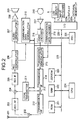
- FIG. 2 presents a simplified block diagram for designating internal construction of the portable telephone device (such as a digital cellular portable telephone device) according to the embodiment of the present invention.
- a signal received by an antenna 201 is transmitted to a RF receiving unit 203 via a selector 202.
- the RF receiving unit 203 limits frequency band of the received signal and also treats it with an automatic gain controlling process as required.
- frequency-controlled signal output from a frequency-controlled local transmitter 211 and another signal output from the RF receiving unit 203 are mixed together by a mixer 204 before eventually converting the received frequency into a constant frequency.
- a signal output from a mixer 204 is then transmitted to an IF receiving unit 205, which then converts the input analog signal into a digital signal, and then, it eventually becomes such an IQ digital data incorporating a constant bit rate.
- the IQ digital data executes a variety of operations in a received-signal demodulator 206 such as elimination of adverse influence from the phasing process, discernment of the kinds of received signal, a de-interleaving process, and an error correction or the like, for example. After properly being demodulated, the IQ digital data is split into audio data and communication data.
- the audio data is compressed, and then, the compressed audio data is transmitted on the block basis per received burst. Because of this, the compressed audio data is expanded by an audio decoder 207 and then decoded. The decoded audio data is then treated with a D/A (digital to analog) conversion process in accordance with an audio sampling rate. The D/A-converted analog vocal signal is power-amplified by a speaker amplifier 208 before eventually being output from a speaker 209.
- D/A digital to analog
- communication data split via the received-signal demodulator 206 is eventually restored into original data by a communication data decoder 210.
- the received data is routed to a CPU bus 225, and then, transmitted to an external device from an input/output (I/O) unit 220 via a data interface (I/F) 220a.
- I/O input/output
- I/F data interface
- voice of the user of the terminal device is converted into an analog audio signal via a microphone 218.
- a microphone amplifier 217 amplifies the analog audio signal up to an essential voltage.
- the amplified analog audio signal is converted into a digital signal based on a proper sampling rate by an audio encoder 216.
- the digital audio signal is encoded, and then, compressed before eventually being arranged into a proper block compatible with a burst signal in the RF receiving unit 203.
- the digital audio signal transmitted from the data interface (I/F) 220a of the input/output (I/O) unit 220 is then arranged into a proper block in a communication data encoder 219.
- the data transmitted from the audio encoder 216 and the communication data encoder 219 are combined with each other by a transmitted-signal modulator 215 before eventually becoming such an IQ digital signal containing a constant data rate.
- the IQ digital signal is then converted into an analog audio signal at an IF transmitting unit 214 and then converted into an analog-modulated signal.
- the analog-modulated signal is then mixed with a conversion signal transmitted from the local transmitter 211 by a mixer 213 whereby the mixed signal is converted into such a frequency desired for transmission.
- the mixed signal is then power-amplified by an RF transmitting unit 212 before eventually being output from the antenna 201 via the selector 202.
- the CPU bus 225 is linked with a CPU 224 and a ROM (Read Only Memory) 221 which stores such a program executed by the CPU 224 and such data including display fonts.
- a RAM 222 is utilized for storing computable data as required while the CPU 224 keeps on executing a program and also for provisionally storing transferable data while shifting data between the receiver and the transmitter.
- An EEPROM 223 consists of an electrically erasable memory, which provides every user with such utility by way of performing such functions including the following: Even when a user turns power off from the portable telephone device, the EEPROM 223 still memorizes actual setting condition immediately before the power is turned off. When the user turns power on again, in order to resume the setting condition identical to that was set before turning power off, the EEPROM 223 still memorizes the relevant setting parameter. In addition, the EEPROM 223 also stores a variety of word-candidates and phrase-candidates to be displayed on the LCD display 6 when the user inputs characters.
- a real-time clock (RTC) 226 provides data with regard to date, that is, the year, month, day, and time data, which is utilized for stamping time, display of time, and activation of alarm in the portable telephone device, for example.
- the above-referred input/output (I/O) unit 220 functions itself as an interface between the CPU 224 and those components including the LCD display 6, the input keyboard 3, the data interface 220a, and an external memory interface 220b.
- the external memory interface 220b is utilized for storing a variety of data in such a case in which the inventive portable telephone device utilizes specific data fed from the "Memory Stick" (a product and a registered trade name of Sony Corporation) or in such a case in which data distributed from a service provider is down-loaded via an internet service network, for example.
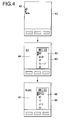
- FIG. 4 exemplifies concrete examples of screen display on the inventive portable telephone device in correspondence with serial steps for the input of characters.
- the jog dial 5 shown in FIG. 1 is operated for vertical shift of the cursor and depressing; a left key 16 is depressed for a leftward shift of the cursor; and a right key 17 is depressed for a right ward shift of the cursor.
- the shift of cursor in the horizontal direction for the input of characters is utilized for changing a conversion width (unit) or for the switching of conversion objects in the course of converting serial paragraphs.
- step S301 If no menu is selected in the step S301, the process goes to step S315, in which normal processes including continuous display of the "stand-by" screen, generation of ringing tone in response to a received call or a literal message, and display of the record on the reception and transmission of the call or the literal message on the LCD display, are individually executed.
- step S303 it is determined whether the user has actually selected a specific mode related to the input of characters out from a plurality of designated menus or not. For example, when the user has selected such a memo-pad mode for newly preparing a mail document or the like by opening a corresponding menu, such an image screen 41 shown in FIG. 4 is displayed. If the user does not select such an input mode, the process goes to another flow, that is, step S304. If the input mode has been selected, the process goes to step S305, in which an initial screen display corresponding to the input mode is displayed. As shown via the image screen 41 shown in FIG. 4, for example, a cursor 42 (depicted by a vertical line in the figure) is displayed at an upper-left corner of the LCD display screen in the initial screen display. This designates that the inventive portable telephone device awaits input of characters to be executed by the user.
- a cursor 42 displayed at an upper-left corner of the LCD display screen in the initial screen display.
- the initial screen display there may be such a case in which "browsing" image screen is displayed. Availing of this, the user will be able to correct the already input characters. Further, in the image screen 41 shown in FIG. 4, as shown via arrow symbols, the cursor 42 can be shifted in all four directions including upward, downward, rightward and leftward directions, and thus, as will be described later on, such an operation to decide for the input of characters by way of depressing the jog dial 5 can be effectuated in this image display.
- step S306 if the user inputs a Japanese "hiragana” character " (se)" by operating one of the numerical keys 4, for example, the CPU 224 displays the input character on the LCD display 6 in the ensuing step S307. Along with the display operation, the CPU 224 starts to detect a certain word that can correspond to the input a Japanese "hiragana” character " (se)", in other words, a ward starting with the character " (se)” in step S320. In the ensuing step S308, the CPU 224 enables display of a list designating practical word-candidates to be described later on.
- Display of word-candidates designates such function to display such a word begun with the initial one character or plural characters previously being input via key operation out from a plurality of words previously registered in a dictionary as practical word candidates potentially desired by users. Accordingly, in the above example, as shown in a word-candidates list 45 displayed in a display screen 43 shown in FIG. 4, a plurality of word-candidates beginning with a Japanese "hiragana” character “ (se)” or “katakana” character “ (se)” are individually displayed.
- the word-candidates list 45 for designating practical word-candidates pops up for display as a provisional screen display.
- an operation performed for shifting the cursor in the vertical and horizontal directions and such an operation to decide for the input of a specific character allocated to an input field 44 while preserving such a state in which only the cursor-shifting device comprising the left-key 16 and the right-key 17 provided on the portable telephone device compatible with shifting movement in the horizontal direction is allocated to the input field 44, such an operation for shifting cursor in the vertical direction by applying the jog dial 5 and another operation for depressing (entering) the jog dial 5 are divided into the shifting of the cursor on the word-candidates list 45 and the instruction for selecting a specific word candidate pointed out by the cursor.
- step S341 the CPU 224 identifies whether any character has already been input in succession to the previously input character or not. If it is identified that a new character has been input, operating mode is back to steps S307 and S320 to cause the newly input character to be displayed on the LCD display 6 in succession to the one already been input. Simultaneously, the CPU 224 starts to detect a proper word.
- step S309 the CPU 224 determines whether the user has actually performed such an operation to select a predetermined word out from the displayed word-candidates by way of shifting the cursor in the vertical direction by operating the jog dial 5 or not. For example, if the user has selected a proper word " (Sendai: a name of a city)", the CPU 224 causes the selected word " (Sendai)” to be displayed on the LCD display 6 in step S310 (refer to a display screen 46 shown in FIG. 4).
- step S321 the CPU 224 predicts such a phrase required for detecting a proper word that may ensue the selected word.
- the CPU 224 displays a phrase-candidates list 48 for designating probable phrase candidates (shown in FIG. 4) that may be linked with the selected word " (Sendai)" on the LCD display 6.
- step S330 the CPU 224 determines whether the user has actually selected a word " " (tojiru: corresponding to a verb "close") within the word-candidates list 45 by way of shifting the cursor in the vertical direction or not. If the word " " (close) has already been selected, then, the operating mode is back to step S305, in which the CPU 224 executes a process to display a predetermined character, where only the already input character is displayed on the LCD display 6 without displaying the word-candidates to enable the user to solely observe the character input field.
- step S341 determines whether a new character has actually been input or not. This in turn corresponds to such a state in which the CPU 244 awaits input of the following character and also corresponds to such a process to be executed by the user when continuously inputting Japanese "kana” characters.
- step S311 When phrase candidates are displayed in step S311, the process goes to the ensuing step S340, in which it is determined whether the user has actually input any character or not. If any character has actually been input, the operating mode is back to step S307 and step S320 to enable the CPU 224 to display the newly input character on the display screen in succession to the one already been input simultaneously with activation of the above-referred operation for detecting proper words.
- step S312 the CPU 224 determines whether the user has actually executed such an operation for selecting a proper phrase by way of shifting the cursor in the vertical direction by operating the jog dial 5 or not. If it is determined that the user has actually selected a proper phrase, the CPU 224 brings the operating mode back to step S310 and step S321. Concretely, in step S310, selected phrase is displayed. In other words, the selected phrase is displayed in succession to those characters or character strings already being decided for the input. In addition, in step S321, the CPU 224 executes the above-referred phrase prediction.
- step S340 After displaying the selected phrase on the display screen, the operating mode proceeds to step S340 to wait for the input of a new character.
- step S313 the CPU 224 determines whether the word " " (close) shown in the phrase-candidates list 48 has actually been selected (entered) or not. In consequence, if the word " " (close) has actually been selected, then, the process goes to step S305. Conversely, if the word " " (close) is not selected, the operating mode is again back to step S340 in order to have the CPU 224 determine whether input of a new character has actually been done by the user or not.
- Selection of the word " " (close) provided in the word candidate list 45 and the phrase-candidate list 48 by the user implies the following: Concretely, by way of selecting the word " " (close), the word-candidate list 45 and the phrase-candidate list 48 are respectively erased (that is, the display of the list is closed). This in turn enables the device for shifting the cursor in the vertical direction and the other entering device thus far being allocated to the list-displaying screen to be back to the input field as fast as possible.
- the inventive portable telephone device whenever the inventive portable telephone device is activated into a character-input mode, among such an operation to execute shifting of the cursor in the vertical and horizontal directions and the entering operation on the display screen, execution of an operation to shift the cursor in the vertical direction and an entering operation via the jog dial are provisionally allocated to the instruction for shifting the cursor on the word-candidates list and the phrase-candidates list and the other instruction for selecting proper candidates.
- the left and right keys on the telephone device are utilized.
- the inventive portable telephone device to quickly and correctly execute various operations for the input and correction of desired characters as well as for selecting proper words and phrases without necessarily executing switching operation to switch between the character input field and the display screen for displaying a list of word or phrase candidates.
- the inventive portable telephone device access the character-input field and the list of the word and phrase candidates while solely proceeding with the character-input mode instead of introducing such a conventional concept which allocates the existing devices for shifting the cursor including a jog dial and left/right keys to the character-input field and the list of word and phrase candidates and executes a switching operation for switching fields for the sake of inputting character. Because of this accessibility, the inventive portable telephone device dispenses with provision of a new device otherwise required for switching fields. Accordingly, it is possible for the inventive portable telephone device to utilize input devices provided for the existing portable telephone devices as of the existing condition, thus making it possible to securely input characters at a faster timing without fail, and yet, without increase of cost.
- the CPU 244 initially detects specific characters based on the input characters followed by a display of word-candidates corresponding to the detected characters, a process for predicting a proper phrase compatible with the displayed words, and a final step of displaying a list of probable phrase candidates, the user is saved from executing a variety of processes except for merely selecting a specific word or phrase cited in the candidate lists. In consequence, rounds of key input operation are drastically decreased to facilitate composition of a sentence with promoted easiness.
- word-candidates and phrase-candidates cited in the word-candidates list and the phrase-candidates list is not solely limited to a format in a vertical direction (a single column) shown in FIG. 4, but as shown in FIG. 5, the above word-candidates and phrase-candidates may also be disposed in the horizontal direction for several lines.
- a word-candidates list 53 and a phrase-candidates list 55 shown in FIG. 5 individually correspond to the above-referred lists 45 and 48 shown in FIG. 4.
- a word-candidates list 61 is so arranged that the list will begin with such a position right behind an input Japanese "kana” character " " (ha), and yet, the list will also begin with such a line right below a line 62.
- each line will be broken at the left end of the word-candidates list 45 to start a new line, and then, at the moment at which the list display is turned off via user's selection of the word " " (close), these characters and phrases will be brought back to the normal display format by way of proceeding with the display of characters and phrases to the right from the upper left portion of the display screen and then each line is broken at the right end to start with a new line at the right end.
- this method even in a case of continuously inputting a number of characters, there is no fear of causing the word candidate list 45 to adversely obstruct the input characters at all.
- the input characters and phrases are vertically written within the input field 44 while the list is displayed. Then, simultaneous with the turn-off of the list display, these characters and phrases may be brought back to the normal display format with horizontal alignment of input characters and phrases. Even when introducing this method, it is possible to prevent the input characters from being concealed by the word and phrase candidate lists 45 and 48.
- the LCD display 6 utilizes monochromatic display of characters and phrases.
- the monochromatic display with a color LCD, it is also allowable to arrange display of soft-keys in coordination with the display of input characters, especially in regard to the display of the word and phrase candidate lists as will be described below.
- the inventive portable telephone device when the inventive portable telephone device enters into the character inputting mode, as shown in FIG. 7, in order that an input field 78 can visually be discerned from a word-candidates list 71, display colors of the word-candidate list 71 and a cursor 72 are converted from black and white into greenish colors, for example. Simultaneously, the color of a certain character (for designating "selection" in this case) on a soft-key 73 corresponding to the jog dial 5 is changed from white in the bluish background color into green, for example. In addition, among four of triangular marks 74 ⁇ 77 designating movable directions of the cursor, only the color of the marks 74 and 75 is changed from white into green, for example.
- the word-candidates list 71 and the soft key 73 are mutually related to each other by way of changing display colors of the word-candidates list 71, the soft-key 73, and the marks 74 and 75 into analogous colors.
Landscapes
- Engineering & Computer Science (AREA)
- General Engineering & Computer Science (AREA)
- Theoretical Computer Science (AREA)
- Human Computer Interaction (AREA)
- Physics & Mathematics (AREA)
- General Physics & Mathematics (AREA)
- Computer Networks & Wireless Communication (AREA)
- Signal Processing (AREA)
- Input From Keyboards Or The Like (AREA)
- Telephone Function (AREA)
- User Interface Of Digital Computer (AREA)
- Telephone Set Structure (AREA)
Applications Claiming Priority (2)
| Application Number | Priority Date | Filing Date | Title |
|---|---|---|---|
| JP2000287401A JP2002101178A (ja) | 2000-09-21 | 2000-09-21 | 携帯通信端末および画面表示方法 |
| JP2000287401 | 2000-09-21 |
Publications (3)
| Publication Number | Publication Date |
|---|---|
| EP1191428A2 true EP1191428A2 (de) | 2002-03-27 |
| EP1191428A3 EP1191428A3 (de) | 2003-04-09 |
| EP1191428B1 EP1191428B1 (de) | 2009-02-25 |
Family
ID=18771150
Family Applications (1)
| Application Number | Title | Priority Date | Filing Date |
|---|---|---|---|
| EP01308004A Expired - Lifetime EP1191428B1 (de) | 2000-09-21 | 2001-09-19 | Tragbares Kommunikationsgerät und Verfahren zur Anzeige von Zeichen oder Bildern |
Country Status (7)
| Country | Link |
|---|---|
| US (1) | US6968215B2 (de) |
| EP (1) | EP1191428B1 (de) |
| JP (1) | JP2002101178A (de) |
| KR (1) | KR100815003B1 (de) |
| CN (1) | CN100474862C (de) |
| AU (1) | AU784979B2 (de) |
| DE (1) | DE60137742D1 (de) |
Cited By (6)
| Publication number | Priority date | Publication date | Assignee | Title |
|---|---|---|---|---|
| EP1355227A1 (de) * | 2002-04-15 | 2003-10-22 | Telefonaktiebolaget L M Ericsson (Publ) | Vorrichtung und Verfahren für Dateneingaben in eiem mobilen Gerät |
| GB2391429A (en) * | 2002-07-30 | 2004-02-04 | Nokia Corp | Selecting an icon from an arrangement of icons having a first portion comprising a plurality of icons and a second portion comprising at least one icon |
| EP1630651A1 (de) * | 2004-08-31 | 2006-03-01 | 2012244 Ontario Inc. | Tragbares Elektronisches Gerät mit Prädicktive-Texteingabe |
| US7817140B2 (en) | 2004-08-31 | 2010-10-19 | Research In Motion Limited | Handheld electronic device with text disambiguation |
| US8004495B2 (en) | 2004-08-31 | 2011-08-23 | Research In Motion Limited | Handheld electronic device and associated method employing a multiple-axis input device and outputting a currently selected variant at a text input location during text disambiguation |
| EP1573714A4 (de) * | 2002-12-16 | 2012-04-18 | Microsoft Corp | Systeme und verfahren zuranschaltung an computereinrichtungen |
Families Citing this family (37)
| Publication number | Priority date | Publication date | Assignee | Title |
|---|---|---|---|---|
| US20020140722A1 (en) * | 2001-04-02 | 2002-10-03 | Pelco | Video system character list generator and method |
| KR20020092057A (ko) * | 2001-06-01 | 2002-12-11 | 삼성전자 주식회사 | 휴대형 단말기에서 디스플레이 방향 변경방법 |
| US7333092B2 (en) | 2002-02-25 | 2008-02-19 | Apple Computer, Inc. | Touch pad for handheld device |
| US20040176114A1 (en) * | 2003-03-06 | 2004-09-09 | Northcutt John W. | Multimedia and text messaging with speech-to-text assistance |
| WO2004102374A1 (ja) | 2003-05-19 | 2004-11-25 | Vodafone K.K. | 文字入力方法、文字入力装置及び移動通信端末装置 |
| US8136050B2 (en) * | 2003-11-21 | 2012-03-13 | Nuance Communications, Inc. | Electronic device and user interface and input method therefor |
| JP2005191834A (ja) * | 2003-12-25 | 2005-07-14 | Fujitsu Ltd | 端末装置 |
| JP2005267000A (ja) * | 2004-03-17 | 2005-09-29 | Sony Corp | 電子機器および機能割り当て方法 |
| US7925241B2 (en) * | 2004-11-09 | 2011-04-12 | Sharp Laboratories Of America, Inc. | Using PIM calendar on a mobile device to configure a profile |
| US20060139328A1 (en) * | 2004-12-29 | 2006-06-29 | Nina Maki | Mobile communications terminal and a method therefor |
| US7509099B2 (en) * | 2005-03-15 | 2009-03-24 | Kyocera Wireless Corp. | Wireless communication device and method of use |
| RU2338238C2 (ru) * | 2005-05-30 | 2008-11-10 | Самсунг Электроникс Ко., Лтд. | Способ и система ввода информации |
| JP2007034641A (ja) * | 2005-07-26 | 2007-02-08 | Brother Ind Ltd | 多機能装置 |
| US20070152983A1 (en) | 2005-12-30 | 2007-07-05 | Apple Computer, Inc. | Touch pad with symbols based on mode |
| US7574672B2 (en) | 2006-01-05 | 2009-08-11 | Apple Inc. | Text entry interface for a portable communication device |
| US7860536B2 (en) * | 2006-01-05 | 2010-12-28 | Apple Inc. | Telephone interface for a portable communication device |
| US8918736B2 (en) * | 2006-01-05 | 2014-12-23 | Apple Inc. | Replay recommendations in a text entry interface |
| KR100738902B1 (ko) * | 2006-03-16 | 2007-07-12 | 삼성전자주식회사 | 휴대용 단말기에서 문자 입력 장치 및 방법 |
| KR100738901B1 (ko) * | 2006-03-16 | 2007-07-12 | 삼성전자주식회사 | 휴대용 단말기에서 문자 입력 장치 및 방법 |
| KR100768426B1 (ko) | 2006-03-16 | 2007-10-18 | 삼성전자주식회사 | 휴대용 단말기의 문자 입력 장치 및 방법 |
| JP2007251804A (ja) * | 2006-03-17 | 2007-09-27 | Matsushita Electric Works Ltd | インターホン親機、集合住宅用インターホンシステム |
| KR100806936B1 (ko) | 2006-03-31 | 2008-02-22 | 엔에이치엔(주) | 자동완성 추천어를 정정하여 노출하는 자동완성 추천어제공 방법 및 시스템 |
| US8022935B2 (en) | 2006-07-06 | 2011-09-20 | Apple Inc. | Capacitance sensing electrode with integrated I/O mechanism |
| US8274479B2 (en) | 2006-10-11 | 2012-09-25 | Apple Inc. | Gimballed scroll wheel |
| US7667148B2 (en) * | 2006-10-13 | 2010-02-23 | Apple Inc. | Method, device, and graphical user interface for dialing with a click wheel |
| JP4907296B2 (ja) * | 2006-10-19 | 2012-03-28 | アルプス電気株式会社 | 入力装置 |
| CN101234031B (zh) * | 2007-02-02 | 2010-12-22 | 深圳迈瑞生物医疗电子股份有限公司 | 用于超声诊断设备的体位图操作方法和系统 |
| JP4605609B2 (ja) * | 2007-06-15 | 2011-01-05 | ソニー・エリクソン・モバイルコミュニケーションズ株式会社 | 電子メール作成装置 |
| US8756527B2 (en) * | 2008-01-18 | 2014-06-17 | Rpx Corporation | Method, apparatus and computer program product for providing a word input mechanism |
| WO2010091530A1 (en) * | 2009-02-10 | 2010-08-19 | Nokia Corporation | Improved title |
| US8352913B2 (en) * | 2009-08-07 | 2013-01-08 | Adobe Systems Incorporated | Generating and resolving component names in an integrated development environment |
| CN102156552A (zh) * | 2011-04-20 | 2011-08-17 | 惠州Tcl移动通信有限公司 | 一种输入法输出字符的处理方法及移动终端 |
| CN102184030A (zh) * | 2011-04-20 | 2011-09-14 | 惠州Tcl移动通信有限公司 | 一种中文输入法输出字符的处理方法及装置 |
| CN102147666B (zh) * | 2011-04-20 | 2013-07-03 | 惠州Tcl移动通信有限公司 | 一种输入法输出文字信息的处理方法及装置 |
| KR20140094744A (ko) * | 2013-01-22 | 2014-07-31 | 한국전자통신연구원 | 휴대 단말의 음성 인식 결과 편집 방법 및 그 장치 |
| KR102087896B1 (ko) * | 2013-04-03 | 2020-03-12 | 삼성전자주식회사 | 터치스크린을 가지는 전자 장치에서 텍스트 입력하는 방법 및 장치 |
| KR102607564B1 (ko) * | 2016-09-13 | 2023-11-30 | 삼성전자주식회사 | 소프트 키를 표시하는 방법 및 그 전자 장치 |
Family Cites Families (9)
| Publication number | Priority date | Publication date | Assignee | Title |
|---|---|---|---|---|
| DE69315969T2 (de) | 1992-12-15 | 1998-07-30 | Sun Microsystems Inc | Darstellung von Informationen in einem Anzeigesystem mit transparenten Fenstern |
| CA2227904C (en) * | 1995-07-26 | 2000-11-14 | Tegic Communications, Inc. | Reduced keyboard disambiguating system |
| US5818437A (en) | 1995-07-26 | 1998-10-06 | Tegic Communications, Inc. | Reduced keyboard disambiguating computer |
| JPH10154144A (ja) | 1996-11-25 | 1998-06-09 | Sony Corp | 文章入力装置及び方法 |
| US5953541A (en) * | 1997-01-24 | 1999-09-14 | Tegic Communications, Inc. | Disambiguating system for disambiguating ambiguous input sequences by displaying objects associated with the generated input sequences in the order of decreasing frequency of use |
| JP3123490B2 (ja) | 1997-11-17 | 2001-01-09 | 日本電気株式会社 | 携帯通信装置および表示情報選択方法 |
| GB2333386B (en) * | 1998-01-14 | 2002-06-12 | Nokia Mobile Phones Ltd | Method and apparatus for inputting information |
| EP1672886A3 (de) | 1998-03-05 | 2014-08-13 | Cliff Island LLC | Tragbares Endgerät |
| KR20030031643A (ko) * | 2001-10-15 | 2003-04-23 | 주식회사 어필텔레콤 | 전화번호 검색방법 |
-
2000
- 2000-09-21 JP JP2000287401A patent/JP2002101178A/ja active Pending
-
2001
- 2001-09-19 AU AU73708/01A patent/AU784979B2/en not_active Ceased
- 2001-09-19 US US09/956,642 patent/US6968215B2/en not_active Expired - Lifetime
- 2001-09-19 EP EP01308004A patent/EP1191428B1/de not_active Expired - Lifetime
- 2001-09-19 DE DE60137742T patent/DE60137742D1/de not_active Expired - Lifetime
- 2001-09-19 KR KR1020010057938A patent/KR100815003B1/ko not_active Expired - Fee Related
- 2001-09-21 CN CNB011379952A patent/CN100474862C/zh not_active Expired - Fee Related
Cited By (9)
| Publication number | Priority date | Publication date | Assignee | Title |
|---|---|---|---|---|
| EP1355227A1 (de) * | 2002-04-15 | 2003-10-22 | Telefonaktiebolaget L M Ericsson (Publ) | Vorrichtung und Verfahren für Dateneingaben in eiem mobilen Gerät |
| GB2391429A (en) * | 2002-07-30 | 2004-02-04 | Nokia Corp | Selecting an icon from an arrangement of icons having a first portion comprising a plurality of icons and a second portion comprising at least one icon |
| EP1573714A4 (de) * | 2002-12-16 | 2012-04-18 | Microsoft Corp | Systeme und verfahren zuranschaltung an computereinrichtungen |
| EP1630651A1 (de) * | 2004-08-31 | 2006-03-01 | 2012244 Ontario Inc. | Tragbares Elektronisches Gerät mit Prädicktive-Texteingabe |
| GB2432953B (en) * | 2004-08-31 | 2009-03-25 | Ontario Inc 2012244 | Handheld electronic device with text disambiguation |
| US7817140B2 (en) | 2004-08-31 | 2010-10-19 | Research In Motion Limited | Handheld electronic device with text disambiguation |
| US8004495B2 (en) | 2004-08-31 | 2011-08-23 | Research In Motion Limited | Handheld electronic device and associated method employing a multiple-axis input device and outputting a currently selected variant at a text input location during text disambiguation |
| US8502783B2 (en) | 2004-08-31 | 2013-08-06 | Research In Motion Limited | Handheld electronic device with text disambiguation |
| US9189080B2 (en) | 2004-08-31 | 2015-11-17 | Blackberry Limited | Handheld electronic device with text disambiguation |
Also Published As
| Publication number | Publication date |
|---|---|
| EP1191428A3 (de) | 2003-04-09 |
| AU784979B2 (en) | 2006-08-10 |
| US6968215B2 (en) | 2005-11-22 |
| KR100815003B1 (ko) | 2008-03-18 |
| EP1191428B1 (de) | 2009-02-25 |
| AU7370801A (en) | 2002-03-28 |
| KR20020023645A (ko) | 2002-03-29 |
| JP2002101178A (ja) | 2002-04-05 |
| DE60137742D1 (de) | 2009-04-09 |
| US20020072394A1 (en) | 2002-06-13 |
| CN1344119A (zh) | 2002-04-10 |
| CN100474862C (zh) | 2009-04-01 |
Similar Documents
| Publication | Publication Date | Title |
|---|---|---|
| EP1191428B1 (de) | Tragbares Kommunikationsgerät und Verfahren zur Anzeige von Zeichen oder Bildern | |
| US8659544B2 (en) | Portable information terminal having a method for inputting symbols or pictograms | |
| KR100247010B1 (ko) | 쇼트 메시지 서비스 이용 디지털 이동 통신단말기에서 메시지 전송방법 | |
| US20040176139A1 (en) | Method and wireless communication device using voice recognition for entering text characters | |
| KR20020061363A (ko) | 이동통신 단말기의 특수문자 선택방법 | |
| US20060206816A1 (en) | Method of and device for predictive text editing | |
| US7973764B2 (en) | Switching between input modes in a limited input device | |
| US6802661B1 (en) | Method of inputting alphanumeric codes by means of 12 keys | |
| US20070113139A1 (en) | Method for setting environment of mobile communication terminal using multimedia message | |
| RU2413986C2 (ru) | Улучшенный терминал мобильной связи и соответствующий способ | |
| JP2003015805A (ja) | 携帯端末、及びその文字入力方法 | |
| KR20050015897A (ko) | 이동 통신 단말기의 문자 표시 방법 | |
| KR100703476B1 (ko) | 이동무선단말기의 화면정보 서비스 방법 | |
| US8284081B2 (en) | Method and apparatus for inputting character in a terminal | |
| JP2007226712A (ja) | 携帯端末装置及びその言語選択方法 | |
| JPH06348383A (ja) | 文字入力装置 | |
| KR100650873B1 (ko) | 이동 통신 단말기의 키톤 처리 방법 및 그 이동 통신단말기 | |
| KR100640542B1 (ko) | 무선통신 단말기에서 픽셀정보를 이용한 커서 위치 지정방법 | |
| KR20050022560A (ko) | 이동통신 단말기에서 변환키를 이용한 문자 입력 방법 | |
| JP2006332751A (ja) | 携帯端末、携帯端末の制御方法及び制御プログラム | |
| KR0181111B1 (ko) | 페이저의 문자편집 방법 | |
| KR101214486B1 (ko) | 휴대용 단말기 및 그의 영상 이동방법 | |
| KR101424255B1 (ko) | 이동통신 단말기 및 이를 위한 문자입력방법 | |
| JP5098814B2 (ja) | 文字入力装置、文字入力方法及びプログラム | |
| JP2003308158A (ja) | 文字入力装置 |
Legal Events
| Date | Code | Title | Description |
|---|---|---|---|
| PUAI | Public reference made under article 153(3) epc to a published international application that has entered the european phase |
Free format text: ORIGINAL CODE: 0009012 |
|
| AK | Designated contracting states |
Kind code of ref document: A2 Designated state(s): AT BE CH CY DE DK ES FI FR GB GR IE IT LI LU MC NL PT SE TR |
|
| AX | Request for extension of the european patent |
Free format text: AL;LT;LV;MK;RO;SI |
|
| PUAL | Search report despatched |
Free format text: ORIGINAL CODE: 0009013 |
|
| AK | Designated contracting states |
Kind code of ref document: A3 Designated state(s): AT BE CH CY DE DK ES FI FR GB GR IE IT LI LU MC NL PT SE TR |
|
| AX | Request for extension of the european patent |
Extension state: AL LT LV MK RO SI |
|
| 17P | Request for examination filed |
Effective date: 20030819 |
|
| AKX | Designation fees paid |
Designated state(s): DE FR GB IT |
|
| 17Q | First examination report despatched |
Effective date: 20040322 |
|
| 17Q | First examination report despatched |
Effective date: 20040322 |
|
| GRAP | Despatch of communication of intention to grant a patent |
Free format text: ORIGINAL CODE: EPIDOSNIGR1 |
|
| GRAS | Grant fee paid |
Free format text: ORIGINAL CODE: EPIDOSNIGR3 |
|
| GRAS | Grant fee paid |
Free format text: ORIGINAL CODE: EPIDOSNIGR3 |
|
| GRAA | (expected) grant |
Free format text: ORIGINAL CODE: 0009210 |
|
| AK | Designated contracting states |
Kind code of ref document: B1 Designated state(s): DE FR GB IT |
|
| REG | Reference to a national code |
Ref country code: GB Ref legal event code: FG4D |
|
| REF | Corresponds to: |
Ref document number: 60137742 Country of ref document: DE Date of ref document: 20090409 Kind code of ref document: P |
|
| PLBE | No opposition filed within time limit |
Free format text: ORIGINAL CODE: 0009261 |
|
| STAA | Information on the status of an ep patent application or granted ep patent |
Free format text: STATUS: NO OPPOSITION FILED WITHIN TIME LIMIT |
|
| 26N | No opposition filed |
Effective date: 20091126 |
|
| REG | Reference to a national code |
Ref country code: GB Ref legal event code: 746 Effective date: 20120703 |
|
| REG | Reference to a national code |
Ref country code: DE Ref legal event code: R084 Ref document number: 60137742 Country of ref document: DE Effective date: 20120614 |
|
| PGFP | Annual fee paid to national office [announced via postgrant information from national office to epo] |
Ref country code: GB Payment date: 20120920 Year of fee payment: 12 |
|
| PGFP | Annual fee paid to national office [announced via postgrant information from national office to epo] |
Ref country code: FR Payment date: 20121010 Year of fee payment: 12 |
|
| PGFP | Annual fee paid to national office [announced via postgrant information from national office to epo] |
Ref country code: IT Payment date: 20120927 Year of fee payment: 12 |
|
| GBPC | Gb: european patent ceased through non-payment of renewal fee |
Effective date: 20130919 |
|
| REG | Reference to a national code |
Ref country code: FR Ref legal event code: ST Effective date: 20140530 |
|
| PG25 | Lapsed in a contracting state [announced via postgrant information from national office to epo] |
Ref country code: GB Free format text: LAPSE BECAUSE OF NON-PAYMENT OF DUE FEES Effective date: 20130919 |
|
| PG25 | Lapsed in a contracting state [announced via postgrant information from national office to epo] |
Ref country code: FR Free format text: LAPSE BECAUSE OF NON-PAYMENT OF DUE FEES Effective date: 20130930 Ref country code: IT Free format text: LAPSE BECAUSE OF NON-PAYMENT OF DUE FEES Effective date: 20130919 |
|
| PGFP | Annual fee paid to national office [announced via postgrant information from national office to epo] |
Ref country code: DE Payment date: 20140922 Year of fee payment: 14 |
|
| REG | Reference to a national code |
Ref country code: DE Ref legal event code: R119 Ref document number: 60137742 Country of ref document: DE |
|
| PG25 | Lapsed in a contracting state [announced via postgrant information from national office to epo] |
Ref country code: DE Free format text: LAPSE BECAUSE OF NON-PAYMENT OF DUE FEES Effective date: 20160401 |