EP0251454A2 - Calculatrice et méthode capable d'afficher une pile historique de valeurs - Google Patents
Calculatrice et méthode capable d'afficher une pile historique de valeurs Download PDFInfo
- Publication number
- EP0251454A2 EP0251454A2 EP87304074A EP87304074A EP0251454A2 EP 0251454 A2 EP0251454 A2 EP 0251454A2 EP 87304074 A EP87304074 A EP 87304074A EP 87304074 A EP87304074 A EP 87304074A EP 0251454 A2 EP0251454 A2 EP 0251454A2
- Authority
- EP
- European Patent Office
- Prior art keywords
- formula
- display
- label
- value
- list
- Prior art date
- Legal status (The legal status is an assumption and is not a legal conclusion. Google has not performed a legal analysis and makes no representation as to the accuracy of the status listed.)
- Granted
Links
Images






Classifications
-
- G—PHYSICS
- G06—COMPUTING OR CALCULATING; COUNTING
- G06F—ELECTRIC DIGITAL DATA PROCESSING
- G06F3/00—Input arrangements for transferring data to be processed into a form capable of being handled by the computer; Output arrangements for transferring data from processing unit to output unit, e.g. interface arrangements
- G06F3/01—Input arrangements or combined input and output arrangements for interaction between user and computer
- G06F3/048—Interaction techniques based on graphical user interfaces [GUI]
- G06F3/0487—Interaction techniques based on graphical user interfaces [GUI] using specific features provided by the input device, e.g. functions controlled by the rotation of a mouse with dual sensing arrangements, or of the nature of the input device, e.g. tap gestures based on pressure sensed by a digitiser
- G06F3/0489—Interaction techniques based on graphical user interfaces [GUI] using specific features provided by the input device, e.g. functions controlled by the rotation of a mouse with dual sensing arrangements, or of the nature of the input device, e.g. tap gestures based on pressure sensed by a digitiser using dedicated keyboard keys or combinations thereof
-
- G—PHYSICS
- G06—COMPUTING OR CALCULATING; COUNTING
- G06F—ELECTRIC DIGITAL DATA PROCESSING
- G06F15/00—Digital computers in general; Data processing equipment in general
- G06F15/02—Digital computers in general; Data processing equipment in general manually operated with input through keyboard and computation using a built-in program, e.g. pocket calculators
- G06F15/0225—User interface arrangements, e.g. keyboard, display; Interfaces to other computer systems
-
- G—PHYSICS
- G06—COMPUTING OR CALCULATING; COUNTING
- G06F—ELECTRIC DIGITAL DATA PROCESSING
- G06F3/00—Input arrangements for transferring data to be processed into a form capable of being handled by the computer; Output arrangements for transferring data from processing unit to output unit, e.g. interface arrangements
- G06F3/01—Input arrangements or combined input and output arrangements for interaction between user and computer
- G06F3/03—Arrangements for converting the position or the displacement of a member into a coded form
- G06F3/033—Pointing devices displaced or positioned by the user, e.g. mice, trackballs, pens or joysticks; Accessories therefor
Definitions
- a algebraic calculating device which displays a stack which contains values most recently calculated or utilized.
- the stack also contains a label for each value. Labels are displayed by the calculating device concurrently with values.
- the labels in the stack are searched to see if there is a value on the stack having the same label. If so the duplicate value and its label are removed from the stack.
- a calculating device 100 having a first section 101 and a second section 102.
- First section 101 includes a plurality of keys 103 which include keys to be utilized for entering alphabetical symbols.
- Second section 102 includes a display 111.
- display 111 is a liquid crystal display which displays four lines of twenty-three characters.
- Second section 102 also contains a plurality of keys 104, which include numeric keys and function keys as labelled.
- a scrolling key 112 and a scrolling key 113 are labelled as shown.
- second section 102 includes a multifunction key 105, a multifunction key 106, a multifunction key 107, a multifunction key 108, a multifunction key 109 and a multifunction key 110.
- Multifunction keys 105-110 are variable function keys which may have associated with them a function or the value of a variable.
- the term "key” is used generically to mean a means of entering data. For instance, the term key includes not only mechanical means of input but also may include entry of data through a touch sensitive screen.
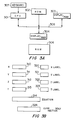
- FIG. 3A shows the internal chip-level architecture of calculating device 100.
- a central processing unit (CPU) 301, a read only memory (ROM) 302, a combination display controller and a random access memory (Display/RAM) 303 and a Display/RAM 304 are shown coupled to a bus 305.
- a keyboard 307 is shown coupled to CPU 301. Keyboard 307 may include plurality of keys 103 and plurality of keys 104.
- a random access memory (RAM) 306 is also shown in Figure 3A.
- RAM 306 is the total RAM from Display RAM 303 and Display RAM 304 which is available to be accessed by CPU 301.
- Figure 3B shows a memory location 310, a memory location 311, a memory location 312, a memory location 313, a memory location 320, a memory location 321, a memory location 322, a memory location 323, a memory location 314 and a memory location 324.
- Memory locations 310-314 and 320-324 are permanently assigned memory locations within RAM 306.
- Memory locations 310-313 each contain 64-bit binary-encoded decimal numbers.
- Memory locations 314, and 320-324 each contain 20-bit addresses that point to other memory locations in RAM 306.
- Memory locations pointed to by memory locations 320-323 contain alphanumeric strings.
- Display 111 displays alphanumeric strings pointed to by memory locations 320-322 and 64-bit arithmetic numbers contained in memory locations 310-312.
- the alphanumeric string pointed to by 320 (called “XLABEL”) is displayed adjacent to the ASCII form of the number stored in memory location 310 (Called “X”).
- the alphanumeric string pointed to by 321 (called YLABEL”) is displayed adjacent to the ASCII form of the number stored in memory location 311 (called “Y")
- the alphanumeric string pointed to by 322 (called “ZLABEL”) is displayed adjacent to the ASCII form of the number stored in memory location 312 (called "Z”).
- FIG. 1 is a flowchart of a program for adding and deleting entries from the stack. Additional details about the stack performance is evident from the discussion below.
- Memory location 314 and memory location 324 are also permanently assigned memory locations.
- Memory location 314 contains the null set or a 20-bit address of alphanumeric string which is used as a current equation, as explained below.
- Memory location 324 contains the null set or a twenty-bit address of a memory location containing the parsed version of the alphanumeric string pointed to by memory location 314, as explained below.
- Figure 2A is a block diagram of a program implementing an equation solving interface.
- the program can be in an entry mode 202 or a calculating mode 203.
- entry mode 202 plurality of keys 103 and 104 can be used to enter a equation into calculating device 100.
- the equation is entered as an alphanumeric string pointed to by memory location 314. More discussion on exactly how to enter an equation and how an equation is displayed by display 111 is found below.
- Calculating device 100 parses the equation displayed by display 111 in order to extract mathematical variables and to determine the mathematical relationship between the variables. Also, calculating device 100 verifies that the entered equation does define a legitimate mathematic relationship.
- a parsed version of the alphanumeric equation shown by display 111 is placed in a memory location pointed to by equation 324. Parsing is well-understood in the art, and a discussion thereof may be found, for instance in Principles of Compiler Design , Alfred V. Aho, Jeffrey D. Ullman, Addison-Wesley Publishing Company, 1977, esp. Chapters 3,4,5.
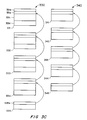
- variable list 330 (sometimes referred to herein as "the variable list"), shown in Figure 3C.
- Variable list 330 is a linked list in which each variable location includes a pointer to the next variable in the list.
- Variable list 330 resides in RAM 306.
- Variable list 330 is shown to have entries 331, 332, 333, 334 and top of list 335. Entry 331 is shown divided into four segments.
- a segment 331a contains a twenty-bit address of the next entry into variable list 330, or the null set if there is no next entry.
- a segment 331c contains an alphanumeric variable name.
- a segment 331b contains the length of the alphanumeric variable name contained in segment 331c.
- a segment 331d contains a 64-bit number representing the current value of the variable of entry 331.
- Entries 332-334 are formatted similarly to entry 331.
- Entry 335 is a top of stack pointer and contains a segment 335a which points to entry 334.
- Formula list 340 (sometimes referred to herein as "the formula list") which stores equations.
- Formula list 340 is shown to have entries 341, 342, 343, 344 and top of list 345.
- Entry 341 is shown divided into three segments.
- a segment 341a contains a twenty-bit address of the next entry into formula list 340, or the null set if there is no next entry.
- a segment 341c contains the equation in unparced for.
- a segment 341b contains the length of the equation contained in segment 341c.
- each variable of the equation is associated with one of the multifunction keys 105-110.
- a label with the name of the variable appears on display 111 right above the multifunction key associated with the variable, as further described below.
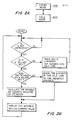
- Calculating device 100 when in calculating mode enters the programming loop described by the flowchart shown in Figure 2B.
- a monitor loops until a key on calculating device 100 is depressed. Once a key is depressed calculating device 100 checks to see if it was one of multifunction keys 105-110. If the key depressed is not one of multifunction keys 105-110, calculator 100 enters the value, into a current calculate line, as described further below. The calculator then reenters the monitor loop.
- calculator 100 checks to see whether the last prior key depressed was from multifunction keys 105-110. If the last prior key depressed was not from multifunction keys 105-110, the value in the calculator line is entered into a variable associated with the multifunction key depressed. The variable and its current value is then displayed.
- variable of the currently depressed multifunction key is calculated using the values of the other variables. The variable calculated and its current value is then displayed.
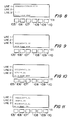
- Display 111 is shown in Figure 4. Calculating device 100 is in a condition such that no equations have been entered into formula list 340. In Figure 4, display 111 shows the main menu of calculating device 110. Display 111 is set to round to two decimal places.
- press [(SOLVE)] is to press a multifunction key from multifunction keys 105-110 which is immediately below the label SOLVE in display 111. As shown in Figure 4, this would mean depressing multifunction key 109.
- a variable name surrounded by "[()]” means that the variable may be selected by depressing one of multifunction keys 105-110.
- a name surrounded by "[]” means that the function may be selected by depressing one of plurality of keys 103 or 104 which is thus labelled. --If there are no formulas in formula list 340 when you press [(SOLVE)], Figure 5 shows what will be seen.
- display 111 is as shown in Figure 6.
- the calculator line is in alphanumeric mode and the calculator history stack described in Figure 3B is masked and can not be seen.
- a pointer (bold arrow) 601 points to the current formula.
- a cursor 602 is to the right of pointer 601, indicating the beginning of the formula that you will type in.
- the [EXIT] key shown labelled in Figure 1, has either of two effects in the SOLVE menu if the cursor is on: o If formula list 340 is empty, the main menu returns. o If formula list 340 is not empty, the SOLVE menu remains, the edit line disappears, and the previous current formula returns as the current formula.
- DOLLARS FRANCS / DTOF (DTOF is francs-to-dollar rate).
- the formula is entered into formula list 340 and placed into line 1, indented one space.
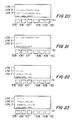
- the calculator line is active. As you calculate and store numbers and the history stack lifts, the formula in line 1 disappears (see flowchart in Figure 2C).
- Variable in the formula that do not already exist are created and initialized to zero.
- the variables will exist in variable list 330 and consume space in RAM 306 until the variables are deleted using either the [(delete)] or [shift] [CLEAR ALL] keys.
- the menu key labels display the first four or five characters of the variable names in the formula, depending on the characters used, in the order in which they appear in the formula. You are now able to calculate using these menu keys.
- the error message "INVALID FORMULA" is displayed and the cursor is placed over the character that is detected as causing the error. You can edit the formula to correct it. If there is more than one error in the formula, the errors are detected one at a time, as you correct them and press [(CALC)].
- the calculator solves for the variable FRANCS and displays the answer. While it is solving for a variable, you will see "CALCULATING" in line 1.
- the present embodiment returns solution using both numeric and symbolic methods. Future embodiments still being developed will utilize the symbolic method to return not only a value, but other types of data as well.
- DOLLARS LIRE / DTOL for conversion between U.S. dollars and Italian fire
- DOLLARS POUNDS / DTOP for conversions between U.S. dollars and British pounds.
- This display indicates that the dollars/francs formula is also the last formula in formula list 340, since there is no current formula (no bold arrow pointing at a formula) and the cursor is blinking at the left of line 3, indented one space.
- the current formula automatically moves up to line 2, the character you typed appears at the left of line 3, and the blinking cursor is to its right. You are typing the formula in and it will be placed between the two formulas now in formula list 340 -- automatically. Complete the typing of the formula and press [INPUT] or [(CALC)]. The formula will be entered and become the current formula.
- the formulas share variables of the same name.
- the three conversion formulas in formula list 340 share the variable named DOLLARS.
- dollars has the value 103.31.
- the dollars/lire formula is the current formula in CALC mode and the variables in the dollars/francs formula have not been cleared. If the conversion of fire to dollars is 1949 fire to $1, you can calculate the fire equivalent to $103.31 at this time by keying in 1949 and pressing [(DTOL)] and display 111 will appear as shown in Figure 22.
- the dollars/lire conversion formula is shown as the current formula and the other two formulas in formula list 340 at this time are shown above it. You can immediately begin typing another formula (which would be inserted after the current formula), or press [v] to find the bottom of formula list 340. If you press [shift] [v] the pointer will be placed just past the last formula in formula list 340. You could also press [(CALC)] again to continue calculating with the current formula.
Landscapes
- Engineering & Computer Science (AREA)
- General Engineering & Computer Science (AREA)
- Theoretical Computer Science (AREA)
- Human Computer Interaction (AREA)
- Physics & Mathematics (AREA)
- General Physics & Mathematics (AREA)
- Computer Hardware Design (AREA)
- Computing Systems (AREA)
- Calculators And Similar Devices (AREA)
- Input From Keyboards Or The Like (AREA)
Applications Claiming Priority (2)
| Application Number | Priority Date | Filing Date | Title |
|---|---|---|---|
| US868405 | 1986-05-29 | ||
| US06/868,405 US4843590A (en) | 1986-05-29 | 1986-05-29 | History stack |
Publications (3)
| Publication Number | Publication Date |
|---|---|
| EP0251454A2 true EP0251454A2 (fr) | 1988-01-07 |
| EP0251454A3 EP0251454A3 (en) | 1989-04-26 |
| EP0251454B1 EP0251454B1 (fr) | 1992-08-05 |
Family
ID=25351618
Family Applications (1)
| Application Number | Title | Priority Date | Filing Date |
|---|---|---|---|
| EP87304074A Expired EP0251454B1 (fr) | 1986-05-29 | 1987-05-07 | Calculatrice et méthode capable d'afficher une pile historique de valeurs |
Country Status (4)
| Country | Link |
|---|---|
| US (1) | US4843590A (fr) |
| EP (1) | EP0251454B1 (fr) |
| JP (1) | JP2625121B2 (fr) |
| DE (1) | DE3780875T2 (fr) |
Cited By (1)
| Publication number | Priority date | Publication date | Assignee | Title |
|---|---|---|---|---|
| EP0427289A3 (en) * | 1989-11-09 | 1991-10-16 | Sharp Kabushiki Kaisha | Portable electronic financial calculator and planner |
Families Citing this family (1)
| Publication number | Priority date | Publication date | Assignee | Title |
|---|---|---|---|---|
| TW200611122A (en) * | 2004-09-17 | 2006-04-01 | Kinpo Elect Inc | Calculator having error notification function and method thereof |
Family Cites Families (20)
| Publication number | Priority date | Publication date | Assignee | Title |
|---|---|---|---|---|
| US3548384A (en) * | 1967-10-02 | 1970-12-15 | Burroughs Corp | Procedure entry for a data processor employing a stack |
| US3878513A (en) * | 1972-02-08 | 1975-04-15 | Burroughs Corp | Data processing method and apparatus using occupancy indications to reserve storage space for a stack |
| US3889243A (en) * | 1973-10-18 | 1975-06-10 | Ibm | Stack mechanism for a data processor |
| GB1540299A (en) * | 1975-02-15 | 1979-02-07 | Mathematik Datenverarbeitung G | Computer employing reduction language |
| US4117542A (en) * | 1977-07-07 | 1978-09-26 | Judah Klausner | Electronic pocket directory |
| JPS56153465A (en) * | 1980-04-30 | 1981-11-27 | Casio Comput Co Ltd | Display system of minicomputer |
| JPS576959A (en) * | 1980-06-13 | 1982-01-13 | Sharp Corp | Electronic memorandum device |
| JPS57122562A (en) * | 1981-01-22 | 1982-07-30 | Toshiba Corp | Semiconductor integrated circuit |
| JPS57122561A (en) * | 1981-01-22 | 1982-07-30 | Nippon Telegr & Teleph Corp <Ntt> | Insulative semiconductor substrate and manufacture thereof |
| US4528638A (en) * | 1981-09-17 | 1985-07-09 | Sharp Kabushiki Kaisha | Shopping calculator with comparison feature |
| DE3242627A1 (de) * | 1981-11-18 | 1983-05-26 | Sharp K.K., Osaka | Programmierbarer elektronischer rechner mit einer anzeigeeinrichtung |
| JPS5890261A (ja) * | 1981-11-24 | 1983-05-28 | Sharp Corp | 電子式計算機 |
| JPS57122560A (en) * | 1981-12-18 | 1982-07-30 | Hitachi Ltd | Semiconductor device |
| US4521868A (en) * | 1982-05-25 | 1985-06-04 | Texas Instruments Incorporated | Electronic data processing apparatus with equation operating system having improved exponentiation operators |
| US4680725A (en) * | 1983-01-21 | 1987-07-14 | The Laitram Corporation | Dual function decimal key |
| US4695983A (en) * | 1983-05-30 | 1987-09-22 | Sharp Kabushiki Kaisha | Calculator or pocket computer with selectable operational sequence |
| JPS60122459A (ja) * | 1983-12-06 | 1985-06-29 | Canon Inc | 電子機器 |
| US4698784A (en) * | 1984-01-06 | 1987-10-06 | Hewlett-Packard Company | Syntactic device for chain calculations |
| JPS60186928A (ja) * | 1984-03-06 | 1985-09-24 | Sharp Corp | 小型電子計算機の表示方法 |
| JPS60193066A (ja) * | 1984-03-13 | 1985-10-01 | Sharp Corp | 電子式計算機 |
-
1986
- 1986-05-29 US US06/868,405 patent/US4843590A/en not_active Expired - Fee Related
-
1987
- 1987-05-07 EP EP87304074A patent/EP0251454B1/fr not_active Expired
- 1987-05-07 DE DE8787304074T patent/DE3780875T2/de not_active Expired - Fee Related
- 1987-05-21 JP JP62125631A patent/JP2625121B2/ja not_active Expired - Lifetime
Cited By (2)
| Publication number | Priority date | Publication date | Assignee | Title |
|---|---|---|---|---|
| EP0427289A3 (en) * | 1989-11-09 | 1991-10-16 | Sharp Kabushiki Kaisha | Portable electronic financial calculator and planner |
| US5245536A (en) * | 1989-11-09 | 1993-09-14 | Sharp Electronics Corporation | Portable electronic financial calculator and planner |
Also Published As
| Publication number | Publication date |
|---|---|
| JPS62282356A (ja) | 1987-12-08 |
| JP2625121B2 (ja) | 1997-07-02 |
| EP0251454B1 (fr) | 1992-08-05 |
| US4843590A (en) | 1989-06-27 |
| DE3780875T2 (de) | 1993-03-25 |
| DE3780875D1 (de) | 1992-09-10 |
| EP0251454A3 (en) | 1989-04-26 |
Similar Documents
| Publication | Publication Date | Title |
|---|---|---|
| EP0247747B1 (fr) | Interface d'appareil de résolution d'équation pour résoudre des équations mathématiques | |
| US5890174A (en) | Method and system for constructing a formula in a spreadsheet | |
| US4680728A (en) | User-friendly technique and apparatus for entering alphanumeric data through a numeric keyboard | |
| US4209784A (en) | Processor controlled editor terminal system and method | |
| EP0598402A1 (fr) | Appareil de traitement de textes avec une fonction d'entrée et d'écriture manuscrite | |
| EP0251454B1 (fr) | Calculatrice et méthode capable d'afficher une pile historique de valeurs | |
| US4835735A (en) | Card image data processing system | |
| JP3529948B2 (ja) | 電子機器及び変数を含む数式の表示方法 | |
| JP4115568B2 (ja) | 文章入力装置 | |
| EP0364099B1 (fr) | Emmagasinage et recouvrement de données dans un calculateur | |
| JPH05324649A (ja) | データ処理方法及びその装置 | |
| JP2938663B2 (ja) | 情報処理装置および情報処理方法 | |
| JP3155600B2 (ja) | 情報検索装置 | |
| JPH01265352A (ja) | 小型電子式計算機 | |
| CA2023617A1 (fr) | Methode et appareil de traitement de hierarchies complexes de donnees | |
| JPH02170216A (ja) | データ入力方法 | |
| JPH0640326B2 (ja) | 電子式漢字辞書 | |
| JPS605955B2 (ja) | ディスプレイ制御方式 | |
| JPS62290964A (ja) | 文書処理装置 | |
| JPH0630103B2 (ja) | 文字処理装置 | |
| JPH04140835A (ja) | 文字の一元管理方式 | |
| JPH04286073A (ja) | データ処理装置とそのデータ検索方法 | |
| JPH0797371B2 (ja) | 文字データ記憶装置 | |
| JPS59174934A (ja) | 日本語入力装置 | |
| JPS62156761A (ja) | 文書デ−タ処理装置 |
Legal Events
| Date | Code | Title | Description |
|---|---|---|---|
| PUAI | Public reference made under article 153(3) epc to a published international application that has entered the european phase |
Free format text: ORIGINAL CODE: 0009012 |
|
| AK | Designated contracting states |
Kind code of ref document: A2 Designated state(s): DE FR GB IT |
|
| PUAL | Search report despatched |
Free format text: ORIGINAL CODE: 0009013 |
|
| AK | Designated contracting states |
Kind code of ref document: A3 Designated state(s): DE FR GB IT |
|
| 17P | Request for examination filed |
Effective date: 19890907 |
|
| 17Q | First examination report despatched |
Effective date: 19910118 |
|
| ITTA | It: last paid annual fee | ||
| GRAA | (expected) grant |
Free format text: ORIGINAL CODE: 0009210 |
|
| AK | Designated contracting states |
Kind code of ref document: B1 Designated state(s): DE FR GB IT |
|
| REF | Corresponds to: |
Ref document number: 3780875 Country of ref document: DE Date of ref document: 19920910 |
|
| ET | Fr: translation filed | ||
| ITF | It: translation for a ep patent filed | ||
| PLBE | No opposition filed within time limit |
Free format text: ORIGINAL CODE: 0009261 |
|
| STAA | Information on the status of an ep patent application or granted ep patent |
Free format text: STATUS: NO OPPOSITION FILED WITHIN TIME LIMIT |
|
| 26N | No opposition filed | ||
| PGFP | Annual fee paid to national office [announced via postgrant information from national office to epo] |
Ref country code: GB Payment date: 19990421 Year of fee payment: 13 Ref country code: FR Payment date: 19990421 Year of fee payment: 13 |
|
| PGFP | Annual fee paid to national office [announced via postgrant information from national office to epo] |
Ref country code: DE Payment date: 19990422 Year of fee payment: 13 |
|
| PG25 | Lapsed in a contracting state [announced via postgrant information from national office to epo] |
Ref country code: GB Free format text: LAPSE BECAUSE OF NON-PAYMENT OF DUE FEES Effective date: 20000507 |
|
| GBPC | Gb: european patent ceased through non-payment of renewal fee |
Effective date: 20000507 |
|
| PG25 | Lapsed in a contracting state [announced via postgrant information from national office to epo] |
Ref country code: FR Free format text: LAPSE BECAUSE OF NON-PAYMENT OF DUE FEES Effective date: 20010131 |
|
| PG25 | Lapsed in a contracting state [announced via postgrant information from national office to epo] |
Ref country code: DE Free format text: LAPSE BECAUSE OF NON-PAYMENT OF DUE FEES Effective date: 20010301 |
|
| REG | Reference to a national code |
Ref country code: FR Ref legal event code: ST |
|
| PG25 | Lapsed in a contracting state [announced via postgrant information from national office to epo] |
Ref country code: IT Free format text: LAPSE BECAUSE OF NON-PAYMENT OF DUE FEES Effective date: 20050507 |