EP0938039B1 - Appareil pour la manipulation d'un objet affiché sur une unité d'affichage - Google Patents
Appareil pour la manipulation d'un objet affiché sur une unité d'affichage Download PDFInfo
- Publication number
- EP0938039B1 EP0938039B1 EP99109587A EP99109587A EP0938039B1 EP 0938039 B1 EP0938039 B1 EP 0938039B1 EP 99109587 A EP99109587 A EP 99109587A EP 99109587 A EP99109587 A EP 99109587A EP 0938039 B1 EP0938039 B1 EP 0938039B1
- Authority
- EP
- European Patent Office
- Prior art keywords
- display
- manipulation
- information
- display device
- touch panel
- Prior art date
- Legal status (The legal status is an assumption and is not a legal conclusion. Google has not performed a legal analysis and makes no representation as to the accuracy of the status listed.)
- Expired - Lifetime
Links
Images




Classifications
-
- G—PHYSICS
- G06—COMPUTING OR CALCULATING; COUNTING
- G06F—ELECTRIC DIGITAL DATA PROCESSING
- G06F3/00—Input arrangements for transferring data to be processed into a form capable of being handled by the computer; Output arrangements for transferring data from processing unit to output unit, e.g. interface arrangements
- G06F3/01—Input arrangements or combined input and output arrangements for interaction between user and computer
- G06F3/048—Interaction techniques based on graphical user interfaces [GUI]
- G06F3/0487—Interaction techniques based on graphical user interfaces [GUI] using specific features provided by the input device, e.g. functions controlled by the rotation of a mouse with dual sensing arrangements, or of the nature of the input device, e.g. tap gestures based on pressure sensed by a digitiser
- G06F3/0488—Interaction techniques based on graphical user interfaces [GUI] using specific features provided by the input device, e.g. functions controlled by the rotation of a mouse with dual sensing arrangements, or of the nature of the input device, e.g. tap gestures based on pressure sensed by a digitiser using a touch-screen or digitiser, e.g. input of commands through traced gestures
-
- G—PHYSICS
- G06—COMPUTING OR CALCULATING; COUNTING
- G06F—ELECTRIC DIGITAL DATA PROCESSING
- G06F3/00—Input arrangements for transferring data to be processed into a form capable of being handled by the computer; Output arrangements for transferring data from processing unit to output unit, e.g. interface arrangements
- G06F3/01—Input arrangements or combined input and output arrangements for interaction between user and computer
- G06F3/03—Arrangements for converting the position or the displacement of a member into a coded form
-
- G—PHYSICS
- G06—COMPUTING OR CALCULATING; COUNTING
- G06F—ELECTRIC DIGITAL DATA PROCESSING
- G06F3/00—Input arrangements for transferring data to be processed into a form capable of being handled by the computer; Output arrangements for transferring data from processing unit to output unit, e.g. interface arrangements
- G06F3/01—Input arrangements or combined input and output arrangements for interaction between user and computer
- G06F3/048—Interaction techniques based on graphical user interfaces [GUI]
- G06F3/0481—Interaction techniques based on graphical user interfaces [GUI] based on specific properties of the displayed interaction object or a metaphor-based environment, e.g. interaction with desktop elements like windows or icons, or assisted by a cursor's changing behaviour or appearance
-
- G—PHYSICS
- G06—COMPUTING OR CALCULATING; COUNTING
- G06F—ELECTRIC DIGITAL DATA PROCESSING
- G06F3/00—Input arrangements for transferring data to be processed into a form capable of being handled by the computer; Output arrangements for transferring data from processing unit to output unit, e.g. interface arrangements
- G06F3/01—Input arrangements or combined input and output arrangements for interaction between user and computer
- G06F3/048—Interaction techniques based on graphical user interfaces [GUI]
- G06F3/0484—Interaction techniques based on graphical user interfaces [GUI] for the control of specific functions or operations, e.g. selecting or manipulating an object, an image or a displayed text element, setting a parameter value or selecting a range
- G06F3/04842—Selection of displayed objects or displayed text elements
-
- G—PHYSICS
- G06—COMPUTING OR CALCULATING; COUNTING
- G06F—ELECTRIC DIGITAL DATA PROCESSING
- G06F3/00—Input arrangements for transferring data to be processed into a form capable of being handled by the computer; Output arrangements for transferring data from processing unit to output unit, e.g. interface arrangements
- G06F3/01—Input arrangements or combined input and output arrangements for interaction between user and computer
- G06F3/048—Interaction techniques based on graphical user interfaces [GUI]
- G06F3/0484—Interaction techniques based on graphical user interfaces [GUI] for the control of specific functions or operations, e.g. selecting or manipulating an object, an image or a displayed text element, setting a parameter value or selecting a range
- G06F3/04845—Interaction techniques based on graphical user interfaces [GUI] for the control of specific functions or operations, e.g. selecting or manipulating an object, an image or a displayed text element, setting a parameter value or selecting a range for image manipulation, e.g. dragging, rotation, expansion or change of colour
-
- G—PHYSICS
- G06—COMPUTING OR CALCULATING; COUNTING
- G06F—ELECTRIC DIGITAL DATA PROCESSING
- G06F3/00—Input arrangements for transferring data to be processed into a form capable of being handled by the computer; Output arrangements for transferring data from processing unit to output unit, e.g. interface arrangements
- G06F3/01—Input arrangements or combined input and output arrangements for interaction between user and computer
- G06F3/048—Interaction techniques based on graphical user interfaces [GUI]
- G06F3/0484—Interaction techniques based on graphical user interfaces [GUI] for the control of specific functions or operations, e.g. selecting or manipulating an object, an image or a displayed text element, setting a parameter value or selecting a range
- G06F3/0485—Scrolling or panning
-
- G—PHYSICS
- G06—COMPUTING OR CALCULATING; COUNTING
- G06F—ELECTRIC DIGITAL DATA PROCESSING
- G06F3/00—Input arrangements for transferring data to be processed into a form capable of being handled by the computer; Output arrangements for transferring data from processing unit to output unit, e.g. interface arrangements
- G06F3/01—Input arrangements or combined input and output arrangements for interaction between user and computer
- G06F3/048—Interaction techniques based on graphical user interfaces [GUI]
- G06F3/0487—Interaction techniques based on graphical user interfaces [GUI] using specific features provided by the input device, e.g. functions controlled by the rotation of a mouse with dual sensing arrangements, or of the nature of the input device, e.g. tap gestures based on pressure sensed by a digitiser
- G06F3/0488—Interaction techniques based on graphical user interfaces [GUI] using specific features provided by the input device, e.g. functions controlled by the rotation of a mouse with dual sensing arrangements, or of the nature of the input device, e.g. tap gestures based on pressure sensed by a digitiser using a touch-screen or digitiser, e.g. input of commands through traced gestures
- G06F3/04883—Interaction techniques based on graphical user interfaces [GUI] using specific features provided by the input device, e.g. functions controlled by the rotation of a mouse with dual sensing arrangements, or of the nature of the input device, e.g. tap gestures based on pressure sensed by a digitiser using a touch-screen or digitiser, e.g. input of commands through traced gestures for inputting data by handwriting, e.g. gesture or text
Definitions
- the present invention relates to an apparatus for use with a display device to manipulate an object displayed on the display device.
- Fig. 1 illustrates a computer system with a conventional user interface.
- a computer system with a conventional user interface consists mainly of a central processing unit (CPU) 4, a main memory 5, a keyboard/mouse 2, a frame memory 60 and a hard disk interface 71, which are interconnected via a system bus interface, and also a hard disk 7 and a display unit 3, which are connected to the system bus interface via the hard disk interface and the frame memory 6, respectively.
- the main memory 5 stores a system control program and application programs which handle graphics processing, and provides a work area for use by the programs.
- the CPU 4 performs display operations under control of the programs.
- the hard disk 7 stores a data file for graphics to be displayed on the display unit 3.
- the frame memory 6 stores a frame of picture (or object) data to be displayed on the display unit 3.
- JP 62 150477A by Canon Inc. discloses a touch panel mounted over a display device so that a graphic cursor can be moved by a finger touch on a prescribed area (graphic moving command area) of the panel.
- a coordinate displacement detection means detects the direction, distance and speed of a coordinate displacement of the finger. That is, that manipulation is determined based on a change in position of the graphic moving command area.
- EP-A-0 314 395 by Crosfield Electronics Ltd. discloses a method of manipulating (moving and deforming) an image on a monitor screen interactively by selecting some points (e.g. two points on the image and a point on the screen) and moving a cursor on the monitor screen. That is, the manipulation is determined based on the user-selected fixed points and a change in the user-specified cursor position.
- EP-A-0 279 652 by Sensor Frame Inc. discloses a touch panel mounted on a display screen, employing light beams and sensors arranged to detect occlusion of the light beams by fingers. Objects on the screen are manipulated by interpreting movements of the fingers. For example, virtual knobs displayed on the screen may be rotated using two fingers; other objects may be rotated and translated.
- an apparatus for use with a display device to manipulate an object displayed on the display device comprising a touch panel, representing a display surface of the display device, which is sensitive to characteristics of a touching contact on the touch panel, the characteristics including at least pressure and co-ordinate positions of the touching contact, for outputting corresponding touch panel information representing the characteristics of the touching contact on the touch panel; and object manipulation means for manipulating and displaying the object on the display device in response to said touch panel information, the object manipulation means comprising file storage means for storing at least one data file which stores object data for displaying the object; display information storage means for storing object information including an object type which specifies the shape or physical properties of the object, and display position information which specifies the position of the object on the display device; and display control means responsive to the touch panel information and to the object information included in said display information storage means, for recognizing the type of manipulation of the object in accordance with the touch panel information, the display position information, and the object type, and for performing the manipulation of the
- the present invention can include a touch-sensitive panel (e.g. touch screen), means storing a plurality of data files, display information storage means and display control means, which can be used with a display device of a controller for controlling the above apparatus.
- a touch-sensitive panel e.g. touch screen
- means storing a plurality of data files
- display information storage means e.g. display information storage means
- display control means e.g. display control means
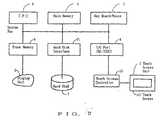
- Fig. 2 is a configuration diagram of a touch screen-equipped workstation for implementing the present invention.
- the system includes an input-output (abbreviated to I/O) port 8, a touch screen controller 15 and a touch screen unit 1 with a touch screen 11.
- the touch screen controller 15 connected to the input-output port 8 through an RS-232C interface, controls the touch screen unit 1.
- the touch screen unit 1 which is sensitive to a position or positions (X-Y coordinates) where it is touched, and preferably also to a pressure applied to it, acts as a user interface that allows a user to send signals to the CPU by touching an area thereon with a body, such as a finger or a pencil.
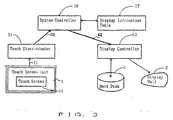
- Fig. 3 is a schematic diagram illustrating the principle of the present invention.
- the input-output port 8, touch screen controller 15 and touch screen unit 1 shown in Fig. 2 are represented by the touch screen unit 1; and the frame memory 6 and display unit 3 are represented by the display unit 3.
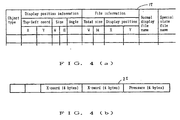
- Fig. 4(a) shows a display information table.
- Fig. 4(b) shows touch screen information.
- a display information table 1T which is provided in the main memory 5, corresponding to objects, includes an object type, display position information, file information, normal-display file name and special-state file name.
- the object type defines the type including the shape, properties, circumstances, etc., of the object.
- the display position information defines the size of the object (width, height), and the position (top-left coordinates X,Y) and the angle at which the object is displayed on the display unit 1.
- the file information stored in the display data file which is used for an object which is so large in size that it requires scrolling to view the whole object, defines the size (width W, height H) of the whole object relative to the display screen size, and also the position (top-left co-ordinates X, Y) of the object portion being displayed on the display device, relative to the whole object data.
- the normal display file name specifies a normal display file where object data for displaying a normal state of the object is stored.
- the special-state file name specifies a special-state file where object data for displaying a special-state (e.g. turn-over indication of display color, used for displaying intermediate process of manipulating the object) of the object is stored.
- Touch-screen information 21, which is sent from the touch screen unit 1, includes a touch position (X-Y coordinates) where the touch screen 11 is touched and a pressure applied thereon.
- the touch discriminator 51 based on the touch screen information 21 from the touch screen unit 1, discriminates the type of a touch an operator's finger has on the touch screen 11, that is, a touch type including, i.e., a "continuous touch start” and “continuous touch end” explained later.
- the touch discriminator 51 sends to the system controller 50, the result of the discrimination as a touch report 3R, which includes a touch type and touch coordinates.
- the system controller 50 determines the type of a manipulation conducted by an operator and, according to the determination, updates the display information table 1T. Then, the system controller 50 sends to the display controller 52, a display update request 4Q along with "display update data" which includes contents of the display information table 1T updated (including display position information, file information, normal display file name and special-state file name.
- the display controller 52 On receipt of the display update request 4Q from the system controller 50, the display controller 52 reads display file data (including object data) specified by the file name frc. the hard disk 7 and stores the data into the main memory 5. The display controller 52 then updates the object data in accordance with the display update data from the system controller 50 and loads the thus-updated object data into the frame memory 6 to display the object, as manipulated by the operator on the touch screen unit 1.
- the present invention determines a manipulation to be conducted on the object displayed, based on the touch screen information 21 which results from an operator's touching the touch screen 11 and the display information table 1T which defines the object's shape, physical properties, display position, etc. It then displays the object according to the manipulation determined, as intended by the operator.
- a pick manipulation is conducted in such a way as an object is picked up at a position on the display surface of the display unit 3 and placed at another position.
- Fig. 5 is a flowchart illustrating a pick manipulation.
- Fig. 6 is a diagram illustrating a pick manipulation.
- a pick manipulation is carried out according to the following steps (S1-S8) in Fig. 5:
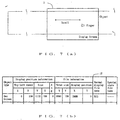
- a scroll manipulation is conducted in such a way as an object extending outside of the display surface of the display unit 3 is moved into and out of the display surface.
- Fig. 7 is a diagram illustrating a scroll manipulation.
- the discriminator 51 On determining that the finger moves while touching the touch screen 11 based on the touch screen information 21 from the touch screen unit 1, the discriminator 51 sends to the system controller 50, a touch report 3R including "continuous touch start” for the touch type and also “coordinates (800, 800)" for the touch position. As another touch screen information 21 comes in, the discriminator 51 sends a touch report 3R including "continuous touch in progress” and coordinates (780, 800). When the touch screen information 21 is not sent for more than 100 milliseconds, for example, the discriminator 51 sends a touch report 3R including "continuous touch end” and coordinates (700, 800) to the system controller 50.
- the system controller 50 recognizes the object as a large one extending beyond the display screen. Then, the system controller 50 determines the speed at which the finger has moved from right to left, for example, based on a change in the X-coordinate in the touch report 3R.
- the display screen is scrolled first at an interval of 100 or 500 milliseconds, respectively. Then, the interval, at which the display update request 4Q is sent to the display controller 52, is increased by a factor 1.5 at each touch report 3R and, when the interval reaches 2 seconds, the scrolling is stopped.
- the screen is so controlled that it starts scrolling at an above-mentioned speed after a finger has moved a distance of 4 dots or more. That is, on recognizing that the finger has moved for that distance, the system controller 50 updates the file information "display position X" of the display information table 1T so that the object is displayed to the left by 10 dots, for example. Then, it sends to the display controller 52, a display update request including display position information, file information and normal display file name from the display information table 1T updated.
- the display controller 52 reads from the hard disk a display file specified by the normal display file name and loads it in the main memory 5. The display controller 52 then transfers only the part of the display file specified by the file information "display position X" of the display information table 1T, from the main memory 5 to the appropriate location of the frame memory 6.
- system controller 50 sends a display update request 4Q to the display controller 52 every time it receives a touch report 3R .
- Fig. 7 is a diagram illustrating a scroll manipulation.
- the system controller 50 doubles the frequency with which display update requests 4Q are sent to the display controller 52, in order to put an end to the scrolling.
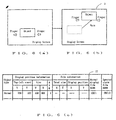
- a push manipulation is conducted in such a way as an object is pushed on the display surface of the display unit 3.
- Fig. 8 is a diagram illustrating a push manipulation.
- the system controller 50 determines the type of a manipulation, based on the touch report 3R and contents of the display information table 1T shown in Fig. 8(c).
- the system controller 50 sends to the display controller 52, a display update request 4Q including display position information, file information and normal display file name so that the object is displayed close to the finger position reported by the touch report 3R.
- the above display operation is repeated until a "continuous touch end" is reported by a touch report 3R.
- a push-while-rotate manipulation is conducted in such a way as an object is pushed at a position off its center (or the center of gravity) and it moves rotating on the display surface of the display unit 3.
- Fig. 8 is a diagram illustrating a push manipulation.
- the system controller 50 determines the type of a manipulation, based on the touch report 3R and contents of the display information table 1T shown in Fig. 8(c).
- the system controller 50 sends to the display controller 52, display update requests 4Q with the angle of rotation increasing by 2 degrees, i.e., while increasing the angle in the display information table 1T shown in Fig. 8(c).
- the display controller 52 reads the display file from the hard disk and loads the data in the main memory 5, rotates the object by the angle and with the left-top coordinates (X, Y) as a rotational center, as specified by the display update request 4Q, and transfers the data with the object rotated, from the main memory 5 to the frame memory 6.
- a flip manipulation is conducted in such a way as a finger flips an object or touches the object from a remote position at a high speed on the display surface of the display unit 3.
- Fig. 9 is a diagram illustrating a flip manipulation.
- the system controller 50 descriminates the type of a manipulation based on the touch report 3R and contents of the display information table 1T shown in Fig. 9 (c).
- the manipulation is a flip manipulation as shown in Fig. 9 (a)
- the system controller 50 obtains a finger speed based on the touch report 3R and also an object speed (i.e., the interval at which display update requests 4Q are sent to the display controller 52), in the same way as described in item (3).
- the system controller 50 sends display update requests 4Q to the display controller 52, while updating the display position information left-top coordinates (X, Y) of the display information table 1T so that the object moves in the direction the finger moves.
- the system controller 50 stops moving the object when the above-mentioned interval reaches 2 seconds.
- a flip-under-gravity manipulation is conducted in such a way as an object which is subjected to a gravity is flipped by a finger on the display surface of the display unit 3.
- Fig. 9 is a diagram illustrating a flip manipulation.
- the system controller 50 sends display update requests 4Q to the display controller 52, while updating the display position information left-top coordinates (X, Y) by adding a value to the Y-coordinate of of the display information table 1T.
- the value is represented by 2 to the Nth power (N: the number of display update requests 4Q sent).
- N the number of display update requests 4Q sent.
- the system controller 50 stops moving the object when the above-mentioned interval reaches 2 seconds.
- the resulting trajectory may be a parabola.
- a roll manipulation is conducted in such a way as a rollable object is rolled by a finger on the display surface of the display unit 3.
- Fig. 10 is a diagram illustrating a roll manipulation.
- the system controller 50 sends display update requests 4Q to the display controller 52, while updating the display position information left-top coordinates (X, Y) of the display information table 1T so that the object moves a distance 10 per cent behind the distance and in the direction the finger moves.
- a distort-restore manipulation is conducted in such a way as an "elastic" object is pressed by a finger on the display surface of the display unit 3, thereby deforming the displayed object.
- Fig. 11 is a diagram illustrating a distort-restore manipulation.
- the system controller 50 calculates an amount of distortion of the object based on the pressure reported by the touch report 3R. It stores in the display information table 1T, a special-state file name specifying one of special-state files (for displaying a distorted state of the object in turn-over indication) corresponding to the amount of distortion calculated. Then, the system controller 50 sends a display update request 4Q to the display controller 52, commanding that the special-state file be displayed at the current display position.
- the system controller 50 sends a display update request 4Q (with a normal display file name specified) to the display controller 52, commanding that a normal display file (normal indication) be displayed at the current display position.
- a display update request 4Q with a normal display file name specified
- a plurality of special-state files are provided in the hard disk 7, corresponding to the amount of distortion of the object, which results from a pressure applied on the touch screen 11.
- the present invention regards a display screen as a virtual space. It defines conditions and physical properties of an object (e.g., weight, hardness, frictional resistance, center of gravity) in the display information table 1T. It also receives touch screen information 21 indicating a finger-touched position and pressure is input from a touch screen unit 1. Based on the touch screen information 21 and the display information table 1T, the present invention determines a manipulation to be conducted on the object displayed, e.g. scrolling, picking (up), pushing, rolling, distorting the object on the display surface of the display unit 3.
- a manipulation to be conducted on the object displayed e.g. scrolling, picking (up), pushing, rolling, distorting the object on the display surface of the display unit 3.
Landscapes
- Engineering & Computer Science (AREA)
- General Engineering & Computer Science (AREA)
- Theoretical Computer Science (AREA)
- Human Computer Interaction (AREA)
- Physics & Mathematics (AREA)
- General Physics & Mathematics (AREA)
- Position Input By Displaying (AREA)
- User Interface Of Digital Computer (AREA)
- Controls And Circuits For Display Device (AREA)
- Digital Computer Display Output (AREA)
Claims (5)
- Appareil pour une utilisation avec un dispositif d'affichage (3) afin de manipuler un objet qui est affiché sur le dispositif d'affichage, l'appareil comprenant:un panneau tactile (11) qui représente une surface d'affichage du dispositif d'affichage (3), lequel panneau est sensible à des caractéristiques d'un contact d'effleurement sur le panneau tactile, les caractéristiques incluant au moins des positions de pression et de coordonnées du contact d'effleurement, pour émettre en sortie une information de panneau tactile correspondante (21) représentant les caractéristiques du contact d'effleurement sur le panneau tactile (11) ; etun moyen de manipulation d'objet (7, 50, 51, 52, 1T) pour manipuler et afficher l'objet sur le dispositif d'affichage en réponse à ladite information de panneau tactile (2I), le moyen de manipulation d'objet comprenant :un moyen de stockage de fichier (7) pour stocker au moins un fichier de données qui stocke des données d'objet pour afficher l'objet ;un moyen de stockage d'information d'affichage (1T) pour stocker une information d'objet incluant un type d'objet qui spécifie les propriétés de forme ou physiques de l'objet et une information de position d'affichage qui spécifie la position de l'objet sur le dispositif d'affichage (3) ; etun moyen de commande d'affichage (52) qui est sensible à l'information de panneau tactile (2I) et à l'information d'objet comme inclus dans ledit moyen de stockage d'information d'affichage, pour reconnaître le type de manipulation de l'objet conformément à l'information de panneau tactile (2I), à l'information de position d'affichage et au type d'objet et pour réaliser la manipulation de l'objet sur le dispositif d'affichage (3) conformément au type de manipulation reconnu, dans lequel le type de manipulation inclut une manipulation par distorsivn-restauration de l'objet selon laquelle ledit moyen de commande d'affichage (52) est sensible aux caractéristiques de pression du contact d'effleurement pour distordre et restaurer l'objet sur le dispositif d'affichage, la quantité de distorsion de l'objet étant calculée sur la base desdites caractéristiques de pression du contact d'effleurement.
- Appareil selon là revendication 1, dans lequel le type de manipulation inclut en outre une manipulation par déplacement de l'objet selon laquelle le moyen de commande d'affichage (52) est sensible aux modifications de position du contact d'effleurement pour déplacer l'objet depuis une position jusqu'à une autre sur le dispositif d'affichage (3).
- Appareil selon la revendication 1, dans lequel le moyen de stockage de fichier (7) stocke en outre une pluralité de fichiers d'états spéciaux pour afficher l'objet dans un état distordu, chaque fichier d'états spéciaux correspondant à une quantité respective de distorsion et étant spécifié sur la base des caractéristiques de pression du contact d'effleurement.
- Appareil selon la revendication 1, 2 ou 3, dans lequel le panneau tactile (11) est monté sur le dispositif d'affichage (3).
- Contrôleur pour commander un dispositif d'affichage (3) afin de manipuler un objet qui est affiché sur le dispositif d'affichage sur la base d'une information en provenance d'un panneau tactile (11) qui représente une surface d'affichage du dispositif d'affichage (3) et qui est sensible à des caractéristiques d'un contact d'effleurement sur le panneau tactile incluant au moins des positions de pression et de coordonnées du contact tactile,
le contrôleur comprenant :un moyen d'émission en sortie (51) pour émettre en sortie une information de panneau tactile correspondante (21) qui représente les caractéristiques du contact d'effleurement sur le panneau tactile (11); etun moyen de manipulation d'objet (50, 52, 1T) pour manipuler et afficher l'objet sur le dispositif d'affichage en réponse à ladite information de panneau tactile (2I), le moyen de manipulation d'objet comprenant :un moyen de stockage d'information d'affichage (1T) pour stocker une information d'objet incluant un type d'objet qui spécifie les propriétés de forme ou physiques de l'objet et une information de position d'affichage qui spécifie la position de l'objet sur le dispositif d'affichage (3) ; etun moyen de commande d'affichage (52) qui est sensible à l'information de panneau tactile (2I) et à l'information d'objet comme inclus dans ledit moyen de stockage d'information d'affichage pour reconnaître le type de manipulation de l'objet conformément à l'information de panneau tactile (2I), à l'information de position d'affichage et au type d'objet et pour réaliser la manipulation de l'objet sur le dispositif d'affichage (3) conformément au type de manipulation reconnu ; dans lequel le type de manipulation inclut une manipulation par distorsion-restauration de l'objet selon laquelle ledit moyen de commande d'affichage (52) est sensible aux caractéristiques de pression du contact d'effleurement pour distordre et restaurer l'objet sur le dispositif d'affichage, la quantité de distorsion de l'objet étant calculée sur la base desdites caractéristiques de pression du contact d'effleurement.
Priority Applications (1)
| Application Number | Priority Date | Filing Date | Title |
|---|---|---|---|
| EP05027103A EP1645946B1 (fr) | 1991-10-07 | 1992-10-07 | Appareil de manipulation d'un objet affiché sur un dispositif d'affichage |
Applications Claiming Priority (3)
| Application Number | Priority Date | Filing Date | Title |
|---|---|---|---|
| JP25823291A JP2827612B2 (ja) | 1991-10-07 | 1991-10-07 | タッチパネル装置およびタッチパネル装置におけるオブジェクトの表示方法。 |
| JP25823291 | 1991-10-07 | ||
| EP92117111A EP0536715B1 (fr) | 1991-10-07 | 1992-10-07 | Appareil pour la manipulation d'un objet affiché sur une unité d'affichage |
Related Parent Applications (1)
| Application Number | Title | Priority Date | Filing Date |
|---|---|---|---|
| EP92117111A Division EP0536715B1 (fr) | 1991-10-07 | 1992-10-07 | Appareil pour la manipulation d'un objet affiché sur une unité d'affichage |
Related Child Applications (1)
| Application Number | Title | Priority Date | Filing Date |
|---|---|---|---|
| EP05027103A Division EP1645946B1 (fr) | 1991-10-07 | 1992-10-07 | Appareil de manipulation d'un objet affiché sur un dispositif d'affichage |
Publications (3)
| Publication Number | Publication Date |
|---|---|
| EP0938039A2 EP0938039A2 (fr) | 1999-08-25 |
| EP0938039A3 EP0938039A3 (fr) | 2000-04-05 |
| EP0938039B1 true EP0938039B1 (fr) | 2006-02-15 |
Family
ID=17317357
Family Applications (6)
| Application Number | Title | Priority Date | Filing Date |
|---|---|---|---|
| EP99109584A Expired - Lifetime EP0938038B1 (fr) | 1991-10-07 | 1992-10-07 | Appareil pour la manipulation d'un objet affiché sur une unité d'affichage |
| EP92117111A Expired - Lifetime EP0536715B1 (fr) | 1991-10-07 | 1992-10-07 | Appareil pour la manipulation d'un objet affiché sur une unité d'affichage |
| EP05027103A Expired - Lifetime EP1645946B1 (fr) | 1991-10-07 | 1992-10-07 | Appareil de manipulation d'un objet affiché sur un dispositif d'affichage |
| EP99109484A Expired - Lifetime EP0938037B1 (fr) | 1991-10-07 | 1992-10-07 | Appareil pour la manipulation d'un objet affiché sur une unité d'affichage |
| EP99109601A Expired - Lifetime EP0938040B1 (fr) | 1991-10-07 | 1992-10-07 | Appareil pour la manipulation d'un objet affiché sur une unité d'affichage |
| EP99109587A Expired - Lifetime EP0938039B1 (fr) | 1991-10-07 | 1992-10-07 | Appareil pour la manipulation d'un objet affiché sur une unité d'affichage |
Family Applications Before (5)
| Application Number | Title | Priority Date | Filing Date |
|---|---|---|---|
| EP99109584A Expired - Lifetime EP0938038B1 (fr) | 1991-10-07 | 1992-10-07 | Appareil pour la manipulation d'un objet affiché sur une unité d'affichage |
| EP92117111A Expired - Lifetime EP0536715B1 (fr) | 1991-10-07 | 1992-10-07 | Appareil pour la manipulation d'un objet affiché sur une unité d'affichage |
| EP05027103A Expired - Lifetime EP1645946B1 (fr) | 1991-10-07 | 1992-10-07 | Appareil de manipulation d'un objet affiché sur un dispositif d'affichage |
| EP99109484A Expired - Lifetime EP0938037B1 (fr) | 1991-10-07 | 1992-10-07 | Appareil pour la manipulation d'un objet affiché sur une unité d'affichage |
| EP99109601A Expired - Lifetime EP0938040B1 (fr) | 1991-10-07 | 1992-10-07 | Appareil pour la manipulation d'un objet affiché sur une unité d'affichage |
Country Status (5)
| Country | Link |
|---|---|
| US (1) | US5844547A (fr) |
| EP (6) | EP0938038B1 (fr) |
| JP (1) | JP2827612B2 (fr) |
| KR (1) | KR950012490B1 (fr) |
| DE (5) | DE69233600T2 (fr) |
Cited By (1)
| Publication number | Priority date | Publication date | Assignee | Title |
|---|---|---|---|---|
| CN105247461A (zh) * | 2014-02-12 | 2016-01-13 | 齐科斯欧公司 | 为触摸屏交互确定俯仰和偏航 |
Families Citing this family (216)
| Publication number | Priority date | Publication date | Assignee | Title |
|---|---|---|---|---|
| US5452240A (en) * | 1993-11-23 | 1995-09-19 | Roca Productions, Inc. | Electronically simulated rotary-type cardfile |
| CN1059303C (zh) * | 1994-07-25 | 2000-12-06 | 国际商业机器公司 | 在个人通讯设备的显示屏幕上标记文本的装置和方法 |
| WO1997004381A1 (fr) * | 1995-07-20 | 1997-02-06 | Sega Enterprises, Ltd. | Unite de traitement d'image, procede de traitement d'image, dispositif d'entree utilise dans ledit procede, machine de jeux et support d'enregistrement |
| US6243619B1 (en) | 1996-05-10 | 2001-06-05 | Amada Company, Ltd. | Control method and apparatus for plate material processing machine |
| WO1997046926A2 (fr) * | 1996-06-07 | 1997-12-11 | Amada Company, Limited | Procede et dispositif de gestion d'une machine d'usinage de plaque |
| US6417844B1 (en) * | 1996-06-25 | 2002-07-09 | Seiko Epson Corporation | Data processing apparatus and data processing method |
| JPH10111776A (ja) * | 1996-10-08 | 1998-04-28 | Sharp Corp | 情報処理装置 |
| JP4044169B2 (ja) | 1997-02-26 | 2008-02-06 | 株式会社アマダ | 工程の流れに沿った情報設定画面の表示方法及びその機能を有するマルチウィンドウ方式のnc装置 |
| KR100224998B1 (ko) * | 1997-04-09 | 1999-10-15 | 구자홍 | Pc 시스템의 원격 조정 사용자 인터 페이스 구현장치 및 방법 |
| JP3504464B2 (ja) * | 1997-07-30 | 2004-03-08 | インターナショナル・ビジネス・マシーンズ・コーポレーション | データ入力装置およびその方法 |
| USRE43318E1 (en) * | 1997-08-28 | 2012-04-17 | Flatworld Interactives, Llc | User interface for removing an object from a display |
| US6920619B1 (en) * | 1997-08-28 | 2005-07-19 | Slavoljub Milekic | User interface for removing an object from a display |
| EP0910011A3 (fr) * | 1997-10-14 | 2000-12-06 | Canon Kabushiki Kaisha | Dispositif et méthode d'affichage de liste de tâches et moyens de stockage pour un tel programme |
| GB9722766D0 (en) | 1997-10-28 | 1997-12-24 | British Telecomm | Portable computers |
| WO1999028811A1 (fr) * | 1997-12-04 | 1999-06-10 | Northern Telecom Limited | Interface gestuelle contextuelle |
| US6131047A (en) | 1997-12-30 | 2000-10-10 | Ericsson Inc. | Radiotelephones having contact-sensitive user interfaces and methods of operating same |
| JPH11203044A (ja) * | 1998-01-16 | 1999-07-30 | Sony Corp | 情報処理システム |
| KR100595922B1 (ko) * | 1998-01-26 | 2006-07-05 | 웨인 웨스터만 | 수동 입력 통합 방법 및 장치 |
| US9239673B2 (en) | 1998-01-26 | 2016-01-19 | Apple Inc. | Gesturing with a multipoint sensing device |
| US7614008B2 (en) | 2004-07-30 | 2009-11-03 | Apple Inc. | Operation of a computer with touch screen interface |
| US9292111B2 (en) | 1998-01-26 | 2016-03-22 | Apple Inc. | Gesturing with a multipoint sensing device |
| US8479122B2 (en) | 2004-07-30 | 2013-07-02 | Apple Inc. | Gestures for touch sensitive input devices |
| US6038333A (en) * | 1998-03-16 | 2000-03-14 | Hewlett-Packard Company | Person identifier and management system |
| US6610917B2 (en) | 1998-05-15 | 2003-08-26 | Lester F. Ludwig | Activity indication, external source, and processing loop provisions for driven vibrating-element environments |
| US7358956B2 (en) * | 1998-09-14 | 2008-04-15 | Microsoft Corporation | Method for providing feedback responsive to sensing a physical presence proximate to a control of an electronic device |
| US7256770B2 (en) * | 1998-09-14 | 2007-08-14 | Microsoft Corporation | Method for displaying information responsive to sensing a physical presence proximate to a computer input device |
| US6396477B1 (en) | 1998-09-14 | 2002-05-28 | Microsoft Corp. | Method of interacting with a computer using a proximity sensor in a computer input device |
| US6333753B1 (en) | 1998-09-14 | 2001-12-25 | Microsoft Corporation | Technique for implementing an on-demand display widget through controlled fading initiated by user contact with a touch sensitive input device |
| US6456275B1 (en) * | 1998-09-14 | 2002-09-24 | Microsoft Corporation | Proximity sensor in a computer input device |
| US20020018051A1 (en) * | 1998-09-15 | 2002-02-14 | Mona Singh | Apparatus and method for moving objects on a touchscreen display |
| US6933919B1 (en) * | 1998-12-03 | 2005-08-23 | Gateway Inc. | Pointing device with storage |
| US7469381B2 (en) | 2007-01-07 | 2008-12-23 | Apple Inc. | List scrolling and document translation, scaling, and rotation on a touch-screen display |
| SE515077C2 (sv) * | 1999-04-27 | 2001-06-05 | Kjell Soederlund | Databehandlingsanordning |
| US6793619B1 (en) | 1999-06-09 | 2004-09-21 | Yaacov Blumental | Computer-implemented method and system for giving a user an impression of tactile feedback |
| US7783978B1 (en) * | 1999-10-20 | 2010-08-24 | Koninklijke Philips Electronics N.V. | Information processing device |
| JP2001134382A (ja) * | 1999-11-04 | 2001-05-18 | Sony Corp | 図形処理装置 |
| US7142205B2 (en) | 2000-03-29 | 2006-11-28 | Autodesk, Inc. | Single gesture map navigation graphical user interface for a personal digital assistant |
| US7450114B2 (en) * | 2000-04-14 | 2008-11-11 | Picsel (Research) Limited | User interface systems and methods for manipulating and viewing digital documents |
| US7576730B2 (en) | 2000-04-14 | 2009-08-18 | Picsel (Research) Limited | User interface systems and methods for viewing and manipulating digital documents |
| JP4686886B2 (ja) * | 2001-04-06 | 2011-05-25 | ソニー株式会社 | 情報処理装置 |
| US7730401B2 (en) * | 2001-05-16 | 2010-06-01 | Synaptics Incorporated | Touch screen with user interface enhancement |
| US6816154B2 (en) * | 2001-05-30 | 2004-11-09 | Palmone, Inc. | Optical sensor based user interface for a portable electronic device |
| US20020180811A1 (en) * | 2001-05-31 | 2002-12-05 | Chu Sing Yun | Systems, methods, and articles of manufacture for providing a user interface with selection and scrolling |
| US20030048280A1 (en) * | 2001-09-12 | 2003-03-13 | Russell Ryan S. | Interactive environment using computer vision and touchscreens |
| JP4722349B2 (ja) * | 2001-09-27 | 2011-07-13 | クラリオン株式会社 | 情報選択装置 |
| US6690387B2 (en) * | 2001-12-28 | 2004-02-10 | Koninklijke Philips Electronics N.V. | Touch-screen image scrolling system and method |
| JP3847641B2 (ja) * | 2002-02-28 | 2006-11-22 | 株式会社ソニー・コンピュータエンタテインメント | 情報処理装置、情報処理プログラム、情報処理プログラムを記録したコンピュータ読み取り可能な記録媒体、及び情報処理方法 |
| US7193609B2 (en) | 2002-03-19 | 2007-03-20 | America Online, Inc. | Constraining display motion in display navigation |
| US11275405B2 (en) * | 2005-03-04 | 2022-03-15 | Apple Inc. | Multi-functional hand-held device |
| US8949716B2 (en) * | 2002-07-23 | 2015-02-03 | Motorola Mobility Llc | Adjusting target size of display images based on input device detection |
| US20040021698A1 (en) * | 2002-08-05 | 2004-02-05 | Baldwin Amanda K. | Intuitive touchscreen interface for a multifunction device and method therefor |
| US7980936B2 (en) * | 2002-09-30 | 2011-07-19 | Igt | Apparatus and method for player interaction |
| KR101077850B1 (ko) * | 2002-12-30 | 2011-10-31 | 코닌클리케 필립스 일렉트로닉스 엔.브이. | 광 디스크 재생장치 |
| US20050014560A1 (en) * | 2003-05-19 | 2005-01-20 | Yacob Blumenthal | Method and system for simulating interaction with a pictorial representation of a model |
| WO2004104807A1 (fr) * | 2003-05-26 | 2004-12-02 | Fujitsu Limited | Procede de selection d'articles, processeur d'informations et support de stockage lisible par ordinateur |
| JP4723799B2 (ja) * | 2003-07-08 | 2011-07-13 | 株式会社ソニー・コンピュータエンタテインメント | 制御システムおよび制御方法 |
| US8164573B2 (en) * | 2003-11-26 | 2012-04-24 | Immersion Corporation | Systems and methods for adaptive interpretation of input from a touch-sensitive input device |
| JP4820360B2 (ja) * | 2004-03-18 | 2011-11-24 | コーニンクレッカ フィリップス エレクトロニクス エヌ ヴィ | スキャニングディスプレイ装置 |
| KR100998633B1 (ko) * | 2004-06-21 | 2010-12-07 | 웨이커(에스)피티이 엘티디 | 가상 카드 게임 시스템 |
| US8381135B2 (en) | 2004-07-30 | 2013-02-19 | Apple Inc. | Proximity detector in handheld device |
| CN101253466A (zh) * | 2004-08-02 | 2008-08-27 | 皇家飞利浦电子股份有限公司 | 能够建模虚拟对象的系统和方法 |
| JP4658544B2 (ja) * | 2004-09-03 | 2011-03-23 | 任天堂株式会社 | ゲームプログラム、ゲーム装置、および入力装置 |
| US7794324B2 (en) | 2004-09-13 | 2010-09-14 | Pokertek, Inc. | Electronic player interaction area with player customer interaction features |
| WO2006030407A1 (fr) * | 2004-09-19 | 2006-03-23 | E.B.T. Interactive Ltd. | Procede et systeme informatiques donnant a l'utilisateur l'impression d'une reponse tactile |
| US7762945B2 (en) * | 2004-10-13 | 2010-07-27 | E.B.T. Interactive Ltd. | Computer-implemented method and system for providing feedback during sex play |
| JP2008527557A (ja) * | 2005-01-14 | 2008-07-24 | コーニンクレッカ フィリップス エレクトロニクス エヌ ヴィ | タッチ入力ディスプレイ装置によって提示されるオブジェクトの移動 |
| EA009976B1 (ru) * | 2005-04-27 | 2008-04-28 | Арузе Корп. | Игровой автомат |
| JP4405430B2 (ja) * | 2005-05-12 | 2010-01-27 | 任天堂株式会社 | ゲームプログラムおよびゲーム装置 |
| JP3888382B2 (ja) * | 2005-07-05 | 2007-02-28 | 松下電器産業株式会社 | データ処理装置 |
| JP4832826B2 (ja) | 2005-07-26 | 2011-12-07 | 任天堂株式会社 | オブジェクト制御プログラムおよび情報処理装置 |
| JP4611147B2 (ja) * | 2005-08-15 | 2011-01-12 | 富士通コンポーネント株式会社 | 遠隔操作システム及び遠隔操作方法 |
| US8225231B2 (en) | 2005-08-30 | 2012-07-17 | Microsoft Corporation | Aggregation of PC settings |
| JP4743602B2 (ja) | 2005-10-04 | 2011-08-10 | 任天堂株式会社 | 画像処理装置、画像処理プログラム、ゲーム装置およびゲームプログラム |
| TW200715192A (en) * | 2005-10-07 | 2007-04-16 | Elan Microelectronics Corp | Method for a window to generate different moving speed |
| US8035531B2 (en) * | 2005-10-31 | 2011-10-11 | Toyota Jidosha Kabushiki Kaisha | Parking support device |
| US20070132789A1 (en) * | 2005-12-08 | 2007-06-14 | Bas Ording | List scrolling in response to moving contact over list of index symbols |
| US7958456B2 (en) | 2005-12-23 | 2011-06-07 | Apple Inc. | Scrolling list with floating adjacent index symbols |
| US7786975B2 (en) * | 2005-12-23 | 2010-08-31 | Apple Inc. | Continuous scrolling list with acceleration |
| JP2007232776A (ja) * | 2006-02-27 | 2007-09-13 | Mitsubishi Electric Corp | プログラマブル表示器、ドキュメント表示方法とその方法を実行するプログラムおよびそれを記録した記録媒体、並びにドキュメント作成方法とその方法を実行するプログラムおよびそれを記録した記録媒体 |
| KR100833862B1 (ko) * | 2006-03-30 | 2008-06-02 | 엘지전자 주식회사 | 이동 단말기 및 이것의 객체 표시 방법 |
| KR100686165B1 (ko) * | 2006-04-18 | 2007-02-26 | 엘지전자 주식회사 | 오에스디 기능 아이콘을 갖는 휴대용 단말기 및 이를이용한 오에스디 기능 아이콘의 디스플레이 방법 |
| JP2008012199A (ja) * | 2006-07-10 | 2008-01-24 | Aruze Corp | ゲーム装置及びゲーム装置の画像表示制御方法 |
| US8564544B2 (en) | 2006-09-06 | 2013-10-22 | Apple Inc. | Touch screen device, method, and graphical user interface for customizing display of content category icons |
| EP2089826A2 (fr) | 2006-12-04 | 2009-08-19 | Deka Products Limited Partnership | Dispositif médical comprenant un coulisseau |
| US20080168402A1 (en) | 2007-01-07 | 2008-07-10 | Christopher Blumenberg | Application Programming Interfaces for Gesture Operations |
| US7844915B2 (en) | 2007-01-07 | 2010-11-30 | Apple Inc. | Application programming interfaces for scrolling operations |
| US20080168478A1 (en) | 2007-01-07 | 2008-07-10 | Andrew Platzer | Application Programming Interfaces for Scrolling |
| US7911453B2 (en) * | 2007-06-29 | 2011-03-22 | Microsoft Corporation | Creating virtual replicas of physical objects |
| US7750895B2 (en) * | 2007-06-29 | 2010-07-06 | Microsoft Corporation | Navigating lists using input motions |
| DE102007039446A1 (de) * | 2007-08-21 | 2009-02-26 | Volkswagen Ag | Verfahren zum Anzeigen von Informationen in einem Kraftfahrzeug mit veränderbarem Maßstab und Anzeigeeinrichtung |
| DE102007039444A1 (de) | 2007-08-21 | 2009-02-26 | Volkswagen Ag | Verfahren zum Anzeigen von Informationen in einem Kraftfahrzeug und Anzeigeeinrichtung für ein Kraftfahrzeug |
| CN101399897B (zh) * | 2007-09-30 | 2010-12-29 | 宏达国际电子股份有限公司 | 图像处理方法 |
| TWI405454B (zh) * | 2007-10-01 | 2013-08-11 | Htc Corp | 影像處理方法 |
| KR20090042342A (ko) * | 2007-10-26 | 2009-04-30 | 주식회사 메디슨 | 소프트 버튼을 포함하는 장치 및 그의 속성 변경 방법 |
| EP2060970A1 (fr) * | 2007-11-12 | 2009-05-20 | Research In Motion Limited | Interface d'utilisateur pour dispositif tactile |
| US20090122018A1 (en) * | 2007-11-12 | 2009-05-14 | Leonid Vymenets | User Interface for Touchscreen Device |
| US8405621B2 (en) | 2008-01-06 | 2013-03-26 | Apple Inc. | Variable rate media playback methods for electronic devices with touch interfaces |
| US8645827B2 (en) | 2008-03-04 | 2014-02-04 | Apple Inc. | Touch event model |
| US8416196B2 (en) | 2008-03-04 | 2013-04-09 | Apple Inc. | Touch event model programming interface |
| US8717305B2 (en) | 2008-03-04 | 2014-05-06 | Apple Inc. | Touch event model for web pages |
| US8205157B2 (en) * | 2008-03-04 | 2012-06-19 | Apple Inc. | Methods and graphical user interfaces for conducting searches on a portable multifunction device |
| US9256342B2 (en) | 2008-04-10 | 2016-02-09 | Perceptive Pixel, Inc. | Methods of interfacing with multi-input devices and multi-input display systems employing interfacing techniques |
| US8209628B1 (en) | 2008-04-11 | 2012-06-26 | Perceptive Pixel, Inc. | Pressure-sensitive manipulation of displayed objects |
| US10180714B1 (en) | 2008-04-24 | 2019-01-15 | Pixar | Two-handed multi-stroke marking menus for multi-touch devices |
| US8836646B1 (en) | 2008-04-24 | 2014-09-16 | Pixar | Methods and apparatus for simultaneous user inputs for three-dimensional animation |
| EP3220616B1 (fr) * | 2008-07-15 | 2019-09-04 | Immersion Corporation | Systèmes et procédés de transmission de messages de manière haptique |
| JP5100556B2 (ja) * | 2008-07-30 | 2012-12-19 | キヤノン株式会社 | 情報処理方法及び装置 |
| JP5858005B2 (ja) * | 2008-08-07 | 2016-02-10 | 株式会社リコー | 表示システム |
| JP5304478B2 (ja) * | 2008-08-07 | 2013-10-02 | 株式会社リコー | 画像形成装置、操作画面更新方法およびプログラム |
| CN102187309A (zh) | 2008-08-22 | 2011-09-14 | 谷歌公司 | 移动设备上的三维环境中的导航 |
| US8477103B2 (en) | 2008-10-26 | 2013-07-02 | Microsoft Corporation | Multi-touch object inertia simulation |
| US8466879B2 (en) | 2008-10-26 | 2013-06-18 | Microsoft Corporation | Multi-touch manipulation of application objects |
| US8302026B2 (en) * | 2008-11-28 | 2012-10-30 | Microsoft Corporation | Multi-panel user interface |
| JP5184384B2 (ja) * | 2009-01-05 | 2013-04-17 | 株式会社ソニー・コンピュータエンタテインメント | 制御システムおよび制御方法 |
| US8289288B2 (en) | 2009-01-15 | 2012-10-16 | Microsoft Corporation | Virtual object adjustment via physical object detection |
| US8631354B2 (en) * | 2009-03-06 | 2014-01-14 | Microsoft Corporation | Focal-control user interface |
| US9684521B2 (en) | 2010-01-26 | 2017-06-20 | Apple Inc. | Systems having discrete and continuous gesture recognizers |
| US8839155B2 (en) | 2009-03-16 | 2014-09-16 | Apple Inc. | Accelerated scrolling for a multifunction device |
| US8566045B2 (en) | 2009-03-16 | 2013-10-22 | Apple Inc. | Event recognition |
| US9311112B2 (en) | 2009-03-16 | 2016-04-12 | Apple Inc. | Event recognition |
| US8589374B2 (en) | 2009-03-16 | 2013-11-19 | Apple Inc. | Multifunction device with integrated search and application selection |
| US8572513B2 (en) | 2009-03-16 | 2013-10-29 | Apple Inc. | Device, method, and graphical user interface for moving a current position in content at a variable scrubbing rate |
| US8285499B2 (en) | 2009-03-16 | 2012-10-09 | Apple Inc. | Event recognition |
| WO2010127175A2 (fr) | 2009-04-30 | 2010-11-04 | Synaptics Incorporated | Éléments de circuit de commande et procédé |
| JP2010262555A (ja) | 2009-05-11 | 2010-11-18 | Sony Corp | 情報処理装置および方法 |
| JP5141984B2 (ja) | 2009-05-11 | 2013-02-13 | ソニー株式会社 | 情報処理装置および方法 |
| US20100295798A1 (en) | 2009-05-21 | 2010-11-25 | Sony Computer Entertainment America Inc. | Hand-held device with ancillary touch activated zoom |
| JP5378884B2 (ja) * | 2009-06-01 | 2013-12-25 | パナソニック株式会社 | 文字入力装置および文字変換方法 |
| KR101451999B1 (ko) * | 2009-07-28 | 2014-10-21 | 삼성전자주식회사 | 데이터 스크롤 방법 및 장치 |
| DE102010026291B4 (de) | 2009-08-06 | 2024-08-22 | Volkswagen Ag | Kraftfahrzeug |
| US8624933B2 (en) | 2009-09-25 | 2014-01-07 | Apple Inc. | Device, method, and graphical user interface for scrolling a multi-section document |
| KR101631273B1 (ko) * | 2009-10-26 | 2016-06-17 | 삼성전자주식회사 | Ui 애니메이션 제공 방법 및 장치 |
| US20110148438A1 (en) * | 2009-12-18 | 2011-06-23 | Synaptics Incorporated | System and method for determining a number of objects in a capacitive sensing region using a shape factor |
| US20110148436A1 (en) * | 2009-12-18 | 2011-06-23 | Synaptics Incorporated | System and method for determining a number of objects in a capacitive sensing region using signal grouping |
| JP2011177203A (ja) | 2010-02-26 | 2011-09-15 | Nintendo Co Ltd | オブジェクト制御プログラムおよびオブジェクト制御装置 |
| US8448084B2 (en) * | 2010-04-08 | 2013-05-21 | Twitter, Inc. | User interface mechanics |
| JP5533254B2 (ja) * | 2010-05-24 | 2014-06-25 | アイシン・エィ・ダブリュ株式会社 | 情報表示装置、情報表示方法及びプログラム |
| JP5354548B2 (ja) * | 2010-06-11 | 2013-11-27 | サミー株式会社 | ゲーム装置 |
| US10216408B2 (en) | 2010-06-14 | 2019-02-26 | Apple Inc. | Devices and methods for identifying user interface objects based on view hierarchy |
| JP5241038B2 (ja) | 2010-07-01 | 2013-07-17 | パナソニック株式会社 | 電子機器、表示制御方法、及びプログラム |
| CN102314297B (zh) * | 2010-07-07 | 2016-04-13 | 腾讯科技(深圳)有限公司 | 一种窗口对象惯性移动方法及实现装置 |
| JP5711479B2 (ja) | 2010-08-17 | 2015-04-30 | キヤノン株式会社 | 表示制御装置及びその制御方法 |
| US8797283B2 (en) | 2010-11-22 | 2014-08-05 | Sony Computer Entertainment America Llc | Method and apparatus for performing user-defined macros |
| US20120159395A1 (en) | 2010-12-20 | 2012-06-21 | Microsoft Corporation | Application-launching interface for multiple modes |
| US8689123B2 (en) | 2010-12-23 | 2014-04-01 | Microsoft Corporation | Application reporting in an application-selectable user interface |
| US8612874B2 (en) | 2010-12-23 | 2013-12-17 | Microsoft Corporation | Presenting an application change through a tile |
| US9423951B2 (en) | 2010-12-31 | 2016-08-23 | Microsoft Technology Licensing, Llc | Content-based snap point |
| US8907903B2 (en) | 2011-01-13 | 2014-12-09 | Sony Computer Entertainment America Llc | Handing control of an object from one touch input to another touch input |
| JP5651494B2 (ja) | 2011-02-09 | 2015-01-14 | 日立マクセル株式会社 | 情報処理装置 |
| US9383917B2 (en) | 2011-03-28 | 2016-07-05 | Microsoft Technology Licensing, Llc | Predictive tiling |
| US9298363B2 (en) | 2011-04-11 | 2016-03-29 | Apple Inc. | Region activation for touch sensitive surface |
| US10097875B2 (en) | 2011-05-25 | 2018-10-09 | Echostar Technologies L.L.C. | Apparatus, systems and methods for presentation management of erotica-related media content |
| US9158445B2 (en) | 2011-05-27 | 2015-10-13 | Microsoft Technology Licensing, Llc | Managing an immersive interface in a multi-application immersive environment |
| US9104440B2 (en) | 2011-05-27 | 2015-08-11 | Microsoft Technology Licensing, Llc | Multi-application environment |
| US9658766B2 (en) | 2011-05-27 | 2017-05-23 | Microsoft Technology Licensing, Llc | Edge gesture |
| US9104307B2 (en) | 2011-05-27 | 2015-08-11 | Microsoft Technology Licensing, Llc | Multi-application environment |
| US8893033B2 (en) | 2011-05-27 | 2014-11-18 | Microsoft Corporation | Application notifications |
| KR101794000B1 (ko) * | 2011-06-13 | 2017-11-06 | 삼성전자주식회사 | 터치 스크린을 구비하는 기기에서 스크롤 장치 및 방법 |
| US8687023B2 (en) | 2011-08-02 | 2014-04-01 | Microsoft Corporation | Cross-slide gesture to select and rearrange |
| JP5694883B2 (ja) * | 2011-08-23 | 2015-04-01 | 京セラ株式会社 | 表示機器 |
| US20130057587A1 (en) | 2011-09-01 | 2013-03-07 | Microsoft Corporation | Arranging tiles |
| US8922575B2 (en) | 2011-09-09 | 2014-12-30 | Microsoft Corporation | Tile cache |
| US20130067390A1 (en) * | 2011-09-09 | 2013-03-14 | Paul J. Kwiatkowski | Programming Interface for Semantic Zoom |
| US9557909B2 (en) | 2011-09-09 | 2017-01-31 | Microsoft Technology Licensing, Llc | Semantic zoom linguistic helpers |
| US10353566B2 (en) | 2011-09-09 | 2019-07-16 | Microsoft Technology Licensing, Llc | Semantic zoom animations |
| US9244802B2 (en) | 2011-09-10 | 2016-01-26 | Microsoft Technology Licensing, Llc | Resource user interface |
| US8933952B2 (en) | 2011-09-10 | 2015-01-13 | Microsoft Corporation | Pre-rendering new content for an application-selectable user interface |
| US9146670B2 (en) | 2011-09-10 | 2015-09-29 | Microsoft Technology Licensing, Llc | Progressively indicating new content in an application-selectable user interface |
| CN109582180A (zh) | 2011-10-18 | 2019-04-05 | 卡内基梅隆大学 | 用于分类触敏表面上的触摸事件的方法和设备 |
| US9223761B2 (en) * | 2011-11-04 | 2015-12-29 | Microsoft Technology Licensing, Llc | Real time visual feedback during move, resize and/or rotate actions in an electronic document |
| US9223472B2 (en) | 2011-12-22 | 2015-12-29 | Microsoft Technology Licensing, Llc | Closing applications |
| JP6196017B2 (ja) * | 2012-01-13 | 2017-09-13 | サターン ライセンシング エルエルシーSaturn Licensing LLC | 情報処理装置及び情報処理方法、並びにコンピューター・プログラム |
| JP5994991B2 (ja) | 2012-01-24 | 2016-09-21 | パナソニックIpマネジメント株式会社 | 電子機器 |
| JP5936381B2 (ja) * | 2012-02-09 | 2016-06-22 | キヤノン株式会社 | 画像処理装置及びその制御方法とプログラム |
| DE112013002430B4 (de) * | 2012-05-11 | 2025-10-02 | Semiconductor Energy Laboratory Co., Ltd. | Elektronisches Gerät, Speichermedium, Programm und Anzeigeverfahren |
| US8949735B2 (en) | 2012-11-02 | 2015-02-03 | Google Inc. | Determining scroll direction intent |
| US9298970B2 (en) * | 2012-11-27 | 2016-03-29 | Nokia Technologies Oy | Method and apparatus for facilitating interaction with an object viewable via a display |
| US10691230B2 (en) | 2012-12-29 | 2020-06-23 | Apple Inc. | Crown input for a wearable electronic device |
| KR20140114766A (ko) | 2013-03-19 | 2014-09-29 | 퀵소 코 | 터치 입력을 감지하기 위한 방법 및 장치 |
| US9013452B2 (en) | 2013-03-25 | 2015-04-21 | Qeexo, Co. | Method and system for activating different interactive functions using different types of finger contacts |
| US9612689B2 (en) | 2015-02-02 | 2017-04-04 | Qeexo, Co. | Method and apparatus for classifying a touch event on a touchscreen as related to one of multiple function generating interaction layers and activating a function in the selected interaction layer |
| US9507426B2 (en) | 2013-03-27 | 2016-11-29 | Google Inc. | Using the Z-axis in user interfaces for head mountable displays |
| US9213403B1 (en) | 2013-03-27 | 2015-12-15 | Google Inc. | Methods to pan, zoom, crop, and proportionally move on a head mountable display |
| JP5787238B2 (ja) | 2013-04-10 | 2015-09-30 | コニカミノルタ株式会社 | 制御装置及び操作制御方法並びに操作制御プログラム |
| JP5686422B2 (ja) * | 2013-05-29 | 2015-03-18 | Necカシオモバイルコミュニケーションズ株式会社 | 端末装置及びプログラム |
| JP5511040B2 (ja) * | 2013-05-29 | 2014-06-04 | Necカシオモバイルコミュニケーションズ株式会社 | 端末装置及びプログラム |
| US9733716B2 (en) | 2013-06-09 | 2017-08-15 | Apple Inc. | Proxy gesture recognizer |
| JP2015035092A (ja) | 2013-08-08 | 2015-02-19 | キヤノン株式会社 | 表示制御装置及び表示制御装置の制御方法 |
| US10503388B2 (en) | 2013-09-03 | 2019-12-10 | Apple Inc. | Crown input for a wearable electronic device |
| JP6200270B2 (ja) * | 2013-10-11 | 2017-09-20 | サターン ライセンシング エルエルシーSaturn Licensing LLC | 情報処理装置及び情報処理方法、並びにコンピューター・プログラム |
| JP6300604B2 (ja) * | 2014-04-01 | 2018-03-28 | キヤノン株式会社 | 触感制御装置、触感制御方法及びプログラム |
| EP3126969A4 (fr) | 2014-04-04 | 2017-04-12 | Microsoft Technology Licensing, LLC | Représentation d'application extensible |
| CN105378582B (zh) | 2014-04-10 | 2019-07-23 | 微软技术许可有限责任公司 | 计算设备的可折叠壳盖 |
| WO2015154276A1 (fr) | 2014-04-10 | 2015-10-15 | Microsoft Technology Licensing, Llc | Couvercle coulissant pour dispositif informatique |
| JP6482196B2 (ja) * | 2014-07-09 | 2019-03-13 | キヤノン株式会社 | 画像処理装置、その制御方法、プログラム、及び記憶媒体 |
| JP6478502B2 (ja) * | 2014-07-11 | 2019-03-06 | キヤノン株式会社 | 情報処理装置、情報処理方法及びプログラム |
| US10254942B2 (en) | 2014-07-31 | 2019-04-09 | Microsoft Technology Licensing, Llc | Adaptive sizing and positioning of application windows |
| US10678412B2 (en) | 2014-07-31 | 2020-06-09 | Microsoft Technology Licensing, Llc | Dynamic joint dividers for application windows |
| US10592080B2 (en) | 2014-07-31 | 2020-03-17 | Microsoft Technology Licensing, Llc | Assisted presentation of application windows |
| US10642365B2 (en) | 2014-09-09 | 2020-05-05 | Microsoft Technology Licensing, Llc | Parametric inertia and APIs |
| US9329715B2 (en) | 2014-09-11 | 2016-05-03 | Qeexo, Co. | Method and apparatus for differentiating touch screen users based on touch event analysis |
| US11619983B2 (en) | 2014-09-15 | 2023-04-04 | Qeexo, Co. | Method and apparatus for resolving touch screen ambiguities |
| US10606417B2 (en) | 2014-09-24 | 2020-03-31 | Qeexo, Co. | Method for improving accuracy of touch screen event analysis by use of spatiotemporal touch patterns |
| US10282024B2 (en) | 2014-09-25 | 2019-05-07 | Qeexo, Co. | Classifying contacts or associations with a touch sensitive device |
| WO2016065568A1 (fr) | 2014-10-30 | 2016-05-06 | Microsoft Technology Licensing, Llc | Dispositif d'entrée à configurations multiples |
| US20160202865A1 (en) | 2015-01-08 | 2016-07-14 | Apple Inc. | Coordination of static backgrounds and rubberbanding |
| KR20160138806A (ko) * | 2015-05-26 | 2016-12-06 | 엘지전자 주식회사 | 글래스타입 단말기 및 그 제어방법 |
| JP6643776B2 (ja) * | 2015-06-11 | 2020-02-12 | 株式会社バンダイナムコエンターテインメント | 端末装置及びプログラム |
| US10642404B2 (en) | 2015-08-24 | 2020-05-05 | Qeexo, Co. | Touch sensitive device with multi-sensor stream synchronized data |
| JP6455489B2 (ja) | 2016-06-20 | 2019-01-23 | 京セラドキュメントソリューションズ株式会社 | 表示装置及び表示制御プログラム |
| US10984179B2 (en) * | 2017-12-04 | 2021-04-20 | Microsoft Technology Licensing, Llc | Intelligent object movement |
| US11009989B2 (en) | 2018-08-21 | 2021-05-18 | Qeexo, Co. | Recognizing and rejecting unintentional touch events associated with a touch sensitive device |
| US11252322B2 (en) | 2019-04-26 | 2022-02-15 | Canon Kabushiki Kaisha | Electronic device capable of performing control in accordance with a movement operation of an operating body and control method thereof |
| US10942603B2 (en) | 2019-05-06 | 2021-03-09 | Qeexo, Co. | Managing activity states of an application processor in relation to touch or hover interactions with a touch sensitive device |
| US11231815B2 (en) | 2019-06-28 | 2022-01-25 | Qeexo, Co. | Detecting object proximity using touch sensitive surface sensing and ultrasonic sensing |
| US11592423B2 (en) | 2020-01-29 | 2023-02-28 | Qeexo, Co. | Adaptive ultrasonic sensing techniques and systems to mitigate interference |
Family Cites Families (14)
| Publication number | Priority date | Publication date | Assignee | Title |
|---|---|---|---|---|
| US3673327A (en) * | 1970-11-02 | 1972-06-27 | Atomic Energy Commission | Touch actuable data input panel assembly |
| JPS6066298A (ja) * | 1983-09-21 | 1985-04-16 | キヤノン株式会社 | 情報処理装置 |
| JPS61502082A (ja) * | 1984-05-07 | 1986-09-18 | シ−メンス、アクチエンゲゼルシヤフト | Crtデイスプレイのスクリ−ン上の図形移動装置 |
| JP2568174B2 (ja) * | 1985-12-25 | 1996-12-25 | キヤノン株式会社 | 表示制御装置 |
| US4746770A (en) * | 1987-02-17 | 1988-05-24 | Sensor Frame Incorporated | Method and apparatus for isolating and manipulating graphic objects on computer video monitor |
| JPS63201816A (ja) * | 1987-02-18 | 1988-08-19 | Hitachi Ltd | カ−ソル表示装置 |
| JPH083785B2 (ja) * | 1987-02-24 | 1996-01-17 | 富士通株式会社 | 表示スクロ−ル方式 |
| GB8725033D0 (en) * | 1987-10-26 | 1987-12-02 | Crosfield Electronics Ltd | Interactive image display |
| US4914624A (en) * | 1988-05-06 | 1990-04-03 | Dunthorn David I | Virtual button for touch screen |
| JP2595045B2 (ja) * | 1988-06-14 | 1997-03-26 | 株式会社日立製作所 | タッチパネル入力装置 |
| US5174759A (en) * | 1988-08-04 | 1992-12-29 | Preston Frank S | TV animation interactively controlled by the viewer through input above a book page |
| US5075673A (en) * | 1989-06-16 | 1991-12-24 | International Business Machines Corp. | Variable speed, image pan method and apparatus |
| US5347628A (en) * | 1990-01-18 | 1994-09-13 | International Business Machines Corporation | Method of graphically accessing electronic data |
| CA2035671A1 (fr) * | 1990-03-12 | 1991-09-13 | John Frederick Fedak | Correlation selective dynamique d'entites graphiques |
-
1991
- 1991-10-07 JP JP25823291A patent/JP2827612B2/ja not_active Expired - Lifetime
-
1992
- 1992-10-02 KR KR1019920018120A patent/KR950012490B1/ko not_active Expired - Lifetime
- 1992-10-07 DE DE69233600T patent/DE69233600T2/de not_active Expired - Lifetime
- 1992-10-07 EP EP99109584A patent/EP0938038B1/fr not_active Expired - Lifetime
- 1992-10-07 DE DE69231270T patent/DE69231270T2/de not_active Expired - Lifetime
- 1992-10-07 DE DE69233284T patent/DE69233284T2/de not_active Expired - Lifetime
- 1992-10-07 EP EP92117111A patent/EP0536715B1/fr not_active Expired - Lifetime
- 1992-10-07 EP EP05027103A patent/EP1645946B1/fr not_active Expired - Lifetime
- 1992-10-07 DE DE69233211T patent/DE69233211T2/de not_active Expired - Lifetime
- 1992-10-07 DE DE69233133T patent/DE69233133T2/de not_active Expired - Lifetime
- 1992-10-07 EP EP99109484A patent/EP0938037B1/fr not_active Expired - Lifetime
- 1992-10-07 EP EP99109601A patent/EP0938040B1/fr not_active Expired - Lifetime
- 1992-10-07 EP EP99109587A patent/EP0938039B1/fr not_active Expired - Lifetime
-
1995
- 1995-05-09 US US08/437,563 patent/US5844547A/en not_active Expired - Lifetime
Cited By (2)
| Publication number | Priority date | Publication date | Assignee | Title |
|---|---|---|---|---|
| CN105247461A (zh) * | 2014-02-12 | 2016-01-13 | 齐科斯欧公司 | 为触摸屏交互确定俯仰和偏航 |
| CN105247461B (zh) * | 2014-02-12 | 2019-05-31 | 齐科斯欧公司 | 为触摸屏交互确定俯仰和偏航 |
Also Published As
| Publication number | Publication date |
|---|---|
| EP0536715A3 (en) | 1993-05-26 |
| DE69233284D1 (de) | 2004-02-12 |
| DE69233600T2 (de) | 2006-08-10 |
| DE69233284T2 (de) | 2004-06-03 |
| DE69233211T2 (de) | 2004-04-29 |
| EP0938039A2 (fr) | 1999-08-25 |
| EP0938038B1 (fr) | 2003-09-17 |
| DE69233600D1 (de) | 2006-04-20 |
| EP0938037A3 (fr) | 2000-03-22 |
| DE69233211D1 (de) | 2003-10-23 |
| EP1645946A3 (fr) | 2006-06-07 |
| DE69231270T2 (de) | 2000-11-30 |
| EP1645946A2 (fr) | 2006-04-12 |
| EP0938039A3 (fr) | 2000-04-05 |
| EP0938037A2 (fr) | 1999-08-25 |
| EP0938040A3 (fr) | 2000-03-29 |
| US5844547A (en) | 1998-12-01 |
| EP0938040B1 (fr) | 2003-07-16 |
| EP0536715A2 (fr) | 1993-04-14 |
| DE69233133T2 (de) | 2004-02-05 |
| KR930008594A (ko) | 1993-05-21 |
| EP1645946B1 (fr) | 2011-06-08 |
| EP0938037B1 (fr) | 2004-01-07 |
| EP0536715B1 (fr) | 2000-07-19 |
| EP0938038A2 (fr) | 1999-08-25 |
| DE69231270D1 (de) | 2000-08-24 |
| DE69233133D1 (de) | 2003-08-21 |
| JP2827612B2 (ja) | 1998-11-25 |
| JPH05100809A (ja) | 1993-04-23 |
| KR950012490B1 (ko) | 1995-10-18 |
| EP0938038A3 (fr) | 2000-03-22 |
| EP0938040A2 (fr) | 1999-08-25 |
Similar Documents
| Publication | Publication Date | Title |
|---|---|---|
| EP0938039B1 (fr) | Appareil pour la manipulation d'un objet affiché sur une unité d'affichage | |
| US7345675B1 (en) | Apparatus for manipulating an object displayed on a display device by using a touch screen | |
| US5568604A (en) | Method and system for generating a working window in a computer system | |
| US6208329B1 (en) | Supplemental mouse button emulation system, method and apparatus for a coordinate based data input device | |
| US7432876B2 (en) | Display system and method for image copy to a remote display | |
| EP0992878B1 (fr) | Appareil et méthode de positionnement absolu et relatif d'un curseur graphique | |
| US5250929A (en) | Interactive overlay-driven computer display system | |
| US6473073B1 (en) | Digitizer system with on-screen cue indicative of stylus position | |
| KR101424294B1 (ko) | 터치스크린 장치의 사용자로부터 수신된 입력 및 제스쳐에 응답하여 동작을 수행하는 컴퓨터로 구현된 방법 및 컴퓨터판독가능 매체 | |
| US6400376B1 (en) | Display control for hand-held data processing device | |
| US7770135B2 (en) | Tracking menus, system and method | |
| JP3168156B2 (ja) | カーソル移動制御装置 | |
| JP2013030050A (ja) | スクリーンパッドによる入力が可能なユーザインタフェース装置、入力処理方法及びプログラム | |
| JP3289072B2 (ja) | ベクトル入力装置 | |
| JP2000293280A (ja) | 情報入力装置 | |
| JP2003122506A (ja) | 座標入力及び操作方法指示装置 | |
| JPH0580939A (ja) | 座標入力方法及び装置 | |
| JPH09244858A (ja) | ウィンドウシステムの制御方法および情報処理装置 | |
| JP3103085B2 (ja) | 表示入力装置 | |
| JPH07160416A (ja) | 情報処理装置 | |
| JPH06332618A (ja) | カーソル制御方法 | |
| JPS62150422A (ja) | 座標入力装置 | |
| JPH09282132A (ja) | マルチウインドウ表示装置 | |
| JPH0277924A (ja) | 情報処理装置 | |
| JPH04180120A (ja) | 位置入力装置 |
Legal Events
| Date | Code | Title | Description |
|---|---|---|---|
| PUAI | Public reference made under article 153(3) epc to a published international application that has entered the european phase |
Free format text: ORIGINAL CODE: 0009012 |
|
| AC | Divisional application: reference to earlier application |
Ref document number: 536715 Country of ref document: EP |
|
| AK | Designated contracting states |
Kind code of ref document: A2 Designated state(s): DE FR GB |
|
| PUAL | Search report despatched |
Free format text: ORIGINAL CODE: 0009013 |
|
| AK | Designated contracting states |
Kind code of ref document: A3 Designated state(s): DE FR GB |
|
| 17P | Request for examination filed |
Effective date: 20000726 |
|
| 17Q | First examination report despatched |
Effective date: 20020130 |
|
| GRAP | Despatch of communication of intention to grant a patent |
Free format text: ORIGINAL CODE: EPIDOSNIGR1 |
|
| GRAS | Grant fee paid |
Free format text: ORIGINAL CODE: EPIDOSNIGR3 |
|
| GRAA | (expected) grant |
Free format text: ORIGINAL CODE: 0009210 |
|
| AC | Divisional application: reference to earlier application |
Ref document number: 0536715 Country of ref document: EP Kind code of ref document: P |
|
| AK | Designated contracting states |
Kind code of ref document: B1 Designated state(s): DE FR GB |
|
| REG | Reference to a national code |
Ref country code: GB Ref legal event code: FG4D |
|
| REF | Corresponds to: |
Ref document number: 69233600 Country of ref document: DE Date of ref document: 20060420 Kind code of ref document: P |
|
| ET | Fr: translation filed | ||
| PLBE | No opposition filed within time limit |
Free format text: ORIGINAL CODE: 0009261 |
|
| STAA | Information on the status of an ep patent application or granted ep patent |
Free format text: STATUS: NO OPPOSITION FILED WITHIN TIME LIMIT |
|
| 26N | No opposition filed |
Effective date: 20061116 |
|
| REG | Reference to a national code |
Ref country code: GB Ref legal event code: 732E Free format text: REGISTERED BETWEEN 20100812 AND 20100818 |
|
| REG | Reference to a national code |
Ref country code: FR Ref legal event code: TP |
|
| REG | Reference to a national code |
Ref country code: GB Ref legal event code: 732E Free format text: REGISTERED BETWEEN 20101111 AND 20101117 |
|
| PGFP | Annual fee paid to national office [announced via postgrant information from national office to epo] |
Ref country code: DE Payment date: 20101006 Year of fee payment: 19 |
|
| PGFP | Annual fee paid to national office [announced via postgrant information from national office to epo] |
Ref country code: GB Payment date: 20101006 Year of fee payment: 19 |
|
| REG | Reference to a national code |
Ref country code: FR Ref legal event code: TP |
|
| PGFP | Annual fee paid to national office [announced via postgrant information from national office to epo] |
Ref country code: FR Payment date: 20111028 Year of fee payment: 20 |
|
| REG | Reference to a national code |
Ref country code: DE Ref legal event code: R071 Ref document number: 69233600 Country of ref document: DE |
|
| REG | Reference to a national code |
Ref country code: DE Ref legal event code: R071 Ref document number: 69233600 Country of ref document: DE |
|
| REG | Reference to a national code |
Ref country code: GB Ref legal event code: PE20 Expiry date: 20121006 |
|
| PG25 | Lapsed in a contracting state [announced via postgrant information from national office to epo] |
Ref country code: GB Free format text: LAPSE BECAUSE OF EXPIRATION OF PROTECTION Effective date: 20121006 |